Transforming a sterile dorm room into a personalized sanctuary doesn’t require a trust fund or a degree in interior design. In fact, one of the most impactful upgrades you can make costs less than a pizza delivery. Smart bulbs have democratized dorm room customization, putting mood lighting, study-focused brightness, and sleep-optimized warmth within reach of even the most budget-conscious student. For under $25, you can orchestrate an entire lighting ecosystem that responds to your schedule, matches your energy, and maybe even impresses your parents during video calls.
But navigating the smart lighting landscape at this price point requires more than just sorting by “lowest price” on Amazon. University networks throw curveballs, roommate dynamics demand flexibility, and not all “budget” bulbs deliver on their promises. This guide cuts through the marketing fluff to equip you with everything you need to know about selecting, installing, and maximizing budget-friendly smart bulbs in your dorm room—without wasting money on features you don’t need or buying into ecosystems that won’t work in your specific situation.
Top 10 Smart Bulbs for Dorm Rooms
Detailed Product Reviews
1. Govee Smart Light Bulbs, Color Changing Light Bulb, Work with Alexa and Google Assistant, 16 Million Colors RGBWW, WiFi & Bluetooth LED Light Bulbs, Music Sync, A19, 800 Lumens, 4 Pack

Overview: The Govee Smart Light Bulbs deliver a comprehensive smart lighting experience with 16 million colors and 54 preset scenes. These A19 bulbs connect via both WiFi and Bluetooth, offering flexibility for users who want dynamic, app-controlled lighting throughout their home. With 800 lumens output and compatibility with major voice assistants, they target users seeking immersive, customizable ambiance.
What Makes It Stand Out: The music sync feature sets Govee apart, using your phone’s microphone to make lights dance with detected sounds. The dual WiFi and Bluetooth connectivity provides reliable control options, while the extensive 54 scene modes offer more presets than most competitors. Group control functionality lets you manage multiple Govee devices simultaneously, creating cohesive lighting schemes across rooms.
Value for Money: At $9.25 per bulb, this 4-pack sits in the mid-range price bracket. You’re paying for robust features like music synchronization and dual connectivity that budget options lack. Compared to premium brands like Philips Hue, Govee offers similar color capabilities without requiring an expensive hub, making it a cost-effective choice for whole-home color lighting.
Strengths and Weaknesses: Strengths:
- 54 preset scene modes for instant ambiance
- WiFi and Bluetooth dual connectivity
- Voice control via Alexa and Google Assistant
- Group control across multiple devices
- Sunrise/sunset scheduling features
Weaknesses:
- No 5GHz WiFi support (2.4GHz only)
- Incompatible with physical smart switches
- Music sync requires microphone permission and doesn’t work when mic is occupied
- Setup can be finicky on some networks
Bottom Line: The Govee 4-pack is ideal for users wanting rich features and extensive customization without breaking the bank. The music sync and scene variety make it perfect for entertainment spaces, though network limitations require careful setup.
2. Linkind Smart Light Bulbs, Smart Bulb That Work with Alexa & Google Home, LED Light Bulbs Color Changing, 104 Preset Scene, Music Sync, A19 E26 2.4GHz RGBTW WiFi Bluetooth Light Bulb 60W, 800LM, 4Pack

Overview: Linkind’s 4-pack smart bulbs position themselves as a feature-rich contender with an impressive 104 preset scenes and dual WiFi-Bluetooth connectivity. These 800-lumen A19 bulbs support both Alexa and Google Home, offering 16 million colors plus tunable white from 1800K to 6500K. The AiDot app provides centralized control for users wanting extensive pre-configured lighting options.
What Makes It Stand Out: The 104 preset scenes dramatically exceed typical offerings, providing instant ambiance for virtually any occasion. Linkind claims their WiFi-Bluetooth connection is twice as fast as competitors, enabling quicker response times. The exceptionally wide white temperature range (1800K-6500K) covers everything from warm candlelight to cool daylight, outperforming many rivals in daily lighting versatility.
Value for Money: At $8.50 per bulb, this is the most affordable per-unit price among feature-packed color bulbs. You’re getting premium capabilities—extensive scenes, music sync, and dual connectivity—at a budget-friendly price point. The 4-pack quantity is perfect for outfitting multiple rooms while maintaining cost efficiency.
Strengths and Weaknesses: Strengths:
- Industry-leading 104 preset scenes
- Fast WiFi-Bluetooth dual connection
- Widest white temperature range (1800K-6500K)
- Competitive per-bulb pricing
- Music sync with multiple rhythm modes
Weaknesses:
- Requires 2.4GHz WiFi (no 5GHz)
- Music sync depends on phone microphone availability
- Lesser-known brand compared to Kasa or Philips
- Initial setup requires both WiFi and Bluetooth
Bottom Line: Linkind offers unbeatable scene variety and connectivity speed at an aggressive price. Perfect for users who want maximum preset options without sacrificing core smart features, though brand trust may concern some buyers.
3. Amazon Basics Smart A19 LED Light Bulb, Color Changing, 9W (60W Equivalent), 800LM, Works with Alexa Only, 2.4 GHz Wi-Fi, No Hub Required, 1 Pack

Overview: Amazon Basics delivers a stripped-down, Alexa-exclusive smart bulb for users deeply invested in the Amazon ecosystem. This 9W A19 bulb produces 800 lumens with 16 preset color options and dimming from 5% to 100%. The setup emphasizes simplicity—screw in the bulb, open the Alexa app, and start controlling within minutes without any third-party apps or hubs.
What Makes It Stand Out: The zero-touch setup option (when enabled during checkout) provides the simplest onboarding experience available. Exclusive Alexa integration means seamless operation without app-hopping—everything runs through the Alexa app you likely already use. The “First light bulb found” notification system automates discovery, removing technical friction for non-tech-savvy users.
Value for Money: At $8.98 for a single bulb, the price is competitive for entry-level smart lighting. However, you’re limited to 16 preset colors versus 16 million from competitors. This makes it cost-effective only for basic color needs. For whole-home setups, the lack of multi-pack discounts hurts long-term value compared to 4-pack alternatives.
Strengths and Weaknesses: Strengths:
- Dead-simple setup with Alexa app only
- No hubs or third-party apps required
- Group control within Alexa ecosystem
- Remote control via Alexa app
- Custom routine scheduling
Weaknesses:
- Alexa ONLY—no Google Home, HomeKit, or SmartThings
- Only 16 preset colors (not millions)
- No music sync capability
- No Bluetooth connectivity
- Single-pack limits value
Bottom Line: This bulb serves one purpose: basic Alexa-controlled color changes. It’s perfect for Alexa households wanting simple smart lighting, but the severe ecosystem lock-in and limited colors make it a poor choice for anyone wanting advanced features or multi-platform support.
4. Kasa Smart Light Bulb KL110, LED Wi-Fi smart bulb works with Alexa and Google Home, A19 Dimmable, 2.4Ghz, No Hub Required, 800LM Soft White (2700K), 9W (60W Equivalent)

Overview: The Kasa KL110 is a dedicated dimmable white smart bulb, eschewing color for reliable, simple brightness control. This 9W A19 bulb delivers 800 lumens of soft white 2700K light with smooth dimming from 1% to 100%. Compatible with Alexa, Google Assistant, and even Microsoft Cortana, it targets users who want straightforward, app-controlled dimming without color complexity.
What Makes It Stand Out: Kasa’s reputation for reliability and the ultra-wide 1-100% dimming range differentiate this bulb. Unlike many competitors that bottom out at 5-10% brightness, the 1% minimum allows for true nightlight functionality. The inclusion of Cortana support (rare in 2024) shows Kasa’s commitment to broad compatibility, though its relevance is diminishing.
Value for Money: At $9.44 for a single dimmable white bulb, the price is fair but not exceptional. You’re paying for Kasa’s trusted brand and app stability rather than features. Compared to basic dimmable bulbs, the smart functionality justifies the premium. However, color-changing bulbs are available at similar per-bulb prices, making this less attractive unless you specifically want white-only control.
Strengths and Weaknesses: Strengths:
- Ultra-wide 1-100% dimming range
- Trusted Kasa brand with stable app
- Triple voice assistant support (Alexa, Google, Cortana)
- No hub required
- Reliable remote control
Weaknesses:
- No color changing (white only)
- Fixed 2700K soft white (no temperature tuning)
- Single bulb pack limits value
- No Bluetooth backup connectivity
- No advanced features like music sync or energy monitoring
Bottom Line: The KL110 is a reliable choice for bedrooms, nurseries, or spaces where simple dimming matters more than color. If you only need white light control, it’s dependable, but most users will get more versatility from similarly priced color bulbs.
5. Kasa Smart Light Bulbs, Full Color Changing Dimmable Smart WiFi Bulbs Compatible with Alexa and Google Home, A19, 60 W 800 Lumens,2.4Ghz only, No Hub Required, 2-Pack (KL125P2), Multicolor
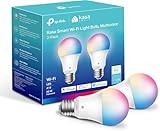
Overview: Kasa’s KL125P2 2-pack delivers full-spectrum smart lighting with 16 million colors and tunable white from 2500K-6500K. These 800-lumen A19 bulbs combine Kasa’s trusted reliability with advanced features like energy monitoring and auto-white adjustment. Supporting Alexa and Google Home via 2.4GHz WiFi, this set targets users wanting premium features from an established brand at a competitive price.
What Makes It Stand Out: The energy monitoring feature provides real-time consumption data, helping users track efficiency—a rarity in this price tier. The auto-white adjustment automatically matches color temperature to natural daylight patterns, enhancing circadian rhythm support. With over 6 million users, Kasa’s UL-certified ecosystem offers proven reliability and frequent app updates that lesser-known brands can’t match.
Value for Money: At $6.82 per bulb, this 2-pack offers the best per-bulb value for full-color smart bulbs with advanced features. You’re getting energy monitoring, auto-white tuning, and brand trust at a price below single bulbs from many competitors. The 2-pack quantity hits the sweet spot for starting a smart home without overcommitting.
Strengths and Weaknesses: Strengths:
- Energy monitoring for consumption tracking
- Auto-white adjustment matches natural light
- Excellent per-bulb pricing
- Trusted brand with 6M+ users
- UL certified for safety
- 16 million colors + tunable white
Weaknesses:
- No 5GHz WiFi support
- No Bluetooth connectivity
- 2-pack only (no single or 4-pack option)
- No music sync feature
- Requires Kasa app (cannot use native Alexa/Google apps exclusively)
Bottom Line: The Kasa KL125P2 is the smart choice for users wanting feature-rich color bulbs from a proven brand without paying a premium. The energy monitoring and auto-white features make it perfect for daily use, while the aggressive pricing makes whole-home expansion affordable. Skip this only if you specifically need music sync or 5GHz support.
6. Lightinginside Smart Light Bulbs 6 Pack, Smart Bulb Works with Alexa/Google Home/Smart Life, CRI>90, RGBCW Color Changing LED Light Bulbs, 2.4G WiFi Bluetooth A19 E26 Bulb, No Hub Required, ETL Listed

Overview: The Lightinginside Smart Light Bulbs offer a six-pack of affordable, feature-rich smart lighting solutions that integrate seamlessly with major voice assistants. With an impressive CRI rating above 90, these bulbs promise accurate color rendering while delivering both RGB color changing and tunable white light capabilities. The dual-channel Bluetooth and Wi-Fi connectivity ensures reliable performance and flexible installation options.
What Makes It Stand Out: The standout feature is the upgraded second-generation chip that enables setup three times faster than competitors, combining Bluetooth and Wi-Fi for robust connectivity. The “Always Connected” functionality is particularly compelling—when Wi-Fi fails, Bluetooth backup maintains local control, eliminating the frustration of offline smart bulbs. The flexible configuration allows initial pairing through either Bluetooth alone or dual-channel setup, catering to different user preferences and network environments.
Value for Money: At $4.49 per bulb, this six-pack represents exceptional value, undercutting most competitors by 30-50% while maintaining premium features. The inclusion of CRI>90 color accuracy at this price point is rare, making these bulbs ideal for budget-conscious shoppers who refuse to compromise on quality. Compared to single-bulb purchases from premium brands, the per-unit savings are substantial.
Strengths and Weaknesses: Strengths include rapid setup, dual connectivity with failover protection, excellent color rendering, and unbeatable per-bulb pricing. The six-pack quantity perfectly outfits an average home. Weaknesses include the requirement for both Bluetooth and Wi-Fi during initial setup (which may confuse some users) and the 2.4GHz-only limitation. The Smart Life app, while functional, lacks the polish of branded alternatives.
Bottom Line: For those seeking reliable, high-quality smart lighting on a budget, the Lightinginside six-pack delivers outstanding value. The dual-connectivity innovation solves common smart home pain points, making this an easy recommendation for first-time smart bulb buyers and experienced users alike.
7. Govee Smart Light Bulbs, WiFi & Bluetooth Color Changing Light Bulbs, Music Sync, 16 Million DIY Colors RGBWW Color Lights Bulb, Work with Alexa, Google Assistant Home App, 800 Lumen, 2 Pack

Overview: Govee’s two-pack smart bulbs bring the brand’s reputation for reliable smart home gear into the lighting space, offering 16 million colors and music synchronization in a straightforward package. Delivering 800 lumens of brightness, these bulbs suit standard room illumination needs while providing extensive customization through the Govee Home App. The dual Wi-Fi and Bluetooth connectivity ensures stable connections without requiring a hub.
What Makes It Stand Out: The music sync feature stands out as a key differentiator, allowing bulbs to react to ambient sound through your phone’s microphone—perfect for parties or immersive entertainment setups. With 54 preset scene modes, Govee eliminates the guesswork from color selection, offering one-tap ambiance for everything from movie nights to morning routines. The brand’s ecosystem integration means these bulbs play nicely with other Govee products for unified control.
Value for Money: At $9.50 per bulb, this two-pack sits in the mid-range pricing tier. While not the cheapest option, you’re paying for Govee’s proven software stability and regular firmware updates. The feature set matches or exceeds premium competitors costing 20-30% more, making this a solid value for those prioritizing reliability over rock-bottom pricing. The two-pack quantity works well for smaller spaces or trial purchases.
Strengths and Weaknesses: Strengths include robust music sync capabilities, extensive preset scenes, reliable dual connectivity, and strong brand support. The Govee Home App is intuitive and frequently updated. Weaknesses include the 800-lumen output, which may feel dim in larger rooms, and the microphone dependency for music sync, which can be interrupted by phone calls. The bulbs cannot be used with smart switches, limiting installation flexibility.
Bottom Line: Govee delivers a dependable, feature-rich smart bulb experience ideal for entertainment-focused users. The music sync and scene variety make it perfect for dorm rooms, apartments, or media spaces where ambiance matters more than maximum brightness.
8. Linkind Smart Light Bulbs, 1600LM (100W Equivalent) Smart Bulb, Work with Alexa & Google Home, RGBTW Color Changing Bulb Music Sync, 2.4GHz Wi-Fi & Bluetooth, LED Alexa Light Bulbs 14W, A21 E26, 2Pack

Overview: Linkind’s smart bulbs target users needing serious brightness, delivering a powerful 1600 lumens equivalent to traditional 100-watt incandescent bulbs while consuming just 14 watts. These A21-sized bulbs illuminate large spaces effectively while offering full RGBTW color changing and music synchronization. Dual Wi-Fi and Bluetooth connectivity ensures reliable operation, and compatibility with Alexa and Google Assistant enables seamless voice control integration.
What Makes It Stand Out: The exceptional brightness sets these apart from typical 60-80W equivalent smart bulbs, making them ideal for spacious living areas, kitchens, or workshops where adequate illumination is non-negotiable. The tunable white range from 1800K to 6500K covers everything from warm candlelight to crisp daylight, supporting circadian rhythms and task-specific lighting needs. Music sync with multiple rhythm modes adds dynamic ambiance for entertaining.
Value for Money: At $16.00 per bulb, these command a premium price justified by the high lumen output and A21 form factor. For spaces requiring maximum brightness, the cost premium over standard smart bulbs is worthwhile. However, for average-sized rooms, the extra lumens may be overkill. The two-pack pricing reflects a focus on quality over quantity, positioning these as specialty bulbs rather than whole-home solutions.
Strengths and Weaknesses: Strengths include outstanding brightness, excellent tunable white range, dual connectivity, and robust music sync features. The high CRI ensures accurate color representation. Weaknesses include the higher price point, A21 size (which may not fit all fixtures), and 14W power consumption that’s higher than standard smart bulbs. The AiDot app, while functional, has a steeper learning curve than mainstream alternatives.
Bottom Line: If you need smart lighting that actually brightens large spaces, Linkind’s 1600-lumen bulbs are worth the premium. They’re best suited for primary living areas where brightness is essential, though average users may find more economical options sufficient for bedrooms and hallways.
9. Lepro B1 AI Smart Light Bulbs - WiFi & Bluetooth RGBWW Color Changing LED Bulb Works with Alexa & Google Assistant, Personalized Al Lighting Designer, AI Voice Control, Music Sync, 2.4GHz Only, 2 Pack

Overview: Lepro’s B1 bulbs introduce genuine AI innovation to smart lighting, featuring the LightGPM 4 system that learns your preferences and generates personalized lighting designs based on simple conversational commands. These Wi-Fi and Bluetooth-enabled bulbs support standard voice control through Alexa and Google Assistant while offering unique image-recognition capabilities that create custom lighting schemes from photos. The two-pack provides an affordable entry point into AI-driven home automation.
What Makes It Stand Out: The AI Lighting Designer fundamentally changes user interaction—instead of manually adjusting colors and effects, you simply describe your desired mood, activity, or even upload an image, and the system generates appropriate lighting automatically. This “take a photo, get the vibe” feature is genuinely innovative, allowing users to match lighting to room decor, movie posters, or game themes instantly. The more you use it, the more personalized the recommendations become.
Value for Money: At just $7.00 per bulb, these are aggressively priced despite cutting-edge AI features. You’re getting technology that competitors haven’t yet implemented at a cost below many basic smart bulbs. This represents exceptional value for tech enthusiasts and those who find traditional smart lighting apps overwhelming. The AI capabilities alone justify the minimal investment.
Strengths and Weaknesses: Strengths include revolutionary AI-driven lighting design, intuitive voice control, photo recognition technology, music sync, and outstanding affordability. The Lepro app delivers on its promises with surprising accuracy. Weaknesses include reliance on the Lepro ecosystem (less universal than Smart Life or Govee), potential privacy concerns with AI processing, and the need for 2.4GHz Wi-Fi only. The brand has less market presence than established competitors.
Bottom Line: Lepro’s AI-powered bulbs are a must-try for anyone frustrated with manual smart lighting controls. The intelligent design features work remarkably well, making these the most user-friendly smart bulbs available at a price that’s hard to beat.
10. Linkind Matter Smart Light Bulb, WiFi Smart Bulbs, Work with Apple Home, Siri, Alexa, Google, SmartThings, RGBTW Color Changing Bulbs Mood Lighting, Music Sync, A19 E26 60W, 2.4Ghz WiFi 6 Pack

Overview: Linkind’s Matter-certified six-pack represents the future of smart home lighting, offering universal compatibility across all major platforms including Apple Home, Siri, Alexa, Google Home, and SmartThings. These 9W bulbs deliver 60W equivalent brightness with full RGBTW color changing and music sync capabilities. The Matter standard eliminates ecosystem lock-in, allowing control through any certified platform without multiple manufacturer apps.
What Makes It Stand Out: Matter compatibility is the headline feature, ensuring these bulbs remain relevant as smart home standards evolve. This future-proofing is invaluable for users invested in multiple ecosystems or planning platform changes. The health-focused design emphasizes eye safety with no blue-ray hazard and colors optimized to reduce visual fatigue. The six-pack quantity at $7.16 per bulb makes whole-home deployment economical.
Value for Money: At $7.16 per bulb, these offer tremendous value for Matter-certified devices, typically commanding a 20-30% premium. The six-pack pricing rivals budget non-Matter options while delivering superior interoperability. Considering the 22-year lifespan rating and 80% energy savings, total cost of ownership is excellent. You’re investing in a standard that protects against obsolescence.
Strengths and Weaknesses: Strengths include broad Matter compatibility, health-conscious design, excellent multi-platform support, music sync, and competitive six-pack pricing. The 2-year warranty provides peace of mind. Weaknesses include 2.4GHz Wi-Fi only limitation, lack of IPv6 router support for some users, and standard 60W equivalent brightness that won’t impress those needing maximum illumination. The Matter setup process can be complex for beginners.
Bottom Line: For smart home enthusiasts seeking ecosystem flexibility and future-proofing, Linkind’s Matter bulbs are an excellent investment. The universal compatibility solves platform fragmentation issues, making these ideal for mixed-device households or anyone wanting to avoid vendor lock-in.
Why Smart Bulbs Are Perfect for Dorm Living
Transforming Temporary Spaces
Dorm rooms are the ultimate blank canvas—and the ultimate design challenge. You’re working with cinderblock walls, fluorescent overheads that belong in a hospital, and furniture that has seen decades of students come and go. Smart bulbs offer instant atmosphere without violating your housing agreement or drilling holes. Unlike string lights that might trip fire code inspections or tapestries that collect dust, smart bulbs replace existing fixtures seamlessly. They travel with you semester after semester, making them one of the few dorm investments that actually pays for itself over time.
The Budget-Friendly Advantage
The sub-$25 category has exploded with options that would have cost triple that amount five years ago. These aren’t stripped-down novelties, either. You can expect legitimate features like 16 million colors, scheduling, and voice control integration. For a student budget, this represents unprecedented value. A single smart bulb can replace multiple lamps, eliminate the need for dimmer switches, and even serve as a wake-up light that gently pulls you from that post-all-nighter crash. When you’re living on ramen and textbook resale money, getting this much functionality for so little cash feels like finding a loophole in the system.
Understanding Smart Bulb Connectivity Options
Wi-Fi vs. Bluetooth vs. Hub-Based Systems
Your bulb’s connection method determines everything from setup difficulty to reliability. Wi-Fi bulbs connect directly to your dorm’s network, offering control from anywhere on campus but potentially clashing with university security protocols. Bluetooth bulbs pair directly to your phone, working reliably without internet but limiting control range to about 30 feet. Hub-based systems require a central bridge device and generally exceed our $25 per-bulb budget while adding complexity that dorm life doesn’t need.
What Works Best in Dorm Networks
Most universities run enterprise-grade Wi-Fi networks with WPA2-Enterprise encryption, device isolation, and aggressive security policies that can block smart home devices. Bluetooth bulbs often emerge as the dorm champion because they bypass these restrictions entirely. Some newer Wi-Fi bulbs support “fallback modes” that create their own mini-network when university Wi-Fi proves uncooperative. Before buying, check your school’s IT policies—many maintain whitelists of approved device MAC addresses or offer a separate IoT network for smart devices.
Key Features to Prioritize Under $25
Brightness Levels That Matter
Lumens measure actual light output, not watts. For dorm rooms, target 600-800 lumens for primary lighting (equivalent to a 60-watt incandescent) and 400-500 lumens for desk lamps or accent lighting. Budget bulbs sometimes advertise inflated lumen counts that don’t hold up in real-world use. Look for bulbs with adjustable brightness down to 1%—this range matters more than maximum output for creating study zones and late-night ambiance without disturbing sleeping roommates.
Color Changing vs. Tunable White
Full RGB bulbs offering millions of colors sound exciting, but tunable white bulbs (adjustable from cool daylight to warm amber) often prove more practical for academic life. The ability to shift from 6500K concentration-enhancing blue light during exam prep to 2700K melatonin-friendly warmth before bed directly impacts your GPA and sleep quality. Some budget bulbs compromise by offering limited color ranges or dimmer color saturation. Decide based on your priorities: party atmosphere or academic performance optimization.
Scheduling and Automation Capabilities
The real magic happens when your lights work without you thinking about them. Quality budget bulbs include sunrise alarms that gradually brighten 30 minutes before your 8 AM class, auto-shutoff timers that ensure lights don’t stay on all day when you rush to a lecture, and Away modes that randomly cycle lights to simulate presence during weekend trips home. Test the app’s scheduling interface before committing—some budget options bury these features behind confusing menus or require cloud accounts with questionable privacy terms.
Decoding Lumens and Wattage Equivalents
Finding the Right Brightness for Small Spaces
Dorm rooms typically measure 12x15 feet with low ceilings, meaning light bounces and concentrates differently than in larger spaces. A single 800-lumen smart bulb in a desk lamp can overwhelm the space if not properly diffused. Consider the beam angle—narrower spots (45 degrees) work for task lighting, while wide floods (120+ degrees) better illuminate entire rooms. Many budget bulbs in our price range use 8-9 watts to produce 600-700 lumens, delivering genuine energy savings over incandescent bulbs while staying bright enough for late-night cram sessions.
Energy Consumption Considerations
Running a 9-watt smart bulb for 6 hours daily costs roughly $2 per year in electricity. Compare that to a 60-watt incandescent at $13 annually. The math becomes compelling when you factor in that smart bulbs last 15,000-25,000 hours versus 1,000 hours for traditional bulbs. Over a four-year degree, one smart bulb could save you $40-50 in energy and replacement costs. Universities with individual room electric metering make these savings even more tangible on your monthly housing bill.
Color Temperature Explained for Study and Sleep
Kelvin Ratings and Their Impact
Color temperature, measured in Kelvin (K), fundamentally affects your cognitive performance and circadian rhythm. Lower Kelvin numbers (2700K-3000K) produce warm, yellowish light that signals your brain to produce melatonin. Higher numbers (5000K-6500K) emit cool, bluish light that suppresses melatonin and boosts alertness. Budget bulbs sometimes struggle with accurate color rendering at extreme ends of this spectrum, so look for bulbs that explicitly mention CRI (Color Rendering Index) ratings above 80 for truer colors.
Creating the Perfect Study Environment
Research from lighting ergonomics shows that 5000K-5500K light improves reading comprehension and reduces eye strain during extended study sessions. Position a tunable white bulb in your desk lamp and program it to automatically shift to this temperature during your typical study hours. The contrast with warmer room lighting creates a psychological boundary that helps your brain shift into “focus mode.” This light temperature also reduces the sleep-disrupting effects of evening studying compared to using standard cool white bulbs.
Winding Down for Better Sleep
Your body’s melatonin production is exquisitely sensitive to blue light. A bulb that transitions to 2700K or lower two hours before bedtime can improve sleep onset by up to 30 minutes. The best budget bulbs offer “circadian modes” that automatically adjust throughout the day. If your bulb lacks this feature, create manual schedules: 5000K until 6 PM, 4000K until 8 PM, then 2700K until a gradual dim-to-off over 15 minutes at your target bedtime. This simple routine beats scrolling through TikTok in bed under harsh overhead lighting.
App Control and User Experience
What to Look for in Companion Apps
A bulb is only as smart as its app. Download the app before purchasing and check reviews specifically mentioning usability. Red flags include mandatory account creation with excessive personal data collection, apps that drain phone batteries with background processes, and interfaces that require multiple taps to perform simple actions like turning lights on/off. Ideal apps offer widget shortcuts, Apple Watch/Android Wear integration, and offline control that doesn’t require constant internet connectivity.
Sharing Control With Roommates
Dorm life means shared spaces and sometimes shared lamps. The best budget bulb apps offer multi-user access without sharing your personal account credentials. Look for “home sharing” features that let you invite roommates via email. Some apps generate QR codes for instant sharing. Establish ground rules: who controls what, whether you’ll use group scenes for movie nights, and how to handle scheduling conflicts when one person wants party lights and the other needs to study. Clear communication prevents passive-aggressive light-switching wars.
Voice Assistant Compatibility on a Budget
Alexa, Google Assistant, and Siri Support
Voice control feels like luxury until you’re carrying laundry and need lights on. Most sub-$25 smart bulbs support at least one major assistant, but rarely all three. Alexa compatibility is most common, followed by Google Assistant. Siri/HomeKit support at this price point is rare and often unreliable. Check the box for explicit “Works with” badges—vague claims like “voice control compatible” often mean you’ll need to jump through IFTTT hoops that add complexity and latency.
Setting Up Voice Control in Shared Spaces
Voice commands in a shared 12x12 room create unique challenges. Train your assistant to recognize only your voice for bulb control to prevent accidental activations when your roommate mentions “lights.” Use specific naming conventions: “desk lamp” instead of just “light” to avoid conflicts. Consider creating routines that combine multiple actions—“Alexa, study mode” could set your desk lamp to 5000K at 80% brightness while dimming the overhead to 20% warm light. This impresses visitors and streamlines your workflow.
Installation and Setup Made Simple
Screw-In vs. Plug-In Options
Standard A19 screw-in bulbs fit most dorm fixtures, but verify your socket type first. Some dorms use candelabra (E12) bases in wall sconces or GU10 pins in track lighting. Adapter converters cost under $5 but add bulk. Plug-in smart bulbs, which look like traditional bulbs with a built-in plug, work great for floor lamps and string light setups. They eliminate the need for smart plugs but limit placement flexibility. For desk lamps with non-standard sockets, consider smart LED strips as an alternative—these often cost under $20 and provide more creative mounting options.
Pairing Your First Bulb
The initial pairing process sets the tone for your entire smart lighting experience. Most budget bulbs use a simple blink-to-pair method: screw in the bulb, turn it on/off three times until it blinks, then connect through the app. This process fails when bulbs arrive with outdated firmware. Always pair within 5 feet of your phone, ensure Bluetooth is enabled (even for Wi-Fi bulbs, which often use BT for initial setup), and temporarily disable VPNs that can block local network discovery. If pairing fails after three attempts, reset the bulb and restart your phone—this solves 90% of connection issues.
Troubleshooting Common Connection Issues
Dorm Wi-Fi networks often isolate devices, preventing your phone from discovering bulbs even when both are connected. The workaround: create a mobile hotspot during initial setup, connect both phone and bulb to this hotspot, complete pairing, then switch the bulb back to dorm Wi-Fi. Bluetooth bulbs may suffer interference from neighboring rooms—change your bulb’s broadcast channel in advanced settings if available. If your bulb randomly disconnects, it’s often due to IP address conflicts on crowded dorm networks. Assigning a static IP through your university’s device portal (if they offer one) creates a permanent fix.
Privacy and Security in Shared Networks
Understanding Data Collection
Those free companion apps aren’t truly free—they collect usage data, location information, and sometimes even contact lists. Read the privacy policy (yes, actually read it) for phrases like “we may share anonymized data with third parties.” Budget bulb companies often monetize user data to offset low hardware margins. Look for apps that offer offline modes or local-only control options. Some bulbs work with third-party apps like Home Assistant that eliminate data collection entirely, though setup complexity increases significantly.
Protecting Your Dorm Room Privacy
Your smart bulb could theoretically reveal your sleep schedule, study habits, and even when you’re away from your room. Disable any features labeled “cloud synchronization” or “usage analytics” in the app settings. Use a unique email address (not your university .edu) for bulb accounts to prevent cross-referencing. If your bulb supports firmware updates, install them promptly—security patches close vulnerabilities that could let nosy neighbors or bad actors access your device. Remember, in dorm living, your network neighbors are physically close enough to attempt Bluetooth sniffing, so always change default passwords and enable any available encryption.
Energy Efficiency and Cost Savings
Calculating Real-World Savings
Let’s run the numbers for a typical four-year degree. One smart bulb: $20 initial cost. Energy savings vs. incandescent: ~$11/year. Replacement cost savings: ~$8/year (incandescents burn out annually). Total four-year savings: $76. Even after the initial investment, you’re $56 ahead. Add the productivity gains from better study lighting and improved sleep from circadian scheduling, and the value proposition becomes undeniable. Many universities also offer green living rebates—check if your housing office provides $5-10 credits for installing energy-efficient devices.
Environmental Impact for Eco-Conscious Students
Each LED smart bulb prevents approximately 450 pounds of CO2 emissions over its lifetime compared to incandescent equivalents. For environmentally aware students, this aligns with campus sustainability initiatives without requiring lifestyle compromises. The 25,000-hour lifespan means one bulb lasting your entire academic career and beyond, reducing landfill waste from broken incandescents. Some manufacturers even offer recycling programs for end-of-life bulbs—collect three dead bulbs, mail them back, and receive a discount code for your next purchase.
Dealing With University Network Restrictions
Working Around Enterprise Wi-Fi
Enterprise networks with 802.1X authentication are smart bulb kryptonite. Most budget bulbs can’t handle the username/password format, only supporting pre-shared keys (PSK). Solutions: contact your IT helpdesk about MAC address whitelisting (provide your bulb’s MAC found in the app), request access to a separate IoT or gaming network, or use a travel router to create your own sub-network. The travel router method—connecting it to dorm Ethernet, then connecting bulbs to its Wi-Fi—bypasses most restrictions but may violate terms of service, so read your housing contract carefully.
Using Hotspots and Alternative Connections
When all else fails, a dedicated old phone or cheap Android device can serve as a permanent hotspot for your bulbs. A $10 prepaid SIM with minimal data handles the tiny bandwidth smart bulbs require. Alternatively, Bluetooth bulbs shine here—they need no network infrastructure beyond your phone. For weekend trips home, some Wi-Fi bulbs include “memory” modes that continue schedules even when disconnected, returning to find your lights behaving exactly as programmed without constant connectivity.
Smart Bulbs vs. Smart Plugs: Making the Right Choice
When to Choose Each Option
Smart plugs control existing lamps and cost $10-15, leaving your current bulbs intact. This works perfectly for that funky lava lamp or reading light you already love. However, plugs can’t adjust brightness or color—it’s on/off only. Smart bulbs offer granular control but replace your existing bulbs. For overhead fixtures controlled by a wall switch, smart plugs are useless unless you never turn off the switch. The hybrid approach often wins: smart bulb in your main lamp for versatility, smart plug controlling string lights or a fan for simple automation.
Combining Both for Maximum Flexibility
The ultimate budget setup pairs one smart bulb ($20) with one smart plug ($12). Use the bulb for task lighting with color and dimming control, and the plug for ambient string lights or a white noise machine. Control both through the same app ecosystem (many budget brands offer both products) to create scenes like “Study Mode” (bulb at 5000K, plug-on for string lights) and “Sleep Mode” (bulb dimming to off over 15 minutes, plug-off for everything else). This two-device system transforms your entire room for under $35 total.
Maintenance and Longevity Tips
Extending Bulb Lifespan
Smart bulbs fail from heat buildup, not just usage hours. Ensure adequate ventilation—don’t enclose them in tight fixtures or under lampshades that trap heat. Dust the bulb monthly with a dry cloth; accumulated dust acts as insulation. Avoid rapid on-off cycling; smart bulbs use almost no standby power, so leave them on and use app control instead of the physical switch. This also preserves your schedules and voice control functionality. If your bulb feels hot to the touch, it’s working too hard—reduce maximum brightness in the app settings to extend its life.
What to Do When You Move Out
Unlike that mini-fridge you might sell, smart bulbs travel beautifully. Before moving, factory reset each bulb (usually 5-10 rapid on/off cycles) to erase your Wi-Fi credentials and schedules. Document your favorite settings with screenshots—recreating that perfect study color temperature is harder than you’d think. Pack bulbs in original boxes with foam padding; LED filaments are more fragile than traditional bulbs. When you arrive at your next place, your lighting setup instantly makes the new space feel like home, giving you one less thing to stress about during the chaotic move-in week.
Troubleshooting Common Dorm Room Scenarios
When Your Roommate Isn’t Tech-Savvy
Not everyone wants to download another app. The physical switch remains your universal backup—ensure your smart bulb defaults to a reasonable brightness when manually switched off and on. Create a simple laminated card with voice commands if you share a voice assistant. For the truly tech-averse, consider bulbs with remote controls (some budget options include them). Most importantly, establish a “no app required” baseline: program a default schedule so the lights behave intelligently even if your roommate never touches the technology.
Handling Network Changes Each Semester
Moving dorms each year means new Wi-Fi networks and re-pairing headaches. Bluetooth bulbs eliminate this entirely—they pair to your phone, not the network. For Wi-Fi bulbs, maintain a digital inventory of your bulbs’ MAC addresses and current firmware versions. This speeds up IT helpdesk requests. Some apps offer bulk network migration tools that reassign multiple bulbs to new Wi-Fi simultaneously. Before summer break, screenshot all your schedules and scenes. Come fall, you’ll rebuild your setup in 10 minutes instead of an hour of frustrated trial and error.
Frequently Asked Questions
Can I get in trouble with my RA for using smart bulbs?
Smart bulbs almost never violate housing agreements because they function as direct replacements for standard bulbs and don’t modify fixtures. However, some strict schools prohibit any Wi-Fi devices beyond phones and laptops. Check your housing handbook for “unauthorized network devices” clauses. If concerned, opt for Bluetooth bulbs that create no network traffic and leave zero digital footprint on university systems.
Will smart bulbs work during campus-wide internet outages?
Bluetooth bulbs continue working normally during outages since they connect directly to your phone. Wi-Fi bulbs depend on your local network but not necessarily internet access—most still respond to app commands on the same network even without external connectivity. However, voice control through Alexa or Google requires internet. Create offline-friendly schedules before outages hit, and keep the physical switch as your ultimate backup.
Do budget smart bulbs really last 15,000 hours?
Laboratory testing under ideal conditions produces those numbers. Real-world dorm use—with power surges, heat, and being jostled during moves—typically yields 10,000-12,000 hours. That’s still 11 years at 3 hours daily use, far outlasting your college career. The electronics usually fail before the LEDs themselves, so buying from reputable budget brands with 1-year warranties protects against early failures.
Can my roommate control the bulbs if they don’t have the app?
Yes, through voice assistants if you share an Alexa or Google device. Some apps generate web links that let anyone control lights from a browser—perfect for temporary guests. The most reliable method is using bulbs that respond to physical wall switches with programmable default states. Just know that flipping the switch off completely disables smart features until it’s turned back on.
Will using smart bulbs slow down dorm Wi-Fi?
Each bulb uses minimal bandwidth—less than 1KB per command, equivalent to sending a text message. A dozen bulbs might generate less traffic than one streaming video. The real issue isn’t speed but device limits. Some dorm networks cap connections at 5-7 devices per student. Bluetooth bulbs bypass this entirely. If using Wi-Fi bulbs, check if your university counts them toward your device quota.
What happens to my schedules when I go home for break?
Wi-Fi bulbs connected to dorm internet will stop executing schedules when you leave since they can’t reach cloud servers. However, many store one or two schedules locally and continue running them offline. Bluetooth bulbs stop working entirely beyond their range. The solution: before leaving, set simple on/off timers that don’t rely on cloud processing, or accept that your room will stay dark until you return.
Can I use smart bulbs in my desk lamp and overhead light together?
Absolutely, and this is where smart lighting shines. Group them in the app as “My Room” for unified control. Create scenes like “Presentation Mode” (overhead bright white, desk lamp off) for video calls, or “Gaming Mode” (both dimmed blue). Just ensure both fixtures use standard bulb bases. For weird fixtures, smart plugs controlling the entire lamp often work better than trying to adapt bulb sizes.
Are there any fire risks with leaving smart bulbs on 24/7?
LED smart bulbs generate minimal heat—typically 85-100°F at full brightness, far below the 300°F+ of incandescents. They’re designed for continuous operation and use less standby power than a phone charger. The only fire risk comes from using them in enclosed fixtures not rated for LEDs, which can trap heat. Stick to open lamps and you’ll be safer than with traditional bulbs.
How do I prevent my neighbors from hacking my lights?
Bluetooth bulbs are discoverable by anyone within 30 feet, but most require physical access to reset and pair. Wi-Fi bulbs on shared dorm networks are vulnerable to local network sniffing. Enable every security feature: change default names and passwords, disable remote access if you don’t need it, and update firmware. For maximum security, use a travel router to isolate your bulbs on their own network segment that other dorm residents can’t see.
Can I take my smart bulbs home for summer and use them there?
Yes, and they’ll work seamlessly on your home Wi-Fi or via Bluetooth. The challenge is recreating your dorm schedules in a different environment. Export your app settings if the feature exists, or simply screenshot everything. Consider it a chance to optimize—your summer schedule differs from your academic routine. Reprogramming takes 15 minutes and lets you experiment with new scenes for home life before returning to campus with perfected lighting automation.