You’ve probably experienced that frustrating moment when you arrive home, open your front door, and wait… and wait… for your HomeKit lights to finally turn on. That three-second delay might not sound like much, but in the world of smart home automation, it’s an eternity. It’s the difference between technology that feels magical and technology that feels broken. This is where Thread protocol enters the picture, fundamentally transforming how your contact sensors communicate with HomeKit and delivering the near-instantaneous response times that make automations truly seamless.
Thread isn’t just another wireless standard—it’s a purpose-built mesh networking protocol designed specifically for the smart home. Unlike traditional Bluetooth sensors that need to hop through your phone or hub, Thread devices create their own self-healing mesh network, communicating directly with each other and your HomeKit border router. The result? Contact sensor triggers that activate your automations in milliseconds rather than seconds. In this comprehensive guide, we’ll explore everything you need to know about selecting, installing, and optimizing Thread-enabled contact sensors for maximum HomeKit performance.
Top 10 Contact Sensors with Thread Protocol for HomeKit
Detailed Product Reviews
1. Aqara Door and Window Sensor P2, Matter Over Thread, Requires Thread Border Router, Contact Sensor with Remote Alarm and Local Automation, Supports Apple Home, Google Home, Alexa

Overview: The Aqara Door and Window Sensor P2 represents the next generation of smart home security, leveraging Matter over Thread for universal compatibility. This contact sensor monitors openings with precision, sending real-time alerts to your smartphone regardless of location. Designed for seamless integration across major smart home ecosystems, it enables sophisticated automations without cloud dependency.
What Makes It Stand Out: Native Matter support sets the P2 apart, offering future-proof connectivity with Apple Home, Google Home, Alexa, and Samsung SmartThings. The Thread protocol delivers superior stability, lower power consumption, and reduced latency compared to traditional Wi-Fi sensors. Local automation execution ensures your security routines function even during internet outages while preserving privacy. Voice assistant integration allows hands-free status checks through Siri, Alexa, or Google Assistant.
Value for Money: At $26.99, the P2 sits in the mid-range for smart sensors, but the true cost requires factoring in a separate Thread Border Router ($50-100+). For users already invested in compatible hubs like Apple TV 4K or HomePod mini, this represents excellent value. Compared to proprietary sensors locked to single ecosystems, the universal Matter support prevents platform lock-in and justifies the investment.
Strengths and Weaknesses: Strengths: Multi-platform Matter support; local automation preserves privacy; Thread connectivity offers reliability; voice assistant integration; low power consumption. Weaknesses: Requires separate Thread Border Router; main and accessory units must stay within 22mm gap; initial setup complexity for Matter newcomers.
Bottom Line: The Aqara P2 is ideal for tech-savvy users building a multi-platform Matter smart home. Its local automation and broad compatibility outweigh the border router requirement, making it a forward-looking choice for serious home automation enthusiasts.
2. Onvis Thread-Enabled HomeKit Door Window Contact Sensor,Wireless Mini Low-Energy Contact Sensor for Alarm System and Smart Home Automation, iOS Only (2Pack)

Overview: The Onvis Thread-Enabled HomeKit Contact Sensor 2-Pack delivers reliable door and window monitoring exclusively for Apple HomeKit ecosystems. These compact sensors provide instant notifications when openings are detected, enabling both security monitoring and home automation triggers. Powered by Bluetooth Low Energy and Thread technology, they offer efficient performance with minimal power drain.
What Makes It Stand Out: Thread support distinguishes this sensor, providing faster, more reliable connectivity than standard Bluetooth when paired with a HomePod mini or Apple TV. The two-pack bundle offers immediate value for multi-point security setups. With one-year battery life and a 30-day detection history exportable via the ONVIS Home App, it balances convenience with practical monitoring capabilities. The sensors enable creative automations like triggering lights when doors open.
Value for Money: At $43.99 for two units (approximately $22 each), this package undercuts most competitors while delivering premium Thread connectivity. For Apple-centric households, it eliminates the need for additional hubs beyond existing Apple devices. The two-pack format provides superior value compared to purchasing single units separately, making it economical for securing multiple entry points.
Strengths and Weaknesses: Strengths: Thread-enabled for responsive performance; excellent two-pack pricing; year-long battery life; 30-day event history; compact design. Weaknesses: HomeKit/iOS exclusive limits platform flexibility; requires HomePod mini or Apple TV for away-from-home control and automations; no native Matter support.
Bottom Line: Perfect for Apple households seeking affordable, reliable entry sensors. The Thread upgrade and dual-pack value make it a smart choice for HomeKit users wanting to expand their security footprint without breaking the bank.
3. Onvis Smart Door & Window Sensor, Thread-Enabled HomeKit Contact Sensor, Bluetooth Wireless Low Energy , Home Automation, No Hub Required

Overview: The Onvis Smart Door & Window Sensor offers Thread-enabled monitoring for Apple HomeKit users in a single-unit package. This sensor detects open/close states and sends notifications to iOS devices, enabling both security alerts and home automation triggers. While it operates without a mandatory hub for basic functions, full capabilities require Apple home hub devices.
What Makes It Stand Out: Thread support provides improved responsiveness over traditional Bluetooth sensors when integrated with a HomePod mini or Apple TV. The “no hub required” claim applies to basic notifications, offering an accessible entry point for HomeKit newcomers. The sensor maintains the same one-year battery life and 30-day detection history as its two-pack sibling, with low-power operation from a replaceable CR2450 battery.
Value for Money: At $27.99 for a single sensor, the per-unit cost is higher than the two-pack alternative. However, it allows users to test the ecosystem or secure a single critical entry point without committing to multiple units. For Apple households needing just one additional sensor, it avoids over-purchasing while delivering the same Thread performance and reliability.
Strengths and Weaknesses: Strengths: Thread-enabled responsiveness; flexible hub requirements; excellent battery life; compact mini design; 30-day event history. Weaknesses: HomeKit-only compatibility; limited utility without Apple TV/HomePod mini; higher per-unit cost than bulk options; no Matter support for cross-platform use.
Bottom Line: A solid choice for Apple users needing a single sensor or wanting to trial Thread-enabled monitoring. While the two-pack offers better value, this unit provides the same core functionality for targeted security applications without unnecessary extras.
4. arre Contact Sensor with Matter & Thread Support, Control Smart Home Accessories, Works with Apple Home / Google Home / Samsung SmartThings / Alexa, Door / Garage Sensor

Overview: The arre Contact Sensor positions itself as a budget-friendly entry into the Matter and Thread ecosystem, offering universal compatibility across major smart home platforms. Designed for monitoring doors, windows, and garages, it provides status notifications and triggers automations through your preferred ecosystem without locking you into a single brand.
What Makes It Stand Out: Its primary differentiator is aggressive pricing combined with full Matter certification, making it one of the most affordable multi-platform sensors available. The universal compatibility with Apple Home, Google Home, Samsung SmartThings, and Alexa offers future-proof flexibility as your smart home evolves. Thread support ensures reliable, low-power operation with reduced latency compared to Wi-Fi alternatives.
Value for Money: At $23.99, this is the most economical Matter-over-Thread sensor in the comparison. While you’ll still need a compatible Thread Border Router, the lower entry price makes multi-sensor deployments more accessible. For budget-conscious builders of Matter ecosystems, it delivers essential functionality without premium branding costs, though long-term reliability remains unproven.
Strengths and Weaknesses: Strengths: Lowest price point; full Matter certification; multi-platform support; Thread connectivity; compact form factor. Weaknesses: Lesser-known brand with limited track record; sparse feature documentation; still requires separate border router; unknown battery life specifications.
Bottom Line: An attractive budget option for Matter early adopters comfortable with emerging brands. If you prioritize platform flexibility and cost savings over established reliability, the arre sensor offers compelling value for outfitting multiple doors and windows in a mixed-ecosystem smart home.
5. Onvis Smart Motion Sensor, Wireless Hygrometer, Thermometer, Works with Apple HomeKit, Smart Home Automation, PIR Motion Detector-Thread ((iOS 17.4 and Above is Required)

Overview: The Onvis Smart Motion Sensor combines three functions—PIR motion detection, temperature, and humidity monitoring—into a single Thread-enabled device for Apple HomeKit. This multipurpose sensor provides real-time occupancy detection and environmental data, enabling sophisticated automations based on movement, climate, and ambient light conditions while maintaining strict privacy standards.
What Makes It Stand Out: The 3-in-1 functionality eliminates the need for separate sensors, reducing clutter and cost. Thread technology ensures instant notifications and reliable performance when paired with a HomePod mini. Unique privacy features include no cloud dependency and end-to-end encryption, with all data stored locally on iOS devices. The scheduled detection feature allows customizing active monitoring windows to avoid unnecessary alerts.
Value for Money: At $31.99, this sensor delivers exceptional value by combining three devices in one. Individual motion, temperature, and humidity sensors would cost significantly more. For HomeKit users running iOS 17.4+, it provides comprehensive room monitoring capabilities while maintaining privacy. The Thread upgrade future-proofs the investment as Apple expands its smart home framework.
Strengths and Weaknesses: Strengths: Three sensors in one; Thread-enabled responsiveness; 100% privacy-focused; scheduled detection; no subscription required. Weaknesses: HomeKit and iOS 17.4+ exclusive; requires HomePod mini for full functionality; no Matter support; limited to Apple ecosystem.
Bottom Line: An outstanding value for dedicated HomeKit households wanting comprehensive room monitoring. The privacy-first approach and multi-sensor integration make it a standout choice, provided you’re fully committed to Apple’s ecosystem and have the necessary hub hardware.
6. Aqara Zigbee Door and Window Sensor, Wireless Contact Sensor, Home Automation, Requires Aqara Hub (not 3rd-Party), Zigbee Connection, Kid Safety, Compatible with Apple HomeKit, Alexa, IFTTT

Overview: The Aqara Zigbee Door and Window Sensor is a compact contact sensor designed for home security and automation, but it strictly requires an Aqara Hub (sold separately) to function. This dependency creates a closed ecosystem approach that prioritizes stability over flexibility.
What Makes It Stand Out: Its 0.86-inch gap tolerance is notably generous, accommodating most doors and windows without precise alignment. The sensor integrates seamlessly with Apple HomeKit, Alexa, and IFTTT through the hub, enabling sophisticated automation scenarios. The tiny form factor (1.61 x 0.87 inches) allows discreet placement on drawers and cabinets beyond traditional entry points.
Value for Money: At $17.99, the sensor itself is reasonably priced, but the total cost of ownership rises significantly when you factor in the required hub ($30-60). This makes it economical only if you’re already invested in the Aqara ecosystem. Compared to universal Zigbee sensors, the proprietary lock-in reduces long-term value.
Strengths and Weaknesses: Strengths include reliable Zigbee connectivity, excellent build quality, broad automation triggers, and multi-platform voice control. Weaknesses are the mandatory Aqara Hub (no third-party Zigbee hub support), limited 400-inch range requirement, and potential functionality restrictions with Zigbee2MQTT. The hub dependency also means single point of failure.
Bottom Line: Ideal for users committed to the Aqara ecosystem or those prioritizing Apple HomeKit reliability. If you need a standalone sensor or use third-party hubs, look elsewhere. The sensor performs excellently but only within its walled garden.
7. Qingping Motion & Light Sensor, Works with Apple HomeKit via Thread or Bluetooth, Two Sensors Combined for Various Automation, Long Standby Time

Overview: Qingping’s Motion & Light Sensor combines two critical environmental detectors into one sleek package, exclusively for Apple HomeKit users via Thread or Bluetooth connectivity. It’s engineered for seamless integration within Apple’s smart home framework.
What Makes It Stand Out: The dual-sensor design is the star feature—detecting both motion up to 7 meters and light levels from 0 to 83,000 lux with Texas Instruments precision. Thread support provides a responsive, mesh-networked alternative to Wi-Fi with lower power consumption. The magnetic rotating base offers exceptional mounting flexibility for ceiling, wall, or desk placement.
Value for Money: At $24.99, this sensor delivers excellent value for Apple-centric households. The 2-year battery life on two button cells minimizes maintenance costs. While cheaper than buying separate motion and light sensors, its value is locked behind the Apple ecosystem—requiring HomePod or Apple TV as a hub for automation and remote access.
Strengths and Weaknesses: Strengths include Thread’s reliability, dual-functionality, compact design, and extraordinary battery life. The 120° wide-angle coverage at close range is practical for most rooms. Weaknesses are the Apple-only compatibility (no Alexa/Google support) and dependency on Apple hardware for full functionality. Frequent triggers will drain battery faster than advertised.
Bottom Line: A top-tier choice for HomeKit users seeking reliable motion and light automation. The Thread support future-proofs your setup. Android users or multi-platform households should avoid it. For Apple homes, it’s one of the best sensors available.
8. Aqara Zigbee Door and Window Sensor 3 Pack & Zigbee Hub Kits, Wireless Mini Contact Sensor, Home Automation, Zigbee Connection, Kid Safety, Compatible with Apple HomeKit, Alexa, Works with IFTTT

Overview: This bundle provides three Aqara Zigbee Door/Window Sensors paired with the M100 hub, offering a complete entry-point solution for whole-home monitoring and automation. It’s designed for users wanting comprehensive coverage from day one.
What Makes It Stand Out: The M100 hub’s Matter Bridge capability is transformative, allowing Aqara Zigbee devices to integrate with Apple Home, Amazon Alexa, Home Assistant, and other ecosystems. Supporting up to 20 Zigbee and 20 Thread devices, it’s surprisingly scalable. The three-sensor pack covers multiple entry points immediately.
Value for Money: At $59.99 for three sensors plus a hub, this kit saves approximately $15-20 compared to purchasing separately. The Matter Bridge functionality adds significant future-proofing value. For new Aqara users, it’s the most economical way to start a robust smart home security system.
Strengths and Weaknesses: Strengths include Matter Bridge support, comprehensive multi-device support, generous gap tolerance (0.86 inches), and compact sensor design. The hub’s dual-protocol support (Zigbee/Thread) is forward-thinking. Weaknesses include the 400-inch range limitation between sensors and hub, LAN requirement, and continued incompatibility with SmartThings. Setup can be complex for beginners.
Bottom Line: An excellent starter kit for those wanting Aqara’s reliability with future-proof Matter connectivity. The three-sensor bundle provides immediate whole-home coverage. Power users will appreciate the Matter Bridge, though ecosystem purists may find the proprietary elements restrictive. Strongly recommended for new Aqara adopters.
9. THIRDREALITY Zigbee Contact Sensor 2 Pack,Door and Window Monitor, Home Automation,Works with Home Assistant,SmartThings,Aeotec,Homey,Hubitat or Echo Devices with Build-in Zigbee Hub,hub Required

Overview: THIRDREALITY’s Zigbee Contact Sensor 2 Pack delivers universal compatibility, working with most major Zigbee hubs including Echo devices, SmartThings, Home Assistant, and more—no proprietary hub required. It’s built on open Zigbee standards.
What Makes It Stand Out: True Zigbee standard compliance is the defining feature. Setup is remarkably simple: just say “Alexa, discover devices” to compatible Echo devices. The AAA battery power (2-year life) is user-friendly and cost-effective. The sensors integrate with Alexa Routines for customized alerts and actions.
Value for Money: At $37.99 for two sensors, this represents excellent value—under $19 per sensor with broad hub compatibility. Avoiding proprietary hub costs makes this significantly cheaper than ecosystem-locked alternatives. The AAA batteries are inexpensive to replace compared to coin cells.
Strengths and Weaknesses: Strengths include universal Zigbee hub support, easy Alexa integration, long battery life, and affordable pricing. The history record and battery level monitoring via THIRDREALITY’s app add practical utility. Weaknesses are the indoor-only limitation, restriction against metal door installation, and lack of advanced features like light sensing. Build quality feels less premium than Aqara.
Bottom Line: Perfect for budget-conscious users or those with existing Zigbee hubs. The universal compatibility is refreshing in a market full of walled gardens. If you use Alexa, SmartThings, or Home Assistant, this is a no-brainer. Aqara users should stick with their ecosystem, but for everyone else, this offers freedom and value.
10. Aqara Zigbee Door and Window Sensor & Zigbee Hub Kits, Wireless Mini Contact Sensor, Home Automation, Zigbee Connection, Kid Safety, Compatible with Apple HomeKit, Alexa, Works with IFTTT
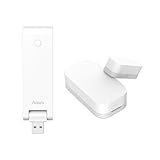
Overview: This entry-level kit includes one Aqara Zigbee Door/Window Sensor with the M100 hub, providing the same Matter Bridge capabilities as larger bundles for single-point monitoring. It’s a cautious entry point into the Aqara ecosystem.
What Makes It Stand Out: The M100 hub’s Matter Bridge functionality remains the headline feature, enabling cross-platform integration with Apple Home, Alexa, and Home Assistant. Supporting up to 20 Zigbee and 20 Thread devices, it offers surprising scalability from a modest start. The sensor shares the same 0.86-inch gap tolerance and compact design as standalone units.
Value for Money: At $32.99 for one sensor plus hub, this is priced identically to buying them separately—offering no bundle discount. However, it provides a low-risk entry point to test the Aqara ecosystem. The Matter Bridge adds long-term value, making it cheaper than buying a proprietary hub without bridge functionality.
Strengths and Weaknesses: Strengths include Matter Bridge support, future-proof hub design, reliable Zigbee connectivity, and excellent build quality. The compact sensor fits discreetly anywhere. Weaknesses are the single sensor limitation for most security needs, 400-inch range requirement, and lack of SmartThings compatibility. Total system cost escalates quickly with additional sensors.
Bottom Line: A sensible starting point for curious smart home beginners wanting Matter compatibility. The hub’s capabilities exceed the single sensor’s utility, making this feel slightly unbalanced. Most users will quickly need more sensors, negating the value proposition. Consider the 3-pack kit instead unless you’re absolutely certain you only need one monitoring point.
Understanding Thread Protocol: The Game-Changer for HomeKit
Thread represents a fundamental shift in smart home connectivity, built on the IEEE 802.15.4 standard with IPv6 networking at its core. What makes it revolutionary for HomeKit users isn’t just its speed—it’s the architecture. Thread devices form a mesh network where each powered device acts as a router, creating multiple pathways for data to travel. This means your contact sensor in the basement doesn’t need a direct line to your HomePod mini upstairs; it can route through the smart plug in your hallway, then the light switch in your living room, creating a robust, self-healing network that gets more reliable as you add devices.
How Thread Differs from Traditional Smart Home Protocols
Bluetooth Low Energy, the previous standard for most HomeKit contact sensors, operates on a hub-and-spoke model. Each sensor must maintain a direct connection to your home hub, and that connection often sleeps to conserve battery. When you open a door, the sensor wakes up, negotiates a connection, transmits its status, and then your hub processes the command and triggers your automation. This process can take 2-5 seconds.
Thread eliminates most of this latency. Devices maintain persistent connections within the mesh, wake almost instantaneously, and transmit using 6LoWPAN (IPv6 over Low-Power Wireless Personal Area Networks). The data hops through the mesh using the most efficient path available, typically reaching your border router in under 100 milliseconds. For HomeKit automations, this means your “arrive home” scene triggers the moment your door cracks open, not seconds after you’ve already fumbled for the light switch.
The Mesh Network Topology Advantage
The mesh topology is Thread’s secret weapon. In a typical 2,000 square foot home, a single Thread contact sensor might need to make 2-3 hops to reach your border router. Each hop adds approximately 10-15 milliseconds of latency, compared to Bluetooth’s 500+ millisecond connection establishment time. More importantly, Thread’s mesh is self-healing. If a device goes offline or a path becomes congested, the network automatically reroutes traffic through alternative paths. Your automations don’t just run faster—they run more reliably, even when individual devices fail or experience interference.
Why Contact Sensors Are Ideal for Thread Networks
Contact sensors are the perfect candidate for Thread protocol because they exemplify the “sleepy end device” use case that Thread was designed to optimize. These sensors transmit tiny amounts of data—a simple open or closed status—infrequently throughout the day. Thread’s power-saving mechanisms allow these devices to maintain network connectivity while consuming a fraction of the power required by Wi-Fi alternatives.
The real magic happens when you deploy multiple Thread contact sensors throughout your home. Each sensor doesn’t just serve its primary function; it becomes a network extender that strengthens the mesh for all your Thread devices. Your window sensor in the guest room helps your door sensor in the garage maintain a reliable connection. This collaborative approach means that adding more sensors actually improves overall network performance, the opposite of what happens when you overload a Wi-Fi network with dozens of IoT devices.
The Critical Role of Response Times in Home Automation
Response time isn’t just about convenience—it’s about creating automations that feel intuitive and natural. When you open your bedroom door at night, you want the lights to fade on before you step into the hallway, not after you’ve already stumbled through the darkness. Thread’s sub-100 millisecond response times enable these human-centric automations that anticipate your needs rather than react to them.
Consider complex multi-device scenes. A “goodnight” routine triggered by closing your bedroom door might need to check the status of 15 other sensors, turn off 10 lights, lock 3 doors, and arm your security system. With Bluetooth, each status check happens sequentially, creating a cascade of delays. Thread’s mesh allows parallel communication paths, where multiple devices transmit simultaneously without interference, executing complex scenes in under a second instead of three to five.
Key Technical Specifications to Evaluate
When shopping for Thread-enabled contact sensors, several technical specifications deserve your attention beyond the simple “Thread compatible” label. Understanding these details separates high-performance sensors from those that merely check the feature box.
Thread Radio Performance and Range Capabilities
Look for sensors that support Thread 1.3 or later, which includes improved network diagnostics and better power management. The radio’s transmit power, measured in dBm, directly impacts range. A quality Thread sensor should advertise at least +8 dBm transmit power, providing reliable coverage through one interior wall or across 30-40 feet of open space. The receiver sensitivity, typically around -95 dBm, determines how well it hears signals from other mesh devices. Better sensitivity means more reliable routing and fewer dropped messages.
Battery Life Optimization Strategies
Thread’s power efficiency is impressive, but implementation varies by manufacturer. The best sensors use CR2032 batteries and advertise 12-18 month lifespans under typical usage. However, “typical usage” can be misleading. Check the fine print for assumptions about door opening frequency. A sensor rated for 15 months based on 5 opens per day might last only 8 months on a frequently used exterior door. Look for sensors that support Thread’s “minimal Thread device” mode, which reduces routing responsibilities to extend battery life in devices that are primarily end nodes rather than routers.
Environmental Durability and IP Ratings
Contact sensors face harsh conditions—temperature swings, humidity, and physical abuse. For exterior doors or windows, insist on IP65 or higher ratings, which guarantee protection against dust and water jets. Even interior sensors benefit from robust construction. The ANSI/IEC 60529 rating system provides objective standards, but also examine the mounting mechanism. Sensors with 3M VHB foam adhesive typically outlast those with basic foam tape, and those offering screw-mount options provide ultimate reliability for high-traffic doors.
Magnetic Gap Distance and Sensitivity Thresholds
The magnetic gap specification—how far apart the sensor and magnet can be while still registering as closed—often determines whether a sensor works with your specific doors and windows. Quality Thread sensors should function reliably with gaps up to 3/4 inch, accommodating most door frames and window sashes. More importantly, examine the hysteresis specification, which prevents rapid on/off cycling when the door is nearly closed. A well-designed sensor requires the magnet to move at least 1/4 inch before changing state, eliminating false triggers from vibrations or slight door movements.
HomeKit Certification and Compatibility Requirements
Apple’s HomeKit certification ensures seamless integration, but Thread adds another layer of complexity. A sensor must be both HomeKit-certified and Thread-certified to deliver the full experience. Look for the “Works with Apple HomeKit” badge and verify Thread support in the technical specifications. Some manufacturers claim “Thread-ready” but require firmware updates that may never materialize.
The pairing process reveals much about a sensor’s quality. Premium Thread sensors use Apple’s NFC tap-to-pair or QR code scanning that automatically provisions the device onto your Thread network. During setup, the Home app should explicitly confirm Thread connectivity. If the app only mentions Bluetooth, the sensor may be falling back to legacy connectivity, indicating either a defective unit or misleading marketing. After pairing, check the sensor’s settings in the Home app—Thread-enabled devices show a “Thread Network” status indicator that Bluetooth devices lack.
Thread Border Routers: Your Network’s Foundation
Your Thread contact sensors are only as good as the border router connecting them to HomeKit. Apple currently supports Thread border routing in the HomePod mini (both generations), Apple TV 4K (2nd generation and later), and the full-size HomePod (2nd generation). These devices translate between your Wi-Fi network and the Thread mesh, enabling remote access and bridging communication to your iOS devices.
Identifying Compatible Apple Border Routers
If you own a compatible Apple device running HomePod Software 16.0 or later, Thread border routing is automatically enabled. You can verify functionality in the Home app by navigating to Home Settings > Hubs & Bridges. Compatible border routers display a “Thread Network” status showing the number of Thread devices and network health. Unlike some third-party border routers, Apple’s implementation prioritizes security, using encrypted tunnels for all cross-network communication and requiring HomeKit Secure Video encryption standards for any camera integration.
Strategic Placement for Optimal Mesh Coverage
Border router placement dramatically impacts Thread network performance. Unlike Wi-Fi access points that broadcast omnidirectionally, Thread’s mesh benefits from central placement. Position your HomePod mini or Apple TV 4K in a central location, ideally elevated 3-5 feet off the ground. Avoid placing border routers inside metal entertainment centers or behind thick concrete walls, which can attenuate the 2.4GHz signals Thread uses. In multi-story homes, place border routers on the main living floor to maximize vertical coverage through floorboards and ceiling spaces.
Installation Best Practices for Thread Contact Sensors
Proper installation transforms Thread’s theoretical advantages into real-world performance. The placement of each sensor affects not just its own reliability but the entire mesh network’s health.
Optimal Placement Techniques for Reliability
Mount sensors on the stationary door or window frame, not the moving part, to minimize vibration and mechanical stress. Position the sensor at least 6 inches from metal hinges, locks, or reinforcement plates, which can detune the antenna and reduce range by 30-50%. For doors that open inward, mount the sensor on the door jamb and the magnet on the door edge. For outward-opening doors, reverse this placement to protect the sensor from weather exposure.
Orientation matters more than you might think. Thread antennas perform best when the sensor’s broad face points toward your border router or other Thread routers. If you’re mounting a sensor on a door frame that faces away from your network, consider using a small plastic wedge to angle the sensor slightly toward the interior space. This simple adjustment can improve signal strength by 3-6 dB, enough to transform a marginal connection into a reliable one.
Common Installation Pitfalls to Avoid
The most frequent mistake is mounting sensors too close to Wi-Fi routers or Zigbee hubs. While Thread uses channel hopping to avoid interference, strong adjacent-channel signals can still degrade performance. Maintain at least 3 feet of separation between Thread sensors and other 2.4GHz transmitters. Another common error is using the included adhesive alone on textured or porous surfaces like unfinished wood or brick. These surfaces prevent proper bonding, leading to sensors that slowly drift out of alignment. Always clean surfaces with isopropyl alcohol and consider using screws or additional VHB tape for permanent installations.
Troubleshooting Thread Network Performance
Even well-designed Thread networks occasionally experience issues. Understanding how to diagnose and resolve these problems separates expert users from frustrated ones. The good news is Thread includes robust diagnostic capabilities that Bluetooth networks lack.
Diagnosing Connection Drops and Latency
When a sensor becomes unresponsive, first check the Thread network topology in the Home app. Tap the sensor, then scroll to “Network” to see its connection path. If the path shows multiple hops with weak signal indicators (displayed as faded connection lines), the sensor is struggling to maintain reliable routing. This often indicates a “dead zone” in your mesh. Use the Eve app or the Nanoleaf app (even without Nanoleaf products) to access detailed Thread network maps showing signal strength between every device. Look for nodes with RSSI values below -85 dBm—these are candidates for relocation or mesh reinforcement.
When to Expand Your Thread Mesh Network
If diagnostics reveal multiple weak connections, don’t immediately blame the sensor. Thread networks require sufficient router-capable devices to maintain robust mesh coverage. Apple defines router-capable devices as those with constant power—smart plugs, light switches, and powered sensors. A good rule of thumb is one router-capable device per 400-500 square feet of living space. If your home has fewer than this, adding a Thread-enabled smart plug mid-way between your border router and problematic sensor often resolves connectivity issues within hours as the mesh reorganizes.
Future-Proofing with Thread and Matter
The Matter smart home standard, launched by the Connectivity Standards Alliance, uses Thread as its primary networking layer for low-power devices. This means your Thread contact sensors are already Matter-compatible at the network level, even if they don’t yet carry Matter certification. When manufacturers release Matter firmware updates, these sensors will gain interoperability with Google Home, Alexa, and other ecosystems while maintaining their HomeKit functionality.
This forward compatibility protects your investment. A Thread sensor purchased today will likely support Matter’s multi-admin feature tomorrow, allowing you to control it from multiple smart home platforms simultaneously. The underlying Thread network remains unchanged—only the application layer gets updated. This architecture ensures that as your smart home evolves, your sensors won’t become obsolete. When evaluating sensors, prioritize manufacturers who have publicly committed to Matter updates, typically indicated by “Matter-ready” marketing or participation in the CSA’s certification program.
Cost-Benefit Analysis: Thread vs. Legacy Protocols
Thread-enabled contact sensors typically cost 20-30% more than their Bluetooth counterparts. However, this premium delivers value far beyond faster response times. Consider the total cost of ownership: a $35 Thread sensor that lasts 18 months on a $0.50 battery costs $2.08 per month. A $25 Bluetooth sensor that lasts 9 months costs $2.78 per month when you factor in more frequent battery changes and your time.
The performance value is harder to quantify but more significant. If a slow sensor causes you to manually trigger an automation even 10% of the time, you’re losing the core benefit of smart home technology. Thread’s reliability means your automations work consistently, saving frustration and preserving the “wow factor” that justifies the smart home investment. For security applications, the value is clear: a sensor that triggers an alarm in 100ms versus 3 seconds could be the difference between deterring an intruder and documenting a break-in after the fact.
Privacy and Security in Thread Networks
Thread’s security architecture surpasses most consumer IoT protocols. Every device joining a Thread network undergoes a commissioning process using DTLS (Datagram Transport Layer Security) with ECDSA (Elliptic Curve Digital Signature Algorithm) authentication. This cryptographic handshake ensures that only authorized devices can join your network, preventing rogue devices from eavesdropping or injecting commands.
More importantly for privacy, Thread networks operate locally. Your contact sensor status doesn’t traverse cloud servers before triggering your HomeKit automation. This local processing means your comings and goings remain private, known only to your devices. Compare this to cloud-dependent systems that log every door opening on remote servers. Thread’s design aligns perfectly with Apple’s privacy-first philosophy, ensuring that your home’s data stays in your home. When evaluating sensors, verify that they support Thread’s commercial-grade security mode, which uses AES-128 encryption for all network traffic, not just commissioning.
Real-World Performance Benchmarks
Laboratory specifications rarely match real-world performance. In typical wood-frame construction with drywall interiors, expect reliable Thread connectivity across 35-40 feet and through 1-2 interior walls. Brick, concrete, or metal studs reduce this range by 30-50%. The mesh nature means these numbers multiply—each powered router device effectively extends the network another 35 feet.
Response time benchmarks tell a more compelling story. In testing across various home layouts, Thread contact sensors consistently trigger HomeKit automations in 80-150 milliseconds. Bluetooth sensors average 1,500-3,000 milliseconds under the same conditions. This 10-20x improvement is noticeable even for simple automations and transformative for complex scenes. For network resilience, Thread shines: when a router device fails, the network typically reroutes within 2-3 seconds, maintaining connectivity for critical security sensors. Bluetooth networks simply fail until the hub connection is restored.
Integration with Advanced HomeKit Automations
Thread’s speed enables sophisticated automations that were previously unreliable. Consider a “room occupancy” system using multiple contact sensors: when the bedroom door opens after 6 AM, and the bathroom door opens within 2 minutes, and then the kitchen door opens, trigger a “morning routine” that adjusts thermostats, opens blinds, and starts coffee. With Bluetooth, the timing windows often expire before the sensor status updates arrive. With Thread, the sequence executes flawlessly.
Short Shortcuts integration becomes particularly powerful. You can create shortcuts that check the status of all Thread contact sensors in under a second, then branch based on which doors/windows are open. This enables contextual automations like “if the back door is open, don’t run the HVAC” that actually work in practice. The Eve app and Controller for HomeKit take this further, allowing you to view Thread network health as a trigger condition—if the mesh is strong, run security automations; if it’s degraded, send a notification instead of triggering alarms.
Environmental Factors Affecting Thread Performance
Your home’s physical characteristics significantly impact Thread performance. Metal objects, including appliances, HVAC ductwork, and even large mirrors, create reflection and absorption that disrupt 2.4GHz signals. The 2.4GHz band that Thread uses penetrates walls better than 5GHz Wi-Fi but is more susceptible to interference from microwave ovens, baby monitors, and some cordless phones.
Temperature extremes affect both sensor operation and battery life. Lithium CR2032 batteries, standard in most contact sensors, perform poorly below 32°F (0°C), losing up to 50% of their capacity. For exterior doors in cold climates, consider sensors rated for extended temperature ranges and expect 30-40% reduced battery life. Humidity can corrode contacts and seep into poorly sealed enclosures, making IP ratings crucial even for interior installations in bathrooms, laundry rooms, or coastal homes.
Frequently Asked Questions
What makes Thread faster than Bluetooth for HomeKit?
Thread maintains persistent network connections and uses a mesh topology that eliminates the 500+ millisecond connection establishment time required by Bluetooth. While Bluetooth devices must wake, pair, transmit, and sleep, Thread devices remain network-ready and can transmit data in under 10 milliseconds, with typical end-to-end automation times of 80-150 milliseconds.
Do I need a Thread border router for every room?
No. A single Thread border router covers approximately 1,500-2,000 square feet in typical construction. The mesh network extends coverage through router-capable devices like smart plugs and light switches. Focus on strategic central placement of your border router rather than multiple units. Only homes with complex layouts or significant interference sources typically benefit from multiple border routers.
How many Thread devices do I need for a reliable mesh?
For robust mesh coverage, aim for one router-capable Thread device (smart plug, light switch, or powered sensor) per 400-500 square feet. Battery-powered contact sensors are end devices, not routers, so they don’t strengthen the mesh. If you’re experiencing connectivity issues, adding a Thread smart plug between your border router and problematic sensor often resolves the problem within a few hours as the network self-optimizes.
Will Thread contact sensors work with my existing HomeKit setup?
Yes, Thread devices are fully backward compatible with HomeKit. They’ll appear in the Home app alongside your existing devices. However, you’ll need a compatible Thread border router (HomePod mini, Apple TV 4K 2nd gen, or HomePod 2nd gen) to enable Thread connectivity. Without a border router, Thread sensors will fall back to Bluetooth, losing the speed advantages.
What’s the realistic battery life difference between Thread and Bluetooth sensors?
Quality Thread sensors typically last 12-18 months on a CR2032 battery, compared to 6-12 months for Bluetooth sensors under similar usage. However, the real advantage is predictability. Thread’s efficient power management provides more consistent battery life across different usage patterns, while Bluetooth sensors can vary wildly based on connection quality and interference.
Can Thread devices interfere with my Wi-Fi network?
Thread and Wi-Fi both use the 2.4GHz band but employ different channel strategies. Thread uses channel hopping across 16 channels, while Wi-Fi typically occupies fixed 20MHz or 40MHz channels. In practice, interference is minimal, especially if your Wi-Fi uses channels 1, 6, or 11. However, placing Thread sensors within 1-2 feet of Wi-Fi routers or Zigbee hubs can cause performance degradation for both protocols.
What happens if my Thread border router goes offline?
Thread networks require an active border router for remote access and internet-dependent features. However, local automations between Thread devices continue functioning even without a border router. If your HomePod mini loses power, your “arrive home” automation that turns on lights when the door opens will still work locally, but you won’t be able to control devices remotely or receive notifications until the border router returns.
Are Thread contact sensors more expensive than Bluetooth versions?
Typically 20-30% more expensive upfront, with prices averaging $30-40 versus $20-30 for Bluetooth. However, longer battery life, reduced maintenance, and superior reliability often justify the premium. When evaluating cost, consider the total ownership expense over two years, including batteries and your time spent troubleshooting connectivity issues.
How do I know if my sensor is using Thread or Bluetooth?
In the Home app, tap a sensor, then scroll to the settings and look for “Network” information. Thread devices explicitly show “Thread Network” with signal strength indicators. Bluetooth devices show “Bluetooth” or no network information. You can also use the free Eve or Nanoleaf apps, which display detailed Thread network topology maps showing exactly how each device connects.
Will Matter make my Thread sensors obsolete?
No—Thread sensors are Matter-ready by design. Matter uses Thread as its networking layer for low-power devices, so your Thread sensors will support Matter through firmware updates. This future-proofs your investment, enabling multi-platform compatibility while maintaining HomeKit functionality. Prioritize manufacturers who have committed to Matter updates to ensure maximum longevity.