Streaming 4K footage directly from your NAS used to be a pipe dream for most home media enthusiasts and small studio professionals. The dreaded buffering spinner, stuttering playback, and agonizingly slow file transfers were all too familiar symptoms of a network gasping for bandwidth. But here’s the reality: your powerful NAS—brimming with NVMe caches and multi-core processors capable of real-time 4K transcoding—is likely being strangled by a gigabit bottleneck that has no place in modern media workflows. Upgrading to a desktop 10G switch isn’t just about raw speed; it’s about unleashing the full potential of your investment and creating a seamless, professional-grade media ecosystem that just works.
The shift toward 10-gigabit networking on the desktop represents a fundamental change in how we approach home labs, content creation studios, and serious media server setups. Unlike enterprise rackmount solutions that demand dedicated server rooms and industrial cooling, today’s desktop 10G switches bring multi-gig performance into your office with whisper-quiet operation, compact footprints, and power-sipping efficiency. Understanding which features genuinely impact 4K transcoding performance—and which are just marketing fluff—can mean the difference between a transformative upgrade and an expensive paperweight. Let’s dive deep into what makes these devices the secret weapon for eliminating bottlenecks in smart NAS environments.
Top 10 Desktop 10G Switches for Smart NAS
Detailed Product Reviews
1. TP-Link TL-SX105 | 5 Port 10G/Multi-Gig Unmanaged Ethernet Switch | Desktop/Wall-Mount | Plug & Play | Fanless | Sturdy Metal Casing | Speed Auto-Negotiation, Free Expert Help

Overview: The TP-Link TL-SX105 is a compact 5-port unmanaged 10GbE switch designed for small offices and power users needing multi-gigabit connectivity. With five auto-negotiating ports supporting 100Mbps to 10Gbps speeds, it delivers up to 100 Gbps switching capacity in a fanless, metal enclosure that fits desktop or wall-mount installations.
What Makes It Stand Out: This switch excels with its pure 10G port configuration—every port supports full 10-gigabit speeds, unlike mixed-port alternatives. The intelligent auto-negotiation seamlessly adapts to connected devices, from WiFi 6 access points to NAS systems. Its completely fanless design ensures silent operation, making it ideal for noise-sensitive environments like home studios or quiet offices. The sturdy metal construction and TP-Link’s reputation for reliability add long-term confidence.
Value for Money: At $229.99, the TL-SX105 sits at a premium price point for a 5-port unmanaged switch. However, the cost per 10G port is competitive at approximately $46. You’re paying for TP-Link’s ecosystem reliability, free expert support, and a truly silent operation. Comparable enterprise-grade 10G switches often cost significantly more, making this a reasonable investment for those prioritizing brand trust and noiseless performance over raw port density.
Strengths and Weaknesses: Strengths:
- True 5x 10GbE ports with full speed capability
- Completely silent fanless operation
- Robust metal construction with flexible mounting
- Hassle-free plug-and-play setup
- TP-Link support and reliability pedigree
Weaknesses:
- Higher cost per port than mixed-speed alternatives
- No 2.5G/5G dedicated ports (though auto-negotiation handles this)
- Limited to five ports may constrain expansion
- Unmanaged means no VLAN or traffic prioritization features
Bottom Line: The TL-SX105 is an excellent choice for users needing guaranteed 10G performance across all ports in a silent, compact form factor. While priced higher than budget brands, its reliability and fanless design justify the premium for specific use cases.
2. 10Gbe Ethernet Switch Unmanaged with 2 x 10Gb RJ45 Ports ➕ 4 x 2.5Gb Base-T Ports, Desktop/Wall Mount NICGIGA 6 Port 10Gbps Network Switch for Wireless AP, NAS, PC

Overview: The NICGIGA 6-port switch delivers mixed-speed networking for budget-conscious users seeking 10G capability without the full cost of an all-10G switch. With two 10GbE ports and four 2.5GbE ports, it provides 60 Gbps switching capacity in a compact, fanless metal chassis suitable for desktop or wall mounting.
What Makes It Stand Out: This switch’s hybrid port configuration stands out—pair the 10G ports with your NAS and main workstation while using 2.5G ports for less demanding devices. The aggressive $79.99 pricing makes multi-gigabit accessible to home labs and small businesses. It includes professional features like 6KV lightning protection and a wide -10~50°C operating range, typically found in more expensive hardware. Lifetime technical support adds exceptional value.
Value for Money: At $79.99, this switch redefines affordability in the multi-gigabit space. Cost per port is under $14, making it cheaper than many Gigabit switches. The 60 Gbps capacity handles most small network loads efficiently. While not all ports are 10G, the strategic allocation lets you prioritize high-bandwidth devices while saving substantially. It’s a pragmatic alternative to spending $200+ on full 10G switches when you only need a couple of ultra-high-speed connections.
Strengths and Weaknesses: Strengths:
- Unbeatable price for mixed 10G/2.5G connectivity
- Fanless silent operation with robust metal case
- 6KV lightning protection for enhanced durability
- Lifetime technical support and one-year warranty
- Flexible mounting options
Weaknesses:
- Only two true 10G ports limits high-speed device expansion
- Lower 60 Gbps switching capacity than full 10G switches
- Lesser-known brand may raise reliability concerns
- Mixed speeds require careful port planning
Bottom Line: The NICGIGA 6-port switch is a budget champion for users needing selective 10G connectivity. If you can work within its two 10G port limitation, it delivers exceptional value and features that punch far above its price class.
3. TP-Link TL-SX1008 | 8 Port 10G/Multi-Gig Unmanaged Ethernet Switch | Desktop/Rackmount | Plug & Play | Sturdy Metal Casing | Speed Auto-Negotiation, Free Expert Help

Overview: The TP-Link TL-SX1008 scales up the TL-SX105 formula with eight 10GbE ports and 160 Gbps switching capacity, catering to growing networks requiring extensive multi-gigabit connectivity. This unmanaged switch supports desktop or rackmount deployment, featuring auto-negotiation across five speeds and a smart fan system for thermal management.
What Makes It Stand Out: Eight full-speed 10G ports in a sub-$350 unmanaged switch is remarkable. The smart fan adjusts speed based on temperature, balancing cooling needs with noise levels—a compromise between the SX105’s fanless design and constant-speed fans. Rackmount capability with included hardware makes it office-ready. The 160 Gbps capacity ensures non-blocking performance even under heavy loads. TP-Link’s free expert support provides peace of mind for business deployments.
Value for Money: At $349.99, the cost per 10G port drops to about $43.75, slightly better than the SX105 while offering three additional ports. For networks needing 6-8 10G devices, this eliminates the cost and complexity of cascading multiple switches. Compared to enterprise alternatives costing $500+, it’s a solid value. The rackmount option and higher capacity justify the $120 premium over its 5-port sibling for expansion-ready setups.
Strengths and Weaknesses: Strengths:
- Eight dedicated 10GbE ports with massive 160 Gbps capacity
- Smart fan reduces noise versus constant-speed alternatives
- Flexible desktop or rackmount installation
- Premium metal construction and TP-Link reliability
- Free expert support included
Weaknesses:
- Significantly more expensive than mixed-port alternatives
- Smart fan still produces some noise (unlike fanless models)
- Unmanaged feature set limits advanced configurations
- Overkill for networks with fewer than five 10G devices
Bottom Line: The TL-SX1008 is ideal for expanding networks requiring multiple 10G connections. Its port density and rackmount flexibility make it a future-proof choice, though budget buyers with modest needs should consider smaller models.
4. 10Gbe Ethernet Switch Unmanaged with 2 x 10Gb RJ45 Ports ➕ 8 x 2.5Gb Base-T Ports, Desktop/Wall Mount NICGIGA 10 Port 10Gbps Network Switch for Wireless AP, NAS, PC
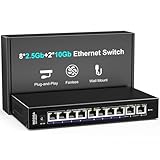
Overview: The NICGIGA 10-port switch expands the budget-friendly formula with eight 2.5GbE ports alongside two 10GbE uplinks, delivering 60 Gbps switching capacity for larger networks. This unmanaged switch maintains the brand’s value proposition while providing greater connectivity density for environments with numerous multi-gigabit devices.
What Makes It Stand Out: Doubling the 2.5G port count while keeping the two 10G ports creates an excellent edge switch topology—connect your core 10G devices and distribute 2.5G to workstations, APs, and endpoints. At $139.99, it remains remarkably affordable, costing less than many 8-port Gigabit switches. The fanless design, 6KV lightning protection, and wide operating temperature range persist as standout features. Lifetime technical support continues to differentiate it from budget competitors.
Value for Money: This switch delivers exceptional value at $14 per port. The 10-port density suits growing small businesses and advanced home networks better than the 6-port model. While the 60 Gbps backplane is shared, real-world usage rarely saturates it in SMB environments. It bridges the gap between basic Gigabit networks and costly full 10G infrastructure, letting you upgrade strategically. The price-to-performance ratio is among the best available.
Strengths and Weaknesses: Strengths:
- High port density (10 ports) at budget pricing
- Strategic mix of 2x 10G and 8x 2.5G ports
- Silent fanless operation with durable metal case
- Professional-grade protection and operating range
- Lifetime technical support
Weaknesses:
- Only two 10G ports may become a bottleneck
- 60 Gbps switching capacity limits concurrent high-speed transfers
- Brand recognition lags behind TP-Link or Netgear
- No dedicated 5G speed ports (auto-negotiation only)
Bottom Line: The NICGIGA 10-port switch is perfect for users needing many multi-gigabit connections but only a couple of full 10G links. Its port density and price make it a smart choice for growing networks on tight budgets.
5. 5-Port 10Gb Ethernet Switch Unmanaged with 5 x 10Gb RJ45 Ports, GiGaPlus 10Gbe Network Switch Easy for 10G NAS, PC, WiFi7 Routers, 10G NIC/Adapters. 100Gbps Switching Capacity. Desktop/19-inch Rack

Overview: The GiGaPlus 5-port switch delivers pure 10GbE connectivity with five auto-negotiating multi-gigabit ports and 100 Gbps switching capacity. Designed for professional environments, it includes rackmount hardware and an industrial-grade fan, positioning itself as a cost-effective alternative to enterprise switches for NAS, WiFi 7 routers, and high-performance workstations.
What Makes It Stand Out: This switch uniquely includes 19-inch rack ears at a $199.99 price point, typically a premium feature. The industrial 5000 RPM fan maintains 24 dB noise—quieter than many competitors’ fans while preventing thermal throttling. Five dedicated 10G ports provide consistent performance without mixed-speed compromises. The 100 Gbps capacity matches more expensive switches, ensuring non-blocking throughput. Support for WiFi 7 devices shows forward-thinking design.
Value for Money: At $40 per 10G port, GiGaPlus undercuts TP-Link’s SX105 while adding rackmount capability. The included mounting hardware saves $20-30 in accessories. While not fanless, the 24 dB noise level is acceptable for equipment closets. It bridges the gap between consumer and enterprise gear, offering professional installation options without managed switch complexity or pricing. For rack-mounted setups, it’s arguably the best value in its class.
Strengths and Weaknesses: Strengths:
- Five dedicated 10G ports with 100 Gbps capacity
- Included 19-inch rackmount hardware
- Industrial fan runs quiet at 24 dB
- 4KV lightning protection
- Supports all modern Ethernet standards
Weaknesses:
- Fan-based cooling (not silent) may deter some users
- Lesser-known brand with uncertain long-term support
- Higher price than some budget alternatives
- Unmanaged limits advanced features
Bottom Line: The GiGaPlus switch excels for rack-mounted 10G deployments where silent operation isn’t critical. Its included hardware and competitive pricing make it a compelling alternative to more established brands.
6. 10 Port 2.5G Unmanaged Ethernet Switch, 8 x 2.5G Base-T Ports, 2 x 10G SFP, Compatible with 100/1000/2500Mbps, VLAN, Fanless, Desktop/Wall Mount YuanLey 2.5Gbe Network Switch for Wireless AP, NAS, PC

Overview: The YuanLey 10-port switch delivers eight 2.5G Base-T ports plus two 10G SFP uplinks for users seeking affordable multi-gig connectivity. This unmanaged fanless switch supports auto-negotiation from 10Mbps to 2.5Gbps and includes one-key VLAN isolation. Housed in a durable metal chassis with 6KV lightning protection, it operates silently across -10~50°C, making it suitable for home labs, small offices, and gaming setups needing reliable throughput without management complexity.
What Makes It Stand Out: Eight 2.5G ports with 10G SFP+ uplinks at this price point is exceptional. The one-key VLAN function provides instant port isolation without configuration headaches. Its fanless design ensures zero noise, while enterprise-grade surge protection and temperature tolerance exceed typical consumer expectations. The 80Gbps switching capacity prevents bottlenecks during simultaneous large file transfers, 4K streaming, and WiFi 6 AP backhaul. SFP flexibility allows fiber or copper 10G connections, future-proofing your network investment.
Value for Money: At $69.98, this dramatically undercuts competitors. Comparable 2.5G switches cost $100+ without 10G uplinks. While SFP modules add expense, the ability to choose connection type justifies the approach. For connecting 2.5G NAS, gaming PCs, and WiFi 6 APs, it delivers professional features at consumer pricing. The five-year cost of ownership is minimal due to low power consumption and silent, fanless reliability. Budget-conscious users get near-enterprise performance without the premium.
Strengths and Weaknesses: Strengths include exceptional price-performance ratio, silent operation, robust metal construction, simple VLAN implementation, flexible 10G SFP uplinks, and wide operating temperature range. Weaknesses: SFP modules not included, unmanaged design limits advanced configuration, no 5G/10G Base-T on access ports, and YuanLey lacks brand recognition of networking giants. Documentation is basic compared to major vendors.
Bottom Line: An outstanding value for upgrading to multi-gig connectivity. Perfect for home labs, small offices, or gaming setups with 2.5G devices. The 10G SFP uplinks provide excellent expansion options, making this the best budget 2.5G switch available. For plug-and-play simplicity with room to grow, it’s hard to beat.
7. 6 Port 10G Ethernet Switch Unmanaged, 4 x 2.5G Base-T Ports, 2 x 10Gb RJ45 Ports, Compatible with 100/1000/2500Mbps, Metal Fanless, VLAN, YuanLey 2.5Gbe Network Switch for 2.5G/10G NAS, Wireless AP

Overview: This compact YuanLey switch combines four 2.5G RJ45 ports with two 10G RJ45 uplinks, eliminating SFP module needs for copper-based high-speed networks. The unmanaged design prioritizes plug-and-play simplicity while delivering 60Gbps non-blocking throughput. Ideal for direct 10G NAS connections, gaming rigs, and WiFi 6 AP backhaul, its fanless metal chassis ensures silent operation in noise-sensitive environments like studios and home offices.
What Makes It Stand Out: Native 10G RJ45 ports set this apart, removing SFP transceiver costs and compatibility guesswork. The intelligent VLAN mode isolates 2.5G ports while preserving 10G uplink communication—perfect for securing multi-AP deployments. Its 6KV lightning protection and -10°C to 50°C operating range provide reliability uncommon at this price. The switch intelligently handles mixed 1G/2.5G/10G devices without manual intervention, auto-negotiating optimal speeds.
Value for Money: At $79.99, the $10 premium over the SFP model is justified for 10G copper users. Competing 10G RJ45 switches exceed $200, making this remarkably affordable. Integrated 10G ports save $50-100 in transceiver costs alone. For 10G NAS owners, it’s the most cost-effective entry point available. The total cost of ownership remains low with passive cooling and minimal power draw. If your devices use RJ45, this is the smarter financial choice.
Strengths and Weaknesses: Strengths include native 10G RJ45 ports, competitive pricing, silent fanless design, VLAN support, compact footprint, and auto-negotiation across all speed grades. Weaknesses: Only four 2.5G ports limits device density, no SFP flexibility for fiber, 60Gbps backplane is lower than 8-port alternatives, and unmanaged restrictions persist. Brand support infrastructure is less established than major vendors.
Bottom Line: A compelling choice for users with 10G RJ45 equipment seeking simplicity and value. Best suited for small setups with a central 10G NAS and multiple 2.5G clients. The native 10G ports justify the modest price increase over SFP models. For direct copper connections, this is the practical, cost-effective solution.
8. 10-Port 10G/2.5G Ethernet Switch with Dual 10GBASE-T, Vimin 8X 2.5G +2 x 10Gb RJ45 Ports Unmanaged Switch, 80Gbps Capacity, 10G Switch Desktop/Wall Mount Network Switch for NAS, PC, Wireless AP
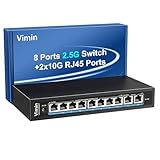
Overview: The Vimin 10-port switch offers eight 2.5G ports plus dual 10G RJ45 uplinks, targeting users needing guaranteed performance for bandwidth-intensive applications. With explicit flow control support and full IEEE 802.3bz compliance, this unmanaged switch prioritizes stability for IP cameras, SMB servers, and sustained large file transfers. The 80Gbps non-blocking architecture ensures wire-speed performance across all ports simultaneously.
What Makes It Stand Out: Flow control implementation (IEEE 802.3x and backpressure) prevents packet loss during congestion—critical for surveillance and server applications. Dual 10G RJ45 uplinks enable redundancy and aggregation without SFP complexity. The switch maintains compatibility with existing CAT5e/CAT6 cabling while supporting 2.5G/5G/10G auto-negotiation. Its metal fanless design combines silent operation with robust heat dissipation, and dynamic LED indicators provide instant status feedback.
Value for Money: At $139.99, this commands a 75% premium over similar YuanLey models. The price reflects advanced features like flow control and explicit 5G support, but most home users won’t leverage these benefits. For business environments requiring guaranteed delivery and reduced broadcast storms, the investment is justified. However, residential users seeking basic multi-gig connectivity should consider cheaper alternatives. The value proposition is niche—technical benefits must be specifically required to warrant cost.
Strengths and Weaknesses: Strengths include robust flow control, full 2.5G/5G/10G compliance, 80Gbps capacity, silent metal construction, native 10G RJ45 convenience, and plug-and-play deployment. Weaknesses: Significantly more expensive than functionally similar switches, unmanaged limitations remain, brand recognition is limited, and the premium is hard to justify for typical use cases. No SFP flexibility for fiber distances.
Bottom Line: Recommended for small business or advanced home lab users specifically needing flow control and guaranteed performance. For standard gaming, NAS, or media streaming, more affordable options deliver equivalent real-world results. The feature set justifies the cost only for technically demanding deployments where packet loss prevention is critical.
9. NETGEAR 8-Port Gigabit Ethernet Easy Smart Managed Essentials Switch (GS308E) - Desktop or Wall Mount, Home Network Hub, Office Ethernet Splitter, Silent Operation

Overview: The NETGEAR GS308E is an 8-port Gigabit Easy Smart switch for users needing basic management without complexity. This fanless switch provides Gigabit speeds across all ports with energy-efficient operation and an intuitive interface for VLAN, QoS, and traffic monitoring. Designed for home offices and small businesses, it balances affordability with just enough control to secure and optimize basic networks.
What Makes It Stand Out: NETGEAR’s industry-leading 5-year limited hardware warranty provides exceptional peace of mind at this price. The Easy Smart software offers sufficient management—VLAN, QoS, and monitoring—without overwhelming non-technical users. IEEE802.3az energy efficiency reduces power consumption, while silent operation suits home environments. NETGEAR’s reliability and support infrastructure are unmatched in this segment, offering firmware updates and technical resources that budget brands lack.
Value for Money: At $23.99, this is incredible value for a managed switch from a premium brand. Unmanaged 8-port Gigabit switches cost $15-20, making the management features and warranty effectively free. While limited to 1G speeds, it’s perfect for internet connectivity, streaming, and basic NAS setups where multi-gig isn’t required. The warranty alone justifies the modest premium over no-name alternatives. For cost-conscious buyers wanting reliability, this is the sweet spot.
Strengths and Weaknesses: Strengths include unbeatable price for managed features, robust 5-year warranty, brand reliability, silent fanless operation, energy efficiency, and intuitive management interface. Weaknesses: Gigabit-only speeds won’t satisfy multi-gig needs, limited advanced features compared to fully managed switches, plastic construction feels less durable than metal alternatives, and no 10G uplink options. Port count is modest for larger networks.
Bottom Line: An excellent entry-level managed switch for users satisfied with Gigabit speeds. Ideal for home networks, small offices, and anyone prioritizing reliability and warranty over raw performance. For multi-gig devices, look elsewhere, but for standard networking, this is the smart budget choice. NETGEAR quality at an impulse-buy price.
10. NETGEAR 10-Port 10G Multi-Gigabit Ethernet Smart Switch (MS510TXM) - Managed, 8 x Multi-gig Ports, 2 x 10G SFP+, Optional Insight Cloud Management, Desktop or Rackmount, Limited Lifetime Protection

Overview: The NETGEAR MS510TXM is a professional-grade 10-port multi-gigabit smart switch featuring four 1G/2.5G ports and four 1G/2.5G/5G/10G ports, plus two 10G SFP+ uplinks. With full management capabilities including SNMP, VLAN, and NETGEAR Insight cloud management, this switch serves demanding business environments requiring scalable, high-performance networking with enterprise support and reliability.
What Makes It Stand Out: True multi-gig flexibility across 5G and 10G on eight ports provides future-proof scalability. NETGEAR Insight enables remote management from anywhere, critical for IT administrators. The Lifetime Limited Hardware Warranty with Next Business Day Replacement and 24/7 expert support demonstrates enterprise commitment. Advanced L2/L3 features, PoE support variants, and robust security protocols make this a complete business solution. Rackmount hardware included adds professional deployment value.
Value for Money: At $529.99, this commands a premium but delivers professional features warranting the cost. Comparable business-class multi-gig switches from Cisco or Ubiquiti cost $600-800 with similar capabilities. For businesses, the warranty, support, and management features provide ROI through reduced downtime and remote troubleshooting. Home users should consider this massive overkill; the target is clearly commercial deployments where reliability is paramount and outages are costly.
Strengths and Weaknesses: Strengths include comprehensive multi-gig port speeds, SFP+ flexibility, cloud management, lifetime warranty, professional support, advanced security, and rackmount capability. Weaknesses: High price excludes home users, complexity may overwhelm simple setups, fan cooling generates noise unsuitable for quiet environments, and power consumption exceeds unmanaged alternatives. Physical size is larger than desktop-focused switches.
Bottom Line: A top-tier business networking solution for organizations requiring managed multi-gig infrastructure. The lifetime warranty and Insight management justify the investment for commercial use. For home labs or enthusiasts, cheaper alternatives offer sufficient performance. This is a professional tool, not a consumer product, delivering enterprise-grade reliability and support.
Understanding the 4K Transcoding Challenge for NAS Systems
Why Gigabit Networks Create Bottlenecks in Modern Media Workflows
A single uncompressed 4K video stream at 30fps can consume upwards of 1.5 Gbps, immediately saturating a standard gigabit connection. When your NAS attempts to transcode multiple streams simultaneously—or serve raw footage to an editing workstation—the math becomes brutal. Gigabit Ethernet maxes out at 125 MB/s theoretical throughput, which drops to roughly 110-115 MB/s after protocol overhead. Modern NAS drives easily deliver 200-500 MB/s sequential reads, meaning your network becomes the definitive chokepoint long before storage performance becomes an issue. This mismatch forces your NAS CPU to work harder, compressing streams more aggressively and degrading quality just to squeeze through the narrow pipe.
The Bandwidth Demands of 4K, 8K, and Multi-Stream Setups
The calculus becomes more demanding when you factor in evolving media standards. 4K HDR content at 60fps can push 2.5-3 Gbps, while 8K workflows demand 8-12 Gbps for single streams. Multi-user environments compound this exponentially—three editors pulling proxies simultaneously, a Plex server transcoding for remote clients, and a backup job running in the background can easily overwhelm even a 2.5 GbE connection. Desktop 10G switches provide the headroom for these concurrent operations, ensuring that aggressive caching algorithms and smart transcoding features in modern NAS systems aren’t starved for data when they need it most.
10G Networking Fundamentals for Desktop Environments
Base-T vs SFP+: Choosing the Right Connection Type
The 10G ecosystem presents two primary physical interfaces: 10GBASE-T (RJ45) and SFP+ (fiber or DAC cables). Base-T offers backward compatibility with existing Cat6a/Cat7 cabling and standard RJ45 ports, making it ideal for gradual upgrades where you might still have gigabit devices on the same network. The downside? Higher power consumption and slightly increased latency. SFP+ connections using Direct Attach Copper (DAC) cables or optical modules deliver lower power draw and minimal latency but require compatible NICs and don’t mix with traditional Ethernet ports. For desktop NAS setups, hybrid switches offering both port types provide maximum flexibility, letting you connect your primary workstation via SFP+ DAC while maintaining Base-T ports for legacy devices.
Full-Duplex Advantage: Simultaneous Data Flow Explained
Unlike half-duplex connections that alternate between sending and receiving, 10G Ethernet operates in full-duplex mode, enabling simultaneous bidirectional traffic at full bandwidth. This becomes critical during transcoding operations where your NAS is both reading source files from its storage array and writing temporary files or streaming output. The full-duplex capability ensures that inbound and outbound packets never compete for bandwidth, eliminating the collision-domain problems that could introduce micro-stutters in your video streams. In practical terms, this means your editing workstation can pull 4K raw footage while simultaneously saving rendered previews back to the NAS without either operation throttling the other.
Desktop vs. Rackmount: Form Factor Considerations
Space Efficiency Without Performance Compromise
Desktop 10G switches typically occupy less than half a square foot of desk space, yet pack the same switching ASICs and feature sets as their rackmount siblings. The compact form factor doesn’t mean compromised performance—many desktop units offer full 20 Gbps non-blocking throughput per port with sub-microsecond latency figures that rival enterprise gear. The key difference lies in port density; where a rackmount switch might offer 24-48 ports, desktop models intelligently provide 5-8 10G ports supplemented by gigabit uplinks. This targeted approach perfectly matches the typical smart NAS deployment: a primary 10G connection to the NAS, 2-3 workstation connections, and gigabit ports for management interfaces, IoT devices, and network peripherals.
Cooling and Acoustic Profiles for Home Office Studios
Enterprise switches scream at 50-60 dB with high-RPM fans that make them unsuitable for shared workspaces. Desktop variants engineered for office environments prioritize acoustic comfort, often operating under 25 dB—quieter than a whisper. They achieve this through passive cooling designs that use heat sinks and strategic airflow instead of forced ventilation, or by employing temperature-controlled fans that only spin up under sustained heavy load. When selecting a switch for a studio where audio recording happens, look for models with fanless operation up to at least 30°C ambient temperature, ensuring your network infrastructure never introduces noise into your creative environment.
Critical Switch Features for NAS Transcoding Workflows
Jumbo Frames: Maximizing Payload Efficiency
Standard Ethernet frames carry 1500 bytes of payload, forcing large video files to be fragmented into thousands of tiny packets. Enabling jumbo frames (typically 9000 bytes) reduces packet overhead by up to 80%, decreasing CPU utilization on both your NAS and workstation while improving effective throughput by 5-10%. The impact on transcoding is subtle but significant—fewer interrupts means the NAS processor can dedicate more cycles to the actual transcoding engine rather than network stack processing. Critically, jumbo frames must be enabled end-to-end: NAS NIC, switch ports, and workstation NIC all need matching MTU settings, or you’ll fragment packets and create worse performance than standard frames.
VLAN Support: Segmentating Media Traffic
Smart NAS devices often run multiple services simultaneously—Plex, file shares, backup targets, surveillance recording—that can interfere with each other under load. VLAN capability lets you isolate your high-priority 4K transcoding traffic onto its own virtual network, preventing backup jobs or file sync operations from contending for bandwidth. Create a dedicated VLAN for your media editing subnet, assign your NAS’s primary 10G interface and workstation ports to it, and keep management traffic separate. This logical segmentation also enhances security, ensuring your raw footage subnet isn’t exposed to guest networks or IoT devices that might snoop traffic or introduce broadcast storms.
QoS Prioritization: Keeping Transcodes Smooth
Quality of Service (QoS) settings allow your switch to identify and prioritize time-sensitive transcoded video streams over bulk data transfers. Look for switches supporting DiffServ (Differentiated Services) with at least four hardware queues per port. You can configure rules to prioritize traffic on specific TCP ports used by your NAS’s media server, or tag packets with DSCP values at the NAS level. During a heavy backup operation, QoS ensures your 4K timeline scrubbing remains responsive, allocating bandwidth preferentially to packets marked as video streaming while throttling less critical traffic. The key is hardware-based QoS—software implementations introduce latency that defeats the purpose for real-time video work.
Buffer Size and Packet Handling Under Load
Switch buffers act as shock absorbers for network traffic bursts, and inadequate buffering causes dropped packets when multiple high-bandwidth streams converge. For 4K transcoding, seek switches with at least 2 MB of packet buffer per 10G port. This becomes crucial when your NAS serves multiple 4K streams simultaneously—each stream might burst to 3 Gbps for several milliseconds, and deep buffers smooth these peaks without dropping frames. Some advanced switches employ dynamic buffer allocation, pooling memory across ports to handle asymmetrical traffic patterns common in media workflows where one NAS port might be hammered while others sit idle.
Smart NAS Integration: Beyond Basic Connectivity
Link Aggregation (LACP) for Multi-Gig Performance
While a single 10G port solves most bandwidth issues, smart NAS systems with dual 10G NICs can leverage Link Aggregation Control Protocol (LACP) to create a 20 Gbps logical connection. Desktop switches supporting LACP across ports let you bond connections for both throughput multiplication and failover redundancy. In transcoding scenarios, this proves invaluable when serving multiple 4K streams while simultaneously handling background tasks like replication or snapshots. The switch distributes traffic across both links using hashing algorithms—typically based on source/destination IP or MAC addresses—ensuring no single stream exceeds 10 Gbps while aggregate throughput hits the full 20 Gbps potential.
iSCSI and NFS Optimization Settings
For professional editing workflows accessing NAS storage as block devices via iSCSI or high-performance file shares through NFS, switch settings dramatically impact performance. Enable flow control (802.3x) on NAS-connected ports to prevent buffer overruns during sustained writes. For iSCSI, ensure your switch supports jumbo frames and has iSCSI-aware features that prioritize storage traffic and prevent packet reordering. NFSv4.1 with pNFS support benefits from switches that handle parallel data paths efficiently. Some advanced desktop switches offer storage-specific profiles that automatically tune these parameters when you designate a port as “storage” in the management interface.
Real-World Performance Metrics to Monitor
Throughput Testing: Beyond Theoretical Maximums
A 10G port’s theoretical maximum is 1250 MB/s, but real-world NAS performance depends on storage speed, protocol overhead, and switch efficiency. Use tools like iperf3 to test sustained throughput, but also measure 4K random I/O performance with fio or similar tools—transcoding involves constant seeking and reading of small chunks. Monitor your switch’s per-port bandwidth utilization via SNMP or its web interface during actual transcoding sessions. You should see consistent 300-600 MB/s per 4K stream with minimal variance. If throughput fluctuates wildly, investigate buffer utilization and error counters—dropped packets or CRC errors indicate cable issues or switch overload.
Latency Impact on Live Transcoding
Latency matters more than raw bandwidth for smooth timeline scrubbing and live preview generation. While bandwidth determines how quickly large files transfer, latency (measured as round-trip time) affects how responsive your editing software feels. Desktop 10G switches should deliver sub-5-microsecond port-to-port latency. Use ping with large packets (ping -s 65500) to measure RTT under load—anything consistently over 100 microseconds suggests buffering issues or CPU overload on the switch. During transcoding, monitor for latency spikes that correlate with frame drops in your video preview; these indicate the switch struggling with burst traffic patterns typical of media workflows.
Network Architecture Strategies for Media Professionals
Direct-Attach vs. Switched Topologies
The simplest 10G setup involves a direct cable between NAS and workstation, eliminating switch cost and latency. However, this approach cripples the “smart” aspects of modern NAS systems—you can’t leverage multiple client connections, link aggregation, or centralized management. A switched topology with a desktop 10G switch becomes essential when scaling beyond one user. The sweet spot for small studios is a 5-8 port switch: connect the NAS via 10G, primary editing workstations via 10G, and use the remaining ports for secondary machines or future expansion. This architecture maintains sub-10-microsecond latency while enabling the collaborative workflows that justify a centralized NAS.
Hybrid Gigabit/10G Setups for Budget Conscious Builds
Not every device needs 10G connectivity. Smart desktop switches with mixed port configurations—say, four 10G ports and eight gigabit ports—let you prioritize bandwidth where it matters while maintaining connectivity for printers, IoT devices, and management interfaces. Connect your NAS and primary editing rig to the 10G ports, use gigabit ports for secondary machines that only access proxies, and enable the switch’s inter-VLAN routing to allow seamless communication between subnets. This hybrid approach costs 40-60% less than full 10G setups while eliminating the critical bottlenecks that plague 4K workflows. The key is ensuring the switch’s backplane can handle full 10G throughput on all high-speed ports simultaneously without oversubscription.
Future-Proofing Your Investment
Upgrading Path from 2.5G to 10G
Many modern NAS devices and motherboards now ship with 2.5 GbE ports as standard, creating a tempting middle ground. While 2.5G switches cost less, they still fall short for multiple 4K streams or 8K workflows. Forward-thinking desktop 10G switches often include a few 2.5G/5G/10G multi-gig ports that auto-negotiate to the highest common speed. This lets you upgrade incrementally—start with 2.5G for basic needs, then move to 10G as your NAS and workstations evolve. The switch becomes a long-term infrastructure piece rather than a stopgap, protecting your investment through several hardware upgrade cycles.
PoE+ Considerations for All-in-One Setups
Power over Ethernet Plus (PoE+) delivering 30W per port enables creative network architectures where your switch powers security cameras, IP phones, or even a Raspberry Pi-based monitoring system alongside your NAS. While the NAS itself won’t run on PoE, having a few powered ports on your desktop switch reduces cable clutter and centralizes power management. For studios, this means powering a dedicated preview monitor’s network adapter or a calibrated reference display’s control interface directly from the switch. Ensure the switch’s total PoE budget exceeds your needs—an 8-port PoE+ switch should provide at least 120W total to avoid port shutdowns during peak draw.
Frequently Asked Questions
Can I use a desktop 10G switch with my existing Cat5e cabling?
Standard Cat5e cable only reliably supports 10G up to 45 meters, and performance degrades significantly with interference. For permanent installations, upgrade to Cat6a or Cat7 to ensure full 100-meter reach and future-proofing. If your run is under 30 feet and you test thoroughly, Cat5e might work temporarily, but expect occasional link flaps during heavy transcoding sessions.
Will a 10G switch automatically improve my Plex 4K transcoding performance?
Only if the network was your bottleneck. If your NAS CPU struggles to transcode a single 4K stream, 10G won’t help. But if you’re serving multiple direct-play 4K streams or using the NAS as a scratch disk for editing, the upgrade eliminates network constraints, letting your NAS’s smart features work at full capacity. Check your current NAS network utilization first—if it’s pinned at 100% on a gigabit link, 10G will transform your experience.
How many 10G ports do I actually need for a home media server setup?
For a typical setup—one NAS, one primary editing workstation, and one secondary machine—three 10G ports suffice. However, consider a switch with at least five ports to accommodate future expansion. The cost difference between 5-port and 8-port models is minimal compared to the expense of replacing an undersized switch later.
Do desktop 10G switches require special configuration for NAS transcoding?
Basic plug-and-play works, but you’ll need to manually enable jumbo frames (MTU 9000) on the switch and all connected devices for optimal performance. Additionally, configure QoS policies if you run mixed workloads, and set up VLANs to isolate media traffic. Most switches include wizards or preset profiles for “storage” or “video” that automate these optimizations.
What’s the power consumption difference between desktop and enterprise 10G switches?
Desktop models typically consume 15-30W under load, while enterprise switches can draw 100-200W due to higher port counts, faster fans, and more powerful management processors. Over a year, this translates to roughly $20-40 in electricity for a desktop switch versus $100-200 for a rackmount unit, not counting cooling costs in climate-controlled spaces.
Can I mix 10G and gigabit devices on the same switch without performance issues?
Yes, provided the switch has a non-blocking architecture with sufficient backplane bandwidth. Quality desktop switches include dedicated 10G and gigabit switching fabrics that operate independently, then interconnect via a high-speed backplane. Verify the switch’s total switching capacity exceeds the sum of all ports (e.g., 160 Gbps for an 8x10G + 8x1G switch) to prevent oversubscription issues.
How does link aggregation affect 4K transcoding performance?
LACP doesn’t increase single-stream bandwidth beyond 10G, but it dramatically improves multi-user scenarios. If two editors pull 4K footage simultaneously, LACP distributes the load across both links, preventing either stream from stalling. For single-user workflows, LACP’s primary benefit is failover redundancy—if one cable fails, you maintain connectivity without dropping frames.
What latency should I expect from a quality desktop 10G switch?
Sub-5-microsecond port-to-port latency is standard for cut-through switching ASICs found in good desktop units. Some premium models achieve sub-3-microsecond latency. Compare this to 20-50 microseconds for a typical gigabit switch, and the improvement in responsiveness becomes clear. Use the switch’s management interface to verify it’s operating in cut-through mode rather than store-and-forward if latency is critical.
Are managed switches necessary for NAS transcoding, or will unmanaged work?
Unmanaged 10G switches handle basic throughput fine but lack jumbo frame configuration, QoS, and VLAN support—features that become essential as your workflow complexity grows. A smart-managed switch (web-managed) offers the perfect middle ground: you get the critical tuning options without the cost and complexity of full CLI-based enterprise management. For any serious media work, managed is strongly recommended.
Can a desktop 10G switch handle 8K video workflows?
Single 8K streams can exceed 10G bandwidth, requiring compression or proxy workflows. However, a desktop 10G switch remains the foundation for 8K-ready networks. Use it to connect NAS and workstations, then implement 25G or 40G backbone links as needed. The switch’s low latency and advanced queuing still benefit 8K environments, even if you need additional bandwidth beyond what a single port provides.