In today’s hybrid work era, your home office isn’t just a desk in a corner—it’s a command center for video conferencing, cloud collaboration, smart home integration, and 4K streaming. But there’s a silent productivity killer lurking in many setups: network switch noise. That incessant whirring isn’t just annoying; it triggers measurable cognitive fatigue and disrupts the acoustic sanctity you’ve carefully crafted with noise-canceling headphones and sound-dampening panels. While fanless switches have long been the default recommendation for quiet environments, a new generation of desktop ethernet switches with silent fans is revolutionizing what’s possible, delivering enterprise-grade performance and PoE+ power without the acoustic footprint of traditional networking gear.
Understanding this technology requires more than a cursory glance at decibel ratings. The intersection of thermal engineering, power management, and acoustic design determines whether a switch will truly disappear into your workspace background or become that maddening device you eventually banish to a closet. This comprehensive guide dives deep into the technical nuances, architectural decisions, and real-world considerations that separate genuinely silent operation from marketing fluff—empowering you to build a smart home office network that’s both powerful and peacefully quiet.
Top 10 Desktop Ethernet Switches for Smart Home Offices
Detailed Product Reviews
1. NETGEAR 8-Port Gigabit Ethernet Easy Smart Managed Essentials Switch (GS308E) - Desktop or Wall Mount, Home Network Hub, Office Ethernet Splitter, Silent Operation

###1. NETGEAR 8-Port Gigabit Ethernet Easy Smart Managed Essentials Switch (GS308E) - Desktop or Wall Mount, Home Network Hub, Office Ethernet Splitter, Silent Operation
Overview: The NETGEAR GS308E bridges the gap between unmanaged dumb switches and complex enterprise gear. This 8-port Gigabit Easy Smart switch gives home users and small offices essential management capabilities without overwhelming complexity. The web-based interface lets you configure VLANs, QoS, and port mirroring—features typically found in pricier equipment. Its silent, fanless design and energy-efficient IEEE802.3az compliance make it ideal for noise-sensitive environments where 24/7 operation is required.
What Makes It Stand Out: The standout feature is NETGEAR’s exceptional 5-year limited hardware warranty, doubling the industry standard. The Easy Smart Managed Essentials software provides just enough control for network segmentation and traffic prioritization without requiring IT expertise. Its ability to function as both a desktop and wall-mounted unit adds deployment flexibility that many competitors lack. The switch also includes loop detection and cable diagnostics—unexpected luxuries at this price tier.
Value for Money: At $23.99, you’re paying only $5 more than NETGEAR’s unmanaged version for crucial management features. This represents outstanding value, offering enterprise-lite functionality at consumer prices. Competing managed switches often cost 50% more while delivering similar performance. The extended warranty alone provides peace of mind that justifies the minimal premium over unmanaged alternatives.
Strengths and Weaknesses: Strengths include the industry-leading warranty, intuitive management interface, silent operation, and robust feature set for the price. The plastic construction feels less premium than metal alternatives, and advanced users may find the “Essentials” feature set limiting. VLAN support is basic compared to fully managed switches, and there’s no Link Aggregation support. The web interface can be sluggish during configuration changes.
Bottom Line: The GS308E is the sweet spot for users wanting network control without complexity. It’s perfect for separating IoT devices, prioritizing gaming traffic, or small business use. The 5-year warranty alone justifies choosing this over unmanaged alternatives. If you need basic management on a budget, this is your best bet.
2. TP-Link 8 Port Gigabit Switch | Easy Smart Managed | Plug & Play | Desktop/Wall-Mount | Sturdy Metal w/ Shielded Ports | Support QoS, Vlan, IGMP and LAG (TL-SG108E)

Overview: The TP-Link TL-SG108E delivers serious networking capabilities in an affordable 8-port Gigabit package. This Easy Smart managed switch targets tech-savvy home users and small businesses needing granular network control. Through its web interface, you can configure up to 32 VLANs, implement QoS policies, and monitor traffic via port mirroring—features that punch well above its weight class. The sturdy metal chassis with shielded ports provides professional-grade build quality rarely seen at this price point.
What Makes It Stand Out: Unlike plastic competitors, the sturdy metal housing with shielded ports provides superior EMI protection and durability. The robust feature set includes IGMP Snooping for optimized multicast streaming, loop prevention, and cable diagnostics—tools typically reserved for enterprise equipment. It supports Link Aggregation (LAG) for combined bandwidth to NAS devices. The ability to handle 32 simultaneous VLANs offers remarkable segmentation flexibility for a switch in this class.
Value for Money: At $29.99, it commands a $6 premium over NETGEAR’s equivalent, but the metal construction and enhanced feature set justify the cost. You’re getting near-enterprise management capabilities at a fraction of business-grade switch prices, making it a smart long-term investment. The shielded ports alone add value in electrically noisy environments.
Strengths and Weaknesses: Strengths include the durable metal chassis, comprehensive VLAN support, advanced monitoring tools, and IGMP optimization for streaming. The 5-year warranty matches competitors. Weaknesses include a slightly higher price point and a steeper learning curve for networking novices. The management software, while powerful, isn’t quite as polished as premium brands. Port status LEDs are dimmer than ideal in bright environments.
Bottom Line: Choose the TL-SG108E if you need robust management features and superior build quality. It’s ideal for advanced home labs, small offices with multiple departments, or anyone prioritizing network security through VLAN segmentation. The metal construction ensures longevity and better heat dissipation, making it worth the small premium.
3. NETGEAR 8-Port Gigabit Ethernet Unmanaged Essentials Switch (GS308) - Home Network Hub, Office Ethernet Splitter, Plug-and-Play, Silent Operation, Desktop or Wall Mount

Overview: The NETGEAR GS308 strips networking down to pure simplicity—eight Gigabit Ethernet ports with true plug-and-play operation. No software, no configuration, no complexity. This unmanaged switch is the digital equivalent of a power strip: just connect devices and they work instantly. It’s designed for users who need reliable port expansion without any management overhead. The fanless design ensures silent operation, making it perfect for living rooms and home offices where noise matters.
What Makes It Stand Out: The GS308’s greatest strength is its absolute simplicity. There are no LEDs to decipher, no web interfaces to learn, and no settings to accidentally misconfigure. The fanless design ensures silent operation, while IEEE802.3az energy efficiency reduces power consumption. NETGEAR backs it with a 3-year warranty—shorter than its managed sibling but still respectable for an unmanaged device. The auto-negotiation and Auto MDI/MDIX eliminate crossover cable concerns entirely.
Value for Money: At $18.99, it’s the most affordable 8-port Gigabit switch from a major brand. You’re getting reliable, no-frills connectivity for under $2.40 per port. For basic network expansion, it’s impossible to beat this price-to-performance ratio. The cost savings over managed alternatives can be allocated to other network upgrades like better cabling or a faster router.
Strengths and Weaknesses: Strengths include unbeatable simplicity, rock-solid reliability, silent operation, and exceptional affordability. It’s perfect for extending networks to entertainment centers or home offices. Weaknesses are its complete lack of management features—no VLANs, no QoS, no monitoring. The plastic housing feels less durable than metal alternatives, and the 3-year warranty is shorter than some competitors. There’s no port aggregation or traffic prioritization.
Bottom Line: The GS308 is perfect for users who just need more ports. If you have no interest in network management and want the cheapest reliable solution, this is it. It’s ideal for connecting smart TVs, gaming consoles, or extending a network to another room without any fuss. Don’t pay extra for features you’ll never use.
4. TP-Link TL-SG105S-M2 | 5-Port Multi-Gigabit 2.5G Ethernet Switch | Unmanaged Network Switch | Ethernet Splitter | Plug & Play | Desktop/Wall Mount | Silent Operation

Overview: The TP-Link TL-SG105S-M2 is a forward-looking 5-port Multi-Gigabit switch that breaks the 1Gbps barrier without requiring a complete cabling overhaul. Each port automatically negotiates speeds of 100Mbps, 1Gbps, or 2.5Gbps, delivering up to 25 Gbps total switching capacity. This unmanaged switch is purpose-built for bandwidth-intensive applications like 4K video editing, NAS backups, and WiFi 6 access points. Its compact form factor and fanless design make it ideal for cramped spaces.
What Makes It Stand Out: The ability to deliver 2.5Gbps speeds over existing Cat5e cabling is revolutionary, saving hundreds in rewiring costs. It’s one of the most affordable ways to experience Multi-Gig performance in a compact, fanless package. The auto-negotiation ensures seamless compatibility with legacy devices while unlocking maximum performance from modern 2.5G-enabled hardware. This future-proofs your network for WiFi 6/6E deployments and high-performance NAS systems.
Value for Money: At $59.99 for five ports, the per-port cost is high, but standard Gigabit pricing doesn’t apply here. Multi-Gig infrastructure typically commands premium prices, and this switch democratizes access to faster speeds. For users with 2.5G-capable devices, the performance uplift justifies every penny. The ability to avoid recabling represents substantial hidden savings.
Strengths and Weaknesses: Strengths include future-proof 2.5G speeds, backward compatibility, silent operation, and no cabling upgrade requirements. It’s incredibly easy to deploy. Weaknesses are the limited port count—five ports fill quickly—and lack of management features. The price may be hard to justify if you don’t have Multi-Gig devices. Unmanaged nature means no traffic prioritization or VLANs. Only one LED per port limits diagnostic capabilities.
Bottom Line: Buy this only if you have or plan to get 2.5Gbps devices. It’s perfect for connecting a 2.5G NAS, WiFi 6E access point, or high-end gaming PC. For standard Gigabit networks, it’s overkill. But for specific high-bandwidth scenarios, it’s an affordable performance multiplier that eliminates bottlenecks.
5. TP-Link 16 Port Gigabit Ethernet Network Switch, Desktop/ Wall-Mount, Fanless, Sturdy Metal w/ Shielded Ports, Traffic Optimization, Unmanaged (TL-SG116)
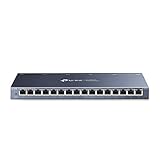
Overview: The TP-Link TL-SG116 solves port shortage problems with sixteen Gigabit Ethernet ports in a fanless, metal chassis. This unmanaged switch is built for expanding medium-sized networks where simplicity and port density matter more than management features. It handles everything from small office deployments to extensive home networks with numerous wired devices. The shielded ports provide enhanced interference protection, while IEEE 802.3X flow control ensures reliable data transfer under load.
What Makes It Stand Out: The combination of high port count, silent operation, and metal construction at this price point is impressive. Despite being unmanaged, it includes advanced hardware features like port-based 802.1p/DSCP QoS and IGMP Snooping for optimized multicast traffic. The fanless design ensures zero noise pollution, while the sturdy metal housing provides durability and better heat dissipation. It supports both desktop and wall-mount deployment for maximum flexibility.
Value for Money: At $79.99, you’re paying just $5 per port—excellent value for a 16-port metal switch from a reputable brand. Comparable switches often cost 30-50% more. The energy-efficient technology further reduces long-term operational costs, making it economical for 24/7 operation. For growing networks, this single purchase eliminates the need for multiple smaller switches.
Strengths and Weaknesses: Strengths include exceptional port density, durable metal construction, silent fanless design, and surprising advanced features like QoS and IGMP Snooping. It’s plug-and-play simple. Weaknesses are its unmanaged nature—no VLANs or remote management—and larger physical footprint. The 16 ports may be overkill for many home users, and there’s no Link Aggregation support. The status LEDs are minimally informative.
Bottom Line: The TL-SG116 is the go-to choice when you need maximum ports without management complexity. It’s perfect for small offices, extensive smart home setups, or connecting multiple rooms. If you need simple, reliable expansion for numerous devices, this offers unbeatable port-per-dollar value and will likely be the last switch you’ll need for years.
6. NETGEAR 24-Port Gigabit Ethernet Unmanaged Essentials Switch (GS324) - Desktop, Wall, or Rackmount, Silent Operation
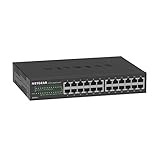
###6. NETGEAR 24-Port Gigabit Ethernet Unmanaged Essentials Switch (GS324) - Desktop, Wall, or Rackmount, Silent Operation
Overview: The NETGEAR GS324 is a 24-port unmanaged Gigabit Ethernet switch designed for small businesses and home offices seeking simple network expansion. Its fanless design ensures silent operation, making it ideal for noise-sensitive environments like offices, studios, or living spaces. The switch offers true plug-and-play functionality with zero configuration required.
What Makes It Stand Out: This switch delivers exceptional port density at an aggressive price point while maintaining versatility. The inclusion of rackmount hardware alongside desktop and wall-mount options provides deployment flexibility rarely seen in this class. Its fanless architecture and energy-efficient IEEE802.3az compliance demonstrate thoughtful engineering for 24/7 operation without noise or excessive power consumption.
Value for Money: At $69.99, you’re paying under $3 per port—a compelling value for Gigabit connectivity from a reputable brand. The three-year warranty surpasses typical budget switch coverage, while unmanaged operation eliminates licensing costs and IT complexity. Compared to managed alternatives costing twice as much, it’s perfect for users who prioritize simplicity over advanced features.
Strengths and Weaknesses: Strengths: 24 Gigabit ports provide ample connectivity; completely silent fanless design; versatile mounting options including rackmount; energy-efficient operation reduces long-term costs; robust 3-year warranty; true plug-and-play simplicity. Weaknesses: Unmanaged nature lacks VLAN, QoS, and monitoring capabilities; no PoE support for powering devices; 24 ports may be overkill for basic home use; limited scalability for growing business networks.
Bottom Line: The GS324 is an excellent choice for users needing maximum port count with minimum fuss. If you require simple, reliable wired expansion without management overhead, this silent workhorse delivers outstanding value and flexibility.
7. NETGEAR 8 Port PoE Gigabit Ethernet Easy Smart Managed Essentials Switch (GS308EP) - with 8 x PoE+ @ 62W, Desktop or Wall Mount

Overview: The GS308EP bridges the gap between unmanaged switches and full managed solutions by offering PoE+ capabilities with essential smart management features. All eight ports deliver both data and power, making it perfect for IP cameras, VoIP phones, and wireless access points in small deployments.
What Makes It Stand Out: Having PoE+ available on every port at this price point is remarkable. The 62W total power budget supports multiple devices simultaneously, while the Easy Smart Management interface provides VLAN, QoS, and traffic monitoring without overwhelming complexity. This combination addresses real-world small business needs typically requiring more expensive equipment.
Value for Money: At $69.99, you’re getting PoE+ capability typically found in switches costing $100+. The eight powered ports eliminate separate power adapters, reducing clutter and installation costs. The three-year warranty and managed features provide enterprise-lite functionality for budget-conscious deployments, delivering professional capabilities at consumer-friendly pricing.
Strengths and Weaknesses: Strengths: PoE+ on all eight ports; useful 62W power budget; web-based management with VLAN and QoS; simple configuration for non-experts; compact design; solid 3-year warranty; excellent for surveillance and VoIP applications. Weaknesses: 62W total budget limits high-power device count; only eight ports may require cascading for larger setups; no rackmount option; management features are basic compared to fully managed switches; no SFP ports for fiber uplinks.
Bottom Line: For small-scale PoE deployments requiring basic management, the GS308EP is unmatched. It powers devices intelligently while providing just enough control for security and optimization without management complexity.
8. TP-Link 5-Port Gigabit Ethernet Easy Smart Switch| Plug and Play | Desktop | Sturdy Metal w/Shielded Ports | Limited Lifetime Replacement (TL-SG105E), Black…

Overview: The TP-Link TL-SG105E packs surprising intelligence into a compact 5-port form factor. This Easy Smart switch targets tech-savvy home users and small businesses wanting managed features without enterprise complexity. Its metal construction and shielded ports signal durability beyond typical plastic budget switches.
What Makes It Stand Out: At $24.99, receiving VLAN support for 32 groups, IGMP snooping, port mirroring, and cable diagnostics is exceptional. The limited lifetime replacement warranty demonstrates manufacturer confidence rarely seen at this price tier. The sturdy metal housing and shielded ports provide physical robustness that plastic competitors lack, making it suitable for demanding environments.
Value for Money: This switch redefines budget networking by delivering managed features at unmanaged prices. The lifetime warranty alone justifies the cost, while advanced capabilities like loop prevention and traffic segmentation typically require 3x the investment. For small networks needing isolation or multicast optimization, it’s practically unbeatable.
Strengths and Weaknesses: Strengths: Incredible feature set for the price; sturdy metal construction; lifetime replacement warranty; VLAN and IGMP snooping support; useful diagnostic tools; compact desktop design; shielded ports reduce interference. Weaknesses: Only five ports limits expansion; no PoE capability; management interface may intimidate absolute beginners; no rackmount option; limited power budget for future PoE needs; small form factor may be misplaced easily.
Bottom Line: The TL-SG105E is the value champion for users wanting managed features on a budget. If you need VLANs or network monitoring in a small footprint, this metal-clad powerhouse is the smart choice.
9. NETGEAR 16-Port Gigabit Ethernet Unmanaged Switch (GS316) - Desktop or Wall Mount, and Limited Lifetime Protection

Overview: The NETGEAR GS316 hits the sweet spot for users needing more ports than 8 but less than 24. This unmanaged switch delivers straightforward Gigabit expansion for home offices and small businesses. Its fanless design ensures quiet operation while the compact form factor accommodates various installation scenarios without requiring a dedicated server room.
What Makes It Stand Out: The 16-port configuration addresses the common gap between entry-level 8-port switches and oversized 24-port models. The limited lifetime protection warranty provides exceptional long-term value and peace of mind. Energy-efficient operation and plug-and-play simplicity make it an environmentally conscious choice that doesn’t sacrifice performance for convenience.
Value for Money: At $66.49, the price per port is competitive, and the lifetime warranty elevates it above similarly priced alternatives with shorter coverage periods. While lacking management features, it delivers reliable, no-fuss connectivity for less than the cost of a dinner for two. The IEEE802.3az compliance ensures lower electricity bills compared to older switches.
Strengths and Weaknesses: Strengths: Ideal 16-port capacity for medium-sized networks; silent fanless operation; lifetime warranty provides exceptional coverage; energy-efficient design reduces operating costs; simple plug-and-play deployment; compact and versatile mounting options. Weaknesses: Unmanaged limits network segmentation and traffic control; no PoE support; lacks advanced monitoring capabilities; no rackmount hardware included; may require additional switches for future growth; no SFP uplink ports.
Bottom Line: The GS316 is perfect for users wanting reliable, warrantied expansion without complexity. If 16 ports meets your needs and management isn’t required, this switch offers professional-grade reliability at a consumer price point.
Why Silence is Non-Negotiable in Modern Home Office Environments
The modern knowledge worker processes information in an environment where every decibel matters. Research from workplace acoustics studies reveals that persistent low-frequency hums—precisely the type generated by networking equipment fans—can elevate cortisol levels and reduce task performance by up to 15%. In smart home offices, this problem compounds: you’re not just battling switch noise, but integrating it with voice assistants, video calls, and sensitive microphones that amplify every background vibration.
Silent operation becomes particularly critical when your network infrastructure lives on your desk or in a media console mere feet from your microphone. A switch rated at 25 dBA might seem quiet on paper, but that measurement is typically taken in anechoic chambers one meter from the device. In reality, the psychoacoustic impact in a reflective home office environment can make it sound twice as loud. Desktop ethernet switches with silent fans address this by maintaining thermal performance at rotational speeds so low they’re virtually imperceptible to human hearing, typically staying under 20 dBA even under full PoE load.
Decoding Ethernet Switch Acoustics: What Actually Makes Noise?
Understanding switch noise requires looking beyond the fan itself. The acoustic signature of a network switch comprises three primary components: aerodynamic noise from airflow, mechanical vibration from fan bearings, and electronic whine from power conversion circuitry. Silent fan technology targets all three simultaneously.
Aerodynamic noise emerges when air turbulence occurs around fan blades and heatsink fins. High-quality silent fans use custom blade geometries—often with sickle-shaped or textured surfaces—that maintain static pressure while minimizing vortex shedding. The result is laminar airflow that produces frequencies above or below the human hearing threshold, typically under 800 Hz where our ears are most sensitive.
Mechanical noise stems from bearing quality and motor design. Fluid dynamic bearings (FDB) and magnetic levitation bearings represent the gold standard, eliminating the metal-on-metal contact of sleeve bearings. These systems use lubricant films or magnetic fields to suspend the rotor, reducing friction-induced vibrations that transmit through the switch chassis and into your desk surface, where they can resonate like a drum.
Fanless vs. Silent Fan Technology: Making the Right Choice
The fanless versus silent fan debate isn’t about superiority—it’s about matching architecture to workload. Fanless switches rely entirely on passive thermal dissipation, making them inherently silent but thermally constrained. They excel in low-power scenarios with 8-16 ports and minimal PoE usage, but struggle under sustained high-bandwidth loads or when powering multiple pan-tilt-zoom cameras and access points.
The Physics of Passive Cooling
Fanless designs use the entire switch chassis as a heatsink, requiring substantial aluminum extrusions and careful thermal pad placement. This approach works brilliantly until internal temperatures exceed 70°C, at which point component throttling reduces performance and longevity. In a smart home office running 4K security cameras, a NAS, and multiple VLANs, that thermal ceiling arrives faster than you might expect.
When Silent Fans Become Necessary
Silent fan switches become essential when your power budget exceeds 60W of PoE delivery or when using multi-gigabit ports that generate significant heat. The key is that these fans operate on pulse-width modulation (PWM) curves so conservative they may not spin at all until 50% load, and even then, they remain under 1,000 RPM. This hybrid approach gives you thermal headroom when needed while maintaining true silence during typical home office workloads.
PoE and Power Consumption: Hidden Noise Factors
Power over Ethernet dramatically impacts switch thermals and, consequently, acoustic performance. Each watt delivered to powered devices generates approximately 0.3 watts of waste heat inside the switch itself. A 16-port switch fully loaded with 30W PoE+ devices is battling 144 watts of internal heat—enough to require active cooling in any compact desktop form factor.
Smart home offices increasingly demand PoE++ (802.3bt) for devices like 4K video doorbells, multi-radio WiFi 6E access points, and LED lighting controllers. These high-power devices push switches toward their thermal limits, making silent fan implementation more complex. The critical specification isn’t just total PoE budget, but how efficiently the switch’s power supply unit (PSU) converts AC to DC. Platinum-rated PSUs with 94% efficiency generate 40% less heat than Gold-rated units, directly translating to lower fan speeds and quieter operation.
Port Density and Heat Generation: Finding Your Sweet Spot
Every additional port contributes to the thermal load, but not linearly. The relationship follows a square law: doubling port count typically quadruples heat generation due to increased switching fabric activity and PHY chip density. A 24-port switch doesn’t just have three times the ports of an 8-port model—it houses a more complex integrated circuit requiring more power and generating more heat per port.
For smart home offices, the optimal balance often lies in 12-16 port switches. This range provides enough connectivity for growth without forcing the thermal compromises of 24+ port designs. Each port should be evaluated not just for count, but for its individual power consumption profile. Energy-Efficient Ethernet (EEE) support can reduce per-port power draw by 30% during idle periods, directly impacting fan speed requirements.
Gigabit, 2.5G, or 10G: Speed vs. Sound Tradeoffs
Multi-gigabit ports generate substantially more heat than traditional Gigabit Ethernet. A 10GbE PHY chip can consume 2-3 watts even at idle, compared to 0.5 watts for Gigabit. This thermal penalty cascades through the entire system, requiring more aggressive cooling. However, the narrative isn’t straightforward—many modern 2.5GbE switches use advanced process nodes that reduce power consumption to near-Gigabit levels.
The acoustic impact becomes apparent when considering your actual workload. If you’re editing 8K video from a NAS, the brief periods of 10G activity generate heat spikes that silent fans must address. Conversely, a 2.5G switch handling continuous surveillance footage may sustain moderate loads that keep fans spinning at their quietest equilibrium point. The key is matching port speed to your sustained, not peak, bandwidth requirements.
Managed vs. Unmanaged: Complexity’s Impact on Acoustics
Management capabilities introduce additional processing overhead that subtly increases heat generation. An unmanaged switch’s ASIC operates at a fixed clock speed with minimal logic, staying cool and quiet. Managed switches run embedded Linux systems with CPUs that dynamically scale frequency based on management tasks—VLAN processing, QoS calculations, SNMP monitoring.
This CPU activity creates unpredictable thermal cycles. A managed switch might be silent for hours, then spike its fan speed when you access the web interface or run a network diagnostic. For smart home offices, smart managed (web-managed) switches strike the best acoustic balance. They provide essential features like VLANs and port mirroring without the full overhead of enterprise SNMP/CLI management that keeps CPUs perpetually active.
Advanced Cooling Designs in Modern Silent Switches
Contemporary silent fan switches employ sophisticated thermal architectures borrowed from high-end consumer electronics. Split-plane design separates the hot PoE power stages from the cooler switching logic, allowing targeted airflow only where needed. Some implementations use heat pipes to transport heat from central ICs to perimeter heatsinks, minimizing the airflow volume required.
The most advanced designs integrate thermal sensors at multiple points—not just one sensor near the CPU. These create granular fan curves that respond to localized hotspots rather than average temperature. This means the fan can spin at 600 RPM to cool a specific 10GbE PHY while the rest of the switch remains passively cooled, achieving silence through precision rather than brute force.
Strategic Placement: Installation Tips for Minimal Noise
Even the quietest switch can become audible through poor placement. Hard surfaces reflect and amplify sound, while enclosed spaces create resonant chambers. The ideal placement follows the “30-30 rule”: position the switch at least 30 centimeters from any wall and 30 centimeters above the desk surface on a soft, non-resonant pad.
Orientation matters. Most silent fan switches intake air from the sides and exhaust rearward. Placing them sideways against a wall recirculates hot air, forcing fans to spin faster. In media cabinets, create a “thermal chimney” by ensuring 5cm of clearance above and below the switch, and consider acoustic foam only on reflective surfaces—not blocking ventilation paths. Remember that PoE cables themselves generate heat; bundling them tightly creates external thermal loads that warm the switch ports.
Energy Efficiency Ratings and Acoustic Performance
The 80 PLUS certification system for PSUs directly correlates with noise levels. Each efficiency tier—from Bronze to Titanium—reduces waste heat by approximately 8-10%. A switch with a Titanium-rated PSU runs 15-20% cooler than one with Gold certification, allowing fans to operate 200-300 RPM slower at equivalent loads.
Beyond PSU ratings, look for switches that implement IEEE 802.3az Energy-Efficient Ethernet at the port level. This standard dynamically reduces transmit power based on cable length, saving up to 80% energy when connected devices are idle. The cumulative effect across 16 ports can drop total switch power consumption by 15-20 watts—enough to keep silent fans from activating during light usage periods.
Build Quality Indicators That Signal Quiet Operation
A switch’s physical construction reveals its acoustic philosophy. Heavy-gauge steel chassis (1.2mm or thicker) dampen internal vibrations better than lightweight aluminum. Internal component layout should show thermal segmentation—power stages separated from logic boards with shielding that doubles as heatsinks.
Examine vent patterns. Quiet switches use perforated grilles with high open-area ratios (>60%) to reduce airflow restriction. Cheaper models force air through narrow slots, creating whistling sounds at higher velocities. The presence of rubber isolation mounts for the fan assembly indicates engineering attention to vibration damping. Even the PCB thickness matters; 2oz copper planes spread heat more effectively than standard 1oz, reducing hotspot formation.
Smart Features: Do They Undermine Silence?
IoT integration and cloud management seem antithetical to quiet operation, but modern implementations can actually enhance it. Switches with scheduled PoE cycling can power down unused ports during off-hours, reducing baseline heat. API integration with home automation platforms allows fan curves to be tied to room occupancy—ramping up cooling when you’re away and prioritizing silence when you’re present.
However, beware of “always-on” management features. USB charging ports, LCD status screens, and constant cloud heartbeat pings keep internal components active, generating background heat. The quietest smart switches provide these features with aggressive power-gating, essentially putting unused subsystems to sleep until explicitly accessed.
Budget Tiers: What Silence Costs at Different Price Points
The relationship between price and acoustics follows a step function rather than a linear curve. Below $100, true silent fan technology is rare; you’ll find basic fanless models or loud sleeve-bearing fans. The $100-200 range introduces FDB fans and basic PWM control, suitable for 8-12 port Gigabit switches with light PoE.
The $200-350 sweet spot delivers sophisticated thermal management, multi-gigabit ports, and PoE+ support with genuine silent operation. Above $350, you’re paying for premium materials, Titanium PSUs, and advanced features like per-port power monitoring that optimizes thermal loads in real-time. For smart home offices, the mid-tier provides the best acoustic value, offering enterprise-grade silence without unnecessary data center features.
Maintenance Practices for Sustained Quiet Operation
Silent fans accumulate dust like any other, but their low RPM operation makes them particularly vulnerable to debris buildup. A fan spinning at 800 RPM has less centrifugal force to eject particles than one at 3000 RPM, causing gradual performance degradation. Establish a quarterly cleaning routine using compressed air at 30 PSI—higher pressure can damage fan bearings.
Firmware updates often include refined thermal algorithms. Manufacturers continuously optimize fan curves based on field data, so keeping your switch updated can yield measurable noise reductions. Monitor PoE budgets monthly; disconnected devices still draw standby power if not administratively disabled. This “phantom load” can reach 2-3 watts per port, adding unnecessary heat that triggers fan activity.
Troubleshooting Unexpected Noise in “Silent” Switches
When a supposedly silent switch becomes audible, systematic diagnosis reveals the culprit. First, measure actual power draw via the management interface; a failing PoE device can draw excessive current, creating heat. Check cable integrity—damaged cables cause PHY chips to work harder, increasing temperature. Use a thermal camera or infrared thermometer to identify hotspots; a single overheating component can force the entire system fan to compensate.
Acoustic analysis with a smartphone app can pinpoint frequency. A 120 Hz hum suggests PSU coil whine, not fan noise, and requires RMA. Clicking or ticking at irregular intervals indicates bearing failure, even in FDB fans. If noise correlates with specific network activity, suspect insufficient packet buffer memory causing CPU spikes that drive thermal cycles.
Future-Proofing: Scalability Without Adding Noise
Plan for growth by selecting switches with modular power supplies and stackable designs that share cooling infrastructure. A 24-port silent switch today might become a 48-port requirement tomorrow; choosing a model designed for expansion prevents replacing the entire unit. Look for firmware support for future Ethernet standards—the IEEE 802.3db standard for optical PoE will demand more efficient cooling, and switches with upgradeable thermal profiles will adapt silently.
Consider the emerging trend of “silent by design” chipsets. Manufacturers are developing 5nm process networking ASICs that reduce power consumption by 40% compared to current 14nm designs. Switches built on these platforms will enable higher port counts and PoE budgets without thermal penalties, making today’s premium silent models tomorrow’s baseline.
Frequently Asked Questions
1. How many decibels is considered “silent” for a desktop ethernet switch?
True silence in a home office environment means operating below 20 dBA, which is quieter than a whisper. Most quality silent fan switches achieve 15-18 dBA under normal loads, making them inaudible against typical room background noise of 25-30 dBA. The key is sustained operation at this level, not just idle measurements.
2. Can I replace a noisy fan in my existing switch with a silent alternative?
While technically possible, this voids warranties and risks thermal damage. Switch firmware is calibrated to specific fan PWM curves and RPM feedback. Aftermarket fans may not provide adequate static pressure for the heatsink design, causing overheating. For business-critical home offices, replacing the entire switch with a purpose-built silent model is safer and more reliable.
3. Does PoE++ (802.3bt) make silent operation impossible in compact switches?
Not impossible, but challenging. PoE++ delivers up to 90W per port, requiring sophisticated thermal design. The quietest PoE++ switches use Gallium Nitride (GaN) power conversion instead of traditional silicon, reducing heat generation by 30%. They also employ larger chassis and multiple silent fans that spin at very low RPMs, distributing the cooling load.
4. How long do silent fan bearings typically last compared to regular fans?
Fluid dynamic bearing (FDB) fans in quality switches are rated for 50,000-70,000 hours (6-8 years of continuous operation) versus 20,000-30,000 hours for sleeve bearings. Magnetic levitation fans can exceed 100,000 hours. In home office use where fans often don’t spin continuously, expect 10+ year lifespans.
5. Will using shorter ethernet cables reduce switch noise?
Yes, measurably. IEEE 802.3az Energy-Efficient Ethernet reduces transmit power for cables under 20 meters by detecting signal attenuation. Shorter cables allow the PHY chips to operate at lower power, reducing heat by 0.5-1 watt per port. Across a 16-port switch, this can drop internal temperatures by 3-5°C, keeping fans off during light usage.
6. Are metal or plastic chassis better for silent switches?
Metal chassis are superior for both thermal performance and acoustic damping. Steel or aluminum acts as a heatsink and contains internal vibrations, while plastic resonates and amplifies fan noise. Premium silent switches use die-cast aluminum with internal damping pads, combining excellent heat spreading with sound absorption.
7. Can switch noise interfere with microphone recordings or video calls?
Absolutely. The fundamental frequency of small fans (200-800 Hz) sits squarely in the vocal range. Even at low volumes, this creates a noise floor that noise-canceling algorithms struggle to remove completely. For podcasters or streamers, a silent fan switch positioned 1-2 meters from the microphone is essential for professional audio quality.
8. What’s the impact of VLANs and QoS on switch temperature?
Each active VLAN requires the switch CPU to maintain separate MAC tables and process additional headers, increasing CPU load by 2-5% per VLAN. QoS with complex classification rules can add 10-15% CPU overhead. While not huge, this continuous processing keeps the CPU from entering deep sleep states, raising baseline temperature by 2-3°C and potentially keeping fans at minimum RPM instead of off.
9. Do I need a managed switch for a truly silent smart home office?
Not necessarily. If your network is simple—computers, printers, a few PoE cameras—an unmanaged switch with good thermal design may be quieter due to lower baseline power consumption. However, for IoT device segmentation and bandwidth prioritization, a smart-managed switch with aggressive power-saving features offers the best balance of silence and control.
10. How can I verify a switch’s noise level before purchasing?
Check independent reviews that use sound level meters in real-world environments, not manufacturer specs. Look for YouTube reviews with audio recordings, paying attention to low-frequency content below 300 Hz. Examine user forums for long-term reports, as some switches are quiet initially but become noisy as bearings wear. Finally, verify the return policy—reputable manufacturers of truly silent gear offer 30-day satisfaction guarantees.