There’s something uniquely satisfying about bringing a century-old home into the 21st century without disturbing its soul. The original plaster walls, ornate trim, and solid wood doors tell a story—one you don’t want to interrupt with messy renovations. Yet flicking a switch with your voice while curled up in a Craftsman built-in? That’s the kind of modern magic that makes the effort worthwhile. Smart switches offer this seamless blend of old-world charm and new-world convenience, but not all kits are created equal when it comes to the quirks of vintage electrical systems.
Before you start swapping out switches in your 1920s Tudor or post-war bungalow, understand that your home’s electrical infrastructure was never designed for the microprocessors and Wi-Fi radios you’re about to install. The right DIY-friendly kit doesn’t just simplify installation—it anticipates the specific challenges of knob-and-tube remnants, cloth-insulated wiring, and electrical boxes that might have held their first switch during the Eisenhower administration. Let’s explore what separates a frustrating weekend project from a satisfying smart home victory.
Top 10 Smart Switch Kits for Old Homes
Detailed Product Reviews
1. Leviton Decora Smart No-Neutral Dimmer & Wi-Fi Bridge Kit for Older Homes Without a Neutral Wire (Works with My Leviton App for controlling light), DNKIT-1RW

Overview:
The Leviton Decora Smart No-Neutral Kit solves a critical problem for pre-1980s homes lacking neutral wires in switch boxes. This starter bundle includes everything needed for basic smart lighting control: a dimmer switch and plug-in Wi-Fi bridge. Designed specifically for older electrical systems, it requires only line, load, and ground connections, making professional installation unnecessary for many DIYers. The My Leviton app enables straightforward configuration.
What Makes It Stand Out:
Its primary differentiator is the no-neutral requirement combined with an included Wi-Fi bridge at an aggressive price point. Unlike competitors that force separate component purchases, this kit provides immediate out-of-box functionality. The wire-free 3-way capability using optional companion dimmers eliminates traveler wires, a major retrofit advantage. It supports Alexa, Google, and Siri without bias.
Value for Money:
At $55.10, this kit undercuts most no-neutral solutions by $30-50. The included Wi-Fi bridge (typically $25-40 alone) delivers exceptional value. While it lacks Lutron’s robust ecosystem, it provides core smart features—voice control, scheduling, and dimming—without hidden costs. For budget-conscious owners of older homes, it’s arguably the best entry point into smart lighting.
Strengths and Weaknesses:
Strengths: No neutral wire required; Bridge included; Affordable; Triple voice platform support; Easy installation; Wire-free 3-way expansion
Weaknesses: Requires separate bridge device (adds outlet clutter); Fewer third-party integrations than Lutron; Bridge dependency for remote access; Limited to 150W LED loads
Bottom Line:
An unbeatable value for no-neutral installations, perfect for older homes wanting basic smart lighting without ecosystem lock-in.
2. Lutron Caseta 3 Way Smart Dimmer Light Switch Kit, Includes Pico Remote, Bracket, and LED Dimmer Switch, No Neutral Required, P-PKG1WB-WH

Overview:
The Lutron Caseta 3-Way Dimmer Kit represents the gold standard in no-neutral smart lighting. This package includes the dimmer switch, Pico remote, and wallmount bracket—though notably, the required Smart Hub is sold separately. Engineered for reliability, Caseta devices communicate via Lutron’s proprietary Clear Connect RF protocol, ensuring responsiveness even when Wi-Fi falters. It’s designed for seamless integration into comprehensive smart home ecosystems.
What Makes It Stand Out:
Lutron’s Clear Connect technology delivers unparalleled reliability and range, working through walls without interference. The ecosystem connectivity is unmatched, integrating with Alexa, HomeKit, Google, Ring, Sonos, and more platforms than any competitor. The included Pico remote provides instant 3-way control without any wiring, functioning as a portable or wall-mounted controller with exceptional 10-year battery life.
Value for Money:
At $87.70 plus the required hub ($80-100), total investment approaches $170. This premium pricing is justified by professional-grade reliability and extensive compatibility. For those building a whole-home system, the cost per device decreases with scale. However, for single-switch installations, it’s overkill compared to Wi-Fi alternatives. The quality and ecosystem depth command a premium that serious users will appreciate.
Strengths and Weaknesses:
Strengths: No neutral needed; Rock-solid reliability; Works during Wi-Fi outages; Extensive smart home integration; Excellent Pico remote; Professional quality
Weaknesses: Hub not included; High total cost; Proprietary ecosystem locks you in; Requires extra purchase for full functionality
Bottom Line:
Best for serious smart home enthusiasts prioritizing reliability and ecosystem depth, but budget for the separate hub.
3. Kasa Smart 3 Way Switch HS210 KIT, Needs Neutral Wire, 2.4GHz Wi-Fi Light Switch works with Alexa and Google Home, UL Certified, No Hub Required, White,2 Count (Pack of 1)

Overview:
The Kasa HS210 3-Way Switch Kit delivers straightforward smart lighting control at an aggressive price point. This two-pack allows control from two locations without proprietary hubs, connecting directly to 2.4GHz Wi-Fi. Designed for homes with neutral wires, these switches replace traditional 3-way configurations in staircases, garages, or large rooms. The Kasa app provides step-by-step installation guidance for DIYers comfortable with basic electrical work.
What Makes It Stand Out:
The combination of hub-free operation and sub-$13 per switch pricing is remarkable. Unlike budget competitors, Kasa maintains UL certification and Silicon Valley engineering credentials. The app-guided installation reduces electrician costs, while direct Wi-Fi connectivity eliminates bridge clutter. Away Mode randomly cycles lights for security, a feature often reserved for premium systems. It functions as both 3-way and single-pole, maximizing flexibility.
Value for Money:
At $25.78 for two switches ($12.89 each), this is among the most economical smart switch solutions available. Comparable Wi-Fi switches cost $20-30 individually. The absence of a hub requirement saves an additional $50-100. For those with neutral wires, it delivers 90% of premium functionality at 25% of the cost, making whole-home smart lighting financially accessible for the average homeowner.
Strengths and Weaknesses:
Strengths: Exceptional price; No hub required; UL certified; App-guided setup; Two switches included; Away Mode security feature
Weaknesses: Requires neutral wire; 2.4GHz Wi-Fi only; No dimming capability; Limited smart home ecosystem; Fewer advanced features
Bottom Line:
The budget champion for neutral-wire homes, offering unbeatable value for basic on/off smart control.
4. Lutron Claro Smart Switch 3-Way Kit for Caseta Smart Lighting, Includes Wall Plate, Pico Paddle Remote, and Bracket, Neutral Required, DVRF-PKG1S-WH
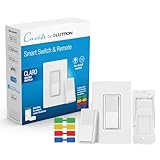
Overview:
The Lutron Claro Smart Switch Kit brings Caseta’s renowned reliability to a modern paddle-style design. Unlike dimmer variants, this is an on/off switch requiring a neutral wire but no minimum load. The kit includes the smart switch, Pico paddle remote, wallmount bracket, and coordinating wallplate—everything needed for a clean installation. Integration with the Caseta ecosystem requires a separate Smart Hub, positioning this as an expansion or aesthetic upgrade.
What Makes It Stand Out:
The updated Claro aesthetic features a sleek paddle design with a subtle LED indicator, matching contemporary decor better than traditional rocker switches. The included wallplate is a premium touch often sold separately. As part of the Caseta family, it inherits the same robust Clear Connect RF protocol, ensuring reliable operation without Wi-Fi dependency. The paddle remote offers intuitive on/off control.
Value for Money:
At $79.95 plus required hub ($80-100), this is a premium single-switch solution. The all-inclusive packaging (wallplate, remote, bracket) justifies some premium over basic Caseta dimmers. However, the neutral wire requirement narrows its applicability compared to no-neutral Caseta models. For those invested in the Caseta ecosystem wanting paddle controls, it’s reasonably priced, but it’s poor value as a standalone purchase without existing hub infrastructure.
Strengths and Weaknesses:
Strengths: Premium paddle design; Includes wallplate; Reliable Clear Connect; LED indicator; Complete kit; Works without Wi-Fi
Weaknesses: Neutral wire required; Hub sold separately; High total cost; No dimming; Limited to on/off
Bottom Line:
Ideal for Caseta users preferring paddle aesthetics, but the neutral requirement and hub cost limit its broader appeal.
5. Lutron Caseta Original Smart Dimmer Switch Kit w/ Hub, with Pico Remote, Wallmount Bracket, & Smart Hub, Works with Alexa, Apple Home, Google Home, 3 Way, 150W, No Neutral Req, P-BDG-PKG1W-A

Overview:
The Lutron Caseta Original Dimmer Kit is the complete entry point into Lutron’s premium smart lighting ecosystem. This all-in-one package includes the dimmer switch, Pico remote, wallmount bracket, and critically, the Smart Hub. Designed for any home regardless of wiring age, it requires no neutral wire while supporting 150W LED loads. The original aesthetic features dedicated brightness buttons alongside on/off, providing precise control.
What Makes It Stand Out:
Including the hub eliminates the common pitfall of incomplete purchases and provides immediate access to Lutron’s full feature set: geofencing, smart away, advanced scheduling, and multi-platform integration. The hub supports up to 75 devices, making this a scalable foundation. The Pico remote’s 10-year battery life and 30-foot wall penetration demonstrate Lutron’s engineering focus. Clear Connect RF technology ensures reliability Wi-Fi cannot match.
Value for Money:
At $114.95, this kit saves $15-25 versus buying components separately. While expensive compared to Wi-Fi switches, it delivers professional-grade reliability and ecosystem depth. The hub’s capacity for 75 devices reduces per-switch cost in whole-home installations. For those committing to Caseta, this is the most economical starting point. The premium is justified by build quality and system responsiveness that cheaper alternatives cannot replicate.
Strengths and Weaknesses:
Strengths: Hub included; No neutral required; Professional reliability; Scalable to 75 devices; Extensive integrations; 10-year remote battery; Clear Connect RF
Weaknesses: High upfront cost; Proprietary ecosystem; Requires app for advanced features; Limited to 150W LED
Bottom Line:
The definitive starter kit for Lutron’s best-in-class ecosystem, worth the premium for serious smart home builders.
6. Lutron Diva Smart Dimmer Light Switch 3-Way Kit for Caseta Smart Lighting, w/Plate, Pico Remote, Wallmount Bracket, and Label Stickers, No Neutral Required, DVRF-PKG1D-WH

Overview: The Lutron Diva Smart Dimmer 3-Way Kit transforms ordinary lighting into intelligent illumination without demanding electrical upgrades. This comprehensive package includes everything needed for installation: the dimmer switch, Pico remote, wallmount bracket, coordinating wall plate, and even wire label stickers. Designed for Caseta smart lighting, it bridges the gap between traditional wiring and modern automation.
What Makes It Stand Out: This kit’s crown jewel is its neutral-free operation, making it compatible with older homes where rewiring would be cost-prohibitive. The inclusion of a physical Pico remote with wallmount bracket means you can create a three-way switch anywhere without running new wires. The Diva design maintains familiar paddle operation while adding smart capabilities, easing the transition for tech-wary household members.
Value for Money: At $84.95, this kit sits in the premium tier but delivers exceptional value. Competing solutions often require expensive electrician visits for neutral wire installation, potentially costing hundreds more. The all-in-one packaging eliminates separate purchases, and Lutron’s reputation for reliability justifies the investment over budget brands that might fail within a year.
Strengths and Weaknesses: Strengths include no-neutral installation, comprehensive kit contents, extensive smart home compatibility, and rock-solid reliability. The 15-minute install claim holds true for most users. Weaknesses: requires separate Caseta Smart Hub for full functionality, limited to 150W LED/600W incandescent, and the price may deter those needing multiple units.
Bottom Line: For homeowners in older properties or anyone wanting a hassle-free smart dimming solution, this kit is worth every penny. The neutral-free design and complete package make it the easiest path to sophisticated lighting control without renovation headaches.
7. Lutron Caseta Deluxe Smart Light Switch Kit w/ Wall Plate and Smart Hub, Compatible w/ Alexa, Apple Home, Google Home, Single-Pole/3 Way, 5 Amp, P-BDG-PKG2WS-WH

Overview: The Lutron Caseta Deluxe Smart Light Switch Kit represents a complete ecosystem solution for whole-room automation. This premium bundle includes two smart switches, the essential Caseta Smart Hub, a wireless Pico remote, wall plate adapter, and coordinating wall plate. Engineered for single-pole or three-way configurations, it modernizes lighting control while preserving existing fixtures.
What Makes It Stand Out: The integrated Smart Hub is the game-changer, creating a dedicated wireless network that operates independently of your Wi-Fi, preventing congestion and ensuring reliable operation even during internet outages. The ability to control multiple fixtures from one switch offers design flexibility, while the Pico remote enables three-way functionality anywhere without new wiring. The system’s compatibility trifecta—Alexa, Apple Home, and Google Home—is unmatched.
Value for Money: At $179.95, this kit commands a premium but delivers professional-grade reliability. Purchasing components separately would cost significantly more, and the hub’s multi-device support spreads the cost across your entire smart home. Unlike Wi-Fi-only switches that can bog down networks, this system’s dedicated protocol prevents performance degradation, making it worth the extra cost for serious smart home enthusiasts.
Strengths and Weaknesses: Strengths include hub-based reliability, extensive compatibility, multi-fixture control, and clean installation. The neutral wire requirement ensures stable operation. Weaknesses: higher upfront cost, requires neutral wire (limiting older home use), and the 5-amp rating may not suit heavy-load applications. Some users report initial hub setup complexity.
Bottom Line: This deluxe kit is ideal for new construction or renovated homes with neutral wires. If you’re building a comprehensive smart home and value reliability over bargain pricing, the investment pays dividends in performance and peace of mind.
8. Lutron Caseta Original Smart Dimmer Switch Kit, 2 Dimmer Switches, 2 Wall Plates, 2 Pico Remotes, and Smart Hub, Works with Alexa, Apple Home, Google Home, 3 Way, 150W, No Neutral, P-BDG-PKG2W-A

Overview: The Lutron Caseta Original Smart Dimmer Switch Kit is the ultimate two-room starter package, delivering premium smart lighting control with zero compromise. This deluxe bundle includes two dimmer switches, two Pico remotes, two wall plates, and the Smart Hub—everything needed to transform multiple spaces. The no-neutral design ensures compatibility across virtually any home configuration.
What Makes It Stand Out: This kit’s deluxe aesthetic features dedicated raise/lower buttons alongside on/off, providing granular control that basic switches lack. Each Pico remote can independently control up to 10 Caseta devices, creating a mesh of control points throughout your home. The 10-year battery life on remotes means set-and-forget convenience. Lutron’s claim as the “most connected” brand holds true with support for Alexa, Apple Home, Google Home, Ring, Sonos, and Samsung SmartThings.
Value for Money: Priced at $232.79 for the two-switch kit ($116.40 per switch), this represents the premium tier. However, you’re getting hub, remotes, and plates included—items that add $50+ when purchased separately. For homes needing multiple smart switches, this kit saves money while delivering Lutron’s legendary reliability and neutral-free installation that competitors can’t match.
Strengths and Weaknesses: Strengths include no-neutral requirement, comprehensive kit contents, exceptional connectivity, long-range Pico remotes, and premium build quality. The 150W LED capacity suits most residential needs. Weaknesses: highest price point in consumer smart switches, hub is mandatory for app control, and the design may feel complex for users wanting simple on/off.
Bottom Line: For those committed to whole-home smart lighting, this kit is the gold standard. The combination of installation flexibility, comprehensive features, and future-proof connectivity justifies the premium for serious smart home adopters.
9. Kasa Smart Light Switch HS200, Single Pole, Needs Neutral Wire, 2.4GHz Wi-Fi Light Switch Works with Google Home, UL Certified, No Hub Required, White

Overview: The Kasa Smart Light Switch HS200 democratizes home automation with an ultra-affordable, no-frills approach to smart lighting. This single-pole switch leverages existing 2.4GHz Wi-Fi networks, eliminating the need for proprietary hubs. Designed by Silicon Valley veterans TP-Link, it promises straightforward app-guided installation and broad compatibility with major voice assistants, making smart lighting accessible to the masses.
What Makes It Stand Out: The HS200’s primary differentiator is its price-to-performance ratio—delivering core smart features at a fraction of competitor costs. The app-guided installation walks novices through wiring step-by-step, reducing intimidation. With over 4 million users and UL certification, it offers proven safety and reliability without premium branding. The “Away Mode” randomly cycles lights to simulate occupancy, a security feature often reserved for pricier systems.
Value for Money: At $15.99, this switch redefines value. It’s perfect for testing smart home waters or outfitting an entire house on a budget. While Lutron and similar brands charge 5-10x more, Kasa delivers essential scheduling, remote control, and voice integration. The lack of a hub saves additional money, though the neutral wire requirement may necessitate electrician costs in older homes, potentially offsetting savings.
Strengths and Weaknesses: Strengths include unbeatable price, simple installation, reliable app, voice control, scheduling, and UL safety certification. Weaknesses: requires neutral wire (limiting compatibility), 2.4GHz-only Wi-Fi can be congested, no dimming capability, and cloud dependency means potential latency issues. Build quality feels less substantial than premium brands.
Bottom Line: For cost-conscious buyers in modern homes with neutral wires, the Kasa HS200 is a no-brainer. It delivers reliable smart control at a price that makes whole-home automation financially feasible without sacrificing core functionality.
10. Eaton Wi-Fi Smart Home Switch Works with Hey Google and Alexa, Color Change Kit (White/Light Almond/Ivory)

Overview: The Eaton Wi-Fi Smart Home Switch offers a middle-ground solution between budget and premium smart lighting, emphasizing flexibility and ease of use. This single-switch kit includes interchangeable faceplates in white, light almond, and ivory, ensuring seamless integration with existing décor. Operating without a hub, it connects directly to 2.4GHz Wi-Fi and supports both Google and Alexa voice control, targeting homeowners seeking straightforward automation.
What Makes It Stand Out: The color-change kit is a standout feature, eliminating the common frustration of mismatched switch plates. Eaton’s LED installation indicators provide visual confirmation of correct wiring—a small but valuable innovation for DIY installers. The “Areas” feature allows grouping multiple devices by room, creating cohesive scenes and schedules. Eaton’s electrical heritage lends credibility to safety and longevity claims that generic brands can’t match.
Value for Money: At $50.54, Eaton positions itself as a step-up from budget options without reaching Lutron’s premium pricing. The included color kits add value, and hub-free operation saves money. However, it lacks dimming capability and requires a neutral wire, potentially limiting its audience. For users wanting brand reliability beyond TP-Link but balking at Lutron prices, Eaton fills a sensible middle market.
Strengths and Weaknesses: Strengths include color customization, installation LED indicators, reputable brand, schedule/scene creation, and area grouping. The app is intuitive for basic setups. Weaknesses: no dimming function, neutral wire required, limited to 2.4GHz Wi-Fi, fewer third-party integrations than competitors, and the design feels utilitarian rather than premium.
Bottom Line: The Eaton smart switch suits practical homeowners who prioritize function over flash. If you need reliable on/off control with basic scheduling and don’t require dimming, this offers solid value with the flexibility to match your home’s aesthetic.
Understanding Your Old Home’s Electrical System
The Age Factor: Pre-1980s Wiring
Homes built before 1980 often lack the neutral wires that modern smart switches require for continuous power. Your switch boxes might contain just two wires—a hot (black) and a switched hot (red or black)—with the neutral connection made at the light fixture itself. This wasn’t sloppy work; it was standard practice that saved copper and worked perfectly for simple mechanical switches. Smart switches, however, need that ever-present neutral to power their internal electronics even when the light is off. Understanding your home’s era helps you shop for compatible solutions from the start.
Identifying Your Wiring Type Without Opening Walls
You don’t need to demolish plaster to understand what you’re working with. Start at your electrical panel—Federal Pacific and Zinsco panels from the 1950s-70s signal specific eras and potential safety concerns. Remove a switch faceplate and shine a flashlight into the box: if you see only two wires connected to the switch (plus possibly a ground), you’re likely missing a neutral. Three or more wires suggest a neutral might be present. Take photos with your phone; the wire colors and their configuration tell a story that product manuals will reference.
Why Neutral Wires Matter in Smart Switch Installation
The neutral wire completes the circuit back to the panel, allowing current to flow continuously to your smart switch’s brain. Without it, the switch can only receive power when the light is on—making remote control impossible when the light is off. Some “no-neutral” smart switches work around this by sending tiny amounts of current through the light bulb, but this can cause LED flickering or require a minimum wattage that modern efficient bulbs don’t meet. Knowing your neutral status is the single most important factor in kit selection.
What Makes a Smart Switch Kit “DIY-Friendly”?
Tool-Free Installation Features
Look for kits that include lever-nut connectors or Wago-style push-in terminals rather than traditional wire nuts. These allow you to connect wires by simply stripping and inserting them—no twisting, no tape, no third hand needed. Some advanced kits come with pre-wired pigtails that connect to your existing wires with snap-on terminals, reducing the time your circuits remain exposed and minimizing the risk of loose connections in cramped boxes.
Clear, Visual Instruction Guides
The best kits provide augmented reality app guides or at least large, color-coded diagrams showing exactly which wire goes where for every possible configuration. They’ll have separate instructions for single-pole, three-way, and four-way setups, with photos of actual vintage wiring scenarios rather than pristine modern examples. Some manufacturers offer video call support where you can show an electrician your specific box configuration before you start.
Pre-Wired Components and Color-Coded Systems
DIY-friendly kits often include pre-configured wire bundles where the neutral, ground, and traveler wires are already bundled together with clear labeling. This eliminates guesswork about which wire serves which function. Color-coded stickers that you apply to your existing wires before disconnecting the old switch can be a lifesaver when you’re trying to remember which black wire was the hot versus the traveler in a three-way setup.
Single-App Ecosystem Simplicity
Kits designed for DIY success use one app for setup, control, and troubleshooting. Avoid systems that require separate apps for installation, device control, and hub management. The ideal app walks you through installation step-by-step, tests each connection as you make it, and provides real-time feedback if something isn’t wired correctly—before you button everything up and wonder why the switch won’t pair.
Critical Compatibility Factors for Vintage Homes
No-Neutral Solutions: Fact vs. Marketing
Many kits claim “no-neutral required,” but read the fine print. Some require a minimum load of 10-25 watts, meaning they’ll only work with multiple incandescent bulbs or a specific “bypass” module installed at the fixture. Others use proprietary communication protocols that may conflict with your Wi-Fi network. True no-neutral switches use capacitive coupling or other advanced electronics to draw negligible power without causing flickering, but these typically cost more and may have fewer features.
Multi-Way Switch Configurations in Older Homes
That stairway light controlled by three switches? That’s a four-way circuit (three switches controlling one light), and it’s common in old homes. DIY-friendly kits handle this by designating one “master” smart switch and providing “add-on” switches that communicate via traveler wires or wirelessly. The key is finding kits where the add-on switches don’t require neutrals themselves and can fit in shallow boxes that might be just 1.5 inches deep.
Low-Wattage LED Compatibility Issues
Your vintage chandelier with four 4-watt LED bulbs totals just 16 watts—below the threshold many smart switches need to function properly without a neutral. Look for kits that specifically mention “low-wattage LED compatible” or include an adjustable minimum load setting. Some switches let you configure this in the app, telling the switch to expect less than 10 watts and adjusting its internal power draw accordingly.
Metal Box Considerations and Wi-Fi Interference
Old homes often have heavy-duty metal electrical boxes that can block Wi-Fi signals. If your switch box is metal and buried in lath-and-plaster walls, a Wi-Fi-based switch might struggle to maintain connection. Consider kits that use Z-Wave or Zigbee protocols, which create mesh networks where each device repeats the signal. Alternatively, look for switches with external antennas or signal boosters designed specifically for metal box installations.
Hub-Based vs. Hubless: Which Works Better for Old Homes?
When a Hub Makes Sense for Unreliable Wi-Fi
If your old home’s thick walls create Wi-Fi dead zones, a hub-based system using Z-Wave or Zigbee can be more reliable than individual Wi-Fi switches. The hub connects to your router via ethernet and creates its own mesh network that penetrates walls better than 2.4GHz Wi-Fi. Plus, one hub can manage dozens of switches without clogging your Wi-Fi bandwidth. Kits that include a hub often provide better out-of-the-box reliability for vintage homes.
Hubless Systems: True Convenience or False Promise?
Hubless Wi-Fi switches seem simpler—no extra hardware to buy and configure. However, each switch competes for Wi-Fi bandwidth and must maintain its own cloud connection. In old homes with spotty Wi-Fi, this can lead to switches that respond slowly or drop offline randomly. That said, if you have strong mesh Wi-Fi and few switches, hubless kits eliminate a potential point of failure and often cost less initially.
Hybrid Approaches: The Best of Both Worlds
Some modern kits offer hybrid functionality: they work hubless for basic control but can connect to an optional hub for advanced automation and better reliability. This gives you the flexibility to start small and add a hub later if you expand your system or encounter connectivity issues. For old homes, this “future-proofing” approach makes sense, as you may not discover Wi-Fi dead zones until after installation.
Wiring Requirements Demystified
Three-Wire vs. Four-Wire Setups
A three-wire setup (hot, neutral, ground) is standard in modern homes but rare in vintage ones. Four-wire adds a traveler for three-way circuits. DIY-friendly kits clearly explain how to adapt their switches to your existing wire count. Some include a “rewire the fixture” option where you pull a neutral from the light box to the switch box using the existing cable—often possible in old homes where wires are run through open wall cavities or conduits.
Ground Wire Reality Checks in Older Homes
Many old homes have no ground wires, or the ground is present but not connected. While some smart switches claim to work without a ground, this violates electrical code and creates a shock hazard. Quality kits include instructions for properly grounding the switch, either by connecting to a metal box (if the box is grounded via conduit) or by installing a GFCI breaker upstream. Never skip the ground—it’s your safety net.
Dealing with Shallow Electrical Boxes
Vintage boxes are often just 1.5 inches deep, while modern smart switches need 2+ inches of clearance. DIY-friendly kits address this by offering shallow-depth switches or extension ring adapters that fit between the box and faceplate. Some use flexible wire connectors that fold flat against the box back, and others have removable heat sinks to reduce depth. Always measure your box depth before ordering.
Advanced Features Worth Paying Extra For
Energy Monitoring Capabilities
Old homes are notoriously inefficient. Smart switches with energy monitoring let you identify which vintage fixtures are costing you the most. Look for kits that provide real-time wattage, daily usage graphs, and cost calculations based on your electric rate. This data can pay for the switches by revealing which “vintage charm” lights should be swapped for efficient LEDs.
Scene and Automation Programming
The real magic happens when you program scenes: “Movie Night” dims the living room sconces to 30%, “Bedtime” turns off all lights except a hallway nightlight path. DIY-friendly kits make this intuitive with drag-and-drop app interfaces and pre-built templates for common scenarios. For old homes, look for “whole house” scenes that can control mixed-era wiring circuits simultaneously.
Vacation Mode and Security Integration
Randomizing your lights while you’re away deters burglars who target dark old homes. Advanced kits simulate occupancy by learning your patterns and varying on/off times slightly each day. Integration with door/window sensors lets lights respond to actual entry points—particularly valuable in homes with original single-pane windows that are easier to breach.
Dimming Precision for Antique Fixtures
Your 1910 Tiffany-style pendant deserves smooth, flicker-free dimming. Cheap smart switches dim in coarse 10% steps that can buzz or flicker. Premium kits offer 1% increments and adjustable dimming curves that match incandescent, LED, or even vintage fluorescent fixtures. Some include “minimum brightness” settings to prevent LEDs from cutting out at low levels.
Aesthetic Considerations for Period Homes
Faceplate Design and Historical Accuracy
Bright white plastic faceplashes look jarringly modern against restored plaster. Look for kits that include or offer separately period-appropriate faceplates: brushed brass, antique bronze, or even custom paintable plates that match your trim. Some manufacturers make “no logo” faceplates that maintain the historical illusion.
Button vs. Paddle: Maintaining Character
Toggle switches scream “vintage,” but smart toggles are rare and often unreliable. The compromise is a paddle switch with a subtle LED indicator that can be disabled. Some kits offer “momentary” paddles that click like a traditional switch but return to center, maintaining the feel while enabling smart control. For maximum authenticity, look for switches that can operate manually even if the Wi-Fi is down.
LED Indicator Light Customization
That blue LED might look futuristic, but it’s inappropriate in a Victorian parlor. Quality kits let you adjust indicator brightness, color, or disable it entirely in the app. Some even offer “night mode” where the indicator only glows when the light is off, providing location visibility without ruining the room’s ambiance.
The Installation Process: Step-by-Step Overview
Pre-Installation Safety Protocols
Turn off the breaker, not just the switch. Test with a non-contact voltage tester, then test again. In old homes, it’s not uncommon for circuits to be mislabeled or for a single box to contain wires from multiple breakers. Take a photo of the original wiring from multiple angles before touching anything. Keep a battery-powered work light handy—old homes have fewer outlets, and you’ll be working in the dark.
Testing Voltage and Identifying Wires
Use a multimeter to confirm which wire is hot, even if you think you know. In old homes, previous DIYers may have ignored color codes. Test between each wire and ground (or the metal box) to identify the line (hot) and load (switched hot). The line will show 120V regardless of switch position; the load will only show voltage when the switch is on.
Configuring Multi-Way Circuits
For three-way setups, identify the “common” wire on the old switch—it’s usually the dark-colored screw or the one attached to a black screw. This wire goes to the “line” or “load” terminal on your smart switch. The other two wires are travelers. DIY-friendly kits include stickers to label these before disconnection. The master switch goes where the line power enters the circuit; add-ons go in the other positions.
Securing Connections in Crowded Boxes
Old boxes are cramped. Use 90-degree screwdrivers and needle-nose pliers to maneuver wires. Fold wires in a “Z” pattern rather than stuffing them haphazardly. If the box is metal, ensure no bare wire touches the box sides—use electrical tape to insulate switch terminals if needed. The goal is a secure connection that won’t vibrate loose over time.
Troubleshooting Common Old Home Issues
Flickering Lights and Ghost Dimming
This usually means the switch’s minimum load requirement isn’t met. First, try replacing one LED with an incandescent bulb to increase load. If that fixes it, you need a bypass module or a switch with lower minimum wattage. Some kits include these modules; others sell them separately. Flickering can also indicate loose neutral connections—double-check all wire nuts.
Weak Wi-Fi Signals Through Plaster Walls
Lath-and-plaster and metal mesh create a Faraday cage effect. If your switch won’t stay connected, try a Z-Wave or Zigbee kit instead. For Wi-Fi switches, install a mesh Wi-Fi node in the same room or hallway. Some advanced kits let you adjust the Wi-Fi transmit power in the app—boosting it can help penetrate old walls.
Circuit Breaker Tripping After Installation
This often means you’ve created a short circuit or the switch is drawing too much current. Remove the switch and test with a multimeter for continuity between wires. Check that you haven’t accidentally connected the neutral to ground. Some smart switches have internal fuses that trip if miswired—check the manual for reset procedures. If the breaker trips immediately, you’ve likely crossed wires.
When Smart Switches Conflict with Each Other
In old homes with multiple circuits, you might install smart switches that interfere with each other’s signals. This is especially true with no-neutral switches that leak small currents. Use switches from the same ecosystem that are designed to work together. If problems persist, install a “filter” module at the electrical panel to isolate the circuits—some kits include these for multi-switch installations.
Budget Planning and Hidden Costs
Starter Kit vs. Individual Purchase Math
A kit with 3-5 switches plus a hub often costs 20-30% less than buying individually. But don’t overbuy. Start with one switch to test compatibility with your wiring, then expand. Some manufacturers offer “expansion packs” without the hub at a discount. Factor in the cost of bypass modules ($10-15 each) for no-neutral installations and possible electrician consultations.
Professional Help: When to Call an Electrician
If you encounter aluminum wiring, cloth-insulated wires that crumble, or signs of previous dangerous modifications, stop and call a licensed electrician. Also seek help if your boxes are too shallow and you’re uncomfortable installing extension rings. A one-hour consultation ($150-200) can save you from a house fire. Many electricians will review your photos and advise if a project is DIY-appropriate.
Subscription Fees and Cloud Dependencies
Avoid kits that require monthly fees for basic functionality. Some advanced features like energy history beyond 30 days or cloud-based automation may require subscriptions, but core on/off/dimming should be free. Read the fine print: if the company goes out of business, will your switches still work? Hub-based systems with local control are more resilient than pure cloud systems.
Safety First: Non-Negotiable Precautions
Understanding Your Home’s Electrical Capacity
Old homes often have 60-amp service and may be near capacity. Adding smart switches doesn’t increase load significantly, but if you’re adding smart switches plus other modern appliances, check your panel’s spare capacity. A switch typically draws less than 1 watt standby, but 20 switches equal another 20-watt bulb running 24/7. Calculate this into your electrical budget.
AFCI/GFCI Protection Requirements
Modern code requires AFCI protection in living areas and GFCI in kitchens and baths. If you’re replacing switches in these locations, you may need to upgrade the breaker—an easy DIY task on most panels. Some smart switches include built-in AFCI/GFCI protection, but these are rare. Check local codes; some jurisdictions exempt historical homes from retroactive requirements.
Insurance Implications of DIY Electrical Work
Most homeowner’s policies cover DIY electrical work if it’s done to code. However, creating a hazard through improper installation can void coverage. Keep all manuals, take photos of your work, and consider having an electrician inspect and sign off on your installation. Some insurers offer discounts for smart home devices that detect electrical faults—ask your agent.
Frequently Asked Questions
Can I install smart switches if my home still has knob-and-tube wiring?
Yes, but with significant caveats. Knob-and-tube systems lack ground wires and often have no neutral in switch boxes. You’ll need a true no-neutral smart switch and must ensure the knob-and-tube insulation is intact. Most importantly, knob-and-tube circuits shouldn’t be overloaded—if the circuit already serves multiple rooms, consult an electrician before adding any continuous load. Never connect smart switches to knob-and-tube in insulated walls, as heat buildup is a fire hazard.
Why do my LED bulbs flicker even with a “no-flicker” smart switch?
Flickering usually indicates the switch’s minimum load threshold isn’t met, but it can also stem from incompatible LED drivers. Try “dimmable” rated LEDs from major brands, as off-brand bulbs often have poor internal drivers. If flickering occurs at low dim levels, increase the switch’s minimum dim setting in the app. For persistent issues, install a load resistor or bypass module at the fixture to provide a stable baseline current.
How do I know if my electrical box is too shallow for a smart switch?
Measure from the back of the box to the wall surface. Most smart switches need 2-2.5 inches of depth. If you have less than 1.75 inches, you’ll need a shallow-depth switch or an extension ring. Extension rings add about 0.5 inches and fit between the box and faceplate—they’re paintable and barely noticeable. Some smart switches are specifically designed for shallow boxes and list their depth requirements prominently in specifications.
Will smart switches work in a home with a 60-amp electrical service?
Absolutely. Smart switches consume less than 1 watt each in standby mode—less than a nightlight. A whole house of 30 smart switches uses under 30 watts continuously, adding about $3-5 annually to your electric bill. The real concern is your overall service capacity if you’re also running modern appliances. If your main breaker trips regularly, the issue is total load, not the switches themselves.
What’s the difference between Z-Wave, Zigbee, and Wi-Fi for old homes?
Wi-Fi connects directly to your router but struggles with thick walls and metal boxes. Z-Wave and Zigbee create mesh networks where each device repeats the signal, penetrating old construction better. Z-Wave operates on a lower frequency (908 MHz) that passes through walls more effectively than Zigbee’s 2.4GHz. However, Wi-Fi switches are often cheaper and don’t require a hub. For reliability in old homes, Z-Wave generally performs best, followed by Zigbee, with Wi-Fi working only if you have strong signal at each switch location.
Can I mix smart switches from different brands in the same home?
Yes, but they’ll operate in separate apps and can’t easily coordinate scenes. You can mix them on the same electrical circuits without issue, but for automation, stick to one ecosystem. If you want to mix brands, use a universal hub like SmartThings or Hubitat that supports multiple protocols. For DIY simplicity, though, starting with one brand’s complete kit avoids integration headaches and ensures consistent installation instructions.
Do I need to replace all switches in a three-way circuit with smart switches?
No, and doing so can cause conflicts. In a three-way setup, you need one smart master switch and one or two “companion” or “add-on” switches, depending on your wiring. The add-ons communicate with the master via traveler wires or wirelessly—they’re not full smart switches themselves. Using mismatched smart switches in a three-way circuit will result in lights that turn on randomly or switches that don’t reflect the correct on/off state.
How do I handle smart switch installation if my home has plaster walls?
Plaster is brittle and cracks easily. Use a utility knife to score around the old switch before removal to prevent crumbling. When pushing the new switch into the box, support the plaster from behind with your hand to minimize stress. If you need to enlarge the box opening, use an oscillating tool with a diamond blade rather than a drywall saw, which can cause large cracks. Always wear a dust mask—old plaster may contain lead or other hazardous materials.
What should I do if my smart switch feels warm to the touch?
Slight warmth is normal—smart switches contain transformers and voltage regulators that dissipate heat. However, if it’s hot enough that you can’t comfortably hold your finger on it, that’s a problem. Turn off the breaker and check for loose connections, which cause resistance heating. Ensure you’re not exceeding the switch’s maximum load rating (usually 600W incandescent, 150W LED). If warmth persists and connections are tight, the switch may be defective. Quality switches should stay below 110°F during normal operation.
Are there smart switch solutions for push-button switches in old homes?
Yes, several manufacturers make smart push-button switches that mimic the look and feel of vintage ones while providing modern control. These typically use momentary buttons that send a signal to the smart relay rather than directly interrupting power. They require a neutral and often need deeper boxes, but they maintain historical accuracy. For a less expensive option, some kits include button-style faceplates that fit over standard smart paddles, though these lack the authentic click feel.