Tired of monthly subscription fees eating into your security budget? You’re not alone. The shift toward facial recognition cameras with local storage represents a fundamental change in how homeowners and businesses approach surveillance—one that puts privacy, control, and long-term savings back in your hands. While cloud-based systems promise convenience, they often come with recurring costs, potential data vulnerabilities, and reliance on internet connectivity that can leave you blind when you need visibility most.
Local storage facial recognition cameras offer a compelling alternative, processing and storing everything on-device or within your private network. This approach eliminates monthly fees while giving you complete ownership of your biometric data. But not all systems are created equal, and navigating the technical landscape requires understanding nuanced features that impact everything from recognition accuracy to legal compliance. Let’s explore what separates exceptional local storage solutions from disappointing compromises.
Top 10 Facial Recognition Cameras with Local Storage
Detailed Product Reviews
1. eufy Security SoloCam E42 4-Cam Kit (HomeBase S380), 4K Security Camera Wireless Outdoor, Solar Powered, AI Motion Tracking, Strobe Light, Pan & Tilt, Facial Recognition, Local Storage Up to 16 TB

Overview: The eufy SoloCam E42 4-Cam Kit delivers comprehensive property surveillance through four wireless 4K cameras powered by solar technology. This system targets homeowners seeking maintenance-free, high-resolution security without recurring subscription fees. The included HomeBase S380 centralizes AI processing and storage, creating an integrated ecosystem for whole-home protection.
What Makes It Stand Out: The combination of true 4K resolution with license plate recognition at 33 feet sets a new clarity standard. SolarPlus 2.0 technology requires only two hours of daily sunlight for continuous operation, eliminating battery changes. The pan and tilt functionality with AI motion tracking ensures no event goes unrecorded, while the motion-activated strobe light actively deters intruders rather than just recording them.
Value for Money: At $599.99, you’re investing $150 per camera—competitive with premium brands but without monthly fees that typically cost $10-30 monthly. Over three years, this saves $360-1,080 compared to subscription-based alternatives. The 16TB expandable local storage ensures you own your footage permanently, making it financially sound for long-term security needs.
Strengths and Weaknesses: Strengths include exceptional 4K clarity, maintenance-free solar power, intelligent AI tracking, and zero subscription costs. The system scales excellently for medium to large properties. Weaknesses involve the high upfront investment and reliance on adequate sunlight for optimal solar performance. Installation may require strategic placement for both security coverage and sun exposure.
Bottom Line: This premium kit excels for homeowners wanting comprehensive, hassle-free security with professional-grade features and no hidden costs.
2. eufy Security SoloCam E42 2-Cam Kit (HomeBase S380), 4K Security Camera Wireless Outdoor, Solar Powered, AI Motion Tracking, Strobe Light, Pan & Tilt, Facial Recognition, Local Storage Up to 16 TB

Overview: This streamlined 2-camera kit offers the same premium 4K surveillance technology as its 4-camera sibling, designed for targeted security coverage of smaller properties or specific high-risk zones. The HomeBase S380 provides centralized AI processing and massive storage expansion, maintaining the ecosystem’s intelligence while reducing initial investment.
What Makes It Stand Out: You get identical 4K resolution with license plate recognition and solar-powered maintenance-free operation, just with two cameras instead of four. The AI motion tracking, pan/tilt functionality, and deterrent strobe light remain fully intact, ensuring no compromise on per-camera capability. This modular approach lets you expand later by adding individual cameras.
Value for Money: Priced at $399.99, the per-camera cost rises to $200, but you save $200 upfront compared to the 4-camera bundle. This makes sense for apartments, townhomes, or focused coverage areas like entry points and driveways. The absence of monthly fees continues delivering long-term savings, and you can scale the system incrementally as needs grow.
Strengths and Weaknesses: Strengths include flagship features at a reduced price, future expandability, and the same solar efficiency and AI intelligence. The system remains subscription-free with excellent video quality. Weaknesses are limited coverage out-of-the-box, higher per-camera cost, and potential need for additional cameras to secure larger properties, increasing total investment over time.
Bottom Line: Ideal for budget-conscious buyers wanting premium features with the flexibility to expand their security network gradually.
3. eufy Security eufyCam C35 4-Cam Kit, Wireless Security Indoor/Outdoor Camera, Magnetic Mount, Color Night Vision, Local Storage, No Monthly Fee, IP67, Facial Recognition, Solar Panel Compatible, White

Overview: The eufyCam C35 4-Cam Kit revolutionizes affordable home security with its tool-free magnetic installation and impressive color night vision capabilities. Designed for renters and homeowners alike, this system prioritizes convenience and value while delivering essential smart features without the premium price tag or recurring fees.
What Makes It Stand Out: The magnetic mounting system enables literally seconds-long installation on any metal surface without drilling, perfect for temporary or rental properties. Spotlight-free color night vision reveals critical details like faces and plates in complete darkness without disturbing neighbors. The dual storage approach—HomeBase Mini plus individual microSD slots—provides unusual flexibility at this price point.
Value for Money: At $199.97 for four cameras (under $50 per unit), this represents exceptional value. While lacking 4K resolution, it includes facial recognition, IP67 weatherproofing, and cross-camera tracking—features typically found in systems costing twice as much. The solar compatibility (panel sold separately) offers future upgrade potential without forcing immediate investment.
Strengths and Weaknesses: Strengths include revolutionary easy installation, affordable color night vision, flexible storage options, and robust weather resistance. The no-subscription model remains compelling. Weaknesses are lower video resolution compared to premium models, less powerful HomeBase Mini, and lack of included solar panels requiring additional purchase for wireless operation.
Bottom Line: The best budget-friendly option for comprehensive coverage, combining innovative installation with solid performance and zero ongoing costs.
4. eufy Security eufyCam S3 Pro 4-Cam Kit, Solar Camera Outdoor Wireless, MaxColor Night Vision, 4K Security Camera with Solar Panel, Face Recognition AI, Expandable Local Storage, No Monthly Fee

Overview: The eufyCam S3 Pro represents the pinnacle of consumer security technology, delivering unmatched nighttime performance and intelligent detection. This flagship 4-camera system combines 4K resolution with revolutionary MaxColor Vision and radar-powered accuracy, targeting tech enthusiasts who demand the best surveillance capabilities without subscription shackles.
What Makes It Stand Out: MaxColor Vision technology achieves daylight-level clarity in near-darkness without spotlights—surpassing traditional night vision. The dual radar-PIR motion detection reduces false alarms by 99%, a game-changer for busy properties. Including two backup solar panels ensures uninterrupted operation during cloudy periods, while HomeKit integration appeals to Apple ecosystem users seeking seamless smart home integration.
Value for Money: At $799.99, this commands a premium but justifies it through included accessories (backup panels) and advanced technology. The radar detection alone saves countless hours reviewing false triggers, while MaxColor Vision provides evidence-grade nighttime footage competitors can’t match. For users in high-crime areas or with valuable property, the reliability and clarity offer peace of mind worth the investment.
Strengths and Weaknesses: Strengths include industry-leading night vision, exceptional false-alert reduction, comprehensive solar backup, HomeKit compatibility, and massive 16TB storage potential. Weaknesses center on the steep price, complexity that may overwhelm casual users, and 1080p limitation when using HomeKit. The system is over-engineered for basic security needs.
Bottom Line: The ultimate choice for discerning users prioritizing nighttime performance and intelligent detection, delivering professional-grade security without monthly fees.
5. eufy Security eufyCam C35 2-Cam Kit, Wireless Security Indoor/Outdoor Camera, Magnetic Mount, Color Night Vision, Local Storage, No Monthly Fee, IP67, Facial Recognition, Solar Panel Compatible, White

Overview: This compact 2-camera version of the C35 system brings magnetic-mount convenience and color night vision to smaller spaces at an entry-level price. Perfect for apartments, condos, or monitoring specific rooms, it maintains the core benefits of easy installation and subscription-free operation while significantly reducing upfront costs.
What Makes It Stand Out: You retain the revolutionary magnetic mounting system that installs in seconds without tools or damage—ideal for renters. The spotlight-free color night vision technology delivers impressive low-light performance that embarrasses traditional cameras at this price. Facial recognition and cross-camera tracking powered by HomeBase Mini provide unexpected intelligence for a budget system.
Value for Money: At $129.97, this is the most affordable path to intelligent security at roughly $65 per camera. It eliminates the primary barrier to home security: cost and complexity. While you’ll need to purchase microSD cards separately and solar panels for wireless freedom, the base system provides tremendous value for securing entry points or small living spaces without monthly fees.
Strengths and Weaknesses: Strengths include unbeatable price, simplest installation in the category, color night vision, IP67 durability, and no subscriptions. The system punches far above its weight class. Weaknesses are limited coverage with only two cameras, lower resolution than premium models, required app updates for smooth operation, and lack of included storage media.
Bottom Line: An outstanding starter system for first-time security users or renters needing effective, non-permanent protection without financial commitment.
6. eufy security eufyCam S300(eufyCam 3C)3-Cam Kit, Security Camera Outdoor Wireless, 4K Camera, Expandable Local Storage, Face Recognition AI, Spotlight, Color Night Vision, 2.4GHz Wi-Fi, No Monthly Fee

Overview:
The eufyCam 3C 3-Cam Kit delivers premium 4K surveillance without subscription fees. This wireless system offers facial recognition, color night vision, and remarkable 180-day battery life per charge, making it ideal for comprehensive home security.
What Makes It Stand Out:
The 4K resolution with Starlight sensor provides exceptional clarity day and night. Its BionicMind AI learns to distinguish family from strangers, reducing false alerts. The expandable local storage (up to 16TB) gives you lifetime video archives without cloud costs, while 180-day battery life minimizes maintenance.
Value for Money:
At $279.99 for three cameras, you’re getting flagship features for under $94 per unit. Competitors charge $10-15 monthly for similar AI and storage, making this kit pay for itself within two years. The included 16GB built-in storage is generous, and expansion costs only the price of a hard drive.
Strengths and Weaknesses:
Pros: True 4K resolution; exceptional battery life; powerful AI facial recognition; massive expandable storage; no subscription required; color night vision; easy voice control integration.
Cons: 2.4GHz Wi-Fi only may limit bandwidth; initial setup can be complex; expandable storage requires additional purchase; face recognition needs training time.
Bottom Line:
The eufyCam 3C is a top-tier choice for homeowners wanting professional-grade security without recurring fees. The 4K clarity, smart AI, and unlimited local storage justify the premium price, making it a wise long-term investment.
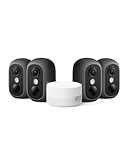
7. eufy Security eufyCam C35 4-Cam Kit, Wireless Security Indoor/Outdoor Camera, Magnetic Mount, Color Night Vision, Local Storage, No Monthly Fee, IP67, Facial Recognition, Solar Panel Compatible, Black
Overview:
The eufyCam C35 4-Cam Kit offers versatile indoor/outdoor security with innovative magnetic mounting and solar compatibility. At $199.99 for four cameras, it balances affordability with advanced features like facial recognition and color night vision.
What Makes It Stand Out:
The magnetic, screw-free installation is revolutionary—snap onto metal surfaces in seconds without drilling. Its spotlight-free color night vision captures crucial details like faces and license plates without disturbing neighbors. The HomeBase Mini enables cross-camera tracking, creating a cohesive security network.
Value for Money:
Four cameras for $200 equals $50 per unit—exceptional value for AI-powered security. The dual storage options (HomeBase up to 1TB plus microSD up to 256GB) provide flexibility without mandatory subscriptions. Solar panel compatibility eliminates battery replacement costs, saving hundreds over the system’s lifetime.
Strengths and Weaknesses:
Pros: Tool-free magnetic installation; IP67 weatherproof rating; dual storage options; solar panel ready; no monthly fees; cross-camera tracking; color night vision without spotlight.
Cons: Requires HomeBase Mini (included) but incompatible with other eufy bases; microSD card not included; app version requirements may confuse some users; facial recognition less advanced than premium models.
Bottom Line:
Perfect for renters and homeowners seeking flexible, affordable security. The magnetic mounting and solar option make it uniquely adaptable, while the four-camera coverage at this price point is hard to beat for value-conscious buyers.
8. CINMOORE 5G Security Camera Indoor 3-Pack, No-Monthly-Fee AI Tracking Facial Recognition, 3K Pet/Dog Camera with Speaker/Phone App, PTZ WiFi Baby Monitor Cameras for Home Security, 0-Glow Night Vision

Overview:
The CINMOORE 5G Indoor 3-Pack delivers impressive 3K resolution and AI-powered monitoring for just $99.99. Designed for pet and baby monitoring, it offers facial recognition, dual-band WiFi 6, and true full-duplex audio without subscription fees.
What Makes It Stand Out:
This system stores five family faces locally with bank-level encryption—zero cloud uploads for maximum privacy. The dual-band WiFi 6 connectivity reduces dropouts by 63% compared to 2.4GHz-only cameras. Full-duplex audio lets you simultaneously listen and talk, unlike traditional walkie-talkie-style cameras.
Value for Money:
At $33 per camera, this is budget-friendly yet feature-rich. Competitors charge $10+/month for AI detection, meaning this kit saves $120+ annually. The 3K resolution surpasses typical 1080p indoor cameras, while WiFi 6 future-proofs your investment. The “spend $20 now, save $100 later” approach is genuinely accurate.
Strengths and Weaknesses:
Pros: Affordable 3K resolution; local AI facial recognition; WiFi 6 dual-band; full-duplex two-way audio; zero-glow night vision; no mandatory subscription; expandable 512GB SD storage.
Cons: Indoor-only design; brand less established than competitors; setup may require tech-savviness; cloud storage is optional paid add-on; microSD card not included.
Bottom Line:
An excellent choice for parents and pet owners wanting premium features on a budget. The local AI processing, WiFi 6, and 3K clarity make it a standout value, though it’s best for those comfortable with DIY tech setup.
9. Lockin Veno Plus Smart Lock with 2K 180° Security Camera & Video Doorbell, AI Local Storage, Palm Vein/Fingerprint Keyless Entry Door Lock, Smart Locks for Front Door Bulit in Wi-Fi, App Control

Overview:
The Lockin Veno Plus combines a smart lock, 2K security camera, and video doorbell into one $189.99 device. With palm vein and fingerprint biometrics, it offers six access methods and processes all data locally for privacy-focused keyless entry.
What Makes It Stand Out:
This all-in-one solution eliminates multiple devices, providing a 180° panoramic 2K view that covers 75% more area than standard doorbells. Palm vein recognition is highly secure and works for all ages, while local triple-layer encryption ensures biometric data never leaves your home. Installation takes just 15 minutes with a screwdriver.
Value for Money:
Purchasing a separate smart lock ($150), video doorbell ($100), and security camera ($80) would cost $330+. This integrated device saves money while reducing clutter. With 8GB built-in storage and no subscription fees, it’s economical long-term. The 12-month warranty and lifetime support add significant value.
Strengths and Weaknesses:
Pros: All-in-one design; palm vein + fingerprint biometrics; 180° 2K camera; local data processing; six access methods; quick installation; no monthly fees; comprehensive warranty.
Cons: Single-point failure risk; battery life not specified; limited to front door use; 8GB storage may fill quickly; brand recognition lower than August or Ring; requires door compatibility check.
Bottom Line:
Ideal for homeowners wanting streamlined entry security. The palm vein technology and local processing address privacy concerns, while the all-in-one design offers convenience and value. Verify door compatibility before purchasing.
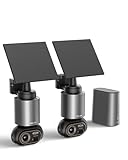
10. BOTSLAB Security Cameras Wireless Outdoor, 2 Cam-Kit, 4K Color Night Vision, Solar Cameras for Home Security with 360° PT,No Monthly Fee,32GB Local Storage Base Station,Auto Tracking,Easy Installation
Overview:
The BOTSLAB 2-Cam Solar Kit provides 4K outdoor surveillance with 360° pan-tilt coverage and intelligent auto-tracking for $299.99. The solar-powered design with 10,000mAh battery ensures continuous operation with minimal maintenance.
What Makes It Stand Out:
The 5W solar panel needs only 30 minutes of daily sunlight for indefinite operation, eliminating battery anxiety. BOTSLAB IQ AI sends descriptive notifications like “person detected at front door” rather than generic alerts. The 360° PT lens automatically tracks movement across your property without blind spots, while the H200 Base Station provides 32GB local storage expandable to 16TB.
Value for Money:
At $150 per camera, it’s competitively priced for 4K solar cameras that typically cost $180-250 each. The included base station with 32GB storage and AI analytics saves $100+ compared to cloud subscription plans. Solar power eliminates electricity and battery replacement costs, providing ROI within the first year for most users.
Strengths and Weaknesses:
Pros: True 4K resolution; effective solar charging; 360° auto-tracking; expandable local storage; no subscription fees; IP66 weatherproof; intelligent AI notifications; quick footage search.
Cons: Requires adequate sunlight; 2.4GHz Wi-Fi only; base station adds setup complexity; bulkier design than non-solar cameras; auto-tracking may have learning curve; limited brand history.
Bottom Line:
Perfect for large properties needing comprehensive coverage without wiring hassles. The solar reliability and 360° tracking make it superior to fixed cameras, though performance depends on sun exposure. A smart investment for permanent installations.
Why Local Storage Matters for Facial Recognition Cameras
Cloud-based surveillance has dominated the market for years, but local storage fundamentally changes the equation. When your camera captures a face, that biometric data—the unique mathematical representation of someone’s identity—remains within your physical control. No third-party servers, no unexpected service outages, and no vendor access to potentially sensitive information. This architecture also means your system continues functioning even during internet disruptions, a critical advantage for security applications where every moment counts.
The financial implications are equally significant. A typical cloud subscription for facial recognition features runs $5-15 per camera monthly. Multiply that across a four-camera system over five years, and you’ve spent $1,200-3,600 in recurring fees—often exceeding the initial hardware investment. Local storage cameras require a higher upfront cost but pay for themselves within 12-18 months for most installations.
How Facial Recognition Technology Works in Security Cameras
Understanding the mechanics helps you make informed decisions. Modern facial recognition cameras use convolutional neural networks (CNNs) to analyze facial geometry—measuring distances between eyes, nose shape, jawline contours, and dozens of other nodal points. This creates a unique “faceprint,” a mathematical vector that’s far more compact than storing actual images.
The critical distinction for local storage systems is where this processing occurs. Edge computing cameras perform AI analysis directly on the device using specialized chips like NPUs (Neural Processing Units) or DSPs (Digital Signal Processors). This eliminates latency and reduces bandwidth needs since only metadata (not full video streams) traverses your network. When evaluating systems, look for cameras with dedicated AI hardware—generic processors struggle with the computational demands, leading to slow recognition and reduced accuracy.
Key Features to Look for in Local Storage Facial Recognition Cameras
Processing Power and Onboard AI Capabilities
The heart of any facial recognition camera is its AI engine. Cameras with true edge computing capabilities process faces in 200-500 milliseconds, while cloud-dependent models may take 2-5 seconds. Check for specifications mentioning TOPS (Tera Operations Per Second)—a 1-2 TOPS NPU handles basic recognition, but 4+ TOPS supports advanced features like mask detection, age estimation, and emotion analysis.
Memory matters too. Cameras need at least 2GB RAM for smooth facial database management. Some premium models offer 4-8GB, allowing them to store 10,000+ face templates locally. This becomes crucial for business applications where you need instant recognition across a large employee or customer database.
Storage Options: SD Cards vs. NVR Systems
MicroSD cards offer simplicity for single-camera setups, with current capacities reaching 512GB-1TB. However, card lifespan becomes a concern—continuous writing degrades flash memory. Industrial-grade high-endurance cards rated for 10,000+ write cycles are non-negotiable for 24/7 recording. These cost 3-4x more than standard cards but prevent catastrophic failures.
Network Video Recorders (NVRs) provide centralized storage for multi-camera systems. A 4K-ready NVR with facial recognition analytics offloads processing from cameras, extending their lifespan. Look for NVRs supporting RAID configurations for data redundancy—losing facial recognition data due to a single drive failure defeats the purpose of local storage. Eight-bay NVRs with hot-swappable drives offer enterprise-grade reliability for serious installations.
Resolution and Image Quality Considerations
Facial recognition requires minimum 1080p resolution, but 4K (8MP) cameras deliver dramatically better accuracy. The difference isn’t just pixel count—it’s the ability to recognize faces at distance. A 4K camera can identify individuals at 30-40 feet, while 1080p struggles beyond 15-20 feet. This impacts camera placement flexibility and total system cost.
Dynamic range proves equally important. Scenes with strong backlighting (like entryways with windows) demand cameras with 120dB+ Wide Dynamic Range (WDR). Without this, faces appear as silhouettes, rendering recognition impossible. For night performance, consider cameras with large sensor pixels (measured in micrometers)—bigger pixels capture more light, producing clearer images for the AI to analyze.
Privacy Advantages of Skipping the Cloud
Local storage transforms privacy from a promise into a verifiable fact. When data never leaves your premises, you eliminate the risk of vendor breaches, unauthorized government access, or data monetization. This is particularly critical with biometric information, which unlike passwords cannot be changed if compromised.
Many jurisdictions treat facial data as protected personal information under GDPR, CCPA, or emerging biometric privacy laws. Local storage simplifies compliance—you know exactly where data resides and who accesses it. Some systems offer encrypted storage with keys you control, providing legal defensibility if questioned about data handling practices. Always verify encryption standards—AES-256 is the current baseline for sensitive data.
Understanding Facial Recognition Accuracy and False Positives
Accuracy metrics can be misleading. Manufacturers often quote “99% accuracy” under ideal lab conditions. Real-world performance depends on lighting, angles, occlusions, and database size. A more useful metric is the False Acceptance Rate (FAR) versus False Rejection Rate (FRR). For residential use, prioritize low FAR (preventing strangers from being recognized as authorized) even if it means occasional FRR (needing to manually identify family members).
The sweet spot for security applications is typically FAR <0.1% and FRR <2%. Be skeptical of cameras lacking these specifications—they may use less sophisticated algorithms. Also consider the “enrollment” process quality. Systems capturing multiple face angles during setup (front, 30°, profile) achieve 30-40% better accuracy than single-image enrollment.
Installation and Placement Strategies for Optimal Performance
Indoor vs. Outdoor Deployment Considerations
Outdoor installations face environmental challenges that directly impact facial recognition. Temperature fluctuations cause lens fogging and sensor noise. Look for IP67-rated cameras with built-in heaters for climates experiencing sub-zero temperatures. The mounting height is critical—position cameras 8-10 feet high, angled 15-30° downward. This captures faces naturally while remaining out of easy reach.
Indoor cameras benefit from controlled lighting but face different obstacles. Reflective surfaces like glass doors or polished floors create glare that confuses AI algorithms. Avoid pointing cameras directly at windows during daytime. For lobby installations, position cameras to capture faces as people approach, not after they’ve passed—most algorithms work best on frontal views within 45° of center.
Power Over Ethernet (PoE) vs. Wireless Connectivity
PoE delivers both power and data through a single cable, eliminating Wi-Fi congestion and power outlet limitations. For facial recognition, this is often superior—wired connections provide the stable bandwidth necessary for high-resolution video streams without compression artifacts that degrade AI performance. Cat6A cables support 10Gbps, future-proofing for 8K cameras emerging in the next 2-3 years.
Wireless cameras offer installation flexibility but introduce variables. Facial recognition requires 2-4 Mbps per camera for reliable performance. In congested Wi-Fi environments (apartment buildings, offices), bandwidth competition causes dropped frames and missed recognitions. If going wireless, dedicate a separate 5GHz network exclusively to cameras, and ensure your router supports MU-MIMO for simultaneous data streams.
Legal and Ethical Considerations You Must Know
Facial recognition exists in a complex legal landscape. In the United States, Illinois’ Biometric Information Privacy Act (BIPA) requires written consent before collecting facial data, with penalties of $1,000-5,000 per violation. Several other states have enacted similar laws. Even if you’re not in these jurisdictions, adopting their consent practices provides legal protection and ethical clarity.
For residential use, inform visitors with clear signage—“Facial Recognition in Use” signs serve both legal notification and deterrent purposes. Business applications demand more robust policies: data retention limits (30-90 days), purpose limitations (security only, not marketing), and deletion procedures when individuals request removal. Document everything; in legal disputes, your records demonstrate good-faith compliance.
Cost Analysis: Upfront Investment vs. Long-Term Savings
The total cost of ownership calculation reveals local storage’s economic advantage. A quality 4K facial recognition camera with local storage runs $200-400, compared to $100-200 for cloud-dependent models. Add a 4-channel NVR at $300-500, and your initial investment reaches $1,100-2,100 for a four-camera system.
Cloud alternatives might start at $600-800 for hardware, but subscription fees accumulate rapidly. Over three years, cloud systems cost $1,800-3,600 total, while local storage systems remain at the initial investment, save for occasional drive replacements ($100-150 every 3-5 years). The break-even point typically occurs at 14-20 months. Factor in that local storage cameras often last 7-10 years versus 3-5 years for cloud models (which become obsolete when vendors discontinue support), and the long-term savings multiply.
Integration with Smart Home Ecosystems
Local storage doesn’t mean isolated systems. Modern cameras support ONVIF and RTSP protocols, enabling integration with platforms like Home Assistant, Blue Iris, or Synology Surveillance Station. This allows facial recognition events to trigger smart home automations—unlocking doors for family members, adjusting thermostat preferences, or pausing Netflix when someone enters the room.
Look for cameras with MQTT support for advanced integrations. This lightweight messaging protocol lets your camera publish recognition events to your home automation hub in real-time. Some systems even offer API access, allowing custom applications like logging employee attendance or triggering alerts when specific individuals are detected. The key is ensuring these integrations work locally without requiring cloud callbacks.
Maintenance and Data Management Best Practices
Facial databases require periodic maintenance. Remove unrecognized faces that accumulate over time—they clutter the database and slow recognition speed. Most systems allow exporting face libraries for backup; do this monthly to a separate encrypted drive. For businesses with employee turnover, establish a quarterly review process to delete departed staff members.
Storage management is equally critical. Implement automatic rollover policies—keep recognition events for 90 days but continuous footage for only 30 days. This balances investigative needs with storage capacity. Set up SMART monitoring on NVR hard drives to predict failures before they occur. A failing drive often shows warning signs 2-4 weeks before complete failure, giving you time to replace it without data loss.
Troubleshooting Common Issues with Local Storage Systems
Recognition failures often stem from insufficient lighting rather than algorithm problems. If accuracy drops at night, consider adding IR illuminators that provide invisible light for the camera without creating a visible spotlight. For cameras missing faces, check the frame rate—facial recognition needs at least 15fps; dropped frames below 10fps cause the AI to lose tracking.
Database corruption can occur if cameras lose power during writing. Use UPS battery backup for NVRs and PoE switches to prevent this. If corruption happens, most systems have a rebuild function, but you’ll lose enrolled faces. This underscores the importance of regular backups. Network conflicts cause intermittent connectivity—ensure cameras have static IP addresses outside your DHCP range to prevent address collisions.
Comparing Local Storage to Hybrid Cloud Solutions
Some manufacturers offer “local-first” hybrid models that sync minimal metadata to the cloud while keeping video local. These provide remote access convenience without full cloud dependency. However, scrutinize what data leaves your network—some systems still upload faceprints, defeating privacy benefits. True hybrid systems should only sync text logs (timestamp, camera name, recognized name) with video remaining accessible through secure VPN connections.
The decision between pure local and hybrid depends on your remote access needs. For most homeowners, a VPN into your home network provides secure camera access without cloud intermediaries. Businesses with multiple locations might justify hybrid approaches for centralized monitoring, but should encrypt all biometric data end-to-end and maintain local backups as the authoritative source.
Frequently Asked Questions
How much local storage do I need for facial recognition footage?
A 4K camera recording continuously requires roughly 1.5-2TB per month. However, with motion-activated recording and facial recognition events only, a 256GB SD card often suffices for 2-3 weeks of relevant footage. For NVR systems, calculate 2TB per camera for 30 days of continuous 4K recording, then add 50% overhead for face database storage and metadata.
Can facial recognition cameras work without any internet connection?
Yes, pure local storage systems operate entirely offline. The camera captures video, processes faces, and stores data without internet. However, you’ll lose remote notifications and firmware updates. For critical security applications, consider a system that can function offline but connects periodically (on your schedule) for updates, then disconnects again.
What’s the maximum number of faces a local storage camera can recognize?
Entry-level models store 100-500 faces, mid-range systems handle 1,000-5,000, and enterprise NVR-based solutions manage 50,000+. The practical limit depends on memory and processing power. For residential use, 100-200 faces cover family, friends, and regular visitors. Businesses should size for 150% of current needs to accommodate growth.
Are local storage cameras harder to install than cloud cameras?
The installation process is nearly identical—the difference is network configuration. Cloud cameras use plug-and-play apps that handle networking automatically. Local storage cameras require manual IP address assignment, port configuration, and NVR setup. This takes 30-60 minutes additional per camera but provides lasting benefits in control and privacy.
How do I access my footage remotely without cloud services?
Set up a Virtual Private Network (VPN) on your router. This creates a secure tunnel into your home network, letting you access cameras as if you were physically present. Alternatively, some NVRs offer secure web interfaces accessible through dynamic DNS services. Avoid port-forwarding cameras directly to the internet—this creates security vulnerabilities.
What happens to my facial data if the camera is stolen?
Quality local storage cameras encrypt data at rest using AES-256. Without your password, thieves cannot access faceprints or footage. Some systems include a “tamper detection” feature that wipes encryption keys when unauthorized access is attempted, rendering data permanently unreadable. For NVRs, lock the device in a secure cabinet or use cloud backup for encryption keys only (not the biometric data itself).
Can I integrate local storage cameras with existing cloud-based systems?
Yes, through protocols like ONVIF and RTSP. You can add local storage cameras to a system that also includes cloud cameras, using a local NVR as the primary recorder while cloud cameras handle remote areas. This hybrid approach lets you phase out cloud dependency gradually. Just ensure the local camera’s facial recognition functions independently and doesn’t require cloud licensing to work.
How often should I update the camera’s firmware?
Check for firmware updates quarterly. Manufacturers improve recognition algorithms and patch security vulnerabilities. However, test updates on one camera first—new firmware occasionally introduces bugs. For mission-critical systems, wait 2-3 weeks after release to ensure no widespread issues are reported. Always backup your face database before updating.
Do local storage cameras perform as well as cloud-based AI?
Modern edge AI has closed the gap considerably. Cloud systems still have advantages in training data diversity and algorithm updates, but local cameras with 4+ TOPS processing power achieve comparable accuracy for most use cases. The key difference is consistency—local performance doesn’t vary with internet speed or server load, often making it more reliable for real-time applications.
What are the insurance implications of using facial recognition cameras?
Many insurers offer 5-15% discounts on premiums for professionally monitored security systems. Local storage systems qualify if they include features like real-time alerts and remote access via VPN. Document your system with photos and specifications. Some policies require footage retention for 30+ days, which local NVRs easily satisfy. Check if your insurer has specific requirements about encryption or offsite backup of critical events.