Ever left for vacation only to remember—halfway to the airport—that the air conditioning is still blasting at 68°F? You’re not alone. The average American household wastes nearly $200 annually heating or cooling an empty home, a figure that skyrockets in extreme climates. Enter geofencing thermostats, the silent efficiency champions that are rewriting the rules of residential energy management. These intelligent devices don’t just follow schedules; they anticipate your arrival and departure with GPS precision, automatically adjusting temperatures based on your smartphone’s location. While manufacturers tout impressive savings of up to 20% on heating and cooling costs, the real magic lies in how they eliminate human forgetfulness—the single biggest drain on HVAC efficiency.
But here’s what most reviews won’t tell you: not all geofencing thermostats are created equal, and the difference between modest savings and that coveted 20% reduction hinges on a dozen subtle factors most buyers overlook. From multi-user household dynamics to GPS drift compensation algorithms, the technology runs far deeper than a simple “home” and “away” switch. This comprehensive guide dives into the engineering principles, feature differentiators, and real-world optimization strategies that separate premium geofencing climate control from basic automation gimmicks.
Top 10 Geofencing Thermostats for Energy Savings
Detailed Product Reviews
1. Honeywell Home RTH8800WF2022, T5 WiFi Smart Thermostat, 7 Day-Programmable Touchscreen, Alexa Ready, Geofencing Technology, Energy Star, C-Wire Required
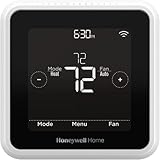
Overview: The Honeywell T5 Smart Thermostat delivers reliable climate control with intelligent scheduling and location-based automation. This Wi-Fi enabled device offers 7-day programmable settings paired with geofencing technology that detects when you’re away to optimize energy usage. Designed for homeowners seeking practical smart home integration without premium pricing, it works with Alexa voice commands and provides monthly energy reports. The Energy Star certification ensures efficient operation, while the demand response program compatibility may qualify you for utility rebates. Installation requires a C-wire, which is standard for most modern HVAC systems but may need professional assistance in older homes.
What Makes It Stand Out: Geofencing technology sets the T5 apart from basic programmable models, automatically adjusting temperatures based on your smartphone’s location. The flexible scheduling options let you choose between traditional 7-day programming or location-based control. Honeywell’s partnership with utility companies enables participation in demand response programs that can earn you credits for reducing consumption during peak periods. The thermostat learns your patterns and switches between Home and Away modes seamlessly, delivering comfort without manual intervention.
Value for Money: At $97.50, the T5 sits in the sweet spot between basic programmable thermostats and premium smart models. The potential 8-16% reduction in heating and cooling bills means it could pay for itself within a year. Compared to competitors lacking geofencing, you’re getting advanced automation for under $100. The Energy Star certification and utility rebate eligibility further enhance its financial appeal.
Strengths and Weaknesses: Strengths include robust geofencing capabilities, flexible scheduling options, Energy Star efficiency, Alexa compatibility, and utility rebate eligibility. The intuitive touchscreen interface simplifies programming. Weaknesses are the mandatory C-wire requirement that complicates installation in older homes, a basic monochrome display compared to color competitors, and limited third-party smart home integrations beyond Alexa.
Bottom Line: The Honeywell T5 is an excellent choice for homeowners wanting geofencing automation and energy savings without breaking the bank. If you have a C-wire and value practical functionality over flashy displays, this thermostat delivers strong performance and quick return on investment.
2. Emerson Sensi Touch Wi-Fi Smart Thermostat with Touchscreen Color Display, Works with Alexa, Energy Star Certified, C-wire Required, ST75 Black 5.625" x 3.4" x 1.17"

Overview: The Emerson Sensi Touch combines modern aesthetics with serious privacy commitments in a smart thermostat. This Wi-Fi-enabled device features a vibrant color touchscreen and promises up to 23% HVAC energy savings through intelligent scheduling and remote access. Designed for DIY enthusiasts, it includes a built-in level and illuminated terminals for straightforward installation. The black finish adds a premium look to any wall. Compatible with most HVAC systems requiring a C-wire, it works seamlessly with Alexa for voice control while explicitly protecting your personal data from third-party sales.
What Makes It Stand Out: Emerson’s explicit privacy protection policy distinguishes it in a data-hungry market, ensuring your usage patterns remain confidential. The auto-detection algorithm simplifies setup by identifying your AC brand and model automatically. The sleek color display provides intuitive navigation and temperature readings at a glance. Unlike competitors that monetize user data, Sensi maintains your privacy while delivering robust smart features like flexible scheduling, remote app control, and detailed usage reports.
Value for Money: Priced at $110, the Sensi Touch costs slightly more than basic smart thermostats but justifies the premium with its color display and privacy guarantee. The 23% energy savings claim is among the highest in its class, potentially delivering faster payback. When you factor in the DIY-friendly installation that saves professional fees, the value proposition strengthens against pricier alternatives like Nest or Ecobee.
Strengths and Weaknesses: Strengths include industry-leading privacy protection, vibrant color touchscreen, easy DIY installation with built-in tools, strong energy savings potential, and modern design options. The app provides clear usage reports and intuitive controls. Weaknesses include mandatory C-wire requirement, limited smart home platform support beyond Alexa, and smaller market presence which may affect long-term software support. The display, while color, is smaller than some premium competitors.
Bottom Line: The Sensi Touch is ideal for privacy-conscious homeowners who want a stylish, capable smart thermostat without data sharing concerns. If you value your personal information and prefer a straightforward DIY installation, this device offers excellent features and energy savings at a reasonable price point.
3. ecobee Smart Thermostat Essential - Energy Star Certified programmable Wi-Fi Thermostat - Works with Siri, Alexa, and Google Assistant

Overview: The ecobee Smart Thermostat Essential delivers universal smart home integration with support for Siri, Alexa, and Google Assistant in one device. This versatile thermostat adjusts temperatures based on your schedule to reduce heating and cooling costs by up to 23% annually. Its standout feature is compatibility with 85% of HVAC systems and a unique solution for homes lacking a C-wire through the Power Extender Kit (PEK). The color touchscreen and companion app provide effortless control, while free software updates ensure your investment stays current. Designed for tech-savvy homeowners, it bridges multiple ecosystems seamlessly.
What Makes It Stand Out: Triple-assistant compatibility is rare, making this the most flexible choice for mixed smart home environments. The PEK option solves installation headaches in older homes without requiring professional rewiring. Ecobee’s automatic scheduling learns your routine and optimizes comfort versus energy savings dynamically. The free software upgrade policy future-proofs your purchase, and the intuitive app tracks consumption patterns with actionable insights. Unlike competitors locked into single ecosystems, ecobee works everywhere.
Value for Money: At $134.99, it’s the priciest option reviewed, but the multi-platform support justifies the premium for Apple HomeKit users. The potential 23% annual savings provide strong ROI, while the PEK compatibility avoids costly electrical work. When compared to buying separate ecosystem-specific thermostats, the universal approach delivers significant value. The included trim kit maintains clean aesthetics during installation.
Strengths and Weaknesses: Strengths include comprehensive voice assistant support, high system compatibility, C-wire workaround via PEK, energy-saving automation, regular free updates, and intuitive controls. The ecobee app is robust and user-friendly. Weaknesses are the higher upfront cost, PEK sold separately adding expense, and potentially overwhelming feature set for users wanting simple programming. The design is functional but less sleek than some competitors.
Bottom Line: The ecobee Essential is the top choice for households with multiple smart home platforms or older HVAC systems lacking a C-wire. If you need Siri, Alexa, and Google integration or want maximum compatibility, the premium price delivers unmatched flexibility and long-term value.
4. Honeywell Home RTH9585WF1004 Wi-Fi Smart Color Thermostat, 7 Day Programmable, Touch Screen, Energy Star, Alexa Ready, Gray

Overview: The Honeywell Wi-Fi Smart Color Thermostat adds personal style to energy management with customizable display colors to match your home décor. This 7-day programmable device offers flexible scheduling and utility company demand response program enrollment to earn rebates while reducing consumption. The bright touchscreen simplifies operation, and Alexa integration enables voice control. Compatible with forced air, hot water, steam, and heat pump systems (excluding electric baseboard), it requires a C-wire for installation. Energy Star certification ensures efficient performance while providing monthly reports to track savings.
What Makes It Stand Out: The ability to personalize screen colors is unique among smart thermostats, turning a functional device into a design element. Honeywell’s established utility partnerships make enrolling in demand response programs straightforward, potentially earning you bill credits. The flexible programming accommodates both your weekly schedule and time-of-use pricing from utilities. The bright, intuitive touchscreen remains readable from across the room, and the gray finish provides a neutral base that complements any wall color.
Value for Money: At $124.23, this thermostat positions itself between basic and premium models. The color customization adds aesthetic value that competitors lack, while the utility rebate programs improve financial returns. Flexible scheduling delivers typical energy savings of 10-15%, meaning payback within 12-18 months for most users. The brand reliability and extensive HVAC compatibility reduce the risk of installation issues.
Strengths and Weaknesses: Strengths include customizable color display, excellent utility program integration, broad HVAC compatibility, bright touchscreen interface, and Energy Star efficiency. The 7-day programming is robust and user-friendly. Weaknesses include mandatory C-wire requirement, lack of geofencing capability, limited smart home integrations beyond Alexa, and a bulkier design than sleeker competitors. The color feature, while nice, doesn’t improve functionality.
Bottom Line: This Honeywell model suits homeowners who prioritize aesthetics alongside functionality. If you want your thermostat to blend with your décor and participate in utility rebate programs, the color customization and reliable performance justify the price. For pure automation features, consider alternatives with geofencing.
5. Breez Max | ENERGY STAR CERTIFIED Smart AC Controller | WiFi Thermostat for Mini-Split, Window, Portable ACs/Heat Pumps | AI-Based Tech | Free App, No Subscriptions | Alexa, Google, IFTTT etc. (Black)

Overview: The Breez Max fills a niche market by making ductless and window air conditioners smart through IR remote control emulation. This Energy Star certified device connects to 2.4 GHz Wi-Fi and works with over 20,000 mini-split, window, and portable AC models that use infrared remotes. The built-in temperature and humidity sensors enable true thermostat functionality, while AI-based Comfy Max prevents overcooling to save energy. With no subscription fees and compatibility with Alexa, Google, and IFTTT, it offers modern smart features for homes without central HVAC systems. Installation is DIY-friendly, though optimal placement requires line-of-sight within 6-12 feet of your AC unit.
What Makes It Stand Out: Universal compatibility with ductless systems is revolutionary for renters and homeowners lacking central air. The AI-driven Comfy Max algorithm intelligently cycles your AC to maintain comfort while minimizing energy waste, a feature rare in IR controllers. Weekly scheduling continues working even during internet outages, ensuring reliability. The absence of monthly subscriptions distinguishes it from competitors that gate features behind paywalls. Automatic brand detection eliminates complex manual programming.
Value for Money: At $124, the Breez Max is competitively priced for its unique capability. Traditional smart thermostats can’t control mini-splits or window units, making this the only viable option for many users. The 23% potential energy savings from smart scheduling deliver quick payback, especially for high-usage ductless systems. Avoiding subscription fees saves $5-10 monthly compared to cloud-dependent competitors, creating substantial long-term value.
Strengths and Weaknesses: Strengths include broad compatibility with ductless systems, AI-powered energy savings, no subscription fees, offline schedule retention, multi-platform voice control, and DIY installation. The built-in sensors provide accurate temperature monitoring. Weaknesses include IR line-of-sight requirement limiting placement options, 2.4 GHz Wi-Fi only (no 5 GHz support), ineffective for central HVAC systems, and potential connectivity issues with some AC brands requiring support intervention.
Bottom Line: The Breez Max is essential for anyone with mini-split, window, or portable ACs wanting smart controls. If you’re a renter or have ductless systems, this is your best option for energy savings and convenience. For central HVAC, choose a traditional smart thermostat instead.
6. Breez Max | ENERGY STAR CERTIFIED Smart AC Controller | WiFi Thermostat for Mini-Split, Window, Portable ACs/Heat Pumps | AI-Based Tech | Free App, No Subscriptions | Alexa, Google, IFTTT etc. (White)

Overview: The Breez Max transforms your existing mini-split, window, or portable air conditioner into a smart climate control system. This IR-based controller bridges the gap between traditional remote-controlled units and modern smart home ecosystems, offering comprehensive control without replacing your entire HVAC setup.
What Makes It Stand Out: True Energy Star certification sets the Breez Max apart from many competitors, ensuring verified energy efficiency. The AI-powered Comfy Max feature intelligently manages temperature and humidity, preventing energy waste from overcooling while maintaining comfort. With compatibility spanning over 20,000 AC models and automatic brand detection, setup is remarkably straightforward. The device maintains your schedules even during internet outages—a critical reliability feature.
Value for Money: At $124, the Breez Max sits in the mid-range for smart AC controllers. The absence of subscription fees delivers long-term value, and the Energy Star certification translates to measurable utility savings. Compared to replacing a functioning mini-split system, this offers smart capabilities at a fraction of the cost.
Strengths and Weaknesses: Strengths include universal IR compatibility, built-in sensors, local schedule storage, and multi-platform support. The free app provides full functionality without paywalls. Weaknesses involve the IR line-of-sight requirement (6-12 feet), 2.4GHz Wi-Fi limitation, and potential need for customer support for obscure AC models. Touch controls can accidentally lock, requiring a specific button combination to reset.
Bottom Line: For owners of IR-controlled AC units seeking genuine energy savings without monthly fees, the Breez Max delivers exceptional functionality. The AI features and offline reliability make it a standout choice for apartments or homes where upgrading the entire system isn’t feasible.
7. Sensibo Air - Smart Air Conditioner Controller. Apple HomeKit Certified. 60-Seconds Installation. Maintains Comfort and Energy Saving Features. Compatible with Google, Alexa, Apple HomeKit & Siri

Overview: Sensibo Air specializes in making ductless air conditioners and heat pumps intelligent through a compact IR bridge. With official Apple HomeKit certification, it caters specifically to iOS-centric households while maintaining broad platform compatibility for mixed ecosystems.
What Makes It Stand Out: The HomeKit certification is the headline feature, enabling Siri control and integration with Apple’s Home app—something many competitors lack. The “60-second installation” promise leverages Bluetooth and QR code scanning for near-instant setup. Advanced features like Geofencing automatically adjusts temperatures based on your location, while Climate React responds to temperature and humidity triggers dynamically.
Value for Money: Priced at $124.99, Sensibo Air commands a slight premium over non-HomeKit alternatives. For Apple users, this premium is justified by native ecosystem integration. The energy savings from automated scheduling and geofencing help offset the initial investment over time.
Strengths and Weaknesses: Strengths include seamless Apple integration, intuitive app design, reliable geofencing, and multi-user support. The device works well even with unstable Wi-Fi. Weaknesses are the IR line-of-sight dependency, occasional firmware update issues, and limited customization compared to some competitors. The premium price may deter non-Apple users who can find similar features elsewhere for less.
Bottom Line: Sensibo Air is the top choice for Apple HomeKit enthusiasts with mini-split or window units. While the price is higher, the native iOS integration and polished user experience deliver value that generic controllers cannot match for Apple-centric homes.
8. New Mysa Smart Thermostat for Heating & Cooling | Programmable WiFi Thermostat | Energy Star Certified | 7-Day Scheduling | Geofencing | Vacation Mode

Overview: Mysa targets central HVAC systems with a sleek line-voltage thermostat that combines elegant design with serious energy management capabilities. Unlike IR controllers, this directly replaces your existing thermostat for furnace, AC, and heat pump control.
What Makes It Stand Out: The Energy Star certification and claim of up to 26% energy savings demonstrate serious efficiency credentials. Geofencing automatically adjusts temperatures when you leave or return, while Vacation Mode protects your home during extended absences. The upcoming Matter support future-proofs the investment, promising seamless integration across all major platforms.
Value for Money: At $129, Mysa is competitively priced for a dedicated HVAC thermostat. The promise of paying for itself within a year through energy savings makes it financially compelling. No subscription fees and free premium features like detailed energy charting add significant long-term value.
Strengths and Weaknesses: Strengths include robust energy reporting, intuitive scheduling, clean minimalist design, and strong customer support. The installation app provides excellent video guidance. Weaknesses center on the C-wire requirement, which may necessitate additional wiring for some homes. Compatibility is limited to 24V systems, excluding high-voltage baseboard heaters. The Matter update is still pending, leaving some smart home integration potential unrealized.
Bottom Line: Mysa is an excellent investment for homeowners with compatible central HVAC systems seeking maximum energy savings. The combination of intelligent features, transparent pricing, and promised Matter support makes it a forward-looking choice that balances performance with cost-effectiveness.
9. meross Smart Thermostat for Home, WiFi Thermostat Works with Matter, Alexa, Apple Home, Google Assistant, App & Voice Control, 7x24h Scheduling, Energy Saving, C-Wire Required

Overview: The meross Smart Thermostat democratizes smart climate control with Matter certification at a budget-friendly price point. Designed for 24V central HVAC systems, it offers comprehensive scheduling and voice control without ecosystem lock-in.
What Makes It Stand Out: Matter integration is the killer feature, providing native, local control across Apple, Amazon, Google, and SmartThings platforms simultaneously. At under $60, it’s remarkably affordable while supporting 95% of HVAC systems including heat pumps, furnaces, and humidifiers. The 24/7 flexible scheduling adapts to complex routines, and smart alerts notify you of filter changes and system issues.
Value for Money: At $59.84, this represents exceptional value—nearly half the cost of competitors. The Matter certification ensures compatibility without requiring multiple hubs or bridges. Energy tracking and management tools help optimize usage and reduce bills, delivering quick return on investment.
Strengths and Weaknesses: Strengths include rock-bottom pricing, true Matter support, wide HVAC compatibility, and proactive system alerts. The app provides solid basic functionality. Weaknesses involve the C-wire requirement for some configurations, incompatibility with high-voltage systems, and less polished app experience compared to premium brands. Two-wire systems are not supported, limiting retrofit applications.
Bottom Line: For budget-conscious homeowners with compatible HVAC systems, the meross thermostat is a no-brainer. The Matter integration alone justifies the price, making it the most cost-effective way to add future-proof smart climate control to your home without sacrificing core functionality.
10. Amazon Smart Thermostat – Save money and energy - Works with Alexa and Ring - C-wire required

Overview: Amazon’s first-party smart thermostat focuses on simplicity and deep Alexa integration. Designed for straightforward installation in homes with existing C-wires, it brings voice-controlled climate management to the masses at an accessible price point.
What Makes It Stand Out: The seamless Alexa integration enables automatic temperature adjustments based on your daily patterns, presence detection via Echo devices, and voice commands without third-party skills. Potential energy provider rebates can significantly reduce the already reasonable $79.99 price. ENERGY STAR certification ensures baseline efficiency standards are met.
Value for Money: At $79.99, it undercuts many competitors while offering Amazon’s ecosystem advantages. The rebate potential makes it even more attractive. EPA-estimated $50 annual savings provide a reasonable payback period, though less aggressive than some competitors’ claims.
Strengths and Weaknesses: Strengths include effortless Alexa pairing, automatic scheduling, clean industrial design, and reliable performance within the Amazon ecosystem. The installation guide is straightforward for qualified systems. Weaknesses are the mandatory C-wire requirement, lack of native HomeKit/Google support, and limited customization compared to standalone brands. Ring integration is mentioned but offers minimal unique value. The thermostat depends heavily on Alexa for advanced features.
Bottom Line: The Amazon Smart Thermostat is ideal for households fully invested in Alexa. While it lacks cross-platform flexibility, the price, potential rebates, and frictionless integration make it a smart choice for Amazon-centric users seeking basic automated climate control without complexity.
Understanding Geofencing Technology in Smart Thermostats
What Is Geofencing and How Does It Work?
Geofencing creates a virtual perimeter around your property using GPS, Wi-Fi positioning, and cellular triangulation. When your smartphone crosses this invisible boundary, it triggers pre-programmed commands to your thermostat. Unlike time-based scheduling that assumes predictable routines, geofencing responds to actual occupancy. The technology typically uses a radius between 500 feet and 7 miles, though advanced systems employ dynamic scaling based on travel speed and traffic patterns.
The system architecture involves three components: your mobile device’s location services, a cloud-based logic engine, and the thermostat’s control module. When you exit the geofence, the cloud processor calculates optimal setback temperatures based on outdoor conditions, thermal mass of your home, and estimated return time. Premium implementations factor in weather forecasts and your home’s historical heating/cooling recovery rates to prevent energy-intensive temperature overshoots.
The Science Behind 20% Energy Savings Claims
The 20% figure isn’t marketing fluff—it’s rooted in Department of Energy studies showing that programmable thermostats save 10% annually, while intelligent occupancy-based systems double those savings by eliminating user error. The key is reducing runtime during unoccupied periods without sacrificing comfort. A conventional schedule might setback temperatures for 8 hours daily, but geofencing extends this to 10-12 hours by catching those unpredictable late nights at the office or spontaneous weekend trips.
Thermal dynamics play a crucial role. Your home loses heat at a rate proportional to the temperature differential with outdoors. By allowing temperatures to drift further during absence, geofencing minimizes heat transfer. Advanced systems calculate the “sweet spot” where setback depth maximizes savings without requiring excessive energy to recover. This balancing act—known as the recovery ramp—prevents auxiliary heat strips from activating in heat pumps, which can instantly erase hours of savings.
Key Features That Define Premium Geofencing Thermostats
Multi-User Geofencing Capabilities
Single-user geofencing works beautifully for solo dwellers but creates chaos in family homes. Premium systems support household profiles with intelligent conflict resolution. When multiple family members have the app, the thermostat tracks the last person to leave and the first to return, maintaining comfort while maximizing unoccupied setbacks. Look for systems offering “weighted presence” where primary residents (like work-from-home parents) can override transient household members.
Advanced implementations include “guest mode” that temporarily suspends geofencing when visitors stay behind, and “staggered arrival” settings that recognize different family members’ schedules. The best systems even learn which household members are associated with which zones in zoned HVAC setups, creating micro-geofences for individual areas.
Adaptive Learning Algorithms
Basic geofencing reacts to location; intelligent geofencing predicts it. Machine learning models analyze your travel patterns, correlating departure times with day-of-week, calendar events, and even traffic conditions. After 2-3 weeks, these systems anticipate your 7:15 AM Tuesday departure and begin pre-cooling or pre-heating accordingly, ensuring comfort upon arrival without wasted runtime.
The algorithms also refine geofence boundaries based on GPS accuracy patterns. If your phone consistently registers as “away” while you’re actually gardening in the backyard, the system automatically expands the geofence or adds Wi-Fi fingerprinting to prevent false triggers. This self-correction distinguishes robust platforms from frustrating entry-level options.
HVAC System Compatibility
Not all HVAC systems play nice with smart thermostats. Heat pumps require special handling to avoid auxiliary heat activation during recovery. Two-stage and variable-speed systems need thermostats that can communicate modulating commands rather than simple on/off signals. Geofencing thermostats designed for high-efficiency systems employ “adaptive recovery” that slowly ramps temperatures over 1-3 hours, maximizing heat pump efficiency.
For homes with dual-fuel systems, premium thermostats calculate the economic balance point between heat pump and furnace operation based on real-time energy prices and outdoor temperature. This dynamic fuel switching, triggered by geofencing recovery sequences, can yield additional 5-8% savings beyond standard setback benefits.
Smart Home Integration Ecosystems
A geofencing thermostat shouldn’t operate in isolation. Integration with smart window shades, ceiling fans, and ventilation systems multiplies savings. When you leave, the system can close motorized blinds to reduce solar gain, activate whole-house fans for free cooling, or trigger ERV/HRV units for optimal air exchange. Look for platforms supporting Matter, Z-Wave, or robust APIs that enable these coordinated responses.
Voice assistant integration should extend beyond basic commands. Advanced systems let you say “We’re leaving for the weekend” to activate extended away modes that ignore routine geofence triggers. Conversely, “I’m on my way home” can initiate immediate recovery, overriding the standard geofence arrival for those times you’re returning unexpectedly early.
How Geofencing Thermostats Deliver Measurable Savings
Eliminating Human Error and Forgetfulness
The primary savings mechanism is simple: your thermostat never forgets. Studies show 40% of programmable thermostat users don’t utilize scheduling features, and 90% override settings manually at least weekly. Geofencing automates the decision entirely. The system doesn’t care if you’re running late for work or decided on an impromptu dinner out—it responds to reality, not routine.
This automation proves especially valuable during seasonal transitions. Spring and fall bring unpredictable temperature swings where manual scheduling fails. Geofencing adapts daily, ensuring you’re not heating an empty house on an unexpectedly warm October afternoon or cooling it during a cool July morning.
Optimizing Temperature Ramps
The energy cost of recovering from setback isn’t linear. Cranking the temperature 10 degrees colder requires roughly 3% more energy than a 5-degree setback—but only if you allow proper recovery time. Geofencing thermostats calculate your estimated time of arrival (ETA) using real-time traffic data and distance, then begin recovery at the optimal moment.
This “just-in-time” recovery prevents the thermostat from calling for heating or cooling hours before needed. For heat pumps, this slow ramp is critical; engaging auxiliary heat strips can consume 3-5 kW instantly, burning through dollars in minutes what hours of efficient heat pump operation saved. Premium systems monitor outdoor temperature and humidity to fine-tune ramp rates.
Reducing Peak Demand Charges
Time-of-use electricity rates are expanding nationwide, with peak charges reaching 3-4x off-peak rates. Advanced geofencing thermostats integrate utility rate APIs to avoid recovery during expensive periods. If you typically arrive home at 5 PM during peak rates, the system might begin recovery at 3 PM (off-peak) even if you’re still home, pre-conditioning the house using cheaper electricity.
Some utilities offer demand response programs that pay you to allow minor temperature adjustments during grid stress. Geofencing thermostats can participate while ensuring you never notice the change—they simply delay recovery by 15-30 minutes during events, stacking incentives on top of your baseline savings.
Critical Buying Considerations Before You Invest
Sizing Your Thermostat to Your Home’s Needs
Thermostat “size” refers to control capacity, not physical dimensions. A single-stage heating/cooling system needs basic switching capability, but multi-zone homes require thermostats that can manage zone controllers. Calculate your total HVAC load: sum the stages across all zones. A two-stage furnace with two-stage AC plus a separate basement zone needs a thermostat supporting at least five control outputs.
Oversized thermostats for simple systems waste money, but undersized units cripple efficiency. If you’re planning future HVAC upgrades (like adding a heat pump or zoning), invest in a scalable platform now. Many premium thermostats enable additional features through software licenses, avoiding hardware replacement.
Wiring and Voltage Requirements
Most geofencing thermostats require a common wire (C-wire) for constant 24VAC power. Older homes often lack this, leading to frustrating installations. While some thermostats include power-stealing technology or bundled adapters, these can cause flickering or inadequate charging in extreme weather when HVAC systems run continuously.
For line-voltage electric baseboard systems, you’ll need specialized thermostats rated for 120V/240V. These are less common and often lack advanced geofencing features. Consider installing a low-voltage relay system to enable standard smart thermostat use—it adds cost but opens the door to superior energy management.
Internet Connectivity and Reliability
Geofencing depends on constant cloud communication. A thermostat that loses Wi-Fi can’t receive geofence triggers. Evaluate your home’s internet reliability and consider a mesh Wi-Fi system if your thermostat location has weak signal. Some premium thermostats include cellular backup for critical functions, though geofencing typically requires primary internet.
Look for systems with local API fallback modes. If the cloud service goes down, these thermostats can still execute basic geofencing logic using direct communication with your phone when both are on home Wi-Fi. This hybrid architecture prevents total system failure during outages.
Mobile App Quality and User Experience
The thermostat is only as smart as its app. Download and test the app before purchasing. Evaluate geofence setup intuitiveness: can you adjust the radius with a simple slider, or must you enter GPS coordinates manually? Check if the app provides real-time location status and trigger logs—essential for troubleshooting.
App reliability directly impacts savings. If the app crashes or gets killed by your phone’s battery optimizer, geofencing stops working. Premium apps use persistent background processes and work with iOS/Android location services to minimize battery impact while maintaining accuracy. Read recent app store reviews focusing on location reliability, not just UI aesthetics.
Installation: Professional vs. DIY Approaches
When to Call a Certified HVAC Technician
DIY installation is tempting but risky with complex systems. Call a professional if you have: heat pumps with auxiliary heat, dual-fuel systems, zoning panels, or any wiring that doesn’t match standard color codes. A $150 installation fee is cheap insurance against a $500 control board replacement.
Technicians also perform critical setup steps: verifying correct equipment staging, configuring cycle rates to prevent short-cycling, and calibrating temperature offsets for optimal sensor accuracy. They’ll test emergency heat functionality and ensure the geofencing integration doesn’t interfere with safety controls. This expertise becomes invaluable when dealing with proprietary communicating HVAC systems that use data protocols instead of simple relay contacts.
Common DIY Installation Pitfalls
The most frequent mistake is improper C-wire handling. Many installers jumper the G-wire (fan) to create a common, losing independent fan control—a feature essential for geofencing systems that run fans for air circulation during setbacks. Another error is leaving old mercury thermostat wires in place, which can cause ghost voltage readings that confuse smart thermostats.
Incorrect system type selection during setup is catastrophic. Telling the thermostat you have a conventional system when you actually have a heat pump results in no auxiliary heat and frozen coils in winter. Always photograph your old thermostat wiring and use the manufacturer’s online compatibility checker before purchase. Test every mode—heating, cooling, fan-only, and emergency heat—after installation.
Pre-Installation Home Assessment Checklist
Before buying, audit your HVAC system: locate your indoor unit’s model number, count the wires at your thermostat, and identify if you have separate heating and cooling systems. Check your electrical panel for a dedicated HVAC breaker—smart thermostats draw more power than mechanical ones, and overloaded transformers cause voltage drops that reboot the thermostat randomly.
Evaluate your smartphone situation: does everyone who needs geofencing have a compatible device? Some systems only support recent iOS/Android versions. Test your home’s GPS reception—if you live in a dense urban canyon or rural area with poor satellite visibility, geofencing accuracy suffers. Consider supplementing with Wi-Fi-based presence detection as a backup.
Maximizing Your Energy Savings Potential
Optimal Geofence Radius Settings
The ideal radius isn’t one-size-fits-all. Urban apartment dwellers need tight 500-foot geofences to avoid triggering while at a neighbor’s place. Suburban homeowners benefit from 1-2 mile radii that activate as they leave the neighborhood. Rural properties might use 5-7 mile geofences tied to highway exit points.
Seasonal adjustments matter. In winter, expand the radius to account for slower travel times and the need for longer recovery periods. Summer allows tighter geofences since cooling recovery is faster. Advanced systems auto-adjust based on historical travel data, but manual fine-tuning during the first month optimizes performance. Monitor the app’s arrival/departure logs to identify false triggers.
Creating Effective Temperature Schedules
Geofencing works best complementing—not replacing—basic schedules. Program a conservative baseline schedule (e.g., 8 AM setback, 6 PM recovery) that geofencing can override. This ensures savings even if location services fail. Set “away” temperatures to 7-10°F from comfort settings in winter, 4-5°F in summer. Deeper setbacks yield diminishing returns and risk humidity issues in cooling mode.
Implement “pre-away” settings that activate when the system predicts departure. If you always leave at 8 AM weekdays, the thermostat might begin gradual setback at 7:30 AM, so by the time geofencing triggers at 8:05 AM, the house is already 3°F closer to away temperature. This hybrid approach maximizes unoccupied hours without the shock of sudden temperature swings.
Leveraging Auxiliary Sensors
A single thermostat location rarely represents whole-home conditions. Add wireless room sensors to create occupancy-weighted averaging. Geofencing puts the system in away mode, but sensors in occupied rooms (like a home office) can maintain comfort in that zone while allowing the rest of the house to drift further. This zoned geofencing can boost savings another 5-8% in large homes.
Place sensors strategically: one in a north-facing room that warms slowly, another near large windows that gain solar heat. The thermostat then calculates optimal recovery start times based on actual conditions rather than a single point measurement. Some systems use door/window sensors to pause geofencing recovery if a patio door is left open, preventing energy waste.
Privacy and Security Implications
Data Collection Practices
Geofencing requires continuous location tracking, raising legitimate privacy concerns. Reputable manufacturers anonymize location data, storing only geofence crossing events rather than full movement histories. However, read privacy policies carefully—some free apps monetize location data. Look for companies certified under GDPR or CCPA frameworks, which mandate data minimization.
The real risk isn’t usually the thermostat company but data breaches. Encrypted location transmission is non-negotiable. Check if the system uses end-to-end encryption for location data and supports two-factor authentication. Disable any “improve location accuracy” features that upload Wi-Fi network names or Bluetooth beacons to company servers.
Securing Your Smart Home Network
Your thermostat is a network entry point. Isolate it on a separate IoT VLAN if your router supports it, preventing potential thermostat vulnerabilities from compromising personal devices. Change the default password immediately and enable automatic security updates. Some thermostats allow disabling remote cloud access, using local-only geofencing through HomeKit or Home Assistant—ideal for privacy-conscious users.
Regularly audit third-party integrations. That old IFTTT applet connecting your thermostat to a defunct service could be a security hole. Review connected apps quarterly and revoke unused permissions. Consider thermostats with physical privacy switches that disable the microphone (for voice models) and camera (if equipped with occupancy sensing).
Troubleshooting Common Geofencing Issues
GPS Drift and False Triggers
Urban canyons, dense cloud cover, and GPS spoofing apps cause location inaccuracies. If your thermostat cycles between away and home modes while you’re stationary, increase the geofence radius by 50% and enable Wi-Fi fingerprinting. This supplements GPS with known network SSIDs, reducing false triggers when your phone connects to your neighbor’s Wi-Fi.
Disable battery optimization for the thermostat app. Android’s Doze mode and iOS Low Power Mode throttle background location updates, causing the system to think you’re still home when you’ve left. Some apps offer “high accuracy” modes that use more battery but provide reliable triggers. Test your setup by deliberately crossing the geofence boundary and timing how long until the thermostat responds—anything over 5 minutes indicates configuration issues.
Battery Drain on Mobile Devices
Continuous location monitoring impacts battery life by 5-15% daily, depending on your phone model. Mitigate this by enabling “significant location change” mode rather than constant tracking. This wakes the app only when you move substantially, using cell tower triangulation instead of power-hungry GPS.
Geofencing works best when the app can run in the background, but some phones aggressively kill apps. Add the thermostat app to your device’s “unrestricted” or “protected” list. Consider dedicated location-sharing solutions like Life360 integration, which some thermostats support, offloading location duties to a specialized app optimized for battery efficiency.
Multi-User Household Conflicts
When family members leave and return at different times, geofencing can create thermostat wars. Implement “presence priority” settings where certain users (like children) don’t trigger away mode when they leave for school, but parents’ departures do. Use “minimum away duration” to prevent the system from cycling if someone forgets their phone and returns home 10 minutes later.
Create geofence hierarchies: a small inner geofence for immediate arrivals and a larger outer geofence that begins recovery. This ensures the first person home triggers pre-conditioning, while subsequent arrivals don’t disrupt the process. Some systems support “geofence exit delay” where the system waits 30 minutes after the last person leaves before activating away mode, accommodating quick errands.
Cost-Benefit Analysis: Real-World ROI Scenarios
Payback Period Calculations
A $250 geofencing thermostat saving 20% on a $200 monthly HVAC bill yields $40 monthly savings. Simple payback occurs in 6.25 months. However, factor in installation costs ($0-$200), potential C-wire upgrades ($50-$150), and subscription fees for premium features ($0-$10/month). Realistic first-year cost: $300-$500, yielding $480 annual savings for a net positive ROI within 10 months.
Savings scale with energy costs. In New England where heating oil exceeds $4/gallon, payback can drop to 3-4 months. In mild climates with low electricity rates, it might extend to 18 months. Calculate your baseline by reviewing 12 months of utility bills, isolating heating/cooling months. Homes with electric resistance heating see the fastest returns due to high energy costs per BTU.
Utility Rebates and Incentive Programs
Over 200 utilities offer smart thermostat rebates, typically $50-$100. Some provide free units through demand response programs. Check the DSIRE database and your utility’s website. Many rebates require enrollment in a “bring your own thermostat” program that allows minor temperature adjustments during grid emergencies—usually just 2-4°F for 1-2 hours, barely noticeable with geofencing’s pre-conditioning.
Time-of-use rate optimization creates additional value. If your utility charges 35¢/kWh from 4-9 PM but only 12¢/kWh overnight, strategic geofencing can shift 30% of cooling load to off-peak hours. A 3-ton AC using 3 kW running 2 fewer hours during peak times saves $1.38 daily—over $500 annually just from rate arbitrage.
Future Trends in Geofencing Climate Control
AI-Powered Predictive Geofencing
Next-generation systems are moving beyond reactive geofencing to predictive models that integrate with your digital life. By analyzing calendar appointments, traffic patterns, and even flight data, these thermostats will begin recovery not when you cross a geofence, but when your 4 PM meeting ends early and your phone shows a calendar update. Machine learning models trained on millions of user patterns will predict arrival times within 5-minute accuracy, optimizing recovery ramps to the second.
These systems will soon incorporate weather prediction at the microclimate level, using hyperlocal forecasts to adjust pre-conditioning. If a thunderstorm is predicted to drop temperatures 10°F, the system will reduce cooling recovery, letting nature do the work. Integration with utility grid carbon intensity data will enable “green geofencing,” delaying recovery until renewable energy generation peaks.
Integration with Electric Vehicle Charging
As EV adoption accelerates, geofencing thermostats will coordinate with home charging systems. When your EV crosses the home geofence with a low battery, the thermostat will pre-cool the house using excess solar generation while the car charges, then enter deep setback mode during peak charging hours. This vehicle-to-home integration could shift 5-10 kWh of HVAC load daily, multiplying geofencing savings.
Bidirectional charging will enable thermostats to draw from EV batteries during peak rate periods, effectively using your car as a whole-home battery. Geofencing ensures this only happens when the vehicle is present and charged above your minimum threshold, creating a symbiotic relationship between transportation and climate control that redefines residential energy management.
Frequently Asked Questions
1. What exactly is a geofencing thermostat and how is it different from a programmable one?
A geofencing thermostat uses your smartphone’s location to automatically switch between home and away modes, while programmable thermostats rely solely on time schedules. The key difference is responsiveness: geofencing adapts to your actual comings and goings, catching those unpredictable moments when you stay late at work or leave early on a Friday, eliminating the energy waste that occurs when rigid schedules don’t match real life.
2. Will I really save 20% on my energy bills, or is that just marketing hype?
The 20% figure is supported by Department of Energy research, but your actual savings depend on your climate, HVAC system type, and current habits. If you already religiously adjust your thermostat manually, you might see only 5-10% savings. However, most households waste significant energy through forgetfulness—in those cases, 15-25% savings are realistic, particularly in extreme climates with high heating or cooling costs.
3. How does geofencing work with multiple family members and different schedules?
Premium systems track each household member individually, switching to away mode only when the last person leaves and resuming comfort settings when the first person returns. You can assign priority levels to different users and set minimum away durations to prevent rapid cycling. The best implementations also learn patterns, recognizing that your teenager’s 3 PM departure for sports practice shouldn’t trigger away mode if a parent is still home working.
4. What are the privacy implications of constant location tracking?
Reputable manufacturers encrypt location data and only store geofence crossing events, not your full movement history. The bigger risk is phone-level security—ensure your device uses strong authentication and the thermostat app has two-factor authentication enabled. For maximum privacy, choose systems supporting local-only geofencing through platforms like HomeKit that keep location data entirely within your home ecosystem.
5. Can I install a geofencing thermostat myself or do I need a professional?
Simple single-stage systems are often DIY-friendly if you have a C-wire and basic wiring knowledge. However, heat pumps, dual-fuel systems, zoned setups, or any system without a clear C-wire require professional installation. A certified technician ensures proper configuration of equipment staging and safety controls—mistakes here can damage expensive HVAC equipment or create safety hazards.
6. What happens if I lose my phone or the battery dies while I’m away?
Most systems include failsafe schedules that activate if no location update is received for a set period (typically 2-4 hours). You can also manually control the thermostat through web portals or voice assistants. Some platforms support backup presence detection via connected smart home devices—if your security system shows armed away status, it can override geofencing and activate setback mode.
7. Will geofencing drain my smartphone battery significantly?
Expect a 5-15% daily battery impact depending on your phone model and settings. Using “significant location change” mode instead of constant GPS tracking minimizes drain. Disable battery optimization for the thermostat app and enable Wi-Fi scanning to supplement GPS. The battery cost is typically offset by the convenience and savings within the first month of use.
8. Do geofencing thermostats work without internet connectivity?
Basic geofencing requires cloud communication to relay location triggers to your thermostat. However, some systems support local network modes where your phone communicates directly with the thermostat when both are on home Wi-Fi. Without internet, you’ll lose remote control and advanced features, but core geofencing can function using direct communication protocols like HomeKit or Z-Wave.
9. What size geofence should I set for optimal performance?
Start with a 1-mile radius in suburban areas and adjust based on results. Urban dwellers may need 500 feet to avoid false triggers from neighboring buildings, while rural homeowners might use 5+ miles. The key is balancing early enough activation for efficient recovery without triggering during routine neighborhood walks. Monitor the app’s logs for the first two weeks and expand if you see false away events or shrink if recovery starts too late.
10. Are there ongoing subscription fees for geofencing features?
Most manufacturers include geofencing in the base price with no recurring fees. However, some advanced features like energy reports, multi-user management, or utility rate optimization may require premium subscriptions ($3-$10/month). Always check the total cost of ownership before buying. Many robust platforms offer full functionality without subscriptions, making them more cost-effective over the thermostat’s 10+ year lifespan.