In an era where smart home technology promises convenience but often delivers privacy anxiety, indoor cameras with privacy shutters have emerged as the gold standard for security-conscious families. These innovative devices offer the best of both worlds: the ability to monitor your home when you need it, and absolute visual privacy when you don’t. Whether you’re watching over a sleeping baby, checking in on elderly parents, or simply wanting to ensure your family’s most intimate moments remain private, understanding how to choose the right camera with a privacy shutter is crucial for true peace of mind.
The market has evolved dramatically from the early days of always-on surveillance. Today’s privacy shutters aren’t just afterthoughts—they’re sophisticated features integrated into thoughtfully designed security ecosystems. But not all privacy shutters are created equal, and the presence of a shutter alone doesn’t guarantee comprehensive protection. This guide will walk you through everything you need to know to make an informed decision that balances security, privacy, and usability for your unique household needs.
Top 10 Indoor Cameras with Privacy Shutters
Detailed Product Reviews
1. Arlo Essential Security Camera 2K | Indoor Only| 2nd Gen | Baby Monitor & Pet Camera | Wired Automated Privacy Shield, 2-Way Audio, Night Vision, Live Stream, Motion Alerts & Notifications White,1 Cam

Overview: The Arlo Essential Security Camera 2K delivers crisp indoor monitoring with a strong emphasis on privacy. This second-generation model offers 2K video quality, two-way audio, and night vision, making it suitable for watching over babies, pets, or general home security. The wired design ensures consistent connectivity, while the automated privacy shield provides physical lens coverage when you want guaranteed privacy.
What Makes It Stand Out: Arlo’s reputation for quality and the integrated privacy shield distinguish this camera from budget alternatives. The 130-degree field of view captures more area than many competitors, and the Arlo app provides a polished user experience with real-time notifications and remote siren activation. The company’s explicit privacy commitment and US-based 24/7 chat support add peace of mind.
Value for Money: At $24.89, the camera itself is competitively priced, but the true cost requires consideration. Advanced features like person/vehicle recognition, package detection, and 60-day cloud storage demand a paid Arlo Secure plan. This subscription model means initial savings may be offset over time, making it best for users already invested in the Arlo ecosystem.
Strengths and Weaknesses: Strengths include excellent 2K video quality, thoughtful privacy shield, wide viewing angle, reliable app performance, and robust customer support. Weaknesses are the mandatory subscription for full functionality, indoor-only limitation, and US-only product support, which restricts its appeal for international users.
Bottom Line: The Arlo Essential 2K is ideal for privacy-conscious buyers seeking high-quality video and reliable brand support. Just budget for the ongoing subscription to unlock its full potential.
2. SimpliSafe SimpliCam 1080p Wired Indoor Home Security Camera with Built-in Privacy Shutter - Compatible with Gen 3 Home security system

Overview: The SimpliSafe SimpliCam is a 1080p wired indoor security camera designed primarily for integration with SimpliSafe’s Gen 3 security system. It features a built-in privacy shutter, night vision, and motion detection alerts. With a 120-degree field of view, it provides reliable indoor monitoring for homes already using or planning to adopt SimpliSafe’s ecosystem.
What Makes It Stand Out: The camera’s standout feature is its video verification capability, which allows monitoring agents to confirm break-ins visually, potentially triggering faster police response when paired with the Fast Protect monitoring plan. The physical privacy shutter offers tangible security against unwanted recording, while seamless integration with SimpliSafe’s award-winning security system creates a cohesive whole-home protection solution.
Value for Money: At $69.99, this is a premium-priced indoor camera. Its value is directly tied to SimpliSafe ecosystem integration—standalone users will find better features for less elsewhere. However, for existing SimpliSafe customers, the video verification feature justifies the cost by enhancing overall security system effectiveness and emergency response times.
Strengths and Weaknesses: Strengths include reliable system integration, video verification for priority dispatch, privacy shutter, and professional monitoring compatibility. Weaknesses are the high standalone price, requirement of a monitoring plan for key features, limited 1080p resolution when 2K cameras are available for less, and narrow ecosystem lock-in.
Bottom Line: Purchase only if you’re committed to SimpliSafe’s security system. As a standalone camera, it’s overpriced and under-featured compared to alternatives.
3. Kasa Smart Indoor Pan-Tilt Home Security Camera, 1080p HD Dog Camera w/Night Vision, Motion Detection for Baby & Pet Monitor, Cloud & SD Card Storage, Works w/ Alexa & Google Home, 2.4G WiFi (EC71)

Overview: The Kasa Smart Indoor Pan-Tilt Camera offers comprehensive room coverage at a budget-friendly price point. This 1080p HD camera features full 360-degree horizontal rotation and 113-degree vertical tilt, making it ideal for monitoring large spaces, babies, or pets. It connects via 2.4GHz WiFi and works with Alexa and Google Home for seamless smart home integration.
What Makes It Stand Out: The patrol mode automatically scans designated areas at set intervals, while intelligent motion tracking follows moving objects or people. Baby crying detection adds specialized nursery functionality. The flexibility of local storage via microSD card (up to 256GB, not included) or optional cloud storage through Kasa Care gives users control over their data and budget.
Value for Money: At $21.98, this camera delivers exceptional value. The combination of mechanical pan-tilt, motion tracking, and flexible storage options typically appears in more expensive models. While 1080p resolution trails behind 2K competitors, the feature set and coverage capabilities far exceed expectations for this price tier.
Strengths and Weaknesses: Strengths include full 360° coverage, patrol mode, motion tracking, baby crying detection, two-way audio, local storage support, and excellent smart home compatibility. Weaknesses are 1080p resolution (not 2K), 2.4GHz WiFi limitation, and subscription required for advanced cloud features like video summaries.
Bottom Line: The Kasa EC71 is the best budget pan-tilt camera available. Its comprehensive coverage and smart features make it perfect for monitoring pets, babies, or entire rooms without breaking the bank.
4. Cloarks 2K Pan/Tilt Security Camera, WiFi Indoor Cameras for Home Security with AI Motion Detection, Pet/Dog/Baby Camera with Phone App, 2-Way Audio, 24/7, Siren, TF/Cloud Storage
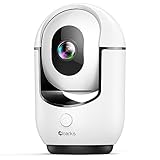
Overview: The Cloarks 2K Pan/Tilt Security Camera balances high-resolution video with comprehensive room coverage. Delivering 2K FHD quality with 355-degree horizontal and 90-degree vertical rotation, it monitors entire spaces effectively. The camera requires constant power via USB-C and works exclusively with 2.4GHz WiFi networks, providing continuous 24/7 protection for homes, babies, and pets.
What Makes It Stand Out: Color night vision sets it apart from standard infrared cameras, providing clearer after-dark footage. The one-click call function enables direct communication from the camera side to the mobile app, a unique feature for two-way interaction. AI-powered motion detection reduces false alerts, while multi-user sharing allows family members simultaneous access.
Value for Money: Priced at $29.98, this camera offers impressive specs for the cost. The 2K resolution combined with pan-tilt functionality and color night vision typically commands higher prices. While brand recognition lags behind established competitors, the feature-to-price ratio is compelling for budget-conscious shoppers wanting premium capabilities.
Strengths and Weaknesses: Strengths include 2K video, color night vision, extensive pan-tilt range, two-way audio with one-click call, AI motion detection, and affordable pricing. Weaknesses are mandatory wired power connection, 2.4GHz WiFi only, lesser-known brand with unproven long-term support, and potential app reliability concerns compared to major brands.
Bottom Line: The Cloarks camera is a feature-packed mid-range option. If you can accept a newer brand, its 2K resolution and color night vision deliver excellent value for whole-room monitoring.
5. Roku Indoor Camera - Home Security - 1-Pack - Wired Security Camera & Pet Monitor with 1080p HD Color Night Vision, Works with Alexa & Google, Motion & Sound Detection, WDR & WiFi 6

Overview: The Roku Indoor Camera leverages the popular streaming brand’s ecosystem to deliver accessible home monitoring. This 1080p wired camera features color night vision, motion and sound detection, and WiFi 6 connectivity. Designed primarily for Roku users, it integrates seamlessly with Roku TVs and players while also offering standalone functionality through the Roku Smart Home mobile app.
What Makes It Stand Out: Deep Roku ecosystem integration is its primary differentiator—viewing live feeds directly on your TV via remote or voice command is genuinely convenient. WiFi 6 support ensures stable connectivity in congested network environments. Wide Dynamic Range (WDR) technology improves image quality in challenging lighting conditions, while sound detection adds another layer of awareness beyond standard motion alerts.
Value for Money: At $19.99, this is the most affordable option reviewed. The price is unbeatable for a camera with color night vision and WiFi 6. However, value is maximized only for existing Roku users. Standalone buyers may find the Roku ecosystem limitation restrictive compared to more versatile alternatives from established security brands.
Strengths and Weaknesses: Strengths include Roku TV integration, WiFi 6, color night vision, WDR, motion and sound detection, and rock-bottom pricing. Weaknesses are 1080p resolution (not 2K), no pan-tilt functionality, limited appeal for non-Roku households, and Roku’s relative inexperience in the security camera market.
Bottom Line: The Roku Indoor Camera is a no-brainer for Roku ecosystem households seeking basic monitoring. Others should consider more flexible options with higher resolution and proven security pedigrees.
6. AOBOCAM 1080P HD Indoor Camera for Indoor Security with App Control Motion Detection & Night Vision Wireless WiFi Rechargeable Pet Camera for Home/Office 24/7 Cycle Save Video Only (1080P)

Overview: The AOBOCAM indoor security camera delivers 1080P HD surveillance with a unique dual WiFi and Bluetooth connection system that dramatically simplifies setup compared to competitors. Designed for versatile indoor use whether monitoring pets, checking on elderly family members, or securing your office, this compact unit features a rechargeable battery for wireless operation or continuous power via USB. The 120° wide-angle lens and enhanced night vision provide comprehensive coverage day and night.
What Makes It Stand Out: Unlike most cameras that rely solely on WiFi, the dual-connection approach reduces setup time and frustration significantly. The flexibility of rechargeable battery operation means you can place it anywhere without hunting for outlets—ideal for temporary monitoring or rental properties. Its 24/7 cycle recording automatically overwrites oldest footage, eliminating manual storage management while ensuring you never miss critical moments.
Value for Money: At $23.99, this camera sits in the sweet spot between budget models and premium options. You’re getting advanced connectivity features typically found in $40+ cameras, plus the rare bonus of rechargeable portability. The lack of included SD card is standard for this price range, and optional cloud storage keeps initial costs low.
Strengths and Weaknesses: Strengths include innovative dual-connection setup, rechargeable battery flexibility, 120° wide-angle coverage, reliable motion detection, and dual storage options. Weaknesses are limited 1080P resolution (not 2K), no included SD card, basic app interface, and battery life constraints during continuous recording.
Bottom Line: The AOBOCAM is an excellent choice for users prioritizing easy installation and placement flexibility. Its dual-connection technology solves real pain points, making it ideal for non-tech-savvy users or those needing quick deployment. For stationary, always-plugged use, alternatives may offer higher resolution.
7. Cinnado Security Camera Indoor-2K 360° WiFi Cameras for Home Security,Pet/Dog/Baby Camera with Phone app, 2-Way Audio, Night Vision, 24/7 SD Card Storage, Works with Alexa & Google Home (2.4Ghz)-D1

Overview: The Cinnado D1 redefines budget home security with impressive 2K resolution and full 360° pan/tilt capabilities at an almost unbelievable price point. This wired indoor camera transforms your smartphone into a remote monitoring command center, allowing real-time surveillance of pets, babies, or general home security. Four invisible IR LEDs enable clear night vision without disturbing sleep, while the integrated siren adds an active security layer.
What Makes It Stand Out: Achieving 2K clarity and complete room coverage for under $15 makes this a market disruptor. The motion-activated siren is rare in budget cameras, providing deterrence alongside documentation. Seamless integration with both Alexa and Google Home ecosystems allows voice-controlled viewing, elevating it beyond typical standalone devices.
Value for Money: At $14.99, you’re receiving features typically bundled in $50+ cameras. The 2K sensor alone justifies the cost, while 360° movement, smart alerts, and voice assistant compatibility represent extraordinary value. The 30-day cloud trial lets you test premium features risk-free.
Strengths and Weaknesses: Strengths include exceptional 2K video quality, comprehensive 360° coverage, deterrent siren, reliable two-way audio, multi-user sharing, and broad smart home compatibility. Weaknesses are 2.4GHz WiFi limitation (no 5GHz), requiring constant power connection, no included SD card, and plastic construction that feels less durable than premium alternatives.
Bottom Line: If you need maximum features on a minimal budget, the Cinnado D1 is nearly impossible to beat. It’s perfect for renters, first-time security users, or supplementing existing systems. Just ensure you have a stable 2.4GHz network and a power outlet within reach.
8. LaView Security Cameras 4pcs, Home Security Camera Indoor 1080P, Wi-Fi Cameras Wired for Pet, Motion Detection, Two-Way Audio, Night Vision, Phone App, Works with Alexa, iOS & Android & Web Access

Overview: LaView’s four-camera bundle delivers comprehensive whole-home surveillance for the price of a single premium camera. Each 1080P wired unit provides reliable indoor monitoring with night vision up to 33 feet, motion detection, and clear two-way audio. The system supports up to nine simultaneous live feeds through the LaView app or web browser, making it ideal for monitoring multiple rooms, pets, or children from anywhere.
What Makes It Stand Out: The per-camera cost under $18 is exceptional for a name-brand system. Unique web browser access eliminates reliance solely on mobile apps—a feature many competitors lack. The ability to share access with up to 20 people makes it perfect for extended families or small businesses needing distributed monitoring without complicated NVR systems.
Value for Money: At $69.99 for four cameras, you’re paying approximately $17.50 per unit—less than most standalone budget cameras. This bundle approach saves over 60% versus buying individually. The included 30-day US-based cloud storage trial on AWS infrastructure provides enterprise-grade data security without additional hardware investment.
Strengths and Weaknesses: Strengths include unbeatable multi-camera pricing, web access flexibility, generous sharing capabilities, reliable night vision, and straightforward setup. Weaknesses are limited 1080P resolution (not 2K), 2.4GHz-only connectivity, wired power requirement limiting placement, no pan/tilt functionality, and basic motion detection without AI differentiation.
Bottom Line: This LaView 4-pack is the smartest choice for budget-conscious buyers needing multiple coverage points. It’s perfect for small homes, apartments, or offices where plug-in power is accessible. For static, multi-room monitoring, the value proposition is unmatched, though individual camera quality trails premium single-unit alternatives.
9. BoyKeep 2K Cameras for Home Security, 2-Pack Indoor Camera with Night Vision, Pet Camera Indoor with Phone App, Motion Detection, 2-Way Audio, Cloud/SD Card Storage, Compatible with Alexa

Overview: BoyKeep’s two-camera kit targets tech-savvy users seeking advanced features beyond basic monitoring. Each unit captures 2K resolution video with full-color night vision up to 33 feet—a significant upgrade from traditional infrared grayscale. The 360° panoramic view combined with 110° vertical tilt eliminates blind spots, while AI-powered smart tracking automatically follows moving people, pets, or vehicles, ensuring important events stay centered in frame.
What Makes It Stand Out: The privacy mode allows remote camera shutdown via app—a critical feature for maintaining trust in bedrooms or private spaces. Dual-band WiFi (2.4GHz and 5GHz) ensures smoother streaming than single-band competitors. Full-color night vision provides identifiable details like clothing colors that standard night vision misses, enhancing security value.
Value for Money: At $49.99 for two 2K cameras ($25 each), BoyKeep positions itself between budget and premium tiers. You’re paying slightly more than basic 1080P pairs but gaining intelligent tracking, color night vision, and enhanced privacy controls—features typically reserved for $40+ individual cameras. The dual-band connectivity alone justifies the modest premium.
Strengths and Weaknesses: Strengths include sharp 2K resolution, intelligent motion tracking, meaningful privacy controls, full-color night vision, dual-band WiFi flexibility, Alexa compatibility, and multi-device sharing. Weaknesses are limited vertical tilt range (not true 360° rotation), newer brand with unproven long-term support, no included SD cards, and motion tracking that may trigger false alerts in busy households.
Bottom Line: BoyKeep excels for users wanting intelligent features without premium pricing. The privacy mode makes it uniquely suitable for mixed-use spaces, while color night vision enhances identification capability. It’s ideal for monitoring active pets or entry points where tracking adds real value, though brand reliability remains less established than industry veterans.
10. Kasa Indoor Pan/Tilt Smart Security Camera, 1080p HD Dog-Camera,2.4GHz with Night Vision,Motion Detection for Baby and Pet Monitor, Cloud & SD Card Storage, Works with Alexa& Google Home (EC70), White

Overview: The Kasa EC70 brings reliable pan/tilt surveillance from a trusted smart home brand at an entry-level price point. This 1080p camera delivers sharp live streaming through the Tapo/Kasa app with responsive remote-controlled movement to scan entire rooms. Designed primarily for pet and baby monitoring, it includes night vision up to 30 feet, real-time motion/sound detection, and seamless integration with both Alexa and Google Home ecosystems.
What Makes It Stand Out: Kasa’s Smart Actions feature enables sophisticated automation, allowing your camera to trigger other Kasa devices like lights when motion is detected—transforming passive monitoring into active home automation. The brand’s mature app ecosystem and proven reliability differentiate it from no-name competitors at similar prices. Voice control integration feels polished and responsive.
Value for Money: At $21.98, you’re getting pan/tilt mechanics and brand credibility rarely seen under $25. While resolution is limited to 1080p, the mechanical movement effectively covers more ground than fixed 2K cameras. The option for local storage up to 256GB or affordable Kasa Care cloud plans provides flexibility without mandatory subscriptions.
Strengths and Weaknesses: Strengths include reliable pan/tilt functionality, excellent smart home integration, mature app experience, sound detection (not just motion), generous local storage capacity, and brand longevity ensuring ongoing support. Weaknesses are 1080p resolution in a 2K market, 2.4GHz-only connectivity, no AI-powered tracking, plastic build quality, and motion detection that can be overly sensitive without adjustment.
Bottom Line: The Kasa EC70 is the sensible choice for users already invested in the Kasa ecosystem or those prioritizing brand trust over bleeding-edge specs. Its pan/tilt functionality and Smart Actions provide tangible benefits for active monitoring of pets or children, though resolution-conscious buyers should look elsewhere. For plug-and-play reliability at a bargain price, it’s hard to fault.
Why Privacy Shutters Matter for Modern Families
Privacy shutters represent more than a physical barrier—they’re a psychological contract between you and your technology. Unlike software-only privacy modes that can be vulnerable to hacking or software glitches, physical shutters provide tangible, visible proof that your camera isn’t watching. For families with children who are becoming increasingly aware of digital privacy, seeing that shutter close can be an important trust-building mechanism. The shutter becomes a clear boundary, ensuring that “off” truly means off, not just “standby” or “idle.”
The importance extends beyond mere paranoia. Recent studies have shown that visible camera lenses, even when supposedly inactive, can create measurable stress and anxiety in household members. A physical shutter eliminates this “surveillance fatigue,” allowing family members to relax completely in their own home. This is particularly vital in multi-generational households where comfort levels with technology vary dramatically—from tech-savvy teenagers to privacy-conscious grandparents.
Understanding Different Types of Privacy Shutters
Manual vs. Automatic Shutters
Manual shutters require physical intervention, typically a small lever or sliding cover that you operate by hand. While seemingly low-tech, they offer absolute reliability—no power means no operation, but the shutter remains in whatever position you left it. This simplicity appeals to those who want zero digital vulnerability, though it sacrifices convenience. You must remember to physically open and close it each time, which can become tedious if your monitoring needs change frequently throughout the day.
Automatic shutters, conversely, integrate with the camera’s software and can be triggered remotely via app, on a schedule, or even geofenced to your smartphone’s location. Imagine your cameras automatically closing when you arrive home and opening when you leave—true set-and-forget privacy. However, this convenience introduces a small dependency on software reliability and power. The best systems include manual overrides, giving you both automation and physical control.
Physical vs. Electronic Shutters
Physical shutters are literal covers—opaque barriers that block the lens completely. They’re foolproof against visual intrusion but don’t address audio privacy if the microphone remains active. Always verify whether “privacy mode” disables both video and audio capture.
Electronic shutters aren’t shutters at all but rather internal mechanisms that physically disconnect the image sensor from the camera’s processor. Think of it as a circuit breaker for your camera’s eye. While technically sophisticated, they lack the visual reassurance of a physical cover. Some premium models combine both: an electronic disconnect paired with a visible physical shutter, addressing both technical and psychological privacy needs.
Key Features to Prioritize Beyond the Shutter
Video Quality and Resolution Standards
A privacy shutter is meaningless if the video quality is so poor you can’t identify important details when it matters. For indoor use, 1080p remains the practical minimum, offering clear facial recognition without overwhelming your Wi-Fi network. However, 2K resolution (2560x1440) has become increasingly standard, providing 30-40% more detail—crucial for reading labels on medication bottles or identifying subtle movements in a nursery.
4K resolution, while impressive, often proves overkill for indoor spaces unless you’re monitoring large open-plan areas. The higher bandwidth and storage requirements can strain home networks, and the marginal benefit rarely justifies the premium price for typical room-sized monitoring. More important than raw resolution is the sensor quality—a quality 1080p sensor with good low-light performance outperforms a cheap 4K sensor in real-world conditions.
Field of View Considerations
Field of view (FOV) determines how much of your room the camera can see, directly impacting how many cameras you’ll need. A 110-130° FOV works well for corner placement in average-sized rooms (12x12 feet), capturing the entire space without significant distortion. Wider angles (150-180°) create fisheye effects that, while comprehensive, can distort facial features at the edges—problematic for accurate identification.
Consider your specific use case. For nursery monitoring, a narrower FOV (90-110°) positioned strategically often provides better detail. For general room security, wider is better. Some advanced models offer motorized pan and tilt as an alternative to extreme wide-angle lenses, allowing you to scan a room manually while maintaining optical clarity.
Night Vision Capabilities
Not all night vision is equal. Traditional infrared (IR) night vision provides clear black-and-white footage in complete darkness but can create an eery glow from the IR LEDs that’s visible to the naked eye—potentially disruptive in bedrooms. Newer starlight sensors amplify available ambient light, producing surprisingly clear color video in near-darkness without any visible LED glow.
For true privacy-conscious families, consider cameras with adjustable IR intensity or the ability to schedule when night vision activates. Some premium models feature “invisible” IR LEDs that operate at a wavelength invisible to human eyes, maintaining darkness in sleeping areas while still providing clear video feed when the shutter is open.
Audio Features: Two-Way Communication and Privacy
Two-way audio transforms a security camera into an intercom system, invaluable for soothing a crying baby or reminding a teenager to do their homework. However, audio privacy concerns often eclipse video worries. When the privacy shutter closes, does the microphone also mute? This should be non-negotiable.
Look for cameras with push-to-talk functionality rather than always-on audio. This prevents accidental eavesdropping and gives you explicit control over when you listen and speak. Audio quality matters too—echo cancellation and noise reduction ensure your voice comes through clearly, while also filtering out background noise that might mask important sounds like smoke alarms or breaking glass.
Some advanced systems offer “audio-only” modes where the shutter remains closed but the microphone stays active for baby monitoring. While convenient, this creates a potential privacy loophole. Always verify how audio data is handled, stored, and encrypted separately from video streams.
Storage Options: Cloud vs. Local
Cloud storage offers convenience and off-site backup, protecting footage even if the camera is stolen. However, it raises legitimate privacy concerns—your family’s most intimate moments reside on someone else’s server. Look for providers offering end-to-end encryption where only you hold the decryption keys, preventing even the service provider from accessing your footage.
Local storage via microSD cards or network-attached storage (NAS) keeps data physically in your home, offering maximum privacy. The trade-off? If an intruder takes the camera, they take the evidence. The sweet spot for many families is hybrid storage: local recording with encrypted cloud backup of only motion-triggered events, not continuous footage.
Understanding Encryption Standards
When evaluating storage, don’t just accept “encrypted” as sufficient. AES-256 encryption is the current gold standard—the same level used by banks and governments. More important is who holds the keys. True privacy requires zero-knowledge architecture where the encryption key is derived from your password and never leaves your device.
Be wary of cameras that encrypt “in transit” but not “at rest.” This means footage is protected while uploading but stored unencrypted on the provider’s servers, vulnerable to data breaches. Also verify if the privacy shutter status is logged and encrypted—this creates an audit trail proving when the camera was physically blocked.
Smart Home Integration and Compatibility
Your privacy camera shouldn’t exist in isolation. Integration with platforms like Apple HomeKit, Google Home, or Amazon Alexa allows for sophisticated automation. For example, “Hey Siri, we’re home” could trigger all cameras to close their shutters and arm your security system in “stay” mode.
However, integration introduces complexity. Each platform has different privacy standards. HomeKit Secure Video, for instance, processes video locally on a HomePod or Apple TV before encrypting and sending it to iCloud, ensuring Apple never sees unencrypted footage. Google and Amazon solutions may offer more features but process more data in the cloud.
Check if the camera supports Matter, the new smart home standard promising better interoperability and local control. Matter-certified devices can often function without cloud accounts, keeping your footage entirely within your home network.
Placement Strategy for Maximum Effectiveness
Optimal Heights and Angles
Mounting height dramatically impacts both security effectiveness and privacy comfort. For general room monitoring, 7-8 feet high angled slightly downward provides the best balance—high enough to be out of easy reach but low enough to capture faces clearly. For nursery cameras, 6-7 feet is better for detailed baby monitoring without creating a looming, intimidating presence.
Avoid placing cameras directly opposite windows or light sources, which can cause glare and render footage useless. Also consider the psychological impact: cameras placed at eye level feel confrontational and invasive, even when the shutter is closed. Corner placement often feels less intrusive while providing comprehensive coverage.
Privacy Zones and Motion Detection
Advanced cameras allow you to define “privacy zones” within the frame—areas that are permanently masked from recording even when the shutter is open. This is invaluable for cameras placed in living areas that might capture neighbors through windows or family members in adjacent rooms. You can monitor entryways while permanently blacking out the couch where family gathers.
Motion detection sensitivity should be adjustable by zone. A camera facing a window doesn’t need to alert you every time a car drives by, but should be hyper-sensitive to movement near a jewelry box or gun safe. Some systems use AI to distinguish between people, pets, and objects, reducing false alerts by up to 95%.
Power Options: Wired vs. Wireless
Wireless cameras offer flexibility in placement and cleaner aesthetics, running on rechargeable batteries that typically last 3-6 months depending on usage. However, battery cameras often enter sleep modes to conserve power, meaning they might miss the first few seconds of an event while waking up. They also require discipline to recharge regularly.
Wired cameras provide 24/7 reliability and often support continuous recording—impossible for most battery cameras. PoE (Power over Ethernet) models deliver both power and data through a single cable, ideal for permanent installations. The downside is installation complexity and cable management, though flat, paintable cables have made this less intrusive.
Consider hybrid models that plug in but include small backup batteries, maintaining critical monitoring during power outages while offering the reliability of wired power. For privacy shutters specifically, verify whether the shutter defaults to open or closed when power is lost—this reveals the manufacturer’s privacy priorities.
Mobile App Experience and User Interface
A camera’s hardware is only as good as its software interface. The app should make shutter control immediate and obvious—a large, unambiguous button, not buried in three menus. Test the app’s responsiveness; a 5-second delay between tapping “close shutter” and actual closure is unacceptable.
Look for apps that support multiple permission levels. Parents might have full control, while babysitters can only view live footage with the shutter open, never control it. Teenagers might have permission to close shutters in their rooms but not open them. This granular control respects family members’ autonomy while maintaining security.
App reliability is critical. Read recent reviews focusing on app crashes and server outages. A camera with a 99.9% uptime but an app that crashes weekly is effectively useless. Also verify if shutter control works locally when internet is down—true privacy shouldn’t depend on cloud connectivity.
Security Certifications and Standards to Look For
Certifications provide third-party validation of privacy claims. SOC 2 Type II certification indicates a company’s data handling meets rigorous security standards. ISO 27001 certification covers information security management systems. While these certifications are expensive and often limited to premium brands, they demonstrate serious commitment to security.
For the camera itself, look for UL or ETL listings ensuring electrical safety. IP (Ingress Protection) ratings indicate dust and moisture resistance—important even for indoor cameras in bathrooms or kitchens. An IP65 rating means complete dust protection and resistance to water jets, more than sufficient for any indoor environment.
Privacy-specific certifications are emerging. The ioXt Alliance certifies IoT devices for security and privacy, with specific criteria around data collection and user control. A camera bearing the ioXt SmartCert label has been independently verified to meet these standards.
Privacy Laws and Ethical Considerations
Legal compliance varies dramatically by region. In the US, one-party consent states allow recording if one participant (you) consents, while two-party consent states require notification of all recorded individuals. The EU’s GDPR requires explicit consent and provides “right to be forgotten” provisions. Your camera should make it easy to export and delete footage on demand.
Ethically, consider household member consent. While you have legal right to record in your own home, creating a surveillance culture can damage trust. Cameras in private spaces like bedrooms and bathrooms should be avoided entirely, regardless of shutter presence. For children’s rooms, discuss monitoring openly and establish clear rules about when cameras operate.
Many families create “shutter schedules” posted in common areas: cameras open when house is empty, closed during family time. This transparent approach builds trust while maintaining security. Some apps can automatically enforce these schedules, removing the burden of manual control.
Budget Planning: What to Expect at Different Price Points
Entry-level cameras ($30-$60) may include basic manual shutters but often compromise on sensor quality, encryption standards, and app reliability. They typically lack AI features and offer limited smart home integration. While functional, they may need replacement within 1-2 years as security standards evolve.
Mid-range options ($80-$150) represent the sweet spot for most families. These cameras offer automatic shutters, 2K resolution, local and cloud storage options, and robust encryption. They typically include person detection and integrate with major smart home platforms. Expect 3-5 year lifespans with regular firmware updates.
Premium cameras ($200+) justify their price with superior build quality, advanced AI that learns family member faces, and sophisticated privacy features like biometric shutter locks. They often include professional monitoring options and carry comprehensive security certifications. While expensive, their longevity (5+ years) and superior privacy protections can justify the investment for security-conscious families.
Remember to factor in ongoing costs. Cloud storage subscriptions typically run $3-$10 per camera monthly. A $100 camera with a $6/month subscription costs $280 over three years—more than a $200 camera with free local storage.
Maintenance and Longevity
Privacy shutters are mechanical components subject to wear. Test the shutter mechanism monthly by opening and closing it through its full range. Listen for grinding or clicking sounds indicating misalignment. Premium cameras use stepper motors rated for 50,000+ cycles—over 13 years of daily use—while budget models may use cheaper servo motors with shorter lifespans.
Firmware updates are critical for security but can occasionally brick devices. Before updating, verify the shutter defaults to closed if the update fails. Reputable manufacturers maintain firmware archives allowing you to roll back problematic updates. Subscribe to security mailing lists to stay informed of vulnerabilities affecting your camera model.
Dust accumulation can prevent shutters from sealing completely. A monthly blast of compressed air keeps the mechanism clean. Avoid using liquids, which can seep into the lens assembly. If the shutter becomes sticky, a tiny amount of synthetic lubricant on the pivot points can help—consult your manual first, as some manufacturers warn against this.
Troubleshooting Common Privacy Shutter Issues
Shutter stuck open? First, check if the camera is in privacy mode—sometimes the app indicates “closed” while the physical shutter hasn’t moved. Power cycle the camera; this resolves 70% of mechanical issues. If manual control works but automatic doesn’t, reinstall the app and re-pair the device.
Shutter not closing completely? This often indicates physical obstruction. Use your phone’s flashlight to inspect the shutter mechanism for dust or debris. Some cameras include calibration functions in their settings that relearn the shutter’s open and closed positions. If the gap is minimal (less than 1mm), it’s likely just a manufacturing tolerance, not a functional problem.
False “shutter closed” notifications plague some models. This usually stems from the app reporting the command sent rather than the action completed. Look for cameras with hall-effect sensors that physically confirm shutter position. If your camera lacks this, set up a manual verification routine: close the shutter, then check the live view to confirm it’s actually blocked.
Future-Proofing Your Investment
The smart home landscape evolves rapidly. Choose cameras that support over-the-air firmware updates and have a track record of supporting devices for at least 3 years post-purchase. Check the manufacturer’s end-of-life policy—some brands continue security updates for legacy devices while others abandon them after 18 months.
Consider modular systems where the camera module can be upgraded while keeping the mount and power infrastructure. This reduces e-waste and long-term costs. Also evaluate the company’s financial stability—a camera from a startup that goes bankrupt next year becomes a security liability.
Emerging standards like Matter and Thread promise better local control and interoperability. While still evolving, cameras supporting these standards are more likely to remain compatible with future smart home ecosystems. Avoid proprietary protocols that lock you into a single ecosystem.
Frequently Asked Questions
1. Can a privacy shutter be hacked remotely to open without my knowledge?
Physical shutters operate via local motors and cannot be opened remotely if they’ve been manually closed. However, automatic shutters controlled by software could potentially be compromised. Choose cameras with end-to-end encryption and hardware-level shutter controls that operate independently of the main processor for maximum protection.
2. Do privacy shutters make a clicking noise when they open or close?
Most shutters produce a faint mechanical sound, typically under 30 decibels—quieter than a whisper. Premium models use dampened motors for near-silent operation. If absolute silence is required (for nursery cameras), look for models specifically marketed as “silent shutter” and check user reviews for noise complaints.
3. Will frequent opening and closing wear out the shutter mechanism?
Quality shutters are rated for tens of thousands of cycles. Opening and closing your shutter 10 times daily would take over 13 years to reach 50,000 cycles. However, budget cameras may use cheaper motors. If you plan to toggle frequently, invest in a mid-range or premium model with documented cycle ratings.
4. Can I schedule my privacy shutters to open and close automatically?
Most Wi-Fi cameras with automatic shutters support scheduling through their companion apps. You can typically create daily or weekly schedules, or use geofencing to trigger shutters based on your phone’s location. Verify these features work without an active cloud subscription, as some manufacturers require paid plans for advanced automation.
5. Do privacy shutters block the microphone as well as the camera?
Not necessarily. The shutter only blocks the lens. Audio privacy requires a separate software or hardware mute. Always verify that “privacy mode” disables both video and audio capture. Some premium models include physical microphone disconnects alongside the visual shutter for complete privacy.
6. Are manual shutters more secure than automatic ones?
Manual shutters offer ultimate reliability—no power or software needed—but sacrifice convenience. Automatic shutters provide better integration and ease of use but introduce minimal software risk. The most secure approach is a manual shutter with electronic controls, giving you both options. For most families, the convenience of automatic shutters with strong encryption outweighs the theoretical risk.
7. How do I know if the shutter is actually closed when the app says it is?
Physically verify periodically. Close the shutter via the app, then check the live view—if you see video, there’s a problem. Premium cameras include hardware sensors that report actual shutter position back to the app. Some models show a tiny red indicator when the shutter is physically closed, providing visual confirmation.
8. Can children or pets accidentally open manual shutters?
Most manual shutters require deliberate force to move, beyond what a toddler or pet can exert. They’re typically recessed and require fingernail or tool access. However, very determined children can eventually figure them out. If this is a concern, use automatic shutters controlled by app-only access with password protection.
9. Do privacy shutters affect video quality or night vision performance?
When open, properly designed shutters sit completely out of the optical path and have zero impact on video quality. When closed, they should block 100% of light. Some very wide-angle cameras may have minimal vignetting (darkening at corners) if the shutter housing intrudes slightly into the frame, but this is rare in quality models.
10. What happens to the shutter during a power outage?
This varies by model. Most automatic shutters default to open when power is lost, assuming you want security monitoring restored immediately upon power return. Some privacy-focused models default to closed, prioritizing privacy over security. Check the specifications or user manual. For maximum control, manual shutters remain in whatever position you left them, regardless of power status.