Cloud gaming demands surgical precision from your network. Every millisecond of latency translates to delayed reactions, missed headshots, and that infuriating moment when your character rubber-bands across the map. Meanwhile, your smart home ecosystem—security cameras, voice assistants, connected appliances—quietly saturates your bandwidth with a constant hum of data chatter. This invisible traffic war creates a perfect storm where your gaming rig battles for priority against a refrigerator reporting its temperature. Powerline adapters emerge as an unlikely hero in this scenario, transforming your home’s electrical wiring into a strategic network backbone that can isolate gaming traffic from IoT noise. But not all powerline kits are built for this dual-front battle. Understanding what separates a mediocre adapter from a low-latency champion could mean the difference between victory and defeat in your next online match.
Top 10 Powerline Adapters for Cloud Gaming
Detailed Product Reviews
1. TP-Link AV2000 Powerline Ethernet Adapter TL-PA9020P KIT - Powerline Network Adapter, Passthrough, 2x2 MIMO, 2 Gigabit Ports, Ethernet Over Power, Plug Pair & Play, Power Saving, Free Expert Help

Overview: The TP-Link AV2000 TL-PA9020P KIT delivers high-speed networking through your home’s electrical wiring, offering a theoretical maximum of 2000Mbps. This kit includes two adapters, each featuring two Gigabit Ethernet ports and a built-in passthrough power outlet, allowing you to maintain outlet availability while extending your network. Designed for homes where Wi-Fi fails to penetrate thick walls or reach remote areas, this solution provides stable wired connectivity for bandwidth-intensive applications.
What Makes It Stand Out: The integrated passthrough outlet is a standout feature, preventing the adapter from consuming valuable wall sockets. The 2x2 MIMO with Beamforming technology enhances signal stability by directing connections more efficiently through your electrical system. Dual Gigabit ports on each unit allow direct connection of multiple devices like smart TVs and gaming consoles without requiring an additional switch. The HomePlug AV2 standard ensures compatibility across a 750-foot range through typical household barriers.
Value for Money: At $89.99, this kit positions itself in the mid-to-premium segment. The price is justified by the passthrough functionality, dual-port design, and advanced MIMO technology. Compared to running Ethernet cable through walls or upgrading to a mesh system costing hundreds more, this offers a cost-effective alternative for specific use cases, though actual speeds rarely approach the advertised 2000Mbps.
Strengths and Weaknesses: Strengths include the passthrough outlet design, dual Gigabit ports for device flexibility, straightforward plug-and-play setup, and power-saving features. The 2x2 MIMO technology provides better stability than basic adapters. Weaknesses are typical of powerline technology: performance varies dramatically based on electrical wiring quality, both units must reside on the same circuit, surge protectors completely block the signal, and real-world speeds often fall short of marketing claims. The bulky design may block adjacent outlets on some power strips.
Bottom Line: This kit excels for users needing reliable wired connections in challenging home layouts without sacrificing outlet access. It’s ideal for connecting home theater systems or gaming setups in distant rooms, provided your electrical infrastructure cooperates.
2. TP-Link AV600 Powerline Ethernet Adapter Kit - Gigabit Port, Plug Pair &Play, Power Saving, Nano Sized Powerline Network Adapter (TL-PA4010 KIT)

Overview: The TP-Link AV600 TL-PA4010 KIT offers an entry-level powerline networking solution with a theoretical 600Mbps speed cap. This ultra-compact kit provides a single Gigabit Ethernet port per adapter, making it suitable for basic internet extension needs. The nano-sized design plugs directly into outlets without obstructing adjacent sockets, creating a discreet network bridge for homes where Wi-Fi coverage proves insufficient for specific devices.
What Makes It Stand Out: Remarkable miniaturization sets this adapter apart—it’s smaller than most competitors while maintaining essential functionality. The automatic power-saving mode reduces energy consumption by up to 85% when idle, appealing to environmentally conscious users. Its simplicity shines through a true plug-and-play experience requiring zero configuration. The kit extends networks up to 300 meters (984 feet) through electrical wiring, surpassing many alternatives in theoretical range.
Value for Money: Priced at $29.72, this represents exceptional value for basic connectivity needs. It’s the most affordable entry point into powerline networking from a reputable brand, costing less than a quality Wi-Fi extender. While speeds won’t satisfy 4K streaming or competitive gaming, it’s perfectly adequate for smart home devices, basic web browsing, or extending internet to a garage office.
Strengths and Weaknesses: Strengths include the incredibly compact footprint, budget-friendly pricing, effortless setup, impressive power efficiency, and sufficient performance for low-bandwidth applications. Weaknesses are significant: the 600Mbps rating is optimistic for real-world conditions, the single port limits device connections, there’s no passthrough outlet, and performance degrades substantially over distance or on noisy electrical circuits. It lacks advanced features like MIMO or Beamforming.
Bottom Line: This kit serves budget-conscious users needing simple internet extension for basic tasks. Choose it for connecting a single device in a remote location where Wi-Fi cannot reach, but temper expectations regarding speed and reliability.
3. TP-Link Powerline Wi-Fi 6 Extender TL-WPA7817 KIT - Includes AV1000 Powerline Ethernet Network Adapter & AX1500 Dual-Band Wi-Fi Extender, Gigabit Port, EasyMesh,Plug, Pair, & Play, Free Expert Support

Overview: The TL-WPA7817 KIT uniquely combines powerline backbone technology with Wi-Fi 6 wireless extension, delivering a hybrid solution for comprehensive coverage. The kit pairs an AV1000 powerline adapter with an AX1500 dual-band Wi-Fi extender, broadcasting wireless signals up to 980 feet from the electrical source. This approach addresses both wired and wireless dead zones simultaneously, supporting up to 64 devices across 5 GHz (1201 Mbps) and 2.4 GHz (300 Mbps) bands.
What Makes It Stand Out: Wi-Fi 6 integration distinguishes this from pure powerline adapters, offering OFDMA and improved device handling for modern smart homes. The EasyMesh compatibility allows integration with broader mesh systems. While the powerline component provides the wired backbone, the wireless extender broadcasts fresh signal rather than repeating weak Wi-Fi, potentially delivering better performance than traditional range extenders.
Value for Money: At $84.98, this kit costs less than purchasing separate powerline and Wi-Fi 6 extender units. It eliminates the need for additional wireless access points in remote areas. The price is competitive with mid-range mesh nodes while offering unique flexibility. However, the AV1000 powerline component is slower than dedicated AV2000 wired kits, representing a trade-off for wireless convenience.
Strengths and Weaknesses: Strengths include Wi-Fi 6 support, dual-band flexibility, hybrid wired/wireless coverage, good device capacity, and integrated design. The powerline backbone avoids Wi-Fi backhaul issues. Weaknesses involve complexity—two different technologies mean more potential failure points. Performance depends heavily on electrical wiring quality, and speeds cannot match dedicated wired solutions. The single Gigabit port limits wired device expansion.
Bottom Line: This versatile kit suits mixed-device households needing both wired stability and modern Wi-Fi extension. It’s ideal for garages or basements requiring wireless coverage plus one wired connection, offering future-proof Wi-Fi 6 technology.
4. TP-Link AV1000 Powerline Ethernet Adapter KIT - Gigabit Port, Plug Pair &Play, Ethernet Over Power, Nano Size, Power Saving Mode, Network Adapter, Free Expert Help (TL-PA7017 KIT)

Overview: The TP-Link AV1000 TL-PA7017 KIT strikes a balance between performance and affordability in the wired powerline category. Delivering theoretical speeds up to 1000Mbps through HomePlug AV2 technology, this kit extends wired networks up to 750 feet across a home’s electrical system. The nano-sized design ensures minimal outlet obstruction while providing a single Gigabit Ethernet port per adapter for reliable connectivity in challenging environments like multi-story homes, attics, and garages.
What Makes It Stand Out: This adapter occupies a sweet spot in TP-Link’s lineup—faster than entry-level AV600 models while maintaining the compact nano form factor. The HomePlug AV2 standard ensures broad compatibility with other TP-Link powerline devices. Its simplicity appeals to users wanting straightforward wired extension without passthrough outlets or multiple ports complicating the design. The integrated power-saving mode automatically reduces consumption when idle.
Value for Money: Priced at $34.80, this kit offers compelling middle-ground value. It costs only slightly more than the AV600 while potentially doubling real-world performance. For users who don’t need the AV2000’s dual ports or passthrough, this delivers better speed-per-dollar than entry-level options. It’s an economical alternative to professional cabling or premium mesh systems for single-device connections.
Strengths and Weaknesses: Strengths include the compact nano design, attractive price-to-performance ratio, HomePlug AV2 compatibility, simple plug-and-play operation, and adequate speed for most applications. Weaknesses mirror typical powerline constraints: single port limits connectivity, no passthrough outlet, performance varies with electrical wiring quality, requires same-circuit placement, and surge protectors block functionality. Real speeds rarely approach 1000Mbps.
Bottom Line: This kit serves as a practical choice for users needing reliable wired extension for a single device without premium features. It’s perfect for connecting a smart TV or console in a room where Wi-Fi struggles, offering solid performance at a reasonable price.
5. NETGEAR Powerline Adapter Kit, 2000 Mbps Wall-Plug, 2 Gigabit Ethernet Ports with Passthrough + Extra Outlet (PLP2000-100PAS), uses Your existing Internet Service via Household Wiring
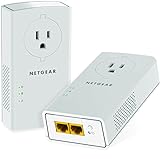
Overview: NETGEAR’s PLP2000 represents the premium tier of powerline networking, advertising 2000Mbps speeds through HomePlug AV2 technology. This kit features two adapters, each equipped with dual Gigabit Ethernet ports and a noise-filtered passthrough outlet. Designed for demanding applications like 4K streaming and competitive gaming, it leverages MIMO with Beamforming to optimize signal paths through household electrical wiring, extending connectivity up to 750 feet while maintaining outlet availability.
What Makes It Stand Out: The extra outlet with built-in noise filtering is a premium touch, reducing electrical interference that can degrade powerline performance. NETGEAR’s implementation of multiple data streams with Beamforming technology theoretically provides superior coverage compared to standard adapters. The brand’s reputation for networking hardware lends confidence, and the dual-port design eliminates immediate need for separate switches in entertainment centers.
Value for Money: At $119.99, this is the most expensive option reviewed. The premium buys the passthrough outlet with noise filtering, dual Gigabit ports, and NETGEAR’s support infrastructure. While significantly pricier than TP-Link’s AV2000 offering, the noise-filtered outlet may provide tangible performance benefits in electrically noisy environments. However, the high cost approaches entry-level mesh Wi-Fi territory, which might serve some users better.
Strengths and Weaknesses: Strengths include the noise-filtered passthrough outlet, dual Gigabit ports, robust build quality, MIMO Beamforming technology, and brand reliability. The extra outlet is genuinely useful. Weaknesses are typical: real-world speeds fall short of 2000Mbps, requires same electrical circuit, incompatible with surge protectors, and the premium price doesn’t guarantee proportional performance gains over cheaper alternatives. The bulky design may block adjacent outlets.
Bottom Line: This premium kit suits users prioritizing outlet preservation and brand reputation who need maximum theoretical powerline performance. Consider it for electrically challenging environments, but verify your wiring can justify the substantial price premium over mid-tier alternatives.
6. TP-Link AV1000 Powerline Ethernet Adapter Kit (TL-PA7017P KIT) - Passthrough, Noise Filtering, Gigabit Port, Plug Pair & Play, Network Adapter, Free Expert Support

Overview: The TP-Link AV1000 Powerline Kit offers a practical solution for extending your wired network through existing electrical wiring. This starter kit includes two adapters equipped with passthrough power outlets, allowing you to maintain access to your wall socket while networking. Designed for homes where WiFi fails to penetrate thick walls or reach distant corners, it delivers speeds up to 1000 Mbps using HomePlug AV2 technology, making it ideal for connecting smart TVs, gaming consoles, and desktop computers in basements, attics, or garages.
What Makes It Stand Out: The integrated passthrough outlet with built-in noise filtering distinguishes this kit from basic models. You won’t sacrifice a power outlet, and the noise filtering helps maintain cleaner signal transmission. The Plug & Play setup requires no configuration—simply connect one adapter to your router and the other to your device. The gigabit Ethernet port ensures maximum wired speeds, and the kit includes necessary cables. Compatibility with all TP-Link powerline products allows easy network expansion.
Value for Money: At $59.99, this kit strikes an excellent balance between features and affordability. Comparable WiFi extenders with similar performance cost $40-70, but often introduce latency and signal degradation. The passthrough feature alone justifies the premium over non-passthrough kits. For users needing reliable wired connections without drilling holes for Ethernet cables, this represents strong value.
Strengths and Weaknesses: Strengths include hassle-free installation, outlet passthrough convenience, noise filtering for signal stability, gigabit port speeds, and broad compatibility. The kit includes Ethernet cables and free expert support. Weaknesses stem from requiring both units on the same electrical circuit, incompatibility with surge protectors, and potential speed reductions due to older wiring quality. Performance varies significantly based on home electrical infrastructure.
Bottom Line: This TP-Link kit excels for users seeking stable wired connections in challenging home layouts. The passthrough design and noise filtering make it superior to entry-level options. While subject to electrical circuit limitations, it delivers consistent performance for streaming and gaming where WiFi falls short.
7. TP-Link AV1000 Powerline Ethernet Adapter - Nano Size, Gigabit Port, PlugPair&Play, Ethernet Over Power, Power Saving Mode, Network Adapter, 𝐀𝐝𝐝-𝐨𝐧 𝐔𝐧𝐢𝐭 (TL-PA7017)

Overview: This compact TP-Link AV1000 adapter serves as an add-on unit to expand existing powerline networks. Measuring in a nano form factor, it discreetly plugs into any standard outlet without blocking adjacent sockets. The device extends wired Ethernet connectivity through your home’s electrical wiring, delivering up to 1000 Mbps speeds via HomePlug AV2 technology. It’s specifically designed for users who already own a TP-Link powerline starter kit and need to connect additional devices like smart TVs, gaming consoles, or computers in remote rooms.
What Makes It Stand Out: The nano size is the headline feature—this adapter occupies minimal space while providing full gigabit Ethernet connectivity. Its power-saving mode automatically reduces energy consumption when connected devices are inactive, making it environmentally conscious. As an add-on unit, it seamlessly integrates with any existing TP-Link powerline ecosystem without requiring configuration. The included Ethernet cable and Plug & Play design ensure immediate deployment.
Value for Money: Priced at just $20.65, this adapter offers exceptional value for expanding your powerline network. Purchasing a full kit for each additional room would cost three times as much. For homeowners who’ve already invested in TP-Link’s ecosystem, this represents the most economical way to extend wired connectivity to more devices. The energy-saving features provide ongoing cost benefits.
Strengths and Weaknesses: Strengths include ultra-compact design, low power consumption, seamless integration with existing TP-Link networks, and an attractive price point. Setup is truly plug-and-play. Weaknesses include lack of passthrough outlet (blocks the socket), requirement for same electrical circuit, and incompatibility with surge protectors. Speeds remain dependent on wiring quality, and it cannot function as a standalone solution.
Bottom Line: Perfect for TP-Link powerline users needing affordable expansion. The nano size and power-saving features make it ideal for permanent installation behind furniture. While lacking advanced features like passthrough, its value is undeniable for extending wired connectivity throughout your home.
8. NexusLink G.hn Powerline Ethernet Adapter Kit – 1200 Mbps, Gigabit Port - Stable Ethernet Over Power for Gaming & Streaming, Home Network Expander, Wall Plug - 2 Units (GPL-1200-KIT)

Overview: The NexusLink GPL-1200-KIT introduces G.hn Wave 1 technology to deliver powerline speeds up to 1200 Mbps through existing electrical wiring. This two-unit kit transforms any outlet into a stable network connection, targeting users who demand reliable connectivity for gaming, 4K streaming, and remote work. Unlike traditional HomePlug AV2 systems, G.hn employs advanced LDPC/FEC error correction and MIMO Dual Phase technology to maintain strong signals even in electrically noisy environments like apartments and offices.
What Makes It Stand Out: G.hn technology represents the next generation of powerline networking, offering superior interference handling compared to older standards. The ability to connect up to 16 compatible devices creates extensive whole-home coverage. Advanced error correction minimizes packet loss and latency, crucial for competitive gaming and uninterrupted video conferencing. The kit supports seamless roaming throughout your electrical system without manual network switching.
Value for Money: At $59.99, this kit matches the price of many AV1000 systems while delivering 20% more theoretical bandwidth. For gamers and streamers frustrated with WiFi instability, it provides enterprise-grade reliability at consumer pricing. The scalability to 16 devices offers future-proofing rarely seen at this price point, making it a smart long-term investment.
Strengths and Weaknesses: Strengths include cutting-edge G.hn technology, robust error correction, support for large device networks, and competitive pricing. The kit excels in challenging electrical environments. Weaknesses include Wave 1 technology (Wave 2 offers higher speeds), incompatibility with HomePlug/AV/AV2 devices, and standard powerline limitations like same-circuit requirements and surge protector incompatibility. Real-world speeds vary with electrical infrastructure.
Bottom Line: An excellent choice for tech-savvy users wanting modern powerline technology without premium pricing. The G.hn standard’s superior stability makes it ideal for latency-sensitive applications. While not the absolute fastest available, it outperforms similarly-priced HomePlug alternatives and provides a clear upgrade path.
9. TP-Link Powerline WiFi Extender TL-WPA8631P KIT- Includes AV1300 Powerline Network Adapter and AC1200 Dual Band Extender, 2x2 MIMO, 3 Gigabit Ports, Passthrough, Plug & Play, Free Expert Support
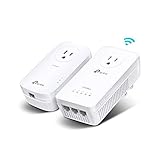
Overview: TP-Link’s TL-WPA8631P KIT uniquely combines powerline networking with dual-band WiFi extension, delivering both wired and wireless connectivity through electrical wiring. The kit includes an AV1300 powerline adapter and an AC1200 WiFi extender with three gigabit Ethernet ports, creating a versatile hybrid solution. It extends networks up to 750 feet through thick walls, making it perfect for multi-story homes needing both WiFi coverage and stable wired connections for devices like smart TVs, gaming consoles, and PCs.
What Makes It Stand Out: This kit’s hybrid approach solves two problems simultaneously: extending WiFi coverage while providing multiple gigabit wired ports. The AC1200 WiFi delivers 867 Mbps on 5 GHz and 300 Mbps on 2.4 GHz, while the passthrough outlet preserves power access. Three Ethernet ports eliminate the need for an additional switch. The 2x2 MIMO configuration enhances wireless performance, and compatibility with all TP-Link powerline products ensures easy expansion.
Value for Money: At $105.99, this premium kit costs less than buying separate powerline and WiFi extender units. For homes requiring both connectivity types in one location, it eliminates equipment clutter and compatibility concerns. The three gigabit ports add significant value, potentially saving $20-30 on a separate switch. Free expert support and included cables further enhance the package.
Strengths and Weaknesses: Strengths include dual connectivity (WiFi + wired), passthrough outlet, three gigabit ports, strong AV1300 powerline backhaul, and unified management. The kit simplifies complex network setups. Weaknesses include high price compared to single-function devices, requirement for same electrical circuit, incompatibility with surge protectors, and potential speed reduction due to wiring. WiFi performance may not match dedicated mesh systems.
Bottom Line: Ideal for users needing both WiFi extension and multiple wired connections in one room. The hybrid design reduces equipment needs while delivering reliable performance. Though premium-priced, it solves connectivity challenges more elegantly than separate devices. Perfect for home theaters or gaming setups requiring both wireless and wired options.
10. Zyxel G.hn 2400 Powerline Ethernet Adapter Starter Kit | Pass-Thru Power | Plug & Play | MIMO | Next-Gen G.hn | Gigabit Ethernet | Ideal for Smart TVs, On-Line Games, 8K Streaming | PLA6456KIT

Overview: The Zyxel PLA6456KIT represents the cutting edge of powerline technology, leveraging G.hn Wave 2 to deliver blistering speeds up to 2400 Mbps through home electrical wiring. This starter kit includes two adapters with integrated pass-through power outlets, designed for bandwidth-intensive applications like 8K streaming, competitive online gaming, and smart home device backbones. Wave 2 technology significantly outperforms previous generations, making this ideal for future-proofing high-performance home networks.
What Makes It Stand Out: G.hn Wave 2 technology provides nearly double the bandwidth of Wave 1 and HomePlug AV2 systems, with enhanced MIMO performance for superior multi-device handling. The integrated power socket ensures no outlet is wasted—a crucial feature for wall-mounted TVs or gaming stations. Unlike older standards, it employs advanced modulation techniques to maximize throughput on noisy electrical circuits. This kit targets users demanding the absolute highest powerline performance available.
Value for Money: Priced at $79.99, the kit commands a $20 premium over AV1000 systems but delivers substantially higher potential speeds. For users with gigabit internet plans or 8K TVs, this investment prevents bottlenecks. The pass-through outlets add practical value, and Wave 2 future-proofs your network as bandwidth demands increase. Compared to professional Ethernet installation, it offers tremendous savings.
Strengths and Weaknesses: Strengths include industry-leading G.hn Wave 2 speeds, pass-through outlets, advanced MIMO technology, and robust performance in challenging environments. The kit handles multiple high-bandwidth devices simultaneously. Critical weaknesses include incompatibility with HomePlug/AV/AV2 products (isolated ecosystem), same-circuit requirement, and surge protector incompatibility. Real-world speeds rarely reach 2400 Mbps, and the technology is overkill for sub-gigabit internet plans.
Bottom Line: The premier choice for power users needing maximum throughput. Its Wave 2 technology and pass-through design make it perfect for home theaters and gaming setups. While the incompatibility with older standards limits mixing devices, the performance justifies the investment for those with demanding bandwidth needs. Skip this if you have modest internet speeds; embrace it for future-proofing.
Understanding the Cloud Gaming and IoT Convergence
Modern households face a unique networking paradox. Cloud gaming platforms like GeForce NOW and Xbox Cloud Gaming require sustained, low-latency connections that rival traditional Ethernet, while IoT devices proliferate exponentially—each adding marginal load that collectively overwhelms consumer routers. This convergence creates unpredictable latency spikes precisely when your game needs stability most. The solution isn’t just more bandwidth; it’s intelligent traffic segregation across physical layers.
The Bandwidth Paradox
Your 100 Mbps internet connection might seem sufficient until you realize that 4K cloud gaming consumes 35-45 Mbps continuously, while a dozen IoT devices can generate 50+ Mbps of background chatter through firmware updates, telemetry, and real-time synchronization. This isn’t about total capacity—it’s about consistent delivery. Powerline adapters can create isolated pathways that prevent your smart doorbell’s 4K stream from interfering with your game’s data packets.
Latency: The Hidden Performance Killer
While download speeds dominate marketing materials, latency determines gaming performance. IoT devices often use burst transmission patterns that introduce micro-jitter—tiny, unpredictable delays that wreak havoc on cloud gaming’s real-time streaming protocols. A quality powerline network can reduce this jitter by 60-70% compared to congested Wi-Fi, creating a deterministic path for gaming traffic.
Demystifying Powerline Technology
Powerline networking treats your electrical wiring as a massive antenna system, modulating data signals onto high-frequency carriers that ride alongside AC power. The technology has evolved dramatically from its early 200 Mbps days, with modern standards pushing theoretical speeds beyond 2 Gbps. But theoretical maximums mean little when your gaming performance depends on real-world consistency.
How Electrical Wiring Becomes Ethernet
The process involves Orthogonal Frequency-Division Multiplexing (OFDM), the same technology underlying Wi-Fi and 4G. Adapters inject data signals between 2-86 MHz, well above the 60 Hz power frequency. Your circuit breakers become network switches, and each outlet transforms into a potential Ethernet port. However, this transformation depends heavily on wire quality, circuit topology, and noise levels.
AV2 vs. G.hn Standards Explained
Two competing standards dominate modern powerline: HomePlug AV2 and G.hn. AV2, the more established protocol, excels in homes with older wiring and offers better interoperability between manufacturers. G.hn theoretically achieves higher speeds and lower latency through more efficient spectrum use, but requires all adapters on your network to use the same chipset. For gaming, G.hn’s reduced overhead can shave 2-3ms off latency, but only if you commit to a single-vendor ecosystem.
The Critical Role of Low Latency in Modern Gaming
Latency in cloud gaming operates differently than traditional online gaming. Instead of just transmitting button presses, you’re streaming video and audio in real-time while sending input commands upstream. This creates a bidirectional latency sensitivity where both download and upload delays compound perceptibly.
Why Milliseconds Matter
Human reaction time averages 250ms, but gaming perception operates on a much finer scale. Studies show players can detect latency differences as small as 16ms—the time between frames at 60Hz. Cloud gaming adds network latency on top of display latency and input latency. A powerline adapter that reduces network latency from 15ms to 8ms effectively improves your competitive edge by nearly 50% in latency-critical scenarios.
The Difference Between Throughput and Responsiveness
High throughput means your network can move large files quickly. Low latency means it can move small packets instantly. IoT devices primarily need throughput for updates; gaming needs responsiveness for real-time control. Premium powerline adapters prioritize small packet efficiency through adaptive modulation, sacrificing peak bandwidth for consistent sub-10ms performance.
Essential Features for Gaming-Grade Powerline Adapters
Not all powerline kits deserve a place in a gaming setup. The consumer market is flooded with adapters optimized for streaming video, not interactive gaming. Identifying gaming-specific features requires looking beyond headline speed ratings.
Quality of Service (QoS) Engine Deep Dive
Effective QoS on powerline adapters operates at the physical layer, not just software prioritization. Look for adapters that can tag DSCP (Differentiated Services Code Point) values and enforce priority queues at the chipset level. This means gaming packets get immediate transmission rights, while IoT traffic waits in buffer queues. The best implementations offer application-aware profiles that automatically detect Xbox, PlayStation, or PC gaming traffic.
Pass-Through Outlet Design Benefits
Gaming setups demand multiple devices: consoles, monitors, charging stations. Pass-through outlets prevent powerline adapters from consuming valuable wall sockets, but they also serve a technical purpose. High-quality pass-through designs include noise-filtering circuits that clean power for the adapter itself, reducing interference from connected devices and improving signal integrity by up to 15%.
Multi-Gigabit Port Considerations
While powerline speeds rarely sustain true gigabit rates in real homes, multi-gigabit (2.5GbE) ports serve a critical purpose: headroom. When QoS prioritizes gaming traffic, the adapter can burst gaming data at rates exceeding 1 Gbps momentarily, clearing buffer queues faster. This translates to lower average latency for IoT devices sharing the same adapter without impacting gaming performance.
Technical Specifications Decoded
Manufacturers love publishing inflated speed numbers. A “2000 Mbps” adapter might deliver 150 Mbps in your home. Understanding which specs correlate with actual gaming performance helps cut through marketing noise.
Speed Ratings: What Those Numbers Really Mean
Speed ratings represent the physical layer’s theoretical maximum under ideal lab conditions—same circuit, no noise, short distances. Real-world performance typically reaches 20-30% of advertised rates. For gaming, focus on the “minimum guaranteed rate” specification, which indicates how the adapter performs under adverse conditions. A 2000 Mbps adapter with a 200 Mbps minimum rate often outperforms a 3000 Mbps adapter with only 100 Mbps guaranteed.
MIMO Technology in Powerline Context
Multiple Input Multiple Output (MIMO) in powerline uses the live, neutral, and ground wires as separate data paths. This creates three parallel channels, dramatically reducing latency through path diversity. When IoT traffic congests one path, gaming packets automatically route through clearer channels. True MIMO implementations (not marketing labels) require three-prong outlets and can improve consistency scores by 40%.
Beamforming Capabilities
Beamforming in powerline adapts the signal spectrum based on circuit characteristics. Advanced adapters continuously probe the electrical environment, shifting frequencies away from noisy bands used by IoT devices like smart switches or LED drivers. This dynamic adaptation maintains low-latency channels even as your home’s electrical noise profile changes throughout the day.
Your Home’s Electrical System as a Network Backbone
Your powerline network’s performance ceiling isn’t set by the adapter—it’s dictated by your home’s electrical infrastructure. Understanding these limitations prevents disappointing purchases and guides strategic installation.
Circuit Breaker Limitations
Powerline signals struggle to cross circuit breakers, losing 50-70% of their throughput at each panel transition. In homes with subpanels for additions or garage workshops, gaming adapters on different panels may perform worse than Wi-Fi. The ideal setup places gaming and primary IoT hubs on the same electrical phase and panel.
Noise and Interference Sources
Every switching power supply introduces broadband noise. Phone chargers, LED bulbs, and especially smart home hubs create a cacophony that drowns powerline signals. The worst offenders are USB-C PD chargers and variable-speed appliances. A single poorly filtered device can increase latency by 5-8ms across your entire powerline network.
The Impact of AFCI/GFCI Breakers
Arc-Fault Circuit Interrupter (AFCI) breakers, now required in many jurisdictions, aggressively filter high-frequency signals—exactly what powerline uses. Testing shows AFCI breakers can reduce powerline throughput by 40% and increase latency variability. Ground-Fault Circuit Interrupter (GFCI) outlets have similar but less severe effects. For gaming-critical circuits, consider standard breakers where code permits.
Strategic Placement for Optimal Performance
Placement determines performance more than any other factor. Even the most expensive adapter performs poorly in a noisy outlet on the opposite phase from your router.
Avoiding Common Placement Mistakes
Never plug powerline adapters into surge protectors, power strips, or UPS units. These devices filter the precise frequencies your adapter needs. The first outlet in a room’s circuit (closest to the breaker) typically offers the cleanest signal path. Avoid outlets shared with high-draw appliances like space heaters or window AC units, which inject massive electrical noise.
The “Same Phase” Rule
Residential power uses split-phase 240V service. Adapters on the same 120V phase communicate directly; cross-phase communication requires traveling through the transformer or panel, adding 3-5ms latency. Use a circuit tester to identify phase alignment, or simply test throughput from various outlets—same-phase connections typically show 2-3x better performance.
Vertical vs. Horizontal Signal Propagation
Powerline signals propagate better vertically through floors than horizontally across long wire runs. In multi-story homes, place the router-connected adapter on the middle floor if possible. Signals traveling between floors often use shared neutral bus bars, creating efficient paths. Long horizontal runs through attics or crawlspaces introduce significant attenuation and noise pickup.
Intelligent Traffic Management
Raw speed means nothing without intelligent prioritization. Modern powerline networks require sophisticated traffic shaping to ensure gaming packets never wait behind IoT telemetry.
Setting Up Effective QoS Rules
Configure QoS based on packet size and protocol, not just device MAC addresses. Gaming traffic predominantly uses small UDP packets (64-256 bytes) on specific ports. Create rules that prioritize all UDP traffic under 512 bytes, then refine by adding device-specific exceptions for your gaming hardware. Most adapters allow three-tier prioritization: reserve the highest tier for gaming, middle tier for streaming, and lowest for IoT bulk transfers.
IoT Device Segregation Strategies
Consider deploying separate powerline networks for IoT and gaming. A two-adapter kit handles gaming, while a second inexpensive kit creates a physically isolated IoT backbone. This prevents any possibility of interference and allows you to enforce different security policies. Alternatively, use VLAN tagging if your router supports it—many gaming-grade powerline adapters can maintain VLAN separation across the powerline network.
Dynamic Bandwidth Allocation
Advanced adapters monitor queue depths in real-time, dynamically adjusting bandwidth allocation. When they detect gaming traffic patterns (regular, small packet bursts), they temporarily reserve 30-40% of available bandwidth for low-latency delivery. This allocation shrinks when gaming stops, allowing IoT devices full access. This automation is crucial for households where gaming schedules vary.
Fortifying Your Network Security
IoT devices represent massive security vulnerabilities—each is a potential entry point for botnets and intrusions. Powerline networks extend your attack surface directly into every room.
Powerline Encryption Standards
All modern adapters use 128-bit AES encryption, but implementation quality varies dramatically. Look for adapters that support key rotation and unique network passwords. Some budget models ship with identical default keys across entire product lines, allowing neighbors or attackers with the same hardware to potentially intercept traffic. Change default passwords immediately and enable push-button pairing for secure key exchange.
Creating VLANs for IoT Devices
Segment your network into at least two VLANs: one for trusted devices (gaming PC, console, phone) and another for IoT gadgets. This containment strategy ensures that even if a cheap smart bulb gets compromised, the attacker cannot access your gaming machine or sniff its traffic. Premium powerline kits support VLAN tagging natively, preserving segmentation across the electrical network.
Firmware Update Protocols
IoT devices rarely receive security updates, but your powerline adapters must. Choose adapters from manufacturers with documented security response teams and regular firmware updates. Some brands offer automatic updates, but for gaming stability, manually schedule updates during off-hours. Check firmware release notes specifically for latency-related fixes and security patches.
Future-Proofing Your Powerline Investment
Networking technology evolves rapidly. A powerline adapter that excels today might become tomorrow’s bottleneck as cloud gaming moves to 8K and IoT devices multiply exponentially.
Backward Compatibility Concerns
Mixing adapter generations creates unpredictable performance. A G.hn adapter will throttle to AV2 speeds when paired with older hardware, often increasing latency due to protocol translation overhead. For gaming, commit to a single generation across all adapters. If upgrading, replace all adapters simultaneously rather than mixing old and new.
Emerging Standards on the Horizon
The HomeGrid Forum is developing G.hn extensions that promise sub-5ms latency and improved noise immunity. Meanwhile, the IEEE is working on standards that integrate powerline with Wi-Fi 7’s multi-link operation. While these aren’t consumer-ready, choosing adapters with firmware-upgradable chipsets ensures you can benefit from future improvements without replacing hardware.
Mesh Integration Possibilities
Next-generation mesh systems will treat powerline as a backhaul tier, automatically routing gaming traffic through the lowest-latency path. Some early implementations already exist, allowing seamless failover between Wi-Fi, powerline, and Ethernet based on real-time latency measurements. Investing in adapters that support 802.11k/v/r roaming protocols positions you for this hybrid future.
Diagnosing Performance Bottlenecks
When latency spikes occur, systematic diagnosis separates electrical issues from network configuration problems. Most users blame the wrong culprit.
Interpreting Powerline Utility Metrics
Manufacturer utilities report link rates, but focus on the signal-to-noise ratio (SNR) and error rates. A link showing 500 Mbps with 1% error rates performs worse for gaming than a 200 Mbps link with 0.01% errors. Errors cause retransmissions, which add unpredictable latency spikes. SNR values above 30 dB indicate clean connections; below 20 dB suggests noise problems requiring outlet changes.
When Speed Tests Lie
Internet speed tests measure throughput, not latency consistency. A powerline connection might deliver 100 Mbps steadily but with 15ms jitter, while a “slower” 60 Mbps Wi-Fi connection maintains 3ms jitter. Use ping plotting tools like PingPlotter to measure latency variance over time. For gaming, consistency matters more than peak speed.
Electrical Noise Mitigation Techniques
Identify noise sources by systematically unplugging devices while monitoring powerline SNR. Often, a single LED bulb or phone charger is the culprit. Replace noisy devices with filtered alternatives, or install ferrite chokes on their power cords. For severe cases, dedicated 20-amp circuits for gaming equipment isolate them from general household noise.
Alternative Solutions: When Powerline Isn’t Enough
Sometimes your electrical infrastructure simply cannot support low-latency powerline networking. Recognizing these limitations early saves frustration.
Powerline + Wi-Fi 6E Mesh
The best hybrid solution uses powerline for backhaul between mesh nodes, with Wi-Fi 6E handling device connections. This leverages powerline’s stability for long-distance runs while benefiting from Wi-Fi’s low-latency airtime scheduling for the final hop. Configure the mesh system to use powerline as the primary backhaul, falling back to wireless only when powerline latency exceeds thresholds.
When to Consider MoCA or Ethernet
If your home has coaxial cable runs, MoCA (Multimedia over Coax) adapters consistently outperform powerline, delivering sub-3ms latency and gigabit speeds. For new construction or major renovations, nothing beats dedicated Ethernet. Consider powerline a strategic compromise, not a permanent replacement for proper wiring.
Professional Installation Tips
Treating powerline installation as a strategic deployment rather than plug-and-play dramatically improves outcomes. A methodical approach yields professional-grade performance.
Pre-Installation Home Electrical Audit
Map your breaker panel before purchasing adapters. Identify which outlets share circuits and phases. Use a toner probe kit to trace outlet-to-breaker relationships. This map reveals optimal adapter placement and helps avoid cross-panel connections that cripple performance. Document which circuits power major appliances to predict noise patterns.
Pairing and Syncing Best Practices
Always pair adapters in the same room before deployment. This ensures they negotiate the highest possible encryption and protocol version without interference. After pairing, wait 5-10 minutes for the adapters to complete channel training and establish stable link parameters before moving them to final locations. Rushing this process results in suboptimal modulation profiles.
Post-Installation Validation Steps
After installation, run a 24-hour latency test while simulating typical IoT load. Use a Raspberry Pi or old laptop to generate continuous IoT-like traffic while gaming. Monitor for latency spikes during high-draw appliance cycles (refrigerator compressor starting, HVAC kicking on). If spikes correlate with appliance cycles, relocate adapters away from shared circuits.
Setting Realistic Performance Expectations
Marketing creates unrealistic expectations. Understanding typical performance parameters prevents disappointment and guides proper configuration.
Typical Latency Ranges
Expect 4-8ms latency between adapters on the same phase and panel. Cross-phase connections add 3-5ms. Subpanel traversal adds another 5-8ms. Thus, a same-room connection might show 5ms, while a garage workshop connection could reach 18ms. For cloud gaming, keep total network latency under 30ms including internet transit.
Bandwidth Degradation Factors
Each 100 feet of wire length reduces throughput by approximately 10-15%. Every AFCI breaker crossed cuts bandwidth by 40%. Older homes with cloth-insulated wiring see 25-30% lower performance than modern Romex installations. Plan for 25-35% of advertised speed as your realistic ceiling, and prioritize adapters with strong minimum-rate guarantees.
Long-Term Reliability Data
Powerline adapters experience performance drift as homes age and new devices introduce noise. Budget for adapter replacement every 3-4 years. Higher-end models with better thermal management and shielding maintain performance longer. Adapters with metal enclosures typically outlast plastic ones by 30-40% due to better EMI protection and heat dissipation.
Cost vs. Performance Analysis
The powerline market spans $30 budget adapters to $200+ premium kits. Understanding the price-performance curve ensures you invest wisely.
Price Tiers and What You Actually Get
Sub-$50 adapters lack proper QoS engines and use single-stream chipsets, making them unsuitable for gaming. The $80-120 range offers the sweet spot: true MIMO, hardware QoS, and robust thermal design. Above $150, you pay for marginal improvements in peak speed that rarely benefit gaming. Focus your budget on features that directly impact latency, not theoretical throughput.
Total Cost of Ownership
Factor in replacement cycles and energy costs. Gaming-grade adapters consume 4-6 watts continuously—$5-8 annually in electricity. Cheaper adapters with poor reliability may cost more over time due to early replacement. Calculate cost per year of expected service: a $100 adapter lasting 4 years costs less than a $40 adapter replaced every 18 months.
Warranty and Support Considerations
Two-year warranties are standard; premium brands offer three years. More importantly, investigate firmware support history. Brands that provide security updates for 5+ years protect your investment. Some manufacturers abandon adapters after 18 months, leaving known vulnerabilities unpatched. Check community forums for long-term support reputation before purchasing.
Frequently Asked Questions
1. Can I use powerline adapters if my gaming setup and router are on different electrical panels?
Cross-panel performance varies dramatically. Expect 60-80% speed reduction and 10-15ms higher latency. Test with a single adapter pair first. If latency exceeds 25ms, consider MoCA if coax exists, or deploy a mesh node on each panel connected via powerline.
2. How many IoT devices can I run before they impact gaming performance on a shared powerline network?
It depends on the devices. A dozen low-bandwidth sensors (temperature, door contacts) have negligible impact. But 4K security cameras, smart TVs, and cloud-syncing devices can saturate the network. Use QoS to prioritize gaming, or deploy separate powerline networks when exceeding 20 active IoT devices.
3. Do powerline adapters work in apartments where I share electrical infrastructure with neighbors?
Yes, but security is critical. Always change the default network password. Modern adapters include neighborhood isolation features that prevent signal leakage beyond your meter. Performance may suffer during peak hours as neighbors’ loads increase electrical noise. Choose adapters with dynamic spectrum management to adapt to changing noise floors.
4. Will a UPS between my adapter and gaming PC protect against powerline latency spikes?
No, and it will likely worsen performance. UPS units filter the same frequencies powerline uses. Plug the adapter directly into the wall, then connect your PC to the adapter’s pass-through outlet if available. For PC protection, use a separate UPS downstream of the adapter, accepting the slight added latency.
5. How do I know if my home’s wiring is too old for effective powerline networking?
Test with a basic adapter pair. If you can’t sustain 50 Mbps with under 15ms latency between outlets on the same circuit, your wiring may be the limit. Cloth-insulated wiring from the 1950s or earlier often lacks proper grounding. Knob-and-tube wiring is incompatible. Consider MoCA or Ethernet for pre-1960s homes.
6. Can I mix powerline adapters from different manufacturers on the same network?
Only if they share the same standard (AV2 or G.hn). Even then, performance defaults to the lowest common denominator. For gaming, avoid mixing brands. Different chipsets handle QoS differently, often creating conflicts that increase latency. Stick to identical model numbers for all adapters in your gaming network.
7. What’s the maximum distance powerline adapters can cover effectively?
Practical limit is about 300 meters of wire length, which typically means 2-3 floors vertically or one long horizontal run. Beyond this, latency becomes unpredictable. Signal quality degrades exponentially with distance. For detached garages or outbuildings, bury Ethernet cable instead.
8. Do powerline adapters interfere with other devices like baby monitors or ham radios?
Potentially yes. Powerline operates in the 2-86 MHz band, overlapping with some RF spectrum. Quality adapters include notch filters to avoid ham radio bands and comply with FCC regulations. If you experience interference, use the adapter’s utility to enable “coexistence mode,” which reduces power output on problematic frequencies at the cost of some throughput.
9. How often should I reboot my powerline adapters for optimal gaming performance?
Unlike routers, powerline adapters shouldn’t require regular reboots. If you find yourself rebooting weekly, you have underlying noise or hardware issues. Quality adapters automatically retrain connections daily during low-traffic periods. Manual reboots only help when you’ve added major new electrical devices and need to force a fresh channel scan.
10. Are there any electrical code concerns with running powerline networking full-time?
No, powerline adapters are UL/CSA listed and consume minimal power. They don’t overload circuits or create hazards. However, they can interfere with AFCI breaker testing. If you’re renovating, mention powerline usage to your electrician—they may recommend dedicated circuits for critical networking gear to isolate it from AFCI protection requirements.