The moment you unmute on a Zoom call and your entire household hears your “focus playlist” blasting from your office, you realize: your work-from-home audio setup needs an upgrade. Multi-room audio systems aren’t just for entertaining guests or weekend parties—they’re productivity powerhouses that can transform your remote work experience from chaotic to symphonic. Imagine seamlessly transitioning from crisp podcast audio in your kitchen during coffee prep, to instrumental focus music in your office, to a calming ambient soundscape in your bedroom for post-work decompression—all controlled from a single interface without disturbing your partner’s conference call in the next room.
This comprehensive guide dives deep into the world of whole-home audio ecosystems, exploring the technologies, features, and strategic considerations that matter most for remote professionals. Whether you’re building a system from scratch or expanding an existing setup, understanding these core principles will help you create an audio environment that enhances concentration, signals work-life boundaries, and adapts to your unique workflow.
Top 10 Multi-Room Audio Systems for Work-From-Home
Detailed Product Reviews
1. Juke-6 | 6 Zone Audio Amplifier | Wirelessly Controlled Multi-Room Audio System | Compatible with Airplay 2, Spotify Connect, Bluetooth, DLNA

Overview:
The Juke-6 represents a modern approach to whole-home audio distribution, delivering amplification for six independent zones and 12 speaker channels. With 40 watts per channel at 8 ohms, it powers in-ceiling, in-wall, or landscape speakers while maintaining stability down to 2 ohms. This system targets homeowners seeking seamless wireless audio control without complex wiring or multiple components.
What Makes It Stand Out:
Juke’s deep AirPlay 2 integration uniquely displays each zone individually in Apple devices, enabling precise room selection from any app. The simultaneous multi-user streaming capability lets family members play different audio in separate zones, while party mode unifies all zones under one source. Its AppleTV connectivity transforms television audio into a wireless whole-home experience, streaming Netflix, Hulu, and other services to any connected speakers with volume control from the TV remote.
Value for Money:
At $1,499, Juke-6 positions itself in the premium tier alongside systems like Sonos Amp and HEOS Drive. The price justifies itself through native AirPlay 2 optimization, multi-user support, and eliminating the need for separate streamers or controllers. For Apple-centric households, this integration alone warrants the investment compared to piecing together separate components.
Strengths and Weaknesses:
Strengths include exceptional wireless ecosystem integration, intuitive multi-user functionality, straightforward installation, and robust zone expansion capability. Weaknesses involve modest 40-watt output limiting headroom in large rooms, reliance on AppleTV for television audio, and no Android-native app control. The six-zone capacity requires additional units for larger homes.
Bottom Line:
The Juke-6 excels for Apple ecosystem users wanting elegant, app-free multi-room audio. Its AirPlay 2 implementation surpasses competitors, making it ideal for households prioritizing seamless streaming over raw power. Consider alternatives if you need higher wattage or deeper Android integration.
2. WS66i (KIT-Package)- 6 Source x 6 Zone Multi-Room Audio Amplifier | Wirelessly App Controlled + 2 Streamers | Compatible with Airplay, Spotify Connect, USB, DLNA

Overview:
The WS66i KIT-Package delivers a comprehensive six-zone, 12-speaker audio distribution solution with 50 watts per channel per zone. This system emphasizes app-based control and streaming flexibility, supporting both iOS and Android devices. It targets tech-savvy homeowners wanting granular control over their multi-room audio experience through modern wireless protocols.
What Makes It Stand Out:
The dual built-in streamers represent a key differentiator, allowing one device to run two music apps simultaneously or enabling two users to stream different content concurrently. The 60-second network setup through the WS66i Control App simplifies installation dramatically. Each zone appears individually in AirPlay and Spotify Connect, while supporting an extensive range of services including Tidal, Pandora, TuneIn, and Deezer.
Value for Money:
Priced at $1,499.99, the WS66i matches the Juke-6 while offering 25% more power per channel and greater streaming service compatibility. The dual-streamer architecture adds flexibility competitors lack. Expansion capability to 18 zones provides growth potential, making it a solid long-term investment for medium-sized homes.
Strengths and Weaknesses:
Strengths include powerful 50-watt output, exceptional app control, broad streaming service support, dual streamers for multi-user scenarios, and straightforward zone expansion. Weaknesses center on app dependency—if the app fails, control options are limited. The brand lacks Juke’s Apple-specific optimization, and physical control options are minimal compared to traditional systems.
Bottom Line:
The WS66i KIT-Package suits Android and iOS households wanting comprehensive app control and streaming versatility. Its dual-streamer design and robust power output make it preferable to the Juke-6 for mixed-platform homes, though Apple purists may prefer Juke’s native integration.
3. Dayton Audio DAX66 6-Source 6-Zone Distributed Whole House Audio System with Keypads 25 WPC

Overview:
The Dayton Audio DAX66 takes a traditional approach to distributed audio, offering six source inputs and six zone outputs with 25 watts per channel. This system prioritizes physical control through included keypads, IR remote, and RS232 automation integration. It appeals to custom installers and homeowners preferring hardwired reliability over wireless complexity.
What Makes It Stand Out:
Bridgeable outputs delivering 100 watts per channel (up to six channels) provide flexibility for powering larger speakers or outdoor zones. The built-in IR repeater system enables source control from any room, while RS232 support allows integration with home automation platforms like Control4 and Crestron. Physical keypads in each zone offer reliable, family-friendly control without smartphone dependency.
Value for Money:
At $902.98, the DAX66 significantly undercuts wireless competitors while delivering professional-grade features. The price reflects its traditional architecture but represents exceptional value for installers and DIY enthusiasts comfortable with wiring. For those not requiring wireless streaming, it provides 60% cost savings over app-based systems.
Strengths and Weaknesses:
Strengths include affordability, bridgeable high-power outputs, robust automation integration, physical control options, and proven reliability. Weaknesses involve the low 25-watt base output, lack of native wireless streaming requiring external streamers, complex installation, and dated user interface. It demands more planning and wiring than modern alternatives.
Bottom Line:
The DAX66 excels for custom installation projects and budget-conscious buyers wanting automation integration. It’s ideal for new construction or homes with existing wiring. Skip this for retrofits or if you prioritize wireless convenience; choose it for reliability, power flexibility, and professional integration capabilities.
4. Pyle Wireless Bluetooth Home Audio Amplifier System-Upgraded 6 Channel 750 Watt Sound Power Stereo Receiver w/USB, Micro SD, Headphone,2 Microphone Input w/Echo, Talkover for PA - PTA62BT.5

Overview:
The Pyle PTA62BT.5 serves as an entry-level six-channel amplifier delivering 750 watts of peak power for budget-conscious multi-room applications. This receiver focuses on versatility rather than true zone independence, offering Bluetooth, USB, micro SD, AUX, and FM radio inputs. It targets casual users wanting basic whole-home audio without professional-grade complexity or cost.
What Makes It Stand Out:
The microphone talk-over function temporarily halts music for announcements, making it suitable for small PA applications. Multiple input options including micro SD and FM radio provide playback flexibility rare in modern amplifiers. The integrated equalizer and remote control offer basic sound shaping and convenience at a fraction of competitor prices.
Value for Money:
At $134.99, this represents the most affordable “multi-room” option available. While not a true zone system with independent source selection, it provides six speaker outputs for simultaneous audio distribution. The price point makes it accessible for renters, small businesses, or homeowners testing multi-room concepts before investing in premium systems.
Strengths and Weaknesses:
Strengths include exceptional affordability, versatile input options, microphone functionality, simple operation, and included remote. Weaknesses involve lack of true zone independence, lower sound quality, inflated peak power ratings, no app control, and limited power per channel in real-world use. Build quality reflects the budget price point.
Bottom Line:
The Pyle PTA62BT.5 suits basic PA systems, small retail spaces, or ultra-budget home setups. It fails as a serious whole-home audio solution but delivers surprising functionality for the price. Purchase only if your needs are simple and budget is severely constrained; otherwise, invest in a proper zone system.
5. WS66i (AMP Only)- 6 Source x 6 Zone Multi-Room Audio Amplifier | Wirelessly App Controlled + 2 Streamers | Compatible with Airplay, Spotify Connect, USB, DLNA
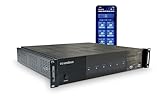
Overview:
The WS66i AMP Only version delivers the core six-zone amplification and streaming functionality of the KIT-Package without additional accessories. It provides 50 watts per channel across six zones, supporting 12 speakers with dual built-in streamers for multi-user audio. This variant targets buyers wanting the essential features at a reduced price point.
What Makes It Stand Out:
Identical to the KIT-Package, the dual-streamer architecture allows concurrent streaming from two sources or users, a feature rarely found in standalone amplifiers. The 60-second app-based setup, broad streaming service compatibility, and individual zone control via AirPlay and Spotify Connect remain fully intact. Expansion capability to 18 zones provides future growth potential.
Value for Money:
At $1,299.99, this offers $200 savings over the KIT-Package while retaining all core functionality. The price positions it competitively against the Juke-6, offering 25% more power and dual-streamer capability. For buyers not needing bundled accessories, this represents superior value. The cost-per-zone of $217 justifies the investment for serious multi-room audio.
Strengths and Weaknesses:
Strengths mirror the KIT-Package: robust 50-watt output, comprehensive app control, extensive streaming support, dual streamers, and zone expansion. Weaknesses include app dependency, minimal physical controls, and potential need to purchase accessories separately. The brand’s market presence remains smaller than established competitors.
Bottom Line:
Choose the AMP Only version over the KIT-Package unless you specifically need bundled accessories. It delivers identical performance and features at a meaningful discount, making it the smarter purchase for most buyers. The WS66i series represents excellent value for mixed-platform households wanting powerful, app-controlled multi-room audio.
6. Rockville RCS2-320-6 320W 6-Zone Stereo/Mono Commercial 70V Amplifier, Bluetooth, USB/SD, Optical Input, Perfect for Restaurants, Schools, Offices, and Multi-Room Audio

Overview: The Rockville RCS2-320-6 is a robust commercial-grade amplifier designed for multi-zone audio distribution. Delivering 320 watts across six independent zones, this unit is ideal for restaurants, schools, offices, and complex residential setups requiring centralized audio management.
What Makes It Stand Out: This amplifier’s standout feature is its versatile 6-zone configuration that can operate in either mono or stereo modes, giving you unprecedented flexibility. The three microphone inputs with dedicated echo control make it perfect for announcements, presentations, or even karaoke events. Its comprehensive connectivity suite includes Bluetooth, USB/SD playback, optical input, RCA connections, and an FM radio tuner.
Value for Money: At $299.95, this commercial amplifier offers exceptional value. Comparable units from premium brands often cost twice as much while delivering similar power and zone control. The inclusion of multiple input sources and mic channels eliminates the need for additional equipment, saving both money and rack space.
Strengths and Weaknesses: Strengths include powerful 320W output, independent zone volume controls, versatile connectivity options, and professional-grade build quality. The echo control for microphones is a rare find in this price range. Weaknesses include a steeper learning curve for non-technical users, potential overkill for simple home setups, and the requirement for 70V-compatible speakers in commercial installations. The interface may feel dated compared to modern app-controlled systems.
Bottom Line: The Rockville RCS2-320-6 is an outstanding choice for business owners and audio installers seeking professional multi-zone capability without breaking the bank. While not ideal for casual home use, it excels in commercial applications where reliability and flexibility are paramount.
7. Compact Stereo System Speakers with CD Player, Bluetooth, FM Radio, Aux-in, USB-in, Earphone Jack, DSP-Tech, Remote, 30W Crisp-Sound Shelf Stereo System for Home (LP-886)
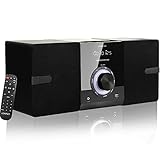
Overview: The LP-886 is a compact all-in-one stereo system that delivers surprisingly versatile functionality in a small footprint. This micro hi-fi system combines traditional CD playback with modern wireless streaming, making it an excellent solution for bedrooms, offices, or small living spaces.
What Makes It Stand Out: This system stands out for its comprehensive feature set at an entry-level price point. The DSP technology enhances audio clarity, while the wooden speaker enclosures provide warmer acoustics than typical plastic cabinets. The top-loading CD player supports multiple disc formats, and the inclusion of Bluetooth, USB, FM radio, and aux-in covers virtually all listening preferences.
Value for Money: At $79.90, the LP-886 represents outstanding value. Purchasing separate components—a CD player, Bluetooth receiver, and powered speakers—would easily cost double. The included remote control and multiple EQ modes add premium touches rarely seen in this price category.
Strengths and Weaknesses: Strengths include its all-in-one convenience, compact dimensions, versatile playback options, DSP-enhanced sound, and attractive wooden speaker design. The system is user-friendly and makes a great gift. Weaknesses include modest 30W total power output, limited bass response, FM-only radio (no AM), and basic build quality typical of budget electronics. The LED display, while functional, is small and may be difficult to read from a distance.
Bottom Line: The LP-886 is a fantastic budget-friendly stereo system for casual listeners who want multiple playback options without complexity. While audiophiles should look elsewhere, it’s perfect for bedrooms, dorm rooms, or as a secondary system where convenience and versatility trump raw power.
8. Google Nest Audio (3-Pack) Smart Speakers – Multi-Room Wireless Home Speaker Bundle with Bluetooth, Wi-Fi, Assistant, Stereo Sound, Voice Control & Smart Home Integration

Overview: The Google Nest Audio 3-Pack transforms your home into an intelligent audio ecosystem. These smart speakers deliver synchronized multi-room sound while serving as voice-activated assistants, making them a centerpiece for modern connected living.
What Makes It Stand Out: What truly distinguishes this bundle is the seamless integration of high-quality audio with Google’s powerful AI assistant. The ability to create a stereo pair for immersive listening while maintaining independent speakers in other rooms is remarkably flexible. Voice control extends beyond music to managing smart home devices, setting reminders, and accessing real-time information.
Value for Money: At $219.95 for three speakers, you’re paying approximately $73 per unit—significantly less than individual retail pricing. Considering each speaker functions as both a premium audio device and smart home hub, the bundle offers compelling value compared to purchasing separate speakers and smart assistants.
Strengths and Weaknesses: Strengths include effortless multi-room synchronization, excellent voice recognition, robust smart home integration, and automatic software updates that continuously improve functionality. The audio quality punches above its size. Weaknesses include mandatory Wi-Fi dependency, potential privacy concerns with always-listening microphones, and ecosystem lock-in to Google services. Bluetooth connectivity can occasionally be finicky, and the lack of wired input limits flexibility.
Bottom Line: This 3-pack is ideal for anyone invested in the Google ecosystem seeking whole-home audio with intelligent voice control. While not for the privacy-conscious or those preferring wired systems, it delivers an unbeatable combination of convenience, sound quality, and smart functionality for tech-savvy households.
9. OSD Audio Nero Max8: 4-Zone, 4-Source Amplifier 80W Power, Multi-Room Audio Control, App Integration for iOS & Android, Expand up to 12 Zones, Control4 Driver Support

Overview: The OSD Audio Nero Max8 is a professional-grade multi-zone amplifier engineered for serious whole-house audio installations. With 80 watts per channel across four independent zones, this unit provides audiophile-quality sound distribution for discerning homeowners and light commercial applications.
What Makes It Stand Out: The Max8’s app-based control system sets it apart, allowing intuitive zone management from iOS or Android devices. Its expandability to 12 zones makes it a scalable solution for growing systems. RS232 integration enables seamless connection with Control4 and other premium home automation platforms, while optional in-wall keypads provide convenient local control.
Value for Money: At $999.99, this is a significant investment, but it delivers professional features that justify the premium. Comparable amplifiers from Crestron or Russound cost considerably more. For custom installers and homeowners building dedicated media rooms, the Max8’s reliability and flexibility offset its high price point.
Strengths and Weaknesses: Strengths include robust 80W per-channel output, intuitive app control, multiple input sources per zone, excellent expandability, and professional automation integration. The build quality is exceptional. Weaknesses include the steep price for casual users, complexity requiring professional installation for optimal setup, and additional costs for in-wall keypads. The lack of built-in streaming services means you’ll need separate source components.
Bottom Line: The Nero Max8 is a top-tier choice for custom home theater installers and serious enthusiasts building comprehensive multi-room systems. While overkill for simple setups, its professional features and rock-solid performance make it worth every penny for demanding applications where quality and reliability are non-negotiable.
10. Bluetooth Speaker Set: Wireless Stereo Dual Pairing Portable Twin TWS System With Big Rich Bass Hi-Fi Multi-Room Indoor Outdoor Use Home Deck Pool Work Travel Party Camping Gift Decor Idea (Chrome)

Overview: This Bluetooth speaker set offers an affordable entry into wireless multi-room audio with its unique unlimited pairing capability. The twin speakers deliver stereo sound that can be expanded across multiple rooms, making them surprisingly versatile for their compact size.
What Makes It Stand Out: The ability to pair unlimited speakers together is the headline feature, allowing users to build a whole-home audio system incrementally. The speakers work both indoors and outdoors, with rugged construction that withstands drops and shocks. Multiple playback modes—including Bluetooth, TF/SD cards, and 3.5mm aux—provide flexibility beyond typical portable speakers.
Value for Money: At $79.97 for two speakers, this set dramatically undercuts premium brands while offering more pairing flexibility. The included stands and durable build add value. For budget-conscious buyers wanting multi-room capability without investing in a proprietary ecosystem, this is an attractive proposition.
Strengths and Weaknesses: Strengths include exceptional affordability, unlimited pairing potential, portable design, indoor/outdoor versatility, and multiple connectivity options. The drop-proof construction is a nice bonus. Weaknesses include modest 5W per speaker output, resulting in limited volume and bass response. Sound quality can’t match premium alternatives, and the manufacturer acknowledges potential Bluetooth interference issues. Battery life isn’t specified, suggesting it may be underwhelming.
Bottom Line: These speakers are perfect for casual listeners seeking affordable multi-room flexibility without frills. While audiophiles will be disappointed, they’re ideal for background music, pool parties, or as a starter system. Manage your expectations regarding sound quality, and you’ll find excellent value in this expandable wireless solution.
Why Multi-Room Audio is the Ultimate WFH Upgrade
The Psychology of Sound in Remote Work
Remote work has fundamentally changed how we interact with our living spaces. Your home now serves multiple competing functions, and audio plays a surprisingly powerful role in creating mental separation between them. Research consistently shows that carefully curated background audio can improve focus, reduce stress, and boost cognitive performance—but only when it’s delivered appropriately for each space and task. A multi-room system gives you the psychological framework to “commute” between different work modes simply by changing audio zones.
The key is intentionality. Rather than one speaker trying to serve every purpose, dedicated audio zones allow you to craft distinct sonic environments. Your deep-work session might demand high-fidelity instrumental tracks in stereo, while your standing desk area could benefit from upbeat mono playback, and your break room needs something entirely different. This spatial audio strategy helps your brain associate specific rooms with specific types of work, creating stronger work-life boundaries that many remote workers struggle to maintain.
Beyond the Single Speaker: Whole-Home Audio Explained
Traditional single-speaker solutions create a one-size-fits-none problem. Crank it loud enough to hear in your office, and it overwhelms the living room. Keep it at a polite level for shared spaces, and you strain to hear it during focused work. Multi-room systems solve this by creating a networked ecosystem of speakers that work in concert while maintaining individual personalities.
Think of it as audio virtualization for your physical space. Each room becomes an independent endpoint that can play its own content, sync with other rooms, or respond to automated triggers based on your schedule. The magic happens through sophisticated synchronization protocols that ensure when you walk from your office to the kitchen during a call, your podcast follows you without skipping a beat—literally. For remote workers, this means no more fumbling with Bluetooth connections or manually turning speakers on and off throughout the day.
Understanding Core Multi-Room Technologies
Proprietary vs. Open Standards
The multi-room audio landscape is divided between closed ecosystems and open standards, and this choice impacts everything from device selection to long-term flexibility. Proprietary systems offer seamless integration and polished user experiences but lock you into a single manufacturer’s products. Open standards like Google Cast or Apple AirPlay provide broader compatibility but sometimes sacrifice the tight integration that makes whole-home audio feel magical.
For WFH setups, consider your existing device ecosystem. If your workflow revolves around a particular operating system or voice assistant, a compatible proprietary system might offer smoother day-to-day operation. However, if you value flexibility and want to mix speakers from different brands or upgrade incrementally, open standards give you that freedom. The critical question isn’t which is “better”—it’s which aligns with your technical comfort level and long-term home technology strategy.
Mesh Networks vs. Hub-and-Spoke Architecture
Understanding how your audio system communicates internally reveals important differences in reliability and scalability. Hub-and-spoke systems route all commands through a central device—typically a soundbar, base station, or dedicated hub. This creates a single point of failure but often delivers more stable performance in smaller setups. If the hub goes down, your entire system goes dark.
Mesh network architectures, by contrast, allow each speaker to communicate directly with others, creating redundant pathways for audio streams and control commands. This self-healing approach means your system remains functional even if one device drops offline, making it particularly attractive for remote workers who can’t afford audio downtime during important presentations. Mesh systems also scale more gracefully, adding new rooms without overwhelming a central controller.
Latency and Synchronization Explained
Nothing breaks immersion faster than hearing your music echo through the house because speakers are slightly out of sync. Latency—the delay between sending an audio signal and hearing it—becomes critical when multiple rooms play the same source. Professional-grade systems maintain sync within milliseconds, creating the illusion of a single, house-wide sound system.
For video conferencing, latency matters even more. If you’re using your multi-room system to distribute call audio throughout your workspace, excessive delay creates lip-sync issues and makes conversations feel unnatural. Look for systems that advertise “video mode” or “low-latency sync” specifically designed for A/V applications. Some advanced setups even let you manually adjust sync timing per room to compensate for acoustic differences, ensuring your audio stays perfectly aligned whether you’re at your desk or grabbing coffee.
Essential Features for Work-From-Home Setups
Individual Room Control vs. Grouped Zones
The difference between a gimmicky gadget and a genuinely useful WFH tool often comes down to zone management sophistication. Basic systems let you group rooms into static zones like “upstairs” or “downstairs,” but truly powerful setups offer dynamic grouping that changes based on time, activity, or even which device you’re using.
Consider your typical workday: morning hours might need “office + kitchen” grouped for news and podcasts as you move between coffee and computer. Afternoon deep work requires isolated office audio, while lunch benefits from “kitchen + patio” pairing. The ability to create, save, and automate these zone configurations—ideally with one-tap activation—transforms your system from a simple speaker network into an intelligent productivity assistant. Some systems even support overlapping zones, allowing a room to belong to multiple groups simultaneously.
Voice Assistant Integration
Voice control becomes simultaneously more useful and more problematic in work-from-home scenarios. On one hand, hands-free operation while you’re typing or on a call is invaluable. On the other, accidental triggers during meetings can be professionally embarrassing. The solution lies in granular privacy controls and context awareness.
Advanced systems let you disable microphones during specific hours, require custom wake words for office speakers, or use physical mute switches that can’t be overridden digitally. Some even leverage presence detection to automatically disable listening when you’re on a video call. When evaluating voice integration, test how quickly the system responds, its ability to understand natural language for complex commands (“play my focus playlist in the office at volume 4”), and whether it supports whisper mode for quiet commands during early morning or late-night work sessions.
Scheduling and Automation Capabilities
The real WFH superpower is automation. Imagine your system automatically starting a “morning routine” playlist at 8 AM, switching to ambient focus sounds at 9 AM when your calendar shows “deep work,” then announcing the end of your workday with a specific song at 5 PM. This level of integration requires robust scheduling features and ideally, connectivity with your calendar or productivity apps.
Look for systems with IFTTT support, native calendar integration, or at minimum, reliable time-based routines. The best setups can trigger different audio based on which device you’re using—starting your “commute home” playlist when you close your laptop, for instance. These automations don’t just save time; they create psychological transitions that help maintain work-life balance in environments where physical boundaries blur.
Sound Quality Considerations
Decoding Audio Specs: Wattage, Drivers, and Frequency Response
Marketing numbers rarely tell the full story. A 100-watt speaker isn’t necessarily louder or better than a 50-watt model—efficiency, driver quality, and enclosure design matter far more. For WFH applications, focus on clarity in the vocal range (roughly 300 Hz to 3 kHz) where podcasts, calls, and video content live. A speaker that excels at thumping bass might muddle spoken word content.
Driver configuration reveals more about performance than power ratings. Separate tweeters and woofers handle different frequency ranges more accurately than full-range drivers. For office environments, consider speakers with front-firing drivers that project sound directly rather than omnidirectional models that create a diffuse field—this keeps audio focused on your workspace without bleeding into adjacent rooms where family members might be working or studying.
Mono, Stereo, or Multi-Channel: What’s Right for Each Room?
Stereo separation matters less than you might think for background work audio. In small offices or kitchens, a single high-quality mono speaker often provides better coverage and simpler placement than a stereo pair where you only hear one channel from most positions. Save stereo pairs for dedicated listening rooms or larger spaces where you’ll sit centered between speakers.
Multi-channel configurations—typically soundbars with satellite speakers—shine in hybrid home office/theater setups. If your workspace doubles as a media room, a system that can switch between music playback and surround sound for after-work movies offers excellent value. Just ensure it supports separate audio profiles so your “work” settings don’t get lost among your entertainment preferences.
The Impact of Room Acoustics on Performance
Your room is as important as your speaker. Hard surfaces create reflections that muddy sound, while soft furnishings absorb high frequencies. For remote workers, this affects intelligibility during calls and fatigue during long listening sessions. Before buying new equipment, optimize your space: position speakers away from walls to reduce bass buildup, add a rug if you have hardwood floors, and consider acoustic panels if your office feels echoey.
Some advanced systems include room calibration microphones that automatically adjust EQ based on your space’s acoustic signature. This feature is invaluable for WFH setups in converted bedrooms or unconventional spaces. Even basic manual EQ adjustments can compensate for room issues—boosting midrange frequencies slightly can help vocals cut through in reverberant spaces.
Connectivity and Compatibility
Wireless Standards: Wi-Fi, Bluetooth, and Beyond
Wi-Fi-based systems dominate multi-room audio for good reason: range, bandwidth, and reliability. Unlike Bluetooth, which compresses audio and disconnects when you leave the room, Wi-Fi streams maintain quality throughout your home. However, not all Wi-Fi implementations are equal. Look for systems supporting at least 802.11n (preferably ac or ax) and dual-band connectivity to avoid congestion from other smart devices.
Bluetooth still has its place as a fallback for guests or quick connections, but treat it as a secondary feature. Some systems offer Bluetooth-to-Wi-Fi bridging, where you can stream via Bluetooth to one speaker and have it redistribute losslessly to others via Wi-Fi. This hybrid approach provides flexibility without sacrificing quality for your primary listening.
Streaming Service Integration
Your multi-room system is only as good as the content it can access. Nearly all platforms support major services like Spotify and Apple Music, but WFH warriors often rely on more specialized sources. Podcast apps, white noise generators, focus music platforms, and corporate web conferencing tools require deeper integration.
Check whether a system supports direct streaming from your preferred services or relies on casting from your phone. Direct streaming means your meeting audio continues even if you step away with your device. Some business-friendly systems even integrate with UC platforms like Microsoft Teams or Zoom, allowing you to pipe call audio through your whole-house system while using a dedicated microphone array for input—a game-changer for walking meetings around your home.
Smart Home Platform Compatibility
Your audio system shouldn’t exist in isolation. Integration with smart home platforms enables powerful cross-device automations: lights dimming when you start focus music, your doorbell chime routing through speakers during work hours, or your system announcing calendar reminders. Matter and Thread are emerging standards promising better interoperability, but current implementation remains patchy.
For immediate WFH benefits, prioritize systems with robust IFTTT or direct integration with your existing smart home hub. The ability to trigger audio based on motion sensors (“start podcast when I enter office”) or time of day creates seamless experiences that fade into the background—exactly what you want from productive technology.
Scalability and Future-Proofing
Starting Small and Expanding Your System
The best multi-room systems grow with you. A common mistake is buying too much upfront, ending up with mismatched speakers or features you don’t use. Start with your primary workspace—a single, high-quality speaker that can anchor future expansion. Ensure it’s from a platform that supports adding components incrementally without requiring a complete overhaul.
Consider the upgrade path: can you add a subwoofer later? Swap a small speaker for a larger one in the same room? Mix outdoor speakers for your patio workspace? Platforms that support heterogeneous speaker configurations give you flexibility to optimize each space rather than forcing one model everywhere. This matters for WFH setups where your office might need a premium speaker while the laundry room gets a basic model.
Firmware Updates and Longevity
Audio equipment should last years, not months. Investigate a manufacturer’s track record for software support—do they still update five-year-old devices? Do they add features or just security patches? Companies that continuously improve existing products through firmware updates protect your investment and adapt to changing streaming standards.
For remote workers, update reliability is crucial. A speaker that reboots randomly during a firmware install could interrupt an important call. Look for systems that schedule updates during off-hours and offer manual control over when they install. Some enterprise-oriented platforms even provide LTS (Long-Term Support) versions of their firmware for users who prioritize stability over new features.
Control and User Experience
App Design and Reliability
You’ll interact with your system’s app dozens of times daily, so its design matters immensely. A beautiful app that’s slow or crashes undermines the entire experience. Test app store reviews specifically mentioning reliability and speed. The best apps offer widget support for quick controls without opening the full application, hardware volume button integration, and persistent notifications for currently playing content.
For WFH use, multi-device control is essential. Can you control office audio from your phone, laptop, and tablet interchangeably? Does the app sync state across devices so volume changes on one reflect immediately on others? These details separate professional-grade systems from consumer toys. Also check offline functionality—if your internet hiccups, can you still control local speakers on the same network?
Hardware Controls and Touch Panels
While apps dominate control, physical buttons matter for quick adjustments. Look for speakers with programmable preset buttons—one tap for “focus mode,” another for “break time.” Some systems include infrared remote support, letting you use universal remotes or even program office automation buttons to control audio.
Touch panels should offer haptic feedback and be positioned where you can reach them without looking up from your screen. Capacitive sliders for volume often work better than buttons for subtle adjustments during calls. For shared home offices, consider speakers with individual user profiles activated by NFC tags or voice recognition, automatically loading personal playlists and volume preferences.
Multi-User Household Management
WFH becomes complicated when multiple people share the space. Robust user management lets each person have their own profile with private playlists, separate volume preferences, and restricted access to certain rooms. Parental controls aren’t just for kids—they can prevent accidental audio interruptions in your partner’s office during their critical meetings.
Advanced systems support concurrent streams: you listening to focus music in your office while your spouse takes a call in theirs, all from the same system. This requires either multiple streaming accounts or platforms that support family sharing. Test how gracefully the system handles conflicts—if you try to play audio in a room already in use, does it offer to override, create a queue, or suggest an alternative space?
Installation and Setup
DIY-Friendly Systems vs. Professional Installation
Most modern multi-room systems promise easy DIY setup, but complexity varies dramatically. App-guided setups using NFC or QR codes can have you running in minutes, while others require network configuration that would challenge IT professionals. For WFH users, consider the time investment and potential downtime—an afternoon troubleshooting network issues is lost productivity.
Professional installation becomes worthwhile for larger homes, complex networks, or integrated systems that tie into existing wiring. Installers can optimize placement, run ethernet for critical speakers, configure VLANs to separate audio traffic, and ensure rock-solid reliability. The cost often pays for itself in saved time and frustration. If you go DIY, prioritize systems with excellent technical support and active community forums where you can find solutions to common WFH-specific issues.
Power Requirements and Cable Management
Wireless audio still needs power, and cable clutter destroys the clean aesthetic that makes multi-room systems appealing. Check whether speakers use standard power cords or proprietary adapters—replaceable cables are easier to manage and replace. Some offer power-over-ethernet (PoE) support, letting a single cable provide both data and power for ultimate cleanliness.
Battery-powered portable speakers add flexibility for impromptu outdoor workspaces or moving between rooms, but verify battery life and whether they maintain sync while unplugged. For permanent installations, consider in-wall or in-ceiling speakers that hide completely, though these sacrifice some flexibility. Smart power strips that turn off desk speakers when your computer sleeps can save energy and prevent unexpected audio during off-hours.
Privacy and Security for Remote Workers
Microphone Mute Controls and Data Privacy
Voice-enabled speakers in home offices create legitimate privacy concerns. Hardwired microphone disconnects—physical switches that completely cut power to the mic—provide ultimate assurance. Some systems use camera-based presence detection instead of always-listening microphones, activating voice control only when they see you.
Review privacy policies carefully: how long are voice recordings stored? Can you delete them automatically? Do they use human review for quality improvement? For sensitive work, consider systems that process voice commands locally rather than in the cloud. Enterprise-focused platforms often offer detailed audit logs showing exactly when microphones were active, providing documentation for compliance requirements.
Network Security Best Practices
Your audio system connects to the same network handling your work data, making it a potential attack vector. Isolate audio devices on a separate VLAN or guest network to limit access to your primary devices. Regular firmware updates are non-negotiable—set them to install automatically during your least productive hours.
Check whether speakers have unnecessary open ports or services. Some systems offer “work mode” that disables all non-essential network features, reducing attack surface during business hours. For highly regulated industries, look for systems with SOC 2 compliance or other security certifications. Remember, a compromised smart speaker could theoretically be used to eavesdrop on confidential calls.
Budget and Value
Total Cost of Ownership
Sticker price rarely reflects true cost. Factor in subscription fees for premium features, potential need for network upgrades, and energy consumption. High-efficiency speakers might cost more upfront but save money over years of daily use. Some platforms require a monthly fee for multi-user management or advanced automation—calculate this over the expected 5-7 year lifespan of the equipment.
Consider resale value too. Ecosystems with strong brand loyalty retain value better, letting you upgrade components without full replacement costs. Refurbished speakers from first-party programs offer significant savings and often include warranties, making them excellent entry points for testing a system before committing to a whole-home deployment.
Refurbished and Ecosystem Entry Points
Manufacturers’ refurbished programs provide like-new equipment at 20-40% discounts, rigorously tested with full warranties. These are ideal for secondary spaces like laundry rooms or garages where you want audio but can’t justify premium pricing. Some ecosystems offer “starter kits” with a hub and two speakers at bundle pricing, then let you expand with individual components.
For budget-conscious remote workers, consider starting with a single premium speaker for your primary workspace, then adding smaller satellite speakers for other rooms. This hybrid approach maximizes your most important listening experience while building toward whole-home coverage. Many platforms support mixing speaker tiers within the same system, so your office can have audiophile-grade sound while less critical zones use budget models.
Troubleshooting and Maintenance
Common Connectivity Issues
Even the best systems experience hiccups. Wi-Fi interference from neighboring networks, mesh handoff problems as you move through the house, and router compatibility issues top the list of complaints. Before purchasing, search forums specifically for your router model and the audio system to uncover known conflicts. Some systems struggle with enterprise-grade security settings common in work-from-home setups.
Audio dropouts during calls are particularly maddening. These often stem from buffer underruns where the speaker runs out of audio data to play. Systems with adjustable buffer settings let you trade a small amount of latency for rock-solid stability—perfect for critical meetings. Keep a wired ethernet connection option available for your primary office speaker as an ultimate fallback when Wi-Fi proves unreliable.
When to Reset vs. When to Replace
The universal tech support advice “have you tried turning it off and on again” applies to audio systems, but there’s a limit. If you find yourself power-cycling speakers weekly, something’s wrong. Persistent issues might indicate failing capacitors (common after 3-5 years), Wi-Fi module degradation, or simply that the system’s architecture can’t handle your network’s complexity.
Before replacing, try a factory reset and manual reconfiguration—sometimes automatic updates corrupt settings. If problems persist, check whether other users report similar issues; widespread problems sometimes get fixed in firmware updates. For WFH users, calculate the productivity cost of ongoing issues against replacement cost. A $300 speaker that causes 15 minutes of weekly frustration quickly becomes more expensive than a $500 reliable replacement when valued against your hourly rate.
Frequently Asked Questions
1. Can I use a multi-room audio system for video conferencing, or will it cause echo and feedback?
Yes, but with careful configuration. Use a dedicated microphone array (like a USB conference mic) for input while routing output through your multi-room speakers. Disable the microphones on the speakers themselves and enable acoustic echo cancellation in your conferencing software. Some enterprise-grade systems offer “meeting mode” that automatically handles this routing and prevents feedback loops.
2. How much internet bandwidth do I need for a whole-home audio system while working?
For audio streaming alone, 5-10 Mbps is sufficient for multiple high-quality streams. However, consider your total usage: video calls, cloud backups, and audio streaming simultaneously can strain connections. A system that supports local network streaming reduces internet dependency—your music streams directly from your phone or NAS to speakers without cloud round-trips, saving bandwidth for critical work applications.
3. Will multi-room speakers interfere with my Wi-Fi performance during important video calls?
Properly designed systems use minimal bandwidth and shouldn’t impact video calls. However, cheap or poorly configured speakers can flood your network with multicast traffic. Look for systems with QoS (Quality of Service) support that prioritize other traffic. Placing speakers on a separate 2.4GHz band while keeping work devices on 5GHz also prevents interference.
4. Can I create a “do not disturb” zone that never receives audio during work hours?
Absolutely. Most advanced systems let you schedule room availability or create permanent DND zones. The best implementations integrate with your calendar, automatically locking your office speaker during scheduled meetings. Physical mute buttons on speakers provide immediate override capability for unexpected interruptions.
5. How do I prevent family members from accidentally controlling my office audio?
Set up individual user profiles with room permissions. Many systems support PIN codes for specific zones or voice recognition that limits control to authorized users. Some business-oriented platforms offer “admin” and “user” roles, letting you lock down critical spaces while keeping common areas open for everyone.
6. Are battery-powered multi-room speakers reliable enough for daily office use?
For primary office use, stick with AC-powered speakers for reliability. Battery models are best for flexible secondary spaces or occasional outdoor work. If you must use battery power, choose speakers with 10+ hour life and “always-on” modes that prevent sleep during work hours. Keep a charger handy—batteries degrade over time, and you don’t want your speaker dying mid-presentation.
7. Can I integrate my existing Hi-Fi equipment into a modern multi-room system?
Yes, through line-in adapters or streaming preamps that add network connectivity to traditional amplifiers. This lets you keep your beloved bookshelf speakers while gaining multi-room capabilities. Check for digital inputs to minimize analog conversion quality loss, and ensure the adapter supports your system’s synchronization protocol to avoid latency issues.
8. What’s the best way to test a system before committing to a whole-home purchase?
Start with a single speaker in your primary workspace from a platform you’re considering. Use it exclusively for two weeks, testing all control methods, streaming services, and automation features. Most manufacturers offer 30-day return policies. Pay attention to app stability, connection reliability, and how often you reach for your old speaker—if you’re not excited about using it daily, the whole-home version won’t magically improve the experience.
9. How do I handle audio for different work modes—focus, calls, breaks—without constant manual adjustment?
Create preset scenes or routines within your system’s app. “Focus mode” might set office volume to 30% with a specific playlist, “calls mode” mutes everything except your office speaker, and “break mode” routes upbeat music to common areas. Trigger these with voice commands, scheduled automations, or physical buttons. The goal is one-tap transitions that match your workflow.
10. Will my multi-room system become obsolete when new streaming technologies emerge?
Choose platforms with strong firmware update histories and open standards support. Systems that support multiple protocols (AirPlay, Chromecast, Spotify Connect) can pivot as services change. Avoid single-protocol systems unless you’re deeply invested in that ecosystem. Some manufacturers offer trade-in programs for legacy devices, softening the blow when true obsolescence arrives. Cloud-dependent features are most at risk; prioritize systems with robust local network capabilities that function even if the manufacturer discontinues service.