Transforming your home’s security doesn’t require a complete overhaul of your existing setup. Smart security lights integrated with Alexa routines represent one of the most impactful upgrades you can make this year, blending cutting-edge illumination technology with intelligent automation that responds to your lifestyle. These aren’t just motion-activated floodlights anymore—they’re sophisticated sentinels that learn your patterns, deter potential threats, and seamlessly coordinate with your entire smart home ecosystem.
As voice control becomes the standard rather than the exception, understanding how to leverage Alexa routines with your security lighting can mean the difference between a basic deterrent and a proactive security system. Whether you’re a smart home novice or looking to expand your existing network, this guide will walk you through everything you need to know about selecting, installing, and optimizing smart security lights that work intelligently with Amazon’s voice assistant.
Top 10 Smart Security Lights with Alexa Routines
Detailed Product Reviews
1. Onforu 100W 9000LM Smart LED Security Lights Motion Sensor Outdoor,WiFi Alexa Flood Light APP Control, 2500K-6500K, Motion Detector with Adjustable 3 Head, IP65 Wall Light for Yard (White)

Overview: The Onforu 100W Smart LED Security Light delivers 9000 lumens of customizable illumination for outdoor spaces. This WiFi-enabled fixture pairs with Alexa and Google Assistant, offering comprehensive control through the dedicated Onforu app. Designed for yards, garages, and driveways, it combines motion detection with tunable white light ranging from 2700K to 6500K.
What Makes It Stand Out: The motion sensor reaches 72.7 feet with a 180° detection angle—exceptional coverage for residential security. Three sensitivity levels and five brightness modes adapt to any environment. The “motion linkage” feature synchronizes multiple lights, triggering them simultaneously when one detects movement. Stepless dimming and memory function ensure precise, consistent lighting preferences.
Value for Money: At $79.99, this unit competes favorably with premium security lights lacking smart capabilities. Traditional motion floodlights with similar brightness cost $50-70, while adding smart features typically pushes prices above $100. The IP65 waterproof rating and aluminum construction promise durability, making it a cost-effective long-term investment for comprehensive property coverage.
Strengths and Weaknesses: Strengths include impressive motion range, robust app controls, group synchronization, and flexible scheduling. The stepless color temperature adjustment and micro-bright mode provide energy savings. Weaknesses: requires 2.4GHz WiFi (no 5GHz support), the adapter isn’t waterproof (installation consideration), and initial setup may challenge less tech-savvy users. Some app typos suggest rushed development.
Bottom Line: For homeowners seeking intelligent security lighting with extensive customization, the Onforu delivers exceptional performance and value. Its advanced motion detection and smart integration justify the price. Recommended for tech-comfortable users wanting reliable, feature-rich outdoor illumination.
2. Onforu 100W 9000LM Smart LED Security Lights Motion Sensor Outdoor, WiFi Alexa Flood Light APP Control, 2500K-6500K, Motion Detector with Adjustable 3 Head, IP65 Wall Light for Yard (Black)

Overview: The Onforu 100W Smart LED Security Light in black offers identical functionality to its white counterpart, delivering 9000 lumens of tunable white illumination for outdoor security. This Alexa and Google Assistant-compatible fixture provides comprehensive app-based control through the Onforu platform, making it ideal for garages, yards, and commercial entrances where discreet dark housing is preferred.
What Makes It Stand Out: Beyond its stealthy aesthetic, the unit features a 72.7-foot motion detection range with 180° coverage—among the longest in its class. The innovative motion linkage synchronizes multiple fixtures, creating a coordinated security perimeter. Five ambient brightness modes and three sensitivity levels ensure reliable detection without false triggers from small animals.
Value for Money: Priced at $79.99, the black variant matches the white version’s excellent value proposition. Comparable non-smart LED floodlights with 9000-lumen output retail for $60-80, while smart-enabled alternatives often exceed $120. The IP65 rating and aluminum build quality ensure weather resistance, representing strong ROI for permanent outdoor installations requiring aesthetic flexibility.
Strengths and Weaknesses: Strengths include exceptional detection range, durable construction, group control capabilities, and micro-bright energy-saving mode. The black finish resists visible weathering better than lighter colors. Weaknesses mirror the white model: 2.4GHz-only WiFi connectivity, non-waterproof adapter requiring careful placement, and occasional app inconsistencies. Professional installation may benefit some users.
Bottom Line: Choose the black version for the same high-performance smart security features with enhanced aesthetic versatility. It seamlessly blends with dark siding and commercial facades while delivering robust motion-activated lighting. Highly recommended for users prioritizing both functionality and visual integration.
3. Linkind Smart Light Bulbs, Smart Bulb That Work with Alexa & Google Home, LED Light Bulbs Color Changing, 104 Preset Scene, Music Sync, A19 E26 2.4GHz RGBTW WiFi Bluetooth Light Bulb 60W, 800LM, 4Pack

Overview: Linkind’s 4-pack of Smart Light Bulbs provides affordable entry into color-changing home automation. These A19 E26 bulbs deliver 800 lumens with 16 million colors plus tunable white from 1800K to 6500K. Compatible with Alexa, Google Home, and the AiDot app, they offer music sync and 104 preset scenes for comprehensive ambient control throughout your living space.
What Makes It Stand Out: The dual WiFi and Bluetooth connectivity enables 2x faster pairing and local control without internet—rare at this price point. Music synchronization uses your phone’s microphone to pulse colors with audio, creating dynamic party atmospheres. With 104 preset scenes spanning holidays to daily moods, customization exceeds many premium competitors. The 4-pack bundle simplifies whole-room coordination.
Value for Money: At $33.99 ($8.50 per bulb), this represents exceptional value. Single color-changing bulbs from major brands typically cost $15-25 each. The feature set—including scheduling, music sync, and scene presets—matches bulbs costing twice as much. For outfitting multiple rooms or fixtures, the bulk packaging drives per-unit costs down significantly without sacrificing core smart functionality.
Strengths and Weaknesses: Strengths include rapid dual connectivity, extensive scene library, responsive music sync, and unbeatable 4-pack pricing. The 800-lumen output suits most residential applications. Weaknesses: requires both WiFi and Bluetooth for initial setup (slightly complex), microphone permissions raise privacy considerations for some users, and the AiDot app lacks the polish of established platforms like Kasa or Philips Hue.
Bottom Line: Linkind’s 4-pack delivers premium smart bulb features at budget prices. Perfect for first-time smart home adopters or expanding existing setups. Despite minor app quirks, the hardware performance and value are undeniable. Highly recommended for cost-conscious users wanting color versatility.
4. Kasa Smart Light Bulb KL110, LED Wi-Fi smart bulb works with Alexa and Google Home, A19 Dimmable, 2.4Ghz, No Hub Required, 800LM Soft White (2700K), 9W (60W Equivalent)

Overview: The Kasa Smart Light Bulb KL110 is a streamlined entry point into smart lighting, offering dimmable soft white illumination (2700K) at 800 lumens. This single A19 bulb connects directly to 2.4GHz WiFi without requiring a hub, integrating seamlessly with Alexa, Google Assistant, and the Kasa Smart app for straightforward remote control and scheduling.
What Makes It Stand Out: Kasa’s reputation for reliability shines through this no-frills offering. The bulb’s 1-100% dimming range provides precise brightness control for any activity, while the app’s intuitive interface simplifies scheduling and remote operation. As part of a trusted ecosystem used by over 6 million people, it ensures consistent firmware updates and broad third-party compatibility.
Value for Money: At $9.44, this represents one of the most affordable smart bulbs from a major brand. Competitor dimmable white bulbs typically start at $12-15. The UL certification and Kasa’s track record for longevity justify the slight premium over unknown brands. For single-fixture upgrades or testing smart home waters, it’s an accessible, low-risk investment that doesn’t compromise core functionality.
Strengths and Weaknesses: Strengths include rock-solid connectivity, excellent app reliability, voice control responsiveness, and hub-free simplicity. The soft white color temperature is ideal for relaxed residential settings. Weaknesses: limited to single color temperature (no tunable white), 2.4GHz-only connectivity may conflict with mesh networks, and lacks energy monitoring found in higher-end Kasa models. No color changing capabilities.
Bottom Line: The KL110 is the ideal starter smart bulb for users prioritizing reliability over flashy features. It executes basic smart lighting flawlessly at an unbeatable price from a trusted brand. Perfect for bedrooms, lamps, or anywhere consistent dimmable white light is needed. Strongly recommended for smart home beginners.
5. Kasa Smart Light Bulbs, Full Color Changing Dimmable Smart WiFi Bulbs Compatible with Alexa and Google Home, A19, 60 W 800 Lumens,2.4Ghz only, No Hub Required, 2-Pack (KL125P2), Multicolor
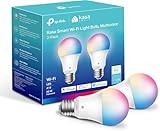
Overview: Kasa’s KL125P2 2-pack delivers full-color smart lighting with professional-grade reliability. These A19 bulbs produce 16 million colors plus auto-adjusting white temperatures (2500K-6500K) at 800 lumens each. Requiring only 2.4GHz WiFi and no hub, they integrate with Alexa and Google Assistant while offering energy monitoring and scheduling through the polished Kasa Smart app.
What Makes It Stand Out: The “Auto White” feature automatically adjusts color temperature throughout the day, mimicking natural light patterns—typically a premium function. Real-time energy monitoring provides usage insights, helping reduce electricity costs. With over 6 million users, Kasa’s platform offers unmatched stability and continuous feature updates. The 2-pack bundle enables synchronized room lighting at competitive pricing.
Value for Money: At $13.63 ($6.82 per bulb), this is extraordinary value for color-changing smart bulbs from an established brand. Individual color bulbs from competitors cost $20-30 each. The inclusion of energy monitoring and circadian lighting features, usually reserved for $25+ bulbs, makes this bundle a standout budget champion without sacrificing quality or support.
Strengths and Weaknesses: Strengths include robust app experience, reliable voice control, energy monitoring, auto white circadian feature, and UL safety certification. The per-bulb cost is market-leading. Weaknesses: 2.4GHz-only limitation, no Bluetooth backup connectivity, and colors may appear slightly less saturated than premium alternatives like Philips Hue. Requires Kasa account for full functionality.
Bottom Line: Kasa’s KL125P2 2-pack is the smart choice for reliable, feature-rich color bulbs at an unmatched price. The energy monitoring and auto white features add genuine utility beyond gimmicks. Perfect for users wanting proven performance without premium costs. Highly recommended for whole-home smart lighting expansion.
6. Onforu 55W Smart LED Flood Lights Outdoor, 5500LM, Tunable 2700K-6500K, APP Control, WiFi Alexa Security Lights with Timer & Adjustable 3 Head, IP65 Waterproof for House, Yard, Porch, Garage, Backyard

Overview: The Onforu 55W Smart LED Flood Light delivers 5,500 lumens of tunable white light (2700K-6500K) for versatile outdoor illumination. Controlled via the Onforu app or voice commands through Alexa and Google Home, this hardwired fixture features three adjustable heads for customizable coverage. Its IP65 waterproof rating ensures durability in harsh weather, making it suitable for yards, garages, porches, and backyards.
What Makes It Stand Out: This flood light’s stepless color temperature and brightness adjustment (1%-100%) provide exceptional flexibility for any occasion or mood. The memory function retains your last settings, while dual timer modes allow automated scheduling with custom brightness and color temperature. The three adjustable heads enable precise directional lighting, eliminating dark spots around your property.
Value for Money: At $49.99, this smart flood light offers impressive value compared to traditional non-smart fixtures with similar brightness. You get app control, voice integration, and tunable white capabilities typically found in more expensive models. While it lacks a motion sensor, the feature set justifies the price point for those prioritizing customizable lighting over automated detection.
Strengths and Weaknesses: Strengths include robust 5,500-lumen output, full tunable white spectrum, reliable IP65 weatherproofing, intuitive app controls, and flexible timer scheduling. Weaknesses are the required hardwired installation (no plug-and-play option), 2.4GHz WiFi limitation, and absence of motion-sensing or dusk-to-dawn functionality, which some users may expect at this price point.
Bottom Line: The Onforu 55W is an excellent choice for homeowners wanting smart, customizable outdoor lighting without motion detection. Its bright output, adjustable heads, and versatile controls make it ideal for illuminating specific areas on demand. Highly recommended for smart home enthusiasts comfortable with hardwired installation.
7. Kasa Smart Light Bulbs that works with Alexa and Google Home, Dimmable Smart LED Bulb, A19, 9W, 800Lumens, Soft White(2700K), CRI≥90, WiFi 2.4Ghz only, No Hub Required, 4 Count (Pack of 1)(KL110P4)

Overview: This four-pack of Kasa Smart A19 bulbs offers 800 lumens of soft white light (2700K) with full dimming capabilities. Designed for indoor use, these 9W LEDs replace 60W incandescents and connect directly to 2.4GHz WiFi without requiring a hub. Integration with Alexa and Google Assistant enables voice control, while the Kasa app provides remote access and scheduling from anywhere.
What Makes It Stand Out: Kasa’s energy monitoring feature sets these apart, allowing real-time tracking of power consumption to help reduce electricity costs. The brand’s reputation—trusted by over 6 million users—is backed by UL certification and a 2-year warranty. With a high CRI of ≥90, colors appear vibrant and natural, making these ideal for living spaces where color accuracy matters.
Value for Money: At $24.99 for four bulbs ($6.25 each), this pack delivers exceptional value. Individual smart bulbs from competitors often cost $10-15 each, making this an affordable entry point into smart lighting. The inclusion of energy monitoring and scheduling features at this price point is particularly impressive, offering long-term savings that offset the initial investment.
Strengths and Weaknesses: Strengths include unbeatable price-per-bulb, reliable brand reputation, energy monitoring, high CRI rating, easy setup, and robust scheduling options. Weaknesses are the fixed 2700K temperature (no tunable white), 2.4GHz-only connectivity, and relatively modest 800-lumen output that may not suit large rooms or task lighting needs.
Bottom Line: The Kasa 4-pack is the best budget-friendly smart bulb option for indoor use. Perfect for lamps, fixtures, and multi-room setups, these bulbs offer reliable performance and energy insights without breaking the bank. Highly recommended for smart home beginners and value-conscious buyers.
8. Onforu 120W Smart Flood Light Outdoor, 12000LM LED Security Light APP Control, WiFi Alexa Flood Lights Outside Floodlight with 5 Adjustable Heads, 2700K-6500K Exterior Light Fixture for Yard

Overview: The Onforu 120W Smart Flood Light is a powerhouse delivering 12,000 lumens through five adjustable heads, providing expansive outdoor coverage. This hardwired fixture features tunable white light (2700K-6500K) and stepless dimming controlled via the Onforu app or Alexa/Google voice commands. With a 340° beam angle and IP65 waterproof rating, it’s engineered to illuminate large yards, driveways, and commercial spaces while withstanding severe weather.
What Makes It Stand Out: Five independently adjustable heads create unparalleled lighting flexibility, allowing you to customize coverage patterns for unique property layouts. The extreme brightness combined with tunable color temperature makes it suitable for both security and aesthetic purposes. Energy-saving claims of 85% electricity reduction versus traditional halogen lights add long-term value, while the memory function preserves your preferred settings.
Value for Money: Priced at $86.99, this premium flood light justifies its cost through exceptional brightness and coverage area. Comparable multi-head smart flood lights often exceed $100, making this competitively priced for large-scale illumination needs. While the initial investment is significant, the energy savings and eliminated need for multiple smaller fixtures provide strong ROI for properties requiring maximum visibility.
Strengths and Weaknesses: Strengths include extraordinary 12,000-lumen output, five adjustable heads, wide 340° coverage, full tunable white spectrum, robust IP65 construction, and comprehensive timer scheduling. Weaknesses are the higher price point, mandatory hardwired installation requiring electrical expertise, 2.4GHz WiFi limitation, and potential overkill for smaller residential spaces.
Bottom Line: The Onforu 120W is the ultimate solution for large properties needing maximum illumination. Its five-head design and extreme brightness eliminate the need for multiple fixtures, while smart controls add convenience. Recommended for expansive yards, commercial applications, and security-conscious homeowners willing to invest in premium coverage.
9. EMANER Smart Security Light Motion Sensor, Compatible with Alexa/Google Home, Warm White to Daylight White Brightness Adjust, App Controlled WiFi Flood Light (White, 1-Pack)

Overview: The EMANER Smart Security Light combines motion detection with tunable white technology in a three-head outdoor fixture. Delivering adjustable color temperatures from 2700K to 6500K and 1%-100% brightness, this hardwired flood light connects via 2.4GHz WiFi to the Smart Life or Tu Ya Smart apps. The integrated PIR motion sensor detects movement up to 26 feet away, making it a versatile security solution for entryways, garages, and yards.
What Makes It Stand Out: The dual-mode operation distinguishes this light: Manual mode provides standard scheduled lighting, while Sensor mode activates motion detection with customizable range and duration (5 seconds to 60 minutes). App-based sensor adjustments eliminate the hassle of ladder climbs for recalibration. Voice control compatibility and a memory function that restores previous settings enhance user convenience.
Value for Money: At $39.99, this motion-sensing smart flood light offers compelling value. Competitors with similar features typically start at $50+, making EMANER an affordable entry into smart security lighting. While the 26-foot detection range is modest compared to premium models, the tunable white capability and app control at this price point deliver significant bang for your buck.
Strengths and Weaknesses: Strengths include integrated motion sensor with app customization, tunable white spectrum, dual operating modes, adjustable heads, and competitive pricing. Weaknesses are the relatively short 26-foot detection range, limited brand recognition, mandatory 2.4GHz WiFi, and hardwired installation that may require professional help.
Bottom Line: The EMANER Smart Security Light is an excellent budget-friendly option for homeowners wanting motion-activated smart lighting without sacrificing color temperature flexibility. Its app-controlled sensor settings and dual modes provide customization rarely seen at this price. Recommended for small-to-medium properties prioritizing security and convenience.
10. Olafus 65W Smart LED Flood Light Outdoor with Motion Sensor, 6500LM, 2700K-6500K WiFi Security Light Work with Alexa/Google, Motion Detector Lights with APP Control, IP65 Floodlight Outside (White)

Overview: The Olafus 65W Smart Flood Light merges advanced motion sensing with tunable white technology, producing 6,500 lumens adjustable from 2700K to 6500K. This hardwired fixture features a highly sensitive PIR sensor detecting motion up to 72 feet away across a 180° angle with three sensitivity levels. Controlled via app or Alexa/Google voice commands, the IP65-rated light includes a unique low-light mode for energy-efficient ambient illumination when inactive.
What Makes It Stand Out: The motion sensor’s exceptional 72-foot range and 180° detection angle surpass most competitors, while app-based activation logging provides security monitoring insights. Group linking allows multiple lights to trigger simultaneously, creating a coordinated security network. The low-light mode maintains minimal illumination between motion events, balancing security with energy savings.
Value for Money: At $52.99, Olafus positions itself as a mid-range option with premium motion detection capabilities. While more expensive than basic motion-sensing lights, the extended range, tunable white features, and advanced app controls justify the cost for security-focused users. Compared to commercial-grade sensors costing $100+, this offers professional-level detection at a consumer-friendly price.
Strengths and Weaknesses: Strengths include industry-leading 72-foot motion detection, wide 180° angle, tunable white spectrum, bright 6500-lumen output, low-light mode, activation recording, IP65 waterproofing, and group control. Weaknesses are the 2.4GHz-only connectivity, hardwired installation requirement, and higher price than entry-level motion lights.
Bottom Line: The Olafus 65W is the top choice for homeowners demanding superior motion detection range and smart features. Its advanced sensor capabilities and tunable white light create a robust security solution. Highly recommended for large properties, long driveways, and users wanting detailed motion activity insights through the app.
Understanding Smart Security Lights and Alexa Integration
What Makes a Security Light “Smart”?
A smart security light transcends traditional motion-activated illumination by connecting to your home network and offering programmable control through apps and voice assistants. These devices combine LED efficiency with sensors, connectivity modules, and sometimes cameras or two-way audio. The “smart” designation means you can adjust brightness, color, sensitivity, and scheduling remotely while receiving real-time notifications on your phone. Unlike conventional fixtures that simply switch on and off, smart lights create a dynamic security layer that adapts to different scenarios, times of day, and even specific individuals approaching your property.
How Alexa Routines Transform Security Lighting
Alexa routines elevate smart lights from remote-controlled fixtures to intelligent security partners. By creating conditional automation chains, you can program your lights to respond to voice commands, door sensor triggers, security system status changes, or even your smartphone’s location. Imagine arriving home to a pathway that illuminates progressively as you approach, flashing red if your security camera detects unusual activity, or automatically dimming to 30% brightness during quiet overnight hours while maintaining motion sensitivity. These routines eliminate manual control, making your security measures proactive rather than reactive.
Key Features to Evaluate Before Buying
Brightness and Lumens: Finding Your Sweet Spot
Security lighting effectiveness hinges on appropriate brightness levels measured in lumens. Entry-level models start around 800 lumens—suitable for small patios—while premium floodlights exceed 3,000 lumens, casting daylight-bright illumination across large driveways. Consider your specific needs: overly bright lights can create harsh shadows and annoy neighbors, while insufficient brightness fails to deter intruders. Look for adjustable lumen settings that let you fine-tune intensity based on time of day or activity type. Many Alexa-compatible lights allow you to create routines that automatically shift from 2,500 lumens during high-alert evening hours to 500 lumens for gentle pathway lighting after midnight.
Color Temperature and RGB Capabilities
Color temperature, measured in Kelvin, dramatically affects both security effectiveness and aesthetic appeal. Cool white light (5000K-6500K) provides maximum visibility and creates a clinical, security-focused atmosphere that signals active monitoring. Warm white (2700K-3000K) offers welcoming ambient lighting for entryways. Advanced RGB capabilities unlock powerful security routines: program lights to flash blue when emergency services are needed, pulse red during alarm triggers, or glow green when your security system is disarmed. This color versatility transforms your lighting from purely functional to communicative, giving you visual status updates at a glance.
Motion Detection Technology Explained
Not all motion sensors are created equal. Passive Infrared (PIR) sensors detect heat signatures and work reliably for human detection but can miss cold-blooded threats or trigger from pets. Dual-technology sensors combine PIR with microwave or ultrasonic detection, requiring both to trigger before activating—drastically reducing false alarms. Some advanced models feature AI-powered human detection that distinguishes between people, animals, and vehicles. When evaluating options, check the sensor’s ability to adjust sensitivity zones and create Alexa routines that respond differently to various detection types.
Field of View and Detection Range
A sensor’s field of view determines its coverage area, typically ranging from 110 to 270 degrees. Wider isn’t always better—overly broad detection can pick up street traffic or neighboring properties. Consider models offering customizable detection zones that you can mask off through the companion app. Detection range varies from 20 feet for compact fixtures to 70+ feet for commercial-grade floodlights. For Alexa routine integration, lights with precise zone control allow you to trigger different responses based on where motion occurs: approach from the driveway might activate welcome lighting, while detection near a back window triggers flashing red alerts.
Power Source Options: Wired vs. Battery vs. Solar
Your installation location and electrical access dictate the best power solution. Hardwired lights offer unlimited power and continuous operation but require professional installation and limit placement flexibility. Battery-powered models provide DIY-friendly setup and placement freedom but demand periodic recharging—look for units with 6+ month battery life and low-battery Alexa notifications. Solar-powered options eliminate wiring and battery concerns but need 4-6 hours of direct sunlight daily and may underperform during winter months. Some hybrid models combine solar with battery backup, ensuring operation during extended cloudy periods. When creating Alexa routines, consider how power source affects reliability—battery and solar lights may enter power-saving modes that delay response times.
Weather Resistance and Durability Ratings
Outdoor security lights must withstand extreme conditions. The IP (Ingress Protection) rating system tells you exactly what a fixture can handle. IP65 offers dust-tight protection and water jets from any direction—suitable for most installations. IP67 provides temporary submersion protection for flood-prone areas. Beyond ratings, examine construction materials: aluminum housings with tempered glass lenses outperform plastic alternatives that degrade under UV exposure. Operating temperature ranges matter too; quality units function from -4°F to 120°F. For coastal homes, verify salt-spray corrosion resistance to prevent premature failure.
Connectivity and Smart Home Ecosystem
Wi-Fi Standards and Hub Requirements
Most Alexa-compatible security lights connect via 2.4GHz Wi-Fi, which offers better range through walls but slower speeds than 5GHz. Some premium models support dual-band connectivity for more reliable performance. Hub-based systems using protocols like Zigbee or Z-Wave reduce Wi-Fi congestion and improve response times but require an additional purchase. When planning your setup, consider your router’s capacity—each connected device consumes bandwidth, and 20+ smart devices can strain entry-level routers. Alexa routines execute faster with hub-connected devices due to local processing rather than cloud-dependent Wi-Fi devices.
Matter Protocol and Future-Proofing
The Matter smart home standard, launched in 2022, promises universal compatibility across ecosystems. While adoption is still growing, selecting Matter-certified security lights ensures they’ll work with future Alexa updates and potentially other voice assistants if you switch platforms. Matter devices offer more reliable local control and faster routine execution since commands don’t need to travel to the cloud and back. Early Matter-compatible security lights may cost 10-15% more but protect your investment from ecosystem lock-in and potential obsolescence.
Integration with Other Security Systems
Standalone security lights provide limited protection. The real value emerges when they integrate with door/window sensors, security cameras, and alarm systems. Look for lights that can join Alexa’s “Guard” mode or trigger based on Ring, Blink, or other security device statuses. Advanced integration allows cascading responses: when a door sensor activates after midnight, pathway lights illuminate at 50% brightness while floodlights warm up to full intensity over 10 seconds, preventing blinding flashes while maintaining security. Ensure the companion app supports IFTTT or has native integration with your existing security ecosystem.
Installation and Setup Considerations
DIY vs. Professional Installation
Hardwired installations above 8 feet or requiring new electrical runs demand licensed electricians for safety and code compliance. However, many modern security lights use low-voltage systems or battery power that any homeowner can install with basic tools. When evaluating DIY options, check for magnetic mounting brackets, adjustable arms, and clear installation guides with video tutorials. Some manufacturers offer virtual installation support through video calls. Factor installation costs into your budget—professional hardwired installation typically runs $150-$300 per fixture, while DIY battery-powered units cost nothing to install but may require ladder work.
Optimal Placement Strategies
Effective placement follows the 8-12 foot rule: mount lights 8-12 feet high to maximize coverage while preventing tampering. Position lights to eliminate blind spots around entry points, but avoid pointing directly at neighbors’ windows or creating harsh glare that actually helps intruders by casting deep shadows elsewhere. Use the “layered lighting” approach: combine pathway lights for approach visibility, floodlights for broad area coverage, and spotlights for specific vulnerable zones. When planning Alexa routines, consider how light placement affects detection timing—lights too far from the detection point may not illuminate threats quickly enough.
Electrical Requirements and Safety
Hardwired units typically require 110-240V AC and may need dedicated circuits depending on wattage. Verify your electrical panel has capacity before purchasing multiple high-wattage floodlights. For battery and solar models, understand charging requirements—some require proprietary chargers, while others use standard USB-C. Safety certifications matter: look for UL or ETL listings that indicate third-party testing for electrical safety. For Alexa routines involving multiple high-draw lights, ensure your circuits can handle simultaneous activation without tripping breakers.
Advanced Alexa Routine Capabilities
Triggering Lights with Voice Commands
Beyond basic “turn on the porch light,” advanced voice triggers can activate complex security scenes. Create custom phrases like “Alexa, secure the perimeter” to arm all motion sensors and set lights to maximum sensitivity. Use Alexa’s " Whisper Mode" integration to silently activate lights with quiet commands like “Alexa, turn on stealth mode,” which illuminates pathways at 10% brightness for late-night checks without disturbing household members. Voice commands can also override automated routines temporarily—essential when hosting gatherings where normal motion triggers would be disruptive.
Geofencing and Location-Based Automation
Alexa’s location triggers allow lights to respond based on your smartphone’s position. Set up arrival lighting that activates when you’re 500 feet from home, or departure sequences that flash all lights to confirm you’ve left and armed the system. Combine geofencing with time conditions: after 11 PM, arriving home triggers a “welcome sequence” that illuminates the driveway and front door, while during daytime hours, only pathway lights activate. Be aware that geofencing accuracy varies—urban areas with tall buildings may experience 100-300 foot position errors, so build delays into your routines to prevent false triggers at stoplights near home.
Multi-Device Scene Creation
The true power of Alexa routines emerges when security lights coordinate with other smart devices. Create a “Potential Intruder” scene where motion detection triggers lights to flash, security cameras start recording, smart locks deadbolt automatically, and Alexa announces “Motion detected on west side” through Echo devices. Use routine delays to create realistic occupancy simulation: at 8 PM, living room lights turn on, followed by kitchen lights 30 minutes later, then bedroom lights at 10 PM, mimicking natural movement patterns. When designing scenes, limit concurrent device activations to 5-7 devices to prevent network congestion and ensure reliable execution.
Sunset/Sunrise Synchronization
Alexa’s astronomical time feature automatically adjusts to your location’s sunrise and sunset times throughout the year. Create adaptive lighting schedules that activate 30 minutes after sunset and deactivate at sunrise, eliminating manual seasonal adjustments. Combine this with motion detection: from sunset to 11 PM, motion triggers full brightness welcome lighting; from 11 PM to sunrise, the same motion triggers dim red lighting that preserves night vision while maintaining security. This dynamic scheduling ensures optimal performance year-round without reprogramming.
Privacy and Security Concerns
Data Encryption and Cloud Storage
Smart security lights transmit sensitive data about your movements and home occupancy patterns. Verify manufacturers use AES-256 encryption for data transmission and storage. Some premium models offer local storage options that keep footage and activity logs on an SD card or hub, transmitting only to the cloud when you access remotely. For Alexa integration, ensure the skill uses OAuth 2.0 authentication and doesn’t store your Amazon credentials. Review privacy policies for data retention periods—some companies delete data after 30 days, others keep it indefinitely for “product improvement.”
Camera-Equipped Lights: Privacy Implications
Security lights with integrated cameras offer compelling convenience but raise significant privacy considerations. These devices can capture audio and video of neighbors, delivery personnel, and public spaces, potentially violating local surveillance laws. Many jurisdictions require visible signage announcing video recording. For Alexa routines, camera-equipped lights can trigger recordings based on motion, but this also means Amazon receives metadata about when your cameras activate. Consider models with physical camera shutters or privacy zones that you can disable through Alexa voice commands when expecting guests.
Securing Your Network
Each connected security light represents a potential network vulnerability. Create a separate guest network or IoT-specific SSID for your smart home devices, isolating them from computers and phones containing sensitive data. Enable WPA3 encryption if your router supports it, and never use default passwords. For advanced protection, configure firewall rules that prevent security lights from accessing the internet directly—allowing only Alexa cloud communication. Regularly check for firmware updates, as manufacturers patch security vulnerabilities quarterly. Some enterprise-grade models support VLAN tagging for network segmentation.
Cost Analysis and Value Assessment
Initial Investment vs. Long-Term Savings
Quality smart security lights range from $40 for basic battery-powered spotlights to $250+ for feature-rich floodlights with cameras. While this exceeds traditional fixture costs, factor in energy savings—LED smart lights use 75% less electricity than halogen equivalents and last 15-25 years. Insurance discounts can offset 5-10% of your premium, saving $50-200 annually. Professional monitoring services integrated with smart lights cost $10-30 monthly, compared to $40-60 for traditional alarm systems. Calculate total cost of ownership over 5 years: a $150 smart light with $5/month cloud storage costs $450 total, while replacing a $30 halogen floodlight three times plus electricity costs approximately $180—making the smart upgrade financially reasonable when factoring security benefits.
Subscription Models: What to Watch For
Many camera-equipped lights require subscriptions for full functionality. Basic plans ($3-5/month) typically include 30 days of cloud storage and person detection. Premium tiers ($10-15/month) add package detection, extended video history, and professional monitoring integration. Some manufacturers gate basic features like motion zone customization behind paywalls. Before purchasing, verify which features work without subscription and whether local storage provides adequate functionality. For Alexa routine integration, ensure subscription-required features like person detection can still trigger routines without additional fees.
Warranty and Support Considerations
Smart security lights operate in harsh conditions, making warranty coverage crucial. Standard warranties range from 1-3 years, but premium manufacturers offer 5-year coverage on the LED module and 2 years on electronics. Look for companies with US-based support and 24/7 chat assistance, as security issues don’t follow business hours. Some brands offer advanced replacement programs, shipping a new unit before you return the defective one. Check community forum activity—active user communities often provide faster troubleshooting than official support channels. For Alexa-specific issues, verify the manufacturer has dedicated smart home integration support staff.
Troubleshooting Common Issues
Connectivity Dropouts and Solutions
Wi-Fi-connected security lights frequently disconnect from overcrowded networks or weak signals. Start by assigning a static IP address to each light in your router settings to prevent conflicts. If dropouts persist, create a separate 2.4GHz network exclusively for IoT devices—this reduces interference from 5GHz devices and improves range. For hub-based systems, position the hub centrally and no more than 30 feet from any device. Mesh Wi-Fi systems with dedicated backhaul channels dramatically improve smart home reliability. When Alexa routines fail due to connectivity, enable routine history logging in the Alexa app to identify whether the breakdown occurs between Alexa and the cloud or the cloud and your device.
False Alert Reduction Techniques
Overly sensitive motion detectors can turn your security system into a nuisance. Begin by adjusting detection zones to exclude streets, sidewalks, and trees that move in wind. Lower sensitivity during high-traffic periods like garbage collection days through scheduled Alexa routines. For PIR sensors, angle them slightly downward to reduce range and focus on human-sized heat signatures. Dual-technology sensors naturally reduce false alerts but may miss fast-moving threats. Some advanced models learn from your corrections—when you dismiss a false alert in the app, the AI adjusts future detection. Create an Alexa routine that temporarily reduces sensitivity when you say “Alexa, I’m working in the yard,” preventing constant triggers during outdoor activities.
Routine Failures and Debugging
When Alexa routines don’t execute reliably, the issue often lies in timing conflicts or device unresponsiveness. Check for overlapping routines that might cancel each other—if a sunset routine and motion routine both target the same light simultaneously, results become unpredictable. Use the Alexa app’s routine testing feature to manually trigger each step and identify failures. Enable device health notifications to receive alerts when lights go offline. For complex routines with delays, break them into multiple simpler routines triggered sequentially. If a light frequently misses routine commands, add a 30-second “repeat” command to ensure execution. Keep routines under 10 actions to prevent timeout failures.
Frequently Asked Questions
Can smart security lights work during a power outage?
Hardwired models fail without electricity unless you have a whole-home generator. Battery-powered and solar lights with battery backup continue operating independently. Some hardwired models include small internal batteries for emergency low-power mode, maintaining basic motion detection for 2-4 hours during outages.
Do I need an Amazon Echo device to use Alexa routines with security lights?
While you need the Alexa app for setup and routine creation, you don’t need an Echo speaker for automation to work. Routines trigger based on schedules, sensors, or location without voice commands. However, an Echo device enables voice control and announcements when motion is detected.
Will smart security lights increase my electricity bill significantly?
Actually, they’ll likely reduce it. A 15-watt LED smart floodlight running 4 hours nightly costs about $2.20 annually in electricity. The same brightness from a 100-watt halogen costs $14.60. Motion activation reduces runtime to under 1 hour nightly, dropping costs to mere cents per month.
Can I integrate lights from different brands into unified Alexa routines?
Absolutely. Alexa acts as a universal translator between brands. You can create routines mixing Ring, Philips Hue, and generic Wi-Fi lights seamlessly. However, brand-specific features like person detection may not be available as triggers for other brands’ lights.
How do I prevent my neighbors from triggering my motion lights?
Use the companion app to create privacy masks or detection zones that exclude neighboring properties. Reduce detection range to 20-30 feet and angle sensors downward. Schedule different sensitivity levels: high during sleeping hours, low during daytime when neighbors are active.
What’s the realistic lifespan of smart security lights?
LED modules last 25,000-50,000 hours (15-25 years of typical use). However, electronic components like Wi-Fi modules and sensors typically fail after 5-7 years in harsh outdoor conditions. Battery-powered units need battery replacement every 1-3 years depending on usage and climate.
Can Alexa routines make my security lights flash like an alarm system?
Yes, using the “flash” or “blink” action available in most smart light Alexa skills. Create routines that flash lights 5-10 times when a security camera detects a person after midnight. Some advanced models support custom flash patterns and colors for different alert types.
Are solar-powered smart lights reliable in cloudy climates?
Modern solar lights with 3000mAh+ batteries and efficient panels work adequately in overcast conditions, though runtime may reduce by 30-50%. Look for models with separate solar panels you can position in optimal sun locations up to 15 feet from the light. Hybrid solar/battery models that accept USB charging provide backup during extended cloudy periods.
How secure are Alexa routines from hacking or unauthorized access?
Amazon employs bank-level encryption for Alexa communications. The primary vulnerability is weak account passwords or reused credentials from data breaches. Enable two-factor authentication on your Amazon account, use a unique strong password, and review third-party skill permissions quarterly. Local Matter-based routines are more secure than cloud-dependent Wi-Fi devices.
Can I temporarily disable motion detection without affecting scheduled lighting?
Yes, create an Alexa routine triggered by a voice command like “Alexa, disable motion” that turns off the motion sensor while maintaining schedule-based operation. Set an automatic re-enable timer for 1-2 hours, or create a separate “enable motion” command. Most companion apps also offer quick-toggle buttons for temporary sensor disabling.