As the holidays approach, millions of homeowners face the annual ritual of untangling lights, testing strands, and figuring out how to make their homes sparkle without making their energy bills do the same. Traditional timers have long been the go-to solution, but they’re clunky, inflexible, and can’t adapt to weather changes or your spontaneous holiday party plans. Enter the outdoor smart plug—a game-changing device that transforms your basic light display into a sophisticated, automated spectacle that responds to your voice, syncs with sunset times, and even simulates occupancy when you’re traveling.
These weather-hardened wonders do far more than simply turn lights on and off. They serve as the command center for your entire outdoor holiday automation system, letting you create cascading light shows, coordinate inflatables with twinkling LEDs, and monitor power consumption from your couch. Whether you’re a tech-savvy decorator planning a synchronized musical display or a busy parent who just wants the porch lights to turn on automatically, understanding what makes an outdoor smart plug truly capable will save you frustration, money, and potentially prevent hazardous electrical situations.
Top 10 Outdoor Smart Plugs for Scheduling Holiday Lights
Detailed Product Reviews
1. Kasa Outdoor Smart Plug, Smart Home Wi-Fi Outlet with 2 Sockets, IP64 Weather Resistance, Compatible with Alexa, Google Home & IFTTT, No Hub Required, ETL Certified(EP40), Black

Overview: The Kasa EP40 is a robust dual-outlet outdoor smart plug designed to bring intelligent control to your exterior spaces. With IP64 weather resistance and individual outlet control, it handles up to 15A/1875W per socket. Operating on 2.4GHz Wi-Fi with a 300-foot range, it integrates seamlessly with Alexa, Google Assistant, and IFTTT without requiring a hub, making it ideal for landscape lighting, pool pumps, and holiday decorations.
What Makes It Stand Out: This plug’s independent dual-outlet control sets it apart, allowing you to manage two devices separately through the Kasa app or voice commands. The impressive 300-foot Wi-Fi range exceeds many competitors, while IFTTT compatibility enables advanced automation scenarios. Backed by TP-Link’s reputation and a 2-year warranty, plus PCMag’s 2020 Reader’s Choice recognition, it offers proven reliability. The sunset/sunrise offset scheduling adds intelligent timing based on actual daylight conditions.
Value for Money: At $23.49, the EP40 sits in the sweet spot for dual-outlet smart plugs. Single-outlet alternatives may cost $13-15, but the ability to control two devices independently effectively halves your per-outlet cost. Compared to premium brands like Ring or Lutron, you’re getting comparable weather resistance and smarter features at a fraction of the price. The included waterproof cover and ETL certification provide additional peace of mind that justifies the investment.
Strengths and Weaknesses: Strengths: Independent dual-outlet control; excellent 300ft Wi-Fi range; IP64 weather resistance; IFTTT compatibility; sunset/sunrise scheduling; trusted brand with 2-year warranty; simple setup. Weaknesses: 2.4GHz Wi-Fi only (no 5GHz); requires Kasa app (no HomeKit support); bulky design may block adjacent outlets; limited to 15A total across both outlets.
Bottom Line: The Kasa EP40 is a top-tier choice for anyone seeking reliable, independent control of two outdoor devices. Its combination of weatherproofing, range, and smart features makes it perfect for comprehensive outdoor automation without breaking the bank.
2. Kasa Outdoor Smart Plug, Smart Home Wi-Fi Outlet Timer, Max Load 15A/1875W, IP64 Weather Resistance, Compatible with Alexa, Google Home & SmartThings, No Hub Required, ETL Certified(KP401)

Overview: The Kasa KP401 is a compact, single-outlet smart plug designed for budget-conscious outdoor automation. Rated for 15A/1875W with IP64 weather resistance, it withstands harsh conditions while providing remote and voice control via Alexa, Google Assistant, and SmartThings. The 300-foot Wi-Fi range and 2.4GHz connectivity ensure reliable operation for pool pumps, landscape lighting, and seasonal decorations without requiring a hub.
What Makes It Stand Out: Its remarkable affordability while maintaining Kasa’s quality standards is the primary draw. The 300-foot Wi-Fi range matches premium models, and SmartThings compatibility broadens smart home integration. The streamlined design occupies minimal space, and the sunset/sunrise offset scheduling brings intelligent automation typically reserved for pricier units. The waterproof cover and straightforward app-based setup make it highly accessible for smart home newcomers seeking essential functionality.
Value for Money: At just $13.23, this is one of the most budget-friendly outdoor smart plugs from a major brand. You’re getting core features—weather resistance, voice control, scheduling, and excellent range—without paying for unnecessary dual outlets. Compared to generic alternatives lacking ETL certification or reliable apps, the KP401 offers proven reliability. It’s perfect for single-device applications where spending $20+ on a dual-outlet plug would be wasteful, delivering maximum utility per dollar spent.
Strengths and Weaknesses: Strengths: Extremely affordable; 300ft Wi-Fi range; IP64 weatherproofing; SmartThings compatibility; reliable Kasa app; easy setup; compact design. Weaknesses: Single outlet only; no IFTTT integration; 2.4GHz Wi-Fi only; no HomeKit support; shorter warranty than EP40; limited advanced automation.
Bottom Line: The KP401 is the go-to choice for cost-conscious buyers needing reliable single-device outdoor control. It skips luxury features to deliver rock-solid performance at an unbeatable price point, making it ideal for simple, focused applications.
3. Kasa Apple HomeKit Outdoor Smart Plug, 2 Sockets, IP64 Weather Resistance for Outdoor String Lights, Compatible with Siri, Alexa & Google Home, Long Wi-Fi Range, 2.4G Wi-Fi Only, ETL Certified (EP40A)

Overview: The Kasa EP40A brings native Apple HomeKit compatibility to the proven dual-outlet outdoor smart plug design. Supporting Siri, Alexa, and Google Assistant, it offers independent control of two 15A/1875W outlets with IP64 weather resistance. The 300-foot Wi-Fi range and 2.4GHz connectivity ensure reliable performance for string lights and outdoor appliances, while seamless integration with Apple’s ecosystem distinguishes it from other Kasa models.
What Makes It Stand Out: This plug uniquely serves Apple-centric households while maintaining triple-platform support. The independent dual-outlet control functions across all three voice assistants, and the HomePod/Apple TV requirement for remote access enhances security. The grouping feature controls multiple Kasa devices simultaneously, while TP-Link’s Wi-Fi technology ensures fewer dropouts than many HomeKit competitors. It’s a rare outdoor plug that truly bridges all major smart home ecosystems without compromise.
Value for Money: Priced at $18.93, it commands only a modest premium over the standard EP40 while adding HomeKit support—a feature that typically costs $5-10 more. For Apple users, this eliminates complex HomeBridge workarounds and app-switching. The dual-outlet design remains cost-effective, and you’re still getting Kasa’s reliability and 300-foot range. It’s competitively positioned against Belkin’s Wemo Outdoor plug while offering superior platform flexibility and better per-outlet pricing.
Strengths and Weaknesses: Strengths: Native Apple HomeKit support; triple ecosystem compatibility; independent dual-outlet control; 300ft Wi-Fi range; IP64 weather resistance; grouping capability; no hub needed for basic use. Weaknesses: Requires Apple TV/HomePod for remote HomeKit access; 2.4GHz only; bulkier than single-outlet alternatives; limited advanced automation compared to IFTTT-enabled models.
Bottom Line: The EP40A is the perfect solution for Apple households wanting outdoor smart control without ecosystem lock-in. Its triple-platform support makes it the most versatile dual-outlet outdoor plug under $20, serving mixed-device families exceptionally well.
4. Amazon Basics Outdoor Smart Plug with 2 Individually Controlled Outlets, Works with Alexa Only, 2.4 GHz Wi-Fi, No Hub Required, Black

Overview: Amazon’s Basics Outdoor Smart Plug delivers dual-outlet control exclusively for Alexa ecosystems. With two independently controllable 15A outlets and IP64-equivalent weather resistance, it reliably handles outdoor lighting and appliances. The 2.4GHz Wi-Fi connectivity and hub-free design simplify installation, while deep Alexa integration enables sophisticated routines and scheduling. It’s purpose-built for users fully invested in Amazon’s smart home platform.
What Makes It Stand Out: The frictionless setup process is its defining feature—plug it in, and the Alexa app automatically detects and configures it within minutes. No third-party apps or skills required. Individual outlet control works seamlessly with Alexa’s grouping and routine features, and the zero-touch setup option (when pre-linked to your Amazon account) delivers genuine plug-and-play convenience. It’s one of the few outdoor plugs designed purely for Alexa, eliminating compatibility complexity entirely.
Value for Money: At $23.99, it’s priced competitively with the Kasa EP40 but trades ecosystem flexibility for setup simplicity. For Alexa-only households, this represents excellent value—you’re not paying for HomeKit or Google features you’ll never use. The build quality reflects Amazon’s improved Basics standards, and ETL certification ensures safety. However, the lack of IFTTT or SmartThings support limits advanced automation, making it slightly less versatile than similarly priced alternatives for users who might expand beyond Alexa.
Strengths and Weaknesses: Strengths: Effortless Alexa auto-setup; independent dual-outlet control; no third-party apps; routine and scheduling integration; solid weather resistance; ETL certified; compact design. Weaknesses: Alexa ONLY (no Google/HomeKit); no IFTTT support; 2.4GHz Wi-Fi only; requires Alexa app for all control; unspecified Wi-Fi range; fewer advanced features than Kasa.
Bottom Line: This is the ultimate plug-and-play solution for dedicated Alexa users. If you live exclusively in Amazon’s ecosystem and want hassle-free dual-outlet control without app clutter, it’s worth the slight premium over more flexible alternatives.
5. SURAIELEC Outdoor Smart Plug, WiFi Power Stake Light Timer with 6 Outlet, 6FT Extension Cord, Electrical Weatherproof for Patio Lights, Christmas Decorations, Compatible with Alexa/Google Assistant
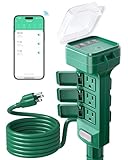
Overview: The SURAIELEC Outdoor Smart Power Stake revolutionizes outdoor control with six outlets on a 6-foot extension cord, perfect for elaborate holiday displays or comprehensive landscape lighting. Rated at 15A/1875W with built-in overload protection, it features IP64-equivalent weatherproofing and a rugged 14/3C SJTW cord. Controlled via the Tuya Smart Life app with Alexa/Google integration, it’s engineered for high-density outdoor power management without daisy-chaining multiple plugs.
What Makes It Stand Out: Six simultaneous outlets on a stake design is the headline feature—ideal for Christmas light installations or complex garden setups. The integrated overload protection with a 15-amp circuit breaker adds critical safety for high-load scenarios. The thick, abrasion-resistant cord and large protective cover demonstrate serious outdoor durability. The astronomical timer automatically adjusts to local sunrise/sunset times, surpassing basic scheduling. The sturdy stake design installs easily in hard ground, solving placement challenges that plague traditional plugs.
Value for Money: At $29.99, it’s the most expensive option but offers six outlets—effectively under $5 per controlled outlet. Compared to buying three dual-outlet plugs ($60-70), the value is exceptional. The 6-foot cord eliminates separate extension cord needs, and the overload protection prevents costly equipment damage. For seasonal decorators or extensive landscape lighting, it’s a cost-effective central command center that consolidates control and enhances safety while reducing clutter.
Strengths and Weaknesses: Strengths: Six outlets; 6-foot heavy-duty cord; overload protection; astronomical timer; rugged stake design; excellent per-outlet value; IP64 weatherproofing; Alexa/Google support. Weaknesses: No individual outlet control (all on/off); bulkier storage; Tuya app less polished than Kasa/Alexa; no HomeKit support; 2.4GHz only; may be excessive for simple setups.
Bottom Line: For serious outdoor decorators or those managing multiple landscape elements, this six-outlet stake is unbeatable. The safety features and cord length justify the price, making it a must-have for elaborate installations where multiple independent plugs would be impractical.
6. ELEGRP PQR20 Outdoor Smart Plug Waterproof IP66, WiFi Plug with 2 Individually Sockets, Compatible with Alexa & Google Assistant, Smart Outdoor Outlet for String Lights, UL Certified, 1 Pack, Black

Overview: The ELEGRP PQR20 outdoor smart plug delivers IP66-rated waterproofing with two independently controllable outlets for $26.99. Compatible with Alexa and Google Assistant, it operates via the ELEGRP app on 2.4GHz WiFi with a 300-foot range. Built for extreme temperatures (-20°C to 50°C), it handles string lights, pumps, and holiday decorations. UL and FCC certifications ensure safe, reliable operation year-round in harsh conditions without requiring a hub.
What Makes It Stand Out: The IP66 rating provides superior protection against heavy rain and dust compared to typical IP44/IP64 competitors. Dual independent outlets effectively give you two smart plugs in one device, maximizing flexibility. The sunrise/sunset scheduling automatically adapts to seasonal daylight changes, eliminating manual timer adjustments. Its extended WiFi range and stable connection reduce common offline issues, while the robust housing withstands UV rays and moisture for permanent outdoor installation.
Value for Money: At $26.99, this dual-outlet plug offers excellent value. Single-outlet alternatives often cost $15-20, making this competitively priced for effectively two switches. The IP66 rating justifies a slight premium over cheaper IP44 models that risk premature failure. For harsh climates, the durability and UL certification provide peace of mind that budget options lack, saving replacement costs long-term.
Strengths and Weaknesses: Strengths include exceptional IP66 waterproofing, dual independent control, intelligent scheduling, long-range WiFi, and comprehensive safety certifications. The wide temperature range ensures reliability. Weaknesses are 2.4GHz-only connectivity, ELEGRP app dependency (no universal platform support), lack of dimming, and bulky design that may not fit tight spaces. No energy monitoring feature.
Bottom Line: The ELEGRP PQR20 excels for users prioritizing weatherproof durability and dual-outlet flexibility. Its superior IP66 rating and robust build make it ideal for challenging climates and permanent installations. While app-specific and non-dimming, the intelligent features and reliable performance make it a worthwhile investment for harsh outdoor environments.
7. Kasa Outdoor Smart Dimmer Plug, IP64 Plug- in Dimmer for Outdoor String Lights, Compatible with Alexa, Google Assistant & SmartThings, Long Wi-Fi Range 2.4Ghz, No Hub Required, ETL Certified(KP405)

Overview: The Kasa KP405 is a specialized outdoor smart dimmer plug designed exclusively for dimmable lights at $15.13. With an IP64 rating, it supports Alexa, Google Assistant, and SmartThings via the Kasa app on 2.4GHz WiFi. Offering a 300-foot range and 4-amp maximum capacity (300W incandescent, 150W LED/CFL), it enables remote brightness adjustment for string lights and landscape lighting. ETL certification and fire-resistant housing ensure safe operation.
What Makes It Stand Out: Unlike standard on/off plugs, this device provides full dimming capability for compatible lights, creating customizable outdoor ambiance. The grouping feature allows multiple dimmers to sync together for cohesive lighting schemes. Kasa’s reputation for stable connectivity and user-friendly app experience stands out in the crowded smart home market. The sunrise/sunset scheduling and timer functions add automation convenience, while the IP64 rating offers adequate splash protection for covered outdoor areas.
Value for Money: At $15.13, this is remarkably affordable for a dimmer-equipped smart plug. Standard outdoor smart plugs without dimming cost $12-18, making the dimming premium minimal. However, the 4-amp limitation restricts use to lighting only—no pumps or high-power appliances. For string light enthusiasts, it’s unbeatable value, but users needing general-purpose control should consider dual-outlet alternatives at similar price points.
Strengths and Weaknesses: Strengths include affordable dimming functionality, reliable Kasa ecosystem, grouping capability, long WiFi range, and trusted brand reputation. The ETL certification ensures safety. Weaknesses are the IP64 rating (not suitable for direct rain exposure), 4-amp/300W power limit, 2.4GHz-only connectivity, and incompatibility with non-dimmable lights. Requires covered installation location.
Bottom Line: The Kasa KP405 is perfect for budget-conscious users wanting dimmable outdoor lighting control. Its specialized design excels for string lights but lacks versatility for other appliances. Ensure your lights are dimmable and installation location is sheltered. For lighting-specific needs, it’s an exceptional value; for general outdoor control, consider more robust options.
8. Tapo Outdoor Smart Dimmer Plug for Outdoor Lights, Matter, App Control, IP65 Weather Resistant, Works with Siri, Alexa, Google, ETL Certified, Energy Monitoring,150WLED/CFL, 2.4GHZ WiFi Only, P430M

Overview: The Tapo P430M outdoor smart dimmer plug combines Matter certification with IP65 weather resistance for $26.17. Compatible with Siri, Alexa, Google, and SmartThings, it offers universal smart home integration via 2.4GHz WiFi. Control brightness remotely through the Tapo app for dimmable LED/CFL lights up to 150W. Energy monitoring tracks consumption, while the -4°F to 122°F operating range ensures durability. ETL certification guarantees safety standards.
What Makes It Stand Out: Matter certification future-proofs this device, ensuring interoperability across all major smart home platforms regardless of brand. This universal compatibility is a significant advantage over proprietary ecosystems. The energy monitoring feature provides clear consumption data, helping reduce electricity bills through automated scheduling. IP65 rating offers solid water jet protection, while weather-sealed gaskets and durable construction promise longevity in harsh conditions.
Value for Money: At $26.17, the Tapo P430M is competitively priced for a Matter-certified dimmer with energy monitoring. Comparable Matter devices cost $30-40, making this an attractive entry point. The 150W LED limitation may restrict some high-wattage setups, but for most residential string lights, it’s sufficient. The energy monitoring can pay for itself over time through optimized scheduling, especially for holiday displays.
Strengths and Weaknesses: Strengths include Matter universal compatibility, energy monitoring, IP65 rating, multi-platform support, and robust weather sealing. The app provides smart actions and scheduling. Weaknesses are the 150W LED/CFL limit (lower than some competitors), 2.4GHz-only WiFi, and newer brand ecosystem compared to Kasa. No dual outlets. Matter setup may require additional hub for some platforms.
Bottom Line: The Tapo P430M is ideal for users invested in multiple smart home ecosystems or planning future expansion. Its Matter certification and energy monitoring provide forward-looking value. While power-limited and single-outlet, it’s perfect for energy-conscious users wanting universal compatibility. Choose this for future-proofing; choose Kasa for simplicity and lower cost.
9. meross Outdoor Smart Plug Compatible with Apple HomeKit, Siri, Alexa, Google Assistant and SmartThings, Waterproof Outdoor Outlet, Remote & Voice Control, Timer, FCC and ETL Certified

Overview: The Meross outdoor smart plug offers dual independent outlets with broad smart home compatibility for $25.99. Supporting Apple HomeKit, Siri, Alexa, Google Assistant, and SmartThings via the Meross app, it features IP44 weatherproofing and a Mediatek IoT chipset for extended range. Control appliances remotely, set schedules with sunrise/sunset offsets, and use voice commands. FCC and ETL certifications ensure safety, while fire-retardant housing adds durability.
What Makes It Stand Out: HomeKit compatibility with Siri support distinguishes this plug in the Apple ecosystem, requiring no additional hub for local voice control. The Mediatek chipset delivers reliable long-range connectivity with lower offline rates than some competitors. Dual independent outlets provide flexibility for controlling two devices separately. The broad compatibility across all major platforms makes it versatile for mixed-ecosystem households, though remote HomeKit control requires an Apple TV or HomePod.
Value for Money: At $25.99 for dual outlets, pricing is competitive with similar dual-outlet plugs. HomeKit support adds value for Apple users who often pay premiums for certified accessories. However, the IP44 rating is the weakest among reviewed products, limiting placement options. Compared to ELEGRP’s IP66 at $26.99, you’re trading weather resistance for HomeKit compatibility. For Apple-centric users in sheltered locations, it’s fairly priced.
Strengths and Weaknesses: Strengths include dual independent control, multi-platform support (especially HomeKit), reliable Mediatek connectivity, scheduling with sunrise/sunset, and safety certifications. Weaknesses are the basic IP44 rating (splash-proof only, not for heavy rain), requirement of Apple hub for remote HomeKit access, 2.4GHz-only WiFi, and Meross app dependency. Not suitable for pumps or direct weather exposure.
Bottom Line: The Meross plug is best for Apple HomeKit users needing dual-outlet control in covered outdoor areas. Its IP44 rating demands careful placement under eaves or porches, not direct rain exposure. For HomeKit households, it’s a solid choice; for harsh weather applications, choose IP65/IP66 alternatives. Verify your installation location before purchasing.
10. ELEGRP PQR20 Outdoor Smart Plug Waterproof IP66, WiFi Plug with 2 Individually Sockets, Compatible with Alexa & Google Assistant, Smart Outdoor Outlet for String Lights, UL Certified, 2 Pack, Black

Overview: The ELEGRP PQR20 two-pack provides the same IP66-rated waterproof smart plug as Product 6, offering dual independent outlets per unit for $49.99 ($25 each). Compatible with Alexa and Google Assistant via the ELEGRP app, these 2.4GHz WiFi devices feature 300-foot range, sunrise/sunset scheduling, and operation from -20°C to 50°C. UL and FCC certified, they’re built for string lights, pumps, and landscape lighting in harsh conditions without requiring a hub.
What Makes It Stand Out: This two-pack delivers exceptional value for multi-zone outdoor control while maintaining the superior IP66 weatherproof rating. Each plug’s dual outlets effectively provide four independently controllable devices across two locations. The bulk pricing saves nearly $4 compared to individual purchases. The same robust construction withstands heavy rain, UV rays, and extreme temperatures, making these ideal for permanent installation around yards, patios, and gardens where multiple control points are needed.
Value for Money: At $49.99 for two, the per-unit cost drops to $25, offering modest savings over individual purchases while providing installation flexibility. For properties needing front and back yard control, this eliminates the need for WiFi extenders or complex wiring. Compared to buying two separate dual-outlet plugs from competitors at $30+ each, the value is clear. The IP66 rating on both units ensures consistent durability across all outdoor zones.
Strengths and Weaknesses: Strengths include superior IP66 waterproofing on both units, four total independent controls, intelligent scheduling, long-range WiFi, and proven durability. The cost savings and multi-location flexibility are significant advantages. Weaknesses mirror the single pack: 2.4GHz-only, ELEGRP app dependency, no dimming capability, and bulky design. May be excessive for users needing only one outdoor smart plug.
Bottom Line: The ELEGRP two-pack is perfect for homeowners wanting to smarten multiple outdoor areas economically. You get the same rugged IP66 protection and dual-outlet convenience at a slight discount. Ideal for large properties or separate patio and landscape lighting setups. If you need only one location, buy the single pack; for two or more zones, this bundle saves money while delivering premium weatherproof performance.
Why Outdoor Smart Plugs Are Essential for Holiday Lighting
The shift from mechanical timers to smart scheduling represents more than just convenience—it’s a fundamental upgrade in safety, energy efficiency, and creative control. Unlike indoor models, outdoor smart plugs must withstand freezing temperatures, driving rain, and UV exposure while maintaining constant Wi-Fi connectivity. They eliminate the need to brave icy conditions to manually adjust settings and provide granular control over multiple zones of decoration. For holiday enthusiasts, this means your roofline LEDs can follow a different schedule than your pathway luminaries, all managed from a single app without touching a single extension cord.
Weather Resistance Ratings Decoded
Understanding IP Ratings for Outdoor Electronics
The Ingress Protection (IP) rating system is your first line of defense against premature failure. An IP rating consists of two digits: the first indicates protection against solid particles like dust, while the second measures water resistance. For holiday lighting applications, you should never settle for anything below IP64. The “6” ensures complete dust-tight construction, preventing pine needles and debris from compromising internal components. The second digit becomes critical in winter climates where melting snow and ice can create persistent moisture.
The Critical Difference Between IP44 and IP65
While IP44 devices might survive a light drizzle, they’re ill-equipped for the sustained moisture exposure common during winter holidays. IP65-rated plugs can withstand direct water jets from any angle—think driving rain or water splashing from gutters. For installations near ground level where snow accumulation occurs, IP67 provides temporary submersion protection. However, this added protection often comes with bulkier housing and higher costs that may not be necessary for covered porch applications.
Why UL Certification Matters for Outdoor Use
Beyond IP ratings, Underwriters Laboratories (UL) certification for outdoor use validates that a device has undergone rigorous testing for electrical safety in damp environments. Look specifically for the “UL Listed” mark with outdoor designation, not just “UL Recognized” components. ETL certification from Intertek follows equivalent standards and is equally valid. Avoid uncertified devices that may lack proper ground fault protection, potentially turning your festive display into an electrical hazard.
Connectivity Options: Wi-Fi vs. Hub-Based Systems
Benefits of Direct Wi-Fi Connection
Wi-Fi-enabled outdoor smart plugs connect directly to your home network, offering straightforward setup without additional hardware. They’re ideal for single-device installations or renters who can’t modify permanent fixtures. Modern 2.4GHz Wi-Fi chips provide superior range through walls and outdoor obstacles compared to 5GHz, though some premium models now offer dual-band support. The key consideration is your router’s placement—signal strength drops significantly when passing through exterior walls, potentially creating dead zones at the far reaches of your property.
When to Consider a Hub-Based System
Hub-dependent systems like Z-Wave or Zigbee create a mesh network where each device strengthens the signal for others, crucial for large properties or installations far from your router. These protocols operate on different frequencies than Wi-Fi, reducing interference from your streaming devices and smart TVs. The hub acts as a centralized brain, enabling local automation that continues working even during internet outages—a significant advantage when your light schedule shouldn’t depend on your ISP’s reliability during holiday travel.
Mesh Network Considerations for Large Displays
For elaborate displays spanning multiple zones, consider how your smart plugs will communicate. Wi-Fi extenders can help, but they create separate network names that confuse some smart devices. A better solution is a mesh Wi-Fi system with outdoor-rated nodes or hub-based smart plugs that relay signals between units. Plan your network topology before buying—map your property and identify potential signal barriers like metal siding, dense evergreens, or detached garages that might require strategic device placement.
Voice Assistant Compatibility
Amazon Alexa Integration Features
Alexa-compatible outdoor smart plugs enable routines like “Alexa, start the holiday show” to activate multiple devices simultaneously. Look for plugs that support Alexa’s “Hunches” feature, which can automatically suggest lighting schedules based on your usage patterns. The most robust integrations allow you to control individual outlets in dual-plug models by name, essential for separating your tree lights from your inflatable Santa without creating separate zones in the app.
Google Home Ecosystem Capabilities
Google Assistant integration shines with its contextual understanding. You can say “Hey Google, turn on the front yard lights” without specifying the exact device name if you’ve properly assigned rooms and zones. Advanced models support Google’s “Home & Away” routines, automatically adjusting your holiday lighting based on your phone’s location. This geofencing capability ensures your display welcomes you home without wasting power when you’re away.
Apple HomeKit Requirements and Benefits
HomeKit-compatible outdoor smart plugs require a HomePod, Apple TV, or iPad to serve as a home hub for remote access and automation. The payoff is end-to-end encryption and seamless integration with iOS. You can create sophisticated shortcuts that adjust lighting based on weather data—dimming lights during heavy snow to prevent overwhelming the neighborhood, for instance. HomeKit’s adaptive lighting feature can even gradually shift your white LED temperature throughout the evening for a more natural appearance.
Advanced Scheduling & Automation Features
Sunset and Sunrise Triggers
The best outdoor smart plugs don’t rely on fixed clock times but instead use astronomical timers that adjust daily based on your location’s sunrise and sunset. This eliminates the need to reprogram as daylight hours shrink through December. Premium models incorporate civil, nautical, and astronomical twilight options—useful for different lighting moods. Some even factor in local weather data, automatically turning lights on earlier during overcast winter afternoons.
Random Vacation Mode for Security
Beyond holiday use, quality outdoor smart plugs offer randomized scheduling that mimics human presence. Unlike simple on/off cycles, sophisticated algorithms vary timing by 15-30 minutes each day and can randomly skip nights, creating convincing occupancy patterns. This feature transforms your holiday lighting investment into year-round security, controlling landscape lighting or even a radio plugged into the same outlet.
Cascading Light Sequences
For animated displays, seek plugs with programmable delays between multiple units. You can create a wave effect where roof lights turn on, followed by yard features 30 seconds later, then pathway lights—a stunning sequence that mechanical timers can’t replicate. Some advanced models support millisecond-level precision, necessary for synchronizing with music or other smart props. This requires either a hub system with local processing or Wi-Fi plugs with exceptional firmware timing accuracy.
Power Handling & Load Capacity
Understanding Wattage Limits and Your Display
Most residential outdoor smart plugs handle 15 amps (1800 watts), but this rating assumes perfect conditions. In freezing temperatures, electrical resistance increases, and continuous loads should stay below 80% of maximum—about 1440 watts—for safety. LED strings consume far less power than incandescent, but startup inrush current can briefly spike to three times the running wattage. Calculate your total load assuming 20% higher than manufacturer specs, and always measure actual draw with a clamp meter before finalizing your design.
Amperage Requirements for LED vs. Incandescent Strings
A typical 100-count incandescent mini-light string draws 40 watts, while an equivalent LED string uses just 4-8 watts. This tenfold difference means you can run vastly more LEDs on a single smart plug. However, LED strings with built-in controllers for effects can create electrical noise that interferes with the plug’s internal electronics. Look for models with EMI filtering specifically rated for LED loads, or you may experience random shutoffs or connectivity issues.
GFCI Protection and Why It’s Non-Negotiable
Any outdoor electrical device must connect to a GFCI-protected circuit, but premium smart plugs include built-in GFCI protection as a secondary safety layer. This protects against faults in your light strings themselves—critical when dealing with decades-old decorations or rodent-chewed wires. Test the GFCI function monthly using the test button; a smart plug that alerts you when GFCI trips via app notification is invaluable for displays you can’t easily inspect daily.
Safety Certifications & Standards
UL Listing vs. ETL Certification Explained
Both marks indicate compliance with safety standards, but UL develops its own standards while ETL tests to UL standards. For outdoor smart plugs, the testing methodology is identical, so either certification is trustworthy. The key is verification—counterfeit certification marks are rampant on marketplace sites. Always check the certification database using the file number printed on the device. Genuine certification includes specific conditions of acceptability, such as “suitable for damp locations” or “rain-tight when mounted vertically.”
FCC Compliance for Wireless Devices
The Federal Communications Commission regulates wireless emissions to prevent interference. Proper FCC ID labeling ensures the device won’t disrupt your Wi-Fi or neighboring equipment. More importantly, it verifies the manufacturer has implemented safeguards against unauthorized access to the device’s radio. Uncertified devices may use prohibited frequency bands or lack proper encryption, creating both legal liability and security vulnerabilities.
Installation & Placement Best Practices
Optimal Mounting Locations for Signal and Safety
Mount smart plugs at least 12 inches above ground level to prevent snow burial and at a slight downward angle to encourage water runoff. Vertical mounting on exterior walls typically provides better Wi-Fi reception than horizontal placement on the ground. Keep plugs at least 3 feet from metal objects like gutters or downspouts that can create Faraday cages blocking signals. For permanent installations, use stainless steel mounting hardware and silicone-sealed screw holes to prevent water intrusion into your siding.
Extension Cord Configurations and Limitations
Smart plugs should always plug directly into the outlet, not into an extension cord. If you must use an extension cord, choose a heavy-duty 12-gauge cord no longer than 25 feet, and ensure the smart plug’s housing can support the cord’s weight without pulling loose. Daisy-chaining multiple cords creates voltage drop and overheating risks. For multi-zone displays, use a single heavy-duty cord to a central point, then distribute to individual smart plugs rather than running multiple cords from the house.
Pre-Installation Network Signal Testing
Before mounting anything permanently, use your phone’s Wi-Fi analyzer app to test signal strength at the intended location. Aim for at least -65 dBm for reliable operation. If signal is weak, consider relocating your router, adding a mesh node near a window facing the display, or choosing a hub-based system. Some advanced smart plugs include signal strength indicators in their apps—test during peak evening hours when neighborhood Wi-Fi congestion is highest to ensure consistent performance.
Mobile App Features That Matter
Group Control and Zone Management
The difference between a good app and a great one is the ability to create nested groups. You should be able to control all holiday lights with one command, but also sub-group by area (front yard, back yard, roofline) and by device type (inflatables, LEDs, spotlights). Look for apps that let you override schedules temporarily without deleting them—essential for those nights when you want to keep the display running late for guests. The best apps also offer widget shortcuts for iOS and Android, giving one-tap control without opening the full application.
Scene Creation for Holiday Themes
Advanced apps allow you to save complete lighting states as scenes—“Elegant Evening” might be warm white roof lights only, while “Festive Extravaganza” activates every color-changing element. These scenes should be scheduleable and voice-controllable. Some ecosystems let you trigger scenes based on calendar events, automatically switching from Thanksgiving warm tones to Christmas colors, then New Year’s cool blues without manual intervention. This feature requires plugs that support rapid state changes without lag.
Firmware Update Processes and Longevity
Smart home devices require regular firmware updates for security and compatibility. Quality manufacturers provide automatic updates with clear changelogs and scheduling options—never update during your peak display hours. Investigate the company’s track record: Do they support devices for five-plus years, or abandon them after two? Community forums and Reddit discussions often reveal which brands maintain long-term support. A plug that can’t receive security updates becomes a network vulnerability.
Energy Monitoring Capabilities
Real-Time Usage Tracking Benefits
Built-in energy monitoring transforms guesswork into precise data. You can identify which decorations are power hogs and calculate the exact cost per hour of operation. During the holiday season, this helps you stay within utility budget tiers. Some apps provide daily, weekly, and monthly comparisons, letting you see the impact of weather on consumption—cold nights when inflatables’ motors work harder, for instance. This data also helps diagnose failing decorations that draw excessive current before they become fire hazards.
Holiday Season Cost Projection Tools
Premium smart plugs integrate with your utility’s rate structure, accounting for time-of-use pricing common in winter months. They can project your December bill based on current usage patterns and suggest schedule optimizations. If your utility offers demand response programs, some plugs can automatically reduce consumption during peak grid stress, earning you bill credits while keeping your display running at reduced brightness. This turns your decorations from a cost center into a potential revenue source.
Single vs. Dual Outlet Configurations
Independent Control Advantages
Dual-outlet smart plugs with independent control effectively give you two devices in one housing. This is invaluable for mixing load types—run your static LED roofline on one outlet and your animated, power-hungry inflatables on the other with different schedules. Independent control also provides redundancy; if one outlet fails, the other continues operating. Check whether the app labels outlets clearly—confusing “Left” and “Right” becomes frustrating when you’re troubleshooting in the dark.
Space-Saving Designs for Crowded Outlets
Outdoor outlets are often placed close together or in weatherproof boxes with limited clearance. Low-profile smart plugs that mount flush against the outlet prevent cover closure issues. Some designs position outlets on the sides rather than front, reducing the overall depth. For installations using bubble covers required by code, verify the plug’s dimensions allow full closure with cords attached—an open cover defeats weatherproofing and creates code violations.
Smart Home Ecosystem Integration
IFTTT and Third-Party Automation Platforms
IFTTT (If This Then That) compatibility unlocks endless possibilities: automatically dim lights when it starts snowing (via weather service triggers), flash lights when your favorite team scores, or sync with your smart doorbell to create a welcome sequence for guests. However, IFTTT’s free tier now limits rule complexity, so prioritize plugs with native integration to your primary smart home platform. Webhooks support allows advanced users to create custom integrations with home servers or Node-RED for truly unique displays.
Matter Protocol Support and Future-Proofing
Matter is the new industry standard promising seamless interoperability between ecosystems. A Matter-certified outdoor smart plug will work with Apple HomeKit, Google Home, Amazon Alexa, and Samsung SmartThings simultaneously without ecosystem lock-in. While still rolling out in 2024-2025, Matter support indicates a manufacturer’s commitment to long-term compatibility. Early adopters should ensure their chosen hub supports Matter 1.0 or higher and that the plug’s firmware is upgradeable to future Matter versions.
Cross-Platform Compatibility Challenges
Even without Matter, some plugs work across multiple ecosystems but with reduced functionality. A plug might support Alexa and Google Home but offer only basic on/off control in HomeKit via HomeBridge workarounds. Before purchasing, verify the exact feature set available on your primary platform. Check community forums for user-reported issues—some plugs require disabling 5GHz Wi-Fi bands during setup or have known conflicts with specific router brands.
Troubleshooting Common Issues
Connectivity Dropouts During Cold Snaps
Wi-Fi chips can behave erratically below freezing, especially in budget devices using consumer-grade components. If your plug drops connection during cold nights, first check for firmware updates that improve thermal stability. Relocating the plug to a slightly warmer location—like inside a weatherproof box with minimal insulation—can help. For persistent issues, switch to a hub-based system where the mesh network provides alternative communication paths. Some premium plugs include internal heaters that activate below specific temperatures, maintaining component reliability.
Weather-Related Malfunctions and Prevention
Ice forming on the plug housing can push buttons or damage seals. Apply a thin layer of dielectric grease to gaskets before installation to prevent ice adhesion. For plugs with manual override buttons, ensure the button cover is intact and flexible in cold weather—stiff covers can crack and admit moisture. If your plug controls motor-driven decorations, voltage fluctuations during startup can cause brief disconnections. Installing a small UPS (uninterruptible power supply) between the outlet and smart plug smooths these spikes and keeps the smart features running during brief power blinks.
Voice Command Failures and Network Congestion
During peak evening hours, neighborhood Wi-Fi congestion can delay or block voice commands. Reduce issues by assigning your smart plugs to a dedicated 2.4GHz network name (SSID) separate from your primary network. This prevents them from competing with bandwidth-hungry devices streaming 4K video. In Alexa, use “Brief Mode” to reduce acknowledgment chatter, and create simple, distinct names like “Roof Lights” rather than “Master Bedroom Exterior Soffit LED Strip”—shorter commands transmit more reliably in noisy RF environments.
Security & Privacy Considerations
Network Segmentation Best Practices
Never place outdoor smart plugs on your primary network with computers and NAS devices. Create a separate IoT VLAN (Virtual Local Area Network) that can access the internet but not other devices on your network. This containment limits the damage if a device is compromised. Many modern routers offer guest network isolation that works adequately for this purpose. Ensure the IoT network uses WPA3 encryption if supported, or at minimum WPA2 with a strong, unique password different from your main network.
Two-Factor Authentication Importance
Your smart plug’s app account should require 2FA, preferably via authenticator app rather than SMS, which can be intercepted. This prevents unauthorized access even if your password is leaked in a data breach. Check whether the app supports biometric login (Face ID, fingerprint) for convenience without sacrificing security. Some manufacturers now offer hardware security keys as an option—the highest level of protection for devices that control your home’s electrical systems.
Data Privacy and Cloud Dependencies
Investigate what data the manufacturer collects and how long they retain it. Some apps track your location for geofencing but sell anonymized location data to third parties. Look for privacy policies that specify data deletion timelines and opt-out options. Consider plugs that support local control via Home Assistant or Hubitat, reducing cloud dependency. If the manufacturer goes out of business or discontinues the cloud service, local control ensures your investment isn’t bricked.
Price vs. Performance: Making the Right Investment
Budget-Friendly Feature Sets
Entry-level outdoor smart plugs ($15-25) typically offer single outlets, basic scheduling, and one-platform compatibility. They’re suitable for simple setups with one or two light strings. However, they often lack energy monitoring, use cheaper Wi-Fi chips prone to dropout, and may receive firmware updates for only 1-2 years. The real cost isn’t the purchase price but the time spent troubleshooting and potential early replacement. For minimal displays, these can suffice, but factor in the cost of your time when a device fails mid-season.
Premium Features Worth the Splurge
Mid-range to premium plugs ($30-60) justify their cost through reliability and advanced features. Dual independent outlets, IP65+ ratings, energy monitoring, and multi-platform support represent tangible value. Look for features that save money long-term: superior weather sealing prevents replacement, local automation reduces cloud subscription needs, and energy monitoring helps optimize consumption. A $50 plug that lasts five years costs less per season than a $20 plug replaced every year due to moisture failure.
Long-Term Value Assessment and Warranty
Evaluate the manufacturer’s warranty and support infrastructure. A two-year warranty suggests confidence in weather sealing and component quality. Check if the company offers advance replacement—shipping you a new unit before you return the failed one—minimizing display downtime. Community support matters too; active user forums and responsive customer service indicate a product that will remain viable. Consider the ecosystem lock-in cost: switching platforms later may require replacing all devices, making cross-platform compatibility worth a premium upfront.
Frequently Asked Questions
1. Can I leave my outdoor smart plug plugged in year-round, or should I remove it after the holidays?
Quality IP65+ rated plugs with UL outdoor certification are designed for permanent installation. However, for longevity, inspect seals annually and apply dielectric grease to gaskets. If your plug lacks independent outlet control and you’re not using one socket, cover unused outlets with weatherproof caps to prevent internal corrosion from condensation.
2. How many light strings can I safely connect to one outdoor smart plug?
Calculate based on amperage, not just outlet count. Most residential circuits are 15 amps, but continuous loads should not exceed 12 amps (1440 watts). LED strings typically use 0.03-0.05 amps each, allowing 200+ strings theoretically. However, check your smart plug’s rating—many are 10 amps total. Always measure actual draw with a kill-a-watt meter, as manufacturer specs can be optimistic.
3. Will my outdoor smart plug work when the temperature drops below zero?
Operation depends on internal component ratings. Consumer-grade Wi-Fi chips often fail around -4°F (-20°C). Look for industrial-rated devices specifying operation to -22°F (-30°C) or lower. If you live in extreme cold climates, mount the plug on a south-facing wall for passive solar warming, or install it inside a minimally insulated enclosure to raise internal temperature a few degrees.
4. Why does my smart plug keep losing Wi-Fi connection at night?
Nighttime dropouts often result from temperature-related Wi-Fi chip instability or increased neighborhood network congestion when everyone streams video. First, ensure your plug connects to 2.4GHz, which penetrates walls better. If the issue persists, assign the plug a static IP address in your router settings to prevent DHCP lease renewal issues. For hub-based systems, add a mesh repeater device halfway between your router and the plug.
5. Can I control multiple outdoor smart plugs as one synchronized unit?
Yes, through grouping in the app, scenes, or platform routines. For true synchronization (lights turning on within milliseconds of each other), use plugs from the same manufacturer that support “zero-crossing” switching or connect via a hub with local processing. Wi-Fi-only plugs may have 1-3 second delays between devices due to cloud latency.
6. Do outdoor smart plugs increase my risk of hacking?
Any internet-connected device presents some risk, but reputable manufacturers implement encryption, secure boot, and regular security updates. Minimize risk by using a separate IoT network, enabling 2FA, and choosing plugs that support local control without mandatory cloud accounts. Disable remote access if you only need on-premises control.
7. How do I prevent my smart plug from being stolen?
Use tamper-resistant outlet covers with locking tabs, or mount the plug inside a locked weatherproof box. For high-value displays, consider security screws or a small lockbox that allows cord exit but secures the plug body. Some commercial-grade plugs include Kensington lock slots. While theft is rare, the real target is often the copper in your extension cords—use locking cord connectors to deter opportunistic thieves.
8. What’s the difference between a smart plug and a smart outlet for holiday lights?
A smart plug is a portable adapter that adds intelligence to a standard outlet. A smart outlet replaces the entire receptacle with a permanently installed smart version. Outlets offer cleaner installations and better weather sealing but require electrical work. Plugs provide flexibility to move between locations and are ideal for renters. For holiday lighting, plugs are generally more practical unless you’re doing a permanent landscape lighting installation.
9. Can outdoor smart plugs handle the startup surge from inflatables and motorized decorations?
Most can handle brief surges up to 1800 watts, but repeated surges stress internal relays. Look for models specifying “inductive load rated” or “motor compatible.” These include snubber circuits that absorb voltage spikes. For large inflatables (over 8 feet), consider a smart plug with a 20-amp rating or use a contactor relay between the smart plug and the decoration to handle the high inrush current.
10. How do I integrate outdoor smart plugs with existing light show software like xLights?
Direct integration requires plugs with open APIs or MQTT support. Most consumer plugs don’t offer this, but you can use a smart home hub like Home Assistant as a bridge. Configure xLights to send commands to the hub via HTTP requests, which then controls the plugs. For precise timing, use hub-based systems with local processing to minimize latency. Some enthusiasts use DMX-to-smart-plug adapters for professional-grade synchronization, though this requires technical expertise in scripting and network protocols.