Your voice is your most natural interface, yet in the smart home world, it’s become a commodity—recorded, analyzed, stored, and sometimes shared without clear consent. Every “Hey…” and “OK…” command potentially travels beyond your walls, logged in distant servers for purposes that stretch far beyond turning on your lights. But what if you could reclaim that boundary? Privacy-focused voice hubs are rewriting the rules, proving that cutting-edge convenience doesn’t require surrendering your personal data to the cloud. These systems process your commands locally, encrypt your voiceprints, and give you genuine control over what stays in your home and what leaves it.
This shift isn’t just for security researchers and tech purists anymore. As data breaches make headlines and privacy regulations struggle to keep pace, mainstream homeowners are waking up to a critical truth: your smart home should work for you, not as a data collection node for someone else’s business model. Understanding what makes a voice hub truly private—and how to evaluate the features that actually protect you—is the first step toward building a secure, voice-controlled sanctuary that respects your boundaries.
Top 10 Voice Hubs for Smart Home Security
Detailed Product Reviews
1. Amazon Echo Hub, 8” smart home control panel with Alexa+ Early Access, Compatible with thousands of devices

Overview: The Amazon Echo Hub transforms wall-mounted smart home control with an 8-inch touchscreen interface and comprehensive Alexa integration. Designed as a central command center, it consolidates control of lights, cameras, locks, and routines through either voice commands or intuitive tap controls, eliminating the need to juggle multiple apps across different devices.
What Makes It Stand Out: Unlike voice-only Echo devices, this dedicated panel offers persistent visual feedback and one-touch access to your most-used devices. Its multi-protocol support—including Zigbee, Matter, Thread, and Amazon Sidewalk—ensures compatibility with thousands of devices without requiring separate bridges. The customizable dashboard lets you prioritize security feeds, lighting scenes, and routine triggers based on your daily patterns and preferences.
Value for Money: At $179.99, it sits between basic hubs and premium displays. While you must purchase mounts and stands separately, its built-in hub functionality replaces multiple protocol bridges, potentially saving $50-100 in additional hardware costs. The inclusion of early Alexa+ access adds future-proofing value for long-term users.
Strengths and Weaknesses: Strengths include versatile mounting options, broad protocol support, seamless Alexa ecosystem integration, and an intuitive interface for all ages. Weaknesses involve hidden costs for accessories, dependency on Amazon’s ecosystem, and limited customization compared to open-source alternatives. The wall-mount design may not suit renters or those wanting portability.
Bottom Line: Perfect for Alexa households wanting a fixed control point. It excels in kitchens or entryways where quick visual status checks matter most. Skip if you need Z-Wave support or prefer platform-agnostic solutions.
2. Aeotec Smart Home Hub2 - V4, Works as a SmartThings Hub, Zigbee, Matter Gateway, Compatible with Alexa, Google Assistant, WiFi (No Z-Wave)

Overview: The Aeotec Smart Home Hub2 V4 delivers Samsung’s robust SmartThings ecosystem in a streamlined, Z-Wave-free package. This hub connects and automates Zigbee and Matter devices through a reliable platform known for its stability and extensive device compatibility, all manageable via the polished SmartThings mobile application.
What Makes It Stand Out: Its deliberate omission of Z-Wave allows for a more focused, cost-effective design that excels with modern Matter and Zigbee protocols. Local automation processing ensures your routines continue functioning even during internet outages—a critical reliability feature for security and convenience. The dual connectivity options provide installation flexibility for any home layout.
Value for Money: At $129.99, it’s $20 cheaper than its Z-Wave-enabled predecessor while maintaining core functionality for most modern users. For those building new systems around Matter and Zigbee, it eliminates the premium you’d pay for legacy Z-Wave support you won’t use. However, existing Z-Wave device owners should consider this a non-starter.
Strengths and Weaknesses: Strengths include rock-solid SmartThings reliability, local automation execution, straightforward setup, and excellent cross-platform voice assistant support. Weaknesses center on the Z-Wave limitation, potential ecosystem lock-in, and occasional SmartThings app limitations for power users seeking advanced customization.
Bottom Line: Ideal for new smart home builders prioritizing Matter and Zigbee protocols. It’s a budget-conscious choice that doesn’t compromise on core performance. Existing Z-Wave device owners should choose the V3 model instead for full compatibility.
3. eufy Security eufy Smart Display E10, Smart Home Hub, 8" Control Panel, Compatible Devices, Four Views on One Screen, Instant Door Alerts, Daily Event Reports, One Tap Control

Overview: The eufy Security E10 merges an 8-inch smart display with a security-focused hub, prioritizing visual monitoring over general device control. It’s engineered for users who want instant awareness of doorstep activity, package deliveries, and property surveillance through a single, always-on interface that simplifies security management for families.
What Makes It Stand Out: Four simultaneous live camera feeds provide comprehensive property oversight without app-switching lag. Instant door alerts with automatic display activation and voice announcements ensure you never miss visitors or packages. Local storage of event footage eliminates cloud subscription fees and buffering delays, while AI-powered daily summaries distill hours of footage into actionable insights quickly.
Value for Money: At $199.99, it commands a premium over basic hubs but undercuts traditional security panels. The absence of mandatory cloud subscriptions saves $3-10 monthly, offsetting the higher upfront cost within two years. However, its value remains tied to the eufy ecosystem and requires compatible cameras for full functionality.
Strengths and Weaknesses: Strengths include exceptional security focus, lag-free local playback, intuitive family-friendly interface, and intelligent event filtering. Weaknesses involve limited protocol support (primarily eufy devices), higher price for non-security features, and potential privacy concerns with local facial recognition processing.
Bottom Line: Best suited for security-first households already invested in eufy cameras. It excels as a dedicated monitoring station but lacks versatility as a whole-home hub for mixed-brand setups requiring broader protocol support.
4. Aeotec Smart Home Hub, Works as a SmartThings Hub, Z-Wave, Zigbee, Matter Gateway, Compatible with Alexa, Google Assistant, WiFi

Overview: The Aeotec Smart Home Hub V3 stands as the most protocol-inclusive SmartThings hub, supporting Z-Wave, Zigbee, Matter, and Wi-Fi devices in one unified platform. It serves as the foundation for complex, multi-brand smart homes requiring maximum compatibility and local automation reliability across diverse device types and manufacturers.
What Makes It Stand Out: Unlike its V4 sibling, it retains Z-Wave Plus support, making it essential for integrating legacy sensors, locks, and switches from established brands. Its ability to run automations locally provides speed and reliability that cloud-dependent hubs can’t match during outages. The SmartThings ecosystem offers advanced logic and community-created device handlers for obscure hardware compatibility.
Value for Money: At $149.99, the $20 premium over the V4 is justified if you own or plan to use Z-Wave devices. For mixed-protocol homes, it eliminates the need for multiple hubs, saving $50-150 in additional hardware. Without Z-Wave needs, however, the V4 offers better value for modern protocol users.
Strengths and Weaknesses: Strengths encompass comprehensive protocol support, proven SmartThings stability, local processing capabilities, and extensive device compatibility. Weaknesses include a steeper learning curve for advanced features, Samsung account requirement, and occasional cloud dependency for certain device types and firmware updates.
Bottom Line: The go-to choice for serious smart home enthusiasts with diverse device collections. It future-proofs your setup while maintaining backward compatibility. Choose V4 only if you’re certain you’ll never need Z-Wave support in your smart home.
5. Wyze Home Security Core Kit: Hub, Keypad, Motion Sensor, Entry Sensors (x2); Compatible w/ Wyze Cam, Leak & Climate Sensors; 3 Mo. of 24/7 Professional Monitoring Service Incl., Subscription Required
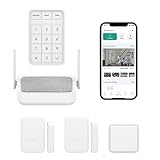
Overview: The Wyze Core Kit democratizes professional home security with an entry-level price point that includes hardware and three months of monitoring service. This DIY-friendly system bundles a hub, keypad, motion sensor, and two entry sensors, creating a foundation for expandable, professionally monitored protection without installation complexity.
What Makes It Stand Out: 24/7 professional monitoring at $9.99/month dramatically undercuts industry averages of $30-50 monthly. The five-second response time commitment sets a new standard for alert verification speed. Its peel-and-stick installation requires zero tools or technical expertise, making professional security accessible to renters and homeowners alike seeking immediate protection.
Value for Money: At $89.99 with three months free monitoring included, the hardware essentially costs nothing upfront. The subscription model remains transparent with no hidden fees, though it’s mandatory for core functionality. Compared to $200+ starter kits from competitors, the value proposition is undeniable for budget-focused families wanting professional oversight.
Strengths and Weaknesses: Strengths include unbeatable pricing, simple installation, rapid professional response, and seamless Wyze camera integration. Weaknesses involve Wyze ecosystem lock-in, subscription requirement for basic functions, limited third-party device support, and no advanced protocol compatibility like Z-Wave or Zigbee for broader smart home integration.
Bottom Line: Perfect for budget-conscious users seeking monitored security without complexity. It’s less a smart home hub and more a dedicated security system—ideal for those prioritizing safety over home automation breadth and protocol flexibility.
6. Kasa Smart Plug HS103P4, Smart Home Wi-Fi Outlet Works with Alexa, Echo, Google Home & IFTTT, No Hub Required, Remote Control, 15 Amp, UL Certified, 4-Pack, White

Overview: The Kasa Smart Plug HS103P4 four-pack brings voice-controlled automation to any home without complexity. These UL-certified outlets connect directly to 2.4GHz WiFi, letting you control lamps, fans, and appliances remotely through the Kasa app or via Alexa/Google Assistant commands. Designed for seamless integration, each plug supports scheduling and timers, making it ideal for beginners building their smart home ecosystem.
What Makes It Stand Out: Kasa’s reputation shines through its 5-million-user base and PCMag 2020 recognition. The scheduling functionality goes beyond basic on/off, allowing countdown timers and customized routines that simulate occupancy. Setup requires no hub—just plug in and follow the intuitive app instructions. The UL certification provides safety reassurance rarely highlighted in budget alternatives.
Value for Money: At $6.06 per plug, this 4-pack undercuts most single-unit competitors by 40-60%. Comparable plugs from TP-Link’s rivals typically retail for $10-15 each, making this bundle exceptional for whole-home deployment. The absence of subscription fees and hub requirements eliminates hidden costs, delivering pure hardware value.
Strengths and Weaknesses: Strengths include rock-solid reliability, broad voice assistant compatibility, robust scheduling, and trusted brand heritage. The 2.4GHz-only limitation may frustrate mesh-network users, and the lack of energy monitoring is a notable omission. The Kasa app, while functional, isn’t as polished as some competitors.
Bottom Line: Perfect for smart home newcomers, this four-pack offers unmatched value and reliability. Buy it to automate multiple rooms without breaking the bank.
7. PGST WiFi Home Alarm Security System,Wireless DIY Smart Home Burglar Security Alarm System 24 Pieces Kits, Compatible with Alexa Google Home Voice Control for Villa Home Apartment

Overview: The PGST WiFi Home Alarm Security System delivers professional-grade protection in a 24-piece DIY package. This dual-network system connects via 2.4GHz WiFi or GSM/4G SIM card, ensuring alerts reach you even during internet outages. With no monthly fees, it includes door/window sensors, motion detectors, remotes, and an SOS button, providing comprehensive coverage for apartments or small homes.
What Makes It Stand Out: The expandable design supports up to 100 wireless accessories, growing with your needs. The one-click SOS emergency button offers immediate family protection, while Smart Life/Tuya app integration enables remote arming and real-time notifications. The system functions entirely without subscription costs—a rare find in monitored security.
Value for Money: At $139.99 for 24 components, each sensor costs under $6, dramatically less than professional installation. Traditional monitored systems charge $20-40 monthly, meaning this kit pays for itself in 3-7 months. The dual-network redundancy provides enterprise-level reliability at consumer pricing.
Strengths and Weaknesses: Strengths include zero monthly fees, dual connectivity, massive expandability, and straightforward self-installation. Weaknesses involve 2.4GHz WiFi limitation, SIM card not included, and the lesser-known brand may raise longevity concerns. App responsiveness can occasionally lag during peak usage.
Bottom Line: An outstanding choice for tech-savvy homeowners seeking affordable, expandable security without recurring fees. Accept the DIY learning curve for substantial long-term savings.
8. Smart Home Starter Kit | Includes Echo Hub, Amazon Smart Plug and 4 Amazon Basics Smart Bulbs, with Alexa+ Early Access

Overview: The Smart Home Starter Kit bundles Amazon’s Echo Hub with a Smart Plug and four Smart Bulbs, creating an all-in-one entry point to home automation. This curated package eliminates compatibility guesswork, offering seamless Alexa integration across lighting and appliance control. The Echo Hub serves as the central nervous system, unifying thousands of compatible devices while providing visual management of your connected home through its touchscreen interface.
What Makes It Stand Out: The guided “magical” setup process demystifies smart home configuration for absolute beginners. The Echo Hub’s 8-inch touchscreen offers intuitive device management that standalone speakers cannot match. The included bulbs feature vacation mode scheduling, enhancing security through simulated occupancy patterns when you’re away.
Value for Money: Priced at $229.99, the kit offers modest savings versus individual purchases (Hub ~$180, Plug ~$25, Bulbs ~$40). While not a deep discount, the value lies in guaranteed compatibility and simplified onboarding. For Alexa households, the time saved justifies the premium over piecing together components.
Strengths and Weaknesses: Strengths include frictionless setup, cohesive ecosystem, versatile hub functionality, and trusted Amazon support. Weaknesses are the Alexa-only focus (no Google/HomeKit), limited bulb quantity for larger homes, and a price point that may overwhelm casual dabblers. The hub’s size requires dedicated counter space.
Bottom Line: Ideal for committed Alexa users wanting a plug-and-play smart home foundation. Pay the premium for convenience and ecosystem harmony.
9. WiFi Door Sensor Window Detector: Smart Window Contact Sensor, Wireless Magnetic Door Open Detector with Free Notification Alerts, Compatible with Alexa Google Assistant (1-Pack)

Overview: This WiFi Door Sensor provides intelligent entry monitoring through a compact, battery-powered design. Compatible with Smart Life, Alexa, and Google Assistant, it sends instant app notifications when doors or windows open, maintaining a detailed history log. The included AAA batteries power the unit for over six months, while the 3M adhesive enables tool-free installation on any entry point, from front doors to liquor cabinets or even mailboxes.
What Makes It Stand Out: The proactive low-battery warning prevents unexpected failures—a crucial feature for security devices. Voice status queries (“Alexa, is the front door open?”) offer hands-free convenience rarely found in sub-$20 sensors. The sensor triggers Smart Life routines, automatically activating lights or plugs upon entry, creating true automation beyond simple alerts.
Value for Money: At $16.99, this sensor undercuts most competitors by $3-8 while including batteries. For single-entry monitoring or expanding existing systems, it delivers premium features without premium pricing. The no-hub requirement eliminates additional hardware costs, making it an economical entry point for smart security.
Strengths and Weaknesses: Strengths include battery inclusion, low-power alerts, effortless installation, and robust Smart Life integration. Weaknesses involve 2.4GHz-only connectivity, limited single-pack availability, and reliance on cloud processing that may delay notifications. The plastic housing feels less durable than industrial alternatives.
Bottom Line: An exceptional value for adding smart awareness to any entry point. Perfect for renters or as an expansion to existing Smart Life ecosystems.
10. Alarm System for Home Security,21Pcs DIY Kit Touch Screen Siren Hub with Loud Alarm,SOS Button,Window Alarms, Remotes,Door/Motion Sensors,APP Control,Compatible with Alexa,NO Monthly Fee
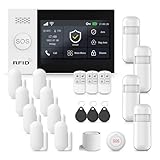
Overview: This 21-piece Alarm System delivers comprehensive DIY security with a 4.3-inch touchscreen hub at its core. Supporting both WiFi (2.4GHz) and GSM/4G connectivity, it offers multiple alert pathways including app notifications, 120dB siren, and phone calls. The system integrates with Smart Life/Tuya and Alexa, enabling remote control without monthly fees, while the touchscreen provides local management for all family members, including elderly users.
What Makes It Stand Out: The silent alarm mode distinguishes this system, allowing discreet notifications during break-ins without alerting intruders. Multiple control methods—touchscreen, app, remote, RFID cards—offer unmatched flexibility. The hub’s color display clearly shows accessory status, simplifying troubleshooting compared to text-only interfaces.
Value for Money: At $139.99 for 21 components, the system matches competitors’ pricing while adding premium features like the touchscreen and silent mode. Professional systems with similar capabilities cost $300+ plus monitoring fees. The one-time investment delivers perpetual protection without subscription drain, paying for itself within months.
Strengths and Weaknesses: Strengths include the intuitive touchscreen, silent alarm option, dual connectivity, loud 120dB siren, and zero subscription costs. Weaknesses are the 2.4GHz WiFi limitation, lack of included SIM card, and initial setup complexity that may challenge less technical users. The plastic sensors feel lightweight but functional.
Bottom Line: A feature-rich security solution for hands-on homeowners prioritizing control and cost savings. Embrace the setup effort for powerful, fee-free protection.
Understanding Voice Hubs and Privacy Implications
Voice hubs serve as the central nervous system for your smart home, translating spoken commands into actions across your connected devices. Traditional models operate on a simple premise: capture audio, stream it to cloud servers for processing, receive a command interpretation, and execute the action. This architecture creates a permanent digital trail of your voice, habits, and even background conversations.
The Hidden Cost of Convenience: Data Collection in Traditional Voice Assistants
Most conventional voice assistants maintain persistent audio buffers, constantly listening for wake words while potentially capturing ambient sounds, television dialogue, and private conversations. These recordings often undergo human review for “quality improvement,” live indefinitely on corporate servers, and may be shared with third-party developers, advertisers, or law enforcement without your explicit knowledge. The privacy policy you accepted without reading? It likely grants broad rights to use your voice data for product development, targeted advertising, and undefined “business purposes.”
How Privacy-Focused Voice Hubs Flip the Script
Privacy-first architectures fundamentally reimagine this flow. Instead of treating your voice as data to be harvested, these systems process audio locally on dedicated hardware within your home. Your voice commands never leave your network unless absolutely necessary—and even then, only in encrypted, anonymized fragments. This approach transforms the privacy paradigm from “trust us” to “verify for yourself,” often through open-source software that allows independent security audits and community scrutiny.
Core Privacy Features That Actually Matter
When evaluating voice hubs, marketing claims about “privacy” abound, but specific technical implementations separate genuine protection from corporate greenwashing. Focus on architecture-first features rather than superficial settings.
On-Device Processing vs. Cloud Dependency
The single most important differentiator is where voice processing occurs. True privacy hubs perform automatic speech recognition (ASR) and natural language understanding (NLU) on local hardware—typically a Raspberry Pi-class processor or dedicated AI chip inside the hub itself. This means your raw voice data never traverses your internet connection. Look for explicit claims of “local processing,” “edge computing,” or “offline capability.” Be wary of vague terms like “enhanced privacy mode” that might simply mean shorter retention periods rather than true local operation.
Open-Source Architecture and Transparency
Proprietary black boxes demand blind trust. Open-source voice hubs publish their entire codebase, allowing security researchers to verify that no hidden telemetry, backdoors, or data exfiltration mechanisms exist. This transparency extends to wake word detection engines, intent recognition models, and integration frameworks. Communities regularly audit these systems, publishing transparency reports that reveal vulnerabilities and confirm privacy claims. A truly open ecosystem also prevents vendor lock-in, letting you migrate your setup if trust erodes.
Physical Privacy Controls That Give You Power
Software toggles can be overridden by updates or exploits. Physical kill switches—actual hardware buttons or sliders that electrically disconnect microphones—provide irrefutable control. The best privacy hubs feature dedicated mute buttons with hardwired LED indicators that operate independently of the main processor, making it impossible for software to reactivate recording without your knowledge. Some advanced models include physical camera shutters and even removable microphone modules for absolute assurance.
Decoding Privacy Policies: What to Actually Look For
Even privacy-focused companies must articulate their data practices in legal terms. Learning to parse these documents reveals the difference between genuine protection and clever wording.
Data Retention Policies That Protect You
Seek policies that specify automatic deletion timeframes measured in seconds or minutes, not months or years. The gold standard: “Voice recordings are processed locally and immediately discarded after command execution. No audio data is stored on our servers.” Be suspicious of options to “review and delete” recordings—this implies storage is the default. True privacy means data never leaves your possession in the first place.
Third-Party Sharing: The Devil in the Details
Many “privacy-respecting” companies still share anonymized metadata or device interaction patterns with partners. Scrutinize language around “service providers,” “analytics partners,” and “affiliated companies.” The ideal policy explicitly states: “We do not share, sell, or provide access to your voice data or interaction history with any third party, period.” Any exceptions for “legal compliance” should require a valid warrant from your jurisdiction, not voluntary cooperation.
Local-First Architecture: The Gold Standard for Privacy
The most secure voice hub is one that treats the internet as optional, not essential. Local-first design principles ensure your smart home remains functional and private even when connectivity fails.
Edge Computing and Your Smart Home
Modern privacy hubs leverage edge computing to run machine learning models directly on the device. This requires more powerful hardware but delivers three critical benefits: immediate response latency, operation during internet outages, and elimination of cloud-based attack surfaces. Edge-based systems can process complex multi-step automations, recognize multiple users, and even learn your usage patterns without ever transmitting raw data upstream.
Offline Functionality: When the Internet Goes Down
Test a hub’s offline capabilities before committing. Can it control Zigbee or Z-Wave devices without cloud mediation? Does it store automation logic locally? Will it respond to voice commands if your ISP has an outage? True privacy hubs maintain a complete feature set offline, syncing optional cloud services only when you explicitly enable them. This architecture also protects against corporate sunsetting—your hub won’t become a paperweight if the manufacturer discontinues service.
Encryption Standards That Keep Your Voice Commands Safe
When local processing isn’t feasible—for instance, when integrating with necessary cloud services—encryption becomes your last line of defense. Not all encryption is created equal.
End-to-End Encryption Explained
True end-to-end encryption (E2EE) means your voice data is encrypted on the hub using keys that only you control, remains encrypted in transit, and can only be decrypted by the intended recipient service—never by intermediaries. Many companies claim “encryption” but merely use TLS for transport, leaving data accessible on their servers. Look for E2EE implementations where you hold the decryption keys, ideally stored in a hardware security module on your hub.
Secure Wake Word Detection
The wake word engine itself presents a vulnerability. Some systems stream audio to the cloud for wake word verification even after local detection. Privacy-first hubs perform all wake word recognition on-device using open-source engines like Porcupine or Snowboy. These systems should operate in a low-power isolated processor that cannot access the network, ensuring that only commands preceded by the wake word—and nothing else—are passed to the main processing unit.
Custom Wake Words and Voice Profiles: Personalization Without Compromise
Personalization traditionally requires cloud-based voice profiling, but modern local processing enables sophisticated features without privacy sacrifice.
Creating Unique Wake Words for Family Members
Advanced local voice recognition can distinguish between household members, allowing personalized responses and access controls. Each user can have a custom wake word trained on-device, with voice profiles stored as encrypted embeddings—not raw audio—on local storage. This prevents reconstruction of your voice while enabling features like “unlock the front door” working only for recognized family members.
Voice Biometrics and Local Storage
Voice biometric data is incredibly sensitive. Privacy hubs store voiceprints as mathematical models that cannot be reverse-engineered into speech. These models never leave the device and can be deleted instantly through a factory reset or secure wipe command. Unlike cloud systems that aggregate voiceprints across millions of users for model improvement, local systems keep your biometric signature entirely under your control.
Integration Without Exposure: Connecting Devices Securely
A voice hub is only as private as its ecosystem. Secure integration with smart devices requires careful protocol selection and network architecture.
Matter Protocol and Privacy Implications
The new Matter standard promises interoperability but introduces privacy considerations. While Matter uses local network communication, some implementations still require cloud accounts for initial pairing. Privacy-focused hubs use Matter’s “no subscription required” clause to enable completely local device control. Verify that your hub supports Matter’s local operational credentials, allowing devices to join your network without phoning home to manufacturer servers.
Zigbee, Z-Wave, and Local Network Communication
Legacy protocols like Zigbee and Z-Wave excel at local-only communication. Privacy hubs leverage these mesh networks to create device islands that function independently of IP-based internet connections. The hub acts as a translator between your voice commands and these protocols, ensuring that your smart bulbs and sensors never gain internet access themselves—eliminating a massive attack surface and data leakage vector.
The Role of Open Source in Verifiable Privacy
Transparency isn’t just about seeing the code—it’s about building a verifiable chain of trust from hardware to software.
Community Audits and Transparency Reports
Reputable open-source voice hubs publish regular transparency reports detailing security audits, vulnerability disclosures, and data flow verifications. These reports should include results from independent penetration testing and cryptographic reviews. Active communities quickly identify and patch privacy issues, while proprietary systems may hide vulnerabilities for months. Look for hubs with bug bounty programs that reward researchers for finding privacy flaws.
Building Your Own: The Ultimate Trust Model
For the technically inclined, building a voice hub from open-source components on trusted hardware provides ultimate assurance. Projects like Home Assistant with Rhasspy or Willow offer complete control, though requiring significant technical expertise. This path lets you audit every component, from the microphone driver to the automation engine, ensuring no hidden telemetry exists. Even if you don’t build it yourself, choosing a commercially-supported hub based on these open foundations gives you escape options if trust breaks down.
Balancing Privacy with Functionality: Finding Your Sweet Spot
Extreme privacy can limit convenience. The right balance depends on your threat model and lifestyle requirements.
Assessing Your Personal Threat Model
Are you protecting against corporate surveillance, government overreach, or malicious hackers? A journalist facing targeted surveillance needs different protections than a family concerned about targeted ads. Voice hubs exist on a spectrum: some offer perfect privacy with limited third-party integrations, others provide moderate privacy with selective cloud enhancements. Map your specific risks before choosing an architecture.
Hybrid Models: Selective Cloud Enhancement
Some privacy hubs offer optional cloud services—like advanced natural language processing or remote access—that you can enable for specific commands. The key is granular consent: you should be able to whitelist certain phrases for cloud processing while keeping all other commands local. This “privacy by default, cloud by choice” model provides flexibility without compromising baseline security.
Setup and Configuration Best Practices for Maximum Security
Even the most private hub can leak data if configured poorly. Implementation details matter as much as architecture.
Network Segmentation and VLANs
Isolate your voice hub on a dedicated VLAN that cannot access your personal devices or the broader internet except through explicitly defined firewall rules. This prevents a compromised hub from snooping on your laptop traffic or exfiltrating data. Use your router’s firewall to block all outbound connections except to specific endpoints you’ve verified, and monitor traffic with tools like Pi-hole to catch unexpected communication.
Secure Wake Word Sensitivity Tuning
Overly sensitive wake words capture false positives—background conversations you never intended to send. Privacy hubs let you adjust detection sensitivity and review local logs of wake word triggers to identify problematic patterns. Set sensitivity to require clear, intentional enunciation, reducing accidental activations that could capture sensitive discussions. Some systems even visualize audio levels locally, letting you see what the microphone hears without recording it.
Future-Proofing Your Privacy: What to Consider Long-Term
Technology evolves, companies get acquired, and privacy promises can erode. Build a system that adapts.
Hardware Upgrade Paths and Modularity
Choose hubs with replaceable microphone arrays and upgradeable compute modules. A Raspberry Pi-based system lets you swap in newer, more powerful boards as local AI models advance. Avoid all-in-one devices with sealed components; if the microphone hardware can’t be updated or replaced, you may be stuck with outdated security. Modular designs also let you physically remove networking components for air-gapped operation.
Data Portability and Ecosystem Independence
Your automation scripts, voice training data, and device configurations should export to standard formats like JSON or YAML. This prevents vendor lock-in and lets you migrate to a different hub if privacy practices change. Open-source ecosystems excel here, while proprietary systems often use opaque binary formats. Test exporting your setup before you commit significant time to configuration.
Frequently Asked Questions
1. Can a voice hub really understand me accurately without cloud-based AI?
Modern on-device AI models have become remarkably sophisticated, running neural networks with millions of parameters on local hardware. For typical smart home commands—“turn off the kitchen lights,” “set the thermostat to 72 degrees”—local processing achieves 95%+ accuracy. Complex queries about general knowledge still benefit from cloud AI, but you can configure privacy hubs to route only those specific requests while keeping home automation commands strictly local.
2. How do I verify my voice hub isn’t secretly sending data to the cloud?
Use network monitoring tools like Wireshark or a Pi-hole DNS filter to inspect all outbound traffic from your hub’s IP address. A truly local hub should show zero unexpected connections. Open-source systems allow you to audit the code for network calls, while some privacy-focused commercial hubs include a “paranoid mode” that logs every packet. Periodically review these logs and block all traffic except essential local network communication.
3. What’s the difference between “privacy-focused” and “privacy-washing”?
Privacy-washing uses selective transparency to appear secure while still harvesting data. Red flags include: optional privacy settings that are disabled by default, vague statements about “anonymized” data collection, and requirements to create cloud accounts for basic functionality. True privacy hubs lead with local processing, publish full source code, and have clear “we collect nothing” policies. If you must dig through settings to enable privacy, it’s likely privacy-washing.
4. Will a privacy hub work with my existing smart devices?
Compatibility depends on protocols. Devices using Zigbee, Z-Wave, or Matter-over-Thread work excellently with local hubs. Wi-Fi devices that require manufacturer apps often won’t. Before purchasing, check if your devices support “local control” or “LAN mode.” Many brands like Philips Hue, IKEA TRÅDFRI, and certain Eve devices offer local APIs. For cloud-dependent devices, consider replacing them gradually with privacy-friendly alternatives rather than compromising your hub’s security model.
5. Are open-source voice hubs secure enough for non-technical users?
Open-source doesn’t mean DIY-only anymore. Several projects offer polished, user-friendly interfaces with one-click installations on Raspberry Pi or pre-configured hardware. The security advantage comes from community auditing—thousands of developers review the code for vulnerabilities. For non-technical users, choosing a commercially-supported open-source hub provides the best of both worlds: professional support and transparent security. Just ensure you install updates regularly.
6. How does voice recognition work locally without a massive server farm?
Local voice recognition uses compressed AI models optimized for edge deployment. Techniques like quantization, pruning, and knowledge distillation shrink models from gigabytes to megabytes while retaining 90%+ accuracy for domain-specific commands. Your hub downloads these models once, then runs them locally. The models are specialized for smart home vocabulary, not general conversation, making them small enough for efficient local processing.
7. Can I use multiple voice hubs with different privacy levels in the same home?
Yes, through network segmentation. Place your high-privacy hub (controlling lights, locks, thermostats) on an isolated VLAN with no internet access. Use a separate, less-private hub for music streaming and general queries on a different network segment. This “privacy zones” approach contains potential leaks. However, managing two systems adds complexity, so most users eventually migrate fully to the private hub as its capabilities expand.
8. What happens to my voice data if the hub manufacturer goes out of business?
With a local-first hub, nothing—because your data never lived on their servers. Your device continues functioning indefinitely. This is a key advantage over cloud-dependent systems that become bricks when servers shut down. For open-source hubs, the community can continue development. For commercial privacy hubs, ensure you can export configurations and that the core software is open-source, allowing others to fork the project if the company disappears.
9. How do privacy hubs handle voice commands from guests or children?
Most systems treat unrecognized voices as “guest” profiles with restricted permissions. You can configure a guest wake word that only controls public devices like lights and music, while locking down security devices. For children, create supervised profiles with parental controls. All voice data from these profiles processes locally and is discarded immediately, preventing collection of children’s voiceprints—a major concern with cloud systems.
10. Is it legal to use a voice hub that bypasses cloud services in my country?
Absolutely. Using local processing is legal everywhere; you’re simply choosing not to use a cloud service. Some countries have laws requiring data localization, which local hubs actually help you comply with by keeping data in your home. The only potential issue is using open-source encryption in regions with restrictive cryptography laws, but standard AES-256 encryption (used by most hubs) is legal virtually worldwide. Always check local regulations if you’re building a hub from scratch with custom encryption.