Waking up doesn’t have to feel like a daily assault on your senses. The shrill beep of a traditional alarm clock triggers a cortisol spike that can leave you feeling jolted and groggy before your day even begins. Enter the era of smart alarm clocks with Spotify integration—a game-changing approach to morning routines that replaces abrasive noise with personalized soundtracks designed to ease you into consciousness. These intelligent devices don’t just play music; they transform your wake-up experience into a carefully orchestrated transition from sleep to alertness.
But not all Spotify-enabled alarm clocks are created equal. The market is flooded with devices claiming “smart” capabilities, yet the difference between a frustrating, glitchy experience and a seamless morning ritual lies in understanding the nuanced features that matter most. Whether you’re a deep sleeper who needs room-filling sound, a tech enthusiast building a connected bedroom ecosystem, or simply someone tired of starting mornings in a panic, knowing what to look for will save you from disappointment—and repeated late arrivals at work.
Top 10 Smart Alarm Clocks with Spotify
Detailed Product Reviews
1. Amazon Echo Spot (newest model), Great for nightstands, offices and kitchens, Smart alarm clock with Alexa+ Early Access, Glacier White

Overview: The Amazon Echo Spot reimagines the bedside alarm clock as a compact smart display powered by Alexa. This Glacier White model combines timekeeping with voice assistant capabilities, delivering weather updates, music streaming, and smart home control from your nightstand. Its circular 2.83-inch screen displays customizable clock faces while a front-firing speaker promises richer audio than typical clock radios.
What Makes It Stand Out: Unlike traditional alarm clocks, the Echo Spot integrates seamlessly with Amazon’s ecosystem, letting you control lights, thermostats, and locks via voice or touchscreen. The “Ease into the Day” routine gradually increases alarm volume and can trigger smart lighting, mimicking sunrise naturally. Motion detection enables presence-based automation—like adjusting temperature when you leave. The vibrant display shows song titles, weather, and reminders at a glance, eliminating the need to check your phone.
Value for Money: At $79.99, it competes directly with the Google Nest Hub (2nd Gen) but offers superior audio quality and a more privacy-focused camera-free design. For Alexa households, it replaces multiple devices: alarm clock, Bluetooth speaker, and smart home hub. However, non-Prime members lose some music integration value, and the screen is smaller than some rivals.
Strengths and Weaknesses: Strengths: Crisp Alexa voice control; robust smart home integration; clear, customizable display; surprisingly full sound; no camera for bedroom privacy; routines for gradual wake-ups.
Weaknesses: Requires Amazon account; limited to Alexa ecosystem; smaller screen than competitors; no battery backup; display may be too bright even at lowest setting.
Bottom Line: Perfect for Alexa users wanting a premium smart alarm clock. Skip if you’re invested in Google or Apple ecosystems. For smart home enthusiasts, it’s an excellent value that justifies its price through versatility and sound quality.
2. LEMEGA IR4S Stereo WiFi Internet Radio,FM Digital Radio, Spotify Connect, Bluetooth Speaker, Dual Alarms Clock, 40 Presets, Headphone-Output, Batteries or Mains Powered (Dark Walnut)

Overview: The LEMEGA IR4S is a versatile audio hub disguised as a retro-styled digital radio. This Dark Walnut unit streams over 30,000 internet radio stations and podcasts worldwide, while also packing FM tuning, Spotify Connect, and Bluetooth connectivity. Its dual 2.5-inch drivers deliver true stereo sound, making it a capable bedside companion or kitchen radio.
What Makes It Stand Out: The IR4S’s flagship feature is its dual-power versatility—run on AC or AA batteries (not included) for true portability. With 40 total presets (20 internet, 20 FM), it outpaces most competitors. Spotify Connect streams directly without phone battery drain, while the acoustically-tuned enclosure produces surprisingly immersive audio for its size. The automatic time-sync from internet or FM signals ensures accuracy.
Value for Money: Priced at $79.99, it matches the Echo Spot but targets a different user: radio enthusiasts prioritizing audio sources over voice assistants. While it lacks smart home features, it offers superior audio codec support and uncompressed streaming. Grace Digital’s similar models cost $20-30 more, making this competitive. However, the battery cost adds ~$10-15.
Strengths and Weaknesses: Strengths: Massive internet radio selection; battery portability; true stereo separation; Spotify Connect integration; automatic time sync; headphone output for private listening.
Weaknesses: No voice assistant; batteries not included; Wi-Fi setup can be finicky; app interface feels dated; larger footprint than typical alarm clocks; no smart home integration.
Bottom Line: Ideal for radio lovers wanting variety and portability. Choose this over smart displays if you value audio sources and stereo sound above voice control. Skip if you prioritize smart home automation.
3. AFK Alarm Clock with Bluetooth Speaker for Bedroom/Office,Small Digital Clock for Heavy Sleepers Adults,Teens,Kids with Dual Alarms,Mirror LED Display,Hands-Free Calling.
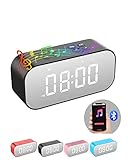
Overview: The AFK Alarm Clock is a budget-friendly multifunction device combining a digital clock, Bluetooth speaker, and speakerphone in one sleek package. Designed for heavy sleepers, it features dual independent alarms with snooze functionality and a mirror-finish LED display with three brightness levels. The built-in 2000mAh battery provides 8-10 hours of playback, making it portable for travel or outdoor use.
What Makes It Stand Out: At under $30, it merges three devices—alarm clock, Bluetooth speaker, and hands-free calling system—into one compact unit. The mirror display adds modern aesthetic appeal while serving as a functional vanity mirror. Dual alarms cater to couples with different schedules, and the intelligent noise-reduction microphone enables clear conference calls. Its versatility across Bluetooth, TF card, and AUX inputs ensures compatibility with virtually any audio source.
Value for Money: This is exceptional value at $27.99. Competitors like the iHome iBT29 typically cost $40-50 for similar features. While audio fidelity won’t match premium speakers, it eliminates the need for separate devices. The rechargeable battery saves money on replacements, and the multi-device consolidation justifies the price even if one feature is used sparingly.
Strengths and Weaknesses: Strengths: Extremely affordable; combines speaker, clock, and speakerphone; portable battery power; mirror display looks premium; multiple connectivity options; dual alarms for different schedules.
Weaknesses: Sound quality is basic; mirror display shows fingerprints; no radio or smart features; build quality may not be durable; LED brightness might still disturb light-sensitive sleepers.
Bottom Line: A fantastic budget pick for teens, college students, or anyone wanting basic smart features without the premium price. Perfect for nightstands where space is limited. Don’t expect audiophile sound, but appreciate the versatility.
4. BIB_WJ Smart Sunrise Alarm Clock with No Signup APP Control & Wake-Up Light, 4 Alarms, White Noise, FM Radio, Wireless Speaker, White
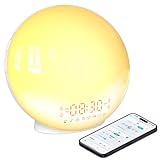
Overview: The BIB_WJ Sunrise Alarm Clock brings premium wake-up light features to the budget segment. This white cylindrical device simulates natural sunrise 10-60 minutes before your alarm, gradually brightening to ease morning grogginess. Controlled via the Halo Light app—requiring no registration—it offers four customizable alarms, seven nature sounds, FM radio, and an 11-color night light, all for under $30.
What Makes It Stand Out: The no-signup app is a rare privacy-conscious feature, eliminating account creation friction while enabling remote control. The sunrise simulation pairs with sunset wind-down modes (5-180 minute timers) for complete sleep cycle support. With four independent alarms, it accommodates complex family schedules better than most dual-alarm units. The 11-color ambient lighting doubles as a mood lamp, reading light, or nursery nightlight, maximizing utility.
Value for Money: At $29.98, it dramatically undercuts Philips’ wake-up lights ($50-100+) while offering more features. Competing brands like JALL provide similar functionality but often require clunky apps with accounts. The inclusion of FM radio, white noise, and a wireless speaker makes this a comprehensive sleep solution at a price point where most competitors offer only basic sunrise simulation.
Strengths and Weaknesses: Strengths: No-registration app; sunrise and sunset modes; four alarms; 11-color lighting; affordable; FM radio integration; white noise options.
Weaknesses: Unknown brand reliability; app may have limited updates; speaker quality is modest; no smart home integration; light intensity may be insufficient for heavy sleepers; no battery backup.
Bottom Line: An excellent entry-level wake-up light for those curious about circadian rhythm lighting. The privacy-friendly app and multi-functionality make it ideal for kids’ rooms or guest bedrooms. Heavy sleepers may need brighter models, but for the price, it’s hard to beat.
5. Wake Up Light Sunrise Alarm Clock for Bedroom, 17 Nightlights, Sound Machine with 5W Bluetooth Speaker, 25 Soothing Sounds, SleepTimer, Dual Alarms, FM Radio, Ideal Gift for Baby, Kids, Adults, Senior
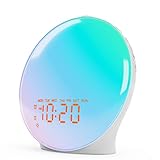
Overview: This upgraded JALL wake-up light alarm clock delivers premium features at a bargain price. It simulates sunrise over 10-60 minutes before alarm time, gradually brightening from 10% to 100% intensity. The full-screen LED display eliminates the dark corners common in budget models, while 17 lighting modes, 25 soothing sounds, and a 5W Bluetooth speaker create a comprehensive sleep and wake system for under $30.
What Makes It Stand Out: The full-screen display is a genuine improvement over competitors, providing uniform brightness for better sunrise simulation. With 25 built-in sounds—from white noise to wind chimes—it offers the most extensive audio library in its class. The dual alarms feature unlimited 9-minute snooze cycles and smart scheduling (every day, weekdays, weekends), while the 10-480 minute sleep timer accommodates everything from naps to full nights. The 5W speaker delivers surprisingly robust audio for music or meditation.
Value for Money: At $29.94, it matches the BIB_WJ model but adds more sounds and a full-screen display. Philips’ basic wake-up light costs twice as much without Bluetooth or FM radio. While brand recognition is lower, the feature set rivals $60-80 devices, making it exceptional value for families needing customizable sleep solutions.
Strengths and Weaknesses: Strengths: Full-screen sunrise simulation; 25 soothing sounds; 17 lighting modes; unlimited snooze; dual smart alarms; powerful 5W speaker; extensive sleep timer; affordable.
Weaknesses: Brand reliability uncertain; light may not be bright enough for severe heavy sleepers; no app control; no battery backup; setup can be confusing; display brightness may still disturb some users.
Bottom Line: The best-featured wake-up light under $30. Perfect for families with varied sleep schedules or anyone wanting extensive sound options. Choose this over the BIB_WJ if you prefer more audio variety and don’t need app control. Heavy sleepers should test brightness tolerance first.
6. Emerson SmartSet Dual Alarm Clock Radio with AM/FM Radio, Dimmer, Sleep Timer and .9" LED Display, CKS1900
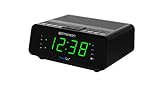
Overview: The Emerson CKS1900 delivers reliable timekeeping and alarm functionality in a compact, no-nonsense package. This budget-friendly clock radio focuses on essentials: accurate time display, dual alarms, and AM/FM radio reception. Its 0.9-inch jade green LED provides clear visibility without overwhelming your nightstand, while the included battery backup ensures alarms sound even during power outages.
What Makes It Stand Out: SmartSet technology automatically configures the correct year, month, date, day, and time upon initial plug-in and after every power interruption—a feature unprecedented at this price point. The dual alarm system offers remarkable flexibility, allowing separate weekday, weekend, or seven-day programming. Four-level dimmer control addresses light sensitivity concerns that plague cheaper models, while the sleep-to-music timer provides gentle transitions to rest.
Value for Money: At $15.39, this represents exceptional value. Comparable basic digital clocks without radio functionality cost similarly, while adding auto-time correction and dual alarms typically pushes prices above $25. You’re essentially getting a reliable radio and intelligent timekeeping for the cost of a simple alarm clock, making it one of the best budget options available.
Strengths and Weaknesses: Strengths include the auto-setting SmartSet feature, compact dimensions (6.1" x 4.9" x 2.5"), reliable alarm performance, and included battery backup. The AM/FM tuner adds entertainment value beyond buzzing alarms. Weaknesses are the lack of modern connectivity (no Bluetooth or USB charging), basic radio-only functionality, and the dated jade green display color that may not suit all aesthetics. The small display can be challenging for visually impaired users.
Bottom Line: Perfect for traditionalists seeking a dependable, set-it-and-forget-it alarm clock. The Emerson CKS1900 excels at core functionality with the bonus of automatic time correction, making it an unbeatable budget choice for bedrooms, guest rooms, or office desks where simplicity reigns supreme.
7. Emerson CKSW5010 Smartset Wireless Charging, Dual Alarm FM Clock, Bluetooth Radio/Speaker, 15W for Ultra-Fast Charging, 3W Retractable Port for Air Pods, White

Overview: The Emerson CKSW5010 modernizes the bedside alarm clock by integrating wireless charging and Bluetooth connectivity. This upgraded model maintains the reliable SmartSet technology while adding contemporary features that address smartphone-centric lifestyles. Its clean white design and larger footprint accommodate multiple charging options without sacrificing core alarm functionality.
What Makes It Stand Out: The versatile charging ecosystem distinguishes this model remarkably. A 15W ultra-fast wireless charging pad with a lift-up stand accommodates smartphones at optimal viewing angles, while a dedicated 3W retractable stand specifically charges AirPods. Additional Type-C and Type-A USB ports ensure compatibility with virtually any device. Bluetooth 5.3 provides stable streaming with a 10-meter range, and the 1.2-inch cyan LED display offers superior readability with four-level dimming and a two-level night LED.
Value for Money: Priced at $39.21, this clock delivers solid value by consolidating three devices: an alarm clock, wireless charger, and Bluetooth speaker. Purchasing these separately would easily exceed $60. While more expensive than basic models, the convenience factor and charging versatility justify the premium for users invested in wireless charging ecosystems, making it a cost-effective space-saving solution.
Strengths and Weaknesses: Strengths include comprehensive charging options, reliable SmartSet auto-time correction, strong Bluetooth connectivity, and the practical night LED feature. The FM radio provides clear digital tuning. Weaknesses include the absence of AM radio, larger footprint (9" x 5.6" x 4.7"), and limited audio quality from the small speaker that won’t satisfy music enthusiasts. The cyan display, while modern, may not appeal to traditionalists.
Bottom Line: An excellent mid-range choice for users prioritizing charging convenience and connectivity. The Emerson CKSW5010 successfully modernizes the alarm clock concept, making it perfect for contemporary bedrooms where smartphone integration is essential and cable clutter must be eliminated.
8. Risop Wake Up Light Sunrise Alarm Clock for Heavy Sleepers, All-in-One Smart Bedside Device with Bluetooth Speaker, FM Radio, Dual Alarm & Sleep Aid Night Light, Best Gift for Adults & Kids

Overview: The Risop Wake Up Light transforms morning routines through science-based light therapy designed specifically for heavy sleepers. This all-in-one device merges sunrise simulation with audio features to create a gentler, more natural awakening experience. Its modern aesthetic and multi-functionality provide a compelling alternative to jarring traditional alarms while serving as a versatile bedside companion.
What Makes It Stand Out: The sophisticated sunrise simulation stands out dramatically, gradually increasing brightness from 1% to 100% over 10-60 minutes to regulate circadian rhythms naturally. Eight nature sounds complement the light therapy, while sunset simulation aids evening relaxation. With 18 color options and 20 brightness levels, it doubles as a mood lamp, and the integrated Bluetooth speaker delivers surprisingly robust audio for music, podcasts, or audiobooks.
Value for Money: At $29.99, this device undercuts premium wake-up lights from brands like Philips while offering comparable core functionality. Adding Bluetooth speaker and FM radio capabilities makes it a stronger value proposition than single-purpose light therapy devices that often cost $40-60. It’s an accessible entry point into sleep science-based wake-up technology without sacrificing modern connectivity.
Strengths and Weaknesses: Strengths include effective sunrise/sunset simulation, extensive customization options, dual alarm flexibility, and versatile color-changing night light. The Bluetooth connectivity and nature sounds enhance utility beyond alarms. Weaknesses include basic FM radio reception, no wireless charging capability, and audio quality that won’t satisfy audiophiles. The plastic construction feels less premium than higher-end competitors, though durability remains adequate.
Bottom Line: Ideal for heavy sleepers seeking a gentler wake-up method or anyone interested in circadian rhythm regulation. The Risop delivers impressive light therapy features at a budget-friendly price, making it a thoughtful gift for adults and kids alike who struggle with traditional alarms and want to improve their sleep quality.
9. MS3 Stereo Smart Music System with Internet Radio, FM Digital Radio,Clock Radio,Spotify Connect,Bluetooth Speaker,WiFi Speaker,Headphone-Out,Alarms,Presets,Remote and App Control–Black Oak
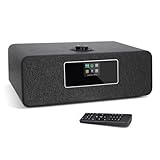
Overview: The MS3 Stereo Smart Music System positions itself as a premium audio hub rather than a simple alarm clock. This sophisticated device caters to audiophiles and radio enthusiasts by combining internet connectivity with traditional FM reception, creating a comprehensive listening experience that extends far beyond morning wake-ups into all-day entertainment.
What Makes It Stand Out: Access to over 30,000 internet radio stations and Spotify Connect integration transforms this into a global audio portal. The one-touch presets for 20 stations, dual independent alarms with smart scheduling for weekdays or weekends, and multiple equalizer settings demonstrate thoughtful design. WiFi connectivity enables automatic time updates, while the UNDOK app and remote control provide unprecedented convenience for a clock radio system.
Value for Money: At $123.49, this is a significant investment, but it justifies the price by replacing multiple devices: internet radio, FM radio, Bluetooth speaker, and alarm clock. Comparable internet radio systems from Grace Digital or Ocean Digital start at $100 without Bluetooth or dual alarms. For serious radio listeners, the extensive station access and premium features warrant the cost, delivering professional-grade functionality.
Strengths and Weaknesses: Strengths include unparalleled radio selection, Spotify Connect streaming, robust app control, USB charging port, and sophisticated alarm customization with music or buzzer options. The black oak finish adds elegance. Weaknesses include the steep price point, larger footprint, potential WiFi setup complexity for non-tech users, and limited portability due to its size and power requirements. No AM radio may disappoint some users.
Bottom Line: Best suited for radio aficionados and music lovers wanting comprehensive audio options. The MS3 excels as a fixed bedroom or office audio system, delivering premium features that justify its price for users who will utilize its full capabilities. Casual users may find it overly complex for basic alarm needs.
10. Digital Alarm Clocks for Bedrooms, Bluetooth Speaker, Alarm Clock with Wireless Charging, White/Brown Noise Sound Machine for Sleep with Night Light Wooden Vintage Decor Birthday Gifts for Men, Women

Overview: This 5-in-1 multifunctional device merges vintage aesthetics with modern technology, creating a unique bedside companion that addresses multiple needs simultaneously. The wood grain finish adds warmth to contemporary features, making it an attractive option for those seeking both style and substance in bedroom accessories without creating clutter.
What Makes It Stand Out: The sheer versatility is remarkable: it functions as an alarm clock, white noise machine, wireless charger, Bluetooth speaker, and ambient night light. The inclusion of 24 soothing sounds—including white, pink, and brown noise—surpasses most dedicated sound machines. Wireless charging eliminates cable clutter, while the vintage design stands out in a market dominated by plastic gadgets. The sunrise light feature gently illuminates when the alarm sounds.
Value for Money: At $36.99, this device offers exceptional value. Purchasing a separate white noise machine ($25), wireless charger ($20), and Bluetooth speaker ($30) would exceed $75. While the wood veneer may not suit ultra-modern decor, it provides a distinctive look that justifies the price point for style-conscious buyers seeking an all-in-one solution that reduces bedside clutter.
Strengths and Weaknesses: Strengths include comprehensive functionality, extensive sound library, wireless charging convenience, attractive vintage design, and versatile LED lighting modes. The sunrise feature and large display enhance usability. Weaknesses include no AM radio, potential wireless charging issues with thick phone cases, and the requirement to purchase a separate power adapter for optimal charging. Audio quality is adequate for casual listening but not exceptional.
Bottom Line: Perfect for those wanting to minimize bedside clutter without sacrificing features. This device excels as a space-saving solution that combines essential functions with charming design, making it an ideal gift for anyone appreciating vintage aesthetics paired with modern convenience and comprehensive sleep support.
Why Spotify-Enabled Alarm Clocks Are Revolutionizing Your Morning Routine
The Psychology of Waking Up to Music vs. Jarring Alarms
Your brain doesn’t process sound the same way when you’re asleep. Abrupt, high-frequency noises like traditional beeping alarms activate the amygdala, your brain’s threat-detection center, triggering a fight-or-flight response before you’re even fully conscious. This neurological shock is why you often wake feeling stressed and disoriented. Music, particularly tracks you personally curate, engages different neural pathways. The auditory cortex recognizes patterns and familiar melodies, allowing for a gentler ascent through sleep stages. Research consistently shows that melodic sounds reduce sleep inertia—that groggy, impaired feeling that can last up to two hours after waking. Spotify-enabled alarms leverage this science by letting you select songs with optimal BPM (beats per minute) and emotional resonance for your personal physiology.
How Streaming Integration Changes the Game
The leap from FM radio or simple Bluetooth pairing to native Spotify integration represents more than convenience—it’s a fundamental shift in reliability and customization. Native integration means the alarm clock communicates directly with Spotify’s servers, independent of your phone being present, charged, or even powered on. This eliminates the single point of failure that plagues app-based alarms. Furthermore, direct integration unlocks features like shuffle modes for entire playlists, algorithmic recommendations based on your listening history, and seamless transitions between songs without the jarring pauses that Bluetooth connections often introduce. The result is a wake-up experience that feels intentional, not mechanical.
Key Features to Look for in Smart Alarm Clocks
Spotify Integration: What “Works With Spotify” Really Means
That “Works with Spotify” badge on packaging can be misleading. True native integration means the device has Spotify Connect built into its firmware, allowing it to pull streams directly from the cloud using your account credentials. Contrast this with devices that merely function as Bluetooth speakers relying on your phone’s Spotify app—these offer none of the reliability benefits and often suffer from connection timeouts. Look for clocks that specify “Spotify Connect” or “Native Spotify Support.” Also investigate whether the integration supports both Free and Premium accounts; many features like ad-free playback, high-quality streaming, and offline mode require Premium. Some devices offer a hybrid approach: native integration for Premium users and Bluetooth fallback for Free accounts, which is worth understanding before purchase.
Sound Quality Matters: Decoding Audio Specifications
A clock that sounds tinny or distorted at volume defeats the purpose of a pleasant wake-up. Pay attention to wattage—not as a definitive quality metric, but as a baseline. A 5-watt speaker might suffice for a nightstand, but 10-20 watts provides headroom for fuller sound without distortion. More important are driver configuration: dual-driver setups (separate woofer and tweeter) deliver clearer mids and highs than single full-range drivers. Frequency response specs (measured in Hz) tell you how low the bass goes and how crisp the highs are. A range of 60Hz-20kHz is decent, but 40Hz-20kHz indicates genuine low-end capability. For bedroom acoustics, consider whether the clock offers stereo separation or relies on mono output—stereo creates a more immersive soundstage that can fill a room more naturally.
Connectivity Options: WiFi, Bluetooth, and Beyond
Your alarm clock’s connectivity determines its reliability and versatility. Dual-band WiFi (2.4GHz and 5GHz) is non-negotiable for stable streaming; 2.4GHz networks are often congested with smart home devices, leading to buffering. The 5GHz band offers cleaner, faster connections with less interference. For Bluetooth, version 5.0 or higher provides better range, stability, and power efficiency. Some advanced clocks include Thread or Zigbee support for mesh networking, which can improve reliability in smart home setups. Ethernet ports, while rare, offer bulletproof connectivity for those who prioritize reliability over wireless convenience. Also investigate whether the device supports WiFi Protected Setup (WPS) for easy pairing with routers that lack simple app-based configuration.
Display Features: Visibility Without Disruption
A bright display can sabotage sleep quality by suppressing melatonin. The best smart clocks feature auto-dimming ambient light sensors that adjust brightness based on room conditions. Look for displays with customizable color temperature—warm amber tones at night are less disruptive than cool blue light. The type of display matters: LED displays offer better contrast and viewing angles than traditional LCDs, while OLED screens provide true blacks but at a premium price. Consider display size relative to your viewing distance; oversized displays can dominate a small bedroom aesthetically. Some clocks offer “night mode” that completely disables the display during sleep hours, activating only when triggered by sound or motion. The ability to customize what information appears (time only vs. time, weather, track info) prevents cognitive overload when you just want to know the time at 3 AM.
Smart Home Ecosystem Compatibility
Your alarm clock shouldn’t exist in isolation. Compatibility with Alexa, Google Assistant, or Apple HomeKit allows you to create sophisticated morning routines. Imagine saying “Alexa, good morning” and having your alarm clock trigger the coffee maker, adjust the thermostat, and start your Spotify playlist simultaneously. The Matter standard, emerging as the universal smart home protocol, future-proofs your investment by ensuring interoperability across ecosystems. Investigate whether the clock can serve as a smart home hub itself—some models include Zigbee or Z-Wave radios to control other devices directly. Voice control capabilities vary: some clocks have built-in microphones for direct command, while others rely on integration with separate smart speakers. Consider privacy implications of always-listening microphones versus push-to-talk models.
Power Backup and Reliability Concerns
A smart alarm clock that fails during a power outage is worse than useless—it’s a liability. Look for devices with battery backup that maintains timekeeping and alarm settings, not just a small cell that preserves the clock but won’t trigger the alarm. Lithium-ion backups are superior to NiMH, offering longer standby times and better performance after months of disuse. Some premium models include power-loss detection that automatically switches to battery mode and can even send notifications to your phone. Investigate what features remain functional during an outage: will Spotify still stream over battery power (unlikely without internet), or does the device fall back to a local tone? The best implementations maintain network connectivity via battery for a short duration, allowing one final Spotify alarm before reverting to a traditional buzzer.
Understanding Audio Formats and Streaming Quality
Spotify streams at different bitrates depending on your subscription tier and settings: Free accounts max out at 160kbps, while Premium offers up to 320kbps. However, your alarm clock’s hardware must support these higher bitrates to deliver the benefit. Some budget devices downsample audio to reduce processing load, negating Premium’s quality advantage. Spotify Connect streams in Ogg Vorbis format, which most modern clocks handle natively, but Bluetooth streaming re-encodes audio, introducing compression artifacts and latency. Latency is particularly problematic for alarms—you don’t want a 2-second delay between your set time and music playback. Look for devices with low-latency Bluetooth codecs like aptX or AAC. For the audiophile, some clocks support FLAC or WAV playback for local files, though this is rare and often unnecessary for morning wake-ups where convenience trumps absolute fidelity.
The Science of Sleep and Sound: Why Music Wakes You Better
Circadian Rhythm Alignment and Gentle Wake Cycles
Your circadian rhythm controls the predictable ebb and flow of alertness throughout the day. Smart alarms can align with this biological clock using gradual volume increases that mimic natural sunrise sounds. The optimal wake-up sequence begins 15-30 minutes before your target time, starting at barely audible levels and slowly increasing. This technique, called “sleep inertia reduction,” allows your brain to transition through sleep stages naturally rather than being ripped from deep sleep. Spotify-enabled clocks excel here because they can crossfade between tracks, creating an uninterrupted sonic landscape. Some devices even analyze your sleep patterns via integrated sensors or connected wearables, adjusting alarm timing to wake you during lighter sleep phases—a feature that transforms the alarm from a simple timer into a personalized sleep optimization tool.
Cortisol, Stress Response, and the Argument Against Beeping
The acoustic startle reflex triggered by traditional alarms causes an immediate cortisol and adrenaline surge. While effective at forcing consciousness, this hormonal spike elevates blood pressure and heart rate, creating unnecessary cardiovascular stress. Studies measuring morning cortisol levels show that subjects waking to melodic music exhibit 25-30% lower stress hormone levels compared to those jolted by beeping. Music, especially tracks with personal meaning or positive associations, activates the brain’s reward centers, releasing dopamine that counteracts the grogginess of sleep inertia. This neurochemical balance is why you might wake smiling to a favorite song but feel irritable after a standard alarm. Spotify’s vast library lets you curate tracks that evolve with your tastes, preventing the desensitization that occurs when you wake to the same song daily.
Alarm Customization: Beyond Just Picking a Song
Shuffle Features and Playlist Rotation
Waking to the same song daily creates psychological accommodation—your brain begins to associate that track with stress, defeating the purpose. Advanced Spotify alarm clocks offer intelligent shuffle modes that randomize tracks while respecting your preferences. Some algorithms avoid songs you’ve recently heard or favor tracks with similar BPM profiles to maintain consistent wake-up energy. True playlist rotation goes further, allowing you to schedule different playlists on weekly cycles. Imagine acoustic folk on Mondays for gentle starts, high-energy pop on Fridays for motivation, and ambient electronic on weekends for leisurely mornings. This variability prevents habituation and keeps your wake-up experience fresh and effective.
Time-Specific Playlists and Day-of-Week Scheduling
Your energy needs differ dramatically between a 6 AM weekday alarm and a 9 AM weekend wake-up. Sophisticated clocks let you assign specific playlists to different days and times. Early work mornings might call for upbeat, high-BPM tracks to quickly elevate alertness, while Sunday mornings benefit from slower, instrumental pieces. Some devices integrate with your calendar, automatically adjusting alarm times and playlists based on scheduled events. This context-aware functionality extends to seasonal adjustments—brighter, more energetic music in dark winter months, mellower tones during summer. The ability to create exceptions for holidays or vacation periods ensures you’re not jolted awake unnecessarily when your routine changes.
Design and Aesthetics: Finding Your Bedroom’s Perfect Match
Bedroom technology should enhance, not dominate, your personal space. Smart alarm clocks come in form factors ranging from minimalist slabs to retro-inspired designs with physical dials. Consider your nightstand’s real estate: a clock that’s too large becomes a visual focal point, while one too small may be difficult to interact with when half-asleep. Material choices affect both aesthetics and acoustics—fabric-wrapped designs soften sound and blend with decor but can collect dust, while metal or wood constructions offer durability but may create harsh acoustic reflections. Cable management is an overlooked design element; clocks with recessed power ports and cable channels maintain a clean look. Some models offer interchangeable faceplates or customizable LED accent lighting to match your bedroom’s color scheme, transforming the device from mere tool to design object.
Privacy and Data Security in the Connected Bedroom
Understanding Data Sharing and Microphone Controls
Any device connected to WiFi and streaming services collects data, but the scope varies dramatically. Some clocks send usage analytics—what time you wake, which songs you prefer, how often you snooze—back to manufacturers. While ostensibly for product improvement, this data can be monetized or vulnerable to breaches. Investigate privacy policies before purchase. For devices with voice control, physical microphone mute switches are essential; software-only mute functions can potentially be bypassed. Consider clocks that process voice commands locally rather than sending audio to cloud servers. GDPR-compliant devices offer data deletion rights, while others may store information indefinitely. If privacy is paramount, look for models that function fully without creating user accounts, using Spotify Connect as the only cloud service.
Price vs. Value: Making Sense of the Market
The smart alarm clock market spans from budget-friendly options under $50 to premium devices exceeding $300. Entry-level models typically offer basic Spotify Connect and adequate sound but skimp on display quality, battery backup, and smart home integration. Mid-range options ($100-$200) represent the sweet spot for most users, balancing sound quality, reliability, and features. Premium clocks justify their price through superior acoustics, advanced sleep tracking, premium materials, and ecosystem integration that can replace multiple devices. Consider total cost of ownership: does the clock require a subscription service for full functionality? Some manufacturers charge monthly fees for advanced features like sleep analytics or voice control. Factor in longevity—a $200 clock that lasts 5 years costs less annually than replacing a $50 model every year due to failures or obsolescence.
Troubleshooting Common Spotify Alarm Issues
Connection Drops and Network Instability
The most common complaint is alarms failing due to lost WiFi connections. This often stems from routers that aggressively disconnect idle devices to save bandwidth. Look for clocks with “keep-alive” settings that maintain persistent connections. Mesh network compatibility is crucial; some older WiFi chips struggle with seamless handoffs between nodes. If you experience dropped alarms, assign your clock a static IP address in your router settings to prevent address conflicts. For dual-band routers, force the clock to connect to 2.4GHz if 5GHz signals are weak in your bedroom—the longer wavelength penetrates walls better. Some advanced models include network diagnostics in their apps, showing real-time signal strength and suggesting optimal placement.
Authentication Errors and Account Management
Spotify requires periodic re-authentication, which can silently break alarm functionality. Premium clocks handle this automatically using refresh tokens, but budget models may require manual re-login every few weeks. If you share a Spotify Family plan, ensure the clock is registered to the correct account—alarms won’t trigger if the primary account holder is streaming elsewhere and device limits are reached. Two-factor authentication can complicate initial setup; some clocks require you to generate app-specific passwords. When switching phones, don’t forget to transfer clock ownership in the app, as some devices bind to a specific mobile device for security. Keep firmware updated; authentication protocols change, and outdated software loses compatibility.
Setting Up Your Spotify Morning Routine: Best Practices
Crafting the Perfect Wake-Up Playlist Psychology
The ideal wake-up playlist follows a psychological arc rather than random favorites. Start with tracks around 100-120 BPM—energetic enough to stimulate but not overwhelming. Avoid songs with jarring intros; instead favor those with gradual builds or gentle openings. Lyrics matter: positive, uplifting messages prime your mindset better than melancholy or aggressive content. Consider instrumental versions of familiar songs to avoid lyrical fatigue. The first track should be one you love but haven’t overplayed; novelty engages the brain more effectively. Limit your wake-up playlist to 30-45 minutes to avoid looping during slow mornings. Refresh the playlist monthly to prevent desensitization. Some users find success with “song ladders”—starting with ambient tracks, moving to acoustic, then full-band arrangements over 20 minutes.
Volume Curves and Gradual Wake Features
Linear volume increases feel unnatural; the best clocks use logarithmic curves that match human hearing perception. Starting at 30-40 decibels (barely above a whisper) and reaching 60-70 decibels over 15-20 minutes mimics natural environmental sound increases. Some devices let you customize this curve based on your sleep depth—deeper sleepers need longer ramps. The “final alarm” feature is crucial: if gradual increase fails to wake you, the clock should escalate to a persistent, louder tone after a set period. Test your volume curve on a weekend; what seems pleasant when awake might be imperceptible when deeply asleep. Consider room acoustics—hard surfaces reflect sound, potentially making gradual increases seem more abrupt than in a carpeted, furnished bedroom.
The Importance of Backup Alarm Strategies
Even the smartest technology fails. Always configure a backup alarm—either the device’s built-in traditional tone or a separate, simple alarm clock set 5 minutes after your primary. This redundancy is especially critical for important mornings like interviews or flights. Test your Spotify alarm weekly by setting it for a few minutes ahead and observing if it triggers correctly. Keep your clock’s firmware updated, but avoid updating the night before critical mornings—updates can reset settings. If your clock supports it, enable email or push notifications for alarm failures. For travel, understand that hotel WiFi often requires browser-based login, which smart clocks can’t handle; bring a reliable backup or use your phone’s hotspot with the clock pre-configured to connect.
Frequently Asked Questions
Do I need Spotify Premium to use these alarm clocks?
While many clocks technically work with free Spotify accounts, the experience is severely limited. Free accounts include ads, which can jolt you awake mid-song, and don’t support offline playback. Premium unlocks ad-free listening, higher audio quality (320kbps), and the ability to play specific songs on-demand rather than just shuffling playlists. Most premium smart alarm features like direct playlist selection require a Premium subscription.
What happens if my internet goes down overnight?
This depends on the device’s design. High-quality smart alarm clocks include battery backup that preserves settings and time, but without internet, they can’t stream Spotify. The best models automatically fall back to a locally stored alarm tone or FM radio when they detect connectivity loss. Others simply fail silent, which is why backup alarms are essential. Some premium devices cache your designated wake-up song locally, playing it once from memory even without internet.
Can I use Spotify podcasts or audiobooks as alarms?
Most native Spotify integrations support any audio content available in the Spotify app, including podcasts and audiobooks. However, there are caveats. Podcasts with dynamic ad insertion may include commercial breaks that disrupt your wake-up. Audiobooks often have long intros or quiet passages that might not effectively rouse you. Additionally, if you fall back asleep, you could wake hours later deep into a chapter with no easy way to rewind to where you left off. For these reasons, music remains the most reliable choice.
Will the alarm still work if Spotify is experiencing an outage?
Spotify outages are rare but do occur. During a widespread service disruption, native Spotify Connect alarms will fail unless the device has cached content locally. This is different from your personal internet outage—if Spotify’s servers are down globally, no amount of local connectivity will help. Some advanced clocks can detect service outages and automatically switch to alternative streaming sources like Amazon Music or Apple Music if you’ve configured them, but most simply revert to a standard alarm tone.
How much data does a Spotify alarm use each morning?
A typical 15-minute wake-up session at Spotify’s highest quality (320kbps) consumes approximately 36MB of data. At normal quality (160kbps), this drops to about 18MB. For users with data caps, this is negligible—less than 1GB per month even with daily use. However, if you’re using a mobile hotspot for connectivity, be aware that background processes and firmware updates can consume additional data. Most clocks allow you to set audio quality limits specifically for alarm playback to manage bandwidth usage.
Can I set different playlists for different days?
Yes, this is a core feature of most quality Spotify-enabled alarm clocks. You can typically assign unique playlists to each day of the week or create groups like “Weekdays” and “Weekends.” Advanced models integrate with your calendar app to automatically adjust playlists based on scheduled events—early meetings might trigger a high-energy playlist, while vacation days default to ambient sounds. Some devices even support location-based alarms that change playlists when you’re traveling.
What if I share a bedroom and don’t want to wake my partner?
Several solutions exist for couples with different schedules. Some clocks feature directional speakers that focus sound toward the sleeper’s side of the bed. Others offer vibration pads that slip under your pillow, using Spotify to trigger gentle vibrations instead of audible alarms. The most elegant solution is a clock with headphone jack or Bluetooth transmitter support, allowing one person to wake to music through earbuds while the other sleeps undisturbed. Just ensure the device supports alarm audio routing to external outputs rather than just the internal speaker.
Are there any privacy concerns with microphones in these devices?
Any internet-connected microphone presents potential privacy risks. Reputable manufacturers include physical mute switches that electrically disconnect the microphone, providing true privacy rather than software-only controls. Review the device’s privacy policy to understand what audio data, if any, is stored or transmitted. Some clocks process voice commands locally without sending recordings to the cloud. For maximum privacy, choose a model without a microphone and rely on integration with a separate smart speaker that you can easily mute. Be wary of devices that require always-on listening for basic functions like snoozing.
Can I control the alarm with voice commands?
If the clock has a built-in microphone and supports Alexa or Google Assistant, you can set, snooze, or cancel alarms using voice commands. However, this typically requires linking your Spotify account through the voice assistant’s app, creating an additional layer of potential failure points. More reliable is using a separate smart speaker in your bedroom to control the alarm clock via smart home routines. For example, saying “Alexa, start my morning” could trigger the alarm clock’s Spotify playlist while also adjusting lights and temperature. Direct voice control of the clock itself is convenient but often less robust than app-based control.
What should I do if my Spotify alarm fails to go off?
First, verify that your Spotify account is active and not being used elsewhere beyond device limits. Check the clock’s WiFi connection and ensure it has a strong signal. In the device’s app, confirm the alarm is enabled and set to the correct time with AM/PM accurate. Test the alarm manually by setting it for two minutes ahead. If it still fails, try re-authenticating your Spotify account and updating the device’s firmware. As a diagnostic step, switch to a different playlist temporarily—sometimes specific tracks become unavailable due to licensing changes. If problems persist, perform a factory reset and reconfigure from scratch. Always maintain a backup alarm until you’ve confirmed reliable operation for at least a week.