Imagine never again experiencing that sinking feeling of wondering whether you locked the front door after you’ve already left for work. Smart deadbolt automations triggered by geofencing technology are transforming this anxiety into confidence, creating an invisible security blanket that activates the moment you exit your designated home zone. These intelligent systems don’t just respond to your commands—they anticipate your needs, learning your patterns and securing your home automatically when you cross that invisible boundary.
The magic lies in the seamless integration of your smartphone’s location services with your home’s security infrastructure, creating a hands-free experience that feels like something from a futuristic smart home vision. But beneath this convenience lies a complex ecosystem of technologies, protocols, and considerations that every homeowner should understand before implementing zone-based locking. Let’s explore the sophisticated world of smart deadbolt automations that lock when you leave, ensuring you make informed decisions that balance security, convenience, and reliability.
Top 10 Smart Deadbolts for Home Security
Detailed Product Reviews
1. eufy Security Smart Lock C220, Fingerprint Keyless Entry Door Lock, Built-in Wi-Fi, App Remote Control, Front Door Smart Lock Deadbolt, 8Months Battery, Reliable Power, IP53 Waterproof, BHMA Grade 3

Overview: The eufy Security Smart Lock C220 positions itself as a premium keyless entry solution for homeowners prioritizing both convenience and security. This BHMA Grade 3 certified deadbolt combines six access methods—including fingerprint recognition—with built-in Wi-Fi connectivity, eliminating the need for additional hubs. Designed for straightforward DIY installation, it promises to retrofit most standard US and Canadian doors in about 15 minutes.
What Makes It Stand Out: The self-learning AI fingerprint sensor is the star feature, growing more accurate with each use and unlocking in under 1.5 seconds. The exceptional eight-month battery life from eight AA batteries sets it apart from competitors requiring more frequent changes. Its IP53 waterproof rating and wide operating temperature range (-22℉ to 158℉) ensure reliable performance in harsh conditions. Integration with the broader eufy ecosystem allows synchronized operation with video doorbells.
Value for Money: At $119.99, the C220 sits in the mid-to-premium tier. The price is justified by the robust feature set, durable construction, and eufy’s reputable customer support offering 18-month protection. Compared to similarly priced alternatives, the extended battery life and AI-enhanced fingerprint accuracy provide tangible long-term value.
Strengths and Weaknesses: Strengths include versatile unlocking options, reliable app control, excellent weather resistance, and minimal maintenance. The self-learning fingerprint technology genuinely improves over time. Weaknesses are the requirement for eight AA batteries (ongoing cost), potential fingerprint recognition issues for elderly users or those with worn prints, and Wi-Fi-only connectivity limiting smart home integration options.
Bottom Line: The eufy C220 is an excellent choice for tech-savvy homeowners seeking reliable fingerprint access with robust remote management. The premium features and build quality justify the price point.
2. eufy Security Smart Lock C30, Keyless Entry Door Lock, Built-in WiFi Keypad Deadbolt for Front Door, No Bridge Required, Easy Installation, App Remote Control, Reliable Power, BHMA Grade 3

Overview: The eufy Security Smart Lock C30 delivers core smart lock functionality at an accessible price point. This keyless entry deadbolt features built-in Wi-Fi for remote access without requiring a bridge or hub. Unlike many competitors, it utilizes physical buttons rather than a touchscreen, targeting users who prioritize durability over flashy aesthetics. The lock maintains eufy’s standard of easy 15-minute DIY installation and broad compatibility.
What Makes It Stand Out: The $66.49 price tag is remarkably competitive for a Wi-Fi-enabled smart lock from a reputable brand. The physical button interface offers enhanced durability and reduces accidental activations compared to touchscreens. Built-in Wi-Fi provides full remote control, access management, and real-time notifications through the eufy Security app. The auto-lock feature with customizable timing adds security for forgetful users.
Value for Money: This represents exceptional value—costing nearly half the C220 while retaining essential smart features. The 18-month warranty and 24/7 customer support provide peace of mind typically reserved for premium products. For budget-conscious homeowners wanting reliable remote access without compromising on brand quality, the C30 is difficult to beat.
Strengths and Weaknesses: Strengths include unbeatable pricing, reliable Wi-Fi connectivity, straightforward installation, and robust customer support. The physical buttons resist wear and work reliably in wet conditions. Weaknesses include the lack of fingerprint recognition, a less modern aesthetic, limited advanced features, and no mention of weatherproof rating. The button interface may feel dated to some users.
Bottom Line: The eufy C30 is the ideal entry-level smart lock for those seeking affordable, reliable Wi-Fi control without frills. It sacrifices advanced features for core functionality and exceptional value.
3. Philips Wi-Fi Door Lock, WiFi Smart Lock Keyless Entry Deadbolt for Front Door, Compatible with Alexa & Google Assistant, Remote Control, Built-in WiFi, APP Fingerprint Passcode Unlock, Auto Locking

Overview: The Philips Wi-Fi Door Lock enters the smart home market leveraging the brand’s reputation for quality electronics. This keyless deadbolt offers five flexible unlocking methods including fingerprint, app control, passcode, physical key, and voice commands via Alexa or Google Assistant. Built-in Wi-Fi eliminates hub requirements, though it exclusively supports 2.4GHz networks.
What Makes It Stand Out: The ability to create up to 100 custom passcodes with flexible scheduling distinguishes it from many competitors. Users can generate unlimited one-time or recurring codes for guests, cleaners, or deliveries. The fingerprint sensor provides instant access, while voice control integration offers hands-free operation when your hands are full. The brand recognition of Philips may appeal to consumers wary of lesser-known security brands.
Value for Money: At $129.99, this lock commands a premium price. The cost is justified by the extensive passcode management capabilities and trusted brand backing. However, batteries aren’t included, adding hidden initial costs. Compared to eufy’s offerings, you pay extra primarily for the Philips name and enhanced code flexibility rather than superior hardware.
Strengths and Weaknesses: Strengths include versatile unlocking options, robust guest access management, straightforward app control, and strong brand reputation. The 100-code capacity exceeds most residential needs. Weaknesses include 2.4GHz Wi-Fi limitation, potential connectivity issues beyond 65 feet from router, lack of included batteries, and a price point that doesn’t significantly outperform cheaper alternatives.
Bottom Line: The Philips Wi-Fi Door Lock suits homeowners requiring extensive guest access control and brand familiarity. For typical residential use, more affordable options offer similar core functionality.
4. TEEHO TE001 Keyless Entry Door Lock with Keypad - Smart Deadbolt Lock for Front Door with 2 Keys - Auto Lock - Easy Installation - Satin Nickel

Overview: The TEEHO TE001 is a no-frills keypad deadbolt designed for homeowners seeking basic keyless entry without complexity or connectivity. This budget-friendly lock eschews Wi-Fi, apps, and biometric features in favor of straightforward PIN code access. Constructed from aluminum alloy with IP54 weather resistance, it focuses on reliability and simplicity rather than smart home integration.
What Makes It Stand Out: The $35.99 price point makes it one of the most affordable keyless entry options available. The anti-peeping password protection allows users to enter random digits before or after their actual code, preventing code theft. The one-touch auto-lock feature (press and hold any key) provides convenient security without complicated programming. Installation requires only a screwdriver and minutes of your time.
Value for Money: This lock redefines budget value. For less than the cost of a dinner out, you eliminate the need for physical keys for your entire household. While lacking remote capabilities, it delivers essential keyless functionality with minimal ongoing costs—no batteries for Wi-Fi or app subscriptions required. It’s ideal for rental properties, garages, or secondary entrances where advanced features aren’t necessary.
Strengths and Weaknesses: Strengths include exceptional affordability, simple operation, reliable construction, and weather resistance. The anti-peeping feature adds surprising security sophistication. Weaknesses include no remote access, limited to 20 user codes, no smartphone integration, and incompatibility with 38mm door holes. The lack of audit trails or temporary scheduling may deter some users.
Bottom Line: The TEEHO TE001 is perfect for budget-conscious buyers wanting reliable keypad entry without smart features. It excels at simple, local keyless access.
5. DESLOC Smart Door Lock B200, Smart Deadbolt Lock, Keyless Entry Door Lock, Fingerprint Smart Lock, Smart Locks for Front Door, App Control, Touchscreen Keypad Deadbolts,12-Month Battery, BHMA Grade3

Overview: The DESLOC Smart Door Lock B200 bridges the gap between basic keypad locks and premium Wi-Fi models by offering biometric access at a mid-range price. This BHMA Grade 3 certified deadbolt features fingerprint recognition unlocking in under 0.3 seconds, alongside PIN codes, physical keys, app control via Bluetooth, and voice assistant integration. It targets users wanting advanced access methods without paying for full remote connectivity.
What Makes It Stand Out: The twelve-month battery life from just four AA batteries is impressive and reduces maintenance. The AI-enhanced fingerprint sensor’s sub-0.3-second recognition speed rivals premium competitors. At $58.81, it’s one of the most affordable locks offering both fingerprint and keypad entry. The inclusion of a USB Type-C emergency power port provides modern convenience during battery failures.
Value for Money: This lock delivers exceptional value for those prioritizing biometric access. You get fingerprint technology, multiple entry methods, and robust security features for roughly half the price of Wi-Fi-enabled alternatives. The 12-month warranty is shorter than eufy’s 18-month offering, but the cost savings are substantial. The Bluetooth app control, while range-limited, still enables code management without monthly fees.
Strengths and Weaknesses: Strengths include rapid fingerprint recognition, excellent battery life, comprehensive access options, and strong weather resistance (-22℉ to 158℉). The anti-peeping protection and local data storage enhance security. Weaknesses include Bluetooth-only connectivity (limited to ~2 meters), no built-in Wi-Fi for true remote access, and customer service limited to business hours for phone support.
Bottom Line: The DESLOC B200 is ideal for users wanting fast fingerprint access and multiple entry methods without paying premium Wi-Fi prices. It excels at local smart functionality.
6. Fingerprint Keyless Entry Door Lock – Smart Deadbolt with App Control, 10-Month Battery Life, Easy Installation, Deadbolt Alternative, IP66 Waterproof, Includes 2 Backup Keys
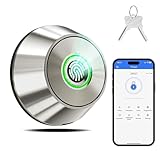
Overview: The Fingerprint Keyless Entry Door Lock delivers budget-friendly smart security at $47.49, offering three entry methods for homeowners seeking affordable keyless convenience. This 3-in-1 deadbolt combines fingerprint recognition, Bluetooth app control, and physical key backup in a weather-resistant package designed for DIY installation.
What Makes It Stand Out: This lock distinguishes itself with an IP66 waterproof rating and 10-month battery life—features uncommon in sub-$50 smart locks. The 360° fingerprint sensor unlocks in 0.3 seconds and stores up to 100 prints via the TTLOCK app. A 15-minute screwdriver installation and auto-lock timer (10-90 seconds) provide accessible security for novices, while the aluminum alloy construction ensures outdoor durability.
Value for Money: At under $50, this lock dramatically undercuts competitors while delivering core smart functionality. Comparable budget models typically lack weatherproofing or offer shorter battery life. The inclusion of two backup keys and a 60-day return policy minimizes purchase risk, making it an exceptional value for first-time smart lock users prioritizing essential features over premium integration.
Strengths and Weaknesses: Strengths include unbeatable pricing, multiple entry methods, true waterproofing, straightforward installation, and robust app management for user access and battery monitoring. Weaknesses involve limited Bluetooth range (15m), no WiFi for remote access, plastic interior components that may affect long-term durability, and reliance on a less-established brand with uncertain support longevity.
Bottom Line: This lock excels as a budget-friendly introduction to keyless entry. While lacking remote access and premium materials, it delivers reliable fingerprint and app control for basic security needs. Ideal for secondary entrances, rental properties, or smart home beginners prioritizing affordability over advanced ecosystem integration.
7. ULTRALOQ Bolt Smart Lock, Built-in Wi-Fi, Matter Over Thread, Works with Apple Home, Alexa, Google, 7-in-1 Keyless Entry Deadbolt with Fingerprint ID, App, Keypad, Remote Control, 18 Months Battery
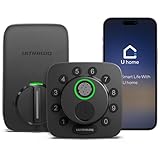
Overview: The ULTRALOQ Bolt Smart Lock positions itself as a future-proof security hub at $119.99, integrating Matter over Thread technology with built-in WiFi. This 7-in-1 deadbolt serves tech-savvy homeowners demanding comprehensive smart home compatibility and extended battery performance.
What Makes It Stand Out: Matter/Thread support ensures seamless integration across Apple Home, Alexa, and Google ecosystems, eliminating platform compatibility concerns. The exceptional 18-month battery life surpasses most competitors, while seven entry methods—including fingerprint, passcode, voice control, and remote app access—offer unmatched flexibility. Built-in 2.4GHz WiFi enables true remote management without additional hubs.
Value for Money: Priced in the mid-range tier, this lock justifies its cost through forward-thinking Matter certification that protects against ecosystem obsolescence. The extended battery life reduces maintenance hassles, while remote access capabilities typically require $150+ alternatives. It’s a strategic investment for growing smart home setups where interoperability is paramount.
Strengths and Weaknesses: Strengths include Matter/Thread future-proofing, industry-leading battery life, multiple access options, true remote access, and voice assistant integration. Weaknesses involve higher cost than basic models, potential feature overkill for simple needs, and possible setup complexity for less tech-comfortable users unfamiliar with smart home protocols.
Bottom Line: This lock is perfect for smart home enthusiasts prioritizing ecosystem flexibility and longevity. While more expensive than entry-level options, its Matter support and 18-month battery make it compelling. Recommended for users invested in multiple smart platforms seeking seamless, hub-free integration.
8. Yale Security Assure Lock 2 Deadbolt, Black Suede Keyed Smart Entry Door Lock with Wi-Fi Connected Keypad for Code Entry and Remote Access, YRD410-WF1-BSP

Overview: Yale’s Assure Lock 2 Deadbolt represents premium smart lock engineering at $198.94, targeting homeowners who prioritize brand reputation and advanced automation. This WiFi-connected keypad lock emphasizes intelligent convenience through DoorSense technology and proximity-based Auto-Unlock.
What Makes It Stand Out: Yale’s century-long security heritage combines with sophisticated automation: DoorSense confirms physical door closure before locking, while Auto-Unlock detects your approach for hands-free entry. The Yale Access App enables comprehensive remote management, and Apple Watch compatibility adds modern convenience. Installation requires only a screwdriver with no DIY experience necessary.
Value for Money: This premium-priced lock competes with top-tier models from August and Schlage. Its value lies in Yale’s proven reliability, advanced sensor technology, and polished user experience rather than cost savings. For users seeking trusted brand performance and seamless automation, the investment delivers justified returns through durability and feature sophistication.
Strengths and Weaknesses: Strengths include trusted Yale brand quality, intelligent DoorSense technology, reliable Auto-Unlock, comprehensive app control, and straightforward installation. Weaknesses center on the steep $199 price point, limitation to 2.4GHz WiFi networks, regional restrictions (US/Canada only), and absence of fingerprint authentication found in cheaper alternatives.
Bottom Line: The Assure Lock 2 excels for users wanting premium, automated security from an established brand. Its intelligent features justify the cost for tech-forward homeowners. However, budget-conscious buyers may find better value elsewhere. Ideal for main entrances where convenience, reliability, and brand trust are paramount.
9. Kwikset Tylo Entry Door Knob with Lock and Key, Secure Keyed Handle Exterior Doorknob, Front Entrance and Bedroom, Satin Chrome, Pick Resistant SmartKey Rekey Security

Overview: The Kwikset Tylo Entry Door Knob offers traditional keyed security with modern SmartKey technology for just $15.24. This mechanical knob lock serves homeowners seeking simple, reliable protection without batteries, apps, or digital complexity for secondary doors.
What Makes It Stand Out: SmartKey Security enables instant re-keying without locksmith costs—a rare feature in sub-$20 hardware. The pick-resistant cylinder defends against common break-in techniques, while the satin chrome finish provides corrosion resistance. Installation completes in minutes with just a screwdriver, fitting standard 1-3/8" to 1-3/4" doors with adjustable latch backset.
Value for Money: At under $16, this lock delivers exceptional value for basic security applications. Comparable mechanical knobs lack SmartKey functionality, requiring expensive professional re-keying. While offering no smart features, its price point makes it ideal for interior doors, garages, or rental properties where digital access isn’t required but re-keying flexibility remains valuable.
Strengths and Weaknesses: Strengths include unbeatable price, SmartKey rekeying convenience, easy DIY installation, pick-resistant design, and zero battery maintenance. Weaknesses involve lack of smart connectivity, lower security than deadbolts, vulnerability to forced entry typical of knob locks, and purely mechanical operation without access logs or remote management.
Bottom Line: This Kwikset knob excels as an affordable, straightforward security solution. Perfect for interior doors, garages, or budget exterior applications where smart features are unnecessary. While not replacing a smart deadbolt for main entrances, its SmartKey technology adds unexpected value to an otherwise basic mechanical lock.
10. August Home, Silver Wi-Fi Connected Smart Keyless Entry Door Lock, Electronic Door Lock Fits Your Existing Deadbolt in Minutes, AUG-SL05-M01-S01

Overview: August’s Wi-Fi Smart Lock offers a unique retrofit design at $109, preserving your existing deadbolt while adding comprehensive smart capabilities. This approach specifically targets renters and homeowners unwilling to replace existing hardware or sacrifice original keys for upgraded convenience.
What Makes It Stand Out: The retrofit design installs over existing single-cylinder deadbolts in 10 minutes without altering exterior hardware or finish. This preserves your original keys and lock appearance while adding app control, Auto-Lock/Unlock, and DoorSense technology. Built-in WiFi eliminates hubs and works seamlessly with HomeKit, Alexa, Google, and SmartThings for broad ecosystem support.
Value for Money: Priced competitively at $109, this lock saves money by leveraging existing hardware while delivering premium features like Auto-Unlock and remote access. Unlike replacement locks, it avoids potential door modification costs. For renters or those with high-end existing deadbolts, it offers superior value to complete replacement systems that would discard functional hardware.
Strengths and Weaknesses: Strengths include effortless installation, preservation of existing keys, broad smart home compatibility, reliable auto-features, and rental-friendly design that doesn’t violate lease terms. Weaknesses involve dependence on original deadbolt quality, limited aesthetic control over exterior appearance, and higher price than some complete budget smart locks with full replacement.
Bottom Line: This August lock is ideal for renters, smart home beginners, or those satisfied with their current deadbolt’s security. It brilliantly balances convenience with hardware preservation. While not suitable for doors without existing deadbolts, it’s the most practical upgrade path for most standard installations where replacing the entire lock is undesirable.
Understanding Geofencing Technology for Smart Locks
Geofencing represents a paradigm shift from reactive to proactive home security. At its core, this technology creates a virtual perimeter around your property using GPS, cellular towers, and Wi-Fi triangulation. When your smartphone crosses this boundary, it triggers predetermined actions—in this case, locking your deadbolt.
How Location-Based Triggers Actually Work
Your smart lock doesn’t directly track your location. Instead, your smartphone’s operating system monitors your position relative to the geofence you’ve established. When you exit the zone, the lock manufacturer’s app receives a notification and sends an encrypted command through your home’s network (or via cellular backup) to secure the door. This multi-step process typically completes within 15-30 seconds, though performance varies based on network conditions and GPS accuracy.
The Difference Between GPS, Wi-Fi, and Bluetooth Geofencing
Most sophisticated systems use hybrid geofencing for reliability. GPS provides broad location awareness but drains battery and struggles indoors. Wi-Fi geofencing triggers when you disconnect from your home network, offering precise “last known location” data. Bluetooth beaconing creates a tight 30-50 foot bubble around your home, triggering locks when the signal drops. The best implementations layer all three, creating redundancy that prevents false triggers while ensuring reliable activation.
The Core Benefits of Zone-Based Locking
Beyond the obvious convenience, automated zone locking delivers measurable improvements to your daily security posture and lifestyle efficiency.
Eliminating Human Error from Your Security Routine
Studies suggest that up to 30% of home burglaries involve unlocked doors or windows. Geofencing automations remove the human memory element entirely. Even during rushed mornings, emergency departures, or when juggling children and groceries, your home secures itself without requiring conscious thought or manual intervention.
Energy Efficiency Through HVAC Integration
Advanced implementations can trigger more than just locking. When your system confirms you’ve left the zone, it can simultaneously adjust your thermostat, turn off lights, and arm security cameras. This creates a holistic “away mode” that reduces energy consumption by an average of 7-12% according to energy management research.
Essential Features to Look for in Zone-Aware Smart Deadbolts
Not all smart locks are created equal when it comes to geofencing capabilities. Understanding the technical specifications separates reliable systems from frustrating experiments.
GPS Accuracy and Refresh Rate Specifications
Look for systems that update location data every 30-60 seconds rather than the standard 2-5 minute intervals. Higher refresh rates prevent the dreaded “driveway delay” where you’re already down the street before the trigger activates. Premium systems also incorporate accelerometer data to detect when you’re actually moving away versus lingering near the boundary.
Multi-User Scalability Without Conflicts
Your lock must intelligently handle multiple household members with independent geofences. The system should only lock when the last person leaves, not when the first departs. This requires sophisticated presence detection algorithms that track multiple devices simultaneously and understand household composition.
Setting Up Your First Leave-the-Zone Automation
Creating your initial geofencing automation requires careful calibration rather than simply enabling a toggle in an app.
Establishing Optimal Zone Boundaries
Start with a 200-300 meter radius and test for one week. Too small, and you’ll trigger locks while walking the dog or checking the mailbox. Too large, and your door might lock while you’re still in the driveway loading the car. Use your app’s zone visualization tool to map your actual property lines, street access, and neighbor proximity.
The Critical Importance of Exit Delay Timers
Configure a 2-4 minute exit delay to prevent immediate re-locking if you forget something and return. Advanced systems offer dynamic delays based on time of day—shorter during morning commutes, longer during evening departures when forgotten items are more common.
Advanced Geofence Configuration Strategies
Once you’ve mastered basic zone locking, sophisticated configurations can address complex living situations and security requirements.
Creating Multiple Nested Zones
Implement a two-zone system: an immediate 50-foot “warning zone” that prepares the lock (warming up connectivity, checking battery), and a broader 500-foot “action zone” that executes the lock command. This staging prevents latency issues and provides opportunities for secondary verification.
Handling Zone Overlaps in Multi-Family Dwellings
In apartments or condos, your geofence might overlap with neighbors’ zones. Advanced systems use altitude data (which floor you’re on) and directional vectors (are you moving toward or away from the building?) to prevent cross-triggering. Some even incorporate your building’s unique Wi-Fi fingerprint as a verification layer.
Multi-User Household Management
The complexity increases exponentially with each additional household member, requiring intelligent orchestration of multiple presence signals.
Last-Person-Leaving Logic Implementation
Your system must maintain a real-time registry of who’s home. When someone leaves, the lock should query: “Is anyone else present?” This requires each user to have a registered device with location permissions. The automation only fires when the registry reaches zero, preventing premature locking when one person leaves while others remain.
Temporary Guest and Service Provider Handling
Create “temporary presence” profiles for dog walkers, cleaners, or house sitters. These can use QR codes, temporary access codes, or limited-duration geofence permissions that expire automatically. The system should recognize these users differently, not including them in the “last person” calculation but logging their activity separately.
Integration with Smart Home Ecosystems
Standalone geofencing is limited; true power emerges when your lock communicates with your broader smart home infrastructure.
Hub-Centric vs. Cloud-Centric Architectures
Hub-based systems (like SmartThings or Hubitat) process geofence logic locally, offering faster response times and internet-independent operation. Cloud-centric systems rely on manufacturer servers, introducing 1-3 second delays but providing more sophisticated AI learning. Hybrid architectures offer the best of both, with local execution and cloud-based analytics.
Cross-Platform Automation Choreography
Your lock should integrate with IFTTT, Matter, or similar protocols to create cascading actions. When you leave the zone, the lock triggers, which signals the security system to arm, which tells the lights to follow a vacation pattern, which instructs the robot vacuum to begin cleaning. This choreography requires a common automation language between devices.
Security Considerations and Best Practices
Automating your lock based on location introduces unique security vulnerabilities that must be actively mitigated.
Preventing GPS Spoofing and Relay Attacks
Sophisticated attackers might spoof your GPS location or relay the lock command. Countermeasures include requiring two-factor authentication for the automation itself, using encrypted location tokens that expire after 60 seconds, and implementing a “challenge-response” where the lock requests verification from your phone before executing.
Privacy Implications of Constant Location Tracking
Your lock manufacturer knows when you’re home, when you leave, your daily patterns, and travel routes. Review privacy policies for data retention limits—opt for systems that anonymize location data after 24 hours and store it locally rather than in cloud servers. Consider using a dedicated automation device (like an old phone) that stays home, rather than your primary device.
Troubleshooting Common Geofencing Issues
Even well-configured systems encounter problems. Understanding failure modes helps you maintain reliability.
Addressing GPS Drift in Urban Canyons
Dense downtown areas with tall buildings cause GPS signals to bounce, creating location inaccuracies of 100-500 feet. Solutions include weighting Wi-Fi disconnect more heavily than GPS in these zones, using cellular tower triangulation as a secondary verification, or establishing “quiet hours” where geofencing disables during predictable urban canyon exposure.
Resolving Battery Optimization Conflicts
Both iOS and Android aggressively kill background apps to save power. This can prevent geofence monitoring. Whitelist your lock app from battery optimization, enable “always allow” location access, and periodically open the app to keep it active. Some systems use push notifications as a heartbeat to prevent the OS from terminating them.
Alternative Trigger Mechanisms Beyond Simple Geofencing
Pure GPS-based geofencing has limitations. Hybrid approaches create more reliable automation.
Wi-Fi Disconnection as a Primary Trigger
Your phone disconnecting from home Wi-Fi provides an immediate, battery-efficient trigger. Configure your automation to lock when Wi-Fi drops and GPS confirms you’re moving away from the property. This two-condition requirement eliminates false triggers from brief Wi-Fi outages.
Bluetooth Beaconing for Precision Boundaries
Place a Bluetooth beacon inside your home. When your phone loses beacon signal (typically at 30-50 feet), it triggers the lock. This creates a highly precise boundary unaffected by GPS issues, though it requires the beacon to have power and your phone to have Bluetooth enabled.
Battery and Power Management for Automated Locks
Frequent automated locking/unlocking impacts power consumption significantly more than manual operation.
Quantifying Automation Power Draw
Each automated lock command consumes 2-3 times more power than a manual turn because the motor engages fully rather than receiving mechanical assistance. A lock that might last 12 months on manual operation could see reduced life to 8-10 months with heavy automation. Systems with power-assist features that learn your door’s alignment can reduce this by 30%.
Solar and Battery Backup Considerations
Consider locks with solar charging panels or external battery packs for automation-heavy installations. Some systems offer “low-power geofencing” modes that batch commands or use predictive locking based on your schedule rather than real-time GPS, extending battery life by 40-50%.
Professional vs. DIY Installation Implications
Geofencing automations introduce installation complexities beyond standard smart lock mounting.
Calibration Requirements for Automated Operation
Professional installers perform “stress testing”—walking the geofence boundary 10-15 times from different directions, measuring trigger consistency, and adjusting zone parameters. They also verify that your door’s mechanical alignment supports repeated automated locking without jamming, which DIY installations often overlook.
Wiring Considerations for Power Users
If you’re automating a heavy-duty deadbolt or integrating with an existing security system, hardwired power becomes essential. This might require low-voltage wiring (16-24V) through the door frame or nearby outlet installation. Professional installation ensures these wires don’t interfere with the lock mechanism or create fire hazards.
Cost Analysis and Value Proposition
Understanding the true investment helps justify the expense against traditional security measures.
Initial Investment Breakdown
Beyond the lock’s purchase price, factor in: smart home hub ($50-150), professional installation ($100-200), potential Wi-Fi extender for reliable connectivity ($30-80), and subscription fees for advanced geofencing features ($3-10/month). Total first-year costs typically range from $300-600 for a complete system.
Insurance Premium Implications
Many insurers offer 5-15% discounts for smart locks with automated locking capabilities, recognizing the reduced risk of opportunistic burglary. However, they often require proof of professional installation and may deny claims if they determine a geofencing failure led to an unlocked door during a break-in. Maintain manual locking as a backup habit.
Future-Proofing Your Smart Lock Investment
The smart home landscape evolves rapidly. Your geofencing system should adapt accordingly.
Matter Standard and Interoperability
The Matter protocol promises universal smart home compatibility. Ensure your lock supports Matter or has a manufacturer commitment to firmware updates. This prevents your geofencing automation from becoming obsolete if you switch smartphone ecosystems or smart home platforms.
AI-Powered Predictive Locking Evolution
Next-generation systems are moving beyond simple geofencing to predictive models that learn your routines. They might lock 30 seconds before you exit the zone based on your typical departure time, bag detection via phone sensors, or calendar integration. Choose systems with machine learning capabilities that improve accuracy over time.
Creating Redundancy and Fail-Safes
Automation should enhance, not replace, fundamental security practices.
Manual Override and Verification Protocols
Configure your system to send a confirmation notification after locking, allowing you to verify or override within 60 seconds. Implement a “grace period” where manual unlocking from inside doesn’t trigger false “arrival” events. Some systems offer a physical key override that temporarily disables geofencing for 24 hours—useful during power outages or phone loss.
Secondary Verification Through Security Cameras
Integrate your lock automation with doorbell cameras or porch sensors. When the geofence triggers a lock command, the camera should verify no one is still entering/exiting before execution. This prevents locking someone out who might be following you with arms full of groceries.
Frequently Asked Questions
How reliable is geofencing for smart locks compared to manual locking?
Modern geofencing achieves 95-98% reliability when properly configured with hybrid location methods (GPS + Wi-Fi + Bluetooth). The remaining 2-5% typically involves edge cases like phone battery death, app crashes, or extreme GPS interference. For critical security, use geofencing as a supplement to manual verification, not a complete replacement. Most users develop a habit of checking their lock status via app after departure, combining automation with human confirmation.
Will geofencing drain my smartphone battery?
Active GPS monitoring can reduce battery life by 10-15% daily. However, most smart lock apps use efficient geofencing APIs built into iOS and Android that minimize impact. The key is enabling “significant location change” monitoring rather than constant GPS polling. Wi-Fi-based triggers consume virtually no power. Expect a 3-5% daily battery impact with optimized settings, which most users find negligible compared to social media apps.
What happens if I lose my phone or it dies while I’m away?
Your geofence automation becomes inactive without a registered device to track. The lock remains in its last state (likely locked). This is actually a security feature—preventing someone who finds your phone from unlocking your home. Always maintain a secondary access method: keypad code, physical key, or trusted neighbor with temporary access. Some systems allow remote geofence management through a web portal if you can access your account from another device.
Can I set different zone sizes for different family members?
Yes, advanced systems support per-user geofence radii. This accommodates different routines—a teen who walks to school might have a 100-foot zone, while a parent with a garage might need 500 feet. The system uses the largest active zone for “last person leaving” logic. Some platforms even support polygonal zones (irregular shapes) rather than circles, useful for properties with unusual layouts.
How do geofencing automations handle guests or service providers already inside?
Standard geofencing only tracks registered devices. If your cleaner arrives after you leave, they use their access code normally—the automation doesn’t affect them. However, if someone is inside when you leave, the lock still engages. This is why exit delay timers and interior motion sensor integration are crucial. Some systems can detect interior motion and postpone locking until the space is vacant.
Will my lock still auto-lock if I’m just walking around the neighborhood?
Properly configured zones prevent this. A 200+ meter radius ensures you must physically leave your immediate area. Additionally, most systems require sustained movement away from the zone for 2-3 minutes, not just momentary boundary crossing. Walking your dog around the block won’t trigger it, but driving to work will. Some users create “pause zones” around parks or neighbors’ houses where geofencing temporarily suspends.
Do geofencing features require a monthly subscription?
Basic geofencing is often included free, but advanced features typically require subscriptions. Expect to pay $3-10 monthly for multi-user geofencing, zone history logs, AI-powered optimization, and cellular backup connectivity. Some platforms bundle these with cloud video storage or professional monitoring. Evaluate whether the convenience justifies the ongoing cost—many users find basic free geofencing sufficient.
Can geofencing work without internet connectivity?
Pure geofencing requires internet to send the lock command, but hybrid systems can use local network triggers. If your phone disconnects from home Wi-Fi and the lock is hub-connected (Z-Wave, Zigbee), the hub can execute the automation locally without internet. However, initial geofence detection still requires some data connection. For true offline operation, consider Bluetooth beaconing with a local hub that processes everything internally.
How accurate are geofences in rural versus urban areas?
Rural areas with clear sky views achieve 10-30 meter GPS accuracy, making geofencing highly reliable. Urban canyons with tall buildings see accuracy degrade to 100-500 meters due to signal reflection. This is why urban users should weight Wi-Fi disconnect more heavily than GPS. Suburban environments offer the best of both—good GPS visibility and strong Wi-Fi signals for hybrid reliability.
What happens during a power outage or smart home hub failure?
Your smart lock’s battery typically lasts 6-12 months independent of house power, so it remains functional. However, geofencing automation fails without network connectivity. The lock reverts to manual/keypad operation. Most systems send you a “connectivity lost” notification if you have cellular service. Consider this a reminder to manually verify lock status until power and connectivity restore. Some premium locks include cellular modules that maintain automation during internet outages.