A fall can change everything in an instant. For older adults living independently, a simple trip on the rug or slip in the bathroom isn’t just a momentary scare—it’s the leading cause of injury-related hospitalization. What happens in the minutes after a fall often determines the outcome, which is why smart fall detection sensors with automatic emergency contact calling have become revolutionary tools in aging-in-place technology. These devices don’t just passively wait for help; they actively bridge the critical gap between incident and response, even when the user is unconscious, disoriented, or unable to reach a phone.
But not all fall detection systems are created equal. The market has exploded with options ranging from basic accelerometer-based pendants to sophisticated AI-powered networks that learn your movement patterns. Understanding the nuanced differences between these technologies, connectivity options, and feature sets can mean the difference between a reliable safety net and a false sense of security. This comprehensive guide cuts through the marketing jargon to explore what truly matters when selecting a system that could save your life or the life of someone you love.
Top 10 Fall Detection Sensors for Emergency Contacts
Detailed Product Reviews
1. AUDAR E2 - Senior Health Smartwatch with Fall Detection & SOS GPS for Family Safety, 24/7 Heart Rate, Blood Pressure, SpO₂ & Temperature Monitoring, Multi-User Health Dashboard, No Smartphone Needed

Overview: The AUDAR E2 positions itself as a comprehensive health monitoring solution for seniors who want independence without smartphone dependency. This smartwatch combines emergency fall detection with continuous vital sign tracking in a lightweight, water-resistant design that prioritizes family-connected safety.
What Makes It Stand Out: The device operates entirely independently—no smartphone, app, or Bluetooth pairing required. Its built-in SIM connects via LTE-M/NB-IoT networks, sending alerts directly to designated contacts through SMS, calls, or email. The multi-user health dashboard allows caregivers to remotely schedule readings and monitor trends, while comprehensive sensors track heart rate, blood pressure, blood oxygen, and body temperature with clear chart visualizations.
Value for Money: At $209.95 with the first year of service free, the E2 offers substantial value compared to traditional medical alert systems. While competitors charge monthly fees immediately, this device provides full functionality for 12 months before any optional subscription, making the upfront investment more palatable for budget-conscious families.
Strengths and Weaknesses:
- Strengths: Completely independent operation; extensive health metrics beyond basic fall detection; exceptional 10-day active battery life; IP67 water resistance; multi-user remote management; lightweight comfortable design
- Weaknesses: Alerts only go to contacts, not 911; requires paid subscription after first year; higher initial cost than some alternatives; limited to LTE-M/NB-IoT network coverage
Bottom Line: The AUDAR E2 excels for seniors seeking comprehensive health tracking and family-alert fall detection without smartphone complexity. It’s ideal for those prioritizing health monitoring over professional emergency services.
2. Safety+ 4G Medical Alert System: Fall Detection, GPS Location, 24/7 Monitoring, Mobile Caregiver App, Small, Lightweight-Call to Activate Wireless Call Button, Personal Safety, Wearable Panic Button

Overview: The Safety+ 4G Medical Alert System delivers professional-grade emergency monitoring in a compact, wearable design. With 24/7 US-based monitoring centers and integrated fall detection, this device bridges the gap between independent living and immediate emergency response for seniors and vulnerable individuals.
What Makes It Stand Out: Unlike family-alert-only devices, Safety+ connects users directly to trained emergency operators with an average sub-9-second response time. The all-inclusive $40/month subscription covers 4G nationwide coverage, fall detection, caregiver app access, and multi-language support—no hidden fees. The mobile app provides real-time location, activity tracking, and battery status to family members.
Value for Money: The $47.99 device cost is reasonable, but the true value lies in the first free month and transparent $40/month subscription. Competitors often charge extra for fall detection, making Safety+’s bundled approach cost-effective for those wanting professional monitoring rather than just family notifications.
Strengths and Weaknesses:
- Strengths: Professional 24/7 emergency monitoring; extremely fast response times; fall detection included at no extra charge; comprehensive caregiver mobile app; water-resistant design; multi-language support
- Weaknesses: Ongoing monthly fee required; only 6-day battery life; requires activation call before use; may be overkill for those wanting simple family alerts
Bottom Line: Safety+ is perfect for seniors who need immediate professional emergency response. The subscription model delivers peace of mind through trained operators, making it worth the ongoing investment for high-risk individuals.
3. AUDAR E2 - Senior Health Smartwatch with Fall Detection & SOS GPS for Family Safety, 24/7 Heart Rate, Blood Pressure, SpO₂ & Temperature Monitoring, Multi-User Health Dashboard, No Smartphone Needed

Overview: Designed for senior autonomy, the AUDAR E2 smartwatch eliminates smartphone barriers while delivering robust health monitoring and emergency protection. This all-in-one wearable tracks vital signs and detects falls, connecting directly to family through cellular networks without requiring companion apps or Bluetooth tethering.
What Makes It Stand Out: The E2’s independence is its hallmark—functioning via built-in SIM on LTE-M/NB-IoT networks to transmit health data and emergency alerts. Its multi-user platform enables remote management by multiple caregivers simultaneously, while on-demand or automatic monitoring of heart rate, blood pressure, oxygen saturation, and temperature provides comprehensive wellness insights through intuitive trend charts.
Value for Money: Priced at $209.95 with a complimentary first-year service, the E2 presents strong long-term value. The initial cost offsets typical monthly medical alert fees, and the included year allows families to evaluate its effectiveness before committing to any optional subscription, reducing financial risk.
Strengths and Weaknesses:
- Strengths: Standalone operation without phone dependencies; quadruple health metric tracking; impressive 10-day active battery; IP67-rated durability; remote caregiver access; zero roaming charges
- Weaknesses: No direct 911 integration; mandatory subscription after year one; premium price point; reliant on specific network technologies
Bottom Line: The AUDAR E2 suits health-conscious seniors wanting detailed vital tracking alongside fall alerts. It empowers independence while keeping family informed, making it ideal for proactive health management.
4. customty Fall Detection Smart Watch for Seniors, Smart Watch with GPS & Sos, 4G Hd Video Call & Waterproof Tracker, Elderly Safety Watch for Men Women(Black)
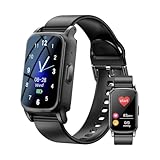
Overview: The customty Fall Detection Smart Watch offers an affordable entry into senior safety technology with surprising features for its price point. This 4G-enabled device provides fall detection, GPS tracking, and even video calling capabilities without burdening users with mandatory monthly fees, making it accessible for budget-minded families.
What Makes It Stand Out: Remarkably, this $56.81 watch includes 4G HD video calling—a feature rarely seen at this price. The automatic fall detection sends SOS alerts with location to preset contacts via the app, while the one-touch emergency button cycles through contacts until someone responds. Its no-subscription model for core features breaks from industry norms.
Value for Money: Exceptional value defines this device. At under $60 with no required monthly fees, it delivers 4G connectivity, video calling, GPS tracking, and fall detection that competitors bundle into costly subscriptions. While health monitoring is basic compared to premium models, the safety features alone justify the price.
Strengths and Weaknesses:
- Strengths: Extremely affordable; no mandatory subscription fees; 4G video calling capability; IP67 waterproof; simple one-touch SOS; GPS tracking included
- Weaknesses: Lesser-known brand with uncertain support; basic health monitoring (heart rate and steps only); battery life unspecified; may lack robust customer service
Bottom Line: For families seeking essential fall detection and communication features on a tight budget, this watch delivers remarkable functionality. It’s best for those comfortable with a newer brand in exchange for subscription-free safety.
5. AUDAR E2 - Senior Health Smartwatch with Fall Detection & SOS GPS for Family Safety, 24/7 Heart Rate, Blood Pressure, SpO₂ & Temperature Monitoring, Multi-User Health Dashboard, No Smartphone Needed

Overview: The AUDAR E2 redefines senior wearables by merging medical-grade health monitoring with autonomous emergency alerting in a sleek, comfortable design. This smartwatch addresses the critical need for fall detection while providing families with comprehensive vital sign tracking through an innovative cloud-based platform that requires no smartphone pairing.
What Makes It Stand Out: Complete operational independence sets the E2 apart—its embedded SIM card connects directly to LTE-M and NB-IoT networks, bypassing smartphones entirely. The Audar Health Platform enables real-time multi-user access, allowing caregivers to remotely adjust settings and receive SMS alerts when vitals exceed normal ranges. This creates a collaborative care ecosystem without technological barriers.
Value for Money: At $209.95 including one free year of service, the investment competes favorably against devices requiring immediate monthly payments. The extended battery life (10 days active, 30 days standby) further enhances value by reducing charging hassles and ensuring consistent protection.
Strengths and Weaknesses:
- Strengths: Fully independent cellular connectivity; four vital sign tracking parameters; ultra-long battery performance; robust water resistance; collaborative multi-user dashboard; magnetic strap comfort
- Weaknesses: Post-first-year subscription costs; alerts limited to contacts (not emergency services); higher initial investment; network compatibility limitations
Bottom Line: The AUDAR E2 is a premium choice for seniors desiring thorough health monitoring with family-based emergency response. Its independence and comprehensive features justify the cost for those prioritizing wellness data alongside safety alerts.
6. MC-33C Normally Closed Recessed Window Door Contact Sensor Alarm Magnetic Reed Switch - (2 Sets)

Overview: The MC-33C recessed magnetic reed switch provides discreet security monitoring for doors and windows. This package includes two complete sets designed for normally closed (NC) alarm circuits, making them compatible with most commercial and residential security systems. The recessed design allows for hidden installation within door and window frames, creating a clean, professional appearance that doesn’t interfere with aesthetics.
What Makes It Stand Out: Unlike bulky surface-mounted sensors, these recessed switches disappear into your frames for a seamless look. The screw terminal connections simplify wiring significantly compared to soldered alternatives. Being normally closed, they trigger alerts when doors/windows open, which is the standard for most security applications. Their universal compatibility with card access and burglar alarm systems adds versatility across different security platforms. The terminal block style connection accepts wire easily, making DIY installation more accessible.
Value for Money: At $8.19 for two sets ($4.10 per unit), these are moderately priced for recessed sensors. Recessed sensors typically cost more than surface-mounted versions due to their discreet profile and installation requirements. You’re paying for the cleaner aesthetic and more permanent installation. For those prioritizing appearance over easy removal, this represents solid value compared to proprietary brands costing $8-12 each. The two-set pack provides enough coverage for a main entry and window.
Strengths and Weaknesses: Strengths include the concealed installation, straightforward screw terminals, robust build quality, and broad system compatibility. The NC configuration works with virtually all alarm panels. Weaknesses involve requiring drilling into frames, making them unsuitable for renters or temporary setups. Installation is more time-consuming than surface mounts, and they’re not ideal for metal doors where the magnet may interfere with operation. The small terminals require careful wire handling.
Bottom Line: Perfect for homeowners wanting invisible security integration. The MC-33C sets offer reliable performance and clean aesthetics. If you can handle the installation complexity, these provide excellent long-term value for permanent security upgrades. Consider your door/window material before purchasing.
7. WESUA 5 Pack NC Magnetic Switch Contacts Door Sensor for Home Alarm Security System

Overview: The WESUA five-pack of NC magnetic switch contacts delivers surface-mounted door and window sensors for home alarm systems. These sensors provide reliable intrusion detection with a focus on aesthetic appeal and straightforward installation. The package includes five complete sensor sets with mounting hardware for multiple entry points, making it suitable for whole-home coverage.
What Makes It Stand Out: The attractive cover design conceals both mounting and terminal screws, creating a cleaner appearance than typical exposed-contact sensors. This small detail prevents tampering and improves visual appeal. The surface-mount design enables quick installation without drilling into frames. Mounting screws are included, saving an extra hardware store trip. The sensors work with any standard NC alarm circuit, ensuring compatibility with existing systems.
Value for Money: At $9.99 for five units ($2.00 each), this pack offers exceptional value. Individual surface-mount sensors from security brands often cost $5-8 each. Getting five for under $10 makes whole-home coverage affordable. The included screws and covers add value typically found in premium options. For budget-conscious homeowners expanding existing systems, this is hard to beat. The per-unit cost allows covering secondary entrances and windows without breaking the budget.
Strengths and Weaknesses: Strengths include the hidden-screw design, complete mounting hardware, attractive appearance, and excellent per-unit pricing. The surface-mount approach suits renters and DIY installers. Weaknesses include being more visible than recessed alternatives and potentially easier to bypass for determined intruders. The plastic construction may not match the durability of commercial-grade sensors. No specification on wire gauge compatibility.
Bottom Line: An outstanding choice for cost-effective home security expansion. WESUA’s five-pack balances aesthetics, functionality, and price. Ideal for DIY installations where drilling isn’t an option, though slightly more conspicuous than recessed models. The hidden screws elevate this above basic budget options.
8. Medical Alert Device, Fall Detection Device, SOS Emergency Button
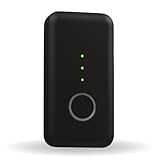
Overview: This medical alert device combines fall detection, GPS tracking, and emergency calling in a portable unit designed for seniors. The system connects users to a 24/7 U.S.-based response center via two-way audio at the press of a button. GPS location sharing and automatic fall alerts keep family members informed through the MySeniorCareHub app, creating a comprehensive safety network.
What Makes It Stand Out: The automatic fall detection uses sensors to identify falls and alert emergency contacts without button presses. Real-time GPS tracking lets caregivers check location anytime. The caregiving app provides instant smartphone notifications during emergencies. Two-way audio enables direct communication with responders or family. The setup is straightforward with online activation, and the included app is free.
Value for Money: The $49.99 device price includes one month of service. At $29.99 monthly thereafter, it’s competitively priced against Life Alert and similar services. The subscription includes unlimited fall alerts, GPS tracking, family notifications, and the app. While not cheap long-term, the peace of mind and professional monitoring justify the cost compared to unmonitored devices. The first month free allows testing before commitment.
Strengths and Weaknesses: Strengths include 24/7 professional monitoring, automatic fall detection, GPS accuracy, and comprehensive family app integration. The setup is straightforward. Weaknesses include the ongoing subscription cost, USA-only service limitation, and potential complexity for seniors uncomfortable with technology. Battery life isn’t specified, which could be a concern for active users. The device design isn’t described as wearable, which may affect carry habits.
Bottom Line: Excellent for families seeking monitored senior safety. The combination of professional response, fall detection, and GPS tracking provides robust protection. The monthly fee is reasonable for the services offered, making it a worthwhile investment for vulnerable individuals. Verify cellular coverage in your area before purchasing.
9. WESUA 5 Pack Surface Mounted NC Magnetic Door Contacts Switch Sensor for Alarm

Overview: The WESUA five-pack provides surface-mounted NC magnetic door contact switches for basic alarm systems. These compact sensors detect when doors or windows open by monitoring magnetic field separation. Designed for wooden doors and windows, they offer simple screw installation and compatibility with standard burglar alarm circuits. The ABS construction provides adequate durability for residential applications.
What Makes It Stand Out: At just $0.80 per unit, these are among the most affordable sensors available. The small size makes them inconspicuous on most frames. The normally closed configuration ensures compatibility with virtually all DIY and professional alarm panels. Their simplicity makes them ideal for basic security expansion without unnecessary features. The five-pack quantity covers most residential needs in a single purchase.
Value for Money: At $7.99 for five sensors, the value proposition is exceptional. Comparable budget sensors cost $3-4 each, making this pack roughly 75% cheaper. For large installations covering multiple windows and doors, the savings multiply. While lacking premium features like hidden screws, the core functionality remains solid. This represents maximum coverage for minimal investment, perfect for workshops, garages, or rental properties where aesthetics are secondary.
Strengths and Weaknesses: Strengths include unbeatable pricing, compact dimensions, straightforward screw mounting, and universal NC compatibility. The five-pack quantity covers most homes. The ABS material resists moisture adequately. Weaknesses include basic plastic construction, visible mounting screws, and lack of aesthetic refinements. No mention of included screws. The exposed design may be vulnerable to tampering. Wire connection method isn’t specified, potentially requiring soldering.
Bottom Line: Perfect for budget-driven security projects or large-scale installations. These no-frills sensors deliver reliable detection at a fraction of typical costs. Accept the basic appearance and visible hardware in exchange for remarkable affordability. Ideal for secondary buildings, rental properties, or as backup sensors where cosmetic concerns are minimal. The value outweighs limitations for practical applications.
10. Vexorium 4G Fall Detection Smart Watch with SOS Emergency Button & GPS Tracker – Two-Way Call Safety Wristband for Seniors & Dementia Care

Overview: The Vexorium 4G Smart Watch integrates fall detection, SOS calling, and GPS tracking into a wearable wristband designed for seniors and dementia care. The device features automatic fall alerts, one-touch emergency calling, and geo-fencing capabilities. 4G connectivity enables two-way voice communication, while daily use features include step counting and activity reminders, making it functional beyond emergencies.
What Makes It Stand Out: The smartwatch form factor provides discreet, wearable safety without the stigma of traditional pendants. Built-in 4G eliminates the need for a paired smartphone. Geo-fencing alerts families when users leave designated safe zones. The combination of health tracking and safety features creates a multi-purpose device. Extended standby battery supports daily use without constant charging. The SOS button requires a deliberate press-and-hold to prevent accidental activation.
Value for Money: At $85.03, the one-time cost is higher than basic alert pendants but lower than many subscription-based alternatives. If no monthly fee is required (verify before purchase), this represents exceptional long-term value. Comparable devices with 4G typically cost $150-300 plus service plans. The inclusion of fitness features adds utility beyond emergency response, making it a daily wearable rather than single-purpose device.
Strengths and Weaknesses: Strengths include the wearable design, 4G connectivity, automatic fall detection, GPS with geo-fencing, and daily activity tracking. The two-way call function is valuable for check-ins. Weaknesses include potential complexity for users with cognitive decline, unspecified service requirements, and possible battery limitations with 4G active. Durability for daily senior wear is uncertain. The display size may challenge those with vision impairment.
Bottom Line: A compelling alternative to traditional medical alerts if service costs are minimal. The watch design encourages consistent wear, while 4G connectivity ensures reliable communication. Verify subscription details and cellular compatibility before purchasing. Best for tech-comfortable seniors needing mobile safety, though dementia patients may require caregiver assistance for charging and operation.
How Modern Fall Detection Technology Works
Today’s fall detection sensors operate on principles far more sophisticated than the simple tilt-switches of a decade ago. Most systems now employ multi-axis accelerometers and gyroscopes that measure changes in velocity and orientation hundreds of times per second. When you fall, your body experiences a unique signature: rapid acceleration downward followed by abrupt deceleration upon impact, combined with a change in orientation from vertical to horizontal. Advanced algorithms analyze this data cascade in real-time, distinguishing between actual falls and everyday movements like sitting down quickly or swinging a tennis racket.
The real magic happens at the processing level. Machine learning models trained on thousands of real-world fall incidents continuously refine their accuracy. These systems calculate impact force, fall trajectory, and post-fall immobility duration before triggering an alert. Some premium devices even incorporate barometric pressure sensors to detect changes in elevation, adding another data layer that helps differentiate between falling from standing height versus simply lying down intentionally.
The Evolution from Pendants to AI-Powered Systems
The journey from basic medical alert buttons to intelligent fall detection represents one of the most significant leaps in personal safety technology. Early systems required manual activation—a fatal flaw if the user lost consciousness. The first-generation automatic detectors reduced response times but suffered from frustrating false alarms, leading many users to abandon them altogether.
Contemporary AI-powered systems have flipped this script. They learn individual gait patterns, recognize normal activities like plopping onto a sofa versus abnormal falls, and some even predict fall risk before an incident occurs. This predictive capability analyzes subtle changes in walking speed, step variability, and balance over weeks and months, providing early warnings that enable preventive action. The integration of ambient sensors in smart homes—floor pressure mats, infrared motion detectors, and even wall-mounted radar—creates a safety ecosystem that doesn’t require wearing any device at all.
Why Automatic Emergency Contact Calling Is a Game-Changer
The automatic emergency contact feature transforms these devices from mere fall detectors into comprehensive response systems. When a fall is detected, the device doesn’t just sound a local alarm—it initiates a cascading communication protocol. Within seconds, it connects to a monitoring center or directly dials pre-programmed contacts through cellular or Wi-Fi networks, simultaneously transmitting location data and fall severity metrics.
This automation eliminates the single point of failure that has plagued traditional systems: human action. A person experiencing a stroke, heart attack, or severe fall may be physically or cognitively unable to press a button. Automatic calling ensures that help is summoned even in worst-case scenarios. The best systems also provide two-way voice communication, allowing the user to speak directly with responders or, if they’re unable to respond, enabling responders to hear ambient sounds that might indicate consciousness level or environmental hazards.
Key Features That Separate Premium Sensors from Basic Models
When evaluating fall detection sensors, certain capabilities separate reliable, life-saving technology from disappointing gadgets. Range of detection tops the list—premium devices detect falls in any orientation, whether you collapse forward, backward, or sideways, while budget models might only trigger on specific impact angles. Response time variance is another critical factor; elite systems alert contacts within 20-30 seconds, whereas basic models can take over a minute.
Advanced fall detection sensors also offer customizable sensitivity settings, allowing users to adjust detection thresholds based on their activity level and physical condition. A physically active senior who exercises daily needs different parameters than someone with limited mobility. Look for devices that provide detailed fall reports, including impact force, location, and time stamps—data that becomes invaluable for medical professionals and family members tracking patterns.
Multi-Sensor Fusion Technology Explained
The most accurate fall detection doesn’t rely on a single sensor type but rather fuses data from multiple sources simultaneously. Multi-sensor fusion combines accelerometer data with gyroscope rotation rates, magnetometer orientation, barometric pressure changes, and sometimes even acoustic signatures from built-in microphones. This sensor array creates a redundant, cross-verified detection system that dramatically reduces false positives.
For example, a gyroscope might detect a rapid rotation that suggests a fall, but the accelerometer shows minimal impact force—perhaps you simply bent over quickly. The system cross-references these signals and correctly identifies it as a non-fall event. Conversely, a slow, sliding fall might not register high acceleration but shows clear orientation change and prolonged immobility, triggering a legitimate alert. This fusion approach achieves accuracy rates above 95% in real-world conditions, compared to 70-80% for single-sensor devices.
GPS vs. Bluetooth Location Tracking: What You Need to Know
Location accuracy can mean the difference between rescue and tragedy. GPS-enabled devices provide precise outdoor positioning, typically within 10-30 feet, and can track a wandering user who has fallen in a park or parking lot. However, GPS signals falter indoors, penetrating buildings poorly and draining batteries rapidly.
Bluetooth-based location systems work differently. They communicate with paired smartphones or home hubs, using signal strength to estimate proximity. Indoors, this can be more reliable than GPS and consumes far less power. The trade-off? Bluetooth-only devices won’t provide location data if you fall outside the range of your paired devices—typically 30-100 feet. Hybrid systems that seamlessly switch between GPS and Bluetooth based on signal availability offer the best of both worlds, though at a higher price point and with increased battery demands.
Understanding False Alarm Prevention Mechanisms
False alarms represent the Achilles’ heel of fall detection technology. A system that cries wolf too often loses credibility, leading users to disable it or ignore legitimate alerts. Modern devices employ several sophisticated false alarm prevention strategies. Cancellation buttons allow users to abort an alert within a 15-30 second countdown window if they’re unharmed. More advanced systems use AI to analyze post-fall movement—subtle shifts, repositioning, or standing up within seconds can automatically cancel the alert.
Some premium sensors incorporate voice prompts after a detected fall: “Fall detected. Say ‘I’m okay’ to cancel.” This hands-free cancellation prevents users from having to physically press buttons when injured but conscious. Machine learning algorithms also build personal movement profiles over time, recognizing that your daily yoga routine or enthusiastic grandchild-hoisting isn’t a fall event, even if it triggers basic detection thresholds.
Wearable vs. Wall-Mounted: Which Form Factor Suits Your Lifestyle?
The debate between wearable and ambient sensors hinges on lifestyle, privacy preferences, and fall risk patterns. Wearable devices—watches, pendants, belt clips—provide protection everywhere you go, including outside the home. They’re ideal for active seniors who travel, garden, or walk in the community. However, they require remembering to wear them, regular charging, and tolerance for something on your body 24/7.
Wall-mounted and ambient sensors eliminate the “forget to wear it” problem. Radar-based systems tucked in corners can monitor entire rooms, detecting falls without any wearable device. Floor pressure sensors can identify when someone has fallen and remained motionless. The limitation is obvious: zero protection outside the monitored area. Many families opt for hybrid approaches—wearables for mobile protection and ambient sensors in high-risk areas like bathrooms where wearables are often removed.
Battery Life Considerations: From Days to Months
Battery performance directly impacts reliability and user satisfaction. Devices requiring daily charging create gaps in protection and burden users with another routine to remember. Premium fall detection sensors now offer battery life ranging from several days to six months on a single charge, with some ambient sensors running on household power.
The battery type matters as much as capacity. Lithium-ion batteries provide consistent power output but degrade over 2-3 years of daily charging. Replaceable coin-cell batteries might last 6-12 months and cost pennies to replace, but provide less advanced features. Solar-assisted wearables extend battery life by harvesting ambient light, while kinetic charging captures energy from movement—though these technologies remain in early stages. Always verify battery life claims are based on real-world usage with all features (fall detection, GPS, cellular) active, not power-saving standby modes.
Water Resistance Ratings: What IP Codes Really Mean
Bathrooms are ground zero for falls, making water resistance non-negotiable. You’ve likely seen IP67 or IP68 ratings, but what do they actually signify for daily use? The first digit (6) indicates dust protection—6 means completely dust-tight. The second digit matters more: 7 indicates immersion protection up to 1 meter for 30 minutes, while 8 means protection beyond 1 meter (manufacturer specifies depth).
For shower safety, IP67 is generally sufficient, but hot water and steam create pressure different from static immersion testing. Look for devices specifically tested for “shower-proof” or “bath-proof” performance, not just IP ratings. Some manufacturers add nano-coatings that repel water from internal components even if seals fail. Remember that water resistance degrades over time as seals age and crack—replace devices every 2-3 years if regularly exposed to water.
Cellular vs. Wi-Fi Connectivity: Making the Right Choice
Your device’s communication method determines where it works and how reliable the connection is. Cellular-based systems operate on 4G LTE networks, providing coverage anywhere with cell service—typically 99% of populated areas. They don’t require a smartphone or home internet, making them ideal for less tech-savvy users. The downside is monthly subscription costs and potential dead zones in rural areas or buildings with thick walls.
Wi-Fi-only devices leverage existing home internet, eliminating monthly fees but tethering protection to your home network. If your internet goes down or you fall outside Wi-Fi range, the device becomes useless. Dual-mode devices that prioritize Wi-Fi for cost savings but seamlessly switch to cellular as backup offer the smartest compromise, though they command premium pricing. For true peace of mind, ensure cellular devices use multiple carrier networks—not just one—so they can roam to the strongest available signal.
The Importance of Two-Way Voice Communication
Two-way voice transforms a simple alert into a lifeline. After a fall, speaking directly with a monitoring agent or family member provides immediate reassurance and critical information. The user can describe injuries, and responders can assess consciousness, breathing sounds, and background noise for signs of stroke or other medical events.
Voice quality varies dramatically between devices. Look for speakers with minimum 80dB volume—loud enough to hear over running water or from another room. Noise-canceling microphones filter out ambient sounds, ensuring clear communication. Some systems offer automatic volume adjustment, detecting when the user is speaking softly due to injury or weakness. The best devices enable voice communication even after a fall has rendered the user immobile, using far-field microphones that pick up speech from several feet away.
Setting Up Your Emergency Contact Network Properly
A fall detection sensor is only as effective as the emergency network behind it. Most systems allow 3-5 contacts, but strategic setup matters enormously. The first contact should be someone who answers their phone 24/7 and lives nearby—a neighbor often proves more valuable than an adult child living three states away. The second contact might be a family member who can make medical decisions. The third could be a professional monitoring service.
Critical detail: verify that contacts understand their role. They should know how to access your home (lockbox location, smart lock codes), have your medical information readily available, and understand when to call 911 versus transporting you themselves. Test this network quarterly—contacts change phones, move, or become unavailable. A beautiful fall detection system fails if it calls a disconnected number.
Primary vs. Secondary Contacts: Building Your Response Chain
Smart systems don’t blast all contacts simultaneously; they follow a logical escalation chain. The primary contact receives the first alert and has 60-90 seconds to respond and indicate they’re handling the situation. If unacknowledged, the system automatically escalates to secondary contacts, then tertiary, before finally contacting emergency services directly.
This staged approach prevents 15 people from converging on your home unnecessarily while ensuring someone responds. Configure acknowledgment methods carefully—some systems require pressing a specific number on their phone keypad, others need a smartphone app response. For elderly contacts who struggle with technology, set them as secondary and assign tech-savvy family members as primaries. Consider adding a professional monitoring service as your final escalation point; they maintain 24/7 staffing and direct emergency dispatch capabilities.
Subscription Models vs. One-Time Purchase: Cost Analysis
The true cost of fall detection extends far beyond the initial purchase price. Subscription-based models typically charge $20-50 monthly for cellular service, monitoring center access, and software updates. Over three years, this adds $720-1,800 to your investment. These models generally provide more reliable service, professional monitoring, and regular feature upgrades.
One-time purchase devices avoid monthly fees but often rely on Wi-Fi connectivity and self-monitoring through smartphone apps. The hidden costs include eventual battery replacements ($30-80 annually), potential cellular plan add-ons if offered, and the risk of obsolescence without software updates. Some manufacturers now offer hybrid models: higher upfront cost ($300-500) with optional $10-15 monthly monitoring subscriptions. Calculate the three-year total cost of ownership, not just the sticker price, and factor in the value of professional monitoring versus family-based response.
Privacy and Data Security in Fall Detection Devices
These sensors collect intensely personal data—your location, movement patterns, voice recordings, and health information. Understanding privacy implications is crucial. Reputable manufacturers encrypt data end-to-end, from device to cloud to app, using AES-256 or similar standards. They should clearly state they don’t sell data to third parties and allow you to delete your data permanently.
Be wary of free or ultra-cheap services; they’re often monetizing your data. Review privacy policies for data retention periods—some companies store fall data indefinitely, while others auto-delete after 30-90 days. European users benefit from GDPR protections, but U.S. consumers must scrutinize policies carefully. Consider devices offering local-only processing that don’t upload data to the cloud at all, though these sacrifice remote monitoring capabilities. For voice recordings, ensure the system doesn’t store audio unless a fall occurs, preventing constant ambient surveillance.
Installation and Setup Best Practices
Proper installation determines detection accuracy. For wearables, fit matters critically—pendants should hang at sternum level, not swinging freely like jewelry. Wrist-worn devices must be snug enough that sensors maintain skin contact but not so tight they restrict circulation. Many users wear them too loose, causing detection delays or failures.
Ambient sensors require careful placement. Wall-mounted units should be positioned 7-8 feet high in room corners, avoiding direct sunlight that can interfere with infrared sensors. Bathroom sensors need placement away from direct shower spray but within detection range of the floor. Radar sensors require clear line-of-sight—no curtains, plants, or furniture blocking their field of view. Always complete the manufacturer’s calibration walk-through, which teaches the system your home’s layout and your normal movement patterns. This one-time 10-minute process dramatically reduces false alarms.
Testing Your System: Why Monthly Drills Matter
A fall detection sensor you don’t test is a false promise waiting to happen. Monthly testing ensures all components function correctly—battery levels, cellular connectivity, GPS accuracy, and contact response times. The best test simulates a real fall using the manufacturer’s recommended safe testing method, which often involves controlled drops onto padded surfaces.
Document each test: date, time, response time, which contacts were reached, audio quality, and location accuracy. This creates a performance baseline, making it easy to spot degradation. If response times increase from 30 to 90 seconds, that’s a red flag requiring investigation. Test in different locations—your bedroom, bathroom, backyard—to verify coverage. Most importantly, test at the times you’re most vulnerable: middle of the night when you’re alone, or during your regular shower time. A system that works perfectly at noon might have connectivity issues at 2 AM when networks are congested.
Frequently Asked Questions
How accurate are smart fall detection sensors compared to manual alert buttons?
Modern multi-sensor devices achieve 95%+ accuracy in real-world conditions, significantly outperforming manual buttons that rely on user consciousness and physical ability. However, accuracy varies by brand, sensor quality, and whether the device uses AI learning. Manual buttons still have a place as backup, but they can’t summon help if the user is incapacitated.
Will my fall detection sensor work if I fall outside my house?
Only cellular-enabled or GPS-equipped wearables provide coverage outside the home. Wi-Fi-only devices lose connectivity beyond your network range. For true mobile protection, choose a device with 4G LTE and GPS, understanding that rural areas may have spotty coverage. Some devices offer “geofencing” alerts that notify contacts when you leave a designated safe zone.
Can I wear my fall detection device in the shower?
Most quality devices are water-resistant (IP67 or higher), but “water-resistant” doesn’t mean “waterproof forever.” Hot water and steam degrade seals over time. Look for devices specifically marketed as “shower-safe” and replace them every 2-3 years if used daily in wet environments. Remove devices during extended hot tub sessions or swimming unless rated for continuous submersion.
What happens if I accidentally trigger a false alarm?
Premium systems provide 15-30 second cancellation windows via button press or voice command. Some learn from false alarms, adjusting sensitivity automatically. Repeated false alarms should prompt sensitivity recalibration through the app or a call to customer support. If false alarms persist, the device may be defective or improperly fitted.
Do I need a smartphone to use a fall detection sensor?
Not necessarily. Many cellular-based devices work independently, connecting directly to monitoring centers without any smartphone involvement. However, smartphone apps unlock advanced features like location tracking, sensitivity adjustment, and fall history analytics. For tech-averse seniors, choose a standalone device with simple operation and professional monitoring.
How long does it take for emergency contacts to be notified after a fall?
Optimal systems alert primary contacts within 20-45 seconds of detection. This includes data transmission, server processing, and call initiation. If the primary contact doesn’t acknowledge within 60-90 seconds, escalation to secondary contacts begins. Total time from fall to emergency services dispatch typically ranges from 2-5 minutes in professionally monitored systems.
Can multiple people be monitored by one system?
Most consumer systems are designed for individual use, but some ambient sensor networks can monitor multiple household members by distinguishing between individuals’ movement patterns. For couples, consider two separate wearables linked to the same contact network, or professional systems offering multi-user dashboards for caregivers managing several family members.
Are there any insurance or Medicare benefits for fall detection devices?
Original Medicare (Part B) typically doesn’t cover fall detection devices, considering them “convenience” items. Some Medicare Advantage (Part C) plans offer allowances for safety devices. Long-term care insurance policies increasingly cover these systems as preventive care. Check with your provider about “aging-in-place” or “chronic care” benefit categories.
How do I know if my elderly parent will actually wear the device?
Compliance is the biggest challenge. Involve them in selection—let them choose watch-style versus pendant based on comfort. Devices that look like regular smartwatches have higher adoption rates than medical-looking pendants. Start with short trial periods, gradually increasing wear time. Some families succeed by framing it as “for my peace of mind, not because you’re old,” reducing stigma.
What maintenance does a fall detection sensor require beyond charging?
Beyond regular charging or battery replacement, clean sensors monthly with alcohol wipes to remove skin oils and debris that can affect charging contacts. Inspect straps and clasps for wear that could cause device loss. Update firmware when prompted to maintain security and accuracy. Replace devices every 3-5 years as sensors degrade and technology advances. And never skip those monthly functional tests—they’re the most important maintenance task of all.