Imagine settling into your favorite leather recliner as the lights automatically dim to a warm amber glow, your projector whirs to life, and surround sound speakers awaken with a subtle hum. This isn’t a scene from a futuristic movie—it’s what happens when you integrate a truly intelligent home theater controller into your living space. The difference between fumbling with five different remotes and orchestrating your entire cinematic experience with a single command is transformative, turning ordinary movie nights into immersive events that rival your local multiplex.
Today’s smart home theater controllers have evolved far beyond simple universal remotes. They’re sophisticated command centers that coordinate everything from your 4K projector and Dolby Atmos receiver to your smart lighting, motorized shades, and climate control. But navigating this landscape of touchscreens, voice commands, and automation protocols can feel overwhelming. Whether you’re building a dedicated theater room or upgrading your living room setup, understanding what separates basic remotes from cinema-grade control systems will help you make an investment that genuinely transforms how you experience entertainment at home.
Top 10 Smart Home Theater Controllers
Detailed Product Reviews
1. MOES WiFi Smart IR Remote Controller Smart Home Infrared Universal Remote Blaster,One for All Control AC TV DVD CD AUD SAT etc,Compatible with Alexa and Google Assistant,No Hub Required

Overview: The MOES WiFi Smart IR Remote Controller transforms traditional infrared devices into smart home appliances. This compact hub controls air conditioners, TVs, DVD players, fans, and set-top boxes through the Smart Life/Tuya app. Operating on 2.4GHz WiFi with no hub required, it enables voice commands via Alexa and Google Assistant. The included UL-certified adapter and USB cable offer flexible placement options, though one unit per room is recommended since IR signals cannot penetrate walls.
What Makes It Stand Out: The programmable DIY learning function sets this apart from competitors. If your device brand isn’t listed in the app, simply clone commands directly from the original remote. This compatibility extends to niche devices like fireplaces and ceiling fans. The UL certification ensures safety, while the Smart Life ecosystem integration enables sophisticated automation scenes, scheduling, and remote access from anywhere with internet connectivity.
Value for Money: At $19.99, this device costs significantly less than premium alternatives like the Broadlink RM4 while delivering comparable core functionality. The ability to consolidate multiple remotes into one app-based system provides immediate return on investment. For renters or budget-conscious smart home beginners, it offers sophisticated automation without permanent installation or rewiring costs, making it an accessible entry point.
Strengths and Weaknesses: Pros include extensive compatibility through DIY learning, reliable app integration, flexible USB or adapter power, voice control, and safety certification. Cons are substantial: IR cannot pass through walls requiring multiple units, no RF support limits device compatibility, 2.4GHz-only WiFi may cause network conflicts, and setup complexity challenges non-technical users. Some brands have incomplete command databases.
Bottom Line: The MOES Smart IR Remote excels as a budget-friendly single-room solution. It’s ideal for apartment dwellers and tech-savvy users wanting to modernize legacy devices. While wall penetration issues and RF exclusion are notable limitations, the DIY learning capability and robust voice control deliver exceptional value at this price point.
2. STUDIOFINIX 100W in Wall Volume Control Knob Matching Impedance - Home Audio Smart Speaker Stereo Controller Switch for Home Theater Indoor/Outdoor Remote Speakers

Overview: The STUDIOFINIX 100W In-Wall Volume Control Knob is a passive impedance-matching controller for multi-room audio systems. This discreet wall-mounted device manages up to eight pairs of speakers from a central location, delivering 100W power handling capacity. Designed for homes, garages, decks, and patios, it integrates seamlessly into existing audio infrastructure without requiring external power, making it perfect for distributed audio applications.
What Makes It Stand Out: Its 100W power rating exceeds most consumer-grade controllers, ensuring clean audio reproduction at high volumes. The impedance-matching feature protects amplifiers from damage when connecting multiple speaker pairs—a critical safety element often omitted in budget alternatives. Three included faceplates provide aesthetic flexibility for various wall switch configurations, accommodating different décor styles without additional purchases.
Value for Money: Priced at $27.59, this controller offers professional-grade impedance matching and power handling at a consumer price. Comparable units from Monoprice or OSD Audio typically cost 30-50% more. The passive design eliminates electricity costs and power adapter clutter, while comprehensive installation hardware adds value. For permanent installations, it delivers long-term reliability that justifies the modest investment.
Strengths and Weaknesses: Strengths include robust 100W capacity, eight-pair speaker support, versatile indoor/outdoor placement, passive operation, amplifier protection, and complete installation kit. The durable construction ensures longevity. Weaknesses include requiring in-wall installation (not renter-friendly), no remote control beyond manual adjustment, volume-only functionality without source switching, and potential need for professional installation for users unfamiliar with low-voltage wiring.
Bottom Line: This STUDIOFINIX controller is excellent for homeowners building permanent multi-room audio systems. The impedance protection and high power capacity provide professional performance at an accessible price. While installation complexity may challenge novices, the functionality and value make it a top choice for audio enthusiasts seeking reliable, centralized volume management.
3. Universal Replacement Remote Control - Compatible with Panasonic Smart TVs & Home Theater Systems (HD/3D/LCD/LED/DVD/AV Devices, No Programming Required)

Overview: This Universal Replacement Remote Control provides instant compatibility with all Panasonic TVs including Plasma, VIERA Series, HDTV, 3D, LCD, LED, and Smart TVs released after 2015. The plug-and-play design requires no programming, pairing, or complex setup—simply insert two AA batteries to restore full control. It mirrors original remote layouts with power management, 3D mode, input selection, and VIERA Link connectivity.
What Makes It Stand Out: The remote’s factory-function precision mirrors the original Panasonic layout exactly, including specialized features like VIERA Link that generic remotes typically omit. Its exceptional durability features impact-resistant ABS housing and food-grade silicone buttons rated for 100,000+ presses. A 26-foot effective range provides reliable performance across large living spaces, outperforming many budget alternatives.
Value for Money: At just $7.99, this remote costs 75-85% less than OEM Panasonic replacements while delivering identical functionality. The instant operation saves hours of programming frustration, offering immediate value. For budget-conscious households or those needing a reliable backup, it represents exceptional cost-effectiveness without sacrificing essential features or construction quality.
Strengths and Weaknesses: Pros include true plug-and-play convenience, comprehensive Panasonic compatibility, durable materials, long operational range, and multilingual customer support. The familiar button layout eliminates learning curves. Cons include Panasonic-only compatibility (no universal function), requires separate AA battery purchase, lacks backlighting for dark environments, and may not support some pre-2015 legacy functions. Build quality feels less premium than original remotes despite durability claims.
Bottom Line: For Panasonic TV owners needing an affordable, reliable replacement, this remote is outstanding. It perfectly balances cost, compatibility, and convenience. While limited to Panasonic devices and lacking backlighting, its reliable performance and exact feature replication make it an indispensable backup or primary remote for Panasonic households seeking hassle-free operation.
4. BTF-LIGHTING 5in1 WB5 2.4GHz Tuya WiFi PWM LED Controller Compatible with Alexa/Google Home/Smart Life/Tuya Smart APP Control for Dimming CCT RGB RGBW RGBCCT LED Strip Work with WR01RF WR02RF etc

Overview: The BTF-LIGHTING WB5 is a versatile 5-in-1 PWM LED controller supporting RGB, RGBW, RGBCCT, CCT, and single-color LED strips at 12-24V DC. With 6A per channel and 15A total output (360W at 24V), it integrates with Tuya/Smart Life apps, Alexa, Google Home, and compatible 2.4GHz RF remotes. Switch between modes via one button, enabling comprehensive control through three simultaneous methods.
What Makes It Stand Out: Its defining feature is switching between five control modes via a single button, eliminating multiple controllers for different strip types. Advanced app features include 16 million colors, biorhythm lighting, tap-to-run automation, and scene customization rarely found in budget controllers. Simultaneous WiFi, RF, and voice control operation provides exceptional flexibility for complex lighting setups.
Value for Money: At $27.99, the WB5 consolidates functionality requiring 2-3 separate controllers costing $40-60 total. The robust 15A output handles substantial installations without amplifiers. For DIY lighting projects, multi-mode versatility and professional app features deliver exceptional value, making it more cost-effective than dedicated controllers for each LED type while providing advanced automation.
Strengths and Weaknesses: Pros include remarkable 5-in-1 versatility, high 360W capacity, triple control methods, extensive app features (timers, scenes, grouping), and broad PWM strip compatibility. The DIY-friendly design simplifies complex installations. Critical cons include complete incompatibility with addressable LED strips (WS2811, SK6812, etc.), 2.4GHz WiFi limitation, potential RF interference in congested environments, and inadequate documentation. Users must verify strip type before purchase.
Bottom Line: The BTF-LIGHTING WB5 is outstanding for non-addressable LED strip projects requiring versatility and smart integration. Its multi-mode capability and robust features justify the price for serious DIYers. However, addressable strip owners must avoid this model. For standard PWM installations, this controller offers unmatched flexibility and value despite documentation shortcomings.
5. AKB73596101 Replace Remote Control Applicable for LG Blu-Ray BH6720S BH6820SW BH6520TW BH6220S BH6240S Bh6340H Home Theater System AKB73596102

Overview: The AKB73596101 Replacement Remote Control is a dedicated replacement for specific LG Blu-ray Home Theater System models including BH6720S, BH6820SW, BH6520TW, BH6220S, BH6240S, and Bh6340H. This no-programming remote restores full system functionality instantly with simple AAA battery installation, targeting users needing exact replacements for discontinued or damaged LG controllers.
What Makes It Stand Out: Its model-specific precision ensures every button function matches the original remote exactly, eliminating trial-and-error setup common with universal remotes. This dedicated approach guarantees compatibility with all system features—audio settings, disc navigation, and sound modes—without compromise. The instant operation makes it ideal for users prioritizing immediate restoration of full home theater control without technical hassles.
Value for Money: Priced at $8.34, this remote saves 65-80% compared to OEM LG replacements ($25-40). The guaranteed compatibility and zero setup time provide immediate value, preventing costly system replacement due to remote loss. For compatible LG system owners, it’s a highly cost-effective maintenance solution that extends equipment lifespan without investing in complex universal remotes with unnecessary features.
Strengths and Weaknesses: Pros include guaranteed compatibility with listed models, true plug-and-play operation, lightweight ergonomic design, and responsive customer support. The dedicated design ensures no function loss. Cons are extreme specificity (only specific LG models), no universal capability for other devices, AAA batteries not included, basic plastic construction feels less substantial than original, and lacks modern features like backlighting or programmable macros. It’s strictly a single-purpose tool.
Bottom Line: This remote perfectly serves owners of compatible LG Blu-ray systems needing an exact replacement. Its specificity is simultaneously its greatest asset and limitation. While completely unsuitable for other devices, it flawlessly restores original functionality at a fraction of OEM cost. For targeted replacement scenarios, it’s unbeatable; for flexible control, explore universal options instead.
6. Soundbar Remote for Samsung Sound Bar Home Theater Audio Surround Sound Speaker System (AH59-02767A)

Overview: This replacement remote offers a budget-friendly solution for Samsung soundbar owners who’ve lost or damaged their original controller. Designed to work across Samsung’s entire lineup—from the A-Series through T-Series—it supports dozens of models including popular HW-N650, HW-Q60T, and HW-Q950T series systems, making it a versatile choice for many households.
What Makes It Stand Out: The remote’s universal compatibility is its key strength, covering multiple Samsung generations and replacing numerous original part numbers like AH59-02767A and AH81-09773A. The instant-setup design requires no programming or pairing—simply insert two AA batteries and it immediately communicates with your soundbar via reliable infrared technology. This plug-and-play approach eliminates the frustration of code-searching.
Value for Money: At $7.58, this remote costs significantly less than Samsung’s official replacement (typically $30-50). For users needing basic functionality like power, volume, input selection, and sound modes, it delivers essential controls without the premium price tag. The satisfaction guarantee adds purchase confidence for skeptical buyers.
Strengths and Weaknesses: Pros include immediate compatibility, extensive model support, and an unbeatable price point. The infrared range and angle limitations are standard for IR remotes. Build quality feels lighter than OEM, and the lack of backlighting may frustrate home theater users. Batteries aren’t included, which is typical but worth noting. Customer service responsiveness is a plus.
Bottom Line: An excellent value proposition for Samsung soundbar owners seeking a no-fuss replacement. While it lacks premium features like backlighting or premium materials, its universal compatibility and rock-bottom price make it a smart backup or primary remote for budget-conscious users who prioritize function over form.
7. Replacement Remote Control Suits for LG Smart Blu-ray Home Cinema BD Home Theater LHB336 HX561 HX771 HX721 HX906PA HX976TZW HX966TZ SH96SB-S SH95TA-W SH96SB-f SH96TA-S SH96TA-W96 HB906TAW SH96SB-C

Overview: This generic replacement remote specifically targets LG Blu-ray home cinema systems, offering a straightforward solution for discontinued models. Compatible with an extensive list including LHB336, HX561, HX771, and SH96SB series, it restores basic playback and system control without complex setup procedures that often plague universal remotes.
What Makes It Stand Out: The remote’s plug-and-play nature eliminates frustration—no codes, no pairing, no waiting. It covers numerous LG home theater configurations from 5.1 to 7.1 channel systems, making it particularly valuable for owners of older equipment where original remotes are scarce and expensive to source through official channels.
Value for Money: Priced at $6.97, it’s one of the most affordable AV remotes available. Compared to hunting down scarce OEM remotes that can cost $25-40, this represents substantial savings. The minimal investment makes it practical even as a backup or spare for multi-room setups, reducing downtime when remotes go missing.
Strengths and Weaknesses: Pros include zero configuration, broad model compatibility, and exceptional affordability. However, it only provides core functions—advanced sound calibration or streaming app controls may be absent. The build quality is functional but basic, and AAA batteries aren’t included. IR line-of-sight requirements limit placement flexibility compared to RF alternatives.
Bottom Line: A practical, cost-effective fix for LG home theater owners. It won’t replicate every original feature, but for essential operations like power, volume, and playback, it’s hard to beat at under seven dollars. Verify your exact model before purchasing, as compatibility is extensive but not absolute for every regional variant.
8. PZL New Replacement Remote Control for Puxinat 2 in 1 Separable Sound Bar for Smart TV, 2.2 Channel 32 inch 5.0 TV Speaker for Surround Sound System Home Theater Bass Adjustable

Overview: This replacement remote from PZL addresses a specific niche: Puxinat’s unique 2-in-1 separable soundbar system. Designed for their 32-inch, 2.2-channel models, it provides full control over this distinctive speaker configuration’s settings, including bass adjustment and surround sound modes that generic remotes cannot properly access or activate.
What Makes It Stand Out: Unlike generic universal remotes, this model is precisely engineered for Puxinat’s separable design. The ergonomic arc design and 3.0 IR technology deliver responsive control up to 12 meters with sub-0.2-second response times. The ABS construction feels substantial, and the button layout matches the original exactly for intuitive operation without a learning curve.
Value for Money: At $18.96, it sits between budget generics and OEM pricing. While more expensive than universal alternatives, its brand-specific optimization ensures all features work correctly—including the separable speaker modes that generic remotes might miss. This specialization justifies the modest premium for preserving full functionality of your sound system.
Strengths and Weaknesses: Pros include excellent build quality, optimized button layout, impressive response speed, and strong signal range. The 120,000-click durability rating suggests excellent longevity. The main drawback is narrow compatibility—it’s useless for any other brand. No batteries or manual are included, and the warranty details are somewhat vague despite good service claims.
Bottom Line: Essential for Puxinat soundbar owners who need full functionality. The superior ergonomics and guaranteed compatibility make it worth the extra cost over universal options. Don’t gamble with cheaper alternatives that may lack critical controls for this unique system. Contact the seller if your model isn’t explicitly listed to avoid disappointment.
9. MOES Smart Home Touchscreen Control(1-Switch Panel), In-wall Smart Panel with Alexa Built-in, Compatible with Smart Life devices, Manage and Control Home Devices and Scenes with Touch and Voice

Overview: MOES Smart Home Touchscreen Control Panel represents a modern approach to whole-home automation. This in-wall unit combines a 5-inch touchscreen, built-in Alexa voice assistant, and integrated Zigbee gateway into a single device, eliminating the need for multiple hubs and controllers cluttering your space and simplifying your smart home architecture.
What Makes It Stand Out: The all-in-one architecture is genuinely innovative—most systems require separate gateway, voice speaker, and control panels. It directly manages Smart Life ecosystem devices including lights, locks, cameras, and scenes with localized control that works even during internet outages. Dual-power options (TYPE-C or hardwired) and flexible connectivity (WiFi/Ethernet) simplify installation scenarios.
Value for Money: At $149.99, it’s competitively priced against buying a $50 Echo device, $40 Zigbee hub, and $80 wall tablet separately. For Smart Life users, the integration value is compelling. However, it’s less attractive for those invested in other ecosystems like HomeKit or SmartThings, creating potential ecosystem lock-in that limits future flexibility.
Strengths and Weaknesses: Pros include streamlined device consolidation, responsive touchscreen, reliable voice control, and reduced clutter. Installation requires neutral wire and basic electrical knowledge, which may challenge some DIY users. The 5-inch screen feels small for complex scene management, and Smart Life dependency limits broader compatibility. No subscription fees are a significant plus.
Bottom Line: Ideal for Smart Life ecosystem users wanting centralized control. It simplifies smart home management while reducing device sprawl. Ensure your devices are Smart Life compatible and you’re comfortable with in-wall installation before purchasing. Professional installation is recommended for those unfamiliar with electrical work.
10. PZL New Replacement Remote Control for Philips NeoPix Ultra 2TV Smart Home Theater LCD Projector PPA1002 NPX643/INT NPX520 NPX644 ULTRA2TV
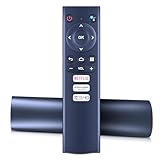
Overview: This PZL replacement remote serves Philips NeoPix Ultra projector owners who need precise control over their portable home theater systems. Compatible with models like NPX643/INT, NPX520, and ULTRA2TV, it restores full menu navigation and settings adjustment capabilities that generic remotes cannot properly replicate, including keystone correction and input switching.
What Makes It Stand Out: The remote mirrors PZL’s quality approach seen in their soundbar controllers, featuring 3.0 IR technology for robust 12-meter range and sub-0.2-second response times. The ergonomic ABS design feels premium compared to generic replacements, and the button layout is faithfully reproduced for intuitive access to projector-specific functions like keystone correction, input selection, and smart features.
Value for Money: At $25.99, it’s priced at the higher end for replacement remotes. While significantly cheaper than Philips OEM parts (often $40+), the premium over generic $10 options is substantial. For projector users who rely on quick menu access during presentations or movie nights, the responsive performance justifies the cost over frustrating laggy alternatives.
Strengths and Weaknesses: Pros include excellent signal strength, comfortable ergonomics, and guaranteed compatibility with specific NeoPix functions. The 120,000-click lifespan indicates durability. Cons are the narrow model compatibility, lack of included batteries, and premium pricing relative to basic functionality. IR limitations remain—line-of-sight is still required, which can be challenging with ceiling-mounted projectors.
Bottom Line: A worthwhile investment for NeoPix Ultra owners needing reliable performance. The build quality and responsiveness exceed budget alternatives, making it suitable for frequent users. Casual users might tolerate cheaper universal options, but this ensures all projector functions remain accessible without compromise. Confirm your exact model before ordering.
Understanding Smart Home Theater Controllers
A smart home theater controller is the central nervous system of your entertainment setup. Unlike traditional universal remotes that simply replicate button functions, these intelligent devices create integrated scenes, automate sequences, and communicate across multiple protocols simultaneously. They understand context—knowing that “Movie Night” means dimming lights, lowering projector screen, switching audio modes, and launching your streaming interface in a single action.
The Evolution From Remote to Command Center
We’ve moved from infrared line-of-sight remotes to sophisticated systems that communicate via Wi-Fi, Bluetooth, Zigbee, and Z-Wave. This evolution means your controller no longer needs to point at devices; it can manage equipment hidden in closets, coordinate outdoor speakers, and even prepare your home theater while you’re still driving home from work.
Why Your Remote Control Is Holding You Back
That drawer full of remotes isn’t just clutter—it’s actively preventing you from experiencing your equipment’s full potential. Multiple remotes create friction that discourages exploration of your system’s capabilities. When switching inputs requires three different remotes and remembering which device controls audio, you’re less likely to experiment with different viewing modes or audio presets that could dramatically enhance your experience.
The Hidden Cost of Device Switching
Every second spent navigating complex input sequences is cognitive load that pulls you out of the immersive experience. Premium controllers eliminate this friction through macro programming that executes dozens of commands in perfect sequence, often faster than you could press a single button manually.
Key Features That Define Premium Controllers
Not all smart controllers are created equal. The difference between a $50 universal remote and a $500 control system lies in specific capabilities that directly impact daily use. Look for devices offering two-way feedback, where your controller knows whether your amplifier is actually on—not just that it sent the power command.
Two-Way Communication Protocols
True integration requires controllers that can receive status updates from your equipment. When your receiver switches to Dolby Atmos mode, your controller should automatically adjust lighting scenes and display the current audio format on its screen. This bidirectional dialogue separates toys from tools.
The Importance of Universal Compatibility
Your dream controller must speak every language your equipment understands. This means supporting infrared for legacy devices, IP control for modern receivers and projectors, HDMI-CEC for display synchronization, and serial control for professional-grade equipment.
Future-Proofing Through Protocol Support
A controller limited to IR commands will become obsolete as manufacturers increasingly disable IR ports on premium equipment. IP and cloud-based control offer more reliable communication and enable features like firmware updates that add new device support years after purchase.
Voice Control Integration
Voice commands have graduated from party tricks to genuinely useful interfaces when properly integrated. The key is contextual understanding—your controller should know that “pause” means pause the movie, not the HVAC system, and that volume commands should target your audio processor, not your smart doorbell.
Multi-Assistant Support Strategies
The best systems work with multiple voice platforms simultaneously, allowing family members to use their preferred assistant while maintaining consistent control logic. This flexibility prevents ecosystem lock-in and ensures your theater remains controllable even as voice technology evolves.
Mobile App vs Physical Remote
The debate between touchscreen apps and traditional remotes misses the point—sophisticated systems use both strategically. Mobile apps excel at complex programming and remote access, while physical remotes provide tactile control that doesn’t require looking away from your screen.
Hybrid Control Methodologies
Premium controllers synchronize app and remote states in real-time. Start a movie from your phone on the way home, then seamlessly take over with the physical remote without missing a beat. Each interface should complement the other rather than forcing compromises.
Hub-Based vs Hub-Less Systems
Hub-based controllers centralize processing and storage, enabling complex automation that works even when internet connectivity fails. Hub-less systems offer simpler setup but rely on cloud processing that can introduce latency and dependency on manufacturer servers.
Local Processing Advantages
Theaters demand instant response. Hub systems process commands locally, ensuring volume adjustments happen in milliseconds, not seconds. This architectural difference becomes critical during intense action sequences where audio delays would ruin immersion.
Programming and Customization Options
Surface-level programming lets you assign buttons to devices. Deep customization allows conditional logic: if it’s after 10 PM, automatically lower maximum volume; if the doorbell rings, pause playback and show the camera feed on screen.
Advanced Macro Creation Techniques
Professional-grade controllers support variables, delays, and conditional branching. Create macros that behave differently based on time of day, which family member is present, or even what genre of content you’re watching. Horror movies might trigger darker lighting scenes than comedies.
Touchscreen vs Button-Based Interfaces
Capacitive touchscreens offer infinite flexibility but lack tactile feedback for common operations. High-end controllers solve this with hybrid designs—touchscreens for complex menus combined with physical buttons for transport controls and volume.
Haptic Feedback and Muscle Memory
The best interfaces provide subtle haptic confirmation for touchscreen presses while maintaining dedicated buttons for functions you’ll use in the dark. This balance between flexibility and usability separates premium controllers from frustrating all-touch designs.
Multi-Room Control Capabilities
Modern controllers extend beyond the theater room, coordinating whole-home audio and video. Watch a movie in the theater while music plays in the kitchen, all orchestrated from the same interface. Zone management becomes crucial as homes integrate more entertainment spaces.
Synchronized Whole-Home Scenes
“Party Mode” might sync music across all zones while dimming lights throughout the house. “Goodnight” could verify the theater is powered down, lock doors, and adjust thermostats. This expansion transforms your theater controller into a true home automation platform.
Budget Considerations
Entry-level smart controllers start around $100, but cinema-grade systems typically range from $400 to $1,500. The investment correlates directly with automation complexity, device count, and reliability. Consider your total equipment value—spending 10% on control delivers disproportionate enjoyment returns.
Total Cost of Ownership Analysis
Factor in programming time, potential professional installation, and subscription fees for advanced cloud features. A $300 controller requiring 20 hours of programming may cost more in time than a $800 system that programs itself through device detection.
Installation and Setup Complexity
DIY-friendly controllers offer wizard-based setup through mobile apps, while professional systems require dealer programming. Your technical comfort level should guide this decision, but remember that complex theaters with multiple zones and conditional logic often benefit from expert configuration.
When to Hire a Professional
If your system includes motorized screens, lighting control, HVAC integration, and more than eight devices, professional programming typically pays for itself in time saved and frustration avoided. Dealers also provide ongoing support and updates.
Future-Proofing Your Investment
Controller obsolescence is real. Look for systems with regular firmware updates, active developer communities, and modular hardware designs that allow component upgrades without replacing the entire system.
Cloud vs Local Architecture Implications
Cloud-dependent controllers may become paperweights if the manufacturer discontinues service. Locally-processed systems with open APIs remain functional indefinitely, often gaining new capabilities through community-developed integrations long after official support ends.
Common Mistakes to Avoid
The biggest error is buying based on device count alone. A controller claiming “unlimited devices” that only supports IR commands is less capable than one supporting 20 devices via IP control. Prioritize protocol support over marketing numbers.
Over-Automation Pitfalls
Automating everything creates brittle systems that fail when conditions change. The best controllers automate the tedious (input switching) while leaving creative decisions (lighting levels) to human judgment. Build flexibility into every automation.
Creating the Perfect Ecosystem
Your controller should be the conductor, not the entire orchestra. Choose complementary smart lighting, climate control, and security systems that integrate natively rather than forcing compatibility through workarounds.
Integration Depth Over Breadth
A controller that deeply integrates with five device categories delivers better experiences than one superficially supporting twenty. Evaluate integration quality through user forums and professional reviews, focusing on reliability and feature completeness.
Frequently Asked Questions
What’s the difference between a universal remote and a smart home theater controller?
A universal remote simply replicates button functions from multiple remotes in one device. A smart controller creates integrated scenes, provides two-way feedback, automates sequences, and coordinates devices across different communication protocols. Think of it as upgrading from a collection of keys to a digital access system that knows who you are and what rooms you need to enter.
Do I need professional installation for a smart theater controller?
It depends on your system’s complexity. Single-room setups with 4-6 devices can typically be self-installed using app-based wizards. Multi-zone systems with lighting control, motorized screens, and conditional automation logic usually benefit from professional programming to ensure reliability and optimal scene creation.
Can smart controllers work without internet connectivity?
Hub-based systems with local processing function perfectly during internet outages, though voice control may be limited. Cloud-dependent controllers lose most advanced functionality without connectivity. For theater use, local processing is strongly recommended to ensure uninterrupted operation during movie playback.
How many devices can one controller realistically manage?
Focus on protocol support rather than device counts. A quality controller managing 15 devices via IP/serial control offers better performance than one claiming “100+ devices” but limited to infrared. Real-world capacity depends on communication method and automation complexity, not marketing numbers.
Will a smart controller make my older equipment obsolete?
Quality controllers extend the life of legacy equipment by adding modern control methods. They can translate voice commands into IR signals, integrate RS-232 control for vintage high-end gear, and bridge communication gaps between decades-old amplifiers and current streaming devices.
What’s the typical learning curve for family members?
Well-designed controllers reduce complexity, but expect a 1-2 week adjustment period. Start with simple activities like “Watch TV” before introducing advanced scenes. The best systems customize interfaces per user—kids get simplified controls while power users access deeper functionality.
How do I prevent accidental voice commands from disrupting movies?
Configure voice systems with theater-specific wake words or require confirmation for disruptive commands. Many controllers offer “movie lock” modes that disable voice control temporarily or limit commands to non-disruptive functions like lighting adjustments.
Can controllers integrate with streaming services directly?
Most controllers manage playback transport functions (play, pause, etc.) but don’t replace native streaming apps. Some premium systems offer deep integration, displaying content recommendations on the remote’s screen or synchronizing watchlists across services, but these features vary significantly by brand.
What maintenance do smart controllers require?
Expect quarterly firmware updates and occasional device reprogramming when you add new equipment. Battery-powered remotes need charging every 1-2 weeks. Hub-based systems require minimal ongoing maintenance beyond updates, while cloud systems may need periodic re-authentication with linked services.
How long should a premium controller last before needing replacement?
With proper firmware support, a high-quality controller should function for 7-10 years. Protocol obsolescence is the primary concern—ensure your choice supports modern standards like IP control and has a track record of adding new device support through updates. Avoid single-manufacturer ecosystems that could be discontinued.