Your porch light refuses to turn on at sunset. Your thermostat sits at a frigid 62°F despite your evening routine. The smart lock won’t respond as you stand in the rain fumbling for physical keys. These aren’t device failures—they’re symptoms of a smart home held hostage by cloud dependency. When your internet hiccups or a distant server farm goes dark, even the simplest automations crumble. The antidote? Smart hubs with robust local processing that treat the cloud as a convenience, not a requirement. These systems keep your home intelligent and responsive even when your broadband connection is nothing more than a blinking red light of frustration.
Top 10 Smart Hubs with Local Processing
Detailed Product Reviews
1. Aeotec Smart Home Hub, Works as a SmartThings Hub, Z-Wave, Zigbee, Matter Gateway, Compatible with Alexa, Google Assistant, WiFi

Overview: The Aeotec Smart Home Hub represents the evolution of Samsung’s SmartThings platform, packaged in a reliable hardware unit. This $149.99 hub serves as the central nervous system for modern smart homes, supporting the three most important protocols: Z-Wave, Zigbee, and Matter. Designed for North American users, it bridges the gap between legacy devices and next-generation smart home technology through a single, cohesive interface.
What Makes It Stand Out: Matter certification future-proofs your investment, while local automation processing ensures lights and sensors respond instantly—even during internet outages. The dual Wi-Fi/Ethernet setup provides installation flexibility, and the SmartThings app offers sophisticated automation building that rivals platforms costing twice as much. Compatibility with thousands of devices from major brands means you’re not locked into a single ecosystem.
Value for Money: At $149.99, this hub sits in the sweet spot between bare-bones Wi-Fi hubs and premium alternatives like Hubitat Elevation. You’re getting enterprise-grade protocol support without the complexity or cost of pro-level systems. For users with existing Z-Wave or Zigbee devices looking to add Matter products, it eliminates the need for multiple bridges, potentially saving $100+ in additional hardware.
Strengths and Weaknesses: Strengths: Robust multi-protocol support; local automation processing improves reliability; established SmartThings ecosystem with extensive device handlers; flexible connectivity options; regular firmware updates.
Weaknesses: SmartThings app can overwhelm beginners; some advanced features still require cloud connectivity; limited customization compared to open-source alternatives; Samsung account required.
Bottom Line: The Aeotec hub is the ideal choice for mainstream users wanting comprehensive protocol support without a steep learning curve or premium price. It strikes an excellent balance between capability and accessibility, making it our top recommendation for most smart homes.
2. Homey Pro (Early 2023) | Smart Home Hub for Home Automation – Features Z-Wave Plus, Zigbee, Wi-Fi, BLE, Infrared, Matter & Thread. Compatible with Siri, Alexa & Google Home.

Overview: Homey Pro positions itself as the undisputed champion of protocol compatibility, packing seven wireless technologies into a single $349 hub. This early 2023 model targets serious smart home enthusiasts who refuse to compromise on device support. With processing handled locally and data stored on-device, it appeals to privacy-conscious power users wanting maximum control over their automation ecosystem.
What Makes It Stand Out: No other consumer hub matches Homey Pro’s protocol breadth—Wi-Fi, Zigbee, Z-Wave Plus, Infrared, BLE, Matter, and Thread cover virtually every smart device imaginable. The Advanced Flows builder enables complex conditional logic that makes SmartThings routines look primitive. Support for 50,000+ devices across 1,000+ brands, including community-developed apps, ensures even obscure gadgets work seamlessly.
Value for Money: The $349 price tag stings, but consider the alternative: separate hubs for Z-Wave, Zigbee, and Thread would cost $200+ and create a management nightmare. For users with diverse device collections, Homey Pro consolidates everything into one elegant interface. The energy monitoring and solar tariff integration can recoup costs through utility savings, justifying the premium for eco-conscious buyers.
Strengths and Weaknesses: Strengths: Unmatched protocol support; true local-first architecture; powerful Advanced Flows; no subscription fees; excellent privacy controls; vibrant community app development.
Weaknesses: Significant upfront investment; overkill for simple setups; steeper learning curve than basic hubs; Infrared range could be better; limited availability in some regions.
Bottom Line: If you’re building a comprehensive smart home with devices from multiple eras and ecosystems, Homey Pro is worth every penny. For casual users with only a dozen devices, it’s expensive overkill. Power users and privacy advocates will find it indispensable.
3. Homey Pro mini | Smart Home Hub for Home Automation – Features Zigbee, Ethernet, Matter & Thread. Compatible with Apple Siri, Amazon Alexa & Google Home.

Overview: The Homey Pro mini distills the Homey experience into a $199 package, sacrificing some protocols while retaining the platform’s core strengths. This streamlined hub targets Matter and Zigbee users who want Homey’s powerful automation engine without paying for features they won’t use. It’s a calculated compromise that maintains local processing and advanced flow capabilities.
What Makes It Stand Out: You still get Homey Flow’s intuitive automation builder and the desktop Advanced Flows editor, enabling sophisticated routines that adapt to your lifestyle. The no-subscription model includes unlimited cloud services, remote access, and voice assistant integrations—features competitors often gate behind monthly fees. Ethernet connectivity ensures stable operation, while the promise of expandability via the Homey Bridge preserves future options.
Value for Money: At $199, the mini undercuts the full Pro by $150 while delivering 80% of the experience. For users invested in Zigbee and Matter ecosystems, it’s a compelling value. However, the $99 Homey Bridge (required for Z-Wave, BLE, and Infrared) narrows the price gap, making the upgrade decision tricky. Compared to the Aeotec hub, you’re paying $50 more for superior automation logic but losing native Z-Wave support.
Strengths and Weaknesses: Strengths: Homey’s powerful automation platform; local data processing; no mandatory subscriptions; clean, modern interface; Matter/Thread future-proofing; expandable architecture.
Weaknesses: Limited out-of-box protocol support; additional cost for full functionality; fewer compatible devices than Pro model; may confuse buyers expecting Pro-level compatibility.
Bottom Line: The Homey Pro mini is perfect for users starting fresh with Matter and Zigbee devices who value privacy and powerful automation. If you need Z-Wave or Infrared today, skip the mini and buy the full Pro—adding the Bridge later makes little financial sense.
4. YEISMOOI Smart Switch Hub, Compatible with Yeismooi Lights, Thread Border Router + Smart Button, Remote/Local Control, Work with Alexa, Google Assistant, App-Based Automation, Wider Range and Stable
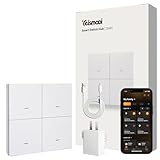
Overview: This $23 hub serves a hyper-specific purpose: controlling Yeismooi brand lights and nothing else. It functions as both a Thread Border Router and a physical smart button controller, making it a niche solution rather than a general-purpose hub. The device targets homeowners who’ve invested in Yeismooi’s outdoor lighting ecosystem and need reliable, extended-range control.
What Makes It Stand Out: The four customizable buttons support single and double presses, providing eight scene controls without opening an app. Thread mesh technology delivers superior outdoor range and reliability compared to Wi-Fi, and the network actually strengthens as you add more Yeismooi lights—a unique advantage for large properties. Local control ensures your yard lighting works even during internet outages.
Value for Money: At $23, it’s inexpensive—but only if you’ve already spent hundreds on Yeismooi lights. As a standalone purchase, it’s worthless. For existing Yeismooi users, it eliminates the need for a $100+ universal Thread border router while adding physical controls. The value proposition is entirely dependent on your investment in the Yeismooi ecosystem; for general smart home use, it scores zero.
Strengths and Weaknesses: Strengths: Affordable Thread entry point for brand loyalists; robust outdoor connectivity; physical button controls enhance usability; mesh network improves with scale; works offline.
Weaknesses: Yeismooi-exclusive lock-in; useless without proprietary lights; extremely limited device support; cannot integrate with other smart home devices; questionable long-term brand viability.
Bottom Line: Buy this only if you already own Yeismooi lights and want Thread connectivity with physical controls. For everyone else, it’s a paperweight. General smart home users should invest in a universal hub that doesn’t chain them to a single obscure brand.
5. Legrand Radiant® Wi-Fi Matter Smart Plug Matter Hub Required 15A, Easy Setup, Enhanced Compatibility with Apple HomeKit, Google Home, Alexa & SmartThings, Easy Wi-Fi Connectivity w/ Matter (4 Pack)

Overview: Important: This is NOT a hub. The $37.25 price covers four Matter-certified smart plugs that require a separate Matter-compatible hub to function. These 15A outlets provide remote control and scheduling for lamps, fans, and small appliances. The Matter certification ensures broad compatibility across major platforms, while local control keeps devices responsive during internet disruptions.
What Makes It Stand Out: The four-pack delivers exceptional value at under $10 per plug—significantly cheaper than single plugs from Lutron or Eve. Matter support means you’re not locked into a single ecosystem; these work with Apple HomeKit, Google Home, Amazon Alexa, and SmartThings interchangeably. The simple QR code setup takes under two minutes per plug, and local processing ensures instant response times for basic on/off commands.
Value for Money: Assuming you already own a Matter hub (Apple TV 4K, Echo, Google Nest Hub, etc.), this 4-pack is among the best deals in smart home tech. Comparable Matter plugs cost $15-20 each, making this bundle 40-50% cheaper. However, if you need to purchase a hub ($100+), the total cost quickly loses its advantage. For Matter-ready households, it’s a no-brainer; for hub-less buyers, it’s a hidden investment.
Strengths and Weaknesses: Strengths: Unbeatable per-unit pricing; true Matter interoperability; simple plug-and-play installation; reliable local control; 15A capacity handles most appliances; no subscription required.
Weaknesses: REQUIRES separate Matter hub (not included); 2.4GHz Wi-Fi only; bulky design may block adjacent outlets; limited to on/off scheduling; no energy monitoring.
Bottom Line: These are excellent budget smart plugs IF you already have a Matter hub. The value evaporates if you must buy a hub separately. For expanding an existing Matter ecosystem, they’re a steal. For starting from scratch, consider an all-in-one hub solution instead. Do not mistake this for a hub—it cannot control other devices.
6. Kasa Smart Plug HS103P2, Smart Home Wi-Fi Outlet Works with Alexa, Echo, Google Home & IFTTT, No Hub Required, Remote Control,15 Amp,UL Certified, (Pack of 2) White
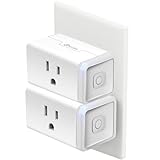
Overview: The Kasa HS103P2 twin pack delivers straightforward smart plug functionality at an entry-level price point. These UL-certified outlets add voice and app control to any 15A device without requiring a dedicated hub, making them ideal for beginners expanding their smart home ecosystem. The Kasa app provides remote access, scheduling, and timer functions for lamps, fans, and holiday lighting.
What Makes It Stand Out: TP-Link’s Kasa brand brings Silicon Valley engineering credibility with over 4 million users and PCMag’s 2020 Readers’ Choice award. The true plug-and-play setup connects directly to 2.4GHz Wi-Fi networks in minutes. Each plug features a physical button for manual control, and the dual-pack configuration immediately outfits two rooms at a cost lower than many single-unit competitors. The IFTTT compatibility enables creative automation beyond basic scheduling.
Value for Money: At $13.99 for two units ($7 each), this represents exceptional value in the no-hub category. Competing single plugs often retail for $12-15, making this twin pack effectively 50% cheaper per unit. The lack of recurring fees, robust build quality, and trusted brand reputation justify every penny. For budget-conscious shoppers wanting reliable Alexa/Google integration without Matter hub investments, this is the market’s sweet spot.
Strengths and Weaknesses: Strengths:
- No hub required; genuine plug-and-play simplicity
- Trusted brand with proven reliability track record
- Physical control buttons on each unit
- Excellent per-unit pricing
Weaknesses:
- 2.4GHz Wi-Fi only; no 5GHz support
- Lacks Matter certification for future-proofing
- Bulkier design may block adjacent outlets
Bottom Line: The Kasa HS103P2 twin pack is the best budget buy for straightforward smart home automation. If you need reliable, hub-free control today and can live without Matter, these deliver outstanding performance and value. Perfect for first-time smart home users or expanding existing Kasa ecosystems.
7. Legrand Radiant® Wi-Fi Matter Smart Plug Matter Hub Required 15A, Easy Setup, Enhanced Compatibility with Apple HomeKit, Google Home, Alexa & SmartThings, Easy Wi-Fi Connectivity w/ Matter (1 Pack)

Overview: Legrand’s Radiant Matter smart plug positions itself as a premium, future-ready solution for unified smart homes. Requiring a Matter-compatible hub (Apple HomeKit, Alexa, Google Home, or SmartThings), this 15A plug prioritizes security and cross-platform compatibility. The sleek design integrates into sophisticated setups where interoperability and local control are paramount.
What Makes It Stand Out: Matter certification ensures this plug works seamlessly across all major ecosystems simultaneously, eliminating platform lock-in. The QR-code setup streamlines installation, while local network communication provides reliable operation even during internet outages. WPA2 security and UL-grade components reflect Legrand’s electrical industry leadership. The plug maintains direct communication with Matter controllers for faster response times than cloud-dependent alternatives.
Value for Money: At $17.79 for a single unit, this commands a 40% premium over no-hub alternatives. The value proposition hinges entirely on Matter ecosystem investment—if you own a compatible hub, this future-proofs your setup. For HomeKit users specifically, native Matter support avoids workarounds. However, budget shoppers without hubs will find better immediate value elsewhere. The price is justified for multi-platform households prioritizing standards-based interoperability.
Strengths and Weaknesses: Strengths:
- Matter-certified for universal ecosystem compatibility
- Local control functionality during internet outages
- Secure WPA2 connectivity
- Premium build quality from established electrical brand
Weaknesses:
- Requires Matter hub (additional cost)
- 2.4GHz Wi-Fi limitation
- Higher per-unit price
Bottom Line: Choose this Legrand plug if you’re invested in Matter ecosystems or planning future expansion. For Apple HomeKit households or multi-platform homes, the interoperability and local control justify the premium. Skip if you lack a Matter hub or prioritize budget over future-proofing.
8. EIGHTREE Matter Smart Plug, Homekit Supported, Hub Required, Smart Plugs That Work with Alexa, Siri & Google Home, WiFi Plug with Remote Control, Timer & Schedule, Matter Smart Home 2.4GHz Wi-Fi Only
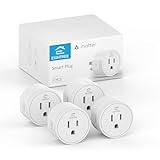
Overview: EIGHTREE’s Matter-certified four-pack delivers privacy-focused smart plugs emphasizing local network operation. Requiring a Matter hub, these outlets promise seamless integration across all major platforms—HomeKit, Alexa, Google Home, and SmartThings—without platform-specific apps. The $22.99 package positions itself as a value play for whole-home Matter adoption.
What Makes It Stand Out: The “no cloud, no data tracking” architecture keeps commands within your LAN, addressing growing privacy concerns. Matter’s direct device-to-device communication ensures functionality during internet outages. The four-pack configuration undercuts competitors’ per-unit pricing while maintaining full Matter certification. Setup through existing apps (Alexa, HomeKit) eliminates proprietary software bloat. Voice control works natively with Siri, Alexa, and Google Assistant simultaneously.
Value for Money: At $5.75 per plug, this four-pack dramatically reduces Matter entry costs compared to Legrand’s $17.79 single unit. The value is exceptional for Matter-ready households needing multiple outlets. Privacy-conscious users gain enterprise-grade data protection without subscription fees. The primary cost consideration remains the Matter hub requirement—factor in $50-100 if you don’t own one. For existing Matter ecosystem users, this is the market’s best bulk value.
Strengths and Weaknesses: Strengths:
- Lowest per-unit cost for Matter-certified plugs
- Superior privacy via local-only communication
- True cross-platform compatibility
- Functions offline during network outages
Weaknesses:
- Requires Matter hub (not included)
- 2.4GHz Wi-Fi only
- Lesser-known brand vs. established competitors
Bottom Line: EIGHTREE’s four-pack is the smartest Matter investment for multi-room deployments. If you own a Matter hub, buy these immediately for unbeatable value and privacy. Newcomers should calculate hub costs first, but the per-unit savings quickly offset initial investment. Ideal for privacy-focused smart home enthusiasts.
9. Kasa Smart Plug KP200, In-Wall Smart Home Wi-Fi Outlet Works with Alexa, Google Home & IFTTT, No Hub Required, Remote Control, ETL Certified , White, 1 Pack

Overview: The Kasa KP200 reinvents the smart plug concept by replacing your wall outlet entirely. This in-wall solution controls two devices independently via Alexa, Google Assistant, or the Kasa app—no hub required. ETL certification and 15A total capacity make it suitable for permanent installation in kitchens, living rooms, or bedrooms where aesthetics and space-saving matter.
What Makes It Stand Out: Unlike bulky plug-in adapters, the KP200 integrates seamlessly into your wall, freeing both outlets for smart control without sacrificing adjacent sockets. Individual device naming allows separate voice commands for each outlet. The Away mode randomly cycles devices to simulate occupancy, enhancing security. Grouping features let you control multiple Kasa devices simultaneously, while in-wall installation reduces clutter and potential unplugging accidents.
Value for Money: At $17.98, this costs slightly more than two individual Kasa plugs but delivers superior aesthetics and space efficiency. Electrically inclined users save money versus hiring an installer, though professional installation adds $50-100. Compared to two smart plugs at $14-20, the premium is justified by permanent integration and dual independent control. For renovations or new constructions, this is more cost-effective than smart plugs plus outlet expanders.
Strengths and Weaknesses: Strengths:
- Dual independent outlet control from single gang
- Clean, permanent in-wall installation
- No hub required; straightforward app setup
- Away mode enhances home security
Weaknesses:
- Requires electrical installation (not plug-and-play)
- 15A total capacity (not per outlet)
- Single unit pricing less flexible than multi-packs
Bottom Line: The KP200 is perfect for homeowners prioritizing clean aesthetics and permanent smart integration. Install it in high-visibility areas where bulky plugs are unacceptable. Renters or commitment-phobes should stick with plug-in alternatives. For kitchen counters, bedroom nightstands, or living room accent lighting, this is the most elegant no-hub solution available.
10. Legrand Radiant® Wi-Fi Matter Smart Plug Matter Hub Required 15A, Easy Setup, Enhanced Compatibility with Apple HomeKit, Google Home, Alexa & SmartThings, Easy Wi-Fi Connectivity w/ Matter (2 Pack)
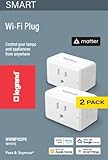
Overview: Legrand’s two-pack Matter smart plugs deliver premium interoperability for multi-platform households. Requiring a Matter hub, these outlets provide secure, local control across Apple HomeKit, Alexa, Google Home, and SmartThings simultaneously. The $20.60 twin pack reduces per-unit cost while maintaining Legrand’s electrical safety standards and Matter’s universal compatibility promise.
What Makes It Stand Out: Matter certification ensures these plugs function as true universal translators in mixed-ecosystem homes. The QR-code setup works across all platforms, eliminating app-hopping frustration. Local network operation keeps commands fast and private, functioning without internet connectivity. Legrand’s reputation for commercial-grade electrical components translates into robust 15A capacity and WPA2 security. The two-pack configuration strategically positions this as a cost-effective entry point for Matter-curious homeowners.
Value for Money: At $10.30 per plug, this two-pack bridges the gap between budget no-hub plugs and premium single-unit Matter devices. The value proposition strengthens if you own a Matter hub—each outlet costs 40% less than Legrand’s single pack while delivering identical features. For households needing 2-4 Matter plugs, this package offers the best balance of brand reliability, certification, and per-unit savings. Hub-less buyers must add $50-100 to the total cost equation.
Strengths and Weaknesses: Strengths:
- Matter-certified for true cross-platform harmony
- Local control during internet outages
- Reputable brand with safety certifications
- Competitive two-pack pricing
Weaknesses:
- Requires Matter hub (additional investment)
- 2.4GHz Wi-Fi limitation persists
- Still pricier than non-Matter alternatives
Bottom Line: This two-pack is the sweet spot for Matter-enabled homes needing multiple smart outlets. The per-unit savings and universal compatibility justify the premium over no-hub plugs if you value future-proofing. For Apple HomeKit users or multi-assistant households, it’s an easy recommendation. Skip if you’re hub-free and satisfied with basic Alexa/Google integration.
Understanding the Cloud Dependency Crisis in Modern Smart Homes
The promise of smart home technology has always been seamless, automated living. Yet most homeowners discover the critical flaw only after investing hundreds or thousands of dollars: when the cloud disappears, so does their home’s intelligence. This isn’t a theoretical problem—major cloud providers experience outages several times yearly, regional internet disruptions are increasingly common, and even routine ISP maintenance can leave your home “dumb” for hours.
The Single Point of Failure Problem
Traditional smart home architectures route every command, sensor reading, and automation trigger through distant servers. Your motion detector detects movement, sends data to a server 800 miles away, the server processes the logic, then sends a command back to your light switch. This round-trip creates multiple failure points: your modem, ISP infrastructure, DNS servers, the vendor’s load balancers, and their application servers. When any link in this chain breaks, your automation fails silently. Worse, you often won’t know about the failure until you flip a switch and nothing happens.
Real-World Impact of Cloud Outages
Cloud outages don’t just break convenience—they compromise safety and security. Imagine arriving home to complete darkness because your geofence-triggered lighting automation failed. Consider elderly family members unable to use voice commands to call for help. During a security event, cloud-dependent cameras might stop recording entirely, leaving you blind when you need visibility most. These aren’t edge cases; they’re daily risks for cloud-tethered homes.
What Is Local Processing and Why It Matters
Local processing—often called edge computing in enterprise contexts—means your smart hub executes automations, processes sensor data, and issues device commands using its own onboard hardware. The hub becomes a miniature, self-contained data center for your home. This architectural shift fundamentally changes reliability from probabilistic to deterministic.
Edge Computing vs. Cloud Computing
The distinction is simple but profound. Cloud computing offloads thinking to remote servers; edge computing does the thinking on-site. A locally processing hub runs its automation engine, stores device states in local memory, and maintains direct communication with your devices through protocols that don’t require internet connectivity. The cloud becomes optional—a sync service for remote access and firmware updates, not the brain of your operation.
The Anatomy of a Truly Local Smart Hub
A genuine local-processing hub contains a capable CPU (often quad-core ARM or better), dedicated RAM for running automation scripts, local storage for logging and configuration, and multiple radio modules for direct device communication. Critically, it runs an operating system and automation platform designed to function independently, with no “phone home” requirement for core operations. This hardware foundation separates marketing claims from engineering reality.
Smart Hub Architectures: Cloud-First, Hybrid, and Local-First
Not all smart hubs claiming “local control” are created equal. Understanding the three fundamental architectures helps you cut through marketing spin and evaluate true resilience.
Cloud-First Systems: Convenience at a Cost
Cloud-first hubs treat local processing as a fallback mode, not a primary design principle. They might cache simple on/off commands locally but require cloud connectivity for complex automations, device pairing, or even basic functionality after a reboot. These systems often use proprietary protocols that can’t function without the vendor’s servers. When evaluating such systems, ask: “What percentage of features work after unplugging the WAN cable?” If the answer isn’t 100% for core automation, it’s not truly local.
Hybrid Models: The Best of Both Worlds?
Hybrid architectures intentionally split functionality between local and cloud processing. They execute automations locally but sync states to the cloud for remote access and use cloud AI for advanced features. The key question for hybrid systems is granularity: can you configure which automations run locally? Do you have a dashboard showing local vs. cloud execution status? The best hybrid systems make this transparent and configurable, while mediocre ones obscure the distinction until failure occurs.
Local-First Hubs: Maximum Reliability
Local-first hubs invert the traditional model. They run everything locally by default and use the cloud only for enhancements. Their mobile apps connect directly to the hub on your LAN using technologies like WebSockets or direct IP communication. Cloud services are treated as optional plugins you can disable. This architecture provides maximum resilience but often requires more technical expertise to configure and maintain.
Critical Benefits of Local Processing Capabilities
The advantages extend far beyond surviving internet outages. Local processing transforms your smart home from a remote-controlled toy into a genuinely intelligent environment.
Uninterrupted Automation During Internet Outages
When your hub processes locally, sunset schedules, motion-triggered lighting, and climate adjustments continue flawlessly during ISP outages. Your home doesn’t revert to 1995 functionality just because a fiber line was cut down the street. The hub’s internal clock and stored logic ensure your carefully crafted scenes execute precisely on schedule, using local device communication that never leaves your property.
Reduced Latency for Responsive Control
Cloud-based commands typically take 500-2000ms to execute. Local processing reduces this to 50-200ms—a difference you can feel when walking through a dark hallway. This responsiveness enables sophisticated automations like presence-based lighting that tracks you from room to room, which would feel jarring and unreliable with cloud-induced delays.
Enhanced Privacy and Data Sovereignty
Local processing keeps your daily routines, occupancy patterns, and behavioral data within your four walls. No vendor can monetize your habits, no government can subpoena your data from a third party, and no hacker can breach a cloud database to learn when you’re typically away. Your home’s intelligence remains your private affair.
Essential Hardware Specifications to Evaluate
Marketing materials rarely disclose the specs that determine real-world performance. Here’s what to investigate before purchasing.
Processor and RAM Requirements
A hub’s CPU determines how many simultaneous automations it can handle and how complex your logic can become. For modest homes with 20-30 devices, a dual-core ARM Cortex-A53 with 1GB RAM suffices. For larger deployments exceeding 100 devices with multi-condition automations, look for quad-core Cortex-A72 or better with 2-4GB RAM. Insufficient RAM causes automation delays and hub crashes—symptoms often misdiagnosed as network issues.
Local Storage Options
Flash storage stores automation scripts, device configurations, and historical data. 8GB is the absolute minimum; 16-32GB with high endurance ratings (designed for frequent writes) ensures longevity. Some advanced hubs support external SSDs for logging and video storage, crucial for security applications where cloud backup is unavailable. Check if storage is expandable—SD card slots or USB ports indicate upgrade paths.
Built-in Battery Backup Considerations
Internet outages often accompany power failures. A hub with USB-C power input can run off a standard power bank, but integrated battery backup is superior. Look for systems with internal lithium cells providing 2-4 hours of runtime. More importantly, verify that the hub gracefully handles power transitions—abrupt shutdowns can corrupt configurations and require complete rebuilds.
Connectivity Protocols That Enable Local Control
The radios inside your hub determine which devices can be controlled locally. Not all wireless protocols are created equal when the internet dies.
Z-Wave and Zigbee: Mesh Networks That Work Offline
These protocols were designed for local control from day one. They create self-healing mesh networks where devices relay messages to each other, independent of your Wi-Fi. Commands travel directly from hub to device via radio signals, never touching your router. When evaluating hubs, confirm they support the latest Z-Wave 700 series or Zigbee 3.0 standards for maximum range and device compatibility.
Wi-Fi Devices: The Local Control Challenge
Most Wi-Fi smart devices are cloud-tethered by default, but many support local control through protocols like mDNS, SSDP, or direct HTTP APIs. The hub must actively discover and maintain these local connections. Some devices require initial cloud pairing but then accept local commands—a workable compromise if the hub handles the transition transparently. Always verify local control capabilities for Wi-Fi devices in the hub’s compatibility list, not just the device’s marketing.
Thread and Matter: The New Local-First Standards
Thread creates a secure, IP-based mesh network that functions entirely locally. Matter, built atop Thread, promises standardized local control across vendors. Hubs with Thread border router capabilities future-proof your investment. However, verify Matter implementation details—some early adopters still route certain commands through cloud services despite the local-first promise.
Automation Engine Deep Dive
The automation engine is your hub’s brain. Its architecture determines whether your complex scenes survive disconnections.
Hub-Based vs. Cloud-Based Logic Execution
Some hubs store automation logic in the cloud and download it to the hub periodically. This creates a critical vulnerability: if the hub reboots during an outage, it might lose its instructions entirely. True local processing means the automation engine and all scripts reside permanently on the hub. Test this by creating an automation, disconnecting internet, rebooting the hub, and verifying the automation still triggers.
Complex Scenario Handling Without Internet
Advanced automations use variables, timers, and state machines. Can your hub maintain a “vacation mode” variable across reboots without cloud sync? Does it support conditional logic like “if motion detected AND after sunset AND temperature below 65°F”? The best local engines use Lua, JavaScript, or Python for scripting, giving you Turing-complete logic that runs entirely on-device.
Time-Based and Sensor-Driven Automations
Cloud-independent timekeeping is crucial. Hubs with real-time clocks (RTCs) and battery backup maintain accurate time during outages. For sensor-driven automations, verify that the hub polls sensors directly rather than relying on cloud webhooks. The hub should maintain its own sensor state database locally, updating it in real-time regardless of connectivity status.
Mobile App and Remote Access Architecture
How your mobile app communicates with the hub reveals much about its local-processing credentials.
Direct Local Network Communication
Premium local-processing apps discover the hub via mDNS or SSDP and establish direct connections using encrypted WebSockets. When you’re home, commands never leave your LAN. Test this by blocking the hub’s internet access at the router level and attempting control from your phone while on Wi-Fi. If the app works seamlessly, you’ve got genuine local control.
Cloud Relay vs. Direct Connection
For remote access, architectures differ significantly. Cloud relay routes all commands through vendor servers, creating latency and dependency. Direct connection uses technologies like WireGuard VPN or TLS-encrypted tunnels to connect your phone directly to your hub. The latter works even during vendor cloud outages, though it requires more setup. Some hubs offer both, letting you choose between convenience and resilience.
Offline App Functionality
Can you view device states and automation logs when the cloud is down? The best apps cache this data locally on your phone, updating it whenever connectivity exists. During outages, you still see the last known states rather than blank screens or error messages. This small detail makes a massive difference in diagnosing issues when you’re home but internet-free.
Security Architecture: Local vs. Cloud
Security paradigms shift dramatically when processing moves local. Understanding these differences helps you avoid new vulnerabilities.
Attack Surface Reduction
Local processing eliminates entire classes of attacks. There’s no cloud API to exploit, no vendor database to breach, and no centralized target for DDoS attacks. Your hub becomes a small, hardened node rather than a client in a massive, attractive target network. However, this also means security responsibility shifts entirely to you—regular updates and proper network segmentation become critical.
Encryption Standards for Local Communication
Local doesn’t mean unencrypted. Look for hubs using AES-128 or AES-256 encryption for Z-Wave/Zigbee, WPA3 for Wi-Fi devices, and TLS 1.3 for app-to-hub communication. Some hubs offer per-device encryption keys stored locally, ensuring that even if one device is compromised, others remain secure. Avoid systems that transmit commands in plaintext on your LAN—packet sniffing can reveal sensitive patterns.
Firmware Update Mechanisms
How does the hub receive security patches? The best systems download updates in the background but let you schedule installation, ensuring you’re not caught offline mid-update. Crucially, verify that firmware updates don’t reset security configurations or re-enable cloud features you’ve disabled. Some hubs offer offline update capabilities via USB, invaluable for air-gapped or highly secure installations.
Privacy Implications of Data Processing Location
Your smart home knows when you wake, when you leave, and when you sleep. Where this data lives matters enormously.
What Stays Local vs. What Goes to the Cloud
Even local-processing hubs may send some data upstream: anonymized crash reports, firmware version checks, or voice command transcriptions. The key is transparency and control. Look for hubs with granular privacy settings that let you disable telemetry entirely. Some open-source platforms even let you audit the code to verify data handling claims—something impossible with closed-source, cloud-centric systems.
Data Retention Policies
Cloud services often retain data indefinitely, creating long-term privacy risks. Local hubs store data on your hardware, giving you complete retention control. Check if the hub supports automated log rotation and secure deletion. For security cameras, verify that video can be stored locally with encryption at rest, and that cloud backup is optional rather than mandatory.
Third-Party Integration Privacy Concerns
Integrating cloud services like weather APIs or voice assistants reintroduces privacy risks. The best local hubs act as privacy proxies—fetching weather data themselves and exposing only necessary information to assistants. Some support local voice processing via tools like Rhasspy or Willow, keeping voice commands entirely on-premises. Evaluate each integration’s data flow; a single leaky integration can undermine your entire local privacy model.
Ecosystem Compatibility and Vendor Lock-in
Choosing a hub is a decade-long commitment. The right choice keeps options open; the wrong one traps you.
Open Standards vs. Proprietary Protocols
Open standards (Z-Wave, Zigbee, Matter) ensure device interoperability regardless of vendor. Proprietary protocols lock you into a single ecosystem, where device selection is limited and prices inflated. Prioritize hubs that actively contribute to open-source projects and standards bodies—they’re more likely to support future devices and less likely to abandon their platform.
Integration APIs and Community Support
A hub’s API determines its extensibility. RESTful APIs with WebSocket support enable custom integrations. Even better: GraphQL APIs that let you query exactly the data you need. Community support matters as much as official documentation—active forums, third-party plugins, and GitHub repositories indicate a healthy ecosystem that will outlast any single vendor’s interest.
Migration Path Considerations
What happens if you outgrow your hub? Some systems use standard configuration formats (YAML, JSON) that can be exported and migrated. Others use proprietary databases that lock you in forever. Before buying, search for migration guides and tools. The existence of active migration communities suggests the hub respects your freedom to leave—ironically, a sign of a trustworthy platform.
Installation and Configuration Complexity
Local processing power comes with complexity tradeoffs. Understanding the setup landscape prevents buyer’s remorse.
Network Topology Requirements
Local-first hubs perform best on robust networks. Consider a dedicated IoT VLAN to isolate smart home traffic from your main network. Some hubs require multiple Ethernet connections or specific multicast configurations. Plan for a wired connection to your router—Wi-Fi-connected hubs introduce a single point of failure that undermines local processing benefits.
Initial Setup Procedures
Cloud-first hubs offer smartphone-guided setup that takes 10 minutes. Local-processing hubs may require manual IP configuration, SSH access, and command-line operations. The sweet spot: hubs offering both—a simple app-based setup that still creates a fully local configuration. Watch out for hubs that require cloud account creation even for local use; this often indicates artificial dependency.
Ongoing Maintenance Expectations
Local hubs need regular backups, log monitoring, and occasional troubleshooting. Automated backup to local NAS or encrypted cloud storage is essential. Some hubs offer self-healing features that restart failed services automatically. Understand the update cadence—frequent updates mean better security but more maintenance. Community-driven platforms may require more hands-on management but offer faster bug fixes.
Total Cost of Ownership Analysis
Sticker price tells only a fraction of the story. The real cost unfolds over years of operation.
Hardware Price Premiums
Local-processing hubs cost 30-100% more than basic cloud hubs due to better specs and smaller production runs. A $150 premium on a hub that lasts 7 years translates to less than $2 monthly for reliability. Compare this to subscription fees for cloud-reliant systems, which can exceed $10 monthly. The break-even point often arrives within the first year.
Subscription Fee Avoidance
Many cloud hubs charge monthly fees for advanced features like video storage or complex automations. Local hubs include these capabilities outright. Calculate three-year total costs: a $200 local hub vs. a $50 cloud hub plus $10/month subscription saves you $130 over 36 months. Factor in potential price increases—subscription fees rarely decrease.
Long-Term Value Calculation
A hub’s value compounds over time. Local hubs retain functionality even if the manufacturer abandons the product (a common fate in the smart home industry). They avoid the “brickification” risk when startups shut down cloud servers. Consider it insurance: paying more upfront protects your entire smart home investment from obsolescence.
Future-Proofing Your Smart Home Infrastructure
Technology evolves rapidly. The right hub choice anticipates tomorrow’s standards while respecting yesterday’s investments.
Matter Standard Adoption
Matter promises seamless local control across vendors. However, Matter support alone isn’t enough—verify the hub’s Matter controller implementation is fully local. Some early Matter devices still require cloud commissioning. Look for hubs that support Matter over Thread and commit to open-source Matter SDKs. This ensures compatibility with devices released years from now.
Over-the-Air Update Policies
Frequent, transparent updates indicate active development, but automatic updates can break functionality. The ideal hub lets you review changelogs, test updates in a staging environment, and roll back if needed. Check the vendor’s track record—do they support hardware for 5+ years, or abandon models after 2? Community-driven projects often support hardware indefinitely, while corporate platforms have planned obsolescence.
Community vs. Corporate Development Models
Corporate hubs offer polished experiences but can be discontinued on a whim. Community-driven platforms (often open-source) survive as long as users maintain them. They adapt faster to new protocols but may lack professional support. Consider your technical comfort level and risk tolerance. A hybrid approach—commercial hub with active community modding support—offers the best of both worlds.
Real-World Failure Scenarios and Local Solutions
Theory meets reality when systems fail. These scenarios demonstrate local processing’s practical value.
Scenario 1: ISP-Wide Outage
A construction crew severs the neighborhood fiber line. With a local hub, your morning routine proceeds normally: lights wake you gradually, coffee starts brewing at 7 AM, and the thermostat adjusts to your schedule. Your security system remains armed, and all automations function. The only loss is remote access and voice control—your home remains intelligently automated.
Scenario 2: Vendor Cloud Service Failure
Your hub manufacturer’s AWS region goes offline. Cloud-first users watch their homes go dark. Hybrid users lose remote access and voice control. Local-first users might not even notice—if they’ve configured direct remote access, they retain full control. The key is choosing a hub where the cloud is genuinely optional, not a hidden dependency.
Scenario 3: Router Failure with Intranet Still Functional
Your router dies, but the hub and devices remain powered. Advanced local hubs with mDNS can still function within the LAN if you connect a laptop directly to the network switch. You lose internet-dependent features but retain local control via direct IP access. This scenario highlights the importance of understanding your network topology and the hub’s discovery mechanisms.
Scenario 4: Cyberattack on Cloud Infrastructure
A DDoS attack cripples your vendor’s authentication servers. Cloud-dependent systems become unusable because apps can’t verify your identity. Local-first hubs using direct connections or personal VPNs remain accessible. Some even support local user databases, making cloud authentication entirely optional. In an era of rising cyberattacks, this independence isn’t just convenient—it’s essential security hygiene.
Frequently Asked Questions
1. Will a local-processing smart hub work with my existing Wi-Fi devices?
It depends on the device’s firmware. Many Wi-Fi devices from major brands support local control via LAN-based APIs, but some remain cloud-locked. Check your device’s technical documentation for “local API” or “LAN control” support. Your hub’s compatibility list should explicitly confirm local control for each device model. For cloud-only devices, you may need to replace them with local-compatible alternatives.
2. How do I test if my hub truly works when the internet is down?
Perform a “disconnect test”: Unplug your modem’s WAN cable (not the hub’s connection). Wait 5 minutes, then verify all automations still trigger. Test by walking past motion sensors, checking scheduled events, and using your mobile app while connected to Wi-Fi. Reboot the hub during the outage and confirm it resumes operations without internet. This reveals whether the hub has any hidden cloud dependencies.
3. Do local-processing hubs require more technical expertise?
Generally yes, but the gap is narrowing. Modern local-first hubs offer smartphone apps with guided setup while maintaining full local functionality. However, advanced configuration—complex automations, custom device handlers, or direct remote access—requires comfort with concepts like IP addresses, port forwarding, and possibly scripting. Consider starting with a user-friendly local hub and expanding complexity as your skills grow.
4. Can I access my local hub remotely when I’m away from home?
Yes, through several methods. The most secure is a personal VPN (WireGuard or OpenVPN) running on your router or a Raspberry Pi. Some hubs offer direct connection features using dynamic DNS and TLS encryption. Avoid solutions that route through vendor clouds—they reintroduce dependency. Setup complexity varies, but step-by-step guides exist for all major platforms.
5. What’s the difference between “local control” and “local processing”?
“Local control” means you can send commands directly to devices, but automations might still run in the cloud. “Local processing” means the hub itself executes all logic—schedules, conditions, and actions—without internet. A hub can offer local control but still depend on cloud servers for automation. Always verify the hub runs its complete automation engine on-device, not just a command relay.
6. How does local processing affect smart home response times?
Local processing typically reduces latency from 500-2000ms to 50-200ms. This makes interactions feel instantaneous—lights turn on as you enter rooms, buttons respond immediately, and complex multi-device scenes execute in perfect sync. The improvement is especially noticeable for sensor-triggered automations where cloud round-trips create perceptible delays.
7. Are local-processing hubs more secure than cloud-based systems?
They reduce attack surface by eliminating cloud infrastructure as a target, but security responsibility shifts to you. You must maintain updates, secure your network, and manage access controls. A poorly maintained local hub can be less secure than a well-managed cloud system. The security advantage comes from control—you decide update timing, data retention, and access policies, not a vendor.
8. What happens to my automations if the hub loses power during an outage?
This depends on the hub’s power management. Units with battery backup and graceful shutdown procedures resume operations seamlessly when power returns. Without battery backup, sudden power loss can corrupt configurations. Always connect your hub to a UPS (uninterruptible power supply) and enable automated configuration backups. Some high-end hubs have internal batteries specifically to handle clean shutdowns.
9. Will Matter devices work locally with my existing hub?
If your hub functions as a Matter Controller and supports Thread networking, yes. However, verify the implementation details—some early Matter controllers still require cloud services for initial device commissioning or firmware updates. True local Matter support means the hub can commission, control, and update devices without internet. Check for Matter certification and community reports of offline operation before purchasing.
10. Can I mix local-processing and cloud-dependent devices in the same home?
Yes, but carefully. Use a local-processing hub as your primary controller, and integrate cloud devices as secondary elements. Avoid automations that depend on cloud devices for critical paths (e.g., security triggers). Some hubs can proxy cloud devices to make them appear local, but this adds complexity. The best approach is gradual replacement: as cloud devices fail, replace them with local-compatible alternatives until your core functionality is internet-independent.