Transforming your front door into a smart, keyless entry system doesn’t require replacing your entire deadbolt or calling a locksmith. Smart lock conversion kits have revolutionized home security by offering an ingenious solution: a compact device that attaches to your existing lock from the inside, granting you remote access, guest codes, and auto-locking features without touching the exterior hardware. For under $100, these retrofit kits deliver remarkable convenience while preserving your current keys and door aesthetics—perfect for renters, homeowners on a budget, or anyone hesitant about complex installations.
But not all conversion kits are created equal, and the budget-friendly price point comes with important trade-offs to understand. From connectivity quirks to motor strength and security certifications, making an informed choice requires looking beyond marketing claims. This guide will walk you through everything you need to evaluate before purchasing, ensuring your sub-$100 investment delivers reliable performance for years to come.
Top 10 Smart Lock Conversion Kits
Detailed Product Reviews
1. Kwikset Convert Zigbee 3.0 Electronic Smart Lock Conversion Kit in Satin Nickel

Overview: The Kwikset Convert Zigbee 3.0 transforms your existing deadbolt into a fully integrated smart lock without replacing the exterior hardware. Designed for homeowners already invested in Zigbee ecosystems, this conversion kit works seamlessly with Xfinity, SmartThings Hub v3, Amazon Echo Plus, and other compatible devices. It replaces only the interior portion of your lock, preserving your existing keys while adding remote capabilities.
What Makes It Stand Out: This kit’s Zigbee 3.0 protocol offers reliable mesh networking with lower power consumption than WiFi alternatives. The standout feature is its broad compatibility with major smart home platforms, allowing you to lock or unlock remotely, receive real-time notifications, and check door status through your existing hub. The satin nickel finish provides a modern aesthetic that blends with most décor.
Value for Money: At $78.32, this conversion kit sits in the mid-range price point. It’s considerably cheaper than purchasing a complete smart lock system while delivering core smart features. However, the hidden cost is the required Zigbee hub, which may add $50-$100 if you don’t already own one. Compared to full replacement smart locks at $150-$250, it offers solid value for existing deadbolt owners.
Strengths and Weaknesses: Strengths include easy installation that takes under 30 minutes, robust Zigbee connectivity, compatibility with multiple platforms, and the ability to retain your original keys. The system provides reliable remote access and monitoring through your smart home ecosystem. Weaknesses are its dependence on a separate hub, limited to specific Zigbee-compatible systems, and lack of standalone WiFi connectivity. The exterior hardware remains unchanged, which may disappoint those wanting a fully modernized look.
Bottom Line: Ideal for smart home enthusiasts already using Zigbee hubs, this conversion kit offers reliable performance and convenience at a reasonable price. Skip it if you want standalone operation or don’t have compatible hub infrastructure.
2. Kwikset 914 Convert Zigbee 3.0 Electronic Smart Lock Conversion Kit in Polished Brass

Overview: The Kwikset 914 Convert Zigbee 3.0 offers identical functionality to its satin nickel counterpart, transforming existing deadbolts into smart locks through Zigbee integration. This model works with Xfinity, SmartThings Hub v3, Amazon Echo Plus, and other Zigbee platforms. It replaces only the interior mechanism while preserving your exterior hardware and original keys, making it a non-destructive upgrade.
What Makes It Stand Out: Beyond the standard Zigbee 3.0 features, the polished brass finish provides a classic, premium aesthetic for traditional home styles. The conversion maintains your existing keyway while adding remote access, notifications, and door status monitoring through your smart home system. The mesh networking capability ensures reliable connectivity throughout your home.
Value for Money: At $140.15, this kit is significantly overpriced compared to the satin nickel version offering identical features at $78.32. You’re paying nearly double for merely a different finish. While polished brass may match certain décor better, the 80% price premium is hard to justify. For budget-conscious buyers, this represents poor value unless you specifically require polished brass to match existing hardware.
Strengths and Weaknesses: Strengths mirror the standard model: straightforward installation, reliable Zigbee connectivity, broad hub compatibility, and key retention. The polished brass finish is durable and attractive. Weaknesses include the inflated price point, mandatory hub requirement, no standalone WiFi, and limited compatibility with specific Zigbee systems. The exterior appearance remains unchanged, which may not suit all preferences.
Bottom Line: Only consider this model if you absolutely need polished brass to match your existing hardware. Otherwise, the identical satin nickel version delivers the same performance at nearly half the price.
3. InstaLock Smart Remote Door Lock for Existing Deadbolt - Installs in 30 Seconds - Enjoy Automatic Keyless Entry with Tool Free Installation - Includes Conversion Kit and Two Wireless Remotes (Silver)

Overview: InstaLock offers a refreshingly simple approach to smart locks, requiring no tools, hubs, or WiFi. This conversion kit installs over your existing deadbolt in 30 seconds, providing keyless entry via two included wireless remotes with up to 80 feet of range. The silver finish complements modern hardware while letting you retain your original key functionality. It’s designed for renters and homeowners seeking hassle-free security upgrades.
What Makes It Stand Out: The tool-free, 30-second installation is genuinely revolutionary—just snap it over your existing deadbolt. Unlike hub-dependent systems, this works immediately with pre-programmed key fobs using rolling code encryption for security. The apartment-friendly design means no modifications and easy removal when moving. Dual access lets you use remotes or your traditional key, providing flexibility without complexity.
Value for Money: At $79.00, this positions itself as an affordable entry point to keyless living. While cheaper than full smart locks, it’s priced similarly to basic WiFi models. The value lies in its simplicity—no additional hub costs or monthly fees. However, the 80-foot range limitation and lack of smartphone control may disappoint tech enthusiasts wanting remote access from anywhere.
Strengths and Weaknesses: Strengths include incredibly easy installation, no hub requirement, rolling code security, dual access methods, and renter-friendly design. The four AA batteries provide long-lasting operation. Weaknesses are the limited 80-foot range, no smartphone app or remote access away from home, and reliance on physical remotes that can be lost. It’s not a true “smart home” device but rather a remote-controlled lock.
Bottom Line: Perfect for renters, apartment dwellers, or anyone wanting simple keyless entry without complicated setup. Skip if you need smartphone control or remote access while traveling.
4. CANDY HOUSE Sesame 5 US, Smart Lock, Bluetooth Electronic Deadbolt, Auto-Lock, Keyless Entry Door Lock for Front Door, Fits Your Existing Deadbolt, for Airbnbs Vacation Rentals (Black)

Overview: The Sesame 5 US takes a minimalist approach to smart locks, mounting over your existing deadbolt with 3M adhesive in minutes. This Bluetooth-enabled device offers keyless entry through your smartphone within range and features an integrated button for manual control. Designed specifically for renters and Airbnb hosts, its damage-free installation and universal key compatibility make it uniquely versatile. The black finish provides a discreet, modern look.
What Makes It Stand Out: The no-drill, adhesive installation is rental-friendly and reversible. Its ability to work with 99% of keys, including custom 3D-printed adapters for unusual keys, solves compatibility issues other locks face. The configurable auto-lock feature (3 seconds to 1 hour) prevents lockouts and enhances security. At just $44, it’s the most affordable smart lock solution available.
Value for Money: Exceptional value at $44.00, undercutting competitors by 40-60% while delivering core smart features. For Airbnb hosts and renters, the easy installation and removal alone justify the price. However, Bluetooth-only connectivity means no remote access away from home without additional bridging hardware. The adhesive mount, while convenient, may raise durability concerns for high-traffic doors.
Strengths and Weaknesses: Strengths include ultra-simple installation, universal key compatibility, auto-lock functionality, built-in control button, and unbeatable price. It’s ideal for temporary setups. Weaknesses are Bluetooth’s limited range, no remote access without extra hardware, potential adhesive failure over time, and basic security features compared to Zigbee or WiFi alternatives. The lack of integration with broader smart home systems limits its functionality.
Bottom Line: An excellent budget choice for renters, Airbnb properties, or anyone wanting simple local smart access. Look elsewhere if you need remote monitoring or robust smart home integration.
5. InstaLock Smart Remote Door Lock for Existing Deadbolt - Installs in 30 Seconds - Enjoy Automatic Keyless Entry with Tool Free Installation - Includes Conversion Kit and Two Wireless Remotes (Bronze)

Overview: This bronze version of InstaLock delivers the same tool-free, 30-second installation as its silver counterpart, transforming existing deadbolts into remote-controlled locks. The kit includes two pre-programmed wireless remotes with 80-foot range and operates on four AA batteries. Designed for renters and homeowners alike, it preserves your original key functionality while adding convenient keyless entry. The bronze finish offers a warm, traditional aesthetic.
What Makes It Stand Out: Like the silver model, the revolutionary snap-on installation requires no tools, hubs, or WiFi. The rolling code encryption provides robust security without complexity. Its apartment-friendly design allows for non-permanent installation and easy removal. Dual access means you can use the wireless remotes or your traditional key, offering flexibility that pure smart locks cannot match. The bronze finish distinguishes it for traditional home styles.
Value for Money: At $79.00, this bronze version maintains the same pricing as the silver model, offering identical features and performance. It’s competitively priced against basic smart locks while avoiding hub costs or subscription fees. The value proposition centers on simplicity and immediate functionality. However, the 80-foot range limitation and absence of smartphone control may not satisfy users wanting full smart home integration.
Strengths and Weaknesses: Strengths include effortless installation, no hub requirement, rolling code security, dual access methods, and the attractive bronze finish. The battery-powered operation is reliable and renter-friendly. Weaknesses remain the limited range, lack of remote access away from home, dependence on physical remotes, and absence of true smart home connectivity. It’s a remote lock rather than a comprehensive smart lock solution.
Bottom Line: Ideal for renters or those wanting simple keyless entry without technical complexity. Choose this bronze finish to match traditional décor while enjoying the same straightforward functionality as the silver version.
6. Kwikset 99250103 Kevo Convert Smart Lock Venetian Bronze Conversion Kit

Overview: The Kwikset Kevo Convert transforms your existing deadbolt into a Bluetooth-enabled smart lock for $117.26. This Venetian Bronze conversion kit works with Kwikset, Weiser, Baldwin, or Schlage hardware, letting you lock and unlock via smartphone within Bluetooth range. It’s important to note this is NOT the Touch-to-Open model—that requires the Kevo 2.
What Makes It Stand Out: Kwikset’s brand reputation and broad compatibility set it apart. The lock integrates with major smart home platforms including Alexa, Ring, Nest, and IFTTT, creating a cohesive ecosystem. For remote access, you’ll need the Kevo Plus hub (sold separately for $99), which also enables Alexa voice commands.
Value for Money: At $117, it’s reasonably priced for a branded conversion kit, but the hidden cost of Kevo Plus for full functionality stings. Without the hub, you’re limited to Bluetooth range, making it less competitive than Wi-Fi alternatives that offer remote access out of the box.
Strengths and Weaknesses: Strengths include trusted brand heritage, straightforward installation that preserves your existing keys, and excellent smart home integration. Weaknesses are the lack of built-in Wi-Fi requiring an expensive hub, no Touch-to-Open capability despite the Kevo name, and limited standalone functionality.
Bottom Line: The Kevo Convert suits homeowners already invested in Kwikset’s ecosystem or those prioritizing brand reliability over cutting-edge features. However, budget-conscious buyers should calculate the total cost with Kevo Plus before purchasing, as newer competitors offer more comprehensive features for less.
7. Anona Holo Wi-Fi Smart Lock with Keypad, Keyless Entry Deadbolt Door Lock with App Remote Control, AutoLock & Anomaly Detection, Non-Destructive Installation, Supports Alexa, Apple Home
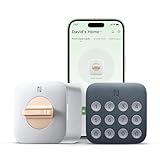
Overview: The Anona Holo Wi-Fi Smart Lock delivers impressive features at just $84.99, making it the budget champion in retrofit smart locks. This keypad-equipped device transforms most single-cylinder deadbolts without replacing exterior hardware, offering keyless entry and app control through built-in Wi-Fi without requiring a separate hub.
What Makes It Stand Out: No-hub Matter ecosystem support is remarkable at this price point, enabling native compatibility with Alexa and Apple HomeKit for voice control. The anomaly detection feature automatically alerts you to jammed or left-open doors, while the inertial sensor enables reliable auto-locking when the door closes—features typically found in premium models.
Value for Money: Exceptional. Under $85, you’re getting Wi-Fi connectivity, a physical keypad, auto-lock, guest management, and anomaly detection. Competing brands often charge $150+ for similar functionality. The 4-6 month battery life on four AA batteries is reasonable, with a low-power travel mode extending usage.
Strengths and Weaknesses: Strengths include unbeatable pricing, comprehensive features, easy installation, and modern Matter support. The main weakness is Anona’s lesser-known brand status, which may concern warranty and long-term support. Compatibility checks are essential despite broad claims.
Bottom Line: The Anona Holo is the clear value winner for most homeowners. It democratizes smart lock technology without compromising core features. If you’re comfortable with a newer brand, this offers premium functionality at a fraction of the cost, making it ideal for first-time smart home adopters.
8. Kwikset Convert Smart Lock Conversion Kit (Amazon Key Edition – Amazon Cloud Cam required), Compatible with Alexa in Satin Nickel

Overview: The Kwikset Convert Smart Lock Conversion Kit (Amazon Key Edition) in Satin Nickel offers a straightforward way to smarten your door for $124.99. Designed specifically for Amazon’s ecosystem, this 2017 TechHome Product of the Year replaces only interior hardware while preserving your existing deadbolt and keys—ideal for renters.
What Makes It Stand Out: Its renter-friendly design is genuinely thoughtful, allowing tenants to add smart functionality without landlord permission or permanent changes. The installation requires just a screwdriver and works with most Kwikset, Weiser, Baldwin, and Schlage standard deadbolts.
Value for Money: The price is mid-range, but the requirement of an Amazon Cloud Cam (sold separately) adds significant cost for full functionality. Without the camera, you lose the core Amazon Key features like in-garage delivery. As a 2017 model, it lacks modern conveniences like built-in Wi-Fi or Matter support.
Strengths and Weaknesses: Strengths include dead-simple installation, preserved existing keys, and seamless Amazon Key integration. Weaknesses are the mandatory Cloud Cam purchase, outdated technology, limited standalone features, and no support for interconnected locksets.
Bottom Line: This lock serves a narrow audience—Amazon Key subscribers wanting minimal door modification. For broader smart home integration or standalone use, newer alternatives offer better value. Renters locked into Amazon’s ecosystem will appreciate it, but most buyers should consider more current, hub-free options.
9. Philips Retrofit Smart Lock 230X, Smart Lock for Existing Deadbolt Built-in WiFi App Remote Control, Upgrade Your Door Lock Keyless Entry for Front Door, Auto Lock, Support Alexa & Google, Silver

Overview: The Philips Retrofit Smart Lock 230X brings trusted brand reliability to the conversion market at $119.99. This silver smart lock upgrades existing deadbolts with built-in Wi-Fi, eliminating hub requirements while letting you keep traditional keys for backup access.
What Makes It Stand Out: Built-in Wi-Fi with remote access via the Philips Home Access app is the headline feature, offering true anywhere control without additional hardware. Voice control through both Alexa and Google Assistant provides flexibility, while comprehensive logging shows who accessed your door and when—excellent for security monitoring.
Value for Money: Very competitive. At $120, it matches the feature set of $150+ competitors from Yale or August. The auto-locking function activates when the door closes, and instant phone alerts keep you informed of all activity. No hidden hub costs significantly improve total ownership value.
Strengths and Weaknesses: Strengths include respected brand name, native Wi-Fi, dual voice assistant support, detailed access logs, and straightforward installation. Weaknesses are unspecified battery life (a concern for Wi-Fi locks) and potential app reliability issues common with newer smart home products.
Bottom Line: The Philips 230X is an excellent choice for brand-conscious buyers wanting comprehensive features without ecosystem lock-in. It balances reliability, functionality, and price effectively. If you value detailed access tracking and dual voice assistant support, this retrofit lock deserves serious consideration.
10. Kwikset Convert Smart Lock Conversion Kit (Amazon Key Edition – Amazon Cloud Cam required), Compatible with Alexa in Venetian Bronze

Overview: The Kwikset Convert Smart Lock Conversion Kit (Amazon Key Edition) in Venetian Bronze provides basic smart functionality for $96.50, making it the most affordable Kwikset Convert option. Like its Satin Nickel sibling, it transforms existing deadbolts by replacing only interior hardware while preserving your keys.
What Makes It Stand Out: Its primary distinction is the lower price point while maintaining Kwikset brand recognition and Amazon Key compatibility. The Venetian Bronze finish offers a classic aesthetic that matches many traditional home styles better than modern silver tones.
Value for Money: At under $97, it’s the budget entry into Kwikset’s conversion lineup. However, the mandatory Amazon Cloud Cam requirement (sold separately) means true cost is higher. Without the camera, functionality is severely limited, making it essentially a Bluetooth lock with Amazon Key potential.
Strengths and Weaknesses: Strengths include trusted brand name, easy screwdriver installation, renter-friendly non-destructive setup, and attractive Venetian Bronze finish. Weaknesses are dependence on Amazon Cloud Cam, lack of built-in Wi-Fi, limited standalone features, and dated technology that lacks modern standards like Matter.
Bottom Line: Only consider this lock if you’re fully committed to the Amazon Key ecosystem and want the cheapest compatible option from an established brand. For general smart lock use, newer Wi-Fi-enabled alternatives provide better value and independence. Its low price is tempting but limiting without additional Amazon hardware investments.
What Is a Smart Lock Conversion Kit?
A smart lock conversion kit is a motorized device that mounts over the interior thumb turn of your existing deadbolt. Unlike full replacement smart locks that completely swap out your hardware, retrofit kits work with what you already have. They physically turn the deadbolt mechanism via a small motor, controlled wirelessly through your smartphone or smart home system.
How Retrofit Kits Differ from Full Replacement Locks
The fundamental difference lies in preservation versus replacement. Full replacement locks integrate the smart technology directly into the deadbolt mechanism itself, requiring you to remove and discard your existing hardware. Retrofit kits, conversely, maintain your exterior keyway, interior aesthetics, and existing security grade. This distinction matters enormously for renters, historic homes with specialty hardware, or doors with high-security deadbolts you don’t want to downgrade.
Why Choose a Retrofit Solution Over a New Deadbolt?
Budget-conscious shoppers aren’t the only ones drawn to conversion kits. The retrofit approach solves multiple problems simultaneously, offering flexibility that full replacement locks simply cannot match.
Cost-Effectiveness Without Compromise
At under $100, you’re getting 80% of the functionality of $200+ full replacement locks. The cost savings come from simplified manufacturing—fewer machined metal parts and no exterior keypad or touchscreen. Yet you retain the core benefits: remote access, activity logs, and temporary guest credentials. For many users, this represents the optimal value proposition.
Preserving Your Existing Hardware
Your current deadbolt might be a Grade 1 commercial lock or match a specific finish throughout your home. Conversion kits respect that investment. They also mean you keep your physical keys as a failsafe, eliminating the anxiety of being locked out due to a dead battery or technical glitch.
Key Features to Evaluate in Sub-$100 Kits
The budget category forces manufacturers to prioritize certain features over others. Understanding these priorities helps you identify which capabilities align with your needs.
Connectivity Protocols: Bluetooth vs. Wi-Fi vs. Zigbee
Bluetooth-only kits dominate the sub-$100 space because Bluetooth modules cost less and don’t require cloud infrastructure. You’ll control the lock from within 30-40 feet, perfect for apartment dwellers. Wi-Fi enabled kits at this price point often use stripped-down chips with higher power consumption, impacting battery life. Zigbee or Z-Wave models appeal to smart home enthusiasts but require a separate hub, adding hidden costs.
Auto-Lock and Auto-Unlock Capabilities
Auto-lock triggers after a set time—typically 30 seconds to 5 minutes—and works reliably across all models. Auto-unlock, which detects your phone’s approach and disengages the bolt, proves more complex. Budget kits often struggle with geofencing accuracy, sometimes unlocking when you’re merely walking past your door rather than approaching it intentionally.
Guest Access and Digital Key Management
Most kits offer unlimited permanent users but limit temporary or scheduled access in their free tiers. Some restrict you to five active temporary codes unless you subscribe to a premium plan. Scrutinize these limitations before buying, especially if you manage an Airbnb or have frequent visitors.
Door Compatibility: The Make-or-Break Factor
No feature matters if the kit doesn’t fit your door. Compatibility issues account for 60% of negative reviews in the budget category, yet most problems are preventable with proper measurement.
Measuring Your Existing Deadbolt
Grab a tape measure and check three critical dimensions: backset (the distance from the door edge to the center of the borehole, typically 2-3/8" or 2-3/4"), cross bore diameter (usually 2-1/8"), and door thickness (standard is 1-3/8" to 1-3/4"). Most product pages bury these requirements in fine print, so measure first.
Understanding Backset, Cross Bore, and Door Thickness
Non-standard doors—common in older homes or custom builds—often require adapter plates or extension kits that may not be included. Some budget kits simply cannot accommodate doors thicker than 1-3/4". Others struggle with rim-mounted deadbolts or integrated multipoint locking systems. When in doubt, contact the manufacturer with your exact measurements before purchasing.
Installation Complexity: What to Expect
The DIY promise of conversion kits holds true for most users, but installation isn’t always tool-free. Realistic expectations prevent frustration.
Tools You’ll Need for DIY Setup
While many kits advertise “3-minute installation,” you’ll typically need a Phillips head screwdriver, and possibly a flathead for prying off tight-fitting thumb turns. Some installations benefit from a small level to ensure the motor aligns perfectly with the deadbolt tailpiece. Metal doors may require a drill to create pilot holes for mounting screws.
Common Installation Pitfalls to Avoid
Overtightening mounting screws can bind the motor, causing it to strain and drain batteries rapidly. Misalignment between the motor’s drive shaft and your deadbolt tailpiece produces clicking noises and eventual failure. Always perform a manual test—turning the lock by hand—before powering on the device. Skipping calibration sequences, which teach the motor your lock’s specific rotation range, ranks as the number one user error.
Security Standards and Certifications
Budget pricing shouldn’t mean compromised security. Reputable manufacturers maintain certain baseline protections even at lower price points.
Encryption Protocols That Matter
Look for AES 128-bit encryption for Bluetooth communication and TLS 1.2+ for any Wi-Fi data transmission. Avoid kits that don’t explicitly state their encryption standards in the product specifications. The absence of this information often indicates outdated or weak security implementations vulnerable to replay attacks.
ANSI/BHMA Grading Explained for Retrofit Kits
Here’s the catch: retrofit kits themselves don’t carry ANSI/BHMA grades because they don’t replace the locking mechanism. Your security remains dependent on your existing deadbolt’s grade. A Grade 3 deadbolt paired with a smart retrofit still provides only Grade 3 protection. Don’t expect a budget kit to upgrade your underlying security—only convenience.
Smart Home Ecosystem Integration
The promise of “works with Alexa” comes with important caveats in the sub-$100 category. Understanding integration limitations prevents disappointment.
Works With Alexa, Google, and HomeKit
Bluetooth-only kits require a separate smart home hub (like SmartThings or Hubitat) for voice control. Wi-Fi models may offer direct integration but often support only basic lock/unlock commands, not advanced features like querying lock status or setting user codes via voice. Apple HomeKit support remains rare under $100 due to Apple’s licensing costs, so Siri users should verify certification carefully.
Matter Support: The Future of Interoperability
Matter, the new smart home standard promising universal compatibility, is slowly entering the budget market. Kits with Matter support future-proof your purchase, ensuring they’ll work with any Matter-compatible ecosystem. However, early implementations may be buggy, and Matter-over-Thread requires a Thread border router, adding complexity for the average user.
Power Management and Battery Life
Nothing kills the smart lock experience faster than constant battery changes. Budget kits face particular challenges here due to less efficient components.
Expected Battery Longevity in Real-World Use
Bluetooth kits should deliver 6-12 months on four AA batteries under normal use. Wi-Fi models often drop to 3-5 months due to constant connectivity. Be skeptical of claims exceeding these ranges—they’re usually based on minimal daily cycles. Cold weather dramatically reduces battery efficiency; expect 30-40% shorter life in freezing temperatures.
Low-Battery Warnings and Backup Entry Methods
Most kits provide app notifications and audible beeps at 20% battery remaining. Crucially, verify the battery replacement process doesn’t require recalibration—some cheaper models lose their settings when power is removed. Always maintain a physical key backup, and test it quarterly. Some kits include a 9V battery terminal on the exterior for emergency power; this feature alone justifies a slightly higher price within the budget range.
Mobile App Experience and Remote Access
The app serves as your primary interface, yet app quality varies wildly among budget manufacturers. A poor app experience can render even the best hardware useless.
Free vs. Paid Subscription Models
Many sub-$100 kits subsidize their hardware cost with optional subscription plans. Free tiers typically include basic locking, unlimited permanent users, and 7 days of activity history. Paid plans ($3-8/month) unlock scheduled access, extended history, and advanced notifications. Calculate the total cost of ownership—if you need premium features, a $120 kit with free everything might be cheaper long-term.
User Interface and Activity Logging
Evaluate app store reviews focusing on comments about lag, crashes, and notification reliability. Quality apps offer detailed activity logs showing which user operated the lock and when. Geofencing settings should be granular, allowing you to adjust the activation radius to prevent false triggers. Avoid apps that require location tracking to be always-on; this drains your phone’s battery unnecessarily.
Design Considerations for Renters and Homeowners
The interior-mounted design of retrofit kits offers unique advantages for temporary living situations, but aesthetic and modification concerns still apply.
Temporary vs. Permanent Modifications
Most conversion kits install with just a few screws and leave no permanent marks when removed—ideal for rental agreements prohibiting alterations. Some use adhesive mounting plates that can damage paint if removed improperly. Always photograph your door’s interior before installation to document its original condition for landlords.
Aesthetic Impact on Your Door’s Appearance
Budget kits prioritize function over form, often featuring bulky plastic housings. Measure the clearance between your door and any screen or storm door; some kits protrude 2-3 inches inward. Color options are typically limited to white or black. If design matters, look for models with swappable faceplates or minimal visual profiles, though these features are rare under $100.
Troubleshooting Common Issues
Even well-reviewed kits encounter problems. Knowing typical failure modes helps you diagnose and resolve issues without returning the product.
Calibration Problems and Motor Strain
If your lock makes grinding noises or fails to fully extend/retract, recalibration is usually the fix. This process teaches the motor the exact rotation degrees needed for your specific deadbolt. Remove batteries, wait 30 seconds, then follow the manufacturer’s calibration sequence precisely. Persistent strain indicates your deadbolt is too stiff—disassemble and lubricate the mechanism with graphite powder, not oil.
Connectivity Dropouts and Range Issues
Bluetooth locks that frequently disconnect may be suffering from interference. Metal doors and frames act as Faraday cages, weakening signals. Try repositioning the kit slightly or adding a small Bluetooth repeater nearby. For Wi-Fi models, poor signal strength often causes lockouts; verify your router reaches the door location with at least two bars of signal strength.
Warranty and Customer Support Expectations
Lower prices typically correlate with reduced support infrastructure. Setting realistic expectations helps you choose manufacturers that stand behind their products.
What Sub-$100 Warranties Typically Cover
Expect 1-year limited warranties covering manufacturing defects but excluding installation damage, water intrusion, or normal wear. Some brands offer extended warranties if you register within 30 days. Read the fine print: many warranties become void if you use rechargeable batteries, which output slightly lower voltage than alkalines.
Community Support vs. Manufacturer Assistance
Established brands maintain active community forums where users share solutions. Newer budget brands often rely solely on email support with 48-72 hour response times. Check Reddit and SmartThings communities for real-world support experiences before buying. Companies that provide detailed installation videos and troubleshooting guides demonstrate commitment to customer success.
Maximizing Value in the Budget Category
Not all corners cut by manufacturers impact usability. Learning which compromises matter helps you spot genuine bargains versus false economies.
Features Worth Paying Extra For
Within the sub-$100 range, an extra $10-20 can unlock significant upgrades: Wi-Fi instead of Bluetooth, 9V battery backup terminals, or metal gears instead of plastic. These improvements dramatically impact long-term reliability. Prioritize kits that allow firmware updates; this indicates ongoing security patches and feature improvements.
Where Manufacturers Cut Corners
Common cost-saving measures include weaker motors (struggling with sticky deadbolts), non-replaceable battery compartments, and proprietary screws that require included tools (lose the tool and you’re stuck). Some apps display ads or push subscription upgrades aggressively. Others use cloud servers in regions with weaker privacy laws. These trade-offs may be acceptable but deserve consideration.
Real-World Use Cases and Lifestyle Benefits
Understanding how these devices fit specific lifestyles clarifies whether a conversion kit truly meets your needs or if you should save for a premium alternative.
For Airbnb Hosts and Rental Properties
Conversion kits shine here. Generate time-limited codes for each guest that expire automatically. Maintain your master key access while providing a seamless experience. Just ensure your chosen kit allows remote code creation without a subscription, and verify local regulations about smart locks in rental properties—some jurisdictions require physical key backup availability.
For Families and Busy Households
Assign each family member a unique code or phone credential to track who’s home. Auto-lock eliminates the “did I lock the door?” anxiety. However, test auto-unlock carefully with kids’ phones; geofencing can be unreliable with devices that have location services restricted for battery saving.
For Elderly Users and Accessibility
For seniors, the physical act of turning a deadbolt can become difficult. A retrofit kit restores independence while keeping familiar keys as backup. Choose models with large, clear manual override buttons and loud confirmation beeps. Avoid kits requiring smartphone app interaction for basic operation—look for ones with simple keypad accessories.
Future-Proofing Your Purchase
Technology evolves rapidly, and today’s bargain shouldn’t become tomorrow’s paperweight. Strategic selection extends your kit’s useful lifespan.
Firmware Update Policies
Check the manufacturer’s website for firmware release notes. Companies that issue updates quarterly demonstrate active development. Avoid brands with no update history or those that require you to email support to receive updates. Over-the-air (OTA) updates via the app are essential; manual USB updates are impractical for most users.
Expandability and Upgrade Paths
Some kits offer modular accessories: add-on keypads, fingerprint readers, or Zigbee modules. This expandability lets you enhance functionality without replacing the entire unit. Even if you don’t need these now, their availability indicates a robust product ecosystem. Conversely, proprietary designs that don’t integrate with broader smart home standards may leave you stranded if the company discontinues support.
Frequently Asked Questions
1. Will a smart lock conversion kit work on a mortise lock or sliding glass door?
No, standard retrofit kits are designed exclusively for cylindrical deadbolts (the common single-bore type). Mortise locks, rim locks, and sliding door mechanisms have different geometries and operating principles that require specialized solutions, typically costing $150+.
2. Can I still use my original keys after installing a conversion kit?
Absolutely. Retrofit kits mount on the interior side only and don’t alter the exterior keyway. Your existing keys function exactly as before, providing crucial backup access if batteries die or the motor fails.
3. How do I know if my deadbolt is too stiff for a budget kit?
Test it manually. If you need more than light pressure to turn the thumb turn, the motor will strain. Remove the interior plate and operate the tailpiece directly with pliers. If it feels gritty or requires significant force, disassemble and clean your deadbolt with graphite lubricant before installing any smart kit.
4. Do these kits work during a power outage?
Yes, they run on batteries and operate independently of home power. However, Wi-Fi models lose remote access if your router and modem lose power. Bluetooth models remain fully functional via phone control. Always keep fresh batteries installed.
5. Are smart lock conversion kits secure against hacking?
Reputable kits use AES 128-bit encryption, making remote hacking extremely difficult. The greater risk is physical—ensure your existing deadbolt is high quality. Bluetooth models have a smaller attack surface than Wi-Fi since they can’t be accessed from the internet without a hub.
6. What happens if I lose my phone?
Most apps allow you to log in from another device to disable lost phone access. Keep your physical keys as backup. Some kits offer a web portal for emergency access. Set up a PIN or biometric lock on your phone itself for an additional layer of security.
7. Can I install a conversion kit on a door with a decorative handle set?
Usually yes, if there’s sufficient clearance. Measure the distance between your deadbolt thumb turn and the handle set. Most kits need at least 2.5 inches of unobstructed space. Low-profile models exist for tight installations but are harder to find under $100.
8. Will cold weather affect performance?
Lithium batteries lose capacity in freezing temperatures, reducing battery life by 30-40%. The motor may also run slower. Keep batteries fresh before winter. Some kits have minimum operating temperatures around -4°F; check specifications if you live in extremely cold climates.
9. Do I need to own my home to install one?
No, conversion kits are ideal for renters since they don’t modify the exterior or require permanent changes. However, review your lease and get written permission if required. Document the door’s original condition with photos before installation.
10. How long do these budget kits typically last before needing replacement?
With proper installation and moderate use, expect 3-5 years of service. The motor is usually the failure point. Kits with metal gears and replaceable batteries tend to last longer. Budget for replacement rather than repair—most manufacturers don’t service units out of warranty.