Your iPhone has already replaced your wallet, camera, map, and maybe even your car keys. Now it’s ready to eliminate that jingle-jangle of metal keys in your pocket forever. Apple Home Key represents one of those rare technological shifts that feels genuinely magical the first time you tap your phone against your door and watch it swing open. But behind that seamless experience lies a complex ecosystem of hardware standards, security protocols, and installation considerations that can make or break your smart lock journey.
This comprehensive guide cuts through the marketing fluff to give you the expert knowledge you need to choose the perfect Apple Home Key compatible smart lock. We’ll explore everything from the nuanced security certifications that actually matter to the subtle design details that’ll keep your home looking sharp. Whether you’re a tech enthusiast ready to automate your entire life or simply tired of fumbling for keys with arms full of groceries, understanding these critical factors will transform not just your iPhone routine, but your entire relationship with home security.
Top 10 Smart Locks with Apple Home Key
Detailed Product Reviews
1. ThorBolt X1 Apple Home Key Lock, iOS ONLY Smart Keyless Entry HomeKit Door Lock with Fingerprint, Keypad Deadbolt Lock Works with HomeKit Over Thread (Border Router Required), IP65 Weatherproof, Black

Overview: The ThorBolt X1 positions itself as an affordable Apple-centric smart lock, delivering Home Key compatibility and Thread connectivity for just $109.99. Designed exclusively for iOS households, it offers six unlocking methods including fingerprint recognition, keypad entry, and NFC tap-to-unlock via iPhone or Apple Watch. The IP65 weatherproof rating and DIY-friendly installation make it suitable for most standard exterior doors in North America.
What Makes It Stand Out: The dedicated Thread support sets the X1 apart from budget competitors, providing ultra-reliable, low-latency communication directly with Apple Home without draining Wi-Fi bandwidth. The one-year battery life from eight AA batteries is impressive for a feature-rich smart lock, while the Sleekpoint app allows granular control over 50 users, 100 passcodes, and 100 fingerprints. Local encryption of biometric data and the ability to unlock even when iPhone is dead shows thoughtful security engineering.
Value for Money: At $110, the X1 undercuts most Thread-enabled competitors by $80-120 while maintaining premium features. You’re getting Apple Home Key, fingerprint scanning, and robust weatherproofing typically found in $200+ locks. The trade-off is the lesser-known brand name and iOS-only limitation, but for Apple-exclusive homes, this represents exceptional value.
Strengths and Weaknesses: Pros: Thread connectivity for reliable Apple Home integration; excellent battery life; comprehensive access management; IP65 weatherproof; works when phone is dead; affordable price. Cons: iOS-only ecosystem; requires Thread border router; brand recognition concerns; no Android support; no built-in Wi-Fi for remote access without hub.
Bottom Line: The ThorBolt X1 is a compelling choice for Apple-centric households seeking Thread reliability without the premium price tag. If you’re already invested in the Apple ecosystem with a HomePod or Apple TV, this lock delivers flagship features at a budget-friendly price. Just don’t expect cross-platform compatibility.
2. ULTRALOQ Bolt NFC, World’s First Smart Lock with Apple Home Key and Android NFC Tap to Unlock, Built in Wi-Fi Deadbolt, Remote Control, Works with HomeKit, Alexa, Google, 1 Year Battery, BHMA Cert.

Overview: The ULTRALOQ Bolt NFC claims the title of world’s first smart lock supporting both Apple Home Key and Android NFC tap-to-unlock, making it a true cross-platform solution at $129.99. With built-in Wi-Fi and eight entry methods including voice control, anti-peep keypad, and auto-unlock, this BHMA-certified deadbolt targets households with mixed device ecosystems seeking maximum flexibility.
What Makes It Stand Out: True platform agnosticism is the headline feature—iPhone, Android, Apple Watch, and even key fobs all work seamlessly. The integrated 2.4GHz Wi-Fi eliminates the need for additional hubs for remote access, while smart auto-lock and auto-unlock features (with door sensor) add genuine convenience. Real-time notifications and comprehensive sharing options through the U-home app provide robust access management without ecosystem lock-in.
Value for Money: At $130, you’re paying a modest premium over the ThorBolt X1 but gaining Android compatibility and native Wi-Fi—features worth the extra $20 for mixed-device homes. Compared to the $190+ Aqara and Yale options, the ULTRALOQ delivers similar versatility at a significant discount, though without Thread’s mesh networking reliability.
Strengths and Weaknesses: Pros: Cross-platform support (Apple & Android); built-in Wi-Fi; eight unlocking methods; BHMA certification; auto-lock/unlock with sensor; no hub required for remote access; competitive pricing. Cons: Wi-Fi consumes more power than Thread; 2.4GHz only; app ecosystem less polished than Apple’s; no emergency power terminal mentioned; potential connectivity issues without mesh network.
Bottom Line: For households juggling iPhones and Android devices, the ULTRALOQ Bolt NFC is the clear winner. It bridges ecosystem divides while maintaining premium features and reliable performance. The built-in Wi-Fi and BHMA certification justify the price, making it a versatile, future-proof choice for multi-platform families.
3. Aqara Smart Lock U100, Fingerprint Keyless Entry Door Lock with Apple Home Key, Touchscreen Keypad, Bluetooth Electronic Deadbolt, IP65 Weatherproof, Supports Apple HomeKit, Alexa, Google, IFTTT, Gray

Overview: The Aqara U100 positions itself as a premium smart lock with Apple Home Key integration, fingerprint recognition, and touchscreen keypad for $189.99. Unlike Thread-based competitors, it uses Bluetooth and requires an Aqara Zigbee 3.0 hub for remote capabilities, targeting users already invested in Aqara’s ecosystem. The BHMA Level 3 certification and IP65 rating promise commercial-grade security and durability.
What Makes It Stand Out: The U100’s gyroscope-based auto-lock eliminates the need for external door sensors, while Do Not Disturb mode demonstrates thoughtful user experience design for late-night arrivals. Local AES encryption and the USB-C emergency charging port address modern security and convenience concerns. Deep integration with other Aqara devices—like automatically unlocking when the video doorbell rings—creates cohesive smart home scenarios competitors can’t match.
Value for Money: At $190, the U100 is $60-90 more than Thread alternatives, but you’re paying for Aqara’s ecosystem synergy and BHMA Level 3 certification. However, the hidden cost of a required Zigbee hub ($30-50) makes the true investment closer to $220-240, putting it in direct competition with the Yale Assure 2 Plus. For non-Aqara households, the value proposition weakens considerably.
Strengths and Weaknesses: Pros: Premium BHMA Level 3 certification; ecosystem integration; gyroscope auto-lock; Do Not Disturb mode; USB-C emergency charging; IP65 weatherproof; AES encryption. Cons: Requires Aqara Zigbee hub for full features; higher price point; only 8-month battery life; Bluetooth range limitations; NFC cards sold separately; no built-in Wi-Fi or Thread.
Bottom Line: The Aqara U100 excels for existing Aqara ecosystem users seeking seamless automation and top-tier security certification. For others, the hub requirement and premium price are hard to justify when Thread-based alternatives offer similar features with better connectivity. Choose this for ecosystem synergy, not standalone value.
4. Yale Security Assure Lock 2 Plus Apple Home Keys (Tap to Open) Deadbolt, Satin Nickel Smart Keyless Entry Door Lock with Wi-Fi Connected Keypad for Code Entry and Remote Access, YRD450-N-WF1-619

Overview: The Yale Assure Lock 2 Plus represents the premium tier of Apple Home Key locks at $233.96, combining Yale’s century-old security heritage with modern smart connectivity. This Wi-Fi-enabled deadbolt offers tap-to-open convenience, remote management via the Yale Access App, and features like Power Reserve that keeps Home Key working even when your iPhone battery dies. The satin nickel finish and refined design target discerning homeowners.
What Makes It Stand Out: Yale’s Power Reserve technology is genuinely innovative—allowing Home Key access for hours after your iPhone needs charging—addressing a real pain point. The 9V battery backup terminal provides emergency power, a feature missing from many competitors. Yale’s brand reputation and BHMA certification deliver peace of mind, while the polished Yale Access App offers superior user experience with one-touch locking and detailed activity tracking.
Value for Money: At $234, this is the most expensive option reviewed, commanding a $100+ premium over ThorBolt models. You’re paying for Yale’s trusted brand, refined software experience, and unique power management features. For homeowners prioritizing reliability and support over cutting-edge specs, the premium is justified. However, tech-savvy users may find equal functionality at lower prices.
Strengths and Weaknesses: Pros: Premium Yale brand reputation; Power Reserve for dead iPhones; 9V emergency terminal; BHMA certification; polished app experience; Wi-Fi connectivity; one-touch locking; excellent customer support. Cons: Highest price point; no Thread support; Wi-Fi battery drain; no Android compatibility; requires Yale Connect Wi-Fi bridge (may be included); limited to Apple ecosystem.
Bottom Line: The Yale Assure Lock 2 Plus is the premium choice for Apple households prioritizing brand trust and polished user experience over value. Its power management innovations and emergency features provide genuine utility, but budget-conscious buyers will find comparable Thread-based options for far less. Buy for peace of mind, not price-performance.
5. X3 Apple Home Key Door Lock Deadbolt, iOS ONLY, Smart Keyless Entry Door Lock with Fingerprint, Works with HomeKit Over Thread (Border Router), Voice/App/Remote Control, IP65 Weatherproof, Black

Overview: The ThorBolt X3 is the budget sibling to the X1, delivering Apple Home Key and Thread connectivity for an aggressive $99.99 price point. This iOS-only smart lock strips away the keypad found on the X1 but retains fingerprint recognition, Siri control, and app management. Targeting cost-conscious Apple households, it promises the same one-year battery life and IP65 weatherproofing in a streamlined package.
What Makes It Stand Out: At under $100, the X3 is the most affordable Thread-enabled Apple Home Key lock on the market, democratizing reliable smart home connectivity. The lightning-fast fingerprint sensor with adaptive learning provides secure, convenient access, while the Sleekpoint app offers robust user management for 50 people and 100 fingerprints. The DIY installation and broad compatibility with standard deadbolts make it accessible to renters and homeowners alike.
Value for Money: The X3’s $100 price tag is genuinely disruptive—$30 less than its X1 sibling and $130 below the ULTRALOQ. You’re sacrificing the physical keypad and some passcode capacity, but retaining core features like Thread, fingerprint scanning, and Home Key. For Apple users who primarily use phone/watch or fingerprint entry, this represents unbeatable value, though the brand’s longevity remains an unknown.
Strengths and Weaknesses: Pros: Unbeatable sub-$100 price; Thread connectivity; one-year battery life; fingerprint recognition; IP65 weatherproof; works when iPhone is dead; easy DIY installation; full Apple Home integration. Cons: No physical keypad; iOS-only; requires Thread border router; unknown brand reliability; limited to 5 entry methods; no built-in Wi-Fi; fewer passcode options than X1.
Bottom Line: The ThorBolt X3 is the value champion for Apple-exclusive households wanting Thread reliability on a tight budget. If you can live without a keypad and trust a newer brand, this delivers premium smart lock features at an entry-level price. For minimalist Apple users, it’s nearly impossible to beat—just ensure you have that Thread hub.
6. Kwikset Halo Select Plus Matte Black Touchscreen Apple Home Keys Tap-to-Unlock, Wi-Fi and Matter Enabled Smart Lock Deadbolt with Door Status Sensor and Intrusion Detection
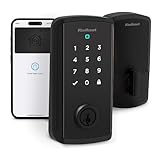
Overview: The Kwikset Halo Select Plus represents the premium tier of smart locks, offering comprehensive Apple Home Key integration with tap-to-unlock convenience. This Wi-Fi and Matter-enabled deadbolt eliminates hub requirements while supporting up to 250 access codes. The inclusion of a door status sensor and intrusion detection sets it apart from standard smart locks, providing real-time security monitoring directly through your preferred smart home ecosystem.
What Makes It Stand Out: NFC-based Apple Home Key functionality delivers seamless iPhone and Apple Watch unlocking, even without opening an app. Matter compatibility future-proofs your investment across platforms, while the integrated intrusion detection system actively monitors for forced entry attempts. The massive 250-code capacity makes it ideal for property managers or large households needing granular access control with scheduling capabilities.
Value for Money: At $329, this lock commands a premium but justifies it through enterprise-grade features. Comparable commercial-grade locks cost significantly more, while consumer alternatives lack the intrusion detection and Matter support. For security-conscious homeowners wanting best-in-class Apple integration without compromise, the price reflects genuine innovation rather than brand markup.
Strengths and Weaknesses: Strengths include native Wi-Fi connectivity, Matter multi-platform support, superior code capacity, and proactive security monitoring. The build quality matches Kwikset’s reputation for durability. Weaknesses involve the premium price point, potential overkill for single-family homes, and limited color options. Battery life isn’t specified, which may concern some users.
Bottom Line: Choose the Halo Select Plus if you demand maximum security, future-proof connectivity, and extensive access management. It’s overkill for basic needs but unbeatable for comprehensive smart home integration and property management scenarios.
7. ULTRALOQ Bolt Fingerprint WiFi Smart Lock, Works with Apple Home, Siri, Alexa, 8-in-1 Keyless Entry with Fingerprint ID, App Remote Control, Keypad Deadbolt, BHMA Cert., Easy Install, 10 Mo. Battery

Overview: The ULTRALOQ Bolt Fingerprint delivers exceptional versatility at a mid-range price point, combining biometric security with Wi-Fi connectivity and full Apple Home support. This 8-in-1 lock accommodates fingerprints, passcodes, smartphone unlocking, voice commands, and traditional keys. BHMA certification ensures commercial-grade durability, while the 10-month battery life minimizes maintenance concerns for busy households.
What Makes It Stand Out: The integrated fingerprint reader stores 50 prints with intelligent learning capabilities that improve recognition speed over time. Native Wi-Fi eliminates hub requirements, offering true remote access without additional hardware costs. The auto-unlock feature uses geofencing for hands-free entry, while comprehensive voice assistant support across Siri, Alexa, and Google provides unmatched flexibility.
Value for Money: At $179.99, this lock significantly undercuts premium competitors while delivering comparable features. The 8-in-1 entry methods provide redundancy rarely found at this price. BHMA certification and 10-month battery life add long-term value, making it a smarter investment than budget options that sacrifice reliability or require costly hub purchases.
Strengths and Weaknesses: Strengths include versatile unlocking options, robust build quality, hub-free Wi-Fi, and excellent cross-platform compatibility. The fingerprint sensor’s learning algorithm and comprehensive app control stand out. Weaknesses include the 50-fingerprint limit (lower than some competitors) and 2.4GHz Wi-Fi-only support, which may cause connectivity issues in congested networks.
Bottom Line: The ULTRALOQ Bolt Fingerprint excels for users wanting maximum flexibility without premium pricing. It’s ideal for tech-savvy families needing reliable biometric access and broad smart home integration.
8. Aqara Smart Lock U50, Keyless Entry Door Lock with Apple Home Key, Bluetooth Deadbolt Lock, App Remote Control, Supports Apple HomeKit, Matter, Google Home, Alexa, IFTTT, Black

Overview: The Aqara U50 offers budget-conscious Apple users a streamlined smart lock experience with Home Key tap-to-unlock functionality. This Bluetooth-based deadbolt integrates with Apple HomeKit and Matter (via hub), providing keyless entry through iPhone or Apple Watch. While requiring an Aqara Zigbee hub for remote features, it delivers core smart lock capabilities at an accessible price point with impressive IPX5 weather resistance.
What Makes It Stand Out: The power-off Apple Home Key functionality ensures access even with a dead device battery—a rare feature in budget locks. The Do Not Disturb mode mutes operation sounds during set hours, showing thoughtful design for shared living spaces. Local AES encryption stores data securely without cloud dependency, addressing privacy concerns common in connected devices.
Value for Money: At $124.99, the U50 is among the most affordable Home Key-compatible locks available. The hub requirement adds hidden costs ($30-60), but even with this addition, it remains competitively priced. For Apple-centric households already invested in the Aqara ecosystem, it delivers exceptional value compared to standalone Wi-Fi locks.
Strengths and Weaknesses: Strengths include unbeatable price for Home Key support, robust weatherproofing, strong privacy protections, and Matter compatibility. The auto-lock gyroscope and emergency USB-C charging add practical value. Weaknesses center on mandatory hub purchase for remote access, Bluetooth-only direct connection limiting range, and no built-in fingerprint sensor.
Bottom Line: The U50 is perfect for Apple users on a budget who already own or plan to build an Aqara smart home system. Skip it if you need standalone Wi-Fi connectivity or biometric entry.
9. Aqara Smart Lock U100, Fingerprint Keyless Entry Door Lock with Apple Home Key, Touchscreen Keypad, Smart Electronic Deadbolt, IP65 Weatherproof, Supports Apple HomeKit, Alexa, Google, IFTTT, Silver

Overview: The Aqara U100 upgrades the U50 with a high-precision fingerprint reader and enhanced weatherproofing while maintaining Apple Home Key integration. This Zigbee-based smart lock stores 50 fingerprints locally with AES encryption and offers multiple entry methods including touchscreen passcodes and mechanical backup keys. IP65 rating ensures reliable operation in harsh conditions, making it suitable for exposed entryways.
What Makes It Stand Out: The fingerprint sensor’s local storage and encryption provide biometric convenience without cloud security risks. IP65 weatherproofing surpasses many premium competitors, while the touchscreen keypad offers more secure code entry than physical buttons. The gyroscope-based auto-lock provides reliable operation without door sensors, and power-off Home Key support ensures you’re never locked out.
Value for Money: Priced at $189.99, the U100 bridges budget and premium tiers effectively. It costs $65 more than the U50 but adds fingerprint security and superior weatherproofing—features typically found in $250+ locks. The hub requirement remains a consideration, but for the feature set, it undercuts Wi-Fi biometric locks while delivering comparable performance.
Strengths and Weaknesses: Strengths include excellent biometric security, superior weather resistance, strong Apple integration, and flexible automation potential. The 8-month battery life is respectable, and local data processing enhances privacy. Weaknesses include mandatory Aqara hub for remote features, no native Wi-Fi, and limited to 50 fingerprints. The silver finish may not suit all décor.
Bottom Line: The U100 is ideal for security-focused users wanting biometric access and Apple Home Key without premium pricing. Accept the hub requirement as the trade-off for this feature-to-price ratio.
10. ThorBolt X1 Apple Home Key Tap to Unlock, iOS ONLY Fingerprint Keyless Entry HomeKit Door Lock, Keypad Deadbolt Lock Works with HomeKit Over Thread (Border Router Required), IP65 Weatherproof, Silver

Overview: The ThorBolt X1 targets Apple purists with Thread-enabled HomeKit integration and aggressive pricing. This iOS-exclusive lock supports Home Key tap-to-unlock, fingerprint recognition, and Siri voice control through the Thread protocol. Requiring a Thread border router for remote access, it prioritizes energy efficiency and reliability within Apple’s ecosystem while delivering premium features at a budget price point.
What Makes It Stand Out: Thread connectivity offers superior reliability and battery life compared to Wi-Fi or Bluetooth, with up to one-year operation on eight AA batteries. The dedicated NFC zone optimizes Home Key performance, while storing 100 fingerprints and 100 passcodes provides generous capacity. IP65 weatherproofing matches premium competitors, and the intelligent fingerprint learning algorithm improves accuracy through regular use.
Value for Money: At $109.99, the X1 disrupts the market by offering Thread and fingerprint security at entry-level pricing. While requiring a Thread router (HomePod mini or Apple TV 4K), many Apple users already own these devices, eliminating hidden costs. For iOS-only households, it delivers features rivaling $250+ locks for less than half the price.
Strengths and Weaknesses: Strengths include exceptional battery life, Thread reliability, generous user capacity, and unbeatable price for the feature set. The iOS-only approach simplifies setup and enhances security. Weaknesses include mandatory Thread router requirement, no Android support, limited third-party integration, and a less established brand reputation compared to Kwikset or Aqara.
Bottom Line: The X1 is a no-brainer for dedicated Apple households with Thread infrastructure. Avoid if you need cross-platform support or standalone Wi-Fi, but embrace it for maximum value within the Apple ecosystem.
What Is Apple Home Key and Why Does It Matter?
Apple Home Key isn’t just another digital key—it’s a native integration built directly into Apple Wallet, leveraging the same secure element that protects your credit cards and transit passes. Unlike third-party apps that require unlocking your phone, opening an app, and waiting for a connection, Home Key works through NFC technology with Express Mode, meaning it functions even when your iPhone battery dies. This isn’t a gimmick; it’s a fundamental rethinking of access control that prioritizes both convenience and security at the hardware level.
The significance extends beyond simple door unlocking. Home Key creates a unified ecosystem where your lock communicates seamlessly with other HomeKit devices. Arrive home and your lock can trigger lighting scenes, adjust your thermostat, and disarm security systems—all initiated by that single tap. For households with multiple Apple users, it eliminates the key management nightmare entirely. No more hiding spare keys under mats or coordinating key copies. Each family member has their own digital key that you can revoke instantly if needed.
How Apple Home Key Transforms Your Daily Routine
The Magic of Tap-to-Unlock Convenience
Picture this: you’re carrying two grocery bags, a toddler’s backpack, and your phone. Traditional smart locks force you to free a finger for fingerprint scanning or shout voice commands. With Apple Home Key, you simply tap your iPhone or Apple Watch against the lock—no need to wake the device. The NFC connection happens in under a second, and the door unlocks. This isn’t just convenience; it’s accessibility redefined. For elderly family members or those with mobility challenges, this frictionless entry removes a daily frustration.
The routine changes extend beyond entry. Leaving home becomes equally streamlined. A simple tap locks the door, and through HomeKit automations, this action can trigger your “away” scene—turning off all lights, lowering the blinds, and arming your security cameras. Your iPhone becomes the conductor of your home’s security orchestra, with the lock as the primary instrument.
Express Mode: When Seconds Count
Express Mode is the unsung hero of Apple Home Key technology. When enabled, your digital key remains active even after your iPhone battery depletes. The secure element maintains enough reserve power for approximately five hours of Express Mode functionality. This feature operates independently of your phone’s main power system, using the same technology that powers Express Transit cards.
For emergency situations, this capability proves invaluable. First responders can access your home if you’ve shared keys appropriately, and you won’t find yourself locked out after a long day when your phone dies. The security implications are equally important—Express Mode keys are cryptographically isolated from the rest of your device, meaning a dead phone presents no additional vulnerability to your digital security.
Compatibility Check: Will It Work With Your Door?
Understanding Door Thickness Requirements
Before falling in love with any smart lock, grab your tape measure. Most Apple Home Key compatible locks accommodate door thicknesses between 1-3/8 inches and 1-3/4 inches, which covers standard residential doors. However, older homes or custom installations might feature doors as thin as 1-1/4 inches or as thick as 2-1/2 inches. Some premium models offer extension kits for thicker doors, but these often cost extra and complicate installation.
Don’t just measure at one point. Door thickness can vary, especially with solid wood doors that may have been planed or trimmed over the years. Measure at the top, middle, and bottom of the door where the lock will install. If you’re replacing an existing deadbolt, also check that the edge of your door has a standard 2-1/8-inch bore hole—many smart locks require this for their integrated design.
Backset and Bore Hole Measurements Explained
The backset—the distance from the edge of the door to the center of the bore hole—comes in two standard sizes: 2-3/8 inches and 2-3/4 inches. Quality smart locks include adjustable latch mechanisms to accommodate both, but verifying this before purchasing prevents installation headaches. The bore hole diameter matters too. While most locks fit standard 2-1/8-inch holes, some European-style doors use smaller 1-1/2-inch holes that require professional modification.
Check your door’s edge preparation as well. The cross-bore hole (where the latch assembly sits) should be 1-inch in diameter. If your door has a drive-in latch (no faceplate), you’ll need to verify whether the smart lock supports this configuration or if you’ll need to chisel out a mortise for a faceplate. These details separate a 30-minute DIY installation from a half-day project requiring professional help.
Installation Realities: DIY or Professional?
Smart lock installation exists in a spectrum from simple retrofit to complete door replacement. If you’re replacing an existing deadbolt on a standard door, most Apple Home Key locks install with just a screwdriver in 20-30 minutes. The process involves removing your old deadbolt, inserting the new latch, mounting the exterior and interior assemblies, and connecting them with the provided linking bar. The final step pairs the lock with your HomeKit system through the Home app.
However, complications arise quickly with non-standard doors, integrated multi-point locking systems, or doors without existing deadbolts. Multi-point locks common in European homes or high-security doors require specific smart lock models designed for that application. Doors without deadbolts need bore holes drilled—a task that demands precise measurements and specialized tools like hole saws and jigs. Misalignment by even 1/16-inch can cause binding and premature lock failure.
Professional installation typically costs between $100-$200 but includes warranty protection on the installation work itself. Many locksmiths now specialize in smart lock installation and can address door alignment issues, weatherstripping conflicts, and integration with existing security systems. For renters, professional installation may be required to maintain your security deposit, as some modifications can’t be easily reversed.
Power Source Considerations: Batteries vs. Hardwired
Battery Life Expectations and Management
Nearly all Apple Home Key locks operate on battery power, typically using four AA batteries. Battery life varies dramatically based on usage, environmental conditions, and feature enablement. Expect anywhere from 6 months to 18 months of operation. The motor that drives the deadbolt is the primary power drain, so doors that require significant force to operate will deplete batteries faster. Extreme temperatures—both hot and cold—can reduce battery life by 30-50%.
Most locks provide low-battery warnings through the Home app, typically at 20% remaining capacity. However, don’t rely solely on digital notifications. Establish a routine of checking battery status monthly, especially before travel. Keep a set of lithium batteries on hand; they perform better in temperature extremes and last longer than alkaline. Some advanced models feature battery meters that learn your usage patterns and predict replacement dates with surprising accuracy.
Hardwired Options and Hybrid Systems
While rare in residential applications, some commercial-grade smart locks offer hardwired power options that connect to your home’s electrical system through low-voltage wiring. These eliminate battery concerns entirely but require professional installation and may need backup battery systems for power outages. More common are hybrid locks that use batteries but support optional power adapters that plug into wall outlets near the door.
Solar-powered options are emerging but remain niche. Small solar panels integrated into the lock’s exterior can trickle-charge internal batteries, extending life significantly in sunny climates. However, these require adequate direct sunlight—at least 2-3 hours daily—and may not provide sufficient power in cloudy regions or shaded entries. For most users, quality lithium batteries changed annually represent the best balance of convenience and reliability.
Security Features That Actually Matter
Understanding ANSI/BHMA Lock Grades
The American National Standards Institute (ANSI) and Builders Hardware Manufacturers Association (BHMA) certify lock durability through a grading system. Grade 1 represents commercial-grade security withstanding 1 million cycles and 10 strikes of 75 foot-pounds. Grade 2 offers residential high-security with 800,000 cycles and 5 strikes of 75 foot-pounds. Grade 3 provides basic residential security with 800,000 cycles but only 2 strikes of 75 foot-pounds.
For exterior doors, insist on Grade 1 or Grade 2 certification. Many smart locks achieve only Grade 3 because their electronic components complicate the mechanical testing process. However, several premium models now carry Grade 2 certification, proving they don’t sacrifice physical security for digital convenience. Verify the certification covers the entire lock assembly, not just the deadbolt mechanism. Some manufacturers test components separately, which can mislead consumers about overall security.
Encryption Standards and Apple HomeKit Security
Apple Home Key leverages end-to-end encryption between your device and the lock. Each digital key is unique, cryptographically signed, and stored in your device’s secure element—the same hardware that protects Apple Pay transactions. When you tap to unlock, the lock generates a one-time cryptographic challenge that your phone must answer correctly using its private key. This prevents replay attacks where someone might intercept and reuse your unlock signal.
Look for locks that support AES-256 encryption for all communications and store access logs locally with encrypted backup to iCloud. The lock should also support secure firmware updates through HomeKit, ensuring vulnerabilities can be patched without compromising security. Avoid locks that require separate apps for full functionality; these often store data on less-secure servers and create additional attack vectors. True HomeKit integration means all management happens through Apple’s infrastructure.
Physical Security: Don’t Forget the Basics
Digital features can’t compensate for poor mechanical design. Examine the strike plate included with your smart lock. Most come with flimsy, stamped-metal plates that fail under minimal force. Upgrade to a heavy-duty strike plate with at least 3-inch screws that bite into the door frame’s studs, not just the trim. This simple $15 upgrade often provides more security than a $500 lock with a weak strike plate.
Consider the lock’s resistance to physical bypass techniques. A quality smart lock should include anti-drill plates around the keyway (even if you never use physical keys), reinforced deadbolt housing, and pick-resistant pin configurations. Some models feature built-in alarms that trigger if someone attempts to tamper with the lock or force the door. These alarms should integrate with HomeKit, sending immediate notifications to your devices and triggering other security responses like camera recording.
Design Aesthetics: Matching Your Home’s Style
Finish Options and Material Quality
Smart locks come in a surprisingly limited range of finishes: satin nickel, oil-rubbed bronze, matte black, and polished brass dominate the market. However, the quality of these finishes varies enormously. Premium locks use physical vapor deposition (PVD) finishes that resist scratching and corrosion for decades. Budget options often use powder coating that chips and fades within a few years, especially on exterior doors facing harsh weather.
Consider your existing hardware’s finish and age. Satin nickel from one manufacturer can clash with satin nickel from another due to undertone differences. Some companies offer finish samples for a small fee—worth the investment before committing to a $300 lock. For coastal homes, look for marine-grade finishes that resist salt air corrosion. In extreme climates, consider locks with UV-resistant coatings that prevent finish degradation from sun exposure.
Smart Home Integration Beyond HomeKit
While Apple Home Key provides seamless iPhone integration, your lock should also play nicely with broader smart home ecosystems. Look for Thread radio support in addition to Bluetooth and Wi-Fi. Thread creates a mesh network that improves reliability and speed while reducing power consumption. It’s the foundation of Matter, the new smart home standard that ensures future compatibility regardless of platform.
Z-Wave compatibility offers another layer of flexibility, allowing integration with professional security systems like ADT or Vivint. Some locks feature multiple radio radios that operate simultaneously, ensuring you never lose connectivity. However, avoid locks that require proprietary hubs; these create single points of failure and often become obsolete when manufacturers discontinue support. The lock should function as a full HomeKit hub device, enabling remote access without an Apple TV or HomePod.
Guest Access Management: The Digital Key Revolution
Temporary vs. Permanent Access
Apple Home Key lets you share access with anyone in your contacts, with granular control over timing and permissions. For dog walkers or house cleaners, create scheduled access that only works during specific hours on specific days. Planning an Airbnb stay? Generate a temporary key valid only for the reservation dates, automatically expiring at checkout. For family members, grant permanent access with the ability to revoke instantly if a phone is lost or relationships change.
The beauty of Home Key sharing is its simplicity. You send an invitation through the Home app; the recipient adds the key to their Apple Wallet with a single tap. No app downloads, no account creation, no complex setup. You can limit shared keys to require authentication (Face ID or passcode) before working, adding security for temporary guests while maintaining Express Mode convenience for family.
Managing Multiple Users Seamlessly
Homes with multiple Apple users need locks that support numerous simultaneous keys—some models accommodate up to 100 users, while others limit you to 25. Consider your needs: immediate family, extended family, regular service providers, occasional guests. The lock should maintain an access log showing who unlocked the door and when, stored securely and viewable in the Home app.
For households with both Apple and Android users, consider locks that support multiple platforms simultaneously. While Android users can’t use Apple Home Key, they can access the lock through the manufacturer’s app or alternative methods like keypad entry. The best installations provide multiple access methods—Home Key, keypad, physical key—ensuring no one gets locked out due to device compatibility or battery issues.
Weather Resistance and Durability
That sleek smart lock must survive blistering summers, freezing winters, and everything in between. Look for IP ratings indicating dust and water resistance. IP65 provides excellent protection against rain and dust, while IPX5 focuses specifically on water jets. For exposed entries without porch coverage, consider IP67 models that withstand temporary submersion. Operating temperature ranges matter too—quality locks function from -22°F to 150°F, while budget models may fail below 32°F.
Condensation poses a hidden threat to electronic locks. In humid climates, moisture can seep into the lock mechanism and freeze in winter, jamming the deadbolt. Look for locks with sealed electronics and internal heaters that activate below freezing temperatures. Metal quality affects durability as well. Forged brass construction withstands decades of use, while zinc alloy components may crack under stress or temperature fluctuations.
Price Expectations and Value Assessment
Apple Home Key compatible locks range from $180 to $400, with premium models reaching $500. The sweet spot for most homeowners lies between $250-$300, where you find Grade 2 security, robust HomeKit integration, and quality materials. Locks below $200 often compromise on mechanical security or use cheaper finishes that won’t last. Those above $350 typically offer marginal improvements in design or niche features most users won’t utilize.
Calculate total cost of ownership, not just purchase price. Factor in battery costs ($10-15 annually), potential professional installation ($100-200), and optional accessories like reinforced strike plates or Wi-Fi bridges. Some manufacturers require subscription fees for advanced features like detailed access logs or extended cloud storage—avoid these models. True HomeKit integration should never require ongoing payments; your Apple devices provide all necessary infrastructure.
Warranty and Support: What to Look For
Smart locks are complex electromechanical devices that can fail in multiple ways. Look for comprehensive warranties covering both electronic and mechanical components for at least two years. Premium manufacturers offer three-year warranties with dedicated support lines for HomeKit-specific issues. The warranty should cover replacement shipping costs and provide advance replacement options so you’re never left unsecured.
Investigate the manufacturer’s firmware update policy. Quality companies commit to supporting locks with security updates for at least five years after discontinuation. Check user forums and Reddit communities for real-world support experiences. Companies that actively engage with users and quickly address bugs demonstrate commitment to long-term product viability. Avoid brands with a history of abandoning products after two years, leaving security vulnerabilities unpatched.
Troubleshooting Common Issues
Even premium smart locks encounter problems. Connectivity issues often stem from weak Bluetooth signals or Wi-Fi interference. Positioning an Apple TV or HomePod within 40 feet of the lock typically resolves this. If tap-to-unlock becomes unreliable, check for NFC interference from metal door frames or thick, reinforced doors—some locks include signal boosters for these situations.
Mechanical binding occurs when door alignment shifts with seasonal humidity changes. Your lock’s motor may struggle to extend or retract the deadbolt, draining batteries and eventually failing. Seasonal adjustment of the strike plate position or door hinges usually fixes this. If your lock becomes completely unresponsive, locate the hidden physical key override (yes, you should still have physical keys as backup) or the battery contacts that allow emergency power from a 9V battery.
Future-Proofing Your Investment
Smart home technology evolves rapidly, but locks are long-term investments. Prioritize locks that support over-the-air firmware updates through HomeKit. Thread radio support ensures compatibility with Matter devices launching over the next few years. Look for modular designs where you can upgrade components—some manufacturers offer replacement exterior assemblies that add new features without requiring complete lock replacement.
Consider your home’s resale value. A quality smart lock with Apple Home Key adds tangible appeal to tech-savvy buyers, while a discontinued or unsupported model becomes a liability. Document your installation with photos and keep all original hardware. When you move, you can reset the lock to factory settings and include it as a valuable feature, or easily revert to a traditional deadbolt for your next home.
Frequently Asked Questions
Can I use Apple Home Key if my iPhone battery is completely dead?
Yes, Express Mode reserves a small amount of power in your iPhone’s secure element even when the main battery dies. This typically works for about five hours after your phone shuts down. Simply tap your powered-off iPhone against the lock as you normally would, and it should unlock. This feature requires initial setup in the Home app and works with iPhone XS and newer models.
Do I need a home hub like Apple TV or HomePod for Apple Home Key to work?
No, Apple Home Key functions locally through NFC and doesn’t require a hub for basic tap-to-unlock functionality. However, you need a HomeKit hub (Apple TV, HomePod, or iPad) for remote access, guest key sharing, and automation features. The hub also enables notifications and access logs when you’re away from home.
What happens if I lose my iPhone or Apple Watch?
Immediately use Find My app from another device to mark your lost device as lost. This disables all Apple Wallet contents, including Home Keys. You can also remove specific Home Keys from the Home app, revoking access without affecting other keys on the device. Since Home Keys require device authentication, a thief can’t use your lost phone to access your home without your passcode or biometric data.
Are Apple Home Key locks secure against hacking?
Apple Home Key uses the same security infrastructure as Apple Pay, with end-to-end encryption and unique cryptographic keys for each transaction. The system is designed to resist relay attacks, brute force attempts, and cloning. However, physical security remains crucial—choose locks with high ANSI/BHMA grades and reinforced strike plates. No digital system is impenetrable, but Home Key’s architecture represents the current gold standard for residential access control.
Can I still use a physical key with Apple Home Key locks?
Most models include a traditional keyway as backup, though some eliminate it for a cleaner design. We recommend keeping physical keys in a secure location (not under the mat) for emergencies like dead batteries or electronic failures. If you choose a keyless model, ensure it has alternative entry methods like a keypad or the ability to provide emergency power through external contacts.
How many people can I share Home Keys with?
This varies by lock manufacturer, typically ranging from 25 to 100 simultaneous users. For most households, 25 users is plenty, covering family, regular service providers, and frequent guests. If you manage rental properties or have large extended families, look for models supporting 50+ users. Remember that shared keys can be set as permanent, temporary, or scheduled, giving you flexible control over each person’s access.
Will Apple Home Key work with my older iPhone?
Apple Home Key requires an iPhone with NFC capability and the secure element introduced with iPhone 6s. However, Express Mode (dead battery functionality) requires iPhone XS or newer. For the best experience, including tap-to-unlock without waking your device, use iPhone XR or later with iOS 15 or newer. Apple Watch Series 4 and later also support Home Key, providing convenient wrist-based access.
What door preparation is required for installation?
Standard installations need a door with a 2-1/8-inch bore hole and either a 2-3/8-inch or 2-3/4-inch backset. The edge of the door should have a 1-inch cross-bore hole. If you have a drive-in latch (no faceplate), you may need to mortise a recess. Non-standard doors may require professional modification. Always measure door thickness, as most locks accommodate only 1-3/8 to 1-3/4 inches without extension kits.
Can I use Apple Home Key on multiple doors with one iPhone?
Absolutely. Your iPhone can store Home Keys for multiple locks across different locations—your front door, back door, office, vacation home, etc. Each key appears as a separate card in Apple Wallet. You can organize them with custom names and colors. This makes Home Key particularly valuable for property managers or people with multiple residences, consolidating all access into one device.
Do smart locks affect my homeowner’s insurance?
Most insurance companies now accept certified smart locks (especially those with high ANSI/BHMA grades) as equivalent to traditional deadbolts. Some insurers even offer small discounts for smart locks with tamper alarms and access logs. However, you must inform your insurer of the change. Keep documentation of your lock’s security certification, and maintain physical keys as backup to avoid potential claim disputes. Always verify specific requirements with your insurance provider before installation.