Transform your holiday display from a static, energy-draining setup into a dynamic, choreographed spectacle that’ll make your home the neighborhood’s evening centerpiece. We’ve all wrestled with those archaic mechanical timers that click loudly and offer nothing more than an all-on or all-off scenario. But here’s the reality: modern smart outdoor plugs with individual outlet scheduling have revolutionized how we approach seasonal lighting, giving you the power to orchestrate every strand of icicle lights, each inflatable snowman, and those projectors casting dancing snowflakes across your garage door—each on its own precise timeline.
Gone are the days of everything blazing to life at 6 PM and shutting down in unison at midnight. Today’s technology lets you create layered, energy-efficient shows that build gradually, highlight specific features at peak viewing hours, and conserve power during lulls. Whether you’re planning an elaborate Christmas wonderland, a spooky Halloween haunt, or a patriotic Fourth of July display, understanding the nuances of these devices will save you money, reduce frustration, and elevate your decorating game to professional levels.
Top 10 Smart Outdoor Plugs for Holiday Lights
Detailed Product Reviews
1. Kasa Outdoor Smart Plug, Smart Home Wi-Fi Outlet with 2 Sockets, IP64 Weather Resistance, Compatible with Alexa, Google Home & IFTTT, No Hub Required, ETL Certified(EP40), Black

Overview: The Kasa EP40 is a robust outdoor smart plug featuring two independently controlled AC outlets, each supporting up to 15A/1875W. With IP64 weather resistance and a 300-foot Wi-Fi range, it’s designed for comprehensive outdoor device management from landscape lighting to pool pumps.
What Makes It Stand Out: Individual outlet control sets this apart from basic models, letting you manage multiple appliances separately. The sunset/sunrise offset scheduling intelligently adapts to changing daylight hours. Its 300-foot range significantly exceeds standard smart plugs, and the 2-year warranty plus PCMag’s Reader’s Choice award demonstrates proven reliability. Grouping capabilities allow seamless integration with other Kasa devices.
Value for Money: At $23.49, it sits in the mid-range but delivers premium features. Competitors with dual independent control often cost $30+. The robust weatherproofing and extended range justify the investment over cheaper single-outlet alternatives, making it a smart long-term purchase.
Strengths and Weaknesses: Pros include dual independent control, excellent IP64 weather resistance, impressive 300ft Wi-Fi range, intelligent scheduling with astronomical timer, and strong brand reputation. Cons are 2.4GHz Wi-Fi only (no 5GHz), requires Kasa app (no native HomeKit), and it’s bulkier than indoor plugs.
Bottom Line: The Kasa EP40 excels for users wanting reliable, feature-rich outdoor automation. Its dual control and advanced scheduling make it worth the modest premium for serious smart home enthusiasts seeking comprehensive outdoor device management.
2. Kasa Apple HomeKit Outdoor Smart Plug, 2 Sockets, IP64 Weather Resistance for Outdoor String Lights, Compatible with Siri, Alexa & Google Home, Long Wi-Fi Range, 2.4G Wi-Fi Only, ETL Certified (EP40A)

Overview: The Kasa EP40A is essentially the HomeKit-enabled sibling of the EP40, offering identical hardware with Apple ecosystem integration. It features two independent 15A outlets, IP64 weatherproofing, and 300-foot Wi-Fi range tailored for Apple households wanting outdoor smart control.
What Makes It Stand Out: Native Apple HomeKit support is the headline feature, enabling Siri voice commands and integration with Apple Home automations. Unlike the standard EP40, this model speaks Apple’s language directly while maintaining Alexa and Google compatibility. The independent outlet control and robust weather resistance carry over from its well-regarded counterpart, making it uniquely versatile.
Value for Money: At $18.93, it’s actually cheaper than the non-HomeKit EP40—a rare scenario that makes it exceptional value for Apple users. You’re getting premium hardware and ecosystem integration for less than competitors charge for basic HomeKit plugs, essentially getting extra features at a discount.
Strengths and Weaknesses: Pros include native HomeKit support, Siri/Alexa/Google triple compatibility, independent dual outlets, IP64 rating, and 300ft range. Cons require an Apple TV or HomePod for remote access, 2.4GHz Wi-Fi limitation, and setup is slightly more complex for HomeKit novices unfamiliar with pairing codes.
Bottom Line: For Apple-centric homes, the EP40A is a no-brainer. It delivers the same robust performance as the EP40 while adding HomeKit support at a lower price point, making it the best value in Apple’s smart home ecosystem.
3. Kasa Outdoor Smart Plug, Smart Home Wi-Fi Outlet Timer, Max Load 15A/1875W, IP64 Weather Resistance, Compatible with Alexa, Google Home & SmartThings, No Hub Required, ETL Certified(KP401)

Overview: The Kasa KP401 strips the dual-outlet design down to a single, robust outdoor smart plug while retaining core Kasa features. It supports 15A/1875W loads, offers IP64 weather resistance, and maintains the 300-foot Wi-Fi range of its pricier siblings for reliable single-device automation.
What Makes It Stand Out: This is Kasa’s most affordable outdoor smart plug, perfect for simple, single-device automation. It doesn’t compromise on weatherproofing or Wi-Fi range, bringing premium reliability to budget-conscious buyers. The sunset/sunrise scheduling and countdown timer remain intact, offering surprising sophistication for the price point without unnecessary complexity.
Value for Money: At $13.23, it’s the entry point to reliable outdoor smart control. While you lose dual-outlet flexibility, you gain genuine Kasa quality—IP64 rating, stable connectivity, and trusted firmware—at a price that undercuts most no-name brands while delivering superior long-term support and reliability.
Strengths and Weaknesses: Pros include unbeatable price for brand-name reliability, full IP64 weather resistance, 300ft Wi-Fi range, advanced scheduling features, and Alexa/Google/SmartThings compatibility. The single con is significant: only one outlet means no independent control of multiple devices, limiting its versatility for complex setups.
Bottom Line: The KP401 is ideal for targeted automation—controlling one string of lights, a fountain, or pool pump. It’s a focused, reliable solution that trades versatility for affordability without sacrificing quality, making it perfect for smart home beginners or simple applications.
4. BN-LINK Outdoor Light Timer, Waterproof Plug-in Dusk-to-Dawn Controller with 2 Grounded Outlets for Christmas & Halloween String Lights, 15A 1/2HP, ETL Listed, 100 ft RF Range, Remote Included
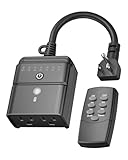
Overview: The BN-LINK timer takes a refreshingly simple approach to outdoor automation, eschewing Wi-Fi and apps for a reliable RF remote and built-in light sensor. It features two grounded outlets controlled simultaneously, making it a straightforward solution for holiday lights and garden equipment without smartphone dependency.
What Makes It Stand Out: The hybrid control system is unique—dusk-to-dawn automation with manual countdown overrides (2/4/6/8 hours) plus a 100-foot RF remote. No Wi-Fi means no connectivity headaches, no app updates, and no cloud dependencies. It’s old-school reliability meeting modern convenience, working even when internet is down.
Value for Money: At $12.74, it’s the cheapest option here, but you’re sacrificing true “smart” features. For users wanting basic automation without smartphone complexity, it delivers excellent value. However, smart home enthusiasts will find its limitations frustrating compared to app-based alternatives with voice control.
Strengths and Weaknesses: Pros include simple plug-and-play setup, reliable RF remote with good range, effective dusk-to-dawn sensor, dual outlets, and no Wi-Fi required. Cons are no voice control, no smartphone app, no independent outlet control, and less flexible scheduling than smart plugs with advanced timers.
Bottom Line: The BN-LINK is perfect for technologically-averse users or as a backup for essential holiday lighting. It automates reliably without the smart home learning curve, but it’s not a true smart plug. Choose it for simplicity, not sophistication.
5. Amazon Basics Outdoor Smart Plug with 2 Individually Controlled Outlets, Works with Alexa Only, 2.4 GHz Wi-Fi, No Hub Required, Black

Overview: The Amazon Basics Outdoor Smart Plug delivers dual independent outlets with deep Alexa integration. It supports 15A loads, requires 2.4GHz Wi-Fi, and promises a streamlined setup experience exclusively within the Alexa ecosystem for outdoor lighting and devices without third-party app complexity.
What Makes It Stand Out: Zero-touch setup and native Alexa app control eliminate third-party apps entirely. The “device found and connected” notification simplifies onboarding, while individual outlet control lets you manage two devices separately. It’s engineered for pure Alexa households, removing ecosystem clutter and potential compatibility issues for seamless operation.
Value for Money: At $23.99, it’s priced similarly to the Kasa EP40 but with a critical limitation: Alexa-only compatibility. For Alexa users, this seamless integration justifies the cost. For multi-platform homes, it’s poor value compared to more flexible alternatives that offer broader voice assistant support and future-proofing.
Strengths and Weaknesses: Pros include effortless Alexa setup, independent dual outlets, no hub required, and clean app integration. The singular con is deal-breaking for many: it works exclusively with Alexa—no Google Assistant, no HomeKit, no SmartThings, limiting future flexibility and cross-platform compatibility.
Bottom Line: This plug is purpose-built for Alexa loyalists. If your smart home lives entirely in Amazon’s ecosystem, the frictionless experience is unmatched. Otherwise, choose a more versatile option that won’t lock you into a single platform as your needs evolve.
6. Kasa Outdoor Smart Dimmer Plug, IP64 Plug- in Dimmer for Outdoor String Lights, Compatible with Alexa, Google Assistant & SmartThings, Long Wi-Fi Range 2.4Ghz, No Hub Required, ETL Certified(KP405)

Overview: The Kasa Outdoor Smart Dimmer Plug is a specialized device designed specifically for controlling the brightness of outdoor dimmable lights. This compact plug from TP-Link’s reputable Kasa line offers remote dimming capabilities through a dedicated app or voice commands via Alexa and Google Assistant, making it ideal for string lights, landscape lighting, and holiday decorations.
What Makes It Stand Out: Unlike standard on/off smart plugs, this model features true dimming functionality with a 4-amp maximum capacity. The IP64 weather resistance rating provides superior protection against dust and water splashes compared to many competitors. Kasa’s established ecosystem ensures reliable performance with an impressive 300-foot Wi-Fi range, and the device requires no hub for operation.
Value for Money: At $15.13, this plug delivers excellent value for those specifically needing dimming capabilities. Standard smart plugs without dimming typically cost $10-15, making the slight premium worthwhile for the brightness control feature. The 2-year warranty and ETL certification add further value.
Strengths and Weaknesses: Strengths include genuine dimming control, robust IP64 weather rating, trusted Kasa brand reputation, excellent Wi-Fi range, and easy setup. Weaknesses are the single outlet limitation, 4-amp/150W LED capacity restriction, and the critical requirement that lights must be dimmable—non-dimmable lights won’t work properly. The device only supports 2.4GHz networks.
Bottom Line: Perfect for homeowners wanting to create ambiance with dimmable outdoor string or landscape lighting. The Kasa Outdoor Smart Dimmer Plug offers specialized functionality at a reasonable price, though its single-outlet design limits scalability.
7. EIGHTREE Outdoor Smart Plug Waterproof IP44, Smart Outlet Plug with 2 Independently Controlled Outlets, Compatible with Alexa and Google Assistant, Voice & Remote Control, Timer&Schedule, 2.4GHz Only
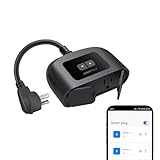
Overview: The EIGHTREE Outdoor Smart Plug offers a budget-friendly solution for controlling multiple outdoor devices independently. Featuring two separately controllable outlets in a single waterproof housing, this plug enables flexible management of holiday lights, fountains, or other outdoor electronics through voice commands or smartphone app control.
What Makes It Stand Out: The dual independent outlets provide exceptional versatility at this price point, allowing users to control two different devices on separate schedules. The IP44 splash-resistant rating handles light rain, while the 300-foot Wi-Fi range ensures reliable connectivity across most properties. Voice integration with Alexa, Google Assistant, and SmartThings adds convenience.
Value for Money: Priced at $16.99, this represents strong value for a dual-outlet smart plug. Single-outlet alternatives often cost $12-15, making the ability to control two devices independently for just a few dollars more highly economical. The extended Wi-Fi range eliminates the need for range extenders in most scenarios.
Strengths and Weaknesses: Strengths include independent outlet control, affordable pricing, wide smart home compatibility, and good Wi-Fi range. Weaknesses are the IP44 rating (splash-resistant only, not suitable for heavy rain or immersion), lack of dimming functionality, and 2.4GHz-only limitation. The plastic construction may not be as durable as premium alternatives.
Bottom Line: An excellent entry-level choice for basic outdoor automation needs. The EIGHTREE plug’s dual independent outlets make it ideal for managing separate lighting zones or devices, though users in harsh weather regions should consider higher IP-rated alternatives.
8. SURAIELEC Outdoor Smart Plug, WiFi Power Stake Light Timer with 6 Outlet, 6FT Extension Cord, Electrical Weatherproof for Patio Lights, Christmas Decorations, Compatible with Alexa/Google Assistant
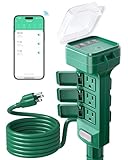
Overview: The SURAIELEC Outdoor Smart Plug is a powerhouse solution designed for extensive outdoor lighting displays. This power stake features six grounded outlets on a 6-foot extension cord, making it perfect for Christmas decorations, landscape lighting, and patio setups. The integrated stake allows secure ground placement, while Wi-Fi connectivity enables app and voice control.
What Makes It Stand Out: The six-outlet configuration with overload protection sets this apart from standard smart plugs. A built-in 15-amp circuit breaker automatically cuts power during overloads, protecting connected devices. The heavy-duty 14/3 SJTW cord withstands abrasion, moisture, and UV exposure, while the large protective cover shields outlets from rain and snow.
Value for Money: At $29.99, this stake offers exceptional value for multi-device setups. Purchasing six individual smart plugs would cost $60-90, making this an economical choice for elaborate displays. The overload protection and durable construction justify the moderate price premium over basic models.
Strengths and Weaknesses: Strengths include six simultaneous connections, robust overload protection, durable weatherproof cord, and convenient stake design. Weaknesses are the IP44 rating (adequate but not exceptional), lack of individual outlet control (all outlets share the same on/off state), and requirement for the Tuya Smart Life app. The 2.4GHz-only limitation may affect some users.
Bottom Line: Ideal for holiday enthusiasts and those with extensive outdoor lighting needs. The SURAIELEC stake simplifies complex installations while providing essential safety features, though the lack of individual outlet control limits scheduling flexibility.
9. HBN Outdoor Smart Plug Waterproof WiFi Outdoor Outlet Timer with 6 Grounded Outlets, Remote & Voice Control Heavy Duty Yard Stake Plug Compatible with Alexa and Google Assistant No Hub Required
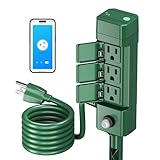
Overview: The HBN Outdoor Smart Plug provides a six-outlet power stake solution for comprehensive outdoor device management. Featuring a 6-foot cord with six grounded outlets and a 12-inch stake for stable ground insertion, this plug timer handles holiday decorations, garden lighting, and fountain pumps through smartphone app and voice control integration.
What Makes It Stand Out: This stake offers simultaneous power distribution to six devices with built-in overload protection, automatically cutting power during electrical faults. The IP44 waterproof rating handles outdoor conditions, while the dedicated BN-HUB app provides scheduling, countdown, and astronomical timer functions that adjust for sunrise/sunset times year-round.
Value for Money: At $29.99, it competes directly with similar six-outlet stakes. The overload protection and astronomical timer features add significant value, potentially saving energy costs. The 1-year warranty provides adequate coverage, though shorter than some competitors.
Strengths and Weaknesses: Strengths include six outlets, overload protection, astronomical scheduling, and sturdy stake design. Weaknesses are the IP44 rating limiting heavy weather exposure, lack of individual outlet control, and dependence on the BN-HUB app (less universal than Kasa or Tuya). The 2.4GHz-only support and 15-amp total capacity require careful load management.
Bottom Line: A solid choice for users needing multiple outdoor connections with intelligent scheduling. The HBN stake excels in holiday lighting applications, though its app-specific ecosystem and shared outlet control may not suit everyone. Consider this if you prioritize astronomical timing over individual zone control.
10. ELEGRP PQR20 Outdoor Smart Plug Waterproof IP66, WiFi Plug with 2 Individually Sockets, Compatible with Alexa & Google Assistant, Smart Outdoor Outlet for String Lights, UL Certified, 1 Pack, Black

Overview: The ELEGRP PQR20 Outdoor Smart Plug stands out with its exceptional IP66 waterproof rating, making it the most weather-resistant option in its class. Featuring two independently controllable sockets in a rugged black housing, this plug withstands harsh conditions from -20°C to 50°C, handling heavy rain, dust, and UV exposure without compromise.
What Makes It Stand Out: The IP66 rating provides superior protection against powerful water jets and complete dust ingress, far exceeding typical IP44 offerings. Individual outlet control allows separate scheduling and voice commands for each socket, while the 300-foot Wi-Fi range ensures reliable connectivity. UL and FCC certifications guarantee safety standards.
Value for Money: At $26.99, this plug commands a premium over basic models but delivers justified value for harsh environments. The IP66 rating typically appears on devices costing $35-40, making this competitively priced. For coastal, rainy, or extreme climate regions, the durability prevents replacement costs.
Strengths and Weaknesses: Strengths include unmatched IP66 waterproofing, independent outlet control, robust temperature range, strong certifications, and stable long-range Wi-Fi. Weaknesses are the premium price for only two outlets, lack of a stake design for ground mounting, and 2.4GHz-only support. The app ecosystem, while functional, isn’t as established as Kasa or Tuya.
Bottom Line: The ultimate choice for challenging weather conditions. The ELEGRP PQR20 excels in durability and individual control, making it perfect for permanent outdoor installations in harsh climates. For users prioritizing weatherproofing over outlet quantity, this plug offers unmatched protection and reliability.
Why Individual Outlet Scheduling Matters for Holiday Displays
The Limitations of Traditional Timers
Traditional mechanical and even basic digital timers treat your entire outdoor lighting array as a single monolithic unit. When that timer clicks on, every single strand, every inflatable, every spotlight surges to life simultaneously. This brute-force approach doesn’t just waste electricity—it creates a visual cacophony that overwhelms viewers rather than guiding their eyes through a thoughtfully designed experience. You’re essentially paying to illuminate your entire yard during those quiet weekday evenings when only a few passing cars might appreciate the display.
Worse yet, these timers lack flexibility. Want your pathway lights to start glowing at dusk while your animated reindeer make their grand entrance two hours later when more families are out walking? Too bad. Need to keep security lighting on all night but shut down the decorative elements by 10 PM? You’ll need separate circuits and multiple timers, creating a tangled web of extension cords and confusion. The inflexibility becomes especially problematic during holiday parties when you want certain elements highlighted while others fade into the background.
Creating Dynamic, Layered Lighting Effects
Individual outlet scheduling transforms your display into a living, breathing performance. Imagine this: as the sun dips below the horizon, your warm white pathway lights gently fade up, creating a welcoming entrance. Thirty minutes later, your centerpiece tree branches into full illumination, followed by the synchronized blink of window outlines. By 8 PM—peak viewing time—your animated characters spring to life while accent spotlights wash your home’s facade in festive colors. Each element knows its cue, its timing, its role in the overall composition.
This layering isn’t just aesthetically superior; it’s strategically brilliant. You can program energy-intensive elements like motor-driven inflatables to operate only during high-traffic hours while low-consumption LED strands maintain ambient lighting throughout the evening. The psychological impact is profound—viewers experience your display as a story unfolding rather than a static image, encouraging them to linger, return, and share their experience with others.
Key Features to Look For in Smart Outdoor Plugs
Weather Resistance Ratings Explained
When you’re trusting a device with 120 volts of electricity in rain, snow, and sub-freezing temperatures, “water-resistant” marketing fluff won’t cut it. You need to understand IP (Ingress Protection) ratings thoroughly. The first digit indicates solid particle protection (dust, debris), while the second reveals liquid ingress resistance. For outdoor holiday applications, IP64 represents the absolute minimum—complete dust protection and splash resistance from all directions. However, IP65 (protected against water jets) or IP66 (powerful water jets) provides the robust protection your investment deserves during winter storms.
But here’s what many product descriptions won’t tell you: IP ratings are tested in laboratory conditions at room temperature. A device rated IP66 might perform differently when the plastic housing contracts in 10°F weather, potentially compromising seals. Look for plugs specifically tested for cold-weather performance, with operating temperature ranges clearly stated. The best devices will function reliably from -4°F to 122°F, ensuring your light show continues through polar vortexes and unseasonable warm snaps alike.
Individual Outlet Control vs. Master Switch
This distinction is absolutely critical and where many buyers get confused. Some “dual outlet” smart plugs only offer a master switch that controls both outlets simultaneously—essentially giving you a smart extension cord rather than true individual control. What you want is explicit confirmation that each receptacle operates independently with its own scheduling, naming, and automation capabilities.
True individual control means you can label Outlet 1 “Front Yard Mini-Tree” and Outlet 2 “Garage Projector” within the app, assign completely different on/off schedules, and even integrate them into separate smart home routines. This granularity becomes invaluable when you’re running multiple zones—perhaps your front yard operates on a different schedule than your backyard display, or you want to manually toggle specific elements without affecting your carefully programmed timers.
Scheduling Capabilities and Automation
Basic scheduling lets you set on/off times, but elite smart outdoor plugs offer sophisticated automation that syncs with real-world conditions. Astronomical scheduling—where lights automatically adjust to daily sunset/sunrise times—eliminates the bi-monthly chore of reprogramming as daylight hours shrink through December. The best systems account for your specific location, adjusting down to the minute based on your GPS coordinates.
Look for cascading schedule support, where one outlet’s state can trigger another’s action. For example, when your main tree lights turn on, they could automatically activate your window candles five minutes later. Randomization features also add security value, making your home appear occupied during post-holiday winter months by varying lighting patterns. Some advanced models even offer calendar-based scheduling, automatically switching between Halloween, Thanksgiving, and Christmas programs without manual intervention.
Voice Assistant Integration
While “Works with Alexa/Google” badges are common, the depth of integration varies dramatically. Surface-level compatibility might only allow on/off commands for the entire device. Deeper integration enables voice control of individual outlets (“Alexa, turn off the inflatable snowman”) and incorporation into complex routines. Imagine saying “Alexa, start the holiday show” and triggering a carefully choreographed sequence where different elements illuminate in stages over two minutes.
The real power emerges when you combine voice control with conditional logic. “Turn on the Christmas lights” could automatically check the weather forecast and adjust brightness if rain is detected, or skip activating certain elements during high winds. Check whether the device requires a separate hub for voice integration or connects directly via Wi-Fi—hub-free designs simplify setup but may sacrifice advanced automation capabilities.
Power Capacity and Safety Certifications
Holiday displays can draw serious amperage, especially if you’re mixing incandescent and LED strands or running multiple inflatables. Most residential outdoor smart plugs max out at 15 amps total (1875 watts), but that rating applies to the entire unit, not per outlet. If you’re planning an elaborate setup, calculate your total load carefully. A single 15-amp circuit can theoretically support 1800 watts, but safety guidelines recommend staying below 80% capacity (1440 watts) for continuous operation.
Beyond amperage, scrutinize safety certifications. UL (Underwriters Laboratories) or ETL (Intertek) listing isn’t just a bureaucratic stamp—it’s assurance that the device has undergone rigorous testing for fire, shock, and overload protection. For outdoor use, specifically look for UL 60730 certification, which covers automatic electrical controls in harsh environments. GFCI (Ground Fault Circuit Interrupter) integration is non-negotiable; while your outdoor receptacle should already be GFCI-protected, built-in GFCI adds a critical redundancy layer that could prevent tragedy.
Understanding Weatherproofing Standards
Decoding IP Ratings for Outdoor Use
Let’s dive deeper into those IP numbers because manufacturers often bury crucial details in technical specifications. An IP64 rating means complete dust protection (6) and splash resistance from any direction (4). Sounds adequate, right? But consider this: a hard driving rain doesn’t just splash—it creates sustained water pressure. IP65 adds protection against low-pressure water jets, while IP66 handles powerful jets from any angle. For coastal areas or regions with heavy, wind-driven precipitation, IP67 (temporary immersion protection) provides peace of mind.
The “X” factor in ratings like IPX4 means the device wasn’t tested for solid particle ingress. Avoid these for outdoor use—dust and debris can accumulate inside the housing over a season, potentially causing shorts or corrosion. Also examine the outlet covers themselves. Spring-loaded, gasket-sealed covers that automatically close when plugs are removed offer far better protection than simple flip-up caps that rely on user diligence.
GFCI Protection: What You Need to Know
Your outdoor smart plug will connect to a GFCI-protected receptacle (building code requires this), but understanding how these devices interact is crucial. When a smart plug with built-in GFCI detects a ground fault, it trips both its internal mechanism and the upstream GFCI outlet, creating a confusing troubleshooting scenario. Some models offer GFCI self-test features that periodically verify protection is active—a valuable diagnostic tool that prevents discovering a failed GFCI during your first snowstorm.
Consider devices with “GFCI trip alert” capabilities that send smartphone notifications when protection activates. This immediate feedback helps you identify which decoration is causing the fault rather than playing a frustrating guessing game. Remember, moisture infiltration into light strand connections is the most common cause of GFCI trips, not the smart plug itself. Strategic placement of the plug under eaves or in weatherproof boxes can minimize nuisance trips while maintaining safety.
Cold Weather Performance Considerations
Plastic becomes brittle in extreme cold, and internal components contract at different rates, potentially breaking solder joints or compromising seals. Quality manufacturers specify operating temperature ranges and often use polycarbonate housings rather than cheaper ABS plastic. Polycarbonate maintains impact resistance down to -40°F and resists UV degradation, which is critical when the device remains installed through summer months.
Wi-Fi performance also degrades in cold weather. Radio frequency signals weaken as temperature drops, and battery-powered devices (if your plug includes a backup battery for schedule memory) lose capacity. Look for plugs with external antennas or signal boosters designed for outdoor range. Some premium models feature wired Ethernet options, eliminating Wi-Fi vulnerabilities entirely for critical displays.
Power Management for Elaborate Holiday Setups
Calculating Your Total Wattage Load
Before purchasing any smart plug, you must audit your display’s power consumption with brutal honesty. LED strands typically draw 4-10 watts per strand, but incandescent mini-lights can consume 40-50 watts per strand. A single large inflatable might pull 60-100 watts while running, with a startup surge double that amount. Add up every single element: the rope lighting along your roofline, the projector casting moving patterns, the animated deer, the net lights over shrubs.
Create a spreadsheet documenting each element’s wattage and amperage. Then apply the 80% rule: if your smart plug is rated for 15 amps (1875 watts), your continuous load shouldn’t exceed 12 amps (1440 watts). This buffer accommodates startup surges and prevents overheating during marathon operating sessions. Remember, that rating is for the entire device. If you’re using a dual-outlet plug with individual control, you might allocate 8 amps to Outlet 1 and 7 amps to Outlet 2, but the total cannot exceed 15 amps.
Amperage Limits and Circuit Breaker Safety
Your smart plug’s 15-amp rating is only one piece of the puzzle. The circuit breaker protecting the outlet itself is likely also 15 or 20 amps. If you’re running your holiday display on the same circuit as garage door openers, outdoor security lighting, or (heaven forbid) a space heater, you’re risking nuisance trips or dangerous overloads. Map your home’s circuit layout before installation. A simple circuit breaker finder tool ($30 at hardware stores) can identify which outlets share a circuit.
Consider installing a dedicated 20-amp outdoor circuit for elaborate displays. The cost (typically $300-500 professionally installed) is negligible compared to the value of your decorations and, more importantly, eliminates fire risk. If that’s not feasible, stagger high-draw elements across different circuits using multiple smart plugs. Your roofline lights on the front porch circuit, yard decorations on the garage circuit—this distribution prevents any single breaker from bearing the full load.
Energy Monitoring Features
Advanced smart plugs offer per-outlet energy monitoring, providing real-time wattage draw and historical consumption data. This isn’t just eco-conscious virtue signaling—it’s a diagnostic goldmine. Noticing one outlet consistently drawing more power than expected? You might have a failing LED strand with partially shorted wiring. Seeing usage spike at 3 AM every night? A timer conflict is activating elements when they should be dark.
Energy monitoring also helps calculate the true cost of your holiday display. At $0.13 per kWh national average, a 500-watt display running 6 hours nightly adds about $12 to your monthly bill. But with individual scheduling, you might reduce that to $8 by keeping only essential elements active during late-night hours. Over a decade of holidays, that savings pays for the smart plug itself. More importantly, it lets you make informed decisions about which decorations deliver the most visual impact per watt consumed.
Scheduling Strategies for Maximum Impact
Staggered Lighting Programs
The magic of professional light shows lies in their timing, and individual outlet scheduling puts that magic in your hands. Rather than everything illuminating at once, create a “build sequence” that unfolds over 10-15 minutes. Start with foundation lighting: pathway markers and roofline outlines. Add mid-ground elements like shrub nets and window candles. Finally, introduce focal pieces: your animated nativity scene or that 12-foot Santa inflatable. This progression creates anticipation and makes your display feel intentional rather than haphazard.
Consider traffic patterns when timing sequences. On weeknights, most viewers pass between 6-8 PM. On weekends, peak viewing might stretch to 9 PM. Program your most energy-intensive elements to shine during these windows while maintaining ambient lighting later for security and late-shift workers coming home. Some smart plugs allow different schedules for different days of the week—use this to create “quiet mode” on Sundays or “party mode” on Christmas Eve with extended hours and all elements active.
Sunset-to-Sunrise Automation
Astronomical scheduling based on your location’s actual sunrise/sunset times is revolutionary for holiday lighting. As December progresses and darkness arrives earlier, your lights automatically adjust without manual reprogramming. But the real artistry comes from offset programming: lights turn on 15 minutes before sunset (creating a seamless transition as twilight deepens) and shut off 30 minutes after sunrise (ensuring early-morning joggers still see your display).
Advanced implementations incorporate civil, nautical, and astronomical twilight calculations. You might want security lighting to activate at civil twilight (when the sun is 6° below horizon) but decorative elements to wait until nautical twilight (12° below) when true darkness makes colors pop. The best smart plugs integrate with weather services to delay activation on overcast days when darkness comes earlier, or to brighten lights during snowstorms when reflections create magical effects.
Creating Themed Lighting Scenes
Think beyond simple on/off scheduling. Individual outlet control lets you create “scenes”—preset combinations of which elements are active. Your “Elegant Evening” scene might feature only warm white lights for a sophisticated look. “Full Spectacular” activates every color and animation for weekend wow-factor. “Security Only” keeps pathway and entryway lights on after midnight for safety.
Program these scenes to activate automatically based on triggers. A “guest arrival” routine could flash your driveway lights when the smart doorbell detects motion. A “windy night” scene (triggered by IFTTT weather applets) might disable delicate hanging elements while keeping ground-level lighting secure. This contextual intelligence transforms your display from a timer-based automation into a responsive, living installation.
Installation and Setup Best Practices
Wi-Fi Signal Strength in Outdoor Areas
That smart plug is only as smart as its connection. Outdoor Wi-Fi signals face interference from walls, insulation, and even holiday decorations themselves. Before mounting anything permanently, perform a signal strength test using your phone’s Wi-Fi analyzer app at the installation location. You’re aiming for at least -70 dBm signal strength; weaker signals cause dropped connections and missed schedule triggers.
If your signal is marginal, don’t despair. A Wi-Fi extender with outdoor rating (IP65 or better) can bridge the gap, or you might install a mesh node near a window facing your display. Some smart plugs support 2.4GHz only (better range but slower speeds) while others offer dual-band connectivity. For outdoor applications, 2.4GHz often proves more reliable through walls and over distance, even if your indoor devices prefer 5GHz. Consider creating a dedicated 2.4GHz SSID just for your smart home devices to reduce congestion.
Proper Mounting and Positioning
Never let your smart plug dangle from the outlet by its own weight—this stresses connections and creates entry points for moisture. Use the mounting holes (quality models include them) to secure the device to a wall, post, or even a sturdy stake. Position the unit with outlets facing downward, allowing any water that penetrates the cover to drain out rather than pool around connections.
Elevation matters. Mounting 12-18 inches above ground level protects against snow accumulation and splashing from rain or irrigation. If you must install near ground level, place the unit inside a weatherproof box with adequate ventilation—sealed boxes can trap condensation, creating a humid environment that promotes corrosion. Avoid direct sunlight exposure when possible; UV degradation yellows plastics and overheats internal components, potentially shortening lifespan from 5+ years to just 2-3 seasons.
Avoiding Common Installation Mistakes
The number one mistake is daisy-chaining extension cords from the smart plug to decorations. Each connection is a potential failure point and voltage drop site. Instead, use a single, appropriately rated outdoor extension cord (12-gauge for runs over 50 feet) and connect decorations directly to it. If you need more reach, install a second smart plug on a different circuit rather than creating an electrical octopus.
Another frequent error is forgetting about GFCI test buttons. Monthly testing is recommended, but who remembers during the holiday rush? Schedule a recurring phone reminder for the first Saturday of each month. When testing, verify that the smart plug sends you a notification (if equipped) and that schedules resume correctly after reset. Some cheaper models lose their programming during power cycles, forcing you to recreate schedules from scratch—a maddening experience at 5 PM on Christmas Eve.
Troubleshooting Common Smart Plug Issues
Connectivity Problems and Solutions
When your smart plug drops Wi-Fi connection, don’t immediately blame the device. Interference from neighboring networks, baby monitors, even your microwave can disrupt signals. Use a Wi-Fi analyzer to identify the least congested channel, then manually set your router to use it. Many smart plugs reconnect automatically after brief outages, but extended drops require manual intervention. Look for models with “connection heartbeat” features that send periodic signals to maintain router table entries.
If connectivity issues persist, check for firmware updates. Manufacturers regularly release patches improving Wi-Fi stability and security. Some devices update automatically; others require manual initiation through the app. A pro tip: after updating firmware, power-cycle the smart plug (unplug for 30 seconds) to ensure clean initialization. For stubborn devices, a factory reset followed by reconfiguration often resolves mysterious glitches that accumulate over months of operation.
Scheduling Conflicts and Firmware Updates
Complex schedules can create logical conflicts where overlapping rules fight for control. Maybe you have a daily sunset schedule but also a manual “off” command from a voice routine. Which takes precedence? Quality apps show a “schedule preview” timeline, visualizing exactly when each outlet will activate over the next 24 hours. Use this religiously after making changes to catch conflicts before they disrupt your display.
Firmware updates occasionally reset schedules to factory defaults—a nightmare scenario mid-season. Before updating, screenshot your schedules or export configuration files if the app allows. Some enterprise-grade smart plugs offer cloud backup of settings, automatically restoring them post-update. If you’re running a particularly complex show, consider maintaining a written log of your schedule logic. It seems old-school, but when you’re troubleshooting at 10 PM in freezing weather, that notebook becomes invaluable.
Dealing with Power Outages and Resets
Smart plugs without battery backup lose time during outages, causing schedules to drift until manually resynced. Most automatically fetch time from internet servers upon reconnecting, but this can take 5-10 minutes. For critical displays, look for models with coin-cell battery backups that maintain clock accuracy for up to 7 days without power. These batteries typically last 2-3 years and are user-replaceable.
After an outage, verify that outlets return to their pre-outage states. Some devices default to “off” for safety, others remember last state, and a few let you configure preferred behavior. During the first storm of the season, intentionally trip the breaker to test this behavior. Nothing’s worse than discovering your plug defaults off when you’re away on vacation and your display remains dark for a week. For ultimate reliability, pair your smart plug with a small UPS (Uninterruptible Power Supply) rated for outdoor use, providing 15-30 minutes of runtime to bridge brief outages.
Security Considerations for Outdoor Smart Devices
Network Security Best Practices
That innocent outdoor smart plug is a potential gateway into your home network. Default passwords, unencrypted communications, and outdated firmware have turned many IoT devices into botnet soldiers. Immediately change the default password during setup, using a unique 16+ character passphrase stored in a password manager. Enable two-factor authentication (2FA) in the device’s app if available—this single step blocks 99% of automated attacks.
Create a separate IoT VLAN (Virtual Local Area Network) on your router, isolating smart home devices from computers storing sensitive data. Many modern routers offer “guest network” functionality that works adequately for this purpose. Restrict outbound traffic from this network, allowing only necessary connections to manufacturer servers. If your plug supports local control protocols like MQTT or HomeKit, enable them and block internet access entirely—your schedules will run locally without cloud dependency, improving both security and reliability.
Preventing Unauthorized Access
Outdoor smart plugs are physically accessible to anyone in your yard. Tamper-detection features that notify you when the device is unplugged provide early warning of mischief. Some models include Kensington lock slots, letting you physically secure the unit to a mounting surface. While not foolproof, it deters casual theft and vandalism.
Disable remote access features you don’t use. If you only control lights from home, block the device’s internet access after initial setup. For voice control, route commands through a local hub like Home Assistant rather than cloud services. Regularly audit the device’s access logs (available in premium models) for unfamiliar IP addresses or connection attempts. That outdoor plug should be a tool for convenience, not a liability that exposes your network to the neighborhood.
Integration with Smart Home Ecosystems
Compatibility with Major Platforms
Before purchasing, verify compatibility with your existing smart home ecosystem. “Works with Alexa” doesn’t guarantee seamless integration—check if it supports Alexa Routines, not just basic voice commands. Can you include individual outlets in complex routines that also adjust thermostats and door locks? Does it support Alexa’s “Hunches” feature, where the AI suggests automation based on your usage patterns?
For Google Home users, confirm support for “Home & Away” routines that automatically activate holiday lighting when you return home. Apple HomeKit integration offers superior privacy (local control via HomePod) but requires devices with specific MFi certification. SmartThings and Hubitat users should look for Z-Wave or Zigbee options that create mesh networks, extending range without additional Wi-Fi infrastructure. The goal is cohesive automation where your holiday lights respond intelligently to other smart home sensors and states.
Creating Holiday Automation Routines
The true power emerges when your smart plug becomes part of holistic holiday automation. Connect a smart weather station to your system, and program high winds to automatically deflate delicate decorations while activating security lighting. Link to your smart doorbell: when visitors approach after 6 PM, briefly boost brightness on pathway lights for safety. Integrate with your garage door opener to trigger “arrival mode,” welcoming you home with a custom light sequence.
Advanced users can leverage IFTTT or Node-RED to create conditional logic impossible within native apps. “If temperature drops below 25°F, delay morning shutoff by 30 minutes to prevent ice formation on connections.” “If rain is forecasted, skip activating ground-level outlets.” These contextual automations transform your display from a simple timer into an intelligent system that adapts to real-world conditions, protecting your investment while maximizing visual impact.
Cost vs. Value: Making the Right Investment
Long-Term Savings Beyond the Holidays
The sticker shock of a $40-60 smart plug versus a $10 mechanical timer fades when you calculate year-round utility. That same device controls patio string lights for summer gatherings, landscape lighting for security, pool pumps on seasonal schedules, and even holiday inflatables for birthday parties. Amortized over 5+ years of multi-season use, the cost-per-use drops to pennies.
Energy savings provide tangible ROI. A 600-watt display running 8 hours nightly for 45 holiday days consumes 216 kWh. With individual scheduling reducing active hours by just 25%, you save 54 kWh annually—about $7 per year at average rates. Over the device’s lifespan, that’s $35-50 in savings, effectively paying for the upgrade. Add in eliminated costs from replacing fried decorations due to timer malfunctions or weather damage, and the financial case becomes compelling.
Warranty and Support Considerations
Mechanical timers fail after a season or two; quality smart plugs should last 5-10 years. Look for minimum 2-year warranties, with some premium manufacturers offering 3-5 year coverage. Read warranty terms carefully—many exclude “weather damage” unless the device is installed “according to manufacturer specifications,” creating loopholes for denying claims. Save your installation photos and keep the device manual; you’ll need them if filing a warranty claim.
Support quality varies enormously. Check manufacturer forums and Reddit communities for real-world experiences. Do they respond to firmware issues? Are there active user communities creating custom integrations? Companies with strong developer support often extend device lifespans through community-driven updates long after official support ends. Consider this ecosystem when investing; a slightly more expensive plug from a responsive manufacturer beats a cheaper option abandoned after 18 months.
Frequently Asked Questions
Can I control each outlet separately with my voice assistant, or do they only respond as a single unit?
True individual outlet control depends on the device’s integration depth. Most quality smart plugs expose each outlet as a separate device in Alexa/Google Home apps, allowing commands like “turn on outlet one” or using custom names you’ve assigned. However, some budget models only support master on/off commands, treating both outlets as a single entity. Always verify in product specifications that “individual outlet voice control” is explicitly mentioned before purchasing.
What’s the realistic Wi-Fi range for outdoor smart plugs, and how can I extend it?
Expect reliable connectivity within 100 feet of your router through one exterior wall. Each additional wall or significant obstruction (metal siding, stone veneer) halves this range. For distances up to 200 feet, install a Wi-Fi extender in a window facing your yard. For elaborate displays beyond 200 feet, consider a mesh network with an outdoor-rated node, or choose Z-Wave/Zigbee devices that create mesh networks where each device extends the signal.
Will my schedules still work if the internet goes down, or does everything require a cloud connection?
This varies by manufacturer. Devices with local scheduling memory continue executing programs without internet, though you can’t modify them until connectivity restores. Cloud-dependent models become expensive paperweights during outages. Look for “local control” or “offline scheduling” in specifications. Test this before the holidays by unplugging your router for an hour and observing if schedules execute correctly.
How do I prevent moisture from getting into the connections, even with a weatherproof plug?
Use dielectric grease on all plug prongs before insertion—this non-conductive silicone compound repels water and prevents corrosion. Wrap connections with self-fusing silicone tape (not standard electrical tape) creating a watertight seal. Ensure plugs face downward and consider placing connection points inside inexpensive plastic storage containers with drainage holes, creating miniature weatherproof boxes. Never submerge connections, and always unplug during severe storms.
Can I use these plugs for heavy-duty items like space heaters or power tools after the holidays?
Generally no. Most outdoor smart plugs are rated for resistive loads (lights, motors) up to 15 amps but aren’t designed for inductive loads like large power tools or high-wattage heaters that create startup surges. Using them improperly can damage the internal relay or create fire hazards. Check the device’s specifications for “inductive load rating”—if it’s not mentioned, assume it’s not supported. For workshop applications, use smart plugs specifically rated for tool use.
Why does my GFCI trip more frequently when using smart plugs compared to direct outlet connections?
Smart plugs introduce additional electronics that can detect minor ground faults that direct connections would ignore. The plug’s internal monitoring may be more sensitive than your GFCI outlet, creating nuisance trips. Ensure all downstream connections are completely dry and use dielectric grease. If trips persist, the smart plug itself may have a manufacturing defect causing internal leakage current. Contact manufacturer support—reputable companies will replace units exhibiting this behavior.
How many individual schedules can I realistically program before the app becomes unwieldy?
Most apps support 10-20 schedules per outlet, but usability degrades around 8-10 complex rules. Instead of creating dozens of individual on/off events, use “scene” functionality to group multiple outlets into single commands. For intricate shows, export scheduling to third-party platforms like Home Assistant or Hubitat, which handle hundreds of rules more elegantly. The native app should be your simple interface; complex programming deserves robust automation platforms.
Do outdoor smart plugs consume significant standby power when outlets are off?
Quality devices draw 0.5-1.5 watts in standby—about $1-3 annually in electricity costs. Cheaper models may consume 2-3 watts, which still only totals $5-7 per year. This parasitic draw is negligible compared to the energy saved through intelligent scheduling. For true zero-draw scenarios, use a mechanical switch in series with the smart plug, cutting all power when the season ends. Just remember to restore power a day before you need the device to allow time for reconnection and clock sync.
What’s the best way to organize and label multiple smart plugs in my app when running a large display?
Develop a hierarchical naming convention: Location_Zone_Device. “FrontYard_Tree_AnimatedDeer” and “Backyard_Patio_StringLights” sort logically and are voice-command friendly. Use emoji in device names for quick visual identification—Christmas tree for holiday elements, house for security lighting. Group outlets into rooms or zones within the app, even if they’re physically separate. Create a “Holiday Show” room containing all seasonal devices, making it easy to bulk-edit schedules or deactivate everything on January 2nd.
Are there any insurance or code compliance issues I should be aware of when installing these permanently?
Most jurisdictions allow temporary seasonal installations without permits, but permanent hardwired smart devices may require inspection and compliance with NEC Article 406 (Receptacles). Check local codes before mounting devices to structures. From an insurance perspective, using UL/ETL-listed devices as directed won’t affect coverage, but non-listed devices or improper installation (overloading, daisy-chaining) can void claims if they cause fires. Document your installation with photos and keep purchase receipts. If you’re running a particularly elaborate display, inform your insurance agent—some policies have sub-limits for outdoor equipment that might need adjustment.