Living in a rental means making peace with beige walls, builder-grade fixtures, and the one cardinal rule: thou shalt not rewire. While homeowners are busy installing smart switches and integrated lighting systems, renters are often left flipping switches manually like it’s 1995. But here’s the good news—smart outlet-controlled adapters have completely changed the game. These ingenious plug-and-play devices transform ordinary outlets into intelligent command centers without touching a single wire, making them the ultimate renter-friendly smart home solution.
Unlike permanent installations that require electrical work and landlord approval, smart adapters slip into existing outlets and give you instant control over lamps, fans, heaters, and virtually anything that plugs in. They’re completely portable, meaning you can take your entire smart home ecosystem with you when your lease ends. Whether you’re looking to automate your studio apartment or add convenience to a rented house, understanding what separates mediocre adapters from exceptional ones will save you money, frustration, and potential lease violations.
Top 10 Smart Outlet-Controlled Adapters for Renters
Detailed Product Reviews
1. LoraTap 656ft Wireless Wall-Switch: Remote Control Outlet 3 Pack — Lights & Small Appliances — No Wiring —1 Remote for 3 Plugs

Overview: The LoraTap system delivers a refreshingly simple RF-based remote control solution that operates entirely without WiFi, apps, or complex configuration. This three-pack kit includes three plug-in receivers and a single three-channel remote pre-paired at the factory. Designed for users who prioritize reliability and ease-of-use over smart home integration, it offers an impressive 656-foot outdoor range and 100-foot indoor range that penetrates walls and windows effectively.
What Makes It Stand Out: Unlike app-dependent alternatives, this system functions during internet outages and requires no smartphone, making it ideal for elderly users, children, or those with limited mobility. The patented memory function restores previous power states after outages, while versatile mounting options (wall plate, magnetic base, or portable) provide exceptional flexibility. Each kit uses a unique ID to prevent interference when multiple systems operate in one home.
Value for Money: At $32.99 for three outlets ($11 per plug), it commands a premium over basic smart plugs but justifies the cost through unique benefits. The 2-year warranty, FCC/CE/RoHS certifications, and elimination of electrician costs for wiring make it reasonable for targeted applications. For users needing simple, reliable control without network dependency, this specialized solution delivers strong ROI.
Strengths and Weaknesses: Pros include no WiFi requirement, extreme range, memory function, multi-kit compatibility, and excellent accessibility features. Cons are the lack of scheduling, smartphone control, voice assistant integration, and potential RF interference in crowded environments. The remote’s battery requires periodic replacement, and the system lacks energy monitoring capabilities.
Bottom Line: The LoraTap excels for specific scenarios: elderly parents, vacation homes with unreliable internet, or rental properties where permanent installation is prohibited. Skip it if you want voice control or advanced automation. For pure simplicity and reliability, it’s an excellent investment that solves problems WiFi plugs cannot.
2. Kasa Smart Plug HS103P4, Smart Home Wi-Fi Outlet Works with Alexa, Echo, Google Home & IFTTT, No Hub Required, Remote Control, 15 Amp, UL Certified, 4-Pack, White

Overview: Kasa’s four-pack smart plugs represent the benchmark for entry-level home automation, combining proven reliability with robust features. These UL-certified outlets connect directly to 2.4GHz WiFi networks, enabling voice control through Alexa and Google Assistant plus remote access via the mature Kasa app. With a substantial 15-amp capacity, they handle most household appliances while maintaining a compact form factor that preserves adjacent outlet access.
What Makes It Stand Out: Backed by over 5 million users and a PCMag 2020 Reader’s Choice award, Kasa delivers exceptional ecosystem stability. The Silicon Valley-developed platform offers IFTTT integration for advanced automation, reliable scheduling, and an away mode for security. Unlike budget alternatives, these plugs carry UL certification and provide a polished user experience without requiring a hub, making them ideal for both beginners and experienced users.
Value for Money: At $24.23 for four ($6.06 per plug), this is outstanding value from a premium brand. Comparable plugs from lesser-known manufacturers cost the same or more while lacking Kasa’s proven reliability and safety certifications. The investment pays dividends through stable performance, regular app updates, and long-term support that budget brands cannot match.
Strengths and Weaknesses: Strengths include trusted brand reputation, excellent app experience, 15A capacity, UL safety certification, and seamless voice assistant integration. Weaknesses are the 2.4GHz-only limitation, requirement for a TP-Link account, and cloud dependency that may concern privacy-focused users. They lack energy monitoring, which is reserved for higher-end models.
Bottom Line: For most homeowners starting their smart home journey, the Kasa HS103P4 is the top recommendation. It perfectly balances affordability, reliability, and features. Choose these if you want hassle-free voice control and scheduling without technical headaches. Power users may want energy monitoring, but for essential automation, Kasa remains the category leader.
3. GHome Smart Plug Outlet Extender, USB Wall Charger with 3 Individual Smart Outlets and 3 Smart USB Ports, Works with Alexa Google Home, Surge Protector Plug Extender for APP Control,15A/1800W

Overview: The GHome extender transforms a single wall outlet into a nine-device smart command center. This WiFi-enabled surge protector features three individually controlled smart outlets, three smart USB ports (group-controlled), and three always-on outlets for continuous power. It consolidates multiple smart plugs into one space-saving unit ideal for entertainment centers, kitchen counters, or office desks where device density is high.
What Makes It Stand Out: The integrated surge protection and USB charging eliminate separate adapters, reducing clutter and improving safety. Individual outlet control via app or voice provides granular automation, while always-on ports ensure critical devices remain powered. The UV-resistant, fireproof V0 casing and multiple safety protections offer peace of mind missing from many budget alternatives, making it suitable for 24/7 operation.
Value for Money: At $26.99 for nine controllable points, this delivers exceptional density value. Purchasing separate smart plugs and a surge protector would cost significantly more. However, the single-point-of-failure risk means if the extender fails, all devices lose smart control—a calculated trade-off for the compact, all-in-one design that saves space and reduces outlet clutter.
Strengths and Weaknesses: Pros include high outlet density, surge protection, smart USB ports, individual outlet control, and robust safety features. Cons are the bulky design that may block second outlets, 2.4GHz WiFi limitation, unknown long-term app reliability, and lack of energy monitoring. The USB ports’ group-only control limits flexibility compared to the individually controlled AC outlets.
Bottom Line: Perfect for consolidating control in one location—like a home entertainment system or bedside charging station. It’s less ideal for distributed control throughout a home. If you need multiple smart outlets in a single spot and value surge protection, this is a compelling, cost-effective solution. For whole-home automation, individual plugs offer more flexibility and redundancy.
4. EIGHTREE Smart Plug, WiFi Outlet Works with Alexa & Google Home, Smart Home Socket with Remote Control & Timer Function, 2.4GHz WiFi Only, 4 Packs

Overview: EIGHTREE’s four-pack provides budget-conscious smart plugs that leverage the established Smart Life ecosystem. These WiFi outlets support voice control through Alexa and Google Home but require initial setup via the Smart Life app. The system emphasizes simplified Bluetooth-assisted pairing, making installation more reliable than many competitors at this price point while avoiding proprietary platform lock-in.
What Makes It Stand Out: The Bluetooth setup assistance automatically detects plugs during configuration, eliminating frustrating WiFi-only pairing failures that plague budget smart plugs. By leveraging the mature Smart Life platform, users access robust scheduling, timer functions, and third-party integrations without being tied to a single-brand ecosystem. This approach provides flexibility while maintaining low cost and broad compatibility.
Value for Money: At $24.99 for four ($6.25 per plug), these sit in the competitive budget tier. While cheaper than premium brands like Kasa, they rely on a third-party app rather than a dedicated platform. The value proposition depends on your Smart Life investment; if you’re already in that ecosystem, these are a steal. Otherwise, minor savings may not justify the brand’s unproven long-term support versus established competitors.
Strengths and Weaknesses: Pros include affordable pricing, easy Bluetooth setup, Smart Life compatibility, scheduling capabilities, and compact design. Cons involve requiring a third-party app, unknown brand longevity, 2.4GHz-only operation, and no mention of UL certification. The dependency on Smart Life’s servers introduces potential reliability variables that dedicated apps avoid.
Bottom Line: A solid choice for budget-conscious buyers already using Smart Life or willing to adopt it. The Bluetooth setup genuinely reduces installation headaches. However, those prioritizing brand reputation and dedicated support should spend slightly more on Kasa. For secondary locations like garages or guest rooms where absolute reliability is less critical, these offer excellent bang for your buck.
5. Govee Smart Plug, WiFi Plugs Work with Alexa & Google Assistant, Smart Outlet with Timer & Group Controller, WiFi Outlet for Home, No Hub Required, ETL & FCC Certified, 2.4G WiFi Only, 4 Pack

Overview: Govee’s four-pack smart plugs distinguish themselves with dual Bluetooth and WiFi connectivity, prioritizing connection stability over raw power capacity. These ETL and FCC-certified outlets support voice control, scheduling, and group management through the Govee Home app. With a 10-amp/1200-watt rating, they’re optimized for electronics rather than high-draw appliances like heaters or air conditioners.
What Makes It Stand Out: The hybrid Bluetooth/WiFi architecture provides a failover connection that prevents the “device offline” issues plaguing pure WiFi plugs. Group controller functionality allows managing multiple plugs as scenes—ideal for lighting setups or morning routines. The compact, space-saving design fits tight spaces, while family sharing features let multiple users control devices seamlessly through the intuitive Govee Home app.
Value for Money: At $26.99 for four ($6.75 per plug), these are moderately priced. The dual connectivity justifies the slight premium over basic WiFi plugs, though the 10A limitation reduces versatility compared to 15A competitors. For controlling lamps, fans, and electronics, the value is strong; for appliances, you’ll need higher-rated alternatives, making this a specialized rather than universal solution.
Strengths and Weaknesses: Pros include stable dual connectivity, group control, compact size, ETL/FCC certification, and family sharing features. Cons are the lower 10A/1200W rating, 2.4GHz-only support, and Govee’s less mature smart home ecosystem compared to Kasa. The app experience, while functional, lacks some advanced automation features that power users expect from market leaders.
Bottom Line: Best for users frustrated with flaky WiFi connections or those wanting reliable group control of multiple devices. The dual connectivity solves real-world reliability problems. However, the 10A limit is a significant constraint—verify your devices’ power draw before buying. For lighting and electronics control, these are excellent; for appliance control, look elsewhere. A specialized tool for stability-seekers willing to trade power capacity for connection reliability.
6. GHome Smart Plug Outlet Extender, USB Wall Charger with 3 Individual Smart Outlets and 3 Smart USB Ports, Works with Alexa Google Home, Surge Protector Plug Extender for APP Control,15A/1800W

Overview: The GHome Smart Plug Outlet Extender transforms a single wall outlet into a comprehensive 9-in-1 power management hub. This surge protector combines three individually controllable smart outlets, three smart USB ports (group control), and three always-on standard outlets in one compact unit. Rated for 15A/1800W, it handles high-wattage appliances like air conditioners while providing sophisticated automation for your entire room’s devices.
What Makes It Stand Out: True individual outlet control sets this apart—each of the three right-side outlets operates independently through the GHome app or voice commands, functioning like separate smart plugs. The three USB ports offer unified smart control, while three left-side outlets remain constantly powered for essential devices. This hybrid approach eliminates the need for multiple smart plugs, creating an all-in-one solution that maintains traditional functionality alongside modern automation.
Value for Money: At $26.99, this extender delivers exceptional value compared to purchasing six separate smart plugs and a surge protector. The integrated design saves space and reduces clutter while providing professional-grade surge protection and fire-resistant housing. For whole-room automation, it’s significantly more cost-effective than building a piecemeal system.
Strengths and Weaknesses: Strengths: Individual outlet control maximizes flexibility; high 15A rating supports heavy appliances; comprehensive safety certifications (FCC/ETL); surge protection included; eliminates wall-wart clutter.
Weaknesses: USB ports only offer group control, not individual; limited to 2.4GHz WiFi networks; app interface less polished than premium brands; larger footprint may block adjacent outlets in tight spaces.
Bottom Line: The GHome Smart Plug Outlet Extender is an outstanding choice for anyone wanting to smarten multiple devices from a single location. Its blend of individual control, permanent outlets, and robust safety features makes it ideal for home offices, entertainment centers, or bedrooms where versatility and value matter most.
7. Smart Sleek Socket: Universal Outlet Concealer with Wi-Fi Smart Power Strip

Overview: The Smart Sleek Socket reimagines the traditional power strip as a design-forward outlet concealer that eliminates cord clutter while adding smart functionality. This innovative device plugs directly into your wall outlet, extending power through a discrete 5-foot cord to a low-profile strip that hugs the wall. It features two smart outlets, USB-A and USB-C charging ports, and voice control compatibility in a package that disappears into your room’s aesthetic.
What Makes It Stand Out: The decorator-approved design solves a genuine problem: ugly plugs and cords disrupting minimalist spaces. Unlike bulky power strips, this unit lets furniture sit flush against walls while maintaining full smart home integration. The universal fit accommodates any duplex outlet size without tools, making it perfect for renters seeking temporary yet elegant upgrades. Fast-charging USB ports (3.1A each) add modern convenience without sacrificing outlet space.
Value for Money: Priced at $34.95, the Sleek Socket commands a premium over standard smart plugs, but justifies it through design innovation and dual functionality. You’re paying for both smart control and aesthetic improvement—effectively getting a cord-concealment system and smart outlets in one. For design-conscious users, the cost is reasonable compared to hiring an electrician or purchasing separate cable management solutions.
Strengths and Weaknesses: Strengths: Seamless wall-blending appearance; tool-free universal installation; fast USB-A and USB-C charging; UL/CSA certified safety; renter-friendly; eliminates cord clutter.
Weaknesses: Only two smart outlets limits device control; 1625W total capacity lower than competitors; adhesive installation may damage paint; 5-foot cord length could be restrictive for some layouts.
Bottom Line: The Smart Sleek Socket excels for style-conscious users prioritizing aesthetics alongside functionality. It’s the perfect solution for living rooms, bedrooms, or anywhere visible cords create eyesores. While it offers fewer smart outlets than alternatives, its design-first approach makes it unmatched for seamless integration into modern décor.
8. LoraTap Mini Remote Control Outlet Plug: 656ft Range — Wireless Light Switch for Household Appliances — No Wiring — 1 Remote for 2 Outlets
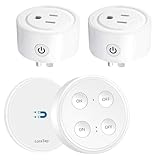
Overview: The LoraTap Mini Remote Control Outlet Plug offers refreshingly simple wireless control without WiFi, apps, or complex setup. This kit includes two grounded outlet adapters and a dual-button remote that works as either a wall-mounted switch or portable controller. Operating on a 915MHz frequency with a remarkable 656-foot range, it provides reliable control of lamps, fans, and appliances through walls and windows without internet dependency.
What Makes It Stand Out: The app-free, pairing-free operation makes this uniquely accessible for elderly users, children, or anyone intimidated by smart home technology. Each kit ships pre-programmed with unique IDs, preventing interference between multiple units in the same household. The magnetic remote base allows flexible placement on walls or refrigerators, while the memory function restores previous power states after outages—saving energy and protecting devices.
Value for Money: At $27.99 for two outlets and a remote, this system delivers solid value for straightforward remote control needs. It avoids ongoing subscription costs and doesn’t require expensive hubs or reliable internet. While lacking advanced scheduling, it provides core functionality at a price point competitive with basic smart plugs, making it ideal for specific use cases like hard-to-reach outlets.
Strengths and Weaknesses: Strengths: Extreme 656-foot range; no WiFi or app required; pre-paired for immediate use; elderly and child-friendly; unique ID prevents interference; memory function saves energy; magnetic remote mounting.
Weaknesses: No voice control or smart home integration; no scheduling or timer functions; limited to two outlets per remote; plastic construction feels less durable; cannot control outlets individually from remote.
Bottom Line: The LoraTap kit is perfect for users wanting simple, reliable remote control without smart home complexity. It’s ideal for controlling Christmas lights, attic fans, or bedside lamps from across the house. While it won’t integrate with Alexa or Google, its unmatched simplicity and range make it a practical solution for specific accessibility and convenience needs.
9. TESSAN 2 Pack Smart Plug, WiFi Smart Outlet with Dual Sockets, Compatible with Alexa and Google Home, Remote Control Outlet with Timer Function, Voice Control, Surge Protection, 2.4GHz WiFi Only

Overview: The TESSAN 2 Pack Smart Plug delivers exceptional value by combining dual-socket control with budget-friendly pricing. Each plug contains two independently controllable outlets, effectively providing four smart outlets across two compact adapters. Compatible with Alexa and Google Home, these WiFi-enabled plugs support voice commands, app control, scheduling, and group automation while including built-in surge protection for connected devices.
What Makes It Stand Out: The dual-socket design maximizes outlet efficiency—perfect for crowded power strips or wall outlets where every socket counts. Each of the four total outlets can be controlled individually or grouped together, offering flexibility rarely seen at this price point. The straightforward setup process uses both WiFi and Bluetooth for reliable pairing, while the app enables sharing control with family members for collaborative home management.
Value for Money: At $23.99 for two plugs (effectively $6 per outlet), this is among the best cost-per-outlet ratios available. Competing single-outlet smart plugs often cost $10-15 each, making this bundle a steal for budget-conscious smart home builders. The inclusion of surge protection and timer functions adds premium features without premium pricing.
Strengths and Weaknesses: Strengths: Outstanding value at $6 per outlet; individual control of dual sockets; compact design; surge protection included; family sharing via app; group control simplifies management.
Weaknesses: 2.4GHz WiFi only; limited to 1800W total per plug; TESSAN app less feature-rich than major brands; no USB charging ports; shared control of dual outlets may confuse some users.
Bottom Line: The TESSAN 2 Pack Smart Plug is the best budget option for expanding smart home capabilities. Its dual-socket design efficiently doubles your control without doubling costs, making it perfect for entertainment centers, kitchen appliances, or holiday lighting. While it lacks advanced features, the unbeatable price and core functionality make it an excellent entry point or expansion set for any smart home ecosystem.
10. Smart Sleek Socket: Universal Outlet Concealer with Wi-Fi Smart Power Strip

Overview: This variant of the Smart Sleek Socket is specifically engineered for inverted wall outlets where the round ground pin sits above the flat blades—a common configuration in newer homes. It maintains all the design-forward features of the standard model: wall-blending aesthetics, two smart outlets, USB-A/C fast charging, and voice control compatibility, while ensuring proper fitment for this specific outlet orientation.
What Makes It Stand Out: The specialized design addresses a frustrating gap in the market—most outlet concealers only work with traditional ground-below configurations. This model’s inverted compatibility ensures the cord routes downward correctly while maintaining the signature flush-mount profile. Like its counterpart, it provides decorator-approved cord concealment that lets furniture sit perfectly against walls, eliminating the visual chaos of traditional power strips.
Value for Money: At $34.95, it matches the standard Sleek Socket’s premium pricing. For owners of inverted outlets, this is essentially the only game in town for combining smart control with aesthetic concealment. The value proposition remains strong: you’re investing in both functionality and interior design, avoiding costly electrical work while achieving a built-in look.
Strengths and Weaknesses: Strengths: Specifically designed for inverted outlets; maintains elegant wall-blending design; fast USB-A and USB-C charging; tool-free universal installation; UL/CSA certified; solves a unique installation challenge.
Weaknesses: Niche compatibility limits versatility; only two smart outlets; 1625W total capacity; premium price for limited outlet count; may not fit non-standard or GFCI inverted outlets.
Bottom Line: If your home has inverted outlets and you value aesthetics, this specialized Sleek Socket is a must-have. It successfully adapts the original’s elegant design to a challenging outlet configuration without compromising functionality. While the limited smart outlets and specific compatibility narrow its audience, for those with inverted outlets seeking clutter-free smart control, it’s an unmatched solution that delivers both form and function.
Understanding Smart Outlet-Controlled Adapters
What Makes Them Renter-Friendly?
Smart outlet adapters are the Switzerland of home automation—neutral, non-invasive, and universally accepted. These devices require zero electrical modifications, no wall plate removal, and absolutely no contractor involvement. You simply plug them into existing outlets, connect them to your Wi-Fi network, and gain immediate smartphone control. The renter-friendly magic lies in their reversibility; when move-out day arrives, you unplug them, pack them up, and leave zero evidence behind. This preserves your security deposit while giving you landlord-approved automation superpowers.
The Technology Behind Plug-and-Play Smart Control
At their core, these adapters contain miniature computers with built-in Wi-Fi or alternative wireless radios that communicate with cloud servers. When you tap a button in your smartphone app, that command travels through the internet to the adapter’s microcontroller, which then opens or closes an internal relay—essentially a smart switch that controls power flow. The best models include energy monitoring chips that measure real-time power consumption, while premium versions feature local memory that maintains schedules even during internet outages. Understanding this technology helps you identify which features are genuinely useful versus marketing fluff.
Why Traditional Smart Home Solutions Don’t Work for Renters
The Rewiring Problem
Hardwired smart switches might look sleek, but they require disconnecting live wires, installing new gang boxes, and potentially altering circuit loads—all tasks that violate most lease agreements and pose serious safety risks for non-electricians. Even “simple” replacements like smart dimmer switches involve touching 120V wiring, which can void your renter’s insurance and create liability nightmares. Smart outlet adapters eliminate this entirely by working with your existing electrical infrastructure rather than against it.
Lease Agreement Limitations
Most standard leases contain explicit clauses prohibiting “alterations to electrical systems” or “modifications to permanent fixtures.” Some particularly strict agreements even forbid replacing outlet faceplates. These restrictions aren’t just landlord fussiness—they’re about liability, building code compliance, and maintaining consistent infrastructure across units. Smart adapters operate completely within these boundaries because they’re classified as personal property, not fixtures. You wouldn’t ask permission to plug in a lamp, and you don’t need it for a smart adapter either.
Security Deposit Concerns
Every renter’s nightmare is losing $1,200 because of a “modification” that seemed harmless. Landlords will absolutely deduct for unauthorized electrical work, and even professional restoration might not get your full deposit back if they discover altered wiring. Smart adapters leave no trace—no screw holes, no paint damage, no evidence you ever had a smart home. This makes them the only risk-free way to add automation to a rental property.
Key Features to Evaluate Before Buying
App Compatibility and Ecosystem Integration
Not all smart home apps are created equal. Some require clunky third-party software, while others integrate seamlessly with major platforms like Apple HomeKit, Google Home, or SmartThings. Before purchasing, verify the adapter works with your existing ecosystem. iPhone users should prioritize HomeKit-compatible models for Siri control, while Android households might prefer Google Home integration. The best adapters offer native support for multiple platforms simultaneously, future-proofing your investment against ecosystem changes.
Voice Assistant Support
Voice control transforms smart adapters from convenient to genuinely life-changing. Imagine saying “turn off the bedroom” when you’re already cozy in bed, or “turn on the coffee maker” while you’re in the shower. Check for native support rather than workaround integrations—native Alexa or Google Assistant support responds faster and more reliably. Some adapters even support multiple assistants simultaneously, letting you switch between Siri and Alexa depending on which device is closest.
Energy Monitoring Capabilities
This feature turns your adapter into a financial advisor for your electricity bill. Real-time energy monitoring shows exactly how much that space heater costs per hour, while historical data reveals which appliances are energy vampires. For renters who can’t upgrade to efficient appliances, this data helps identify the worst offenders and modify usage patterns accordingly. Look for adapters that export data to spreadsheets for detailed analysis, especially if you split utilities with roommates.
Scheduling and Automation Options
Basic scheduling lets you turn devices on/off at set times, but advanced automation responds to conditions. The best adapters offer sunrise/sunset triggers, random vacation modes that simulate occupancy, and conditional logic like “turn on fan when temperature exceeds 75°F.” Some even integrate with weather services to preemptively close windows or adjust heaters. For renters with unpredictable schedules, geofencing capabilities that trigger actions based on your phone’s location prove invaluable.
Physical Design and Outlet Placement
That bulky adapter that blocks both outlets is a deal-breaker in outlet-scarce apartments. Evaluate the physical dimensions carefully—slim designs that preserve outlet access are worth premium pricing. Consider whether the adapter extends vertically or horizontally, and whether it covers the second outlet. Some innovative models feature side-mounted plugs or pass-through outlets that let you plug another device directly into the adapter itself, effectively doubling your outlet capacity.
Connectivity Protocols: Wi-Fi vs. Zigbee vs. Z-Wave
Wi-Fi adapters connect directly to your router—simple to set up but can congest busy networks. Zigbee and Z-Wave models require a separate hub but create mesh networks that improve reliability and reduce Wi-Fi clutter. For renters in small apartments, Wi-Fi models usually suffice. However, if you’re building a comprehensive smart home with dozens of devices, a hub-based system offers better performance and future scalability. Consider your router’s capabilities and your long-term smart home goals.
Power Rating and Appliance Compatibility
That $15 adapter might handle a lamp beautifully but will fry instantly if you plug in a 1,500-watt space heater. Always check the maximum wattage and amperage ratings—most quality adapters support 15 amps (1,800 watts), but budget models might only handle 10 amps. For high-draw appliances like air conditioners, heaters, or power tools, look for adapters specifically rated for “appliance duty” with built-in overload protection. The adapter should also specify compatibility with motor loads, which draw significantly more power at startup.
Away-From-Home Controls
Not all smart adapters work remotely. Some cheaper models only function when your phone is on the same Wi-Fi network, defeating the purpose of smart control. Verify the adapter offers true cloud-based control that works from anywhere with internet access. This feature proves essential for vacation mode automation, checking if you left the iron on, or turning on lights before arriving home late at night. Test this functionality during the return window—some adapters promise remote access but deliver laggy, unreliable performance.
Guest Access and Multi-User Management
In a shared rental, everyone needs control without sharing your primary account. Quality adapters offer multi-user management with permission levels—letting roommates control common area devices while restricting access to your bedroom lamp. Guest access features let you grant temporary control to visitors without giving them permanent access or your Wi-Fi password. Some even generate time-limited QR codes for houseguests. This becomes crucial in multi-bedroom rentals where smart devices serve the entire household.
Safety Certifications to Demand
Electrical devices without proper certification are house fire risks posing as convenience. Insist on UL or ETL certification for North American models—these indicate independent testing for overheating, overload conditions, and component failure. For international brands, look for CE marking or equivalent. Avoid uncertified Amazon marketplace specials, no matter how tempting the price. The certification should be specifically for the adapter, not just the USB charger portion that some models include.
Installation and Setup Best Practices
First-Time Pairing Process
The initial setup experience predicts your long-term satisfaction. Premium adapters use Bluetooth-assisted Wi-Fi pairing that completes in under two minutes, while frustrating models require multiple app switches and cryptic button presses. Look for adapters with QR code scanning for instant recognition, and avoid those requiring you to temporarily connect to their ad-hoc Wi-Fi network. The process should feel straightforward, not like you’re hacking into the mainframe.
Wi-Fi Network Requirements
Many smart adapters only work on 2.4 GHz networks, which can cause headaches if your router automatically merges bands. Before purchasing, verify your router can broadcast separate SSIDs or has a dedicated 2.4 GHz guest network. Some newer adapters support 5 GHz, offering faster response times. For apartment dwellers in dense buildings, consider adapters with external antennas or mesh support for better signal penetration through walls.
Troubleshooting Connection Issues
Even quality adapters occasionally drop connections. The difference lies in recovery—good models automatically reconnect within seconds, while poor ones require manual unplugging. Look for adapters with status LEDs that communicate clearly: solid blue for connected, flashing for pairing, red for connection issues. Some premium models include power-cycle scheduling that automatically reboots the adapter weekly to prevent connection drift, a feature that solves problems before you notice them.
Maximizing Your Smart Adapter Investment
Creating Scenes and Routines
Individual device control is just the starting point. The real magic happens when you combine adapters into scenes—“Movie Night” dims lights, turns on the TV, and activates ambient lighting with one command. Advanced routines chain multiple actions with delays: “Good Morning” gradually brightens lights, starts the coffee maker after five minutes, then turns on the news. For renters, scenes compensate for not having hardwired dimmers or three-way switches, creating sophisticated automation from simple plug-in devices.
Integrating with Other Smart Devices
Smart adapters become exponentially more powerful when they trigger other devices. Connect them to smart sensors—motion detectors that turn on lights, door sensors that activate entry lighting, or temperature sensors that control fans. IFTTT (If This Then That) support opens infinite possibilities: receive a phone call when your washing machine finishes, or flash lights when your team scores. This interoperability transforms a collection of gadgets into a cohesive smart home ecosystem.
Energy-Saving Strategies for Renters
Since you can’t upgrade to Energy Star appliances, smart adapters become your efficiency weapon. Use energy monitoring to identify devices drawing phantom power, then schedule them to cut power completely during sleep hours. Create “away” modes that shut down everything except the refrigerator, and use geofencing to ensure devices never run when nobody’s home. In older rentals with inefficient heating, pair adapters with space heaters to create zone heating that only warms occupied rooms, potentially cutting heating bills by 30%.
Common Pitfalls and How to Avoid Them
Overloading Circuits
A typical apartment bedroom might have only one or two 15-amp circuits. Plugging multiple high-draw appliances into smart adapters on the same circuit creates overload risks. Use energy monitoring to track cumulative draw, and never exceed 80% of circuit capacity (12 amps on a 15-amp circuit). Spread high-wattage devices across different rooms or circuits. Some advanced adapters offer load balancing features that automatically stagger startup times for multiple devices, preventing simultaneous surges that trip breakers.
Ignoring Firmware Updates
That notification to update firmware isn’t just annoying—it’s critical for security and performance. Manufacturers patch vulnerabilities and improve connectivity through updates, but many renters dismiss them fearing complexity. Enable automatic updates when available, or schedule monthly manual updates. Outdated firmware can leave your network vulnerable and cause compatibility issues with updated smart home platforms. The five minutes spent updating prevents hours of troubleshooting later.
Privacy and Data Security Considerations
Your smart adapter knows when you’re home, what devices you use, and your daily routines. Some budget manufacturers sell this data to advertisers or fail to encrypt communications. Research the company’s privacy policy—reputable brands explicitly state they don’t sell user data and use end-to-end encryption. For maximum privacy, consider adapters that work locally without cloud dependency, though this reduces remote access capabilities. Change default passwords immediately and disable any features you don’t use to minimize attack surfaces.
Frequently Asked Questions
1. Can my landlord legally prohibit smart outlet adapters?
Generally no, since they’re classified as personal property like any other plug-in device. However, check your lease for unusual clauses about “communication devices” or “network equipment.” If concerned, a quick email confirming they’re non-permanent plug-in devices usually suffices.
2. Will smart adapters increase my electricity bill?
The adapters themselves consume minimal power—typically 1-2 watts, costing less than $2 annually. However, they often reveal how much power your devices were wasting in standby mode, which can lead to savings of $50-150 per year when you eliminate phantom loads.
3. What happens to my schedules if the internet goes down?
It depends on the model. Basic adapters lose all functionality without internet, while premium models with local memory continue executing schedules. Check for “offline mode” or “local control” features if this is a concern, especially in areas with unreliable internet.
4. Can I use smart adapters with power strips or extension cords?
Yes, but with caution. Never exceed the adapter’s maximum wattage rating, and avoid plugging multiple high-draw appliances into the same strip. For safety, use a quality surge protector and ensure the total load remains below 80% of the adapter’s rating.
5. How many smart adapters can I run on my apartment’s Wi-Fi?
Most consumer routers handle 20-30 connected devices comfortably. If you’re approaching that limit, consider adapters using Zigbee or Z-Wave with a hub, which reduce Wi-Fi congestion. For heavy users, a mesh Wi-Fi system significantly increases capacity.
6. Are smart adapters safe to leave plugged in unattended?
UL/ETL-certified adapters are designed for continuous operation and include safety features like overload protection and automatic shutoff. However, never use them with damaged cords or appliances, and avoid covering them with flammable materials like curtains.
7. Can roommates control my smart adapters?
Only if you grant permission. Most apps offer multi-user access with customizable permissions. You can give roommates control over common area devices while keeping personal items private, or generate temporary guest access for visitors.
8. Do smart adapters work with dimmable lamps?
Standard adapters only provide on/off control. For dimming, you need specialized smart dimmer plugs that communicate with dimmable LED bulbs. Using a regular adapter with a dimmable bulb will cause flickering or limit you to full brightness only.
9. Will taking my smart adapters when I move violate my lease?
Absolutely not—they’re your personal property. In fact, removing them restores the unit to its original condition. Document this during move-out inspections to avoid any deposit disputes over “missing” smart devices that were never permanent fixtures.
10. How do I reset a smart adapter for a new Wi-Fi network?
Most feature a physical reset button held for 10-15 seconds. Some use a pattern of rapid power cycling. Always check the manual—improper resetting can lock the device or require manufacturer intervention. After resetting, you’ll need to reconfigure all schedules and routines.