Gone are the days of robot vacuums aimlessly bumping into furniture like confused bumper cars. Today’s smart mapping vacuums navigate your home with the precision of a seasoned cartographer, creating detailed floor plans that let them clean efficiently while you tackle your Zoom calls. For the work-from-home professional, this isn’t just convenience—it’s a fundamental shift in how we manage household chores during the nine-to-five grind.
The technology has evolved from simple infrared sensors to sophisticated systems that can distinguish your kitchen from your conference room, adjust suction power for different floor types, and even avoid that tangle of charging cables under your desk. Understanding these mapping capabilities isn’t just about buying a gadget; it’s about investing in a silent cleaning partner that respects your workflow and your space. Let’s explore what makes these autonomous cleaners truly smart and how to choose one that seamlessly integrates into your work-from-home lifestyle.
Top 10 Smart Vacuum Cleaners with Mapping
Detailed Product Reviews
1. Tikom Robot Vacuum and Mop Combo, 6000Pa Automatic Robotic Vacuum Cleaner, Smart Mapping, 150 Min Max, Ideal for Pet Hair, Hardfloors, Carpets, Home(L8000 Pro)
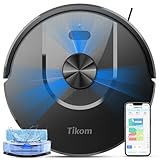
Overview: The Tikom L8000 Pro is a versatile 2-in-1 robot vacuum and mop that delivers impressive 6000Pa suction power at a mid-range price point. With smart LiDAR navigation and a 150-minute runtime, this device efficiently handles daily cleaning across multiple floor types. It’s designed for pet owners and busy households seeking automated cleaning without the premium cost of self-emptying models.
What Makes It Stand Out: The L8000 Pro’s advanced radar mapping saves up to five floor plans, making it perfect for multi-level homes. Its whisper-quiet 45dB operation in low mode allows for undisturbed cleaning day or night. The automatic carpet detection boosts suction instantly, ensuring deep cleaning on rugs without manual intervention. With a 450ml dustbin and 300ml water tank, it covers substantial area before needing attention.
Value for Money: At $199.99, this model offers exceptional value by combining LiDAR navigation, mopping capability, and powerful suction typically found in more expensive units. While it lacks self-emptying, the large-capacity bins require less frequent maintenance than many competitors. It’s an ideal entry point for those wanting premium features without paying for convenience they may not need.
Strengths and Weaknesses: Strengths: Powerful 6000Pa suction; ultra-quiet operation; smart multi-floor mapping; automatic carpet boost; extended 150-minute battery life. Weaknesses: No self-emptying base; manual dustbin and water tank emptying; smaller debris capacity compared to self-emptying models; mopping function requires periodic pad maintenance.
Bottom Line: The L8000 Pro is a feature-rich, cost-effective solution for automated cleaning. It excels in navigation and versatility, making it perfect for apartments and smaller homes where self-emptying isn’t essential. The quiet operation and strong performance make it a top contender in its price class.
2. Tikom Robot Vacuum and Mop, 6000Pa Robotic Vacuum Cleaner with Self-Emptying Base, 90 Days Capacity, LiDAR Navigation, Home Mapping, Ideal for Pet Hair, Hard Floors, Carpet (L8000 Plus)

Overview: The Tikom L8000 Plus builds upon the L8000 Pro by adding a 90-day self-emptying base while maintaining the same powerful 6000Pa suction and smart navigation. This hybrid model eliminates the primary chore of robot vacuum ownership—frequent bin emptying—making it ideal for pet-heavy households and allergy sufferers who want truly hands-free operation.
What Makes It Stand Out: The standout feature is undoubtedly the 3L dustbag that holds months of debris, a significant upgrade from the standard model. It retains the LiDAR navigation with five-map storage and adds dual-band WiFi compatibility for more reliable connectivity. The customizable app controls allow for no-go zones, virtual walls, and room-specific scheduling with unprecedented precision.
Value for Money: At $219.98, the Plus model commands only a $20 premium over the Pro version—a remarkable value for adding self-emptying capability. Competing brands often charge $100+ more for this feature. The time saved and hygiene benefits from less frequent dust exposure justify the modest price increase, positioning this as one of the best deals in automated cleaning.
Strengths and Weaknesses: Strengths: 90-day self-emptying; dual-band WiFi; retains powerful suction; comprehensive app controls; multi-floor mapping. Weaknesses: Slightly noisier during emptying cycles; marginally higher initial cost; dustbags require periodic replacement; base station occupies more space.
Bottom Line: For just $20 more than the base model, the L8000 Plus delivers transformative convenience. The self-emptying feature makes this the sweet spot for most buyers—offering premium automation without premium pricing. It’s an easy recommendation for anyone wanting maximum convenience on a budget.
3. Robot Vacuum and Mop, 3-in-1 Robotic Vacuum Cleaner with 70-Day Self-Emptying Base, 360° LiDAR Navigation, Smart Mapping & Auto-Return, 6000Pa Strong Suction for Pet Hair, Carpets & Hard Floors

Overview: The D60S MAX represents the premium tier of robot vacuum innovation, combining 70-day self-emptying capability with an exceptional 220-minute runtime. This 3-in-1 powerhouse targets large homes with complex layouts, offering six cleaning modes and extensive customization. Its 6000Pa suction and massive 5200mAh battery deliver uncompromising performance for demanding users.
What Makes It Stand Out: With up to 14 no-go zones and five map storage, the D60S MAX offers unparalleled control over cleaning boundaries. The 220-minute battery life outlasts nearly all competitors, enabling whole-home cleaning in one session. Six specialized modes including Zigzag, Spot, and Edge cleaning provide tailored solutions for every scenario. Voice control via Alexa and Google Assistant adds seamless smart home integration.
Value for Money: Priced at $266.39, this is the most expensive option but justifies the cost for large households. The extended runtime and superior mapping capabilities eliminate the need for mid-clean charging interruptions. While $50 more than the iRobot, it includes self-emptying and mopping—features that would cost significantly more from premium brands.
Strengths and Weaknesses: Strengths: 220-minute runtime; 70-day self-emptying; 14 no-go zones; six cleaning modes; superior battery capacity; voice assistant compatibility. Weaknesses: Highest price point; lesser-known brand; larger base station footprint; dustbag replacement costs add up.
Bottom Line: The D60S MAX is ideal for large homes requiring extensive, unattended cleaning. Its marathon battery life and granular control options make it worth the premium. If you have substantial square footage and want maximum automation, this is your best choice despite the higher investment.
4. iRobot Roomba 104 Vac Robot Vacuum - Intense Power-Lifting Suction, Smart & Fast Home Mapping, Ideal for Pet Hair, LiDAR Navigation, Multi-Surface Cleaning, Cleans in Neat Rows, Self-Charging

Overview: The iRobot Roomba 104 brings the trusted Roomba brand into the modern LiDAR era with enhanced suction and intelligent mapping. This vacuum-only model focuses on core cleaning excellence, delivering 70 times more power than the 600 series. It’s engineered for those who prioritize brand reliability and proven performance over multi-function features.
What Makes It Stand Out: iRobot’s ClearView LiDAR navigation provides precise, methodical cleaning in neat rows—a hallmark of the brand’s engineering. The 3-Stage Cleaning System with specialized brushes tackles everything from fine dust to large debris. The Roomba Home App offers intuitive controls, filter life monitoring, and easy keep-out zone creation. Spot cleaning mode targets stubborn messes with five-minute intensive passes.
Value for Money: At $249.99, the Roomba 104 commands a brand premium without offering mopping or self-emptying. While the suction is impressive, similarly priced competitors include these features. You’re paying for iRobot’s ecosystem reliability, superior customer support, and resale value. For dedicated vacuum performance from a trusted name, it’s fairly priced.
Strengths and Weaknesses: Strengths: Trusted brand reputation; excellent navigation; powerful suction upgrade; user-friendly app; specialized brushes; spot cleaning mode. Weaknesses: No mopping function; no self-emptying base; premium pricing for features; limited to vacuum-only; dustbin requires frequent emptying.
Bottom Line: The Roomba 104 is perfect for brand-loyal customers wanting reliable, thorough vacuuming without frills. It excels at its core mission but misses modern conveniences. Choose this if you trust iRobot’s ecosystem and don’t need mopping or self-emptying capabilities in your automated cleaning routine.
5. eufy C10 Robot Vacuum Self Emptying, 8 Weeks Hands Free, Advanced Smart Mapping with LiDAR Navigation, 2.85-Inch Slim Design, Powerful Suction, Edge Expansion Brush for Pet Hair, Carpet Detection

Overview: The eufy C10 distinguishes itself with an ultra-slim 2.85-inch design that accesses hard-to-reach areas under furniture where dust accumulates. This self-emptying vacuum combines 8 weeks of hands-free operation with eufy’s reputation for reliable performance. It’s specifically designed for homes with low-clearance furniture and tight spaces.
What Makes It Stand Out: The unique CornerRover Arm extends to clean deep into corners and along edges—areas where pet hair notoriously collects. Its remarkably thin profile navigates under beds, sofas, and cabinets that bulkier models simply cannot reach. The 3L self-emptying station provides two months of maintenance-free operation, while laser navigation ensures systematic coverage despite the compact form factor.
Value for Money: At $206.99, the C10 offers self-emptying convenience at a competitive price point, sitting between the two Tikom models. While its 4000Pa suction is lower than competitors, the specialized design and corner-cleaning technology compensate for raw power. For homes with challenging architecture, this targeted engineering provides better value than higher-suction models that can’t reach problem areas.
Strengths and Weaknesses: Strengths: Ultra-slim 2.85-inch design; innovative corner-cleaning arm; 8-week self-emptying; competitive pricing; effective navigation; reaches tight spaces. Weaknesses: Lower 4000Pa suction; no mopping function; smaller dustbag capacity than some rivals; side brush may wear faster.
Bottom Line: The eufy C10 is the specialist choice for homes with low furniture and corner-heavy debris. Its slim design solves a specific problem better than any competitor. If accessibility is your primary concern, this is your best option, though you’ll sacrifice some suction power and mopping capability for the compact form factor.
6. Robot Vacuum and Mop Combo, Robotic Vacuums Cleaner with LiDAR Navigation, Smart Mapping, Strong Suction, with WiFi/App/Alexa/Voice Control, Obstacle Avoidance, for Home, Wood/Hard Floors, Pet Hair

Overview: The D60S MAX represents the pinnacle of robot vacuum technology, commanding a premium price for comprehensive automation. This flagship device combines vacuuming and mopping with an upgraded self-emptying system that stores up to 70 days of debris, while its massive 5200mAh battery delivers an impressive 220 minutes of cleaning time. Designed for large homes with complex layouts, it promises near-total floor care autonomy.
What Makes It Stand Out: The combination of 6000Pa suction power and 360° LiDAR navigation places this model in elite territory. The navigation system stores up to five floor maps and enables precise no-go zone settings—critical for homes with delicate areas or pet feeding stations. Six cleaning modes including Zigzag and Spot cleaning provide granular control, while the extra-large dust bag minimizes maintenance to nearly bi-monthly intervals.
Value for Money: At $1,299.99, this competes directly with premium models like the Roborock S7 MaxV Ultra and iRobot Roomba j7+. While expensive, the 70-day capacity and 220-minute runtime exceed many competitors, potentially justifying the cost for large households seeking maximum convenience.
Strengths and Weaknesses: Strengths include exceptional battery life, powerful suction, advanced mapping, and extensive automation. Weaknesses are the premium price point, ongoing cost of replacement dust bags, and potential overkill for smaller apartments.
Bottom Line: Ideal for large homes with pets and mixed flooring where maximum automation justifies the investment. For smaller spaces, more budget-friendly options deliver similar core performance.
7. roborock Q7 L5 Robot Vacuum and Mop Combo, 8,000Pa Suction, Upgraded from Q5 Pro, Dual Anti-Tangle System, LiDAR Navigation, Multi-Level Mapping, Self-Charging Robotic Vacuum Cleaner, Black

Overview: The roborock Q7 L5 emerges as a budget-friendly powerhouse, delivering flagship-level suction at an entry-level price point. This upgraded model builds upon the Q5 Pro’s foundation with enhanced anti-tangle technology and impressive 8,000Pa HyperForce suction. While lacking self-emptying capability, it focuses resources on core cleaning performance and reliable navigation for daily use.
What Makes It Stand Out: The dual anti-tangle system—featuring a specially designed main brush and zero-tangle side brush—addresses one of robot vacuums’ most persistent pain points. This innovation significantly reduces maintenance for pet owners. The 8,000Pa suction power surpasses many models costing three times as much, while precision LiDAR navigation ensures efficient, methodical cleaning patterns across multiple floors.
Value for Money: At $199.99, this represents exceptional value. Comparable suction power typically appears in $500+ models. The trade-off is manual emptying, but for those prioritizing cleaning performance over automation, it’s unmatched in its price class.
Strengths and Weaknesses: Strengths include best-in-class suction, effective anti-tangle design, proven roborock reliability, and multi-level mapping. Weaknesses include the integrated water tank/dustbin design limiting capacity and absence of self-emptying functionality.
Bottom Line: Perfect for performance-focused users wanting maximum cleaning power without premium features. Pet owners and those with high-traffic homes will appreciate the anti-tangle system and suction strength.
8. iRobot Roomba 104 2in1 Vacuum & Mop Robot - Self-Empties for 75 Days, Intense Power-Lifting Suction, Vacuums All Floors, Ideal for Pet Hair, LiDAR Smart Navigation Mapping, Mops Hard Floors
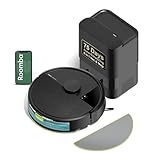
Overview: The iRobot Roomba 104 Combo brings the brand’s trusted navigation and self-emptying technology to the vacuum-mop hybrid category. Positioned as a mid-tier offering, it emphasizes hands-free operation with a 75-day disposal capacity and intelligent carpet detection. This model targets iRobot loyalists seeking comprehensive floor care without flagship pricing, maintaining the brand’s reputation for reliability.
What Makes It Stand Out: The automatic carpet avoidance while mopping is a standout feature that eliminates a common frustration with combo units. Combined with ClearView LiDAR mapping and 70x power-lifting suction, it delivers a thoughtful cleaning experience. The sealed disposal system traps 99% of allergens as small as 0.7 microns, making it particularly appealing for allergy sufferers concerned about air quality.
Value for Money: At $299.99 with self-emptying capability, this undercuts many competitors while offering iRobot’s ecosystem and support. The 75-day capacity matches or exceeds premium alternatives, providing excellent long-term convenience for the investment.
Strengths and Weaknesses: Strengths include reliable brand support, intelligent carpet detection, superior allergen sealing, and flexible cleaning modes. Weaknesses are the unspecified suction power in Pa (making direct comparisons difficult) and potentially higher long-term costs for proprietary bags.
Bottom Line: An excellent choice for iRobot enthusiasts wanting mop functionality and self-emptying. The carpet detection feature alone may justify the purchase for homes with mixed flooring.
9. Robot Vacuum and Mop, 5000Pa Suction Self-Emptying Robot Vacuum Cleaner, Laser Navigator with Smart Mapping Robotic Vacuums, Schedule,150Mins Runtime, App Alexa Control for Carpet/Pet Hair,Q10 pro

Overview: The Q10 Pro positions itself as a feature-rich mid-range contender, packing self-emptying capability and 5000Pa suction into a sub-$300 package. This versatile unit offers four-in-one functionality—vacuuming, sweeping, mopping, and self-emptying—making it an all-in-one floor care solution for busy households seeking automation without premium pricing from established brands.
What Makes It Stand Out: The 60-day self-emptying base at this price point is remarkable, competing with models twice as expensive. Advanced LiDAR plus SLAM navigation creates accurate home maps with no-go zones, while three suction levels and water flow settings provide customizable cleaning. The 150-minute runtime covers most medium to large homes in a single session, enhancing daily convenience significantly.
Value for Money: At $259.99, this delivers premium features—self-emptying, LiDAR navigation, and strong suction—at a mid-tier price. It challenges established brands by offering comparable automation for significantly less, though long-term reliability remains unproven compared to market leaders.
Strengths and Weaknesses: Strengths include excellent feature-to-price ratio, self-emptying convenience, versatile cleaning modes, and smart home integration. Weaknesses involve the lesser-known brand with potentially limited support and unknown durability compared to established competitors.
Bottom Line: Outstanding value for those prioritizing features over brand name. Ideal for tech-savvy users wanting self-emptying and mapping without breaking the bank.
10. Tikom Robot Vacuum and Mop Combo, 5000Pa Robotic Vacuum Cleaner, 150 Min Max, App & Remote Control, Ideal for Hard Floor, Carpet, Pet Hair, Self-Charge(G8000 Max)

Overview: The Tikom G8000 Max enters as the budget champion, delivering 5000Pa suction and vacuum-mop combo functionality at an astonishing sub-$120 price. This ultra-slim 2.99-inch design prioritizes accessibility and basic automation for first-time robot vacuum buyers or small-space dwellers who want essential features without financial commitment or complexity.
What Makes It Stand Out: Four control methods—app, remote, voice, and button—make this exceptionally user-friendly for all ages, particularly seniors or those uncomfortable with smartphone-only operation. The simultaneous vacuum-mop function with 450ml dustbin and 300ml water tank reduces cleaning time by 50%, while anti-collision and anti-fall sensors provide basic but effective navigation around obstacles.
Value for Money: At $113.98, this is among the most affordable vacuum-mop combos available. It sacrifices advanced mapping and self-emptying for core functionality, offering tremendous value for apartments or as a secondary unit for specific areas.
Strengths and Weaknesses: Strengths include unbeatable price, strong suction for the cost, slim design for under-furniture cleaning, and multiple control options. Weaknesses are the lack of LiDAR navigation, no self-emptying, and shorter 150-minute battery life compared to premium models.
Bottom Line: An excellent entry point for robot vacuum newcomers. Perfect for small apartments or as a supplemental cleaner where advanced features aren’t essential.
Understanding Smart Mapping Technology
Smart mapping technology forms the brain of modern robot vacuums, transforming them from random movers into methodical cleaning machines. Unlike their predecessors that cleaned through chaotic patterns, mapping vacuums systematically cover every inch of your floor plan, reducing cleaning time by up to 60% while ensuring no spot gets missed during your busy workday.
How LiDAR Mapping Works
LiDAR (Light Detection and Ranging) systems spin tiny lasers at high speeds, bouncing light off walls and objects to create millimeter-accurate maps of your home. This technology works in complete darkness, making it ideal for cleaning under furniture or during early morning hours before your first meeting. The laser measurements generate thousands of data points per second, building a real-time 3D model that helps the vacuum navigate tight spaces and avoid obstacles with remarkable precision. For home offices, this means the unit can detect chair legs, monitor stands, and even stray power strips that could derail a cleaning session.
Camera-Based Vision Systems
Vision-based navigation uses upward-facing cameras to photograph your ceilings and identify visual landmarks, creating a topological map of your space. These systems excel at recognizing specific objects like pet bowls or shoe piles, allowing for intelligent obstacle avoidance. However, they require some ambient light to function optimally and may struggle in pitch-black rooms. The visual data processing enables features like room identification and furniture recognition, which helps the vacuum understand it’s entering your home office versus your living room, adjusting its behavior accordingly.
Gyroscope and Accelerometer Navigation
Entry-level mapping vacuums often combine gyroscopes and accelerometers with basic infrared sensors for dead reckoning navigation. While not as accurate as LiDAR or camera systems, this approach still provides systematic cleaning patterns and basic map creation. These units measure distance traveled and direction changes to plot their course, creating simplified maps that work well in smaller apartments or single-level homes. The technology serves as a cost-effective entry point into smart mapping without the premium price tag of laser or vision systems.
Key Features That Enable True Autonomous Cleaning
Autonomous cleaning means more than just starting a schedule—it requires intelligence to handle real-world complications without your intervention. The difference between a basic robot and a true autonomous cleaner lies in how it responds to unexpected situations and adapts to your living patterns.
Multi-Level Mapping Capabilities
Premium mapping vacuums can store up to four different floor plans, recognizing automatically which level they’re on and loading the appropriate map. This feature proves invaluable if you work from a basement office or have a multi-story home. The system remembers no-go zones, room names, and cleaning schedules for each floor, eliminating the need to remap when moving the unit between levels. Look for systems that support manual floor selection in the app, giving you control when automatic detection fails.
No-Go Zones and Virtual Boundaries
Virtual boundary setting lets you cordon off problem areas without physical barriers. Simply draw lines or boxes on your digital map to keep the vacuum away from your desk’s cable nest, your dog’s water bowl, or that delicate equipment in your home studio. Advanced systems allow different boundary types—some block all access while others permit vacuuming but disable mopping, perfect for protecting area rugs in your office. The best implementations let you set temporary boundaries for one-time cleaning sessions versus permanent restrictions.
Room-Specific Cleaning Schedules
True autonomy means cleaning different spaces on different days with varying intensities. Map your home office for a light daily touch-up while scheduling deep cleans for high-traffic hallways during your lunch break. Look for vacuums that let you customize suction power, water flow (for mopping models), and number of passes per room. This granularity ensures your workspace stays presentable for video calls without the vacuum roaring at full power during important meetings.
Performance Factors to Consider
Raw cleaning power means nothing if the vacuum can’t sustain it throughout your workday or handle your specific flooring challenges. Performance metrics extend far beyond suction specifications on a product sheet.
Suction Power and Carpet Detection
Suction power, measured in Pascals (Pa), ranges from 2,000Pa in entry-level models to over 6,000Pa in premium units. More importantly, smart carpet detection automatically boosts suction when transitioning from hard floors to carpeting, ensuring deep cleaning without unnecessary noise on bare floors. The best systems create carpet zones on your map, remembering which rooms need maximum power and which can use eco modes. For home offices with mixed flooring, this feature maintains quiet operation while ensuring thorough cleaning.
Battery Life and Recharge & Resume
Battery capacities typically span 90 to 180 minutes, but real-world runtime varies dramatically based on suction settings and floor type. The critical feature is recharge and resume—the vacuum returns to its dock when power runs low, charges just enough to finish the job, then picks up exactly where it left off. For large homes or deep cleaning sessions during your workday, this ensures complete coverage without waiting for a full charge cycle. Check the battery type too; lithium-ion batteries maintain consistent power output until depleted, while older NiMH batteries gradually lose suction as they discharge.
Dustbin Capacity and Self-Emptying Systems
Standard dustbins hold 400-600ml, requiring manual emptying every 2-3 cleaning cycles. Self-emptying docks change the game by transferring debris into a larger bag or bin, typically holding 30-60 days of dirt. For pet owners or dusty home environments, this feature eliminates a major maintenance task. The docking mechanism uses powerful suction to clear the robot’s bin, often with anti-bacterial bags that seal when removed, preventing dust clouds and allergen exposure during disposal.
Integration with Your Work-From-Home Setup
Your robot vacuum should complement your workflow, not compete with your concentration. The right features transform it from a noisy distraction into a silent productivity partner.
Quiet Operation Modes
Decibel levels range from 55dB (quiet conversation) to over 70dB (vacuum cleaner roar) at maximum power. Look for dedicated quiet modes that drop below 60dB, perfect for running during conference calls. Some advanced models automatically detect phone activity through smart home integration, pausing cleaning when you’re on a call. The brush design matters too—rubber brushes are generally quieter than bristle brushes, especially on hard floors, reducing the grinding noise that can penetrate closed doors.
App Control and Remote Monitoring
A well-designed app serves as your command center, offering real-time location tracking, cleaning history, and manual control. The best apps provide detailed coverage maps showing exactly where the vacuum cleaned, useful for spotting missed areas. Push notifications should be customizable—receive alerts only when the unit genuinely needs help, not for every completed cleaning. Look for apps that support multiple users, allowing family members to control the vacuum without sharing login credentials, and check if the app works reliably when you’re away from home, monitoring cleaning progress during business trips.
Smart Home Ecosystem Compatibility
Integration with Alexa, Google Assistant, or Siri enables voice commands like “start cleaning my office” without opening an app. More sophisticated integrations trigger cleaning based on your leaving home (geofencing) or coordinate with other smart devices. Some vacuums integrate with IFTTT or direct API access, allowing custom automations like “when I lock my smart door at 9 AM, start cleaning the downstairs.” For Apple users, HomeKit integration provides secure, local control without cloud dependency, crucial for privacy-conscious professionals.
Advanced Navigation Intelligence
Beyond basic mapping, advanced navigation systems demonstrate true artificial intelligence by understanding context, predicting problems, and adapting to dynamic environments. This intelligence separates frustrating gadgets from reliable tools.
Obstacle Recognition and Avoidance
Modern obstacle avoidance uses AI-trained cameras or 3D structured light sensors to identify and navigate around common household objects. The system recognizes shoes, cables, socks, and pet waste, steering clear instead of plowing through or getting tangled. For home offices, this means your vacuum won’t snag on laptop chargers or knock over equipment stands. The most advanced systems learn from encounters, updating their obstacle database and improving avoidance accuracy over time, reducing the “rescue missions” that interrupt your work.
Cliff Sensors and Fall Prevention
Cliff sensors using infrared light detect stairs and ledges, but their effectiveness varies. Premium systems employ multiple sensor types and map-based cliff detection, remembering stair locations and approaching them cautiously even if sensors are dirty. For multi-level homes or sunken living rooms, this redundancy prevents costly falls during unsupervised cleaning. Some units allow you to mark drop-offs on the map manually, creating an additional safety layer beyond hardware sensors.
Cleaning Path Optimization
Intelligent path planning calculates the most efficient route, typically cleaning along room perimeters first before covering interiors in systematic straight lines. Advanced algorithms account for room size, furniture density, and soil levels, spending more time on high-traffic areas. Look for vacuums that adapt their pattern based on previous cleaning data—if the unit consistently finds more dirt near your desk chair, it should automatically increase passes in that zone. This learning capability ensures cleaning efficiency improves over time rather than remaining static.
Maintenance and Upkeep Requirements
Even the smartest vacuum requires regular maintenance to maintain mapping accuracy and cleaning performance. Understanding these needs upfront prevents mid-week surprises when you’re buried in deadlines.
Filter Replacement Schedules
HEPA filters capture 99.97% of particles down to 0.3 microns, crucial for allergy sufferers and clean office environments. Most manufacturers recommend replacing filters every 2-3 months, though washable filters can extend this to 6 months with proper care. The app should track filter life based on actual usage hours rather than calendar time, providing accurate replacement alerts. Some premium models feature self-cleaning filters that shake off debris after each session, dramatically extending filter lifespan and maintaining consistent suction.
Brush Maintenance and Hair Removal
Brush rolls inevitably collect hair and fibers, reducing cleaning effectiveness and potentially damaging the motor. Look for vacuums with tool-free brush removal and included cleaning tools that cut through wrapped hair. Rubber brushes resist tangles better than bristle brushes, especially in pet households. The best designs feature anti-tangle technology that actively prevents hair wrapping, using comb-like structures or reverse rotation cycles to eject debris. Set a recurring calendar reminder to check brushes weekly—five minutes of prevention saves you from a mid-day cleaning failure when you’re presenting to clients.
Sensor Cleaning Protocols
Dirty sensors cause navigation errors, missed areas, and increased bumping. LiDAR sensors need gentle wiping with a dry microfiber cloth weekly, while camera lenses require similar care to maintain clear vision. Cliff sensors can accumulate dust that triggers false drop-off detection, causing the vacuum to avoid legitimate cleaning areas. The app should provide sensor health indicators, alerting you when performance degrades. Avoid using liquids or compressed air near optical sensors, as moisture can damage internal components and forced air can push debris deeper into the mechanism.
Mapping Accuracy and Learning Curve
The initial mapping process sets the foundation for all future cleaning, yet many users rush through it, resulting in incomplete maps and frustrating performance. Patience during setup pays dividends for months.
Initial Mapping Run Best Practices
The first mapping run should occur with ideal conditions: fully charged battery, all lights on, furniture in its normal position, and floors cleared of clutter. Let the vacuum complete its full mapping cycle without interrupting it, even if it seems to be taking inefficient routes. This baseline map captures the raw geometry of your space. For best results, walk through your home beforehand, removing small obstacles and opening all doors to rooms you want included. Some experts recommend running the mapping process twice, especially in complex layouts, to ensure the system captures every nook.
Map Editing and Customization
Once the initial map generates, spend time in the app dividing spaces into logical rooms, labeling them appropriately, and setting correct floor types. Most apps let you merge or split rooms, adjust boundaries, and designate carpeted zones. This customization enables room-specific scheduling and targeted cleaning. Pay special attention to transitional areas like doorways—properly defined thresholds help the vacuum understand when to change cleaning modes. Save multiple map versions if you rearrange furniture frequently, allowing quick switching between layouts without remapping.
Software Updates and Map Stability
Manufacturers regularly release firmware updates that improve mapping algorithms, add features, and fix bugs. However, major updates can sometimes corrupt existing maps, requiring remapping. Enable automatic updates but schedule them for weekends when you have time to troubleshoot. The best systems backup maps to the cloud, allowing easy restoration if issues arise. Map stability—how well the vacuum maintains its map between cleanings—varies significantly. Premium units rarely lose their position, while budget models may require frequent repositioning, especially after getting stuck or being manually moved.
Flooring-Specific Considerations
Your home office might have plush carpet, while the kitchen features tile and the living room showcases hardwood. A mapping vacuum must intelligently handle these transitions without manual intervention.
Hardwood and Tile Performance
Hard surfaces benefit from mopping attachments and controlled water flow to prevent streaking and oversaturation. The vacuum should lift its mopping pad when detecting carpet or use ultrasonic vibration for deeper tile cleaning. Soft rubber wheels prevent scratching delicate hardwood finishes, while edge-sweeping brushes should be positioned to kick debris away from baseboards rather than scattering it. For tile floors with deep grout lines, look for models with high-frequency vibration mopping that agitates dirt from crevices while the vacuum function handles surface debris.
Carpet Deep Cleaning Abilities
Carpet cleaning requires strong suction, aggressive brush action, and thorough coverage. The vacuum should automatically detect carpet entry, boost suction, and increase brush rotation speed. Some models feature carpet-only cleaning modes that make multiple passes in alternating directions, mimicking the action of an upright vacuum. For home offices with area rugs, the system should map these as distinct zones, applying appropriate cleaning intensity without treating the surrounding hardwood floor the same way. Pay attention to carpet pile height ratings—some vacuums struggle with plush carpeting above ¾ inch, while others handle deep pile with ease.
Transitioning Between Floor Types
The threshold between floor types presents a navigation challenge. Quality mapping vacuums detect these changes and adjust cleaning parameters instantly. They should maintain map accuracy even when climbing up to ¾-inch height differences, common with carpet edges or tile transitions. The best systems create “transition zones” in their maps, approaching these areas with appropriate speed and brush settings to prevent getting stuck or scattering debris. If your home has multiple floor type changes, prioritize models with strong climbing ability and intelligent transition logic.
Pet Owner Essentials
Pets and productivity don’t always mix, especially when fur accumulates under your desk or a robot vacuum spreads an “accident” across your office floor. Pet-specific features transform potential disasters into non-issues.
Pet Hair Extraction Systems
Effective pet hair removal requires more than strong suction—it demands anti-tangle brushes, high-capacity dustbins, and HEPA filtration to capture dander. Dual-brush systems with one rubber and one bristle brush often perform best, agitating carpet fibers to release embedded hair while resisting tangles. The vacuum should identify high-hair zones (like pet beds) and automatically increase cleaning frequency or intensity. Self-emptying docks become nearly essential for pet owners, as a standard bin fills with hair after just one or two cleaning cycles, interrupting autonomous operation.
Allergen Containment Features
For allergy sufferers, sealed HEPA filtration prevents captured allergens from escaping back into your workspace. Look for vacuums with multi-stage filtration including mesh screens, foam filters, and true HEPA final filtration. Some premium models feature UV sterilization in the dustbin or docking station, killing bacteria and dust mites on contact. The self-emptying process should also be sealed, preventing a cloud of allergens when transferring debris to the dock. During shedding season, schedule daily cleaning of your office area to maintain air quality for video calls and focused work.
Pet Accident Detection and Avoidance
AI-powered cameras can recognize pet waste and navigate around it, preventing the infamous “poopocalypse” scenario. These systems use trained machine learning models to identify shape, size, and color patterns of common pet accidents. While not foolproof, they significantly reduce risk compared to blind navigation. For households with elderly pets or puppies, this feature provides peace of mind when running the vacuum during long work sessions. Some models even send alerts if they detect an accident, allowing you to address the issue before it becomes a bigger problem.
Value Proposition and Budget Tiers
Mapping technology spans a wide price range, from budget-friendly options under $300 to premium systems exceeding $1,000. Understanding what each tier offers helps you invest wisely based on your actual needs.
Entry-Level Mapping Features
Sub-$300 mapping vacuums typically use gyroscope-based navigation with simplified app maps. They clean systematically but lack advanced features like room-specific scheduling or virtual boundaries. These units suit small apartments or single-room offices where basic systematic cleaning suffices. Expect shorter battery life, smaller dustbins, and limited smart home integration. The maps are often not editable and may need recreation if the unit gets lost. However, they still outperform random navigation by a significant margin, making them a solid entry point for budget-conscious remote workers.
Mid-Range Smart Capabilities
The $400-$700 range offers LiDAR navigation, editable maps, no-go zones, and room-specific scheduling. These vacuums represent the sweet spot for most home offices, providing reliable autonomous cleaning with minimal supervision. Battery life typically exceeds 120 minutes, and app functionality includes cleaning history, maintenance reminders, and decent smart home integration. Some models in this tier offer optional self-emptying docks as add-ons. The mapping accuracy and stability are generally excellent, with rare need for remapping. This tier balances cost with the features truly needed for hands-off operation.
Premium Autonomous Functions
Above $700, you get AI obstacle avoidance, multi-level mapping, self-emptying docks included, and advanced mopping systems. These vacuums essentially eliminate all manual intervention for weeks at a time. Features like automatic mop washing, hot air drying, and detergent dispensing make them true floor care systems rather than just vacuums. The apps offer detailed analytics, superior customization, and often include features like cleaning reports with dirt maps showing where the most debris was collected. For busy professionals who value time above all, this tier offers maximum convenience and performance.
Privacy and Security Implications
A device that maps your home and potentially records video raises legitimate privacy concerns, especially when you’re working with sensitive information. Understanding data handling practices is crucial for security-conscious professionals.
Camera Data Handling
Camera-equipped vacuums process images locally in most cases, sending only metadata (not actual photos) to the cloud for AI improvement. However, some models upload low-resolution images for obstacle recognition. Check the privacy policy to understand what data leaves your device. Look for vacuums with local processing and optional cloud features, allowing you to disable image uploading. For maximum privacy, choose LiDAR-only models without cameras, as they create maps using laser data that reveals no visual details of your home office setup or personal belongings.
App Permissions and Data Storage
Vacuum apps often request extensive permissions—location, Wi-Fi details, Bluetooth access. Scrutinize these requests and deny unnecessary permissions. The best apps function with minimal access, using only Wi-Fi for control and maybe location for geofencing (if you enable it). Data storage location matters too; some companies store maps on Chinese servers while others use US or EU-based servers with stricter privacy laws. Look for GDPR or CCPA compliance statements, and check if the app offers data deletion options for your maps and cleaning history.
Network Security Best Practices
Connect your vacuum to a separate IoT network rather than your primary work network to isolate potential vulnerabilities. Change default passwords and enable two-factor authentication if available. Regularly update firmware, as updates often include security patches. Some enterprise-grade routers allow you to firewall the vacuum, preventing it from accessing the internet while still allowing local control. For the truly security-conscious, look for models that support local-only control via HomeKit or similar protocols, eliminating cloud dependency entirely.
Troubleshooting Common Mapping Issues
Even premium vacuums encounter mapping problems that can disrupt your cleaning schedule and require attention during work hours. Knowing how to quickly resolve these issues minimizes downtime.
Lost Position and Map Recovery
When a vacuum loses its position—often after being manually moved or encountering a significant obstacle—it may struggle to realign with its map. Most units attempt to relocate by scanning the environment, but this can fail in featureless areas. If your vacuum frequently gets lost, ensure adequate lighting and remove reflective surfaces that confuse sensors. Create distinct visual landmarks in problem areas, like a unique piece of furniture or a patterned rug. The app should offer a “relocate” function that helps the unit find itself without starting a new map from scratch.
Stuck Locations and Problem Areas
Stuck locations often repeat—under the same desk, between the same chair legs. Use the cleaning history to identify these patterns, then set no-go zones or physically modify the space. Some apps highlight stuck locations on the map, making it easy to see where problems occur. For recurring issues, schedule cleaning during times when you can monitor the first few attempts, noting exactly where the unit struggles. Proactive problem-solving prevents mid-day interruptions when you’re focused on critical tasks.
Poor Edge Cleaning Solutions
Mapping vacuums sometimes leave a 1-2 inch gap along baseboards and in corners. This happens when their side brush doesn’t extend far enough or the navigation algorithm avoids walls to prevent collisions. Look for models with “edge cleaning” modes that slow down and hug walls during perimeter passes. You can also manually designate edge-only cleaning sessions for specific rooms. If edge cleaning remains poor, consider the vacuum’s shape—D-shaped units typically outperform round ones for corner and edge performance, though they may navigate tight spaces less effectively.
Maximizing Efficiency While You Work
Strategic scheduling and zone targeting transform your robot vacuum from a background appliance into an active productivity tool that maintains your environment without conscious thought.
Scheduling Strategies for Minimal Disruption
Program your vacuum to clean your office during natural work breaks—perhaps during your daily stand-up meeting or lunch hour. Use quiet modes during focused work blocks and full power during passive activities like email processing. Many professionals find success with a “clean-as-I-leave” geofencing approach, where the vacuum starts when you take a mid-day walk. Experiment with scheduling algorithms that clean high-traffic areas daily and less-used spaces weekly, optimizing battery usage and minimizing noise frequency.
Zone Cleaning for High-Traffic Areas
Define small zones around your desk, the kitchen, and main walkways for quick daily cleans that take 15-20 minutes. This targeted approach keeps presentable areas clean without running a full-house cycle that drains battery and creates prolonged noise. Zone cleaning also lets you address spills immediately—spill coffee during a break? Send the vacuum to clean just that zone before your next meeting. The best apps let you create custom zone shapes rather than just rectangles, allowing precise targeting around irregular furniture arrangements.
Integration with Work Breaks
Coordinate cleaning cycles with your Pomodoro technique or other time management methods. A 25-minute focused work block followed by a 5-minute break aligns perfectly with a single-room cleaning cycle. Use the vacuum’s completion notification as a cue to take a break, stretch, and reset your workspace. This Pavlovian approach builds healthy work habits while keeping your environment clean. Some overachievers even use IFTTT to trigger a cleaning cycle when they mute their microphone on video calls, ensuring the vacuum runs only when you’re not speaking.
Future-Proofing Your Investment
Robot vacuum technology evolves rapidly, and today’s premium features become tomorrow’s standard. Choosing a model with upgrade potential protects your investment and ensures compatibility with future smart home developments.
Software Update Track Records
Research the manufacturer’s history of supporting older models with new features. Some brands provide updates for 3-5 years, adding capabilities like new room division options or improved AI avoidance. Others abandon models after 12-18 months. Check user forums and Reddit communities for real-world update experiences. Companies with strong track records often announce feature roadmaps, giving visibility into planned improvements. Avoid brands that lock features behind new hardware releases when software could enable them.
Expandable Feature Sets
Modular designs allow adding components later, like upgrading to a self-emptying dock or adding a mopping module. Some vacuums support third-party accessories or have active developer communities creating custom firmware. Look for USB ports or expansion slots that suggest hardware upgradeability. The app architecture matters too—does it support plugins or integrations that could add functionality? A vacuum that grows with your needs offers better long-term value than one requiring complete replacement for new features.
Community and Support Ecosystem
Active user communities share maps, troubleshooting tips, and custom automation scripts that extend functionality. Official support channels should offer live chat, phone support, and detailed knowledge bases. Check warranty terms—some brands offer 2-year warranties while others provide only 12 months. Replacement part availability is crucial; a vacuum is useless if you can’t buy new filters or brushes two years later. Premium brands often maintain parts inventory for discontinued models, while budget brands may leave you stranded.
Environmental and Sustainability Factors
Eco-conscious professionals increasingly consider the environmental impact of their appliances, from manufacturing to end-of-life disposal. Smart vacuums have unique sustainability considerations.
Energy Consumption Patterns
A robot vacuum uses 30-90 watts while cleaning and 3-5 watts on standby. Over a year, this totals 50-150 kWh—less than a traditional upright used weekly. However, self-emptying docks with hot air drying can add 200+ kWh annually. Look for energy-saving modes that reduce standby power and schedule cleaning during off-peak hours if your utility offers time-of-use rates. The most efficient models optimize path planning to minimize cleaning time, directly reducing energy consumption while still covering all areas.
Recyclable Component Programs
Some manufacturers offer take-back programs for old units, recycling plastics and recovering valuable metals like neodymium magnets from motors. Check if the brand participates in e-waste recycling initiatives or partners with organizations like Call2Recycle. User-replaceable batteries extend device lifespan beyond the typical 3-4 year battery life, preventing premature disposal. Modular construction using standard screws rather than glue allows easier repair and component replacement, aligning with right-to-repair principles.
Longevity and Repairability
Build quality directly impacts longevity. Metal brush housings and reinforced bumpers withstand years of collisions better than all-plastic construction. Check iFixit or similar sites for repairability scores—some vacuums are designed for easy disassembly while others are sealed units. Firmware support duration also affects usable lifespan; a vacuum that stops receiving updates may lose app functionality when cloud servers shut down. Investing in repairable, well-supported models reduces long-term waste and total cost of ownership.
Frequently Asked Questions
How long does initial mapping typically take, and can I use my office during the process?
Initial mapping usually takes 60-90 minutes for an average home, moving slower than normal cleaning to ensure accuracy. You can absolutely use your office during mapping—the vacuum will simply navigate around you. However, for best results, minimize movement and keep furniture in its normal position. The system needs to see your space as it typically exists. If you frequently shift your desk chair, consider mapping with it in different positions or set a no-go zone around your desk area to prevent the vacuum from getting confused by changing obstacles.
Will a mapping vacuum work in my small, cluttered apartment studio?
Yes, mapping technology excels in small spaces by cleaning methodically rather than randomly. In cluttered environments, focus on models with superior obstacle avoidance—either AI cameras or 3D structured light sensors. These can navigate tight spaces between furniture legs and avoid small objects on the floor. Set up no-go zones for areas under desks with cable nests or around pet bowls. The key is running the initial mapping when your space is in its typical “lived-in” state so the vacuum learns to work around your normal clutter rather than an artificially tidy version of your home.
Can I run my robot vacuum while I’m on video calls without it being distracting?
Absolutely, with the right settings. Use quiet mode during calls, which typically reduces noise to 55-60dB—about the level of a quiet conversation. Schedule cleaning during known call times, or manually start quiet cleaning before important meetings. Position the dock away from your office door to minimize noise during startup and docking. Some advanced models integrate with calendar apps, automatically entering silent mode during scheduled meetings. The key is managing expectations: even quiet mode produces some sound, so test it during a non-critical call first to ensure it doesn’t pick up on your microphone.
How often do I really need to empty the dustbin if I don’t have pets?
Without pets, a standard 500ml dustbin typically fills every 3-5 cleaning cycles depending on your home’s dust level and flooring type. Hard floors generate less debris than carpet, extending emptying intervals. However, for true autonomous operation, a self-emptying dock is still worthwhile—it eliminates the mental load of remembering to check the bin. If you’re manually emptying, set a recurring calendar reminder every three cleanings to check the bin level. A full bin not only reduces suction but can cause the vacuum to abort cleaning mid-cycle, leaving your office half-cleaned when you’re expecting clients.
What’s the difference between mapping and navigation, and why does it matter?
Mapping is the creation of a floor plan; navigation is how the vacuum uses that map to move. A vacuum can have excellent mapping (detailed, accurate floor plans) but poor navigation (clumsy movement, getting stuck). Conversely, some units navigate smoothly but create simplistic maps. For work-from-home use, you need both: accurate maps to define office no-go zones and intelligent navigation to avoid disturbing you. Look for reviews that specifically address both aspects—mapping quality (map detail, editing options) and navigation intelligence (obstacle avoidance, path efficiency).
Do I need Wi-Fi for my mapping vacuum to work, or can it clean offline?
Most mapping vacuums require initial Wi-Fi setup for map creation and app features, but many can clean offline using saved maps and scheduled routines. However, you’ll lose remote control, real-time monitoring, and the ability to adjust settings on the fly. Some models support local-only control via Bluetooth or smart home hubs like HomeKit, reducing cloud dependency. For maximum reliability, choose a vacuum that stores maps locally and can execute scheduled cleanings even if your internet goes down—crucial for maintaining your cleaning routine during important workdays when you can’t afford to troubleshoot connectivity issues.
How do I prevent my robot vacuum from damaging my office furniture or equipment?
Enable gentle navigation modes that slow the vacuum near obstacles and reduce collision force. Set no-go zones around expensive equipment, and use physical barriers like clear plexiglass sheets under desk areas with cables. Some vacuums offer “furniture protection” settings that increase clearance around detected objects. For delicate items like studio monitors or camera equipment, consider raising them off the floor or creating physical barriers. The most advanced models recognize specific object types and maintain extra distance from electronics automatically, but verifying this behavior during the first few runs prevents costly accidents.
Can mapping vacuums handle multiple people working from home in different rooms?
Yes, multi-room scheduling is a core strength of mapping systems. Create separate schedules for each person’s workspace, cleaning during their natural breaks or when they’re in meetings. Use quiet modes for rooms with active calls and full power for empty spaces. Some families assign each person app access to their office zone, allowing individual control. The vacuum can clean one person’s office at 10 AM while they’re in a meeting, then tackle the other office at 2 PM during a different call. Coordinate schedules to avoid cleaning during all-hands meetings or times when both people need silence.
What happens if my robot vacuum gets stuck under my desk during a workday?
Most vacuums send push notifications when stuck, including a photo of their location (camera models) or a map pin showing where they are. Keep the rescue retrieval tool (usually a hook or handle) near your desk for quick extraction without crawling under furniture. To minimize stuck incidents, run initial cleaning sessions while you’re present to identify problem areas, then set no-go zones accordingly. Some premium models feature “escape algorithms” that attempt multiple exit strategies before giving up, often freeing themselves from tricky spots. If stuck frequency remains high, consider raising your desk slightly or adding a physical barrier that blocks access while maintaining airflow.
How long should I expect a mapping robot vacuum to last before needing replacement?
With proper maintenance, expect 4-6 years of reliable service. Battery capacity typically degrades first, becoming noticeable after 3-4 years. Replaceable batteries extend lifespan significantly. Motors and sensors usually outlast batteries, but cliff sensors can fail from dust buildup and bump sensors wear from repeated collisions. Software support often ends before hardware fails, with apps losing compatibility after 5+ years. Premium brands tend to support older models longer, while budget brands may abandon software updates within 2-3 years. Consider it a long-term investment: spending more initially on a repairable, well-supported model often costs less than replacing a budget unit every few years.