Imagine your smart home responding instantly to every command, even when your internet connection is down. No more waiting for cloud servers to process simple requests like turning on lights or adjusting your thermostat. This isn’t a futuristic fantasy—it’s the reality of Thread border routers designed for offline, local control. While many smart home devices chain you to internet-dependent ecosystems, a new generation of Thread border routers is emerging that puts you back in command of your own network, ensuring privacy, reliability, and lightning-fast response times regardless of your internet status.
The difference between a cloud-dependent border router and one built for local control is like night and day. One gives you convenience at the cost of autonomy; the other delivers true ownership of your smart home infrastructure. As Matter devices proliferate and Thread becomes the backbone of modern mesh networking, understanding which border routers can operate independently from the cloud isn’t just technical trivia—it’s essential knowledge for anyone serious about building a resilient, private smart home. This guide dives deep into the critical features, specifications, and architectural decisions that separate genuinely offline-capable Thread border routers from those that merely pay lip service to local control.
Top 10 Thread Border Routers for Local Control
Detailed Product Reviews
1. ESP Thread Border Router/Zigbee Gateway Board

Overview: The ESP Thread Border Router/Zigbee Gateway Board is Espressif’s barebones development platform for building Thread and Zigbee networks. As the main board component, it provides core processing capabilities for creating custom IoT gateways. This product targets developers, hobbyists, and manufacturers looking to prototype or produce Thread/Zigbee-enabled devices, offering direct access to Espressif’s well-regarded chipsets and open-source software stack.
What Makes It Stand Out: This board stands out through its manufacturer-direct pedigree and comprehensive documentation. Espressif provides extensive user guides and technical resources, making it ideal for those who want to understand the nuts and bolts of Thread and Zigbee protocols. At $20, it delivers professional-grade hardware without the markup of consumer-packaged alternatives, perfect for custom installations or learning purposes.
Value for Money: Priced at $20, this main board offers excellent value for developers but represents only part of a complete solution. You’ll need additional components (like the sub-Ethernet board for connectivity) and technical expertise to create a functional system. For hobbyists, it’s an affordable entry point to Thread/Zigbee development, though casual users will find better value in turnkey hubs.
Strengths and Weaknesses: Strengths include low cost, open documentation, reputable manufacturer support, and flexibility for custom applications. Weaknesses are its barebones nature—no enclosure, limited out-of-box functionality, and steep learning curve for non-technical users. It requires additional hardware to reach full potential and lacks consumer-friendly features.
Bottom Line: This is a specialized tool for developers and serious DIY enthusiasts, not a consumer product. If you’re comfortable with embedded systems and want maximum control over your Thread/Zigbee network, it’s an unbeatable value. For plug-and-play smart home control, look elsewhere.
2. Aqara Smart Hub M100 for Home Automation, Matter Controller, Thread Border Router, Features Aqara Zigbee (Not Third-Party), Wi-Fi, Supports Amazon Alexa, Apple HomeKit, IFTTT, Home Assistant

Overview: The Aqara Smart Hub M100 is a compact, multi-protocol smart home hub that bridges Aqara’s Zigbee ecosystem with modern Thread and Matter standards. Supporting up to 20 Aqara Zigbee devices and 20 Thread devices, it acts as a Matter Controller and Bridge, enabling seamless integration with Apple HomeKit, Amazon Alexa, Home Assistant, and other major platforms. Its USB-A power design allows flexible placement, powering from wall adapters, power banks, or even routers.
What Makes It Stand Out: The M100 excels with its advanced Matter bridging capabilities, bringing Aqara’s unique features like facial recognition to third-party ecosystems. Local automation execution ensures millisecond response times and continued operation during internet outages. Wi-Fi 6 support with WPA3 security provides future-proofed, robust connectivity in congested networks. The adjustable 210-degree shaft offers unprecedented placement flexibility for optimal signal coverage.
Value for Money: At $29.99, the M100 delivers exceptional value, undercutting most competitors while offering superior protocol support and local processing. Comparable hubs often cost $40-60 without Wi-Fi 6 or Matter bridging. The limitation to Aqara Zigbee devices (not third-party) is offset by the hub’s ability to connect those devices to broader Matter ecosystems, effectively expanding their compatibility.
Strengths and Weaknesses: Strengths include affordable pricing, multi-protocol support, local automation, Wi-Fi 6, compact design, and flexible power options. Weaknesses are the restriction to Aqara-branded Zigbee devices, 2.4GHz-only Wi-Fi, lack of included power adapter, and 20-device-per-protocol limit which may constrain larger setups.
Bottom Line: The M100 is the best entry-level hub for Aqara ecosystem users wanting Matter compatibility. Its combination of affordability, advanced features, and local control makes it a smart choice for small-to-medium smart homes. Power users should consider the M200 instead.
3. ESP Thread Border Router/Zigbee Gateway Sub-Ethernet Board.

Overview: The ESP Thread Border Router/Zigbee Gateway Sub-Ethernet Board is a companion add-on that provides wired Ethernet connectivity to the main ESP gateway board. This sub-board cannot function independently and must be paired with the main board to create a complete Thread/Zigbee border router with stable, reliable network backhaul. It’s designed for developers and integrators who require the robustness of Ethernet over Wi-Fi for their IoT deployments.
What Makes It Stand Out: This sub-board enables professional-grade wired connectivity for Espressif’s development platform, a feature rarely available in affordable DIY gateway solutions. Ethernet provides superior stability, lower latency, and reduced interference compared to wireless backhaul—critical for reliable IoT infrastructure. The modular design allows users to add networking capabilities only when needed, keeping initial costs down.
Value for Money: At $20, this sub-board doubles the total investment to $40 for a complete Ethernet-enabled gateway. While the price seems high for an add-on, it unlocks essential commercial-grade features. For hobbyist projects, Wi-Fi may suffice, making this unnecessary. However, for permanent installations or environments with congested wireless spectrum, the reliability justifies the cost. Comparable commercial Ethernet gateways cost significantly more.
Strengths and Weaknesses: Strengths include enabling stable Ethernet connectivity, maintaining Espressif’s documentation support, and providing a clean integration with the main board. Weaknesses are its dependence on the main board (total cost adds up), lack of consumer packaging or support, and minimal feature description. It’s a niche product with limited appeal beyond the developer community.
Bottom Line: Purchase only if you’ve already committed to the ESP gateway ecosystem and specifically need Ethernet connectivity. For most DIY users, the Wi-Fi option on the main board will suffice. This is a specialized component for targeted applications, not a general-purpose upgrade.
4. YEISMOOI Smart Switch Hub, Compatible with Yeismooi Lights, Thread Border Router + Smart Button, Remote/Local Control, Work with Alexa, Google Assistant, App-Based Automation, Wider Range and Stable
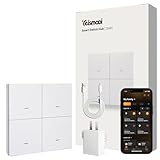
Overview: The YEISMOOI Smart Switch Hub is a purpose-built Thread Border Router designed exclusively for YEISMOOI smart lighting products. It cannot function with other brands, serving as a dedicated bridge between YEISMOOI lights and your smart home ecosystem. The hub features four physical smart buttons supporting single and double presses, providing eight customizable scene controls without needing a phone app.
What Makes It Stand Out: This hub’s dual functionality as both Thread router and physical controller sets it apart. The tactile button interface offers immediate, reliable control even when your phone isn’t handy. Outdoor-optimized Thread mesh technology provides superior range and stability compared to Wi-Fi or Bluetooth, with networks that strengthen as you add more devices. The hub maintains light connectivity even during Wi-Fi outages, ensuring your outdoor lighting remains responsive.
Value for Money: At $23, the hub is reasonably priced for a Thread border router with integrated physical controls. However, its value is entirely contingent on owning YEISMOOI lights. The brand lock-in severely limits its utility as a general smart home hub. If you’re invested in the YEISMOOI ecosystem, it’s a fair price for the functionality. For mixed-brand homes, it offers poor value compared to universal hubs like Aqara’s offerings.
Strengths and Weaknesses: Strengths include physical button controls, robust Thread mesh networking, outdoor optimization, voice assistant integration, and continued operation during Wi-Fi failures. The critical weakness is absolute incompatibility with non-YEISMOOI devices, making it a single-brand solution. Limited ecosystem support and unknown long-term viability of the brand are concerns.
Bottom Line: Buy this hub only if you own or plan to purchase YEISMOOI lights. Its brand exclusivity makes it unsuitable as a general-purpose smart home hub. For YEISMOOI users, the physical controls and reliable Thread networking justify the purchase. Everyone else should consider universal alternatives.
5. Aqara Smart Hub M200, Matter Controller, Thread Border Router, Featuring Aqara Zigbee, Bluetooth, Wi-Fi, PoE, IR, Supports Amazon Alexa, Apple HomeKit, Home Assistant, SmartThings, Google Home

Overview: The Aqara Smart Hub M200 is a premium multi-protocol smart home hub that elevates the M100’s foundation with advanced features for demanding users. Supporting up to 40 Aqara Zigbee devices and 40 Thread devices, it serves as a Matter Controller, Thread Border Router, and Matter Bridge. Unique additions include a 360° IR blaster with status feedback, Power over Ethernet (PoE) support, dual-band Wi-Fi, Bluetooth connectivity, and a built-in speaker for alarms and announcements.
What Makes It Stand Out: The M200’s standout feature is its IR blaster that learns and detects traditional remote usage, bridging legacy air conditioners into your Matter ecosystem as smart thermostats when paired with Aqara sensors. PoE support enables single-cable installation with uninterrupted power, ideal for security applications. The built-in speaker transforms the hub into a comprehensive alarm system, doorbell, and notification center. Dual-band Wi-Fi and USB-C UPS compatibility ensure maximum reliability.
Value for Money: At $59.99, the M200 commands double the M100’s price but delivers proportionate value for advanced users. The IR blaster alone justifies the upgrade for homes with legacy AC units, while PoE support appeals to reliability-focused installers. Compared to competitors offering similar professional features at $80-100, the M200 remains competitively priced. For basic setups, the M100 offers better value; for comprehensive automation, the M200 is worth the premium.
Strengths and Weaknesses: Strengths include expanded device capacity (40 each), PoE support, IR blaster with feedback, dual-band Wi-Fi, built-in speaker, USB-C UPS option, and robust local automation. Weaknesses are higher price, still limited to Aqara Zigbee devices, and lack of included power adapter. The feature set may overwhelm casual users.
Bottom Line: The M200 is the best choice for serious Aqara enthusiasts and professional installations requiring IR control, PoE reliability, and expanded capacity. For simple smart homes, stick with the M100. For advanced automation integrating legacy devices, the M200 is unbeatable.
6. SmartSetup Outlet (Matter), USB C and A, App & Voice Control, Thread, Works with Apple Home, Alexa, Google Home, SmartThings, 100% Privacy, Requires Thread Border Router

Overview: The SmartSetup Outlet delivers Matter-certified smart home control at an accessible price point. This dual-power outlet features both USB-A and USB-C ports, all individually controllable through major platforms. Built on Thread technology, it functions as a network router while maintaining complete local control without cloud dependency.
What Makes It Stand Out: Unlike basic smart plugs, this device exposes all four outputs (two AC outlets, USB-A, and USB-C) to Matter control, enabling unprecedented flexibility. Its dual-role as both smart outlet and Thread mesh extender strengthens your network with each added device. The Matter 1.4 certification via firmware update ensures future-proof compatibility across Apple Home, Alexa, Google Home, SmartThings, and Home Assistant.
Value for Money: At $34.99, this outlet significantly undercuts competitors while offering more features. Most Thread outlets lack USB control or cost $10-20 more. The integrated router functionality eliminates the need for separate mesh extenders, making it an economical choice for expanding both device control and network coverage simultaneously.
Strengths and Weaknesses: Strengths:
- Four individually controllable outputs
- Built-in Thread router strengthens mesh network
- True privacy with no cloud requirement
- Universal Matter platform compatibility
- Budget-friendly pricing
Weaknesses:
- Requires existing Thread Border Router
- Brand lacks Eve’s established reputation
- No energy monitoring capability
Bottom Line: The SmartSetup Outlet is an exceptional value for Thread-based smart homes, offering versatility and network expansion that premium brands can’t match at this price. Perfect for budget-conscious users prioritizing functionality over brand prestige.
7. Matter Smart Home Hub, Thread & Tuya Zigbee 3.0, Control Your Connected Devices (M1 - Zigbee&Thread)

Overview: The M1 Hub serves as a critical bridge for Tuya ecosystem users seeking Matter integration. This dual-protocol hub connects Thread and Tuya-standard Zigbee devices to major smart home platforms, enabling unified control through a single gateway. It translates proprietary Zigbee devices into Matter-compatible accessories.
What Makes It Stand Out: Its specialty lies in converting existing Tuya Zigbee investments into cross-platform assets. By supporting both Thread and Zigbee 3.0, it preserves compatibility with budget-friendly Tuya devices while opening access to Apple Home, Google Home, and Alexa. The QR code sharing system simplifies platform integration without complex re-pairing.
Value for Money: Priced at $49.98, the M1 Hub justifies its cost by unlocking existing Tuya devices for Matter ecosystems. Rather than replacing compatible bulbs and sensors, this hub extends their lifespan and functionality. For users with Tuya investments, it’s far cheaper than device replacement, though less versatile than universal Zigbee hubs.
Strengths and Weaknesses: Strengths:
- Bridges Tuya Zigbee to Matter platforms
- Supports both Thread and Zigbee protocols
- Enables cross-platform voice control
- Preserves existing Tuya device investments
- Simple QR code setup
Weaknesses:
- Limited to Tuya-standard Zigbee devices only
- Requires separate Thread Border Router for Matter
- Not compatible with all Zigbee brands
- Zemismart ecosystem dependency
Bottom Line: Ideal for Tuya ecosystem loyalists wanting Matter compatibility, but restrictive for mixed-brand Zigbee households. Purchase only if you own or plan to buy verified Tuya devices, otherwise consider universal alternatives.
8. Eve Energy Outlet (Matter) – Smart Outlet & Power Meter, App & Voice Control, No Bridge, Thread, Works with Apple Home, Alexa, Google Home, SmartThings, 100% Privacy, Requires Thread Border Router

Overview: Eve’s Energy Outlet represents premium Thread-based smart home control with sophisticated power management. This dual-outlet smart plug allows independent control of each socket while providing detailed energy consumption data. Built on Eve’s privacy-first philosophy, it operates entirely locally without cloud dependency.
What Makes It Stand Out: Individual outlet control sets it apart from single-receptacle competitors, effectively doubling its utility. The integrated power meter provides real-time consumption data for energy-conscious users. Eve’s unwavering commitment to privacy—no registration, no tracking, no cloud—combined with UL certification delivers enterprise-grade reliability for residential use.
Value for Money: At $54.95, this outlet commands a premium but delivers proportional value. Competing dual-outlet Thread devices with energy monitoring are rare, and Eve’s build quality justifies the investment. For users prioritizing data privacy and granular control, the cost premium over budget alternatives is worthwhile, though casual users may find it excessive.
Strengths and Weaknesses: Strengths:
- Independent dual-outlet control
- Built-in energy monitoring
- Superior privacy protections
- UL-certified safety
- Thread network enhancement
- Premium build quality
Weaknesses:
- Highest price in category
- Requires Thread Border Router
- No USB ports
- Limited to Matter ecosystems
Bottom Line: The Eve Energy Outlet is the gold standard for privacy-conscious users needing advanced control and monitoring. Worth the premium for serious smart home enthusiasts, but overkill for basic automation needs.
9. Eve Energy (Matter) 2 Pack – Smart Plug, App and Voice Control, 100% Privacy, Matter Over Thread, Works with Apple Home, Alexa, Google Home, SmartThings, Requires Thread Border Router

Overview: The Eve Energy 2-Pack delivers Thread-enabled smart plugs at a more accessible per-unit cost. These compact adapters transform standard outlets into individually controllable smart sockets across major platforms. Maintaining Eve’s privacy standards, each plug operates locally without cloud registration or tracking.
What Makes It Stand Out: The two-pack configuration provides immediate value for multi-room deployments, reducing per-unit cost to $34.98. Eve’s reputation for reliability and privacy distinguishes these from budget alternatives. Thread networking ensures responsive performance while strengthening your mesh with each added device, creating a self-healing network infrastructure.
Value for Money: At $69.95, the 2-Pack offers significant savings compared to purchasing singles. Most premium Thread plugs retail above $40 individually, making this bundle economical for whole-home expansion. The investment pays dividends through robust performance and privacy protection, though users needing only one plug might consider the SmartSetup alternative.
Strengths and Weaknesses: Strengths:
- Reduced per-unit pricing
- Trusted Eve reliability and privacy
- Thread network mesh enhancement
- Compact, non-blocking design
- Multi-platform Matter support
Weaknesses:
- Requires Thread Border Router
- No energy monitoring
- Higher upfront cost than singles
- Overkill for single-room needs
Bottom Line: Perfect for outfitting multiple rooms with reliable, private smart control. The 2-Pack balances Eve’s premium quality with practical value, making it the smart choice for expanding Thread networks throughout your home.
10. Eve Light Switch (Matter) – Smart Wall Switch for Apple Home, Alexa, Google Home, SmartThings; for Single-Pole & 3-Way switches; Thread, Requires Thread Border Router & Neutral Wire; UL-Certified
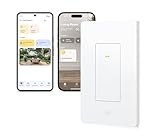
Overview: The Eve Light Switch brings Matter-over-Thread intelligence to permanent lighting installations. Designed for both single-pole and 3-way configurations, it replaces existing switches while preserving manual operation. This hardwired solution eliminates the need for smart bulbs, offering centralized control of ceiling fixtures and built-in lighting.
What Makes It Stand Out: 3-way compatibility without replacing both switches provides unique flexibility for hallway and stairway installations. Unlike smart bulbs, it maintains functionality during network outages. The Thread backbone ensures instantaneous response times while extending network coverage through your home’s electrical wiring, creating a robust mesh backbone.
Value for Money: At $49.95, this switch competes with premium alternatives while offering superior protocol support. Hardwired Thread devices provide better reliability than Wi-Fi equivalents, justifying the cost over $30 Wi-Fi switches. However, the neutral wire requirement may necessitate electrician installation, adding hidden costs for older homes.
Strengths and Weaknesses: Strengths:
- Single-pole and 3-way support
- Manual switch operation preserved
- Thread network backbone enhancement
- UL-certified electrical safety
- No smart bulbs required
Weaknesses:
- Neutral wire mandatory
- Requires Thread Border Router
- Professional installation may be needed
- Single-device control only
Bottom Line: An excellent choice for whole-home lighting automation, particularly in new construction or renovated spaces with neutral wires. For older homes, verify wiring compatibility before purchasing to avoid costly surprises.
Understanding Thread Technology and Offline Capabilities
Thread is fundamentally designed as a self-healing mesh network protocol that doesn’t require internet connectivity to function at its core. However, the border router—the device that bridges your Thread mesh to your home network—determines whether your smart home remains operational during an outage. A truly offline-capable Thread border router maintains full functionality without ever phoning home to manufacturer servers. This means it can route packets, manage device commissioning, and handle network security entirely through local resources.
The architecture of Thread specifies that devices communicate using IPv6, making them addressable on your local network just like any other IP device. Offline border routers leverage this by implementing a complete Thread stack locally, including the necessary routing tables, device credentials, and network parameters. When evaluating options, look for implementations that store all network keys and commissioning data on-device rather than syncing them to external servers. The Thread specification’s open-source nature means manufacturers can build completely autonomous systems—if they choose to prioritize local control over cloud-based management.
Why Local Control Matters More Than Ever
Your smart home shouldn’t stop working because a server farm hundreds of miles away experiences downtime. Local control ensures your lighting, climate control, and security systems respond in milliseconds rather than seconds, eliminating the frustrating lag that plagues cloud-dependent setups. More importantly, offline operation protects your privacy by keeping device states, usage patterns, and automation routines within your own four walls.
Consider the practical implications: during internet outages, which are becoming more frequent due to infrastructure challenges and extreme weather, a cloud-dependent smart home becomes a collection of expensive paperweights. An offline-first Thread border router transforms this vulnerability into resilience. Your automations continue running, your sensors keep reporting, and your family maintains control over their environment. For vacation homes, remote properties, or anyone valuing digital sovereignty, this capability isn’t a luxury—it’s a requirement.
Core Features That Define Offline-First Border Routers
Local Processing Power Requirements
The CPU inside your border router determines its ability to handle complex routing decisions without external help. Look for devices with multi-core processors running at least 1 GHz for robust offline performance. Single-core or underpowered chips may struggle with large meshes containing dozens of devices, leading to dropped packets or slow commissioning. ARM Cortex-A53 processors or equivalent provide the headroom needed for simultaneous Thread routing, protocol translation, and local automation logic.
Memory architecture matters equally. A minimum of 512MB RAM ensures the router can maintain state tables for 50+ Thread devices while running local services. Flash storage should exceed 4GB to accommodate firmware, network logs, and cached device credentials. Under-resourced devices often offload processing to the cloud not by design, but by necessity—their hardware simply can’t handle the workload locally.
Memory and Storage Benchmarks
Beyond raw capacity, examine how the border router utilizes its storage. High-quality offline routers implement wear-leveling algorithms on their flash memory to prevent premature failure from frequent writes. They also encrypt stored data using hardware-accelerated cryptography, ensuring your network keys remain secure even if someone physically accesses the device. Some advanced models include separate secure elements or TPM chips for key storage, providing bank-grade protection for your mesh credentials.
Thread Radio Specifications That Matter
Channel Support and Interference Avoidance
Thread operates on 2.4 GHz using IEEE 802.15.4, but not all radios are created equal. Premium offline border routers support dynamic channel selection across all 16 Thread channels, automatically detecting Wi-Fi and Bluetooth interference to maintain a clean signal. This is crucial for local control because interference directly impacts latency and reliability—there’s no cloud fallback to compensate for a poor mesh connection.
Radio sensitivity, measured in dBm, determines how well the border router hears distant devices. Aim for receivers better than -100 dBm sensitivity. Transmit power, limited to +20 dBm by regulations, should be paired with excellent antenna design rather than just raw amplification. A well-designed radio front-end with proper filtering prevents desensitization from nearby Wi-Fi routers, ensuring your Thread mesh remains stable even in congested RF environments.
Antenna Design and Signal Propagation
Internal vs. external antennas present a tradeoff. External antennas offer better performance and the ability to optimize placement, but increase cost and complexity. High-quality internal antennas, when properly engineered with adequate ground planes and isolation from other components, can perform admirably. The key specification is antenna gain—look for 2-3 dBi for omnidirectional coverage in typical home layouts. For large properties, consider routers with antenna connectors allowing you to attach directional antennas for extended range.
Network Interface Flexibility
Ethernet Backhaul vs. Wi-Fi Dependencies
A border router that requires Wi-Fi for its own operation introduces a single point of failure. True offline-capable devices prioritize Ethernet backhaul, connecting directly to your home network switch. This hardwired connection eliminates variability and ensures the Thread mesh remains accessible even if your Wi-Fi access points fail. The gold standard is Gigabit Ethernet with auto-negotiation and full-duplex support, though 100 Mbps suffices for most Thread traffic.
Some advanced models include Ethernet passthrough or bridging capabilities, allowing you to place the router optimally without running additional cables. For installations where Ethernet is impossible, ensure any Wi-Fi backhaul operates in station mode with robust reconnection logic. The device should cache network credentials and attempt reconnection aggressively without requiring manual intervention or cloud-based authentication.
Power Infrastructure Considerations
PoE Support for Reliable Deployment
Power-over-Ethernet (PoE) transforms border router placement from a logistical challenge into a strategic advantage. PoE+ (802.3at) delivering up to 30W ensures stable operation even with power-hungry radios and processors. This is particularly valuable for offline setups because PoE switches can be backed by UPS systems more easily than distributed wall warts. When the power goes out, your entire Thread infrastructure stays online.
Verify the router’s PoE implementation includes proper isolation and surge protection. Cheap PoE implementations can introduce noise or fail during power fluctuations, undermining the reliability you’re seeking. Look for devices that specify compliance with IEEE 802.3 standards rather than passive PoE, which lacks safety features and can damage equipment.
Security Architecture for Air-Gapped Operation
Certificate Management Without Cloud PKI
Traditional smart home devices rely on cloud-based Public Key Infrastructure to authenticate devices and issue certificates. Offline-capable border routers must include a local Certificate Authority that generates and manages device certificates internally. This CA should be accessible via a local web interface or API, allowing you to manually approve new devices and revoke compromised credentials without internet access.
The implementation details matter critically. The router should generate a root certificate upon first boot, store it in a secure element, and never expose the private key. Device certificates must be short-lived (24-72 hours) with automatic renewal handled locally. This prevents long-term credential theft while maintaining security. Some routers implement a “commissioning mode” that temporarily relaxes security for new device pairing, then automatically reverts to strict certificate validation.
Local Encryption Key Handling
Thread networks use multiple keys: Master Key, Network Key, and session-specific keys. An offline-first router generates and distributes these keys without external coordination. The Master Key, used for commissioning, should be user-configurable and never transmitted outside the local network. Advanced implementations allow you to set custom key rotation schedules, automatically re-keying the network weekly or monthly to limit the impact of any potential breach.
Protocol Translation and Local Bridging
Matter-Over-Thread Without Internet
Matter certification requires local operation, but many Matter controllers still phone home for telemetry or remote access. A truly offline border router implements the full Matter stack locally, including the Commissioner, Administrator, and Operational Discovery services. This allows Matter devices to join the network, be controlled, and execute automations without any cloud dependencies.
The key differentiator is how the router handles Matter’s Operational Credentials. Offline routers generate these locally and store them in persistent memory. They also implement mDNS for device discovery entirely within your LAN, ensuring devices remain discoverable even when your ISP connection drops. Some routers go further, caching Matter device schemas and cluster definitions locally, enabling control through local APIs without internet-based schema downloads.
MQTT Broker Integration
For integration with home automation platforms like Home Assistant, local MQTT broker support is invaluable. Premium Thread border routers include an embedded MQTT broker that translates Thread/Matter messages to MQTT topics automatically. This eliminates the need for separate bridging software and reduces latency. The broker should support MQTT 5.0 with QoS levels, retained messages, and authentication.
Configuration must be entirely local through a web interface or configuration files. Avoid routers that require cloud-based dashboards for MQTT setup. The ideal implementation exposes Thread device attributes as intuitive MQTT topics (e.g., thread/sensors/temperature/kitchen) and allows two-way control through simple pub/sub messages.
Placement and Coverage Optimization
Border router placement dramatically impacts mesh performance. Unlike Wi-Fi access points that benefit from central mounting, Thread border routers work best when positioned near the edge of your intended mesh, acting as a gateway rather than a center. Place the router within 30 feet of several powered Thread routers (like smart plugs or light switches) to ensure multiple routing paths.
Physical obstacles affect 2.4 GHz signals significantly. A single drywall wall attenuates signal by 3-5 dB, while brick or concrete can cause 10-15 dB loss. For multi-story homes, position the border router on the main floor near stairwells to facilitate vertical propagation. Avoid placing routers inside metal cabinets, near microwave ovens, or within 3 feet of Wi-Fi routers operating on overlapping channels.
Redundancy Strategies for Critical Deployments
For essential applications like security systems or climate control, a single border router introduces unacceptable risk. Implementing redundant routers requires careful planning, as Thread currently supports only one active border router per partition. However, some advanced implementations support warm standby: a secondary router maintains synchronized network state and can take over within seconds if the primary fails.
Look for routers that support VRRP (Virtual Router Redundancy Protocol) or similar mechanisms for seamless failover. The standby router should monitor the primary through both Thread and Ethernet connectivity, triggering failover if either path fails. Network configuration must allow both routers to share a virtual IP address, ensuring your home automation platform doesn’t need reconfiguration during failover events.
Ecosystem Compatibility Matrix
Your border router must play nicely with existing devices. While Thread is a standard, implementation details vary. Verify support for all Thread device types: Full Thread Devices (FTDs), Minimal Thread Devices (MTDs), and Sleepy End Devices (SEDs). The router should correctly handle SED polling schedules to maximize battery life without dropping messages.
For non-Thread devices, local bridging capabilities become crucial. Can the router translate between Thread and Zigbee or Z-Wave locally? Does it expose a local CoAP (Constrained Application Protocol) interface for direct device communication? The best offline routers include multiprotocol radios and perform all translation on-device, avoiding cloud-based protocol bridges that introduce latency and dependency.
Firmware Management in Offline Environments
Updating firmware without internet requires creative solutions. Premium routers support local firmware files uploaded through the web interface or pushed via local network shares. Some implement a dual-bank partitioning scheme, allowing you to test updates on a secondary partition and roll back instantly if issues arise.
The update process must verify cryptographic signatures using locally-stored public keys, not keys fetched from the internet. Look for routers that publish their firmware signing keys openly, allowing you to verify updates independently. For completely air-gapped networks, some manufacturers offer firmware update packages that can be side-loaded via USB drives, though this requires careful security validation to prevent malicious updates.
Environmental and Mounting Considerations
Operating temperature ranges reveal much about build quality. Consumer-grade routers function between 0-40°C, but industrial-designed units operate from -20 to 70°C, ensuring reliability in attics, garages, or unheated spaces. Verify the IP rating if mounting in dusty or potentially damp locations—IP54 provides basic dust and splash protection.
Ventilation matters more than you might think. Thread routers with poorly designed thermal management throttle performance when overheated, causing intermittent connectivity issues. Look for devices with passive cooling through thermal pads and vented enclosures. Active fans introduce noise and failure points, making them unsuitable for 24/7 operation in living spaces.
Total Cost of Ownership Analysis
The purchase price is just the beginning. Calculate energy costs: a router consuming 10W continuously costs roughly $15-20 annually in electricity. More efficient models running at 3-5W reduce this to under $10/year. Over a 5-year lifespan, this difference becomes significant.
Factor in potential downtime costs. A $200 router that fails monthly, requiring resets, costs more in frustration and lost automation than a $400 bulletproof unit. For business or critical residential applications, include the cost of a spare unit for rapid replacement. Some manufacturers offer extended warranties with advance replacement—valuable insurance for offline setups where troubleshooting is harder without cloud diagnostics.
Future-Proofing Against Protocol Evolution
Thread and Matter are evolving rapidly. Your border router should support firmware updates that add new features, not just bug fixes. Check the manufacturer’s track record: do they actively develop and release updates? Open-source firmware projects like OpenThread provide transparency and community support, often outliving commercial products.
Radio upgradeability offers another path to longevity. Some routers include mini-PCIe or M.2 slots for radio modules, allowing you to upgrade to future Thread versions (like Thread 1.4 or 2.0) without replacing the entire unit. This modular approach costs more initially but protects your investment as standards advance.
Common Pitfalls to Avoid
Don’t assume “works with Matter” means “works offline.” Many Matter-certified devices require cloud onboarding and maintain persistent connections for remote access. Always verify that local commissioning and control are explicitly documented. Another trap: routers that require mobile apps for initial setup which themselves need internet to function. Look for devices offering web-based configuration accessible from any browser on your local network.
Beware of partial offline support. Some routers operate locally after initial cloud-based setup, but lose functionality if they can’t periodically check in with manufacturer servers. This “phone home” requirement might be buried in the terms of service. Test the router by blocking its internet access during the return period to verify true offline operation.
Frequently Asked Questions
1. Can a Thread border router work without any internet connection at all?
Yes, a properly designed Thread border router can function completely offline. It manages all mesh networking, device commissioning, and local control internally. However, you must verify this capability before purchasing, as many consumer-grade routers include hidden cloud dependencies for features like remote access, telemetry, or even initial setup.
2. How many Thread devices can an offline border router handle?
Most quality offline border routers support 50-100 devices per unit, with some industrial models handling 200+. The limiting factor is RAM for routing tables and CPU power for processing mesh management traffic. For large deployments, implement multiple routers with proper segmentation rather than pushing one router beyond its limits.
3. Will my Thread devices still work with voice assistants if the border router is offline?
Local voice processing solutions like Home Assistant’s voice pipeline or Mycroft can work offline, but cloud-dependent assistants like Alexa or Google Assistant require internet. For true offline voice control, you’ll need a local voice assistant that integrates directly with your Thread network through your border router’s local API.
4. How do I commission new devices without internet?
Offline border routers use local commissioning methods: QR code scanning through a local web interface, manual PIN entry, or NFC pairing. The router generates all necessary credentials locally and provisions them directly to the new device via Thread’s secure commissioning protocol, no cloud involvement needed.
5. What’s the difference between “offline-capable” and “offline-first” design?
“Offline-capable” devices can operate without internet but may have reduced functionality or require cloud services for certain features. “Offline-first” devices are architected from the ground up for autonomous operation, with all features available locally and cloud connectivity treated as an optional add-on rather than a core requirement.
6. Can I mix offline and online Thread border routers on the same network?
Thread networks support only one active border router per partition, so you cannot have both simultaneously active. However, some setups use an offline router as primary and an online router as a separate network for non-critical devices. Advanced users can implement VLANs to segregate traffic while maintaining device isolation.
7. How do I back up my Thread network configuration?
Quality offline routers provide local backup options: configuration export via the web interface, automatic backups to local network storage, or even USB drive exports. These backups should include network keys, device credentials, and routing tables. Test restoration procedures before you need them—networks with dozens of devices are painful to reconfigure manually.
8. Will Thread devices from different manufacturers work with my offline border router?
Yes, Thread is an open standard. However, some manufacturers implement proprietary extensions or require their own border router for full functionality. Stick to devices certified by the Connectivity Standards Alliance (CSA) and verify they support standard Thread commissioning rather than locked-down ecosystems.
9. How does local control affect battery life on Thread devices?
Local control actually improves battery life by reducing communication overhead. Cloud-dependent setups often require devices to wake frequently to maintain cloud connections or handle redundant status updates. Pure local control allows devices to sleep according to their actual data reporting needs, extending battery life by 20-40% in many cases.
10. Can I access my offline Thread network remotely without compromising local control?
Yes, through secure VPN tunneling into your home network. This gives you remote access while keeping the Thread network itself completely offline and autonomous. Avoid border routers that offer their own “remote access” service, as these typically route traffic through manufacturer servers. Instead, use a separate VPN server on your network to maintain end-to-end control and privacy.