That dusty tower in your basement isn’t dead—it’s just waiting for the right upgrade to become the brains of your smart home. While everyone’s chasing the latest pre-built NAS or overpriced smart hub, your old desktop holds untapped potential: serious processing power, expandable storage, and full OS flexibility. The missing piece? Modern connectivity. Wi-Fi 6E PCIe adapters are the secret weapon that transforms legacy hardware into a high-performance smart home server without running ethernet through your walls.
This isn’t just about faster internet. It’s about building a low-latency, high-throughput command center that can handle 4K security streams, Home Assistant automation, Plex media serving, and IoT device management—simultaneously. Let’s dive into what makes these adapters game-changers and how to choose the right one for your resurrection project.
Top 10 Wi-Fi 6E PCIe Adapters for Smart Home Servers
Detailed Product Reviews
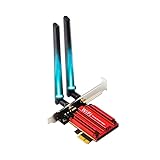
1. WiFi 6E AX210 WiFi Card,PCIe WiFi Wireless Network Card with Bluetooth 5.3,AX5400 Tri-Band PC Wireless Card,Supports OFDMA & MU-MIMO, Ultra-Low Latency, WPA3, Low-Profile Bracket, Windows 10/11
Overview:
This PCIe WiFi 6E card leverages Intel’s AX210 chipset to deliver cutting-edge tri-band connectivity for desktop PCs. Supporting 2.4GHz, 5GHz, and the newly opened 6GHz spectrum, it achieves speeds up to 5400Mbps while maintaining backward compatibility with older WiFi standards. The inclusion of Bluetooth 5.3 and WPA3 security makes it a comprehensive solution for users seeking future-proof networking.
What Makes It Stand Out:
The genuine Intel AX210 chipset distinguishes this card from generic alternatives, ensuring superior driver support and reliability. Its low-profile bracket accommodates compact SFF builds without sacrificing performance. The 6GHz band access provides fourteen interference-free 80MHz channels, ideal for dense urban environments. Bluetooth 5.3 delivers enhanced audio streaming with lower latency and improved power efficiency for wireless peripherals.
Value for Money:
At $29.98, this card sits at the premium end of the AX210 market. The authentic Intel silicon justifies the modest price increase over budget clones, offering stable performance and regular driver updates. Competing solutions with similar features typically range $25-35, making this a fair investment for reliability-conscious buyers who prioritize manufacturer support over absolute lowest cost.
Strengths and Weaknesses:
Strengths include genuine Intel chipset, tri-band operation, Bluetooth 5.3, low-profile bracket support, and WPA3 encryption. The card excels in high-density environments with OFDMA and MU-MIMO technologies. Weaknesses involve potential driver installation complexity for novice users and slightly higher pricing than generic alternatives. Windows 10/11 exclusivity may limit legacy system compatibility.
Bottom Line:
Ideal for gamers, content creators, and professionals requiring stable, high-performance wireless connectivity. The authentic Intel chipset and comprehensive feature set justify the premium, making it a smart long-term investment for performance-focused desktop builds.
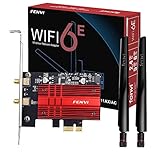
2. WiFi 6E AX210 PCI-E WiFi Network Card BT5.3 160MHz Tri-Band Expands WiFi into 6GHz/5GHz/2.4GHz 5400Mbps Gigabit AX210ngw Desktop PC PCIe Wireless Adapter WiFi 6E 802.11ac ax MU-MIMO for Windows 11/10
Overview:
The FV-AXE3000 AX210NGW PCIe adapter brings WiFi 6E connectivity to desktop PCs with an emphasis on signal strength and range. This tri-band solution operates across 2.4GHz, 5GHz, and 6GHz frequencies, delivering maximum throughput of 5400Mbps. Designed specifically for Windows 10 and 11 systems, it combines the Intel AX210 chipset with amplified antennas for enhanced coverage in challenging environments.
What Makes It Stand Out:
Two 6dBi high-gain antennas with power amplifiers significantly extend wireless range compared to standard dipole designs. The 160MHz channel width support on the 6GHz band doubles throughput potential, making it excellent for bandwidth-intensive tasks. Bluetooth 5.3 technology provides four times the coverage of previous generations, solving connectivity issues in larger rooms or through obstacles.
Value for Money:
Priced at $27.99, this card offers compelling value with its enhanced antenna system. While slightly more expensive than barebones adapters, the included high-gain antennas eliminate separate purchases. Comparable kits with similar antennas typically cost $30-40, positioning this as a cost-effective solution for users prioritizing signal quality over absolute minimalism.
Strengths and Weaknesses:
Strengths include powerful 6dBi antennas, 160MHz channel support, Bluetooth 5.3, and MU-MIMO capability. The external antennas dramatically improve reception in obstructed environments. Weaknesses include Windows-only compatibility limiting flexibility, potential fitment issues in compact cases, and reliance on third-party drivers rather than direct Intel support.
Bottom Line:
Perfect for users struggling with weak WiFi signals or operating in large spaces. The amplified antennas justify the modest premium, making it an excellent choice for gaming rigs and home offices where range matters more than compact form factor.
3. WiFi 6E Half Mini PCI-E WiFi Network Card 802.11AX AC MPE-AXE3000H 2.4GHz 5GHz 6GHz 5400Mbps Wireless Card BT5.2 MU-MIMO Mini PCIe Wi-Fi 6E Adapter OFDMA vPro for Windows 10/11 PC Laptops

Overview:
The REKONG MPE-AXE3000H addresses a specialized market with its half mini PCIe form factor, enabling WiFi 6E upgrades for compatible laptops and compact systems. This tri-band adapter delivers up to 5400Mbps across 2.4GHz, 5GHz, and 6GHz bands while supporting enterprise-grade vPro management features. Designed for Windows 10/11 64-bit systems, it breathes new life into aging but capable mobile workstations.
What Makes It Stand Out:
vPro technology integration provides hardware-based security and remote management capabilities rarely found in consumer adapters, appealing to IT professionals and business users. The mini PCIe interface supports legacy laptop upgrade paths where M.2 slots are unavailable. Miracast support enables seamless wireless display streaming, while 160MHz channels maximize bandwidth on compatible networks.
Value for Money:
At $23.74, this is the most affordable WiFi 6E solution reviewed, though its niche interface limits broader appeal. For compatible laptop owners, it offers tremendous value compared to replacing entire systems. Desktop users requiring mini PCIe are rare, but those who do will appreciate the competitive pricing against harder-to-find alternatives.
Strengths and Weaknesses:
Strengths include low price point, vPro support, Miracast capability, and 160MHz channel width. The adapter excels in enterprise environments requiring remote management. Weaknesses involve Bluetooth 5.2 (not latest 5.3), limited compatibility with many laptop brands, and the declining mini PCIe standard. Installation requires technical expertise and driver sourcing from Intel.
Bottom Line:
Best suited for IT departments upgrading vPro-enabled business laptops or technically proficient users with compatible mini PCIe slots. The price is attractive, but verify laptop compatibility carefully before purchasing. Not recommended for standard desktop builds or general consumers.
4. GLOTRENDS WA01 M.2 E Key to PCIe X1 WiFi Bluetooth Adapter for M.2 WiFi 4/5/6/6e/7/Coral TPU Module, with 6-dBi SMA Antenna Kits

Overview:
The GLOTRENDS WA01 is a unique adapter rather than a complete WiFi card, converting M.2 E Key modules into PCIe x1 expansion cards. This versatile solution supports WiFi 4 through emerging WiFi 7 standards and even accommodates Coral TPU modules for AI acceleration. The included 6dBi SMA antenna kit provides robust signal reception when paired with a compatible M.2 card.
What Makes It Stand Out:
Unparalleled flexibility allows users to upgrade wireless capabilities without replacing the entire adapter. The triple-band antenna system works across all supported WiFi generations, while USB passthrough enables Bluetooth functionality. Support for specialized Coral TPU modules makes it valuable for machine learning developers seeking PCIe connectivity for AI inference tasks.
Value for Money:
At $9.99, this is exceptionally affordable, but requires a separate M.2 WiFi module ($15-30), making total investment comparable to integrated solutions. The real value lies in future-proofing and module swapping capability. Enthusiasts who upgrade frequently save money long-term compared to buying new complete cards.
Strengths and Weaknesses:
Strengths include broad module compatibility, WiFi 7 readiness, high-gain antennas, and Coral TPU support. The adapter excels in versatility for advanced users. Weaknesses involve complex installation requiring both PCIe and USB connections, lack of included WiFi module, and potential driver conflicts. Novice users may find setup frustrating compared to plug-and-play alternatives.
Bottom Line:
Excellent for tech enthusiasts, developers, and frequent upgraders who value flexibility over convenience. The Coral TPU support is a unique bonus for AI projects. Casual users should opt for integrated cards instead. Verify motherboard USB header availability before purchase.
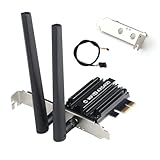
5. WiFi 6E PCIe Card AX5400Mbps Tri-Band Wireless Adapter (2.4G/5G/6GHz) BT 5.3 WPA3 802.11AX WiFi Adapter with MU-MIMO for Desktop PC - Windows 10/11 Compatible
Overview:
This AX5400 PCIe card delivers comprehensive WiFi 6E connectivity for mainstream desktop users seeking balanced performance and affordability. Supporting tri-band operation with Bluetooth 5.3 and WPA3 security, it covers essential modern networking needs without premium pricing. The dual-antenna design provides adequate coverage for typical home and office environments while maintaining compatibility with Windows 10 and 11.
What Makes It Stand Out:
The competitive $22.99 price point combined with full feature parity of more expensive options makes this an accessible entry into WiFi 6E. Bluetooth 5.3 integration ensures modern peripheral connectivity with enhanced audio streaming capabilities. The straightforward driver installation process from the manufacturer website simplifies setup for less technical users compared to manual Intel driver hunting.
Value for Money:
Positioned as a budget-friendly alternative, this card undercuts most AX210-based competitors while delivering similar specifications. The cost savings come from generic chipset sourcing rather than premium branding. For users prioritizing functionality over brand recognition, it offers 90% of the experience at 70% of the cost, representing excellent mainstream value.
Strengths and Weaknesses:
Strengths include aggressive pricing, complete feature set (tri-band, BT 5.3, WPA3, MU-MIMO), and straightforward compatibility. The card performs reliably for gaming and streaming. Weaknesses involve potentially less robust long-term driver support, generic build quality, and no low-profile bracket included. Performance may vary slightly compared to authentic Intel solutions.
Bottom Line:
A solid choice for budget-conscious builders wanting modern WiFi 6E capabilities without premium cost. Perfect for general use, media streaming, and moderate gaming. Enthusiasts seeking maximum stability should consider Intel-based alternatives, but most users will find this delivers exceptional value.
6. WAVLINK AXE5400 PCIe WiFi 6E WiFi Card, 2025 Tri-Band Wireless Network Card with Bluetooth 5.3, AX210 Chip, MU-MIMO, WPA3, OFDMA, Low-Profile Bracket, Heat Sink

Overview: The WAVLINK AXE5400 PCIe WiFi 6E card delivers cutting-edge wireless connectivity for desktop PCs at an aggressive price point. Powered by Intel’s AX210 chipset, this tri-band adapter supports the full WiFi 6E spectrum including the interference-free 6GHz band, making it ideal for bandwidth-intensive tasks like 4K streaming, competitive gaming, and VR applications. With speeds up to 574Mbps on 2.4GHz, 2400Mbps on 5GHz, and 2400Mbps on 6GHz, it transforms any compatible desktop into a wireless powerhouse.
What Makes It Stand Out: This card distinguishes itself through comprehensive feature implementation at budget pricing. The inclusion of Bluetooth 5.3 provides twice the speed and four times the range of previous generations, perfect for connecting controllers, headsets, and peripherals. Dual 5dBi antennas with magnetic base placement flexibility ensure optimal signal reception, while the low-profile bracket accommodates compact builds. Advanced technologies like OFDMA, MU-MIMO, and 1024-QAM reduce latency by 75% compared to AC WiFi, while WPA3 encryption offers robust security.
Value for Money: At $34.99, this card undercuts premium competitors by $15-30 while delivering identical AX210 performance. The 12-month warranty (extendable to 18 months with registration) and lifetime technical support add significant value. For users seeking WiFi 6E capabilities without paying brand premiums, this represents exceptional cost-effectiveness, matching the performance of cards costing nearly twice as much.
Strengths and Weaknesses: Strengths include Intel AX210 reliability, tri-band WiFi 6E support, Bluetooth 5.3, dual high-gain antennas, low-profile compatibility, and outstanding price. The magnetic base provides placement flexibility. Weaknesses include potential driver quirks on Linux requiring manual installation, and the brand lacks TP-Link’s recognition. Some users report antenna cables could be longer for optimal positioning.
Bottom Line: The WAVLINK AXE5400 is a standout value proposition that democratizes WiFi 6E technology. It delivers flagship performance, comprehensive features, and robust security at a mid-range price. For Windows 10/11 users seeking future-proof wireless connectivity without overspending, this card is highly recommended. Linux users should verify compatibility but will find excellent performance once configured.
7. TP-Link AXE5400 WiFi 6E PCIe WiFi Card for Desktop PC (Archer TXE73E), Up to 5.4 Gbps Tri-Band Wireless Card | 6 GHz | Low-Latency | Bluetooth 5.3 | WPA3 | Low-Profile Single Antenna | OFDMA, MU-MIMO

Overview: TP-Link’s Archer TXE73E brings trusted networking expertise to the WiFi 6E arena with this tri-band PCIe adapter. Designed for performance-conscious users, it delivers up to 5.4Gbps total bandwidth across 2.4GHz, 5GHz, and the game-changing 6GHz spectrum. The single-antenna design saves space while maintaining strong signal integrity, making it perfect for gaming rigs and workstations where desk real estate is premium. Windows 11 optimization ensures seamless 6GHz utilization.
What Makes It Stand Out: The innovative single high-gain antenna with magnetized base sets this card apart, delivering robust reception without the clutter of dual antennas. This space-saving design doesn’t compromise performance, maintaining full tri-band speeds. Bluetooth 5.3 integration offers enhanced peripheral connectivity with improved stability. TP-Link’s reputation for reliable drivers and firmware updates provides peace of mind, while OFDMA and MU-MIMO technologies minimize lag on congested networks. The low-profile bracket ensures compatibility with SFF builds.
Value for Money: Priced at $49.99, this card sits at the premium end of the WiFi 6E market, commanding a $15 premium over budget alternatives. The TP-Link brand name, proven driver support, and quality assurance justify the cost for users prioritizing reliability over raw savings. While performance matches cheaper AX210-based cards, you’re paying for ecosystem trust and potentially smoother long-term support. For business or critical applications, this premium is worthwhile.
Strengths and Weaknesses: Strengths include TP-Link reliability, clean single-antenna design, magnetic base flexibility, Bluetooth 5.3, WPA3 security, and excellent Windows 11 integration. The brand’s support infrastructure is superior. Weaknesses include higher price point for equivalent hardware performance, and the single antenna may provide slightly less signal diversity than dual-antenna setups in challenging RF environments. Requires Windows 11 for full 6GHz functionality.
Bottom Line: The Archer TXE73E is a premium WiFi 6E solution for users who value brand reliability and clean aesthetics. It delivers exceptional performance with a space-saving design, making it ideal for high-end gaming PCs and professional workstations. If budget allows and you trust the TP-Link ecosystem, this card is an excellent investment. Budget-conscious buyers can find similar performance for less, but with potentially less polish.
8. FebSmart Wireless N 2.4GHz 300Mbps PCIE Wireless Network Adapter for Windows 11, 10, 8.1, 8, 7, XP (32/64bit), Windows Server and Linux PCs, PCIE WiFi Card, PCIE WiFi Adapter (FS-N300)

Overview: The FebSmart FS-N300 is a budget-focused wireless solution delivering reliable 2.4GHz connectivity at 300Mbps for older desktops and basic networking needs. Built around the established Qualcomm Atheros AR928X chipset, this PCIe adapter prioritizes broad compatibility across Windows versions from XP through Windows 11, plus Linux support via the ATH9K driver. It’s designed for users seeking affordable wireless access for web browsing, video calls, and light streaming without requiring cutting-edge performance.
What Makes It Stand Out: This card’s standout feature is its exceptional compatibility legacy, supporting operating systems dating back to Windows XP and Windows Server 2003. Power amplifiers on each antenna chain and dual 3dBi detachable antennas provide surprisingly robust range for a budget card. The plug-and-play experience on modern Windows versions eliminates driver headaches, while Linux support via standard kernel drivers appeals to open-source enthusiasts. Its IEEE 802.11n standard ensures backward compatibility with all WiFi router generations.
Value for Money: At $12.99, the FS-N300 represents outstanding value for basic connectivity needs. It’s significantly cheaper than AC or AX alternatives, making it ideal for repurposing older hardware or adding wireless to budget builds. While limited to 2.4GHz and 300Mbps, the price-to-performance ratio is excellent for its target use case. For web browsing, email, and standard-definition streaming, it delivers reliable performance that justifies the minimal investment.
Strengths and Weaknesses: Strengths include rock-bottom pricing, exceptional OS compatibility, plug-and-play simplicity on modern Windows, Linux support, power-amplified antennas, and solid 2.4GHz range. Weaknesses are the lack of 5GHz support, capped 300Mbps speeds, no Bluetooth functionality, and older N-standard technology that struggles with multiple devices or high-bandwidth applications. Not suitable for gaming or 4K streaming.
Bottom Line: The FebSmart FS-N300 is a no-frills wireless adapter that excels at basic connectivity for legacy systems and budget builds. It won’t win speed awards, but delivers reliable 2.4GHz performance where high bandwidth isn’t critical. Perfect for office PCs, home theater setups with modest streaming needs, or breathing wireless life into older hardware. For $13, it’s hard to beat, but gamers and heavy users should invest in WiFi 6 solutions instead.
9. WAVLINK AXE5400 WiFi 6E PCIe Network Card, Tri-Band AX210 Wireless Adapter with Bluetooth 5.3, MU-MIMO, WPA3, OFDMA, Low-Profile Bracket, Heat Sink, for Windows 10/11 PC

Overview: Another WAVLINK AXE5400 entry, this variant closely mirrors its sibling Product 6 but with subtle differences in antenna design and pricing. Powered by the Intel AX210 module, it delivers full tri-band WiFi 6E capabilities with speeds reaching 574Mbps on 2.4GHz, 2400Mbps on 5GHz, and 2400Mbps on the interference-free 6GHz band. This card targets performance enthusiasts seeking maximum wireless throughput for gaming, VR, and 4K/8K streaming on modern Windows 10/11 systems.
What Makes It Stand Out: The magnetic base antenna system with 3.6ft RF cable provides exceptional placement flexibility, allowing optimal positioning away from PC case interference. Dual 5dBi high-gain antennas ensure robust signal capture, while the full suite of WiFi 6E technologies—OFDMA, MU-MIMO, 1024QAM, and TWT—deliver near-zero latency even under heavy network load. Bluetooth 5.3 doubles transfer speeds and quadruples range compared to previous generations, while WPA3 encryption provides cutting-edge security against modern threats.
Value for Money: At $45.99, this card positions itself between budget and premium WiFi 6E options. It’s $11 more than WAVLINK’s other offering but still undercuts TP-Link by $4. The extended antenna cables and magnetic base justify the modest premium for users needing flexible placement. The 12-month warranty (18 months registered) and lifetime support add value. Performance-per-dollar remains excellent, essentially matching cards costing $50+.
Strengths and Weaknesses: Strengths include Intel AX210 performance, tri-band WiFi 6E, flexible magnetic antenna base, Bluetooth 5.3, WPA3 security, low-profile bracket, and competitive pricing. The longer antenna cables are genuinely useful. Weaknesses include Linux driver complexity, WAVLINK’s lesser brand recognition versus TP-Link, and potential quality control variance. The price gap between this and WAVLINK’s $34.99 version may confuse buyers.
Bottom Line: This WAVLINK variant is an excellent choice for users needing antenna placement flexibility without paying premium brand prices. It delivers flagship WiFi 6E performance with thoughtful physical design considerations. The magnetic base and extended cables solve real installation challenges. Recommended for gamers and content creators who want maximum performance and placement options. If you don’t need the cable length, save $11 with WAVLINK’s base model.
10. 2X Dual Band WiFi 6E 2.4GHz 5GHz 5.8GHz 10dBi MIMO RP-SMA Male Antenna for WiFi Router PCIe Wireless Network 6E Card USB Adapter Security IP Camera Video Surveillance Monitor ASUS RT-AC68u Router

Overview: These dual-band antennas are specialized accessories designed to enhance existing wireless hardware rather than function as standalone adapters. With 10dBi gain and RP-SMA male connectors, they’re compatible with WiFi 6E routers, PCIe cards, USB adapters, and various wireless applications including security cameras, FPV drones, and industrial equipment. Operating across 2.4GHz, 5GHz, and the new 6GHz spectrum, these antennas significantly boost signal strength and stability for devices struggling with weak reception or range limitations.
What Makes It Stand Out: The exceptional 10dBi gain dramatically outperforms standard 3-5dBi antennas included with most consumer hardware, providing substantially improved range and signal quality. Universal RP-SMA compatibility ensures broad applicability across brands and devices. Support for the full WiFi 6E spectrum including 6GHz makes them future-proof for next-generation equipment. The MIMO design maintains multiple spatial streams for maximum throughput, while rugged construction suits both indoor and demanding outdoor applications like FPV racing or vehicle surveillance systems.
Value for Money: At $8.99 for a pair, these antennas offer remarkable value for troubleshooting connectivity issues or extending range. They’re significantly cheaper than upgrading entire wireless cards or routers, providing a targeted solution for signal problems. For users experiencing dead zones or weak connections, this represents a minimal investment with potentially dramatic improvements. The versatility across routers, PCIe cards, cameras, and specialized equipment maximizes utility.
Strengths and Weaknesses: Strengths include high 10dBi gain, universal RP-SMA compatibility, tri-band WiFi 6E support, MIMO capability, rugged build quality, and exceptional affordability. Weaknesses involve requiring existing compatible hardware, potential overkill for short-range applications, larger physical size versus stock antennas, and no guarantee of improvement if the underlying hardware is the bottleneck. Installation requires careful positioning to avoid interference.
Bottom Line: These high-gain antennas are an excellent upgrade for users battling weak WiFi signals or seeking maximum range from existing compatible hardware. They deliver professional-grade performance at consumer prices, making them ideal for gamers, security camera installations, and specialized wireless applications. Before purchasing, verify your device uses RP-SMA connectors. For under $9, they’re a smart, cost-effective solution to signal strength challenges, though they won’t fix fundamental hardware limitations.
Why Your Aging Desktop Deserves a Wi-Fi 6E Upgrade
Your decade-old desktop might seem obsolete, but its PCIe slots are portals to modern networking bliss. Wi-Fi 6E breathes new life into machines that already have the CPU muscle and RAM capacity for server tasks. Unlike USB adapters that share bandwidth and introduce latency, PCIe cards deliver dedicated, high-speed lanes directly to your motherboard. For smart home servers that run 24/7, this stability isn’t optional—it’s critical. You’re not just adding wireless; you’re creating a robust backbone for your entire connected ecosystem.
Demystifying Wi-Fi 6E: More Than Just Faster Speeds
Wi-Fi 6E extends Wi-Fi 6 into the pristine 6 GHz band, but the real story is capacity, not raw speed. For smart home servers juggling dozens of devices, this means less congestion and more simultaneous connections. The technology introduces features like 4K QAM and 160 MHz channels that matter when you’re streaming security footage while backing up smart device configurations. Understanding these specs helps you separate marketing fluff from genuine server-grade performance.
The 6 GHz Advantage: A Traffic-Free Highway
Think of the 6 GHz band as a freshly paved highway while 2.4 GHz and 5 GHz are gridlocked city streets. Most of your neighbors’ devices can’t even see this spectrum, meaning your server-to-client communications face zero interference. This is crucial for latency-sensitive applications like real-time camera feeds or instant automation triggers. When your smart doorbell needs to ping your server, it won’t get stuck behind your roommate’s Netflix binge.
Backward Compatibility: Protecting Your Investment
A quality Wi-Fi 6E adapter doesn’t abandon your older devices—it elevates them. While your server operates in the 6 GHz realm, it simultaneously manages 5 GHz and 2.4 GHz clients through intelligent band steering. This means your legacy smart bulbs and sensors stay connected while your newer devices enjoy premium bandwidth. Look for adapters that support all three bands concurrently to avoid creating device islands in your smart home.
PCIe vs. USB: Why the Slot Matters for Server Duty
USB adapters are convenient, but they’re tourists in the server world. They compete for USB bus bandwidth, draw power from overburdened ports, and often lack advanced features like Wake-on-LAN or hardware encryption acceleration. PCIe cards, by contrast, are citizens with dedicated resources. They tap directly into the motherboard’s chipset, offering lower latency, superior thermal management, and the ability to handle sustained high-throughput workloads without throttling. For a machine that’ll run Home Assistant, Node-RED, and Frigate simultaneously, PCIe isn’t just better—it’s mandatory.
Key Features That Separate Premium Adapters from Pretenders
Not all Wi-Fi 6E cards are built for server abuse. Consumer-focused models prioritize peak speeds in ideal conditions; server-grade adapters focus on stability, heat dissipation, and advanced management features. The difference often lies in details manufacturers don’t splash on the box. Understanding these nuances prevents you from buying a flashy paperweight that crashes under sustained load.
Antenna Design and Placement: Your Signal’s Lifeline
Those stubby antennas bundled with cheap cards? They’re performance killers. Premium adapters feature detachable antennas with RP-SMA connectors, letting you position them for optimal coverage using extension cables. Magnetic antenna bases aren’t just convenient—they let you move the antennas away from the metal case that acts like a Faraday cage. For server duty, consider adapters that support external antenna arrays or even directional antennas for targeting specific smart home zones.
MU-MIMO and OFDMA: The Server’s Best Friends
Multi-User MIMO and Orthogonal Frequency Division Multiple Access sound like alphabet soup, but they’re your server’s secret sauce for handling 50+ IoT devices. MU-MIMO lets your adapter talk to multiple devices simultaneously instead of taking turns. OFDMA slices channels into smaller resource units, perfect for low-bandwidth sensors that need quick, efficient check-ins. Verify these features are implemented in hardware, not just software-emulated, by checking the chipset specifications.
Power Consumption and Thermal Management
A server runs 24/7, and a hot adapter is a failing adapter. Look for cards with heatsinks that extend beyond the chipset—preferably with thermal pads contacting the PCB. Some premium models even include small fans or mounting points for aftermarket cooling. Power draw matters too; adapters that sip under 5 watts at idle keep your electricity bill sane while delivering burst performance when needed. Check reviews for thermal throttling tests under sustained load.
Motherboard Compatibility: Avoiding Costly Mistakes
That PCIe x1 slot from 2012 might physically accept a modern card, but will it deliver? Older motherboards often lack the power delivery or BIOS support for modern adapters. Verify your slot is PCIe 2.0 or newer—PCIe 3.0 is ideal. Check if your BIOS supports cards larger than 2GB of address space, a common issue with pre-2015 boards. Some adapters require UEFI boot mode or specific chipset features. When in doubt, search forums for your motherboard model plus the adapter’s chipset name before purchasing.
Understanding Antenna Configurations and Beamforming
Spatial streams and beamforming determine real-world coverage, not the advertised speed. A 4x4:4 adapter (four transmit, four receive, four spatial streams) can serve more devices simultaneously than a 2x2:2 model. Beamforming focuses signal energy toward devices rather than broadcasting omnidirectionally, crucial for reaching smart sensors in distant corners. For server applications, prioritize adapters with explicit beamforming support and multiple spatial streams over raw link rate numbers.
Driver Support: The Hidden Dealbreaker
Linux support separates hobby-grade from server-grade hardware. Most smart home servers run Home Assistant OS, Proxmox, or Ubuntu, making Linux driver maturity critical. Broadcom chipsets often lag in open-source support, while Intel and Qualcomm Atheros typically offer robust mainline kernel drivers. Check GitHub issues and forum posts for your chosen chipset—driver bugs can turn your server into a network black hole. Avoid adapters requiring proprietary drivers that haven’t been updated in years.
Installation Best Practices for Server Stability
Installing a PCIe card isn’t just plug-and-play for servers. Start by powering down and unplugging—then press the power button to discharge capacitors. Use the screw to secure the card; vibration from case fans can unseat it over months. Route antenna cables away from power supply cables to avoid EMI. After booting, immediately disable power-saving features in the driver settings; “Green” modes cause latency spikes that break smart home automations. Finally, set a static IP in your router—your server can’t afford DHCP lease renewals at 3 AM.
Optimizing Your Adapter for 24/7 Server Operation
Default driver settings favor battery life and casual browsing. Servers need aggression. Dive into advanced settings and disable USB selective suspend, PCIe link state power management, and any “eco” modes. Enable interrupt moderation only if your CPU is overwhelmed—otherwise, it adds latency. Set your adapter to prefer 6 GHz connections but maintain 5 GHz fallback. These tweaks transform a jittery connection into a deterministic pipeline for your smart home traffic.
QoS Settings and Traffic Prioritization
Your server streams 4K camera footage, but your smart switch only needs a tiny status packet. Quality of Service (QoS) ensures critical packets jump the queue. Look for adapters that support 802.11e QoS and WMM (Wi-Fi Multimedia). In Linux, use tc or nftables to prioritize CoAP and MQTT traffic from IoT devices. Some advanced adapters let you tag traffic at the hardware level, offloading this work from your CPU—a lifesaver when your server is already busy transcoding video.
Channel Selection in the 6 GHz Band
The 6 GHz band offers 59 new channels, but not all are created equal. Channels 1-29 support low-power indoor operation with standard power limits, while channels 30-58 allow higher power but may require AFC (Automated Frequency Coordination) in some regions. For indoor smart home servers, stick to channels 1-29 and manually select one after scanning for radar interference. Channel bonding (160 MHz) sounds appealing but can increase interference; start with 80 MHz for stability.
Security Considerations for Smart Home Servers
Your server is the crown jewel of your smart home—protect it. Wi-Fi 6E supports WPA3 encryption, but not all adapters implement it correctly in Linux. Verify your adapter supports SAE (Simultaneous Authentication of Equals) and OWE (Opportunistic Wireless Encryption) for open networks. Disable WPS entirely; it’s a security nightmare. For server duty, consider creating a separate VLAN for IoT devices and using your adapter’s MAC address filtering as an additional layer—not as primary security, but as defense in depth.
Real-World Performance Expectations
A Wi-Fi 6E adapter won’t magically give you 2 Gbps to a 2015 laptop. Real throughput depends on client capabilities, distance, and obstacles. Expect 800-1200 Mbps sustained throughput to a modern 6 GHz client in the same room, dropping to 400-600 Mbps through one wall. Latency should stay under 5 ms for local devices. For IoT devices on 2.4 GHz, you’ll see 50-100 Mbps but with dramatically improved response times due to OFDMA. Measure performance with iperf3, not speed tests, to isolate Wi-Fi performance from internet bottlenecks.
Troubleshooting Common PCIe Adapter Issues
If your adapter isn’t detected, check BIOS settings for “Above 4G Decoding” and enable it. Linux users: blacklist the iwlwifi driver if it conflicts with your chipset. Intermittent disconnects often trace to PCIe power management—disable ASPM (Active State Power Management) via kernel boot parameters. Poor 6 GHz performance usually means client incompatibility; verify your device supports 6E, not just Wi-Fi 6. Antenna issues manifest as strong signal but high error rates—swap antennas one at a time to isolate faults.
Future-Proofing: Beyond Wi-Fi 6E
Wi-Fi 7 is on the horizon with 320 MHz channels and multi-link operation, but PCIe 3.0 slots won’t bottleneck Wi-Fi 6E for years. Focus on adapters with firmware update mechanisms that don’t require Windows utilities—look for Linux-based flash tools or EFI shell updaters. Consider cards with replaceable RF modules; some high-end adapters let you swap the entire radio unit while keeping the PCIe interface. This modular approach extends your server’s life through multiple Wi-Fi generations.
Frequently Asked Questions
1. Will any PCIe slot work, or do I need a specific generation?
PCIe 2.0 x1 slots provide enough bandwidth (500 MB/s) for Wi-Fi 6E’s maximum throughput, but PCIe 3.0 or newer ensures lower latency and better power delivery. Avoid PCIe x1 slots that share bandwidth with SATA or M.2 slots—check your motherboard manual for lane assignments.
2. Can I use these adapters in a 1x slot if the card is 4x physical size?
Yes, most Wi-Fi 6E cards are PCIe x4 physical but only require x1 electrical connections. The extra pins are for structural support. However, verify your case has clearance; some full-height cards won’t fit in low-profile slots even with an adapter bracket.
3. Do I need a new router to benefit from Wi-Fi 6E?
Absolutely. Your server can’t create a 6 GHz network—it can only join one. You’ll need a Wi-Fi 6E router or access point. The adapter’s real value is future-proofing your server and improving backhaul performance if you’re using it as a wireless bridge.
4. How many devices can these adapters realistically handle?
A 4x4:4 adapter can manage 100+ low-bandwidth IoT devices, but performance degrades if many are high-throughput. For mixed workloads (cameras, sensors, media streaming), budget one spatial stream per 15-20 active devices. Use multiple adapters or VLANs if exceeding this.
5. Are external antenna upgrades worth the cost?
For server applications, yes. Moving antennas away from your PC’s EMI noise floor improves SNR by 10-15 dB. High-gain omnidirectional antennas (6-8 dBi) extend coverage, while directional patches can target specific smart home zones. Expect $20-40 for quality upgrades.
6. What’s the difference between Wi-Fi 6E and 6 GHz?
Wi-Fi 6E is the certification that includes 6 GHz band support. A device could have a 6 GHz radio without full Wi-Fi 6E compliance, missing features like improved WPA3 or better MU-MIMO. Always choose Wi-Fi 6E certified adapters for guaranteed feature sets.
7. Can I run two adapters for separate IoT and media networks?
Yes, and it’s a pro move. Linux supports multiple Wi-Fi interfaces beautifully. Assign one adapter to your 6 GHz “fast lane” for media streaming and another to 2.4 GHz for IoT devices. This isolation improves security and prevents chatty sensors from impacting critical traffic.
8. Will these adapters work in a virtualized environment?
PCIe passthrough to a VM works flawlessly with most adapters, but USB-based Bluetooth on combo cards often fails. Use PCIe for the Wi-Fi radio and a separate USB Bluetooth dongle if needed. Disable IOMMU grouping issues by updating your motherboard BIOS.
9. How do I verify Linux compatibility before buying?
Search the chipset name plus “Linux kernel” to find the driver module. Check lspci output examples in forums. GitHub issues for projects like Home Assistant or Proxmox reveal real-world problems. Avoid adapters requiring out-of-tree drivers that lag kernel updates.
10. What’s the typical lifespan of these adapters in 24/7 operation?
Expect 5-7 years with quality models. Capacitor degradation is the main failure point; adapters with solid polymer caps last longer. Thermal cycling kills cheaper cards. Monitor temperatures and keep them under 70°C. Premium adapters often outlast the motherboards they plug into.