Diving into smart home lighting doesn’t have to mean diving into your savings account. While the market floods you with premium options boasting eye-watering price tags, WiZ-compatible bulbs have emerged as the unsung heroes for budget-conscious beginners. These hub-free, Wi-Fi-enabled lights deliver most of the magic—16 million colors, scheduling, voice control—without the complexity or cost that scares first-timers away. Whether you’re renting your first apartment or finally upgrading that starter home, understanding the WiZ ecosystem is your shortcut to a smarter space that actually respects your budget.
This comprehensive guide walks you through everything you need to know before clicking “add to cart.” We’ll decode technical jargon, expose hidden pitfalls, and arm you with strategies to build a robust smart lighting setup without the trial-and-error headaches. No brand endorsements, no sponsored fluff—just pure, actionable intelligence from the trenches of home automation.
Top 10 WiZ-Compatible Bulbs for Budget Smart Home Beginners
Detailed Product Reviews
1. WiZ Connected Smart Light Bulbs, 2-Pack, Color A19 60W 800LM E26 Indoor LED Lights, Smart Bulbs with Motion Detection, Control with Voice or App

Overview: The WiZ Connected Smart Light Bulbs deliver motion-activated smart lighting at an accessible price point. This 2-pack provides 800 lumens of customizable color output through standard E26 fixtures, operating on 2.4 GHz Wi-Fi without requiring a hub. The bulbs integrate with major voice assistants and offer full-spectrum color control through the intuitive WiZ app.
What Makes It Stand Out: SpaceSense technology is the defining feature, using Wi-Fi signal interference between two bulbs to detect motion without dedicated sensors. This innovative approach eliminates extra hardware costs while providing responsive automation. The system intelligently illuminates spaces as you enter, making it ideal for hands-free operation in high-traffic areas like hallways, bathrooms, and kitchens.
Value for Money: At $10.43 per bulb, this pack represents exceptional value. Motion detection typically requires separate $15-30 sensors, making this integrated solution highly cost-effective. Compared to Philips Hue or LIFX alternatives costing $25-40 per bulb plus hub requirements, WiZ delivers comparable functionality at less than half the investment.
Strengths and Weaknesses: Pros: Built-in motion detection without extra hardware; 16 million color options; simple setup; broad voice assistant compatibility; vacation mode scheduling. Cons: Requires 2.4 GHz Wi-Fi only; motion detection needs minimum two bulbs; app interface less polished than premium brands; occasional connectivity hiccups reported.
Bottom Line: Ideal for budget-conscious buyers wanting motion-activated smart lighting without complexity. The SpaceSense feature alone justifies the price, making this a top choice for entryways and utility spaces where hands-free operation enhances convenience.
2. WiZ Clear 60W ST19 Tunable White Filament LED Smart Bulb - Pack of 6 - E26- Indoor - Connects to Your Existing Wi-Fi - Control with Voice or App + Activate with Motion - Matter Compatible

Overview: These vintage-style filament smart bulbs merge classic aesthetics with modern technology. The 6-pack of ST19 bulbs delivers tunable white lighting through decorative clear glass, perfect for exposed fixtures. With Matter compatibility and motion detection, they future-proof your smart home while maintaining timeless visual appeal.
What Makes It Stand Out: The filament design distinguishes these from standard smart bulbs, remaining attractive even when powered off. Matter compatibility ensures interoperability with emerging smart home ecosystems. SpaceSense motion detection works across all six bulbs, creating comprehensive room coverage without additional sensors.
Value for Money: At $11.50 per bulb, these are competitively priced for filament smart bulbs with advanced features. Traditional filament LEDs cost $8-12 without smart capabilities, while smart versions from competitors run $20-35 each. The 6-pack quantity provides whole-room motion detection coverage at a bulk discount.
Strengths and Weaknesses: Pros: Attractive vintage design; Matter compatible; no hub required; effective motion detection; tunable white for circadian rhythm; excellent for decorative fixtures. Cons: No color options; requires multiple bulbs for motion sensing; 2.4 GHz Wi-Fi only; larger form factor may not fit all fixtures; higher upfront cost.
Bottom Line: Perfect for style-conscious users wanting vintage aesthetics with modern convenience. The Matter compatibility and motion detection make these a smart long-term investment for decorative lighting in living spaces, dining rooms, or pendant fixtures where appearance matters as much as functionality.
3. Kasa Smart Light Bulbs, Full Color Changing Dimmable Smart WiFi Bulbs Compatible with Alexa and Google Home, A19, 60 W 800 Lumens,2.4Ghz only, No Hub Required, 2-Pack (KL125P2), Multicolor
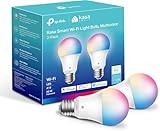
Overview: Kasa’s 2-pack delivers reliable, full-color smart lighting from a trusted brand serving over 6 million users. These UL-certified A19 bulbs produce 800 lumens of dimmable color and white light, controlled via the established Kasa Smart app without hub requirements. The system emphasizes energy efficiency and automated scheduling.
What Makes It Stand Out: Energy monitoring sets Kasa apart, providing real-time consumption data to reduce electricity costs. The brand’s proven reliability and UL certification offer exceptional peace of mind. Auto-white adjustment automatically modifies color temperature throughout the day, supporting natural circadian rhythms without manual intervention.
Value for Money: At $6.82 per bulb, this represents the most affordable option reviewed. Comparable features from budget brands rarely dip below $8 per bulb. With energy monitoring, scheduling, and sunrise/sunset automation included, the value proposition is outstanding for cost-conscious smart home beginners seeking trusted performance.
Strengths and Weaknesses: Pros: Excellent price point; trusted brand reputation; energy monitoring; auto-white adjustment; sunrise/sunset scheduling; UL certified; reliable connectivity. Cons: No motion detection; 2.4 GHz only; requires Kasa app (no HomeKit); fewer preset scenes than some competitors; setup can be finicky for some routers.
Bottom Line: The best budget choice for reliable color smart bulbs from an established brand. Energy monitoring and circadian features make these ideal for offices, bedrooms, and anywhere you want to track consumption while enjoying comprehensive smart lighting control without premium pricing.
4. WiZ Connected 2-Pack Color 60W A19 Smart WiFi Light Bulb, 16 Million Colors, Compatible with Alexa and Google Home Assistant, No Hub Required

Overview: This WiZ 2-pack emphasizes core smart lighting functionality with robust scheduling and household sharing features. These A19 bulbs deliver 16 million colors and adjustable whites through a streamlined app experience designed for family accessibility. The system prioritizes reliability and user management over sensor capabilities.
What Makes It Stand Out: Guest access controls allow you to share lighting control without compromising settings—ideal for families and rentals. Integrated scheduling continues working during Wi-Fi outages, a rare feature ensuring reliability. Vacation mode simulates occupancy when you’re away, enhancing home security through intelligent automation.
Value for Money: At $15.81 per bulb, these sit in the mid-range. While pricier than WiZ’s motion-detecting variant, they offer superior scheduling reliability and access controls. Compared to LIFX at $25+ per bulb, these provide similar color quality and smart features at a significant discount while maintaining WiZ’s easy setup.
Strengths and Weaknesses: Pros: Excellent scheduling with offline capability; guest access controls; vacation mode; simple setup; reliable voice control; good color accuracy. Cons: No motion detection; 2.4 GHz Wi-Fi only; app less feature-rich than some; occasional firmware update issues; higher per-bulb cost than basic alternatives.
Bottom Line: Best for users prioritizing scheduling reliability and household sharing over advanced sensors. The offline scheduling makes these perfect for vacation homes or areas with inconsistent internet, while guest controls suit multi-user households where you want to limit full access to settings.
5. Linkind Smart Light Bulbs, Smart Bulb That Work with Alexa & Google Home, LED Light Bulbs Color Changing, 104 Preset Scene, Music Sync, A19 E26 2.4GHz RGBTW WiFi Bluetooth Light Bulb 60W, 800LM, 4Pack

Overview: Linkind’s 4-pack delivers entertainment-focused smart lighting with dual connectivity and extensive customization. These A19 bulbs combine Wi-Fi and Bluetooth for flexible control, feature music synchronization, and offer an impressive 104 preset scenes. The system emphasizes dynamic environments and reliable local control.
What Makes It Stand Out: Wi-Fi and Bluetooth dual-mode enables local control without internet—a unique advantage when connectivity fails. Music sync transforms spaces with dynamic lighting that pulses to audio detected through your phone’s microphone. With 104 scenes, these bulbs offer the most extensive preset library for instant ambiance matching any occasion.
Value for Money: At $8.50 per bulb, this 4-pack offers outstanding value. Dual connectivity and music sync typically command $15-20 per bulb from premium brands. Getting four bulbs with these entertainment features under $35 makes this the best value for party lighting, dorm rooms, and dynamic environments where versatility matters.
Strengths and Weaknesses: Pros: Wi-Fi + Bluetooth connectivity; music synchronization; 104 preset scenes; competitive pricing; good brightness; flexible control options. Cons: Requires microphone permission; initial setup needs both Wi-Fi and Bluetooth; 2.4 GHz only; newer brand with limited track record; app may have bugs.
Bottom Line: Perfect for entertainment spaces where music sync and scene variety create atmosphere. The dual connectivity ensures you can always control your lights, making this a versatile, budget-friendly choice for dynamic, colorful lighting in party environments, gaming setups, or anywhere you want lighting that reacts to your lifestyle.
6. New Kasa Smart Bulb, Full Color Changing Dimmable Smart WiFi Light Bulb Compatible with Alexa and Google Home, A19, 9W 800 Lumens,2.4Ghz only, No Hub Required, 1-Pack (KL125), Multicolor

Overview: The Kasa KL125 is a single-pack smart bulb from TP-Link’s trusted smart home line, offering full-spectrum color control and scheduling without requiring a hub. This 9W LED delivers 800 lumens (60W equivalent) with 16 million colors and tunable whites from 2500K-6500K, controllable via Alexa, Google Assistant, or the Kasa app.
What Makes It Stand Out: Kasa’s energy monitoring feature sets it apart, letting you track real-time power consumption directly in the app. The “Auto White” function automatically adjusts color temperature throughout the day to match natural light patterns, promoting better circadian rhythm. With over 6 million users and UL certification, it offers proven reliability and safety that many budget brands lack.
Value for Money: At $8.98 for a single bulb, it’s pricier per unit than bulk packs but delivers premium features typically found in higher-end options. The 2-year warranty and brand reputation justify the modest premium over no-name alternatives, making it ideal for testing smart lighting before committing to a whole-home setup.
Strengths and Weaknesses: Strengths: Trusted brand with extensive user base; energy monitoring capability; UL safety certified; excellent app stability; auto white adjustment mimics natural light; no hub required; robust scheduling options. Weaknesses: 2.4GHz Wi-Fi only (no 5GHz support); single-pack limits value for whole-home projects; no Bluetooth backup if Wi-Fi fails; color rendering unspecified; higher cost per bulb versus multi-packs.
Bottom Line: The Kasa KL125 is a reliable, feature-rich entry point into smart lighting. Its energy monitoring and circadian features make it perfect for bedrooms or home offices where light quality matters. While not the cheapest option, the brand reliability and safety certification make it worth the slight premium for quality-conscious buyers.
7. DAYBETTER Smart Light Bulbs, Smart Bulb Compatible with Alexa & Google Home, A19 E26 2.4G WiFi Bluetooth Alexa Light Bulbs, RGBCW Color Changing LED Light Bulb, 60W Equivalent, 800LM, 6Pack

Overview: DAYBETTER’s six-pack offers an affordable path to whole-home smart lighting with 9W bulbs delivering 800 lumens each. Compatible with Alexa and Google Assistant via 2.4GHz Wi-Fi, these RGBCW bulbs provide 16 million colors and tunable whites from 2700K-6500K, controlled through the DAYBETTER app.
What Makes It Stand Out: The music synchronization feature is the headline act, using your phone’s microphone to make lights dance with audio—perfect for parties. Dual Wi-Fi and Bluetooth connectivity ensures faster pairing and more stable connections than Wi-Fi-only alternatives. Group control lets you manage all six bulbs simultaneously, while scheduling supports sunrise simulation and security modes.
Value for Money: At $24.99 ($4.16 per bulb), this represents exceptional value—nearly half the price of premium brands. You’re getting six bulbs with advanced features like music sync that competitors often reserve for higher-priced options. For budget-conscious shoppers wanting to outfit multiple rooms, the per-bulb cost is hard to beat.
Strengths and Weaknesses: Strengths: Unbeatable price per bulb; music synchronization adds entertainment value; Wi-Fi + Bluetooth dual connectivity; convenient group control; energy-efficient 9W design; good brightness at 800LM; comprehensive scheduling. Weaknesses: Lesser-known brand may have questionable long-term support; app reliability unproven at scale; 2.4GHz Wi-Fi only; no physical remote option; unspecified safety certifications; color accuracy may vary between bulbs.
Bottom Line: DAYBETTER’s six-pack is the budget champion for those wanting maximum coverage with minimal investment. The music sync feature adds fun factor for entertainment spaces. While brand longevity remains uncertain, the feature set and price make it a low-risk entry into smart lighting for renters or first-time users who prioritize quantity over premium branding.
8. WiZ 60W Color LED Smart Bulb 2-Pack + WiZ Remote Control for WiZ WiFi Products - Smart Lighting Bundle

Overview: WiZ takes a different approach by bundling two color-changing bulbs with a dedicated physical remote, offering hybrid control options. These 60W-equivalent bulbs connect via Wi-Fi and support Alexa, Google Home, Apple HomeKit, and the new Matter standard, providing broad smart home integration without a hub.
What Makes It Stand Out: The included remote control is a game-changer for households with kids or guests who lack app access, offering instant on/off, dimming, and preset scene activation. Motion activation automatically turns lights on/off based on movement detection—ideal for hallways or closets. Matter compatibility future-proofs your investment as the new smart home standard gains traction.
Value for Money: At $29.80 for two bulbs plus a remote, you’re paying roughly $14.90 per bulb, but gaining features worth the premium. The remote alone would cost $15-20 separately, making this bundle cost-effective. For those wanting both app and physical control without sacrificing advanced smart home compatibility, the price is justified.
Strengths and Weaknesses: Strengths: Physical remote included; Matter support for future-proofing; Apple HomeKit compatible; motion activation adds automation; works with all major platforms; no hub needed; preset modes for activities. Weaknesses: Only two bulbs limits coverage; higher per-bulb cost; remote only controls WiZ products; 2.4GHz Wi-Fi only; no Bluetooth backup; energy monitoring not mentioned.
Bottom Line: WiZ’s bundle excels for users wanting the best of both worlds—smart app control and traditional remote convenience. The Matter support and HomeKit compatibility make it perfect for Apple-centric households. While not the cheapest per-bulb option, the included remote and motion features justify the cost for entryways, bedrooms, or anywhere tactile control is preferred alongside automation.
9. Lightinginside Smart Light Bulbs 6 Pack, Smart Bulb Works with Alexa/Google Home/Smart Life, CRI>90, RGBCW Color Changing LED Light Bulbs, 2.4G WiFi Bluetooth A19 E26 Bulb, No Hub Required, ETL Listed

Overview: Lightinginside’s six-pack targets tech-savvy users with dual-connectivity bulbs featuring Bluetooth backup and an impressive CRI>90 for accurate color rendering. These 2.4GHz Wi-Fi bulbs work with Alexa, Google, and Smart Life app, offering RGBCW color control and local Bluetooth control when internet fails.
What Makes It Stand Out: The “Always Connected” Bluetooth backup is a standout—when Wi-Fi drops, you still maintain local control, solving a common smart bulb frustration. The upgraded chip enables 3x faster setup, while CRI>90 ensures colors appear true-to-life, crucial for task lighting or photography. ETL listing provides safety assurance many budget brands skip.
Value for Money: At $26.95 ($4.49 per bulb), you’re getting premium features like Bluetooth backup and high CRI at near-budget pricing. The six-pack covers multiple rooms while the reliability features prevent the “dumb bulb” problem during outages. For reliability-focused buyers, the slight premium over DAYBETTER is justified by the connectivity safeguards.
Strengths and Weaknesses: Strengths: Bluetooth backup maintains control during Wi-Fi outages; CRI>90 for excellent color accuracy; ETL safety certified; 3x faster setup; dual connectivity; Smart Life app compatibility; six bulbs for whole-home coverage. Weaknesses: Initial setup requires both Bluetooth and Wi-Fi; 2.4GHz Wi-Fi only; brand recognition lower than Kasa; no energy monitoring; no physical remote included; app experience may vary.
Bottom Line: Lightinginside is the reliability champion for users frustrated by Wi-Fi-dependent bulbs. The Bluetooth backup ensures your lights work even when internet doesn’t, making it ideal for smart home beginners or those in areas with spotty connectivity. With high color accuracy and safety certification, it’s the sweet spot between budget price and premium peace of mind.
10. Linkind Matter Smart Light Bulb, WiFi Smart Bulbs, Work with Apple Home, Siri, Alexa, Google, SmartThings, RGBTW Color Changing Bulbs Mood Lighting, Music Sync, A19 E26 60W, 2.4Ghz WiFi 6 Pack

Overview: Linkind’s six-pack embraces the new Matter standard, enabling seamless integration across Apple Home, Alexa, Google, and SmartThings without multiple apps. These 9W bulbs produce 16 million colors with an exceptionally wide white range (1800K-6500K) and include music sync, targeting users invested in the future of smart home interoperability.
What Makes It Stand Out: Matter support eliminates ecosystem lock-in, letting you mix brands while controlling everything from your preferred platform. The health-focused design boasts “no blue-ray hazard” and claims 22-year lifespan (3 hours/day), addressing LED eye strain concerns. The 1800K-6500K range is wider than competitors, enabling deeper warm tones for true ambiance control.
Value for Money: At $42.99 ($7.16 per bulb), it’s the premium option here, but Matter certification and Apple Home support justify the cost for ecosystem-agnostic users. The 22-year lifespan and 2-year warranty provide long-term value, while 80% energy savings offset initial investment. For Apple households, it’s cheaper than Hue while offering similar compatibility.
Strengths and Weaknesses: Strengths: Matter support for universal compatibility; Apple HomeKit/Siri native support; health-conscious design; extremely wide color temperature range; music synchronization; 22-year lifespan claim; group control across platforms; energy efficient. Weaknesses: Highest per-bulb cost in this set; IPv6 router requirement may exclude some users; 2.4GHz Wi-Fi only; no Bluetooth backup; setup complexity for Matter novices.
Bottom Line: Linkind is the future-proof choice for Apple users and smart home enthusiasts embracing Matter. The health-conscious design and exceptional lifespan make it worth the premium for primary living spaces. While overkill for basic needs, it’s ideal for those building an interoperable smart home where bulbs must communicate across ecosystems seamlessly. The music sync and wide color range make it perfect for entertainment and mood lighting.
Why WiZ-Compatible Bulbs Are the Smart Choice for Budget-Conscious Beginners
Understanding the WiZ Ecosystem: Hub-Free Simplicity
WiZ technology operates on a simple principle: direct Wi-Fi connection. Unlike proprietary systems that force you to buy a central bridge or hub, WiZ-compatible bulbs connect straight to your home network. This architecture saves you $50-100 right out of the gate and eliminates another point of failure. For beginners, this means fewer devices to troubleshoot and a setup process that takes minutes, not hours. The protocol uses a cloud-based control system, so your commands travel from your phone to WiZ’s servers and back to the bulb, enabling control from anywhere with internet access.
The Real Cost Advantage: Initial Investment vs. Long-Term Savings
Budget beginners often focus solely on sticker price, but the true value reveals itself over time. A typical WiZ-compatible bulb consumes 8-10 watts while producing the same light as a 60-watt incandescent. Over a 15,000-hour lifespan, you’re looking at roughly $18 in electricity savings per bulb compared to old-school bulbs. Multiply that across a five-bulb starter setup, and you’ve offset the entire purchase cost in two years. Factor in the absence of hub replacement costs and the ability to start with a single bulb, and the financial barrier to entry becomes nearly nonexistent.
Essential Features to Prioritize in Your First Smart Bulbs
Color vs. Tunable White: Matching Features to Your Needs
Color bulbs dazzle with their rainbow capabilities, but tunable white bulbs often deliver more daily value for less money. Tunable white lets you shift from energizing cool daylight (6500K) to relaxing warm amber (2200K), mimicking natural light patterns that boost productivity and sleep quality. For beginners, a hybrid approach works best: install color bulbs in living spaces where ambiance matters (living room, bedroom) and tunable white in functional areas (kitchen, bathroom). This strategy cuts costs by 30-40% while preserving the “wow factor” where it counts.
Brightness Decoded: Navigating Lumens for Different Spaces
Forget wattage—lumens measure actual light output. For beginners, here’s the practical breakdown: 450 lumens suits bedside lamps and accent lighting; 800 lumens replaces standard 60-watt bulbs for general room illumination; 1100+ lumens tackles overhead fixtures and larger spaces. Pay attention to beam angle too. A 180-degree bulb spreads light widely for table lamps, while a narrower 120-degree beam works better for recessed cans. Overshooting brightness creates harsh environments; undershooting leaves you squinting. Most WiZ-compatible bulbs offer dimming via app, but starting with appropriate baseline lumens prevents the “dimmed to 10% all the time” inefficiency.
Energy Efficiency Ratings: What Those Numbers Actually Mean
That “A+” energy rating sticker isn’t just marketing. It translates to real consumption metrics: most WiZ bulbs draw 9W for 800 lumens, achieving 89 lumens per watt. Compare this to incandescent’s paltry 14 lumens per watt. The Energy Star certification on many WiZ-compatible models indicates they’ve passed rigorous standby power tests—some bulbs sip less than 0.5W when off. For budget beginners, this matters because phantom load from poorly designed smart bulbs can add $2-3 annually per bulb to your electric bill. Always check the standby consumption spec in the product details before buying.
Bulb Types and Form Factors Demystified
A19 Standard Bulbs: The Versatile Foundation
The A19 shape—the classic light bulb silhouette—fits 90% of home fixtures and serves as the perfect starting point. These omnidirectional bulbs cast light in all directions, making them ideal for table lamps, floor lamps, and open ceiling fixtures. When shopping, verify the physical dimensions. Some WiZ-compatible A19 bulbs run slightly larger than traditional bulbs, creating fit issues in tight enclosures or shallow fixtures. The standard medium E26 base fits virtually all US sockets, but always check for “E26 compatible” in the specs to avoid surprises.
BR30 Recessed Lighting: Directional Powerhouses
BR30 bulbs, with their bulged reflector design, direct light downward in a focused beam, making them perfect for can lights and track lighting. They typically deliver higher lumen outputs—1000-1100 lumens is common—and often feature wider dimming ranges. For beginners retrofitting recessed fixtures, note that BR30s run larger (3.75" diameter) and may not fit older 4-inch cans designed for smaller bulbs. The directional nature means you’ll need more bulbs per room compared to A19s, but the focused light reduces wasted illumination and creates cleaner ceiling aesthetics.
Specialty Shapes: When Aesthetics Matter
Candelabra (E12 base) bulbs bring smart features to chandeliers and decorative sconces, though they command a 20-30% price premium. Vintage-style filament bulbs with exposed LED filaments offer Instagram-worthy aesthetics but typically sacrifice brightness (500 lumens max) and color range. For budget beginners, limit specialty shapes to one or two statement fixtures. The cost-per-lumen is higher, and the tech inside these decorative bulbs often lags behind standard shapes in features like circadian modes. Always confirm the base type—E12, E26, GU10—before ordering, as adapters introduce connectivity issues and void warranties.
Setup and Connectivity: What First-Timers Should Expect
Wi-Fi Direct: The No-Hub Advantage Explained
WiZ’s hub-free design means each bulb becomes its own network device, like a mini computer. During setup, your phone temporarily connects directly to the bulb’s broadcasted Wi-Fi signal, transfers your home network credentials, then the bulb reboots onto your main network. This process typically takes 45-90 seconds per bulb. The catch: most WiZ-compatible bulbs only support 2.4GHz networks. If your router uses the same SSID for both bands, you may need to temporarily disable 5GHz or stand near the router during setup to ensure your phone connects to the 2.4GHz band for credential transfer.
The 2.4GHz Reality: Why Your Dual-Band Router Matters
Modern routers push devices toward 5GHz for speed, but WiZ bulbs require 2.4GHz’s longer range and better wall penetration. This isn’t a flaw—it’s a feature that ensures reliable control across your home. If setup fails repeatedly, log into your router settings and verify 2.4GHz is enabled with a distinct SSID or band steering is disabled. Some mesh systems (Eero, Google Nest) handle this automatically, while others require manual configuration. For apartment dwellers in congested Wi-Fi environments, changing your 2.4GHz channel from auto to channel 1, 6, or 11 can dramatically improve bulb responsiveness.
Step-by-Step Setup Walkthrough for Beginners
Start with one bulb in a central fixture. Download the WiZ app, create an account, and grant location permissions (required for setup). Screw in the bulb, power it on, and wait for it to pulse or blink—this indicates pairing mode. In the app, tap “Add Device,” select your bulb type, and follow prompts to connect to the bulb’s temporary Wi-Fi. Enter your 2.4GHz network password precisely, as bulbs won’t auto-detect typos. Name the bulb logically (“Living Room Main”) and assign it to a room. Success means the bulb stops pulsing and responds to app commands within 30 seconds. Test on/off, dimming, and color before installing additional bulbs.
App Capabilities That Transform Your Home
Scheduling and Automation: Beyond Basic Timers
The WiZ app offers graduated automation tiers. Basic scheduling sets on/off times with fade transitions—perfect for simulating occupancy. Next-level automation uses “If This Then That” logic: if motion is detected (via phone location), then turn on porch lights. The real power lies in “Rhythms,” which gradually shifts color temperature throughout the day without rigid schedules. For budget beginners, start with sunrise/sunset triggers that automatically adjust based on your location and season. This eliminates manual reprogramming and creates a set-it-and-forget-it experience that justifies the smart bulb premium.
Dynamic Lighting Modes and Presets
WiZ-compatible bulbs ship with curated modes like “Romance,” “Party,” and “Focus” that coordinate multiple bulbs into synchronized scenes. These aren’t gimmicks—they’re professionally designed color palettes optimized for specific activities. “Focus” uses cool white with slight blue tones to increase alertness; “Romance” employs warm ambers and soft reds to create intimacy. Beginners should explore these presets before creating custom scenes, as they demonstrate the ecosystem’s capabilities. Save your favorite custom scenes directly to the app’s home screen for one-tap access, effectively creating lighting “macros” for your daily routines.
Circadian Rhythm and Sleep-Friendly Features
The circadian rhythm feature automatically adjusts color temperature throughout the day, suppressing blue light after sunset to boost melatonin production. This isn’t just wellness marketing—studies show reduced blue light exposure improves sleep quality by up to 20%. For budget beginners, this transforms a $15 bulb into a sleep aid that rivals $100+ dedicated devices. Enable “Circadian mode” in the app, set your typical wake and sleep times, and let the algorithm handle the rest. The gradual shifts are subtle enough that you won’t notice them consciously, but your body’s chemistry will.
Voice Control and Smart Home Integration
Amazon Alexa Integration
Alexa integration offers the deepest feature set for WiZ users. After enabling the WiZ skill and linking accounts, you can control individual bulbs, rooms, or scenes with natural language: “Alexa, set the kitchen to cooking mode.” Pro tip: create Alexa routines that trigger WiZ scenes for complex multi-step commands like “Alexa, movie time” that dims lights, sets colors, and adjusts brightness across multiple bulbs. The integration supports color names, hex codes, and even relative adjustments (“make it warmer”). For beginners, start with room-based commands before diving into routine creation—it’s less overwhelming and builds confidence.
Google Assistant Compatibility
Google Home integration mirrors Alexa’s capabilities but shines in contextual understanding. You can say “Hey Google, make the lights the color of the ocean” and get a surprisingly accurate turquoise. The Google Home app displays WiZ bulbs alongside other smart devices, creating a unified control dashboard. However, Google’s scene support is less robust than Alexa’s; you may need to create duplicate scenes within the Google Home app for full functionality. For households already invested in Google Nest products, the native presence sensing can automatically trigger WiZ lights when you arrive home, no additional sensors needed.
Apple Siri Shortcuts and Workarounds
Here’s the limitation: WiZ doesn’t offer native HomeKit support. But budget beginners can bridge the gap using Siri Shortcuts. In the WiZ app, any scene or bulb action can generate a Siri Shortcut URL. Add these to the Shortcuts app, assign custom phrases like “Hey Siri, chill mode,” and voilà—voice control via iPhone or HomePod. The workaround lacks HomeKit’s visual interface and automation triggers, but for basic voice commands, it’s seamless. Power users can explore HomeBridge or HOOBS to create unofficial HomeKit integration, though this requires a Raspberry Pi and technical comfort beyond most beginners.
Budget Strategy: Maximizing Value Without Sacrificing Quality
Price Tiers: What You Get at $10, $15, and $20+ Per Bulb
The sub-$10 tier typically offers 800-lumen tunable white bulbs with basic app control—perfect for bulk purchases in hallways and bathrooms. The $12-15 sweet spot adds full RGB color, better CRI (80+), and advanced modes like circadian rhythm. Premium $20+ bulbs deliver 90+ CRI for accurate color rendering, 1100+ lumens for large spaces, and enhanced durability for outdoor use. For budget beginners, allocate 70% of your budget to mid-tier bulbs for primary living areas, reserving premium options for spaces where color accuracy matters (home office, art display) and economy bulbs for utility spaces.
Bulk Buying vs. Single Bulb Purchases
Multi-packs often discount individual bulb prices by 15-25%, but buying identical bulbs for every room wastes money. A strategic mix yields better results: purchase 4-packs of tunable white for bedrooms and bathrooms, twin packs of color bulbs for living spaces, and single specialty bulbs for statement fixtures. Watch for “starter kits” that bundle bulbs with WiZ plugs or strips—they’re rarely cost-effective unless you plan to expand into those categories. For renters, stick to single purchases initially; you can always add more when you understand your space’s needs.
Timing Your Purchases: Sales Cycles and Discount Strategies
Smart lighting follows predictable discount patterns. Black Friday and Prime Day offer 30-40% off, making them ideal for large purchases. Back-to-school season (August) sees moderate discounts as retailers target dorm rooms. New model releases typically happen in Q1, making Q4 the perfect time to snag previous-generation bulbs at clearance prices—functionality rarely changes between generations, just minor efficiency tweaks. Set price alerts on shopping apps for your target bulbs, and don’t chase every sale; the technology evolves slowly, so a deal today will likely be matched in 2-3 months.
Common Beginner Mistakes and Prevention Strategies
Overloading Your Network: The 50-Bulb Limit Reality
Most consumer routers struggle beyond 30-40 connected devices, and WiZ bulbs count toward this limit. The WiZ cloud itself can handle up to 100 bulbs per home, but your router’s memory and CPU create the real bottleneck. Symptoms of overload include bulbs randomly dropping offline, slow response times, and failed commands. Solutions include upgrading to a mesh system with high device capacity (Eero Pro, ASUS AiMesh) or adding a dedicated 2.4GHz access point just for IoT devices. For budget beginners, the preventive approach is simpler: plan your deployment in phases, testing network stability after every 10 bulbs.
Dimmer Switch Compatibility: A Critical Warning
Here’s a costly mistake: installing WiZ-compatible bulbs on existing dimmer switches. The internal electronics of smart bulbs conflict with dimmer circuits, causing flickering, buzzing, or complete failure. Even “smart dimmer” switches like Lutron Caseta aren’t compatible—they’re designed for dumb bulbs. The solution is binary: either replace dimmer switches with standard on/off switches or set dimmers to 100% and use a smart switch cover that physically prevents adjustment. For renters, the switch cover costs $10-15 and preserves your security deposit; for homeowners, swapping the switch is a $5 part and 15-minute DIY project.
Firmware Fatigue: When and How to Update
WiZ pushes firmware updates automatically, but beginners often interrupt the process by flipping switches or losing Wi-Fi during the 2-3 minute update window. This can brick bulbs, requiring factory resets. Best practice: enable auto-updates in the app but schedule them for overnight hours when you won’t touch switches. If you prefer manual control, update bulbs one at a time, ensuring the bulb remains powered and your phone stays on the same network throughout. The app shows update progress as a percentage—don’t panic if the bulb flickers or appears off during this process; it’s normal behavior.
Advanced Features Worth the Premium
Color Rendering Index (CRI): Why 90+ Matters
CRI measures how accurately a light source displays colors compared to natural sunlight. Standard WiZ bulbs offer CRI 80, making reds appear muddy and skin tones washed out. Premium bulbs with CRI 90+ render colors nearly identically to incandescent, crucial for spaces where appearance matters: bathrooms (makeup application), home offices (design work), and dining areas (food presentation). For budget beginners, the upgrade costs $3-5 per bulb but dramatically improves the quality of light. Test by illuminating a colorful object under both CRI 80 and 90+ bulbs—the difference in vibrancy is immediately apparent.
Custom Power-On Behavior: The “Switch Flip” Solution
The Achilles’ heel of smart bulbs: they become dumb when someone flips the physical wall switch off. Custom power-on behavior mitigates this by letting you preset what happens when power returns: last state, specific brightness, or even a color. Set bathroom bulbs to “always on at 100% white” so guests aren’t left in darkness. Configure bedroom bulbs to “last state” so your scheduled wake-up routine isn’t disrupted by accidental switch flips. This feature, found in mid-tier and premium bulbs, transforms the wall switch from enemy to failsafe, preserving harmony in households with tech-resistant family members.
Zoning and Grouping: Whole-Home Control Strategies
The WiZ app supports nested grouping: rooms contain zones, zones contain individual bulbs. A “Living Room” room might have “Couch Area” and “Reading Nook” zones, each with two bulbs. This hierarchy lets you issue broad commands (“turn off living room”) or precise ones (“dim reading nook to 30%”). For budget beginners, plan zones based on functional areas, not fixture count. A single zone should control bulbs that serve the same purpose. Avoid creating single-bulb zones unless absolutely necessary; it clutters the interface and defeats the efficiency of group control.
Installation Best Practices for Optimal Performance
Placement Psychology: Where Smart Bulbs Make the Most Impact
Strategic placement multiplies perceived value. Prioritize locations where lighting changes have outsized impact: bedside lamps (circadian rhythm), entryway fixtures (welcome home scenes), and kitchen pendants (task lighting). Avoid placing your first smart bulbs in closets, garages, or utility rooms where basic on/off suffices. The psychological boost of walking into a perfectly lit room after a long day justifies the cost more than automating a storage space. For maximum wow factor, install color bulbs in fixtures visible from multiple rooms—open floor plans let one bulb’s ambiance influence adjacent spaces.
The Physical Switch Dilemma: Maintaining Control
The clash between smart bulbs and physical switches creates household friction. Solutions range from simple to sophisticated. Tape over switches with “Do Not Turn Off” labels (free, but ugly). Install magnetic switch guards ($5) that allow manual override when needed. Replace switches with smart buttons like Flic or Aqara that send wireless commands without cutting power. The gold standard: install a smart switch that controls the bulb via software while maintaining constant power flow. For budget beginners, start with switch guards and upgrade to smart buttons only after you’ve lived with the system for a month and understand your usage patterns.
Outdoor and Bathroom Installations: IP Ratings Explained
That “IP44” rating isn’t gibberish—it’s your bulb’s armor rating against dust and water. The first digit (4) means protection against objects larger than 1mm; the second digit (4) means splash resistance from any direction. For covered porches, IP44 suffices. Exposed fixtures require IP65 (water jets) or IP67 (temporary immersion). Bathrooms need IP44+ for zones near sinks, IP65+ for showers. Budget beginners often cheap out on ratings, but a $5 savings becomes a $15 replacement when moisture kills an indoor-rated bulb. Check fixture seals too; even IP67 bulbs fail if installed in cracked enclosures.
Troubleshooting Fundamentals Every Beginner Should Know
The Universal Fix: Power Cycling Like a Pro
When a bulb goes rogue—won’t respond, shows wrong color, flickers—don’t panic. The 10-second power cycle resolves 80% of issues: turn off at the switch, count to ten (slowly), turn back on. This forces a clean reboot and reconnection to Wi-Fi. For stubborn problems, perform a “deep cycle” by unscrewing the bulb for 30 seconds to discharge internal capacitors. Avoid rapid flipping; the bulb needs time to fully power down. Document which fixtures require ladder access—keeping a step stool handy prevents the “it’s broken” frustration that leads to premature returns.
Factory Reset Procedures for Stubborn Bulbs
When power cycling fails, the factory reset is your nuclear option. Most WiZ-compatible bulbs use a “rapid on-off” sequence: flip the switch on-off-on-off-on within 2-3 seconds, then leave on. The bulb will pulse or cycle colors to confirm reset. This wipes all settings, forcing you to re-add it to the app—annoying, but effective. If the sequence doesn’t work, check the manufacturer’s documentation; some use 5-second holds or specific timing. Never reset all bulbs simultaneously unless you enjoy repetitive setup. Reset one, reconfigure, test thoroughly, then move to the next.
Support Channels: When to Escalate Issues
WiZ’s community forums often solve problems faster than official support. Search error messages verbatim; chances are another beginner already posted the solution. Official support via chat responds within 24 hours but may request diagnostic logs from the app. Before contacting them, gather: bulb model number, router make/model, Wi-Fi channel, and a clear description of the issue with steps to reproduce. For hardware failures under warranty, retailers handle returns more efficiently than manufacturers. Amazon’s 30-day window beats waiting for warranty shipping. Document issues with screenshots or screen recordings—visual proof accelerates resolutions.
Future-Proofing Your Investment
Matter Standard Migration: What WiZ Users Need to Know
Matter, the new universal smart home standard, promises cross-platform compatibility. WiZ has committed to Matter support via firmware updates for recent bulb models. This means your bulbs will eventually work with Apple HomeKit, Samsung SmartThings, and other ecosystems natively. For budget beginners buying today, prioritize bulbs manufactured after 2022 with “Matter-ready” labeling. These models contain sufficient memory and processing power for the update. Older bulbs may lack hardware requirements, locking you into the WiZ app long-term. Matter support won’t make existing features obsolete—it just adds more control options.
Ecosystem Expansion: Beyond Just Bulbs
WiZ-compatible plugs, strips, and sensors share the same app and voice control, allowing unified scenes. A “Movie Night” scene can dim bulbs, turn off a plug-connected fan, and activate LED strips behind the TV. This expansion path saves you from learning new apps and maintains a single automation logic. For budget beginners, add one device type at a time. Plugs ($10-15) control existing lamps or appliances, offering more bang-for-buck than replacing perfectly functional dumb fixtures. Motion sensors ($20) enable hands-free lighting in hallways and bathrooms, delivering luxury convenience at entry-level pricing.
Exit Strategy: What Happens If You Switch Platforms
Smart home commitment anxiety is real. The good news: WiZ bulbs work as basic on/off bulbs even if you abandon the ecosystem. The bad news: advanced features require the app. If you migrate to another platform, you won’t need to physically replace bulbs—just reset and re-pair them. For maximum flexibility, avoid buying bulbs locked to proprietary protocols. WiZ’s Wi-Fi-based approach ensures universal router compatibility. Keep original packaging and receipts; unopened bulbs retain resale value on secondary markets. Document your setup (room names, scenes) in a notes app—this makes migration to any new platform infinitely easier.
Frequently Asked Questions
Do WiZ-compatible bulbs require a hub or bridge to work?
No, WiZ bulbs connect directly to your Wi-Fi network without any additional hardware. This hub-free design is one of their primary cost advantages for beginners. Each bulb contains its own Wi-Fi radio and communicates directly with your router and the WiZ cloud servers, eliminating the $50-100 upfront cost of a proprietary bridge.
Can I use WiZ bulbs with my existing dimmer switches?
No, this is one of the most critical compatibility issues. WiZ bulbs contain internal dimming circuitry that conflicts with external dimmer switches, causing flickering, buzzing, or permanent damage. You must replace dimmer switches with standard on/off switches or set dimmers to maximum and use smart switch covers to prevent adjustment. The bulbs themselves offer full dimming control through the app or voice commands.
How many WiZ bulbs can I control in one home?
The WiZ cloud technically supports up to 100 bulbs per account, but your home router is the real limiting factor. Most consumer routers handle 30-40 connected devices reliably before performance degrades. If you plan to exceed 30 bulbs, invest in a mesh Wi-Fi system designed for high device counts or add a dedicated 2.4GHz access point for your smart home devices.
Will WiZ bulbs work if my internet goes down?
Local network control remains functional without internet—you can still use the WiZ app on the same Wi-Fi network to control bulbs. However, voice commands via Alexa/Google require cloud connectivity, and remote access from outside your home is disabled. The bulbs will maintain their last settings and any scheduled automations stored locally will continue to run until internet is restored.
Can I control WiZ bulbs when I’m away from home?
Yes, through the WiZ app. Because bulbs connect to WiZ’s cloud servers, you can control them from anywhere with internet access. The app communicates with the cloud, which relays commands to your bulbs. This requires your home Wi-Fi to remain online and the bulbs to maintain their connection. For security, enable two-factor authentication on your WiZ account to prevent unauthorized access.
Do WiZ-compatible bulbs work in ceiling fans and enclosed fixtures?
Yes, but with caveats. The vibration from ceiling fans can loosen connections over time—check and tighten bulbs every few months. Enclosed fixtures trap heat, which degrades LED lifespan. Ensure the bulb is rated for “enclosed fixture use” and verify the fixture’s maximum wattage rating (though LED wattage is low, heat generation is the real concern). Bulbs in enclosed fixtures may run 10-15% dimmer due to thermal throttling.
What’s the actual lifespan of budget WiZ bulbs?
Rated lifespans of 15,000-25,000 hours assume optimal conditions: stable voltage, moderate temperature, and limited switching cycles. Real-world use typically yields 12,000-18,000 hours—still 12+ years at 3 hours daily use. Frequent on/off switching, high ambient temperatures, and voltage fluctuations reduce lifespan. Budget bulbs may use lower-grade capacitors that fail before the LEDs themselves, manifesting as flickering or color accuracy loss after 5-7 years.
Are WiZ bulbs secure from hacking?
WiZ uses AES encryption for cloud communication and regular security patches. However, any Wi-Fi device presents potential vulnerabilities. Protect your network by using a strong Wi-Fi password, enabling WPA3 encryption on your router, creating a separate guest network for IoT devices, and regularly updating firmware. For paranoid beginners, some routers allow VLAN isolation, keeping smart bulbs separate from computers and phones.
Can I mix different brands of WiZ-compatible bulbs?
Absolutely. The WiZ platform is brand-agnostic—bulbs from different manufacturers using the WiZ protocol coexist seamlessly in the same app and scenes. You might notice slight color rendering differences between brands at identical settings, but the app provides per-bulb calibration to match brightness and white points. This flexibility lets you shop for the best value per bulb type without ecosystem lock-in.
What happens if I move to a new house?
Your WiZ bulbs move with you. Simply unscrew them, pack them safely, and install them in your new home. In the app, delete your old “home” and create a new one, then re-add each bulb to the new Wi-Fi network. All your saved scenes and schedules are stored in the cloud, so they’ll transfer once bulbs are reconnected. It’s the ultimate renter-friendly smart home investment—no permanent installation, no lost investment.