Your safe holds your most valuable possessions, but what happens when traditional locks and static alarms aren’t enough? Sophisticated burglars have developed methods to bypass conventional security, leaving a critical gap in your protection strategy. Zigbee vibration sensors represent the next evolution in safe security, detecting the subtle tremors and movements that signal unauthorized access attempts before a breach occurs. These intelligent devices don’t just sound an alarm—they create an invisible shield around your valuables, communicating with your entire smart home ecosystem to trigger layered defense responses.
Unlike standalone security gadgets that operate in isolation, Zigbee vibration sensors leverage mesh networking technology to create a resilient, self-healing security web. This means even if one device is compromised or loses signal, your safe remains protected by a network of interconnected sentinels. Whether you’re safeguarding firearms, documents, jewelry, or business assets, understanding how to select and deploy these sensors transforms your safe from a simple metal box into an intelligent fortification system.
Top 10 Zigbee Vibration Sensors for Unauthorized Safe Access
Detailed Product Reviews
1. ThirdReality Vibration Sensor

Overview: The ThirdReality Vibration Sensor is a versatile Zigbee 3.0 device designed for comprehensive home monitoring. At $14.99, it offers broad compatibility with major smart home ecosystems including Echo devices, SmartThings, Home Assistant, and Hubitat. This sensor provides real-time alerts for vibrations across multiple applications from garage doors to jewelry drawers.
What Makes It Stand Out: The standout feature is its manual sensitivity adjustment using two physical switches with four distinct levels—no app required. The integrated 110dB siren delivers immediate local alerts, while the mute switch offers flexibility for phone-only notifications. Its ability to create complex automation routines when paired with compatible hubs sets it apart from basic sensors.
Value for Money: At $14.99, this sensor sits in the sweet spot between budget and premium options. The manual controls eliminate dependency on apps for basic configuration, saving time and frustration. Compared to proprietary systems, its multi-hub support prevents ecosystem lock-in, offering long-term value that justifies the modest investment.
Strengths and Weaknesses: Strengths include exceptional hub compatibility, physical sensitivity controls, loud alarm, and flexible notification options. The local mute switch is practical for different environments. Weaknesses: requires separate Zigbee hub, battery life isn’t specified, and the design may be bulkier than minimalist alternatives. The dependency on hub connectivity means no standalone operation.
Bottom Line: This is an excellent choice for smart home enthusiasts seeking flexible, reliable vibration monitoring across multiple platforms. The manual controls and loud alarm make it ideal for both security and automation applications. If you already own a compatible Zigbee hub, it’s a worthwhile investment that delivers professional-grade features at a consumer-friendly price.
2. THIRDREALITY Zigbee Vibration Sensor 3 Pack with 110dB Alarm, Zigbee Hub Required,Adjustable Sensitivity, Work with SmartThings, Home Assistant via ZHA/Z2M and Echo Devices with Built-in Zigbee hub
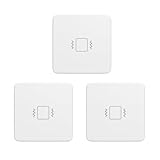
Overview: The THIRDREALITY Zigbee Vibration Sensor 3 Pack delivers triple the coverage for $43.99, making it ideal for whole-home security setups. Each unit mirrors the single sensor’s capabilities with Zigbee 3.0 compatibility across Echo devices, SmartThings, Home Assistant, and more. This bundle lets you monitor multiple entry points, appliances, and valuables simultaneously.
What Makes It Stand Out: The three-pack configuration offers immediate multi-location deployment at a discounted rate. Each sensor retains the signature manual sensitivity adjustment with four levels via physical switches, plus the 110dB siren with mute functionality. The ability to mix-and-match monitoring scenarios—from garage doors to washing machines—creates a cohesive security ecosystem.
Value for Money: Priced at $43.99 for three ($14.66 per unit), you save roughly $1 per sensor compared to individual purchases. More importantly, you eliminate multiple shipping costs and ensure uniform functionality throughout your home. For comprehensive coverage, this bundle is significantly cheaper than buying disparate sensors from different brands.
Strengths and Weaknesses: Strengths include cost savings, consistent user experience across all devices, broad hub compatibility, and loud audible alerts. The manual controls remain a key advantage. Weaknesses: still requires a Zigbee hub, no volume discount beyond the modest per-unit savings, and you commit to one sensor type. If one fails, you may have spares, but no brand diversity.
Bottom Line: This 3-pack is perfect for homeowners ready to implement comprehensive vibration monitoring. The slight per-unit discount and unified ecosystem make it smarter than buying individually. For those needing three or more sensors, this bundle offers convenience and value. If you only need one sensor, stick with the single pack.
3. Aqara Zigbee Vibration Sensor, Wireless Mini Glass Break Detector for Alarm System, Home Automation, Requires Aqara Hub (not 3rd-Party), Compatible with Apple HomeKit, Alexa, IFTTT, Home Assistant

Overview: The Aqara Zigbee Vibration Sensor is a premium $18.99 option focused on the Aqara ecosystem. It detects vibration, tilt, and drop movements, making it versatile for securing valuables and monitoring appliances. With up to two-year battery life and HomeKit compatibility, it targets Apple-centric smart homes requiring reliable, long-term monitoring.
What Makes It Stand Out: Unlike competitors, it detects three movement types (vibration, tilt, drop) rather than just vibration. The exceptional two-year battery life minimizes maintenance, while the compact design suits discrete placement on windows, safes, or artwork. Native Apple HomeKit support ensures seamless integration for iOS users, and the 393-inch range provides flexible hub placement.
Value for Money: At $18.99, it’s pricier than generic alternatives, but the multi-axis detection and proven Aqara reliability justify the cost for ecosystem users. However, requiring a proprietary Aqara hub adds $30-60 to the total investment. For Apple HomeKit users, this is cost-effective; for others, the ecosystem lock-in reduces value compared to universal Zigbee sensors.
Strengths and Weaknesses: Strengths include triple-motion detection, exceptional battery life, HomeKit certification, and stable connectivity within the Aqara ecosystem. The build quality is typically superior. Weaknesses: mandatory Aqara hub (no third-party hub support), limited compatibility with Zigbee2MQTT, and higher entry cost. The ecosystem dependency is restrictive for platform-agnostic users.
Bottom Line: This sensor excels for Apple HomeKit households already invested in Aqara. The tilt/drop detection and battery life are compelling. For multi-platform users or those without an Aqara hub, look elsewhere. It’s a specialized tool that performs brilliantly within its intended ecosystem but lacks the flexibility of universal Zigbee sensors.
4. Zigbee Wireless Vibration Sensor, 120dB Alarm, Adjustable Sensitivity, Glass Break, Vibration Detector for Alarm System & Smart Home Automation, Work with Tuya & Smart Life App

Overview: This $12.99 Zigbee Wireless Vibration Sensor is a budget-friendly entry point for basic home monitoring. Operating via the Tuya/Smart Life ecosystem, it offers a louder 120dB alarm and app-based sensitivity adjustment. Designed for cost-conscious users, it supports zigbee2MQTT and IFTTT, appealing to DIY smart home enthusiasts.
What Makes It Stand Out: The 120dB alarm is the loudest in this lineup, ensuring alerts are heard even in large homes. App-controlled sensitivity provides granular adjustment without physical switches. History logging updates every 30 minutes, offering pattern insights. The zigbee2MQTT support is a major win for open-source Home Assistant users seeking flexible integration.
Value for Money: At $12.99, it’s the most affordable option here. The feature set punches above its weight with loud alarms and app control. However, requiring two AAA batteries (not included) adds hidden cost and maintenance. For Tuya ecosystem users, it’s exceptional value. For others, the gateway requirement may negate savings if you need to purchase additional hardware.
Strengths and Weaknesses: Strengths include lowest price, loudest alarm, app-based configuration, history logging, and excellent third-party integration support. Weaknesses: batteries not included, unspecified battery life, Tuya ecosystem dependency, and potentially less reliable build quality than premium brands. The app configuration may frustrate users preferring physical controls.
Bottom Line: This is the best value for Tuya/Smart Life users or zigbee2MQTT enthusiasts wanting loud alarms and app control. The price is hard to beat for basic vibration monitoring. If you need rock-solid reliability, long battery life, or universal hub compatibility, invest more in established brands. For experimental setups or secondary monitoring, it’s a smart budget choice.
5. Zigbee Smart Vibration Sensor,3-in-1 Vibration+Tilt +Drop Alarm, Compatible with Alexa,App and Remote Control,Real Time Alarm, Scene Linkage,for Windows,Doors.

Overview: The Zigbee Smart Vibration Sensor is an $18.99 weatherproof option offering 3-in-1 detection (vibration, tilt, drop) for indoor and outdoor use. Compatible with Alexa and Tuya gateways, it features IP67 waterproofing and high-sensitivity ±2g detection. This sensor targets users needing durable, versatile monitoring beyond climate-controlled environments.
What Makes It Stand Out: The IP67 waterproof rating is unique here, enabling outdoor installation on gates, sheds, or exterior windows. The triple-detection capability matches Aqara’s versatility while maintaining broader hub compatibility. Real-time notifications via app and gravity-based ±2g sensitivity provide precise monitoring for both security and automation triggers.
Value for Money: At $18.99, it commands a premium over basic sensors but offers features others lack. The waterproofing and triple-detection justify the cost for specific use cases. However, requiring a Tuya Zigbee gateway and lacking included batteries may increase total investment. For outdoor monitoring, it’s competitively priced; for indoor-only use, cheaper alternatives suffice.
Strengths and Weaknesses: Strengths include IP67 waterproofing, three detection modes, high sensitivity, Alexa compatibility, and real-time alerts. The weather resistance opens new installation possibilities. Weaknesses: Tuya gateway requirement, unspecified battery life and type, limited brand recognition, and potentially weaker ecosystem support compared to Aqara or ThirdReality.
Bottom Line: Choose this sensor if you need outdoor-capable vibration monitoring with tilt/drop detection. The waterproofing is its killer feature. For indoor-only applications, consider more established brands with proven reliability. It’s a specialized tool that excels in harsh environments but may be overkill for typical interior security needs. Ensure you have a compatible Tuya gateway before purchasing.
6. WiFi Vibration Sensor: Smart Door Window Sensor with App Alerts, Wireless Glass Break Detector, Adjustable Sensitivity, Compatible with Alexa Google Home (4Pack)
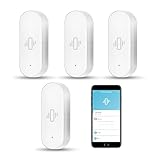
Overview: This four-pack system delivers comprehensive door and window monitoring via WiFi without requiring a hub. Each sensor detects vibrations and sends instant alerts through the Tuya Smart Life app. Running on 2.4 GHz networks, these battery-powered units install with included 3M adhesive, making them ideal for renters or DIY security upgrades across multiple entry points.
What Makes It Stand Out: Adjustable sensitivity calibration lets you fine-tune detection from light touches to forceful knocks, minimizing false alarms while maintaining security. The home automation integration enables cascading actions—when one sensor triggers, it can activate Tuya-compatible sirens, lights, or cameras. Low-battery warnings through both LED indicators and app notifications ensure continuous protection without surprise failures.
Value for Money: At $37.99 for four sensors (under $9.50 each), this pack offers substantial savings over individual purchases. The hub-free design eliminates additional hardware costs, while included AAA batteries provide immediate operation. For whole-home coverage, this represents a 35% discount versus buying separately, delivering professional-grade monitoring at a budget-friendly price point.
Strengths and Weaknesses: Strengths include straightforward WiFi setup, customizable sensitivity, seamless Tuya integration, and proactive battery monitoring. The tool-free installation suits temporary or rental properties. Weaknesses involve 2.4 GHz-only connectivity, potential adhesive degradation over time, and possible false triggers from environmental vibrations. The Tuya ecosystem dependency may limit compatibility with non-Tuya devices.
Bottom Line: This four-pack excels for users wanting affordable, scalable security without hub investment. While requiring careful sensitivity adjustment, it provides comprehensive coverage and reliable automation capabilities, making it an excellent choice for primary residences, vacation homes, or rental properties.
7. WiFi Vibration Sensor: Smart Door Window Sensor with App Alerts, Wireless Glass Break Detector, Adjustable Sensitivity, Compatible with Alexa Google Home (1Pack)
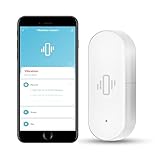
Overview: This single-unit WiFi vibration sensor provides targeted door or window monitoring without hub requirements. Connecting via 2.4 GHz WiFi to the Tuya Smart Life app, it detects vibrations and sends instant smartphone alerts. The battery-powered design with included AAA batteries and 3M adhesive enables immediate deployment on any glass, door, or window surface.
What Makes It Stand Out: The entry-level single-pack offers the same adjustable sensitivity as multi-packs, allowing precise calibration from gentle touches to forceful impacts. This flexibility reduces false alarms while ensuring genuine threats trigger notifications. The hub-free operation and Tuya ecosystem integration enable automation with other compatible devices, letting this sensor trigger lights, cameras, or alarms when activated.
Value for Money: At $13.99, this unit provides an accessible entry point into smart security, though at a higher per-sensor cost than multi-pack options. It’s ideal for testing the system or protecting a single critical entry point. While cost-effective for targeted use, expanding coverage later proves more expensive than investing in a multi-pack initially.
Strengths and Weaknesses: Strengths include easy WiFi setup, customizable sensitivity, reliable app alerts, and simple adhesive installation. The low upfront cost minimizes investment risk. Weaknesses mirror the multi-pack: 2.4 GHz-only connectivity, potential adhesive failure over time, and environmental vibration false triggers. Single-unit purchase lacks the economy of scale for whole-home protection.
Bottom Line: Perfect for trying smart vibration sensing or securing one vulnerable entry point, this single sensor delivers core functionality without commitment. However, for comprehensive home security, multi-pack options offer substantially better long-term value and cohesive protection.
8. WiFi Vibration Sensor: Smart Door Window Sensor with App Alerts, Wireless Glass Break Detector, Adjustable Sensitivity, Compatible with Alexa Google Home (2Pack)

Overview: This two-pack strikes a practical balance between coverage and cost, providing WiFi-based vibration monitoring for doors and windows without requiring a hub. Each sensor connects to 2.4 GHz networks and communicates through the Tuya Smart Life app, delivering instant alerts when vibrations are detected. The included AAA batteries and 3M adhesive mounts enable quick installation on multiple entry points.
What Makes It Stand Out: Offering middle-ground quantity with full feature parity, this pack includes adjustable sensitivity settings that calibrate detection thresholds from light contact to heavy knocks. The dual-sensor setup allows coordinated automation—triggering sirens, lights, or cameras across different zones. Low-battery warnings through LED and app notifications maintain system reliability without manual checking.
Value for Money: At $21.99 for two units ($11 each), this pack delivers better per-sensor pricing than single purchases while remaining accessible for smaller homes or apartments. It represents a smart compromise, providing 25% savings over buying individually while avoiding the larger upfront investment of the four-pack. For moderate security needs, this hits the pricing sweet spot.
Strengths and Weaknesses: Strengths include hub-free WiFi connectivity, customizable sensitivity, seamless Tuya integration, and straightforward adhesive mounting. The dual-sensor approach covers primary entry points economically. Weaknesses involve 2.4 GHz-only operation, potential adhesive longevity issues, and susceptibility to environmental false alarms. The ecosystem lock-in may frustrate users with mixed smart home platforms.
Bottom Line: This two-pack serves as the most practical choice for average users needing moderate coverage without hub complexity. It balances affordability with functionality, making it ideal for apartments, small homes, or as a starter kit before expanding your security network.
9. Aeotec SmartThings Motion Sensor, Zigbee, Magnetic Mounting, Works with Smart Home Hub and Compatible Zigbee Hubs

Overview: Aeotec’s Zigbee motion sensor provides professional occupancy detection for hub-based smart home systems. Requiring a compatible Zigbee hub (SmartThings, Aeotec, or other coordinators), it monitors movement within a 15-foot range across a 120-degree field of view. The magnetic ball mount enables precise angle adjustment for targeted room coverage and automation triggers.
What Makes It Stand Out: The quick-tilt magnetic mounting system allows effortless positioning optimization without permanent installation. Zigbee protocol ensures reliable, low-power operation independent of WiFi congestion. The sensor excels at triggering sophisticated automation—lighting pathways, adjusting thermostats, or activating security responses based on occupancy patterns rather than simple vibration detection.
Value for Money: Priced at $48.99, this premium sensor justifies cost through Aeotec’s reliability and hub-based stability. While requiring existing hub infrastructure, it avoids WiFi interference and integrates with enterprise-grade systems. For committed Zigbee users, it delivers superior long-term value, though first-time buyers must factor in an additional $50-100 hub investment.
Strengths and Weaknesses: Strengths include robust Zigbee connectivity, adjustable magnetic mounting, 15-foot detection range, and immunity to WiFi congestion. Motion detection reduces false alarms versus vibration sensors. Weaknesses center on mandatory hub requirement, Zigbee-only compatibility, and higher per-unit cost. It’s unsuitable for renters wanting temporary, hub-free solutions or mixed-ecosystem homes.
Bottom Line: Ideal for dedicated SmartThings/Zigbee users seeking reliable motion automation in permanent installations. Choose this for sophisticated occupancy-based scenes, but select WiFi vibration sensors if you want simple, hub-free security without additional infrastructure investment.
10. Klanata Zigbee Graffiti Vibration Sensor - Smart Home Automation Alarm, Vibration Detection, Smart Light Switch for Home Security

Overview: Klanata’s Zigbee vibration sensor offers budget-friendly motion detection for users with existing Zigbee hub infrastructure. Unlike WiFi alternatives, this device requires a compatible Zigbee coordinator and provides vibration-based triggering for security and automation scenarios. Powered by two AAA batteries with low-power consumption, it updates status every 30 minutes and operates within a 10-30 meter range.
What Makes It Stand Out: This sensor’s versatility extends beyond security into niche applications like greenhouse monitoring, workshop lighting automation, and plant care—unusual flexibility for a vibration detector. The Zigbee protocol ensures stable connectivity without impacting WiFi bandwidth. Its rapid response time and real-time monitoring with history tracking provide actionable data for both security and environmental automation purposes.
Value for Money: At $22.09, it’s an affordable Zigbee entry point, though requiring a hub diminishes immediate value for newcomers. For existing Zigbee ecosystem users, it offers economical expansion options compared to premium brands. However, the hub prerequisite means first-time buyers face a $50-100 additional investment, making WiFi alternatives more cost-effective for casual users.
Strengths and Weaknesses: Strengths include Zigbee reliability, versatile application scenarios, low power consumption, and budget pricing. The 10-30 meter range suits various installations. Weaknesses involve mandatory hub requirement, uncertain compatibility with all Zigbee platforms, limited brand recognition, and potential setup complexity for beginners. Vibration detection may trigger false alarms from environmental factors.
Bottom Line: Best for Zigbee enthusiasts seeking economical vibration sensing for specialized automation beyond basic security. Hobbyists and greenhouse users will appreciate its versatility, but mainstream consumers should consider WiFi sensors for simpler, hub-free operation.
Understanding Zigbee Vibration Sensors for Safe Security
How Vibration Detection Technology Works
Vibration sensors function as sophisticated seismic detectors for your safe, converting mechanical energy into electrical signals through piezoelectric or accelerometer-based mechanisms. When someone attempts to drill, pry, or physically move your safe, these devices measure the amplitude and frequency of resulting vibrations. Advanced models analyze vibration patterns using onboard microprocessors to distinguish between benign disturbances—like foot traffic or nearby construction—and targeted attacks. This discrimination capability proves essential for safes located in high-traffic areas of homes or businesses where environmental noise could trigger false alerts.
Why Zigbee Protocol Excels in Security Applications
Zigbee’s low-power, mesh-networking architecture makes it uniquely suited for security applications where reliability trumps raw data speed. The protocol operates on the 2.4 GHz frequency band but uses frequency agility to hop between channels, avoiding interference from Wi-Fi networks and microwave ovens. For safe security, Zigbee’s true strength lies in its mesh topology—each powered device acts as a signal repeater, creating multiple pathways back to your hub. If a burglar attempts signal jamming, the network automatically reroutes communications through alternative nodes, ensuring your tamper alert reaches you despite interference attempts.
Key Features That Define Premium Zigbee Vibration Sensors
Sensitivity Calibration and Adjustment Range
Professional-grade sensors offer granular sensitivity controls spanning 0.1 to 10 G-force measurements, allowing precise tuning based on your safe’s weight, construction, and location. Look for devices with at least 5-10 adjustable sensitivity levels rather than simple high/medium/low settings. The best models include learning modes that analyze baseline environmental vibrations for 24-48 hours, then automatically set thresholds that filter out normal disturbances. This feature proves invaluable for wall safes installed in apartment buildings where adjacent units generate constant low-level vibrations.
Battery Life and Power Management Systems
Top-tier Zigbee vibration sensors achieve 2-3 year battery life using CR123A lithium batteries through intelligent power cycling. The device enters deep sleep mode, consuming microamps of current, then wakes every 100-300 milliseconds to sample for vibrations exceeding baseline thresholds. Premium models include battery voltage reporting in their status updates, alerting you to replace batteries at 20% remaining capacity rather than waiting for complete failure. Some advanced units feature capacitor-based power reservoirs that can transmit final tamper alerts even when batteries are critically low, ensuring you’re notified of access attempts during power transitions.
Build Quality and Tamper-Proof Design
The sensor’s physical construction directly impacts its effectiveness against determined adversaries. Opt for devices encapsulated in ultrasonic-welded polycarbonate housings rated IP65 or higher, preventing moisture intrusion and physical tampering. Internal tamper switches should detect both cover removal and base separation from the safe surface. Premium sensors include anti-jamming detection circuits that trigger alerts if someone attempts to flood the Zigbee channel with noise. The mounting system matters equally—3M VHB automotive-grade adhesive combined with optional screw reinforcement provides dual-layer attachment that resists both prying and solvent attacks.
Installation Best Practices for Maximum Effectiveness
Optimal Placement Strategies on Different Safe Types
For freestanding gun safes, mount the sensor on the upper third of the door panel, offset from the handle to capture pry bar leverage attempts. Wall safes require sensor placement on the interior door frame where vibrations from drilling concentrate. Floor safes demand dual-sensor configuration—one on the door and another on the body to detect both drilling and jack-based removal attempts. Always position sensors on metal surfaces rather than paint or plastic overlays, as metal transmits vibrations 5-7 times more effectively. Use isopropyl alcohol to clean mounting surfaces, removing oils that compromise adhesive bonds over time.
Pairing and Network Integration Procedures
Initiate pairing with your Zigbee hub in close proximity (within 10 feet) to ensure strong initial connection, then move the sensor to its final location. Most hubs support Install Code pairing, which uses a QR code on the device to establish encrypted communication, preventing man-in-the-middle attacks during setup. After physical installation, perform a “walk test” by gently tapping the safe with a rubber mallet while monitoring your hub’s signal strength indicator. Aim for Link Quality Indicator (LQI) values above 150 for reliable tamper detection. If LQI drops below 100, install a Zigbee repeater device within 20 feet to strengthen mesh connectivity.
Integration with Smart Home Security Ecosystems
Compatible Hubs and Controllers
Not all Zigbee hubs support security device clusters required for vibration sensors. Verify your hub implements IAS (Intruder Alarm System) Zone Cluster 0x0500, which handles tamper notifications and supervision messages. SmartThings, Hubitat Elevation, and Home Assistant with Zigbee2MQTT fully support these clusters, while some basic hubs only handle lighting and sensor on/off states. For commercial applications, consider hubs offering UL 1023 certification for household burglary alarm system units, ensuring compliance with insurance requirements. Advanced users should prioritize hubs that expose raw vibration amplitude data, enabling custom threat analysis algorithms.
Automation Rules and Alert Configuration
Effective safe security requires multi-stage automation rather than simple push notifications. Configure your system to: (1) trigger immediate silent alerts to your phone upon threshold vibration, (2) activate nearby IP cameras to begin recording with pre-buffer, (3) illuminate entry path lights to 100% brightness as deterrent, and (4) send secondary verification alerts if vibrations persist beyond 10 seconds. Use presence detection to differentiate between your legitimate access (phone Bluetooth beacon) and unauthorized attempts. Set up conditional logic that escalates alerts—first vibration triggers phone notification, sustained vibration adds SMS, and detected safe movement initiates emergency services contact.
Technical Specifications Decoded
Understanding Detection Ranges and False Alarm Prevention
Manufacturers specify detection ranges in G-force (acceleration) rather than distance. Quality sensors detect vibrations as subtle as 0.05 G, equivalent to light tapping, while ignoring ambient vibrations below 0.03 G. The critical specification is Signal-to-Noise Ratio (SNR)—look for values above 30 dB, indicating clean signal separation from background noise. Advanced devices employ Fast Fourier Transform (FFT) analysis to break vibrations into frequency components, allowing you to filter out HVAC rumble (20-50 Hz) while retaining drill detection (100-500 Hz). This spectral analysis reduces false alarms by up to 85% in challenging environments.
Signal Strength and Mesh Network Reliability
Zigbee’s theoretical range of 100 feet indoors reduces to 30-40 feet through walls and floors. For safe security, calculate mesh depth—the number of hops between sensor and hub. Each hop adds 50-100 milliseconds of latency, which accumulates in large networks. Premium installations maintain three or fewer hops for time-critical tamper alerts. Monitor Route Record responses to verify mesh health; frequent route changes indicate interference or weak links. Consider Zigbee channel selection—channels 15, 20, and 25 experience least Wi-Fi overlap, reducing packet loss. Some advanced sensors support Touchlink commissioning, allowing direct hub communication during emergencies bypassing normal mesh routing.
Advanced Configuration for Security Professionals
Sensitivity Tuning for Specific Threat Levels
Configure multiple sensitivity profiles for different threat scenarios. “Away Mode” should use maximum sensitivity (0.05 G threshold) while “Home Mode” might increase threshold to 0.2 G to ignore household activities. Create geofenced automation that automatically switches profiles based on your location. For high-value safes, implement “Duress Mode”—a secret button sequence on your keypad that appears to disarm the system but actually lowers vibration thresholds to maximum sensitivity, covertly alerting authorities during forced access attempts. Program time-based sensitivity ramps, such as heightened alertness during 2-5 AM hours when break-ins statistically peak.
Multi-Sensor Zoning and Layered Defense
Professional installations never rely on a single sensor. Create zones with overlapping coverage: primary vibration sensor on safe door, secondary accelerometer on safe body, and tertiary motion sensor in the room. Configure “AND” logic requiring two sensors to trigger before escalating to emergency response, eliminating single-point false alarms. Implement sensor fusion algorithms that correlate vibration intensity with sound levels from microphones (where legally permitted) to confirm break-in attempts. For vault rooms, create entry/exit delay zones that allow 30 seconds of vibration during legitimate access before arming, preventing self-triggering.
Common Pitfalls and How to Avoid Them
False Alarm Triggers and Environmental Factors
HVAC systems, subway vibrations, and heavy appliances generate false triggers through harmonic resonance. Perform a 48-hour baseline monitoring period using your hub’s logging capabilities to identify peak interference times. Install mechanical isolation pads beneath floor safes to decouple them from building vibrations. For wall safes, use closed-cell foam backing to dampen transmitted vibrations. Configure “vibration windows”—time periods where sensitivity automatically reduces during known high-vibration events like garbage collection or laundry cycles. Avoid mounting sensors near safe door hinges, as normal opening generates vibration spikes that can desensitize the sensor over time.
Network Congestion and Interference Issues
Zigbee networks support maximum of 240 devices per coordinator, but performance degrades above 60-80 active devices due to channel contention. Dedicate a separate Zigbee coordinator exclusively for security sensors, isolating them from bandwidth-heavy lighting networks. Enable source routing in your hub to reduce broadcast traffic, and configure sensors to report only state changes rather than periodic heartbeats. Wi-Fi interference from neighboring networks can be mitigated by switching Zigbee channel to 11 or 26, which sit at spectrum edges. For high-interference environments, consider Zigbee 3.0 devices with channel agility that automatically switch frequencies when packet loss exceeds 10%.
Cost-Benefit Analysis and ROI Considerations
Professional-grade Zigbee vibration sensors range from $35-$75 per unit, with total installation costs reaching $150-$300 including repeaters and configuration time. Compare this to safe replacement costs ($1,000-$5,000) and average burglary losses ($2,416 according to FBI crime statistics). Insurance premium reductions of 5-15% for certified alarm systems typically recover sensor costs within 18-24 months. Factor in intangible value—peace of mind and deterrence effect. DIY installations save labor costs but may void safe warranties if drilling is required. Commercial installations should budget for annual recalibration ($50-$100) to maintain optimal sensitivity as building structures settle and environmental conditions change.
Future-Proofing Your Safe Security Investment
The Zigbee 3.0 protocol ensures forward compatibility with emerging security standards, but verify your devices support over-the-air (OTA) firmware updates. This capability allows manufacturers to patch vulnerabilities and add features without hardware replacement. Look for sensors with Matter protocol support on their roadmap, ensuring interoperability with future smart home ecosystems. Battery chemistry matters—devices using standard CR123A batteries offer 10+ year availability, while proprietary battery packs may become obsolete. Consider sensors with expandable I/O ports that can connect to external probes, allowing upgrades like seismic sensors or chemical detection for fire safes. Archive your hub’s configuration settings quarterly; firmware updates can reset custom sensitivity profiles, and having backups ensures rapid restoration.
Frequently Asked Questions
1. Will Zigbee vibration sensors work on fireproof safes with composite walls?
Yes, but placement becomes critical. Fireproof safes use gypsum or concrete composites that dampen vibrations significantly. Mount sensors directly on the metal door skin or bolt mechanism where metal components transmit vibrations more effectively. You may need to increase sensitivity by 30-40% compared to all-metal safes. Test detection by tapping various points with a non-metallic object while monitoring your hub’s live signal feed.
2. Can burglars detect or jam Zigbee vibration sensors?
Zigbee operates at low power (1-100 mW) making remote detection difficult without specialized equipment. Jamming is theoretically possible but requires continuous transmission on the exact Zigbee channel. Quality sensors detect jamming as a loss of supervision messages and trigger tamper alerts. Using channel agility and encrypted communication makes practical jamming attacks extremely rare in residential settings. For high-security applications, pair Zigbee sensors with hardwired backup alarms.
3. How do I prevent pets from triggering false alarms?
Pet-induced false alarms typically register below 0.1 G from cats jumping on or near the safe. Set sensitivity thresholds to 0.15 G or higher, and enable the “pet immunity” feature available in many hubs that ignores short-duration vibrations. For large dogs, mount sensors on the upper door portion away from nose height. Consider adding a PIR motion sensor in the room that must also trigger before sending critical alerts, creating a two-factor verification system.
4. What’s the difference between vibration sensors and tilt sensors for safe security?
Vibration sensors detect drilling, prying, and hammering through high-frequency acceleration measurements. Tilt sensors monitor angular position changes, alerting when a safe is being moved or tipped. For comprehensive protection, use both: vibration sensors catch in-place attacks while tilt sensors detect removal attempts. Some advanced units combine both technologies, reporting separate alert types to your hub for precise threat identification.
5. Can I install these sensors on a rented safe in an apartment?
Absolutely. Most Zigbee vibration sensors use non-destructive adhesive mounting, leaving no damage when removed. Check your lease agreement for any security device restrictions. Position sensors inside the safe door if external mounting is prohibited—this reduces sensitivity but still detects drilling and prying. Use battery-powered units to avoid wiring modifications. Inform your insurance company, as some policies require notification of alarm system installations.
6. How often should I test my vibration sensor’s functionality?
Perform functional tests monthly using gentle taps with a rubber mallet while your system is in test mode. Conduct full sensitivity calibration quarterly, especially after seasonal temperature changes that affect building structures. Verify battery levels monthly through your hub’s reporting interface. Annual professional inspection is recommended for safes containing high-value items, including adhesive bond testing and signal strength verification under various environmental conditions.
7. Will these sensors interfere with my safe’s electronic lock mechanism?
No, Zigbee operates at 2.4 GHz while electronic locks typically use low-frequency RFID (125 kHz) or simple electrical contacts. The power levels are too low to induce currents in lock circuits. However, mount sensors at least 3 inches away from lock keypads to avoid physical interference with button operation. For biometric locks, maintain 6-inch separation from fingerprint scanners to prevent vibration-induced misalignment of delicate optical components.
8. Can vibration sensors detect safe door opening by authorized users?
Yes, if sensitivity is set high enough. Normal door opening generates 0.3-0.5 G vibrations from bolt retraction. Configure your system to differentiate through presence detection—when your smartphone’s Bluetooth beacon is detected, vibration alerts route to activity logs rather than emergency notifications. This creates an audit trail of safe access without triggering false alarms. Some sensors support “home mode” that automatically reduces sensitivity when your alarm system is disarmed.
9. What happens during power outages or internet failures?
Zigbee sensors continue monitoring during power outages using battery power. Alerts queue locally in the sensor’s memory (typically 5-10 events) and transmit when the hub reconnects. For internet outages, local hub processing still triggers sirens, activates lights, and logs events. Consider a UPS for your hub (4-8 hour runtime) and a cellular backup module for critical alerts. Mesh network functionality remains intact without internet, though remote notifications require connectivity restoration.
10. Are Zigbee vibration sensors legally admissible in insurance claims or court cases?
Sensor logs serve as supporting evidence but rarely as standalone proof due to lack of visual confirmation. Courts treat them as circumstantial evidence indicating attempted access. For insurance claims, they strengthen your case by documenting timing and force of attacks. Some insurers offer premium discounts for monitored systems with professional installation certificates. For legal proceedings, pair sensors with time-stamped video footage. Maintain detailed installation logs and calibration records to establish sensor reliability if evidence authenticity is challenged.