Living in a compact apartment often means every square inch counts, and counter space is practically currency. You need technology that doesn’t just add clutter but actively enhances your daily routine within tight quarters. Smart displays promise to be that versatile hub—offering video calls, recipe guidance, ambient lighting control, and hands-free information—but finding one that fits both your tiny kitchen nook and your wallet feels like searching for a needle in a haystack. The good news? The market is increasingly catering to space-conscious renters and budget-aware buyers, proving you don’t need deep pockets to bring intelligent convenience into your micro-living space.
Imagine waking up and asking for your schedule while brewing coffee, all without touching your phone. Picture following a step-by-step recipe on a screen that fits beside your toaster, or using the same device to dim smart lights and play calming sounds as you unwind. For small apartment dwellers, a well-chosen smart display becomes an indispensable multitasker, replacing several gadgets and streamlining life where physical space is limited. But navigating the sea of options under $100 requires knowing exactly which features deliver real value in a constrained environment and which are just flashy extras that won’t justify their footprint. Let’s cut through the noise and focus on what truly matters for your compact living setup.
Top 10 Smart Displays under $100
Detailed Product Reviews
1. Amazon Echo Show 5 (newest model), Smart display, Designed for Alexa+, 2x the bass and clearer sound, Charcoal

Overview:
The Amazon Echo Show 5 (2024 model) is a compact smart display designed to integrate Alexa into bedside or desktop spaces. Its 5.5-inch screen delivers visual feedback for routines, media, and smart home control, targeting users seeking hands-free convenience in smaller rooms.
What Makes It Stand Out:
Enhanced audio with “2x the bass” makes it superior for music in tight spaces, while the privacy-focused camera shutter and seamless Prime integration (unlimited photo storage) differentiate it from competitors. Real-time video calling and smart home device management—like checking doorbells remotely—add practical utility others lack.
Value for Money:
Priced mid-range ($60–$80), it outperforms cheaper displays with richer sound and Prime perks. While budget alternatives exist, the updated audio and Alexa ecosystem justify the cost for Amazon-centric households, though non-Prime users may find limited value.
Strengths and Weaknesses:
Strengths: Crisp display for its size, intuitive smart home hub, excellent voice recognition, and photo-sharing features. Weaknesses: Screen too small for extended video use, camera quality lags behind dedicated devices, and ad-supported free content can be intrusive.
Bottom Line:
Ideal for Alexa loyalists wanting a bedroom/desktop assistant with solid audio. Avoid if you prioritize large-screen media consumption or lack Amazon Prime.
2. RROSKY WiFi Digital Calendar Smart Family Planner,Chore Charts, Achievement Rewards, AI Meal Planning, Smart Touchscreen Interactive Display for Schedules and Cloud Photo Desk Bases, Gifts for Women Men, Gifts for Mom Dad, 10.1’’ Black

Overview:
This 10.1-inch touchscreen transforms into a family command center, merging calendar management, chore tracking, and AI meal planning. Designed for kitchen or living room use, it targets households needing centralized organization beyond basic digital calendars.
What Makes It Stand Out:
The chore reward system (star-based incentives for kids) and AI meal planner—tailored to health goals like weight loss—are unique. Two-way sync across all family accounts ensures real-time updates, while dual functionality as a photo frame adds aesthetic value competitors rarely match.
Value for Money:
At $120–$150, it’s pricier than basic calendars but justifies cost through specialized features. Free apps offer scheduling, but the tactile interface, chore motivation tools, and AI nutrition planning provide tangible time savings for busy families.
Strengths and Weaknesses:
Strengths: Intuitive multi-user sync, robust chore/reward system, personalized meal plans, and elegant photo display. Weaknesses: AI meal suggestions can be generic, setup requires app dependency, and screen glare affects readability in bright rooms.
Bottom Line:
A top pick for families prioritizing habit-building and meal coordination. Skip if you prefer minimalist scheduling without gamified chores.
3. BIGASUO 10.1" Digital Calendar, Smart Touchscreen Interactive Display, Electronic Organizer for Monthly, Weekly & Daily Agenda, Chore Chart, Meal Planner, To Do List, Family Schedules, Picture Frame
Overview:
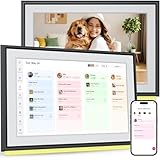
The BIGASUO R-1.5.0 is a Wi-Fi-enabled family organizer emphasizing calendar syncing and visual task management. Its 10.1-inch display serves as a hub for schedules, chores, and photos, ideal for households replacing paper planners.
What Makes It Stand Out:
Seamless two-way sync with major calendar services (Google, iCloud) and color-coded task assignment simplify coordination. The integrated chore chart and meal planner eliminate app-switching, while the photo frame mode leverages cloud storage for shared memories—no wall mounting needed.
Value for Money:
Priced at $100–$130, it competes well against app-based solutions. The all-in-one functionality (vs. buying separate tools) offers savings, though advanced AI features like RROSKY’s meal planning are absent, making it better for straightforward organization.
Strengths and Weaknesses:
Strengths: Reliable calendar sync, user-friendly interface, versatile display modes, and strong app integration. Weaknesses: Meal planning lacks personalization, initial software update required, and screen responsiveness lags during rapid inputs.
Bottom Line:
Best for families wanting a no-frills, sync-focused organizer. Opt for RROSKY if AI-driven meal support is essential.
4. Anker Smart Display Charger, Anker Nano 45W GaN Fast Charging USB C Charger, 180° Foldable Plug, Smart Recognition, Built-in Care Mode, for iPhone17/16/15(Non-Battery,One USB-C Port,No Cable Included)

Overview:
Anker’s Nano 45W charger integrates a smart display into a compact GaN adapter, designed exclusively for recent iPhones and iPads. It merges fast charging with real-time power monitoring in a travel-friendly form.
What Makes It Stand Out:
The interactive display (tap controls for status/mode switching) and TÜV-certified Care Mode—which reduces heat by 9°F during overnight charging—are groundbreaking. Its 47% smaller footprint than standard 30W chargers and dual-angle foldable prongs enhance portability without sacrificing speed.
Value for Money:
At $40, it’s $10 pricier than basic 45W chargers but justifies cost through unique display functionality and battery longevity features. For iPhone users prioritizing device health, it’s a premium worth paying versus generic alternatives.
Strengths and Weaknesses:
Strengths: Exceptional space efficiency, precise charging insights, temperature-safe overnight charging, and robust build. Weaknesses: iPhone/iPad-only compatibility, no included cable, and display auto-off limits usability.
Bottom Line:
A must-have for iPhone 15–17 users seeking smarter charging. Avoid if you need multi-device support or cable inclusivity.
5. Anker Smart Display Charger, Anker Nano 45W GaN Fast Charging USB C Charger, 180° Foldable Plug, Smart Recognition, Built-in Care Mode, for iPhone17/16/15(Non-Battery,One USB-C Port,No Cable Included)

Overview:
Identical to Product 4, this Anker Nano 45W charger targets iPhone and iPad users with its smart display and GaN technology. It emphasizes safety and portability for daily charging needs.
What Makes It Stand Out:
The standout features remain the real-time display (tap for status, double-tap to switch modes) and Care Mode, which actively cools charging to extend battery lifespan. Its ultra-compact design—36% lighter than older models—makes it ideal for travel without compromising 45W output.
Value for Money:
Priced identically at $40, it offers the same value proposition: premium features for Apple device owners. The lack of multi-brand compatibility narrows its audience, but for iPhone users, it outperforms non-display chargers in longevity protection.
Strengths and Weaknesses:
Strengths: Industry-leading portability, innovative display controls, heat-reducing Care Mode, and rapid 50% charging in 20 minutes. Weaknesses: Limited to Apple devices, requires separate cable purchase, and display visibility fades in direct sunlight.
Bottom Line:
An identical recommendation to Product 4: essential for Apple users focused on battery health and convenience. Not suitable for non-Apple ecosystems.
6. HolaCube WiFi Holographic Crystal 3D Photo Display, Smart Weather Station & Digital Clock with GIF Animations and Electronic Image Album Player for Desktop/Car Décor (Black Base)

Overview:
The HolaCube is a novelty desktop gadget combining a holographic display, weather station, and digital clock. It projects 3D-like images and GIFs onto a transparent crystal base, aiming to personalize workspaces or serve as a unique gift. Setup involves connecting via WiFi and using a companion app to upload content.
What Makes It Stand Out:
Its transparent design and “holographic” effect create visual intrigue, while the integrated weather station and clock add functional utility beyond typical photo frames. The extensive pre-loaded GIF library and easy app-based customization allow dynamic, eye-catching displays that evolve with user input, setting it apart from static décor.
Value for Money:
Priced mid-range for novelty electronics, it justifies cost through multifunctionality (display + weather + clock) and strong gif personalization. While not essential, its gift appeal and conversation-starting novelty offer fair value for those seeking unique desk accessories, though alternatives lack its holographic twist.
Strengths and Weaknesses:
Strengths: Intuitive app setup; versatile gif/image support; compact design fits desks or cars; strong gift potential; 30-day guarantee reduces risk. Weaknesses: “Holographic” effect is a 2D projection (not true 3D); weather data accuracy may vary; limited utility beyond aesthetics; app dependency could frustrate less tech-savvy users.
Bottom Line:
A fun, visually engaging novelty item ideal for gifting or livening up workspaces. Manage expectations—it’s not true holography—but its ease of use and multifunctionality make it worthwhile for those seeking whimsical tech décor.
7. Anker Smart Display Charger, Anker Nano 45W GaN Fast Charging USB C Charger, 180° Foldable Plug, Smart Recognition, Built-in Care Mode, for iPhone17/16/15(Non-Battery,One USB-C Port,No Cable Included)

Overview:
Anker’s Nano 45W GaN charger targets iPhone 15/16/17 users with a compact, intelligent wall adapter featuring a smart display. It prioritizes safety and speed for Apple devices, leveraging GaN tech for reduced size without sacrificing power, though it lacks included cables.
What Makes It Stand Out:
The real-time OLED display shows charging status, temperature, and mode—unique for chargers in this class. iPhone-specific “Care Mode” intelligently throttles overnight charging to extend battery lifespan, while the dual-foldable plug and ultra-compact design (47% smaller than older models) enhance portability.
Value for Money:
At a premium price, it excels for iPhone-centric users needing optimized, safe charging. The display and Care Mode justify the cost over generic 45W chargers, but the exclusion of a cable and narrow compatibility (iPhone/iPad Pro only) reduce value for multi-device households.
Strengths and Weaknesses:
Strengths: Exceptional portability; TÜV-certified battery care; intuitive touch controls; rapid 50% charge in 20 mins; reduced heat output. Weaknesses: No cable included; limited to Apple devices (wasted on non-iPhone users); single port restricts multi-device charging; display auto-off may frustrate some.
Bottom Line:
A top-tier choice for iPhone owners prioritizing battery health and portability, but overkill for Android users or those needing multi-port charging. Worth the investment if you own compatible Apple gear.
8. Anker Charger, 100W Max Ultra-Compact 3-Port GaN USB C Charger Block with Smart Display and Touch Control, Fast Wall Adapter for iPhone 17/16 Series, iPad, MacBook (Include Charge Cable, Non-Battery)
Overview:
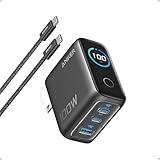
Anker’s 100W 3-port GaN charger delivers high-speed, multi-device charging with a smart display. Designed for travelers and power users, it includes a USB-C cable and supports laptops, tablets, and phones simultaneously while maintaining a remarkably small footprint.
What Makes It Stand Out:
The 100W output across three ports (with dynamic power allocation) is rare in such a compact form. The HD display shows real-time wattage, temperature, and port usage, while “Low-Current Mode” safely charges earbuds—a thoughtful touch absent in competitors. The included 4.9ft cable adds immediate value.
Value for Money:
Priced higher than basic 100W chargers, it justifies cost via the smart display, included cable, and superior port versatility. Outperforms rivals in sustained peak output (twice as long) and device compatibility, making it ideal for MacBook + iPhone users despite the premium tag.
Strengths and Weaknesses:
Strengths: Unmatched port flexibility; clear real-time display; travel-friendly size; included high-quality cable; efficient low-power device support. Weaknesses: Still bulky vs. single-port chargers; display may drain minimal power; max 100W only with one device; no USB-A port.
Bottom Line:
The best 100W charger for multi-device households needing visibility and reliability. If you juggle a laptop, tablet, and phone daily, the premium is easily warranted.
9. Digital Badge Pin with IPS Screen & Protective Case, Bluetooth Pixel Badge Electronic Smart Display, 1.70-inch 360x360 Resolution Photo Video GIF, Magnetic Smart for Cosplay, Conventions, Events (Black)

Overview:
This digital badge pin is a wearable tech accessory featuring a high-res 1.70-inch IPS screen for displaying photos, GIFs, or videos. Targeted at convention-goers and cosplayers, it magnetically attaches to clothing and connects via Bluetooth for easy content updates.
What Makes It Stand Out:
The sharp 360x360 resolution and vibrant IPS screen outperform most pixel badges in clarity. Magnetic attachment (with lanyard/pin alternatives) ensures secure, comfortable wear, while Bluetooth app integration allows instant GIF/photo swaps—crucial for dynamic event engagement.
Value for Money:
A niche product priced fairly for its quality. The 30-hour battery life, robust build, and included accessories (case, lanyard) offer solid value versus basic LED badges. Justifiable for frequent convention attendees, though casual users may find it excessive.
Strengths and Weaknesses:
Strengths: Excellent screen clarity; versatile magnetic/lanyard mounting; long battery life; intuitive Bluetooth app; durable protective case included. Weaknesses: Niche appeal (limited daily utility); app required for updates; screen visibility may suffer in direct sunlight; small size restricts content detail.
Bottom Line:
An essential tool for cosplayers and convention regulars seeking professional, customizable badges. Casual users should skip it, but for its target audience, it’s a standout investment.
10. Smart Ring for Women Men, Fitness Tracker with Display, Heart Rate, Blood Oxygen, Step, Sleep Tracking, IP68 Waterproof Fitness Ring for Gesture Control, No App Fees for iPhone and Android, Silver 11
Overview:
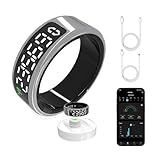
The KVKVMO Smart Ring is a discreet health tracker worn like jewelry, monitoring steps, sleep, heart rate, and blood oxygen. It emphasizes no subscription fees and includes gesture controls (e.g., camera shutter), with an HD LED display for on-ring data viewing.
What Makes It Stand Out:
Its zero-app-fee model is rare in the smart ring market, appealing to privacy-conscious users. The built-in HD display eliminates constant phone checks, while gesture controls (shaking for camera, double-tap for videos) add unique utility beyond standard tracking.
Value for Money:
Competitively priced with no hidden costs, it offers exceptional value for basic health tracking. However, size accuracy is critical—poor fit ruins sensor data. Outperforms subscription-based rivals for budget-focused users, but lacks advanced metrics of premium rings.
Strengths and Weaknesses:
Strengths: No subscription fees; clear on-ring display; IP68 waterproofing; intuitive gesture controls; solid multi-sport tracking. Weaknesses: Fit sensitivity (requires precise sizing); less accurate than medical devices; sleep tracking limited to 16-hour window; display visibility issues in bright light.
Bottom Line:
A compelling, cost-effective entry into smart rings for casual health tracking—provided you size correctly. Avoid if you need clinical-grade data, but ideal for discreet, subscription-free fitness monitoring.
Why Smart Displays Shine in Compact Living Spaces
Maximizing Counter Real Estate Efficiently
When your kitchen counter doubles as a dining area and workspace, every appliance must earn its place. Smart displays excel by consolidating multiple functions—alarm clock, recipe viewer, video call terminal, and smart home controller—into a single, unobtrusive unit. Opting for a model with a compact footprint (think under 7 inches wide) ensures it tucks neatly beside your coffee maker without sacrificing essential usability. Prioritize designs with minimal bezels and a stable base that won’t wobble during daily use, turning a potential eyesore into a seamless part of your efficient workflow.
The Multitasking Powerhouse for Daily Routines
Beyond saving space, the true magic lies in how these devices simplify apartment living. Need to check the weather before heading out? Just ask. Struggling to find storage-friendly dinner ideas? A voice command pulls up video tutorials directly on-screen. They integrate seamlessly with budget-friendly smart plugs and bulbs, letting you control your entire environment without fumbling for apps. For renters, this means creating personalized ambiance and convenience without drilling holes or complex installations—perfect for temporary setups where permanence isn’t an option.
Overcoming Common Small-Space Tech Frustrations
Cluttered cables and mismatched gadgets are the nemesis of minimalist living. Many budget displays now feature integrated cable management solutions or magnetic charging bases that reduce visible wires. Voice control minimizes the need to constantly pick up your phone, reducing screen time and physical clutter. Crucially, look for models with adjustable stands or wall-mount compatibility—this flexibility lets you repurpose vertical space, mounting the display on a cabinet or wall to free up precious counter room while keeping it within easy view.
Essential Features to Prioritize Under $100
Screen Size and Visibility: Small but Mighty
Don’t assume “budget” means a frustratingly tiny screen. Prioritize displays between 5 and 8 inches diagonal—large enough for clear recipe steps or video calls, yet small enough to fit on a narrow countertop. High-resolution LCD panels are standard even at this price point, but matte finishes significantly reduce glare from windows or overhead lights, a critical factor in bright apartment kitchens. Test screen brightness levels; models offering 400+ nits ensure readability even in sunny rooms without draining power excessively.
Voice Assistant Flexibility: Your Command Center
The voice platform matters more than brand loyalty. Choose devices offering multiple assistant options (like switching between major platforms via settings), giving you freedom to use whichever ecosystem aligns with your existing gadgets. Clear far-field microphones with noise cancellation are non-negotiable in small spaces—background noise from neighbors or appliances shouldn’t drown out your commands. Bonus points for physical mute buttons; in close quarters, knowing your mic is truly off provides essential peace of mind.
Audio Quality for Intimate Environments
You won’t be blasting concerts, but clear audio is vital for timers, alarms, and casual music. Focus on mid-range clarity over bass depth; muffled voices during video calls defeat the purpose. Models with dual speakers or upward-firing drivers create a more immersive soundstage in confined areas without needing high volume. Avoid displays where the speaker grille faces downward—this traps sound against your counter, muffling output significantly in smaller rooms.
Privacy and Security in Shared or Temporary Housing
Physical Safeguards for Renters’ Peace of Mind
As a renter, you lack control over your physical environment, making privacy features paramount. Always prioritize models with a dedicated, hardware-based camera shutter—a sliding cover you can physically close provides tangible reassurance no one is watching. Similarly, a prominent microphone mute switch that visibly disconnects power offers immediate control. These aren’t luxuries; they’re essential for anyone sharing walls with neighbors or subletting space.
Data Handling Transparency Matters
Budget shouldn’t mean opaque data practices. Scrutinize the manufacturer’s privacy policy before buying: How is your voice data stored? Can you easily delete recordings? Reputable brands provide clear in-app tools for data management and offer local processing options for basic commands (like setting timers) without sending data to the cloud. Avoid obscure brands with vague policies; your apartment’s privacy is worth prioritizing over a few extra dollars.
Guest Mode and User Profiles for Shared Living
If you occasionally host roommates or family, look for displays supporting quick guest modes or distinct user profiles. This prevents accidental access to your personal calendar or smart home routines. Simple PIN protection for sensitive actions (like making purchases) adds another layer of security, crucial in environments where your device might be within reach of visitors or delivery personnel.
Seamless Integration Within Your Existing Setup
Compatibility with Budget Smart Home Ecosystems
Your display is useless if it can’t talk to your existing gear. Verify compatibility with major, affordable smart home protocols like Wi-Fi and Bluetooth LE before purchasing. Check if it works with common budget-friendly brands for plugs, bulbs, or sensors—many displays list compatible devices on their spec sheets. Avoid displays locked into a single, expensive ecosystem unless you’re fully committed to that brand’s entire product range.
Effortless Setup for Tech Beginners
Complex installations kill the convenience factor. Opt for displays using standard USB-C or 12W power adapters (common with modern phones) to avoid hunting for proprietary bricks. True plug-and-play setup via a clear mobile app—where connecting to Wi-Fi and linking voice services takes under five minutes—is a hallmark of user-friendly budget models. QR code pairing for quick device linking is a huge time-saver compared to manual network entry.
Long-Term Software Support Considerations
A $100 display should last years, not months. Research the manufacturer’s track record: Do they provide regular OS updates for older models? How long is the typical support window? Brands consistently updating devices for 2-3 years ensure your display gains new features and security patches, protecting your investment far beyond the initial purchase. Avoid companies known for abandoning budget lines quickly.
Optimizing Performance Without Breaking the Bank
Balancing Processing Power and Responsiveness
Don’t expect flagship-speed performance, but noticeable lag ruins the experience. Prioritize displays using modern, efficient chipsets (often found in current-year models) over older, heavily discounted units. Check reviews specifically mentioning wake-from-sleep speed and command response time—sub-2-second reactions are ideal. Sufficient RAM (1GB+) prevents frustrating stutters when switching between video calls and timers during busy mornings.
Battery Life Nuances for Portable Use
While most displays stay plugged in, some offer limited battery backup for moves or power outages. If portability matters (e.g., moving from kitchen to bedroom), verify realistic battery duration—not the manufacturer’s best-case scenario. 60-90 minutes of screen-on time is typical for budget models; enough for a quick movie in bed but not all-day use. Remember: battery models often sacrifice speaker quality or screen brightness to compensate.
Storage Capacity for Personalization
Internal storage (usually 8-16GB) mainly affects how many custom wallpapers, voice profiles, or downloaded media the device holds. For pure smart display use, even 8GB is ample unless you plan heavy local media storage. More critical is cloud integration—ensure your preferred streaming services (music, photos) work smoothly via the display’s apps to minimize reliance on local storage.
Future-Proofing Your Compact Apartment Tech
Anticipating 2026 Connectivity Needs
Even budget displays in 2026 will leverage faster Wi-Fi 6E for smoother video streaming and quicker smart home responses. While Wi-Fi 5 suffices today, opting for Wi-Fi 6 support ensures compatibility with next-gen routers becoming standard in apartments. Bluetooth 5.2+ is also wise for stable connections to wearables or headphones, especially important in dense apartment buildings with many competing signals.
Software Updates as Your Longevity Lifeline
The display you buy today should feel relevant in 2026. Prioritize manufacturers with a public commitment to multi-year software support, including regular feature drops. Check online communities to see if older budget models still receive updates—this indicates a brand that values all customers, not just premium buyers. Features like new voice commands or smart home integrations often arrive via updates, extending your device’s usefulness.
Modular Design for Evolving Needs
Look for subtle design cues indicating upgradability. Removable camera modules or standardized mounting points (like standard VESA patterns) might seem minor now but could allow adding accessories later. While full hardware upgrades are rare at this price, displays designed with serviceability in mind often have longer lifespans and reduce e-waste—a consideration increasingly important for eco-conscious apartment dwellers.
Making the Final Decision Confidently
Trial Periods and Return Policies Are Crucial
Never skip checking the retailer’s return window—30 days is standard, but some offer 60. Budget displays vary wildly in real-world performance; what looks good online might feel sluggish or have poor screen visibility in your specific lighting. Treat the return policy as part of your purchase criteria. Buy from sources with hassle-free returns so you can test the display in your actual apartment environment without risk.
Reading Between the Lines in Customer Reviews
Focus reviews on recurring themes, not single complaints. Search for phrases like “works in small kitchen,” “good voice pickup with AC on,” or “screen readable in sunlight.” Ignore isolated issues about dead-on-arrival units (common with any electronics), but note patterns like “frequent disconnects” or “privacy concerns.” Pay extra attention to reviews from verified apartment dwellers—they’ll highlight space-specific pros and cons you won’t find in studio tests.
When to Stretch Your Budget Slightly
If a display at $110 offers critical features missing in $99 models—like a physical camera shutter, significantly better screen brightness, or confirmed 3-year software support—it’s often worth the small premium. Calculate the cost per year of expected use; an extra $10 for two more years of reliable service is a smart investment. However, avoid “feature creep” where you pay for unnecessary bells and whistles that won’t enhance your compact living experience.
Frequently Asked Questions
Can I use a smart display effectively without a smartphone?
Yes, most budget displays function as standalone units for core tasks like setting timers, checking weather, or playing music via voice commands. However, initial setup and advanced configuration (like adding smart home devices) typically require a companion smartphone app for the first-time connection.
How do I prevent my smart display from listening constantly in a small apartment?
Look for models with a physical microphone mute button that visibly disconnects the mic. When muted, the display cannot process voice commands. Additionally, review the device settings to disable “always listening” for certain wake words if you prefer only using the physical button to activate it.
Will a budget display work well for video calls with family?
Many entry-level models support popular video calling services through their screen. Ensure the display has a front-facing camera of at least 2MP resolution and check if your preferred service (like WhatsApp or Zoom) is compatible. Audio quality is often more critical than video resolution for clear conversations in small spaces.
Can these displays control non-smart appliances in my apartment?
Indirectly, yes. Pair your display with affordable smart plugs or switches. You can then use voice commands through the display to turn lamps, coffee makers, or fans plugged into these adapters on or off, effectively adding smart control to regular appliances without rewiring.
Is screen glare a major problem on budget models near windows?
It can be. Prioritize displays with matte screen finishes and brightness levels of 400 nits or higher. Position the device away from direct sunlight if possible. Many models allow manual brightness adjustment in settings to optimize visibility during different times of day.
How much internet data do smart displays consume monthly?
Basic usage (checking weather, setting timers) uses minimal data—typically under 1GB per month. Streaming music continuously uses about 0.5GB per hour, while regular video calls can use 1-3GB per hour. Budget models don’t inherently use more data than premium ones for equivalent tasks.
Do I need separate subscriptions to use the core features?
No. Core functionality like voice commands, timers, alarms, weather, and controlling compatible smart home devices usually requires no subscription. Some advanced features like premium music services or video streaming may need separate subscriptions, but the display itself works without them.
Can I use wall mounting to save counter space with budget models?
Many displays under $100 include a standard wall-mount adapter or are compatible with common mounting brackets (check product specs). This is an excellent space-saving solution for kitchens or bedrooms, turning unused vertical space into a functional tech zone without permanent damage to rental walls.
How do I clean the screen without damaging it?
Use a microfiber cloth slightly dampened with distilled water. Never spray liquids directly onto the screen. Avoid paper towels, abrasive cleaners, or window sprays, which can scratch coatings or seep into device seams. Gently wipe in a circular motion for best results.
Are budget smart displays secure against hacking?
Reputable brands implement standard security protocols like end-to-end encryption for voice data and regular security patches. Always change default passwords, enable two-factor authentication in the companion app, and keep the device’s software updated. Avoid obscure brands with unknown security practices.