Imagine this: dinner prep chaos, homework emergencies, and someone’s inevitably asking, “What’s the weather tomorrow?” while the family calendar vanishes under a pile of mail. Modern family life thrives on connection but often stumbles over disorganization. That’s where smart display speakers step in—not as flashy gadgets, but as quiet command centers designed to streamline the daily whirlwind. They answer questions hands-free, show recipe steps while flour dusts your screen, and become a digital hub for shared photos and schedules, all without demanding your full attention. For families juggling countless moving parts, these devices promise simplicity where it’s needed most.
Gone are the days when a speaker was just for music. Today’s smart displays blend voice intelligence with visual feedback, creating an intuitive interface even young children can navigate. Think video calls with grandparents appearing on the kitchen counter, timers counting down during bath time, or calming bedtime stories illuminating a dark room. But with so many options flooding the market, choosing the right one feels overwhelming. Is screen size more critical than sound quality? How do you ensure privacy while keeping kids engaged? This guide cuts through the noise, focusing on what truly matters for your household’s unique rhythm—not hype or brand names, but practical features that integrate seamlessly into your family’s story.
Top 10 Smart Display Speakers
Detailed Product Reviews
1. Amazon Echo Show 5 (newest model), Smart display, Designed for Alexa+, 2x the bass and clearer sound, Charcoal

Overview:
The Amazon Echo Show 5 is a compact 5.5” smart display designed to integrate Alexa seamlessly into daily routines. It emphasizes visual interaction for tasks like video calls, weather checks, and smart home control, now featuring enhanced audio with “2x the bass.” Its charcoal finish targets minimalist decor.
What Makes It Stand Out:
The updated audio drivers deliver notably richer sound for its size, ideal for music or podcasts. The always-on display excels as a photo frame with Prime’s unlimited cloud storage, and the built-in camera enables hands-free video drop-ins. Tight Alexa integration simplifies controlling lights, thermostats, or compatible doorbells remotely.
Value for Money:
Priced competitively under $100, it outperforms budget smart displays with superior audio and Prime-exclusive photo benefits. While alternatives like the Google Nest Hub offer similar features, Alexa’s broader smart home ecosystem and the bass boost justify the cost for Amazon-centric households.
Strengths and Weaknesses:
Strengths: Exceptional value; crisp display; intuitive Alexa experience; robust smart home hub; photo frame utility. Weaknesses: Camera lacks physical shutter; display size limits video streaming; non-upgradable storage; privacy concerns with always-listening mic.
Bottom Line:
A top-tier entry-level smart display for Alexa users, especially with Prime. Its audio upgrade and photo features make it a compelling, affordable hub for small spaces—ideal for casual users prioritizing convenience over premium media consumption.
2. WiiM Sound Smart Speaker with 1.8″ Touch Display, Hi‑Res 24‑bit/192 kHz, AI RoomFit™ Room Correction, 100W Peak, Wi‑Fi 6E/Bluetooth 5.3, Multi‑Room & Stereo Pairing, Remote Included, Black

Overview:
The WiiM Sound is a premium smart speaker targeting audiophiles, featuring a 1.8” touch display, Hi-Res audio support, and AI-driven room calibration. Its 100W peak power and high-end drivers prioritize sound fidelity over smart assistant integration, positioning it as a serious music-focused device.
What Makes It Stand Out:
AI RoomFit™ calibration tailors output to room acoustics in one tap—a rarity at this price. The versatile connectivity (Wi-Fi 6E, Bluetooth 5.3, Roon support) and true stereo pairing capability cater to multi-room setups. The tactile display enables direct source/EQ control without apps.
Value for Money:
At $250, it competes with mid-tier smart speakers but delivers near-high-end audio quality. Unlike Alexa/Google-focused rivals, its open-platform approach (Spotify Connect, TIDAL, Qobuz) and room correction offer superior value for music purists, though smart features are secondary.
Strengths and Weaknesses:
Strengths: Outstanding Hi-Res audio clarity; adaptive room correction; extensive streaming/app compatibility; robust stereo pairing; sleek physical controls. Weaknesses: Limited smart assistant functionality; display too small for video; no built-in mic for voice commands; premium price may deter casual users.
Bottom Line:
A standout choice for audiophiles seeking Hi-Res sound with smart conveniences. Its calibration tech and multi-room flexibility justify the cost for dedicated music lovers, though general smart-home users may prefer more assistant-centric alternatives.
3. WiiM Sound Smart Speaker with 1.8″ Touch Display, Hi‑Res 24‑bit/192 kHz, AI RoomFit™ Room Correction, 100W Peak, Wi‑Fi 6E/Bluetooth 5.3, Multi‑Room & Stereo Pairing, Remote Included, White

Overview:
Identical to the black variant in specs, this white WiiM Sound speaker offers the same audiophile-grade performance in a brighter aesthetic. It targets users prioritizing sound quality and room integration, with Wi-Fi 6E, AI calibration, and a touch display for tactile control.
What Makes It Stand Out:
The color option enhances decor flexibility while retaining all technical strengths: 24-bit/192kHz playback, 100W peak power, and AI RoomFit™ tuning. Seamless multi-room grouping with Google/Alexa ecosystems and direct app streaming (TIDAL, Qobuz) cater to discerning listeners.
Value for Money:
Priced identically to the black model, it delivers exceptional value for Hi-Res audio. At $250, it undercuts dedicated Hi-Res systems while offering smart features competitors lack. Ideal for those wanting premium sound without sacrificing streaming versatility or room calibration.
Strengths and Weaknesses:
Strengths: Reference-grade audio with room optimization; neutral white finish suits light interiors; future-proof Wi-Fi 6E; effortless stereo pairing; no voice assistant bloat. Weaknesses: Same limitations as black version—minimal smart features, small display, no mic for voice control.
Bottom Line:
A superb audio-first smart speaker where color preference is the only differentiator. Highly recommended for music enthusiasts seeking customizable, high-fidelity sound in a stylish white package—functionally identical to the black model but decor-adaptable.
4. Felvoro White Smart Alarm Clock with Wireless Bluetooth 5.4 Speaker & Dynamic RGB Light,Hi-fi Stereo Sound,Hd Large Screen Display

Overview:
The Felvoro Smart Alarm Clock merges traditional alarm functionality with modern tech: a large HD display, Bluetooth 5.4 speaker, RGB lighting, and basic voice assistant support. It targets bedside or desk use with portability as a key differentiator.
What Makes It Stand Out:
Its 2000mAh battery enables true portability—rare among smart displays—while dynamic RGB lights offer customizable ambiance. The 57mm speaker delivers surprisingly rich sound for its size, and Bluetooth 5.4 ensures stable wireless connectivity for on-the-go use.
Value for Money:
Priced under $60, it outperforms similarly sized smart clocks with superior audio and battery life. Though less feature-rich than Echo Show, its portability and vibrant lighting provide unique value for travelers or minimalist setups prioritizing aesthetics.
Strengths and Weaknesses:
Strengths: Excellent portability with long battery life; vivid RGB lighting; clear HD display; strong stereo sound; affordable. Weaknesses: Basic voice assistant (no advanced smart home control); plastic build feels less premium; limited app ecosystem; no camera.
Bottom Line:
A versatile, budget-friendly alarm clock for users wanting portability and ambiance over deep smart integration. Perfect for bedrooms or dorms where style, music, and customizable lighting matter most—skip if you need robust smart home features.
5. Amazon Echo Show 5 (newest model), Smart display, Designed for Alexa+, 2x the bass and clearer sound, Cloud Blue

Overview:
This Cloud Blue Echo Show 5 shares all technical specs with the charcoal model but offers a softer, modern color option. It’s a compact 5.5” Alexa-centric display focused on smart home control, video calls, and visual media, now with upgraded audio drivers.
What Makes It Stand Out:
The cloud blue finish provides a fresh aesthetic alternative without compromising functionality. Like its sibling, it shines with Prime photo storage, video drop-in, and smart device control. The “2x bass” enhancement makes it one of the loudest, clearest displays in its class.
Value for Money:
Priced identically to the charcoal version, it offers the same compelling value under $100. The color choice adds no cost premium, making it ideal for those matching room decor. Alexa’s ecosystem depth still beats competitors like Nest Hub for Amazon households.
Strengths and Weaknesses:
Strengths: Attractive color variant; enhanced audio clarity; seamless Alexa/smart home integration; photo frame utility; affordable. Weaknesses: Identical privacy limitations (no camera shutter); small display for video; storage constraints; mic always active.
Bottom Line:
An excellent choice for Alexa users wanting a stylish, functional smart display. The cloud blue hue elevates its visual appeal without sacrificing performance—select this if color coordination matters, otherwise functionally identical to the charcoal model.
6. Google Audio Bluetooth Speaker - Wireless Music Streaming, Powerful Sound, Assistant Built-in, Wi-Fi and Bluetooth Connectivity, Smart Home Control, Stereo Pairing - Chalk

Overview: The Google Audio Bluetooth Speaker (Nest Audio) delivers robust wireless audio with deep integration into Google’s ecosystem, ideal for multi-room setups and smart home control.
What Makes It Stand Out: Its 30W woofer and tweeter produce room-filling, balanced sound uncommon in mid-range speakers. Seamless Google Assistant integration enables voice-controlled intercom messaging across Nest devices, while stereo pairing and multi-room streaming via Wi-Fi/Bluetooth offer flexible audio distribution.
Value for Money: Priced competitively against Sonos One, it excels as a standalone unit or part of a Google-centric system. The inclusion of stereo pairing and smart home hub functionality justifies its cost, though alternatives like the Amazon Echo Studio offer louder output at similar prices.
Strengths and Weaknesses: Strengths: Rich, punchy audio quality; intuitive multi-room setup; essential smart home hub features; reliable voice assistant. Weaknesses: No Bluetooth LE audio support; limited third-party smart home compatibility; bass can overwhelm at high volumes.
Bottom Line: A top choice for Google ecosystem users seeking premium multi-room audio and smart home control, though audiophiles may desire more refined bass tuning.
7. Amazon Echo Show 5 (newest model), Smart display, Designed for Alexa+, 2x the bass and clearer sound, Glacier White

Overview: The latest Echo Show 5 is a compact smart display blending improved audio, visual convenience, and Alexa-powered home automation in a bedside or desk-friendly form.
What Makes It Stand Out: Its 5.5" display shines for photo slideshows (with Prime’s free cloud storage), video calls, and at-a-glance info. Doubled bass and clearer vocals enhance music/podcast playback, while the camera enables hands-free home monitoring and Drop In calls—unmatched in its size class.
Value for Money: Excellent for Alexa households, offering visual smart home control and communication features absent in speaker-only devices. Competes well with Google Nest Hub (2nd Gen) but edges ahead with superior audio tweaks and Prime photo perks.
Strengths and Weaknesses: Strengths: Crisp display for notifications/media; significantly upgraded sound; intuitive smart home hub; photo display doubles as decor. Weaknesses: Camera quality is basic; limited screen brightness for sunny rooms; requires Amazon account for full functionality.
Bottom Line: The best compact smart display for Alexa users prioritizing audio clarity, photo sharing, and seamless home control—ideal for bedrooms or kitchens.
8. Divoom MiniToo Retro PC-Style Computer Speaker, Smart Pixel Screen with DIY Faces, Bluetooth & USB Audio, Alarm/White Noise Clock, Desk Setup Gift for Bedroom, Office & Gaming
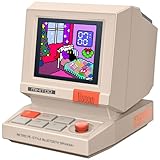
Overview: This nostalgic mini speaker merges retro PC aesthetics with modern smart features, targeting creatives and gamers seeking a functional desk companion.
What Makes It Stand Out: The 1.77" pixel screen enables endless customization—DIY messages, retro clock faces, or animations via the Divoom app. Built-in white noise, alarms, and Pomodoro timers eliminate phone reliance, while USB/TF card playback offers offline versatility rare in Bluetooth speakers.
Value for Money: Priced as a niche lifestyle accessory, it’s justified for its unique blend of retro charm and utility. Cheaper than standalone smart clocks but less powerful than mainstream speakers; ideal as a gift ($35-$45 range).
Strengths and Weaknesses: Strengths: Adorable retro design; highly customizable screen; no-wifi required operation; versatile audio inputs; perfect desk decor. Weaknesses: 5W audio lacks depth for large rooms; app can be glitchy; screen visibility poor in direct light.
Bottom Line: A delightful, giftable novelty for desk enthusiasts who value personality over raw audio power—skip if you need room-filling sound.
9. Mini Bluetooth Speaker, Smart Wireless Portable Speaker with Touchscreen, Loud HD Sound, LED Lights, BT5.4, All In One Small Audio for Home/Outdoor/Travel/Shower/Party/Beach/Camping/Hiking/Cycling

Overview: An ultra-compact touchscreen speaker packing surprising features into a palm-sized body for adventurers and multitaskers.
What Makes It Stand Out: Bluetooth 5.4 ensures rock-solid 50ft connectivity, while the touchscreen controls calls, weather, alarms, and even a calculator—unheard of in mini speakers. The passive subwoofer delivers deep bass for its size, and dynamic LED lights add party flair.
Value for Money: Exceptional at under $30. Competes with JBL Go 4 but surpasses it with the touchscreen and multifunctionality. Battery life (6 hours) is average, yet its versatility justifies the cost for travelers.
Strengths and Weaknesses: Strengths: All-in-one touchscreen utility; impressive portability; stable BT 5.4; vibrant LED effects; IPX7-like water resistance (implied for shower/pool). Weaknesses: Short battery life; bass distorts at max volume; no aux-in; strap sold separately.
Bottom Line: The ultimate pocket-sized multitool for outdoor enthusiasts—prioritize convenience over audiophile quality.
10. BOCT Music Frame Smart Speaker - with Lyrics Display,Hi-Fidelity Box Speaker,Creative Home Gift,Over 10000+ World Famous Paintings,Supports Spotify & Apple Music

Overview: A luxury hybrid that disguises high-fidelity audio within a digital art frame, merging museum-grade visuals with immersive sound for discerning decorators.
What Makes It Stand Out: Its “floating lyrics” optical tech overlays song words onto displayed paintings (10,000+ in gallery), creating a mesmerizing 3D effect. Dual 10W tweeters/mid-range drivers and 15W bass units deliver true hi-fi audio, while the frame transforms into elegant wall art when idle.
Value for Money: Premium-priced ($200+), but justified by dual functionality as speaker + art curator. Beats generic smart displays in aesthetics and sound depth, though lacks voice assistant smarts. Ideal as a statement gift.
Strengths and Weaknesses: Strengths: Stunning visual/audio fusion; expansive art library; audiophile-grade sound; seamless Spotify/Apple Music integration; lifetime customer support. Weaknesses: No built-in voice control; bulky for wall mounting; app customization can be complex.
Bottom Line: A masterpiece for art and music lovers seeking sophisticated home ambiance—worth the splurge for its unparalleled dual-role elegance.
Understanding Your Family’s Unique Needs
Before diving into technical specs, pause and reflect on how your household actually functions. A bustling family of five with toddlers and teens has vastly different requirements than a quiet home with school-aged kids. Consider who will interact with the device most: Will young children use it independently for learning games? Do parents need reliable calendar management? Is seamless video calling with distant relatives a priority? Identifying these core use cases prevents you from overspending on features you’ll rarely touch or missing critical functionalities that solve your specific pain points. Honest assessment here is the foundation for a satisfying purchase.
Assessing Primary Usage Scenarios
Map out your top three daily or weekly activities. Is it morning routine coordination (weather, traffic, schedules), homework assistance (showing diagrams, setting study timers), or entertainment (streaming cartoons, playing family trivia)? If video calls are frequent, prioritize camera quality and field of view. For music lovers, audio performance becomes non-negotiable. If it’s mainly for quick info (recipes, timers, alarms), a smaller, more affordable model might suffice. Be specific—vague goals lead to mismatched devices.
Evaluating Household Age Dynamics
The presence of young children dramatically shifts requirements. Devices need robust parental controls, durable builds (think silicone bumpers), and content filtering. For teens, integration with their preferred music streaming services and social features might matter more. Consider accessibility needs too—larger text options or voice command clarity benefit everyone, from grandparents to kids with learning differences. A one-size-fits-all approach rarely works; tailor your search to the ages living under your roof.
Display Specifications That Truly Matter
Don’t get dazzled by raw screen size numbers alone. The type of display and its viewing experience in your actual home environment are crucial. A high-resolution screen is wasted if glare from a kitchen window makes it unreadable during breakfast. Prioritize anti-reflective coatings, especially for counters near windows. Brightness levels (measured in nits) should be ample for well-lit rooms—aim for at least 500 nits for reliable daytime visibility. Touch responsiveness matters too; sticky fingers demand screens that register taps accurately without frustration.
Screen Size and Placement Harmony
Size isn’t just about preference—it’s about practicality. Compact 5-7 inch displays fit neatly on nightstands or crowded kitchen counters but might strain eyes for group video calls. Larger 10-inch+ screens offer better visibility for recipes or shared photos but demand significant counter real estate. Measure your intended spot! Also, consider viewing angles: wide-angle IPS panels ensure the screen remains clear even when viewed from the couch or while standing at the sink, unlike cheaper screens that wash out when not viewed head-on.
Touch Interface and Visual Clarity for All Ages
For younger users or those with visual impairments, large, well-spaced on-screen buttons are essential. Check if the interface allows adjustable text size. High contrast between text and background prevents eye strain. If kids will use it for educational content, color accuracy matters for diagrams and videos. Avoid models where menus are tiny or nested too deeply—simple, direct navigation keeps the focus on usability, not deciphering the interface.
Audio Performance Beyond the Basics
Sound quality is often underestimated in smart displays, yet it’s vital for immersion during family movie nights, clarity in voice calls, or simply enjoying music while cooking. Don’t assume a bigger speaker automatically means better sound. Look for details: dedicated woofers for richer bass (great for movie soundtracks), tweeters for crisp highs (clearer voices in calls), and spatial audio processing that fills the room evenly. Testimonials mentioning “balanced sound” or “clear vocals” are more telling than generic “good audio” claims.
Room Coverage and Volume Considerations
Consider the acoustics of your intended room. Large, open kitchens with hard surfaces might need more power to overcome ambient noise (blenders, dishwashers) than a carpeted living room. Check maximum volume levels—but prioritize clarity at moderate volumes, as blasting volume often distorts sound and isn’t family-friendly. Devices with upward-firing or omnidirectional speakers distribute sound more evenly, preventing the “sweet spot” problem where only one person hears clearly.
Music Streaming and Multi-Room Potential
If syncing with other speakers for whole-home audio is a dream, verify compatibility with your existing or desired ecosystem (e.g., multi-room groups within a single brand). Support for high-fidelity streaming services (like those offering lossless audio) matters if music is a priority, though this is less critical for casual listening. Ensure the device handles common codecs (like AAC or aptX) for stable Bluetooth connections from phones or tablets.
Voice Assistant Capabilities and Integration
The voice assistant is the brain of your smart display. While core functions (setting timers, answering questions) are similar across platforms, nuanced differences impact daily life. Consider which assistant aligns with your other smart home devices—mismatched ecosystems create frustrating friction. Evaluate natural language understanding: can it handle complex, kid-like requests (“Show cartoons about dinosaurs after my bath timer”)? Proactive features (like calendar reminders popping up visually) add significant value beyond simple voice commands.
Ecosystem Compatibility is Key
Your smart display shouldn’t exist in a vacuum. If you already use specific smart lights, thermostats, or doorbells, confirm seamless control via voice and the display’s interface. Jumping between apps defeats the purpose of a unified hub. Research whether the assistant supports “routines” that trigger multiple actions (e.g., “Goodnight” turns off lights, locks doors, and sets alarms)—this is where true smart home synergy shines for busy families.
Customization and Personalization Depth
Look for assistants that learn household preferences over time. Can it distinguish between family members’ voices for personalized results (e.g., showing your calendar, not your spouse’s)? Robust customization of routines, wake words (if alternatives exist), and notification settings prevents the device from becoming annoying or irrelevant. A system that adapts to your family’s quirks is infinitely more valuable than one with rigid, out-of-the-box settings.
Privacy and Security Features for Peace of Mind
Smart displays listen for wake words, raising understandable privacy concerns, especially with children present. Prioritize models with physical microphone and camera mute switches—a tangible “off” button provides immediate reassurance. Investigate data policies: how is voice data stored, used, or anonymized? Look for on-device processing for basic commands (meaning your requests aren’t always sent to the cloud), and robust parental controls that let you review voice history or disable recording for specific users.
Parental Controls That Go Beyond the Basics
Effective controls should allow granular management: setting content filters for videos and web searches, scheduling “device downtime” during homework or sleep hours, and requiring PINs for purchases. Some platforms offer “supervised accounts” for kids, limiting access to age-appropriate content and features. Check if you can easily monitor and manage these settings remotely via a parent’s phone app—a lifesaver when you’re not home.
Secure Setup and Ongoing Updates
Ensure the manufacturer provides regular, automatic security updates to patch vulnerabilities. A device that stops receiving updates becomes a security risk. During setup, use strong, unique passwords for the associated account and enable two-factor authentication if available. Disable unused features (like continuous video recording) to minimize potential exposure points. Security isn’t one-time; it’s an ongoing commitment from both you and the maker.
Durability and Design for Family Life
Let’s be real: family spaces are high-traffic zones prone to spills, bumps, and curious little hands. Prioritize devices with sturdy builds—look for descriptions mentioning “reinforced corners” or “spill-resistant surfaces.” Avoid models with large, exposed grilles that easily trap crumbs. A non-slip base is essential for countertops. Consider aesthetics too; a device that blends with your decor is more likely to stay out and be used, rather than hidden away in a cabinet after one too many juice incidents.
Ease of Cleaning and Maintenance
Screen smudges are inevitable. A display with an oleophobic coating (resists fingerprints) saves constant wiping. Removable fabric speaker covers are a huge plus, allowing you to toss them in the wash after inevitable messes. Check if ports are covered to prevent dust or liquid ingress. Simple maintenance translates to longevity, especially in homes where the device sees heavy daily use.
Strategic Placement Flexibility
Think beyond the kitchen counter. Can the device stand securely on a nightstand? Does it have a stable base for a bookshelf? Some models offer optional stands for landscape or portrait orientation—useful if wall-mounting near a play area. Ensure placement keeps cameras at a reasonable height for video calls (not staring up noses!) and microphones unobstructed. Versatile design ensures the device fits where your family actually needs it.
Connectivity and Expandability Options
Your smart display should connect effortlessly with the rest of your digital life. Robust Wi-Fi 6 support ensures stable performance in crowded home networks packed with devices. Bluetooth 5.0+ provides reliable, extended-range connections for streaming audio from phones. Crucially, check for useful physical ports: a USB-C port can charge a tablet nearby, while an auxiliary input might connect an older device. Future-proofing matters—will this device support emerging smart home standards?
Seamless Phone and Calendar Syncing
Effortless integration with your smartphone OS (iOS or Android) is non-negotiable for busy families. Can you instantly mirror your phone screen for presentations or photos? Does calendar syncing happen reliably and automatically, pulling in school events or doctor appointments without manual entry? Smooth syncing transforms the display from a standalone tool into a true extension of your personal organization system.
Smart Home Hub Functionality
Some displays double as hubs for specific smart home protocols (like Zigbee or Thread), eliminating the need for separate bridges. This simplifies setup for compatible devices (locks, sensors, lights) and can improve reliability. While not essential for every family, it’s a significant bonus if you’re building a robust smart home, reducing clutter and potential points of failure. Verify supported protocols match your planned ecosystem.
Setting Up and Optimizing for Family Use
Out-of-the-box setup should be intuitive, but true family integration requires fine-tuning. Take time during initial configuration to set up individual user profiles if supported—this tailors experiences and enhances privacy. Position the device centrally in your main activity zone, angled slightly towards common seating areas. During setup, meticulously configure privacy settings and parental controls; it’s far harder to backtrack later. Think of setup as laying the groundwork for months of smooth operation.
Creating Effective Family Routines
Leverage the device’s routine-building features to automate daily transitions. Create a “School Morning” routine that announces the weather, reads the day’s schedule, and plays upbeat music—all triggered by saying “Good morning.” A “Bedtime” routine could dim smart lights, play lullabies, and activate “Do Not Disturb.” Well-crafted routines reduce nagging and create comforting predictability, making the device an active participant in your family’s flow.
Ongoing Management and Troubleshooting Tips
Assign a family “tech steward” (maybe a tech-savvy teen!) to handle minor updates or reboots. Keep a log of common issues and fixes (e.g., “If video calls cut out, restart Wi-Fi”). Regularly review voice history together to refine understanding and address any privacy concerns transparently. Treat the device as a shared tool—establish basic house rules (e.g., “No shouting at the display”) to foster respectful use and prolong its lifespan.
Maximizing Educational and Creative Potential
Smart displays are powerful learning companions when used intentionally. Explore built-in educational apps and skills focused on age-appropriate topics—interactive quizzes, virtual museum tours, or step-by-step craft instructions. Use the screen to visualize complex homework concepts or practice language skills with visual flashcards. The key is active engagement; position it as a tool for discovery, not passive screen time. Set clear boundaries for educational use versus entertainment.
Fostering Creativity and Connection
Turn the display into a digital photo frame showcasing family adventures, or use it for collaborative activities like virtual family game nights with trivia apps. Encourage kids to create simple voice commands for their own routines (“Show my dinosaur facts!”). Video messaging features can keep extended family involved in daily moments. The screen becomes a canvas for shared experiences, strengthening bonds through interactive participation rather than isolation.
Balancing Screen Time Mindfully
Establish clear guidelines before the device arrives. Use built-in features like scheduled downtime or usage timers to prevent overuse. Position it in common areas, not bedrooms, to encourage shared rather than solitary interaction. Discuss digital citizenship: what information is okay to share with the device? Model healthy habits by using voice commands for quick tasks instead of lingering on the screen. Intentionality transforms it from a distraction into a tool that enhances, rather than replaces, family interaction.
Future-Proofing Your Investment
Technology evolves rapidly, so consider longevity. Does the manufacturer have a track record of multi-year software support? Devices receiving regular updates gain new features and stay secure longer. Avoid models reliant on proprietary, outdated protocols. Opt for established platforms with broad developer support, ensuring compatibility with future smart home devices and services. A slightly higher upfront cost for a device with a proven update history often saves money and hassle down the line.
Evaluating Upgrade Cycles and Longevity
Research typical support lifespans for brands—some offer 3-5 years of updates, others significantly less. Read reviews focusing on performance degradation over time (e.g., “After 18 months, it feels sluggish”). Consider repairability; modular designs or accessible parts (like replaceable batteries in some models) extend usability. View this not as a disposable gadget, but as a durable household appliance warranting a thoughtful, long-term fit.
Frequently Asked Questions
How do I prevent accidental purchases by my children?
Enable strict voice purchasing controls requiring a PIN for every transaction and disable “voice match” for purchase authorization on child profiles. Regularly review purchase history settings.
Can I completely disable the camera and microphone when not in use?
Yes, prioritize models with physical hardware switches that mechanically disconnect the camera and mute microphones, providing tangible assurance beyond software toggles.
What’s the ideal screen size for a kitchen counter?
A 8-10 inch display offers the best balance for most kitchens—large enough for recipes and video calls, yet compact enough to fit without dominating counter space. Measure your available area first.
How can I limit my child’s screen time on the display?
Use built-in parental controls to set daily usage limits, schedule downtime periods (like during homework or after bedtime), and restrict access to non-educational content categories.
Will it work well if my internet connection is sometimes slow?
Basic voice commands and locally stored routines function offline, but streaming video, music, and complex queries require solid Wi-Fi. Ensure your router covers the device’s location adequately.
Can multiple family members have personalized experiences?
Yes, most platforms support multiple user profiles with voice recognition, offering tailored calendars, preferences, and content filtering based on who is speaking.
How do I clean fingerprints and spills without damaging the screen?
Use a soft, slightly damp microfiber cloth. Avoid harsh chemicals; water or dedicated screen cleaners are safest. For grime on speaker fabric, check if covers are removable for washing.
Is it safe to leave the display on 24/7 in a common area?
While designed for continuous use, enabling auto-brightness and scheduled “sleep” modes during inactive hours saves energy and extends screen life, especially in high-traffic zones.
Can I use it to monitor a baby or pet when I’m in another room?
Some models support camera viewing on other household displays, but dedicated baby monitors often offer better features like motion alerts and night vision—check specific capabilities.
What happens to my voice data after I speak to the device?
Reputable manufacturers typically anonymize and aggregate voice data to improve services, but you usually have options to review, delete, or disable voice recording storage in account settings. Always review the privacy policy.