Imagine your front door as the frontline of your home’s security—a single point where peace of mind meets vulnerability. In today’s connected world, a simple mechanical lock isn’t enough; smart door sensors transform this critical entry point into an intelligent sentinel. They quietly monitor every opening and closing, sending real-time alerts to your phone whether you’re in the backyard or across the globe. This isn’t just about catching intruders—it’s about knowing your teenager got home safely from school, confirming the dog walker left properly, or realizing you forgot to latch the patio door during a storm. That subtle “click” of a sensor activating is the sound of your home actively looking out for you.
Gone are the days when home security meant clunky, hardwired systems only professionals could touch. Modern smart door sensors are sleek, DIY-friendly, and integrate seamlessly into the ecosystem of devices you already own. They’ve evolved from basic alarms to sophisticated components of a holistic security strategy, working alongside cameras, lights, and voice assistants to create layered protection. As threats become more complex and our lives increasingly mobile, understanding what makes a truly effective sensor—beyond flashy marketing claims—is essential. Let’s cut through the noise and focus on the features that genuinely enhance safety, convenience, and reliability for your unique living situation.
Top 10 Smart Door Sensors
Detailed Product Reviews
1. Tapo Door Sensor Starter KIT, Matter Compatible, 3X Smart Door Window Contact Sensor and 1x Smart Hub with Built-in Chime, Smart Automation, Real-Time Notification, T31 KIT

Overview:
This starter kit delivers a robust entry-level smart security solution with three T110 contact sensors and an H100 hub. Designed for Tapo ecosystem users, it leverages Sub-GHz wireless for reliable communication and extended battery life, requiring the hub for operation and 2.4 GHz Wi-Fi.
What Makes It Stand Out:
The integrated 90dB alarm on the hub and Matter compatibility provide immediate deterrence and future-proofing. Real-time Tapo app notifications for door/window status, plus seamless integration with Tapo cameras for automated recording during breaches, elevate its security utility beyond basic alerts. The Sub-G protocol significantly boosts sensor battery life compared to Wi-Fi alternatives.
Value for Money:
Priced competitively as a bundle, it offers savings over buying components separately. The inclusion of a hub with chime and three sensors justifies the cost for Tapo-centric homes, though non-Tapo users face ecosystem lock-in. It outperforms single-sensor kits but lacks the range of LoRa-based systems.
Strengths and Weaknesses:
Strengths: Long battery life via Sub-G; loud on-hub alarm; camera integration; Matter support.
Weaknesses: Hub mandatory (no standalone use); limited to Tapo ecosystem; 2.4 GHz Wi-Fi dependency.
Bottom Line:
Ideal for expanding Tapo smart homes affordably, this kit excels in integrated security but suits only committed Tapo users seeking reliable, app-driven alerts without subscription fees.
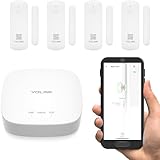
2. YoLink LoRa Smart Door Sensor Starter Kit: - 1/4 Mile Open-Air Range, Door Left-Open Reminders,5 Years Battery Life, SMS/Text, Email & App Alerts, Alexa, IFTTT, Home Assistant
Overview:
This starter kit includes one YoLink Hub and four pre-battery-equipped door sensors, leveraging LoRa wireless for exceptional range (up to 1/4 mile open-air) and 5-year battery life. It targets users seeking no-fee, self-monitored security with versatile alert options.
What Makes It Stand Out:
The standout feature is the door left-open reminder with customizable timers, amplified by optional audio alerts via SpeakerHub. SMS/email notifications eliminate app dependency, while the 1/4-mile range and 5-year batteries suit large properties. Pre-installed batteries and tool-free setup using 3M tape simplify installation.
Value for Money:
Excellent long-term value due to no subscriptions, minimal battery replacements, and scalable support for 300+ devices. The kit’s inclusion of four sensors at this price undercuts competitors, though LoRa’s niche status may limit future expansion flexibility.
Strengths and Weaknesses:
Strengths: Exceptional range and battery life; SMS/email alerts; easy setup; door left-open feature.
Weaknesses: LoRa less common than Zigbee/Wi-Fi; hub required for full features; limited third-party camera integration.
Bottom Line:
A top choice for large homes or users avoiding subscriptions, offering unmatched range and self-monitoring freedom, though ecosystem compatibility is narrower than mainstream alternatives.
3. WiFi Door Window Sensor: Smart Contact Sensor with App Alerts, Door Open Detector Compatible with Alexa Google Assistant, Entry Detector Sensor for Home Security and Home Automation (4-Pack)

Overview:
This 4-pack delivers hub-free Wi-Fi door/window sensors compatible with Alexa and Google Assistant. Using Tuya/Smart Life apps, it provides instant notifications and basic automation without extra hardware, targeting budget-conscious smart home starters.
What Makes It Stand Out:
Direct Wi-Fi connectivity eliminates hub costs and complexity. Voice control for real-time status checks (“Alexa, is the garage door open?”) and straightforward app-based automation (e.g., turning on lights when doors open) simplify smart home entry. The four-sensor bundle maximizes coverage at a low price.
Value for Money:
Highly cost-effective for basic needs, with four sensors included and no hub expenses. However, reliance on Tuya’s app—known for occasional stability issues—and shorter 1-year battery life reduce long-term appeal versus hub-based competitors.
Strengths and Weaknesses:
Strengths: No hub needed; affordable 4-pack; voice control; easy DIY installation.
Weaknesses: Tuya app limitations; shorter battery life; weaker security encryption than hub systems.
Bottom Line:
Perfect for renters or beginners wanting minimal setup and voice control, but lacks the reliability and battery life for comprehensive home security; best as a supplementary system.
4. Aqara Zigbee Door and Window Sensor 3 Pack, Wireless Mini Contact Sensor, Home Automation, Requires Aqara Hub, Zigbee Connection, Kid Safety, Compatible with Apple HomeKit, Alexa, Works with IFTTT

Overview:
This compact 3-pack Zigbee sensor suite requires an Aqara hub (sold separately) for operation, emphasizing deep integration with Apple HomeKit, Alexa, and IFTTT. Its mini design targets discreet placement on doors, windows, or cabinets for security and automation.
What Makes It Stand Out:
Apple HomeKit compatibility is a major draw for iOS users, enabling secure, local automation without cloud reliance. The sensors trigger Aqara Hub alarms during breaches and automate other Aqara devices (e.g., lights). Their slim profile fits tight spaces, and the 0.86-inch gap tolerance accommodates most doors.
Value for Money:
Sensors are competitively priced, but the mandatory Aqara hub inflates total cost. Superior for Apple-centric homes due to HomeKit, yet poor value for non-Aqara users. Battery life is unspecified, lagging behind YoLink’s 5-year claim.
Strengths and Weaknesses:
Strengths: Seamless HomeKit support; compact size; reliable Zigbee mesh; no subscriptions.
Weaknesses: Hub required (no standalone use); incompatible with SmartThings; limited gap tolerance; vague battery specs.
Bottom Line:
A premium choice for Apple ecosystem devotees seeking reliable, local automation, but the hub dependency and niche compatibility make it impractical for broader smart home setups.
5. Ring Alarm Contact Sensor - 2nd Gen | Instant Window & Door Alerts | Approximately 3-Year Battery Life | Slim Design Fits Any Frame | Easy Installation | Base Station Required

Overview:
Ring’s slim 2nd-gen contact sensor provides door/window monitoring for the Ring Alarm ecosystem, requiring the Ring Base Station. It delivers instant mobile alerts and integrates with Ring cameras for comprehensive security, emphasizing minimalist design and tool-free setup.
What Makes It Stand Out:
The ultra-slim profile enables near-invisible installation on narrow frames, while the 3-year battery life reduces maintenance. Tight integration with Ring cameras allows automated recording during breaches, though full features like 24/7 recording demand a Ring Protect subscription.
Value for Money:
Sensors are reasonably priced within the Ring ecosystem, but the mandatory Base Station and often-required subscription diminish value. The 3-year battery is a plus, yet ongoing costs for video history or advanced alerts make long-term ownership expensive.
Strengths and Weaknesses:
Strengths: Discreet slim design; 3-year battery; seamless Ring ecosystem integration.
Weaknesses: Base Station essential; subscription needed for key features; limited third-party compatibility.
Bottom Line:
Best for existing Ring users prioritizing aesthetics and simplicity, but the subscription model and ecosystem lock-in reduce appeal for cost-conscious buyers seeking standalone functionality.
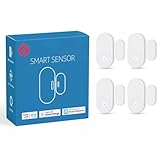
6. 4 Pack Zigbee Door Sensor, Mini Smart Contact Sensors for Doors, Home Automation, Compatible with SmartThings, Alexa, Home Assistant, Hubitat, Aeotec and Homey (Zigbee Hub Required)
Overview:
This compact Zigbee contact sensor pack offers seamless integration into major smart home ecosystems. Requiring a compatible Zigbee hub, it monitors doors, windows, or cabinets with minimal installation effort using adhesive backing. Ideal for users invested in platforms like SmartThings or Home Assistant seeking reliable, real-time status updates.
What Makes It Stand Out:
Its broad compatibility (SmartThings, Hubitat, Homey) and true mesh networking via Zigbee ensure robust, low-latency communication. The ultra-slim design fits discreetly on narrow frames, while real-time Alexa alerts and automation routines (e.g., lights triggering on door open) enhance convenience without constant app checks.
Value for Money:
Priced competitively for a 4-pack, it delivers exceptional value for Zigbee-centric homes. Though a hub is mandatory (adding cost), the long-term reliability and mesh network resilience justify the investment over Wi-Fi alternatives prone to router dependency issues.
Strengths and Weaknesses:
Strengths: Reliable mesh connectivity; broad ecosystem support; discreet size; easy peel-and-stick setup; energy-efficient (long battery life). Weaknesses: Requires separate Zigbee hub; no standalone audible alerts; limited to hub-supported automations.
Bottom Line:
A top choice for existing Zigbee ecosystem users needing scalable, reliable door/window monitoring. Skip if you lack a compatible hub, but highly recommended for integrated smart home setups seeking dependable sensor coverage.
7. WiFi Door Sensor: Smart Door Open/Closed Detectors, Wireless Window Sensor with App Notification Alert, Contact Sensor for Home Security, Compatible with Alexa Google Assistant (1pack)

Overview:
This standalone Wi-Fi sensor connects directly to 2.4GHz networks via Tuya/Smart Life apps, eliminating hub requirements. It delivers instant phone alerts for door/window activity and integrates with Alexa/Google Assistant for voice control, targeting users prioritizing simplicity and direct smartphone connectivity.
What Makes It Stand Out:
Hub-free operation simplifies setup, while dual Bluetooth/Wi-Fi connectivity ensures stable pairing. The inclusion of history logging, low-battery app alerts, and compatibility with Tuya automation scenes (e.g., triggering smart plugs) offers comprehensive functionality in a compact, sticker-mounted package.
Value for Money:
At an entry-level price, it’s ideal for beginners avoiding hub costs. Though the single-sensor pack limits coverage, the 12-month warranty, included batteries, and no subscription fees provide solid ROI for basic security needs.
Strengths and Weaknesses:
Strengths: No hub needed; easy app setup; voice control support; history log; affordable. Weaknesses: Limited to 2.4GHz Wi-Fi; shorter battery life (~6 months); single-sensor focus; Tuya ecosystem lock-in.
Bottom Line:
An excellent budget-friendly starter sensor for renters or small spaces. Choose this for hassle-free installation and core features, but consider multi-packs if scaling your system.
8. WiFi Door Sensor Chime, Smart Door Open Alert Window Sensor for Business/Home/Kids Safety, Real-Time App Notification, 500ft Range, 32 Melodies, 5 Volume Levels, Window Contact Sensor Alarm Kit

Overview:
This Wi-Fi sensor combines app alerts with a physical 110dB chime receiver, targeting homes and businesses needing audible notifications. Supporting Tuya/Smart Life apps, it offers customizable ringtones and family sharing, excelling in child/dementia care scenarios where immediate sound alerts are critical.
What Makes It Stand Out:
The dual alert system (app push + loud chime) is unique, with 32 melodies to distinguish entry points. The 500ft range, 20-sensor expandability, and power-outage memory ensure reliability. Free app notifications and optional SMS/call alerts add versatility without subscriptions.
Value for Money:
Priced moderately higher due to the chime receiver, it’s justified for safety-focused users. The expandability and professional-grade volume (ideal for stores) offer better value than single-app-alert sensors in high-traffic or multi-room environments.
Strengths and Weaknesses:
Strengths: Audible chime with customization; extensive range; family sharing; no monthly fees; easy DIY setup. Weaknesses: Requires outlet for receiver; app limited to Tuya ecosystem; chime may be overly loud for small homes.
Bottom Line:
Essential for caregivers or businesses needing immediate audible alerts alongside app notifications. Opt for this over silent sensors if real-world awareness trumps minimalist design.
9. Tapo Door Sensor Mini, Requires Tapo Hub, Long Battery Life w/Sub-1G Low-Power Wireless Protocol, Contact Sensor, 15mm Wide Gap Allowed, Real-Time Notification, Smart Action (T110)

Overview:
This sensor operates exclusively within TP-Link’s Tapo ecosystem, pairing with the Tapo Hub H100 via Sub-1G wireless. Designed for ultra-long battery life, it monitors doors, cabinets, or mailboxes with 15mm gap tolerance, targeting Tapo camera/hub users seeking seamless integration.
What Makes It Stand Out:
Sub-1G protocol enables 2-year battery life (CR2032 included) and 15mm gap detection—unmatched for fridge/freezer monitoring. Offline Smart Actions (e.g., triggering hub sirens during outages) and hub-based automations (lights/cameras) provide robust, resilient security without cloud dependency.
Value for Money:
Best value for existing Tapo Hub owners; the hub’s 64-sensor capacity and 90dB siren justify its cost. Standalone, the sensor’s premium battery life and gap tolerance outperform most competitors, though the mandatory hub adds upfront expense.
Strengths and Weaknesses:
Strengths: Exceptional 2-year battery; wide 15mm gap detection; offline automations; hub siren integration; compact size. Weaknesses: Ecosystem-locked (Tapo only); hub required; no direct Wi-Fi/app access.
Bottom Line:
A must-buy for Tapo ecosystem users prioritizing battery longevity and offline reliability. Avoid if you prefer open-platform compatibility, but ideal for integrated Tapo security setups.
10. Smart WiFi Door Sensor: Wireless Window Sensor with App Notification Alert, Tuya Door Open Contact Sensor for Home Security, No Hub Required, Compatible with Alexa Google Assistant

Overview:
This budget-friendly Wi-Fi sensor connects directly to Tuya/Smart Life apps without hubs, offering instant phone alerts and voice control via Alexa/Google. Featuring 24-month warranty and broad placement options (garages, mailboxes), it targets cost-conscious users needing basic, reliable monitoring.
What Makes It Stand Out:
The standout 24-month warranty surpasses competitors, while included AAA batteries and 2.4GHz Wi-Fi simplicity ensure plug-and-play usability. Deep Tuya automation (e.g., lights activating on door open) and low-battery app alerts enhance its practicality for whole-home coverage.
Value for Money:
Exceptional value with long warranty, included batteries, and no subscriptions. Though similar to Product 7, the extended warranty and broader placement flexibility (pet doors, drawers) make it a smarter long-term buy for multi-scenario use.
Strengths and Weaknesses:
Strengths: No hub needed; 24-month warranty; versatile placement; voice status queries; affordable. Weaknesses: 2.4GHz Wi-Fi only; ~6-month battery life; Tuya app dependency; no audible chime.
Bottom Line:
The best budget pick for warranty-focused users seeking hassle-free, multi-room monitoring. Choose this over shorter-warranty alternatives for reliable, long-term peace of mind.
Understanding Smart Door Sensor Technology
How These Sensors Actually Work
At their core, most smart door sensors operate using a simple magnetic principle. A small magnet is installed on the moving part (like the door itself), and a corresponding sensor unit is placed on the stationary frame. When the door opens, the magnet moves away from the sensor, breaking the magnetic field and triggering the device. This action is then communicated wirelessly to your home hub or directly to your smartphone app. Understanding this fundamental mechanism helps you grasp why proper alignment during installation is non-negotiable for reliable performance.
Wireless Communication Protocols Demystified
The way your sensor talks to the rest of your system significantly impacts range, battery life, and compatibility. Common protocols include Wi-Fi (direct connection to your router, easy setup but higher power draw), Z-Wave and Zigbee (mesh networking protocols known for reliability, longer range through other devices, and lower energy consumption, often requiring a central hub), and Bluetooth (typically shorter range, suitable for single-room use or direct phone connection). Choosing the right protocol depends heavily on your existing smart home setup and the size/layout of your property—mesh networks often excel in larger homes.
Battery Life Expectations and Management
Battery longevity is a critical practical concern. Sensors using Z-Wave or Zigbee typically boast 2-5 years on a single coin-cell battery due to their efficient communication, while Wi-Fi models might need replacement every 6-18 months because of higher power demands. Look for sensors with clear low-battery notifications sent directly to your app—don’t rely on guessing. Some advanced models now offer rechargeable options or even energy-harvesting capabilities, though these are less common. Always factor in the ease of battery replacement; nobody wants to struggle with tiny compartments quarterly.
Critical Installation and Usability Factors
Proper Placement for Maximum Reliability
Where you mount the sensor and magnet is paramount. They should be aligned precisely (usually within 1/4 to 1/2 inch of each other when closed) and installed on stable, non-magnetic surfaces. Avoid placing them near metal studs, large appliances, or other strong magnetic sources that could interfere. For sliding doors or windows, specialized long-range magnetic sensors or alternative technologies like infrared beams might be necessary. Incorrect placement is the leading cause of missed detections or false alarms, rendering even the most advanced sensor useless.
DIY-Friendly Design vs. Professional Installation Needs
Most modern sensors are designed for true DIY installation—think peel-and-stick adhesive pads or simple screws. Key features to look for include clear visual alignment guides, tool-free battery access, and intuitive mounting templates. However, if you have unique door materials (like thick steel), historic home constraints, or demand the absolute highest reliability for critical entry points, consulting a professional installer might be worthwhile. They can ensure optimal placement, wiring for hardwired backup options (if available), and integration into complex security panels.
User Interface and App Experience Essentials
The sensor itself is only half the story; the app experience dictates how useful the data becomes. A good app should provide instant, customizable push notifications (e.g., “Front Door Opened at 2:15 AM”), a clear activity history log showing all open/close events with timestamps, and the ability to easily arm/disarm sensors as part of routines. Avoid apps buried in complex menus—critical status (armed, disarmed, low battery) should be visible at a glance. Seamless integration with your existing smart home platform (like Apple Home, Google Home, or Samsung SmartThings) is equally vital for creating automated responses.
Integration and Ecosystem Compatibility
Seamless Smart Home Platform Integration
Your door sensor shouldn’t exist in a silo. True value emerges when it triggers actions across your smart home. Does it work smoothly with your preferred platform to automatically turn on lights when a door opens at night? Can it silence your smart speaker’s alarm volume if you disarm the system via the door sensor? Verify compatibility before purchasing. Platforms like Apple HomeKit (requiring the “Works with Apple HomeKit” badge), Google Home, and Amazon Alexa have specific certification requirements that generally ensure smoother setup and more reliable automation than generic third-party integrations.
Creating Powerful Automations and Routines
This is where basic sensors transform into intelligent security tools. With proper integration, a door opening can trigger a cascade of actions: turning on entryway lights, starting a camera recording, adjusting the thermostat, or sending a specific alert to designated family members. Conversely, closing and locking the front door at night could trigger a “Goodnight” routine that locks all other smart locks, arms the security system, and turns off interior lights. The flexibility to create these custom, multi-device responses based on door status is a hallmark of a truly smart sensor within a cohesive ecosystem.
Hub Dependency: Pros, Cons, and Alternatives
Many Z-Wave and Zigbee sensors require a central hub, while some Wi-Fi models connect directly to your router. Hubs offer advantages: they create robust mesh networks extending range, often provide local processing (so automations work even if your internet is down), and consolidate multiple device types into one app. However, hubs add cost, complexity, and another potential point of failure. Wi-Fi direct sensors simplify setup but are vulnerable to internet outages affecting functionality and may drain battery faster. Consider your tolerance for complexity versus your need for reliability and advanced features when choosing your communication path.
Security, Privacy, and Reliability Considerations
Encryption and Data Protection Standards
Your door sensor transmits sensitive information about your home’s activity—when you’re likely away, when family members arrive. Ensure the manufacturer employs strong encryption (like AES-128 or higher) for data both in transit (between sensor and hub/app) and at rest (stored in the cloud). Look for adherence to recognized security frameworks (such as those from the Internet of Things Security Foundation) and a clear, transparent privacy policy detailing what data is collected and how it’s used. Avoid brands with a history of security breaches or vague privacy claims.
Minimizing False Alarms: Smart Features to Seek
Nothing erodes trust in a security system faster than constant false alarms. Advanced sensors combat this with intelligent features. Look for “pet immunity” settings that ignore small movements below a certain height (crucial for homes with cats or small dogs). Some offer adjustable sensitivity for the magnetic field, preventing triggers from doors vibrating in strong winds. The most sophisticated models now incorporate brief delay timers—allowing you 15-30 seconds to disarm the system after entering before an alarm sounds—reducing panic moments when you fumble for keys.
Physical Tamper Resistance and Durability
A sensor is only as good as its ability to withstand real-world conditions and potential interference. Check for robust construction (look for IP ratings indicating dust/water resistance, especially for exterior doors or garages). Tamper-proof features are crucial: does the sensor send an immediate alert if someone tries to forcibly remove it from the frame? Are the mounting points designed to resist prying? Sensors placed on exterior doors should also be rated for the temperature extremes in your climate to prevent malfunctions during heatwaves or freezes.
Future-Proofing Your Investment
Scalability for Expanding Your Security System
Start with your immediate needs, but plan for growth. Will the sensor protocol (Z-Wave, Zigbee, Wi-Fi) allow you to easily add more sensors, cameras, or other security devices later without hitting compatibility walls? If you choose a hub-based system, check how many devices it supports—some budget hubs max out at 50, while others handle 200+. A system that scales effortlessly saves you from costly replacements down the line when you decide to secure windows, the garage, or add environmental sensors.
Over-the-Air Updates and Long-Term Support
Technology evolves rapidly. A sensor released today should receive regular firmware updates via the internet (OTA updates) to patch security vulnerabilities, improve battery efficiency, add new features, or enhance compatibility with emerging platforms. Investigate the manufacturer’s track record: how long do they typically support devices with updates? Do they have a history of abandoning products quickly? Choosing a brand known for long-term software commitment ensures your hardware remains effective and secure for years, not just months.
Emerging Trends: AI and Predictive Capabilities
While not mainstream in every sensor yet, the future points towards smarter analysis. Basic sensors just report “open” or “closed.” Next-generation models, often leveraging hub or cloud processing, may use simple AI to learn your household’s typical door usage patterns. This could enable predictive features: alerting you if the basement door opens at 3 AM when it never does, or recognizing the “signature” of your child’s return from school versus an unknown entry. While not essential today, considering platforms open to future AI integrations adds longevity to your purchase.
Frequently Asked Questions
Frequently Asked Questions
How long do smart door sensor batteries typically last? Battery life varies significantly by technology. Z-Wave and Zigbee sensors often last 2-5 years on standard coin-cell batteries due to efficient communication. Wi-Fi direct sensors typically require battery changes every 6-18 months because of higher power consumption. Always check manufacturer estimates and ensure the app provides clear low-battery warnings.
Can smart door sensors work through glass or metal doors? Standard magnetic sensors struggle with thick metal doors or frames as metal disrupts the magnetic field. For metal doors, look for specialized long-range magnetic sensors designed for such applications or consider alternative technologies like infrared beam sensors. Glass doors generally work fine with standard sensors unless they have metal frames or coatings that interfere.
Do I need a separate hub for smart door sensors? It depends on the communication protocol. Sensors using Z-Wave or Zigbee almost always require a compatible central hub. Wi-Fi direct sensors connect to your router without a hub. Bluetooth sensors usually need your phone nearby or a Bluetooth bridge. Check the specific requirements of the sensor model against your existing smart home setup.
How accurate are pet-immune door sensors? Pet-immune features typically work by ignoring triggers originating below a certain height (e.g., 24-36 inches), suitable for cats and small-to-medium dogs. Accuracy depends on proper installation height and the specific sensor’s design. They are generally reliable for pets within the specified weight/height limits but aren’t foolproof for very large or unusually agile animals.
Can smart door sensors be installed on sliding doors? Yes, but standard magnetic sensors may not suit sliding mechanisms. Look for sensors specifically designed for sliding doors, which often use longer magnetic strips or alternative technologies like infrared beams to detect the slide track’s movement reliably. Proper alignment is even more critical here.
What happens to my door sensors during a power outage? Battery-powered sensors continue functioning normally during a power outage since they don’t rely on mains electricity. However, if they connect via Wi-Fi, your router and modem going down (unless backed up by a UPS) will prevent alerts from reaching your phone. Hub-based systems with local processing may still trigger local alarms or execute pre-set automations even without internet.
Are smart door sensors vulnerable to hacking? All connected devices carry some risk. Mitigate this by choosing sensors from reputable brands with strong encryption (AES-128+), regular security updates, and good privacy practices. Change default passwords, keep your home Wi-Fi secure, and ensure your router’s firmware is up-to-date. Avoid obscure brands with unknown security track records.
How do I prevent false alarms from wind or door vibrations? Look for sensors with adjustable sensitivity settings for the magnetic field. Some allow you to set a slight delay before triggering an alert, giving a vibrating door time to settle. Proper installation is key—ensure the magnet and sensor are securely mounted and aligned within the optimal gap specified by the manufacturer to avoid micro-movements causing triggers.
Can renters install smart door sensors without damaging walls? Absolutely. Most modern sensors use strong, removable adhesive strips (like 3M VHB) that leave no residue and avoid drilling. Ensure the surface is clean and dry before application. For added security without damage, consider discreet placement on the interior side of the door frame where it’s less visible but still functional.
Do smart door sensors work with professional security monitoring services? Many do, but compatibility is key. Systems designed for professional monitoring (often using cellular or landline backup) typically require specific sensors certified by the monitoring company. If you plan to use professional monitoring, consult with the provider before purchasing sensors to ensure they meet their technical and certification requirements.