Imagine fumbling for keys with grocery bags while your dog strains at the leash, or lying awake wondering if you locked the door after rushing out for coffee. For renters, these everyday stresses often come with extra layers of worry: Will the landlord approve a lock change? What if you damage the door? Can you even install something permanent? The good news is that smart lock technology has evolved dramatically to specifically address the unique challenges faced by those who don’t own their homes. Forget the days of drilling holes or swapping out entire deadbolts; today’s solutions prioritize non-invasive installation, reversible modifications, and flexibility that aligns perfectly with the transient nature of renting.
Smart locks for renters aren’t just about convenience (though unlocking your door remotely while your hands are full is undeniably cool). They represent a fundamental shift towards security and peace of mind without compromising your lease agreement. Modern options are designed to work with existing hardware, often requiring nothing more than strong adhesive strips or simple screw adjustments that leave no lasting trace. This guide cuts through the marketing noise to focus on the critical factors you must consider as a renter. We’ll explore the essential features that protect your security deposit, simplify your life, and ensure your tech upgrade stays compliant, no matter how long you call this place home.
Top 10 Smart Locks for Renters
Detailed Product Reviews
1. August Home, Silver Wi-Fi Connected Smart Keyless Entry Door Lock, Electronic Door Lock Fits Your Existing Deadbolt in Minutes, AUG-SL05-M01-S01

Overview:
The August Home Smart Lock transforms standard deadbolts into keyless, Wi-Fi-connected entry systems without replacing hardware. Designed for interior mounting, it leverages your existing lock mechanism for seamless smart access.
What Makes It Stand Out:
Its standout feature is effortless integration with major smart home ecosystems (Alexa, Google, Apple HomeKit) via built-in Wi-Fi—no hub required. Auto-Unlock (geofenced entry) and DoorSense technology ensure automatic locking upon door closure, eliminating manual checks. The intuitive app simplifies access sharing with temporary or scheduled permissions.
Value for Money:
Priced mid-range, it delivers exceptional value by avoiding full deadbolt replacement costs. While pricier than basic Bluetooth locks, the built-in Wi-Fi and broad compatibility justify the investment for users prioritizing remote access and ecosystem versatility without extra hubs.
Strengths and Weaknesses:
Strengths: Tool-free installation (10 minutes), reliable auto-lock/unlock, no hub needed, robust access-sharing features. Weaknesses: Geofencing can drain phone battery; interior mounting may not suit all door types; occasional connectivity hiccups if Wi-Fi is unstable.
Bottom Line:
Ideal for renters or homeowners seeking hassle-free keyless entry with top-tier smart home integration. Its balance of simplicity, security, and ecosystem compatibility makes it a compelling upgrade for most single-cylinder deadbolts.
2. SwitchBot Smart Lock, Bluetooth Electronic Deadbolt, Keyless Entry Door Lock for Front Door, Compatible with WiFi Bridge (Sold Separately), Fits Your Existing Deadbolt,for Airbnbs Vacation Rentals

Overview:
The SwitchBot Smart Lock offers keyless entry via Bluetooth, targeting Airbnb hosts and homeowners with a focus on security and flexible access management. It mounts externally using adhesive or optional drilling.
What Makes It Stand Out:
ATS-128-CTR encryption and real-time app notifications prioritize security. Customizable auto-lock timers and Home Sharing enable precise access control for guests. Its standout trait is Matter compatibility (with SwitchBot Hub 2), bridging Apple HomeKit and other ecosystems. The free hardware replacement warranty adds peace of mind.
Value for Money:
Competitively priced, but Wi-Fi Bridge ($30+) is essential for remote access, increasing total cost. Excellent value for short-term rental hosts due to granular access logs and temporary codes, though DIYers must verify door compatibility first.
Strengths and Weaknesses:
Strengths: Strong encryption, 180-day battery life, Matter-enabled with Hub 2, no-tool installation. Weaknesses: Wi-Fi Bridge sold separately; door gap ≤30mm required for auto-lock; adhesive mounting may fail on textured surfaces.
Bottom Line:
A secure, flexible choice for vacation rentals—if compatible with your door. Budget for the Wi-Fi Bridge to unlock full potential, but confirm measurements beforehand to avoid return hassles.
3. Smart Lock Ultra with Keypad,Fingerprint Door Lock, App Remote Control, Built-in WiFi Keypad Deadbolt, Auto Unlock, Waterproof&Easy Install,Supports Alexa and Google (Lock Ultra Touch Combo)

Overview:
This all-in-one smart lock combines fingerprint recognition, keypad, and app control with built-in Wi-Fi. It targets users seeking multi-method access and apartment-friendly installation without replacing core hardware.
What Makes It Stand Out:
Ultra-fast (0.3s) fingerprint scanning for 100 users and a “Triple Power System” (12-month battery) are highlights. The included “Accessory Kit” supports Jimmy Proof/Mortise locks—a rarity—and DIY wood-grain stickers allow customization. Matter compatibility via SwitchBot Hub mini enables Apple HomeKit integration.
Value for Money:
Mid-to-high pricing is justified by extensive features: waterproofing, quiet-night mode, and 17 unlock methods with Hub mini. Beats competitors bundling niche extras (e.g., accessory kits), though Hub must be purchased separately for full ecosystem use.
Strengths and Weaknesses:
Strengths: Exceptional fingerprint speed, versatile mounting, 6-layer security, quiet operation. Weaknesses: Hub required for Apple Home; fingerprint sensor accuracy drops with wet/dirty fingers; app can feel cluttered.
Bottom Line:
Best for fingerprint enthusiasts and apartment dwellers needing non-destructive installs. The bundled accessories and robust security offset the Hub cost, making it a premium but practical pick.
4. ULTRALOQ Bolt SE Smart Lock, Built-in Wi-Fi, Matter Over Thread, Works with Apple Home, Alexa, Google, 7-in-1 Keyless Entry Deadbolt with Fingerprint ID, App, Keypad, Remote Control, 18 Months Battery

Overview:
ULTRALOQ Bolt SE merges 7 unlock methods (fingerprint, keypad, app, voice, etc.) with built-in 2.4GHz Wi-Fi and Matter over Thread, targeting users wanting hub-free remote access and future-proof smart home compatibility.
What Makes It Stand Out:
Its 18-month battery life (enabled by Thread’s low-energy mesh) and native Wi-Fi (no hub) are revolutionary. Matter integration allows seamless cross-platform control (Apple Home, Alexa), while mechanical keys provide backup. Remote eKey sharing via web portal adds versatility for service providers.
Value for Money:
Priced higher than basic models, but the hub-free Wi-Fi and Matter support deliver long-term savings. Ideal for tech-savvy users avoiding recurring hub costs—especially valuable for those within 70ft of their router for stable connectivity.
Strengths and Weaknesses:
Strengths: Industry-leading battery life, no hub needed, 7 access methods, robust Matter ecosystem support. Weaknesses: Router proximity requirement (70ft); Thread features need compatible hub; fingerprint sensor less responsive in cold weather.
Bottom Line:
A top-tier investment for those prioritizing battery longevity and ecosystem flexibility. Skip if your router is distant, but otherwise, it’s a future-proof powerhouse with unmatched convenience.
5. Anona Holo Wi-Fi Smart Lock with Keypad, Keyless Entry Deadbolt Door Lock with App Remote Control, AutoLock & Anomaly Detection, Non-Destructive Installation, Supports Alexa, Apple Home

Overview:
Anona Holo focuses on simplicity with Wi-Fi connectivity, non-destructive installation, and anomaly detection. It upgrades existing deadbolts using interior mounting, targeting security-conscious homeowners seeking peace of mind.
What Makes It Stand Out:
Inertial sensors enable precise auto-locking and anomaly alerts (e.g., jamming or prolonged open-door states). Its “no-hub” Matter support allows direct Apple HomeKit/Alexa pairing—a rarity in its price bracket. Low-power mode extends battery life during travel.
Value for Money:
Aggressively priced for built-in Wi-Fi and Matter compatibility. Outperforms similarly priced locks with anomaly detection and non-destructive installs, though battery life (4–6 months) lags behind Thread-based rivals.
Strengths and Weaknesses:
Strengths: Reliable anomaly alerts, easy installation, no-hub Matter support, temporary passcode sharing. Weaknesses: Shorter battery life; keypad backlighting is dim; app lacks advanced automation.
Bottom Line:
Perfect for budget-focused users wanting essential smart features without hubs. The anomaly detection and Apple Home integration offer exceptional baseline security, making it a smart entry-point for beginners.
6. August Home Smart Lock, 3rd Generation – Silver

Overview: The August Home Smart Lock (3rd Gen) is a retrofit smart lock designed to replace the interior thumbturn of your existing deadbolt, transforming it into a keyless entry system without altering the exterior. It targets renters and homeowners seeking convenience while retaining physical keys as a backup. Installation is straightforward, requiring no drilling. What Makes It Stand Out: Its standout feature is seamless hands-free operation via DoorSense technology, which auto-locks when the door closes securely and auto-unlocks as you approach (using geofencing). Unlike competitors, it integrates natively with Apple HomeKit and major voice assistants without mandatory hubs, enhancing smart home compatibility. Value for Money: Priced mid-range, it offers excellent value by eliminating the need for hubs or complex installations. While cheaper alternatives exist, August’s reliable auto-unlock, robust app, and renter-friendly portability justify the cost for users prioritizing seamless daily use over budget savings. Strengths and Weaknesses: Strengths: Hassle-free installation (~10 mins), true hands-free auto-lock/unlock, no exterior modifications, works as a backup key. Weaknesses: Requires DoorSense sensor (sold separately for full auto features), limited battery life (~3 months), and Bluetooth-only connectivity necessitates the August Connect bridge for remote access. Bottom Line: Ideal for Apple ecosystem users and renters wanting reliable, key-free convenience. Its intuitive operation and smart home integration make it a top retrofit choice, though budget buyers might prefer Wi-Fi models.
7. SwitchBot Smart Lock Pro Keyless Entry Door Lock, Smart Deadbolt Retrofit for Existing Deadbolt, No-Drill Install for Renters, Auto-Lock, Add Hub (Sold Separately) for Matter Siri, Alexa & Google

Overview: The SwitchBot Smart Lock Pro is a retrofit smart deadbolt compatible with most North American single-cylinder locks, targeting renters with its no-drill installation. It adds keyless entry via app, voice control (with hub), and auto-lock features but requires additional hardware for full functionality. What Makes It Stand Out: Its Matter compatibility (via separate hub) future-proofs integration with Apple Home, Alexa, and Google ecosystems. The modular design allows pairing with SwitchBot accessories like Keypad Touch for fingerprint/passcode access, creating a customizable entry system unmatched by closed ecosystems. Value for Money: The lock itself is affordably priced, but essential features like remote access, Matter support, and voice control require a $30–$40 hub, inflating the total cost. Value shines for existing SwitchBot ecosystem users; newcomers face a steep initial investment compared to all-in-one Wi-Fi locks. Strengths and Weaknesses: Strengths: Modular expandability, long battery life (6–12 months), renter-friendly install, Matter support. Weaknesses: Hub dependency for core features, inconsistent auto-unlock (GPS/geofence limitations), complex setup, and compatibility issues with non-standard deadbolts. Bottom Line: A strong choice for tech-savvy users invested in SwitchBot’s ecosystem, but the hub requirement and setup complexity make it less appealing for casual renters compared to integrated Wi-Fi alternatives.
8. August Home, Matte Black Wi-Fi Connected Smart Keyless Entry Door Lock (4th Generation), Electronic Door Lock Fits Your Existing Deadbolt in Minutes, AUG-SL05-M01-G01

Overview: August’s 4th Gen Wi-Fi Smart Lock upgrades its predecessor with built-in Wi-Fi, eliminating the need for a separate Connect bridge. It retrofits existing deadbolts in minutes, offering keyless entry, remote access, and smart home integration while preserving physical keys as backup. What Makes It Stand Out: Built-in Wi-Fi is the game-changer, enabling direct remote control and seamless voice assistant compatibility (Alexa, Google, HomeKit) without extra hardware. The August app excels in access management, allowing granular temporary or recurring codes for guests, ideal for vacation rentals. Value for Money: Priced higher than hub-dependent models, the built-in Wi-Fi justifies the cost by removing ongoing hub expenses and simplifying setup. It outperforms budget locks in reliability and ecosystem integration, though battery life (~3 months) lags behind competitors like FEOCEY. Strengths and Weaknesses: Strengths: True plug-and-play Wi-Fi, intuitive access sharing, compact design, strong smart home support. Weaknesses: Shorter battery life, auto-unlock requires precise phone positioning, and DoorSense sensor sold separately for advanced auto-locking. Bottom Line: The best all-in-one August lock for hassle-free remote access and guest management. Worth the premium for users prioritizing Wi-Fi convenience and ecosystem compatibility over maximum battery longevity.
9. FEOCEY Smart Lock, Retrofit Your Existing Deadbolt in Minutes, Built-in Wi-Fi Keyless Entry with App Remote Control, Auto-Lock & Door Ajar Alert, 300-Day Battery, Compatible with Alexa, Silver
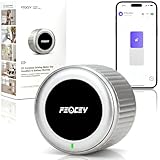
Overview: The FEOCEY Smart Lock delivers keyless entry via a retrofit install on existing deadbolts, emphasizing long battery life and standalone Wi-Fi. It targets renters and homeowners with features like door-ajar alerts and a coreless motor, all without requiring hubs or subscriptions. What Makes It Stand Out: Its 300-day battery life (using AA batteries) and built-in gyroscope for auto-lock/door-ajar alerts—without external sensors—are unmatched. The coreless motor ensures quiet operation and reliable physical key backup, while direct 2.4GHz Wi-Fi connectivity eliminates hub costs. Value for Money: Exceptional value at its price point. The 10-month battery life reduces maintenance costs, and included Wi-Fi outperforms hub-dependent rivals. It undercuts premium brands like August while offering superior battery performance and unique safety features. Strengths and Weaknesses: Strengths: Industry-leading battery life, no-hub Wi-Fi, precise door-ajar alerts, renter-friendly install, reliable key backup. Weaknesses: Basic app interface, auto-unlock less refined than August’s, limited smart home automations compared to Matter-enabled locks. Bottom Line: A top budget pick for reliability-focused users. Its battery longevity, safety features, and hub-free Wi-Fi make it ideal for renters and security-conscious households seeking no-fuss, long-term operation.
10. August Home Silver Wi-Fi Smart Lock and Smart Keypad, Keyless Door Lock for Front Entry Door, Great for Guests and Vacation Rentals, AUG-SL05-KY1-S05

Overview: This bundle pairs August’s 4th Gen Wi-Fi Smart Lock with a physical Smart Keypad, offering dual access methods for keyless entry. It retrofits existing deadbolts in minutes, targeting households with frequent guests, kids, or vacation rental hosts needing code-based access. What Makes It Stand Out: The included Smart Keypad is the highlight, enabling PIN-code entry without smartphones—perfect for guests, kids, or emergencies. Combined with August’s built-in Wi-Fi and robust app-based access sharing, it creates a versatile entry solution for multi-user households. Value for Money: The bundle offers significant savings over buying both components separately. While the lock alone competes with Product 8, the keypad addition ($50+ value) justifies the higher price for users needing non-app access, especially vacation rental owners. Strengths and Weaknesses: Strengths: Seamless keypad integration, no-hub Wi-Fi, excellent guest access management, compact design. Weaknesses: Keypad requires separate batteries, battery life still ~3 months, and keypad must be mounted externally (may not suit all doors). Bottom Line: The definitive choice for hosts or families needing flexible access. The keypad bundle solves app dependency issues, making it worth the investment for those prioritizing guest convenience alongside smart features.
Understanding Renter-Specific Smart Lock Requirements
Renting introduces constraints that homeowners rarely face. Choosing the right smart lock means navigating these limitations strategically to avoid disputes or deductions from your security deposit. It’s not just about the lock’s features; it’s about how it integrates with your temporary living situation.
Non-Permanent Installation is Non-Negotiable
The cornerstone of any renter-friendly smart lock is its installation method. Solutions requiring drilling into the door frame, replacing the entire deadbolt cylinder, or permanently altering the strike plate are almost always off-limits. Prioritize locks that utilize strong, removable adhesives (like specialized 3M tape) or clamp onto your existing deadbolt thumbturn without tools. These methods ensure you can restore the door to its original condition effortlessly when you move out, safeguarding your deposit.
Reversibility Must Be Absolute
Beyond just installation, consider the entire footprint of the device. Does the interior assembly leave screw holes when removed? Does the exterior keypad or fingerprint sensor require permanent mounting? True reversibility means leaving zero evidence of the lock’s existence upon removal. Look for designs where all components detach cleanly, leaving the door surface and hardware completely unaltered. Test the removal process mentally: if it requires filling holes or repainting, it’s likely not renter-appropriate.
Landlord Approval Protocols
Never assume your landlord will automatically approve a smart lock. Your lease agreement likely contains clauses about “alterations” to the property, which could encompass even non-permanent devices. The safest approach is to get written permission before purchasing or installing anything. Frame your request by emphasizing the security benefits for the property and the completely reversible nature of the installation. Providing the landlord with the lock’s specifications and removal instructions upfront can significantly increase approval chances.
Essential Security Features for Renter Peace of Mind
Security is the primary reason to upgrade, but renters need features that address specific vulnerabilities without creating new risks. A smart lock should enhance your safety without introducing complications that could jeopardize your tenancy or personal security.
Robust Physical Security Integration
A smart lock is only as strong as the deadbolt it controls. Ensure the model you choose works seamlessly with a high-quality, Grade 1 or 2 deadbolt – the kind that actually resists forced entry. Avoid designs that compromise the structural integrity of your existing deadbolt mechanism. Look for locks that maintain the full throw length of the bolt and don’t create weak points through flimsy adapters. Physical security must never be sacrificed for smart features.
Multi-Factor Authentication Options
Relying solely on a PIN code or smartphone app creates a single point of failure. Opt for locks offering multiple authentication layers. This could mean requiring both a PIN and a fingerprint, or enabling two-factor authentication (2FA) for app access where a code is sent to your phone. This significantly reduces the risk if one method is compromised (e.g., a guest guesses your temporary PIN, or your phone is lost).
Tamper Alerts and Real-Time Notifications
Immediate awareness of suspicious activity is crucial. Choose a lock that sends instant smartphone alerts for events like forced entry attempts, repeated incorrect PIN entries, or the lock being physically removed from the door. Real-time notifications for successful unlocks (showing who used which method and when) provide transparency, especially useful if you grant temporary access to guests, cleaners, or maintenance personnel. This feature deters tampering and provides evidence if issues arise.
Connectivity and Power Management Considerations
Reliable operation hinges on stable connectivity and predictable power. For renters, who may move frequently or live in buildings with spotty signals, these factors are even more critical to avoid being locked out or compromising security.
Reliable Wireless Protocol Selection
The type of wireless connection impacts range, reliability, and compatibility. Bluetooth offers low power consumption but limited range (usually just within the apartment). Wi-Fi provides remote access from anywhere but drains batteries faster and depends on your home network stability. Consider hybrid models that use Bluetooth for local control and a separate Wi-Fi bridge (often plug-in) for remote access, balancing reliability and battery life. Mesh protocols like Thread (often via Matter) offer excellent reliability in multi-device homes but require compatible hubs.
Battery Life Expectations and Monitoring
Battery longevity varies wildly. Some models last 6 months, others over a year. Crucially, look for locks with accurate, multi-level battery monitoring (e.g., 75%, 50%, 25%, critical) sent directly to your phone, not just a generic “low battery” alert days before it dies. Consider models that allow temporary external power via a 9V battery terminal in case of a complete drain – a lifesaver when you’re locked out. Factor in how batteries are replaced; easy access without removing the entire lock is ideal.
Handling Power Outages Gracefully
Unlike traditional locks, smart locks need power. Ensure your chosen model has a clear, reliable mechanical override – a physical keyhole – that works consistently, even if the batteries are dead. Some newer models offer temporary external power options via USB-C or a specific terminal. Understand exactly how the lock behaves during a power outage: does it stay locked (requiring the key), or does it default to unlocked (a significant security risk)? Prioritize locks that remain securely locked during outages.
User Management and Access Control Flexibility
Rental life often involves frequent guest access – friends, family, cleaners, or maintenance. A smart lock’s ability to manage this access securely and temporarily is a major advantage over traditional keys.
Temporary and Scheduled Access Codes
The ability to generate unique, time-limited PIN codes is essential. You should be able to create codes that only work for specific hours on specific days (e.g., for a weekly cleaner) or for a single day (e.g., for a visiting friend). Crucially, these codes should automatically deactivate after their scheduled window, eliminating the need to change codes constantly or worry about unused codes lingering.
Remote Access Granting and Revocation
Real-time control is invaluable. Being able to instantly grant or revoke access for anyone from your phone, no matter where you are, provides immense flexibility. Forgot to give the plumber access? Do it remotely. Need to let a friend in early? Send a temporary unlock command. This feature also allows you to immediately revoke access for anyone no longer needing it, like a departing guest or terminated service provider, without changing physical locks.
Detailed Activity Logging
A comprehensive log of every lock event (unlock method used, time, date, and often which specific code or user) is critical for security and accountability. This log should be easily accessible within the app. Reviewing this history helps identify unusual activity, confirm when service people arrived, or settle disputes about who accessed the apartment. Ensure logs are stored securely and for a sufficient duration.
Future-Proofing Your Smart Lock Investment
Technology evolves rapidly. Choosing a lock that can adapt ensures your investment remains useful beyond your current lease, especially important for renters who move more frequently.
Matter and Thread Protocol Support
Matter is a new, unifying smart home standard built on Thread (a low-power mesh networking protocol). Locks supporting Matter over Thread offer significantly improved reliability, local control (so functions work even if your internet is down), and seamless integration with a wider range of smart home ecosystems (Apple Home, Google Home, Amazon Alexa, SmartThings) without being locked into one brand. This future-proofs against ecosystem changes and enhances overall system stability.
Over-the-Air (OTA) Update Capability
Firmware updates are vital for fixing bugs, patching security vulnerabilities, and sometimes adding new features. Ensure the lock supports automatic or manual OTA updates directly through its app. A lock that can’t receive updates becomes a security liability over time as new threats emerge. Check the manufacturer’s track record for regular, timely updates.
Ecosystem Compatibility Beyond Just Voice Control
While “Hey Google, lock the door” is convenient, true ecosystem compatibility means deeper integration. Can the lock trigger other smart actions? (e.g., “When the door locks at night, turn off lights and set thermostat to sleep mode”). Does it work reliably within your existing smart home platform for routines and automations? Prioritize broad compatibility to maximize utility within your current and future smart home setups.
Navigating Lease Agreement and Legal Considerations
Your lease is the ultimate rulebook. Ignoring its terms regarding alterations can lead to denied deposits or even eviction proceedings. Smart lock adoption must align strictly with your contractual obligations.
Deciphering the “Alterations” Clause
Most leases prohibit “alterations” without written consent. Smart locks often fall into a grey area. Carefully read your specific lease language. Does it define alterations as any change, or only structural/permanent ones? Highlight the non-permanent, reversible nature of your intended lock in your request to the landlord. If the lease is ambiguous, getting explicit written approval is the only safe path.
Documenting the Door’s Condition
Before installing anything, take high-resolution photos and videos of the door, frame, and existing lock hardware from multiple angles. Note any pre-existing scratches or dings. This documentation is crucial when you move out to prove any new damage wasn’t caused by your smart lock installation or removal. Include this in your move-in inspection report if possible.
Exit Strategy: Removal and Restoration
Have your removal and restoration plan finalized before installation. Know exactly how to detach the lock, clean any adhesive residue (using methods specified by the lock manufacturer to avoid damaging the finish), and ensure the original deadbolt functions perfectly. Test the removal process on a similar surface if possible. Keep all original hardware and packaging in case the landlord requests the lock be removed before the final walkthrough.
Frequently Asked Questions
Frequently Asked Questions
Can I install a smart lock if my lease says “no alterations”? Yes, often. Focus on non-permanent, adhesive-based models and get written permission from your landlord, emphasizing the reversible nature. Document everything.
Will a smart lock void my security deposit? Only if it causes damage. Choose truly reversible models, get approval, document the door’s condition before and after, and restore it perfectly upon removal.
What happens if the smart lock batteries die while I’m locked out? All reputable renter-friendly locks have a physical key override. Some also offer temporary external power via USB-C or a 9V battery terminal – know how yours works.
Do I need a hub or extra equipment for remote access? It depends. Bluetooth-only locks need your phone nearby. For true remote access (from anywhere), you’ll need either a lock with built-in Wi-Fi or a separate Bluetooth-to-Wi-Fi bridge/hub.
Are fingerprint smart locks reliable for renters? They can be, but consider wear on the sensor and potential issues with湿 fingers. Ensure the lock has robust backup methods (PIN, key) and easy user management for guests.
How do I handle maintenance requests with a smart lock? Grant temporary access codes to maintenance staff valid only for their scheduled appointment window. Revoke the code immediately after they leave.
Can my landlord force me to remove a smart lock I installed with permission? Yes, potentially. Your lease agreement and the terms of their written permission govern this. Permission might be revoked, though landlords usually can’t demand removal without cause if it’s compliant.
What’s the biggest mistake renters make with smart locks? Installing without landlord permission or choosing a model requiring permanent modifications, risking deposit deductions or lease violations.
How long do smart lock batteries actually last for renters? Typically 6-12 months, but varies significantly by model, usage (frequent remote unlocks drain faster), and connectivity (Wi-Fi vs. Bluetooth). Monitor levels closely via the app.
Is a smart lock more secure than my traditional deadbolt? It can be, with features like tamper alerts, activity logs, and no physical keys to lose or copy. However, it adds potential digital vulnerabilities, so strong PINs, 2FA, and firmware updates are essential.