Tangled cords snaking across your desk, the nagging worry of a sudden power surge frying your expensive monitor, or that frustrating moment when your laptop battery dies mid-Zoom call – these are the all-too-common headaches of modern home office life. We’ve all been there, juggling too many devices on a single overloaded strip, only to trip the circuit breaker right before a crucial deadline. It’s not just inconvenient; it’s a productivity killer and a genuine risk to your valuable electronics. The chaos of managing power in a space that’s become our command center demands more than just a basic extension cord. It’s time to rethink the humble power strip as the silent, intelligent foundation of a truly efficient and protected workspace.
Imagine a power solution that doesn’t just multiply outlets but actively manages your energy, shields your gear from invisible threats, and even anticipates your daily workflow. This isn’t science fiction; it’s the reality smart power strips deliver today. Moving beyond simple surge protection, these intelligent devices integrate seamlessly into your smart home ecosystem, offering unprecedented control and insights. They transform passive power distribution into an active tool for boosting productivity, enhancing safety, and even saving money on your energy bill. Understanding what makes a smart power strip truly effective for the unique demands of a home office is the key to unlocking this next level of workspace organization and resilience.
Top 10 Smart Power Strips for Home Office
Detailed Product Reviews
1. Kasa Smart Plug Power Strip HS300, Surge Protector with 6 Individually Controlled Smart Outlets and 3 USB Ports, Works with Alexa & Google Home, No Hub Required

Overview: The Kasa HS300 is a robust smart power strip designed for managing multiple devices in homes or offices. It combines six individually controllable smart outlets with three USB ports and ETL-certified surge protection, all managed via the Kasa app without requiring a separate hub.
What Makes It Stand Out: Its standout feature is granular energy monitoring per outlet, allowing precise tracking of device consumption and remote shutoff for high-usage appliances. The six independent outlets offer unmatched flexibility for controlling diverse electronics, from holiday lights to office gear, while voice control via Alexa, Google, or Cortana adds hands-free convenience.
Value for Money: Priced mid-range for its class, the HS300 justifies its cost with superior outlet count and energy insights lacking in competitors. It outperforms cheaper strips with limited control and provides better long-term savings through usage optimization compared to basic models.
Strengths and Weaknesses: Strengths: Six independent outlets; accurate per-device energy monitoring; reliable app/hub-free operation; strong surge protection. Weaknesses: No Apple HomeKit support; USB ports lack fast-charging specifications; initial setup can be finicky on congested Wi-Fi networks.
Bottom Line: Ideal for tech-savvy users needing detailed energy management and maximum outlet control. A premium but worthwhile investment for home offices or entertainment centers where monitoring and individual device control matter most.
2. kasa smart Plug Power Strip KP303, Surge Protector with 3 Individually Controlled Smart Outlets and 2 USB Ports, Works with Alexa & Google Home, No Hub Required , White

Overview: The Kasa KP303 offers a compact smart power strip solution with three individually controlled outlets, two always-on USB ports, and essential surge protection. It targets spaces needing moderate smart control without overwhelming complexity, integrating seamlessly with Alexa and Google Assistant.
What Makes It Stand Out: Its scheduling and timer functionality shines, enabling automated routines like turning off chargers overnight or powering coffee makers at dawn. The “always-on” USB ports ensure devices like routers stay powered during outlet shutoffs, while the minimalist white design blends discreetly into bedrooms or desks.
Value for Money: Excellent value for smaller setups. It costs significantly less than the HS300 while retaining core Kasa features like voice control and scheduling. Cheaper alternatives often lack outlet independence or reliable app integration, making the KP303 a balanced choice for budget-conscious buyers.
Strengths and Weaknesses: Strengths: Intuitive scheduling/timers; clean, space-saving design; consistent Kasa app performance; always-on USB ports. Weaknesses: Only three controllable outlets limits scalability; no energy monitoring; USB ports output standard 5W, unsuitable for fast-charging tablets.
Bottom Line: A top pick for bedside tables, compact offices, or travel. If you need basic automation for 3–5 devices without energy tracking, the KP303 delivers exceptional simplicity and reliability at a fair price.
3. Smart Power Strip, Yozisital Surge Protector with 6 Smart Outlets and 4 USB Ports, 5FT Flat Plug Extension Cord for Home Office

Overview: This Yozisital strip packs 12 ports (6 smart AC outlets, 2 regular AC, 2 USB-A, 2 USB-C) into a flat-plug design, targeting cluttered workspaces. It relies on the Smart Life app for control but mandates 2.4GHz Wi-Fi—a critical limitation for modern networks.
What Makes It Stand Out: The dual USB-C ports (one rated 10W) cater to newer devices, while the 5-foot cord offers rare flexibility for positioning. The Smart Life app enables group scheduling for all six smart outlets, useful for aquariums or grow lights, and the flat plug minimizes wall outlet blockage.
Value for Money: Budget-friendly with high port density, but compromises exist. It undercuts Kasa on price but lacks per-outlet control granularity and energy monitoring. Better suited for users prioritizing quantity over precision who already use the Smart Life ecosystem.
Strengths and Weaknesses: Strengths: High port count (12 total); USB-C support; flat plug design; affordable. Weaknesses: 2.4GHz Wi-Fi only (no 5GHz); inconsistent Smart Life app reliability; no individual outlet scheduling; setup requires Bluetooth pairing.
Bottom Line: A functional, economical option for basic smart control in spaces needing many ports. Avoid if you use 5GHz Wi-Fi or require per-outlet automation—opt for Kasa instead for reliability.
4. Govee Smart Plug Outlet Extender, 3-Sided Smart Power Strips with 2 Smart Outlets & 2 USB Ports with RGB Night Light, APP & Voice Control, Surge & Overload Protection for Home Office

Overview: Govee’s innovative extender combines two smart outlets, four always-on outlets, two USB ports, and an RGB night light in a space-saving 3-sided design. It prioritizes aesthetics and safety for tight spaces like nightstands, with robust surge protection.
What Makes It Stand Out: The customizable RGB night light is a unique dual-purpose feature—acting as mood lighting or a soft guide—and its screw-mount installation prevents accidental dislodging. The 1.97-inch outlet spacing accommodates bulky adapters, a frequent pain point with competitors.
Value for Money: Premium-priced but justified for its niche. The night light and secure mounting add tangible value where competitors don’t compete. Cheaper strips lack these extras, though users ignoring ambiance might prefer Kasa’s pure functionality.
Strengths and Weaknesses: Strengths: RGB night light versatility; exceptional physical stability; wide outlet spacing; strong safety certifications. Weaknesses: Only two smart outlets limit control scope; USB power (5W/10W) is modest; night light could disturb light-sensitive sleepers.
Bottom Line: Perfect for bedrooms or desks where style, safety, and space efficiency matter. If you want ambiance and rock-solid placement, it’s unmatched—but choose Kasa for extensive device control.
5. meross Smart Plug Power Strip, WiFi Flat Outlet 15A Compatible with Apple HomeKit, Siri, Alexa, Google Assistant & SmartThings, with 4 AC Outlets & 4 USB Ports, 6 Feet Surge Protector Extender

Overview: Meross delivers a HomeKit-compatible smart strip with four individually controlled AC outlets, four grouped USB ports, and a 6-foot cord. It bridges Apple ecosystems while supporting Alexa/Google, targeting iOS users wanting native Siri integration without workarounds.
What Makes It Stand Out: Native Apple HomeKit support (via Apple TV/iPad bridge) is its crown jewel, enabling seamless Siri commands and Home app automation. Dual-band Wi-Fi compatibility and sunrise/sunset scheduling add versatility, while the 15A rating handles high-wattage appliances safely.
Value for Money: Strong value for Apple households. It matches Kasa’s features while adding HomeKit—something Kasa lacks. Priced competitively, it’s cost-effective versus buying separate HomeKit plugs, though non-Apple users may prefer Kasa’s simpler setup.
Strengths and Weaknesses: Strengths: Native HomeKit/Siri support; dual-band Wi-Fi; 15A capacity; sunrise/sunset automation; ETL/FCC safety certs. Weaknesses: Requires Apple TV/iPad for remote HomeKit access; USB ports lack individual control; app less polished than Kasa’s.
Bottom Line: The definitive choice for Apple-centric homes needing reliable HomeKit integration. If you use Siri daily, it’s indispensable—otherwise, Kasa offers a smoother standalone experience.
6. Matter Smart Power Strip,Works with Apple HomeKit, Siri, Alexa, Google Assistant, with 4 Individually Controlled AC Outlets & 2 USB 2 Type-C Ports, Multi-Plug Extender for Home Office-Black
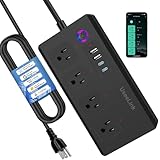
Overview:
This Matter-compatible smart power strip integrates seamlessly into diverse ecosystems, supporting Apple HomeKit, Alexa, Google Assistant, and SmartThings. It offers 4 individually controllable AC outlets and 2 combined USB/Type-C ports, targeting users seeking unified smart home control without platform lock-in. Safety certifications and scheduling features cater to home/office environments.
What Makes It Stand Out:
Its Matter protocol support is the key differentiator, eliminating reliance on single platforms and enabling centralized control via one app. The dual Type-C fast-charging ports (3500W max) and individual outlet control provide flexibility. Voice commands work across all major assistants, while scheduling/timers optimize energy use for devices like lamps or humidifiers.
Value for Money:
Priced competitively for Matter-certified devices, it justifies cost through cross-platform compatibility rarely found at this tier. While requiring a Matter hub adds initial expense, long-term savings from energy management and avoiding multiple smart plugs make it worthwhile for ecosystem-agnostic users.
Strengths and Weaknesses:
Strengths: Universal Matter compatibility; robust 3500W capacity; precise scheduling; comprehensive safety protections (overheat/short-circuit). Weaknesses: Hub required for setup; USB/Type-C ports lack individual control; sustained max power use not recommended.
Bottom Line:
Ideal for tech-savvy users invested in multiple smart home platforms. Its Matter integration and safety features outweigh the hub dependency, making it a future-proof investment for unified device management at a fair price point.
7. GHome Smart Power Strip with 3 WiFi Outlets & 3 USB Ports, ETL Listed Smart Surge Protector, Works with Alexa & Google, Individual Control WiFi Outlet Strip 4Ft Extension Cord for Home Office & Travel

Overview:
The GHome power strip delivers accessible smart control via Alexa and Google Assistant, featuring 3 individually controllable outlets, 3 USB ports, and a 4ft cord. Designed for home offices or travel, it emphasizes app-based automation and ETL safety certification without requiring a separate hub.
What Makes It Stand Out:
Group control functionality lets users sync multiple strips for whole-room automation (e.g., turning off all lamps simultaneously). The GHome app enables precise scheduling—sunrise/sunset triggers for coffee makers—and reliable remote access. Its travel-friendly compact design and 3.1A USB output enhance versatility.
Value for Money:
An affordable entry into smart power management, undercutting hub-dependent competitors. The ETL certification and 4ft cord justify its price for basic automations, though USB amperage is lower than premium rivals. Best for budget-conscious users prioritizing essential smart features.
Strengths and Weaknesses:
Strengths: No hub needed; intuitive group control; solid ETL safety; travel-ready size. Weaknesses: USB ports share 3.1A total (slower charging); app limited to Alexa/Google (no Apple support); outlets lack energy monitoring.
Bottom Line:
A practical, no-frills smart strip for renters or travelers seeking reliable voice/app control. While USB charging is modest, its group automation and safety features offer excellent value for casual smart home users.
8. One Beat Power Strip Surge Protector - 6 Widely Outlets 4 USB Ports(2 USB C), 3 Sided Outlet Extender, 6 Ft Flat Plug Extension Cord, Wall Mount Power Strip for Home Office Travel College Dorm Room

Overview:
This non-smart surge protector focuses on space efficiency with 6 widely spaced AC outlets, 4 USB ports (including 2 USB-C), and a 6ft flat cord. Ideal for tight spaces, it features wall-mount capability and robust protection for dorms, offices, or travel.
What Makes It Stand Out:
The ultra-slim 0.35-inch flat plug fits flush against walls, while 3-sided outlets with 1.6-inch spacing prevent bulky adapter blockage. USB-C ports deliver 3A fast charging, and the 900J surge protection includes a visual “Surge Protected” indicator—rare at this price.
Value for Money:
Exceptional for its cost, outperforming basic strips with thoughtful design. The flat plug and wide outlet spacing solve common clutter issues, while ETL/RoHS certifications ensure reliability. Lacks smart features but excels as a pure utility device.
Strengths and Weaknesses:
Strengths: Space-saving flat plug; unblockable 3-sided outlets; fast USB-C; wall-mountable; 1382℉ fire-resistant shell. Weaknesses: Non-smart (no app/voice control); USB ports not individually optimized; 900J surge rating is modest for high-end electronics.
Bottom Line:
A top pick for students or minimalists needing a clutter-free, safety-certified power solution. Its ingenious physical design and fast charging make it indispensable for desks or travel, despite lacking smart capabilities.
9. Power Strip Tower with Multiple Outlets, Flat Plug Surge Protector Tower Extension Cord with 12 AC Outlets 4 USB Ports (2 USB C), 6FT Cord Power Tower Surge Protector for Home Office Dorm Room, White
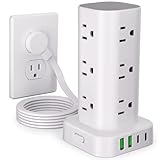
Overview:
This vertical power tower transforms one socket into 16 ports (12 AC + 4 USB), featuring a flat plug, 6ft cord, and 1800J surge protection. Its compact tower design targets desktop organization in homes, offices, or dorms where space is limited.
What Makes It Stand Out:
The miniaturized tower (3.15x3.15x5.79 inches) houses double the AC outlets of competitors without sprawl. USB-C ports charge 30% faster than standard, and the 1800J surge rating exceeds most towers. Rubber feet prevent sliding, while the flat plug tucks neatly behind furniture.
Value for Money:
Premium-priced but justified by port density and surge protection. The vertical layout eliminates cable chaos on desks, and faster USB-C charging adds utility. Comparable strips offer fewer outlets or weaker protection, making this a space-conscious powerhouse.
Strengths and Weaknesses:
Strengths: High port count in small footprint; 1800J surge protection; fast USB-C; stable non-slip base; clean aesthetic. Weaknesses: Non-smart; USB ports share total amperage (limits simultaneous fast charging); limited outlet spacing for oversized adapters.
Bottom Line:
The ultimate space-saving hub for multi-device households. Though not smart-enabled, its organizational prowess and robust protection offer compelling value for desks drowning in chargers.
10. TESSAN Smart Power Strip with 6 Outlet 3 USB, WiFi Wall Smart Outlet Plug with 3 Remote Controll Outlets, Compatible with Alexa Google Assistant for Home Office, Only 2.4 GHz Wi-Fi

Overview:
TESSAN’s wall-mounted smart strip combines 3 controllable outlets, 3 always-on outlets, and 3 USB ports. Using the Smart Life app, it enables voice control via Alexa/Google and sunrise/sunset scheduling, targeting users needing selective automation without platform exclusivity.
What Makes It Stand Out:
The hybrid design—3 smart + 3 always-on outlets—is unique for devices needing constant power (e.g., routers) alongside automated ones (lamps). Sunrise/sunset scheduling and family sharing via Smart Life app enhance usability, while its slim profile fits tight wall spaces.
Value for Money:
Budget-friendly for smart functionality, especially given the always-on outlets. The Smart Life app’s reliability and multi-user support add value, though USB ports lack smart control. Beats single-outlet smart plugs when managing multiple devices.
Strengths and Weaknesses:
Strengths: Always-on outlets; intuitive sunrise/sunset scheduling; family sharing; UL/FCC certified; compact wall-mount design. Weaknesses: USB ports not controllable; 2.4GHz Wi-Fi only; app occasionally lags during remote commands.
Bottom Line:
A smart choice for automating essential devices while keeping others powered. Its hybrid outlet setup and scheduling justify the price for practical home/office use, despite minor app quirks.
Understanding the Core Needs of a Home Office Power Solution
Evaluating Your Device Load and Outlet Requirements
Before diving into features, critically assess how many devices you actually plug in daily. Count monitors, laptops, printers, lamps, speakers, routers, and any peripherals. Don’t forget USB-powered gadgets! Consider both standard AC outlets and the growing need for dedicated USB-A and USB-C ports directly on the strip. Ensure the total wattage of your plugged-in devices doesn’t exceed the strip’s maximum rating – a common oversight leading to overheating risks. Factor in future additions; your setup will likely expand.
The Critical Role of Surge Protection Specifications
Not all surge protection is created equal, especially for sensitive electronics like computers and monitors. Look beyond the basic claim of “surge protection.” Focus on the Joule rating – this measures the total energy the strip can absorb over its lifetime. For valuable home office equipment, aim for a minimum of 1000 joules, with 2000+ joules offering significantly better long-term protection against multiple smaller surges. Also, check the Clamping Voltage (lower is better, ideally under 400V) and Response Time (faster is better, under 1 nanosecond). These specs determine how effectively and quickly the strip diverts dangerous voltage spikes away from your gear.
Why Basic Power Strips Fall Short for Modern Workflows
A traditional power strip is merely a passive conduit. It offers no control once devices are plugged in – phantom energy drain from idle printers or chargers wastes money constantly. It provides no insight into which device might be causing an overload. Crucially, it lacks the intelligence to automate tasks like powering down non-essential equipment after hours or safely shutting down systems during unstable grid conditions. For the dynamic, device-heavy reality of a home office, this passive approach is increasingly inadequate and potentially risky.
Essential Smart Features for Enhanced Control and Efficiency
Mastering Outlet Grouping and Individual Control
The real power of smart strips often lies in how outlets are configured. Look for models that allow grouping outlets (e.g., one group for your computer tower and monitor, another for non-essential items like a lamp or printer). This enables you to create schedules or voice commands that power down entire non-essential groups overnight with a single tap, while keeping critical devices like your router running. Individual outlet control per device is even more granular, letting you cycle power to a frozen device remotely without disturbing your entire setup.
Scheduling and Automation for Seamless Work Routines
Leverage scheduling to mirror your workday. Program your primary monitor and task lamp to turn on automatically 15 minutes before your usual start time, creating a ready-to-work environment. Set printers, secondary monitors, or desk fans to power down completely during lunch breaks and after work hours, eliminating standby waste. Automations can trigger based on time, sunrise/sunset, or even your phone’s location (leaving the “office” zone powers down non-essentials). This reduces manual effort and ensures energy isn’t wasted when devices are idle.
Voice Assistant Integration for Hands-Free Management
Seamless integration with platforms like Amazon Alexa, Google Assistant, or Apple HomeKit is non-negotiable for true smart functionality. Need to quickly power cycle your Wi-Fi router during a call drop? A simple voice command like “Hey Google, turn off the router outlet” saves scrambling behind the desk. Starting your work session? “Alexa, turn on my office” can power up your main workstation group. This level of hands-free control streamlines your workflow and enhances accessibility.
Real-Time Energy Monitoring and Cost Insights
Advanced smart strips go beyond on/off, providing detailed energy consumption data per outlet or for the whole unit. Track exactly how much power your desktop PC uses during rendering versus idle time, or see the vampire drain from your printer. Many companion apps translate this usage into estimated costs based on your local electricity rates. This data is invaluable for identifying energy hogs, understanding your true operational costs, and making informed decisions about which devices to unplug or replace for efficiency.
Connectivity and Integration Considerations
Choosing the Right Wireless Protocol: Wi-Fi vs. Bluetooth vs. Zigbee
Most consumer smart strips use Wi-Fi for direct internet and app access, offering remote control anywhere. However, Wi-Fi can be power-hungry for the strip itself and congest network bandwidth. Bluetooth models are cheaper and simpler but require your phone to be nearby for control. For deeper smart home integration (especially in larger setups), strips using protocols like Zigbee or Z-Wave connect via a central hub (like Samsung SmartThings or Hubitat), offering better reliability, lower power use, and mesh networking benefits, though requiring that additional hub investment.
App Reliability and User Experience Essentials
The companion app is your primary control center, so its quality is paramount. Test (if possible) or research reviews for app stability – frequent crashes or disconnections defeat the purpose. A good app should offer intuitive scheduling, clear energy data visualization, reliable remote access, and straightforward device grouping. Look for robust notification settings (e.g., alerts for power surges, unusual energy spikes, or if a device is left on too long). A clunky app can make even the most feature-rich hardware frustrating to use.
Compatibility Within Your Existing Smart Ecosystem
Ensure the smart strip works smoothly with your current smart home platform. Does it integrate with your preferred voice assistant without complex workarounds? Can it trigger or be triggered by other smart devices (e.g., “When my smart lights turn off at midnight, power down the office strip”)? Check compatibility lists carefully, especially if you use a specific hub-based system like Apple HomeKit (which often requires specific certification) or Thread-based ecosystems. Avoid devices that lock you into a proprietary app with limited external integrations.
Safety, Durability, and Physical Design Factors
Overload Protection and Auto-Shutoff Mechanisms
Beyond surge protection, robust overload protection is critical. The strip should automatically cut power if the total connected load exceeds its safe capacity (e.g., 15A or 1875W), preventing dangerous overheating and potential fire hazards. Look for clear visual indicators (like an LED) showing when this safety feature has activated. This is a fundamental safety net that basic strips often lack or implement poorly.
Physical Build Quality and Heat Dissipation
Home offices often tuck power strips behind desks or in cabinets, making heat management crucial. Prioritize strips with sturdy, non-flammable (UL 94 V-0 rated) plastic housings. Check for adequate ventilation slots around the outlets and internal components. Avoid flimsy, thin plastic that feels cheap; it often indicates poor internal wiring and heat resistance. A well-built strip should feel substantial and remain cool to the touch even under moderate load.
Cord Length, Outlet Spacing, and Physical Layout
Measure your desk setup! A cord that’s too short forces awkward placements, while an excessively long one creates new tangles. Consider the direction of the plug – a right-angled plug can save precious space behind furniture. Pay close attention to outlet spacing; bulky “wall-wart” adapters (like laptop chargers) need significant room. Look for models with widely spaced outlets or rotating plugs to prevent one large adapter from blocking adjacent ports. Some offer angled outlets specifically for this challenge.
Child Safety Features for Shared Spaces
If your home office doubles as a shared family space, especially with young children, outlet safety becomes a concern. Look for strips featuring built-in safety shutters on standard outlets – these plastic covers only open when equal pressure is applied to both sides (like a proper plug), preventing curious fingers or small objects from making contact with live pins. This is a simple but vital safety addition often overlooked.
Installation and Ongoing Management Tips
Strategic Placement for Optimal Safety and Access
Never place a power strip under carpets, rugs, or furniture where heat can build up. Ensure it’s in a well-ventilated area, away from direct heat sources or moisture. Keep it accessible for plugging/unplugging and checking indicators, but positioned to minimize tripping hazards. Avoid running cords under doors or across high-traffic walkways. If mounting on a wall or under a desk, use the provided hardware securely and ensure cords have slack without dangling dangerously.
Avoiding Daisy-Chaining: A Critical Safety Warning
This cannot be overstated: Never plug one power strip into another (“daisy-chaining”). This practice drastically overloads circuits, creates fire hazards, and almost always voids safety certifications and warranties. Smart strips, despite their intelligence, are still subject to the same fundamental electrical limitations. If you need more outlets than one strip provides, the only safe solution is to plug additional strips into separate, dedicated wall outlets on different circuits, or consult an electrician about installing more outlets.
Firmware Updates: Keeping Your Strip Secure and Functional
Like any smart device, your power strip relies on firmware for its core functionality and security. Manufacturers release updates to fix bugs, patch vulnerabilities, and sometimes add new features. Ensure the device and its app make firmware updates easy and automatic where possible. Regularly check for updates within the app settings. Ignoring updates can leave your device vulnerable to exploits or cause features to malfunction over time.
Understanding Warranty and Support Expectations
Quality smart power strips, especially those with robust surge protection, should come with a solid warranty. Look for warranties covering connected equipment – a sign the manufacturer stands behind their surge protection claims (e.g., a $50,000 or $250,000 connected equipment warranty). Understand what the warranty covers (surge damage, defects) and for how long. Also, research the manufacturer’s reputation for responsive customer support in case you encounter issues with the device or app.
Frequently Asked Questions
Frequently Asked Questions
Can a smart power strip really save me money on my electricity bill? Yes, primarily by eliminating “vampire power” – the energy devices consume even when turned off but still plugged in (like printers, chargers, monitors). Features like scheduling, automations, and individual outlet control allow you to completely cut power to non-essential devices when not in use, which adds up over time, especially with energy monitoring to identify the biggest culprits.
Do I still need a surge protector if I have a smart power strip? Absolutely. While many smart strips include surge protection, it’s a distinct feature. Always verify the specific surge protection specifications (Joule rating, clamping voltage) are adequate for your sensitive electronics. Never assume “smart” automatically means sufficient surge protection; it’s a critical component you must actively look for.
Are smart power strips safe to use with high-wattage devices like space heaters? Generally, no. Space heaters, air conditioners, and other high-draw appliances should always be plugged directly into a wall outlet on a dedicated circuit. Smart power strips, like all power strips, have maximum wattage/amperage limits (usually 15A / 1875W). Exceeding this with a high-wattage device creates a severe fire hazard due to overheating. Check your device’s wattage and the strip’s rating.
How do I know if my smart power strip is compatible with my voice assistant? Check the product specifications and packaging for explicit mentions of compatibility (e.g., “Works with Alexa,” “Google Assistant compatible,” “Apple HomeKit certified”). The manufacturer’s website will have the most detailed and up-to-date compatibility information. If it requires a specific hub (like Zigbee), ensure you have that hub already.
Can I use a smart power strip outdoors in a home office shed or garage? Only if the strip is explicitly rated for outdoor use (look for an IP rating like IP65 or IP67 indicating dust and water resistance). Standard indoor smart strips are not designed for exposure to moisture, dust, or temperature extremes and pose a serious electrical shock or fire risk if used outdoors. Never assume an indoor-rated strip is safe outside.
What does “connected equipment warranty” actually mean? This is a warranty offered by the manufacturer that covers the cost of replacing devices (like your computer or monitor) that are plugged into the strip and damaged by a power surge while the strip’s surge protection was functional. The coverage amount (e.g., $100,000) and specific terms (what’s covered, claim process) vary significantly, so read the fine print carefully.
Why does my smart power strip keep disconnecting from Wi-Fi? Common causes include weak Wi-Fi signal strength at the strip’s location, network congestion, router issues, or outdated firmware on the strip or router. Try moving the strip closer to your router, ensuring your router firmware is updated, restarting both the strip and router, or connecting the strip to a less congested 2.4GHz band (most smart devices don’t support 5GHz).
Is it safe to plug a UPS (Uninterruptible Power Supply) into a smart power strip? It’s generally not recommended. Plugging a UPS into a smart strip adds an unnecessary layer that could interfere with the UPS’s critical function during a power outage. Conversely, plugging the smart strip into the UPS is usually acceptable, as the UPS provides clean, backed-up power to the strip. Always consult both the UPS and smart strip manuals for specific guidance.
How often should I replace my smart power strip? There’s no fixed timeline, but consider replacement if: the surge protection indicator light shows it’s no longer functional (many have a “protected” LED), it shows signs of physical damage (cracks, burns, melting), outlets feel loose, it frequently trips, or it’s over 3-5 years old (surge components degrade with use). Energy monitoring accuracy might also decline over time.
Can a smart power strip protect against lightning strikes? No power strip, smart or otherwise, can reliably protect against a direct lightning strike. Their surge protection is designed for the more common, smaller voltage spikes originating from within the power grid (like from appliances cycling on/off or minor grid fluctuations). For lightning protection, a whole-house surge protector installed at your main electrical panel by an electrician is the primary defense, with point-of-use strips like these offering a secondary layer.