Smart thermostats aren’t just gadgets for tech enthusiasts anymore; they’ve become essential tools for comfort, safety, and independence, especially for older adults. For seniors, managing home temperature is about more than just convenience—it directly impacts health, energy bills, and the ability to age comfortably in familiar surroundings. Fluctuating temperatures can exacerbate chronic conditions, while high heating and cooling costs strain fixed incomes. The right smart thermostat can offer peace of mind for both seniors and their families, simplifying climate control and providing valuable safeguards without demanding constant attention.
Imagine effortlessly maintaining a warm, safe environment during a bitter winter without struggling with tiny buttons or complex menus. Picture automatic adjustments that prevent pipes from freezing while you’re away for a few days, or alerts sent to a loved one if temperatures become dangerously extreme. This isn’t futuristic fantasy—it’s the practical reality smart thermostats deliver today. Choosing the right one, however, requires understanding the specific needs and potential limitations that come with aging. It’s not about the flashiest tech, but about finding intuitive, reliable solutions that seamlessly integrate into daily life, promoting autonomy and well-being without adding stress.
Top 10 Smart Thermostats for seniors
Detailed Product Reviews
1. ecobee Smart Thermostat Essential - Energy Star Certified programmable Wi-Fi Thermostat - Works with Siri, Alexa, and Google Assistant

Overview: The ecobee Essential is an Energy Star-certified smart thermostat designed to optimize home heating and cooling efficiency through automated scheduling and remote control. It targets eco-conscious homeowners seeking intuitive climate management without complex setup.
What Makes It Stand Out: Its standout feature is broad HVAC compatibility (85% of systems), verified via ecobee’s online checker, and seamless integration with major voice assistants. The free software updates ensure long-term relevance, while the color touchscreen and app provide effortless adjustments and real-time energy tracking.
Value for Money: Priced competitively, it justifies cost through potential 23% annual energy savings (per manufacturer claims) and DIY installation flexibility. Though the Power Extender Kit (for C-wire-less homes) is sold separately, the core unit offers robust functionality comparable to pricier rivals.
Strengths and Weaknesses: Strengths: Reliable voice/app control, strong energy-monitoring tools, and future-proof updates. Weaknesses: Requires additional purchases for C-wire-less setups, and the schedule automation lacks advanced geofencing.
Bottom Line: An excellent entry-level smart thermostat for most homes, balancing energy savings, compatibility, and user-friendliness—ideal for beginners prioritizing simplicity and long-term value.
2. Sensi Smart Thermostat, 100 Years Of Expertise, Wi-Fi, Data Privacy, Programmable, Easy DIY Install, Works With Alexa, Energy Star Certified, Mobile App, ST55
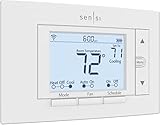
Overview: Sensi ST55 leverages Emerson’s century of HVAC expertise to deliver a privacy-focused, user-friendly smart thermostat. It emphasizes straightforward installation and energy management without compromising data security.
What Makes It Stand Out: Its ironclad privacy policy—refusing to sell user data—sets it apart in a crowded market. The intuitive physical buttons mimic traditional thermostats, avoiding wall damage during installation, while built-in level tools and app-guided setup simplify DIY efforts.
Value for Money: At a mid-range price, it offers exceptional value with ENERGY STAR-certified 23% energy savings potential and zero subscription fees. The no-C-wire necessity for most systems reduces hidden costs, outperforming budget models with limited features.
Strengths and Weaknesses: Strengths: Unmatched privacy commitment, tool-free wall mounting, and HVAC performance alerts. Weaknesses: Less polished app interface than competitors, and limited third-party ecosystem integration beyond Alexa.
Bottom Line: A top pick for privacy advocates and DIYers wanting hassle-free installation and reliable energy savings—perfect for those prioritizing data security over expansive smart-home connectivity.
3. Amazon Smart Thermostat – Save money and energy - Works with Alexa and Ring - C-wire required

Overview: Amazon’s thermostat merges Alexa deep integration with ENERGY STAR efficiency, targeting users invested in Amazon’s ecosystem. It focuses on automated comfort zones and utility rebates to maximize savings.
What Makes It Stand Out: Unique “comfort zone” automation uses Echo devices or Ring to adjust temperatures based on room occupancy or air quality. Post-purchase rebate assistance and automatic away/sleep modes via Alexa streamline energy conservation without manual scheduling.
Value for Money: Competitive pricing is enhanced by potential utility rebates (averaging $50/year savings per EPA). However, the mandatory C-wire requirement may incur professional installation costs, slightly offsetting initial affordability.
Strengths and Weaknesses: Strengths: Frictionless Alexa/Ring synergy, rebate navigation support, and sleek minimalist design. Weaknesses: Limited compatibility without C-wire, and fewer granular scheduling options than rivals.
Bottom Line: Best for Alexa-centric households seeking effortless automation and rebate access, though its C-wire dependency makes it less versatile for older homes.
4. meross Smart Thermostat for Home, WiFi Thermostat Works with Matter, Alexa, Apple Home, Google Assistant, App & Voice Control, 7x24h Scheduling, Energy Saving, C-Wire Required

Overview: The meross thermostat prioritizes universal Matter protocol support, enabling local, hub-free control across Apple Home, Google, and Alexa ecosystems. It’s engineered for tech-savvy users avoiding app fragmentation.
What Makes It Stand Out: Its Matter certification ensures seamless, low-latency cross-platform integration—a rarity at this price point. Customizable 7x24 scheduling and proactive HVAC alerts (e.g., filter reminders) enhance long-term system health and energy tracking.
Value for Money: An affordable gateway to Matter’s interoperability, eliminating the need for multiple apps. While the C-wire requirement adds installation complexity, the robust scheduling and compatibility with 95% of HVAC systems justify the cost versus single-ecosystem models.
Strengths and Weaknesses: Strengths: Future-proof Matter support, detailed usage reports, and extensive HVAC compatibility. Weaknesses: C-wire mandatory (no PEK alternative), and setup may challenge non-tech users.
Bottom Line: A forward-thinking choice for multi-ecosystem homes wanting unified control and precise scheduling—optimal for early adopters prioritizing Matter’s promise over plug-and-play simplicity.
5. Google Nest Thermostat - Smart Thermostat for Home - Programmable Wifi Thermostat - Charcoal

Overview: Google’s Nest Thermostat merges minimalist design with AI-driven efficiency, learning routines to auto-adjust temperatures. It targets users seeking a sleek, “set-and-forget” experience within the Google Home ecosystem.
What Makes It Stand Out: Its signature Auto-Schedule feature learns habits over time to optimize heating/cooling without manual programming. The C-wire-free design (for compatible systems) and Google Home app integration enable effortless adoption, while ENERGY STAR certification validates savings.
Value for Money: Mid-priced with strong long-term ROI via energy reduction. Though C-wire-less setups work for many, heat pump/zone systems may need accessories—adding cost. Competes well against ecobee on learning capabilities but lags in Matter support.
Strengths and Weaknesses: Strengths: Intuitive habit learning, elegant interface, and broad app accessibility. Weaknesses: Limited Matter/HomeKit compatibility, and schedule customization is less flexible than meross or ecobee.
Bottom Line: Ideal for Google ecosystem loyalists wanting adaptive intelligence and clean aesthetics, though power users may prefer more scheduling control from alternatives.
6. ecobee Smart Thermostat Premium with Smart Sensor and Air Quality Monitor - Programmable Wifi Thermostat - Works with Siri, Alexa, Google Assistant, Black

Overview: The ecobee Premium is a high-end smart thermostat bundling advanced climate control, occupancy sensing, and comprehensive air quality monitoring. It targets homeowners seeking energy savings, seamless smart home integration, and healthier indoor environments through precise temperature management and air quality insights.
What Makes It Stand Out: Its standout features include the included SmartSensor for room-specific temperature balancing, a built-in air quality monitor (tracking PM2.5, VOCs, CO2), and radar-based occupancy detection for security. Seamless integration with the ecobee doorbell camera and premium build quality (metal trim, vibrant display) elevate it beyond basic thermostats.
Value for Money: Priced higher than competitors, it justifies cost through bundled value (SmartSensor included), ENERGY STAR-certified 26% energy savings, and unique health-focused air quality features. While pricier than mid-tier models, the comprehensive package offers long-term savings and functionality rarely matched at this level.
Strengths and Weaknesses: Strengths: Exceptional air quality monitoring, accurate room-by-room comfort via SmartSensor, robust smart home compatibility, DIY-friendly install with PEK included, premium build. Weaknesses: Highest price point in ecobee’s lineup, air quality features may be overkill for some, requires compatible HVAC system (95%).
Bottom Line: Ideal for health-conscious users and smart home enthusiasts prioritizing air quality and precise comfort. The bundled sensor and advanced monitoring deliver significant value, making it a top premium investment for comprehensive home climate management.
7. ecobee Smart Thermostat Enhanced - Programmable Wifi Thermostat - Works with Siri, Alexa, Google Assistant - Energy Star Certified - Smart Home

Overview: The ecobee Enhanced offers intelligent temperature automation and strong energy-saving capabilities without the air quality focus of the Premium model. It’s designed for users wanting reliable smart scheduling, occupancy-based adjustments, and broad system compatibility at a more accessible price point.
What Makes It Stand Out: Built-in radar occupancy sensing intelligently pre-heats/cools your home before arrival and adjusts for comfort during sleep. It learns schedules, factors in humidity, and offers robust remote control via app or voice assistants, emphasizing effortless automation over environmental monitoring.
Value for Money: Delivering up to 26% energy savings, it competes well against similarly priced thermostats. The inclusion of PEK/Trim Kit for DIY installation and strong focus on occupancy-based efficiency provide solid ROI, especially for those not needing air quality tracking. Slightly better value than the Premium for basic climate control.
Strengths and Weaknesses: Strengths: Excellent occupancy-based scheduling, humidity adjustment, learns preferences, easy DIY install with included kits, wide HVAC compatibility (90%), strong app integration. Weaknesses: Lacks air quality monitoring, no physical SmartSensors included (sold separately), display less premium than Premium model.
Bottom Line: A highly capable, cost-effective smart thermostat for automating home comfort. Best for users prioritizing intelligent scheduling, occupancy detection, and energy savings without requiring air quality features, offering excellent core functionality at a fair price.
8. Sensi Lite Smart Thermostat, Programmable, WiFi, Easy DIY, Works With Alexa, ENERGY STAR Certified, ST25, Most Systems C-Wire Not Required, C-Wire needed with Heat/Cool Only & Heat Pump System – Black
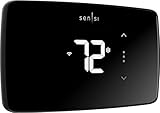
Overview: The Sensi Lite is a budget-friendly, privacy-focused smart thermostat emphasizing straightforward installation and essential energy-saving features. It appeals to cost-conscious users seeking reliable remote control and basic automation without complex add-ons.
What Makes It Stand Out: Its key differentiator is a strong privacy commitment—explicitly stating it won’t sell user data or use activity for ads. The “C-wire not required for most systems” design simplifies DIY installation significantly compared to many competitors, lowering the barrier to entry.
Value for Money: As one of the most affordable ENERGY STAR-certified options (saving ~23%), it delivers excellent value for core functionality. The easy install (no C-wire hassle for many), top-rated app, and geofencing provide solid savings potential at a very competitive price point.
Strengths and Weaknesses: Strengths: Very affordable, easy DIY install (no C-wire needed for common systems), strong privacy policy, ENERGY STAR savings, reliable app control. Weaknesses: Lacks advanced features like room sensors or occupancy detection, basic display/interface, C-wire required for heat pumps/heat-cool-only systems.
Bottom Line: A superb value pick for budget-focused users prioritizing privacy, simple installation, and fundamental smart thermostat benefits. Avoid if you need advanced automation or room-specific sensing, but ideal for straightforward, cost-effective energy savings.
9. Provirtec Smart Thermostat for Home with Room Sensor, 7 Days Programmable, Energy Saving WiFi Thermostats for House,APP & Touchscreen Control, C Wire Required, 3.95 Inch Large Screen

Overview: The Provirtec thermostat combines a large touchscreen interface with a bundled room sensor for whole-home temperature monitoring. It targets families or larger homes needing consistent comfort across multiple zones with intuitive physical and app-based control.
What Makes It Stand Out: The “One + One” system pairs the main thermostat with a wireless thermo-hygrometer sensor for real-time multi-room monitoring, enabling body-location-based temperature adjustments. Its unique “traditional + smart” sliding touch interface and BT Mesh backup for network stability are notable features.
Value for Money: Offering strong HVAC compatibility (95%+) and a bundled room sensor at a mid-range price, it provides good value for multi-room comfort seekers. The large screen and hybrid control design enhance usability, though the mandatory C-wire requirement adds slight installation complexity.
Strengths and Weaknesses: Strengths: Bundled room sensor for accurate multi-zone control, very large easy-read screen, intuitive sliding touch interface, BT Mesh network redundancy, good compatibility. Weaknesses: C-wire strictly required, lacks air quality monitoring, app ecosystem less mature than ecobee/Honeywell, no radar occupancy.
Bottom Line: An excellent choice for households wanting affordable multi-room temperature control with a user-friendly large screen. Prioritize it for sensor-included zoning simplicity, but consider alternatives if air quality or advanced smart features are critical.
10. Honeywell Home RTH9585WF1004 Wi-Fi Smart Color Thermostat, 7 Day Programmable, Touch Screen, Energy Star, Alexa Ready, Gray

Overview: Honeywell’s RTH9585WF features customizable color displays and utility program integration, focusing on personalization and energy provider partnerships. It’s suited for users enrolled in demand-response programs or those valuing a bright, traditional touchscreen interface.
What Makes It Stand Out: The standout feature is personalization via a color-customizable display to match home décor. Strong utility integration allows enrollment in demand-response programs for potential rebates, and its flexible programming caters well to utility peak-rate pricing schedules.
Value for Money: While competitively priced, its value hinges on utility program participation for rebates. The bright touchscreen and reliable Honeywell build offer solid usability, but it lacks room sensors or occupancy tech found in similarly priced ecobee models, slightly limiting its feature ROI.
Strengths and Weaknesses: Strengths: Customizable display color, excellent utility program integration, bright intuitive touchscreen, ENERGY STAR certified, reliable brand. Weaknesses: Requires C-wire, excludes baseboard heating, no room sensors or advanced occupancy features, less robust smart home ecosystem than ecobee.
Bottom Line: Best for users actively participating in utility demand-response programs or seeking a highly customizable, traditional-looking touchscreen thermostat. A dependable workhorse, but less compelling for those wanting advanced automation or multi-room sensing.
Why Smart Thermostats Matter for Senior Well-being
Health and Comfort Connection
Maintaining a stable, comfortable indoor temperature is crucial for managing many age-related health issues. Extreme cold can worsen arthritis pain and increase the risk of hypothermia, while excessive heat can lead to dehydration, dizziness, or exacerbate heart conditions. Smart thermostats provide consistent climate control, automatically adjusting to prevent dangerous spikes or drops, contributing significantly to physical comfort and reducing health risks associated with temperature extremes.
Financial Relief on Energy Bills
Fixed incomes often make seniors particularly vulnerable to fluctuating utility costs. Smart thermostats excel at learning household patterns and optimizing heating and cooling schedules to avoid wasting energy when no one is home or during sleeping hours. This intelligent automation translates directly into lower monthly energy bills, freeing up precious resources for other essential needs without requiring constant manual intervention or complex programming.
Preserving Independence at Home
The desire to remain in one’s own home is strong for many seniors. A user-friendly smart thermostat becomes a key enabler of this independence. By simplifying temperature management—removing the need to constantly adjust manual thermostats or remember complex schedules—it reduces a daily chore. More importantly, advanced safety features can provide a layer of security, allowing seniors to live confidently in their homes longer, knowing potential environmental hazards are monitored.
Essential Features to Prioritize for Senior Users
Large, Clear Display with High Contrast
A small, dimly lit screen with tiny text is a major barrier. Prioritize models with generously sized displays featuring bold, easy-to-read fonts and strong color contrast (like black text on a white or yellow background). Backlighting that automatically adjusts to ambient light is also vital for visibility in various room conditions, especially for those with declining vision.
Simple, Tactile Physical Controls
While touchscreens are common, they can be frustrating for users with arthritis, tremors, or reduced dexterity. Look for thermostats that retain well-spaced, physical buttons with distinct tactile feedback (a clear “click” when pressed). Knobs for temperature adjustment are often preferred over purely touch-based sliders. The interface should be minimal, avoiding nested menus for basic functions like raising or lowering the temperature.
Intuitive Menu Navigation
Complex menu structures are a dealbreaker. The thermostat’s interface should be incredibly straightforward, ideally requiring just one or two button presses to adjust the current temperature. Avoid systems that bury core functions deep within digital menus. The setup process should also be simplified, with clear, step-by-step on-screen instructions that don’t assume prior tech knowledge.
Voice Control: A Game-Changer for Accessibility
Hands-Free Operation Benefits
Voice commands eliminate the need to physically interact with the thermostat altogether. This is invaluable for seniors with limited mobility, chronic pain, or who simply prefer convenience. Being able to say, “Hey [Assistant], make it warmer,” from the comfort of an armchair or bed significantly enhances usability and reduces frustration.
Compatibility with Major Voice Assistants
Ensure the thermostat seamlessly integrates with widely used, user-friendly voice assistants like Amazon Alexa or Google Assistant. These platforms are often already familiar through smart speakers. Compatibility means seniors can leverage voice control without needing to learn a new, proprietary voice system specific to the thermostat, lowering the adoption barrier.
Clear Voice Feedback and Confirmation
After issuing a voice command, the thermostat (or connected speaker) should provide immediate, clear auditory feedback confirming the action (“Okay, I’ve set the temperature to 72 degrees”). This confirmation is critical for users with visual impairments or to ensure the command was understood correctly, preventing uncertainty about whether the adjustment took place.
Safety and Monitoring Features You Can’t Overlook
Extreme Temperature Alerts
This is a non-negotiable safety feature. The thermostat should actively monitor indoor conditions and send immediate alerts (via phone notification or email) to the senior and designated family members or caregivers if temperatures fall dangerously low (risking hypothermia or frozen pipes) or rise excessively high (posing heatstroke risks or fire hazards from overheating systems).
Remote Monitoring for Peace of Mind
Family members living elsewhere need the ability to discreetly check on the home’s temperature remotely via a smartphone app. This allows them to verify conditions are safe, especially during severe weather events or after an illness, providing immense reassurance without constant phone calls that might worry the senior.
Geofencing for Automatic Safety Adjustments
Geofencing uses a smartphone’s location to trigger thermostat actions. Crucially for safety, it can automatically adjust temperatures to a safe, pre-set level (like preventing freezing) if the senior’s phone hasn’t been detected at home for an unusual period, potentially indicating an emergency situation where they haven’t returned or are unwell.
Simplifying Installation and Setup
Compatibility Checks Are Crucial
Before purchasing, verify the thermostat is compatible with the home’s existing HVAC system (voltage, number of wires, presence of a C-wire). Many older homes lack a common “C-wire,” essential for powering most smart thermostats. Choose models known for easy installation in older homes, often including detailed step-by-step video guides specifically designed for non-technical users or DIYers.
Professional Installation Considerations
Don’t hesitate to opt for professional installation, especially for complex HVAC systems or if the senior isn’t comfortable with electrical work. Many retailers or HVAC companies offer installation services. The small cost ensures the thermostat is set up correctly and safely from day one, preventing frustration and potential system damage, and often includes personalized setup of the senior’s preferred settings.
Initial Setup Made Easy
The initial configuration process within the companion app should be exceptionally guided. Look for thermostats that use QR codes for quick Wi-Fi pairing, offer large text options within the app itself, and provide clear, concise instructions without jargon. Setup should focus on getting basic temperature control working immediately, with advanced features introduced later.
Maximizing Energy Savings Without Complexity
Automatic Scheduling That Learns Gently
While learning capabilities are touted, seniors often have very consistent routines. A thermostat that allows setting a simple, reliable schedule (e.g., “70° during waking hours, 65° overnight”) is often more valuable than aggressive “learning” that might misinterpret patterns. The schedule should be easy to view and adjust with minimal steps.
Pre-Programmed Energy Saving Modes
Simple, one-touch modes like “Energy Saver” or “Vacation Mode” are extremely useful. Vacation Mode should be easy to activate (ideally via voice or a prominent app button) and automatically adjust temperatures to safe, energy-efficient levels when the home is empty for extended periods, protecting the home and saving money effortlessly.
Clear Energy Usage Reporting
Understanding savings is motivating. The thermostat’s app should present energy usage data in simple, visual terms (like weekly charts comparing to previous periods) rather than raw kWh numbers. Highlighting estimated cost savings in dollars makes the benefit tangible and reinforces the value of the device.
Remote Access: Staying Connected Safely
User-Friendly Companion Apps
The smartphone app is the remote control hub. It must feature a clean, uncluttered interface with large tap targets, clear icons, and minimal steps to change the temperature. Avoid apps packed with unnecessary features or complex navigation. The primary function—adjusting the temperature—should be the most prominent and easiest action.
Multiple User Access Management
Caregivers or family members need secure, straightforward access. The system should allow adding multiple users easily through the app, with clear permissions (e.g., view-only access for some, full control for others). Password recovery options should be simple and accessible, avoiding overly technical steps.
Reliability of Remote Connection
Nothing is more frustrating than a thermostat that disconnects from the internet frequently. Prioritize models known for stable Wi-Fi connectivity and reliable app performance. Consistent remote access is essential for both the senior’s convenience and the caregiver’s ability to monitor safety effectively.
Long-Term Usability and Support
Software Updates for Security and Functionality
Smart devices require ongoing software updates to fix bugs, patch security vulnerabilities, and sometimes add minor features. Ensure the manufacturer has a strong track record of providing regular, seamless updates that happen automatically in the background without disrupting the thermostat’s core function or requiring user intervention.
Accessible Customer Support Channels
When questions arise (and they will), getting help shouldn’t be a hurdle. Look for manufacturers offering multiple support avenues: clear online knowledge bases with large-text guides, toll-free phone support with reasonable wait times, and potentially video chat assistance. Avoid companies that rely solely on complex online ticketing systems.
Physical Manual Availability
Despite digital trends, a well-organized, printed quick-start guide and full manual with large type is invaluable. It provides immediate, offline reference for basic operations and troubleshooting without needing to navigate a phone or computer, catering to users who prefer tangible instructions.
Frequently Asked Questions
How difficult is it to install a smart thermostat myself if I’m not tech-savvy?
Many modern models are designed for DIY installation with clear, step-by-step video guides and tools like wire labels. However, if your HVAC system is older, lacks a common wire (C-wire), or you’re uncomfortable with basic electrical work, professional installation is highly recommended for safety and peace of mind. It’s often a small investment for guaranteed correct setup.
Can I control the thermostat without using a smartphone app?
Absolutely. The primary control should always be straightforward directly on the thermostat’s physical interface. Additionally, robust voice control integration with assistants like Alexa or Google Home allows for completely hands-free operation using simple voice commands, eliminating the need for a phone or tablet for daily adjustments.
What happens if my Wi-Fi goes out? Will the thermostat stop working?
No, it won’t stop working entirely. During a Wi-Fi outage, the thermostat reverts to basic manual control using its physical buttons or display, maintaining your last set schedule or manual temperature. You simply lose remote access and voice control features until the internet connection is restored.
Are smart thermostats safe from hacking? I’m worried about security.
Reputable brands prioritize security with features like data encryption and regular automatic software updates to patch vulnerabilities. Choosing a well-established manufacturer and using a strong, unique password for your home Wi-Fi network significantly reduces risks. Avoid obscure brands with unknown security practices.
Can the thermostat automatically adjust for safety if I have a medical condition affected by temperature?
While not medical devices, features like extreme temperature alerts and geofencing-based safety adjustments (e.g., preventing freezing if you’re unexpectedly away) provide indirect safety benefits. Always discuss specific health-related temperature needs with your doctor; the thermostat helps maintain the environment you and your doctor determine is safe.
How do I know if my existing heating and cooling system is compatible?
Check the thermostat’s compatibility tool on the manufacturer’s website before purchasing. You’ll typically need to know your system type (e.g., forced air, heat pump) and look at your current thermostat’s wiring. Many sites have simple guides or tools where you input your wires to confirm fit. When in doubt, consult an HVAC professional.
Will using voice control require me to buy a separate smart speaker?
Yes, to use voice commands like “Hey Google, set temperature to 70,” you will need a compatible smart speaker (like a Google Nest Audio or Amazon Echo) placed within earshot in your main living area. The thermostat itself connects to the speaker via your home Wi-Fi network.
Are the energy savings really significant for someone on a fixed income?
Yes, studies consistently show smart thermostats can save 10-15% on heating and cooling costs annually through optimized scheduling and reduced waste. For seniors on fixed incomes, even these modest percentage savings can translate to meaningful reductions in monthly utility bills over time, often paying for the device itself within a couple of years.
What if I forget how to use a feature or get stuck in a menu?
Look for models with a prominent “Home” or “Back” button to easily exit menus. A simple physical reset button (often requiring a paperclip) can usually restore basic functionality. Most also have toll-free customer support specifically for usability questions, and printed quick guides are essential for immediate reference.
Can family members who live far away help me set it up or troubleshoot?
Yes, most systems allow you to securely grant remote access to family members via the companion app. They can often view settings, adjust temperatures, and sometimes even see basic system status remotely. During initial setup, they might even be able to assist via a video call, walking you through the process on your phone screen.