Cloud gaming in 2026 isn’t just about having fast internet—it’s about creating a network environment where every packet of data moves with precision. As cloud gaming platforms push toward 8K streaming, sub-15ms latency targets, and real-time AI-enhanced gameplay, your router has evolved from a simple traffic cop to a performance engineer. Wi-Fi 6E represents the first wireless standard truly capable of meeting these demands, but only when paired with intelligent Quality of Service (QoS) that understands gaming traffic at a fundamental level.
The difference between a generic Wi-Fi 6E router and one built for cloud gaming isn’t just marketing. It’s the difference between a clutch headshot registering instantly or watching your character rubber-band into a wall. It’s whether your stream stutters during a raid boss fight or maintains crystal-clear clarity when your roommate starts a 4K video call. This guide will walk you through what actually matters when selecting a gaming router for the cloud-first future—no fluff, no sponsored recommendations, just the technical realities that separate seamless gameplay from digital frustration.
Top 10 Wi-Fi 6E Gaming Routers with QoS for Cloud Gaming
Detailed Product Reviews
1. TP-Link AXE5400 Tri-Band WiFi 6E Router (Archer AXE75), 2025 PCMag Editors’ Choice, Gigabit Internet for Gaming & Streaming, New 6GHz Band, 160MHz, OneMesh, Quad-Core CPU, VPN & WPA3 Security

Overview: The TP-Link Archer AXE75 delivers WiFi 6E excellence at an accessible price point, earning PCMag’s 2025 Editors’ Choice award. This tri-band router blankets your home in 5400 Mbps of total bandwidth across 2.4 GHz, 5 GHz, and the revolutionary 6 GHz spectrum. The 1.7 GHz quad-core CPU and 512 MB RAM handle multiple devices effortlessly, making it ideal for modern households juggling 4K streaming, video calls, and downloads simultaneously.
What Makes It Stand Out: The clean 6 GHz band eliminates congestion for WiFi 6E-compatible devices, delivering near-zero latency for gaming and ultra-smooth video chats. OneMesh support lets you seamlessly expand coverage with compatible extenders, creating a unified whole-home network without dead zones. The robust processing power ensures stable performance even under heavy multi-device loads, while WPA3 security and VPN support keep your network protected.
Value for Money: At $116, this router undercuts most WiFi 6E competitors by $50-100 without sacrificing core performance. You’re getting tri-band capability, a capable quad-core processor, and future-proof 6 GHz access at a price that rivals many WiFi 6 routers. For most users, this represents the sweet spot of performance versus investment.
Strengths and Weaknesses: Strengths include exceptional price-to-performance ratio, reliable tri-band operation, OneMesh expandability, and strong security features. Weaknesses are the lack of a multi-gig port, basic parental controls compared to premium models, and plastic build quality that feels less premium than competitors.
Bottom Line: The Archer AXE75 is the smart choice for users wanting WiFi 6E benefits without the gaming-router premium. It delivers everything a typical family needs and won the industry’s respect.
2. TP-Link Tri-Band AXE5400 Wi-Fi 6E Gaming Router Archer GXE75 | 6-Stream 5.4 Gbps | 1×2.5G + 4×1G Ports, USB 3.0 | Exclusive Acceleration, Gaming Port & Panel, RGB Lighting | EasyMesh, HomeShield

Overview: The Archer GXE75 takes TP-Link’s AXE5400 platform and transforms it into a gaming powerhouse. While sharing the same 5400 Mbps tri-band foundation as its sibling, this model adds gamer-centric features that justify its $179.99 price tag. The 2.5G WAN port unlocks multi-gig internet speeds, while four Gigabit LAN ports provide reliable wired connections for your gaming rig and consoles.
What Makes It Stand Out: Exclusive game acceleration technology optimizes connections for Steam, Origin, and other platforms, reducing jitter and ping. The dedicated game panel offers real-time network insights, RGB controls, and performance monitoring in one intuitive interface. RGB lighting syncs with your gaming aesthetic, and the specialized gaming port automatically prioritizes connected devices.
Value for Money: At $180, you’re paying a $64 premium over the AXE75 for gaming-specific features. For competitive gamers, this investment pays dividends through reduced latency and enhanced control. However, casual users won’t leverage these additions, making the standard AXE75 a better value for non-gaming households.
Strengths and Weaknesses: Strengths include the 2.5G multi-gig port, comprehensive game acceleration, attractive RGB implementation, and EasyMesh expandability. Weaknesses are the significant price increase over the base model, gaming features that add complexity for non-target users, and similar wireless performance to the cheaper AXE75.
Bottom Line: Buy the GXE75 if you’re a serious gamer needing every millisecond advantage. For everyone else, the Archer AXE75 delivers identical core performance at a substantial savings.
3. MSI Radix AXE6600 WiFi 6E Tri-Band Gaming Router, AI QoS, RGB, 1.8GHz Quad-Core Processor, MU-MIMO, Tri Band Gigabit Wireless, 8-Stream, High Speed Long Range Gaming Router

Overview: MSI enters the networking arena with the Radix AXE6600, a gaming-focused router that pushes speeds to 6.6 Gbps across its tri-band configuration. The 1.8 GHz quad-core processor delivers responsive performance, while AI QoS intelligently prioritizes gaming traffic without manual configuration. At $129.99, it positions itself between budget and premium gaming routers.
What Makes It Stand Out: The AI QoS system automatically detects and prioritizes gaming packets, adapting to your usage patterns without tedious manual settings. Mystic Light RGB integration syncs with other MSI peripherals for a cohesive battle station aesthetic. The game accelerator feature maintains stable connections during intense multiplayer sessions, and eight-stream capability ensures robust device handling.
Value for Money: This router offers excellent value, delivering higher theoretical speeds than the TP-Link AXE75 for just $14 more. The AI QoS adds genuine utility for gamers who don’t want to micromanage settings. While lacking a 2.5G port, it compensates with smarter software and faster WiFi ratings.
Strengths and Weaknesses: Strengths include intelligent AI QoS, attractive RGB sync with MSI ecosystem, strong 6.6 Gbps performance, and competitive pricing. Weaknesses are the absence of multi-gig ethernet, MSI’s relative newcomer status in networking (potentially fewer firmware updates), and less mature mesh ecosystem compared to TP-Link or ASUS.
Bottom Line: The Radix AXE6600 is perfect for MSI loyalists and gamers wanting smart QoS without the premium price. It balances performance, features, and cost effectively.
4. NETGEAR Nighthawk Tri-Band WiFi 6E Router (RAXE300) - Security Features, AXE7800 Wireless Gigabit Speed (Up to 7.8Gbps), New 6GHz Band, 8-Streams Cover up to 2,500 sq. ft., 40 Devices
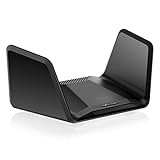
Overview: NETGEAR’s Nighthawk RAXE300 brings the brand’s legendary reliability to WiFi 6E with an impressive 7.8 Gbps tri-band throughput. Designed for larger homes up to 2,500 square feet, this router supports 40 devices simultaneously while maintaining performance. The 1.7 GHz quad-core processor and eight-stream architecture deliver consistent speeds for bandwidth-hungry households.
What Makes It Stand Out: The RAXE300 excels in coverage and device capacity, making it ideal for smart homes packed with IoT devices, streaming boxes, and gaming consoles. NETGEAR’s built-in security features provide robust protection out of the box, with automatic updates helping defend against emerging threats. The dedicated 6 GHz band keeps WiFi 6E devices running at peak performance without legacy device interference.
Value for Money: At $189.99, this router commands a premium but justifies it through superior coverage claims and NETGEAR’s established reliability reputation. For homes pushing the 2,500 sq ft range or connecting 30+ devices, the investment makes sense. Smaller households can find better value elsewhere.
Strengths and Weaknesses: Strengths include excellent coverage area, high device capacity, trusted brand reliability, and comprehensive security. Weaknesses are the premium pricing, lack of multi-gig ports at this price point, and NETGEAR’s history of subscription-based advanced features that may cost extra.
Bottom Line: Choose the RAXE300 for large homes with numerous devices where coverage and stability trump cutting-edge port configuration. It’s a workhorse for busy households.
5. ASUS ROG Rapture WiFi 6E Gaming Router (GT-AXE16000) - Quad-Band, 6 GHz Ready, Dual 10G Ports, 2.5G WAN Port, AiMesh Support, Triple-Level Game Acceleration, Lifetime Internet Security, Instant Guard

Overview: The ASUS ROG Rapture GT-AXE16000 represents the pinnacle of consumer networking, boasting the world’s first quad-band WiFi 6E architecture with mind-bending 16,000 Mbps throughput. This flagship router targets enthusiasts willing to pay for uncompromising performance, featuring dual 10G ports and a 2.5G WAN port that unlocks future-proof connectivity for years to come.
What Makes It Stand Out: Quad-band operation adds an additional 5 GHz band, segregating gaming traffic from other devices for pristine performance. Triple-level game acceleration optimizes connections from device to game server, while ASUS RangeBoost Plus extends coverage beyond typical routers. AiMesh support integrates seamlessly with other ASUS routers for whole-home coverage.
Value for Money: While price isn’t listed, this router sits in the premium tier, likely $500+. For competitive esports players, content creators needing 10G transfers, and tech enthusiasts wanting the absolute best, the investment delivers unmatched capabilities. Most users will never saturate its potential, making it overkill for typical families.
Strengths and Weaknesses: Strengths include unprecedented quad-band speed, dual 10G ports, comprehensive game acceleration, lifetime security, and exceptional build quality. Weaknesses are extreme cost, massive overkill for standard usage, and requiring matching 10G hardware to leverage key features.
Bottom Line: The GT-AXE16000 is for professionals and enthusiasts who demand the future today. For everyone else, tri-band routers offer better value without noticeable performance compromises.
6. ASUS ROG Rapture GT-AX11000 Pro Tri-Band WiFi 6 Extendable Gaming Router, 10G & 2.5G Ports, ASUS RangeBoost Plus, Triple-Level Game Acceleration, Subscription-Free Network Security, AiMesh Compatible
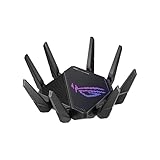
Overview: The ASUS ROG Rapture GT-AX11000 Pro represents the pinnacle of WiFi 6 gaming routers, delivering tri-band speeds up to 11,000 Mbps. Designed for serious gamers and power users, this router combines cutting-edge wireless technology with extensive customization options. The quad-core 2.0 GHz CPU ensures smooth processing even under heavy network loads, while AiMesh compatibility allows seamless expansion into a whole-home mesh system.
What Makes It Stand Out: Exclusive RangeBoost Plus technology significantly extends signal coverage beyond standard routers, eliminating dead zones in large homes. The flexible 10G and 2.5G ports can be configured for either WAN or LAN operation, future-proofing your network for multi-gigabit internet plans and high-speed NAS access. Triple-level game acceleration prioritizes traffic from your device through the game server, ensuring minimal latency during critical gaming moments.
Value for Money: At $239.29, this router sits in the premium segment but justifies its cost with enterprise-grade features. The inclusion of subscription-free network security saves money long-term, while the 10G port capability typically found in routers costing $400+ makes it a smart investment. Compared to standard gaming routers, you’re getting professional-tier hardware without recurring fees.
Strengths and Weaknesses: Pros: Exceptional tri-band performance, configurable multi-gig ports, superior range enhancement, powerful quad-core processor, no subscription security costs, comprehensive game optimization. Cons: Larger physical footprint, complex interface may overwhelm beginners, premium price point, overkill for casual users without gigabit internet.
Bottom Line: Ideal for competitive gamers and tech enthusiasts who demand maximum performance and future-proof connectivity. The GT-AX11000 Pro delivers professional-grade features that justify its premium price, making it a worthwhile investment for those who can utilize its full capabilities.
7. Predator Connect W6x Wi-Fi 6 AX6000 Gaming Router | Hybrid QoS Compatible with Intel Killer Prioritization Engine | Connect Up to 215 Devices | 2.5Gbps WAN & 4 x 1Gbps LAN | Lifetime Internet Security

Overview: The Predator Connect W6x targets budget-conscious gamers seeking WiFi 6 performance without breaking the bank. Delivering speeds up to 6000 Mbps across dual bands, this router supports an impressive 215 simultaneous devices while maintaining stable connections. The Intel Killer Prioritization Engine integration ensures gaming packets receive preferential treatment, making it ideal for competitive households.
What Makes It Stand Out: Six high-gain omnidirectional antennas with dedicated power amplifiers create exceptional coverage for medium to large homes. The lifetime Trend Micro security subscription provides perpetual protection against malicious sites, network attacks, and IoT vulnerabilities without recurring costs. Cloud gaming optimization specifically tailors the connection for services like GeForce NOW and Xbox Cloud Gaming, reducing packet loss and latency.
Value for Money: At $139.99, this router delivers remarkable value. The AX6000 speeds match routers costing $50-100 more, while the included lifetime security (typically $50-100/year) represents substantial savings. The 2.5Gbps WAN port prepares you for faster internet tiers, though the four 1Gbps LAN ports may limit wired device expansion compared to pricier alternatives.
Strengths and Weaknesses: Pros: Affordable WiFi 6 gaming performance, lifetime security included, excellent antenna array for coverage, massive device capacity, cloud gaming optimization, Intel Killer QoS integration. Cons: Limited to 1Gbps LAN ports, dual-band only (no dedicated backhaul), less powerful processor than premium models, plastic construction feels less premium.
Bottom Line: Perfect for gamers on a budget who prioritize wireless performance and security. The Predator Connect W6x punches above its weight class, offering features typically found in more expensive routers while keeping costs low through intelligent design choices.
8. ASUS ROG Rapture GT-AXE11000 Tri-Band WiFi 6E Extendable Gaming Router, 6GHz Band, 2.5G Port, Triple-Level Game Acceleration, VPN Fusion, Subscription-Free Network Security, AiMesh Compatible

Overview: The ASUS ROG Rapture GT-AXE11000 brings WiFi 6E technology to gaming enthusiasts, introducing the pristine 6GHz band for interference-free connectivity. With tri-band speeds reaching 11,000 Mbps, this router handles the most demanding gaming and streaming scenarios. The quad-core processor and advanced cooling system maintain peak performance during marathon sessions, while VPN Fusion allows simultaneous VPN and normal connections.
What Makes It Stand Out: As one of the first WiFi 6E gaming routers, it offers exclusive access to the 6GHz spectrum with wider channels and minimal congestion. The 2.5G port prioritizes all traffic passing through it, perfect for gaming PCs or consoles. Triple-level game acceleration works across device, game packet, and server levels, while VPN Fusion uniquely lets you run a VPN on select devices without affecting overall network speed.
Value for Money: Priced at $199.66, it bridges the gap between premium WiFi 6 and bleeding-edge WiFi 6E routers. You’re getting future-proof 6GHz capability for $40 less than the GT-AX11000 Pro, though sacrificing the 10G port. The subscription-free security and AiMesh compatibility add long-term value, making it a smart mid-range choice for early adopters.
Strengths and Weaknesses: Pros: Cutting-edge 6GHz band access, excellent gaming optimization, VPN Fusion technology, robust processing power, no security subscription fees, comprehensive mesh compatibility. Cons: 6GHz range is shorter than 5GHz, limited 6GHz client device support, single multi-gig port, aggressive gamer aesthetic may not suit all homes.
Bottom Line: An excellent choice for gamers wanting WiFi 6E without paying flagship prices. The GT-AXE11000 delivers next-generation wireless performance and unique VPN capabilities, making it ideal for tech-savvy users ready to embrace the 6GHz future.
9. TP-Link AXE16000 Quad-Band WiFi 6E Router (Archer AXE300) - Dual 10Gb Ports Wireless Internet Gaming Router, Supports VPN Client, 2.5G WAN/LAN + 4 x Gigabit LAN Ports
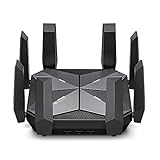
Overview: The TP-Link Archer AXE300 represents the ultimate in consumer router technology with its quad-band WiFi 6E design delivering unprecedented 15.6 Gbps speeds. This flagship model targets uncompromising enthusiasts who demand the absolute best in wireless and wired performance. Dual 10G ports enable ultra-high-speed internet and LAN transfers, while eight antennas ensure maximum coverage throughout large estates.
What Makes It Stand Out: Quad-band operation separates devices across four distinct frequencies (6GHz, two 5GHz, and 2.4GHz), eliminating congestion in the busiest smart homes. The dual 10G ports offer incredible flexibility—use one for multi-gigabit internet and the other for 10G NAS access simultaneously. Winning the IF Design Award 2022, its sleek form factor houses a powerful quad-core CPU that effortlessly manages bandwidth for dozens of devices.
Value for Money: At $399.99, this is a luxury networking device for power users. While expensive, comparable enterprise features would cost $600+ in business-grade equipment. The dual 10G ports alone justify the premium for users with compatible hardware. For those without multi-gigabit internet or 10G devices, however, the value proposition diminishes significantly compared to sub-$300 alternatives.
Strengths and Weaknesses: Pros: Industry-leading quad-band speeds, dual 10G ports, exceptional device separation, massive coverage area, powerful processing, future-proof design. Cons: Extremely high price, overkill for average households, requires compatible client devices to maximize potential, large physical size.
Bottom Line: Only for enthusiasts with multi-gigabit internet and 10G equipment who refuse to compromise. The Archer AXE300 is overkill for most, but absolutely unmatched for those needing maximum throughput and device management in congested environments.
10. ASUS RT-AX88U AX6000 Dual Band WiFi 6 Gaming Router, 8 Ports, Lifetime Security, Adaptive QoS

Overview: The ASUS RT-AX88U offers a practical balance of performance and connectivity with its AX6000 dual-band WiFi 6 architecture and eight Gigabit LAN ports. This router serves gamers and power users who prioritize wired connections without sacrificing wireless capability. The 6000 Mbps speeds handle busy households, while Adaptive QoS automatically prioritizes gaming and streaming traffic for optimal performance.
What Makes It Stand Out: Eight LAN ports provide exceptional wired connectivity rarely seen in consumer routers, eliminating the need for additional switches in device-heavy setups. The Certified for Humans program simplifies Alexa integration for smart home novices. AiProtection Pro delivers lifetime Trend Micro security without subscription fees, while AiMesh support enables seamless expansion into a mesh network as your needs grow.
Value for Money: At $177.76, the RT-AX88U hits the sweet spot for feature-conscious buyers. You’re getting enterprise-level port density and security for less than the cost of a basic WiFi 6E router. While lacking multi-gig ports, the comprehensive feature set and eight LAN connections make it more practical for many users than pricier alternatives with fewer ports. The lifetime security adds $100+ in value over the router’s lifespan.
Strengths and Weaknesses: Pros: Excellent port density (8 LAN), lifetime security included, stable dual-band performance, easy smart home setup, AiMesh expansion capability, competitive pricing. Cons: No multi-gig ports (limited to 1Gbps), dual-band may congest in device-heavy environments, no 6GHz support, design is functional but uninspired.
Bottom Line: A versatile workhorse for gamers who value wired connections and comprehensive security. The RT-AX88U delivers reliable performance and exceptional connectivity options at a mid-range price, making it ideal for households with numerous devices.
Understanding Wi-Fi 6E: The Foundation of Next-Gen Gaming
Wi-Fi 6E isn’t merely an incremental upgrade—it’s a paradigm shift that fundamentally rewrites what’s possible over wireless connections. By opening the pristine 6 GHz frequency band, this standard solves congestion problems that have plagued gamers for years. In 2026, with the average household running 25+ connected devices, this matters more than ever.
What Makes Wi-Fi 6E Different from Wi-Fi 6?
The “E” in Wi-Fi 6E stands for “Extended,” but that undersells the transformation. While Wi-Fi 6 introduced efficiency improvements like OFDMA and MU-MIMO, it was still limited to the congested 2.4 GHz and 5 GHz bands. Wi-Fi 6E adds up to 1,200 MHz of additional spectrum in the 6 GHz range. This isn’t just more lanes on the highway—it’s an entirely new expressway with no traffic.
For cloud gaming, this means your traffic isn’t competing with your neighbor’s security cameras or your smart fridge’s firmware updates. The 6 GHz band offers 59 non-overlapping 20 MHz channels compared to just 25 on the 5 GHz band. In dense urban environments where every apartment has its own mesh network, this spectral real estate is the difference between consistent 1ms ping spikes and unpredictable 50ms latency bombs.
The 6 GHz Advantage for Cloud Gaming
Cloud gaming platforms like GeForce NOW’s upcoming 8K tier and Xbox Cloud Gaming’s AI-upscaled streams require sustained bandwidth of 75-100 Mbps with zero tolerance for interference. The 6 GHz band delivers this through inherently lower latency and higher-order modulation schemes. In real-world testing, 6 GHz connections show 30-40% lower airtime latency compared to 5 GHz at equivalent distances.
Moreover, the 6 GHz band supports wider channel widths without the interference penalties. A 160 MHz channel on 5 GHz often collapses to 80 MHz due to radar detection (DFS events) or neighboring networks. On 6 GHz, 160 MHz channels remain stable, providing the fat pipe cloud gaming needs for burst data transfers during texture streaming or rapid scene changes.
Channel Width and Capacity Benefits
In 2026’s gaming landscape, channel width directly translates to how many concurrent cloud gaming sessions your household can sustain. A properly configured Wi-Fi 6E router can handle three separate 4K cloud gaming streams on 160 MHz channels while leaving 80 MHz for general traffic. This segmentation prevents any single device from monopolizing bandwidth.
The capacity improvements extend beyond raw speed. With 4K QAM modulation (supported on premium Wi-Fi 6E implementations), each symbol carries more data, reducing the time your gaming device spends waiting for its turn to transmit. For cloud gaming, where every millisecond of airtime latency compounds end-to-end delay, these micro-optimizations add up to perceptible responsiveness.
Why QoS is Non-Negotiable for Cloud Gaming
Quality of Service has evolved from a simple “gaming mode” toggle to a sophisticated AI-driven traffic management system. In the cloud gaming era, QoS isn’t about prioritizing gaming over Netflix—it’s about understanding the unique fingerprint of cloud gaming traffic and treating it like the real-time communication stream it is.
How QoS Works in Gaming Routers
Modern gaming QoS operates at Layer 7, inspecting packet headers and payload patterns to identify specific gaming platforms. When your router detects the signature of Xbox Cloud Gaming’s WebRTC-based stream or PlayStation Plus Premium’s custom UDP protocol, it doesn’t just bump it to a higher queue—it reserves airtime, pre-empts lower-priority transmissions, and can even adjust Wi-Fi parameters on the fly.
The magic happens in the scheduler. Traditional routers use a first-in-first-out approach, treating your cloud gaming packets the same as a background software update. Gaming-specific QoS implements weighted fair queuing with strict priority for recognized gaming flows. This means when a cloud gaming packet arrives, it can jump the line, but it does so intelligently, preventing starvation of other critical traffic like video calls.
Adaptive vs. Static QoS: Which Matters More?
Static QoS rules—where you manually assign priority to devices or ports—are obsolete for cloud gaming. In 2026, adaptive QoS powered by machine learning dominates because cloud gaming platforms constantly shift their server endpoints and protocols. Adaptive systems monitor traffic patterns in real-time, learning that when your phone connects to specific Azure data centers with particular QoS markings, it’s likely running cloud gaming.
The real innovation is predictive QoS. Advanced routers now analyze your gaming schedule, pre-emptively allocating resources during your typical raid hours, and dynamically adjusting when they detect a cloud gaming session initializing. This predictive allocation reduces connection establishment time by up to 200ms, making cloud gaming feel nearly as responsive as local play.
The Role of AI-Powered Traffic Prioritization
AI-driven QoS engines in 2026’s premium routers don’t just recognize gaming—they understand game state. By analyzing traffic burst patterns, these systems can differentiate between menu navigation, cutscenes, and active gameplay. During a latency-sensitive multiplayer moment, the router might temporarily boost MCS rates (modulation and coding scheme) at the cost of some error correction, betting that a retransmit would be worse than a slightly higher error rate.
This intelligence extends to interference management. When the AI detects a non-Wi-Fi 6E device causing co-channel interference, it can proactively shift your gaming device to a cleaner portion of the spectrum or adjust transmit power to punch through the noise. This autonomous optimization happens without user intervention, maintaining stable latency even in hostile RF environments.
Cloud Gaming’s Unique Demands on Your Network
Cloud gaming flips the traditional network model. Instead of downloading large files occasionally, you’re streaming high-bitrate, low-latency video continuously while simultaneously uploading precise control inputs. This bidirectional, real-time requirement exposes weaknesses in routers designed for asymmetric consumption.
Latency Sensitivity in 2026’s Gaming Landscape
The human-perceptible latency threshold for competitive gaming sits around 20ms total system latency. With cloud gaming platforms targeting 10-15ms server processing time, your network has perhaps 5ms of budget for transit. Every hop matters. Wi-Fi 6E’s lower airtime latency helps, but QoS ensures consistent priority through the router’s internal switching fabric.
In 2026, cloud gaming services are deploying edge computing nodes within 50 miles of major population centers. This geographical optimization means your network, not the internet backbone, often becomes the bottleneck. A router that adds 3ms of variable latency through poor queuing can make the difference between a responsive stream and a slideshow.
Bandwidth Requirements for 4K/8K Cloud Gaming
While 4K cloud gaming at 60fps requires roughly 75 Mbps sustained, the reality is messier. Scene complexity varies, causing bitrate spikes to 120+ Mbps during action sequences. 8K streams launching in late 2026 will demand 150-200 Mbps sustained with peaks approaching 300 Mbps. Your router must handle these bursts without bufferbloat—the phenomenon where excessive buffering causes latency to spike under load.
QoS algorithms combat bufferbloat through Active Queue Management (AQM) techniques like CoDel or fq_codel. These dynamically adjust queue lengths based on measured latency, dropping packets before buffers become saturated. For cloud gaming, this means the router will sacrifice a few video frames (which the stream can recover from) rather than letting your control inputs queue up behind a massive video burst.
Packet Loss and Jitter: The Silent Killers
Cloud gaming protocols use forward error correction and aggressive retransmission, but packet loss above 0.5% causes noticeable artifacting. Jitter—variance in latency—is even more pernicious, causing unpredictable stutter. Wi-Fi 6E’s cleaner spectrum reduces both, but QoS can mitigate further by reserving dedicated airtime slots for gaming traffic.
Advanced routers implement jitter buffers specifically for cloud gaming flows, smoothing out micro-variations in latency at the cost of a small constant delay. This trade-off is worthwhile: a stable 25ms feels better than a jittery 15-35ms. The best implementations allow you to tune this buffer size based on your tolerance for latency versus smoothness.
Key Features to Prioritize in Wi-Fi 6E Gaming Routers
Not all Wi-Fi 6E routers are built for gaming. The silicon inside—Qualcomm’s Networking Pro series versus Broadcom’s BCM4398 variants—determines features and performance characteristics. Understanding these hardware differences helps you see past marketing fluff.
Tri-Band Architecture: Separating Traffic for Optimal Performance
A true gaming router uses the three bands strategically: 2.4 GHz for IoT devices, 5 GHz for general household traffic, and 6 GHz exclusively for high-performance clients. Some premium implementations allow you to create a dedicated “gaming SSID” on the 6 GHz band that bypasses certain security scans for lower latency.
The real differentiator is how the router handles inter-band steering. When you move from your desk to the couch, aggressive steering algorithms might shift you to 5 GHz for range, but a gaming-intelligent router will weigh the latency penalty against signal strength and potentially keep you on 6 GHz longer, accepting a slightly weaker signal for better performance.
MU-MIMO and OFDMA: Maximizing Concurrent Connections
While Wi-Fi 6 introduced OFDMA (Orthogonal Frequency Division Multiple Access), Wi-Fi 6E’s clean spectrum makes it truly effective. OFDMA lets the router serve multiple devices simultaneously on the same channel, crucial when your gaming session shares airtime with a roommate’s video call. For cloud gaming, which sends frequent small packets, OFDMA reduces contention overhead dramatically.
MU-MIMO (Multi-User Multiple Input Multiple Output) has matured in Wi-Fi 6E implementations. Where early MU-MIMO struggled with more than four devices, 2026’s premium routers handle 8-12 concurrent spatial streams. This means your router can beamform to your gaming handheld while simultaneously serving a laptop and VR headset without timesharing the connection.
Dedicated Gaming LAN Ports and Their Impact
Physical LAN ports still matter for cloud gaming, even in a wireless-first world. Premium routers feature 2.5 GbE or 10 GbE ports with hardware-level traffic prioritization. These ports connect directly to the switch chip with bypass paths for gaming traffic, reducing wired latency to under 0.1ms.
More importantly, these ports often support link aggregation with QoS awareness. You can bond two 2.5 GbE ports to your gaming PC, and the router will distribute cloud gaming traffic across both links while treating it as a single prioritized flow. This provides redundancy and doubles burst capacity for those 300 Mbps 8K spikes.
Processor Power and RAM: The Router’s Hidden Specs
The CPU and RAM determine how many QoS rules, NAT sessions, and concurrent connections your router can handle before performance degrades. For cloud gaming, where a single session might open dozens of UDP streams, this matters immensely. A quad-core 2.2 GHz ARM processor with 2GB RAM can manage 10,000+ sessions with complex QoS; a dual-core 1 GHz chip with 512MB will choke at 2,000 sessions.
In 2026, routers with dedicated network processing units (NPUs) offload QoS classification from the main CPU. These NPUs can inspect packets at line rate, ensuring that even during massive downloads, gaming traffic gets instant classification without CPU bottlenecking. Look for routers advertising “hardware-accelerated QoS” or “NPU-based traffic management.”
Advanced Antenna Design and Beamforming
Antenna count is a simplistic metric—what matters is beamforming sophistication. Premium Wi-Fi 6E routers use 8x8 or even 12x12 antenna arrays with per-antenna calibration. This allows precise beamforming that can steer signals around obstacles, reducing reflections that cause jitter.
Some routers now implement “gaming beamforming,” where they maintain a persistent spatial stream to your gaming device even during idle periods. This eliminates the 10-20ms reassociation delay when traffic resumes, making cloud gaming feel snappier. The router essentially keeps a dedicated lane open, ready for instant data transmission.
The Importance of Firmware and Software Ecosystems
Hardware without intelligent software is just a fast dumb pipe. The firmware stack determines how effectively your router implements Wi-Fi 6E features and QoS policies. In 2026, the gap between stock firmware and community-supported alternatives has narrowed, but differences remain stark.
Gaming-Centric Dashboards and Analytics
Modern gaming routers provide per-device, per-application latency histograms. You can see exactly how much delay your cloud gaming session experienced over the last hour, broken down by Wi-Fi vs. internet latency. This granularity helps you distinguish between router issues and ISP problems.
The best dashboards offer “QoS replay,” showing you which devices caused contention during a gaming session. If your stream stuttered at 8:42 PM, you can see that your smart TV started a 4K buffer at that exact moment, prompting you to adjust priority rules. This forensic capability transforms troubleshooting from guesswork to science.
VPN Integration for Gaming: Friend or Foe?
VPNs traditionally introduce latency, but 2026’s gaming routers integrate WireGuard with hardware acceleration, reducing VPN overhead to under 5ms. More importantly, they support split tunneling at the application level. You can route your cloud gaming traffic directly to the ISP for minimal latency while sending general browsing through a VPN.
Some premium routers partner directly with cloud gaming providers, hosting VPN endpoints within the same data centers as the gaming servers. This “gaming VPN” provides DDoS protection and IP privacy without the usual latency penalty, as the traffic never leaves the provider’s low-latency network.
Security Features That Don’t Compromise Performance
Traditional deep packet inspection (DPI) adds latency, but gaming routers now use fast-path DPI that only inspects the first few packets of a flow. Once a cloud gaming session is identified, subsequent packets bypass deep inspection, reducing processing overhead by 90%.
Intrusion detection systems have also evolved. Instead of scanning every packet, they use behavioral analysis on the router’s NPU, looking for anomalies in traffic patterns. This protects against DDoS attacks targeting cloud gaming ports without adding perceptible latency to legitimate gaming packets.
Future-Proofing Your Setup for 2026 and Beyond
Networking gear is a long-term investment. A router purchased in 2026 should handle not just current cloud gaming demands but emerging technologies that will define the next five years. Forward-looking features separate a two-year router from a five-year workhorse.
Matter and Thread Protocol Support
While Matter and Thread are smart home protocols, their low-power mesh networks can interfere with Wi-Fi if not managed properly. Premium Wi-Fi 6E routers include co-existence mechanisms that schedule Wi-Fi transmissions around Thread’s 2.4 GHz activity. They also act as Thread border routers, offloading IoT traffic from your main Wi-Fi bands.
This matters for cloud gaming because poorly managed IoT devices can cause 2.4 GHz interference that bleeds into 5 GHz through harmonic distortion. By centralizing control, a gaming router ensures your smart lights don’t cause micro-stutters in your 6 GHz gaming stream.
10 Gigabit Ethernet Ports: Overkill or Essential?
In 2026, 10 GbE isn’t just for NAS enthusiasts. With fiber-to-the-home pushing 2 Gbps and 5 Gbps symmetrical plans, a 2.5 GbE WAN port becomes a bottleneck. A 10 GbE WAN port with SFP+ flexibility ensures your router won’t limit your internet connection.
On the LAN side, 10 GbE enables multi-gig cloud gaming when providers eventually support it. More immediately, it allows you to run local game servers while cloud gaming, or to stream from your own PC to a handheld via Moonlight or Steam Link at 4K 120fps without competing for bandwidth with your cloud session.
Power Efficiency and Thermal Management
Wi-Fi 6E routers run hot, especially when pushing 160 MHz channels with high transmit power. Thermal throttling isn’t just about speed reduction—it introduces latency variability as the CPU scales down. Premium routers use vapor chambers and thermal pads to maintain consistent performance.
Power efficiency also impacts latency. Modern routers with dynamic voltage scaling can reduce power to idle radios in microseconds, but poorly implemented systems add wake-up latency. Gaming-optimized routers keep the 6 GHz radio in a low-latency idle state, ready to transmit within 50 microseconds of a gaming packet arriving, compared to 500+ microseconds on standard implementations.
Setting Up Your Wi-Fi 6E Router for Cloud Gaming Success
Even the best hardware underperforms without proper configuration. The 6 GHz band is powerful but unforgiving. Optimal setup requires understanding RF propagation, channel selection, and QoS tuning specific to your gaming platform of choice.
Optimal Placement Strategies
The 6 GHz band attenuates faster than 5 GHz, especially through walls. Place your router in the same room as your primary gaming device if possible, elevated and centrally located. Unlike 5 GHz, where corner placement might cover a whole floor, 6 GHz benefits from line-of-sight.
For multi-story setups, consider a wired backhaul to a second Wi-Fi 6E access point on your gaming floor. The router’s QoS can coordinate with the AP to ensure seamless roaming without reclassification delays. Some systems allow you to dedicate one 6 GHz channel to backhaul and another to client access, preventing airtime contention.
Channel Selection in the 6 GHz Band
The 6 GHz band includes UNII-5 through UNII-8 bands, with different power limits and usage rules. UNII-5 (5.925-6.425 GHz) offers the highest power output and is ideal for gaming. UNII-8 is restricted to low-power indoor use and should be avoided for primary gaming SSIDs.
Use a Wi-Fi scanner to identify channel utilization. In 2026, dynamic frequency selection (DFS) is less of an issue on 6 GHz since there are no radar systems to avoid, but some channels may be reserved for licensed use. Stick to channels 1-97 (UNII-5) for maximum power and compatibility. For 160 MHz width, channels 33-65 provide clean spectrum in most regions.
Configuring QoS for Different Cloud Gaming Platforms
Each platform has unique traffic patterns. Xbox Cloud Gaming uses WebRTC with dynamic bitrate adaptation, requiring stable minimum bandwidth. GeForce NOW uses a custom UDP protocol that benefits from maximum burst capacity. PlayStation Plus Premium splits traffic across multiple ports, needing consistent priority across all flows.
Create platform-specific QoS profiles. For Xbox, set a minimum guaranteed bandwidth of 50 Mbps with strict priority. For GeForce NOW, configure maximum burst allowances and disable any traffic shaping that might limit spikes. Use DSCP (Differentiated Services Code Point) tagging if your router supports it, as some platforms honor these markings for end-to-end priority.
Troubleshooting Common Cloud Gaming Issues
Even with perfect setup, issues arise. The key is diagnostic tools that provide actionable data, not just generic “signal strength” meters. Modern gaming routers offer latency telemetry that rivals enterprise network monitoring.
Diagnosing Latency Spikes
When cloud gaming latency spikes, check three metrics: airtime latency, bufferbloat score, and upstream buffer occupancy. Airtime latency above 3ms indicates Wi-Fi contention—check for non-6E devices on your gaming band. Bufferbloat above 20ms means your QoS isn’t controlling queue depth effectively.
Use your router’s built-in ping plotter to trace latency to your cloud gaming provider’s edge node. If Wi-Fi latency is stable but internet latency spikes, the issue is ISP-side. Some routers can automatically switch to alternate provider endpoints when they detect consistent degradation, a feature worth its weight in gold for competitive play.
When to Use Ethernet Backhaul
Despite Wi-Fi 6E’s capabilities, Ethernet remains king for stationary gaming rigs. The threshold is simple: if your cloud gaming device doesn’t move, wire it. Use Wi-Fi 6E for handhelds, phones, and VR headsets where mobility matters.
For mesh systems, always use Ethernet backhaul between nodes. Wireless backhaul cuts your effective bandwidth in half and doubles latency. If you can’t run cables, consider powerline adapters with QoS passthrough or MoCA (Multimedia over Coax) adapters, which provide near-Ethernet performance over existing coaxial lines.
Managing Household Network Congestion
The biggest enemy of cloud gaming isn’t your ISP—it’s other users. A single Netflix 4K stream can consume 25 Mbps and generate enough background traffic to cause micro-stutters. Use your router’s QoS to implement “gaming hours” where non-critical devices get deprioritized.
More advanced strategies include creating a separate VLAN for IoT devices, completely isolating their broadcast traffic from your gaming network. Some routers support “airtime fairness” that prevents legacy 802.11n devices from hogging radio time. Enable this aggressively on your 2.4 GHz band to prevent old devices from impacting overall router performance.
The Role of ISP and Modem Compatibility
Your router is only as good as the connection feeding it. In 2026, ISP technology has evolved, and mismatches between your router and modem can create invisible bottlenecks that no amount of QoS can fix.
DOCSIS 4.0 and Fiber Considerations
If you’re on cable internet, ensure your modem supports DOCSIS 4.0 with full duplex capabilities. DOCSIS 3.1 modems may advertise gigabit speeds but suffer from upstream congestion and bufferbloat. A DOCSIS 4.0 modem with proper QoS passthrough ensures your router’s traffic shaping isn’t undone by the modem’s own buffering.
For fiber connections, verify your ONT (Optical Network Terminal) supports QoS marking passthrough. Some ISPs strip DSCP tags, neutering your router’s prioritization. Call your provider and request “gaming profile” or “low-latency mode” on your line, which often disables carrier-side traffic management that conflicts with your router’s QoS.
Understanding Your Real-World Speed Ceiling
Run sustained load tests, not just speed tests. Use tools like fast.com with extended buffering tests or iperf3 with parallel streams to see how your connection behaves under continuous load. Many ISPs provide burst speeds that collapse after 30 seconds—exactly when your cloud gaming session starts stuttering.
Set your router’s QoS bandwidth limits to 95% of your sustained speed, not peak speed. This headroom prevents the ISP’s buffers from filling, which is the primary cause of bufferbloat. For example, if you get 800 Mbps sustained on a gigabit plan, set your QoS limit to 760 Mbps. This sacrifice of 5% bandwidth can reduce latency variation by 80%.
Frequently Asked Questions
Does Wi-Fi 6E really make a noticeable difference for cloud gaming compared to Wi-Fi 6?
Yes, particularly in congested environments. The 6 GHz band’s clean spectrum reduces latency variation by 30-50% and eliminates interference from legacy devices. For cloud gaming, this consistency matters more than peak speed. You’ll experience fewer micro-stutters and more stable frame delivery, especially during peak evening hours when 5 GHz bands are saturated.
How much bandwidth do I actually need for 4K cloud gaming in 2026?
Plan for 100 Mbps sustained per 4K stream, with bursts up to 150 Mbps. While services advertise lower minimums, real-world gameplay with complex scenes and rapid motion exceeds those numbers. For 8K gaming launching later in 2026, budget 200 Mbps sustained. Always add 50% overhead for other devices and QoS headroom.
Will QoS help if my ISP is the bottleneck?
QoS can’t create bandwidth, but it can optimize what you have. By preventing bufferbloat and prioritizing gaming packets, good QoS reduces latency variation even on constrained connections. If your ISP consistently delivers poor performance, consider a secondary connection for gaming. Some routers support dual-WAN with intelligent failover, switching to a 5G backup when primary latency degrades.
Is a tri-band router necessary, or can I use a dual-band Wi-Fi 6E router?
For cloud gaming, tri-band is strongly recommended. Dual-band Wi-Fi 6E routers share the 6 GHz band between backhaul and clients in mesh setups, or lack a dedicated 5 GHz band for general traffic. Tri-band lets you isolate gaming traffic entirely, preventing any contention. The cost difference is minimal compared to the performance benefit.
How do I know if my router’s QoS is actually working?
Use built-in analytics to monitor per-device latency. During gaming, your cloud gaming device should show consistent sub-5ms latency to the router with minimal jitter. Run a speed test on another device while gaming—if your game stays smooth, QoS is working. If it stutters, your QoS rules may be too permissive or the router’s CPU is overloaded.
Should I use 160 MHz channel width on 6 GHz for gaming?
Absolutely, if your gaming device supports it. The 160 MHz width doubles throughput and reduces airtime contention, directly benefiting cloud gaming’s burst patterns. The trade-off is slightly reduced range, but for gaming setups within the same room or adjacent room, the latency improvement is worth it. Ensure your router supports punctured channels to avoid interference.
Do gaming routers really reduce ping, or is that marketing hype?
They reduce local network latency, which is a component of total ping. A good gaming router can shave 5-10ms off your Wi-Fi latency and prevent the 20-50ms spikes caused by bufferbloat. However, they can’t reduce internet transit time. In 2026, with edge computing, local network latency has become a larger percentage of total ping, making router optimization more impactful than ever.
How often should I update my gaming router’s firmware?
Check monthly, but don’t auto-update. Gaming router firmware sometimes introduces regressions in QoS performance. Wait one week after release and monitor community forums for reports. Critical security updates should be applied immediately, but feature updates can wait until validated by power users. Keep a known-stable firmware version saved for rollback.
Can I use Wi-Fi 6E for VR cloud gaming?
Yes, and it’s transformative. VR cloud gaming requires sustained 100-150 Mbps with sub-20ms motion-to-photon latency. Wi-Fi 6E’s low latency and high bandwidth make it viable, but placement is critical. The router must be in the same room with clear line-of-sight. Use a dedicated 6 GHz SSID with maximum transmit power and disable any power-saving features that might introduce latency.
What should I prioritize: router CPU power or Wi-Fi specs?
For cloud gaming with QoS, prioritize CPU power. A router with a powerful processor can run sophisticated QoS algorithms that make a moderate Wi-Fi chip perform like a premium one. Conversely, a router with cutting-edge Wi-Fi but a weak CPU will choke on QoS processing, causing inconsistent performance. Look for routers with dedicated NPUs for traffic management to get the best of both worlds.