Building a smart-home lab in a rental apartment feels like assembling a puzzle where half the pieces are locked behind a “no modifications” clause. You need stable, hardwired connections for your Raspberry Pi cluster, security cameras, and automation hubs, but your landlord won’t appreciate you fishing cables through walls or installing a 24-port patch panel in the living room. This is where budget Ethernet splitters become your secret weapon—delivering wired reliability without permanent installation or blown budgets. For under thirty dollars, these humble devices can transform a single wall jack into a multi-device networking backbone that moves with you when the lease ends.
The trick is knowing what actually matters when shopping in this price range. Spec sheets can be misleading, and that “gigabit” claim might not hold up when you’re simultaneously flashing firmware to three ESP32 boards while your Home Assistant server syncs with the cloud. Let’s cut through the marketing noise and focus on what makes a splitter truly renter-friendly, lab-capable, and worth your limited cash.
Top 10 Budget Ethernet Splitters for Renters
Detailed Product Reviews
1. RJ45 Ethernet Network Y Splitter Adapter Cable, RJ45 Coupler Connector 1 Male to 2 Female Cat6 Splitter Cable Adapter Suitable for Super Category 5 Ethernets, Category 6 Ethernet and More

Overview:
The RJ45 Ethernet Network Y Splitter Adapter Cable is a passive splitter that converts one RJ45 socket into two female ports for $4.99. Designed for users who need network access in different rooms without moving cables, this adapter physically divides the eight Ethernet pins into two channels (1236/4578), limiting each connection to 100Mbps. It enables alternating use between locations but cannot support simultaneous device connectivity.
What Makes It Stand Out:
This splitter features gold-plated needle cores that shield against electromagnetic interference for stable signal transmission. Its fixed RJ45 interface minimizes connection issues, while compatibility with Cat5 through Cat8 cables ensures versatility. The pure physical connection requires no software configuration, making it truly plug-and-play for its intended purpose.
Value for Money:
At under five dollars, this adapter serves an extremely narrow niche. It’s exponentially cheaper than a network switch, but the single-device limitation drastically reduces utility. For users who genuinely just need to alternate between two locations, it offers acceptable value. However, most buyers would be better served investing more in a true switch that enables simultaneous connections.
Strengths and Weaknesses:
Strengths include rock-bottom pricing, stable interference-resistant connections, plug-and-play simplicity, and wide compatibility. Critical weaknesses are the inability to support two devices simultaneously, the 100Mbps speed cap, persistent customer confusion despite clear warnings, and its inability to actually expand network capacity.
Bottom Line:
This splitter only makes sense for users needing to alternate network access between two rooms. For true network expansion with simultaneous connections, invest in a proper Ethernet switch instead. The product description’s warnings are explicit—heed them carefully before purchasing.
2. Internet Splitter 1 in 4 Out, Gigabit Ethernet LAN Splitters High Speed 1000Mbps RJ45 Ethernet Switch for Cat8/7/6/5e/5 Cable [4 Devices Simultaneous Networking]
![Internet Splitter 1 in 4 Out, Gigabit Ethernet LAN Splitters High Speed 1000Mbps RJ45 Ethernet Switch for Cat8/7/6/5e/5 Cable [4 Devices Simultaneous Networking]](https://m.media-amazon.com/images/I/51C-uJ7wGTL._SL160_.jpg)
Overview:
The Internet Splitter 1 in 4 Out is a genuine Gigabit Ethernet switch that transforms one network connection into four simultaneous, high-speed ports for $23.99. Unlike passive splitters, this active device supports true 1000Mbps data transfer across all four outputs concurrently, making it a legitimate network expansion solution for home offices and small workspaces.
What Makes It Stand Out:
This device delivers genuine switching capability with full Gigabit speeds on all ports simultaneously—something passive splitters cannot match. The USB-C power delivery system provides stable operation without bulky adapters. Its plug-and-play design requires zero configuration, and broad compatibility with Cat5 through Cat8 cables ensures future-proofing for various network environments.
Value for Money:
While significantly more expensive than passive adapters, this switch delivers actual functionality. The ability to connect four devices simultaneously at Gigabit speeds justifies the $24 price tag. Compared to larger desktop switches, it offers comparable performance in a compact form factor, representing solid value for users needing moderate port expansion.
Strengths and Weaknesses:
Strengths include simultaneous four-device connectivity, full Gigabit speeds, USB-C power convenience, effortless setup, and robust compatibility. The primary weakness is the higher cost relative to passive alternatives. The requirement for external power via USB-C may limit placement options, though the included cable provides flexibility.
Bottom Line:
This is a proper network switch that delivers on its promises. For users needing to connect multiple wired devices simultaneously, it’s worth every penny. Skip the confusing passive splitters and invest in this reliable, high-performance solution for true network expansion.
3. Oxsubor RJ45 Splitter Connectors Adapter 1 to 2 Ethernet Coupler Double Socket HUB Interface Contact Modular Plug Connect Network LAN Internet Cat5 Cat62 Pack (Can’t Run Both at The Same TIME)
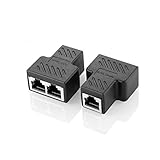
Overview:
The Oxsubor RJ45 Splitter Connectors Adapter comes as a 2-pack of passive splitters, each converting one Ethernet connection into two female ports. At $8.99 for two, these adapters target users who need network access in multiple locations without running additional cabling. The manufacturer repeatedly emphasizes in all-caps warnings that both devices cannot be used simultaneously.
What Makes It Stand Out:
The two-pack configuration offers immediate value for users needing splitters at multiple locations. Each unit features eight-core gold-plated needle cores and robust metal shielding that protects against EMI and RFI interference better than plastic alternatives. The adapters also serve as simple cable extenders when your primary Ethernet cable falls short of the required length.
Value for Money:
Getting two shielded splitters for under nine dollars presents reasonable value, provided you understand the limitations. Each splitter costs less than $4.50, making them slightly cheaper than buying individually. However, the fundamental constraint of single-device usage means you’re paying for convenience rather than true network expansion capability, which diminishes overall value.
Strengths and Weaknesses:
Strengths include the dual-pack value proposition, superior metal shielding, gold-plated contacts for stable transmission, and cable extension capability. Weaknesses mirror other passive splitters: inability to support simultaneous connections, speed limitations to 100Mbps, and persistent customer confusion despite explicit warnings about functionality.
Bottom Line:
This 2-pack suits users who need physical network access in two separate locations for alternating use. The build quality exceeds many competitors, but the same fundamental limitations apply. Only purchase if you specifically need to switch between devices in different rooms, not run them concurrently.
4. Jxiwfvl RJ45 1 Male to 3 Female LAN Splitter Cable, Ethernet Adapter for Cat5, Cat5e, Cat6, Cat7 LAN Ethernet Socket Network Connector Adapter Compatible with Routers, Set-top Boxes, Computers

Overview:
The Jxiwfvl RJ45 1 Male to 3 Female LAN Splitter Cable offers a unique three-way passive split, extending a single Ethernet port to three female connectors for $8.99. This compact adapter serves users who frequently switch between multiple devices or locations without constant cable swapping, though simultaneous usage remains impossible like all passive splitters.
What Makes It Stand Out:
The triple-port design is uncommon among passive splitters, providing more flexibility than typical two-way models. Its compact 20x10x2.2cm form factor enhances portability for mobile professionals. The plastic housing incorporates a protective conductive circuit to prevent damage and electromagnetic interference, while universal compatibility spans Cat5 through Cat7 cables.
Value for Money:
At the same price point as many two-way splitters, the third port adds versatility without additional cost. However, the passive nature means you’re still limited to one active connection at a time. For users needing three location options, it delivers decent value, but a proper switch remains superior for true expansion and should be strongly considered.
Strengths and Weaknesses:
Strengths include the rare three-port configuration, compact portability, plug-and-play operation, protective circuitry, and competitive pricing. Weaknesses involve the plastic construction’s long-term durability concerns, 100Mbps speed limitation, inability to run multiple devices simultaneously, and high potential for user confusion about actual capabilities.
Bottom Line:
This three-way splitter works for specific scenarios requiring access from three locations on a rotating basis. While more versatile than two-port versions, it shares the same critical limitations. For permanent multi-device setups, choose an active switch instead. Understand its constraints thoroughly before purchasing.
5. Binardat 1 to 2 Gigabit Network Splitter, 3 Port Gigabit Ethernet Switch, Type-C Power Supply, Mini Size Plug and Play (White)

Overview:
The Binardat 1 to 2 Gigabit Network Splitter is a compact three-port Ethernet switch offering one input and two simultaneous Gigabit outputs for $13.99. Unlike passive adapters, this active switch enables concurrent connectivity at full 1000Mbps speeds, making it a legitimate mini network expansion solution for home and office environments where space is at a premium.
What Makes It Stand Out:
This device delivers true simultaneous dual-port connectivity in an incredibly compact 5.1×5.6×1.8cm footprint—smaller than most competitors. The fanless design ensures silent operation, while Type-C power delivery modernizes the connection standard. Auto-negotiation and auto MDI-MDIX eliminate manual configuration entirely, and LED indicators provide clear status monitoring.
Value for Money:
At $13.99, this represents exceptional value for a genuine Gigabit switch. It costs significantly less than larger desktop switches while delivering comparable performance. The mini size adds versatility for cramped spaces, and the included USB power cable means no proprietary adapters. For users needing just two additional ports, it hits the sweet spot of price and performance.
Strengths and Weaknesses:
Strengths include true simultaneous Gigabit speeds, ultra-compact silent operation, modern Type-C power, plug-and-play simplicity, and lifetime technical support. The only notable weakness is the limited two-output-port capacity, which may be insufficient for users needing more expansion. The power requirement is minimal and well-implemented.
Bottom Line:
This is the best budget-friendly option for legitimate network expansion. It avoids the confusion of passive splitters while delivering real simultaneous connectivity. For most home users needing a few extra ports, it’s perfect. Highly recommended for its performance, diminutive size, and outstanding value proposition.
6. 1000Mbps High Speed Ethernet Cable Splitter 1 in 2 Out,LAN Splitter with USB Power Cable,Gigabit RJ45 LAN Network Extension for Cat8/7/6/5e/5 Cable

Overview: This active Ethernet splitter from an unnamed manufacturer promises to divide a single internet signal between two devices simultaneously, supporting gigabit speeds up to 1000Mbps on each output. Designed for modern networks, it works with Cat5 through Cat8 cabling and requires USB power to operate its internal chip. The device targets users needing to share one network drop between two endpoints like a computer and TV box without running new cables.
What Makes It Stand Out: Unlike passive splitters that often cause network conflicts, this model uses an integrated chip to actively manage traffic, enabling true simultaneous connectivity. The dual gigabit interfaces operate independently without interference, while USB power delivery ensures stable performance with minimal heat generation. Its broad compatibility across cable categories and plug-and-play operation eliminates complex configuration.
Value for Money: At $7.99, this splitter sits in the budget-friendly range for active network components. Passive adapters cost $3-5 but frequently fail with modern equipment. True network switches start around $15-20. For users needing only two devices connected, this offers switch-like functionality at half the price, making it cost-effective for simple setups.
Strengths and Weaknesses: Strengths include genuine simultaneous device support, gigabit speed maintenance, stable active chipset, and universal cable compatibility. The compact design suits tight installations. Weaknesses involve the mandatory USB power requirement, which may limit placement options. Some users report compatibility issues with certain routers or PoE systems. The unknown brand raises concerns about long-term reliability and support.
Bottom Line: This active splitter works well for specific scenarios where running a second cable is impractical. It’s ideal for splitting a connection between a smart TV and streaming device or a computer and printer. However, understand its limitations: it won’t replace a proper switch for heavy traffic, and the USB power requirement may be inconvenient. Verify your devices don’t require PoE before purchasing.
7. RJ45 Network Switch Selector 2x1 Ethernet RJ45 Network Switch Splitter Selector Box 100M/1000M
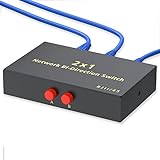
Overview: The Kisdoo network selector is a mechanical A/B switch that manually toggles between two RJ45 connections. Unlike electronic splitters, this device physically connects one input to either of two outputs (or vice versa) through a simple push-button interface. Housed in a metal case, it supports both network and telephone applications via 8P8C connectors, making it a versatile solution for scenarios requiring selective connectivity rather than simultaneous sharing.
What Makes It Stand Out: Its robust metal construction provides superior durability and EMI shielding compared to plastic alternatives. The dual RJ45/RJ11 compatibility offers unusual flexibility for users managing both network and phone lines. Operating without external power or drivers, it delivers reliability through simplicity—no firmware updates or electronic components to fail. The manual control ensures predictable, secure switching for sensitive environments.
Value for Money: Priced at $11.59, this mechanical selector occupies a middle ground between cheap passive splitters and powered switches. For users who genuinely need only one active connection at a time, it eliminates the cost and complexity of electronic devices. The metal build quality suggests longevity, potentially outlasting powered alternatives. However, its inability to support simultaneous connections limits its value compared to true switches.
Strengths and Weaknesses: Strengths include durable metal housing, no power requirement, broad compatibility, and manual control that prevents automatic switching errors. It’s simple and reliable. Weaknesses are significant: cannot run two devices simultaneously, requiring manual intervention that becomes tedious. Speed ratings are ambiguous—while labeled 100M/1000M, mechanical switches often introduce signal degradation at gigabit speeds. The small form factor may tip over due to cable weight.
Bottom Line: This device serves a specific niche: securely switching between two network sources or destinations. It’s perfect for sharing a single wall jack between a work laptop and personal computer, or connecting a computer to either a LAN or isolated security network. Don’t buy this expecting simultaneous connectivity. If you need constant access from multiple devices, invest in a proper network switch instead.
8. FANTIA RJ45 Ethernet Cable Splitter Network Adapter, 1 Female to 2 Female LAN Ethernet LAN Network Extension Splitter Cable for Cat 5, Cat5e, Cat 6,Black 1 Pack

Overview: This ultra-compact passive splitter from FANTIA divides a single RJ45 connection into two female ports without active electronics. Measuring just 1.6 x 1.4 x 0.8 inches, it’s essentially a wired junction that physically splits the eight Ethernet conductors into two sets of four pins each. The manufacturer claims simultaneous internet access for two devices, but this passive design fundamentally conflicts with standard Ethernet protocols that require all eight pins for full-duplex gigabit communication.
What Makes It Stand Out: The primary distinguishing feature is its rock-bottom $5.38 price point—among the cheapest Ethernet splitting solutions available. Its diminutive size allows installation in the tightest spaces behind furniture or equipment racks. The plug-and-play simplicity appeals to non-technical users seeking an immediate, no-configuration solution. The matte black finish blends discreetly with most equipment.
Value for Money: While inexpensive, the value proposition is questionable. It may function for connecting two 10/100Mbps devices that don’t transmit simultaneously, but modern gigabit equipment will experience conflicts, dropped connections, or complete failure. Users often mistake its low price for a bargain, then spend hours troubleshooting network issues. A $10 powered switch delivers infinitely more reliable performance, making this false economy for most applications.
Strengths and Weaknesses: Strengths include minimal cost, tiny footprint, and absolute simplicity—no power or configuration needed. It’s potentially useful for specialized applications like sharing a connection between two rarely-used devices. Weaknesses are severe: passive splitting violates Ethernet standards, causing IP conflicts and collisions. It reduces available bandwidth, limits speeds to 100Mbps maximum (often less), and provides no electrical isolation. Network administrators universally advise against such devices.
Bottom Line: Avoid this product for general networking. It cannot reliably support two active devices simultaneously on modern networks. The only valid use cases involve connecting one device at a time (defeating its purpose) or splitting a connection for specialized non-standard equipment. For home users wanting to share internet access, purchase a proper Ethernet switch. This splitter creates more problems than it solves and belongs in the category of networking snake oil.
9. TNP RJ45 Ethernet Cable Combiner/Splitter Kit (1 Pair), 2 Male to 1 Female & 1 Male to 1 Female POE Data Adapter LAN Ethernet Network Extender Y Splitter Cat5e Cat6 Cable for Surveillance

Overview: This specialized TNP kit comprises paired adapters designed specifically for surveillance system installations. Unlike general-purpose splitters, it separates data and power for CCTV applications, supporting HDCVI, AHD, and TVI signals up to 1080p over extended distances. The kit includes a combiner (2 male to 1 female) for the camera end and a splitter (1 male to 2 female) for the DVR/NVR end, enabling PoE and data transmission through a single cable run while maintaining surge protection.
What Makes It Stand Out: Purpose-built for security professionals, it handles analog HD video signals that standard Ethernet splitters cannot process. Built-in surge and transient overvoltage protection safeguards expensive camera equipment from electrical spikes. The impressive 200-300 meter transmission range far exceeds standard Ethernet limitations. Its compatibility with any 10/100 switch, PoE or non-PoE, provides installation flexibility in legacy and modern systems alike.
Value for Money: At $13.99 for the pair, this kit offers excellent value for surveillance installers. Individual specialized baluns often cost $10+ each. For DIY security upgrades, it eliminates the need to run separate power and data cables, saving substantial labor and material costs. However, its limited 100Mbps speed cap and specialized nature reduce value for general networking purposes.
Strengths and Weaknesses: Strengths include robust surge protection, exceptional transmission distance for HD video, PoE compatibility, and specialized design for surveillance ecosystems. The plug-and-play operation simplifies professional installations. Weaknesses involve complete unsuitability for standard computer networking—it’s not a generic Ethernet splitter. The 100Mbps limitation restricts future-proofing, and the unidirectional design requires correct pairing. Documentation is minimal, confusing non-professional buyers.
Bottom Line: This is a niche product that excels in its intended surveillance role but fails as a general-purpose network splitter. Purchase this exclusively for extending HD security camera connections where running separate power lines is impractical. For home or office Ethernet sharing, buy a standard switch. Security installers will appreciate its robust protection and distance capabilities, but typical consumers should look elsewhere. The product’s value is entirely context-dependent on your surveillance needs.
10. Toptekits 4 Port Way 8P8C RJ45 Network Ethernet Manual ABCD Sharing Switch Box,4 Ports Network Switch Splitter Selector Hub 4-in 1-Out or 1-in 4-Out

Overview: This Toptekits mechanical switch box provides manual selection between four RJ45 connections in either direction. Functioning as a 4-in-1-out or 1-in-4-out selector, it allows users to physically route one active connection among four devices or networks. The metal housing contains robust mechanical switches rated for over 100,000 cycles, while the 10/100Mbps specification indicates its focus on reliability over speed. No external power or software configuration is required.
What Makes It Stand Out: Four ports offer significantly more flexibility than typical 2-way switches, accommodating complex setups like switching between multiple networks or sharing one wall jack among several devices. The exceptional 100,000+ cycle switch rating suggests professional-grade durability. Its bidirectional capability allows use as either a source selector or device sharer, adapting to varying needs. The compact metal enclosure provides stability and EMI shielding unmatched by plastic desktop switches.
Value for Money: At $19.99, it represents solid value for specialized applications requiring manual network isolation. Comparable 4-way mechanical switches range from $15-30, placing this competitively. For scenarios demanding physical network separation for security compliance, it’s far cheaper than managed switches. However, its 100Mbps limitation and manual operation make it poor value for modern high-speed networking where a $20 auto-sensing Gigabit switch would outperform it.
Strengths and Weaknesses: Strengths include durable metal construction, high switch cycle rating, no power requirement, and flexible 4-port configuration. The manual control provides absolute security through physical isolation. Weaknesses are the 100Mbps speed cap, which bottlenecks modern connections, and the tedious manual switching process unsuitable for frequent changes. It cannot support multiple simultaneous connections, limiting practical utility. The lightweight design may slide on desks despite its metal case.
Bottom Line: This switch serves users needing secure, manual network segregation rather than convenience. It’s ideal for connecting a computer to either a corporate LAN, isolated lab network, or home internet—one at a time. Security-conscious professionals and test engineers will appreciate its physical isolation capability. For general home or office use requiring simultaneous device connectivity, purchase a standard Gigabit switch instead. This is a specialized tool, not a productivity device.
Understanding Ethernet Splitters: The Basics
What Is an Ethernet Splitter, Really?
An Ethernet splitter isn’t magic—it’s a physical adapter that divides the eight internal wires of a single Ethernet cable into two separate circuits. Unlike powered network switches that intelligently route traffic, splitters create two distinct pathways by repurposing unused wire pairs. Think of it as a Y-shaped plumbing fitting for data rather than a smart traffic controller. This simplicity is exactly why they cost less than a pizza and require zero configuration.
How Splitters Differ from Switches and Hubs
Here’s where most renters get confused. A splitter shares bandwidth passively between two connections, while a switch actively manages traffic and provides full bandwidth to each port. Hubs? They’re ancient history—dumb broadcast devices that’ll bottleneck your entire lab. For temporary setups, splitters win on cost and portability, but you’ll sacrifice speed when both connected devices demand maximum throughput simultaneously.
Why Splitters Make Sense for Temporary Setups
Your smart-home lab probably doesn’t need gigabit speeds 24/7. That Zigbee coordinator, smart thermostat bridge, and dedicated NTP server each sip data slowly. Splitters let you run multiple low-bandwidth devices over existing infrastructure without adding powered hardware that becomes another moving-day liability. When you’re packing up, they slip into a pocket—no power bricks, no configuration backups.
Why Renters Need Budget-Friendly Network Solutions
The Temporary Lab Dilemma: No Drilling, No Damage
Rental agreements universally frown upon drilling holes for cable runs. Even “friendly” landlords draw the line at Ethernet jacks appearing in every room. Splitters work with the outlets you already have, keeping your security deposit intact and your DIY ambitions satisfied. Run one cable along baseboards with adhesive clips, split it behind your desk, and you’ve got a three-device lab station that disappears in minutes.
Landlord Restrictions and Security Deposit Protection
Network modifications fall into a gray area that landlords love to exploit during move-out inspections. That “professional installation” you paid for? They might claim it damaged drywall. Splitters require zero permanent changes. If you can plug in a lamp, you can install a splitter—making it the most landlord-compliant networking solution short of Wi-Fi.
Moving Day Considerations
Every tech enthusiast has opened a moving box to find a tangle of power adapters and forgotten wall warts. Splitters weigh ounces and cost so little that losing one won’t trigger a budget post-mortem. Buy a few spares, keep them in a labeled ziplock, and your next apartment’s lab infrastructure is already packed.
Key Features to Evaluate in Sub-$30 Splitters
Port Configuration: 2-Way vs. 4-Way Designs
Most budget options are 2-way splitters, turning one cable into two connections. Some adventurous models offer 4-way splitting, but these often cheat by dropping speeds to 100Mbps on all ports. For smart-home labs, 2-way is the sweet spot—maintaining reasonable speeds while doubling your connection count. Four-way splitters only make sense if you’re connecting exclusively low-bandwidth IoT devices.
Cable Compatibility: Cat5e, Cat6, and Beyond
That “Cat6 compatible” sticker means little if the internal contacts are thin, cheap metal. Look for splitters that explicitly support Cat5e at minimum—this ensures the wire gauge and pinouts match modern standards. Cat6a compatibility is a bonus, but overkill for most sub-gigabit lab devices. The real test is whether the RJ45 jack grips cables securely without excessive wiggle room.
Build Quality on a Budget
Thirty dollars won’t buy milled aluminum, but you shouldn’t accept flimsy plastic that cracks when you look at it. Quality budget splitters use polycarbonate housings with some heft. Give the RJ45 jacks a firm press—if they feel mushy or the retention clip doesn’t snap crisply, keep shopping. Your lab deserves better than connections that fail when you bump the desk.
LED Indicators: Essential or Optional?
Most splitters under $30 skip LEDs to save cost. For temporary labs, this is actually fine—LEDs consume power and add failure points. You’ll know if your connection works by watching device status lights. If you must have visual confirmation, spend the extra $5 on a model with link/activity LEDs, but don’t sacrifice port quality for blinky lights.
Technical Specifications That Matter
Speed Ratings: Understanding 100Mbps vs. 1Gbps
Here’s the dirty secret: many budget splitters only support 100Mbps on each leg, even when marketed as “gigabit ready.” True gigabit splitting requires all four wire pairs, which isn’t possible when dividing one cable into two connections. For smart-home labs, 100Mbps is often sufficient—your Philips Hue Bridge uses barely 10Mbps. But if you’re pushing firmware updates to multiple devices or running a local NVR, that speed ceiling becomes a frustrating bottleneck.
Power Over Ethernet (PoE) Pass-Through
Running a PoE security camera or access point? Most splitters under $30 don’t support PoE pass-through, and those that do often can’t deliver the full 802.3af/at power budget to both outputs. If PoE is non-negotiable, verify the splitter explicitly lists PoE support with voltage ratings. Otherwise, plan on using separate injectors or powered switches for your PoE devices.
Shielding and Interference Resistance
Apartments are RF nightmares—neighbors’ Wi-Fi, microwaves, baby monitors all create electromagnetic chaos. Unshielded splitters act like tiny antennas, introducing errors that manifest as slow speeds or dropped connections. Look for “shielded” or “STP” in descriptions, which indicates metal shielding around the circuitry. It’s a $2 feature that saves hours of troubleshooting mysterious disconnects.
Duplex Communication: Half vs. Full
Budget splitters often force half-duplex mode, meaning devices can’t send and receive simultaneously. For IoT devices that mostly report sensor data, this is invisible. But try half-duplex with a device that ACKs every packet, and latency spikes dramatically. Product descriptions rarely mention duplex mode, so check user reviews for phrases like “slow response” or “high ping”—code for half-duplex issues.
The Real-World Performance Factor
Bandwidth Sharing Realities
When two devices share a split connection, they’re not just sharing the cable—they’re sharing the total bandwidth. If your internet plan provides 200Mbps, a splitter might deliver 95Mbps to each device when both are active. This isn’t a problem when your smart mirror updates weather data while your ESP32 downloads a 50KB config file. It becomes a problem when you’re simultaneously streaming camera footage and updating Home Assistant.
Latency Considerations for Smart Devices
Smart-home responsiveness depends on low latency. Splitters add minimal delay—usually under 1ms—but this compounds with each hop. In a complex lab with multiple splitters cascaded (a bad idea, by the way), that 1ms becomes 5ms, which can make voice commands feel sluggish. Keep splitter chains shallow: one split per cable run, maximum.
Distance Limitations in Apartment Settings
Ethernet specs allow 100 meters, but splitters eat into that budget. Each connection introduces signal loss, effectively reducing your reliable run length to about 75 meters total. In apartments, this rarely matters—unless you’re wiring from a basement utility closet to a third-floor loft. For typical wall jack-to-desk distances under 50 feet, splitters perform flawlessly.
Smart-Home Lab Specific Requirements
Device Density: How Many Gadgets Can You Connect?
Practical math: a 2-way splitter gives you two ports. Daisy-chain another splitter? You get three usable connections, but speeds plummet and reliability tanks. For a healthy lab, plan on one splitter per wall jack, feeding 2-3 critical devices. Supplement with Wi-Fi for low-priority sensors. Your Z-Wave hub and main automation server deserve dedicated runs; that extra temperature sensor doesn’t.
IoT Protocol Interference Issues
Zigbee and Thread networks operate on 2.4GHz, which can interfere with Wi-Fi—but not Ethernet. However, poorly shielded splitters can radiate noise that affects nearby USB 3.0 ports (common on Raspberry Pi setups). Keep splitters at least six inches from SDRs, Zigbee sticks, and other RF-sensitive gear. A small breadboard with standoffs works wonders for physical separation.
Security Implications of Shared Connections
Splitters create a shared collision domain, meaning devices on the same split connection can theoretically sniff each other’s traffic. In a trusted lab environment, this is low risk. But if you’re splitting a connection to both your Home Assistant server and a cheap Chinese smart bulb hub, you’re creating a lateral movement path for malware. Segment wisely: keep untrusted IoT devices on separate splits from your core infrastructure.
Installation and Setup Best Practices
Cable Management for Temporary Spaces
Command strips and adhesive cable clips are your best friends. Run splitters along baseboards, not across doorways. Use colored electrical tape to code cables—red for critical infrastructure, blue for experimental devices. When move-out day arrives, fifteen minutes with a plastic scraper removes all evidence. Pro tip: photograph the empty wall before you start to prove you didn’t damage anything.
Testing Your Connections Properly
Don’t trust the “link” light. Use iperf3 to test actual throughput between devices on each splitter leg. Run a continuous ping for 24 hours to catch intermittent drops. For smart-home labs, test during peak apartment Wi-Fi hours (7-10 PM) to ensure neighbor interference isn’t bleeding into your unshielded cables. Document baseline performance—when things slow down, you’ll know if it’s the splitter or your ISP.
Labeling Strategies for Complex Labs
A label maker is worth its weight in gold. Tag both ends of every cable with the splitter number and port designation (e.g., “S1-P1” for splitter 1, port 1). Create a simple network diagram on graph paper and tape it inside your server cabinet. Future you, troubleshooting at 2 AM, will thank present you for this five-minute investment.
Troubleshooting Common Issues
When Devices Won’t Connect
First, swap cables. Then swap ports. If one device works and another doesn’t, you’ve isolated the problem to a specific splitter leg. Check for bent pins in the RJ45 jack—they’re fragile and easily damaged during moves. Use a cable tester to verify the run isn’t damaged. Still no link? Some devices auto-negotiate poorly through splitters; forcing 100Mbps full-duplex in device settings often resolves this.
Diagnosing Speed Drops
Run speed tests with only one device connected, then both. If speeds halve, you’re hitting the splitter’s bandwidth limit. If speeds are erratic, check for interference—unplug nearby USB 3.0 devices and microwaves. Remember that apartment wiring is sometimes daisy-chained through walls; your splitter might be sharing a cable with your neighbor’s smart TV. Only solution? Use a different wall jack.
Dealing with Intermittent Connectivity
Intermittent issues are usually physical. Wiggle each connection while pinging—if you see packet loss, you’ve found a loose jack. Temperature fluctuations in sunlit rooms can cause cheap plastic splitters to expand and contract, breaking contact. If problems occur at the same time daily, suspect electrical interference from a neighbor’s appliance on the same circuit. A shielded splitter often solves this mysterious pattern.
Alternatives Worth Considering
When to Choose a Small Switch Instead
If you need gigabit speeds or PoE, a $25 unmanaged switch beats a splitter. Switches require power but deliver full bandwidth to each port. For labs with more than three devices in one location, the switch’s bulk is justified by performance. Just remember: it’s another device to pack, another wall wart to lose.
Powerline Adapters as a Renter-Friendly Option
When you can’t run cables at all, powerline adapters use electrical wiring as network cable. Performance varies wildly based on your apartment’s electrical panel quality, but modern AV2000 adapters can hit 300Mbps reliably. They’re plug-and-play and move with you. Downsides? They don’t work across circuit breakers, and some landlords (mistakenly) think they damage wiring.
Mesh Wi-Fi Backhaul Solutions
For truly temporary setups, mesh nodes with wireless backhaul eliminate cables entirely. Place a node in your lab area and wire devices to its LAN ports. You’ll sacrifice stability and add 5-10ms latency, but setup takes seconds. This works best when your lab devices are Wi-Fi capable and you only need Ethernet for one or two critical pieces.
Making Your Purchase Decision
Reading Between the Lines of Product Descriptions
“Bargain” splitters often hide limitations in fine print. “Supports up to 100Mbps” means it won’t do gigabit. “Passive design” means no PoE. “Compact size” might indicate flimsy construction. Look for explicit mentions of “shielded,” “full-duplex,” and “PoE pass-through” if those features matter. When in doubt, buy from retailers with generous return policies.
Warranty and Return Policy Importance
A 30-day return window is non-negotiable for budget electronics. Splitters can be DOA or fail within days. A 1-year warranty suggests manufacturer confidence, but read the terms—many require you to pay shipping that exceeds the product’s value. Amazon’s “free returns” is your safety net; obscure marketplaces with no return policy are a gamble.
Where to Shop for the Best Deals
Amazon Basics and Monoprice offer reliable budget options with solid return policies. Micro Center’s in-house brand is surprisingly robust if you live near one. Avoid eBay for splitters under $30—counterfeit rates are high, and you can’t verify shielding quality from photos. For bulk purchases (splitters for every room), Alibaba can work if you order from a verified supplier with transaction history.
Future-Proofing Your Temporary Setup
Scalability Planning
Design your lab with splitter limits in mind. Use splits only for final device connections, never to expand core infrastructure. Document which wall jacks feed which lab zones; when you upgrade to a real switch, you’ll know exactly where to place it. Keep spare splitters in your “network emergency kit”—they’re cheap enough to stockpile.
Compatibility with Next-Gen Standards
Wi-Fi 6E and Thread are reducing the need for Ethernet to IoT devices, but wired backbones remain critical. Splitters supporting Cat6a will handle future 2.5Gbps standards that may trickle down to budget hardware. The $2 premium for “Cat6a ready” splitters is cheap insurance against obsolescence.
Reusability for Future Moves
Buy splitters with standard RJ45 jacks, not proprietary designs. Avoid models that require special cables or have molded plastic that cracks during packing. The best budget splitter is one you can toss in a box, ship across the country, and plug in two years later without hesitation. Metal-shielded models survive moves better than all-plastic ones.
Safety and Compliance
Electrical Safety in Rental Properties
Passive splitters carry no voltage, making them safer than powered switches. But poorly made ones can short pins, damaging your router or device NICs. Test new splitters with a cheap USB-to-Ethernet adapter first—better to fry a $15 adapter than your laptop’s built-in port. Never force a splitter into a damaged wall jack; exposed wires could create a fire hazard.
UL Certification and What It Means
Underwriters Laboratories certification is rare on sub-$30 splitters because the testing costs exceed the product value. However, UL-listed splitters do exist from major brands. The certification ensures the device won’t overheat or create electrical hazards. In older apartments with questionable wiring, UL listing isn’t just nice-to-have—it’s essential.
Avoiding Counterfeit Products
Counterfeit splitters use aluminum contacts that corrode, creating resistance and heat. Genuine products use gold-plated contacts (look for “gold-plated” in specs). Buy from authorized retailers, not random Amazon marketplace sellers. Check packaging for spelling errors—counterfeiters often misspell “Ethernet” or use wrong symbols on Cat rating badges.
Maximizing Your Investment
Repurposing Splitters Beyond the Lab
When you upgrade to a proper switch, those splitters aren’t landfill fodder. Use them to extend connections to smart TVs, gaming consoles, or even to test cable runs in your next apartment. They make excellent diagnostic tools—if a direct connection works but a split one doesn’t, you’ve identified a cable quality issue.
Resale Value Considerations
Used splitters have negligible resale value, so don’t buy with the intent to flip. Instead, consider them disposable infrastructure. However, keeping them in original packaging with receipts makes them deductible if you’re running your lab as a business expense. The $30 total cost across ten splitters is a legitimate write-off for a home lab business.
Community Sharing Among Tech Enthusiasts
Local hackerspaces and tech meetups often have “swap boxes” of budget networking gear. Contribute your spare splitters and grab someone else’s abandoned cable tester. This circular economy keeps costs down and builds community. Just test shared gear thoroughly—community hardware has seen things.
Frequently Asked Questions
Can I daisy-chain multiple splitters to connect more devices?
Technically yes, but practically it’s a terrible idea. Each split halves available bandwidth and increases signal loss. Beyond two splitters in series, most devices won’t maintain a stable link. For three or more devices, upgrade to a small switch instead of chaining splitters.
Will using a splitter violate my ISP’s terms of service?
No—splitters operate below the network layer and are invisible to your ISP. They only see a single MAC address from whatever device is connected through the splitter. However, if you’re splitting to run multiple routers (creating separate networks), your ISP might notice multiple DHCP requests and could investigate, though this is rare.
Do I need special cables for splitters?
Standard Cat5e or Cat6 cables work perfectly. The splitter handles the signal division internally. However, use the shortest cables possible on the device side—every foot of cable adds attenuation. For the main run from wall to splitter, a high-quality Cat6a cable ensures you don’t compound signal loss.
Can splitters cause IP address conflicts?
No—splitters don’t assign IPs or manage traffic. Conflicts occur from misconfigured devices or DHCP issues upstream. If you connect two devices through a splitter and both get the same IP, your router’s DHCP server is malfunctioning. The splitter is merely a passive conduit.
How do I know if my apartment’s wiring supports splitters?
Test with a single splitter on a non-critical device. If you get link lights and stable pings, the wiring is sufficient. Older buildings with Cat3 telephone wire repurposed as Ethernet won’t work—splitters need all four wire pairs intact. A cable tester that checks continuity on all eight pins is a $15 investment that answers this definitively.
Are splitters secure for smart-home devices?
Splitters create a shared collision domain, meaning devices on the same split can theoretically sniff each other’s traffic. For IoT devices, this risk is minimal—they rarely transmit sensitive data unencrypted. But never split a connection between your main automation server and an untrusted guest network device. Segment trusted and untrusted devices on separate splits.
What’s the realistic lifespan of a budget splitter?
Expect 2-3 years of reliable service in a stationary setup. The RJ45 retention clip is the failure point—it breaks after 50-100 insertions. If you’re frequently reconfiguring your lab, buy extras. Heat and humidity accelerate contact corrosion, so avoid placing splitters near windows or radiators. Unplugging them during summer vacations extends lifespan.
Can splitters affect Wi-Fi performance?
No direct effect—splitters operate on wired Ethernet only. However, if you split a cable that was previously providing backhaul to a Wi-Fi access point, you might throttle the AP’s throughput. Keep your primary Wi-Fi backhaul on an unsplit connection, and use splitters only for secondary devices that don’t affect wireless clients.
Do I need to configure anything on my router?
Zero configuration required. Splitters are plug-and-play at the physical layer. Your router sees whatever device is connected as if it were plugged directly into the wall. The only exception is if your router port is configured for specific speed/duplex settings—set it to auto-negotiate to ensure compatibility with the splitter’s limitations.
Why does my splitter work with one device but not another?
Different network chips have varying tolerance for signal degradation. A laptop with a robust Intel NIC might link perfectly, while a cheap ESP32 board’s Ethernet module fails to negotiate. Try forcing the problematic device to 100Mbps full-duplex manually. If that fails, the device’s PHY is too weak for splitters—use a small switch instead, which provides signal regeneration.