Ever had that sinking feeling halfway to work when you suddenly can’t remember if you locked the front door? Or maybe you lie awake at night wondering if the garage door is truly closed after the kids got home from school. That nagging uncertainty is incredibly common, and frankly, exhausting. In our busy lives, keeping track of every entry point in our homes feels like an impossible mental load. The good news? Smart door sensors exist precisely to eliminate this stress, offering peace of mind that extends far beyond just knowing a door is shut. They’re not just for security enthusiasts; they’re practical tools designed for everyone who values simplicity and safety in their daily routine.
Think of them as your home’s quiet sentinels, silently monitoring the comings and goings that matter most. These unassuming little devices transform passive entry points into active sources of information, putting you in control whether you’re on the couch, at the office, or on vacation across the globe. For beginners stepping into the world of smart home technology, door sensors are often the perfect starting point – relatively affordable, incredibly useful, and surprisingly easy to integrate. They deliver immediate, tangible benefits without requiring a PhD in home automation. Let’s demystify how they work and what you really need to know to choose the right one for your home.
Top 10 Smart Door Sensors for Beginners
Detailed Product Reviews
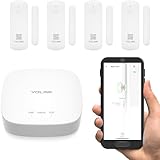
1. YoLink LoRa Smart Door Sensor Starter Kit: - 1/4 Mile Open-Air Range, Door Left-Open Reminders,5 Years Battery Life, SMS/Text, Email & App Alerts, Alexa, IFTTT, Home Assistant
Overview:
The YoLink LoRa Starter Kit includes one hub and four door/window sensors designed for robust, long-range security monitoring. Leveraging LoRa wireless technology, it boasts a 1/4-mile open-air range and eliminates monthly fees through self-monitoring via SMS, email, or app alerts. Preinstalled batteries promise five years of operation, targeting homeowners seeking reliable, low-maintenance perimeter protection for doors, windows, or appliances like refrigerators.
What Makes It Stand Out:
Its exceptional 1/4-mile range and five-year battery life outclass competitors. The “Door Left-Open” reminder with customizable timing is uniquely practical for preventing accidents or energy waste. Seamless integration with Alexa, Home Assistant, and IFTTT enables versatile automations, while the starter kit’s pre-applied 3M tape ensures tool-free installation in minutes—no technical expertise required.
Value for Money:
At a mid-tier price, it delivers outstanding longevity and flexibility. The five-year battery reduces long-term costs compared to Wi-Fi sensors needing annual replacements. Avoiding subscription fees (unlike some security systems) and supporting 300+ YoLink devices makes it a scalable investment for large properties, though the hub-only requirement for advanced features may necessitate future purchases.
Strengths and Weaknesses:
Strengths: Industry-leading range/battery life; no monthly fees; intuitive setup; versatile use cases (e.g., fridge monitoring); strong smart-home compatibility.
Weaknesses: Hub required for all functions; limited to YoLink ecosystem; no built-in siren (relies on SpeakerHub add-on).
Bottom Line:
Ideal for tech-savvy users prioritizing range and battery longevity, this kit excels as a future-proof foundation for DIY security. Its fee-free monitoring and multi-scenario utility justify the cost, earning a strong recommendation for expansive or remote properties.
2. Tapo Door Sensor Starter KIT, Matter Compatible, 3X Smart Door Window Contact Sensor and 1x Smart Hub with Built-in Chime, Smart Automation, Real-Time Notification, T31 KIT

Overview:
Tapo’s starter kit bundles three T110 contact sensors and an H100 hub with a 90dB chime, targeting users seeking immediate audible alerts and smartphone notifications. Using Sub-GHz wireless protocol, it offers extended range and 10x longer battery life than Wi-Fi alternatives. Fully Matter-compatible, it integrates with Apple Home, Alexa, and Google for real-time monitoring of doors, windows, or cabinets via the Tapo app.
What Makes It Stand Out:
The hub’s built-in 90dB alarm instantly deters intruders without extra devices—a rarity in starter kits. Sub-GHz connectivity ensures reliability in Wi-Fi-dead zones, while Matter support guarantees future-proof ecosystem flexibility. Unique camera integration lets Tapo pan/tilt cams auto-record footage when sensors trigger, enhancing visual verification.
Value for Money:
Priced competitively, the kit’s included chime hub and Matter readiness offer premium features typically found in costlier systems. The 64-sensor capacity per hub suits larger homes economically, though Wi-Fi dependency (2.4GHz only) may limit some users. Battery longevity offsets replacement costs, but standalone sensors require the hub, adding expense for expansions.
Strengths and Weaknesses:
Strengths: Loud built-in siren; Matter compatibility; seamless Tapo camera sync; excellent battery efficiency; straightforward app.
Weaknesses: Hub mandatory for operation; no cellular/SMS alerts; limited to Tapo ecosystem beyond Matter.
Bottom Line:
A compelling choice for Tapo/Apple Home users wanting audible alarms and camera联动, this kit balances affordability with professional-grade security. The Matter support future-proofs investments, making it highly recommended for new smart-home adopters.
3. WiFi Door Sensor Chime, Smart Door Open Alert Window Sensor for Business/Home/Kids Safety, Real-Time App Notification, 500ft Range, 32 Melodies, 5 Volume Levels, Window Contact Sensor Alarm Kit

Overview:
This Tuya/Smart Life-compatible kit features a plug-in receiver with 32 melodies and five volume levels (up to 110dB), paired with wireless sensors for door/window monitoring. Designed for homes and businesses, it provides real-time app alerts, family sharing, and wire-free installation. With a 500ft range and support for 20 sensors, it emphasizes loud, customizable audible alerts alongside smartphone notifications for child or dementia care.
What Makes It Stand Out:
The 110dB chime with assignable ringtones per sensor is exceptional—business owners instantly identify entry points without checking phones. Power-outage memory retention and family sharing ensure reliability during disruptions. Unlike hub-dependent kits, its receiver-only design simplifies setup, while free app notifications eliminate subscription costs.
Value for Money:
Budget-friendly for its dual alert system (app + physical chime), it outperforms similarly priced Wi-Fi sensors with its volume customization and 20-sensor scalability. The lack of hub fees is a plus, but the receiver requires constant power, and Tuya’s ecosystem may feel less polished than premium brands. Ideal for renters or small businesses needing audible monitoring without subscriptions.
Strengths and Weaknesses:
Strengths: Extremely loud chime; customizable tones/volume; no monthly fees; easy DIY setup; family sharing.
Weaknesses: Receiver must stay plugged in; limited smart-home integrations; Tuya app can be glitchy.
Bottom Line:
Perfect for storefronts or homes needing immediate audible alerts, this kit delivers unmatched volume flexibility at an entry-level price. Though lacking advanced automations, its simplicity and reliability earn a solid recommendation for basic security needs.
4. Smart WiFi Door Sensor: Wireless Window Sensor with App Notification Alert, Tuya Door Open Contact Sensor for Home Security, No Hub Required, Compatible with Alexa Google Assistant

Overview:
This standalone Tuya sensor operates without a hub, connecting directly to 2.4GHz Wi-Fi for app alerts via Smart Life/Tuya. It monitors doors/windows, triggering instant smartphone notifications and voice-status checks via Alexa/Google. Bundled with AAA batteries (6+ months life) and 3M tape, it targets users seeking minimalist, affordable security for entry points, refrigerators, or cabinets.
What Makes It Stand Out:
True hub-free operation is its crown jewel—unlike competitors requiring hubs, it cuts costs and complexity. Deep Tuya ecosystem integration enables automations like lights turning on when doors open, while low-battery app alerts prevent downtime. The broad mounting versatility (garages, pet doors, etc.) and 24-month warranty add exceptional value for DIYers.
Value for Money:
Exceptionally cost-effective as a single-sensor solution, eliminating hub expenses. The 6-month battery and zero fees undercut subscription-based systems, though frequent replacements may offset savings versus LoRa sensors. Best for small spaces; scaling requires multiple purchases, making large homes less economical than hub-based kits.
Strengths and Weaknesses:
Strengths: No hub needed; voice-status checks; strong Tuya automations; easy installation; generous warranty.
Weaknesses: Shorter battery life (6 months); Wi-Fi range limitations; 2.4GHz only; no audible alarm.
Bottom Line:
A superb entry-point for budget-conscious users wanting app-based monitoring without hubs. Its simplicity and Tuya compatibility make it highly recommended for apartments or single-door setups, though battery life lags behind premium alternatives.
5. WiFi Door Window Sensor: Smart Contact Sensor with App Alerts, Door Open Detector Compatible with Alexa Google Assistant, Entry Detector Sensor for Home Security and Home Automation (4-Pack)

Overview:
This 4-pack Tuya sensor set connects directly to 2.4GHz Wi-Fi, delivering app alerts for door/window status changes via Smart Life/Tuya apps. Each sensor includes AA batteries (1-year life), supports voice queries via Alexa/Google, and enables automations like light triggers. Designed for comprehensive coverage, it suits homeowners securing multiple entry points, garages, or liquor cabinets without a hub.
What Makes It Stand Out:
The four-sensor bundle offers unmatched scalability at its price point, ideal for whole-home coverage. Programmable routines (e.g., lights activating on door open) and shared family access enhance utility, while app-based battery monitoring prevents surprises. The mailbox/pet-door compatibility extends beyond typical security use cases.
Value for Money:
The 4-pack provides the best per-sensor value among Wi-Fi options, undercutting competitors requiring hub purchases. One-year batteries reduce maintenance, and zero subscription fees maximize savings. However, Wi-Fi dependency may cause dropouts in large homes, and the lack of a physical chime limits immediacy compared to chime-equipped kits.
Strengths and Weaknesses:
Strengths: Cost-effective 4-pack; hub-free; 1-year battery; family sharing; versatile mounting.
Weaknesses: No audible alert; Wi-Fi instability risks; limited range in dense layouts; basic app interface.
Bottom Line:
An excellent choice for budget-focused users needing multi-point monitoring, this pack delivers reliable app-based security and automations. Its affordability and simplicity earn a top recommendation for small-to-medium homes prioritizing coverage over audible alarms.
6. Aqara Zigbee Door and Window Sensor 3 Pack, Wireless Mini Contact Sensor, Home Automation, Requires Aqara Hub, Zigbee Connection, Kid Safety, Compatible with Apple HomeKit, Alexa, Works with IFTTT

Overview: This compact Zigbee-based sensor trio monitors doors, windows, or cabinets for home automation and security. Requiring the separate Aqara Hub, it integrates with Apple HomeKit, Alexa, and IFTTT for real-time alerts and automated routines, ideal for child safety or intrusion detection.
What Makes It Stand Out: Its ultra-slim design (0.86-inch gap tolerance) fits discreetly on narrow openings, while Zigbee ensures low-power, stable connections. Hub-triggered local alarms and cross-platform compatibility stand out, though it exclusively requires Aqara’s ecosystem—no SmartThings support.
Value for Money: At $35 for three sensors, it’s competitively priced for premium integrations like HomeKit. However, the mandatory $60+ hub inflates initial costs versus hub-free Wi-Fi alternatives, making it best for existing Aqara ecosystem users.
Strengths and Weaknesses: Strengths: Reliable Zigbee stability, 2.4GHz Wi-Fi flexibility with newer hubs, no subscription fees. Weaknesses: Hub dependency limits versatility; strict 400-inch range from hub; non-standard gap tolerance may hinder installation on warped surfaces.
Bottom Line: An excellent choice for Aqara or HomeKit loyalists prioritizing seamless automation, but avoid if you lack the hub or need broader platform support—consider hub-free options for simplicity.
7. YoLink LoRa Smart Door & Window Sensor: Up to 1/4 Mile Open-Air Range, Door Left-Open Reminders, up to 5 Year Battery Life, Alexa, IFTTT, Home Assistant, Home Security, Hub Required

Overview: Engineered for expansive properties, this LoRa-based sensor offers exceptional 1/4-mile range and 5-year battery life. It requires the YoLink Hub but delivers door-left-open alerts, multi-scenario monitoring (e.g., medicine cabinets), and integrations with Alexa and Home Assistant.
What Makes It Stand Out: Unmatched outdoor range and the unique “door ajar” timer set it apart. Installation is foolproof with pre-applied 3M tape, and it avoids subscription fees by leveraging free app alerts—ideal for farms, warehouses, or large homes.
Value for Money: Priced at $28 per sensor, it justifies cost through longevity and no recurring fees. Though the $40 hub adds expense, the 5-year battery and industrial-grade range offer superior ROI for remote monitoring versus short-range competitors.
Strengths and Weaknesses: Strengths: Exceptional range/battery life; versatile applications (fridge, safes); SpeakerHub audio alerts. Weaknesses: Hub mandatory; limited third-party app support beyond IFTTT; setup complexity for non-tech users.
Bottom Line: A top pick for large-scale or commercial use where range and battery life trump simplicity—skip if you need instant smart-home compatibility without hub investment.
8. ecobee Smart Sensor for Doors & Windows 2 Pack - Wifi Contact Sensor for Home Security, Energy Savings - Compatible with Smart Thermostats - Temperature sensor, white

Overview: This Wi-Fi-native 2-pack sensor pairs directly with ecobee thermostats for security and energy savings. It sends real-time door/window alerts via the ecobee app, includes temperature monitoring, and requires no hub or subscription for core features.
What Makes It Stand Out: Direct thermostat integration enables unique energy-saving automations (e.g., adjusting HVAC when windows open). The built-in temperature sensor and chime feature with Premium thermostats add utility beyond basic contact detection.
Value for Money: At $60 for two sensors, it’s pricier than hub-dependent models but eliminates hub costs. Best value for ecobee thermostat owners—non-users miss key features, reducing its versatility versus standalone sensors.
Strengths and Weaknesses: Strengths: No hub/subscriptions; 3-year battery; seamless thermostat synergy; temperature tracking. Weaknesses: Limited to ecobee ecosystem; no Alexa/Google voice control for status checks; white-only design.
Bottom Line: Highly recommended for ecobee users seeking integrated climate/security automation, but overspecialized for those outside the ecosystem—opt for multi-platform sensors otherwise.
9. WiFi Door Sensor: Smart Door Open/Closed Detectors, Wireless Window Sensor with App Notification Alert, Contact Sensor for Home Security, Compatible with Alexa Google Assistant (1pack)

Overview: A budget-friendly, hub-free Wi-Fi sensor using Tuya/Smart Life apps for instant door/window alerts. It connects via Bluetooth or Wi-Fi, supports voice control with Alexa/Google, and enables automations (e.g., triggering smart plugs) without subscriptions.
What Makes It Stand Out: Dual connectivity (Wi-Fi/Bluetooth) and zero hub dependency simplify setup. Real-time history logs, low-battery alerts, and broad compatibility with Tuya-based ecosystems make it accessible for beginners.
Value for Money: At $15, it’s the most affordable option here. The 1-year battery and included AAA cells offer decent longevity, though frequent replacements may offset savings versus 5-year battery rivals.
Strengths and Weaknesses: Strengths: No hub/costly hub needed; easy app integration; voice control; 12-month warranty. Weaknesses: Shorter battery life; Tuya app limitations; plastic build feels less durable; limited range indoors.
Bottom Line: An excellent entry-level pick for renters or Tuya users prioritizing simplicity and low cost—avoid for critical security due to battery constraints.
10. YisTech Caregiver Pager WiFi Door Alarms for Dementia Patients with Phone App,WiFi Smart Door Sensor Alarm for Kid Safety/Home Security/Elderly/Business/Store/Mailbox(2 Sensor 1 Gateway)

Overview: Tailored for caregiver scenarios, this kit includes two sensors and a loud gateway receiver (110dB) with app alerts. It monitors doors for dementia patients or children, offering cross-continental notifications and hearing-impaired support via LED alerts.
What Makes It Stand Out: The 110dB gateway with 32 melodies and adjustable volume is unmatched for audible warnings. Shareable alerts and expandability (add sensors/receivers) cater specifically to caregiving needs, unlike generic security sensors.
Value for Money: At $50 for 2 sensors + gateway, it’s reasonably priced for specialized use. The focus on accessibility (LED/volume controls) justifies cost for medical/care contexts, though overkill for standard home security.
Strengths and Weaknesses: Strengths: Exceptional volume/customization; global app alerts; expandable; hearing-impaired friendly. Weaknesses: Bulky gateway; limited smart-home integration (no IFTTT/Alexa routines); app stability concerns noted in reviews.
Bottom Line: Essential for caregivers managing dementia or child safety—skip for general security due to niche features and weaker smart-home compatibility.
Why Smart Door Sensors Matter for Your Home
Beyond Basic Security: The True Value Proposition
While preventing break-ins is a significant benefit, the real power of smart door sensors lies in their versatility. They provide actionable awareness, letting you know instantly when a door opens or closes – whether it’s your teenager sneaking in late, a package being delivered to your porch, or your pet escaping through the doggy door. This constant stream of simple status updates forms the bedrock of a responsive smart home, triggering automations and notifications that save time, energy, and worry.
Peace of Mind That Travels With You
The anxiety of “Did I lock it?” evaporates when you can check your phone from anywhere. Imagine confirming the back door is secure while sitting in a meeting, or getting an alert the moment your child arrives home from school. This remote monitoring capability isn’t a luxury; it’s a fundamental shift in how we interact with and feel safe in our living spaces, offering reassurance that adapts to your life, not the other way around.
Foundation for a Smarter Home Ecosystem
Door sensors are rarely standalone heroes. They act as crucial triggers within a broader smart home setup. An open front door can automatically turn on hallway lights at night, signal your thermostat to adjust, or silence security cameras indoors. This seamless interplay between devices creates intuitive routines that make your home work for you, establishing door sensors as essential building blocks for further automation.
How Smart Door Sensors Actually Work
The Core Components Explained Simply
At their heart, most smart door sensors consist of two parts: a magnet and a sensor unit. When the magnet (mounted on the moving door or window) is close to the sensor unit (mounted on the frame), the circuit is “closed,” signaling the door is shut. When the door opens and the magnet moves away, the circuit “opens,” triggering the alert or automation. It’s elegantly simple physics made intelligent through connectivity.
Understanding Wireless Communication Protocols
These sensors don’t work in isolation; they need to talk to your home network and hub. They primarily use specific wireless languages: Wi-Fi connects directly to your router, Bluetooth offers short-range control (often requiring a nearby phone), while protocols like Z-Wave and Zigbee rely on a central hub for longer range, better battery life, and mesh networking (where devices boost each other’s signals). Choosing the right protocol depends heavily on your existing or planned smart home ecosystem.
The Role of the Central Hub or Bridge
For non-Wi-Fi sensors (Z-Wave, Zigbee), a hub is essential. Think of it as the translator and traffic controller for your smart home. It receives signals from the door sensor, interprets them, and then communicates the event to your smartphone app or triggers connected devices. Many smart speakers and displays also function as hubs, simplifying setup for beginners.
Powering Your Sentinels: Battery Life and Options
Virtually all smart door sensors are battery-powered for easy installation. Common batteries include coin cells (CR2032) or AA/AAA types. Battery life varies significantly – from 1-2 years up to 5+ years – depending on the sensor type, wireless protocol, and how often the door is used. Key factors affecting longevity include signal strength (weak signals drain batteries faster) and temperature extremes. Always check estimated battery life and ease of replacement.
Key Features Every Beginner Should Evaluate
Compatibility: The Non-Negotiable First Check
This is paramount. Before falling in love with a sensor’s features, confirm it works with your existing smart home “brain.” Does it require a specific hub (like SmartThings, Hubitat, or a dedicated brand hub)? Is it certified for Apple HomeKit, Google Home, or Amazon Alexa? Check compatibility lists meticulously on manufacturer websites – a sensor that doesn’t integrate is just an expensive paperweight.
Wireless Range and Signal Reliability
How far can the sensor reliably communicate with its hub or bridge? Advertised ranges are often ideal lab conditions. Real-world factors like thick walls, metal framing, and interference from appliances can drastically reduce effective range. If your front door is far from your hub, prioritize sensors using Z-Wave or Zigbee (which benefit from mesh networks) over basic Bluetooth. Look for user reviews mentioning signal stability in larger homes.
Installation Ease: DIY-Friendly is Key
As a beginner, you want simplicity. Most sensors use strong adhesive strips – no drilling required. Look for clear alignment guides and compact designs that fit unobtrusively on standard doors/windows. Avoid complex wiring unless you’re specifically looking for hardwired security system integration. Check if the magnet and sensor need precise alignment (tighter tolerances can be fiddly) or have a wider operational gap.
App Experience and Notification Control
You’ll interact with the sensor primarily through a smartphone app. Is the interface intuitive? Can you easily create automations (e.g., “If front door opens after 10 PM, turn on porch light”)? Crucially, does the app allow granular control over notifications? Being bombarded with alerts every time a door opens gets annoying fast; the ability to customize when you get notified (e.g., only when you’re away, or only for specific doors) is essential for long-term usability.
Physical Design and Discreetness
Sensors live on your doors and windows, so aesthetics matter. Consider size (smaller is often better), color options (white is standard, but some offer paintable covers), and whether the design blends in or stands out. If discretion is important (like for security), a low-profile sensor that’s hard to spot is preferable. Also, check if the battery compartment is easy to access for replacements.
Integration Depth with Smart Assistants
Beyond basic “door open” announcements, how deeply does it work with Alexa, Google Assistant, or Siri? Can you ask “Hey Google, is the garage door closed?” for a direct status? Can you create complex voice-controlled routines (“Alexa, goodnight” locks doors, arms security, and turns off lights)? Deeper integration significantly enhances the hands-free experience.
Geofencing Capabilities for Truly Smart Automation
This powerful feature uses your phone’s location to trigger actions automatically. For example, your system could arm the security system and lock doors when the last person leaves the geofenced area (your home), or disarm and unlock the front door as you approach. Ensure the platform supporting the sensor offers reliable geofencing, as flaky location tracking can be frustrating.
Tamper Detection for Enhanced Security
A good sensor should alert you not just when the door opens, but also if someone tries to physically remove or disable the sensor itself. This tamper detection adds an important layer of security, especially for exterior doors, signaling potential malicious intent beyond just normal door use.
Weather Resistance for Exterior Use
Planning to monitor a garage door, shed, or exterior gate? The sensor must be rated for outdoor use (look for IP65 or similar weatherproofing). Indoor sensors exposed to rain, snow, or extreme temperature swings will fail prematurely. Don’t assume all sensors are created equal for different environments.
Installation and Setup Tips for Success
Choosing the Perfect Mounting Location
Placement is critical for reliable operation. Mount the sensor unit on the stationary frame and the magnet on the moving door/window. Ensure they align perfectly when closed, typically within 1/2 to 1 inch of each other (check the sensor’s spec sheet). Avoid metal surfaces near the mounting spot, as metal can interfere with the magnetic signal. For sliding doors, place sensors near the lock point.
Achieving Optimal Alignment for Fewer False Alarms
Misalignment is the top cause of missed detections or false alarms. Use the alignment guides often printed on the sensor housing. Test thoroughly before fully adhering: open and close the door multiple times, watching the app for consistent status updates. Adjust the positions slightly if detection is spotty. A perfectly aligned sensor is a reliable sensor.
Troubleshooting Common Connectivity Issues
If the sensor loses connection, first check the battery. Next, consider distance and obstacles – is the hub too far away? Can you move the hub closer or add a repeater device (common with Z-Wave/Zigbee)? Restarting the hub or the sensor (by removing the battery briefly) often resolves temporary glitches. Consult your hub’s signal strength indicator if available.
Maximizing Your Investment: Smart Use Cases
Creating Essential Home Routines
Turn simple door events into powerful automations. Have interior lights turn on automatically when the front door opens upon your arrival home in the evening. Program the thermostat to enter “Away” mode when the last person exits the house. Set exterior lights to activate only when the garage door opens after sunset. These small touches add up to significant convenience and efficiency.
Enhancing Family Safety and Awareness
Get notified the moment your child arrives home from school. Monitor if an elderly relative has opened their bedroom door during the night. Receive an alert if a window is opened unexpectedly while you’re away. This real-time awareness fosters safety and provides invaluable peace of mind for family members living independently.
Energy Savings Through Behavioral Insights
Notice patterns? Maybe the basement door is frequently left open, causing your HVAC to work overtime. Or the garage door gets left ajar after groceries are brought in. Door sensors provide the data to identify energy-wasting habits, allowing you to adjust routines or set up automations (like closing the garage door automatically after 5 minutes) to improve efficiency.
Frequently Asked Questions
Frequently Asked Questions
Can smart door sensors work through walls and multiple floors? Most sensors using Z-Wave or Zigbee protocols are designed to work through typical interior walls and across floors within a standard home, especially when part of a mesh network where other devices relay the signal. Wi-Fi sensors generally have shorter effective ranges through obstacles. Always check the manufacturer’s stated range for your specific home layout.
Do I need a separate hub for every door sensor? No, a single compatible hub can typically manage dozens of sensors (often 50+). The hub acts as the central communication point for all connected devices using its specific protocol (like Z-Wave or Zigbee). You add sensors to the hub; you don’t need a hub per sensor.
How long do the batteries usually last in these sensors? Battery life varies widely but commonly ranges from 1 to 5 years. Factors include the wireless protocol (Z-Wave/Zigbee often last longer than frequent Wi-Fi pinging), battery type (coin cell vs. AA), how often the door is opened/closed, and signal strength (weak signals drain batteries faster). Most apps provide low-battery warnings well in advance.
Will a smart door sensor still work if my Wi-Fi goes down? It depends on the system. Sensors connected via Z-Wave or Zigbee to a local hub will usually continue to trigger local automations (like sounding a siren or turning on a light) even without internet. However, remote notifications to your phone and cloud-based automations require an active internet connection. Wi-Fi-only sensors typically lose all functionality without internet.
Can smart door sensors detect how wide a door is opened? Standard magnetic contact sensors only detect binary states: “closed” (magnet near sensor) or “open” (magnet moved away). They cannot measure the degree of opening. For that level of detail, you’d need specialized (and less common) sensors like linear displacement sensors, which are not typical for home use.
Are smart door sensors difficult to install for a total beginner? Generally, no. Most are designed for DIY installation using strong adhesive strips – no tools or electrical knowledge required. Mounting involves cleaning the surface, peeling adhesive, and sticking the sensor and magnet in aligned positions. The most challenging part is often precise alignment for reliable detection, which requires some patience but no special skills.
Can I use one sensor for both a door and a window? Yes, the same basic magnetic contact sensor technology works identically for doors and windows. The installation principles (alignment, distance) are the same. Just ensure the specific sensor model is suitable for the size and type of window (e.g., a large sliding patio door might need a sensor rated for wider gaps).
Do smart door sensors trigger false alarms easily? Properly installed and aligned sensors are very reliable. False alarms are usually caused by misalignment (sensor and magnet not close enough when closed), weak batteries, physical damage, or strong magnetic interference near the sensor. Regularly checking alignment and battery levels minimizes this risk.
Can I integrate smart door sensors with a professional security system? It depends on the security system. Some modern professionally monitored systems (like certain ADT or Vivint packages) have smart home integrations that allow adding compatible Z-Wave sensors. However, traditional hardwired security systems often cannot integrate with standard consumer smart door sensors. Check with your security provider.
What happens if the battery dies in the middle of the night? When the battery gets critically low, the sensor will typically send a “low battery” alert to your app days or weeks in advance. If it dies completely, the sensor simply stops reporting. It won’t trigger a false “door open” alert due to battery death alone (that’s what tamper detection is for). Replacing the battery restores function immediately; no re-pairing is usually needed.