Imagine coming home after a long day, hands full of groceries, only to fumble for keys in the dark. Now picture your front door recognizing you and unlocking seamlessly as you approach—no keys, no hassle. This isn’t science fiction; it’s the reality of modern home security in 2026. Smart locks have evolved from niche gadgets into essential guardians of our homes, blending convenience with fortress-like protection. As break-ins grow more sophisticated and our lives become increasingly digital, the humble door lock has transformed into a high-tech sentinel. Homeowners today aren’t just buying hardware; they’re investing in peace of mind, knowing their family and belongings are shielded by innovations that adapt to their routines while outsmarting potential threats.
Yet with so many options flooding the market, choosing the right smart lock can feel overwhelming. Should you prioritize biometric scanners over voice control? How do you ensure your new lock won’t become obsolete in a year? And what about security vulnerabilities that could turn your “smart” upgrade into a liability? These questions matter more than ever as cyber threats evolve and smart home ecosystems grow more complex. This guide cuts through the noise to focus on what truly counts: understanding the non-negotiable features, avoiding costly pitfalls, and making a decision that keeps your home secure for years to come. Let’s explore how to future-proof your entryway without falling for flashy gimmicks.
Top 10 Smart Locks for Exterior Doors
Detailed Product Reviews
1. Veise Fingerprint Door Lock with 2 Lever Handles - Keyless Entry Door Lock, Electronic Keypad Deadbolt, Digital Smart Code & Front Handle Sets, Auto-Locking, Easy Installation, Matte Black

Overview: The Veise Fingerprint Door Lock offers keyless entry with dual lever handles, targeting homeowners seeking convenience and robust security for front or exterior doors. Its matte black finish and ANSI Grade 3 certification emphasize durability.
What Makes It Stand Out: Exceptional 0.3-second fingerprint recognition with 99.99% accuracy and self-learning AI sets it apart, alongside four unlock modes (20 fingerprints, 20 passcodes, physical keys, and one-time codes). The anti-peep function and auto-lock (10–99 seconds) enhance security, while IP54 waterproofing ensures reliability in extreme temperatures (-31°F to 158°F).
Value for Money: Priced competitively for its premium zinc alloy build and multi-user flexibility, it outperforms basic keypad locks. The elimination of hidden keys justifies the cost for families needing access management for elders, kids, or service providers.
Strengths and Weaknesses: Strengths: Lightning-fast biometrics; weather/temperature resilience; intuitive anti-snooping codes; ergonomic handles. Weaknesses: No Wi-Fi/app integration; limited to physical access methods; temporary codes lack remote sharing.
Bottom Line: Ideal for security-focused households prioritizing speed and reliability over smart-home connectivity, though tech enthusiasts may miss remote features. A solid investment for hassle-free, physical key elimination.
2. TEEHO TE012W WiFi Smart Lock, Fingerprint Door Lock with Built-in Wi-Fi, Keyless Entry Keypad Smart Deadbolt, App Remote Control, Alexa Compatible, IP55 Waterproof for Front Door – Satin Nickel

Overview: The TEEHO TE012W integrates built-in Wi-Fi for true remote access, eliminating hubs while supporting voice control and comprehensive app management for modern smart homes.
What Makes It Stand Out: Direct 2.4GHz Wi-Fi connectivity enables real-time remote control via the KK Home App—no hub required—and supports Alexa/Google Assistant. AES-128 encryption ensures data privacy, while IP55 weatherproofing and 100-user passcodes cater to rentals or multi-tenant use. The backlit keypad and silent mode add practicality.
Value for Money: Justified by its all-in-one smart features at a mid-range price. Competitors often require separate hubs for remote access, making this a cost-efficient upgrade for tech-savvy users needing rental-property management or family access control.
Strengths and Weaknesses: Strengths: Genuine remote access; robust encryption; 8-month battery life; versatile unlock options (app/fingerprint/voice); rental-friendly code limits. Weaknesses: No 5GHz Wi-Fi support; app functionality limited to 2.4GHz networks; backup keys feel flimsy.
Bottom Line: A top pick for renters or smart-home adopters wanting reliable, hub-free remote control. Avoid if your router lacks 2.4GHz bands, but otherwise excels in convenience and security.
3. Philips Smart Lock with Handles, Keyless Entry Door Lock Set, Keypad Door Lock with 2 Level Handles, Digital Keypad Deadbolt for Front Door, App Fingerprint PIN Code Unlocking, Auto Locking
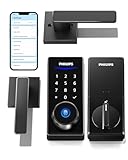
Overview: Philips’ handle-inclusive smart lock provides keyless entry with Bluetooth-centric access, requiring a separate Wi-Fi gateway for full remote features—a hybrid solution for partial smart-home integration.
What Makes It Stand Out: Bundled lever handles simplify installation, while 50-fingerprint capacity and unlimited one-time PINs cater to large households. Bluetooth proximity unlocking (8–10m) works natively, but remote access demands the optional Wi-Fi gateway—a notable limitation versus built-in-Wi-Fi rivals.
Value for Money: Handles included add value for door upgrades, but the gateway requirement inflates total cost. Better suited for users already in the Philips ecosystem; standalone buyers might find all-inclusive locks more economical.
Strengths and Weaknesses: Strengths: High fingerprint/user capacity; seamless handle integration; flexible PIN management; reliable auto-lock. Weaknesses: Remote features require costly separate gateway; Bluetooth range is restrictive; no native voice assistant support.
Bottom Line: Recommended only for Philips ecosystem users needing handle replacement. Those seeking out-of-box remote access should consider alternatives with built-in Wi-Fi for better long-term value.
4. TEEHO TE001 Keyless Entry Door Lock with Keypad - Smart Deadbolt Lock for Front Door with 2 Keys - Auto Lock - Easy Installation - Satin Nickel

Overview: A budget-friendly keypad deadbolt focusing on simplicity, targeting users prioritizing ease of installation and basic keyless convenience without smart-home complexities.
What Makes It Stand Out: Its 10-minute DIY installation (no drilling) and reversible handle suit most doors. The one-time PIN system and auto-lock (10–99s) offer essential security, while IP54 weatherproofing and a 1-year battery life provide reliability for low-tech households.
Value for Money: Exceptional for cost-conscious buyers. At half the price of Wi-Fi models, it covers core needs—guest access, auto-locking, and durability—without app dependencies. Ideal for rentals or secondary doors where remote features are unnecessary.
Strengths and Weaknesses: Strengths: Effortless setup; dependable battery life; anti-peep code protection; solid aluminum construction. Weaknesses: Limited to 20 user codes; no fingerprint/app integration; basic one-time PIN functionality.
Bottom Line: Perfect for minimalists or rental properties needing affordable, no-frills security. Skip if you desire biometrics or remote access, but unbeatable for straightforward keypad reliability.
5. Keypad Smart Door Lock with Handle: Kucacci Keyless Entry Door Lock - Smart Lock for Front Door - Electronic Door Lock with Keypad for Exterior Door - Deadbolt Lever Alternative - Easy Installation

Overview: The Kucacci lock merges fingerprint, app, and physical access with multi-property management tools, targeting landlords and tech-forward households via its NICE DIGI ecosystem.
What Makes It Stand Out: Unique multi-property management via its free app—ideal for Airbnb hosts—supports unlimited one-time codes and real-time access logs. Five unlock methods (fingerprint/app/key fob/etc.) and reversible handles enhance versatility, though Wi-Fi gateway dependency mirrors Philips’ limitation.
Value for Money: High for property managers due to lifetime free app access and rental-focused features. The comprehensive warranty (30-day refund, 1-year coverage) offsets the premium price for commercial use, but casual users may find it over-engineered.
Strengths and Weaknesses: Strengths: Best-in-class rental management; five unlock options; reversible handles; strong warranty; easy DIY install. Weaknesses: Remote features require separate Wi-Fi gateway; app stability issues reported; key fob sold separately.
Bottom Line: A landlord’s dream for scalable property access, but overkill for single-home use. Prioritize if managing rentals; otherwise, opt for simpler, gateway-free models.
6. Keypad Smart Door Knob Lock, Yamiry Keyless Entry Digital Lock with Handle, Electronic Code Knob for Front Door, Easy Installation

Overview: The Yamiry Keyless Entry Digital Lock offers a straightforward, non-WiFi smart lock solution for standard doors. Built with aluminum alloy and featuring a backlit keypad, it prioritizes physical security and simplicity for homeowners seeking keyless convenience without app connectivity.
What Makes It Stand Out: Its standout features include tool-free installation in under 15 minutes, support for 20 user codes plus one-time guest codes, and practical physical security elements like IP54 weather resistance, anti-pry coding, and mechanical key backup. The adjustable auto-lock timer (5–99 seconds) adds hands-free convenience.
Value for Money: Priced accessibly, it delivers excellent value for users who prioritize ease of installation and basic digital access over smart-home integration. While lacking remote control, it outperforms budget mechanical locks and undercuts WiFi-enabled competitors, making it ideal for renters or secondary doors.
Strengths and Weaknesses:
Strengths: Simple setup; durable build; low battery alerts; flexible code management; physical key override.
Weaknesses: No WiFi/app control; limited to keypad/key entry; no voice assistant support; basic guest-code features.
Bottom Line: A reliable, no-frills keyless entry solution perfect for users wanting quick installation and essential digital access without smart-home complexity. Best for budget-conscious homeowners prioritizing physical security over remote features.
7. Philips WiFi Keypad Door Lock with Handle, Built-in WiFi, APP Remote Control, Voice & Fingerprint Unlock, Smart Locks for Front Door with Auto Lock, Digital Front Door Lock Set, Keyless Entry Deadbolt

Overview: The Philips 4200 Series is a premium all-in-one smart lock with built-in WiFi, eliminating the need for hubs. It combines fingerprint, keypad, app, and voice control for comprehensive remote access management, targeting tech-savvy homeowners.
What Makes It Stand Out: Direct 2.4GHz WiFi connectivity enables real-time remote control via the Philips Home Access app, including live access history and status checks. The 0.3-second fingerprint sensor, versatile passcode options (one-time/periodic), and seamless Alexa/Google Assistant voice control set it apart from basic keypad locks.
Value for Money: Justifying its higher price, it replaces multiple devices (hub-dependent locks, separate door sensors) with robust remote functionality. While costlier than non-WiFi models, its all-in-one design and professional-grade access management offer strong long-term value for primary doors.
Strengths and Weaknesses:
Strengths: Hub-free WiFi; ultra-fast fingerprint; detailed app controls; flexible code scheduling; voice assistant compatibility.
Weaknesses: 2.4GHz WiFi only; requires stable internet; complex setup for non-tech users; no physical key override mentioned.
Bottom Line: A top-tier choice for homeowners invested in smart ecosystems, offering exceptional remote control and multi-user flexibility. Worth the investment if you prioritize real-time access management and voice integration.
8. eufy Security Smart Lock C220, Fingerprint Keyless Entry Door Lock, Built-in Wi-Fi, App Remote Control, Front Door Smart Lock Deadbolt, 8Months Battery, Reliable Power, IP53 Waterproof, BHMA Grade 3

Overview: The eufy C220 merges fingerprint convenience with extended battery life and built-in WiFi. It targets users seeking low-maintenance security, featuring self-learning AI for fingerprint recognition and seamless integration with eufy’s ecosystem (e.g., doorbells).
What Makes It Stand Out: An industry-leading 8-month battery life (with 8 AAs) and self-learning AI that improves fingerprint accuracy over time are key differentiators. Built-in WiFi enables direct app control (no hub), while IP53 waterproofing, BHMA Grade 3 security, and routines with eufy doorbells enhance its versatility.
Value for Money: Competitively priced for its feature set, it offers exceptional battery longevity and robust security (BHMA Grade 3). The 18-month warranty and 24/7 support beat most competitors, providing peace of mind that offsets its mid-range cost.
Strengths and Weaknesses:
Strengths: Long battery life; self-learning fingerprint AI; reliable app controls; BHMA-certified security; strong warranty.
Weaknesses: IP53 less weather-resistant than IP54/55; limited to 50 fingerprints; no voice control in specs; app ecosystem restricted to eufy devices.
Bottom Line: An excellent balance of reliability and smart features, ideal for users wanting minimal battery changes and AI-enhanced fingerprint access. Highly recommended for eufy ecosystem owners.
9. Philips Wi-Fi Door Lock, WiFi Smart Lock Keyless Entry Deadbolt for Front Door, Compatible with Alexa & Google Assistant, Remote Control, Built-in WiFi, APP Fingerprint Passcode Unlock, Auto Locking

Overview: This Philips deadbolt delivers flexible keyless entry with built-in WiFi, supporting fingerprint, app, passcode, voice, and physical key access. It’s designed for families needing customizable user management and remote control.
What Makes It Stand Out: Its standout trait is versatile access management: 100 custom passcodes, unlimited one-time/scheduled codes for guests or services, and seamless voice control via Alexa/Google. The 2.4GHz WiFi (hub-free) enables reliable remote locking/unlocking and real-time notifications from anywhere.
Value for Money: Priced mid-to-high, it excels for households with frequent guest access (e.g., rentals, cleaners). The ability to generate time-limited codes remotely justifies the cost versus simpler locks, though budget buyers may find it excessive for basic needs.
Strengths and Weaknesses:
Strengths: 100-user capacity; dynamic code scheduling; voice control; hub-free WiFi; physical key backup.
Weaknesses: Batteries not included; 65ft router proximity requirement; no fingerprint storage limit specified; app updates needed for voice control.
Bottom Line: A superb choice for busy households or property managers needing granular access control. Prioritize it if guest code flexibility and voice commands are essential.
10. Philips Wi-Fi Smart Door Lock with Handle, Keyless Entry Door Lock for Front Door Lock Set with App Remote Control, Fingerprint Door Handle Lock, Touchscreen Keypad Lever Lock Front Door Handle

Overview: Philips’ handle-integrated smart lock combines biometric speed with multi-mode functionality. Its unique fingerprint-handle design unlocks in 0.3 seconds, targeting users who value both security and seamless physical interaction.
What Makes It Stand Out: The integrated fingerprint handle (0.3s unlock) and three operational modes (Passage, Privacy, Silent) are exceptional. Built-in WiFi enables app control, while 50 fingerprint storage, 100 passcodes, and auto-lock customization (5–180 seconds) cater to diverse household routines.
Value for Money: As a premium handle-and-deadbolt system, it justifies its cost with professional installation compatibility and scenario-specific modes. Though pricier than standalone deadbolts, the all-in-one design saves long-term upgrade costs for front-door replacements.
Strengths and Weaknesses:
Strengths: Instant fingerprint-handle unlock; versatile operational modes; 50 fingerprint capacity; auto-lock flexibility; Alexa/Google support.
Weaknesses: 2.4GHz WiFi only; complex mode switching; handle design may not suit all doors; no physical key image in specs.
Bottom Line: The best pick for those upgrading entire door hardware, offering unmatched convenience via its fingerprint handle and adaptive modes. Ideal if swift physical access and customization are top priorities.
Understanding Modern Smart Lock Technology
How Smart Locks Have Evolved Beyond Keyless Entry
Gone are the days when “keyless” simply meant a keypad code. Today’s smart locks integrate machine learning to recognize patterns, like distinguishing between a family member’s routine approach and an unfamiliar loiterer. They’ve shifted from standalone devices to proactive security partners that learn your schedule, alert you to unusual activity, and even simulate occupancy while you’re away. This evolution means your lock isn’t just responding to commands—it’s anticipating needs and threats.
Core Components Powering Today’s Reliability
At the heart of every robust smart lock lies a trifecta of critical elements: military-grade encryption chips, multi-protocol wireless radios, and ruggedized mechanical assemblies. Unlike early models that relied on fragile Bluetooth connections, 2026’s standards demand dual-band radios supporting Wi-Fi 6E and Thread for seamless communication. Simultaneously, the physical mechanism must withstand forced entry attempts, featuring hardened steel bolts and anti-pick cylinders that meet ANSI Grade 1 security benchmarks.
The Shift to Zero-Trust Security Architecture
Security protocols have undergone a radical overhaul, moving beyond basic password protection to adopt zero-trust frameworks. This means every access attempt—whether from your phone, fingerprint, or voice command—triggers multi-layered verification. Think dynamic encryption keys that refresh with each use and anomaly detection that flags repeated failed entries. In 2026, a lock that doesn’t employ this “never trust, always verify” approach is considered dangerously outdated.
Key Features to Prioritize in 2026
Biometric Authentication Options Beyond Fingerprint Scanners
While fingerprints were once the gold standard, today’s top-tier biometrics include vein pattern recognition and behavioral analytics (like gait detection via connected cameras). Look for systems with liveness detection to prevent spoofing using photos or replicas. Crucially, ensure biometric data is processed and stored locally on the device—not in the cloud—to eliminate hacking risks.
Advanced Wireless Connectivity Standards You Can’t Ignore
Wi-Fi alone is insufficient for reliable operation. Prioritize locks with Matter over Thread compatibility, enabling direct communication with smart home hubs without relying on unstable internet connections. This ensures your lock remains functional during outages and reduces latency for instant responses. Bonus points for models supporting Bluetooth 5.3’s extended range, allowing auto-unlock from 30+ feet away.
Voice Control Integration Without Compromising Privacy
Seamless voice assistant compatibility is table stakes, but 2026 demands on-device processing for commands. Avoid locks that require constant cloud streaming, which creates privacy loopholes. Instead, seek devices with local voice recognition that can execute “lock the door” requests offline, keeping your conversations out of third-party servers.
Auto-Lock and Unlock Functionality That Adapts to You
Smart locks should intelligently manage access based on context, not just schedules. Geofencing that auto-unlocks as you approach must include adjustable sensitivity to prevent accidental unlocks (like when you’re just walking past the house). Similarly, auto-lock timers should learn your habits—delaying locking if kids arrive home late—without leaving doors vulnerable during high-risk hours.
Remote Access and Management Tools for True Peace of Mind
The ability to grant temporary access to guests or service providers remotely is essential, but 2026’s best systems add granular control. Think expiring digital keys with usage limits (e.g., “plumber can enter only between 9–11 AM”) and real-time activity logs showing who accessed your home and when. Critical here is end-to-end encryption for all remote actions to thwart man-in-the-middle attacks.
Security Considerations That Can’t Be Overlooked
Encryption Standards Every Lock Must Meet
Insist on AES-256 encryption for data in transit and at rest—this isn’t optional. Verify that the manufacturer undergoes regular third-party security audits (like those from UL or ICSA Labs) and publishes transparent vulnerability disclosure policies. Any lock using weaker encryption (e.g., AES-128) or lacking audit trails is a gamble with your home’s safety.
Physical Security Against Tampering and Forced Entry
A smart lock’s brains mean little if its body is weak. Check for ANSI Grade 1 certification, indicating resistance to 10+ kicks, 200+ pounds of pull force, and drilling attacks. Features like anti-shim technology (to block credit card bypasses) and tamper alarms that trigger loud sirens when the lock is physically manipulated are non-negotiable for exterior doors.
Regular Firmware Updates and Long-Term Support
Technology decays without updates. Commit only to brands promising minimum 5-year firmware support with automatic, silent patching for security flaws. Investigate their track record—how quickly did they address past vulnerabilities? A company that abandons devices after 18 months leaves you exposed to exploits hackers will inevitably discover.
Two-Factor Authentication Implementation for All Access
Single-factor authentication (like a code alone) is a relic. Your lock should enforce two-factor authentication for critical actions, such as requiring both a fingerprint and a temporary PIN to reset admin privileges. This prevents unauthorized users from taking control if they steal your phone or guess your code.
Installation and Compatibility Factors
Door and Frame Requirements for Flawless Operation
Not all doors can handle smart locks. Solid-core exterior doors are mandatory; hollow-core or warped frames cause misalignment and security gaps. Measure your door’s backset (the distance from edge to center of bore hole), which must match the lock’s specs (typically 2 3/8" or 2 3/4"). Ignoring this leads to improper bolt extension, making your door easy to kick in.
Power Source Options and Real-World Battery Life
Battery life claims often ignore real-world variables. Prioritize locks with 12+ month runtimes using standard CR123A batteries (not proprietary packs) and low-battery alerts sent to your phone 30 days in advance. Solar charging or kinetic energy harvesting are emerging but still niche—stick with proven battery solutions unless you’re in constant sunlight.
Smart Home Ecosystem Compatibility Beyond Brand Loyalty
Avoid vendor lock-in by confirming Matter certification, ensuring your lock works across Apple Home, Google Home, and Amazon ecosystems. Test compatibility with your existing hub—some require specific firmware versions. If you use legacy Z-Wave or Zigbee devices, ensure the lock supports those protocols as secondary options for broader integration.
Future-Proofing Your Smart Lock Investment
Scalability with Emerging Technologies
Your lock should evolve with tech trends. Look for modular designs where components (like biometric sensors) can be upgraded independently. Support for upcoming standards like Wi-Fi 7 or AI-powered anomaly detection via firmware updates ensures your hardware won’t become obsolete when new threats emerge.
Long-Term Manufacturer Support and Roadmaps
Research the company’s history: Do they still support devices launched 3+ years ago? Check their public development roadmap for commitments to new features. Brands that treat hardware as disposable will leave you stranded; those investing in backward compatibility signal reliability.
Adapting to Changing Home Security Needs
Life changes—new family members, aging parents, or home offices—demand flexible access management. Choose systems allowing unlimited user profiles with customizable permissions (e.g., “teenagers can’t unlock after 10 PM”). Cloud-based management dashboards that scale from single-family homes to multi-property portfolios add invaluable adaptability.
Cost Analysis and Value Assessment
Breaking Down the Price Points
Smart locks range from $150 to $400+, but price alone doesn’t indicate value. Higher costs often cover ANSI Grade 1 hardware, advanced biometrics, or professional installation. Budget models may cut corners on physical security—always prioritize core safety features over bells and whistles.
Hidden Costs to Watch For
Factor in subscription fees for cloud storage of access logs or video verification, which some brands hide behind “premium” tiers. Also, consider installation costs: complex doors might require a locksmith ($75–$150), and upgrading your doorframe to meet security standards adds unexpected expenses.
Warranty and Customer Service Evaluation
A 3-year minimum warranty is standard for quality locks. Scrutinize coverage details—does it include battery corrosion damage or forced entry repairs? Test customer service responsiveness pre-purchase via social media; slow or unhelpful support during a malfunction can turn a minor issue into a security crisis.
Frequently Asked Questions
How do I know if my door is compatible with a smart lock?
Measure your door’s thickness (1-3/8" to 2" is standard), backset, and bore hole size. Solid-core exterior doors are essential; hollow-core doors compromise security. Consult the manufacturer’s compatibility checker tool before purchasing.
Can smart locks be hacked, and how do I prevent it?
Yes, but robust models use military-grade encryption and regular updates to minimize risks. Prevent breaches by enabling two-factor authentication, disabling unused features like remote access during travel, and choosing locks with local processing instead of cloud dependency.
Do I need a smart home hub for my lock to work?
Not necessarily. Matter-compatible locks connect directly to your Wi-Fi or phone via Bluetooth, but a hub enhances reliability and automations (e.g., “lock when alarm arms”). Check if your preferred ecosystem requires one for full functionality.
How long do smart lock batteries typically last?
Most last 6–12 months with daily use, but this varies by features (e.g., video integration drains power faster). Opt for models with standard batteries for easy replacement and low-battery mobile alerts 30+ days in advance.
Are biometric smart locks more secure than keypad codes?
Biometrics add convenience but introduce new risks like spoofing. For maximum security, combine biometrics with another factor (e.g., PIN) and ensure data is stored locally. Keypads remain highly secure if using complex, non-repeating codes.
What happens during a power outage or internet disruption?
Quality locks operate on battery power, so doors remain functional. Matter-over-Thread devices maintain local control without internet, while Wi-Fi-only models may lose remote features but still work via Bluetooth or manual keys.
Can I install a smart lock myself, or should I hire a professional?
DIY is feasible for standard doors if you’re handy, but professional installation ($75–$150) ensures proper alignment and security. Hire a pro for complex doors (e.g., steel frames) or if your home has unique security requirements.
How do smart locks handle extreme weather conditions?
Look for IP65+ weatherproofing ratings to withstand rain, snow, and dust. Avoid plastic components; metal housings resist temperature extremes. Test winter performance in your climate—some locks malfunction below freezing without internal heaters.
Are there monthly fees associated with smart locks?
Most basic functions (locking/unlocking, access logs) are fee-free. However, cloud-based video verification, extended activity history, or advanced monitoring often require subscriptions ($3–$10/month). Always confirm before buying.
How often should I update my smart lock’s firmware?
Enable automatic updates to ensure immediate patching of vulnerabilities. Manually check for updates quarterly, especially after security advisories. Brands with infrequent updates (less than twice yearly) pose higher risks.