Imagine this: you’re lugging heavy grocery bags to your front door, arms overflowing, when you suddenly remember you left the garage door open. Or picture arriving home late at night in pouring rain, fumbling for keys while your remote sits uselessly in the car. These frustrating scenarios are relics of the past, thanks to the quiet revolution happening in your garage. Wireless garage door controllers have evolved from simple remote replacements into sophisticated hubs of home convenience, offering seamless integration, enhanced security, and peace of mind that extends far beyond just opening and closing a heavy metal door. They represent a fundamental shift towards truly connected living, where controlling access to one of your home’s largest entry points is as effortless as checking the weather on your phone.
Gone are the days when a garage door opener was merely a mechanical necessity operated by a bulky remote clipped to your visor. Today’s wireless controllers are intelligent gateways, transforming how we interact with our homes and manage daily routines. They address genuine pain points – the panic of realizing the garage is open after leaving for vacation, the inconvenience of manual operation during emergencies, or the simple desire to grant temporary access to a trusted neighbor. By leveraging modern connectivity and security protocols, these devices move far beyond basic functionality, offering features that integrate with your broader smart home ecosystem and provide a level of control and awareness previously unimaginable. Understanding what makes a truly effective wireless controller is key to unlocking this new era of effortless home management.
Top 10 Wireless Garage Door Controllers
Detailed Product Reviews
1. CHAMBERLAIN Smart Garage Control - Wireless Garage Hub and Sensor with Wifi & Bluetooth - Smartphone Controlled, myQ-G0401-ES, White

Overview:
The CHAMBERLAIN Smart Garage Control transforms traditional garage doors into remotely monitored systems via the myQ app. Compatible with most openers post-1993, it uses Wi-Fi and Bluetooth for real-time status checks and control, eliminating “did I close the garage?” anxiety.
What Makes It Stand Out:
Its seamless integration with Amazon Key In-Garage Delivery—a major perk for Prime members—sets it apart. The app allows granular access sharing for family/friends and automated close schedules, enhancing security without complex setup.
Value for Money:
Priced mid-range, it justifies cost through premium ecosystem ties (like Amazon Key) and robust app functionality. Cheaper alternatives lack this level of integration, making it worthwhile for Amazon-centric households despite no voice assistant flexibility beyond Alexa/Google.
Strengths and Weaknesses:
Strengths: Reliable app, Amazon Key support, intuitive scheduling, no subscription fees.
Weaknesses: Limited voice control options (no Siri support), occasional Wi-Fi sync delays, requires existing Chamberlain/Liftmaster ecosystem for full potential.
Bottom Line:
Ideal for Amazon Prime users prioritizing in-garage deliveries and seamless scheduling. While niche in voice compatibility, its security features and app reliability make it a top-tier choice for integrated smart home setups.
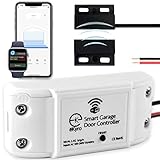
2. eKyro Smart Garage Door Opener - Universal WiFi Remote Controller Compatible with Alexa, Google Home, iPhone, Siri, Android, Door Left Open Alert, Door Security Systems, Updated Model
Overview:
The eKyro Smart Garage Door Opener is a universal adapter enabling Wi-Fi control for existing garage openers. It supports voice commands via major assistants (Alexa, Google, Siri) and offers real-time alerts for door status, all without subscription fees.
What Makes It Stand Out:
Zero monthly fees for core features—unlike some competitors—and compatibility with multi-door setups (each requires a separate unit). Its standout trait is broad voice assistant integration, including Siri and smartwatches, plus free scheduling and auto-close functions.
Value for Money:
Offers exceptional affordability with no hidden costs. While slightly pricier than basic models, the lifetime-free access to voice control and alerts outshines subscription-based rivals. Compatibility caveats (e.g., no Ryobi support) are mitigated by free adapter offers.
Strengths and Weaknesses:
Strengths: No fees, multi-assistant support, multi-door pairing, robust scheduling.
Weaknesses: Requires adapter for some openers (not included), limited troubleshooting resources, SMS alerts incur carrier fees.
Bottom Line:
A budget-friendly powerhouse for tech-savvy users wanting fee-free, voice-controlled access. Despite minor compatibility hiccups, its versatility and cost efficiency make it a compelling upgrade for most garages.
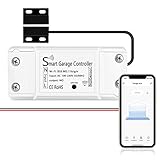
3. AGSHOME Smart Wi-Fi Garage Door Opener Remote, APP Control, Compatible with Alexa, Google Assistant, No Hub Needed with Smartphone Control
Overview:
The AGSHOME Smart Garage Opener adds app and voice control (via Alexa/Google) to existing systems without a hub. It focuses on simplicity, offering remote access, real-time notifications, and guest permissions through the Smart Life app.
What Makes It Stand Out:
Emphasis on effortless installation—wireless setup with video guides—and broad compatibility across major opener brands. The “guest control” feature for family/couriers is highlighted, alongside instant open/close alerts.
Value for Money:
Competitively priced for no-hub convenience, though not the cheapest. Its value lies in quick DIY installation and no subscriptions. However, the 2.4GHz Wi-Fi-only limitation may frustrate users with modern dual-band routers, slightly reducing its appeal.
Strengths and Weaknesses:
Strengths: Tool-free setup, guest access sharing, strong security encryption, app simplicity.
Weaknesses: 2.4GHz Wi-Fi restriction, inconsistent Smart Life app reviews, compatibility checks required pre-purchase.
Bottom Line:
Best for beginners seeking hassle-free smart garage conversion. While the Wi-Fi constraint is a drawback, its plug-and-play design and responsive notifications deliver solid value for non-tech users.
4. Liftmaster myQ Smart Garage Control - Wireless Garage Hub and Sensor with WiFi & Bluetooth - Smartphone Controlled, 821LMC-S, White

Overview:
Liftmaster’s myQ Smart Garage Control (821LMC-S) modernizes garage access via Wi-Fi/Bluetooth, letting users monitor and operate doors remotely through the myQ app. It targets universal compatibility with post-1993 openers and blends aesthetics with functionality.
What Makes It Stand Out:
Bluetooth Low Energy (BLE) simplifies setup significantly—faster pairing than older models. The sleek white design discreetly integrates into garages, and Amazon Key In-Garage Delivery support remains a key differentiator for secure package handling.
Value for Money:
Priced similarly to Chamberlain’s equivalent, it offers refined usability (BLE setup) and Liftmaster’s trusted reliability. Worth the investment for those valuing quick installation and Amazon Key, though non-Liftmaster users may find compatibility narrower than third-party options.
Strengths and Weaknesses:
Strengths: BLE-assisted setup, Amazon Key compatibility, modern design, reliable app.
Weaknesses: No Siri support, photoelectric sensor requirement limits older openers, no multi-door management in one unit.
Bottom Line:
A polished, user-friendly choice for Liftmaster/Chamberlain owners or Amazon Key enthusiasts. Its streamlined setup and dependable performance justify the cost, though broader voice control is lacking.
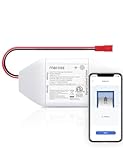
5. meross Smart WiFi Garage Door Opener Remote, App Control, Works with Alexa, Google Assistant and SmartThings, No Hub Needed(Non HomeKit Versions)
Overview:
The meross Smart Garage Opener enables app/voice control (Alexa, Google, SmartThings) for 200+ brands and 1,600+ models. It emphasizes precise monitoring via a wired sensor, real-time alerts, and compatibility checks to ensure seamless integration.
What Makes It Stand Out:
Industry-leading compatibility scope—backed by free accessory support for tricky setups—and multi-mode notifications (overtime/overnight alerts). Its high-sensitivity wired sensor ensures accurate door-status tracking, a step above basic wireless sensors.
Value for Money:
Mid-priced with exceptional adaptability; meross’s proactive compatibility assistance (free accessories) adds significant value. No subscriptions enhance affordability, though Security+ 3.0 incompatibility may exclude newer openers, requiring careful pre-purchase verification.
Strengths and Weaknesses:
Strengths: Broadest compatibility, detailed usage logs, stable wired sensor, no fees.
Weaknesses: No Security+ 3.0 support, 2.4GHz Wi-Fi only, accessory delays possible.
Bottom Line:
The go-to for diverse garage systems needing reliable, fee-free smart control. Despite Wi-Fi limitations, meross’s customer support and sensor precision make it a standout for complex or older installations.
6. Chamberlain myQ Wireless Garage Door Keypad

Overview:
The Chamberlain myQ Wireless Garage Door Keypad offers keyless entry for compatible garage door openers (Chamberlain, LiftMaster, Craftsman post-1997). Designed for secure, temporary access without physical remotes, it targets homeowners seeking convenience for guests or service providers.
What Makes It Stand Out:
Its standout feature is temporary PIN creation, ideal for dog walkers or contractors without sharing permanent codes. Weather-resistant construction handles extreme climates, while military-grade encryption prevents hacking. Simplified programming eliminates electrical work, making setup accessible for non-technical users.
Value for Money:
Priced mid-range, it justifies cost through robust security and versatility. While basic keypads exist for less, the myQ’s temporary access and encryption offer superior value over competitors lacking these features, especially for families prioritizing safety.
Strengths and Weaknesses:
Strengths: Easy installation; durable weatherproofing; secure temporary PINs; broad compatibility. Weaknesses: Limited to post-1997 openers with safety sensors; no backlighting for low-light use; requires battery replacement.
Bottom Line:
A reliable, security-focused keypad ideal for households needing flexible access control. Its weather resistance and encryption make it worth the investment over cheaper alternatives lacking advanced features.
7. Universal Garage Door Opener Keypad for Liftmaster Chamberlain Craftsman Wayne Dalton Openers Produced Since 1993, Wireless Keypad Keyless Entry, Replaces 877/878MAX 377/977/877/66LM

Overview:
This universal keypad supports LiftMaster, Chamberlain, Wayne Dalton, and Craftsman openers (1993–present) with specific learn buttons. It replaces models like 877MAX and offers keyless entry via 4-digit codes, targeting users needing broad compatibility and temporary access solutions.
What Makes It Stand Out:
Exceptional compatibility covers most major brands with color-coded learn buttons. The three-channel capability controls up to three openers via one keypad, and temporary PINs enhance security for visitors. Backlit buttons and included rain cover improve usability in varied conditions.
Value for Money:
Competitively priced, it delivers high value through multi-opener support and included accessories (battery, anchors). Cheaper keypads often lack multi-channel functionality or weather protection, making this a cost-effective upgrade for complex setups.
Strengths and Weaknesses:
Strengths: Controls three openers; backlit buttons; temporary PINs; comprehensive accessory kit. Weaknesses: Excludes specific Craftsman/Wi-Fi models; programming may confuse beginners; rain cover feels flimsy.
Bottom Line:
An excellent choice for multi-garage homes needing versatile access. Despite minor compatibility gaps, its multi-channel support and included extras justify the price for most users.
8. Solidremote 12V - 24V Secure Wireless RF Remote Control Relay Switch Universal 2-Channel Receiver with 2 Transmitters for Garage Door Openers, LED Lights etc (KIT-1)

Overview:
The Solidremote KIT-1 is a professional-grade RF relay system for garage doors, lights, and industrial equipment. Featuring two channels, rolling code security, and 12V–24V compatibility, it caters to users needing customizable, secure wireless control beyond standard keypads.
What Makes It Stand Out:
Unmatched security with 18 quintillion code combinations and superheterodyne RF sensitivity ensures near-hack-proof operation. Dual relays support complex setups (e.g., garage door + lights), while IP55-rated weatherproofing and flexible power inputs (AC/DC) suit diverse environments.
Value for Money:
Priced higher than basic keypads, it offers exceptional value for technical users. The industrial durability, dual-channel versatility, and future-proof security justify costs compared to single-purpose devices, especially for automation enthusiasts.
Strengths and Weaknesses:
Strengths: Military-grade encryption; dual-relay flexibility; weatherproof; wide voltage range. Weaknesses: Steep learning curve for non-technical users; installation requires wiring knowledge; overkill for simple garage setups.
Bottom Line:
A top-tier solution for advanced automation needs. While complex for casual users, its robustness and adaptability make it indispensable for industrial or multi-device applications.
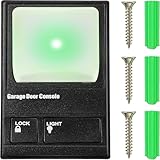
9. Fiada Garage Door Opener Wall Mount Compatible with Liftmaster 41A5273-1 78LM, Multifunction Keypad Control Panel with Lighting Control, Wired Replacement Panel Wall Keypad Button
Overview:
The Fiada wall mount panel replaces LiftMaster 41A5273-1/78LM units, offering wired control for garage doors and lights. Compatible with post-1995 openers (Green/Red/Purple learn buttons), it emphasizes security via a lock function and illuminated controls.
What Makes It Stand Out:
The lock button disables remote operation—a rarity in budget panels—enhancing security. Brightly lit push buttons ensure visibility in darkness, while straightforward wiring simplifies replacement for common models like AC chain/belt drives.
Value for Money:
An affordable wired solution that outperforms basic buttons. The included lock feature and light control add value over cheaper single-function panels, though the lack of wireless capability limits convenience-focused buyers.
Strengths and Weaknesses:
Strengths: Lock function for security; easy installation; illuminated button; budget-friendly. Weaknesses: No wireless/temporary access; excludes Yellow learn button openers; cords not included.
Bottom Line:
A dependable, security-enhanced replacement for traditional wall panels. Ideal for users prioritizing simplicity and safety over smart features, but skip if wireless capability is essential.
10. Garage Door Opener Control Panel, Multi-Function Wall Keypad Button Replacement for 78LM, Wired

Overview:
This wired control panel replaces standard buttons for LiftMaster openers with Green/Red/Purple learn buttons. Focusing on simplicity, it integrates light control and security locking into a basic wall-mounted unit for everyday garage access.
What Makes It Stand Out:
Its minimalist design prioritizes user-friendliness with dedicated light and lock buttons. Broad compatibility across billion-code and Security+ protocols (390MHz/315MHz) ensures fit for most modern openers, appealing to users seeking hassle-free upgrades.
Value for Money:
Very cost-effective for core functionality. It matches Fiada’s features at a similar price but lacks differentiation—cheaper than wireless options yet offering no extras like weatherproofing or multi-opener support.
Strengths and Weaknesses:
Strengths: Intuitive operation; light/lock controls; wide protocol compatibility; responsive support. Weaknesses: No backlighting; basic build quality; redundant against Product 9’s similar offering.
Bottom Line:
A functional, no-frills panel for straightforward replacements. Choose only if Product 9 is unavailable; otherwise, opt for models with additional security or visibility features.
Understanding Core Connectivity Options
Choosing the right wireless controller hinges significantly on understanding the underlying communication technologies. The method it uses to connect to your home network and your mobile device directly impacts reliability, range, and integration potential. It’s not just about getting a signal; it’s about ensuring consistent, secure communication that works flawlessly whether you’re in the driveway or across the globe.
Wi-Fi Direct Connection Benefits
Wi-Fi direct controllers connect straight to your home’s existing Wi-Fi network, bypassing the need for a separate hub in most cases. This offers the significant advantage of leveraging your robust home internet connection for remote access. You can open or close the door from anywhere with an internet connection using a dedicated app, receive real-time status notifications (open, closed, moving), and often integrate directly with voice assistants like Alexa or Google Assistant without additional hardware. The setup is generally straightforward for users familiar with connecting smart home devices to their Wi-Fi.
Cellular Backup Capabilities
For homeowners concerned about internet outages compromising garage access, controllers with integrated cellular backup are invaluable. These devices include a SIM card slot or built-in cellular modem, allowing them to maintain remote functionality even when your home Wi-Fi or broadband goes down. This ensures critical access during storms or service interruptions and provides continuous remote monitoring. While often involving a small monthly service fee, the peace of mind for essential access or security monitoring is a major consideration for many.
Bluetooth Low Energy (BLE) Proximity Features
Bluetooth Low Energy offers a unique layer of convenience focused on proximity-based automation. BLE-enabled controllers can detect when your smartphone enters or leaves a predefined radius around your home. This allows for automatic actions like opening the garage door as you approach (hands-free arrival) or triggering a reminder if the door is left open after you’ve walked away. BLE consumes minimal battery power on your phone and provides highly reliable short-range communication, perfect for automating routines without constant internet reliance.
Prioritizing Unshakeable Security Measures
Your garage door is a major access point to your home, making security the non-negotiable foundation of any wireless controller. A compromised system isn’t just an inconvenience; it’s a significant safety risk. Modern controllers employ multiple layers of security protocols that go far beyond the simple radio signals of older remotes, creating a robust digital deadbolt for your garage.
Rolling Code Encryption Standards
Gone are the days of fixed codes easily captured by code grabbers. Reputable controllers utilize advanced rolling code (or hopping code) technology. Each time you use the remote or app command, the system generates a brand new, unique code. Even if someone intercepts one signal, it’s useless for future attempts because the code constantly changes. Look for implementations adhering to strong encryption standards (like AES-128 or higher) within the rolling code protocol to ensure the highest level of protection against replay attacks.
Two-Factor Authentication (2FA) Implementation
Adding an extra verification step significantly bolsters account security. Controllers supporting Two-Factor Authentication require not only your password but also a temporary code sent to your phone via SMS or generated by an authenticator app when logging into the management portal or performing sensitive actions. This prevents unauthorized access even if your password is somehow compromised, adding a critical barrier against remote hacking attempts targeting your garage system.
Secure Firmware Update Protocols
The security landscape evolves, and so must your controller. Devices that receive regular, secure over-the-air (OTA) firmware updates are essential. These updates patch potential vulnerabilities discovered after the device ships. Crucially, the update process itself must be secure – digitally signed firmware ensures updates come only from the legitimate manufacturer and haven’t been tampered with during download. Avoid controllers lacking a clear, automated, and secure update mechanism.
Physical Security Safeguards
Security isn’t just digital. Consider controllers with physical features like tamper alarms that trigger a notification if someone attempts to forcibly disconnect or damage the unit. Secure mounting hardware and placement out of easy reach also contribute to overall system integrity. Some systems offer the ability to disable the internal wall control button remotely, adding another layer of physical security when you’re away.
Evaluating Installation and Compatibility Factors
A seamless installation and guaranteed compatibility with your existing opener are crucial for a frustration-free experience. Not all controllers are universal, and the complexity of setup can vary significantly. Thoroughly assessing your current setup and the controller’s requirements prevents costly mistakes and ensures you reap the benefits without unnecessary headaches.
Opener Model Compatibility Verification
This is the absolute first step. Garage door openers, especially older models, use different logic boards and wiring configurations. A wireless controller must be explicitly compatible with your opener’s brand and model year. Manufacturers provide detailed compatibility lists – scrutinize these carefully before purchasing. Some controllers require specific receiver boards or adapters for certain opener brands, adding complexity and cost. Ensure the controller you choose is a proven match.
DIY vs. Professional Installation Complexity
Be realistic about your technical skill level. Some controllers involve simple plug-and-play connections to existing terminals on your opener’s logic board, suitable for confident DIYers. Others might require more intricate wiring, voltage checks, or configuration within the opener’s settings menu. Evaluate the installation guide – clear instructions with diagrams are a good sign. If the process seems daunting or involves working near high-voltage components, professional installation is a worthwhile investment for safety and proper function.
Power Source and Wiring Considerations
Most controllers draw power directly from the garage door opener’s logic board. However, verify the voltage requirements (typically low-voltage 12-24V AC/DC) match your opener’s available terminals. Some advanced models, particularly those with cameras or cellular backup, might require a separate power source or have specific wiring needs. Ensure you have the necessary power access near the opener unit before committing to a particular controller.
Smart Home and Ecosystem Integration Depth
The true power of modern wireless controllers often lies in how well they play with the rest of your connected home. Seamless integration transforms the garage from a standalone function into a coordinated part of your daily routines and broader home automation strategies, creating effortless experiences.
Native Voice Assistant Compatibility
The ability to use simple voice commands through Amazon Alexa, Google Assistant, or Apple HomeKit (via Siri) adds a significant layer of convenience. “Alexa, open the garage door” while your hands are full is a game-changer. Prioritize controllers that offer native, direct integration without requiring complex third-party hubs or unreliable workarounds. Check which specific voice platforms are supported and ensure the integration allows for both opening/closing commands and status inquiries.
Unified App Experience and Automation Rules
Controlling your garage door within the same app you use for lights, thermostats, and security cameras creates a cohesive smart home experience. Look for controllers that integrate natively into major smart home platforms (like Samsung SmartThings, Apple Home, or Google Home). This allows you to create powerful automations: “Close the garage door when the last person leaves home,” “Turn on the garage light 5 minutes before the door opens in the evening,” or “Get an alert if the door opens while the security system is armed.”
Essential Features for Daily Convenience and Control
Beyond core connectivity and security, specific features elevate a wireless controller from functional to indispensable. These elements address common scenarios and user desires, making interaction intuitive and adding practical value to your daily life.
Real-Time Status Monitoring and Alerts
Knowing the exact state of your garage door at any moment is fundamental. A good controller provides instant visual confirmation within its app – is it fully open, fully closed, or stuck somewhere in between? Crucially, customizable alerts notify you instantly via push notification or email for critical events: the door being opened unexpectedly, left open for a set period (like 10 minutes), or failing to close properly. This constant awareness eliminates worry and enables quick action.
Multi-User Access Management
Modern households often require shared access. Robust controllers allow you to easily grant and revoke permissions for multiple family members or trusted individuals (like cleaners or dog walkers) through the app. You can set specific access schedules (e.g., “only between 9 AM and 3 PM on Tuesdays”), receive activity logs showing who opened the door and when, and instantly disable access for a lost phone or terminated employee without changing physical remotes.
Scheduling and Geofencing Automation
Take convenience a step further with automated routines. Schedule the door to open at a specific time each morning for your commute or close automatically every night at bedtime. Geofencing uses your smartphone’s location to trigger actions: the door can open automatically as you approach home (within a safe distance) or send you a reminder if you drive away while the door is still open. These automations save time and prevent common oversights.
Battery Backup Integration Awareness
While the controller itself might run on mains power, its functionality during a power outage depends on your garage door opener’s battery backup system. A good controller app should clearly indicate the status of the opener’s backup battery – whether it’s charged, low, or needs replacement. This awareness is critical during outages, as you need to know if you can still operate the door manually or if remote control via the controller (if it has its own backup) is your only option.
Considering Environmental and Usage Factors
Your specific garage environment and how you use the space influence the ideal controller choice. Factors like temperature extremes, door size, and frequency of use impact performance and longevity, so it’s wise to evaluate these practical aspects.
Temperature Tolerance Specifications
Garages experience significant temperature swings, from freezing winters to sweltering summers. The controller unit mounted near the opener must be rated to operate reliably within the expected temperature range of your specific garage. Check the manufacturer’s specifications for operating temperature limits. Units designed for harsher environments (e.g., -20°F to 140°F) offer greater resilience in extreme climates compared to those with narrower ranges.
Signal Range and Obstruction Handling
While primarily used within the home, reliable signal strength matters, especially for larger properties or homes with thick walls/concrete between the garage and living areas. Consider the controller’s stated Wi-Fi range and its ability to handle signal obstructions. Controllers with stronger antennas or mesh network compatibility (if your Wi-Fi system supports it) can maintain a stable connection where weaker devices might drop out, ensuring commands go through reliably from inside your house.
Usage Frequency and Motor Stress
If your garage door sees exceptionally heavy use (e.g., multiple family members coming and going constantly, or a home-based business with frequent deliveries), the controller’s communication reliability becomes even more critical. Frequent remote operation shouldn’t strain the system. While the controller itself doesn’t directly stress the opener motor, ensuring smooth, consistent communication prevents repeated failed command attempts that could indirectly cause issues. Robust connectivity minimizes this potential friction.
Future-Proofing Your Investment
Technology evolves rapidly. Choosing a controller with an eye toward future developments ensures your investment remains relevant and functional for years to come, avoiding the need for premature replacement.
Manufacturer Support Longevity
Research the manufacturer’s reputation for long-term support. How long do they typically provide firmware updates for older models? Do they have a history of abandoning products quickly? A company committed to ongoing software support ensures your controller gains new features, maintains compatibility with evolving smart home platforms, and receives critical security patches long after purchase.
Emerging Protocol Adoption Potential
While Wi-Fi and Bluetooth dominate now, keep an eye on emerging smart home protocols like Matter. Controllers built on flexible platforms or with hardware capable of future protocol support (potentially via firmware updates) offer greater longevity. While not essential today, awareness of industry trends can help select a device less likely to become obsolete as connectivity standards evolve.
Frequently Asked Questions
Frequently Asked Questions
How secure are modern wireless garage door controllers against hacking? Reputable controllers using strong rolling code encryption (AES-128+), secure firmware updates, and features like two-factor authentication are highly secure against common hacking methods. Avoid older models with fixed codes or no encryption.
Can I control my garage door remotely if my home internet is down? Only if your controller has cellular backup capability. Standard Wi-Fi controllers require an active home internet connection for remote access; they typically still work locally via Bluetooth or the physical wall button during an outage.
Do I need a separate hub for my wireless garage door controller? Most modern controllers connect directly to your Wi-Fi network and do not require a separate hub, simplifying setup. Some older systems or specific integrations might need a hub, but direct Wi-Fi is now standard.
How do I know if a controller is compatible with my existing garage door opener? Check the manufacturer’s detailed compatibility list before purchasing. You’ll need your opener’s brand name and the model number (usually found on a sticker on the opener unit itself).
Can I grant temporary access to someone without giving them my main app login? Yes, robust controllers offer multi-user management with the ability to create temporary access codes or grant time-limited permissions to specific individuals through the app.
Will extreme garage temperatures damage the wireless controller? Choose a controller rated for the temperature extremes in your specific garage. Most quality units handle a range like -20°F to 140°F, but verify the specs if you live in an area with severe climate conditions.
How do geofencing features for automatic door opening work safely? Geofencing triggers based on your phone’s location entering a predefined radius (e.g., 0.5 miles). Reputable systems include safeguards like requiring the phone to be moving towards the home and having a minimum dwell time to prevent accidental triggers from passing traffic.
What happens to my wireless controller during a power outage? The controller itself (if wired to the opener) will be off. If your opener has a battery backup, you can usually operate the door manually via the emergency release and potentially via the controller’s app if the controller has its own battery/cellular backup. Check your specific system’s capabilities.
Can I integrate my garage door controller with my home security system? Yes, many modern controllers offer integration with major security platforms. This allows actions like automatically closing the garage door when the security system is armed away, or triggering an alarm if the door opens while the system is armed.
How often should I expect to update the controller’s firmware? Security-focused manufacturers typically release firmware updates every few months, addressing potential vulnerabilities or adding minor features. Ensure the device receives automatic over-the-air updates to stay protected.