Garage doors represent one of the most vulnerable points in any home security system, yet they’re often the last to receive smart upgrades. How many times have you stood in the rain, frantically tapping your phone app, only to realize the garage door won’t respond because your Wi-Fi signal weakens near the back of the property? Or worse, returned home late to find the door mysteriously ajar because a flaky connection prevented the close command from registering? These frustrating disconnects aren’t just inconvenient; they create genuine security gaps and undermine the very purpose of smart home integration. The garage, typically isolated from the main living areas and often constructed with dense materials like concrete and metal, presents unique connectivity hurdles that standard smart home setups simply weren’t designed to overcome.
This chronic struggle between location and reliable communication is precisely why dedicated smart garage hubs have evolved from niche gadgets into essential home infrastructure. Forget the days of relying solely on your main router or hoping a random smart plug will suffice. Modern hubs specifically engineered for the garage environment tackle interference, signal dropouts, and protocol incompatibilities head-on. They act as intelligent intermediaries, creating robust, localized networks that ensure your garage door, lights, sensors, and even tools stay reliably connected to your home ecosystem and, crucially, to you. In 2026, solving these connectivity issues isn’t a luxury—it’s the baseline requirement for a truly functional, secure, and stress-free smart garage experience. Let’s explore what makes these hubs indispensable and how to choose the right one for your unique setup.
Top 10 Smart Garage Hubs
Detailed Product Reviews
1. CHAMBERLAIN Smart Garage Control - Wireless Garage Hub and Sensor with Wifi & Bluetooth - Smartphone Controlled, myQ-G0401-ES, White

Overview:
This Chamberlain hub transforms standard garage door openers into smart devices via Wi-Fi and Bluetooth. Using the free myQ app, users gain remote control, monitoring, and scheduling capabilities without replacing existing hardware (compatible with openers post-1993).
What Makes It Stand Out:
Its seamless integration with Amazon Key In-Garage Delivery offers exclusive package security for Prime members. The ability to grant temporary access to family or friends remotely, plus automatic night-closing schedules, eliminates “did I shut the garage” anxiety. Bluetooth simplifies initial setup.
Value for Money:
Priced competitively around $35, it’s a cost-effective upgrade over full opener replacements. While similar hubs exist, Amazon Key compatibility and Chamberlain’s brand reliability justify the investment for Prime users seeking convenience and security.
Strengths and Weaknesses:
Strengths: Effortless app control; robust guest access; reliable scheduling; Amazon Key integration. Weaknesses: Requires 2.4GHz Wi-Fi; no camera/sensor beyond door status; subscription needed for advanced features (though not required for core functions).
Bottom Line:
Ideal for Chamberlain/Craftsman owners wanting reliable remote access and Amazon Key benefits. A practical, affordable smart upgrade with minor connectivity limitations.
2. Liftmaster myQ Smart Garage Control - Wireless Garage Hub and Sensor with WiFi & Bluetooth - Smartphone Controlled, 821LMC-S, White

Overview:
Liftmaster’s compact hub delivers universal smartphone control for most garage door openers made after 1993. It uses Wi-Fi and Bluetooth for remote operation via the myQ app, emphasizing ease of installation and modern aesthetics.
What Makes It Stand Out:
The sleek white design discreetly blends into garage interiors, while Bluetooth Low Energy (BLE) enables faster, simpler setup than older models. Universal compatibility (excluding low-power sensor openers) and Amazon Key In-Garage Delivery support are key differentiators.
Value for Money:
At $30–$40, it matches competitors’ pricing but offers superior aesthetics and smoother installation. The BLE setup saves time versus Wi-Fi-only hubs, providing better value for DIY users prioritizing simplicity and reliability.
Strengths and Weaknesses:
Strengths: Universal compatibility; quick BLE setup; discreet modern design; Amazon Key integration. Weaknesses: Limited to basic door control (no camera); requires myQ app for all features; no local processing during outages.
Bottom Line:
A top choice for Liftmaster/Chamberlain users seeking hassle-free installation and dependable remote access. Avoid if advanced monitoring beyond door status is needed.
3. myQ Smart Garage Door Video Keypad with Wide-Angle Camera,Customizable PIN Codes,and Smartphone Control–Take Charge of Your Garage Access Works with Chamberlain, LiftMaster and Craftsman openers,White

Overview:
This all-in-one unit combines a smart garage hub with a 140° wide-angle camera, two-way audio, and PIN-based keypad access. It integrates with existing myQ-compatible openers, adding visual monitoring and enhanced security layers.
What Makes It Stand Out:
Real-time video surveillance, motion detection, and customizable alerts (including AI-powered object recognition via subscription) set it apart. Two-way audio allows communication through the garage, while PIN codes offer keyless physical access—features absent in basic hubs.
Value for Money:
Priced higher ($120–$150), it justifies cost by merging camera, keypad, and hub functionality. The free premium trial showcases AI detection (people/cars/packages), but ongoing value depends on subscription willingness ($3/month).
Strengths and Weaknesses:
Strengths: Comprehensive video monitoring; flexible access (app/PIN); advanced motion alerts; two-way audio. Weaknesses: Subscription required for AI features; complex setup; higher price than hub-only options.
Bottom Line:
Essential for users prioritizing garage security and visual verification. Best for those willing to pay for subscription perks; overkill if only remote door control is needed.
4. Chamberlain MyQ Smart Garage Hub - Wi-Fi enabled Garage Hub with Smartphone Control, Model MYQ-G0301, Old Version, Black
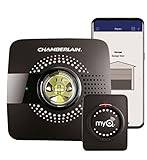
Overview:
This discontinued black hub (predecessor to G0401) provides core myQ functionality: remote garage control via app, guest access, and smart home integration. It requires 2.4GHz Wi-Fi within 50 feet but lacks modern Bluetooth enhancements.
What Makes It Stand Out:
Its legacy support for older openers and compatibility with IFTTT/Google Assistant (without subscriptions) offers niche utility. The black color may better match certain garage aesthetics compared to newer white models.
Value for Money:
Often discounted ($25–$30), it’s the cheapest entry into myQ ecosystem. However, the outdated design and lack of Bluetooth make setup trickier than newer models, reducing long-term value despite the lower price.
Strengths and Weaknesses:
Strengths: Lowest cost; IFTTT/Google integration; no subscription for basic features. Weaknesses: Obsolete design; no Bluetooth (slower setup); limited range; not sold new by Chamberlain.
Bottom Line:
Only consider for tight budgets or specific legacy compatibility needs. Newer hubs (like G0401) offer better reliability and ease of use for minimal extra cost.
5. meross Smart Garage Door Opener Remote, Compatible with Apple HomeKit, Siri, CarPlay, Alexa, Google, SmartThings, and Android, Universal WiFi Garage Door Controller, App + Voice Control, No Hub Needed

Overview:
This universal controller bypasses brand-specific ecosystems, working directly with 200+ opener brands via Wi-Fi. It enables remote/app control, voice commands (Siri, Alexa, etc.), and local operation during outages—no hub required.
What Makes It Stand Out:
Unmatched voice assistant compatibility (including CarPlay and HomeKit) and true “no hub” operation distinguish it. The wired sensor ensures precise door-status monitoring, while local control maintains functionality during internet outages.
Value for Money:
Priced around $35, it rivals myQ hubs but offers broader smart-home integration without subscriptions. Ideal for Apple/HomeKit users excluded from myQ’s ecosystem, providing premium flexibility at mainstream cost.
Strengths and Weaknesses:
Strengths: Universal compatibility; no hub/subscription; HomeKit/Siri support; local control during outages; detailed app logs. Weaknesses: Complex compatibility checks; accessory fees possible; no camera.
Bottom Line:
The best pick for non-Chamberlain users or Apple-centric smart homes. Prioritize compatibility verification, but enjoy exceptional voice control and reliability if supported.
6. meross Smart WiFi Garage Door Opener Remote, App Control, Works with Alexa, Google Assistant and SmartThings, No Hub Needed(Non HomeKit Versions)
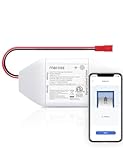
Overview: This smart garage door controller retrofits most existing openers, enabling remote access via the Meross app and voice commands through Alexa, Google Assistant, or SmartThings—no hub or subscriptions required. It targets homeowners seeking affordable, subscription-free smart garage integration with robust notification features.
What Makes It Stand Out: Its extensive compatibility (200+ brands, 1,600+ models using Security+ 1.0/2.0 protocols) and precision wired sensor ensure reliable status monitoring. Real-time notifications for open/close events, overtime alerts, and activity logs provide exceptional oversight. Direct 2.4GHz Wi-Fi connectivity eliminates hub dependency, simplifying setup.
Value for Money: Priced competitively under $40, it undercuts premium brands like Chamberlain while offering identical core features (app/voice control, no fees). The included wired sensor adds reliability lacking in cheaper alternatives, though compatibility checks are essential—potential accessory costs for niche openers could offset savings.
Strengths and Weaknesses:
Strengths: No monthly fees; intuitive app; multi-platform voice support; detailed activity history; responsive customer support for compatibility issues.
Weaknesses: Excludes Security+ 3.0 openers; 2.4GHz Wi-Fi only; accessory costs may apply for non-standard setups; no HomeKit integration.
Bottom Line: An excellent budget-friendly upgrade for compatible garage doors, offering reliable remote control and peace-of-mind notifications without hidden costs—verify model compatibility first.
7. Chamberlain MyQ Wi-Fi Smart Garage Door Hub - Model Number MYQ-G0302 - Model Number MYQ-G0301

Overview: Chamberlain’s MyQ Hub transforms traditional garage doors into smart systems via smartphone control and real-time alerts. Designed for seamless integration with existing openers, it emphasizes reliability from a leading garage door brand, targeting security-conscious households.
What Makes It Stand Out: As a trusted industry name, Chamberlain guarantees robust build quality and compatibility with most openers. Real-time door-status alerts and remote operation via the MyQ app deliver essential functionality without frills. Its straightforward troubleshooting support via included manual reduces setup frustrations.
Value for Money: Priced higher than generic alternatives (typically $50+), it justifies cost through brand reliability and consistent performance. While lacking voice assistant integration (unlike competitors), it’s ideal for users prioritizing security over smart-home ecosystems. No subscription is needed for core features.
Strengths and Weaknesses:
Strengths: Trusted brand reputation; simple installation; dependable remote access; clear real-time alerts; no monthly fees.
Weaknesses: No native Alexa/Google Assistant support; limited smart-home integration; no activity logs or scheduling; basic app experience.
Bottom Line: A dependable, no-nonsense choice for remote garage access and alerts—best for Chamberlain loyalists or those avoiding complex smart-home setups, but skip if voice control is essential.
8. Smart WiFi Garage Door Opener Remote Controller, Smartphone App Control, Compatible with Alexa, Google Assistant and IFTTT, No Hub Required

Overview: This budget-friendly Smart Life-compatible controller adds app and voice control to existing garage doors. It emphasizes extreme affordability and broad smart-home compatibility, requiring only basic wiring knowledge for installation via the user-friendly Smart Life ecosystem.
What Makes It Stand Out: Universal compatibility testing (using a paperclip method) ensures broad opener support, while IFTTT integration enables custom automations (e.g., “close door when I leave work”). Multi-user access, real-time notifications, and scheduling—rare at this price point—enhance practicality for families.
Value for Money: Often under $25, it’s the most economical option reviewed. Despite lacking a dedicated brand, it matches premium features (voice control, scheduling) at half the cost. However, Smart Life app reliability can be inconsistent versus branded apps like Meross.
Strengths and Weaknesses:
Strengths: Exceptional affordability; IFTTT/scheduling support; easy two-wire install; multi-user access; works with Siri/Smartwatches.
Weaknesses: Requires manual compatibility verification; Smart Life app can be glitchy; no dedicated customer support; limited notification customization.
Bottom Line: A wallet-friendly powerhouse for tech-savvy users willing to self-verify compatibility—ideal for basic smart upgrades but avoid if you prioritize app stability or brand support.
9. AGSHOME Smart Wi-Fi Garage Door Opener Remote, APP Control, Compatible with Alexa, Google Assistant, No Hub Needed with Smartphone Control
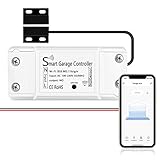
Overview: AGSHOME’s no-frills controller delivers essential smart garage functionality using the Smart Life platform. It focuses on simplicity and speed, enabling remote access, voice commands, and real-time alerts without hub requirements—perfect for quick, low-cost modernization.
What Makes It Stand Out: Installation is streamlined with wireless setup guidance and video tutorials, claiming “minutes” of setup time. Guest access management and 2.4GHz Wi-Fi compatibility cater to shared households, while real-time notifications ensure security awareness without complex configuration.
Value for Money: Competing at $20–$30, it matches Product 8’s affordability but with marginally better documentation. However, it lacks scheduling/IFTTT features, making it less versatile. Best for users wanting barebones remote control without advanced automations.
Strengths and Weaknesses:
Strengths: Ultra-low cost; fast wireless installation; reliable Alexa/Google integration; simple guest access; clear compatibility guide.
Weaknesses: No scheduling or IFTTT; Smart Life app limitations; minimal security features; 5GHz Wi-Fi unsupported (common oversight).
Bottom Line: A functional entry-level option for immediate remote access—choose only if budget is critical and you don’t need scheduling; otherwise, opt for more feature-rich alternatives.
10. meross Smart Garage Door Opener Remote with External Antenna, Up to 3 Single Doors, Compatible with Apple HomeKit, Amazon Alexa, Google Assistant, SmartThings, App Control, No Hub Needed

Overview: Meross’s premium model adds HomeKit support and dual-door capability via an external antenna, targeting Apple-centric households needing multi-door control. It retains core features like app/voice access and robust notifications but elevates compatibility and signal strength.
What Makes It Stand Out: The external antenna boosts Wi-Fi reach for challenging garages, while triple-door support (with optional third sensor) is unmatched. HomeKit/Siri integration—absent in Product 6—caters to Apple users, and detailed activity logs with overtime alerts enhance security oversight.
Value for Money: At $50–$60, it’s pricier but justifies cost for multi-door setups or HomeKit users. The included two wired sensors add value over competitors selling sensors separately, though the third sensor incurs extra cost. Ideal if expanding beyond single-door needs.
Strengths and Weaknesses:
Strengths: HomeKit/Siri support; extended Wi-Fi range; controls up to 3 doors; precise wired sensors; no subscriptions; comprehensive notifications.
Weaknesses: Highest price point; third sensor sold separately; Security+ 3.0 still unsupported; 2.4GHz Wi-Fi limitation.
Bottom Line: The top choice for Apple users or multi-door garages—invest here for future-proofing and seamless HomeKit integration, but verify compatibility to avoid accessory costs.
Understanding Garage Connectivity Challenges
The Physics of Signal Weakness
Garages are notoriously difficult environments for wireless signals. Thick concrete walls, metal doors and framing, and the sheer distance from the main home router create significant obstacles. Wi-Fi signals, especially the common 2.4 GHz band used by many smart devices, struggle to penetrate these barriers effectively, leading to dead zones and unreliable connections right where you need them most. This physical reality is the root cause of many frustrating “unresponsive device” errors.
Interference from Common Garage Equipment
Beyond structural barriers, garages are filled with potential sources of electromagnetic interference. Large motors from washing machines, refrigerators, or workshop tools, fluorescent lighting ballasts, and even older cordless phones can emit noise that disrupts the 2.4 GHz and 5 GHz bands. This interference causes signal degradation, packet loss, and intermittent disconnections, making consistent command execution unreliable. Standard home networks often lack the robustness to filter out this localized noise.
Protocol Fragmentation and Compatibility Gaps
The smart home landscape uses multiple communication protocols – Wi-Fi, Bluetooth, Zigbee, Z-Wave, and proprietary systems. Many garage door openers, especially older models, don’t natively speak the same “language” as your home hub or voice assistant. This fragmentation means a single protocol device (like a basic Wi-Fi opener) might connect poorly to your main network, while sensors using Zigbee could be completely invisible without the right translator. A universal compatibility layer is essential.
Core Features of a Reliable Smart Garage Hub
Multi-Protocol Support as Standard
The most critical feature is native support for multiple wireless protocols within a single hub. Look for devices that seamlessly integrate Wi-Fi (dual-band is ideal), Bluetooth LE, Zigbee 3.0, and Z-Wave. This eliminates the need for multiple separate bridges and ensures every potential sensor, opener module, or accessory in your garage ecosystem can communicate reliably, regardless of its native protocol. This unified approach is fundamental to solving connectivity silos.
Dedicated Mesh Networking Capabilities
Advanced hubs now incorporate mesh networking technology specifically optimized for the garage and its surroundings. Instead of relying solely on the weak signal from your main house router, these hubs can form their own resilient local mesh network. They communicate directly with garage sensors and repeaters, dynamically finding the strongest path for data. This creates a localized “bubble” of strong connectivity that isn’t dependent on the main home network’s reach.
Industrial-Grade Signal Amplification
Don’t underestimate the power needs. Quality hubs feature significantly amplified antennas and signal processing designed for challenging RF environments. This isn’t just about stronger Wi-Fi; it involves sophisticated interference mitigation techniques and signal boosting specifically tuned to cut through the electromagnetic “noise” common in garages. This hardware-level robustness is non-negotiable for consistent performance.
Evaluating Hub Performance and Reliability
Real-World Range Testing Beyond Specifications
Manufacturer range claims are often based on ideal, open-field conditions – the opposite of your garage. Prioritize hubs with verified performance in real-world, obstructed environments. Look for independent reviews or user testimonials specifically mentioning performance through concrete walls, metal doors, or against common interference sources. A hub that reliably reaches 50 feet through your garage structure is far more valuable than one claiming 100 feet in a lab.
Fail-Safe Mechanisms and Local Control
True reliability means the hub functions even when your internet goes down. Ensure the hub supports robust local execution – the ability to process commands and trigger automations directly within your home network without needing cloud access. Critical functions like opening/closing the garage door via a physical button on the hub or a local app command should work during internet outages. Redundant communication paths (e.g., cellular backup options on some prosumer models) add another layer of security.
Environmental Durability Considerations
Garages experience extreme temperature swings, humidity, dust, and vibration. A suitable hub must be rated for these conditions. Check for operating temperature ranges that cover freezing winters and hot summers, as well as ingress protection (IP) ratings indicating resistance to dust and moisture splashes. Plastic enclosures that crack in cold weather or electronics that overheat in summer render even the smartest hub useless.
Integration and Ecosystem Compatibility
Seamless Home Automation Platform Bridging
Your garage hub shouldn’t exist in isolation. It must integrate flawlessly with your primary smart home platform (Apple HomeKit, Google Home, Amazon Alexa, Samsung SmartThings, or Hubitat). This goes beyond basic voice control; it enables complex automations like “If garage door opens after sunset, turn on driveway lights and disarm security system.” Verify deep integration, not just superficial compatibility, ensuring all hub features and connected sensors are fully accessible within your main ecosystem.
Advanced Sensor Integration Capabilities
Modern garage security and utility rely on more than just the door. A capable hub must effortlessly incorporate various sensors: door position sensors (for precise open/closed status), motion detectors (for security or light activation), temperature/humidity monitors (for climate-sensitive storage), water leak detectors, and even vibration sensors for workshop tools. Ensure the hub supports the specific sensor types and quantities you anticipate needing, now or in the future.
API Access and Customization Potential
For tech-savvy users or those with complex setups, open API access or support for platforms like Home Assistant is invaluable. This allows for highly customized automations, deeper data logging, integration with niche security systems, or connection to broader home monitoring services. While not essential for everyone, it’s a strong indicator of a hub’s flexibility and long-term viability within a sophisticated smart home.
Setup, Management, and User Experience
Simplified Installation Tailored for Garages
Avoid hubs requiring complex network configurations. The best solutions offer guided setup specifically acknowledging the garage environment – perhaps including tips for optimal placement away from major interference sources or instructions for pairing legacy garage door openers using simple magnetic sensors. Clear, step-by-step mobile app guidance that anticipates common garage-specific hurdles is crucial for user adoption.
Intuitive Mobile App Interface
The companion app is your primary control point. It must provide immediate, unambiguous status of the garage door (open/closed, percentage), all connected sensors, and hub health. Critical actions like “Open,” “Close,” and “Stop” should be prominent and responsive. The app should also offer clear diagnostics for connectivity issues – showing signal strength from the door sensor to the hub, for instance – so you can troubleshoot without guesswork.
Remote Access Security and Permissions
Secure remote access is non-negotiable. Ensure the hub employs end-to-end encryption for all communications and robust authentication (like two-factor authentication). Granular user permissions are also vital; you might want to give a family member full access but restrict a delivery person or service technician to only opening the door during specific time windows. Audit logs showing who accessed the garage and when add an important security layer.
Future-Proofing Your Garage Investment
Over-the-Air Update Commitment
Technology evolves rapidly. Choose a hub from a manufacturer with a proven track record of regular, long-term firmware updates. These updates fix security vulnerabilities, improve performance, add compatibility with new devices, and sometimes introduce entirely new features. A hub that receives updates for 3-5 years significantly extends its useful life and protects your investment against obsolescence.
Scalability for Expanding Needs
Consider your potential future requirements. Will you add more sensors? Integrate workshop tools? Connect an EV charger? Ensure the hub has sufficient capacity (number of supported devices, processing power) to handle anticipated growth without needing replacement. A hub limited to only 5 devices will quickly become inadequate as your smart garage ecosystem expands beyond the door opener.
Standards-Based Approach Over Proprietary Lock-in
While some features might be unique, prioritize hubs built on open or widely adopted standards (like Matter over Thread, where applicable, or robust Zigbee/Z-Wave implementations). This reduces the risk of being trapped in a dying ecosystem if the manufacturer changes direction. Standards compliance generally ensures better long-term interoperability and device support across the broader smart home market.
Frequently Asked Questions
How do smart garage hubs differ from my regular home Wi-Fi router?
Smart garage hubs are specifically engineered to overcome the unique signal challenges of garages (thick walls, interference) using multi-protocol support, mesh networking, and industrial-grade amplification. Routers lack the targeted RF resilience and protocol translation needed for reliable garage device communication.
Can a smart garage hub work if my main internet is down?
Yes, hubs with robust local execution capabilities allow critical functions like opening/closing the garage door via the physical hub button or local app commands to work without internet. Cloud-dependent features (like remote access from work) will be unavailable until internet is restored.
Do I need a separate hub if my garage door opener is already “smart”?
Often, yes. Many “smart” openers rely solely on Wi-Fi, which is prone to dropouts in garages. A dedicated hub provides stronger local connectivity, multi-protocol support for additional sensors, better reliability, and deeper integration with your overall smart home system than the opener’s basic Wi-Fi module.
What’s the best placement for a smart garage hub to maximize signal?
Position the hub centrally within the garage, ideally mounted high on a wall, away from large metal objects, appliances, and the main electrical panel. Avoid placing it directly behind the garage door opener motor unit, which is a significant source of interference.
How secure are these hubs against hacking?
Reputable hubs use enterprise-grade encryption (like TLS 1.3), regular security patches, and secure boot processes. Always choose hubs with strong password requirements, two-factor authentication, and a manufacturer committed to prompt vulnerability fixes. Avoid older hubs lacking modern security protocols.
Can one hub manage multiple garage doors?
This depends entirely on the specific hub’s capabilities. Some consumer models support only one door, while advanced or commercial-grade hubs can often manage two or more doors simultaneously, along with numerous sensors. Check the device specifications for supported door count.
Are these hubs difficult to install for a non-tech person?
Most modern hubs are designed for DIY installation with clear app-guided setup. Basic tasks involve plugging in the hub, pairing it via the app, and attaching a simple magnetic sensor to the door. No complex wiring or advanced networking knowledge is typically required for standard door control.
What happens if the hub loses power?
Like your garage door opener, hubs require power. During an outage, the hub and connected smart features will be offline. However, your physical wall button and safety sensors on the opener itself should still function to operate the door manually (if it has battery backup) or ensure safety.
Can I use the hub to control garage lighting and other accessories?
Absolutely. A key advantage is integrating lighting, climate sensors, leak detectors, and even smart plugs for workshop tools. The hub acts as the central controller, allowing you to automate lights based on door movement or sensor triggers, creating a truly cohesive smart garage environment.
How often do these hubs need firmware updates?
Quality manufacturers typically release security and feature updates every few months. Critical security patches may come more frequently. Ensure your hub automatically checks for updates or that you proactively install them through the app to maintain security and functionality.