Navigating daily life becomes increasingly complex as we age, and small tasks that once felt effortless can gradually turn into frustrating hurdles. For many older adults, simple actions like adjusting the thermostat, remembering to lock doors, or even turning on a light can cause unnecessary stress or safety concerns. The good news? Thoughtfully designed technology exists to ease these burdens, offering independence and peace of mind without demanding tech expertise. Smart home hubs, when chosen wisely, act as a central, intuitive command center, transforming the home into a supportive environment that adapts to individual needs rather than adding complexity.
Gone are the days when smart home technology meant complicated setups and confusing interfaces reserved for tech enthusiasts. Today’s focus for senior users is squarely on accessibility, reliability, and seamless integration into existing routines. The right hub prioritizes ease of interaction—whether through clear voice commands, large-button remotes, or straightforward mobile apps—ensuring that assistance is always within reach, literally at the sound of your voice or the touch of a familiar button. This isn’t about flashy gadgets; it’s about practical solutions that promote safety, conserve energy, and restore a sense of effortless control over one’s living space, making everyday moments a little smoother and a lot more secure.
Top 10 Smart Home Hubs for Seniors
Detailed Product Reviews
1. Aeotec Smart Home Hub, Works as a SmartThings Hub, Z-Wave, Zigbee, Matter Gateway, Compatible with Alexa, Google Assistant, WiFi

Overview:
The Aeotec Smart Home Hub serves as a versatile central controller for modern smart homes, integrating seamlessly with Samsung’s SmartThings ecosystem. It supports multiple wireless protocols including Z-Wave Plus (V3), Zigbee, Wi-Fi, and Matter, enabling unified management of diverse devices like lights, sensors, and locks via the SmartThings app or voice assistants.
What Makes It Stand Out:
Its certification for Matter ensures future-proof compatibility across ecosystems, while local automation processing enhances speed and reliability without cloud dependency. Dual connectivity (Ethernet/Wi-Fi) simplifies installation, and broad compatibility with Alexa, Google Assistant, and thousands of devices eliminates brand silos for a truly integrated experience.
Value for Money:
Positioned competitively against standalone hubs, its multi-protocol support and Matter gateway functionality offer exceptional value. It avoids recurring fees while replacing multiple single-protocol hubs, making it cost-effective for expanding smart homes compared to pricier alternatives like Hubitat.
Strengths and Weaknesses:
Strengths: Local automation, Matter/Z-Wave/Zigbee trifecta, no subscription fees, easy SmartThings app integration.
Weaknesses: Limited to North American frequencies, Z-Wave Plus requires V3 model, no built-in Zigbee repeater. Setup may confuse beginners despite streamlined app guidance.
Bottom Line:
An ideal hub for users invested in SmartThings or seeking Matter-ready flexibility. Its protocol diversity and local processing justify the price, especially for medium-to-large smart homes prioritizing reliability over minimalist setups.
2. PILSAMSA WiFi Caregiver Pager Wireless Call Button with Flashing Caller ID & App Alerts, 3 Waterproof Panic Button, Medical Alert Systems for Seniors No Monthly Fee, Alert Button for Seniors at Home

Overview:
This medical alert system provides reliable emergency communication for seniors using a Wi-Fi hub and three waterproof 433MHz call buttons. Designed for home or care facilities, it delivers instant visual, audible, and app-based alerts without mandatory subscriptions, targeting high-risk areas like bathrooms.
What Makes It Stand Out:
The flashing Caller ID (red LEDs labeled 1–6) pinpoints help requests in seconds, while waterproof (IP65) buttons endure showers—addressing the 80% fall risk in wet zones. Lifetime-free app alerts with customizable tones/names and 328ft wall-penetrating range outperform basic pagers reliant on line-of-sight.
Value for Money:
Eliminating monthly fees (unlike traditional medical alerts) makes it highly affordable upfront. The three included buttons cover multiple rooms, and the robust build quality justifies the cost versus single-button systems, though SMS/email alerts require an optional $9.99/month plan.
Strengths and Weaknesses:
Strengths: No subscription costs, waterproof design, clear Caller ID, easy setup, 328ft range.
Weaknesses: Wi-Fi limited to 2.4GHz, SMS/email alerts need paid add-on, app sharing relies on Tuya ecosystem. Buttons lack fall detection.
Bottom Line:
A budget-friendly, no-frills solution for basic senior safety. Its waterproofing and instant location ID make it ideal for bathroom emergencies, though tech-dependent users should verify Wi-Fi compatibility.
3. PILSAMAS WiFi Caregiver System - 2 Smart HUBs with Flashing Caller ID & APP Alert, 2 Waterproof Wristband + 2 Call Buttons, No Monthly Fee, Medical Alert Systems for Seniors at Home & Nursing Homes
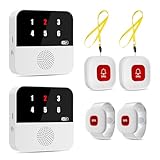
Overview:
This upgraded system includes dual hubs, two wristbands, and two call buttons, targeting multi-room or multi-caregiver scenarios. It builds on PILSAMSA’s core features with redundant hubs for backup alerts and enhanced coverage, ideal for nursing homes or large households.
What Makes It Stand Out:
Dual hubs ensure continuous operation if one fails—defaulting to simultaneous alerts across both or customizable per-hub assignments (e.g., night-shift alerts to staff lounge). The IP65 wristbands extend waterproof protection to mobility-focused users, while CDC-aligned wet-zone safety addresses critical fall risks.
Value for Money:
The dual-hub redundancy and four total alert points (vs. Product 2’s three) justify a higher price for professional/complex setups. No subscription fees maintain affordability, though SMS/email add-ons remain optional. Bulk hardware inclusion offers better scalability than single-hub systems.
Strengths and Weaknesses:
Strengths: Hub redundancy, versatile placement (wristbands/buttons), no subscriptions, wet-zone durability.
Weaknesses: Complex hub customization may confuse users, identical 2.4GHz Wi-Fi limitation, app dependent on Tuya. Redundancy unused in small homes.
Bottom Line:
Essential for nursing facilities or multi-generational homes needing fail-safe alerts. The dual hubs and wristbands provide unmatched reliability for high-need environments, though overkill for single-room use.
4. eufy Security eufy Smart Display E10, Smart Home Hub, 8" Control Panel, Compatible Devices, Four Views on One Screen, Instant Door Alerts, Daily Event Reports, One Tap Control

Overview:
The eufy Smart Display E10 is an 8-inch touchscreen hub focused on security management, integrating eufy cameras and compatible devices. It emphasizes real-time monitoring via live feeds, instant alerts, and local event storage without mandatory cloud fees.
What Makes It Stand Out:
Four simultaneous live views on one screen and instant doorbell/camera-triggered pop-ups provide unparalleled situational awareness. Local event storage enables buffer-free playback, while AI-powered daily reports (via HomeBase 3) highlight packages or recognized faces—avoiding subscription fatigue common in rivals like Ring.
Value for Money:
At a mid-range price, it outperforms displays requiring paid plans for basic features. Local processing eliminates recurring costs, and broad eufy ecosystem compatibility adds value. However, non-eufy integrations are limited versus Alexa Show devices.
Strengths and Weaknesses:
Strengths: Four-view display, no mandatory subscriptions, instant local playback, senior-friendly interface.
Weaknesses: Limited third-party integrations, facial recognition requires HomeBase 3, no built-in speakers for two-way talk.
Bottom Line:
A top choice for eufy camera owners prioritizing ad-free, real-time security oversight. Its multi-view efficiency and local storage justify the cost, but ecosystem lock-in may deter multi-brand users.
5. CallToU Wi-Fi Wireless Caregiver Pager Call Button for Elderly at Home , APP Emergency Alert for Seniors, Patients, and The Disabled

Overview:
CallToU offers a streamlined caregiver pager system with one hub, one call button, and app integration. Using 433MHz for 328ft range and 2.4GHz Wi-Fi connectivity, it targets budget-conscious users needing basic emergency alerts for seniors or disabled individuals.
What Makes It Stand Out:
Lifetime warranty and free app notifications (vs. SMS/text add-ons at $9.99/month) enhance affordability. Customizable ringtones/names per button aid quick identification, while Tuya app sharing allows family-wide alert distribution—simplifying coordination without complex setup.
Value for Money:
The lowest-cost entry in this category includes essential features: waterproof button, app alerts, and range sufficient for most homes. Though less comprehensive than PILSAMSA’s kits, its simplicity and warranty suit small spaces or trial users testing caregiver tech.
Strengths and Weaknesses:
Strengths: Lifetime warranty, free core app alerts, easy sharing, 328ft range.
Weaknesses: Only one button included, SMS/email requires monthly fee, Tuya dependency, no Caller ID LEDs like competitors.
Bottom Line:
A solid starter system for single-room needs or tight budgets. Its warranty and free app alerts deliver reliability, but limited hardware makes PILSAMSA kits better for whole-home coverage.
6. PILSAMAS WiFi Caregiver Pager Wireless Call Button with App Alert, Medical Alert Systems for Seniors No Monthly Fee- 2 Caregiver Call Button + Wristband Panic Button, Alert Button for Seniors at Home

Overview:
This wireless medical alert system offers seniors safety at home without monthly fees. It includes two wall-mounted call buttons, a wearable wristband panic button, and a Wi-Fi hub for app alerts. Designed for 2.4GHz networks, it covers up to 230ft through walls, targeting seniors, caregivers, and healthcare facilities seeking reliable, subscription-free monitoring.
What Makes It Stand Out:
Its no-fee lifetime app access is a major differentiator, allowing global real-time alerts, customizable ringtones (18 options), and device naming (e.g., “Bedroom Button”). The pre-paired setup, hypoallergenic wristband, and multi-channel alerts (app + loud hub alarm) provide immediate response flexibility. Unlike competitors, it avoids recurring costs for core functionality.
Value for Money:
Priced competitively, it delivers exceptional value by eliminating mandatory subscriptions. While SMS/email alerts cost extra, the free app notifications and broad compatibility make it cheaper long-term than systems like NOMO. Ideal for budget-conscious families needing basic, reliable alerts without hidden fees.
Strengths and Weaknesses:
Strengths: No monthly fees; easy setup; waterproof wristband; app customization; global access. Weaknesses: Limited to 2.4GHz Wi-Fi; SMS/email alerts require paid plan; wristband battery life not specified; range may falter in large, obstructed spaces.
Bottom Line:
A top choice for cost-effective senior safety. Its fee-free app alerts, versatile buttons, and simple operation make it highly recommended for households prioritizing affordability and essential monitoring without subscription traps.
7. NOMO Smart Care Medical Alert System, Fall Detection for Seniors, WiFi in Home Monitoring Safety System, Emergency Call Button, Custom Fall Alert, Virtual Caregiver, 60-Day Trial, Monthly Subscription

Overview:
NOMO’s camera-free system combines fall detection, motion/sound sensors, and two-way voice communication for in-home senior safety. The kit includes a Smart Hub, two Satellites, and wearable Tags, connecting via Wi-Fi. It emphasizes privacy and offers a 60-day trial of 24/7 emergency monitoring, after which a $19.99/month subscription applies.
What Makes It Stand Out:
Advanced fall detection via Tags (with adjustable sensitivity) and motion/sound monitoring provide proactive alerts beyond basic panic buttons. The two-way voice hub enables direct emergency communication, while RapidSOS integration ensures professional response. Its camera-free design prioritizes user privacy, a key advantage over camera-based systems.
Value for Money:
The 60-day trial offers risk-free testing, but the mandatory $19.99/month fee post-trial reduces long-term value versus fee-free alternatives like PILSAMAS. Justifiable for families needing professional emergency response and sophisticated fall detection, yet costly for basic alert needs.
Strengths and Weaknesses:
Strengths: Accurate fall detection; 24/7 monitoring trial; two-way voice; privacy-focused; easy setup. Weaknesses: Required monthly subscription; higher total cost over time; no standalone app alerts without subscription; Tags may false-trigger during vigorous activity.
Bottom Line:
Recommended for those prioritizing fall detection and emergency response services, but only if the subscription cost is acceptable. Less ideal for users seeking one-time-purchase affordability.
8. PILSAMAS WiFi Caregiver Pager Wireless Call Button with App Alert, Medical Alert Systems for Seniors No Monthly Fee with 2 Emergency Call Button, Alert Button for Seniors at Home

Overview:
This PILSAMAS system features two IP65 waterproof call buttons and a Wi-Fi hub, using 433MHz for 328ft range through walls. It targets wet-area safety (showers, kitchens) with app alerts, zero monthly fees, and CDC-backed fall prevention for seniors in homes or care facilities.
What Makes It Stand Out:
IP65 waterproofing on buttons is critical for bathroom safety, directly addressing 80% of wet-zone falls per CDC data. The app instantly identifies button locations (e.g., “Grandma - Bathroom”) and assigns unique ringtones—eliminating guesswork during emergencies. Lifetime-free app access contrasts sharply with subscription-dependent rivals.
Value for Money:
Outstanding value for moisture-prone environments. At a mid-range price, its waterproof durability and no-fee app make it more economical than systems requiring subscriptions for core features. A smarter investment than basic non-waterproof buttons for high-risk areas.
Strengths and Weaknesses:
Strengths: Superior waterproofing; precise location alerts; no monthly fees; 328ft range; app customization. Weaknesses: SMS/email alerts need paid plan; Wi-Fi dependency (2.4GHz only); hub not waterproof; limited to essential alerting (no fall detection).
Bottom Line:
Highly recommended for households needing reliable, waterproof emergency buttons in bathrooms or kitchens. Its focus on wet-area safety and zero recurring costs make it indispensable for senior fall prevention.
9. PILSAMAS Wireless Call Button - Panic Button Only, Smart WiFi HUB Rquired - No Monthly Fee, Emergency Alert Button for Seniors at Home

Overview:
This is a standalone replacement panic button for existing PILSAMAS Wi-Fi systems (e.g., models B0D45463VD). It requires a compatible hub, scales to 255 buttons per hub, and offers app-controlled alerts with no monthly fees—ideal for expanding setups in clinics or multi-room senior homes.
What Makes It Stand Out:
Scalability is its core strength: one hub supports 255 buttons, and one button can link to multiple hubs. This flexibility suits large facilities or homes needing extensive coverage. Like PILSAMAS’ full kits, it retains free app features (custom ringtones, device naming) without subscriptions.
Value for Money:
An economical expansion tool. Priced low as a single component, it maximizes value for users already owning a PILSAMAS hub. Cheaper than buying full systems to add coverage, especially for care facilities scaling their infrastructure.
Strengths and Weaknesses:
Strengths: Highly scalable; no added fees; app customization; durable build; easy pairing. Weaknesses: Useless without PILSAMAS hub; no standalone functionality; SMS/email alerts require paid plan; limited to enhancing existing setups.
Bottom Line:
Essential for expanding PILSAMAS networks but irrelevant for new buyers. Only recommended as a supplementary purchase for current PILSAMAS hub owners needing more coverage.
10. SwitchBot Hub 3 (3rd Gen), Smart Home Hub with 2.4" IPS Screen & Knob Control, WiFi Thermometer Hygrometer, IR Remote (Matter/Bluetooth 200m), Alexa/Google/Apple Home Compatible

Overview:
SwitchBot Hub 3 is a versatile smart home command center with a 2.4" IPS screen, built-in thermometer/hygrometer, and IR remote capabilities. It unifies Matter, Bluetooth, and IR devices (ACs, lights, SwitchBot ecosystem), supporting Apple/Google/Alexa and featuring tactile knob control.
What Makes It Stand Out:
The vivid screen displays real-time temp/humidity, weather, and device status (e.g., door locks) at a glance—unlike app-reliant hubs. The physical knob enables precise adjustments (e.g., AC temp by 1°C), while Matter bridging integrates third-party devices seamlessly. Its all-in-one display and dial interface simplify control for all users.
Value for Money:
Priced moderately, it justifies cost through exceptional versatility: replaces standalone thermostats, remotes, and hubs. Free Matter support avoids ecosystem lock-in, and the screen/knob add tangible utility missing in competitors like Amazon Echo Show.
Strengths and Weaknesses:
Strengths: Intuitive screen/knob; Matter/Bluetooth/IR unification; precise environmental monitoring; family-friendly design; no subscription. Weaknesses: Requires 2.4GHz Wi-Fi; CO₂/special sensors sold separately; steep learning curve for non-tech users.
Bottom Line:
A must-have for smart home enthusiasts seeking centralized, screen-based control. Its blend of display, Matter support, and tactile interface makes it the most user-centric hub for whole-home automation.
Understanding the Senior-Focused Smart Home Hub
Why a Dedicated Hub Makes Sense for Older Adults
A central hub eliminates the need to juggle multiple apps or devices, creating a unified system that’s far less overwhelming. For seniors, this simplicity is paramount; it reduces cognitive load and prevents the frustration of managing disparate technologies. Instead of remembering different controls for lights, locks, and thermostats, a single point of interaction streamlines everything, fostering confidence in using the technology daily.
Key Differences from General Consumer Hubs
While mainstream hubs often prioritize features like multi-room audio syncing or advanced automation for tech-savvy users, senior-oriented systems emphasize core functionality with unparalleled ease of use. Think reduced setup steps, voice recognition tuned for varied speech patterns, and physical interfaces designed for potentially limited dexterity. The focus shifts from novelty to essential, reliable support for daily living.
The Foundation of Independence and Safety
Beyond convenience, the right hub becomes a proactive safety net. It can monitor routine activity patterns, trigger automatic responses during potential emergencies (like prolonged inactivity), and provide instant connections to family or emergency services. This layer of intelligent oversight helps seniors maintain their cherished independence while giving loved ones significant peace of mind.
Essential Features for Senior-Friendly Operation
Voice Control Clarity and Reliability
Crystal-clear voice recognition that works reliably in normal conversational tones, even with softer speech or regional accents, is non-negotiable. The system should minimize misinterpretations and provide immediate, audible feedback confirming commands were understood and executed, reducing uncertainty and repeated attempts.
Simplified Physical and Visual Interfaces
Large, high-contrast buttons on remotes or wall panels, coupled with uncluttered mobile apps featuring adjustable text size and intuitive icons, cater to potential vision or dexterity challenges. Avoiding tiny touch targets and complex menu hierarchies ensures the interface remains accessible and frustration-free.
Effortless Setup and Ongoing Management
The initial configuration process should be remarkably straightforward, ideally guided by clear voice instructions or large-print manuals. Equally important is the ease of adding new devices later—ideally through simple voice commands or plug-and-play recognition—so maintaining the system doesn’t become a chore requiring constant technical support.
Prioritizing Safety and Security Integration
Emergency Alert Systems and Protocols
Seamless integration with medical alert systems or the ability to trigger direct emergency calls through simple voice phrases (“Help, I’ve fallen”) is critical. The hub should offer customizable alert protocols, ensuring the right people are notified immediately via phone call, text, or app notification during a crisis.
Automated Safety Routines for Peace of Mind
Imagine lights automatically turning on along a path to the bathroom at night, or the system detecting unusually prolonged stove usage and sending an alert. These automated safety routines, easily set up within the hub, address common senior concerns like falls in the dark or accidental fires without requiring constant vigilance.
Monitoring for Well-Being Without Intrusion
Subtle monitoring features, like tracking general movement patterns through connected sensors (not cameras), can provide reassurance about daily activity levels. The hub should allow customizable notifications for loved ones if routines significantly deviate, offering insight into well-being while respecting privacy and autonomy.
Ensuring Long-Term Usability and Support
Accessibility-First Design Philosophy
Look for hubs designed from the ground up with accessibility standards in mind, not just retrofitted features. This includes compatibility with screen readers, consistent navigation patterns, and the elimination of time-sensitive interactions that might be difficult for some users to complete quickly.
Reliable Customer Support Tailored to Seniors
Access to patient, knowledgeable customer support via phone (not just chat or email) is essential. Support teams should be trained specifically to assist older adults, using clear language without jargon, offering step-by-step guidance, and understanding common points of confusion in the setup or operation process.
Future-Proofing for Evolving Needs
Choose a hub platform known for long-term software updates and compatibility with a wide and growing range of accessible devices. This ensures the system can adapt as needs change—whether adding a new sensor for mobility assistance or integrating with a future health monitoring tool—without requiring a complete, confusing system overhaul.
Practical Considerations for Home Integration
Compatibility with Existing Household Devices
Assess which devices in the home are most relevant for simplification (like specific light brands, thermostats, or door locks) and ensure the hub supports those standards (Zigbee, Z-Wave, Wi-Fi) out-of-the-box. Avoiding the need for multiple hubs or complex bridges keeps the system simple and reliable.
Network Stability and Hub Placement
A strong, reliable home Wi-Fi network is the backbone of any smart home. The hub itself should be placed centrally, away from large metal objects or thick walls that can interfere with its signal to other devices. Consider Wi-Fi extenders if the home layout is large or problematic to ensure consistent coverage.
Power Source and Battery Backup Essentials
Opt for hubs that connect directly to a wall outlet for consistent power. Crucially, ensure the hub (or its critical components) has a reliable battery backup feature. This maintains core safety functions like emergency alerts and basic voice control during short power outages, a vital consideration for security.
Building Confidence Through Gradual Adoption
Starting Small with High-Impact Devices
Begin with one or two highly beneficial, easy-to-manage devices directly controlled by the hub, like automated bedside lamps or a smart thermostat. Mastering these simple automations builds confidence and demonstrates tangible value before expanding the system, preventing initial overwhelm.
Creating Simple, Reliable Automations
Focus on automations that solve specific, immediate problems: “When I say ‘Goodnight,’ turn off all downstairs lights and lock the front door.” Avoid overly complex, multi-step routines initially. Reliable, single-action automations provide consistent wins and reinforce the system’s usefulness.
Involving Family for Initial Setup and Training
Having a trusted family member or caregiver assist with the initial setup and provide patient, hands-on training sessions significantly increases adoption success. They can help customize voice commands to the senior’s natural speech and be available for quick troubleshooting during the learning phase.
Frequently Asked Questions
Can I use a smart hub if I’m not very tech-savvy?
Absolutely. Modern senior-focused hubs are designed specifically for ease of use, often relying primarily on simple voice commands or large physical buttons. Setup is usually guided step-by-step, and ongoing use minimizes the need for complex app navigation.
What’s the easiest way to control everything without a smartphone?
Many hubs come with dedicated physical remotes featuring large, clearly labeled buttons for common tasks like lights or temperature. Voice control through the hub itself is also a primary, screen-free method for issuing commands hands-free.
How does the hub help if I have trouble seeing small screens?
Look for hubs that prioritize voice interaction as the main control method. Companion apps should offer high-contrast modes and the ability to significantly increase text size. Physical remotes with large, tactile buttons are also available for many systems.
Will the system understand my voice if I speak softly or slowly?
Reputable hubs designed with accessibility in mind use advanced voice recognition trained on diverse speech patterns. They are generally effective with softer volumes, slower speech, or common regional accents, though clear enunciation always helps accuracy.
What happens if there’s a power outage?
Hubs with built-in battery backup will maintain core functions like voice command recognition for basic controls and emergency alerts for a limited time (usually several hours). Critical safety devices like certain sensors may also have their own batteries.
Can the hub automatically call for help if I fall?
While the hub itself isn’t a medical alert, it can integrate with compatible fall detection sensors or wearables. If a fall is detected, the hub can be programmed to automatically trigger loud alarms, call emergency contacts, or send alerts to monitoring services.
Is my privacy protected with all these sensors and voice commands?
Yes, privacy is paramount. Reputable hubs offer robust security features like end-to-end encryption, local processing options (so voice data isn’t constantly sent to the cloud), and clear controls over what data is stored and for how long. Review privacy settings carefully during setup.
How difficult is it to add a new device, like a smart plug?
Senior-friendly hubs make adding devices very simple, often through voice commands (“Hey Hub, add a new device”) or by pressing a single button on the hub and the new device. The process avoids complex network configurations or scanning QR codes.
Will the system work if my internet goes down?
Basic local control (like voice commands to turn on lights or locks within the same room as the hub) often continues to function without internet. However, remote access via smartphone apps, voice assistants requiring cloud processing, and internet-dependent alerts will be unavailable until connectivity is restored.
How much does a suitable hub and basic setup cost?
Prices vary, but a core hub unit plus 2-3 essential starter devices (like smart plugs or a motion sensor) typically starts in a moderate range. Focus on value—reliability, ease of use, and safety features are more important than the lowest upfront cost, as a frustrating system won’t be used.