Imagine this: you’ve carefully selected a smart thermostat, installed voice-controlled lights, and added smart locks for security. Everything should work in harmony, right? Yet, when you try to create a simple “Good Morning” routine, half your devices stubbornly refuse to play along. That sinking feeling of frustration is all too familiar for many smart home enthusiasts. The culprit? Often, it’s not the individual gadgets themselves, but the central nervous system meant to connect them all – the home automation hub. Choosing the wrong hub can turn your dream of seamless automation into a fragmented, headache-inducing puzzle where devices speak different languages and refuse to cooperate.
Compatibility isn’t just a minor annoyance; it’s the absolute bedrock of a truly functional and enjoyable smart home. A hub that lacks broad protocol support or gets stuck within a single, restrictive ecosystem severely limits your choices and future upgrades. You shouldn’t have to compromise on your favorite light bulb brand just because your hub vendor has a vendetta against it. The good news is, understanding the key compatibility factors empowers you to select a hub that acts as a universal translator, effortlessly bridging the gap between diverse devices and ensuring your smart home evolves smoothly for years to come, far beyond the immediate future.
Top 10 Home Automation Hubs
Detailed Product Reviews
1. Aeotec Smart Home Hub, Works as a SmartThings Hub, Z-Wave, Zigbee, Matter Gateway, Compatible with Alexa, Google Assistant, WiFi

Overview:
This hub transforms your home into a unified smart ecosystem via SmartThings, supporting Z-Wave Plus (V3), Zigbee, Matter, and Wi-Fi. It enables centralized control of lighting, security, and climate devices through the SmartThings app, with local automations for reliability during internet outages. Voice commands via Alexa or Google Assistant add hands-free convenience.
What Makes It Stand Out:
Its triple-protocol support (Z-Wave, Zigbee, Matter) accommodates thousands of devices from major brands, while Matter certification ensures future-proof interoperability. Local automation processing accelerates routines like security triggers, eliminating cloud dependency. Flexible Wi-Fi/Ethernet setup and North American certification simplify installation.
Value for Money:
Priced competitively against single-protocol hubs, it delivers exceptional versatility. The inclusion of Z-Wave (absent in newer Aeotec V4) justifies its cost for users with legacy Z-Wave devices, though Matter-only users might find alternatives sufficient. No subscription fees enhance long-term savings.
Strengths and Weaknesses:
Strengths: Robust multi-protocol compatibility; reliable local automation; user-friendly SmartThings app; seamless voice assistant integration. Weaknesses: Z-Wave support limited to V3 model; no Thread/Matter 1.5; Ethernet cable sold separately; complex setups may overwhelm beginners.
Bottom Line:
Ideal for SmartThings enthusiasts with mixed Z-Wave/Zigbee ecosystems, this hub excels in reliability and broad compatibility. While newer protocols are absent, its local processing and no-subscription model make it a top-tier choice for stable, comprehensive smart home control.
2. Amazon Echo Hub, 8” smart home control panel, Designed for Alexa+, Compatible with thousands of devices

Overview:
Echo Hub is a wall-mountable 8-inch touchscreen panel serving as a central command center for Alexa-compatible devices. It replaces physical switches with customizable widgets for lights, cameras, and thermostats, controlled via touch or voice. Designed for seamless integration with Amazon’s ecosystem, it simplifies daily smart home management.
What Makes It Stand Out:
The vibrant touchscreen dashboard offers at-a-glance control of security feeds and routines, with personalized widget layouts. Built-in hub capabilities support Matter, Thread, Zigbee, and Sidewalk, syncing thousands of devices without additional bridges. Wall-mount flexibility (with optional accessories) enables strategic placement in kitchens or hallways.
Value for Money:
At its price point, it outperforms standalone displays by combining a premium screen with multi-protocol hub functionality. While accessories like PoE adapters are extra, the elimination of third-party hubs justifies costs for Alexa-centric households seeking an elegant, unified interface.
Strengths and Weaknesses:
Strengths: Intuitive touch interface; comprehensive Alexa integration; supports Matter/Thread for modern devices; easy wall mounting. Weaknesses: Subscription-free but limited without Amazon services; no Z-Wave; cable management requires paid add-ons; fewer automation options than dedicated hubs.
Bottom Line:
A streamlined solution for Alexa users wanting a visual command post. Its seamless device integration and customization make it perfect for casual smart home adopters, though automation enthusiasts may prefer more programmable alternatives.
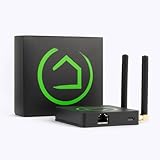
3. Hubitat Elevation C-8 Pro Smart Home Automation Hub – Latest Platform Updates – Matter 1.5, Z-Wave 800 LR, Zigbee 3.0 & Bluetooth – Local Control (No Cloud) – Alexa, Apple HomeKit & Google Home
Overview:
Hubitat C-8 Pro is a powerhouse hub prioritizing local processing for zero-latency automation, even during internet outages. Supporting Matter 1.5, Z-Wave 800 LR, Zigbee 3.0, and Bluetooth, it integrates 1,000+ devices across brands while emphasizing privacy through on-premise data handling.
What Makes It Stand Out:
True local control ensures automations run independently of the cloud, offering unmatched speed and reliability. Continuous free updates add features like AI-assisted rules and Matter 1.5 support, while its beginner-to-advanced flexibility caters to all skill levels. No subscriptions or mandatory cloud services enhance its appeal.
Value for Money:
Higher priced than entry hubs, but justified by its future-proof protocols, robust local processing, and lifelong free updates. Savings from avoiding subscriptions (e.g., compared to SmartThings Premium) make it cost-effective for privacy-focused or internet-unreliable environments.
Strengths and Weaknesses:
Strengths: Complete offline functionality; extensive protocol support; no mandatory cloud; regular feature updates; strong privacy. Weaknesses: Steeper learning curve for complex automations; limited voice assistant depth vs. Alexa/Google; app interface less polished than competitors.
Bottom Line:
Essential for users demanding cloud-free reliability and cutting-edge protocols. Its local-first architecture and update longevity make it a premium investment for tech-savvy homeowners prioritizing speed, privacy, and resilience.
4. Aeotec Smart Home Hub2 - V4, Works as a SmartThings Hub, Zigbee, Matter Gateway, Compatible with Alexa, Google Assistant, WiFi (No Z-Wave)

Overview:
This streamlined hub focuses on Zigbee and Matter protocols within Samsung’s SmartThings ecosystem, enabling control of lighting, sensors, and thermostats via the SmartThings app. Designed for simplicity, it supports local automations during internet downtime and integrates with Alexa/Google voice commands.
What Makes It Stand Out:
As a dedicated Matter and Zigbee gateway, it offers plug-and-play setup for modern devices while leveraging SmartThings’ mature app. The exclusion of Z-Wave reduces complexity, and local automation processing ensures critical routines (e.g., security alerts) function offline—ideal for apartments or minimalist setups.
Value for Money:
Priced lower than its Z-Wave-inclusive predecessor, it targets Matter/Zigbee adopters seeking affordable entry into SmartThings. The lack of Z-Wave support saves costs for users without legacy devices, though those with Z-Wave gear should opt for V3.
Strengths and Weaknesses:
Strengths: Matter-ready for future devices; simple Wi-Fi/Ethernet setup; seamless SmartThings app experience; reliable local automations. Weaknesses: No Z-Wave (limits device compatibility); fewer protocols than competitors; app less intuitive for advanced automations; Matter implementation lacks Thread.
Bottom Line:
A solid budget-friendly gateway for SmartThings newcomers focused on Zigbee and Matter devices. While not for Z-Wave users, its reliability and ecosystem integration make it a smart pick for streamlined, subscription-free home automation.
5. Aqara Smart Home Hub M3 for Advanced Automation, Matter Controller, Thread Border Router, Features Zigbee, Bluetooth, Wi-Fi, PoE, IR, Supports Alexa, Apple HomeKit, SmartThings, Home Assistant, IFTTT

Overview:
Aqara M3 is a multi-protocol powerhouse supporting Zigbee, Thread, Wi-Fi, Bluetooth, and IR, with Matter bridging for cross-ecosystem integration. It features PoE, encrypted local storage, and an IR blaster for controlling non-smart appliances, all managed through Aqara’s Home app with local automation focus.
What Makes It Stand Out:
Its unique IR blaster with feedback learns and replicates remote commands while reporting status—turning AC units into smart thermostats. Matter bridging syncs Aqara-exclusive scenes to Home Assistant, and 8GB encrypted storage prioritizes privacy. PoE, dual-band Wi-Fi, and Thread border routing ensure enterprise-grade stability.
Value for Money:
Priced for enthusiasts, it justifies costs through unmatched versatility: IR control, Matter/Thread support, and PoE eliminate multiple single-purpose devices. The no-subscription model and migration path from older Aqara hubs enhance its long-term value for expanding ecosystems.
Strengths and Weaknesses:
Strengths: Advanced IR learning; Matter bridging for Home Assistant; PoE stability; robust local automation; privacy-focused storage. Weaknesses: Zigbee limited to Aqara devices (no third-party); complex Matter setup; AC thermostat support requires specific sensors; USB-C power adapter not included.
Bottom Line:
A premium hub for Aqara devotees and Home Assistant users seeking IR integration and Thread reliability. Its niche strengths outweigh the learning curve, making it indispensable for advanced automations—though Zigbee flexibility is notably restricted.
6. eufy Security eufy Smart Display E10, Smart Home Hub, 8" Control Panel, Compatible Devices, Four Views on One Screen, Instant Door Alerts, Daily Event Reports, One Tap Control

Overview: This 8-inch touchscreen hub serves as a central control panel for eufy security ecosystems, offering real-time monitoring and smart home management. It integrates seamlessly with eufy cameras and sensors, prioritizing local data processing for privacy.
What Makes It Stand Out: Instant hands-free door alerts with live video feeds eliminate manual checks, while the unique four-view simultaneous display provides comprehensive property oversight. Local storage enables instant playback without buffering, and AI-powered daily reports with facial/package recognition (via HomeBase 3) deliver actionable security insights.
Value for Money: Priced mid-range, it justifies cost by avoiding cloud subscription fees for storage and advanced features. Competitors often charge monthly for similar AI analytics, making this a cost-effective long-term solution for eufy ecosystem users.
Strengths and Weaknesses: Strengths: Intuitive interface for all ages; no subscription needed; reliable local processing. Weaknesses: Requires HomeBase 3 for full AI features; limited to eufy devices; no voice assistant integration.
Bottom Line: Ideal for privacy-focused users deeply invested in eufy security gear, offering exceptional real-time control and analytics without recurring fees—though ecosystem lock-in limits flexibility.
7. Tapo CentralHub for Smart Home Devices – Connect up to 16 Tapo Cameras & 64 Sub-G Sensors, 16GB Built-in Storage + 2.5’’ SATA Expandable Storage Option, Improves Camera AI Accuracy - H500

Overview: The Tapo H500 centralizes management of Tapo cameras and Sub-G sensors, functioning as a local storage hub with expandable capacity. It enhances security workflows through AI features and unified device control.
What Makes It Stand Out: Its expandable local storage (16GB base + SATA HDD/SSD support) eliminates per-camera microSD costs and subscription dependencies. Facial recognition filters reduce false alarms, while HDMI output enables multi-camera monitoring on external displays—rare in budget hubs.
Value for Money: Excellent for existing Tapo camera owners, as the hub adds premium AI features (like facial recognition) to compatible cameras at no extra cost. The one-time purchase beats recurring cloud fees, though SATA storage requires separate investment.
Strengths and Weaknesses: Strengths: Robust local storage; strong WPA3 security; simplifies multi-camera management. Weaknesses: Max 4 cameras for continuous recording; Tapo ecosystem exclusive; no built-in display.
Bottom Line: A smart investment for expanding Tapo setups, delivering subscription-free storage and AI upgrades—but best suited for users committed to the Tapo ecosystem with multiple cameras.
8. Homey Pro (2026) | Smart Hub for Home Automation – Features Z-Wave Plus, Zigbee, Wi-Fi, BLE, Infrared, Matter & Thread. Compatible with Siri, Alexa & Google Home.
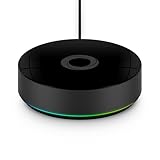
Overview: Homey Pro (2026) is a powerhouse local-first hub supporting seven wireless protocols, designed to unify diverse smart home ecosystems without cloud reliance. Its open-platform approach accommodates extensive device integration and complex automations.
What Makes It Stand Out: Unmatched protocol support (Zigbee, Z-Wave, Thread, Matter, etc.) enables compatibility with 50,000+ devices across 1,000+ brands. Local processing ensures rapid, private automations (“Flows”), while doubled RAM allows extensive device scaling and energy monitoring.
Value for Money: Premium-priced but justified for advanced users needing protocol agnosticism and local control. Avoids subscription pitfalls of cloud-dependent hubs, with long-term savings through energy automation and zero forced fees.
Strengths and Weaknesses: Strengths: Truly local processing; vast compatibility; sophisticated automation tools. Weaknesses: Steeper learning curve; community app support varies; no built-in IR blaster.
Bottom Line: The top choice for tech-savvy users building expansive, multi-brand smart homes prioritizing privacy and responsiveness—worth the investment despite the complexity.
9. SmartThings Hub 3rd Generation [GP-U999SJVLGDA] Smart Home Automation Hub Home Monitoring Smart Devices - Alexa Google Home Compatible - Zigbee, Z-Wave, Cloud to Cloud Protocols – White
![SmartThings Hub 3rd Generation [GP-U999SJVLGDA] Smart Home Automation Hub Home Monitoring Smart Devices - Alexa Google Home Compatible - Zigbee, Z-Wave, Cloud to Cloud Protocols – White](https://m.media-amazon.com/images/I/21hChu0ounL._SL160_.jpg)
Overview: Samsung’s SmartThings Hub 3rd Gen is a versatile entry-point hub supporting Zigbee, Z-Wave, and cloud-to-cloud integrations. It focuses on broad compatibility and seamless ecosystem blending via the SmartThings app.
What Makes It Stand Out: Strong cloud-to-cloud partnerships (e.g., Philips Hue, Ecobee) allow cross-platform automations without local protocols. Deep Alexa/Google Home synergy enables voice-centric control, while the intuitive app simplifies routine creation for beginners.
Value for Money: Budget-friendly for basic automation needs, but recurring fees apply for advanced features like 24/7 camera recording. Competes well on price for casual users but lacks robust local processing.
Strengths and Weaknesses: Strengths: Easy setup; wide cloud integrations; responsive app. Weaknesses: Cloud-dependent (unreliable during outages); limited local automation; no Thread/Matter support.
Bottom Line: A solid starter hub for simplicity seekers using major ecosystems—opt for this if you prioritize app ease over local control, but avoid if offline reliability is critical.
10. Aqara Smart Hub M100 for Home Automation, Matter Controller, Thread Border Router, Features Aqara Zigbee (Not Third-Party), Wi-Fi, Supports Amazon Alexa, Apple HomeKit, IFTTT, Home Assistant

Overview: The Aqara M100 is a compact Matter controller and Thread border router designed to bridge Aqara’s ecosystem with major platforms like Apple HomeKit and Alexa. It emphasizes local automation and Matter compatibility.
What Makes It Stand Out: As a Matter bridge, it unlocks Aqara-specific features (e.g., facial recognition) in non-Aqara ecosystems. Local automation executes in milliseconds without cloud reliance, while Wi-Fi 6 ensures secure, stable connections in crowded networks.
Value for Money: Affordable for Aqara-centric setups, especially with Matter integration. The lack of subscription fees and USB-A power flexibility add value, though Zigbee exclusivity limits broader use.
Strengths and Weaknesses: Strengths: Reliable local automations; seamless Matter/HomeKit support; compact and versatile placement. Weaknesses: Aqara Zigbee-only (no third-party); requires constant power; limited sensor range.
Bottom Line: Perfect for Aqara users embracing Matter—delivering fast, private automations and cross-platform harmony—but skip if you rely on non-Aqara Zigbee devices.
Understanding the Core Challenge: Why Compatibility Matters
The Protocol Puzzle Explained
Smart home devices don’t all communicate the same way. They rely on different wireless protocols like Zigbee, Z-Wave, Wi-Fi, Thread, Bluetooth, and Matter. Each has strengths – Zigbee and Z-Wave are low-power and mesh-capable, Wi-Fi offers high bandwidth, Thread is secure and IP-based, Matter aims for universal compatibility. A hub’s ability to speak multiple protocols natively (without needing separate bridges) is fundamental to avoiding compatibility headaches. If your hub only supports Wi-Fi, you’ve instantly excluded a vast universe of efficient, reliable Zigbee and Z-Wave sensors and switches.
Ecosystem Lock-In Dilemma
Some hubs are deeply intertwined with a single major platform (like a specific voice assistant ecosystem). While this offers seamless integration within that walled garden, it often creates significant barriers when trying to incorporate devices from other manufacturers or platforms. True compatibility freedom means the hub acts as a neutral platform, allowing you to mix and match devices based on features and value, not corporate allegiances. Avoid hubs that force you down a single, inflexible path.
The Matter Standard: A Beacon of Hope
Matter represents a significant leap forward in smart home interoperability. Built on Thread and Wi-Fi, this open-source standard aims to ensure devices from different brands work together reliably over a local network. While adoption is growing, not all hubs support Matter controller functionality yet. Prioritizing a hub with robust Matter support (both as a Thread Border Router and Matter controller) is crucial for future-proofing. It significantly reduces compatibility worries for new Matter-certified devices, creating a more unified experience.
Key Features to Prioritize for Seamless Integration
Native Protocol Support Spectrum
Don’t settle for a hub that only handles one or two protocols. Look for comprehensive native support, ideally including Zigbee 3.0, Z-Wave (with the latest Long Range capability if possible), Thread, and Wi-Fi. Bluetooth support can also be useful for initial device setup or specific peripherals. The broader the native spectrum, the fewer external dongles or bridges you’ll need, simplifying your setup and reducing single points of failure. Check the hub’s specifications meticulously for the exact protocols and versions supported.
Local Processing Power and Intelligence
Relying solely on the cloud for automation logic is a recipe for lag, failure during internet outages, and privacy concerns. A hub with strong local processing capabilities executes automations directly on the device within your home network. This means faster reactions (lights turning on instantly), reliability when the internet is down (security systems still functioning), and enhanced privacy (sensitive data like motion triggers staying local). Prioritize hubs that emphasize robust local execution for core automations.
Robust Automation Engine Capabilities
The heart of a good hub is its ability to create complex, reliable automations. Look beyond simple “if this, then that” triggers. Does it support multi-condition triggers (e.g., “If motion detected AND it’s after sunset AND no one is home”)? Can it handle delays, waits, and sequences? Does it offer advanced logic like variables or loops? A powerful, flexible automation engine allows you to create truly personalized and sophisticated routines that adapt to your life, rather than being constrained by simplistic options.
Scalability for Your Growing Smart Home
Your smart home won’t stay static. You’ll likely add more devices over time – perhaps more sensors, smart plugs, or even entirely new categories. Choose a hub known for handling a high number of devices reliably. Check manufacturer specifications for maximum device limits, but also research user experiences regarding performance degradation as device count increases. A hub that chokes at 20 devices won’t serve you well if you envision a fully automated home with 50+ components.
Evaluating Ecosystem Integration and Flexibility
Voice Assistant Neutrality
While integration with popular voice assistants is desirable, the hub itself shouldn’t dictate your voice assistant choice. The best hubs offer seamless, deep integration with multiple major voice platforms (like different leading assistants) without favoring one to the detriment of others. This flexibility ensures you can use the voice interface you prefer while still controlling all your hub-managed devices. Avoid hubs that lock you into a single voice ecosystem exclusively.
Mobile App Experience and Customization
The mobile app is your primary window into the hub’s world. It needs to be intuitive, stable, and visually clear. Crucially, it should provide deep customization options for automations, device management, and user permissions. A clunky, restrictive app can make even the most powerful hub feel frustrating to use. Look for apps that allow you to easily visualize device relationships, create complex automations through flexible interfaces (not just limited templates), and manage multiple users with granular controls.
User Management and Access Control
As your smart home grows, especially if you have family members or guests, granular user permissions become essential. Can you create different user profiles? Can you restrict certain users from accessing specific devices (like disabling children from adjusting the thermostat wildly) or critical automations (like the security system)? Robust user management within the hub’s ecosystem is vital for security and practical daily use in shared households.
Future-Proofing Your Investment
Matter Controller and Thread Border Router
As Matter adoption accelerates, a hub that functions as both a Matter controller (managing Matter devices) and a Thread Border Router (connecting Thread devices to your Wi-Fi network) becomes increasingly critical. This isn’t just a nice-to-have for 2026; it’s becoming table stakes for long-term compatibility. Ensure the hub explicitly supports these roles to seamlessly integrate the next generation of Matter-certified devices without needing additional hardware.
Software Update Commitment
Technology evolves rapidly. A hub’s hardware is only as good as the software that runs on it. Investigate the manufacturer’s track record for providing regular, timely software updates. These updates fix bugs, patch security vulnerabilities, and, most importantly for compatibility, add support for new devices and protocols. A company known for abandoning older hubs after a year or two leaves you stranded with outdated technology and potential new device incompatibilities.
Open Platform vs. Closed Garden Approach
Consider the philosophy behind the hub. Does the manufacturer actively support third-party integrations and developer access? An open platform approach, often evidenced by robust API availability or integration with popular open-source home automation platforms, fosters greater long-term flexibility and community-driven innovation. A tightly closed ecosystem might offer simplicity initially but risks becoming obsolete or incompatible with emerging solutions faster.
Security and Reliability: Non-Negotiable Foundations
End-to-End Encryption Standards
Your hub is the central command center for your home. It must employ strong, industry-standard encryption (like TLS 1.2/1.3) for all communications, both locally within your home network and when connecting to the cloud (if applicable). Verify the encryption protocols used for data in transit and at rest. Compromised security in the hub can mean compromised security for your entire smart home network.
Regular Security Patching Schedule
Cyber threats evolve constantly. A hub manufacturer must demonstrate a proactive and reliable schedule for releasing security patches. Look for information on their security policy – how quickly do they respond to vulnerabilities? Do they have a bug bounty program? Regular, predictable security updates are as crucial as the initial security features. A hub that hasn’t received a security patch in over a year is a significant risk.
Uptime and Redundancy Features
Reliability means the hub is almost always available. Frequent crashes or reboots cripple your automations and device control. Research user reports on stability. Additionally, consider if the hub offers any redundancy features. For instance, can critical automations still run locally if the hub loses internet connectivity? Does it have a battery backup option for power outages? True reliability ensures your smart home fundamentals keep working even when minor hiccups occur.
Making the Right Choice for Your Unique Home
Auditing Your Current and Planned Devices
Before selecting a hub, take a thorough inventory. List every smart device you currently own and note its communication protocol (check the manual or specs online). Then, list devices you realistically plan to add in the next 2-3 years. This exercise will clearly show which protocols are non-negotiable for your specific setup. Don’t buy a hub based solely on future promises if it doesn’t support the devices you have right now.
Assessing Your Technical Comfort Level
Hubs range from ultra-simple “set it and forget it” models to highly customizable platforms requiring technical know-how. Be honest about your comfort level. If you prefer plug-and-play simplicity, prioritize hubs with intuitive apps and minimal configuration needs, even if it means sacrificing some advanced features. If you enjoy tinkering and want maximum control, seek out hubs known for deep customization and open-platform support, accepting a steeper initial learning curve.
Balancing Budget with Long-Term Value
While cost is a factor, view the hub as a strategic, long-term investment in your home’s infrastructure. A slightly more expensive hub with superior compatibility, processing power, and update commitment will likely save you money and frustration over 5+ years compared to a cheaper model that becomes obsolete or incompatible quickly. Factor in the potential cost of replacing incompatible devices later – the hub’s price is often dwarfed by that risk. Prioritize value and longevity over the absolute lowest upfront cost.
Frequently Asked Questions
Frequently Asked Questions
How do I know which wireless protocols my smart devices use? Check the product specifications on the manufacturer’s website, the device packaging, or the user manual. Terms like “Zigbee,” “Z-Wave,” “Wi-Fi,” “Thread,” or “Bluetooth” will be clearly listed. If unsure, search online for “[Device Name] protocol” or consult the retailer’s detailed specs.
Can a single hub really support all my smart devices from different brands? The goal of modern hubs, especially those supporting Matter, is broad compatibility. While no single hub guarantees every device ever made will work, a hub with robust native protocol support (Zigbee, Z-Wave, Thread, Wi-Fi) and Matter controller functionality will support the vast majority of mainstream devices from diverse brands, significantly reducing compatibility issues.
What’s the difference between a hub with Matter support and one without? A hub with Matter support (as a controller and Thread Border Router) can natively integrate and control Matter-certified devices using the secure, local, and brand-agnostic Matter standard. A hub without Matter support will require the Matter device to connect via its original brand’s cloud or a separate bridge, often leading to slower response times, reliance on the internet, and potential limitations within the hub’s ecosystem.
Do I still need a hub if I only use devices from one brand? Sometimes, but not always. Many single-brand ecosystems (like some voice assistant platforms) can control their own devices directly. However, a dedicated hub often provides more reliable local control, better automation capabilities across all your devices (even if from one brand), and future flexibility if you decide to add non-brand devices later. It also centralizes management.
How important is local automation versus cloud-based automation? Local automation is critically important for speed, reliability, and privacy. Automations running locally react instantly (no internet lag), continue working during internet outages (crucial for security or basic comfort), and keep sensitive data (like motion detection) on your home network. Relying solely on cloud automations creates vulnerabilities and frustrations.
Can a home automation hub improve my home’s security? Yes, significantly. A capable hub allows you to create sophisticated security automations: triggering lights and alarms based on motion sensors when you’re away, locking doors automatically at bedtime, receiving instant alerts for unexpected activity, and ensuring critical sensors work even during internet downtime via local processing. It centralizes and enhances security logic.
What happens if the hub manufacturer goes out of business? This is a risk with any smart device. Prioritize hubs from established companies with a strong track record of long-term support. Hubs with open-platform philosophies or support for integration with open-source systems may offer more migration paths. Regularly back up your hub configuration if possible. Research community forums for older hubs to see if workarounds exist if official support ends.
How many devices can a typical hub handle reliably? This varies greatly by model. Entry-level hubs might handle 20-50 devices, while high-end models can manage 100+ or even 200+. However, the type of devices matters – many simple sensors use less bandwidth than multiple video streams. Always check real-world user experiences beyond the manufacturer’s maximum claim, as performance can degrade before hitting the stated limit.
Is a more expensive hub always better for compatibility? Not necessarily, but price often correlates with broader protocol support, stronger processing for local automations, and a higher likelihood of long-term software updates – all crucial for compatibility. The cheapest hubs frequently lack key protocols (like Z-Wave) or have limited local processing, creating immediate or future compatibility constraints. Evaluate features against your specific needs.
Will my existing non-Matter devices become obsolete with Matter hubs? No. Matter is designed to coexist. Your existing Zigbee, Z-Wave, and Wi-Fi devices will continue to work through the hub’s native protocol support. The hub acts as a translator. Matter primarily simplifies adding new devices. Your older devices remain functional; the hub just provides a more unified way to manage them alongside newer Matter devices.