Imagine staring at your electricity bill, wincing at the ever-increasing numbers, and wondering exactly where all that power is going. You unplug devices you suspect might be energy hogs, only to realize many modern gadgets—like your gaming console, coffee maker, or even phone charger—continue siphoning electricity even when “off.” This invisible drain, often called “vampire power,” can account for up to 10% of your monthly bill. The good news? Technology has evolved beyond guesswork, putting precise energy insights directly into your hands through smart plugs designed specifically for monitoring consumption. No more financial surprises—just clear, real-time data to reclaim control of your household expenses.
Energy monitoring smart plugs aren’t just another trendy gadget; they’re a strategic tool for modern homeowners tired of opaque billing practices. Unlike basic smart plugs that only offer remote on/off control, these specialized devices measure voltage, current, and wattage down to the minute, revealing patterns you’d never notice otherwise. Think of them as personal energy detectives for your outlets—exposing which devices guzzle power during standby mode or peak hours, and how minor habit adjustments compound into meaningful savings. In an era where energy prices swing unpredictably, this knowledge isn’t just convenient; it’s essential for budget resilience. Let’s explore how to harness this tech without falling for marketing hype or overspending on features you don’t need.
Top 10 Energy Monitoring Smart Plugs
Detailed Product Reviews
1. TP-Link 𝗧𝗮𝗽𝗼 Smart Plug Wi-Fi Mini, Energy Monitoring, Compatible with Alexa & Google Home & Samsung SmartThings, Timer, 15A/1800W Max, ETL Certified, 2.4G Wi-Fi Only, Tapo P115(4-Pack)

Overview:
The TP-Link Tapo P115 4-Pack offers budget-friendly smart plug functionality with robust energy monitoring. Designed for 2.4GHz Wi-Fi networks, it integrates seamlessly with Alexa, Google Assistant, and SmartThings, enabling remote control and scheduling for non-Matter ecosystems. Its compact size minimizes outlet obstruction.
What Makes It Stand Out:
Energy management is its crown jewel: detailed consumption charts, cost estimation tied to billing cycles, and automatic off-peak scheduling for high-drain devices. Unique overcharge prevention cuts power when devices hit custom low-battery thresholds, protecting gadgets while optimizing utility costs.
Value for Money:
At its price point, the 4-pack delivers exceptional value for non-Matter homes. The inclusion of granular energy billing insights—rare in entry-tier plugs—justifies the cost, especially for users prioritizing electricity savings over Matter compatibility. Cheaper alternatives lack this analytical depth.
Strengths and Weaknesses:
Strengths: Intuitive app, precise energy cost tracking, reliable voice control, ETL safety certification, and space-saving design. Weaknesses: No Matter support limits future-proofing, requires stable internet (no LAN-only operation), and lacks UL certification found in competitors.
Bottom Line:
Ideal for budget-conscious users in non-Matter homes seeking actionable energy data. While lacking next-gen Matter integration, its cost-saving features and 4-pack value make it a top choice for immediate utility optimization without ecosystem constraints.
2. Kasa Smart Plug, Matter Compatible, Energy Monitoring, Compact Design, 15A/1800W Max, Super Easy Setup, Works with Apple Home, Alexa & Google Home, UL Certified, 2.4G Wi-Fi Only, White, KP125M(2-Pack)

Overview:
Kasa’s KP125M 2-Pack merges Matter compatibility with reliable energy tracking. Certified for UL safety and designed to fit snugly without blocking adjacent outlets, it connects to Apple Home, Alexa, Google Home, and SmartThings via 2.4GHz Wi-Fi, emphasizing seamless Matter ecosystem integration.
What Makes It Stand Out:
Matter support enables critical offline functionality: devices communicate directly on your local network during internet outages, ensuring lights or sensors remain controllable. This future-proof reliability, combined with straightforward setup and UL certification, sets it apart from non-Matter rivals.
Value for Money:
Priced moderately for a 2-pack, it offers strong value for Matter adopters. The offline LAN control justifies the cost over cheaper non-Matter plugs, and UL certification adds safety assurance. Though pricier per unit than bulk packs, its ecosystem flexibility is worth the investment for Apple/Smart Home users.
Strengths and Weaknesses:
Strengths: True Matter compatibility with offline operation, UL safety rating, compact size, effortless setup, and cross-platform app support. Weaknesses: Only 2-pack option limits bulk savings, energy data is less detailed than Tapo’s billing integration, and no 5GHz Wi-Fi support.
Bottom Line:
A must-have for Matter-focused households prioritizing reliability during outages. Its compact design and UL certification make it safe and practical, though those needing detailed energy billing may prefer alternatives. Highly recommended for Apple HomeKit users.
3. Kasa Matter Smart Plug w/ Energy Monitoring, Compact Design, 15A/1800W Max, Super Easy Setup, Works with Apple Home, Alexa & Google Home, UL Certified, 2.4G Wi-Fi Only, White, KP125M (4-Pack)

Overview:
This Kasa KP125M 4-Pack delivers Matter-enabled smart plug convenience at scale. Sharing the compact, UL-certified design of its 2-pack sibling, it emphasizes local network resilience and cross-platform control via Apple Home, Alexa, and Google Assistant on 2.4GHz Wi-Fi.
What Makes It Stand Out:
The standout feature is Matter’s local control: all devices interact directly on your LAN without cloud dependency, ensuring functionality during internet blackouts. The 4-pack configuration offers exceptional value for whole-home deployment, covering multiple rooms affordably while maintaining outlet accessibility.
Value for Money:
The 4-pack significantly reduces per-unit cost compared to the 2-pack, making Matter adoption economical for multi-outlet needs. UL certification and offline reliability justify the price, outperforming non-Matter plugs in long-term ecosystem value despite similar base features.
Strengths and Weaknesses:
Strengths: Offline Matter operation, UL safety rating, space-efficient design, easy Kasa app setup, and ideal bulk value. Weaknesses: Energy monitoring lacks Tapo’s cost-estimation depth, no 5GHz support, and identical functionality to the 2-pack—only quantity differs.
Bottom Line:
The best buy for Matter users needing multiple plugs. Its offline capability and safety certification make it indispensable for reliable smart homes, while the 4-pack maximizes savings. Choose this over individual packs for whole-house setups where future-proofing matters.
4. Govee Smart Plug with Energy Monitoring, WiFi Bluetooth Plug Work with Alexa and Google Assistant, 15A Smart Outlets with Timer & Group Controller, No Hub Required, ETL&FCC Certified for Home, 4 Pack

Overview:
Govee’s 4-Pack smart plugs blend dual-band connectivity (Wi-Fi + Bluetooth) with group scheduling. ETL/FCC-certified and supporting voice control via Alexa/Google, they focus on accessibility for families and seniors, offering year-long energy data tracking through the Govee Home app.
What Makes It Stand Out:
Dual connectivity ensures remote access via Wi-Fi while Bluetooth provides local backup. Group control is exceptional—synchronize multiple plugs for routines like “Good Morning” coffee makers—and the app’s 1-year energy history aids long-term savings analysis, surpassing competitors’ limited data retention.
Value for Money:
Competitively priced for a 4-pack, it excels in user-friendly automation. Group scheduling and Bluetooth fallback offer unique convenience, especially for non-Apple households. While energy data is thorough, it lacks Matter integration, making it best for users prioritizing simplicity over ecosystem interoperability.
Strengths and Weaknesses:
Strengths: Bluetooth/Wi-Fi redundancy, intuitive group scheduling, 1-year energy reports, ETL/FCC safety, and senior-friendly voice control. Weaknesses: No Matter support, incompatible with Apple Home, and app can feel less polished than Kasa/Tapo.
Bottom Line:
Perfect for Alexa/Google-centric homes wanting effortless group routines and Bluetooth reliability. Its scheduling depth and safety certs justify the cost, but Matter or Apple users should consider alternatives. A top pick for families seeking hassle-free automation.
5. TP-Link Tapo Smart Plug Mini, Matter Compatible, Compatible with Alexa, Google Home & Samsung SmartThings, Energy Monitoring, 15A, UL Certified, 2.4G Wi-Fi Only, Tapo P110M(4-Pack)

Overview:
The Tapo P110M 4-Pack bridges TP-Link’s energy expertise with Matter compatibility. UL-certified and supporting Alexa, Google, and SmartThings, it retains Tapo’s signature energy analytics while adding Matter’s local network resilience for uninterrupted control during outages.
What Makes It Stand Out:
It uniquely combines Matter’s offline functionality with Tapo’s advanced energy tools: real-time cost estimation, off-peak scheduling, and overcharge prevention. This hybrid approach delivers both ecosystem flexibility and granular utility insights unmatched by pure Matter competitors.
Value for Money:
As a Matter-enabled 4-pack with UL certification, it offers premium features at mid-tier pricing. The inclusion of Tapo’s billing-focused energy tracking—absent in most Matter plugs—provides tangible savings potential, making it a compelling upgrade from non-Matter Tapo models.
Strengths and Weaknesses:
Strengths: Matter + Tapo energy synergy, UL safety, cost-estimation tools, compact design, and robust scheduling. Weaknesses: No Apple Home native support (requires SmartThings bridge), energy data less visual than P115, and limited to 2.4GHz Wi-Fi.
Bottom Line:
The ideal fusion for Tapo fans entering the Matter era. Its energy management depth and offline reliability justify the investment, especially for Samsung/Google ecosystems. Choose this over P115 if Matter compatibility is essential—it’s the smartest evolutionary step.
6. Emporia Energy Monitoring Smart Plug, WiFi Smart Outlet Plug Works with Alexa and Google Home - 15a WiFi Outlet with Timer, Mobile App, Home Energy Monitor, Scheduling - 2.4ghz WiFi Only (4 Pack)

Overview: The Emporia 4-pack offers budget-friendly smart plug functionality centered on detailed energy monitoring. It targets users seeking to reduce electricity bills by tracking appliance-specific consumption via its dedicated app, while supporting core smart features like scheduling and remote control over 2.4GHz Wi-Fi. What Makes It Stand Out: Its standout feature is granular, real-time energy monitoring displayed clearly in the app, allowing users to identify energy hogs and eliminate standby waste. The 15A peak load capacity (for 1 hour daily) and robust scheduling for automating routines like coffee makers provide practical utility beyond basic on/off control. Value for Money: Priced competitively for a 4-pack, it delivers exceptional value for energy-conscious households. The comprehensive monitoring surpasses many rivals in this price bracket, though the lack of 5GHz Wi-Fi support limits compatibility for some routers, potentially affecting remote reliability. Strengths and Weaknesses: Strengths: Accurate energy tracking, strong scheduling, 4-pack value, Alexa/Google compatibility. Weaknesses: 2.4GHz Wi-Fi only (no 5GHz), app can feel less polished than competitors, peak load restriction requires careful appliance management. Bottom Line: An excellent choice for cost-effective energy management and basic automation. Ideal for users prioritizing consumption insights over cutting-edge app design, provided their network supports 2.4GHz.
7. TP-Link 𝗧𝗮𝗽𝗼 Smart Plug Wi-Fi Mini, Energy Monitoring, Compatible with Alexa & Google Home & Samsung SmartThings, Timer, 15A/1800W Max, ETL Certified, 2.4G Wi-Fi Only, Tapo P115(2-Pack)

Overview: TP-Link’s Tapo P115 mini smart plug delivers reliable, app-centric control with robust energy monitoring. Designed for seamless integration into existing smart homes, it focuses on practical energy savings through usage tracking, scheduling, and safety features within a compact form factor. What Makes It Stand Out: Its standout capability is the integration of energy cost estimation directly within the Tapo app, translating usage data into bill impact. Features like automatic shutoff during overload and smart charging (stopping at user-defined battery levels) enhance safety and device longevity beyond basic monitoring. Value for Money: The 2-pack offers solid value, leveraging TP-Link’s trusted reliability and ETL certification. While similar to competitors, the intuitive cost-estimation feature and strong SmartThings compatibility justify its price for users focused on tangible bill savings and ecosystem integration. Strengths and Weaknesses: Strengths: Excellent energy cost visualization, overload/overcharge protection, compact size, broad voice assistant support. Weaknesses: 2.4GHz Wi-Fi limitation, scheduling lacks some advanced options found in premium models, app occasionally lags. Bottom Line: A highly practical and safety-focused plug pack. Recommended for users wanting clear energy-to-cost insights and reliable performance within major smart home ecosystems, accepting the 2.4GHz constraint.
8. AiSeek Tuya Smart Plug,Mini with Energy Monitoring,Pro Series 15A Plug,2.4G Wi-Fi Outlets Support Alexa, Google Assistant, Time Schedule,ETL & FCC Certified, 4 Pack

Overview: The AiSeek 4-pack provides a feature-rich Tuya-based smart plug solution emphasizing compact design, group control, and essential energy monitoring. It caters to users seeking a cost-effective way to automate multiple devices and track consumption using the widely available SmartLife app. What Makes It Stand Out: Its key differentiator is the efficient group control feature, enabling simultaneous management of all plugs with a single command—ideal for whole-room automation. The compact design avoids blocking adjacent outlets, a common pain point, while maintaining 15A capacity and critical safety certifications (ETL/FCC). Value for Money: Exceptional value as a 4-pack at an accessible price point. The combination of group control, space-saving build, and reliable SmartLife app functionality offers more utility per dollar than many single or 2-packs, though app reliance is a consideration. Strengths and Weaknesses: Strengths: True group control, non-obstructive design, 4-pack affordability, solid safety features. Weaknesses: Requires SmartLife app (not Tapo/brand-specific), limited advanced energy analytics, 2.4GHz Wi-Fi only, scheduling is basic. Bottom Line: The top pick for budget-conscious users needing to control multiple plugs together. Best for SmartLife app users prioritizing simplicity and space efficiency over deep energy analytics.
9. THIRDREALITY ZigBee Smart Plug 4 Pack with Real-time Energy Monitoring,15A Outlet, Zigbee Repeater,ETL Certified,ZigBee Hub Required,Work with Home Assistant,Compatible Echo Devices and SmartThings

Overview: THIRDREALITY’s ZigBee plugs offer a hub-dependent alternative to Wi-Fi models, prioritizing mesh network stability and deep integration with advanced platforms like Home Assistant. This 4-pack targets tech-savvy users invested in ZigBee ecosystems seeking reliable, low-latency control. What Makes It Stand Out: Its unique ZigBee 3.0 foundation acts as a signal repeater, strengthening the mesh network—unlike Wi-Fi plugs. Deep compatibility with Home Assistant, Hubitat, and SmartThings enables complex automations, while real-time energy monitoring integrates natively into these platforms for advanced users. Value for Money: Good value for ZigBee enthusiasts, but requires an existing compatible hub (e.g., Echo 4th Gen, SmartThings). The repeater function adds network value, though the mandatory hub investment makes the total cost higher than Wi-Fi-only options for new users. Strengths and Weaknesses: Strengths: Mesh network repeater, low-latency control, deep Home Assistant/SmartThings integration, robust local automation potential. Weaknesses: ZigBee hub required (added cost/complexity), setup less intuitive for beginners, limited standalone app functionality. Bottom Line: Highly recommended only for users with an existing ZigBee hub seeking reliable, automatable plugs with mesh benefits. Not suitable for beginners or Wi-Fi-only smart home setups.
10. TP-Link Tapo Smart Plug Mini, Matter Compatible, Compatible with Alexa, Google Home & Samsung SmartThings, Energy Monitoring, 15A, UL Certified, 2.4G Wi-Fi Only, Tapo P110M(2-Pack)
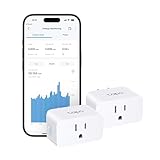
Overview: TP-Link’s Matter-certified Tapo P110M represents the future of smart plugs, prioritizing cross-platform compatibility and unified control. It combines robust energy monitoring and safety features with the emerging Matter standard for seamless integration across Apple Home, Alexa, Google, and SmartThings. What Makes It Stand Out: Matter certification is its defining feature, enabling secure, local network control without cloud dependency and effortless switching between ecosystems. This future-proofs the investment, while features like energy bill estimation and overcharge prevention maintain Tapo’s practical utility. Value for Money: Priced slightly higher than non-Matter models, it justifies the cost through unparalleled flexibility and longevity. Avoiding potential obsolescence as Matter adoption grows offers significant long-term value for users invested in multiple platforms or planning ecosystem changes. Strengths and Weaknesses: Strengths: Matter-certified (Apple/Google/Alexa/SmartThings), local control, excellent cross-platform support, UL safety certification, strong energy features. Weaknesses: Still 2.4GHz Wi-Fi only, Matter setup may confuse novices, limited to basic energy analytics initially. Bottom Line: The essential choice for users prioritizing future-proofing and ecosystem flexibility. Highly recommended despite the premium price, especially for those using multiple smart home platforms or valuing local network reliability.
Understanding Energy Monitoring Smart Plugs Fundamentals
What Sets Monitoring Plugs Apart from Standard Smart Plugs
Basic smart plugs let you turn devices on or off remotely but provide zero insight into energy use. Monitoring plugs, however, include built-in sensors that measure real-time wattage, voltage, and current flow. This transforms them from simple switches into diagnostic tools that quantify exactly how much power each connected appliance consumes—whether it’s running, idling, or seemingly “off.” The distinction is critical: without these metrics, you’re optimizing blindly.
Core Technology Behind Power Tracking
These devices rely on current transformers or shunt resistors to measure electrical flow, converting analog signals into digital data via microcontrollers. Advanced models incorporate power factor correction to account for inefficiencies in devices like refrigerators or motors, ensuring readings reflect actual energy drawn from the grid (not just apparent power). This precision prevents misleading estimates that could undermine your savings strategy.
Why Accuracy Matters More Than You Think
A 5% margin of error might seem negligible, but it translates to significant miscalculations over time—especially for high-wattage appliances like space heaters or AC units. Look for plugs certified to industry standards (like IEC 62053) with sub-1% accuracy for critical loads. Inaccurate data doesn’t just distort savings projections; it could lead you to overlook genuine energy drains.
Evaluating Critical Performance Features
Real-Time Monitoring vs. Historical Data Depth
Instant wattage readouts help catch sudden spikes (like a malfunctioning fridge), but long-term trend analysis reveals behavioral patterns. Opt for plugs that store at least 30 days of granular data—hourly or daily breakdowns let you correlate usage with billing cycles and identify seasonal shifts, such as increased heating costs in winter.
Granular Measurement Capabilities
Beyond total kWh, advanced models track voltage fluctuations, amperage, power factor, and apparent power (VA). This matters for diagnosing electrical health: unstable voltage can damage sensitive electronics, while low power factor indicates inefficient energy use in motor-driven appliances. These metrics help prioritize which devices to replace or unplug.
Calibration and Self-Testing Functions
Over time, sensor drift can compromise accuracy. Top-tier plugs include auto-calibration features or manual reset options to maintain reliability. Some even run self-diagnostics, alerting you if readings fall outside expected ranges—critical for catching faulty appliances before they cause safety hazards.
Compatibility and Integration Essentials
Electrical System Requirements Check
Not all plugs handle the same loads. Verify voltage compatibility (110V vs. 220V regions) and maximum amperage (typically 10A–16A). Overlooking this risks tripping breakers or damaging devices—especially with high-draw appliances like hair dryers or microwaves. Always match the plug’s rating to your appliance’s wattage (watts = volts × amps).
Smart Home Ecosystem Flexibility
A plug that only works with one voice assistant (e.g., Alexa but not Google Home) limits future flexibility. Prioritize models supporting Matter over Thread or Wi-Fi 6 for broader compatibility, and check if they integrate with energy management platforms like Home Assistant for custom automations.
App Interface Usability Factors
Clunky apps defeat the purpose of easy monitoring. Test screenshots for intuitive dashboards showing cost estimates (not just kWh), customizable alerts, and exportable reports. Avoid apps requiring constant logins or lacking dark mode—these friction points reduce long-term engagement with your data.
Installation and Operational Best Practices
Strategic Placement for Maximum Insight
Plug high-impact devices first: entertainment centers, home offices, or kitchen clusters where “vampire loads” accumulate. Avoid daisy-chaining multiple plugs, as cumulative wattage may exceed limits. For whole-home insights, prioritize circuits with constant loads (like refrigerators) before intermittent ones (like lamps).
Network Stability for Uninterrupted Tracking
Wi-Fi congestion from other smart devices can cause data gaps. Choose plugs supporting 2.4GHz bands (more stable for IoT) and position your router centrally. If your home has dead zones, consider models with mesh networking capabilities to relay signals through other compatible devices.
Calibration Against a Trusted Meter
Cross-verify your plug’s readings against a standalone energy meter (like a Kill A Watt) during initial setup. Run a known-load device (e.g., a 60W incandescent bulb) for 1 hour—your plug should report ~0.06 kWh. Discrepancies over 3% warrant contacting support before relying on long-term data.
Maximizing Savings Through Data-Driven Habits
Identifying Hidden Energy Vampires
Standby power from “always-on” electronics (cable boxes, printers, chargers) adds up silently. Use your plug’s idle-mode tracking to list devices consuming >1W when “off,” then deploy smart strips or schedules to cut phantom loads. Even 5W per device across 10 gadgets wastes 44 kWh yearly—that’s $6–$12 in most regions.
Cost Projection Tools and Tariff Alignment
Some apps convert kWh to currency using your local electricity rate. Input your provider’s off-peak/peak pricing to see how shifting laundry or dishwasher runs to cheaper hours impacts bills. This feature turns abstract data into tangible financial incentives, making conservation feel immediately rewarding.
Behavioral Nudges via Custom Alerts
Set thresholds for abnormal usage (e.g., “alert if >50W overnight”) to catch forgotten space heaters or malfunctioning appliances. Weekly summary emails highlighting top energy users create gentle accountability—studies show such feedback reduces household consumption by 5–15% through awareness alone.
Long-Term Value and Sustainability
Calculating Your Payback Timeline
Divide the plug’s cost by your projected monthly savings (e.g., $25 plug ÷ $3 savings = 8.3 months). Focus on high-impact devices first—monitoring a 1500W heater used 4 hours nightly could save $15+/month, paying for itself in weeks. Low-usage gadgets may never justify the investment.
Build Quality and Overload Protection
Cheap plastics and thin wiring risk overheating. Look for plugs with fire-retardant housings, child-safe shutters, and automatic shutoff if temperatures exceed safe limits. These safety features prevent costly hazards and extend the device’s lifespan beyond typical 2-year warranties.
Firmware Evolution and Feature Roadmaps
Manufacturers often add capabilities via updates—like solar integration or carbon footprint tracking. Research brands with a history of meaningful updates (check forums for user feedback) to ensure your plug stays relevant as energy management evolves.
Security and Privacy Safeguards
Data Encryption Standards to Demand
Energy data reveals intimate habits (e.g., when you’re home/asleep). Verify end-to-end encryption during data transmission and storage. Avoid plugs storing unencrypted history on cloud servers—opt for local processing where possible, with clear data retention policies.
Third-Party Data Sharing Policies
Read privacy terms carefully: some brands monetize aggregated usage data by selling insights to utilities or advertisers. Choose vendors with explicit “no data resale” clauses and granular permission controls, letting you delete historical data permanently.
Frequently Asked Questions
How accurate are energy monitoring smart plugs compared to utility meters?
Most high-quality models achieve 95–99% accuracy for resistive loads (like heaters), but inductive loads (motors, compressors) may show 2–5% variance due to power factor complexities. They’re reliable for relative comparisons between devices but shouldn’t replace your utility meter for billing disputes.
Can these plugs handle high-wattage appliances like air conditioners?
Yes, but verify the plug’s amperage rating first. A standard 15A plug supports up to 1,800W (120V systems). For 5,000W window AC units, you’ll need a heavy-duty 20A+ model—never exceed the plug’s stated limit to avoid fire risks.
Do they work during power outages?
No—without grid power, most lose connectivity and monitoring capability. Battery-backed models exist but are rare; assume data gaps during outages and sync resumes when power returns.
Will monitoring features slow down my Wi-Fi?
Minimal impact. These devices transmit small data packets intermittently (e.g., every 10 minutes). Even 10 plugs add less load than a single security camera. Wi-Fi 6-compatible models are even more efficient.
How do I interpret power factor readings?
Power factor (PF) measures efficiency: 1.0 is ideal (all energy used productively), while <0.9 indicates waste (common in motors). Low PF doesn’t increase your bill if your utility doesn’t charge for it, but it signals devices that could be upgraded for long-term savings.
Can I use them outdoors?
Only if explicitly rated for outdoor/wet locations (IP65+). Standard indoor plugs lack weatherproofing and pose electrocution risks when exposed to moisture. Never use non-rated plugs for patio heaters or holiday lights.
Do they reduce energy consumption automatically?
No—they provide data to inform your actions. Savings come from behavioral changes (unplugging devices) or schedules you create. Some advanced models trigger automations (e.g., “turn off if idle >30 mins”), but human oversight is still key.
How long do they typically last?
Quality plugs last 3–5 years with continuous use. Overheating from overloaded circuits or poor ventilation shortens lifespan. Look for thermal fuses that disable the plug if temps exceed 70°C (158°F).
Are there privacy risks with energy usage data?
Yes—if hacked, usage patterns can reveal occupancy schedules. Mitigate risks by using strong unique passwords, disabling remote access when unused, and choosing brands with local data processing options.
Can multiple plugs monitor an entire home’s consumption?
Not precisely. They only track individual circuits, missing hardwired appliances (ovens, HVAC). For whole-home insights, pair them with a main-panel energy monitor—plugs excel at appliance-level diagnostics but aren’t whole-house solutions.