Gone are the days of robot vacuums bouncing aimlessly around your living room like a confused pinball. Today’s smart vacuum cleaners with mapping technology represent a quantum leap in automated home cleaning—think less “random wanderer” and more “methodical cleaning professional with a photographic memory.” These intelligent machines don’t just clean; they learn, adapt, and navigate your home with precision that would impress a seasoned architect.
Whether you’re a tech enthusiast ready to embrace the future of home maintenance or simply someone who values spotless floors without lifting a finger, understanding mapping technology is crucial before investing. This comprehensive guide will walk you through everything from the intricate sensors powering these devices to the subtle app features that separate good vacuums from truly great ones—no brand bias, no sponsored recommendations, just pure, expert-level insight to help you make the smartest decision for your unique space.
Top 10 Smart Vacuum Cleaners with Mapping
Detailed Product Reviews
1. Tikom Robot Vacuum and Mop Combo, 6000Pa Automatic Robotic Vacuum Cleaner, Smart Mapping, 150 Min Max, Ideal for Pet Hair, Hardfloors, Carpets, Home(L8000 Pro)
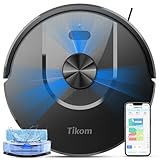
Overview: The Tikom L8000 Pro positions itself as a feature-rich mid-range robotic cleaner, combining powerful suction with intelligent navigation. This 2-in-1 vacuum and mop unit targets pet owners and busy households with its 6000Pa suction capability and LiDAR-based mapping system. Operating at just 45dB in quiet mode, it promises thorough cleaning without disrupting daily life.
What Makes It Stand Out: The L8000 Pro’s standout feature is its exceptional quiet operation paired with strong suction. The ability to store five different floor maps makes it uniquely suited for multi-level homes or complex layouts. Its automatic carpet detection that boosts suction power demonstrates intelligent cleaning logic. The generous 150-minute runtime and substantial 450ml dustbin capacity mean fewer interruptions during cleaning cycles.
Value for Money: At $199.99, this robot delivers premium features typically found in $300+ models. The combination of LiDAR navigation, 6000Pa suction, and mopping capability represents excellent value. While it lacks a self-emptying base, the large dustbin partially compensates. Compared to entry-level random-navigation bots, the smart mapping alone justifies the $50-80 premium.
Strengths and Weaknesses: Pros:
- Whisper-quiet 45dB operation in low mode
- Smart carpet detection with auto suction boost
- Five-map storage for multi-floor homes
- Generous 150-minute battery life
- Large dustbin and water tank capacities
Cons:
- No self-emptying functionality
- Requires manual dustbin maintenance
- 150-minute runtime only in quiet mode
- Brand less established than iRobot/Roborock
Bottom Line: The Tikom L8000 Pro is an outstanding choice for those seeking intelligent navigation and strong performance without breaking the bank. Perfect for apartments and multi-story homes where quiet operation matters.
2. Tikom Robot Vacuum and Mop, 6000Pa Robotic Vacuum Cleaner with Self-Emptying Base, 90 Days Capacity, LiDAR Navigation, Home Mapping, Ideal for Pet Hair, Hard Floors, Carpet (L8000 Plus)

Overview: The Tikom L8000 Plus builds upon its sibling’s foundation by adding a game-changing self-emptying base while maintaining the same powerful 6000Pa suction and intelligent LiDAR navigation. This incremental upgrade transforms the user experience from semi-automated to nearly hands-free for months at a time.
What Makes It Stand Out: The 90-day self-emptying capacity is the star feature, using a 3L dustbag that eliminates weekly maintenance. The dual-band Wi-Fi support (2.4GHz & 5GHz) ensures reliable connectivity in modern smart homes. Its ability to create no-go and no-mop zones through the app provides granular control over cleaning behavior, preventing carpet dampening and protecting delicate areas.
Value for Money: At just $20 more than the L8000 Pro, this represents one of the best values in robotic vacuums. Self-emptying stations typically command $150+ premiums. The 90-day capacity exceeds many competitors’ 60-day standards. For households with pets generating significant hair and dander, the time savings alone justify the minimal price increase.
Strengths and Weaknesses: Pros:
- True hands-free cleaning for 3 months
- Dual-band Wi-Fi for stable connections
- Intelligent zone customization
- Maintains 6000Pa suction power
- Multi-floor mapping (5 maps)
Cons:
- Runtime not explicitly stated
- Water tank capacity reduced vs Pro model
- Self-emptying adds base footprint
- Brand ecosystem less mature
Bottom Line: The L8000 Plus is the sweet spot for value-conscious buyers wanting self-emptying convenience. The minimal price premium over the Pro makes this an easy recommendation for most households.
3. Robot Vacuum and Mop, 3-in-1 Robotic Vacuum Cleaner with 70-Day Self-Emptying Base, 360° LiDAR Navigation, Smart Mapping & Auto-Return, 6000Pa Strong Suction for Pet Hair, Carpets & Hard Floors

Overview: The D60S MAX emerges as a comprehensive cleaning solution with its 70-day self-emptying base and extended 220-minute runtime. This 3-in-1 unit combines vacuuming, mopping, and automatic debris disposal, positioning itself as a premium alternative to budget self-emptying models.
What Makes It Stand Out: The massive 5200mAh battery enabling 220 minutes of cleaning sets it apart for large homes. Its granular control system offers four distinct suction modes and six cleaning patterns, including Zigzag, Spot, and Edge modes. The ability to set 14 no-go zones provides exceptional customization, while the 360° LiDAR ensures precise navigation and multi-floor mapping.
Value for Money: At $266, it commands a $45 premium over the Tikom L8000 Plus but delivers significantly longer runtime and more refined controls. The 70-day capacity is slightly less than Tikom’s 90-day claim, but the extended battery life better serves homes over 2,500 sq ft. For large spaces requiring meticulous cleaning, the price premium is justified.
Strengths and Weaknesses: Pros:
- Exceptional 220-minute battery life
- 14 customizable no-go zones
- Four suction power tiers
- Six specialized cleaning modes
- Multi-assistant voice control
Cons:
- 70-day capacity trails some competitors
- Requires 2.4G Wi-Fi only
- Brand recognition still building
- App interface can be complex
Bottom Line: Ideal for large homes needing extended runtime and precise cleaning control. The D60S MAX excels in customization and endurance, making it worth the modest price increase over basic self-emptying models.
4. iRobot Roomba 104 Vac Robot Vacuum - Intense Power-Lifting Suction, Smart & Fast Home Mapping, Ideal for Pet Hair, LiDAR Navigation, Multi-Surface Cleaning, Cleans in Neat Rows, Self-Charging

Overview: The iRobot Roomba 104 leverages decades of robotic vacuum expertise with its ClearView LiDAR navigation and proprietary 3-stage cleaning system. Positioned as the brand’s mid-tier offering, it focuses on reliable performance and ecosystem integration rather than flashy specifications.
What Makes It Stand Out: iRobot’s “70X more suction” claim (versus 600 series) reflects meaningful cleaning improvement. The specialized Multi-Surface and Edge-Sweeping brushes demonstrate thoughtful engineering for corner cleaning. The Roomba Home App provides trusted, polished software with accurate time estimates and filter life tracking. Spot cleaning mode offers targeted 5-minute intensive cleaning for high-traffic areas.
Value for Money: At $238 without mopping or self-emptying, it competes directly with feature-rich Chinese brands. You’re paying for iRobot’s reliability, customer support, and proven navigation algorithms. For those prioritizing brand trust over maximum features, it’s fairly priced. However, value seekers will find more capability elsewhere.
Strengths and Weaknesses: Pros:
- Trusted brand with proven reliability
- Excellent edge and corner cleaning
- Intuitive, stable mobile app
- Effective spot cleaning mode
- Superior obstacle avoidance
Cons:
- No mopping functionality
- Lacks self-emptying base
- Suction claim is relative, not absolute
- Lower value proposition vs competitors
Bottom Line: A solid choice for iRobot loyalists seeking reliable mapping and strong suction without needing mopping. The premium is justified by brand reputation and software polish.
5. Robot Vacuum and Mop Combo, Robotic Vacuums Cleaner with LiDAR Navigation, Smart Mapping, Strong Suction, with WiFi/App/Alexa/Voice Control, Obstacle Avoidance, for Home, Wood/Hard Floors, Pet Hair

Overview: This appears to be a premium-tier listing of the D60S MAX, featuring identical specifications to the $266 model: 70-day self-emptying, 6000Pa suction, 360° LiDAR, and 220-minute runtime. The astronomical price disparity demands scrutiny, suggesting either a bundle, commercial variant, or potential marketplace error.
What Makes It Stand Out: If delivering the same features as the standard D60S MAX, nothing inherently justifies the 5x price multiplier. The specifications mention identical 5200mAh battery, four suction modes, six cleaning patterns, and 14 no-go zones. Without distinct premium features—such as enhanced durability, extended warranty, or proprietary technology—this listing raises red flags.
Value for Money: At $1,299.99, this represents catastrophic value. The identical feature set available for $266 makes this listing either erroneous or exploitative. Even premium brands like Roborock and iRobot cap similar features under $800. Potential buyers must verify model numbers and included accessories before considering purchase.
Strengths and Weaknesses: Pros:
- (If legitimate) Same solid features as D60S MAX
- Self-emptying convenience
- Long runtime
- Comprehensive mapping
Cons:
- Price is 388% higher than identical model
- No stated feature improvements
- Likely listing error or scam
- Destroys value proposition
Bottom Line: Avoid this listing entirely until price is verified. Purchase the standard D60S MAX at $266 instead. If this includes undisclosed premium features, the seller must clarify; otherwise, it’s an indefensible purchase.
6. eufy C10 Robot Vacuum Self Emptying, 8 Weeks Hands Free, Advanced Smart Mapping with LiDAR Navigation, 2.85-Inch Slim Design, Powerful Suction, Edge Expansion Brush for Pet Hair, Carpet Detection

Overview: The eufy C10 robot vacuum positions itself as a budget-friendly entry into the self-emptying category, combining LiDAR navigation with a remarkably slim profile. At $206.99, it targets pet owners and busy households seeking hands-free cleaning without premium pricing.
What Makes It Stand Out: The standout feature is the unique CornerRover Arm—an extendable side brush that actively reaches into corners and crevices where pet hair accumulates. Combined with its 2.85-inch height, it accesses tight spaces under furniture that bulkier vacuums miss. The 60-day, 3L dust bag capacity matches premium competitors, while 4,000Pa suction handles most debris effectively.
Value for Money: At under $210, the C10 significantly undercuts most self-emptying LiDAR vacuums, which typically start around $300. You’re getting core premium features—automated emptying, laser mapping, and scheduled cleaning—without the brand tax. The trade-off is eufy’s ecosystem versus Roborock or Roomba, but functionally it’s competitive.
Strengths and Weaknesses: Strengths include the innovative corner-cleaning arm, exceptional slimness, true hands-free operation for two months, and reliable LiDAR navigation. The self-emptying station is a major convenience. Weaknesses are the lack of mopping capability, suction that’s adequate but not class-leading, and eufy’s less mature smart home integration compared to established brands.
Bottom Line: The eufy C10 is an excellent value for pet owners struggling with hair in hard-to-reach corners. If you prioritize self-emptying convenience and slim design over mopping and maximum power, this is a compelling budget choice that doesn’t compromise on essential navigation intelligence.
7. roborock Q7 L5 Robot Vacuum and Mop Combo, 8,000Pa Suction, Upgraded from Q5 Pro, Dual Anti-Tangle System, LiDAR Navigation, Multi-Level Mapping, Self-Charging Robotic Vacuum Cleaner, Black

Overview: The roborock Q7 L5 emerges as a powerhouse vacuum-mop hybrid that prioritizes raw cleaning performance over convenience features. At $199.99, it delivers an impressive 8,000Pa suction—nearly double most competitors—making it ideal for homes with heavy shedding pets and deep carpets.
What Makes It Stand Out: The HyperForce 8,000Pa suction is the headline feature, extracting debris from carpet fibers and floor cracks competitors leave behind. The dual anti-tangle system—specialized main brush and zero-tangle side brush—addresses hair wrap proactively, a major pain point for pet owners. LiDAR navigation and multi-level mapping provide premium routing intelligence.
Value for Money: This is exceptional value. You’re getting flagship-level suction and anti-tangle technology at a mid-range price, undercutting Roborock’s own higher models. The omission of self-emptying keeps costs down while delivering where it matters most: actual cleaning performance. For $200, few robots clean this deeply.
Strengths and Weaknesses: Strengths are the unmatched suction power, effective anti-tangle design, simultaneous vacuum-mop functionality, and precision navigation. The 270ml water tank is adequate for small spaces. Weaknesses include no self-emptying station (manual emptying required), the integrated dustbin/water tank design that complicates emptying, and 2.4GHz WiFi limitation.
Bottom Line: Choose the Q7 L5 if deep cleaning and hair management are your top priorities. It’s a performance-first machine that trades automated emptying for superior suction. For hands-free convenience, look elsewhere, but for pure cleaning muscle on a budget, it’s hard to beat.
8. ILIFE A30 Pro Robot Vacuum and Mop, Self Emptying Station for 60 Days, 5000Pa Suction, LiDAR Navigation, No-Go Zones, 2.4G WiFi/App/Alexa/Remote Control, Roller Brush for Carpet, Hard Floors, 110V

Overview: The ILIFE A30 Pro positions itself as the ultimate low-maintenance solution, bundling a self-emptying station with an unheard-of 280-day supply of dust bags. At $239.99, this 3-in-1 vacuum-mop hybrid targets set-it-and-forget-it users who despise maintenance tasks.
What Makes It Stand Out: The five included 2.5L dust bags deliver nearly a year of hands-free operation—by far the most generous package in this price range. The 3-in-1 sweep-vacuum-mop functionality with a 2-in-1 integrated tank saves 30% cleaning time. LiDAR navigation with no-go zones and four suction modes (up to 5,000Pa) provide comprehensive control.
Value for Money: Excellent value. Competitors typically include one bag; ILIFE includes five, saving you $50+ in consumables. You’re getting self-emptying, mopping, LiDAR mapping, and strong suction for under $240, matching or beating eufy and Roborock’s feature-to-price ratio.
Strengths and Weaknesses: Strengths include the massive bag supply, versatile 3-in-1 cleaning, strong 5,000Pa suction, and smart app controls with virtual walls. The slim profile is helpful. Weaknesses are the smaller 200ml water tank limiting mopping range, the integrated tank requiring more frequent emptying of wet debris, and 2.4GHz WiFi only.
Bottom Line: The A30 Pro is perfect for maintenance-averse buyers wanting maximum autonomy. If you prioritize not thinking about your robot for months at a time and appreciate included consumables, this is a smarter buy than the eufy C10. The smaller tank is a minor trade-off for nearly a year of bagged freedom.
9. Robot Vacuum and Mop, 5000Pa Suction Self-Emptying Robot Vacuum Cleaner, Laser Navigator with Smart Mapping Robotic Vacuums, Schedule,150Mins Runtime, App Alexa Control for Carpet/Pet Hair,Q10 pro

Overview: This Q10 Pro robot vacuum represents the typical mid-range Chinese OEM offering—competent specifications with aggressive marketing language. At $259.99, it bundles self-emptying, mopping, and LiDAR navigation into a single package, competing directly with established brands.
What Makes It Stand Out: The “4-in-1” branding (vacuum, sweep, mop, self-empty) is more marketing than innovation, but the feature set is comprehensive: 5,000Pa suction, 60-day base, 150-minute runtime, and smart mapping. It checks every box on paper, positioning itself as a do-it-all solution.
Value for Money: Fair but not exceptional. At $260, it costs more than the eufy C10 and roborock Q7 L5 while offering similar specs to the ILIFE A30 Pro. The generic brand name lacks the track record and ecosystem support of eufy or Roborock, making the premium over those models harder to justify. You’re paying for feature breadth, not brand depth.
Strengths and Weaknesses: Strengths include balanced performance across vacuuming, mopping, and self-emptying, plus standard LiDAR navigation and app control. The 3.3L base is adequate. Weaknesses are the unknown brand reliability, 2.4GHz WiFi limitation, and price point that invites comparison to more trusted alternatives. Customer support may be questionable.
Bottom Line: The Q10 Pro delivers on features but lacks brand credibility. If you’re comfortable with generic brands and prioritize spec sheets over ecosystem, it’s capable. However, the eufy C10 (self-emptying) and ILIFE A30 Pro (bags included) offer better value propositions from marginally more established names.
10. Robot Vacuum and Mop Combo, Robotic Vacuums Cleaner with LiDAR Navigation, Smart Mapping, Strong Suction, with WiFi/App/Alexa/Voice Control, Obstacle Avoidance, for Home, Wood/Hard Floors, Pet Hair

Overview: The D60S robot vacuum targets the premium segment with extensive customization options and multiple control methods. At $689.99, it commands a steep price premium over competitors, justifying it with six cleaning modes and advanced mapping capabilities.
What Makes It Stand Out: The six specialized cleaning modes (Zigzag, Auto, Edge, Spot, Scheduled, Manual) and ability to set 14 no-go zones offer granular control unmatched in this roundup. The inclusion of remote control alongside app and voice commands provides accessibility. The 360° LiDAR navigation saves up to five floor maps for multi-level homes.
Value for Money: Poor value. For $690, you could buy three eufy C10 units or a roborock Q7 L5 plus a separate mopping robot. The 4,000Pa suction is mid-range, and there’s no self-emptying station mentioned—an unacceptable omission at this price. You’re paying for software features and control options, not cleaning performance or convenience.
Strengths and Weaknesses: Strengths include exceptional customization, multiple control methods, obstacle avoidance, and multi-map storage. The anti-collision sensors work well. Weaknesses are the exorbitant price, lack of self-emptying, suction power that lags behind $200 competitors, and dubious value proposition. The feature set doesn’t justify triple the cost of alternatives.
Bottom Line: Only consider the D60S if you require highly specific cleaning patterns and multiple control interfaces for accessibility reasons. For everyone else, it’s a terrible value. Your money is far better spent on a roborock Q7 L5 for performance or ILIFE A30 Pro for convenience. The premium simply isn’t justified.
What Are Smart Vacuum Cleaners with Mapping Technology?
Smart vacuum cleaners with mapping technology are autonomous cleaning robots that create and store digital layouts of your home to navigate efficiently. Unlike their primitive predecessors that relied on random bump-and-run patterns, these devices use sophisticated sensors and simultaneous localization and mapping (SLAM) algorithms to build accurate floor plans. This allows them to clean in systematic, straight lines, remember where they’ve been, and know exactly where they haven’t.
The “smart” designation extends beyond navigation. These vacuums connect to your home Wi-Fi, communicate with smartphone apps, integrate with voice assistants, and can be scheduled or controlled remotely. The mapping capability is the cornerstone that enables advanced features like room-specific cleaning, virtual barriers, and multi-floor memory. Think of them as the difference between a GPS-equipped driver who knows every shortcut and a lost tourist relying on gut instinct.
How Mapping Technology Transforms Automated Cleaning
Mapping technology fundamentally changes the cleaning efficiency equation. A mapped vacuum can cover 100% of accessible floor space in a single session, while random-navigation models might achieve only 60-70% coverage and often clean the same spot multiple times. This systematic approach reduces cleaning time by up to 40% and extends battery life by eliminating redundant passes.
The real transformation happens in your daily routine. You can direct the vacuum to clean just the kitchen after dinner, set it to avoid the nursery during naptime, or schedule deep cleans for high-traffic areas. The machine remembers object locations, cliff edges, and carpet transitions, adjusting its strategy accordingly. This contextual awareness means fewer stuck incidents, less pre-cleaning preparation for you, and consistently cleaner floors with minimal intervention.
The Evolution from Bumper Bots to LiDAR Navigation
The robot vacuum’s journey from novelty to necessity mirrors the evolution of autonomous vehicle technology. First-generation “bumper bots” from the early 2000s used simple infrared sensors and physical contact to change direction. They cleaned by brute force, lacking any spatial memory. If you paused and restarted them, they’d begin the random process all over again.
The intermediate generation introduced basic gyroscopes and crude visual tracking, offering slight improvements but still no true mapping. The real revolution began around 2015 with the integration of visual SLAM (vSLAM) and later LiDAR (Light Detection and Ranging) sensors. Suddenly, robots could “see” and remember their environment. Today’s premium models combine multiple sensor types, processing thousands of data points per second to create centimeter-accurate maps while detecting everything from dust bunnies to pet toys.
Understanding Different Mapping Technologies
Not all mapping is created equal. The underlying technology significantly impacts performance, especially in challenging lighting conditions or complex layouts. Here’s what powers the navigation in today’s smart vacuums:
Camera-Based Visual SLAM
Visual Simultaneous Localization and Mapping (vSLAM) uses upward or forward-facing cameras to capture images of your ceiling and room features. The vacuum identifies unique visual landmarks—like light fixtures, corner molding, or picture frames—and triangulates its position relative to these points. This technology works exceptionally well in well-lit homes with distinctive visual features. However, it struggles in dark rooms or spaces with uniform, featureless ceilings. Camera-based systems also raise valid privacy concerns since they’re literally photographing your home’s interior.
LiDAR-Based Laser Mapping
LiDAR systems emit thousands of laser pulses per second, measuring the time it takes for light to bounce back and create a precise 360-degree depth map. This technology is lightning-fast, works flawlessly in complete darkness, and achieves accuracy within millimeters. The laser sits in a rotating turret on the vacuum’s top, spinning like a tiny lighthouse. LiDAR excels at detecting obstacles before contact and navigating tight spaces. The downside? The mechanical spinning component introduces a potential failure point, and the sensors can be fooled by very dark, light-absorbing surfaces or transparent glass doors.
Hybrid Systems
The most advanced vacuums now deploy hybrid navigation, combining LiDAR’s precision with camera-based object recognition. The LiDAR handles mapping and navigation while the camera identifies specific obstacles—like pet waste, charging cables, or socks—and makes intelligent decisions about avoidance. Some systems even use the camera to detect floor type changes and adjust suction accordingly. This redundancy means if one sensor fails or encounters limitations, the other can compensate, resulting in more reliable operation across diverse home environments.
Gyroscopic and Inertial Navigation
While not true mapping technology, gyroscopic navigation deserves mention as it’s often marketed as “mapping” in budget models. These systems use accelerometers and gyroscopes to track movement and approximate position. They can create basic map-like representations but lack true spatial awareness. Think of it as dead reckoning versus GPS—it works reasonably well for short distances but accumulates errors over time, resulting in less efficient cleaning and no reliable room recognition.
Key Features That Define Premium Mapping Vacuums
Beyond basic navigation, mapping unlocks a suite of features that transform user experience. When evaluating models, prioritize these capabilities:
Multi-Floor Mapping
Premium vacuums can store multiple floor plans—typically 3-4 different maps—and automatically recognize which level they’re on. This is essential for multi-story homes. The vacuum detects when you move it between floors and loads the appropriate map without manual intervention. Look for systems that don’t overwrite existing maps when creating new ones, and that allow unique settings for each floor.
No-Go Zones and Virtual Boundaries
Physical barriers are so 2010. Modern mapping vacuums let you draw invisible lines in your app—blocking off pet bowls, fragile décor, or tangled cable zones without scattering unsightly magnetic strips across your floors. The best systems support multiple zone types: no-go zones (completely avoided), no-mop zones (for hybrid models), and virtual walls (linear barriers). These should be easy to adjust and take effect immediately without requiring a map rebuild.
Room Segmentation and Custom Cleaning
After the initial mapping run, advanced vacuums automatically divide your floor plan into rooms. You can then merge, split, or rename these spaces to match your home’s actual layout. This enables commands like “clean the living room and kitchen only” or scheduling different suction levels per room—high power for carpeted bedrooms, quiet mode for hardwood hallways. The segmentation should be editable and support complex layouts like open-plan spaces.
Real-Time Tracking and Coverage Reports
Watch your vacuum move through your home in real-time on your smartphone screen. After cleaning, detailed reports show exactly where the vacuum traveled, how long it spent in each area, and any spots it missed. This transparency helps you identify problem areas—perhaps a cluttered corner that consistently blocks access—and verify thorough cleaning. Some systems even generate dirt maps, highlighting areas where they detected higher debris concentrations.
The Importance of Suction Power and Brush Design
Mapping is meaningless without effective cleaning. Suction power, measured in Pascals (Pa), ranges from 1,500 Pa in basic models to over 6,000 Pa in premium units. For homes with carpets, look for at least 2,500 Pa to extract embedded dirt. But raw power tells only part of the story—brush design dramatically impacts real-world performance.
Main brushes should combine bristles and rubber fins to agitate carpet fibers while resisting hair tangles. Anti-tangle technology is crucial for pet owners; some designs feature self-cleaning brushes that cut hair during operation. Side brushes sweep debris from corners and edges into the main path, but poorly designed ones can scatter debris on hard floors. The best vacuums adjust side brush speed based on surface type, spinning faster near walls and slower on open floors to prevent flinging crumbs across the room.
Battery Life and Recharge-and-Resume Logic
Mapping vacuums navigate efficiently, but battery life remains critical, especially for large homes. Most models offer 90-180 minutes of runtime. More important than total runtime is the recharge-and-resume logic. When batteries run low, smart vacuums return to their dock, recharge only as much as needed to complete the job (not necessarily to 100%), then resume exactly where they left off.
Look for intelligent battery management that prioritizes high-traffic areas if the battery can’t complete a full clean. Some advanced systems will calculate estimated cleaning time versus battery life before starting and alert you if they anticipate needing a mid-cycle charge. For homes over 2,500 square feet, prioritize models with 150+ minute runtime and fast-charging capabilities.
Dustbin Capacity and Auto-Empty Stations
A vacuum’s dustbin capacity typically ranges from 300ml to 700ml. Larger bins mean less frequent emptying, but they also increase the unit’s size and weight. For pet owners or large families, even the largest onboard bin fills quickly. This is where auto-empty stations revolutionize the experience.
These docking stations suck debris from the vacuum’s bin into a sealed bag, typically holding 30-60 days of dirt. The transfer process uses powerful suction to empty even compacted debris and hair tangles. While adding cost and bulk, auto-empty stations transform robot vacuums from semi-autonomous to truly hands-free. Consider bag versus bagless designs—bagged systems contain allergens better but require purchasing replacements, while bagless options save money but expose you to dust during emptying.
Smart Home Integration and Voice Control
Your robot vacuum shouldn’t exist in isolation. Robust smart home integration allows it to work in concert with other devices. Most vacuums support Amazon Alexa and Google Assistant, enabling basic commands like “start cleaning” or “return to dock.” Deeper integration goes further.
Look for IFTTT support or native integration with smart home platforms like SmartThings, HomeKit, or Hubitat. This enables sophisticated automation: starting a cleaning cycle when you leave home (triggered by your smart lock), pausing when the doorbell rings, or increasing suction when your air purifier detects high particulate levels. Matter protocol support is emerging as the new standard for cross-platform compatibility, future-proofing your investment.
App Ecosystem and User Experience
A powerful vacuum hampered by a terrible app creates frustration. Evaluate the companion app before purchasing—check recent reviews for bugs and usability complaints. The interface should be intuitive, responsive, and feature-rich without being overwhelming.
Key app features include: editable maps, scheduling with multiple triggers, cleaning history logs, firmware updates, suction level controls, and notification preferences. Advanced apps offer remote control (manual driving), cleaning sequence customization (which rooms in what order), and seasonal scheduling variations. Offline functionality is valuable—if your internet drops, the vacuum should still execute scheduled cleans using its stored map, even if you can’t monitor it remotely.
Maintenance and Longevity Considerations
Mapping sensors are precision instruments requiring care. LiDAR turrets need occasional cleaning with a soft brush to remove dust that can interfere with laser accuracy. Camera lenses should be gently wiped with microfiber cloths. The vacuum’s cliff sensors, typically infrared, also need regular cleaning to prevent false drop detections.
Brush maintenance impacts both cleaning performance and mapping accuracy. Tangled brushes force the motor to work harder, draining battery faster and potentially causing the vacuum to skip areas. Replace brushes every 6-12 months depending on usage. Filter replacement is equally critical—clogged filters reduce suction and can cause the vacuum to overcompensate by slowing down, effectively reducing cleaning efficiency. Budget for annual maintenance costs of $30-80 for replacement parts.
Common Limitations and How to Overcome Them
Even the best mapping vacuums have limitations. Dark carpets can absorb cliff sensors’ infrared light, causing the vacuum to falsely detect a drop-off. Covering sensors with white tape (check warranty implications) or creating no-go zones around dark carpet edges solves this. High-pile carpets (over 1 inch) can trap wheels, confusing navigation—use virtual boundaries or manually block these areas.
Glass doors and floor-to-ceiling windows can be invisible to LiDAR, causing collisions. Placing small reflective stickers at pet-eye level helps the laser detect the barrier. Mirrors can reflect LiDAR signals, creating ghost obstacles in your map. Covering mirrors during the initial mapping run prevents this mapping artifact. Clutter remains the enemy of efficiency; even the smartest vacuum can’t organize your home. Establish a nightly “robot-ready” routine: pick up cables, toys, and clothes to ensure thorough cleaning.
Setting Up Your Smart Vacuum for Optimal Mapping
The initial mapping run sets the foundation for all future cleaning. Start with a fully charged vacuum and clear floors of obstacles—this isn’t a cleaning run, it’s a reconnaissance mission. Run it during daylight if using camera-based navigation, though LiDAR works anytime. Let it complete the full mapping cycle without interruption, even if it seems to take inefficient paths.
Once the map generates, spend time in the app refining it. Correct room dividers, merge oddly split areas, and label rooms accurately. Set your first no-go zones before the first real cleaning—block problem areas like tangled cord zones or delicate furniture. Test the vacuum’s understanding by running a small, scheduled clean of one room. Verify it respects boundaries and returns home correctly. This upfront investment of 30-60 minutes pays dividends in months of trouble-free operation.
Troubleshooting Mapping Issues
When your vacuum starts cleaning in circles or ignoring no-go zones, the map has likely corrupted. This happens after furniture rearrangement, moving the dock, or software glitches. The solution is rarely complicated: delete and rebuild the map. Yes, it’s inconvenient, but it’s the most reliable fix. Before rebuilding, move the dock to a central, open location against a wall, with 3 feet of clearance on either side and 6 feet in front.
If the vacuum fails to locate the dock consistently, check for infrared interference from direct sunlight hitting the dock’s location—relocate it if necessary. Persistent “stuck” errors in open areas often indicate dirty cliff sensors or a confused map. Clean sensors thoroughly and ensure no dark rugs are triggering false drop detection. For multi-floor homes where the vacuum loads the wrong map, manually select the correct map in the app before starting, or relocate the dock to a more distinctively shaped room to help auto-recognition.
The Future of Mapping Technology in Robot Vacuums
The next frontier is predictive cleaning and AI-driven obstacle recognition. Emerging models are training on millions of home layouts to predict dirt accumulation patterns—cleaning more frequently near entryways or kitchen counters without explicit scheduling. 3D mapping is coming, using structured light sensors to understand not just floor plans but furniture height, allowing robots to clean under some chairs while avoiding others.
Collaborative mapping, where multiple devices share environmental data, will enable your vacuum to benefit from your robot mop’s floor type detection. Edge computing will process maps locally, addressing privacy concerns while enabling faster adaptation. We’re also seeing prototypes with extendable arms that can move obstacles—imagine your vacuum gently pushing dining chairs aside to clean thoroughly. Within five years, the line between robot vacuum and general-purpose home robot will begin to blur.
Making the Right Choice for Your Home
The “best” mapping vacuum is entirely contextual. For a 1,200 sq ft apartment with hardwood floors, a mid-range LiDAR model with basic app controls offers optimal value. For a 3,500 sq ft multi-story home with pets and carpets, invest in premium hybrid navigation with auto-empty and multi-floor mapping. Prioritize features you’ll actually use—don’t pay for advanced mopping functions if you only need vacuuming.
Consider your home’s unique challenges: dark décor, high thresholds, shag carpets, or numerous small rooms each demand specific capabilities. Read user reviews from homes similar to yours, not just star ratings. Measure your furniture’s ground clearance—most vacuums need at least 3.5 inches to pass underneath. Finally, evaluate the manufacturer’s software update history; a vacuum that improves through firmware updates over two years delivers far better value than one abandoned after launch.
Frequently Asked Questions
1. How long does it take for a smart vacuum to create an initial map of my home? Initial mapping typically takes 30-90 minutes depending on your home’s size and complexity. The vacuum moves deliberately, often taking seemingly inefficient paths to ensure complete coverage. Resist the urge to stop it early—an incomplete map leads to poor navigation. Large homes over 2,500 square feet may require multiple mapping runs to achieve full accuracy.
2. Can mapping vacuums work in complete darkness? LiDAR-based vacuums perform flawlessly in total darkness since they use lasers, not visible light. Camera-based systems require some ambient light and may struggle or fail in pitch-black rooms. Hybrid systems will switch to LiDAR-only mode in darkness, losing some object recognition capabilities but maintaining navigation. For night cleaning, LiDAR is the superior choice.
3. Will my vacuum’s map be deleted if I move furniture around? Minor furniture shifts won’t delete the map, but the vacuum may detect changes and update the map on subsequent runs. Major rearrangements—like moving a sofa to a different wall—can confuse the system and may require map editing or rebuilding. Premium models handle changes more gracefully, recognizing them as updates rather than errors.
4. How accurate are the virtual boundaries I set in the app? Virtual boundaries are typically accurate within 6-12 inches. The vacuum’s body size means it stops slightly before the exact line you’ve drawn. For delicate objects, create a generous buffer zone. Some advanced models allow “danger zone” settings where the vacuum slows down but doesn’t stop, useful for areas with occasional obstacles like shoes.
5. Do mapping vacuums store my home layout data in the cloud? Most manufacturers store maps in the cloud to enable remote access and multi-device syncing. However, privacy policies vary widely. Some offer local-only storage options that limit remote features but keep data on-device. Always review the privacy policy; reputable companies anonymize data and encrypt maps. If concerned, choose brands with GDPR compliance or explicit no-cloud-storage options.
6. Can I use one vacuum for multiple floors without carrying the dock? Yes, but with limitations. The vacuum can clean other floors using its internal battery and stored maps, but it cannot return to a dock on a different floor. You’ll need to manually place it on the target floor and return it to its main dock floor when finished. Some users purchase a second dock for upstairs, though the vacuum will only auto-empty when on the dock’s floor.
7. How often should I clean the mapping sensors for optimal performance? Clean LiDAR turrets and camera lenses every 2-4 weeks, or weekly in dusty environments. Use a soft brush or compressed air on the LiDAR, and microfiber cloths for cameras. Dirty sensors cause navigation errors, missed areas, and false obstacle detection. The app may not warn you about sensor cleanliness, so make it a regular maintenance task.
8. What’s the difference between a “map” and a “cleaning route”? The map is a static floor plan your vacuum creates and stores—a blueprint of your home. The cleaning route is the dynamic path the vacuum plans for each session, which can vary based on battery level, selected rooms, and detected obstacles. Think of the map as the city and the route as the daily commute that changes based on traffic.
9. Can mapping vacuums detect and avoid pet waste or other small hazards? Only the most advanced hybrid systems with AI object recognition can reliably identify and avoid pet waste. Standard mapping vacuums will map around it if they make physical contact, but may run it over first. If you have pets with occasional accidents, look for models specifically advertising “pet waste avoidance” with camera-based AI training. Otherwise, maintain a no-go zone around litter boxes and feeding areas.
10. Why does my vacuum sometimes clean the same area twice even with mapping? Double-cleaning can be intentional—some modes offer “deep cleaning” that overlaps passes for thoroughness. However, unintentional double-cleaning usually indicates map corruption or poor dock placement. If the vacuum loses its position reference (e.g., gets picked up or wheels slip on carpet), it may re-clean to ensure coverage. Ensure the dock is on a hard surface and the vacuum’s wheels and sensors are clean.