Your NAS is quietly screaming. Every night, as it churns through terabytes of family photos, 4K video projects, and encrypted business archives, that aging gigabit Ethernet connection wheezes like a marathon runner in a dust storm. In 2026, multi-gig connectivity isn’t a luxury—it’s the oxygen your backup strategy needs to breathe. The good news? 2.5 Gigabit Ethernet has emerged as the Goldilocks solution, delivering 2.5x the throughput over your existing Cat5e cables without the price premium of full 10G infrastructure.
But not all 2.5G switches are created equal. The difference between a smooth, silent backup that finishes before your morning coffee and a bottlenecked nightmare that drags into lunchtime often comes down to subtle architectural choices most spec sheets gloss over. Whether you’re a creative professional safeguarding client work or a data hoarder curating a personal media empire, understanding these nuances will save you from costly mistakes and frustrating performance hits.
Top 10 2.5G Ethernet Switches for Multi-Gig Smart NAS Backups
Detailed Product Reviews
1. TP-Link TL-SG108S-M2 | 8-Port Multi-Gigabit 2.5G Ethernet Switch | Unmanaged Network Switch | Ethernet Splitter | Plug & Play | Desktop/Wall Mount | Silent Operation

Overview: The TP-Link TL-SG108S-M2 is an 8-port unmanaged 2.5 Gigabit Ethernet switch designed to deliver multi-gigabit speeds without complexity. Perfect for home offices, entertainment centers, and small businesses, this switch provides a straightforward plug-and-play upgrade path from standard Gigabit networking. With eight 2.5Gbps ports offering 40 Gbps total switching capacity, it handles bandwidth-intensive tasks like 4K streaming, large file transfers, and gaming simultaneously. The fanless design ensures completely silent operation, making it ideal for living spaces or quiet office environments.
What Makes It Stand Out: This switch’s standout feature is its ability to deliver 2.5Gbps speeds over existing Cat5e cabling, eliminating costly rewiring projects. The auto-negotiation intelligently adapts to 100Mbps, 1Gbps, or 2.5Gbps devices, ensuring universal compatibility. Its compact metal housing supports both desktop and wall-mount configurations, while the industry-leading fanless design maintains zero noise output. Unlike many competitors, TP-Link’s reputation for reliability and broad device compatibility gives users confidence in mixed-device environments.
Value for Money: At $79.99, the TL-SG108S-M2 positions itself as a premium unmanaged switch, yet undercuts managed alternatives significantly. The cost savings from avoiding Cat6 rewiring can exceed the switch’s price alone. For users needing eight multi-gig ports, it offers superior value compared to purchasing multiple 5-port units, while providing headroom for future device expansion.
Strengths and Weaknesses: Strengths include silent operation, effortless setup, backward compatibility, versatile mounting options, and the elimination of cabling upgrade costs. The metal chassis provides durability uncommon in this price range. Weaknesses are inherent to unmanaged switches: no VLAN support, QoS controls, or traffic monitoring. Power users seeking advanced network segmentation will find it limiting. Additionally, the 2.5Gbps ceiling may not satisfy those eventually wanting 10GbE.
Bottom Line: The TP-Link TL-SG108S-M2 is an exceptional choice for users seeking hassle-free multi-gigabit expansion. Its silent operation and cabling flexibility make it perfect for home environments, while the eight ports provide ample room for growth. For unmanaged switching at this price point, it’s difficult to beat.
2. TP-Link TL-SG105S-M2 | 5-Port Multi-Gigabit 2.5G Ethernet Switch | Unmanaged Network Switch | Ethernet Splitter | Plug & Play | Desktop/Wall Mount | Silent Operation

Overview: The TP-Link TL-SG105S-M2 delivers the same 2.5 Gigabit performance as its 8-port sibling in a more compact 5-port configuration. This unmanaged switch provides 25 Gbps switching capacity, making it ideal for smaller setups like home entertainment centers, gaming stations, or small office workgroups. The plug-and-play design requires zero configuration, while the fanless construction ensures silent operation suitable for any room. It maintains full compatibility with WiFi 6 access points, NAS devices, gaming PCs, and 4K streaming hardware.
What Makes It Stand Out: This switch inherits the same cabling flexibility as the 8-port model, running 2.5Gbps over existing Cat5e infrastructure. Its smaller footprint makes it perfect for space-constrained installations. The auto-negotiation feature seamlessly handles mixed 100Mbps, 1Gbps, and 2.5Gbps devices without manual intervention. TP-Link’s established firmware stability and broad device compatibility ensure reliable performance across diverse networking environments. The wall-mount capability adds installation versatility.
Value for Money: Priced at $59.99, this 5-port model costs $20 less than its 8-port counterpart, representing solid value for smaller networks. However, the per-port cost is higher, making it less economical for expanding setups. It’s an excellent choice for targeted deployments like connecting a gaming console, PC, and NAS, but users anticipating growth should consider the 8-port version for long-term value.
Strengths and Weaknesses: Strengths include silent operation, true plug-and-play simplicity, backward compatibility, and the same cabling cost savings as the larger model. The compact design fits anywhere. Weaknesses mirror the 8-port version: no management features, limited to 2.5Gbps speeds, and only five ports may constrain future expansion. The plastic construction feels less robust than enterprise alternatives.
Bottom Line: The TL-SG105S-M2 is perfect for users needing a few multi-gig connections without breaking the bank. For small, defined networks, it delivers exceptional performance. However, the marginal savings over the 8-port model make the larger unit a smarter investment for anyone considering future device additions.
3. BrosTrend 5 Port 2.5GB Switch, Unmanaged Ethernet Switch for Game Console, PC, NAS, etc. 2.5 Gigabit Network Switch Fanless Plug & Play, Multi-Gigabit Switch, Desktop / Wall Mount, Lifetime Protection

Overview: BrosTrend’s 5-port 2.5G switch enters the multi-gigabit market as a budget-friendly alternative to established brands. This unmanaged switch delivers 25 Gbps switching capacity across five ports, targeting home users, gamers, and small office deployments. The fanless design ensures silent operation, while the plug-and-play setup eliminates technical barriers. Compatible with gaming consoles, PCs, NAS devices, and smart TVs, it provides a straightforward path to multi-gigabit networking without complex configuration.
What Makes It Stand Out: The most compelling feature is the lifetime protection warranty, offering peace of mind uncommon in budget networking gear. The switch explicitly avoids SFP port complexity, focusing purely on RJ45 connections to maximize value. Its aggressive pricing undercuts major brands while maintaining core functionality. The fanless design and compact form factor make it suitable for noise-sensitive environments like bedrooms or living rooms.
Value for Money: At $39.99, this switch represents exceptional value, costing $20 less than TP-Link’s comparable 5-port model. The lifetime warranty significantly enhances long-term value proposition. For budget-conscious buyers wanting multi-gigabit speeds without premium pricing, it’s nearly unbeatable. The savings could fund other network upgrades or additional switches.
Strengths and Weaknesses: Strengths include outstanding price-to-performance ratio, lifetime warranty, silent operation, and effortless installation. The focus on RJ45 ports simplifies connectivity. Weaknesses involve BrosTrend’s lesser-known brand reputation and potentially shorter track record for reliability. Build quality may not match premium brands, and unmanaged limitations apply. Customer support infrastructure might be less robust than TP-Link or NETGEAR.
Bottom Line: For users prioritizing budget over brand prestige, the BrosTrend 5-port switch delivers genuine multi-gigabit performance at an entry-level price. The lifetime warranty mitigates reliability concerns. It’s ideal for home labs, gaming setups, or anyone wanting to experiment with 2.5Gbps networking without significant investment.
4. NETGEAR 8-Port Multi-Gigabit Ethernet Easy Smart Managed Essentials Switch (MS308E) - Managed, with 8 x 1G/2.5G, Desktop or Wall Mount, and Limited 5 Year Protection

Overview: The NETGEAR MS308E elevates multi-gigabit switching with managed capabilities in an 8-port 2.5Gbps platform. This Easy Smart Managed Essentials switch targets small businesses and advanced home users needing network control beyond unmanaged alternatives. Eight multi-gig ports deliver 40 Gbps switching capacity, while the intuitive web interface provides VLAN configuration, QoS controls, and traffic monitoring. The metal chassis supports desktop or wall mounting, and the 5-year limited hardware warranty reflects enterprise-grade reliability expectations.
What Makes It Stand Out: Unlike its unmanaged competitors, the MS308E offers essential management features without overwhelming complexity. The Easy Smart interface balances functionality with usability, providing network segmentation, port mirroring, and bandwidth controls. NETGEAR’s reputation for business-grade reliability and comprehensive warranty coverage distinguishes it from consumer-focused brands. The IEEE802.3az energy-efficient design reduces operational costs and environmental impact.
Value for Money: At $189.99, this switch commands a premium price—more than double comparable unmanaged 8-port models. However, for small businesses requiring network security, traffic prioritization, or VLAN segmentation, the management features justify the cost. Home users without management needs will find better value elsewhere. The 5-year warranty and enterprise support add tangible value for business deployments.
Strengths and Weaknesses: Strengths include robust management features, VLAN support, QoS controls, energy efficiency, durable metal construction, and industry-leading warranty. The brand’s enterprise pedigree ensures firmware stability. Weaknesses center on price, complexity for beginners, and potentially unnecessary features for simple home networks. The web interface, while simplified, still requires networking knowledge. It’s overkill for basic plug-and-play scenarios.
Bottom Line: The MS308E is a business-class solution masquerading in a small form factor. For offices needing managed switch capabilities with multi-gigabit speeds, it’s an excellent investment. Home users should save money with unmanaged alternatives unless they specifically require VLAN or QoS features. The premium delivers professional-grade control.
5. BrosTrend 2.5Gb Switch, 8 Port Network Switch 2.5 Gigabit, Unmanaged Ethernet Switch for Game Console, NAS, PC, Computer Networking Switch Plug & Play Fanless, Desktop Wall Mount, Lifetime Protection

Overview: BrosTrend’s 8-port 2.5G switch scales their budget-friendly approach to larger networks, delivering 40 Gbps switching capacity across eight ports. This unmanaged switch targets home offices, entertainment systems, and small businesses needing multiple multi-gigabit connections without management complexity. The fanless design maintains silent operation, while plug-and-play functionality ensures immediate deployment. Compatible with desktops, NAS devices, WiFi access points, gaming consoles, and smart TVs, it provides comprehensive connectivity for bandwidth-intensive environments.
What Makes It Stand Out: This switch disrupts the market with aggressive pricing that undercuts major brands by significant margins. The lifetime protection warranty remains a standout feature, offering security typically reserved for premium products. By focusing exclusively on RJ45 ports, it eliminates SFP transceiver costs and complexity. The 8-port capacity matches enterprise offerings while maintaining consumer simplicity. Its fanless, compact design suits noise-sensitive installations.
Value for Money: At $54.99, this switch delivers extraordinary value—costing $25 less than TP-Link’s comparable 8-port model. The lifetime warranty amplifies long-term cost effectiveness. For budget-conscious buyers needing eight multi-gig ports, it’s arguably the best value available. The savings versus brand-name alternatives could fund a quality WiFi 6 access point or NAS upgrade, making it a strategic budget choice.
Strengths and Weaknesses: Strengths include exceptional pricing, lifetime warranty, silent operation, high port density, and straightforward setup. The 40 Gbps capacity handles demanding workloads. Weaknesses involve brand recognition, potentially variable build quality, and lack of management features. Long-term reliability data is limited compared to established competitors. Customer support may not match TP-Link or NETGEAR’s responsiveness.
Bottom Line: For home users and small offices prioritizing value and port count, the BrosTrend 8-port switch is a compelling choice. The lifetime warranty addresses reliability concerns. While it lacks brand prestige, the performance and savings are undeniable. It’s the smart buy for cost-conscious multi-gigabit expansion without management needs.
6. D-Link 8-Port 2.5GB Unmanaged Gaming Switch with 8 x 2.5G - Multi-Gig, Network, Fanless, Plug & Play (DMS-108),Black

Overview: The D-Link DMS-108 is an eight-port unmanaged 2.5 Gigabit Ethernet switch engineered for WiFi 6 networks and high-performance home or small office environments. Delivering 40Gbps switching capacity, it enables multi-gig speeds across multiple devices without management complexity. The fanless metal chassis ensures silent, reliable operation while dissipating heat efficiently.
What Makes It Stand Out: This switch distinguishes itself with eight 2.5G ports—offering superior connectivity density versus typical five-port models. The QoS feature with eight priority levels is remarkable for an unmanaged switch, enabling basic traffic shaping for gaming and streaming. Auto-negotiation seamlessly handles 100Mb, 1G, and 2.5G devices, while IGMP Snooping optimizes multicast streams. The IEEE 802.3az Energy-Efficient Ethernet significantly reduces power consumption.
Value for Money: At $116.99 (approximately $14.60 per port), the DMS-108 sits in the mid-range sweet spot for 2.5G connectivity. While pricier than Gigabit switches, it costs far less than 10G alternatives. The eight-port configuration provides better scalability for users with multiple NAS units, gaming PCs, and WiFi 6 access points, justifying the premium over five-port models.
Strengths and Weaknesses: Strengths include silent fanless operation, robust metal construction, intelligent QoS features, and energy efficiency. The port density maximizes connectivity options. Weaknesses are the absence of 10G uplink ports, limiting future expansion, and unmanaged limitations—no VLANs or advanced monitoring. The 40Gbps capacity may restrict performance under full simultaneous load.
Bottom Line: The D-Link DMS-108 excels for users maximizing WiFi 6 performance across numerous devices. Its blend of port density, build quality, and smart features makes it a top-tier choice in the 2.5G unmanaged switch market.
7. D-Link 5-Port 2.5GB Unmanaged Gaming Switch with 5 x 2.5G - Multi-Gig, Network, Fanless, Plug & Play (DMS-105),Black

Overview: The D-Link DMS-105 is a compact five-port unmanaged 2.5 Gigabit Ethernet switch targeting budget-conscious users seeking multi-gig performance. With 25Gbps switching capacity, it efficiently handles WiFi 6 networks, gaming PCs, and NAS devices. The fanless metal housing guarantees durability and whisper-quiet operation in any setting.
What Makes It Stand Out: This switch delivers premium features at an entry-level price. QoS with eight priority levels and IGMP Snooping capabilities are rare in this segment. Auto-negotiation intelligently adjusts between 100Mb, 1G, and 2.5G speeds for optimal device compatibility. Its diminutive footprint suits tight spaces and desktop deployments perfectly.
Value for Money: At $71.74 ($14.35 per port), this represents exceptional entry-level value for 2.5G connectivity. Users save roughly 38% versus the eight-port DMS-108, making it ideal for smaller setups. The energy-efficient design further reduces long-term operational costs, while delivering core multi-gig benefits without financial strain.
Strengths and Weaknesses: Strengths include unbeatable price-to-performance ratio, silent operation, robust metal construction, and advanced QoS features typically absent in budget switches. Plug-and-play simplicity appeals to non-technical users. Weaknesses are limited port expansion—five ports may constrain growing networks. No 10G uplink ports restrict future-proofing, and the 25Gbps capacity can bottleneck during multiple simultaneous transfers.
Bottom Line: The DMS-105 is the definitive budget solution for users needing a few 2.5G connections. It provides professional-grade features without premium pricing, perfectly suited for small home networks prioritizing simplicity and value.
8. 10Gbe Ethernet Switch Unmanaged with 2 x 10Gb RJ45 Ports ➕ 8 x 2.5Gb Base-T Ports, Desktop/Wall Mount NICGIGA 10 Port 10Gbps Network Switch for Wireless AP, NAS, PC
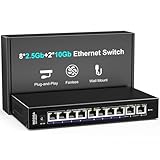
Overview: The NICGIGA 10-port switch merges eight 2.5G Ethernet ports with two 10G RJ45 ports, creating a versatile hybrid for mixed-speed networks. Delivering 60Gbps switching capacity, it bridges mainstream 2.5G devices and premium 10G equipment. The fanless metal design supports desktop or wall-mount installation with broad deployment flexibility.
What Makes It Stand Out: Dual 10G ports function as excellent uplinks to NAS servers or core switches—a feature absent in pure 2.5G switches. Six-kilovolt lightning protection provides superior surge defense. The switch handles auto-negotiation across multiple speeds (100M/1G/2.5G/10G) and operates silently across a wide temperature range (-10~50°C). One-year warranty and lifetime technical support enhance buyer confidence.
Value for Money: At $139.99, this switch undercuts many competitors while offering 10G capability. The flexible port configuration justifies the premium over 8-port 2.5G switches, providing a growth path for 10G adoption. Cost-conscious users gain future-ready features without typical 10G pricing penalties.
Strengths and Weaknesses: Strengths include hybrid port flexibility, robust surge protection, silent operation, and versatile mounting options. The 60Gbps capacity handles most home/SOHO traffic patterns effectively. Weaknesses involve lesser-known brand reputation compared to D-Link or TP-Link, potentially affecting resale value. The 60Gbps switching capacity may limit performance if both 10G ports saturate simultaneously. No advanced management features are included.
Bottom Line: This NICGIGA switch excels for users needing both 2.5G device connectivity and 10G backbone links. Its unique port mix and protective features make it a smart, affordable bridge technology for evolving network infrastructures.
9. TP-Link TL-SX105 | 5 Port 10G/Multi-Gig Unmanaged Ethernet Switch | Desktop/Wall-Mount | Plug & Play | Fanless | Sturdy Metal Casing | Speed Auto-Negotiation, Free Expert Help

Overview: The TP-Link TL-SX105 is a premium five-port 10G Ethernet switch built for enthusiasts demanding maximum throughput. With 100Gbps switching capacity and five-speed auto-negotiation (100M/1G/2.5G/5G/10G), it unlocks WiFi 6E, 10G NAS, and high-end gaming potential. The sturdy metal casing ensures professional-grade durability and heat dissipation.
What Makes It Stand Out: Every port delivers true 10Gbps performance, eliminating bottlenecks in high-bandwidth scenarios. Five-speed auto-negotiation provides unmatched compatibility across legacy and cutting-edge devices. TP-Link’s reliability reputation shines through the fanless silent design and IEEE 802.3X flow control. Free expert help distinguishes it from competitors, adding premium support value.
Value for Money: At $229.99 ($46 per port), this commands a premium but delivers genuine 10G performance. It’s significantly more expensive than 2.5G alternatives, yet competitively priced for full 10G switches. For bandwidth-hungry users, the investment pays dividends in reduced transfer times and improved responsiveness. Casual users will find it overpriced for their needs.
Strengths and Weaknesses: Strengths include uncompromising 10G performance, exceptional 100Gbps capacity, broad speed compatibility, silent operation, and enterprise-grade build quality. Brand trust and support are invaluable assets. Weaknesses are the high cost, limited five-port expansion, and lack of dedicated 10G uplinks beyond the existing ports. Unmanaged limitations restrict advanced configurations and monitoring.
Bottom Line: The TL-SX105 is the ultimate plug-and-play solution for users committed to 10G networking. Its performance justifies the premium for professionals and enthusiasts who demand the fastest possible connections without management complexity.
10. 10 Port 10G Ethernet Switch Unmanaged, 8 x 2.5G Base-T Ports, 2 x 10Gb RJ45 Ports, Compatible with 100/1000/2500Mbps, Metal Case Fanless, YuanLey 2.5Gbe Network Switch for 2.5G/10G NAS, Wireless AP
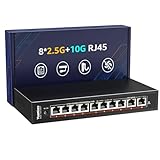
Overview: The YuanLey 10-port unmanaged switch delivers eight 2.5G ports alongside two 10G RJ45 ports, offering a high-capacity hybrid solution for demanding networks. With 80Gbps switching capacity, it surpasses many competitors in raw throughput. The fanless metal construction and 6KV lightning protection ensure reliable, silent operation from -10°C to 50°C.
What Makes It Stand Out: The 80Gbps capacity provides substantial headroom for simultaneous high-bandwidth transfers across all ports. Comprehensive speed support (10M/100M/1G/2.5G/10G) maximizes device compatibility. The wide operating temperature range and passive cooling enable deployment in challenging conditions. Dual 10G ports function as excellent NAS or server uplinks for bandwidth-intensive applications.
Value for Money: Priced at $139.99, it matches the NICGIGA while offering 33% more switching capacity. The cost-per-port is highly competitive at $14 for 2.5G capability, with 10G ports effectively included at minimal premium. This positions it as a performance leader in the budget hybrid category, delivering specifications typically found in pricier models.
Strengths and Weaknesses: Strengths include superior 80Gbps capacity, robust surge protection, silent fanless design, flexible mounting, and excellent price-to-performance ratio. The port configuration suits mixed-device environments perfectly. Weaknesses center on the obscure brand name, potentially affecting long-term support and firmware updates. Documentation may be less comprehensive than Tier-1 vendors. No advanced management or monitoring capabilities are available.
Bottom Line: The YuanLey switch is a powerhouse for users prioritizing capacity and flexibility. Its impressive specs and aggressive pricing make it an outstanding value proposition for building a future-ready multi-gig network infrastructure.
Understanding Multi-Gig Ethernet: Why 2.5G is the Sweet Spot for NAS Backups
The IEEE 802.3bz standard, finalized years ago, finally hit its stride when NAS manufacturers began integrating 2.5GBase-T ports as standard features. Unlike the leap to 10GbE—which often demands Cat6a cabling, power-hungry PHYs, and serious budget consideration—2.5G hums happily along the Cat5e infrastructure already lurking in your walls. This backward compatibility makes it the pragmatic upgrade path for homeowners and small businesses who can’t justify rewiring their entire building.
For NAS backups, the math is compelling. A modern 8TB hard drive can sustain 200-250 MB/s sequential writes. Gigabit Ethernet caps out at roughly 125 MB/s after overhead, creating an immediate bottleneck. 2.5G pushes that ceiling to approximately 312 MB/s, letting your drives stretch their legs while leaving headroom for other network traffic. It’s not just about raw speed—it’s about completing backup windows before they collide with your workday.
The Evolution from Gigabit: Is It Time to Upgrade Your Network Backbone?
We’ve lived with gigabit Ethernet for two decades, and it’s been a faithful workhorse. But storage technology hasn’t stood still. SMR drives, SSD caches, and hybrid arrays now saturate 1G links with embarrassing ease. If you’re running incremental backups every hour or continuous replication to a secondary NAS, that 1G pipe becomes a traffic jam during peak usage.
The tipping point often arrives subtly. You notice Time Machine backups stalling your video streaming. Your surveillance system drops frames when the NAS syncs. Cloud upload tasks crawl to a halt during local backups. These aren’t random glitches—they’re symptoms of a saturated network. Upgrading to 2.5G doesn’t just accelerate transfers; it restores quality-of-service to your entire digital ecosystem.
Key Performance Metrics: What Actually Matters in a 2.5G Switch
Manufacturers love bombarding you with impressive-sounding numbers, but only a handful determine real-world NAS performance. Focus on switching capacity, forwarding rate, and buffer size rather than port count alone. A 24-port switch with inadequate buffers will stumble during large file transfers just as badly as an overloaded 8-port model.
Throughput and Buffering: Avoiding Bottlenecks During Large Backup Jobs
Switch buffers act as shock absorbers when incoming data arrives faster than the switch can forward it. During a massive backup job, your NAS might blast data at full 2.5G speed while other devices compete for bandwidth. Switches with tiny buffers—common in budget models—drop packets, triggering TCP retransmissions that slaughter throughput. Look for buffers sized in megabytes per port group, not kilobytes. A switch with 2-4MB per 8 ports handles burst traffic gracefully, while 256KB buffers cause micro-stutters that cascade into macro problems.
Latency Considerations: Real-Time vs. Scheduled Backup Performance
Latency rarely makes spec sheet headlines, but it dictates how snappy your NAS feels during interactive tasks. Cut-through switching architectures reduce latency below 5 microseconds, while store-and-forward designs might hit 20-30 microseconds. For scheduled backups, this difference is negligible. But if you’re running real-time sync applications or virtual machines directly from your NAS, those microseconds compound into noticeable lag. Enterprise-grade ASICs prioritize consistent low latency; consumer chips chase maximum throughput at the expense of jitter.
Power Over Ethernet (PoE): Do You Need It for Your NAS Setup?
PoE capability transforms your switch from a simple connectivity device into a power distribution hub. While most NAS units use dedicated AC adapters, PoE becomes invaluable for the ecosystem around your storage. IP cameras writing directly to NAS, Wi-Fi 6E access points serving wireless backup clients, and even some compact backup appliances can run entirely on PoE+. But this convenience comes at a cost—both financial and thermal.
PoE++ vs PoE+: Power Budget Planning for Access Points and Cameras
PoE+ (802.3at) delivers 30W per port, sufficient for most access points and cameras. PoE++ (802.3bt) pushes 60-90W, supporting power-hungry devices like pan-tilt-zoom cameras or compact NUC-style backup servers. Calculate your total power budget meticulously. An 8-port switch with 120W total budget can only power four 30W devices simultaneously—plug in a fifth, and the switch starts shutting down ports. Smart switches with per-port power management let you prioritize critical devices, ensuring your security cameras stay online even when your backup AP temporarily disconnects.
Managed vs. Unmanaged Switches: Making the Right Choice
The managed versus unmanaged debate hinges on control versus simplicity. Unmanaged switches are plug-and-play appliances that forward packets and stay out of your way. They work perfectly for straightforward setups: one NAS, a few clients, no complex policies. Managed switches expose a web of configuration options—VLANs, QoS, SNMP monitoring, port mirroring—that intimidate novices but empower enthusiasts.
For multi-NAS environments or homes blending personal and work networks, management features stop backup traffic from overwhelming other services. The learning curve is steeper, but the ability to diagnose issues through port statistics or isolate a misbehaving device pays dividends in stability.
VLAN Support: Segmenting Backup Traffic for Security and Performance
VLANs let you carve a single physical switch into multiple logical networks. Create a dedicated VLAN for NAS backups, isolating that traffic from your main LAN. This segmentation prevents backup floods from affecting video calls, gaming, or smart home devices. It also adds a security layer—if a ransomware attack compromises a workstation, the isolated backup VLAN remains untouched. Look for switches supporting 802.1Q VLAN tagging with at least 16 VLAN IDs; more is better if you’re running complex lab environments.
Link Aggregation (LAG): Maximizing Throughput Beyond Single Ports
Link Aggregation Groups (LAG) combine multiple physical ports into one logical pipe. While a single 2.5G connection satisfies most NAS units, aggregating two ports yields 5G theoretical throughput—useful for multi-user environments or when your NAS supports multiple simultaneous backup streams. Ensure the switch supports both static LAG and LACP (802.3ad) for compatibility with various NAS operating systems. Beware of switches advertising “port trunking” without proper LACP support; these often use proprietary algorithms that won’t play nice with your Synology or QNAP.
Port Count Planning: How Many 2.5G Ports Do You Really Need?
It’s tempting to buy the largest switch your budget allows, but unused ports waste money and increase power consumption. Map your current devices: NAS, desktop workstations, media streamers, and any always-on servers. Then add 30% headroom for growth. An 8-port switch serves most home labs perfectly, while small businesses might need 16-24 ports.
Remember that uplinks consume ports too. If you’re connecting to a 10G core switch or router, you’ll dedicate one 2.5G port as an uplink, reducing available client ports. Some switches include dedicated SFP+ uplink ports—prefer these designs as they preserve all RJ45 ports for end devices.
Uplink Strategy: 10G and Beyond for Future-Proofing
Your 2.5G switch doesn’t exist in isolation; it needs a path to your router, internet, and possibly other switches. A single 2.5G uplink creates a bottleneck if multiple clients hammer the NAS simultaneously. Forward-thinking designs include one or two 10G SFP+ uplink ports. These allow your 2.5G access switch to feed into a 10G core without throttling aggregate throughput.
Even if your current router lacks 10G, switches with SFP+ cages let you add a 10G NIC later and connect directly to your NAS. This modular approach extends the switch’s useful lifespan, protecting your investment as network cores inevitably upgrade to multi-gig speeds.
Energy Efficiency: Silent Operation and Heat Management
Unlike gigabit switches that sip power, 2.5G PHYs generate noticeable heat—especially with PoE added to the mix. Fanless designs offer silent operation perfect for living room installations, but they rely on thermal throttling under sustained load. Switches with temperature-controlled fans strike a better balance: silent during light use, audibly cooling only when necessary.
Check the power supply efficiency rating. 80+ Bronze or better PSUs waste less electricity as heat, reducing long-term operating costs. Some enterprise switches support Energy Efficient Ethernet (EEE), which reduces power on idle ports. This feature conflicts with some NAS wake-on-LAN implementations, so test it before enabling network-wide.
Build Quality and Reliability: Enterprise vs. Prosumer Grade
Prosumer switches target enthusiasts with glossy marketing and aggressive pricing. They perform admirably but often cut corners on component quality—think electrolytic capacitors with 3-5 year lifespans instead of solid polymer caps rated for a decade. Enterprise gear uses metal enclosures for EMI shielding, includes redundant power supply options, and backs everything with lifetime warranties.
For mission-critical backups, enterprise reliability matters. A failed switch means failed backups until replacement, risking data loss during that window. Prosumer gear works fine for secondary backups or non-critical media libraries, but primary backup infrastructure deserves enterprise-grade robustness. The price premium amortizes over years of uninterrupted service.
Smart Features for NAS Integration: LLDP, Jumbo Frames, and Flow Control
Your NAS and switch should communicate intelligently. Link Layer Discovery Protocol (LLDP) lets the NAS identify switch port capabilities automatically, simplifying troubleshooting. Jumbo frames (9KB MTU) reduce CPU overhead and improve throughput by 5-10%—a small but free performance gain. However, all devices in the Layer 2 domain must support jumbo frames, or you’ll fragment packets and kill performance.
Flow control (802.3x) pauses traffic when buffers fill, preventing packet loss during bursts. Most NAS units enable this by default, but some switches disable it. Verify compatibility; mismatched flow control settings create silent performance degradation that’s maddening to diagnose.
Price-to-Performance Ratio: Budgeting for Your Multi-Gig Network
2.5G switches span from budget-friendly 5-port models to enterprise 48-port behemoths. The sweet spot for NAS backups lies in the 8-16 port range, where you avoid the premium of high-density designs while getting useful features. Expect to pay more per port for PoE capability—roughly 30-50% premium—and another 20% for managed features.
Don’t forget hidden costs: SFP+ modules for uplinks, higher-grade patch cables if your existing ones are suspect, and potentially a larger UPS to handle increased power draw. Budget 15% over the switch’s sticker price for these accessories. Buying a switch with integrated 10G uplink ports often proves cheaper than adding a separate media converter later.
Installation and Setup Best Practices
Physical placement matters more than you’d think. Keep the switch in a cool, ventilated space away from direct sunlight. Avoid stacking it directly under your NAS; the combined heat output accelerates component aging. Use the shortest Ethernet cables that reach comfortably—excess coiling acts as an antenna, picking up interference.
Configure management IP addresses outside your DHCP pool to prevent conflicts. Update firmware before going live; manufacturers often release performance optimizations shortly after hardware launch. Document which ports connect to which devices; when a port fails at 2 AM, you’ll thank yourself for that labeled diagram.
Troubleshooting Common Multi-Gig NAS Backup Issues
If backups start fast then throttle down, suspect thermal throttling. Check switch temperatures via its management interface—anything above 70°C risks performance reduction. Inconsistent speeds often point to cable issues; 2.5G is more sensitive to cable quality than gigabit. Replace suspect cables, especially flat ones or those exceeding 50 meters.
When a NAS fails to negotiate 2.5G and falls back to 1G, force the port speed manually on both devices. Auto-negotiation bugs plague some early 2.5G PHY implementations. If you experience micro-disconnections during heavy transfers, disable EEE on that port—some NAS NICs misinterpret the power-saving signals as link flaps.
Future-Proofing Your Investment: Wi-Fi 7 and Beyond
Wi-Fi 7 routers now ship with 2.5G WAN ports as standard, and client devices will follow. Your 2.5G switch becomes the critical bridge between wireless clients and wired NAS storage. Choosing a switch with 10G uplinks ensures it won’t become the bottleneck when you upgrade to Wi-Fi 7 access points that can saturate a 2.5G backhaul.
Consider switches supporting emerging standards like 2.5GBASE-T PoE++ for powering next-gen access points. While 5G and 10G Ethernet exist, 2.5G will dominate the access layer through 2028 due to its cost-effectiveness and cable compatibility. Buy accordingly.
Frequently Asked Questions
Will a 2.5G switch work with my existing Cat5e cabling?
Absolutely. The 2.5GBASE-T standard was specifically designed for Cat5e runs up to 100 meters. However, cable quality matters—if your Cat5e is damaged, poorly terminated, or running alongside power lines, you might experience negotiated fallback to 1G. Test each run with a cable certifier or temporarily force 2.5G mode to verify stability.
Do I need a 2.5G switch if my NAS only has gigabit ports?
Not immediately, but plan ahead. Many modern NAS units support USB-to-2.5G adapters, and most 2025-2026 models include native 2.5G ports. Buying the switch now prevents a second purchase later. Plus, client devices with 2.5G—like modern motherboards and laptops—will benefit immediately, even if the NAS remains at 1G temporarily.
What’s the real-world speed difference between 2.5G and gigabit for backups?
Expect 280-300 MB/s on 2.5G versus 115 MB/s on gigabit, assuming your drives can keep pace. That’s a 2.5x improvement, turning a 6-hour backup into 2.4 hours. Real-world gains depend on file sizes—small files incur more protocol overhead, while large video files approach theoretical maximums.
Can I mix 2.5G and 10G devices on the same switch?
Yes, but understand the topology. Most 2.5G switches with 10G uplinks support mixed speeds seamlessly. A 10G NAS can communicate with 2.5G clients at the client’s maximum speed. The reverse—2.5G NAS to 10G client—runs at 2.5G. Ensure your switch supports non-blocking architecture so 10G traffic doesn’t congest the 2.5G ports.
How much power does a typical 2.5G switch consume?
An 8-port unmanaged 2.5G switch draws 10-15W idle, rising to 20-25W under load. Adding PoE+ dramatically increases consumption—budget 30W for the switch plus whatever your powered devices require. A fully loaded 8-port PoE+ switch with cameras and APs can exceed 150W. Always size your UPS accordingly.
Is a managed switch overkill for home NAS backups?
Usually, but not always. If you’re running a single NAS and five clients, unmanaged works fine. The moment you add IP cameras, a separate IoT network, or experience backup-induced lag on video calls, VLAN and QoS features become essential. Managed switches also provide invaluable diagnostic data when troubleshooting.
What cable length limits should I consider for 2.5G?
The 100-meter Cat5e limit remains, but signal degradation becomes noticeable beyond 80 meters in noisy environments. For runs approaching the maximum, use Cat6 or Cat6a—even though 2.5G doesn’t require it, the thicker conductors and better shielding improve signal integrity. Avoid flat Ethernet cables for runs over 15 meters; their lack of twisting invites interference.
Will upgrading to 2.5G reduce my backup times proportionally?
Only if your storage subsystem can feed data fast enough. A single 7200RPM HDD tops out around 200 MB/s, so you’ll see 70% time reduction. SSD-based NAS or arrays with caching can saturate the full 2.5G link, delivering near-linear improvements. Check your NAS performance metrics first—upgrading network gear can’t fix slow drives.
Do I need special SFP+ modules for 2.5G uplinks?
Standard 1G SFP modules won’t work for 2.5G. You need SFP+ modules that explicitly support 2.5GBASE-T, or use direct-attach copper (DAC) cables if connecting to nearby 10G equipment. Some switches support rate-limiting 10G SFP+ ports to 2.5G, but this is implementation-dependent. Verify compatibility in the switch’s hardware compatibility list.
How does 2.5G compare to Wi-Fi 6E/7 for NAS backups?
Wired 2.5G wins on reliability and consistency. Wi-Fi 6E can theoretically exceed 2.5G speeds, but real-world performance fluctuates with interference, distance, and client count. For scheduled backups, Wi-Fi works fine. For critical, time-sensitive transfers or iSCSI connections, 2.5G Ethernet’s deterministic performance is non-negotiable. The best setups use 2.5G for stationary devices and Wi-Fi 7 for mobile clients.