Gone are the days of frantic key searches under doormats or making duplicate copies for every family member. As we navigate 2026, smart deadbolts have evolved from niche gadgets to essential home infrastructure for families seeking both security and convenience. The technology has matured dramatically, with manufacturers addressing early concerns about battery life, connectivity hiccups, and cybersecurity vulnerabilities. Today’s keyless entry systems offer sophisticated access management that adapts to your family’s unique rhythm—whether that’s granting temporary access to the dog walker, sending notifications when the kids arrive home from school, or integrating seamlessly with your broader smart home ecosystem. But with this rapid advancement comes complexity; not all smart deadbolts are created equal, and families have specific needs that differ from single users or commercial applications. Understanding the nuanced features, emerging standards, and long-term considerations will ensure your investment delivers value for years to come.
Top 10 Smart Deadbolts for Keyless Family Entry
Detailed Product Reviews
1. TEEHO TE001 Keyless Entry Door Lock with Keypad - Smart Deadbolt Lock for Front Door with 2 Keys - Auto Lock - Easy Installation - Satin Nickel

Overview: The TEEHO TE001 offers affordable keyless entry without the complexity of WiFi connectivity. This battery-powered deadbolt provides keypad access with 20 permanent codes and temporary guest codes, plus traditional key backup. Designed for straightforward DIY installation, it retrofits standard 2-1/8" door holes and features automatic locking capabilities with customizable timing from 10-99 seconds.
What Makes It Stand Out: This lock excels at simplicity and accessibility. The anti-peeping password protection allows you to enter random digits before your real code to prevent code theft. The one-touch auto-lock feature (holding any key for 2 seconds) provides immediate security when leaving. Its IP54 weather resistance and sturdy aluminum alloy construction deliver reliable performance without premium pricing. Installation requires only a screwdriver, making it genuinely accessible for non-technical homeowners.
Value for Money: At $35.99, the TE001 represents exceptional value. Comparable keypad-only locks from established brands typically cost $60-80, while WiFi-enabled models start around $100. You’re getting core smart functionality—keyless entry, guest codes, and auto-lock—without paying for connectivity features many users don’t need. The included physical keys and low-battery indicator add practical value.
Strengths and Weaknesses: Strengths include unbeatable price, simple installation, reliable basic features, and no dependency on internet connectivity. The anti-peeping protection and one-time codes enhance security beyond basic keypad locks. Weaknesses are the lack of remote access, limited to 20 user codes, no smartphone app, and incompatibility with 38mm door holes. The absence of WiFi means no real-time monitoring or remote management.
Bottom Line: The TEEHO TE001 is ideal for budget-conscious homeowners wanting reliable keyless entry without smart home complexity. It delivers essential features flawlessly at a fraction of competitor prices. Choose this if you prioritize simplicity, affordability, and direct keypad access over remote connectivity.
2. Philips Wi-Fi Door Lock, WiFi Smart Lock Keyless Entry Deadbolt for Front Door, Compatible with Alexa & Google Assistant, Remote Control, Built-in WiFi, APP Fingerprint Passcode Unlock, Auto Locking

Overview: The Philips Wi-Fi Door Lock brings comprehensive smart home integration to your front door at a mid-range price point. This feature-rich deadbolt offers five unlocking methods: smartphone app, fingerprint scanner, keypad, physical key, and voice commands via Alexa or Google Assistant. Built-in WiFi eliminates the need for additional hubs, enabling true remote access from anywhere.
What Makes It Stand Out: The fingerprint scanner provides instant, keyless entry—perfect for busy households. Supporting up to 100 custom passcodes plus unlimited one-time and scheduled codes, it offers exceptional access management flexibility. Voice control integration allows hands-free operation when your hands are full. The built-in WiFi connects directly to 2.4GHz networks without extra hardware, simplifying setup and reducing costs.
Value for Money: At $129.99, this lock sits in the sweet spot between budget keypad models and premium smart locks. It delivers fingerprint authentication and remote access—features typically found in $200+ locks—while maintaining affordability. The absence of required subscription fees enhances long-term value. However, batteries aren’t included, adding minor upfront cost.
Strengths and Weaknesses: Strengths include versatile entry options, robust app control, generous code capacity, and straightforward installation. The fingerprint reader adds convenience and security, while voice control enhances accessibility. Weaknesses include 2.4GHz-only WiFi support, potential connectivity issues beyond 65 feet from router, and reliance on battery power. Some users may experience occasional app connectivity hiccups.
Bottom Line: This Philips lock excels for tech-savvy homeowners wanting full smart home integration without breaking the bank. The fingerprint scanner and remote access justify the price premium over basic keypad models. It’s an excellent choice if you value convenience, flexible access management, and voice control capabilities.
3. TEEHO TE001 Keyless Entry Door Lock with Keypad - Smart Deadbolt Lock for Front Door with 2 Keys - Auto Lock - Easy Installation - Matte Black

Overview: The matte black version of the TEEHO TE001 delivers identical functionality to its satin nickel counterpart in a modern, bold finish. This keypad-only lock provides 20 permanent access codes plus temporary guest codes without requiring WiFi connectivity or smartphone apps. The battery-powered design installs in minutes on standard 2-1/8" door preps and features customizable auto-locking from 10-99 seconds.
What Makes It Stand Out: Beyond its striking aesthetic, this lock shares the TE001 series’ standout features: anti-peeping code protection, one-touch manual locking, and IP54 weather resistance. The matte black finish resists fingerprints and complements contemporary home designs while hiding wear better than metallic finishes. The screwdriver-only installation and intuitive programming make it accessible for all skill levels.
Value for Money: At $35.99, this represents the same exceptional value as other TE001 variants. You’re paying only for the finish difference, not functionality. The matte black option typically commands a $10-20 premium from competitors, making this particularly attractive for modern aesthetics. The cost savings versus WiFi locks remain substantial—roughly $70-150 less than connected alternatives.
Strengths and Weaknesses: Strengths include the stylish matte finish, straightforward operation, no internet dependency, and robust construction. The anti-peeping feature and one-time codes provide security beyond basic locks. Weaknesses mirror the series: no remote access, 20-code limit, no app connectivity, and incompatibility with 38mm door holes. Users wanting smart home integration must look elsewhere.
Bottom Line: Choose the matte black TE001 if you want affordable keyless entry with modern styling. It delivers the same reliable performance as other finishes while enhancing curb appeal. This is perfect for design-conscious homeowners prioritizing simplicity and value over remote connectivity features.
4. TEEHO TE001 Keyless Entry Door Lock with Keypad - Smart Deadbolt Lock for Front Door with 2 Keys - Auto Lock - Easy Installation - Oil-Rubbed Bronze

Overview: The oil-rubbed bronze TE001 completes TEEHO’s finish lineup, offering identical keypad functionality in a classic, traditional aesthetic. Like its siblings, this model provides 20 permanent codes, temporary guest access, and auto-locking capabilities without WiFi connectivity. The battery-powered design installs on standard 2-1/8" door holes and includes two physical backup keys for emergency access.
What Makes It Stand Out: This finish option allows homeowners with traditional or rustic decor to enjoy modern keyless convenience without stylistic compromise. The oil-rubbed bronze develops a natural patina over time, adding character. It shares the series’ practical features: anti-peeping protection, one-touch locking, IP54 weather resistance, and tool-free installation. The warm, dark tone coordinates with classic hardware and fixtures.
Value for Money: Priced at $35.99, it matches other TE001 variants in value proposition. Traditional finishes often carry premiums from heritage brands, making this budget-friendly option particularly compelling. You save $70-150 compared to WiFi-enabled locks while getting durable, attractive hardware. The finish quality exceeds expectations at this price point.
Strengths and Weaknesses: Strengths include the timeless finish, simple operation, no network dependencies, and easy installation. The anti-peeping code feature and low-battery indicator add thoughtful touches. Weaknesses remain consistent: no remote management, 20-user limit, no smartphone integration, and door compatibility restrictions. The lack of connectivity may disappoint tech-focused buyers.
Bottom Line: The oil-rubbed bronze TE001 suits traditional homes wanting keyless entry without modern tech aesthetics. It provides identical functionality to other finishes, so choose based on your home’s style. This is ideal for homeowners valuing classic looks, straightforward operation, and exceptional affordability over smart home features.
5. Schlage Encode Smart WiFi Deadbolt Lock for Front Door - Keyless Entry with App or Touchscreen - Works with Alexa, Hey Google, & Airbnb - Create Codes for Guests - Satin Nickel Silver
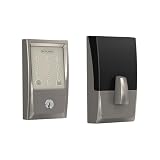
Overview: The Schlage Encode represents the premium tier of smart locks, offering built-in WiFi, advanced security certification, and comprehensive remote management. This deadbolt supports up to 100 access codes, real-time notifications, and voice control via Alexa and Google Assistant. The BHMA-certified construction meets highest residential security standards, while the Snap ’n Stay design simplifies installation.
What Makes It Stand Out: The Encode’s built-in alarm detects forced entry attempts and door movement, providing proactive security alerts. Its fingerprint-resistant touchscreen prevents code detection through wear patterns. Unlike many competitors, it works seamlessly with Airbnb for automated guest access. The robust Schlage Home app enables detailed activity logs, code scheduling, and multi-lock management from anywhere.
Value for Money: At $222.79, this is a significant investment, but justified by premium features and certified security. Comparable commercial-grade smart locks exceed $300. The lack of required subscription fees and professional installation costs improves long-term value. For vacation rental owners or security-conscious families, the robust feature set and reliability justify the premium over $130 WiFi locks.
Strengths and Weaknesses: Strengths include BHMA certification, built-in alarm, Airbnb integration, reliable connectivity, and superior build quality. The intuitive app and voice control work flawlessly. Weaknesses include the high price point, battery consumption from WiFi, and potential overkill for basic needs. Some users report occasional app lag during updates.
Bottom Line: The Schlage Encode is the best choice for those prioritizing maximum security, remote management, and smart home integration. It’s particularly valuable for rental property owners and tech-savvy families wanting top-tier protection. While expensive, its certified security and robust features make it a worthwhile long-term investment for your home’s primary entry point.
6. Schlage Encode Smart WiFi Deadbolt Lock for Front Door - Keyless Entry with App or Touchscreen - Works with Alexa, Hey Google, & Airbnb - Create Codes for Guests - Matte Black

Overview: The Schlage Encode represents the gold standard in smart deadbolts, offering built-in WiFi connectivity that eliminates the need for additional hubs. This premium lock provides comprehensive remote access through the Schlage Home app, allowing you to manage up to 100 unique access codes from anywhere. Its matte black finish and BHMA certification ensure both aesthetic appeal and top-tier security for discerning homeowners.
What Makes It Stand Out: Unlike many competitors requiring separate gateways, the Encode features native WiFi connectivity for truly seamless integration. The fingerprint-resistant touchscreen maintains a clean appearance, while the customizable forced entry alarm provides proactive security alerts. Its ability to work directly with Airbnb for guest management makes it ideal for rental property owners seeking professional-grade solutions without complex setup.
Value for Money: At $206.75, this lock commands a premium price but delivers exceptional value through reliability and feature completeness. The absence of monthly fees, combined with enterprise-level security certification and direct WiFi connectivity, makes it more cost-effective than budget options that require additional hardware purchases. It’s an investment in peace of mind that pays dividends through durability.
Strengths and Weaknesses: Strengths include built-in WiFi, BHMA certification, 100 code capacity, Airbnb integration, and voice control compatibility. The Snap ’n Stay installation design simplifies setup considerably. Weaknesses include the premium price point and limited to 1-3/8" to 1-3/4" door thickness, which may not suit all installations. Battery life could be shorter due to constant WiFi connectivity.
Bottom Line: The Schlage Encode is the ideal choice for homeowners and hosts who demand premium reliability, seamless smart home integration, and professional security standards. Worth every penny for those prioritizing convenience and proven performance over initial cost.
7. Fingerprint Smart Deadbolt with Keypad – Keyless Entry Lock for Home, Apartment, Office, Airbnb, Rental, Kids & Seniors, App & Code Access, Auto-Lock, Easy DIY Install, Compatible with Alexa & Google

Overview: This versatile fingerprint smart deadbolt delivers premium features at a mid-range price point, making advanced keyless entry accessible to budget-conscious homeowners. Supporting multiple unlock methods including fingerprint, keypad, app, fob, and physical key, it stores over 100 fingerprints and codes. The DIY installation requires only a screwdriver, and it’s designed for both left and right-handed doors with no locksmith needed.
What Makes It Stand Out: The exceptional versatility in access methods sets this lock apart, catering to families with children, seniors, and rental hosts. The free app and web portal provide comprehensive management without subscription fees. Privacy and passage modes offer flexible security options, while anti-peep technology prevents code observation. The auto-lock function ensures you never accidentally leave your door unsecured.
Value for Money: At $89.99, this lock strikes an impressive balance between features and affordability. While it requires a separate gateway for remote access (unlike premium built-in WiFi models), the core functionality at this price point is remarkable. It competes favorably with locks costing twice as much, making it excellent value for multi-family homes and rental properties needing multiple user codes without premium brand pricing.
Strengths and Weaknesses: Strengths include multiple entry methods, high user capacity, easy installation, and smart home compatibility. The anti-peep code and low battery alerts enhance security and maintenance. Weaknesses include requiring a separate gateway for remote features, unknown brand longevity compared to established names, and potentially less robust encryption than premium alternatives.
Bottom Line: An outstanding value proposition for those wanting comprehensive smart lock features without breaking the bank. Ideal for families and rental hosts comfortable with optional gateway purchases for full remote functionality.
8. TEEHO TE002 Fingerprint Door Lock - Keyless Entry Door Lock - Electronic Keypad Deadbolt - Smart Locks for Front Door - Auto Lock - Easy Installation - Matte Black

Overview: The TEEHO TE002 offers an entry point into biometric security at an exceptionally accessible price. This fingerprint door lock provides keyless entry through both fingerprint recognition and keypad codes for up to 20 family members. Installation takes minutes with just a screwdriver, requiring no drilling for standard 2-1/8" door holes. The matte black finish provides a modern aesthetic without the premium cost of major brands.
What Makes It Stand Out: The one-time PIN code feature is remarkable at this price point, automatically deleting after use for enhanced guest security. The 0.3-second fingerprint recognition speed is competitive even with pricier models. Its straightforward operation focuses on essential features without overwhelming users with complex smart home integrations, making it perfect for those wanting simple, reliable biometric access without technical complications.
Value for Money: At $45.99, this lock delivers impressive value for basic keyless entry needs. While it lacks advanced smart home connectivity and remote management, it provides core biometric functionality at a fraction of premium brand costs. The limited 20-user capacity suits small families but may constrain larger households or rental applications. It’s an excellent starter smart lock for testing biometric convenience before upgrading.
Strengths and Weaknesses: Strengths include ultra-affordable pricing, easy installation, one-time code functionality, and fast fingerprint recognition. The auto-lock feature (10-99 seconds) provides customizable security. Weaknesses include limited 20-user capacity, no remote access capabilities, restricted door hole compatibility (2-1/8" only), and absence of established security certifications. Build quality may not match premium alternatives.
Bottom Line: Perfect for budget-conscious homeowners seeking basic biometric convenience without advanced smart features. A solid choice for small families wanting keyless entry on a tight budget, though larger households should consider higher-capacity options.
9. GHome Smart deadbolt Lock, Keyless Entry Door Lock for Front Door, App Remote, Auto Lock, Easy Installation, Fingerprint Door Lock with Keypad for Home, Airbnb, Apartment, Garage, Black

Overview: The GHome Smart Deadbolt packs an impressive array of features into a sub-$40 price point, offering six unlock methods including fingerprint, PIN codes, app control, and physical keys. Supporting 50 fingerprints and 50 codes with 0.2-second recognition speed, it provides advanced biometric security typically found in pricier models. The DIY installation requires only a Phillips screwdriver and standard batteries, promising up to 180 days of life.
What Makes It Stand Out: The 0.2-second fingerprint recognition with 98.99% accuracy rate is exceptional for this price tier. Its ability to generate temporary passwords remotely without an internet connection is a unique feature for rental hosts. The extensive auto-lock range (1-1800 seconds) offers unparalleled customization. Anti-counterfeiting technology blocks fake fingerprints, prioritizing family safety beyond what most budget locks offer.
Value for Money: At $39.99, this lock redefines budget smart lock expectations. The feature set rivals $150+ locks, making it arguably the best value on the market. While brand recognition is limited compared to Schlage or Yale, the specifications are outstanding. The long battery life and no-subscription app control enhance its cost-effectiveness for rental properties and large families wanting maximum functionality.
Strengths and Weaknesses: Strengths include incredible price-to-feature ratio, fast fingerprint recognition, multiple entry methods, long battery life, and remote password generation. Weaknesses include unknown brand reliability, potentially less robust customer support, absence of major security certifications, and dependency on app quality that may lack polish of premium brands.
Bottom Line: An unbeatable value for adventurous buyers prioritizing features over brand name. Ideal for rental property owners and tech-savvy families wanting maximum functionality on minimal budget, though risk-averse buyers may prefer established brands.
10. Keyless Entry Front Door Lock Set: Fingerprint Smart Lock with Keypad Auto-Lock & Deadbolt for Easy Install Family Houses

Overview: This keyless entry lock set positions itself as a family-focused solution with multiple access methods including fingerprint, PIN code, traditional key, and optional app control. Designed specifically with seniors and families in mind, it eliminates key fumbling while providing auto-lock security. The manufacturer claims trust from over 100,000 families worldwide, emphasizing anti-picking and anti-replication technology for robust physical and digital protection.
What Makes It Stand Out: The family-centric design philosophy distinguishes this lock, addressing specific pain points for elderly users and busy households. The one-touch auto-lock feature (press button for 2 seconds) provides instant security, while the 1-99 second auto-lock range prevents accidental exposure. Universal compatibility with all US-standard doors ensures broad installation potential without professional help. The emphasis on anti-picking technology addresses a critical vulnerability in many smart locks.
Value for Money: With price listed as N/A, value assessment is challenging. Based on features described, it appears positioned in the $80-120 range, competing with mid-tier smart locks. The family-focused feature set and claimed security technologies suggest good value if priced competitively. However, the required gateway for full smart features adds hidden costs that should be factored into total ownership expenses before purchasing.
Strengths and Weaknesses: Strengths include family-friendly design, multiple access methods, easy DIY installation, and advanced anti-tampering technology. The brand’s claimed large user base suggests reliability. Weaknesses include unknown price point, mandatory gateway purchase for remote features, and lack of specific security certifications. Marketing claims are strong but independent verification is limited compared to industry-standard testing.
Bottom Line: A compelling option for families prioritizing ease-of-use and security, particularly those with elderly members. Worth considering if competitively priced, but verify gateway costs and seek independent security validation before purchasing.
Why Smart Deadbolts Are Becoming Essential for Modern Families
The modern family dynamic demands flexibility that traditional locks simply cannot provide. Between work schedules, extracurricular activities, and the occasional forgotten key, physical keys create daily friction. Smart deadbolts eliminate this friction while adding layers of security and awareness. In 2026, we’re seeing a shift where these devices aren’t just about keyless entry—they’re about creating a digital perimeter that works intelligently for households with multiple users across different age groups. Parents can receive real-time alerts when children arrive home, revoke access instantly for lost credentials, and maintain detailed audit trails of who enters and when. For families with aging relatives or frequent guests, the ability to grant temporary access without physical key exchanges represents a fundamental improvement in both safety and quality of life.
Key Security Standards That Matter in 2026
Security certifications provide objective benchmarks in a market flooded with marketing claims. The ANSI/BHMA grading system remains the gold standard, with Grade 1 representing the highest residential security. However, 2026 introduces enhanced testing protocols that evaluate digital security alongside physical resistance. Look for locks certified under the new UL 294B standard, specifically designed for smart lock cybersecurity resilience. This standard tests against relay attacks, signal jamming, and brute-force entry attempts. Additionally, FIPS 140-2 Level 3 validation for cryptographic modules ensures your lock’s digital keys receive the same protection as government security systems. Don’t overlook IP rating for dust and water resistance—IP65 has become the minimum benchmark for exterior installation longevity. Reputable manufacturers now publish penetration testing results from third-party security firms, providing transparency that savvy families should demand before installation.
Understanding Connectivity Protocols: Wi-Fi vs. Matter vs. Z-Wave
Your lock’s communication method determines reliability, battery life, and integration capabilities. Wi-Fi 6E locks now dominate the market, offering direct cloud connectivity without hubs and improved power efficiency over previous generations. However, they still consume more battery than alternatives. Matter-over-Thread represents the 2026 frontier, delivering local control with internet-independent operation and remarkable energy efficiency—expect 12-18 month battery life compared to 6-9 months with Wi-Fi. Z-Wave 800 series locks remain relevant for established smart home ecosystems, offering superior range and mesh networking capabilities, though they require a compatible hub. Bluetooth 5.3 serves as a reliable backup protocol for close-range access when internet connectivity fails. The most robust locks employ multi-protocol architectures, automatically switching between methods based on availability and power optimization algorithms. For families, Thread’s local processing means faster response times when unlocking—critical when you’re standing at the door with groceries and kids in tow.
Biometric Authentication: Fingerprint Scanners and Beyond
Fingerprint recognition has become remarkably reliable, with 2026 sensors featuring liveness detection that distinguishes real fingers from molds or printed replicas. Capacitive and ultrasonic sensors now achieve <0.5 second recognition times with 99.8% accuracy rates. For families, consider locks that store 50+ unique fingerprints and support age-adaptive profiles that account for children’s growing fingers. Some advanced models incorporate palm vein recognition, which works for all ages and remains accurate even with dirty or wet hands—ideal for families with young children or outdoor enthusiasts. Facial recognition has matured with on-device processing and infrared depth sensing, though privacy concerns make it less popular for residential use. Voice authentication should be avoided as a primary method due to spoofing risks, though it can serve as a convenient secondary factor. The key for families is multi-modal biometric support, allowing different family members to use their preferred authentication method while maintaining a single, secure system.
Mobile App Ecosystems: What to Evaluate Before Buying
The app experience defines daily interaction with your smart lock. A well-designed family management interface should allow role-based permissions, letting parents administer settings while granting children limited control. Evaluate activity log granularity—the best apps timestamp every entry, exit, and failed attempt with user identification and method used. Geofencing capabilities should be sophisticated enough to create multiple zones (home, school, work) and trigger different automations for each family member. Offline functionality is crucial; the app should cache critical data locally, allowing access management even during internet outages. Test the guest access workflow before purchasing—can you generate temporary codes that expire automatically? Does the app send customizable notifications to guests? Two-factor authentication for the app itself is non-negotiable, and biometric app locking adds another layer of security. In 2026, leading apps offer wellness integration, subtly alerting you if a family member’s arrival pattern changes significantly—a feature particularly valuable for elderly relatives.
Battery Life and Power Management Strategies
Battery anxiety plagued early adopters, but 2026 technology offers multiple solutions. Lithium-thionyl chloride batteries now provide 18-24 months of life in low-power Thread-based locks, while Wi-Fi models typically require replacement every 6-12 months. Look for locks with adaptive power management that reduces Wi-Fi polling frequency during predictable quiet hours. Solar harvesting has evolved from gimmick to viable supplement, with integrated panels extending battery life by 30-40% in sunny climates. Hardwired power options with battery backup provide ultimate reliability for families who can run low-voltage wiring. Emergency power terminals—typically 9V battery contacts or USB-C ports—are essential for avoiding lockouts. The best locks provide predictive battery analytics, learning your usage patterns and alerting you 30-60 days before depletion. For families, consider locks with standard AA or AAA batteries rather than proprietary packs—easier to replace and less expensive. Some advanced models feature wireless charging pads that power the lock through daily use, eliminating battery changes entirely.
Installation Considerations: DIY vs. Professional Setup
Door compatibility remains the primary installation challenge. Measure your backset (2-3/8" or 2-3/4"), door thickness (1-3/8" to 2-1/4" standard), and deadbolt bore diameter (typically 2-1/8") before purchasing. Mortise depth must accommodate the smart lock’s interior assembly—many 2026 models are 30% slimmer, fitting more doors. Metal door reinforcement may be necessary for Grade 1 security, as smart deadbolts are heavier than mechanical ones. DIY installation is feasible for handy homeowners, requiring 30-60 minutes and basic tools. However, professional installation ($150-300) ensures proper alignment, which is critical for battery life and motor longevity—misaligned bolts force the motor to work harder. Consider pro installation if your door has sag issues, non-standard dimensions, or if you’re integrating with existing smart home wiring. Some manufacturers offer video-assisted installation with AR overlays through their apps, bridging the gap between DIY and professional help. For renters, non-destructive retrofit locks that install over existing deadbolts have improved significantly, though they typically sacrifice some security features.
Integration with Smart Home Platforms
A smart lock should enhance, not complicate, your existing ecosystem. Matter compatibility is now the universal translator, allowing locks to work seamlessly across Apple HomeKit, Google Home, Amazon Alexa, and Samsung SmartThings. Evaluate automation depth—can you create routines that disarm security systems, adjust thermostats, and turn on lights with a single unlock action? Voice assistant integration should support PIN-protected commands to prevent unauthorized unlocking through open windows. Scene synchronization matters for families; your lock should trigger different scenes based on which family member arrives. Hub dependency varies—Wi-Fi locks operate independently, while Z-Wave and Thread locks require hubs but offer local control advantages. Bridge devices can connect older locks to Matter networks, extending their useful life. In 2026, look for locks with edge computing capabilities that process automations locally, ensuring reliability even during internet outages. Energy management integration allows locks to signal HVAC systems when the house is empty, optimizing efficiency.
Access Management for Growing Families
Family dynamics change rapidly, and your lock should adapt effortlessly. The best systems support unlimited user profiles with customizable permission levels—owner, admin, resident, guest, and temporary. Time-based access should offer granular scheduling, down to 15-minute windows for service providers. Recurring schedules simplify management for regular caregivers or housekeepers. One-time codes generated on-demand through the app provide secure access for deliveries or emergencies. Auto-expiring credentials remove the burden of manual deletion. For teenagers, curfew notifications can alert parents when they arrive home after set times. Guest networks allow extended family members to have limited admin capabilities—perfect for grandparents who occasionally need to grant access. Access request workflows let children or guests request entry through the app, which parents can approve remotely. The most sophisticated locks offer AI-powered anomaly detection, flagging unusual access patterns that might indicate a lost credential or unauthorized sharing.
Physical Backup Options: Keys and Emergency Entry
Despite digital sophistication, mechanical backups remain crucial. Traditional key override is standard, but keyway quality varies—look for pick-resistant and bump-proof cylinders with security pins. Emergency power contacts should be accessible without tools; top-mounted USB-C ports are most practical. Manual thumbturns inside must operate smoothly even if electronics fail, allowing exit during power outages. Some 2026 models feature energy harvesting from the manual turn itself, generating enough power for a single unlock cycle. Hidden mechanical release combinations provide entry without keys or power, using a series of button presses on the exterior. Backup key storage should be secure yet accessible—consider locks with integrated key safes that require biometric authentication to open. For families, teach children multiple entry methods; they should know how to use the key, emergency power, and manual override. Redundant communication pathways ensure that even if Wi-Fi fails, Bluetooth or NFC still functions for authorized users.
Durability and Weather Resistance Ratings
Exterior smart locks face harsh conditions that impact longevity. IP65 rating is the minimum for reliable outdoor performance, protecting against dust and water jets. IP67 (temporary submersion) is preferable for coastal or flood-prone areas. Operating temperature ranges have expanded—premium locks now function from -40°F to 150°F, critical for families in extreme climates. UV-resistant finishes prevent sun damage; PVD coatings offer 25+ year color retention. Gasket quality around the mounting plate prevents water infiltration that can freeze internal mechanisms. Corrosion resistance is vital near saltwater; look for 316 stainless steel components. Impact resistance testing (IK08 or higher) ensures the lock withstands attempted forced entry. Button and touchscreen durability matters—capacitive touch panels should be rated for 1 million+ cycles. For families, antimicrobial coatings on touch surfaces reduce germ transmission, a feature that gained prominence post-2020 and has evolved significantly.
Privacy and Data Security Concerns
Your lock knows when you’re home—a data point with significant privacy implications. End-to-end encryption for all communications is mandatory; AES-256 is the current standard. Data residency options allow you to specify where your data is stored—crucial for compliance with regional privacy laws. Local-only modes disable cloud storage entirely, keeping all data on-device. GDPR/CCPA compliance ensures manufacturers follow strict data handling protocols. Transparency reports from manufacturers detail government data requests and security incidents. On-device processing for biometrics prevents your fingerprint data from ever leaving the lock. Regular security audits by third-party firms should be published annually. For families, data deletion policies are important—can you permanently erase all historical access data? Two-person integrity features require two admin approvals to export or delete logs, preventing a single compromised account from erasing evidence. In 2026, blockchain-based audit trails are emerging, providing tamper-proof access logs that even manufacturers cannot alter.
Cost Analysis: Understanding True Ownership Value
Sticker price tells only part of the story. Initial cost ranges from $150 for basic models to $600+ for premium multi-biometric locks. Subscription fees have become common for advanced features—cloud storage, AI insights, and extended warranties typically cost $3-10 monthly. Battery expenses add $10-30 annually depending on type and usage. Installation costs range from free (DIY) to $300 for complex professional setups. Longevity differs dramatically—budget locks may last 3-5 years, while premium models with modular electronics can function for 10+ years with component upgrades. Resale value is a new consideration; Matter-compatible locks retain value better as they remain relevant across platform changes. Insurance discounts of 5-15% are increasingly available for certified smart locks, offsetting costs. For families, cost per user is a useful metric—divide total ownership cost by the number of family members who benefit. Energy savings from HVAC integration can recoup $50-100 annually. Avoid locks with proprietary components that force expensive replacements; instead, prioritize industry-standard battery types and firmware-upgradable security.
Warranty and Customer Support Expectations
A smart lock is only as reliable as its support ecosystem. Standard warranties now range from 2-5 years for mechanical components and 1-3 years for electronics. Extended warranties covering accidental damage and electronics failure are worth considering for family use. Firmware update commitment is critical—reputable manufacturers guarantee 5-7 years of security updates. Support channels should include 24/7 chat, phone support, and comprehensive knowledge bases. Response time guarantees for security vulnerabilities (e.g., 48-hour patch commitment) indicate serious security posture. Replacement policies for failed electronics vary—some manufacturers offer advance replacement programs to avoid leaving you locked out. Community support through active user forums provides real-world troubleshooting. Professional installer networks backed by manufacturer training ensure quality service. For families, multi-language support and family-friendly documentation (videos, not just text) make a significant difference. Remote diagnostic capabilities allow support teams to identify issues without home visits, speeding resolution.
Future-Proofing Your Investment
Technology evolves rapidly, and your lock should evolve with it. Modular designs allow you to replace the electronic module while keeping the mechanical deadbolt, protecting your investment when new protocols emerge. Over-the-air update capability is standard, but update frequency and substance matter—does the manufacturer add features or just fix bugs? Matter compatibility ensures your lock remains relevant as smart home platforms consolidate. Open API access enables community-developed integrations that manufacturers haven’t envisioned. Hardware expansion ports for future sensors (camera modules, environmental sensors) extend functionality. AI/ML acceleration chips onboard allow for future advanced features without hardware replacement. Component availability commitments from manufacturers guarantee replacement parts for 7-10 years. For families, user interface adaptability is key—can the lock’s interface be updated to accommodate children’s changing capabilities or elderly relatives’ accessibility needs? Standards body participation by manufacturers (Connectivity Standards Alliance, Z-Wave Alliance) indicates commitment to interoperability. Consider locks with upgrade trade-in programs that offer discounts on next-generation models.
Frequently Asked Questions
1. How many fingerprints can a family smart deadbolt typically store? Most 2026 models store between 50-100 unique fingerprints, with premium units supporting up to 200. For families, the key isn’t just capacity but the ability to organize prints into profiles—allowing you to manage access for children, relatives, and service providers separately. Look for locks that support age-adaptive recognition, which automatically adjusts for children’s growing fingers without requiring re-enrollment every six months.
2. What happens if the batteries die while we’re away from home? Modern locks provide multiple failsafes. First, you’ll receive low-battery warnings starting at 30 days out, then weekly, then daily. If batteries do deplete, emergency power terminals (usually USB-C or 9V contacts) allow temporary power from a portable battery. Most locks also retain settings for 30-60 seconds after power loss, giving you time to connect emergency power. For extended absences, consider locks with solar harvesting or hardwired backup power options.
3. Can my teenager’s friends hack the lock or gain unauthorized access? Reputable 2026 locks employ multiple security layers that make casual hacking nearly impossible. End-to-end AES-256 encryption, secure element chips, and rate-limiting on code attempts prevent brute force attacks. However, social engineering remains a risk—teens sharing their codes. Combat this with time-limited guest codes, activity notifications, and regular credential audits. Enable two-factor authentication for all admin accounts and require biometric verification for code generation.
4. Are smart deadbolts safe for families with young children who might accidentally lock themselves in? Yes, but choose models with interior emergency egress features. All certified locks allow manual exit via thumbturn regardless of electronic status. For added safety, look for locks with child-lock modes that prevent accidental locking from inside, or interior motion sensors that auto-unlock when someone approaches from inside. Teach children multiple exit methods and test emergency scenarios monthly. Some locks offer interior handle designs that require deliberate two-step actions to lock.
5. How do smart deadbolts perform in extreme weather conditions? Premium 2026 locks operate from -40°F to 150°F and carry IP65 or IP67 ratings. In extreme cold, battery performance degrades—lithium batteries are essential, and some locks include battery warmers. For coastal areas, 316 stainless steel components resist salt corrosion. Direct sunlight can heat locks beyond operating range; choose models with thermal management and install under cover when possible. In hurricane-prone regions, impact-resistant (IK08+) housings protect against debris.
6. Will my smart deadbolt work during a power or internet outage? Connectivity loss doesn’t prevent local access. Bluetooth, NFC, and biometric authentication function without internet. However, remote access and notifications require connectivity. Matter-over-Thread locks maintain local network control even without internet. For maximum resilience, choose multi-protocol locks and consider a battery-backed hub. Program critical access codes locally before outages, and ensure at least one family member knows the physical backup key location.
7. How difficult is it to install a smart deadbolt on an older home’s door? Many 2026 models accommodate non-standard doors better than predecessors. Measure backset, thickness, and bore diameter carefully. Retrofit adapters handle 1-1/2" to 2-1/4" thickness and both 2-3/8" and 2-3/4" backsets. For vintage doors with mortise locks, consider locks designed for minimal modification. Professional installation ($150-300) is recommended for doors older than 30 years, those with sag or alignment issues, or if you’re uncomfortable with woodworking. Many locksmiths now specialize in smart lock installation.
8. What subscription features are actually worth paying for? Evaluate subscriptions based on your family’s needs. Cloud storage for activity logs (typically $3-5/month) is valuable if you need historical data beyond the 30 days most locks store locally. AI-powered anomaly detection ($5-8/month) identifies unusual patterns that might indicate security issues. Extended warranties and priority support ($2-4/month) make sense for families who depend heavily on the lock. Skip subscriptions for basic remote access or user management—these should be free. Calculate the 5-year total cost before committing.
9. How do I manage access for babysitters, cleaners, and other service providers? Create service provider profiles with restricted permissions. Generate time-window codes valid only during scheduled visits—most 2026 locks support down to 15-minute granularity. Use one-time codes for emergency access. Enable entry notifications so you know when they arrive and leave. Some locks offer “observation mode” that logs but doesn’t notify during expected windows, reducing notification spam. For regular providers, recurring schedules eliminate weekly code generation. Always expire credentials immediately after service termination and audit logs regularly.
10. Can smart deadbolts integrate with my home security system and cameras? Matter-compatible locks integrate seamlessly with most 2026 security ecosystems. They can trigger arm/disarm sequences, camera recording, and lighting scenes upon locking/unlocking. Look for locks that support two-way communication with security panels—alarm status can prevent accidental unlocking during armed-away mode. Video doorbell integration allows verification before remote unlocking. Geofencing integration with security systems prevents false alarms when family members arrive. Ensure your security system’s API supports lock events; some older panels require intermediary hubs like SmartThings or Hubitat for full integration.