The vacation rental landscapein 2026 looks nothing like it did just five years ago. Guests now expect seamless, hotel-style check-ins without the front desk, while hosts juggle multiple platforms, cleaning crews, and maintenance teams across several properties—sometimes from different time zones. In this hyper-connected ecosystem, the humble deadbolt has evolved from a simple mechanical barrier into your property’s most critical 24/7 operational manager. The right smart deadbolt doesn’t just secure your door; it eliminates midnight key-drop emergencies, provides audit trails for insurance claims, and silently elevates your guest experience from “adequate” to “exceptional.”
But here’s the challenge: not all smart locks are built for the unique demands of rental hosting. A device perfect for your primary residence can crumble under the strain of 150+ annual guest turnovers, cleaner schedules, and the constant connectivity demands of a commercial-adjacent environment. This guide cuts through marketing fluff to examine what truly matters when selecting a smart deadbolt for your rental business in 2026—helping you invest in technology that scales with your ambitions rather than creating another headache to manage.
Top 10 Smart Deadbolts for Rental Hosts
Detailed Product Reviews
1. Yale Assure Lock 2 Keypad with Wi-Fi Connect, Black Suede Deadbolt for Vacation Rental Hosts, YRD410-CB1-BSP

Overview:
The Yale Assure Lock 2 Keypad with Wi-Fi Connect in Black Suede is purpose-built for vacation rental hosts seeking reliable keyless entry management. This smart deadbolt eliminates traditional key handoffs through its robust code-sharing system, allowing you to generate temporary access codes that automatically expire after guest checkout. The integrated Yale Connect Wi-Fi Bridge provides remote management capabilities without additional hub purchases.
What Makes It Stand Out:
Its rental-specific automation sets it apart. The DoorSense technology automatically secures the door when closed, eliminating guest forgetfulness. Battery operation ensures functionality during outages, while the included backup key prevents lockouts. The Yale Access app integrates with major rental platforms, streamlining your workflow.
Value for Money:
At $259.99, this lock delivers professional-grade reliability that justifies its premium over budget alternatives. Compared to $100-150 basic smart locks, you’re paying for Yale’s established security pedigree, seamless rental integrations, and the included Wi-Fi bridge (typically $50-75 separately). For hosts managing multiple properties, the time saved on key management quickly offsets the initial investment.
Strengths and Weaknesses:
Strengths include rock-solid reliability, intuitive guest code management, automatic locking, and excellent battery life. The physical backup key provides peace of mind. Weaknesses are the lack of fingerprint scanning (available in the Touch model), 2.4GHz Wi-Fi limitation, and premium pricing that may strain single-property budgets.
Bottom Line:
Ideal for serious rental hosts prioritizing reliability and brand reputation. The Black Suede finish offers modern appeal, while the comprehensive feature set eliminates common hosting headaches. Choose this model if you value proven performance over cutting-edge biometrics.
2. Yale Assure Lock 2 Touch Deadbolt, Black Suede Keyed Smart Entry Door Lock with Wi-Fi Connected Touchscreen Keypad and Fingerprint Scanner for Vacation Rental Hosts, YRD420-F-CB1-BSP

Overview:
The Yale Assure Lock 2 Touch Deadbolt in Black Suede combines touchscreen keypad convenience with fingerprint authentication for vacation rental properties. At $254.35, it paradoxically costs less than the standard keypad model while adding biometric security. The same rental-focused infrastructure—temporary codes, DoorSense auto-lock, and Wi-Fi connectivity—remains intact.
What Makes It Stand Out:
The capacitive fingerprint scanner delivers 99% accuracy in under 0.5 seconds, offering you personal access that’s faster and more secure than codes. For guests, the touchscreen keypad provides familiar entry methods. The Yale Connect Wi-Fi Bridge enables remote management, letting you monitor access logs and modify codes from anywhere.
Value for Money:
This model represents exceptional value, undercutting the keypad version while adding premium biometric features. The fingerprint scanner typically commands a $40-60 premium in competing brands, making this pricing strategy compelling. You get Yale’s security expertise, rental platform integrations, and advanced unlocking without paying extra.
Strengths and Weaknesses:
Strengths include versatile entry options, rapid fingerprint recognition, robust build quality, and comprehensive rental automation. The touchscreen resists wear better than physical buttons. Weaknesses: fingerprint registration can intimidate less tech-savvy guests, the black finish shows fingerprints, and setup requires patience for optimal biometric performance.
Bottom Line:
The smart choice for hosts wanting future-proof security without paying more. The Black Suede Touch model delivers premium features at a discount, making it the Yale lineup’s value champion. Perfect for mixed-use properties where owners want biometric access while guests use codes.
3. Yale Assure Lock 2 Touch Deadbolt, Satin Nickel Keyed Smart Entry Door Lock with Wi-Fi Connected Touchscreen Keypad and Fingerprint Scanner for Vacation Rental Hosts, YRD420-F-CB1-619
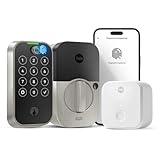
Overview:
The Yale Assure Lock 2 Touch Deadbolt in Satin Nickel offers identical functionality to its Black Suede counterpart but commands a $45 premium at $299.99. You get the same 99% accurate fingerprint scanner, touchscreen keypad, DoorSense auto-lock, and included Wi-Fi Bridge—all wrapped in a brighter, more traditional finish.
What Makes It Stand Out:
The Satin Nickel finish matches classic door hardware, making it ideal for properties with existing brushed metal fixtures. The fingerprint recognition remains class-leading, and the rental-specific features like temporary code generation and automatic expiration work flawlessly. The Yale Access app provides the same robust remote management capabilities.
Value for Money:
The $299.99 price is difficult to justify when the Black Suede version offers identical features for $254.35. You’re essentially paying 18% more for aesthetic preference. While finish matching matters for upscale properties, budget-conscious hosts should strongly consider the black alternative. The premium doesn’t buy enhanced performance or durability.
Strengths and Weaknesses:
Strengths include the versatile entry options, premium Yale build quality, excellent app integration, and finish flexibility. The fingerprint scanner adds owner convenience. Weaknesses are the significant price premium for color alone, the fingerprint scanner’s limited utility for transient guests, and the same 2.4GHz-only Wi-Fi limitation.
Bottom Line:
Only choose the Satin Nickel version if your property’s aesthetic demands it. Functionally, it’s indistinguishable from the cheaper Black Suede model. For rental properties where appearance impacts reviews, the investment may be worthwhile, but most hosts should save money with the black variant.
4. Yale Assure Lock 2 Keypad with Wi-Fi Connect, Satin Nickel Deadbolt for Vacation Rental Hosts, YRD410-CB1-619

Overview:
The Yale Assure Lock 2 Keypad with Wi-Fi Connect in Satin Nickel mirrors its Black Suede twin exactly, offering the same rental-focused smart lock capabilities at the same $259.99 price point. This model trades the fingerprint scanner for a traditional physical keypad while maintaining Yale’s robust temporary code system and remote management features.
What Makes It Stand Out:
The Satin Nickel finish provides hardware matching for traditional or upscale properties without sacrificing functionality. You still get DoorSense automatic locking, battery-powered reliability with backup key access, and seamless integration with rental platforms through the Yale Access app. The included Wi-Fi Bridge eliminates extra hub costs.
Value for Money:
At $259.99, this model fairly competes with other premium keypad-only smart locks. The price parity with the black version means you’re not penalized for finish preference. Compared to budget brands, you’re investing in Yale’s security reputation and proven rental ecosystem. For hosts who don’t need biometrics, this offers professional-grade reliability.
Strengths and Weaknesses:
Strengths include durable construction, intuitive guest code management, automatic locking, excellent battery life, and finish options. The physical buttons suit guests uncomfortable with touchscreens. Weaknesses: no fingerprint option for owners, 2.4GHz Wi-Fi only, and premium pricing that may exceed casual host budgets.
Bottom Line:
Choose based on your door hardware’s finish. If your property features satin nickel fixtures, this model integrates seamlessly while delivering Yale’s trusted rental management tools. It’s functionally identical to the black version—select purely for aesthetic harmony.
5. Fingerprint Smart Deadbolt with Keypad – Keyless Entry Lock for Home, Apartment, Office, Airbnb, Rental, Kids & Seniors, App & Code Access, Auto-Lock, Easy DIY Install, Compatible with Alexa & Google

Overview:
This Fingerprint Smart Deadbolt delivers remarkable versatility at just $89.99, making it an accessible entry point for budget-conscious rental hosts. It supports five unlocking methods—including fingerprint, keypad, app, fob, and key—and stores 100+ fingerprints and codes. The DIY installation requires only a screwdriver, eliminating locksmith costs.
What Makes It Stand Out:
The price-to-feature ratio is unmatched. You get biometric scanning, remote app control, voice assistant compatibility, and rental-specific modes like passage and privacy settings. The anti-peep password protection and low-battery alerts add security layers typically found in premium models. It works for both left and right-handed doors.
Value for Money:
At $89.99, this lock costs one-third of Yale’s offerings while providing comparable functionality. The main trade-off is brand reputation and the separate Sifely Gateway purchase for remote access. Even with a $30-40 gateway, you’ll spend under $130 total. For new hosts or small properties, this represents exceptional value.
Strengths and Weaknesses:
Strengths include unbeatable price, multiple entry options, easy installation, flexible user management, and smart home integration. Weaknesses: unknown long-term reliability, plastic construction may lack durability, gateway sold separately, and customer support may not match established brands. The fingerprint scanner may be less accurate than premium alternatives.
Bottom Line:
Perfect for startup rental operations or hosts prioritizing affordability. While it may not match Yale’s build quality, the feature set and price make it a compelling alternative. Consider this if you’re willing to trade brand assurance for significant savings and don’t mind purchasing the gateway separately.
6. Fingerprint Smart Deadbolt with Keypad – Keyless Entry Lock for Home, Apartment, Office, Airbnb, Rental, Kids & Seniors, App & Code Access, Auto-Lock, Easy DIY Install, Compatible with Alexa & Google

Overview: This budget-friendly smart deadbolt delivers comprehensive keyless entry for modern households and rental properties. The lock supports five access methods—fingerprint recognition, keypad codes, mobile app, fob, and traditional key—accommodating up to 100 fingerprints and 100 codes. Designed for universal compatibility, it installs on most standard doors in minutes using just a screwdriver, with no professional assistance required.
What Makes It Stand Out: The versatility at this price point is remarkable. The anti-peep password protection allows users to enter random digits before or after their actual code, preventing code theft. Privacy and passage modes offer flexibility for different scenarios, while one-touch locking provides instant security. The system integrates with Alexa and Google for voice control, though the Sifely Gateway is sold separately for remote access.
Value for Money: At $79.99, this lock significantly undercuts major brands while delivering comparable features. However, the separate gateway purchase (around $30-50) narrows the price gap for those needing remote management. Still, for local control and Airbnb hosts who can manage codes on-site, it represents exceptional value compared to $200+ alternatives.
Strengths and Weaknesses: Strengths include easy DIY installation, multiple entry methods, high user capacity, and thoughtful security features like anti-peep codes and auto-lock. The primary weakness is the lack of built-in WiFi, requiring an additional gateway purchase for remote functionality. Battery life and long-term durability remain unproven given the unknown brand.
Bottom Line: An excellent entry-level smart lock for budget-conscious buyers, rental property owners, and families wanting keyless convenience without premium pricing. Just factor in the gateway cost if remote access is essential.
7. LOCKSTAR® Smart Door Lock • Keyless Entry Deadbolt Door Lock • Multiple Entry Methods – APP • Fingerprint Touch ID • Keypad Code • Card FOB • Traditional Key • Smart Home Devices

Overview: The LOCKSTAR® Smart Door Lock positions itself as a comprehensive solution for property managers and busy households seeking reliable keyless entry. Offering five access methods—including fingerprint Touch ID, keypad, app, card fob, and traditional key—this system prioritizes convenience and security. The package includes a WiFi gateway, enabling full remote access without hidden costs.
What Makes It Stand Out: Unlike competitors who sell gateways separately, LOCKSTAR® bundles everything needed for complete remote management. The customized app provides real-time event history, showing precisely who accessed your property and when. The auto-lock feature engages automatically when the door closes, and manual one-touch locking adds another layer of convenience. Installation requires only a screwdriver—drill bit included for new doors.
Value for Money: At $139.97, this lock sits in the mid-range category but delivers premium value by including the WiFi gateway. Competitors often charge $200+ for comparable functionality, making this particularly attractive for rental property owners who need immediate, out-of-the-box remote management without additional investments.
Strengths and Weaknesses: Major strengths include the included gateway, detailed event logging, comprehensive access methods, and rental-focused features. The brand lacks Schlage’s name recognition, which may concern some buyers. The fingerprint reader’s speed and accuracy in real-world conditions remain less documented than premium alternatives.
Bottom Line: Ideal for Airbnb hosts and rental property managers wanting full smart lock capabilities without premium pricing. The included gateway and robust app make it a turnkey solution worth the investment.
8. Schlage Encode Smart WiFi Deadbolt Lock for Front Door - Keyless Entry with App or Touchscreen - Works with Alexa, Hey Google, & Airbnb - Create Codes for Guests - Matte Black

Overview: The Schlage Encode represents the gold standard in residential smart locks, combining trusted security credentials with built-in WiFi connectivity. This premium deadbolt allows homeowners to manage up to 100 access codes remotely through the Schlage Home app without additional hubs. The BHMA-certified Grade 1 security rating provides maximum residential protection, while the fingerprint-resistant touchscreen maintains a clean appearance.
What Makes It Stand Out: Built-in WiFi eliminates gateway clutter and complexity, offering direct, secure connection to your home network. Advanced security features include a customizable alarm that alerts you to forced entry attempts or excessive door movement. The Snap ’n Stay design simplifies installation by holding the lock in place during setup. Voice control through Alexa and Google Home works seamlessly for hands-free operation.
Value for Money: At $206.75, this is a significant investment. However, the Schlage name carries decades of security expertise, BHMA certification, and proven durability that budget brands cannot match. For security-conscious homeowners, the premium is justified by encrypted connections, robust construction, and reliable long-term support.
Strengths and Weaknesses: Strengths include built-in WiFi, top-tier security certification, brand reliability, comprehensive app features, and excellent build quality. The fingerprint-resistant touchscreen sacrifices biometric convenience for security. The price point may exceed budget-conscious buyers’ limits, and it lacks the fingerprint option found in cheaper alternatives.
Bottom Line: Perfect for homeowners prioritizing security and reliability over cost. The Schlage Encode justifies its premium price through proven performance, advanced security features, and seamless WiFi integration.
9. Fingerprint Smart Deadbolt with Keypad – Keyless Entry Lock for Home, Apartment, Office, Airbnb, Rental, Kids & Seniors, App & Code Access, Auto-Lock, Easy DIY Install, Compatible with Alexa & Google

Overview: This versatile smart deadbolt offers families and rental hosts an affordable entry into keyless home security. Supporting over 100 fingerprints and 100 keypad codes, the lock accommodates large households and frequent guest turnover. The five-in-one entry system includes biometric scanning, mobile app control, fob access, and traditional key backup. Installation takes minutes with basic tools, fitting both left and right-handed doors without professional help.
What Makes It Stand Out: The family-friendly design includes thoughtful touches like passage mode for gatherings and privacy mode for security. Anti-peep technology protects your access code from prying eyes by allowing random digits before/after the real code. One-touch locking with the ‘#’ button provides instant security, while auto-lock ensures you never accidentally leave your home vulnerable. Alexa and Google integration enables convenient voice commands.
Value for Money: Priced at $79.99, this lock delivers remarkable functionality for less than half the cost of premium brands. The main caveat is that remote app access requires purchasing the Sifely Gateway separately. For users who primarily need local management or can visit their rental property, this represents outstanding savings. The cost of the gateway still keeps the total investment well under $150.
Strengths and Weaknesses: Pros include the impressive user capacity, multiple unlock methods, straightforward installation, and robust security modes. Cons involve the separate gateway purchase for remote features and the unknown brand’s long-term reliability track record. Battery notifications help prevent lockouts.
Bottom Line: A smart choice for families and on-site rental managers wanting comprehensive smart lock features at an accessible price. Factor in the gateway if remote management is critical to your needs.
10. Built-in WiFi Fingerprint Smart Deadbolt with Keypad – Keyless Entry Lock for Home, Airbnb, Rental, Kids/Seniors, Remote App Access, Auto Lock, DIY Setup (No Gateway Needed), Alexa & Google Compatible
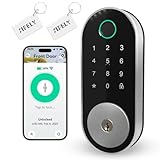
Overview: This smart deadbolt eliminates the biggest frustration of budget smart locks by integrating WiFi directly into the unit. For just $10 more than gateway-dependent models, you get full remote access without additional hardware. The lock offers five entry methods—fingerprint, keypad, app, passcode, and physical key—making it ideal for families, seniors, and rental properties. DIY installation requires only a screwdriver and works with standard US door preparations.
What Makes It Stand Out: The built-in WiFi is the headline feature, providing out-of-the-box remote management for Airbnb hosts and property managers. Create, share, and delete passcodes from anywhere while tracking real-time access logs. The auto-lock function secures your door automatically, and voice control through Alexa and Google adds modern convenience. No wiring or professional installation needed.
Value for Money: At $89.99, this lock offers the best value proposition for remote access. Competitors charge $30-50 extra for a gateway, making this effectively $40-60 cheaper than comparable WiFi-enabled alternatives. For rental property owners who need immediate remote capabilities, this represents significant savings without sacrificing core functionality.
Strengths and Weaknesses: Strengths include built-in WiFi, affordable pricing, easy installation, multiple access methods, and rental-focused features. Weaknesses include the lesser-known brand reputation and potential WiFi connectivity issues in areas with weak signals. Long-term durability remains unproven compared to established brands.
Bottom Line: The top choice for budget-minded buyers who require remote access without hidden costs. Perfect for Airbnb hosts and rental managers wanting immediate, gateway-free operation at an unbeatable price.
Why Smart Deadbolts Have Become Non-Negotiable for Rental Hosts
The math is brutally simple. Every physical key exchange costs you approximately 45 minutes of coordination, $15 in Uber reimbursements for forgotten keys, or a 1-star review when a guest can’t access your property at 11 PM. Multiply that across 100+ bookings annually, and you’re bleeding both profit and peace of mind. Smart deadbolts transform this friction into automation, generating time-limited access codes that expire automatically and providing real-time entry notifications.
Beyond convenience, they’ve become essential risk management tools. Insurance carriers increasingly offer premium discounts for properties with certified smart locks that provide digital audit trails. In dispute resolution, timestamped logs showing when cleaners, guests, or maintenance staff entered can be the difference between a covered claim and a costly liability. For hosts managing properties remotely, the ability to grant temporary access to a plumber without driving two hours—or trusting them with a physical key—fundamentally changes your business’s scalability.
Understanding the Core Technology Behind 2026’s Smart Deadbolts
The Shift to Matter-Over-Thread Protocol
The smart home industry finally coalesced around Matter in 2025, and 2026 locks leverage this standard for unprecedented interoperability. Unlike earlier Zigbee or Z-Wave devices that required proprietary hubs, Matter-enabled deadbolts connect directly to your existing Wi-Fi router while maintaining local network functionality if internet drops. This matters enormously for rentals, where you can’t always troubleshoot connectivity issues in person.
Edge Computing and Offline Functionality
Modern units now process access credentials locally using edge computing chips. When a guest punches in their code, the lock doesn’t need to ping a cloud server—it validates against encrypted credentials stored on the device itself. This reduces latency from 2-3 seconds to under 500 milliseconds and ensures functionality during internet outages. Look for locks advertising “offline mode capacity” of at least 50 cached codes.
Biometric Evolution: Beyond Fingerprints
While fingerprint scanning remains common, 2026’s rental-grade locks increasingly feature palm-vein recognition and behavioral authentication—analyzing typing cadence and pressure on keypads. These methods resist spoofing better than traditional biometrics and work reliably for guests with wet, dirty, or glove-covered hands, a frequent issue at ski cabins or beach rentals.
Essential Security Features Every Host Must Prioritize
ANSI/BHMA Commercial Grade Certification
Residential Grade 1 certification is insufficient for rental applications. Your lock should meet ANSI/BHMA A156.36 Commercial Grade 1 standards, tested for 1,000,000 cycles versus the 250,000 cycles of residential units. This ensures the motor, clutch, and bolt withstand constant use without premature failure. The certification also mandates resistance to torque attacks and physical bypass techniques that plague consumer-grade models.
Anti-Tamper Alarms and Auto-Lockdown
Sophisticated models now feature accelerometer-based tamper detection that triggers if someone attempts to pry the lock from the door. More importantly, look for configurable auto-lockdown protocols—after five failed entry attempts, the lock can disable keypad input for 10 minutes while simultaneously alerting you and triggering a connected security camera to begin recording. Some advanced units even broadcast a deterrent tone through integrated speakers.
Encrypted Key Override Protection
Physical keyways remain a necessary backup, but they shouldn’t be a vulnerability. Premium 2026 models include encrypted key cylinders that communicate with the lock’s internals. If someone attempts to pick or bump the lock, the cylinder sends a tamper signal and can physically block rotation even if the pins are successfully manipulated. This hybrid mechanical-digital approach provides layered security that satisfies both tech-savvy guests and old-school insurance inspectors.
Guest Experience: The Silent Differentiator
Frictionless Arrival Workflows
The first 10 minutes of a guest’s arrival shapes their entire stay perception. Smart locks should support “geofenced auto-prompts”—when a guest’s phone enters your property’s radius, they receive their access code via SMS or app notification without manual host intervention. The best systems integrate with booking platforms to trigger these messages automatically upon reservation confirmation, eliminating the “Where’s the key?” message thread entirely.
Customizable Entry Aesthetics
Believe it or not, the keypad’s UX impacts reviews. Backlit, weatherproof touchscreens with haptic feedback feel premium compared to rubber button pads. Some hosts report fewer entry errors with “scramble PIN” features that let guests add random digits before/after their real code, preventing code theft from fingerprint smudges or over-the-shoulder viewing—a subtle but appreciated security touch.
Accessibility and Universal Design
ADA compliance isn’t just legal prudence; it’s good business. Voice-guided entry prompts for visually impaired guests, large high-contrast displays for older visitors, and compatibility with NFC tags for guests who struggle with keypads all expand your potential guest base. The most inclusive locks offer multiple entry methods simultaneously—code, card, phone, and biometric—letting guests choose their preferred method.
Integration Ecosystem: Connecting Your Lock to Your Tech Stack
Property Management System (PMS) APIs
Your lock must speak directly to your PMS—whether it’s Hostfully, Guesty, or a custom solution. Native API integration means when a booking is modified on Airbnb, the lock automatically adjusts access dates without manual reconfiguration. Avoid locks that only integrate via third-party middleware like IFTTT, which introduces latency and potential failure points. Demand documentation of RESTful API endpoints and webhook capabilities.
Channel Manager Synchronization
If you’re listed on multiple OTAs (Airbnb, Vrbo, Booking.com), your lock’s software must reconcile conflicting reservation data. Advanced platforms now offer “conflict resolution logic”—if Booking.com shows a guest checking in at 3 PM and Airbnb shows a 4 PM checkout for the previous guest, the system automatically builds a 60-minute buffer and assigns appropriate codes. This prevents the nightmare scenario of overlapping access.
Smart Home Hub Compatibility
While Matter reduces hub dependency, deeper automation still benefits from hub integration. Connecting your lock to a SmartThings or Hubitat ecosystem allows complex rules: “When guest code is entered between 10 PM and 6 AM, turn on pathway lights and set thermostat to 72°F.” Ensure the lock supports both Matter and legacy Z-Wave/Zigbee for maximum flexibility across property portfolios with mixed infrastructure.
Battery Life and Power Management Strategies
Lithium vs. Alkaline: The Hidden Cost Factor
Alkaline batteries might save $10 upfront but require replacement every 3-4 months in high-traffic rentals. Lithium AA batteries last 12-14 months and perform reliably in extreme temperatures (-40°F to 140°F), crucial for mountain or desert properties. Some commercial-grade locks now feature rechargeable lithium packs with solar trickle-charging panels, achieving 18-24 month intervals between manual charges.
Hardwired Backup Power Solutions
For premium properties or high-rise installations, consider locks with PoE+ (Power over Ethernet) capabilities. A single Ethernet cable provides both connectivity and power, eliminating battery changes entirely. If that’s overkill, at minimum choose a lock with external 9V battery terminals on the bottom—guests can temporarily power a dead lock by touching a 9V battery to exposed contacts, preventing lockouts during battery failures.
Predictive Battery Analytics
Don’t settle for low-battery warnings. Advanced locks now provide predictive analytics: “Based on 47 weekly entries and current voltage curve, battery will reach critical level in 23 days.” These systems factor in temperature fluctuations and usage patterns, sending alerts to your phone and property management dashboard with enough lead time to schedule maintenance during turnover gaps.
Installation Considerations: DIY vs. Professional Setup
Door Compatibility Assessment
Before purchasing, measure your door’s thickness (standard is 1-3/8" to 1-3/4", but older properties may vary), backset (2-3/8" or 2-3/4"), and face bore diameter (2-1/8"). Rental properties often have metal commercial doors requiring reinforced strike plates and longer screws. Some 2026 models include adjustable backsets and modular adapters, but others need specific door prep. Misalignment here causes motor strain and premature failure.
Network Infrastructure Requirements
A lock is only as smart as its connection. For Wi-Fi models, verify your router broadcasts a strong 2.4 GHz signal at the door location—5 GHz penetration through exterior walls remains poor. Consider installing a dedicated guest network with bandwidth throttling to prevent lock disconnection when guests stream 4K video. For remote properties, evaluate cellular backup routers that maintain lock connectivity during primary ISP outages.
Professional Installation ROI
While DIY installation saves $150-$250, professional locksmiths familiar with smart locks ensure proper alignment, weather sealing, and integration testing. More importantly, they can install high-security strike boxes with 3" screws anchoring into the door frame stud—transforming a $300 lock into a true security system. For hosts managing multiple properties, establishing a relationship with a smart-lock-certified locksmith pays dividends during emergency callouts.
Access Management: Codes, Apps, and Beyond
Time-Based Code Architecture
Your lock should support minute-level granularity for code activation and expiration. A code valid “June 15th” is useless—you need it active at exactly 4:00 PM on check-in day and dead at 11:00 AM on checkout morning. Look for “rolling code” features that automatically generate new codes for each booking and sync them to your cleaning staff’s schedules, preventing former guests from re-entering if checkout runs late.
Multi-Level Permission Tiers
Not all users need equal access. Your system should distinguish between:
- Guest codes: Valid for reservation duration only, no configuration access
- Cleaner codes: Recurring weekly schedules with audit trails
- Maintenance codes: One-time use with 4-hour windows
- Master codes: Your override access, never shared
This tiered approach limits liability and provides clear accountability when something goes wrong inside the property.
Emergency Access Protocols
What happens when a guest is locked out at 2 AM and you’re on a flight? Your lock system needs “break-glass” emergency contacts—trusted individuals who can generate temporary 15-minute codes via SMS verification. The best platforms integrate with virtual assistant services like Breezeway or Turno, allowing their support staff to verify guest identity and grant access through a secure portal, all logged and timestamped.
Durability and Weather Resistance Standards
IP Ratings and Temperature Extremes
That “weather-resistant” marketing claim means nothing without an IP rating. For exposed installations, insist on IP65 or higher—dust-tight and resistant to water jets. Temperature ratings are equally critical: locks operating below -20°F require specialized grease and battery chemistries. Coastal properties need locks with salt-spray corrosion resistance (ASTM B117 certification) to prevent internal component degradation from sea air.
UV-Resistant Finishes
Black locks look sleek but absorb heat, causing internal temperatures to exceed 150°F in direct sun, which degrades electronics and batteries. Powder-coated finishes with UV inhibitors maintain appearance and prevent heat buildup. Some manufacturers now offer solar-reflective colors that stay 30-40°F cooler without sacrificing aesthetics—crucial for desert or tropical rentals.
Vandalism and Physical Attack Resistance
Rental properties in urban areas or party-house hotspots face unique threats. Look for locks with recessed keypads that resist prying, reinforced zinc alloy bodies (not plastic), and tamper-proof Torx screws requiring special tools for removal. Some commercial models include breakaway keypad designs—the keypad detaches when forced, leaving the internal locking mechanism intact and triggering immediate alerts.
Data Privacy and Compliance in the Rental Space
GDPR and CCPA Guest Data Handling
If you host international guests, you’re subject to GDPR regardless of your location. Your lock’s cloud provider must offer data residency options—EU guest data stored on EU servers. The system should automatically purge guest access logs 90 days post-stay and provide guests with data export capabilities upon request. Verify the vendor’s SOC 2 Type II certification and penetration testing schedules.
Local Short-Term Rental Ordinances
Many municipalities now mandate “host presence verification” or “local contact requirements” that smart locks can satisfy or violate. Some cities require physical keys remain available within 20 miles of the property. Others ban biometric data collection from guests without explicit written consent. Research your local ordinances and choose a lock that offers flexible configuration to comply—sometimes this means disabling certain features entirely.
Audit Trail Admissibility
If you ever need to use lock logs in a legal dispute (property damage, unauthorized parties), courts require specific data integrity standards. Your lock must cryptographically sign each log entry with a timestamp from an NTP server, preventing retroactive alteration. Export logs in CSV format with SHA-256 hash verification. Some enterprise systems offer blockchain-based logging for absolute immutability, though this remains overkill for most hosts.
Cost Analysis: ROI for Short-Term and Long-Term Rentals
Upfront vs. Lifecycle Costing
A $200 consumer lock seems attractive until it fails at 18 months and costs you a $500 last-minute booking cancellation. Commercial-grade locks at $400-$600 typically last 5-7 years in rental service with proper maintenance. Calculate total cost of ownership: (Purchase Price + Expected Battery Costs + Installation) / Projected Lifespan in Months. A $500 lock lasting 72 months costs $6.94/month versus a $200 lock lasting 18 months at $11.11/month.
Revenue Enhancement Opportunities
Smart locks enable “early check-in” and “late checkout” upsells—automated features that generate $25-$50 per request without staff involvement. They also reduce negative reviews mentioning access issues, directly impacting search ranking and occupancy rates. Conservative estimates suggest a quality smart lock improves net revenue by 2-3% through reduced friction and enhanced review scores.
Insurance Premium Reductions
Major carriers like Proper Insurance and CBIZ now offer 5-10% premium discounts for properties with certified smart locks and integrated water sensors. Over a $2,000 annual policy, that’s $100-$200 savings—effectively paying for the lock’s batteries and subscription fees. Document your lock’s certification and provide underwriters with access to audit trail samples to secure these discounts.
Maintenance and Troubleshooting Best Practices
Quarterly Preventative Maintenance Schedule
Every 90 days, perform a 15-minute check: test all entry methods (code, app, key), clean keypad contacts with isopropyl alcohol, lubricate the bolt mechanism with graphite (never oil-based products), and verify firmware is current. Check door alignment—seasonal wood swelling can bind the bolt, forcing the motor to work harder and draining batteries. Document each check in a maintenance log; this demonstrates due diligence if a failure occurs.
Remote Diagnostics and Firmware Updates
Choose locks offering remote diagnostic dashboards showing battery voltage trends, Wi-Fi signal strength, and motor current draw. Abnormal current draw indicates mechanical binding before complete failure. Firmware updates should be automatic but configurable—schedule them for 3 AM during vacancy windows to avoid disrupting guests. Never allow updates during active reservations; a bricked lock mid-stay is a hosting catastrophe.
Common Failure Modes and Spare Parts
The two most common failures are motor gear stripping and keypad flex cable fatigue. Keep a “crash kit” at each property: a spare keypad module (if removable), a 9V battery, and a physical key. For portfolio hosts, maintain one complete spare lock that can be overnighted to any property. Establish a relationship with a local locksmith who stocks parts for your specific model—waiting two weeks for a warranty replacement during peak season isn’t viable.
Future-Proofing Your Investment: 2026 and Beyond
AI-Powered Predictive Access
Emerging locks now use machine learning to detect anomalous access patterns—if a code is used at 3 AM on a Tuesday when your guest is a family with young children, the system can flag it and request verification. This moves beyond simple alerts to predictive security, potentially identifying unauthorized parties before they escalate. Ensure your chosen platform has a clear AI ethics policy and allows you to disable invasive monitoring features.
Quantum-Resistant Encryption
While still emerging, forward-thinking manufacturers are implementing post-quantum cryptographic algorithms for access credentials. Your lock purchased today should support firmware upgrades to these standards. Ask vendors about their cryptography roadmap; a lock that can’t be updated will become a liability within 5-7 years as quantum computing threatens current encryption.
Sustainability and E-Waste Regulations
The European Union’s 2026 Ecodesign Directive now requires smart locks to have user-replaceable batteries and modular components. Even if you operate in the US, choosing a lock compliant with these standards ensures parts availability and reduces environmental impact. Some manufacturers offer battery recycling programs and refurbishment credits—factors that increasingly influence guest booking decisions among eco-conscious travelers.
Common Mistakes Hosts Make When Choosing Smart Deadbolts
Over-Engineering for Simple Needs
A 12-unit apartment building needs enterprise-grade access control, but a single cabin does not. Hosts often purchase feature-rich locks with $20/month subscription fees when a $5/month plan would suffice. Map your actual requirements: number of annual guests, integration needs, remote management frequency. A studio condo doesn’t require the same lock as a 6-bedroom party house.
Ignoring Guest Tech Literacy
Your lock’s app might be intuitive to you, but consider guests who are elderly, international travelers with different app stores, or simply technophobic. Locks requiring app downloads create friction and negative reviews. Always maintain a keypad as primary entry; apps should be optional enhancements, not mandatory gatekeepers. Test your chosen lock with non-tech-savvy friends before deploying.
Underestimating Network Reliability
Rural properties with spotty internet need locks with cellular backup or robust offline caching. Urban properties in dense buildings face Wi-Fi congestion. Hosts often blame lock failures on hardware when the root cause is inadequate network infrastructure. Conduct a 48-hour Wi-Fi signal logging test at your door before installation, using tools like NetSpot to identify dead zones and interference.
Final Considerations Before Making Your Decision
Vendor Viability and Support Quality
The smart lock market consolidated significantly in 2025, with several consumer brands exiting the space. Choose vendors with established commercial divisions and 24/7 support. Test their support responsiveness pre-purchase: call their helpline with a technical question at 11 PM on a Saturday. If you can’t reach them then, you won’t reach them during a guest emergency. Review their firmware update history—frequent updates indicate active development; abandoned products receive none.
Portfolio Scalability
If you plan to acquire more properties, select a platform that scales without per-device fees. Some enterprise systems charge $3/month per lock, which becomes prohibitive at 20+ properties. Look for flat-rate portfolio plans or self-hosted options where you control the hub. The lock hardware should remain consistent across properties so staff only need to learn one system.
Exit Strategy and Lock Reassignment
Eventually, you’ll sell a property or convert it to a long-term rental. Your smart lock should support complete factory resets that wipe all guest data securely (meeting NIST 800-88 standards) and allow transfer to a new owner without subscription penalties. Some vendors charge $50+ to “unlock” a device from your account—a hidden cost that infuriates buyers during property sales.
Frequently Asked Questions
1. How do smart deadbolts handle power outages? Will my guests be stranded?
Premium 2026 models cache access credentials locally and run on batteries, remaining fully functional during power outages. The lock’s Wi-Fi connectivity drops, but keypad entry, RFID cards, and biometric authentication continue working. Some units include cellular backup modules that maintain remote management capabilities even when the property’s internet is down. Always choose a lock with at least 50 cached codes and test it in airplane mode before deployment.
2. What’s the realistic battery life difference between heavy rental use and residential use?
Residential locks average 12 months; rental locks see 3-6 months with alkaline batteries due to 10-15x more entries. Lithium batteries extend this to 10-12 months. The biggest drain isn’t entries but cold temperatures and poor Wi-Fi connectivity causing constant reconnect attempts. In high-traffic urban rentals, budget for quarterly battery checks and semi-annual replacements as preventative maintenance rather than waiting for low-battery alerts.
3. Can I install a smart deadbolt on a metal commercial door common in urban apartments?
Yes, but you need specific hardware. Metal doors often have a 2-3/4" backset and require reinforced strike plates with 3" screws anchoring into the door frame stud. The lock’s antenna performance also suffers inside metal doors, so choose models with external antenna modules or signal boosters. Some commercial locks offer metal door mounting kits with insulated mounting plates to prevent grounding issues and signal attenuation.
4. How do I prevent former guests or cleaners from retaining access?
Use time-based codes that auto-expire down to the minute, never “permanent” codes for temporary users. Enable “code purge” protocols that wipe all temporary credentials after each checkout. For cleaning staff, use recurring schedules with rolling codes that change weekly. The lock’s audit trail should alert you if any code is used outside its window. Never share your master code; if you must grant emergency access, generate a one-time code that expires after 15 minutes.
5. Are smart deadbolts vulnerable to hacking or digital lockpicking?
Any connected device has risk, but rental-grade locks use AES-256 encryption and TLS 1.3 for communications, making remote hacking extremely difficult. The bigger threat is weak host passwords or reused credentials across platforms. Enable two-factor authentication on your lock’s management portal and use a password manager. Physical attacks are more common than digital ones; prioritize locks with anti-drill plates and reinforced strike boxes over worrying about Hollywood-style hacking.
6. What happens if a guest loses their phone with the app-based key?
Your lock should never rely solely on app entry. Always provide a keypad code as primary access. If the guest loses their phone, they can still enter using the code. For app-only locks (not recommended for rentals), ensure you can remotely deactivate the digital key and issue a new code without requiring the guest to access the app. Some platforms offer SMS-based code delivery that works on any phone, smartphone or not.
7. Do smart deadbolts work with smart home platforms like Alexa or Google Home for guest use?
Integration exists but should be disabled for guest access. While you can use voice commands for your own management, allowing guests to unlock doors via voice creates security and privacy issues (anyone could shout through a window). Instead, use hub integrations for automation: “When guest code is entered, turn on entry lights and set thermostat.” Guests never need direct voice control access.
8. How do I handle lockouts when the batteries die completely?
Choose locks with external 9V battery contacts on the bottom. Guests can touch a 9V battery to these contacts to temporarily power the lock and enter their code. Keep a spare 9V battery in a lockbox on the property (with a code provided in pre-arrival instructions). For backup, always have a physical key in a secure lockbox. Test the 9V jumpstart procedure quarterly and document it in your house manual with photos.
9. Can smart deadbolts provide evidence for damage deposits or insurance claims?
Absolutely. Timestamped audit trails showing when cleaners, guests, and maintenance entered can corroborate damage timelines. For example, if a cleaner reports a broken window at 10 AM and the guest checked out at 11 AM, logs prove the guest was present when damage occurred. Export logs immediately after incidents—most systems auto-purge after 90 days for privacy compliance. Ensure your lock’s timestamps use NTP synchronization for legal admissibility.
10. Should I use the same smart deadbolt brand across all my properties?
Yes, standardization is crucial for portfolio management. Using one platform means one app, one support contact, and interchangeable spare parts. Training cleaning staff becomes simpler, and you can bulk-purchase batteries and maintenance kits. The only exception is if you have radically different property types (urban condo vs. remote cabin) requiring different feature sets. Even then, choose locks from the same vendor’s product family to maintain software consistency.