Gone are the days when “smart home” meant mortgaging your future for a single gadget. Today’s budget-friendly smart air conditioners prove you can beat the heat without burning through your savings. With Wi-Fi connectivity, voice control, and app-based scheduling now standard in sub-$500 models, the dream of automated climate control is officially democratized. But here’s the catch: not every “smart” label delivers equal intelligence, and navigating the sea of specs, BTU ratings, and connectivity claims can feel like decoding a foreign language.
Whether you’re cooling a stuffy bedroom, a home office that doubles as a sauna, or a rental where permanent installation is a no-go, understanding what truly matters in this price bracket separates savvy shoppers from those stuck with buyer’s remorse. This guide cuts through the marketing noise, focusing on the features that genuinely enhance your life while exposing the compromises you should never accept. Let’s dive into what makes a budget smart AC worth every penny—and how to spot the duds before they land in your cart.
Top 10 Smart Air Conditioners Under $500
Detailed Product Reviews
1. Midea 10,000 BTU U Shaped Smart Inverter Window Air Conditioner - Cools 450 Sq Ft, Ultra Quiet with Open Window Flexibility - Alexa/Google Assistant Compatible - 35% Energy Savings, Remote (Updated)

Overview: The Midea 10,000 BTU U-Shaped Smart Inverter AC redefines window cooling for spaces up to 450 square feet. Its innovative design splits the unit around your window frame, creating a significantly quieter and more secure installation than traditional models while maintaining smart connectivity.
What Makes It Stand Out: The revolutionary U-shape allows your window to close between the unit, blocking external noise and enabling operation as low as 32 dBA—10 times quieter than conventional ACs. This design also permits window opening for fresh air and includes an anti-theft lock. The DC inverter technology achieves over 35% energy savings, earning Energy Star certification. Wi-Fi and voice control via Alexa/Google Assistant provide seamless smart home integration.
Value for Money: At $302.04, this commands a premium over standard 10,000 BTU units ($220-280). However, the whisper-quiet operation, energy savings, and unique window flexibility justify the cost. For bedrooms or offices where noise matters, the investment delivers tangible comfort benefits and reduced utility bills that offset the price difference within two seasons.
Strengths and Weaknesses: Pros: Exceptionally quiet; innovative window-opening design; superior energy efficiency; robust smart controls; anti-theft mechanism; straightforward installation. Cons: Requires specific window dimensions (22"-36" width); higher upfront cost; U-shape may not suit all homes.
Bottom Line: If silence and efficiency are priorities, this Midea unit is unmatched. Ideal for noise-sensitive environments, the innovative design and premium features make it worth every dollar for compatible windows.
2. TCL H8W35W 8,000 8000 BTU Smart Window Air Conditioner, Fan & Dehumidifier, 350 Sq. Ft, Remote Control, Compatible with Alexa/Google Assistant, White

Overview: The TCL H8W35W is an 8,000 BTU smart window air conditioner that cools rooms up to 350 square feet. This versatile unit combines three functions—air conditioning, fan, and dehumidifier—with modern app and voice control at a budget-conscious price point.
What Makes It Stand Out: True 3-in-1 functionality maximizes year-round utility beyond just cooling. The TCL Home App provides intuitive smartphone control, while compatibility with Alexa, Google Assistant, and Siri offers flexible voice command options. Sleep and Eco modes intelligently manage energy consumption without sacrificing comfort. The LED display and included remote ensure convenient operation from anywhere in the room.
Value for Money: At $204.67, this TCL model delivers exceptional value. Comparable smart ACs typically start at $250, making this an accessible entry point into connected cooling. While lacking inverter technology for maximum efficiency, the triple functionality and multi-platform smart support provide substantial features for the price, making it ideal for renters and first-time smart home users.
Strengths and Weaknesses: Pros: Affordable smart AC; versatile 3-in-1 operation; multi-platform voice control; user-friendly app; energy-saving modes; included remote. Cons: Not an inverter model; unspecified noise levels; cooling-only limitation (no heat); basic build quality.
Bottom Line: Perfect for budget-minded buyers wanting smart features without premium pricing. The TCL offers solid performance and connectivity for small to medium rooms. If ultimate efficiency and whisper-quiet operation aren’t critical, this represents excellent value.
3. Midea 12,000 BTU Smart Inverter Air Conditioner Window Unit with Heat and Dehumidifier – Cools up to 550 Sq. Ft., Energy Star Rated, Quiet Operation, Electronic Controls, Remote Control, White

Overview: The Midea 12,000 BTU Smart Inverter AC is a multi-season powerhouse cooling up to 550 square feet while providing supplemental heating. This window unit delivers near-mini-split performance with year-round climate control and smart connectivity in a single package.
What Makes It Stand Out: True four-season functionality distinguishes this unit—functioning as AC, heater, dehumidifier, and fan. Variable-speed inverter technology achieves up to 35% energy savings while maintaining quiet 45 dBA operation. Five modes, three speeds, and a 24-hour timer provide comprehensive control. Smart connectivity via the SmartHome app and Alexa/Google Assistant enables remote management and voice commands.
Value for Money: Price is listed as N/A, but similar inverter models with heat typically range $450-550. The dual heating/cooling capability eliminates needing a separate space heater, saving $60-120. Energy Star certification ensures lower operating costs, while inverter technology accelerates payback through reduced electricity consumption compared to standard units.
Strengths and Weaknesses: Pros: Year-round heating/cooling; powerful 12,000 BTU; energy-efficient inverter; quiet operation; comprehensive smart controls; washable filter. Cons: Heat function limited to 41°F+ outdoor temps; requires larger windows (24"-38.5"); likely premium pricing; heavier than cooling-only models.
Bottom Line: For those needing both heating and cooling in moderate climates, this Midea unit is compelling. Verify window compatibility and pricing, but the feature set justifies consideration for year-round comfort.
4. LG 6000 BTU Window Air Conditioner[2024 New] Remote Control, WiFi Enabled works with LG ThinQ, Alexa, Hey Google, Washable Filer Ultra-Quiet Cools Small Room up to 250 Sq.Ft AC Unit White LW6024RSMX
![LG 6000 BTU Window Air Conditioner[2024 New] Remote Control, WiFi Enabled works with LG ThinQ, Alexa, Hey Google, Washable Filer Ultra-Quiet Cools Small Room up to 250 Sq.Ft AC Unit White LW6024RSMX](https://m.media-amazon.com/images/I/41tIA88IwiL._SL160_.jpg)
Overview: The LG LW6024RSMX is a compact 6,000 BTU window air conditioner designed for small rooms up to 250 square feet. This 2024 model emphasizes essential cooling, smart connectivity, and maintenance simplicity at an entry-level price point.
What Makes It Stand Out: Wi-Fi connectivity via LG ThinQ app is rare in this size and price class, enabling remote control and monitoring. The check filter alert and slide-out washable filter simplify maintenance for optimal performance. The EZ Mount installation kit and fixed chassis design streamline DIY installation. Using eco-friendly R32 refrigerant demonstrates environmental consideration.
Value for Money: At $115.21, this is among the most affordable smart ACs available. Basic 6,000 BTU units typically start at $180, making this a remarkable value. While lacking inverter efficiency and advanced features, the smart connectivity, maintenance alerts, and trusted LG brand deliver exceptional worth for small-space cooling on a tight budget.
Strengths and Weaknesses: Pros: Extremely budget-friendly; Wi-Fi enabled; simple installation; filter maintenance alerts; compact size; reputable brand. Cons: Lower BTU for small rooms only; no inverter technology; limited features; basic noise reduction; fixed chassis less secure.
Bottom Line: Ideal for dorm rooms, small bedrooms, or offices where budget is paramount. The LG delivers essential cooling with modern app control at an unbeatable price. Don’t expect premium efficiency or silence, but it’s a reliable entry-level smart AC.
5. Midea 8,000 BTU Smart Inverter Air Conditioner Window Unit with Heat and Dehumidifier – Cools up to 350 Sq. Ft., Energy Star Rated, Quiet Operation, Electronic Controls, Remote Control, White

Overview: The Midea 8,000 BTU Smart Inverter AC with Heat provides year-round climate control for rooms up to 350 square feet. This unit combines efficient cooling, supplemental heating, and dehumidification in a smart-enabled package for multi-season comfort.
What Makes It Stand Out: Inverter technology delivers up to 35% energy savings while maintaining quiet 45 dBA operation. Five modes including heat, auto, cool, dry, and fan offer versatile functionality. Smart control via the SmartHome app and Alexa/Google Assistant, plus a 24-hour timer and ECO mode, provide comprehensive automation. The swing-adjustable louvers direct airflow precisely where needed.
Value for Money: At $399.99, this commands a premium over 8,000 BTU cooling-only units ($180-280). However, the heating capability eliminates needing a separate heater, saving $50-100. Energy Star certification and inverter efficiency reduce operating costs, while year-round functionality means you use it across seasons, improving cost-effectiveness.
Strengths and Weaknesses: Pros: Year-round heating/cooling; energy-efficient inverter; quiet operation; robust smart features; multiple modes; washable filter. Cons: Heat limited to 41°F+ outdoor temps; higher upfront cost; requires larger window opening; may be excessive for mild climates.
Bottom Line: Perfect for shoulder seasons and moderate climates needing supplemental heat. The smart features and inverter efficiency justify the premium for those requiring both functions. If you only need cooling, choose a less expensive model.
6. Midea 8,000 BTU U Shaped Smart Inverter Window Air Conditioner - Cools 350 Sq Ft, Ultra Quiet with Open Window Flexibility - Alexa/Google Assistant Compatible - 37% Energy Savings, Remote (Updated)
Overview: The Midea U-shaped inverter air conditioner redefines window cooling with its innovative design that blocks external noise while allowing window operation. This 8,000 BTU unit efficiently cools 350 square feet, making it ideal for bedrooms and home offices. Operating at just 32 dBA, it’s ten times quieter than conventional units.
What Makes It Stand Out: The revolutionary U-shape design is the star feature, enabling you to open your window for fresh air while maintaining security through its anti-theft mechanism. The Wi-Fi connectivity and voice control via Alexa or Google Assistant provide modern convenience, while the DC inverter technology delivers over 37% energy savings. The quick-snap bracket installation simplifies setup for windows 22-36 inches wide.
Value for Money: At $357.40, this premium-priced unit justifies its cost through substantial energy savings and unique functionality. Traditional window ACs block windows completely and run louder, while this model preserves your view and reduces electricity bills significantly. The ENERGY STAR certification ensures long-term operational savings that offset the higher initial investment.
Strengths and Weaknesses: Strengths include ultra-quiet operation, smart home integration, flexible window opening, anti-theft security, and exceptional energy efficiency. The innovative design reduces noise pollution while maintaining cooling performance. Weaknesses include a higher price point, specific window size requirements, and potentially more complex initial installation compared to standard units. The U-shape may not suit all window types.
Bottom Line: This Midea unit is perfect for those prioritizing quiet operation, smart features, and window flexibility. The premium price delivers tangible benefits in comfort, convenience, and energy savings, making it a worthwhile investment for modern homes.
7. Hisense 6,000 BTU Smart Inverter Window Air Conditioner, 3 modes (Cooling, Fan, Dehumidifier), Easy Installation,Ultra Quiet, 24.5% more Energy Saving, 2 Years Warranty

Overview: Hisense delivers an affordable entry into inverter technology with this 6,000 BTU window unit designed for smaller spaces. The three-in-one functionality combines cooling, fan circulation, and dehumidification in a compact package that promises up to 24.5% energy savings over conventional models. It’s engineered for straightforward DIY installation.
What Makes It Stand Out: The standout feature is the two-year warranty, doubling the industry standard and demonstrating manufacturer confidence. The effortless installation kit eliminates professional setup costs, while the washable removable filter ensures hassle-free maintenance. The inverter system provides precise temperature control with quieter operation than traditional units.
Value for Money: Priced at $223.41, this unit offers excellent value for budget-conscious buyers wanting inverter benefits without premium costs. While its 24.5% energy savings are modest compared to high-end models, the ENERGY STAR certification guarantees efficiency. The extended warranty and easy maintenance reduce long-term ownership costs significantly.
Strengths and Weaknesses: Strengths include affordable pricing, dual warranty coverage, simple installation, ENERGY STAR efficiency, and low maintenance requirements. The three-mode versatility adds year-round utility. Weaknesses include lower BTU output suitable only for small rooms, limited smart features compared to Wi-Fi enabled competitors, and less impressive energy savings than premium inverter models. The basic remote control lacks app integration.
Bottom Line: Ideal for renters and small space dwellers seeking reliable, efficient cooling without breaking the bank. The Hisense unit proves you don’t need premium prices for modern inverter technology and peace of mind.
8. Midea 12,000 BTU U Shaped Smart Inverter Window Air Conditioner - Cools 550 Sq Ft, Ultra Quiet with Open Window Flexibility - Alexa/Google Assistant Compatible - 35% Energy Savings, Remote (Updated)
Overview: This 12,000 BTU version of Midea’s innovative U-shaped line tackles larger spaces up to 550 square feet while maintaining the whisper-quiet 32 dBA operation. The scaled-up design preserves all the smart features and flexible window functionality of its smaller sibling, delivering powerful cooling without the traditional noise penalty.
What Makes It Stand Out: The U-shape design remains unique in the market, allowing window operation and maintaining views while cooling substantial areas. The robust installation system supports the heavier unit securely, and the anti-theft mechanism provides peace of mind. Smart home integration via the SmartHome app and voice assistants offers seamless control.
Value for Money: At $456.79, this represents a significant investment, but it’s competitively priced for a high-BTU inverter unit with premium features. The 35% energy savings translate to considerable utility bill reductions for large-space cooling. Compared to installing multiple smaller units or a central system, this single-unit solution offers both cost and convenience advantages.
Strengths and Weaknesses: Strengths include powerful cooling capacity, exceptional quiet operation, window flexibility, comprehensive smart controls, and strong energy efficiency. The design preserves natural light and ventilation options. Weaknesses include the highest price in its class, substantial weight requiring careful installation, and specific window dimension requirements that may limit compatibility. The premium features may be overkill for modest cooling needs.
Bottom Line: Perfect for cooling larger bedrooms, living rooms, or open-plan spaces where quiet operation and smart features are priorities. The investment pays dividends in comfort, convenience, and energy savings for those with compatible windows.
9. LG 14,000 BTU DUAL Inverter Smart Window Air Conditioner, 115V, Cools 800 Sq. Ft. for Bedroom, Living Room, Apartment, Quiet Operation, ENERGY STAR®, works with LG ThinQ, Amazon Alexa and Hey Google
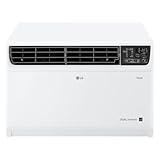
Overview: LG’s flagship 14,000 BTU dual inverter unit dominates large-space cooling with coverage up to 800 square feet. This powerhouse leverages dual inverter compressors and a BLDC motor to deliver 35% energy savings while maintaining operation as low as 44dB in sleep mode. It’s built for whole-apartment or large-room cooling.
What Makes It Stand Out: The dual inverter technology represents LG’s engineering prowess, providing rapid cooling with exceptional efficiency. The LG ThinQ app offers sophisticated scheduling and monitoring features, while the 72-inch cord length provides installation flexibility. The EZ Mount installation kit simplifies setup despite the unit’s size.
Value for Money: Priced at $469.00, this unit offers compelling value for its capacity class. Comparable central cooling solutions cost thousands more. The dual inverter system maximizes energy savings for large spaces, where efficiency matters most. While slightly louder than Midea’s U-shaped design, it cools nearly double the area, justifying the cost per square foot.
Strengths and Weaknesses: Strengths include maximum cooling capacity, dual inverter efficiency, comprehensive smart controls, ENERGY STAR certification, and easy installation for its size. The washable filter maintains performance. Weaknesses include 44dB operation being noticeably louder than premium competitors, fixed chassis blocking window function, higher power consumption at 115V, and substantial bulk requiring robust window support.
Bottom Line: The ideal solution for large apartments or open spaces needing serious cooling power. If your priority is maximum coverage with smart efficiency over whisper-quiet operation, this LG unit delivers exceptional performance and value.
10. DELLA 5000 BTU Smart Window Air Conditioner Compatible with Alexa, Cools Up to 150 Sq. Ft, Small Room AC Unit with GEO Location, WIFI & Remote Controls, Dehumidifier, Fan Cools, Eco, Easy Install

Overview: DELLA’s 5,000 BTU smart air conditioner targets small-space cooling with surprising tech sophistication. This compact unit covers 150 square feet while packing features like GEO location, Alexa integration, and a 2025 Red Dot Design Award-winning aesthetic. Operating at 51 dB, it balances quietness with functionality for bedrooms and offices.
What Makes It Stand Out: GEO location automatically adjusts cooling based on your smartphone location, a premium feature rarely seen at this price. The four fan speeds and four operating modes (Auto, Cool, Fan, Dry) provide exceptional versatility. The impressive CEER 11.0 rating delivers 29% energy savings, while the pre-assembled side panels enable true DIY installation.
Value for Money: At $219.96, this unit punches above its weight class in features. Smart capabilities typically cost $50+ more, and the design pedigree adds aesthetic value. While BTU is modest, the efficiency and intelligent automation maximize comfort per dollar. It’s an affordable entry into smart climate control without sacrificing quality.
Strengths and Weaknesses: Strengths include advanced smart features, GEO location automation, Red Dot design, high CEER rating, easy installation, and compact size. The 24-hour timer and eco mode enhance efficiency. Weaknesses include limited cooling capacity for spaces over 150 sq ft, 51 dB operation being audible in quiet environments, basic one-year warranty, and potential app reliability issues common to smaller brands.
Bottom Line: Excellent choice for tech-savvy users in small apartments or home offices wanting premium smart features without premium pricing. The GEO location automation and design awards make it a standout value.
Understanding Smart Air Conditioners in the Sub-$500 Range
What Makes an AC “Smart”?
Smart functionality extends far beyond a simple remote control app. At its core, a genuine smart air conditioner offers Wi-Fi connectivity that enables cloud-based control, automation, and integration with broader smart home ecosystems. Look for units that support 2.4GHz networks (most common in this price range) and provide real-time status updates. The difference between a “Wi-Fi enabled” unit and a truly smart one lies in its ability to learn your habits, respond to external triggers like weather changes, and operate autonomously based on rules you set. Budget models typically nail the basics—app control and voice commands—but may skimp on advanced features like machine learning or detailed energy analytics.
The Budget-Friendly Reality Check
The sub-$500 price point sits at an interesting intersection of capability and compromise. Manufacturers achieve this affordability by focusing smart features on software rather than hardware bells and whistles. You’ll get robust app control and scheduling, but premium materials, ultra-quiet compressors, and exotic designs stay out of reach. Expect plastic construction, standard efficiency ratings, and straightforward installation kits. The magic happens when companies prioritize firmware development over flashy hardware—this is where you find hidden gems that punch well above their weight class. Understanding this balance helps set realistic expectations while still demanding excellent value.
Decoding BTU Ratings for Your Space
Room Size Calculations
British Thermal Units (BTUs) measure cooling power, and getting this number right determines whether your smart AC becomes your favorite gadget or a disappointing paperweight. The standard formula—20 BTU per square foot—serves as a starting point, but budget units often list maximum coverage that assumes perfect conditions. For a 150-square-foot bedroom, a 6,000 BTU unit works theoretically, but factor in real-world inefficiencies. In the sub-$500 category, manufacturers rarely oversize their components, so err on the side of caution. A 6,500-7,000 BTU unit for that same room provides buffer capacity for those 95°F heatwaves without cycling too frequently.
Ceiling Height and Sunlight Factors
Your room’s personality dramatically impacts BTU requirements. High ceilings above 8 feet demand 10% more capacity per additional foot. That sunny south-facing room with floor-to-ceiling windows? Add another 10-15%. Kitchen installations require a full 4,000 BTU boost to combat heat-generating appliances. Budget smart ACs under $500 typically max out around 10,000-12,000 BTU, making them ideal for spaces under 450 square feet with standard ceilings. For attic apartments or sun-drenched living rooms, you might need to prioritize raw cooling power over smart features—or accept that the unit will run continuously during peak heat.
Energy Efficiency: Saving Money Beyond the Purchase Price
EER and CEER Ratings Explained
Energy Efficiency Ratio (EER) and Combined Energy Efficiency Ratio (CEER) reveal how many BTUs of cooling you get per watt of electricity. In the budget category, aim for a minimum EER of 11.0 or CEER of 10.5. Anything below these thresholds means your “budget” purchase will guzzle electricity, negating initial savings. The sub-$500 market has seen impressive efficiency gains recently, with many models hitting 12+ EER thanks to improved compressors and fan designs. This translates to roughly $30-50 annual savings compared to older units—effectively paying for the smart features through reduced utility bills.
Energy Star Certification Importance
That blue Energy Star logo isn’t just marketing fluff—it guarantees the unit meets strict EPA efficiency guidelines, typically placing it in the top 25% of its class. For budget smart ACs, Energy Star certification often indicates better insulation, more precise temperature sensors, and smarter defrost cycles. These units frequently include eco modes that automatically adjust cooling intensity based on room occupancy and outdoor temperature, features that cheaper non-certified models lack. The certification also suggests more rigorous quality control, reducing the risk of early failure.
Essential Smart Features to Prioritize
Wi-Fi Connectivity Standards
Dual-band Wi-Fi (2.4GHz and 5GHz) rarely appears under $500, so accept that 2.4GHz is your reality. This isn’t a dealbreaker—2.4GHz provides better range through walls anyway. What matters more is signal strength: look for units that explicitly mention “enhanced Wi-Fi range” or “external antenna.” Weak connectivity renders all smart features useless. Before purchasing, use a Wi-Fi analyzer app to check signal strength at your intended installation location. If you’re hovering around -70 dBm or weaker, consider a Wi-Fi extender or a unit known for robust connectivity.
Voice Assistant Ecosystems
Most budget smart ACs play nice with Alexa and Google Assistant, but the depth of integration varies wildly. Basic commands like “turn on the AC” and “set temperature to 72” work universally, but advanced features like “activate eco mode” or “set sleep timer for 2 hours” require more sophisticated skill development. Apple HomeKit support remains rare in this price range due to Apple’s stringent certification costs. If you’re deep in the HomeKit ecosystem, you’ll need to bridge through Home Assistant or settle for more limited Siri shortcuts—hardly ideal for a plug-and-play experience.
App Functionality and User Experience
The companion app makes or breaks the smart experience. Download it before buying (most are free) and explore the interface. Quality indicators include: customizable scheduling with multiple daily periods, filter cleaning reminders, usage history graphs, and firmware update capabilities. Red flags include mandatory account creation with excessive data permissions, frequent crashes in recent reviews, and a lack of offline manual control. The best budget apps offer local network control when the internet goes down—a feature that separates thoughtful engineering from checkbox feature-ticking.
Types of Smart ACs in Your Budget
Window Units: Power and Efficiency
Window air conditioners dominate the sub-$500 smart category, offering the best BTU-per-dollar ratio. Their fixed installation creates a tight seal, maximizing efficiency and minimizing noise leakage. Most smart window units in this range handle 6,000-10,000 BTU, making them ideal for bedrooms and small living spaces. The installation learning curve steeper than portables—you’ll need to manage tilt angles for proper drainage, secure mounting brackets, and insulate gaps. But once installed, they run quieter and more efficiently than their portable counterparts, with many achieving noise levels below 52 decibels.
Portable Units: Flexibility Trade-offs
Portable smart ACs offer plug-and-play convenience but extract a premium in efficiency and noise. The same $400 that buys a 10,000 BTU window unit typically gets you only 8,000 BTU in portable form, with CEER ratings 15-20% lower. The exhaust hose radiates heat back into the room, and the indoor compressor location increases noise to 55-60 decibels—conversation-interrupting levels. However, for renters, casement windows, or multi-room cooling needs where you move the unit seasonally, portability justifies the compromises. Look for dual-hose designs (rare under $500 but occasionally available on sale) which improve efficiency by using outside air for condenser cooling.
Emerging Categories
Innovation creeps into the budget segment through unconventional designs. Saddle-style window units that straddle the sill free up window space and reduce noise. U-shaped designs place the compressor outside the window, dropping indoor noise to whisper-quiet 42-45 decibels. While these advanced form factors typically exceed $500 at launch, previous generation models frequently drop into budget territory during clearance sales. Keep an eye on manufacturer refurbishment programs too—last year’s premium smart features often appear in certified refurb units under $400 with full warranties.
Installation Realities for DIYers
Window Mounting Requirements
Smart features can’t compensate for poor installation. Measure your window’s physical opening and maximum weight capacity before falling in love with any unit. Most budget window ACs require a minimum 13-inch vertical opening and support up to 85 pounds. Check for nearby outlets—manufacturers recommend dedicated 115V circuits for units above 10,000 BTU. The electrical code requires a 3-prong grounded outlet within 6 feet; extension cords void warranties and create fire hazards. Weather stripping and foam insulation tape, often omitted from budget packaging, prove essential for preventing air leaks that sabotage efficiency.
Portable AC Venting Challenges
Portable units demand more than just rolling them into place. The exhaust hose, typically 5-7 feet long, must run in a straight line with minimal bends—each 90-degree bend reduces efficiency by 5%. The window kit needs to fit your specific window type; casement and sliding windows often require custom plexiglass solutions not included in the box. Budget portables frequently skimp on hose insulation, causing the exhaust to heat your room. Wrap it with inexpensive foil duct insulation from the hardware store—a $10 upgrade that dramatically improves performance. Also, plan for condensate removal: while many units claim “self-evaporation,” humid climates will overwhelm this feature, requiring manual draining or a small pump.
Electrical Safety Considerations
That $350 price tag doesn’t include an electrician, but you might need one. Units above 8,000 BTU can draw 7+ amps continuously, stressing older wiring. If your circuit breaker trips during the compressor startup surge, you’re overloading the circuit. Budget smart ACs rarely include built-in surge protection—a critical omission during summer storms. Invest in a $15 appliance-grade surge protector with at least 1000 joules rating. Never use a power strip or multi-tap adapter; these create fire hazards with high-draw appliances. Check your home’s wiring: aluminum wiring from the 1970s requires special outlets and poses compatibility issues that void warranties.
Performance Metrics That Impact Daily Use
Noise Level Benchmarks
Sound pressure levels measured in decibels (dB) determine whether your smart AC becomes a sleep aid or a sleep disruptor. In the sub-$500 category, window units typically range from 50-58 dB on high—comparable to a refrigerator hum. For bedrooms, prioritize models advertising “sleep mode” below 50 dB. Portable units run louder, usually 55-65 dB, due to indoor compressor placement. Pro tip: read user reviews specifically mentioning noise, as manufacturers often measure dB from unrealistic distances. The location matters too—installing a window unit in a vinyl frame versus wood studs can amplify vibrations, adding 3-5 dB of structural noise.
Cooling Speed and Airflow Patterns
Smart features should include adjustable louvers and multiple fan speeds—not just on/off control. Look for units offering at least 3 fan speeds plus an auto mode that modulates based on temperature differential. The best budget models include a “follow me” function where the remote’s built-in sensor communicates ambient temperature, adjusting cooling accordingly. Airflow direction matters: vertical oscillation helps distribute cool air evenly, preventing hot spots. Check the CFM (cubic feet per minute) rating—higher numbers mean faster cooling. A 6,000 BTU unit should move at least 180 CFM; 10,000 BTU models need 250+ CFM for effective circulation.
Dehumidification Capabilities
Air conditioning inherently removes moisture, but some units excel at it. Check the pints-per-hour dehumidification rating, especially if you live in a humid climate. Budget smart ACs typically remove 1.5-3 pints per hour—adequate for moderate humidity but insufficient for tropical conditions. The smart angle here involves humidity-based triggers: premium budget models can activate cooling when relative humidity exceeds a set threshold, independent of temperature. This feature, sometimes called “dry mode,” prevents that clammy feeling and protects against mold. If your climate sees summer humidity above 60%, prioritize this capability over fancy scheduling features.
Advanced Smart Capabilities Worth Considering
Scheduling and Automation Depth
Basic scheduling lets you set on/off times, but sophisticated automation responds to multiple triggers. Look for apps supporting conditional logic: “Turn on at 5 PM, but only if outdoor temperature exceeds 80°F” or “Switch to eco mode after 10 PM on weekdays.” The best budget platforms allow different schedules for each day of the week, accommodating irregular work shifts. Some units learn your manual adjustments over time, creating adaptive schedules—though this AI-like feature remains rare under $500. Test the app’s scheduling interface before purchasing; clunky, slow interfaces indicate poor backend architecture that’ll frustrate you daily.
Geofencing and Location-Based Controls
Geofencing uses your phone’s location to automate operation based on proximity. Drive within 2 miles of home, and the AC kicks on to pre-cool your space. Leave for work, and it automatically switches to energy-saving mode. This feature, once premium-only, now appears in budget apps but with limitations: single-user tracking (confusing multi-person households), GPS battery drain, and occasional false triggers from location inaccuracies. Implementation quality varies dramatically—some apps refresh location every 5 minutes, creating delays, while others use cellular tower triangulation for faster response. If geofencing appeals to you, search app reviews specifically for “location” mentions to gauge real-world reliability.
Third-Party Integration and IFTTT
IFTTT (If This Then That) support unlocks creative automation: “If my Nest thermostat detects I’m away, turn off the portable AC” or “If local weather drops below 70°F, switch to fan-only mode.” Native IFTTT channels indicate a company’s commitment to open ecosystems. Budget brands increasingly offer this, though sometimes through unofficial community applets rather than first-party support. SmartThings, Hubitat, and Home Assistant integration provide similar benefits for home automation enthusiasts. Check community forums for user-created drivers—popular budget models often have robust community support that surpasses official capabilities.
Hidden Ownership Costs
Maintenance and Filter Expenses
That $379 purchase price excludes ongoing maintenance. Washable filters, common in budget units, require cleaning every 2-4 weeks during heavy use. Replacement filters, if needed, cost $15-30 annually. Some smart apps track filter status based on runtime hours—a genuinely useful feature that prevents efficiency-robbing clogs. Check filter accessibility before buying; units requiring screwdriver removal for basic cleaning quickly become neglected. The condenser coils need annual vacuuming—budget models with rear-facing coils behind flimsy grilles make this task frustrating. Factor in a $5 can of coil cleaner and 30 minutes of your time each spring.
Energy Consumption Monitoring
Real-time energy tracking separates thoughtful smart ACs from gimmicky ones. Quality apps display current wattage draw, estimated monthly cost, and historical usage patterns. This data reveals inefficiencies: that 30-minute pre-cooling might cost $0.15 daily, adding $45 to your summer bill. Some units integrate with utility time-of-use rates, automatically shifting heavy cooling to off-peak hours. While rare under $500, a few budget brands partner with energy rebate programs, offering $25-50 incentives for enrolling in demand response programs where the utility can briefly cycle your AC during peak load events.
Warranty Limitations
Budget smart ACs typically carry 1-year full warranties, with 5-year coverage on the sealed system (compressor, evaporator, condenser). However, “smart” components often fall under shorter 90-day warranties. Read the fine print: some brands require online registration within 30 days, while others demand original receipts and serial numbers. Third-party sellers on marketplace sites may not honor manufacturer warranties. Consider the cost of extended warranties carefully—they often exceed 25% of the purchase price, making replacement more economical than repair for sub-$500 units. Keep original packaging for at least the warranty period; many companies require it for returns.
Brand Reliability in the Budget Segment
What to Expect at This Price Point
The sub-$500 smart AC market includes established appliance brands, white-label manufacturers, and direct-to-consumer disruptors. Established brands offer proven reliability but often lag in smart feature innovation. Newer brands pack impressive app functionality but may lack long-term durability data. Check the company’s history: brands with 5+ years in smart appliances have worked out firmware bugs and server reliability issues. Look for FCC certification numbers on product listings—this indicates proper radio frequency testing, often skipped by fly-by-night brands. The sweet spot: companies with appliance manufacturing experience who’ve recently expanded into smart features, offering both reliability and modern functionality.
Researching Company Reputation
Dig deeper than star ratings. Search for “[Brand Name] server outage” or “[Brand Name] app not working” to uncover chronic cloud infrastructure problems. Check if the company provides firmware release notes—regular updates indicate active development and security patching. The Better Business Bureau profile reveals customer service responsiveness; look for patterns in complaint resolution. Reddit’s r/homeautomation and HVAC forums offer unfiltered user experiences. Pay attention to comments about app updates breaking functionality—a sign of poor quality assurance. Companies that maintain active social media support channels typically resolve issues faster than those relying solely on email tickets.
Common Buyer Mistakes to Avoid
The BTU Mismatch Problem
Oversizing causes short-cycling: the AC cools too quickly, shuts off, then restarts minutes later. This prevents proper dehumidification and wears components faster. Undersizing leads to continuous operation, sky-high electric bills, and premature compressor failure. The most common mistake? Ignoring insulation quality. A poorly insulated 300 sq ft room might need 10,000 BTU despite calculators suggesting 6,000. Conversely, a well-insulated basement might stay comfortable with 5,000 BTU. When in doubt, size down slightly—continuous operation at 80% capacity beats constant on/off cycling at 150% capacity.
Wi-Fi Signal Strength Oversights
That perfect AC means nothing if it can’t maintain a stable connection. Metal window frames, concrete walls, and distance from your router create dead zones. Test your phone’s Wi-Fi at the exact installation spot; if you struggle to load a webpage, your smart AC will too. Some users resort to Wi-Fi extenders, but these introduce latency that can delay commands by 5-10 seconds. Powerline adapters with Wi-Fi offer better reliability for fixed installations like window units. For portables, consider units with Bluetooth backup control—limited range but reliable when Wi-Fi fails.
Misleading “Smart” Marketing Claims
“Works with Alexa” doesn’t guarantee comprehensive voice control. Some budget units only support on/off and temperature adjustment, lacking mode changes or fan speed control. “Smart scheduling” might mean simple timer functions rather than conditional automation. “Energy saving” could refer to a basic eco mode that merely limits fan speed, not true adaptive cooling. Scrutinize app screenshots in product listings—if they only show a power button and temperature slider, the smart features are superficial. True intelligence includes sensor data, usage analytics, and rule-based automation. When in doubt, search YouTube for “[Model Number] app walkthrough” to see actual functionality before committing.
Maximizing Value and Longevity
Seasonal Maintenance Routines
Treat your smart AC like a car requiring regular tune-ups. Each spring, remove and deep-clean the filter with mild detergent. Vacuum the condenser coils from the outside, being careful not to bend the delicate fins. Check the window seal integrity; compressed weatherstripping from winter storage needs replacement. Run the unit on fan-only mode for 30 minutes to dry internal components before storage, preventing mold. Store portables upright—laying them down can cause compressor oil migration, creating startup damage. These simple steps add 3-5 years to the typical 7-10 year lifespan, stretching your $400 investment to under $50 annually.
Optimizing Placement for Efficiency
Location dramatically impacts performance. For window units, install on the shadiest side of your home—north-facing walls are ideal. Ensure at least 20 inches of clearance around the outdoor condenser; blocked airflow reduces efficiency by 15-20%. Inside, position the unit so airflow isn’t obstructed by curtains or furniture. For portables, keep the exhaust hose as short and straight as possible; each foot of extra hose reduces cooling capacity by 1%. Place the unit centrally in the room, not pushed against a wall. Smart features like remote temperature sensors work best when the unit isn’t fighting against its own temperature stratification.
Timing Your Purchase Strategically
Seasonal Pricing Trends
Air conditioner pricing follows predictable cycles. January through March sees the lowest prices as retailers clear inventory, with discounts of 25-35% off summer MSRP. April brings new model announcements, further depressing last year’s prices. May through July commands full retail pricing—avoid buying then unless absolutely necessary. August offers the first summer clearance sales, typically 15-20% off. September through December sees sporadic deals as stock dwindles. For maximum selection and savings, shop late February through early March. Set price alerts on comparison sites; many budget models see 30% price drops during these off-peak windows.
Holiday Sale Opportunities
Black Friday and Cyber Monday increasingly feature smart AC deals, though inventory is limited. Memorial Day and July 4th sales offer modest 10-15% discounts but include bundle deals like free installation kits or extended warranties. Earth Day (April 22) sometimes triggers energy efficiency promotions with utility rebate stacking opportunities. Amazon Prime Day in July has become a major AC sales event, with exclusive budget models launched specifically for the sale. Pro tip: create accounts on major retailer sites beforehand, saving your payment info for lightning-fast checkout during limited-stock sales events.
Setting Up Your Smart Home Integration
Router and Network Preparation
Before installation, optimize your network. Create a dedicated 2.4GHz SSID for smart home devices—this prevents dual-band routers from pushing the AC to 5GHz, which it can’t use. Assign static IP addresses through your router’s DHCP reservation to prevent connection drops during IP renewals. Enable WPA2 security; some older budget units choke on WPA3. If you have 20+ Wi-Fi devices, upgrade to a router supporting 50+ concurrent connections—budget ACs sometimes hold connections open unnecessarily, exhausting cheaper router connection tables. These network optimizations eliminate 90% of “smart” connectivity complaints.
Creating Automation Routines
The real power emerges when your AC collaborates with other devices. Create scenes like “Summer Evening” that dim lights, closes smart blinds, and sets the AC to 74°F. Use temperature sensors in multiple rooms to trigger the AC only when your home office exceeds 78°F, ignoring the cooler bedroom. Pair with smart plugs to measure actual energy consumption, creating rules that shut off the AC if it draws excessive power indicating a malfunction. The IFTTT integration in many budget units allows creative triggers: “If CO2 levels rise above 1000ppm (from a separate air quality monitor), increase fan speed to circulate air.” This ecosystem approach transforms a simple appliance into an intelligent climate management system.
Frequently Asked Questions
1. Can I really get a reliable smart AC for under $500, or am I sacrificing too much quality?
Absolutely, but reliability depends on prioritizing core components over flashy features. Focus on units from established manufacturers where the smart features are value-adds rather than the main selling point. These models typically use proven compressors and coils with newer Wi-Fi modules. The key is reading recent reviews specifically about longevity; models with 2+ years of firmware updates and consistent app performance indicate stable products. Avoid first-generation smart features from brands new to connectivity.
2. How much will a budget smart AC actually add to my electricity bill?
A typical 8,000 BTU unit running 8 hours daily costs $25-45 monthly, depending on your electricity rate and climate. Smart features can reduce this by 15-25% through scheduling and eco modes. The real savings come from avoiding cooling an empty home—geofencing and scheduling ensure you only pay for cooling when needed. Monitor the first month’s usage through the app, then adjust schedules to optimize around your utility’s peak and off-peak rates for maximum savings.
3. Do I need a special router or internet speed for these smart ACs to work properly?
No, but stability matters more than speed. Any broadband connection works, but the AC needs consistent 2.4GHz Wi-Fi. A basic dual-band router is sufficient if placed within 30 feet and a few walls of the unit. For detached garages or backyard offices, a mesh network node nearby ensures reliable connectivity. Latency below 100ms is ideal; higher latency causes delayed app responses. The AC uses minimal bandwidth—less than 50MB monthly—so it won’t impact your other devices.
4. Will my smart AC work during a power outage or internet outage?
During power outages, the unit obviously won’t run, but crucially, it should resume your previous settings when power returns. Quality models include auto-restart with memory retention. Internet outages are more nuanced: most budget units revert to manual remote control, losing app and voice functionality until connectivity restores. Some premium budget models offer local network control via Bluetooth or LAN, maintaining basic scheduling. Check reviews for “offline mode” mentions if this concerns you.
5. How difficult is installation really? Can I do it myself?
Window units require basic DIY skills: measuring, lifting 40-80 pounds, and using a screwdriver. Two people make installation safer and easier. Most users complete it in 45-90 minutes. Portable units are simpler—just attach the window kit and plug in—but the hose setup can be finicky. If you’re not comfortable lifting heavy objects or working at heights, hire help. Many retailers offer installation for $75-150, which includes proper sealing and electrical safety checks.
6. What’s the difference between a smart AC and a regular AC with a smart plug?
Smart plugs only provide on/off control and basic energy monitoring. They can’t adjust temperature, change modes, or access internal sensors. A true smart AC offers granular control over setpoints, fan speeds, and operational modes. More importantly, smart ACs provide internal diagnostics, filter alerts, and can modulate cooling rather than just cycling on/off. This precision saves energy and improves comfort. However, for simple window units without electronic controls, a smart plug can be a budget hack—just ensure the AC resumes operation after power loss.
7. How long do budget smart ACs typically last?
With proper maintenance, expect 7-10 years of service. The smart components (Wi-Fi module) often fail before the mechanical parts, typically around year 5-6. Fortunately, the AC continues working manually if the smart features die. Budget units may have slightly shorter lifespans than $800+ models due to thinner gauge metal and simpler compressors, but the difference is usually only 1-2 years. Regular filter cleaning and seasonal storage dramatically impact longevity. Units run continuously in humid climates may need compressor replacement at year 8, which often isn’t economical.
8. Can I integrate a budget smart AC with my existing smart home system?
Yes, but integration depth varies. Alexa and Google Home work seamlessly for voice control. For platforms like SmartThings, Hubitat, or Home Assistant, check community forums for custom device handlers—popular budget models often have robust community support. Full HomeKit integration is rare under $500, though HomeBridge software can bridge the gap for tech-savvy users. IFTTT support enables creative cross-platform automations even without native integration. Always verify the specific model number’s compatibility; similar-looking units can have completely different connectivity chips.
9. Are there security risks with budget smart ACs connecting to my network?
Any internet-connected device poses potential risks, but reputable brands implement basic security: encrypted cloud connections, regular firmware updates, and no open ports. Risks increase with obscure brands lacking security track records. Protect yourself by: creating a guest network for IoT devices, using strong unique passwords, enabling two-factor authentication on the app if available, and checking for firmware updates monthly. Avoid units requiring overly broad app permissions (access to contacts, photos, etc.). No major security breaches have targeted budget ACs specifically, but practicing good IoT hygiene is essential.
10. What should I do if the smart features stop working but the AC still cools?
First, power cycle the unit and router—this resolves 60% of connectivity issues. Check for app updates and firmware updates in the settings menu. If problems persist, try re-pairing the unit: delete it from the app, reset the AC’s Wi-Fi (usually holding a button for 5 seconds), and re-add it. Contact manufacturer support via email with your model number and description; many issues require server-side fixes. As a last resort, use the infrared remote that came with the unit. If smart features are critical and the unit is under warranty, push for replacement. Otherwise, a $30 universal smart remote with temperature sensor can restore partial automation.