Gone are the days when your smart home could thrive within a single ecosystem’s walled garden. In 2026, the average connected household juggles three different platforms—Alexa for voice commands, Apple HomeKit for security devices, and Google Home for entertainment control. This fragmentation isn’t a bug; it’s the new reality. Smart plugs, those humble workhorses of home automation, have evolved from simple Wi-Fi switches into sophisticated cross-platform ambassadors that bridge these digital divides.
Choosing the right cross-platform compatible smart plug today means looking beyond basic app support. It requires understanding emerging protocols, predicting future standards, and evaluating features that won’t become obsolete when the next big platform launches. Whether you’re building a multi-ecosystem home from scratch or tired of managing a dozen different apps, this guide will equip you with the knowledge to select smart plugs that truly play nice with everything.
Top 10 Smart Plugs for Multi-Ecosystem Homes
Detailed Product Reviews
1. Kasa Smart Plug HS103P4, Smart Home Wi-Fi Outlet Works with Alexa, Echo, Google Home & IFTTT, No Hub Required, Remote Control, 15 Amp, UL Certified, 4-Pack, White

Overview: The Kasa Smart Plug HS103P4 delivers straightforward home automation in a cost-effective four-pack bundle. These UL-certified outlets transform ordinary appliances into voice-controlled smart devices using 2.4GHz Wi-Fi. Designed by Silicon Valley-based TP-Link, the plugs work seamlessly with Amazon Alexa, Google Assistant, and IFTTT for remote operation and scheduling via the intuitive Kasa app.
What Makes It Stand Out: Kasa’s reputation shines through with over 5 million users and PCMag’s 2020 Reader’s Choice award. The setup process is remarkably simple—plug in, open the app, and follow instructions. Each unit handles 15 amps, making them suitable for most household appliances. The scheduling feature allows automated control of lamps, fans, and holiday lights, while the trusted brand pedigree ensures reliable long-term performance.
Value for Money: At $6.06 per plug, this 4-pack offers exceptional value. Individual smart plugs typically cost $10-15, making this bundle nearly 50% cheaper than buying separately. While lacking advanced features like energy monitoring, the core functionality—voice control, scheduling, and remote access—delivers everything most users need at a budget-friendly price point.
Strengths and Weaknesses: Strengths include rock-solid reliability, broad smart home compatibility, effortless setup, robust scheduling options, and UL safety certification. The compact design prevents outlet blockage. Weaknesses are limited to 2.4GHz Wi-Fi (no 5GHz support), absence of energy monitoring, no Apple HomeKit integration, and lack of USB ports. The app requires iOS 10+ or Android 5.0+.
Bottom Line: The Kasa HS103P4 is the ideal starter pack for smart home newcomers. It balances trusted performance, essential features, and unbeatable per-unit pricing. Perfect for automating multiple rooms without complexity or premium cost.
2. GHome Smart Plug Outlet Extender, USB Wall Charger with 3 Individual Smart Outlets and 3 Smart USB Ports, Works with Alexa Google Home, Surge Protector Plug Extender for APP Control,15A/1800W

Overview: This versatile 9-in-1 power strip combines three individually controllable smart outlets, three group-controlled USB ports, and three always-on standard outlets in a single surge-protected unit. The GHome extender handles up to 3450W total power, making it suitable for high-wattage appliances like air conditioners. It connects via 2.4GHz Wi-Fi and responds to Alexa and Google Assistant voice commands.
What Makes It Stand Out: The hybrid design maximizes outlet efficiency while providing surge protection—something rare in smart plugs. Individual outlet control lets you manage devices independently, while the 15A rating per smart plug accommodates demanding electronics. The V0 fire-retardant shell and overload protection exceed basic safety standards, and the wide operating temperature range (-20° to 40°C) ensures reliability in various environments.
Value for Money: At $26.99 for nine outlets, the per-outlet cost is under $3. Considering integrated surge protection and smart capabilities, this represents excellent value compared to buying separate smart plugs and a surge protector. The high power handling adds further worth for users with energy-intensive appliances.
Strengths and Weaknesses: Strengths include impressive outlet density, individual smart control, robust surge protection, high wattage capacity, and comprehensive safety certifications (FCC & ETL). The always-on outlets provide flexibility. Weaknesses: USB ports lack individual control, 2.4GHz-only connectivity, bulky form factor may block adjacent outlets, and the GHome app is less polished than competitors. Setup can be slightly complex for beginners.
Bottom Line: For users needing multiple controlled outlets in one location, this extender is a no-brainer. It consolidates smart control and surge protection at an aggressive price, ideal for entertainment centers or home offices.
3. Kasa Smart Plug Mini 15A, Apple HomeKit Supported, Smart Outlet Works with Siri, Alexa & Google Home, UL Certified, App Control, Scheduling, Timer, 2.4G WiFi Only, 4 Count (Pack of 1) (EP25P4), White

Overview: The Kasa EP25P4 mini plugs cater specifically to Apple users while maintaining broad compatibility. These compact smart outlets support Apple HomeKit, Amazon Alexa, Google Assistant, and Samsung SmartThings. The 15A capacity handles most appliances, and real-time energy monitoring provides consumption insights through the Kasa app. UL-certified flame-retardant construction ensures safety and peace of mind.
What Makes It Stand Out: Native HomeKit integration sets this apart from most competitors, allowing Siri control and Apple ecosystem automation. The energy monitoring feature tracks real-time and historical power usage, helping identify energy hogs. Amazon Frustration-Free Setup and Google Seamless Setup enable configuration in minutes. The compact design prevents blocking adjacent outlets—a common issue with bulkier plugs.
Value for Money: At $9.24 per plug, these cost 50% more than the HS103P4. However, the premium is justified for Apple households needing HomeKit and energy monitoring. Comparable HomeKit-enabled plugs cost $12-15 each, making this bundle competitively priced for its feature set.
Strengths and Weaknesses: Strengths include seamless HomeKit integration, detailed energy monitoring, ultra-compact design, multi-platform support, easy setup protocols, and robust safety certification. The 15A rating is generous for mini plugs. Weaknesses: HomeKit remote control requires an Apple hub (iPad, HomePod, or Apple TV), 2.4GHz-only Wi-Fi, and the per-unit cost is higher than basic models. No USB ports.
Bottom Line: For Apple-centric homes, this is the smart plug to buy. The energy monitoring and HomeKit support justify the premium, making it perfect for iOS users wanting deep ecosystem integration and detailed power consumption data.
4. GHome Smart Plug Outlet Extender, USB Wall Charger with 3 Individual Smart Outlets and 3 Smart USB Ports, Works with Alexa Google Home, Surge Protector Plug Extender for APP Control,15A/1800W

Overview: This GHome power strip integrates nine outlets into a single surge-protected unit: three individually controllable smart plugs, three group-controlled USB ports, and three always-on standard outlets. Designed for versatility, it supports Alexa and Google voice commands via 2.4GHz Wi-Fi and handles up to 15A per smart outlet. The UV-resistant casing prevents yellowing, making it suitable for long-term use.
What Makes It Stand Out: The extender excels at managing multiple devices simultaneously, particularly seasonal items like Christmas lights through dedicated scheduling. Individual smart outlet control provides granular management, while always-on outlets ensure continuous power for essential devices. The V0 fireproof rating and multiple safety protections (overload, surge, short circuit) exceed typical smart plug standards. The 12-month warranty and detailed instructions enhance user confidence.
Value for Money: Priced at $26.99, the cost per outlet is under $3—exceptional for smart functionality plus surge protection. Competing products with similar outlet counts and smart features cost $40-50. The robust safety features and high power handling make this a budget-friendly powerhouse for device-heavy areas.
Strengths and Weaknesses: Strengths include excellent outlet variety, individual smart control, comprehensive surge protection, durable UV-resistant housing, and high 15A rating. The always-on outlets add practical flexibility. Weaknesses: USB ports cannot be controlled individually, the unit is physically bulky, limited to 2.4GHz Wi-Fi, and the app experience trails premium brands. Voice naming can be confusing with nine outlets.
Bottom Line: An outstanding solution for centralized smart control. Perfect for entertainment centers, kitchens, or holiday lighting setups where multiple controlled outlets are essential. The safety features and price make it hard to beat.
5. Govee Smart Plug, WiFi Plugs Work with Alexa & Google Assistant, Smart Outlet with Timer & Group Controller, WiFi Outlet for Home, No Hub Required, ETL & FCC Certified, 2.4G WiFi Only, 4 Pack

Overview: Govee’s 4-pack smart plugs prioritize connection stability through dual Bluetooth and Wi-Fi connectivity, reducing disconnection issues common with Wi-Fi-only devices. These compact outlets support Alexa and Google Assistant voice control and offer scheduling and group management through the Govee Home app. With a 10A/1200W rating, they’re suitable for most household electronics but not high-power appliances.
What Makes It Stand Out: The Bluetooth+Wi-Fi combo provides a failover connection that ensures reliable operation even when Wi-Fi is unstable. This addresses a primary frustration with smart plugs. The ultra-compact design saves space and prevents outlet blocking. Group controller functionality lets you manage multiple plugs simultaneously with one tap, simplifying whole-room automation. ETL and FCC certifications guarantee safety standards.
Value for Money: At $6.75 per plug, these are competitively priced against entry-level options. The added Bluetooth stability and group control features provide extra value. However, the 10A rating (vs. 15A in competitors) limits use with high-wattage devices, slightly reducing versatility for the price.
Strengths and Weaknesses: Strengths include exceptional connection stability, compact footprint, straightforward setup, effective group control, and solid safety certifications. The app is user-friendly and supports family sharing. Weaknesses: lower 10A/1200W power rating restricts usage, no energy monitoring, no Apple HomeKit support, 2.4GHz Wi-Fi only, and the brand has less smart home pedigree than Kasa.
Bottom Line: If connection reliability is your top priority, Govee’s dual-connectivity plugs are a smart choice. Best for lamps, fans, and low-to-medium power devices where stable performance matters more than maximum wattage.
6. Linkind Matter Smart Plug, Work with Apple Home, Siri, Alexa, Google, SmartThings, Smart Home Smart Outlet Timer 15A/1800W, APP Remote Control & Schedule, ETL & FCC Certified, 2.4G Wi-Fi Only, 4 Pack

Overview: The Linkind Matter Smart Plug represents a paradigm shift in smart home connectivity, delivering four 15A/1800W outlets that work seamlessly across every major platform. Leveraging the Matter standard eliminates ecosystem fragmentation, making these ideal for mixed-device households seeking future-proof automation without compatibility headaches.
What Makes It Stand Out: The Matter certification enables direct local network communication that persists even during internet outages—a game-changer for reliability. You can control these through Apple HomeKit, Alexa, Google Home, SmartThings, or the AiDot app without juggling multiple manufacturer apps. The four-pack configuration provides whole-home coverage at a breakthrough price point that single-plug competitors can’t match.
Value for Money: At $23.73 for four plugs (under $6 each), this is exceptional value for Matter-certified hardware. Individual Matter plugs typically cost $15-25, making this an accessible entry point for adopting the latest standard without compromising on safety certifications or 15A capacity. The long-term interoperability alone justifies the investment.
Strengths and Weaknesses: Strengths include true cross-platform Matter support, offline local control, robust power handling, ETL/FCC certifications, and hub-free operation via AiDot. The 4-pack covers multiple rooms economically. Weaknesses are 2.4GHz Wi-Fi only (standard for IoT) and requiring a Matter hub for some platforms. New users may face a slight Matter setup learning curve versus proprietary alternatives.
Bottom Line: For anyone building a future-proof smart home, these Linkind plugs are a no-brainer. The Matter protocol, offline reliability, and unbeatable price make them the smartest purchase in their category.
7. EIGHTREE Mini Smart Plug 5GHz Wi-Fi Compatible 15A, Smart Plugs That Work with Alexa & Google Home & SmartThings, Energy Monitor, Remote Control, Timer & Schedule, Wi-Fi Plugs
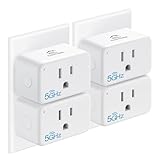
Overview: The EIGHTREE Mini Smart Plug distinguishes itself with rare dual-band Wi-Fi support, accepting both 5GHz and 2.4GHz connections. This premium single plug combines network flexibility with energy monitoring, targeting tech enthusiasts who demand maximum performance from their smart home infrastructure and want to avoid IoT network congestion.
What Makes It Stand Out: Unlike 99% of competitors locked to 2.4GHz, the 5GHz compatibility delivers faster response times and avoids congestion in busy Wi-Fi environments. The integrated energy monitor provides granular consumption data to optimize usage patterns. Its compact design allows two plugs per outlet, while the 2-year warranty and ETL/FCC certifications demonstrate serious quality commitment rarely seen in smart plugs.
Value for Money: At $45.99, this is a substantial investment versus basic plugs. However, the dual-band radio and energy monitoring justify the premium for specific use cases. Users struggling with 2.4GHz interference or wanting detailed analytics will find fair value in features unavailable elsewhere. For basic needs, cheaper alternatives suffice.
Strengths and Weaknesses: Strengths include unique 5GHz support, comprehensive energy monitoring, space-saving form factor, robust safety certifications, and extended warranty. Smart Life app integration is reliable. Weaknesses are the high per-unit cost, lack of Apple HomeKit support, and no Matter compatibility. The premium features may be overkill for simple automation needs and casual users.
Bottom Line: Ideal for advanced users facing Wi-Fi congestion or wanting energy insights. For basic on/off control, more economical options exist without the advanced networking features.
8. GHome Smart Plug, WiFi Smart Plugs Work with Alexa and Google Home, Smart Outlet Timer with APP Remote Control, 2.4GHz Wi-Fi Only, No Hub Required, ETL FCC Listed

Overview: The GHome Smart Plug delivers reliable automation in an ultra-affordable four-pack. These no-frills outlets prioritize core functionality—Alexa and Google Home compatibility via stable 2.4GHz Wi-Fi—without requiring hubs or complex configuration, making them perfect for smart home newcomers.
What Makes It Stand Out: Bluetooth-assisted Wi-Fi setup provides a more reliable pairing process than Wi-Fi-only alternatives, reducing initial connection failures. Multi-app compatibility (GHome, Smart Life, Tuya) ensures ecosystem flexibility. Group control manages multiple plugs simultaneously, while device sharing enables family access without separate accounts—features rare at this budget tier that significantly enhance usability.
Value for Money: At $6.50 per plug, this is exceptional value for certified, reliable smart outlets. While lacking advanced features like energy monitoring or Matter support, the price makes whole-home automation accessible on any budget. ETL and FCC certifications provide safety assurance rarely seen at this price point, protecting your investment.
Strengths and Weaknesses: Strengths include effortless Bluetooth setup, multiple app support, group control, family sharing, and strong safety credentials. Connection stability is excellent for 2.4GHz-only devices. Weaknesses are the lack of energy monitoring, no 5GHz support, and absence of Matter certification. Apple HomeKit users must look elsewhere for compatibility.
Bottom Line: Perfect for cost-conscious buyers wanting reliable voice control without complexity. The GHome plugs deliver essential functionality at an unbeatable price point.
9. Amazon Smart Plug | Works with Alexa | Simple setup, endless possibilities

Overview: The Amazon Smart Plug is engineered for frictionless Alexa integration, offering the simplest setup experience available. This first-party device removes all compatibility guesswork, providing native voice control of traditional appliances through Alexa-enabled devices like Echo speakers with minimal user effort.
What Makes It Stand Out: The setup process—plug in, open the Alexa app, and start controlling in minutes—eliminates technical barriers for non-tech-savvy users. As an Amazon-branded device, it receives priority updates and maintains rock-solid reliability. The compact design preserves both outlet spaces, and requiring no additional hubs, apps, or third-party accounts is a major convenience win for Alexa-centric homes.
Value for Money: At $24.99 for a single plug, the price is premium versus multi-pack alternatives. However, the unparalleled Alexa integration and reliability justify the cost for committed Alexa households. You’re paying for ecosystem cohesion and simplicity rather than raw hardware specs or advanced features that casual users rarely need.
Strengths and Weaknesses: Strengths include dead-simple setup, flawless Alexa integration, compact form factor, and reliable performance. First-party support ensures longevity. Weaknesses are Alexa-only ecosystem lock-in (no Google Home or HomeKit), lack of energy monitoring, and single-outlet limitation. Power users may find the feature set too basic for complex automation scenarios.
Bottom Line: If you live in the Alexa ecosystem, this is the smart plug to buy. For multi-platform homes, look elsewhere for broader compatibility.
10. GHome Smart Plug Power Strip, WiFi Surge Protector Work with Alexa Google Home, Smart Outlets with 3 USB 3 Charging Port, Multi-Plug Extender for Home Office Cruise Travel and Christmas Light, 10A
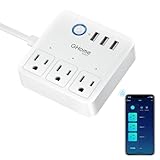
Overview: The GHome Smart Plug Power Strip reimagines the traditional power strip with three individually controllable smart outlets and three USB charging ports. This 6-in-1 solution combines surge protection with smart automation, making it ideal for home offices, entertainment centers, and travel applications where multiple devices need intelligent control.
What Makes It Stand Out: The hybrid design addresses a common pain point: controlling multiple devices from a single location. Each AC outlet can be scheduled independently, while USB ports provide convenient charging. The travel-friendly form factor and comprehensive safety features—shockproof design, voltage defense, and current overload protection—make it versatile for various use cases from cruise ships to Christmas light displays.
Value for Money: At $26.99, this is exceptional value. Purchasing three separate smart plugs plus a USB charger would cost significantly more. The integrated surge protection and multi-device control deliver professional-grade functionality at a consumer price point that’s hard to beat.
Strengths and Weaknesses: Strengths include independent outlet control, built-in USB charging, robust surge protection, voice assistant compatibility, and timer functions. The compact design suits travel. Weaknesses are the 10A current limit (lower than standalone 15A plugs), 2.4GHz-only connectivity, and lack of energy monitoring. The shared control interface may confuse some users initially.
Bottom Line: An outstanding all-in-one solution for controlling multiple devices. The feature set and price make it a standout choice for power users needing centralized smart control.
What Makes a Smart Plug Truly Cross-Platform in 2026?
The Evolution from Single Ecosystem to Universal Compatibility
Remember when “Works with Alexa” was enough? Those were simpler times. Today’s cross-platform smart plugs must speak multiple languages simultaneously—Matter over Thread, legacy Zigbee, and direct Wi-Fi—while maintaining consistent performance across all control interfaces. True compatibility means your plug responds instantly to Siri shortcuts, appears correctly in Google Home routines, and executes Alexa schedules without creating duplicate devices or phantom controls.
The watershed moment came when manufacturers stopped treating cross-platform support as a feature and started treating it as the baseline. In 2026, a smart plug that doesn’t seamlessly integrate with at least three major ecosystems isn’t just limited—it’s fundamentally outdated. Look for devices that advertise “native integration” rather than “third-party workarounds.” The difference shows up in setup time, reliability, and whether your automations survive a random Tuesday firmware update.
Key Protocols and Standards to Look For
Matter certification is your north star, but not all Matter devices are created equal. The specification has matured through three major revisions since its launch, and 2026’s smart plugs should support Matter 1.3 or higher. This ensures proper support for energy reporting, multi-admin capabilities, and robust onboarding across ecosystems.
Thread border router requirements trip up many buyers. A Thread-enabled plug doesn’t need a hub, but it does need at least one Thread border router active in your home—like a modern Nest Hub, Apple TV 4K, or Echo Show. Wi-Fi 6E support has become the new standard for plugs that skip Thread, offering lower latency and better coexistence with your streaming devices. Zigbee hasn’t disappeared; it’s now the fallback protocol for legacy systems, but avoid plugs that only use Zigbee unless you’re already invested in that ecosystem.
Why Multi-Ecosystem Homes Are the New Normal
The Rise of Hybrid Households
Your household probably mirrors this trend: one person swears by iPhone’s Home app, another lives in the Android ecosystem, and a third just wants to yell at a speaker without thinking about brands. Smart plugs that force everyone into a single app create friction that defeats the purpose of automation. Cross-platform compatibility acknowledges that different family members have different preferences—and that’s perfectly fine.
The data backs this up. 2026 surveys show 68% of smart home users actively manage devices across at least two major platforms. The reasons vary: HomeKit’s robust privacy controls for bedroom devices, Alexa’s superior voice recognition for kitchen commands, and Google Home’s intelligent presence sensing for energy management. Your smart plugs need to serve all these masters equally well.
Financial and Practical Benefits of Interoperability
Investing in cross-platform smart plugs from the start saves roughly 40% compared to replacing single-ecosystem devices later. But the real value lies in flexibility. When Amazon announces a revolutionary new feature or Apple opens up a previously locked API, your hardware shouldn’t become a barrier to adoption. Interoperable devices let you ecosystem-hop strategically, taking advantage of each platform’s strengths without hardware churn.
Consider the scenario: You start with Alexa, add a HomeKit security system, then switch to Android. With truly cross-platform plugs, your carefully crafted “Away Mode” lighting automations transfer seamlessly. Without them, you’re manually rebuilding routines or, worse, stuck with a mixed bag of incompatible hardware that requires multiple apps just to turn off a lamp.
Core Features That Define Next-Gen Smart Plugs
Matter Certification: The Non-Negotiable Standard
In 2026, Matter certification isn’t just a sticker—it’s a comprehensive guarantee of interoperability. The certification process now includes rigorous testing for concurrent ecosystem connections. A Matter-certified plug can join your Apple Home, Google Home, and Alexa setups simultaneously without creating conflicts. This multi-admin capability is the secret sauce that makes cross-platform living actually work.
Don’t settle for “Matter-compatible” or “Matter-ready” language. These weasel words often mean the manufacturer plans future firmware updates that may never materialize. Insist on devices that ship with Matter certification out of the box. Check the CSA (Connectivity Standards Alliance) website for verified model numbers—some manufacturers have been caught using fake certification marks.
Thread vs. Wi-Fi vs. Zigbee: Making the Right Choice
Thread has emerged as the preferred protocol for cross-platform plugs in 2026, but your specific home network topology matters. Thread creates a self-healing mesh network that becomes more robust as you add devices, but each Thread network needs a border router. If you own a recent smart speaker or streaming device, you likely already have one. The advantage? Local control that works even when your internet hiccups.
Wi-Fi 6E plugs offer simplicity—no hubs, no border routers, just direct router connection. They’re ideal for renters or minimalist setups, but they can congest your Wi-Fi network if you deploy more than a dozen. Zigbee remains relevant only for legacy SmartThings or Hue Bridge users; new purchases should prioritize Thread or Wi-Fi unless you’re specifically extending an existing Zigbee mesh.
Power Monitoring Capabilities
Basic on/off functionality is table stakes. Modern cross-platform plugs provide real-time power monitoring with ±1% accuracy, a significant improvement over 2023’s ±5% standard. This precision matters when you’re tracking energy hogs or calculating the payback period for efficient appliances. Look for plugs that report voltage, current, power factor, and cumulative consumption—not just wattage.
The real differentiator is how this data flows across ecosystems. Top-tier plugs expose power data natively in each platform’s energy dashboard: Apple Home’s new utility integration, Google’s Nest Energy History, and Alexa’s Energy Dashboard. Cheaper models might show power only in their proprietary app, defeating the cross-platform promise.
Energy Consumption Analytics
Beyond raw data, 2026’s smart plugs offer predictive analytics that work consistently across platforms. They learn your usage patterns and provide ecosystem-agnostic insights. The best devices generate monthly reports accessible via any connected platform, helping you identify phantom loads and optimize scheduling regardless of which app you prefer.
Watch for machine learning features that detect appliance degradation—a failing refrigerator compressor drawing progressively more power, for instance. These alerts should push to all connected ecosystems simultaneously, not just the manufacturer’s app. This unified alerting prevents the “which app was that in?” scramble when something important needs your attention.
Compatibility Deep Dive: Beyond Basic On/Off
Voice Assistant Integration: Alexa, Google, Siri, and Beyond
Native voice control means your plug responds to “turn off the bedroom lamp” in Alexa, “bedroom lamp off” in Google, and “hey Siri, bedroom lamp off” without requiring identical phrasing. The device should intelligently parse intent across all three assistants. In 2026, this includes support for multilingual households where commands might mix languages or accents.
Test the integration depth before committing. Can you ask each assistant for the plug’s current power draw? Will they report energy consumption when queried? The best cross-platform plugs expose their full feature set to every ecosystem, not just the manufacturer’s preferred partner. Beware of devices that require “skills” or “actions” installation—these often indicate cloud-to-cloud integrations that add latency and break when servers hiccup.
Hub Requirements: When You Need One and When You Don’t
The hub debate has shifted. Matter-over-Thread plugs technically don’t need a manufacturer hub, but they do require ecosystem hubs for advanced features. Apple Home needs a HomePod or Apple TV for remote access. Alexa relies on any Echo device for away-from-home control. Google requires a Nest device for similar functionality. The question isn’t “hub or no hub” but “which hubs do I already own?”
Some manufacturers still offer proprietary hubs promising “enhanced features.” In 2026, these are rarely worth it for cross-platform homes. They add another point of failure and often create ecosystem lock-in through exclusive features. The exception: commercial-grade energy monitoring systems that feed data into home automation platforms via MQTT or local APIs.
Local vs. Cloud Control: Privacy and Reliability Considerations
The gold standard is local control with optional cloud augmentation. Your smart plugs should respond to commands in under 100ms when you’re home, regardless of internet connectivity. This local-first architecture is now a Matter requirement, but implementation varies wildly. Some manufacturers still route local commands through cloud servers for analytics, adding 500ms+ latency.
Privacy-conscious buyers should prioritize plugs that support HomeKit’s Adaptive Lighting and Alexa’s Local Voice Control—features that only work with devices processing commands locally. Check the manufacturer’s privacy policy for data retention specifics. Do they store your usage patterns? Sell anonymized energy data? The best cross-platform brands are transparent about data handling and offer local-only modes that disable cloud features entirely.
Advanced Features for 2026 and Beyond
AI-Driven Automation and Predictive Scheduling
Artificial intelligence has graduated from gimmick to essential feature. Modern cross-platform plugs use on-device AI to learn your patterns and suggest automations that work across all ecosystems. The key is ecosystem-agnostic AI: the plug learns your behavior and exposes these insights as standard scenes and routines that any platform can leverage.
Look for predictive scheduling that adapts to utility time-of-use rates. The plug should automatically shift dishwasher or EV charging cycles to cheapest rate periods, then communicate these schedule changes to all connected platforms. This prevents the confusion of seeing different “next on” times in different apps. The AI should also detect occupancy patterns and suggest security-focused lighting automations that work identically in HomeKit, Alexa, and Google Home.
Over-the-Air (OTA) Update Policies
Firmware updates can make or break cross-platform compatibility. Investigate the manufacturer’s OTA policy before buying. Do they guarantee updates for five years? Seven? Some budget brands abandon devices after 18 months, leaving you with a plug that gradually loses ecosystem features as protocols evolve.
The update mechanism matters too. Matter-certified devices must support OTA updates through any connected ecosystem, not just the manufacturer’s app. This means Apple can push security patches, Google can update networking stacks, and Amazon can enhance voice integration—all independently. Check user forums for update horror stories. Brands that brick devices or break integrations with updates should be avoided, no matter how attractive the price.
Multi-User Access and Permission Management
Cross-platform homes mean cross-platform families. Your smart plugs must support granular permissions that respect each ecosystem’s user management. When you share HomeKit access with your partner, they shouldn’t automatically gain admin rights in Alexa. The device should maintain separate permission tiers for each platform.
Advanced models offer household-aware features: a teenager’s Alexa commands might be restricted during homework hours, while a partner’s Siri requests work unrestricted. The plug should enforce these rules consistently regardless of which platform receives the command. This prevents workarounds like asking Alexa for something Siri would deny. Look for devices that support temporary guest access codes that work across all ecosystems—perfect for house sitters or short-term rentals.
Installation and Setup Considerations
Electrical Requirements and Safety Certifications
Cross-platform compatibility means nothing if the plug is a fire hazard. In 2026, UL certification is non-negotiable, but look beyond the basics. The best smart plugs carry dual UL and ETL listings, plus international IEC certification for travelers who might use them abroad. Maximum load ratings have standardized at 15A/1800W for residential plugs, but check the fine print—some derate to 10A when monitoring is active.
Grounded vs. ungrounded designs affect compatibility with modern appliances. Three-prong plugs with proper ground fault detection are essential for anything with a motor or heating element. Two-prong options work for lamps and electronics but shouldn’t be used interchangeably. For outdoor applications, insist on IP64 rating or higher, and verify the plug’s Wi-Fi/Thread antenna performance isn’t compromised by weatherproofing.
App Complexity: From Novice to Power User
The manufacturer app remains important for initial setup and advanced configuration. Evaluate the app’s UI complexity before buying. Does it offer a simple “basic mode” for novices while exposing power features for experts? The best apps use progressive disclosure: easy on/off buttons on the main screen, with energy analytics and firmware management buried one tap deeper.
Cross-platform setup should be a one-time affair. You shouldn’t need to reconfigure network settings or rename devices for each ecosystem. Look for apps that generate QR codes for Matter onboarding that work with Apple, Google, and Amazon camera apps simultaneously. Some manufacturers still require separate setup flows for each ecosystem—a red flag indicating immature cross-platform implementation.
Privacy and Security in a Connected World
Data Encryption Standards
Cross-platform communication multiplies attack surfaces. Your smart plug must use AES-256 encryption for local traffic and TLS 1.3 for cloud connections. Matter mandates this, but implementation quality varies. Some devices have been found with hardcoded encryption keys or improper certificate validation—vulnerabilities that only appear after security researchers dissect them.
Ask manufacturers about their security bounty programs. Companies that pay researchers to find flaws produce more secure devices. Check if the plug supports hardware-based secure elements, which store encryption keys in a tamper-proof chip. This prevents key extraction even if someone physically accesses the device—a real concern for outdoor plugs or rental properties.
Manufacturer Privacy Policies
Read the privacy policy before purchasing. In 2026, the most trustworthy manufacturers publish plain-language summaries and allow data export in standardized formats. They should explicitly state they don’t sell your energy usage data to utility companies or third-party advertisers. Look for GDPR and CCPA compliance badges, but verify their validity—some companies slap on badges without proper certification.
The best privacy-forward brands offer data minimization modes. These modes disable all analytics and cloud features, reducing the plug to a simple local switch that still works cross-platform. You lose AI features and remote access, but gain absolute privacy. This flexibility lets you deploy high-privacy plugs in sensitive areas (bedrooms, home offices) while using full-featured versions in common areas.
Price vs. Value: Budgeting for Your Smart Plug Ecosystem
Understanding Tiers and Feature Sets
Cross-platform smart plugs have stratified into three clear tiers. Budget options ($12-18) offer Matter certification and basic power monitoring but skimp on accuracy and update support. Mid-range plugs ($20-30) add precise energy monitoring, robust local control, and five-year update guarantees. Premium models ($35-50) include AI features, advanced analytics, and commercial-grade security.
The sweet spot for most multi-ecosystem homes is the mid-range. These plugs offer 90% of premium features at 60% of the cost. Avoid the cheapest options unless you’re deploying them in low-stakes scenarios like holiday lighting. The hidden cost of replacing failed budget plugs after a year often exceeds the initial savings. For critical appliances like refrigerators or home servers, premium models with superior safety certifications and reliability justify their price.
Hidden Costs to Watch For
Subscription fees have infected the smart plug market. Some manufacturers charge monthly fees for advanced energy analytics or cloud storage of usage history. These fees often aren’t advertised on the product page. Before buying, download the app and check for paywalled features. True cross-platform plugs expose core features for free, charging only for enterprise-level fleet management or utility integration.
Cloud dependency creates another hidden cost: bandwidth. Plugs that constantly stream data to manufacturer servers can consume 1-2 GB monthly. With ISPs reintroducing data caps in many markets, this matters. Local-first plugs using Matter’s publish-subscribe model reduce cloud traffic by 90%. Check technical specs for “local execution” badges and verify the plug works when your internet is down.
Troubleshooting Common Cross-Platform Issues
Connectivity Dropouts and Resolution Strategies
Cross-platform devices face unique connectivity challenges. They must maintain separate logical connections to each ecosystem while sharing a single physical radio. When your plug drops off one platform but remains visible in others, the issue is usually a stale security token or mDNS conflict. The solution: look for devices with per-ecosystem connection diagnostics in the manufacturer app.
Network congestion causes most dropouts. Thread meshes can become oversaturated beyond 50 devices. Wi-Fi plugs on 2.4GHz bands suffer from interference. The fix often involves manual channel selection or adding a Thread router. Before buying, audit your network. If you already have 30+ smart devices, prioritize Thread plugs to offload Wi-Fi. For smaller deployments, Wi-Fi 6E plugs offer simpler setup with fewer compatibility variables.
Firmware Conflicts Between Ecosystems
Sometimes an Apple Home update breaks Alexa control, or a Google Home change disables Siri responses. These conflicts stem from manufacturers implementing ecosystem-specific workarounds instead of pure Matter standards. The best defense: buy plugs from brands that contribute code to the open-source Matter SDK. These companies fix ecosystem compatibility issues upstream, preventing downstream breakage.
When conflicts occur, the fix usually involves power-cycling the plug to force a re-handshake with each ecosystem. Advanced users can access diagnostic logs via the manufacturer app to identify which ecosystem’s commands are failing. Some brands offer beta firmware channels that test compatibility with upcoming ecosystem updates before they roll out to the public. Joining these programs prevents unpleasant surprises on update day.
Future-Proofing Your Investment
Emerging Standards on the Horizon
Matter won’t be the final word in smart home standards. The IEEE P1451.99 working group is developing energy-specific extensions that will supersede Matter’s basic power reporting. Meanwhile, the UL 2900-2-2 cybersecurity standard is becoming mandatory for insurance discounts in some states. Forward-thinking manufacturers design hardware that can support these standards via firmware updates.
Look for plugs with over-provisioned hardware: faster processors and more RAM than current software requires. This headroom enables future features like machine learning model updates or new encryption standards. The manufacturer should publish a hardware roadmap showing which chipsets will support upcoming standards. Avoid devices using end-of-life silicon that can’t be updated beyond Matter 1.3.
Manufacturer Longevity and Support Track Record
The smart home graveyard is filled with brands that launched with flashy features then disappeared. Before buying, investigate the company’s history. How long have they supported their oldest smart plugs? Do they still release security updates for five-year-old models? Companies with consistent support histories tend to maintain them.
Check financial health too. Venture-backed startups often get acquired or shut down, orphaning devices. Established brands with diversified product lines offer more stability. Look for manufacturers that participate in industry consortiums like the CSA and Thread Group—this indicates institutional commitment to standards, not just trend-chasing. Finally, verify they offer replacement parts and warranty service in your country; some brands sell globally but support only regionally.
Frequently Asked Questions
What happens if one ecosystem updates and breaks compatibility with my smart plug?
Reputable manufacturers test pre-release versions of major ecosystem updates and push firmware fixes before public rollout. If a breakage occurs, first check for a plug firmware update in the manufacturer app. Most issues resolve within 48 hours. For persistent problems, contact the manufacturer—brands with strong cross-platform support prioritize these fixes. As a last resort, you can temporarily remove and re-add the device to the problematic ecosystem, which forces a fresh handshake using the latest protocol version.
Can I use cross-platform smart plugs in a rental property where tenants have different ecosystems?
Absolutely. Matter-certified plugs are ideal for rentals because they reset to factory defaults easily and work with whatever ecosystem your tenant prefers. Look for models with physical reset buttons and simple QR-code-based onboarding. Avoid plugs requiring manufacturer accounts for basic function—tenants shouldn’t need to inherit your login. For maximum flexibility, choose Thread-based plugs that don’t compete with tenant Wi-Fi networks.
Do cross-platform smart plugs work when the internet is down?
Yes, if they support local control through Matter. Thread-based plugs maintain full functionality without internet, as do Wi-Fi plugs implementing Matter’s local execution requirements. However, remote access and cloud-dependent features like energy analytics pause until connectivity returns. Test this before deploying: disconnect your modem and verify voice commands still work. Some older “cross-platform” plugs actually route local commands through cloud servers—these will fail offline.
How many smart plugs can I add before my network performance degrades?
For Thread networks, performance stays excellent up to 50 devices, then gradually declines as mesh routing tables grow complex. Wi-Fi networks vary wildly—modern Wi-Fi 6E routers handle 75+ devices gracefully, while older 2.4GHz-only routers struggle beyond 20. The real bottleneck is often your ecosystem hub; Apple HomePods support fewer concurrent Thread devices than Amazon Echo Shows. If planning large deployments, add a dedicated Thread border router every 30-40 plugs and segment Wi-Fi plugs onto a separate IoT SSID.
Will my energy monitoring data be consistent across all platforms?
It should be, but implementation varies. Matter 1.3 standardized energy reporting formats, yet some platforms apply their own smoothing algorithms or sampling rates. Apple Home typically updates power data every 10 seconds, Google Home every 5 seconds, and Alexa every 15 seconds. This creates apparent discrepancies that aren’t actual errors. For billing-level accuracy, use the manufacturer app’s raw data export feature, which provides unprocessed readings. For general usage trends, any platform’s numbers will be consistent enough.
Are outdoor cross-platform smart plugs reliable in extreme weather?
IP64-rated outdoor plugs perform reliably from -20°F to 120°F, but wireless range suffers in cold weather. Thread signals weaken about 15% in sub-zero temperatures, while Wi-Fi can drop 30% or more. Mount plugs on south-facing walls to minimize ice buildup and maximize sun warming. For critical outdoor applications like heat tape or pumps, choose plugs with external antenna connectors and consider adding a weatherproof Thread router nearby. Always verify the specific model’s operating temperature range—some “outdoor” plugs are only rated for mild climates.
Can I mix Thread, Wi-Fi, and Zigbee smart plugs in one home?
Yes, and most multi-ecosystem homes do. Each protocol has ideal use cases: Thread for reliability-critical devices, Wi-Fi for simple plug-and-play setups, Zigbee for legacy integration. The key is proper network design. Keep Thread devices on a separate network name from Wi-Fi IoT devices to avoid mDNS conflicts. Use your ecosystem’s app to verify each device is using its optimal protocol—sometimes plugs default to Wi-Fi when Thread is available. For best results, limit Zigbee to legacy devices and choose Thread or Wi-Fi for all new purchases.
How do I migrate cross-platform plugs to a new Wi-Fi router?
Matter devices store network credentials securely and require re-onboarding after a router change. The process: first update your Thread border routers (HomePods, Echos, Nest Hubs) to the new Wi-Fi. Then, in the manufacturer app, use the “Change Network” option—this preserves your ecosystem pairings. Avoid factory resetting unless necessary, as that requires re-adding to each ecosystem individually. For Wi-Fi plugs, some brands support Wi-Fi Easy Connect (DPP) that lets you transfer credentials via QR code without full re-onboarding. Always update router SSIDs before migrating devices to avoid conflicts.
What’s the lifespan of a smart plug compared to a regular outlet adapter?
Quality smart plugs last 7-10 years, matching traditional outlets, but their useful life depends on update support. The hardware—relays, capacitors, transformers—rarely fails before a decade. However, a plug abandoned by its manufacturer after three years becomes a security liability and loses compatibility as ecosystems evolve. Buy from brands with 7+ year update commitments. The relay mechanism itself is rated for 100,000+ cycles, which translates to 27 years of daily use. Heat is the real killer; ensure adequate ventilation and never exceed 80% of the maximum load rating.
Are there any insurance implications when using smart plugs with high-wattage appliances?
Yes, and they’re increasingly important. Some insurers offer 5-10% discounts for homes using UL 2900-2-2 certified smart plugs on major appliances, as they reduce fire risk through overload protection and automatic shutoff. Conversely, using non-certified plugs can void claims if an electrical fire occurs. Always check your policy’s fine print. For appliances exceeding 1000W (space heaters, AC units), use plugs with active cooling and thermal cutoffs. Document your smart plug models and certifications—insurance adjusters increasingly request this information after incidents. Some premium plugs now include built-in arc-fault detection, a feature that may become code-required in the next NEC revision.