Your smart home is only as reliable as the network infrastructure hiding behind your walls. In 2026, as 8K streaming, cloud gaming, and AI-powered security systems become household staples, that tangled mess of Ethernet cables in your wiring closet isn’t just an eyesore—it’s a performance bottleneck waiting to happen. A properly chosen patch panel transforms chaos into a clean, serviceable, and scalable command center that future-proofs your investment for the next decade.
But walk into any supplier’s showroom or browse online catalogs and you’ll face a dizzying array of options: keystone versus fixed, Cat6a versus Cat8, shielded versus unshielded, rack-mount versus wall-mount. The wrong choice won’t just waste money—it could limit your bandwidth, complicate troubleshooting, or force a complete rewiring job when you add that sixth security camera or third Wi-Fi access point. This guide cuts through the marketing noise to arm you with the decision-making framework that professional installers use.
Top 10 Ethernet Patch Panels for Smart-Home Wiring Closets
Detailed Product Reviews
1. Rapink Patch Panel 24 Port Cat6 with Inline Keystone 10G Support, Pass-Thru Coupler Patch Panel UTP 19-Inch with Removable Back Bar, 1U Network Panel for Cat6, Cat5e, Cat5 Cabling

Overview: The Rapink 24-port Cat6 patch panel offers a modern, toolless approach to network infrastructure. This 1U, 19-inch rackmount panel features pass-through couplers that eliminate the need for punch-down tools, making it ideal for DIY home network enthusiasts and small office installations. Supporting Cat6, Cat5e, and Cat5 cabling with 10G Ethernet capability, it provides a versatile foundation for high-speed networking.
What Makes It Stand Out: The toolless design saves up to 70% installation time—just plug cables into both sides instead of tedious termination. The removable back bar with zip ties prevents cable deformation and connection failures. Its modular keystone system allows future upgrades; swap Cat6 couplers for fiber, HDMI, or coax adapters as needs evolve. The gold-plated pins ensure reliable 10G performance, and you can use two units instead of a bulky 48-port panel.
Value for Money: At $38.99, this panel strikes an excellent balance between convenience and cost. Traditional punch-down panels require expensive tools and professional installation, while this pass-thru model eliminates those expenses. The flexibility to reconfigure ports with different keystone types adds long-term value, making it cheaper than buying separate specialized panels.
Strengths and Weaknesses: Strengths include rapid installation, excellent cable management, modularity for future expansion, and clear port identification. The pass-thru design reduces installation errors and makes troubleshooting simple—just replace a faulty coupler. Weaknesses: UTP-only design lacks shielding for high-EMI environments, and pass-thru connections may introduce minimal signal attenuation compared to direct termination. The brand recognition is lower than established competitors.
Bottom Line: Perfect for homeowners and small businesses seeking a fast, flexible networking solution without professional help. The Rapink panel delivers 10G performance with exceptional convenience and future-proofing at a competitive price.
2. Cable Matters [UL Listed] Mini 12-Port Vertical Patch Panel with 89D Bracket, Compact 10 Inch Patch Panel with 10 Gigabit Ethernet
![Cable Matters [UL Listed] Mini 12-Port Vertical Patch Panel with 89D Bracket, Compact 10 Inch Patch Panel with 10 Gigabit Ethernet](https://m.media-amazon.com/images/I/310cpNyqPJL._SL160_.jpg)
Overview: The Cable Matters mini 12-port patch panel delivers professional-grade networking in a compact 10-inch form factor. Designed for space-constrained environments like network closets and under-stairwell installations, this UL-listed panel supports 10G Ethernet across Cat6a, Cat6, Cat5e, and Cat5 cables. The included 89D bracket enables versatile vertical or horizontal mounting.
What Makes It Stand Out: Its diminutive 10 x 2.25-inch footprint maximizes space efficiency without sacrificing performance. The panel meets ANSI/TIA 568-C.2 standards and supports PoE, PoE+, and PoE++ for powering devices. Gold-plated RJ45 contacts and color-coded IDC blocks ensure superior connectivity and pair isolation. Front label spaces and rear port numbering simplify identification and maintenance.
Value for Money: At $24.99, this panel offers exceptional value for small-scale deployments. You get UL-listed, ETL-verified reliability at a price point comparable to generic alternatives. The included mounting bracket and compatibility with standard 110/Krone tools provide professional installation options without premium cost. It’s ideal for expanding existing setups without committing to a full 19-inch rack.
Strengths and Weaknesses: Strengths include UL certification, compact size, robust PoE support, and excellent labeling. The steel construction and gold contacts ensure durability. Weaknesses: Limited to 12 ports, requires punch-down tools (not toolless), and the compact design may complicate cable management in dense installations. The smaller size might look disproportionate in standard racks.
Bottom Line: An excellent choice for small offices and home networks where space is premium. The Cable Matters mini panel combines certified reliability, 10G performance, and PoE capability in a compact, affordable package.
3. Cable Matters 1U 19-Inch 24-Port 10Gbps Cat6A Ethernet Patch Panel with Inline Keystone and Cable Management Bar, Rackmount or Wall Mount RJ45 Patch Panel

Overview: The Cable Matters 24-port Cat6A patch panel delivers enterprise-grade shielded performance for demanding network environments. This 1U, 19-inch rackmount solution supports 10Gbps speeds with comprehensive PoE/PoE+/PoE++ capabilities. Its STP design with individual port shielding provides superior EMI/RFI protection, making it ideal for data centers and industrial applications.
What Makes It Stand Out: Advanced shielding sets this panel apart—each port features foil or mesh shielding to block electromagnetic interference. The robust cable management bar with C-shaped keyholes and sequential labeling ensures pristine organization. Standard keystone sockets allow customization; swap the included STP couplers for specialized jacks. The comprehensive accessory kit includes 26 cable ties, 4 reusable Velcro ties, and rack mounting hardware.
Value for Money: At $48.99, this panel commands a premium over UTP alternatives but justifies it with Cat6A shielding and superior build quality. For environments with interference concerns, it’s far more cost-effective than troubleshooting signal issues later. The included accessories and keystone flexibility add significant value compared to bare-bones competitors.
Strengths and Weaknesses: Strengths include exceptional EMI protection, robust cable management, PoE support, and premium construction. The toolless coupler design simplifies changes. Weaknesses: Higher price point, shielded cables are more expensive and harder to terminate, and the added complexity may be overkill for simple home networks. It’s heavier than UTP panels.
Bottom Line: Best suited for commercial installations where interference is a concern. The Cable Matters Cat6A panel offers professional-grade shielding and management that justifies its premium for critical applications.
4. Rapink Patch Panel 12 Port Cat6 10G Support, Network Patch Panel UTP 10-Inch, Wallmount 1U Ethernet Patch Panel Punch Down Block for Cat6, Cat5e, Cat5 Cabling

Overview: The Rapink 12-port Cat6 patch panel offers a budget-friendly, compact solution for basic networking needs. This 10-inch, 1U panel features traditional punch-down termination and supports 10G Ethernet across Cat6, Cat5e, and Cat5 cables. Its small footprint makes it ideal for home networks and small installations where a full 19-inch panel is unnecessary.
What Makes It Stand Out: The aggressive $15.99 price point makes professional network organization accessible to budget-conscious buyers. Gold-plated pins ensure 10G capability despite the low cost. The 10-inch width fits standard wall-mount brackets and small cabinets. Clear 568B labeling simplifies termination for DIY installers, and included zip ties provide basic cable strain relief.
Value for Money: This is among the most affordable 12-port panels available. At $15.99, it costs less than many unmanaged switches. While it lacks advanced features, it delivers essential functionality without compromise. For small networks, it eliminates the cost premium of larger panels and pass-thru designs, making it perfect for single-room deployments or as an expansion panel.
Strengths and Weaknesses: Strengths include exceptional affordability, compact size, 10G support, and straightforward installation. The punch-down design provides reliable, permanent connections. Weaknesses: Requires punch-down tools and skills, limited scalability, no shielding, and minimal cable management features. The smaller brand may have less robust customer support. Port density is low for growing networks.
Bottom Line: An unbeatable value for simple, small-scale networks. The Rapink 12-port panel delivers reliable 10G performance at a price that makes professional cabling accessible to any homeowner.
5. Lysymixs 24 Port RJ45 Patch Panel Cat6 Feed Through, Coupler Network Panel 19 Inch, Inline Keystone Ethernet Patch Panel with Back Bar

Overview: The Lysymixs 24-port feed-through patch panel provides a toolless, efficient solution for medium-sized networks. This 1U, 19-inch rackmount panel uses pass-thru couplers on both sides, eliminating punch-down termination. Supporting Cat6 with 10Gigabit speeds, it simplifies installation for home labs, small businesses, and anyone seeking plug-and-play network infrastructure.
What Makes It Stand Out: The dual-sided RJ45 couplers create a true plug-and-play experience—just connect patch cables on both sides. The detachable back bar with zip-tie slots ensures cable stability and prevents port damage from cable stress. Keystone modularity allows easy replacement of faulty ports without replacing the entire panel. Gold-plated contacts maintain signal integrity for 10G performance.
Value for Money: At $32.99, it’s competitively priced against toolless alternatives. The time savings during installation translate to immediate value, especially for DIYers. The ability to repair individual keystone jacks extends the panel’s lifespan, offering better long-term value than fixed punch-down panels. It undercuts premium brands while delivering similar functionality.
Strengths and Weaknesses: Strengths include rapid installation, easy maintenance, standard 19-inch rack compatibility, and effective cable management. The pass-thru design reduces installation errors and simplifies moves, adds, and changes. Weaknesses: UTP-only construction lacks shielding, pass-thru couplers may add minimal insertion loss, and brand recognition is limited. The coupler quality may vary compared to premium alternatives.
Bottom Line: An excellent middle-ground option for those wanting toolless convenience without premium pricing. The Lysymixs panel offers solid performance and maintainability for growing networks.
6. Cable Matters [UL Listed] 24 Port Patch Panel Rackmount or Wall Mount 19-Inch, 1U Cat6 Network Patch Panel for 10 Gigabit Ethernet, 110 or Krone Impact Tools Compatible
![Cable Matters [UL Listed] 24 Port Patch Panel Rackmount or Wall Mount 19-Inch, 1U Cat6 Network Patch Panel for 10 Gigabit Ethernet, 110 or Krone Impact Tools Compatible](https://m.media-amazon.com/images/I/41Yp82HtJdL._SL160_.jpg)
Overview:
The Cable Matters 24-Port Cat6 Patch Panel delivers professional-grade network infrastructure for demanding environments. This 1U, 19-inch rackmount or wall-mount unit supports 10 Gigabit Ethernet while maintaining backward compatibility with Cat5e and Cat5 cabling. Designed for versatility, it handles PoE, PoE+, and PoE++ deployments, making it ideal for IP cameras, wireless access points, and high-performance switches in both commercial and advanced home networks.
What Makes It Stand Out:
UL listing (E486099) sets this panel apart, ensuring fire safety compliance critical for commercial installations. The dual compatibility with both 110 and Krone impact tools provides flexibility for different termination preferences. Gold-plated contacts guarantee reliable connections, while numbered ports and color-coded T568A/T568B diagrams simplify installation and troubleshooting, reducing setup errors.
Value for Money:
At $44.99, this panel strikes an excellent balance between professional features and affordability. Competing panels often lack UL certification or charge premiums for PoE support. The included D-rings and cable ties add value by simplifying cable management out of the box, saving approximately $10-15 in additional accessory costs.
Strengths and Weaknesses:
Strengths include robust UL-listed construction, comprehensive PoE support, versatile mounting options, and clear labeling. The backward compatibility ensures investment protection. Weaknesses include the requirement for punch-down termination, which demands more time and skill compared to keystone-based systems. Additionally, Cat6 (not Cat6A) may limit future-proofing for ultra-high-speed applications beyond 10Gb over longer distances.
Bottom Line:
Perfect for IT professionals and businesses needing a safe, reliable, and standards-compliant network foundation. The UL listing and PoE support justify the investment for commercial deployments where safety and performance are non-negotiable.
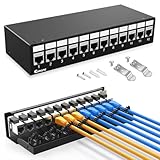
7. Enmane 12Port Patch Panel CAT6A Keystone Patch Panel Shielded Network Patch Patch with Smart Cable Management for Home/Office Network (1U 12Port, CAT6A)
Overview:
The Enmane 12-Port CAT6A Shielded Patch Panel targets home and office users seeking a clean, low-maintenance networking solution. This 1U panel features a dust-proof cover that protects internal connections and reduces equipment wear. The shielded design minimizes electromagnetic interference, ensuring stable connections for critical devices like NAS systems, workstations, and smart home hubs in compact installations.
What Makes It Stand Out:
The innovative ratchet lock design eliminates traditional cable ties, significantly reducing installation time and effort. Pre-installed CAT6A keystone couplers enable true plug-and-play operation—no punch-down required. This tool-less approach makes it exceptionally beginner-friendly while maintaining professional performance standards and a tidy aesthetic.
Value for Money:
Priced at $42.99 for 12 ports, this panel commands a premium per-port cost compared to 24-port alternatives. However, the convenience factor, shielded construction, and included dust cover justify the price for small-scale deployments. The time saved during installation translates to labor cost savings, particularly valuable for DIY installers and small business owners.
Strengths and Weaknesses:
Strengths include the protective dust cover, tool-less installation, shielded performance, and space-efficient 12-port design ideal for smaller racks. The ratchet cable management system is both innovative and reusable. Weaknesses include limited port density—costing nearly as much as some 24-port panels—and lack of expandability. The shielding adds unnecessary expense for typical residential environments without significant EMI concerns.
Bottom Line:
Ideal for homeowners and small office users prioritizing convenience and clean aesthetics over maximum port density. The tool-free setup makes it perfect for networking novices who want professional results without professional complexity.
8. Enmane 1U 12 Port Patch PanelRJ45 Patch Panel Cat6A Keystone Patch Panel Unshielded Network Patch Panel with Smart Cable(No Cable Tie Required) Management for 10inch Rackmount

Overview:
The Enmane 1U 12-Port Cat6A Patch Panel offers exceptional value for budget-conscious network builders. Designed for 10-inch rackmount installations, this unshielded panel provides straightforward connectivity for small-scale deployments. Its compact form factor makes it perfect for space-constrained environments like home labs, small offices, or AV cabinets where full-size racks are impractical.
What Makes It Stand Out:
Remarkable affordability meets innovative design at $24.99. The smart cable management system eliminates cable ties entirely, using a reusable, environmentally-friendly approach. Toolless termination with pre-installed keystone couplers slashes installation time by up to 80%—a full setup takes roughly 10 minutes. The flexible architecture allows easy replacement of individual couplers with fiber adapters, HDMI, or other connectivity types.
Value for Money:
This panel delivers the best price-per-port ratio in its class. At under $2.10 per port, it costs significantly less than competitors while offering superior flexibility. The ability to repair or reconfigure individual ports without replacing the entire panel provides long-term value and reduces electronic waste, making it economical for hobbyists and small businesses.
Strengths and Weaknesses:
Strengths include unbeatable pricing, rapid tool-less installation, expandable design, and eco-friendly cable management. The 10-inch width suits non-standard racks. Weaknesses include unshielded construction, limiting EMI-heavy environments, and the smaller form factor reduces compatibility with standard 19-inch equipment. Only 12 ports may require multiple units for growing networks, potentially offsetting initial savings.
Bottom Line:
An outstanding choice for hobbyists, small businesses, and budget projects. The combination of low cost and high flexibility makes it a standout value proposition for those willing to work within its port density and size constraints.
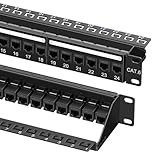
9. Cable Matters 1U 19-Inch 24-Port 10Gbps Cat6 Ethernet Patch Panel with Inline Keystone and Cable Management Bar, Rackmount or Wall Mount Network Patch Panel
Overview:
The Cable Matters 24-Port Cat6 Patch Panel balances performance and adaptability for dynamic network environments. Supporting 10Gbps speeds and comprehensive PoE standards, this 1U, 19-inch panel integrates keystone sockets for maximum customization. The design accommodates both shielded and unshielded twisted pair cables, offering versatility across deployment scenarios from home labs to small business server rooms.
What Makes It Stand Out:
The integrated cable management bar features C-shaped keyholes for zip ties and sequential port labels, enabling superior organization. Unlike fixed panels, the keystone socket design allows users to swap RJ45 couplers for specialized connectors, future-proofing investments. The comprehensive installation kit—including 26 cable ties, rack screws, cage nuts, and reusable hook-and-loop straps—provides everything needed for professional mounting.
Value for Money:
At $39.99, this panel offers competitive pricing for a 24-port keystone-based system. The included accessories, typically purchased separately, add approximately $10-15 in value. While slightly higher than basic punch-down panels, the customization potential justifies the premium for evolving networks that may require fiber, HDMI, or other connection types.
Strengths and Weaknesses:
Strengths include flexible keystone architecture, excellent cable management, complete installation kit, and robust PoE support. The panel’s adaptability suits growing networks. Weaknesses include requiring separate keystone jack purchases for full utilization and Cat6 limitation versus Cat6A for maximum future-proofing. The keystone approach adds slight cost and complexity compared to direct termination panels.
Bottom Line:
Excellent for IT managers and enthusiasts needing adaptable infrastructure. The keystone flexibility makes it ideal for networks requiring mixed media types or frequent reconfiguration without replacing the entire panel.
10. Jadaol [UL Listed] 24-Port Shielded Cat6A Patch Panel, 19” 1U Rackmount/Wall Mount Feed-Through RJ45 Panel with 24 Preloaded Shielded Keystone Couplers + 1 Spare, Up to 10Gbps, Cable Management Bar
![Jadaol [UL Listed] 24-Port Shielded Cat6A Patch Panel, 19" 1U Rackmount/Wall Mount Feed-Through RJ45 Panel with 24 Preloaded Shielded Keystone Couplers + 1 Spare, Up to 10Gbps, Cable Management Bar](https://m.media-amazon.com/images/I/51D9+uXlqbL._SL160_.jpg)
Overview:
The Jadaol 24-Port Shielded Cat6A Patch Panel delivers premium performance for high-density networking. This UL-listed, 1U 19-inch panel supports 10Gbps bandwidth while reducing electromagnetic interference through its fully shielded metal construction. Preloaded with 24 shielded keystone couplers plus one spare, it ensures reliable connections in demanding environments like data centers, industrial facilities, and performance-critical business networks.
What Makes It Stand Out:
Complete shielding throughout—panel and couplers—provides superior EMI/RFI protection, critical in high-interference settings. The tool-free, feed-through design accelerates deployment, while the spare coupler demonstrates thoughtful engineering for maintenance scenarios. Heavy-duty steel housing and a detachable rear cable management bar ensure clean routing, strain relief, and long-term durability under frequent use.
Value for Money:
At $45.99, this panel competes directly with unshielded alternatives while offering comprehensive protection. The included spare coupler and robust construction justify the modest premium. For environments with high interference or strict compliance requirements, the shielding eliminates costly troubleshooting and potential downtime, delivering strong ROI for professional installations.
Strengths and Weaknesses:
Strengths include full shielding, UL certification, rugged metal construction, spare coupler inclusion, and excellent cable management. The tool-free design simplifies field repairs and MAC work. Weaknesses include higher cost than unshielded panels and potential overkill for residential or low-EMI office settings. Shielded cables and connectors are required to maintain grounding continuity, adding installation complexity and expense.
Bottom Line:
The top choice for data centers, industrial applications, and performance-critical networks. The shielding and build quality make it worth every penny for professional deployments where signal integrity and reliability are paramount.
Why Your Smart Home Demands a Professional Patch Panel Strategy
Smart homes in 2026 aren’t just connecting laptops and smart TVs. You’re routing power and data to PoE++ security cameras, 2.5 Gbps Wi-Fi 7 access points, whole-home audio streamers, and IoT hubs that require rock-solid low-latency connections. A patch panel isn’t merely organizational—it’s the physical layer of your network’s reliability. Without one, every device move, upgrade, or troubleshooting session becomes a game of “which cable is which?” that risks disconnecting critical systems.
Understanding Patch Panel Fundamentals for Modern Homes
Before diving into features, let’s establish what a patch panel actually does in a residential context. It acts as a centralized termination point for all your home’s Ethernet runs, allowing you to connect rooms to your switch via short patch cables rather than fishing new cables through walls every time you reconfigure your network. Think of it as the network’s circuit breaker panel—organized, labeled, and serviceable.
The Role of the Patch Panel in Network Topology
In a typical smart home, your patch panel sits between the structured cabling (the cables running to wall jacks throughout your house) and your network switch. This separation is crucial: it protects the in-wall cabling from repeated handling, makes reconfigurations plug-and-play, and provides a clear demarcation point for diagnosing connection issues.
Port Density: Counting What You’ll Actually Need
The biggest mistake homeowners make is buying for today’s device count. A 12-port panel might cover your current smart TV, office computer, and a couple of cameras, but what about the smart appliances, additional sensors, and outdoor lighting controllers you’ll add in three years? Calculate your needs by doubling your current run count, then rounding up to the nearest standard size. For most 2026 smart homes, that means planning for 24 to 48 ports minimum.
Planning for Expansion Without Rewiring
Remember that each room might need multiple runs. A home office could require separate lines for a computer, printer, NAS, and IP phone. Bedrooms might need drops for TVs, gaming consoles, and smart hubs. Running two cables per location during initial construction costs marginally more but saves thousands in future labor.
Shielded vs. Unshielded: Making the Right EMI Call
Your decision here impacts both cost and performance. Shielded panels and cables (STP) protect against electromagnetic interference from power lines, fluorescent lighting, and neighboring Wi-Fi networks. In most residential settings, unshielded (UTP) suffices—until you’re running cables near your main electrical panel, HVAC systems, or in-home EV charging stations.
When Shielding Becomes Non-Negotiable
If your wiring closet shares a wall with your electrical panel or you’re installing high-power PoE devices that generate their own interference, shielded components are mandatory. The catch: shielding only works if every component—cable, panel, and connectors—is properly grounded. A partially shielded system can perform worse than an unshielded one.
Category Rating: Future-Proofing Beyond Cat6
Cat6 panels dominated 2020s installations, but 2026 demands more foresight. Cat6a supports 10 Gbps up to 100 meters and handles PoE++ power delivery with less heat buildup. Cat8, while overkill for most homes today, supports 25-40 Gbps at shorter distances—making it viable for connecting a central NAS to switches in larger properties.
The Cat6a Sweet Spot for Smart Homes
For 95% of smart-home installations, Cat6a hits the value-performance bullseye. It supports multi-gigabit speeds that Wi-Fi 7 access points need for backhaul, handles the 90W PoE++ required for pan-tilt-zoom cameras, and costs only 20% more than Cat6. The thicker cable is harder to terminate but delivers tangible headroom.
Keystone vs. Fixed Configuration: Flexibility vs. Simplicity
Keystone panels accept interchangeable jacks, letting you mix Ethernet, coaxial, fiber, and even HDMI in the same panel. Fixed panels have permanent RJ45 ports. For pure Ethernet installations, fixed panels offer better density and lower cost per port. But smart homes evolve unpredictably—today’s Ethernet-only closet might need a fiber drop tomorrow for a 10 Gbps ISP connection.
The Hybrid Approach Gaining Traction
Many 2026 installers recommend a split strategy: a primary fixed panel for standard Ethernet runs and a smaller keystone panel for specialized connections. This keeps costs down while preserving flexibility for that one-off fiber or audio cable that inevitably appears.
Rack Mount vs. Wall Mount: Space and Accessibility
Your wiring closet’s physical constraints dictate this choice. Wall-mount panels save floor space and work in shallow closets but limit cable management options. Rack-mount systems require at least 19 inches of width and depth for proper cable routing but offer superior organization, ventilation, and professional appearance.
Depth Considerations for Shallow Closets
Modern homes often allocate shallow linen closets for networking. Standard rack-mount panels need 10-12 inches of depth behind the panel for cable bend radius. If space is tight, look for slim-profile panels with rear cable management bars that reduce required depth to 6-8 inches.
Cable Management Features That Prevent Future Headaches
A panel without proper cable management is just a fancy wall plate. Look for integrated rear cable managers, hook-and-loop strap points, and removable front covers that hide patch cables. The best designs include numbered ports that correspond to labeling fields on both front and rear, making it trivial to trace a connection.
Bend Radius Protection and Strain Relief
Ethernet cables hate sharp bends. Panels with built-in cable guides that maintain a 1-inch minimum bend radius prevent signal degradation. Strain relief bars distribute cable weight so terminations don’t loosen over time—a critical feature in homes subject to temperature swings or vibration.
Labeling Systems: The Difference Between Order and Chaos
You’ll thank yourself for investing in a robust labeling strategy. Simple numbered stickers fade and peel. The best panels accept printed labels that slide behind clear windows, resisting dust and handling. Some 2026 models integrate with network documentation apps via QR codes, letting you scan a port to see its full path to the device.
Color-Coding Strategies for Smart Home Segmentation
Consider using colored patch cables and labels to segment your network: blue for data devices, red for security cameras, yellow for IoT hubs, green for access points. This visual language lets you identify critical connections at a glance during troubleshooting.
Power Over Ethernet (PoE) Compatibility and Heat Dissipation
Modern smart devices run on PoE, but pushing 90W through multiple ports generates significant heat. Standard panels can become hot spots that degrade performance. Look for panels with ventilated designs and heat-resistant materials. Some advanced models feature individual port LEDs that indicate PoE power status—priceless when diagnosing why a camera won’t boot.
Planning for PoE++ and Beyond
With 802.3bt (PoE++) becoming standard for high-power devices, ensure your panel’s contacts are rated for the increased current. Cheaper panels use thinner metal that can corrode or overheat under sustained high-power loads.
Installation Best Practices for DIYers and Pros
Even the best panel performs poorly with sloppy termination. Leave 12-18 inches of service loop at each end of your cable runs—this slack lets you re-terminate without pulling new cable. Use a proper cable tester after each termination, not just at project completion. A single bad connection can degrade an entire switch port’s performance.
Punch-Down Tools and Technique
Invest in a quality impact punch-down tool with adjustable force settings. Over-punching cracks the PCB; under-punching creates intermittent connections. Practice on scrap cable first. For keystone jacks, a dedicated crimp tool ensures consistent terminations that meet Cat6a standards.
Budget Planning: Realistic Cost Expectations
A quality 24-port Cat6a panel runs $80-150 in 2026. Add $2-4 per keystone jack, $50-100 for a basic cable management kit, and $75-200 for a professional-grade tester. Skimping on the panel to save $30 is false economy when a failed connection costs hours of troubleshooting. Allocate 15-20% of your total network cabling budget to the panel and management hardware.
Hidden Costs That Derail Projects
Don’t forget the rack or wall-mount bracket, patch cables (budget $5-8 each for quality molded-boot cables), and labeling supplies. Many homeowners underestimate patch cable needs—plan for at least 1.5 cables per active port to allow for reconfigurations.
Common Mistakes That Void Warranties and Performance
Mixing components from different category ratings is the cardinal sin. Cat8 cables terminated into Cat6 panels create impedance mismatches that kill performance. Similarly, using non-standard patch cables (like thin 28AWG cables) with standard panels can cause connection instability and violates most manufacturer warranties.
The Grounding Gotcha with Shielded Systems
Improper grounding of shielded panels creates ground loops that introduce noise worse than having no shielding at all. If you’re not prepared to ground the panel to your electrical system’s ground bus with a dedicated low-impedance conductor, stick with unshielded components.
Integration with Smart Home Management Platforms
In 2026, the smartest patch panels don’t just sit there—they talk to your network. Panels with integrated management ports can report port status, connection speed, and even cable length measurements to your home automation platform. While not essential for small installations, this telemetry is invaluable for large properties with dozens of connected devices.
API Access for Advanced Users
Some panels offer RESTful APIs that let you integrate port status into dashboards like Home Assistant. Imagine seeing not just that a camera is offline, but that the physical connection dropped—a huge time-saver for remote troubleshooting.
Maintenance and Upgrade Pathways
Patch panels should last 15-20 years, but that doesn’t mean they’re maintenance-free. Annual inspection should include checking for corrosion, retightening any loose keystone jacks, and verifying labels remain legible. When upgrading your switch to multi-gigabit, re-test every port with a qualified cable tester—aging terminations that worked fine at 1 Gbps can fail at 10 Gbps.
Planning for Future Fiber Integration
Even if you’re all-Ethernet today, run a couple of empty conduits from your panel location to your main utility entry. When 10 Gbps symmetrical fiber internet becomes standard, you’ll want a clean path to pull fiber without opening walls.
Frequently Asked Questions
What’s the minimum category rating I should consider for a smart home in 2026?
Cat6a is the practical minimum. While Cat6 handles 1 Gbps fine, Cat6a supports 10 Gbps and superior PoE performance for only slightly higher cost. The marginal savings on Cat6 aren’t worth the future limitations.
Can I mix keystone and fixed panels in the same installation?
Absolutely. Most professional installations use a fixed panel for standard Ethernet runs and a smaller keystone panel for specialized connections like fiber or audio. Just ensure they’re mounted with proper spacing for cable management.
How many ports should I install per room?
Run a minimum of two cables to each location. For entertainment centers and home offices, four cables is prudent. The cost of pulling extra cables during construction is minimal compared to retrofitting later.
Do I really need a rack-mount system, or is wall-mount sufficient?
If your closet is deeper than 24 inches and you have more than 24 ports, rack-mount offers superior organization. For shallow closets or under 24 ports, a quality wall-mount system with integrated cable management works beautifully.
What’s the biggest installation mistake that reduces performance?
Violating bend radius. Sharp bends, especially near the panel, cause signal reflection and crosstalk. Always maintain at least a 1-inch radius on cable bends, and never zip-tie cables so tight they deform.
How do I know if I need shielded panels?
If your cables run parallel to power lines for more than a few feet, pass near HVAC equipment, or you’re installing high-power PoE++ devices, choose shielded. Otherwise, unshielded is simpler and more cost-effective.
Can I install a patch panel myself, or should I hire a pro?
If you’re comfortable with punch-down tools and have patience for meticulous work, a DIY installation is achievable. However, hiring a certified installer ensures warranty coverage and proper testing, often worth the $500-800 labor cost.
What’s the lifespan of a quality patch panel?
Expect 15-20 years for a fixed panel and 10-15 years for keystone panels (since jacks can wear from reconfiguration). The limiting factor is usually corrosion on contacts, not electronic failure.
Are managed patch panels worth the premium for home use?
For most homes under 3,000 square feet, no. But if you have a large property, rental units, or run a home business with SLAs, the remote monitoring and diagnostics can pay for themselves after one prevented outage.
How do I document my panel for future homeowners or technicians?
Create a simple spreadsheet mapping port numbers to room locations and connected devices. Print a copy to keep in the closet, and save a digital version in cloud storage. Include photos of the rear cable management before you close everything up.