Remember when adjusting your thermostat meant squinting at a tiny dial and hoping you turned it the right way? If the thought of a “learning thermostat” conjures images of blinking error codes and smartphone apps you’ll never figure out, you’re not alone. The good news is that 2026 has ushered in a new generation of smart climate control designed specifically for homeowners who’d rather not earn a computer science degree just to stay comfortable.
Today’s learning thermostats have evolved from geeky gadgets into genuinely helpful home companions that practically configure themselves. Manufacturers have finally realized that the best technology is the kind you don’t have to constantly think about. This guide walks you through everything you need to know—without the technical mumbo-jumbo—to choose a system that respects your comfort zone while quietly shaving hundreds off your energy bills.
Top 10 Learning Thermostats for Tech-Shy Homeowners
Detailed Product Reviews
1. Google Nest Learning Thermostat (4th gen) + Nest Temperature Sensor (2nd gen) - Silver

Overview: The Google Nest Learning Thermostat (4th gen) represents the pinnacle of smart climate control, bundled with a second-generation temperature sensor for whole-home comfort optimization. This silver-finished system learns your schedule automatically while providing unprecedented visibility into your energy consumption patterns through the Google Home app.
What Makes It Stand Out: This latest generation features a 60% larger display with Dynamic Farsight technology, allowing you to see temperature, weather, or time from across any room. Its Matter compatibility ensures seamless integration with any smart home ecosystem, while the revolutionary “permission-first” approach asks before adjusting schedules, putting you in complete control. Most notably, it eliminates the dreaded C-wire requirement in most installations, dramatically simplifying setup for DIYers.
Value for Money: At $270, this premium package commands a higher price point but delivers proportionate value. The included $50 temperature sensor and cutting-edge features like proactive energy recommendations justify the investment. For tech-forward homeowners, the energy savings—typically 10-15% on utility bills—will recoup costs within two years, while the Matter support future-proofs your smart home.
Strengths and Weaknesses: Strengths: Hassle-free installation without C-wire; stunning large display; cross-platform voice control; intelligent learning with user consent; Matter compatibility future-proofs your investment.
Weaknesses: Premium pricing may deter budget-conscious buyers; requires Google Home app (ecosystem lock-in); advanced features have a learning curve; overkill for smaller homes or apartments.
Bottom Line: Ideal for homeowners seeking the most advanced, user-respecting smart thermostat available. The 4th gen’s installation ease and intelligent features make it worth every penny for those who value both convenience and control.
2. Nest Learning Thermostat 3rd Generation (Professional Version -Model # T3008US)

Overview: This professional-grade variant of the venerable 3rd generation Nest Learning Thermostat is engineered specifically for HVAC contractors and certified installers. While functionally identical to the consumer version, it comes packaged for professional deployment with specialized documentation and support structures not available in retail channels.
What Makes It Stand Out: The professional designation means access to installer-specific resources, bulk pricing structures, and dedicated technical support channels. Contractors benefit from streamlined warranty processes and installation guides tailored for complex HVAC configurations. This version maintains all the beloved 3rd gen features: Auto-Schedule learning, Home/Away Assist, and comprehensive Energy History reporting that delivers proven 10-12% heating and 15% cooling savings.
Value for Money: At $192.95, it sits between consumer 3rd gen and premium 4th gen pricing. For professionals, the value lies in procurement efficiency and support infrastructure rather than feature differentiation. Consumers should avoid this listing entirely, as it lacks retail packaging and consumer-facing warranty support, making potential returns or troubleshooting problematic.
Strengths and Weaknesses: Strengths: Same proven 3rd gen technology; professional support network; potential bulk discounts; reliable energy savings; established compatibility database.
Weaknesses: NOT FOR CONSUMER PURCHASE; limited color options; no retail packaging; requires professional certification for full support; outdated compared to 4th gen features.
Bottom Line: This is exclusively for professional installers. If you’re a homeowner, purchase the consumer version instead. For contractors, it offers reliable hardware with pro-focused logistics, though the 4th gen may be a smarter long-term inventory choice.
3. Nest (T3007ES) Learning Thermostat 3rd Gen, Stainless Steel with Deco Gear 2 Pack WiFi Smart Plug

Overview: This bundle pairs the reliable Nest 3rd Generation Learning Thermostat in stainless steel with two Deco Gear WiFi smart plugs, creating an entry-level smart home ecosystem. The thermostat brings intelligent climate control while the plugs extend automation to lamps and small appliances, all manageable through separate but complementary apps.
What Makes It Stand Out: The value proposition lies in the bundle itself—you’re getting baseline smart home functionality beyond just climate control. The stainless steel finish offers a premium aesthetic that complements modern decor. Deco Gear plugs, while basic, provide immediate app-controlled automation for additional devices without requiring a separate hub purchase, making this a one-stop starter kit.
Value for Money: At $198, this package sits at the sweet spot for starter smart homes. The thermostat alone typically retails for $180-200, effectively making the two smart plugs free. While the plugs lack advanced features like energy monitoring, they provide essential on/off scheduling that integrates with the broader automation mindset the Nest cultivates, maximizing the bundle’s practical value.
Strengths and Weaknesses: Strengths: Attractive bundle pricing; stainless steel finish; immediate multi-device automation; proven Nest learning algorithms; easy Nest app integration.
Weaknesses: 3rd gen technology (not latest); Deco Gear plugs are generic and lack advanced features; limited documentation on plug compatibility; no temperature sensor included; may require C-wire; managing two different apps can be clunky.
Bottom Line: Perfect for first-time smart home adopters wanting maximum gadget value. The thermostat’s proven performance combined with bonus plugs makes this an economical way to dip your toes into whole-home automation without committing to premium individual components.
4. Nest Learning Thermostat (3rd Generation) with Nest Temperature Sensor (T5000SF) (White)

Overview: This classic white 3rd generation Nest Learning Thermostat package includes a dedicated temperature sensor, allowing precise climate management in multi-level homes or rooms far from the main unit. As the first ENERGY STAR certified smart thermostat, it combines proven savings with extended temperature monitoring capabilities for comprehensive comfort control.
What Makes It Stand Out: The 3rd gen’s track record is its strongest asset—billions of kilowatt-hours saved globally with independently verified 10-12% heating and 15% cooling bill reductions. The included sensor solves the common problem of uneven heating/cooling by prioritizing comfort in occupied spaces rather than just where the thermostat hangs. The crisp white finish offers a clean, versatile aesthetic that disappears into most wall treatments.
Value for Money: At $229.99, this bundle delivers solid mid-range value. You’re paying a $40-50 premium over the base thermostat for the sensor, which is standard pricing. With typical payback periods under two years through energy savings, the investment is financially sound. The 3rd gen’s maturity means stable software and broad compatibility with older HVAC systems.
Strengths and Weaknesses: Strengths: Proven energy savings; ENERGY STAR certification; comprehensive energy reporting; remote temperature sensing; established reliability; white finish matches most decor; extensive compatibility database.
Weaknesses: Requires C-wire in many installations; smaller display than 4th gen; no Matter support; white plastic may yellow over time; older processor slower than newer models; lacks proactive permission features.
Bottom Line: A reliable, data-backed choice for homeowners wanting proven performance over cutting-edge features. The included sensor makes this ideal for multi-story homes where temperature variance is a daily frustration. Skip if you need the latest tech, buy if you value stability and documented ROI.
5. Nest Learning Thermostat (3rd Generation) (T3018-US) with Nest Temperature Sensor (T5000SF) (Mirror Black)
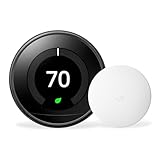
Overview: This sleek mirror black 3rd generation Nest Learning Thermostat bundle delivers the complete Nest experience with a striking contemporary finish. Paired with a temperature sensor for multi-zone awareness, it offers the same intelligent learning capabilities that made Nest a household name, wrapped in a bold aesthetic statement that serves as a design element.
What Makes It Stand Out: The mirror black finish distinguishes this from standard stainless or white models, serving as a reflective surface when idle. Functionally, it includes Nest’s signature Auto-Schedule and Home/Away Assist, which automatically adjusts temperatures based on occupancy patterns detected through the app. The bundled sensor ensures you’re heating or cooling based on where you actually spend time, not just hallway temperature.
Value for Money: At $189.99, this represents exceptional value—it’s the lowest-priced sensor bundle available. You’re essentially getting the temperature sensor for $10-20 over the standalone thermostat price. This aggressive pricing makes the proven 3rd gen technology accessible to budget-conscious buyers who don’t need the 4th gen’s incremental upgrades, with identical core energy-saving capabilities.
Strengths and Weaknesses: Strengths: Unbeatable bundle price; attractive mirror black finish; complete feature set; includes remote sensor; proven energy savings; straightforward installation; works with existing Nest app.
Weaknesses: Mirror finish shows fingerprints and dust; 3rd gen lacks 4th gen’s larger display; no C-wire flexibility; limited smart home protocol support; reflective surface may not suit all lighting conditions; sensor battery requires periodic replacement.
Bottom Line: The best value proposition for a full-featured Nest system. If you can live without the 4th gen’s larger screen and Matter support, this mirror black bundle delivers identical core functionality at a fraction of the price. Perfect for style-conscious bargain hunters prioritizing substance over newest specs.
6. Google Nest Learning Thermostat - Smart Wi-Fi Thermostat - Polished Steel

Overview: The Google Nest Learning Thermostat represents the gold standard in smart climate control, combining sophisticated machine learning with premium aesthetics. This third-generation device automatically adapts to your lifestyle patterns within a week, creating a personalized schedule that balances comfort and energy efficiency without manual programming.
What Makes It Stand Out: Beyond basic scheduling, the Nest’s Home/Away Assist uses phone location and built-in sensors to automatically switch to Eco Temperatures when you leave, eliminating wasted heating and cooling. The distinctive Nest Leaf icon gamifies energy conservation, while the HVAC monitoring system provides proactive alerts about potential system issues—features rarely found in competitors. Its polished steel finish and vibrant display make it a design statement, not just a utility.
Value for Money: At $259.99, this is a premium investment that typically pays for itself within two years through 10-15% annual energy savings. While significantly pricier than budget alternatives, the advanced diagnostics, learning algorithms, and seamless integration with Google Home justify the cost for homeowners seeking a truly autonomous system.
Strengths and Weaknesses: Strengths include exceptional learning capabilities, remote access via intuitive app, comprehensive energy reporting, and proactive maintenance alerts. The build quality and design are outstanding. Weaknesses center on the high upfront cost and the Nest Temperature Sensor being a separate purchase. Some users report occasional over-aggressive learning that requires manual correction.
Bottom Line: For tech-savvy homeowners wanting maximum automation and energy insights, the Nest Learning Thermostat delivers unparalleled performance. The premium price buys genuine intelligence and peace of mind that budget options simply cannot match.
7. Home Thermostat - T4000ES Learning Thermostat E - White

Overview: The T4000ES Learning Thermostat E positions itself as an accessible entry point into smart climate control at a fraction of premium brand prices. This white, minimalist device promises intelligent scheduling and remote management capabilities that compete with market leaders while maintaining broad compatibility with existing HVAC systems.
What Makes It Stand Out: Its aggressive $64.99 pricing makes smart home technology attainable for budget-conscious consumers. The device claims 85% compatibility with 24V systems and advertises the same 10-15% energy savings as pricier alternatives. The learning algorithm automatically adjusts to your routines without complex programming, while remote control functionality provides convenience through smartphone access.
Value for Money: This thermostat dramatically undercuts competitors, potentially offering similar energy savings for one-quarter the price. For renters or homeowners wanting basic smart features without premium cost, it presents compelling value. However, the unknown brand raises questions about long-term software support and reliability.
Strengths and Weaknesses: Strengths include exceptional affordability, straightforward installation, and core smart features like learning and remote control. The price point is unbeatable. Weaknesses involve limited feature depth—no HVAC monitoring, basic energy reporting, and uncertain build quality. The brand lacks Google’s robust ecosystem and proven track record, potentially affecting future updates and troubleshooting resources.
Bottom Line: The T4000ES is a solid budget choice for those prioritizing cost over advanced features. While it delivers baseline smart functionality, buyers should weigh the savings against potential longevity and support limitations compared to established brands.
What Makes a Thermostat “Learning” and Why It Matters for Tech-Shy Users
A learning thermostat is essentially a climate control system that observes your daily routines and automatically creates a heating and cooling schedule that matches your lifestyle. Unlike programmable thermostats that require you to manually input every temperature change, these devices pay attention to when you’re home, when you’re away, and even seasonal patterns.
For the tech-shy homeowner, this matters because it eliminates the primary barrier to energy savings: complexity. You don’t need to understand algorithms or data analytics. The thermostat simply notices that you turn down the heat at 10 PM and bump it up at 6 AM, then starts doing it for you. Think of it as a particularly observant houseguest who remembers your preferences without being asked.
The Evolution of User-Friendly Smart Home Tech by 2026
The smart home landscape has matured dramatically, and 2026 represents a tipping point where user experience finally took priority over feature lists. Early smart thermostats were powerful but required constant tinkering. Today’s models have refined their onboarding processes to feel more like setting up a new coffee maker than configuring a network server.
Voice guidance during setup, augmented reality apps that show you exactly which wire goes where, and machine learning that starts working within 48 hours instead of two weeks—these aren’t futuristic concepts anymore. They’re standard features designed for people who’d rather spend Sunday afternoon gardening than troubleshooting Wi-Fi connections.
Key Features That Simplify Your Life (Not Complicate It)
Automatic Scheduling That Actually Works
The hallmark of a truly user-friendly learning thermostat is its ability to build a reliable schedule without your intervention. By 2026, the best systems have moved beyond simple pattern recognition to contextual awareness. They understand the difference between your Tuesday and Saturday routines, recognize holiday patterns, and even adjust for that random Tuesday you worked from home.
What this means for you: After about a week of normal living, the thermostat takes over completely. You’ll see subtle adjustments happening automatically, but there’s no pressure to approve or modify them. The interface is designed to be glanced at, not studied.
Geofencing: Set It and Forget It
Geofencing sounds technical, but it’s simply the thermostat using your phone’s location to know when you’ve left home. In 2026, this feature has become remarkably precise and privacy-conscious. You don’t need to share your exact location—just a general “I’ve left the neighborhood” signal.
The beauty for tech-shy users is its invisibility. Drive to work, and the house efficiently dials back energy use. Head home, and it’s comfortable when you arrive. No buttons, no apps, no remembering to adjust anything. The radius is generous enough that you’re not triggering changes during a quick grocery run.
Voice Control Without the Jargon
Voice assistants have become more conversational and less command-driven. Instead of memorizing specific phrases like “Alexa, set thermostat to 72 degrees,” you can now say things like “Hey house, I’m cold” or “Make it warmer in here.” The thermostat interprets natural language and responds with simple confirmations.
Crucially, voice control in 2026 is optional, not mandatory. You can use it once a month or never at all—the thermostat works perfectly either way. Think of it as a helpful feature that exists if you want it, not a requirement to learn a new skill.
Touchscreen Interfaces That Feel Familiar
The best learning thermostats now feature displays that mimic the simplicity of a smartphone home screen. Large, clearly labeled buttons replace cryptic icons. Temperature adjustments work like scrolling through photos—intuitive gestures you already use daily.
Many models offer a “simple mode” that hides advanced features entirely, showing only the current temperature and a basic up/down control. The learning happens in the background while you interact with a deliberately basic interface that never overwhelms.
Installation Anxiety? Here’s What to Expect in 2026
DIY-Friendly Design Advances
If the thought of turning off circuit breakers makes you nervous, you’re in luck. Modern learning thermostats have revolutionized the installation experience with color-coded wire connectors that only fit in the correct slots. Think of it like a child’s shape-sorting toy—square pegs won’t go in round holes.
The companion apps now include step-by-step video tutorials where you can scan your old thermostat model number and get custom instructions. Some manufacturers even offer live video support where a technician watches your installation in real-time (with your permission) and guides you verbally. The entire process typically takes 20-30 minutes for standard systems.
When to Call a Pro (And Why That’s Okay)
Here’s a secret even tech enthusiasts acknowledge: sometimes it’s worth calling a professional. Complex HVAC systems, high-voltage lines, or simply peace of mind are all valid reasons to hire help. The difference in 2026 is that installation costs have dropped significantly due to standardized mounting systems and quicker setup times.
Most HVAC professionals can now install a learning thermostat in under an hour, and many offer flat-rate pricing that includes a brief tutorial on basic functions. Consider it a small investment to ensure the job is done right and to have a human expert demonstrate the three things you actually need to know.
Compatibility Checks Made Simple
HVAC System Basics for Beginners
Before falling in love with any thermostat, you need to understand your home’s heating and cooling system. The good news? You only need to know three things: Do you have central air? Is your system gas, electric, or heat pump? And how many wires are behind your current thermostat?
Most learning thermostats in 2026 work with 95% of residential systems. The packaging clearly states compatible system types, and manufacturer websites offer simple quizzes where you answer 3-4 questions to get a green light. No need to understand voltage or amperage—the quiz does the heavy lifting.
Wi-Fi Requirements That Won’t Let You Down
Your thermostat needs a steady internet connection to learn and be controlled remotely. But “steady” doesn’t mean gigabit fiber. A basic 10 Mbps connection is sufficient, and most units have enhanced antennas that work reliably even if your router is on a different floor.
The key consideration is your router’s age. If you’re still using a router from 2020, you might experience occasional dropouts. But any router purchased in the last few years handles smart home devices flawlessly. The thermostat itself will run a connectivity test during setup and politely suggest a router upgrade only if truly necessary.
Privacy and Security Concerns Addressed
Data Encryption in Plain English
Tech-shy homeowners often worry about a thermostat “spying” on them. Here’s the reality: these devices track temperature preferences and occupancy patterns, not personal conversations or activities. By 2026, all major manufacturers use end-to-end encryption—the same technology that protects online banking.
Your data is converted into unreadable code before leaving your home, and even the company can’t decipher your specific patterns. They see aggregated trends like “users in cold climates prefer 68 degrees at night,” not “Jane Smith likes it cool on Tuesdays.” It’s anonymous and protected.
Local vs. Cloud Processing
Some advanced thermostats now offer “local processing” modes where most learning happens on the device itself, not in some faraway server. This means if your internet goes down, the thermostat keeps working and remembering your preferences.
For the privacy-conscious, this is a game-changer. You can choose models that minimize cloud dependency, giving you smart features without feeling like your home is constantly talking to the internet. The trade-off is slightly less remote access capability, but many tech-shy users prefer this balance.
Budget Considerations Without the Sticker Shock
Understanding Total Cost of Ownership
Yes, learning thermostats cost more upfront than basic models—typically $150-$300 in 2026. But the math is compelling: most households save 10-15% on heating and cooling bills annually. With average HVAC costs running $1,200-$2,400 per year, the thermostat pays for itself in 12-18 months.
The key is looking beyond the purchase price. Factor in potential energy rebates (often $50-$100), extended HVAC system life from optimized run times, and the intangible value of never arguing about the temperature again. It’s not an expense; it’s an investment that starts returning money within two billing cycles.
Rebates and Incentives in 2026
Utility companies have embraced smart thermostats as grid-management tools. In 2026, most major providers offer instant rebates at purchase or bill credits after installation. Some even provide free units to customers in exchange for participating in energy-saving events during peak demand.
Check your utility’s website before buying—the application process is usually a single form and a photo of your installation. Many thermostat manufacturers automatically check your eligibility during online setup and apply discounts directly, no paperwork required.
The “Set It and Forget It” Philosophy
The ultimate goal for tech-shy homeowners is achieving comfort without ongoing management. Modern learning thermostats have perfected this with “adaptive hold” features. If you manually adjust the temperature, the thermostat asks if this is a one-time change or a new preference, using plain language on a simple screen.
Select “just for now,” and it resumes learning tomorrow. Choose “always like this,” and it incorporates the change into your schedule. There’s no complex menu diving or “advanced settings” to navigate. The thermostat becomes invisible, quietly optimizing your comfort while you focus on literally anything else.
Troubleshooting for the Non-Tech-Savvy
Common Issues and Simple Fixes
Even the best devices occasionally hiccup. The difference with 2026 models is how they communicate problems. Instead of cryptic error codes, you’ll see messages like “Having trouble connecting to Wi-Fi. Let’s try restarting your router.” The thermostat often knows exactly what’s wrong and guides you through the fix with conversational prompts.
Most “problems” resolve with the classic unplug-and-replug solution (which the thermostat can do itself during off-hours). For persistent issues, many units have a “help” button that connects you to a human support agent who can remotely diagnose and often fix problems without you touching a single wire.
When and How to Get Human Help
Tech support has evolved from frustrating phone trees to on-demand video chat with knowledgeable representatives. In 2026, premium thermostat brands offer lifetime support included in the purchase price. You can schedule a call-back during your lunch break or request a technician visit if remote support can’t solve the issue.
The best part? Support agents are trained to speak in plain English, not technical jargon. They’ll ask questions like “Is the screen on?” before diving into network diagnostics. Many services also offer co-browsing, where you can share your app screen securely so they can see what you see and guide you visually.
Future-Proofing Your Purchase
Technology moves fast, but HVAC systems last 15-20 years. When choosing a learning thermostat, look for “over-the-air update” capability, which means the manufacturer can add features and improvements automatically. In 2026, this is standard on reputable models.
Also consider Matter certification—a new industry standard ensuring your thermostat will work with whatever smart home ecosystem you might adopt in the future (even if that’s “none at all”). It’s like buying a universal remote instead of one that only works with a single brand.
Making the Final Decision: A Tech-Shy Buyer’s Checklist
When you’re ready to choose, focus on these five questions:
- Does it work with my HVAC system? (Use the manufacturer’s online quiz)
- Can I install it myself or does professional installation fit my budget?
- Does the interface have a “simple mode” that hides complexity?
- Is there free human support if I need help?
- Are there utility rebates that reduce the effective cost?
If you can answer “yes” to at least four, you’ve found a winner. Everything else—advanced energy reports, integration with other smart devices, fancy color screens—is optional frosting on an already useful cake.
The First 30 Days: What to Expect
Week one feels surprisingly normal. You adjust temperatures as usual, maybe using the app once or twice out of curiosity. By week two, you’ll notice the thermostat making suggestions like “I noticed you like it cooler at night. Should I do this automatically?” You tap “yes,” and that’s the last time you think about it.
By day 30, the device has faded into the background. Your home is comfortable when you’re there, efficient when you’re not, and you’ve probably already seen a dip in your energy bill. The only reminder it’s smart is the occasional gentle notification like “Saved $12 this week by optimizing your schedule.” That’s it. No complexity, no stress, just comfort and savings.
Frequently Asked Questions
Will a learning thermostat work if I don’t have a smartphone?
Absolutely. While most models offer enhanced control through an app, they function perfectly as stand-alone devices. You can do everything—adjust temperature, change modes, even set basic schedules—directly on the unit’s touchscreen. The learning happens automatically based on your manual adjustments.
What happens if my internet goes down?
Your thermostat continues operating on its learned schedule. It won’t receive remote commands or weather updates, but it will maintain your home’s comfort perfectly. Once internet returns, it syncs any changes and resumes full functionality. Think of it like a digital watch that keeps time even when not connected to a signal.
How long does it really take to “learn” my routine?
Most thermostats build a basic schedule within 5-7 days, but they continue refining for about a month. You’ll see the most noticeable automation after two weeks. The process is invisible—you just live normally while it observes and adapts.
Can my family members mess up the learning process?
Modern thermostats are smarter about multiple users. They recognize patterns across all household members and optimize for the collective routine. If someone manually overrides the temperature regularly, the thermostat will ask if this should become the new normal or remain a one-time adjustment.
Do these thermostats work with older homes?
Yes. Compatibility has expanded dramatically. As long as you have a low-voltage HVAC system (most homes built after 1970), and at least four wires, you’re likely compatible. Many 2026 models include wire adapters for older systems, and manufacturer quizzes will tell you definitively before you buy.
Will it really save money, or is that just marketing?
Independent studies show 10-15% average savings on heating and cooling costs. The EPA’s Energy Star program verifies these claims. Your actual savings depend on your climate, utility rates, and how inconsistent your previous manual adjustments were. Most users see a noticeable drop within the first two months.
What if I hate it? Can I return to my old thermostat?
Most major retailers and manufacturers offer 30-day satisfaction guarantees. Reverting is as simple as unscrewing the new unit and reconnecting your old one. Many tech-shy users keep their old thermostat in a closet for the first month, just for peace of mind.
Does it track my location constantly?
Only if you enable geofencing, and even then, it’s not precise tracking. The thermostat only knows if you’re within a 2-3 mile radius of home, not your exact location. You can disable this feature entirely and still get excellent learning performance based on manual adjustments and occupancy sensors.
How often will I need to update or maintain it?
Never, practically. Updates install automatically during low-usage hours. There’s no cleaning, calibration, or battery replacement (they’re hardwired). The only maintenance is occasionally dusting the screen. It’s less work than your old thermostat.
Can I lock it so guests or kids can’t change settings?
Yes. All 2026 models include PIN-protected lock modes that restrict adjustments to a few degrees or lock them completely. You can grant temporary access to house-sitters through guest codes that expire automatically. The lock feature is typically a single toggle in the settings menu—no complex programming required.